IRT3 - Thermometer General - Free user manual and instructions
Find the device manual for free IRT3 General in PDF.


| Product type | Non-contact infrared thermometer |
| Brand | General |
| Model | IRT3 |
| Measuring range | -30 to 250 °C |
| Resolution | 0.1 °C |
| Accuracy | ±2 °C or 2% of reading (>0 °C); ±3 °C or 2% (<0 °C) |
| Distance to spot ratio (D:S) | 4:1 |
| Emissivity | Fixed 0.95 |
| Response time | 500 ms for 95% of the response |
| Display type | LCD (25 x 18 mm) |
| Laser | Class 2, <1 mW, wavelength 655 nm |
| Power supply | 2 CR2032 (3 V) non-rechargeable lithium batteries |
| Battery life | 50 h (typical) |
| Power consumption | <40 mA (laser on), <30 mA (laser off) |
| Operating temperature | 0 to 40 °C, humidity <75% RH |
| Storage temperature | -20 to 60 °C, humidity <85% RH |
| Dimensions | 106 x 56 x 23 mm |
| Weight | 62.4 g (with batteries) |
| Package contents | Thermometer, batteries installed, user manual |
| Warranty | 1 year (extendable by 60 days with online registration) |
| Main functions | Non-contact measurement, scanning mode, reading hold, °C/°F selection, laser on/off |
| Safety | Class 2 laser – avoid eye exposure |
| Maintenance and cleaning | Clean the infrared sensor window with a soft, dry cloth |
| Auto power off | After 15 seconds of inactivity |
Frequently Asked Questions - IRT3 General
User questions about IRT3 General
0 question about this device. Answer the ones you know or ask your own.
Ask a new question about this device
Download the instructions for your Thermometer in PDF format for free! Find your manual IRT3 - General and take your electronic device back in hand. On this page are published all the documents necessary for the use of your device. IRT3 by General.
USER MANUAL IRT3 General
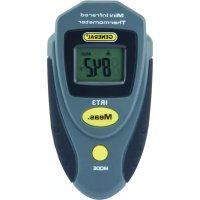
The IRT3 is a small and lightweight non-contact thermometer that measures the surface temperature of an object from a distance by using an IR sensor to measure its thermal radiation. A laser pointer indicates the target area (spot) whose temperature is being measured.
SAFETY INSTRUCTIONS
The IRT3's targeting laser is a Class 2 type that emits less than 1mW of power at a wavelength of 655nm. Avoid direct eye contact with laser light radiation. U.S. law prohibits pointing a laser beam at aircraft; doing so is punishable by a fine of up to \$10,000 and imprisonment.
The IRT3 comes in a plastic blister pack with two pre-installed batteries and this user's manual.
PRODUCT OVERVIEW
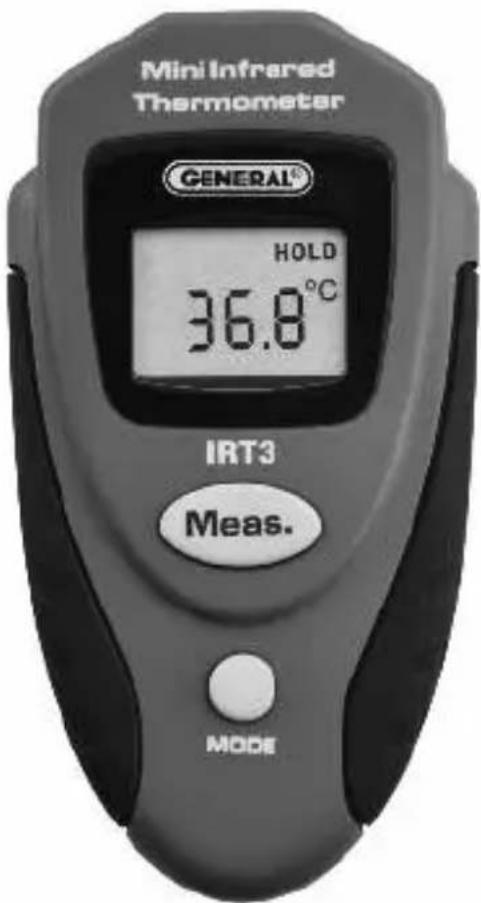
Figure 1 shows the locations of the controls, indicators and physical features of the IRT3.
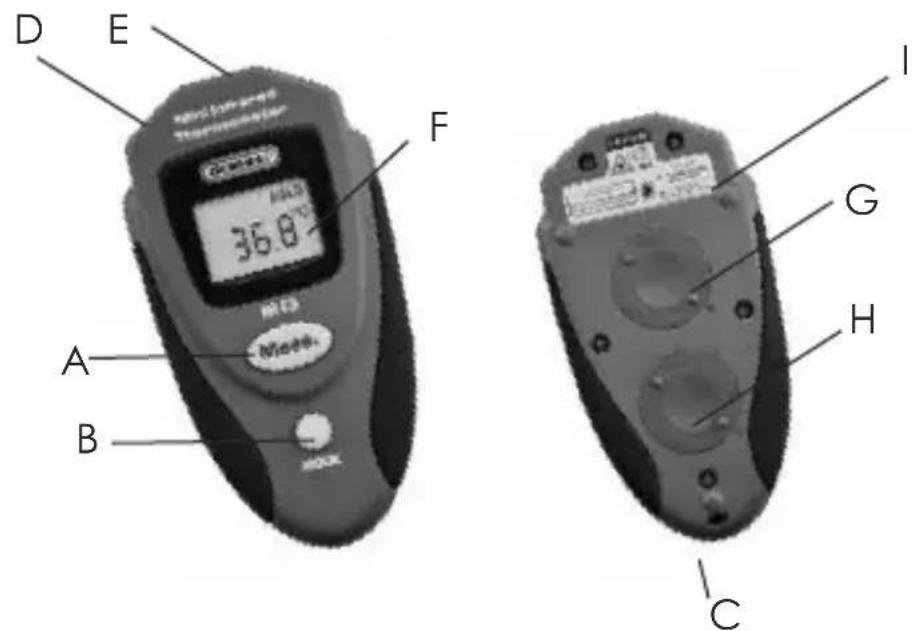
Fig. 1. The IRT3's controls, indicators and physical features
A. Meas. (measure) button
B. MODE button
C. Wrist strap attachment bar
D. Laser pointer E. IR sensor window
F. LCD
G. Thermometer battery compartment
H. Laser battery compartment
I. Laser Identification/Certification/Warning/Safety Labels (on upper back of unit)
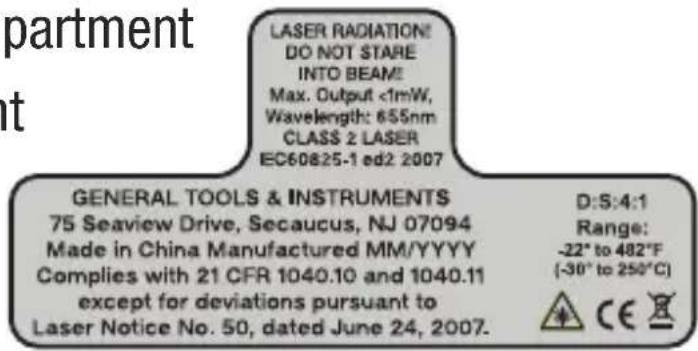
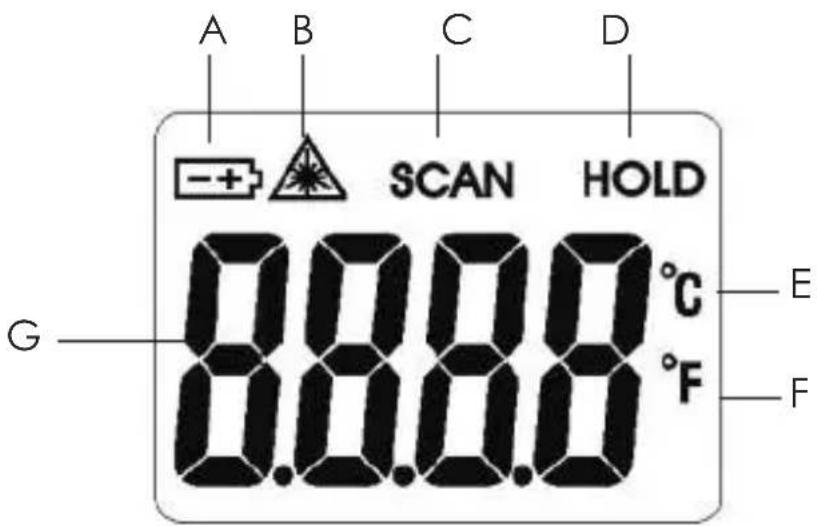
Fig. 2. All possible display indicators and their meanings
A. Low Battery icon
B. Laser Enabled icon
C. Indicates operation in Scan mode (with Meas. button pressed and held)
D. Indicates measured value is being held
E. Celsius unit selected
F. Fahrenheit unit selected
G. Measured value
SETUP INSTRUCTIONS
The IRT3 comes with two CR2032 batteries pre-installed in separate compartments (Fig. 1, Callouts G and H).
To activate each battery:
- Turn the IRT over and use your thumbs or a coin to turn its battery compartment cover clockwise 30 degrees, in the direction marked OPEN.
- Pull and discard the tab under the pre-installed battery.
- Replace the battery compartment cover and turn it counterclockwise 30 degrees until it snaps shut.
Complete Setup by carefully removing the plastic film protecting the LCD.
OPERATING INSTRUCTIONS
Point the front of the unit at a surface, press the Meas. (measure) button, hold it for at least one second, and then release. The temperature of the surface will be displayed instantly on the LCD.
Note that if you press and hold the Meas. button while targeting different surfaces (walls, windows, lights), the display will track their different temperatures. This is called operating in Scan mode. Also note that when you release Meas. the reading will be held for 15 seconds and then disappear as the IRT automatically powers off (to extend battery life).
By default, the laser pointer turns on when the Meas. button is pressed and turns off when the button is released. The laser's current state is indicated by the presence or absence of the Laser Enabled icon (callout B of Fig. 2). To prepare to
turn the laser off, press the MODE button twice. When the Laser Enabled icon begins to flash, press the Meas. button to turn off the laser. The laser will remain disabled until the IRT3 powers off. When the IRT is powered on again, the laser will be re-enabled automatically.
To power off the IRT3, either press and hold the MODE button for at least 3 seconds or let the Auto Power Off (APO) function turn the IRT off after 15 seconds of front-panel inactivity.
To change the temperature unit, press the MODE button once. When the currently selected temperature unit begins to flash, press the Meas. button to switch to or from °F (the default unit) and °C.
MAKING ACCURATE MEASUREMENTS
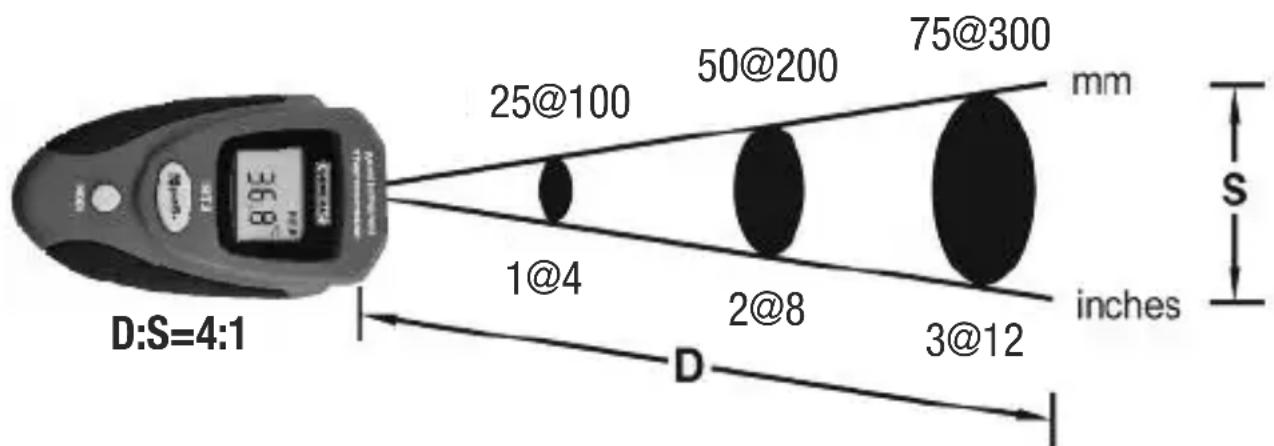
The IRT3 has a distance-to-spot (D:S) ratio of 4:1. This means that the target area (spot) whose infrared radiation (temperature) is being measured increases in diameter by 1 inch for every 4 inches you move away from the target. Conversely, the diameter of the target area measured decreases by 1 inch for every 4 inches you move closer to the target.
other
| Measurement | D (inches) | |-------------|------------| | 1@4 | 4 | | 2@8 | 8 | | 3@12 | 12 | | 50@200 | 200 | | 75@300 | 300 | | mm | - | | s | - |Fig. 3. The IRT3's field of view
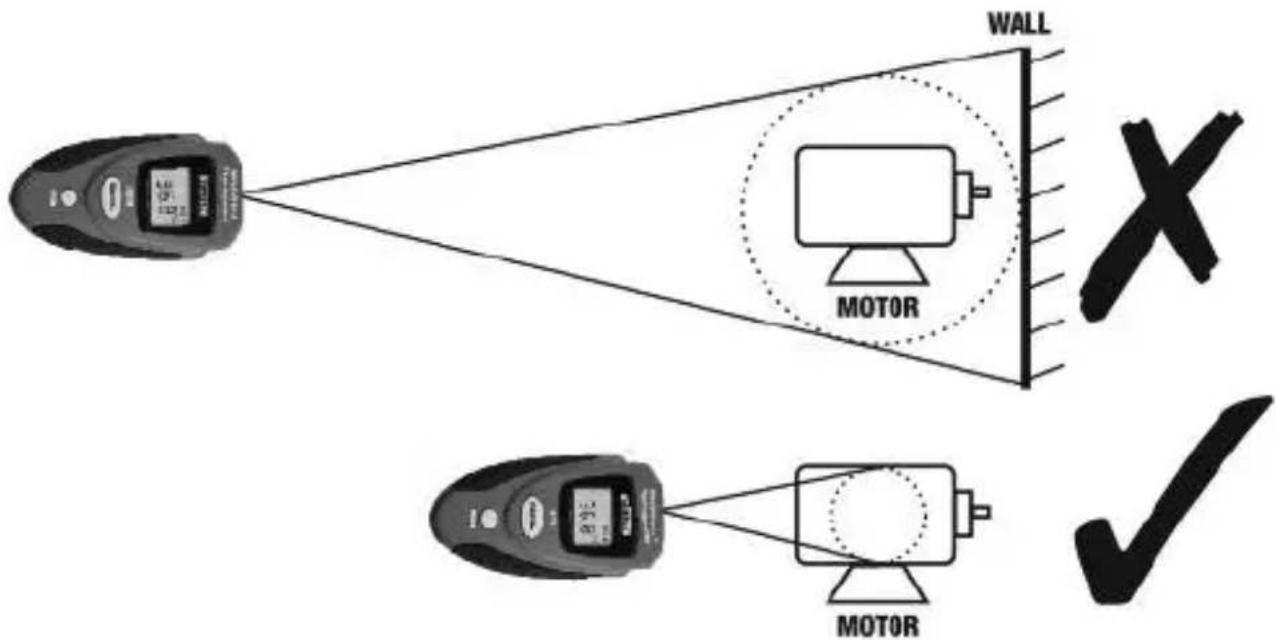
For example, when using the IRT3 to measure the temperature of a motor with an area of 1 ft ^2 , the optimal measurement distance would be 4 ft. To eliminate error, the IRT must be moved close enough so the motor is the only object in the target area (see Fig. 4 below).
flowchart
graph TD
    A["Device 1"] --> B["MOTOR"]
    C["Device 2"] --> D["MOTOR"]
    B --> E["WALL"]
    D --> E
    style E fill:#f9f,stroke:#333,stroke-width:2px
    note right of E
        X
        ✓
Fig. 4. Measuring a motor's temperature from the wrong (top) and right (bottom) distance.
SPECIFICATIONS
| Measurement Range/Resolution | -22° to 482°F (-30° to 250°C)/0.1° |
| Measurement Accuracy | ±3.6°F (2°C) or 2% of reading (whichever is greater) above 32°F (0°C); ±5.4°F (3°C) or 2% of reading (whichever is greater) below 32°F |
| Measurement Repeatability | 1% of reading or 1°C |
| Distance-To-Spot (D:S) Ratio | 4:1 |
| Emissivity | Fixed at 0.95 |
| Response Time | 500 msec for 95% response |
| Display Type/Size | LCD/1.0 (H) x 0.7 (W) in. (25 x 18mm) |
| Laser Class/Power/Wavelength | Class 2/<1mW/655nm |
| Response Wavelength | 8 to 14 um |
| Auto Power Off | After 15 seconds of inactivity |
| Thermometer Battery Life | 50 hours, typical |
| Current Consumption | <40mA with laser on;<30mA with laser off |
| Operating Temperature | 32° to 104°F(0° to 40°C)@<75% R.H. |
| Storage Temperature | -4° to 140°F(-20° to 60°C)@<85% R.H. |
| Dimensions | 4.17 x 2.20 x 0.90 in.(106 x 56 x 23mm) |
| Weight (including batteries) | 2.2 oz. (62.4g) |
| Power Source | Two CR2032 (3V) non-rechargeable Lithium-ion cells |
WARRANTY INFORMATION
In the U.S., General instruments and accessories are warranted against defects in material or workmanship for one year from date of purchase. General will replace or repair the defective unit, at its option, subject to verification of the defect.
This warranty does not apply to defects resulting from abuse, neglect, accident, unauthorized repair, alteration, or unreasonable use of the product.
Any implied warranties arising from the sale of a General product, including but not limited to implied warranties of merchantability and fitness for a particular purpose, are limited to the above. General shall not be liable for loss of use of the product or other incidental or consequential damages, expenses, or economic loss, or for any claim of such damage, expenses, or economic loss.
State laws vary. The above limitations or exclusions may not apply to you.
We encourage our customers to register for warranty online. General will extend your warranty an additional 60 days if you register at www.generaltools.com/ProductRegistry.
RETURN FOR REPAIR POLICY
Every effort has been made to provide you with a reliable product of superior quality. However, in the event your instrument requires repair, please contact our Customer Service to obtain an RGA (Return Goods Authorization) number before forwarding the unit via prepaid freight to the attention of our Service Center at this address:
General Tools & Instruments
75 Seaview Drive Secaucus, NJ 07094 212-431-6100 Remember to include a copy of your proof of purchase, your return address, and your phone number and/or e-mail address.
GENERAL®
Specialty Tools & Instruments
GENERAL TOOLS & INSTRUMENTS
75 Seaview Drive Secaucus, NJ 07094-1806
PHONE (212) 431-6100 FAX (212) 431-6499 TOLL FREE (800) 697-8665
e-mail: sales@generaltools.com
www.generaltools.com
IRT3 User's Manual
Specifications subject to change without notice
©2015 GENERAL TOOLS & INSTRUMENTS
NOTICE - WE ARE NOT RESPONSIBLE FOR TYPOGRAPHICAL ERRORS.

MINI THERMOMÈTRE À INFRAROUGE 4:1
MANUEL DE L'UTILISATEUR
IRT3
VUE D'ENSEMBLE DU PRODUIT
Fig. 2.
General Tools & Instruments
Specialty Tools & Instruments
GENERAL TOOLS & INSTRUMENTS
75 Seaview Drive Secaucus, NJ 07094-1806 U.S.A.
TÉL. (212) 431-6100 TÉLÉC. (212) 431-6499
SANS FRAIS (800) 697-8665
Fig. 2.
General Tools & Instruments
75 Seaview Drive Secaucus, NJ 07094 212-431-6100
Specialty Tools & Instruments
GENERAL TOOLS & INSTRUMENTS
75 Seaview Drive Secaucus, NJ 07094-1806
TELÉFONO (212) 431-6100
FAX (212) 431-6499
SIN CARGO (800) 697-8665