ToolSmart TS03 - Camera General - Free user manual and instructions
Find the device manual for free ToolSmart TS03 General in PDF.


| Product Type | Digital Camera |
| Model | ToolSmart TS03 |
| Brand | General |
| Dimensions (approx.) | 100 mm x 60 mm x 30 mm |
| Weight (approx.) | 150 g |
| Power Source | Rechargeable Lithium-Ion Battery |
| Battery Capacity | 1000 mAh |
| Image Sensor | CMOS, 12 Megapixels |
| Lens | Fixed focal length, f/2.8 |
| Optical Zoom | 4x Digital Zoom |
| Display | 2.7-inch LCD |
| Video Recording | 1080p at 30 fps |
| Storage Media | microSD card (up to 32 GB) |
| Connectivity | USB 2.0, HDMI mini |
| Main Functions | Photo, video, playback, self-timer, scene modes |
| Maintenance & Cleaning | Clean lens with dry microfiber cloth; keep away from dust and moisture |
| Safety Precautions | Do not expose to water; use only manufacturer-approved charger; avoid extreme temperatures |
| Spare Parts & Repairability | Replacement battery and charger available; lens repair by authorized service center |
| Manual Language | English (PDF available for download) |
Frequently Asked Questions - ToolSmart TS03 General
User questions about ToolSmart TS03 General
0 question about this device. Answer the ones you know or ask your own.
Ask a new question about this device
Download the instructions for your Camera in PDF format for free! Find your manual ToolSmart TS03 - General and take your electronic device back in hand. On this page are published all the documents necessary for the use of your device. ToolSmart TS03 by General.
USER MANUAL ToolSmart TS03 General
FLASHLIGHT INSPECTION CAMERA
USER'S MANUAL
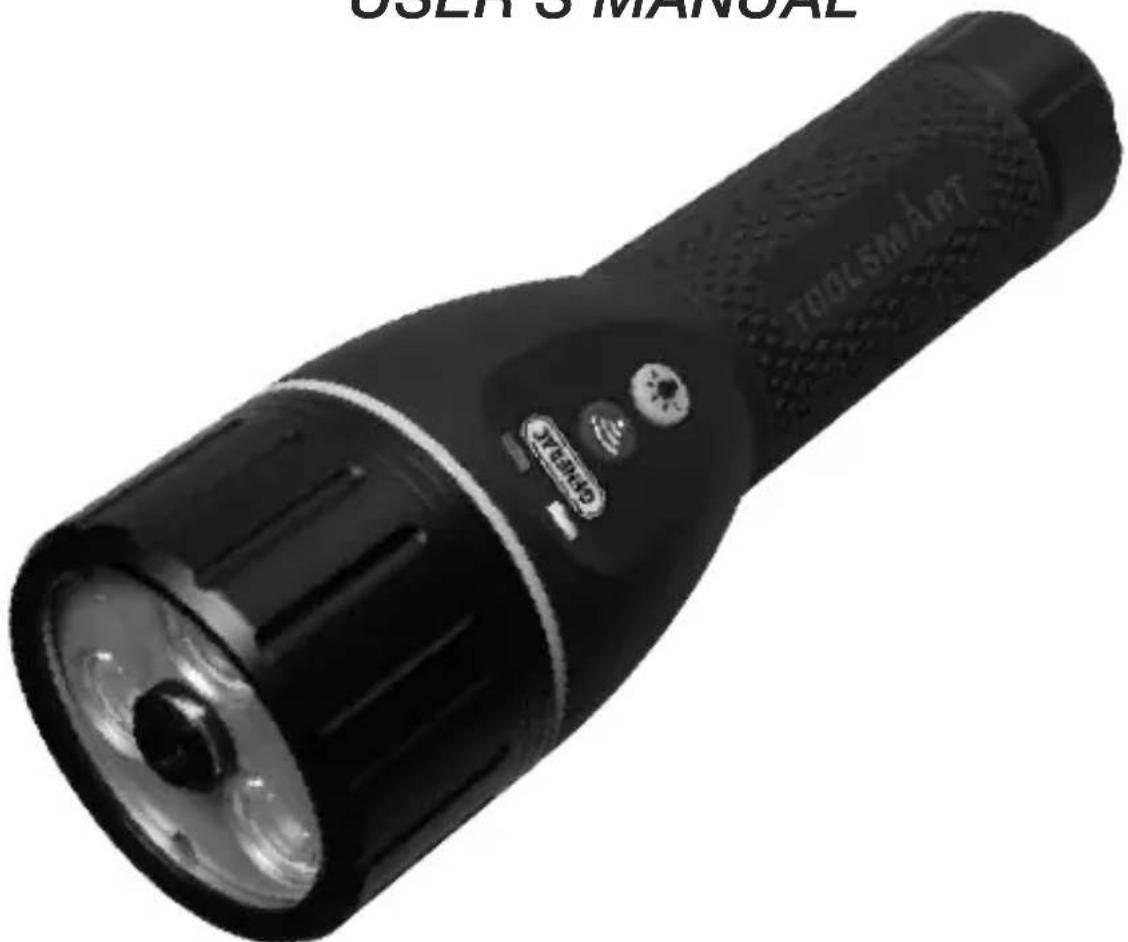
natural_image
Black handheld electronic device with a 3D lens and 'TOOLSMART' label (no additional text or symbols visible)TS07
Please read this manual carefully and thoroughly before using this product.
TABLE OF CONTENTS
Introduction 2-3
Key Features .... 3
Safety Instructions 4
What's in the Package 4
Product Overview .... 5
Setup Instructions 5
Charge Battery 5
Operating Instructions 7-8
Using the Flashlight 7
Using the WiFi Camera 7-8
Specifications 8
Operating & Maintenance Tips 9
Warranty Information 9 – 10
Return for Repair Policy 10
FCC Statement 11
The TS07 Flashlight Inspection Camera is ideal for making inspections of equipment and areas that are open enough to not require the maneuverability of a flexible borescope probe. Lighting for the line-of-sight camera is provided by a powerful LED flashlight that can be used independently. One
obvious application for the TS07 is documenting—with high-definition, date- and time-stamped video and photos—the rounds of security guards.
The TS07 can be used as a standalone flashlight, or with General's free ToolSmart™ app running on your mobile phone.
When used in concert with an iPhone® or Android™ smartphone, the TS07 can stream—via a self-generated local WiFi hotspot (without Internet access)—to the phone all live video it “sees”. The phone initiates the transfer using the ToolSmart™ app, which can be downloaded from the iTunes® App Store or Google Play Store.
Soft buttons on the app can be pressed to save video clips and capture still photos of the video stream.
iPhone® and iTunes® are trademarks of Apple Inc., registered in the U.S. and other countries.
Android ^™ is a trademark of Google Inc.
KEY FEATURES
- Combines a powerful LED flashlight with a high-definition video recording camera
- LED flashlight can be used separately or to illuminate camera's field of view. Brightness and illumination modes (including fast strobe and "S-O-S" transmission in Morse code) are controllable from front panel.
- Aluminum flashlight/camera head cover, with knurled non-slip thermoplastic elastomer (TPE) grip and rubber overmold
SAFETY INSTRUCTIONS
The flashlight section of the Flashlight Inspection Camera uses three 2-watt LED lights that are powerful enough to disorient or cause short-term vision problems for anyone looking directly at them. Avoid staring at those lights—especially when the flashlight is operated in full power or fast strobe mode.
Keep the TS07 out of the hands of children.
Do not use the Flashlight Inspection Camera in the presence of flammable or explosive gases.
WHAT'S IN THE PACKAGE
The Flashlight Inspection Camera comes in a display box along with a rechargeable Lithium-ion battery and a USB charging cable.
- Flashlight Inspection Camera
- Rechargeable Lithium-ion battery
- USB charging cable
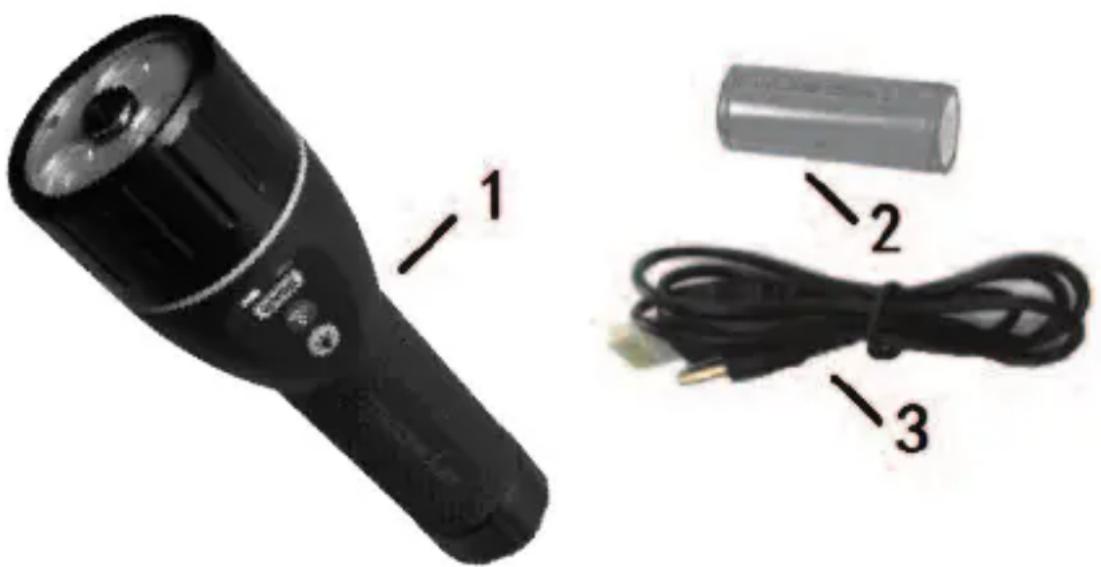
natural_image
Product photo of a black handheld device with labeled parts including a battery, cable, and USB plug (no text or symbols on main subject)PRODUCT OVERVIEW
A. Camera head
B. LED lights
C. Charging jack (under top cover)
D. Reset button (under top cover, 180° opposite charging jack)
E. Flashlight/camera head cover
F. WiFi camera button.
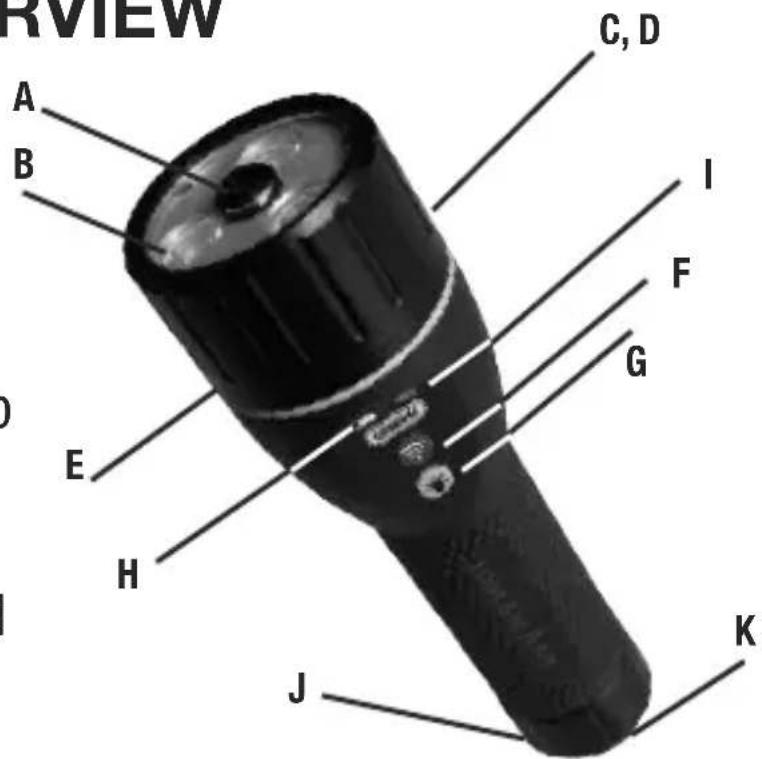
Press and hold for three seconds to turn on camera head and generate local WiFi network (without Internet access). Press and hold again to turn off camera head and network.
G. 🎨flashlight power button. See the Operating Instructions section of this manual for lighting options.
H. Flashlight power indicator. Glows steady green when flashlight LEDs are powered on. Flashes green when battery is low on charge.
I. WiFi indicator. Glows steady blue when camera head and WiFi network are powered on. Glows steady green when battery is charging. Flashes green when battery is low on charge.
J. Battery compartment
K. Wrist strap attachment hole
SETUP INSTRUCTIONS
CHARGE BATTERY
During charging, the TS07 can be used as a flashlight, but not as a WiFi video camera. Charging may take up to eight hours.
To charge the battery:
- Power off the TS07 by pressing and holding the and buttons (Callouts F and G on page 5).
- Unscrew and remove the battery compartment (Callout J).
- Remove and discard the clear plastic battery activation disc.
- Insert the cylindrical plug end of the included USB cable into the jack exposed by unscrewing the head (Callout C), and the full-size (standard-A) USB plug at the other end into a USB port of your computer or a socket of a USB AC power adapter.
If you do not already own a USB AC power adapter (most smartphones include one), you can purchase one on-line or at many retail stores for less than \$5. Be aware that “trickle” charging the TS07 through a USB port of your computer will take much longer than charging it from an AC outlet.
-
During charging, the Wi-Fi indicator LED (Callout I) will blink/flash green.
-
When the battery is fully charged the LED's color will switch to solid green.
-
Replace the flashlight/camera head cover and hand-tighten it.
OPERATING INSTRUCTIONS
USING THE FLASHLIGHT
The 🎨 button controls the TS07's flashlight:
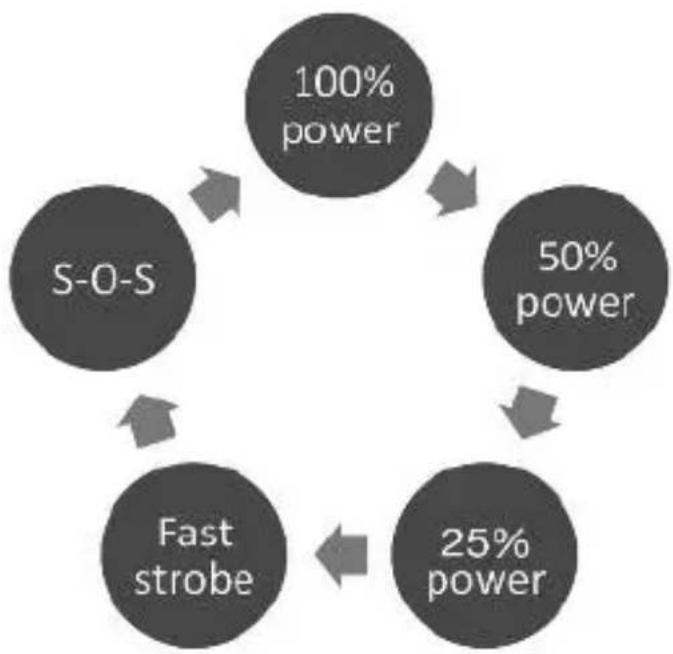
- To turn on the flashlight at a 100% power level, briefly press the button once.
- Briefly press the again to lower the power level to 50%.
- Briefly press the button again to lower the power level to 25%.
- Briefly press the 🎯 button again to switch the flashlight to fast strobe mode.
- Briefly press the button again to use the flashlight to signal S-O-S in Morse code.
- Briefly press the button again to return the flashlight to a 100% power level.
To turn off the flashlight, press and hold the button.
USING THE WIFI CAMERA
To use the TS07 with your phone, begin by downloading the ToolSmart™ app from the iTunes Store or Google Play Store and installing it on your phone. Then, press the button on the TS07 to power on the camera head and generate a local WiFi hotspot. Next, detect and connect to this hotspot (IP Borescope) after activating WiFi reception on your phone.
flowchart
graph TD
    A["100% power"] --> B["50% power"]
    B --> C["25% power"]
    C --> D["Fast strobe"]
    D --> E["S-O-S"]
A tutorial on the app explains how to use it to capture video clips and photos using the TS07's camera, save the files to your phone, and integrate the information in the files with data from other ToolSmart™ products.
SPECIFICATIONS
Camera Lighting: Three 2-watt LEDs delivering 150, 300 and 600 lumens at 25%, 50% and 100% power
Camera Field of View/Depth of Field: 62°/2.4 in. (60mm) to infinity
Video Resolution: HD (1280 x 720 pixels)
Water/Dust Ingress Protection Level: IP54
WiFi Standard: 802.11 b/g/n
WiFi Frame Frequency: 30 fps
Fast Strobe Frequency: 8Hz
Operating Temperature: 32° to 113°F (0° to 45°C)
@ <95%RH
Dimensions: 7.4 (L) x 1.6 in. (Dia.)/188 x 40mm, with camera head diameter of 2.3 in. (58mm)
Weight (with battery): 13 oz. (370g)
Power Source: 3.7V, 3200mAh rechargeable Li-ion battery (included)
Battery Life: 1.25 hours @ 100% LED brightness, 2 hours @ 50% brightness, 3.5 hours @ 25% brightness; 6 hours with LEDs off and WiFi on
When both LEDs on the Flashlight Inspection Camera begin flashing green to indicate that that the battery is becoming low on charge, charge the battery by connecting the TS07 to a power source, using the “Charge Battery” Setup instructions on page 6 as a guide.
The TS07 is notequipped with an Auto Power Off (APO) feature that would automatically power off the unit after a fixed period of inactivity. To avoid having to recharge the battery often, remember to power off both the flashlight and the WiFi camera head when you are finished using them.
When left in the Flashlight Inspection Camera for an extended period of time, the Lithium-ion battery may corrode and release toxic chemicals capable of permanently damaging the unit. Remove the battery when preparing the TS07 for long-term storage, and also when you do not intend to use it for weeks or months.
Use an anti-static microfiber cloth to clean the TS07 housing and other structures. Never use abrasive or chemical cleaning agents.
WARRANTY INFORMATION
General warrants its instruments and accessories, and digital tools products against defects in material or workmanship for one year from the date of purchase unless otherwise stated on the packaging, manual, and/or marketing materials.
General also warrants its non-digital tools products against defects in material or workmanship on a limited lifetime term.
General will replace or repair the defective unit, at its option, subject to verification of the defect.
This warranty does not apply to defects resulting from abuse, neglect, accident, unauthorized repair, alteration, or unreasonable use of the product. It also does not cover products purchased from unauthorized distributors. A proof of purchase must accompany each warranty claim.
Any implied warranties arising from the sale of a General product, including but not limited to implied warranties of merchantability and fitness for a particular purpose, are limited to the above.
General shall not be liable for loss of use of the product or other incidental or consequential damages, expenses, or economic loss, or for any claim of such damage, expenses, or economic loss.
State laws vary. The above limitations or exclusions may not apply to you.
For more details or to file a warranty claim, contact General Tools & Instruments Technical Support at techsupport@generatools.com.
RETURN FOR REPAIR POLICY
Every effort has been made to provide you with a reliable product of superior quality. However, in the event your instrument requires repair, please contact our Customer Service to obtain an RGA (Return Goods Authorization) number before forwarding the unit via prepaid freight to the attention of our Service Center at this address:
General Tools & Instruments 75 Seaview Drive Secaucus, NJ 07094
Remember to include a copy of your proof of purchase, your return address, and your phone number and/or e-mail address.
FCC STATEMENT
This device complies with part 15 of the FCC Rules. Operation is subject to the following two conditions: (1) This device may not cause harmful interference, and (2) This device must accept any interference received, including interference that may cause undesired operation.
This equipment has been tested and found to comply with the limits for a Class B digital device, pursuant to part 15 of the FCC Rules. These limits are designed to provide reasonable protection against harmful interference in a residential installation. This equipment generates, uses and can radiate radio frequency energy and, if not installed and used in accordance with the instructions, may cause harmful interference to radio communications.
However, there is no guarantee that interference will not occur in a particular installation. If this equipment does cause harmful interference to radio or television reception, which can be determined by turning the equipment off and on, the user is encouraged to try to correct the interference by one or more of the following measures:
- Reorient or relocate the receiving antenna.
- Increase the separation between the equipment and receiver.
- Connect the equipment to a different circuit than the one the receiver is connected to.
- Consult your supplier or an experienced radio/TV technician for help.
GENERAL®
GENERAL TOOLS & INSTRUMENTS
75 Seaview Drive
Secaucus, NJ 07094
PHONE (212) 431-6100
FAX (212) 431-6499
TOLL FREE (800) 697-8665
e-mail: sales@generaltools.com
www.generaltools.com
TS07 User's Manual
Specifications subject to change without notice
©2016 GENERAL TOOLS & INSTRUMENTS
NOTICE - WE ARE NOT RESPONSIBLE FOR TYPOGRAPHICAL ERRORS.
MAN# TS07
11/02/16
GENERAL TOOLSMART™
CONNECTED PRECISION
natural_image
Black handheld flashlight with visible lens and flash, no text or symbols on bodyTS07
natural_image
Black handheld device with a circular head and a labeled pointer (no visible text or symbols on the device body)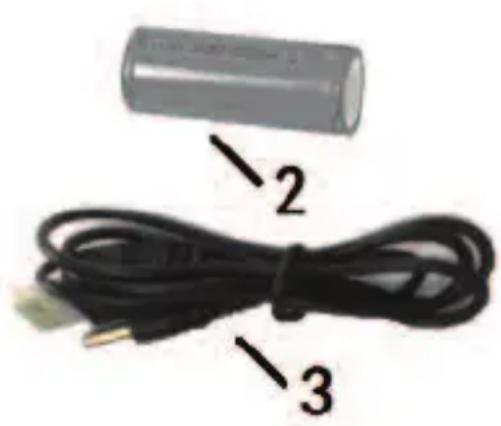
natural_image
Illustration of a battery and its cable, showing a 2-pin connector and its connectors (no text or symbols)CÓMO USAR LA LINTERNA
CÓMO USAR LA CÁMARA WIFI
General Tools & Instruments
75 Seaview Drive
Secaucus, NJ 07094
212-431-6100
General Tools & Instruments


GeneralToolsNYC