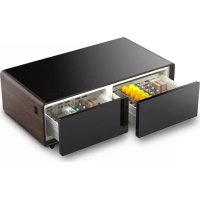
Sound & Cool 794 - Soundbar CASO - Free user manual and instructions
Find the device manual for free Sound & Cool 794 CASO in PDF.



| Product Type | Soundbar with refrigerated compartments |
| Brand | CASO |
| Model | Sound & Cool 794 |
| Power supply | 220-240 V ~ 50/60 Hz |
| Left compartment temperature | 3 to 8 °C |
| Right compartment temperature | 6 to 12 °C (or off "OF") |
| Energy saving mode | Yes (ECO button) |
| Audio connectivity | Bluetooth 5.0 (range 10 m) |
| Sound and light programs | Pop, Jazz, Rock, Movie, Auto |
| Charging ports | 2 USB ports + 1 USB-C port |
| Wireless charging | Yes (dedicated surface) |
| Max load on glass surface | 200 kg |
| Display | Yes (shared between refrigerator and soundbar) |
| LED light strip | Yes (adjustable) |
| Sound volume | Adjustable (+ and - buttons) |
| Defrost | Automatic |
| Cleaning | Soft cloth and mild detergent |
| Warranty | 24 months (Germany, Austria, Netherlands) |
| Included accessories | Power cable, cable channel, 4 dividing panels, 2 inserts |
Frequently Asked Questions - Sound & Cool 794 CASO
User questions about Sound & Cool 794 CASO
0 question about this device. Answer the ones you know or ask your own.
Ask a new question about this device
Download the instructions for your Soundbar in PDF format for free! Find your manual Sound & Cool 794 - CASO and take your electronic device back in hand. On this page are published all the documents necessary for the use of your device. Sound & Cool 794 by CASO.
USER MANUAL Sound & Cool 794 CASO
Original-Bedienungsanleitung | Instruction Manual | Mode d'emploi Istruzione d'uso | Manual del usuario | Gebruiksaanwijzing Руководство по эксплуатации | Bruksanvisning | Manual de instruções
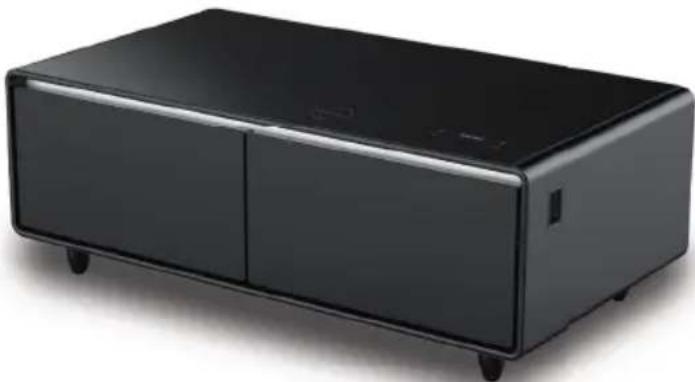
Sound & Cool Black 792
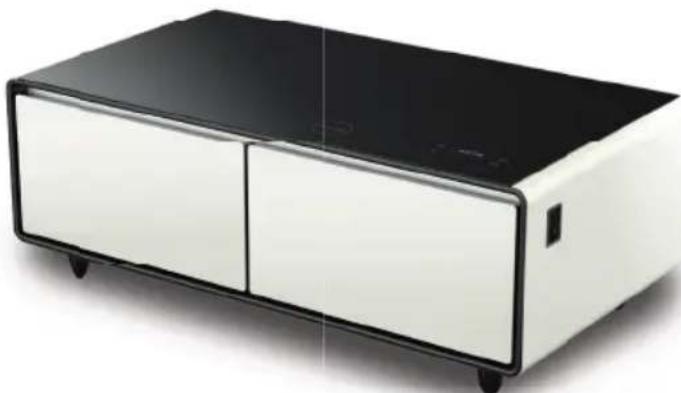
Sound & Cool White 793
Sound & Cool Wood 794
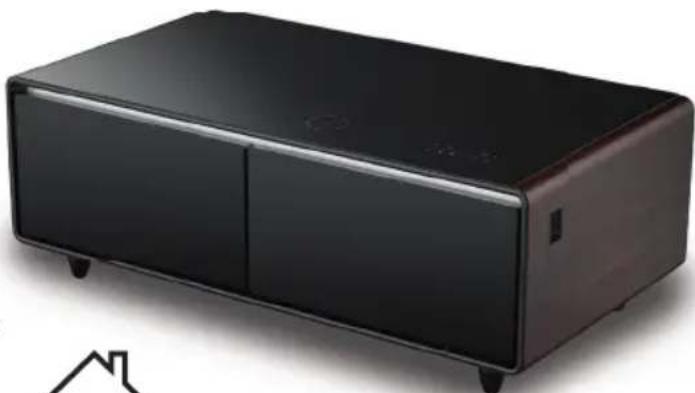
Technische Daten / Technical Data / Caractéristiques techniques / Dati tecnici / Datos técnicos / Technische gegevens / Технические характеристики / Tekniska data / Especifi cações técnicas
| Gerät / Device / Appareil /Apparecchio / Aparato /Aparaat / Прибор / Apparat / Aparelho | Loungetisch / Lounge table / Tablede salon / Tavolo da salotto / Mesa de salón / Salontafel / Столик длягостиной / Lounge-bord / Mesa de sala |
| Name / Name / Nom / Nome / Denominación / Name /Наименовани / Namn /Nome | CASO Sound & Cool |
| Artikel-Nr. / Item No. / N°. d'article / N. Articolo / N° de art /Artikelnr. / N° артикула / Artikel-nr. /N.° de artigo | 792, 793, 794 |
| Anschlussdaten / Mains data / Données de raccordement / Dati connessione / Conexión / Aansluitgegevens /Параметры подключения / Anslutningsdata /Dados deligação | 220 V - 240 V; 50/60 Hz; 0,7 A |
| Außenabmessungen (B/H/T) / External measurements (W x H x D) / Dimensions externes (I/h/p) / Misure esterne (L/H/P) / Dimensiones exteriores (An/H/P) / Afmetingen (BxHxD) / Габаритные размеры (Ш/В/Г) / Yttermått (B/H/D) / Dimensões externas (L/A/P) | 1305 mm x 460 mm x 700 mm |
| Nettogewicht / Net weight / Poids net / Peso netto / Peso net / Nettogewicht / Bec / Nettovikt / Peso líquido | 55,3 kg |
| Kapazität / Capacity / Capacité / Capacità / Capacidad /Capaciteit / Вместимость / Kapacitet / Capacidade | 135 L |
| Schnittstellen / Interfaces / Interfaces / Interface / Conexiones / Interfaces / Интерфейсы / Gränssnitt / Interfaces | Bluetooth 5.0, USB |
| USB 2x USB (5 V) + 1x USB-C (5 V) | |
| Leistung Lautsprecher / Power of speakers / Puissance haut-parleur / Potenza del l'altoparlante / Potencia del el altavoz / Vermogen spreker / Мощностьгромкоговорителя / Högtalarprestanda / Potência do altifalante | 20 W |
HINWEIS

GEFAHR
5.7 Kabellose Ladestation / Wireless Charging
6.3 Abtauen
1.1 Information on this manual....21
1.2 Warning notices 21
1.3 Limitation of liability 22
1.4 Copyright protection....22
2 Safety....22
2.1 Intended use 22
2.2 General Safety information....23
2.3 Sources of danger 25
2.3.1 Risk of fire / flammable materials used. Danger of burns or of explosion 25
2.3.2 Dangers due to electrical power....25
3 Commissioning 26
3.1 Safety information....26
3.2 Delivery scope and transport inspection 26
3.3 Unpacking 27
3.4 Setup location requirements....27
3.5 Electrical connection....28
4 Design and Function....29
4.1 Complete overview....29
4.2 Controlelements....30
4.3 Rating plate....30
5 Operation and Handing....30
5.1 Temperature setting....30
5.2 Instructions for storing food/beverages in the unit....31
5.3 Soundbar setting via Bluetooth....31
5.4 Setting the LED light bar 32
5.5 Sound and light programmes 32
5.6 Charging via USB and USB-C 32
5.7 Wireless charging station / wireless charging 32
6 Cleaning and Maintenance 32
6.1 Safety information....33
6.2 Cleaning....33
6.3 Defrost....33
6.4 Moving the appliance 33
7 Troubleshooting 34
7.1 Safety notices 34
7.2 Troubleshooting table 34
8 Disposal of the Old Device 35
8.1 Disposal of the packaging....35
9 Guarantee....36
1General
Please read the information contained herein so that you can become familiar with your device quickly and take advantage of the full scope of its functions.
Your device will serve you for many years if you handle it and care for it properly. We wish you a lot of pleasure in using it!
1.1 Information on this manual
These Operating Instructions are a component of the Sound & Cool (referred to hereafter as the Device) and provide you with important information for the initial commissioning, safety, intended use and care of the device.
The Operating Instructions must be available at all times at the device. This Operating Manual must be read and applied by every person who is instructed to work with the device:
- Commissioning, - Operation,
- Troubleshooting and/or
- Cleaning
Keep the Operating Manual in a safe place and pass it on to the subsequent owner along with the device.
1.2 Warningnotices
The following warning notices are used in the Operating Manual concerned here.

DANGER
A warning notice of this level of danger indicates a potentially dangerous situation. If the dangerous situation is not avoided, this can lead to death or serious injuries.
Observe the instructions in this warning notice in order to avoid the danger of death or serious personal injuries.

WARNING
A warning notice of this level of danger indicates a possible dangerous situation. If the dangerous situation is not avoided, this can lead to serious injuries.
▶ Observe the instructions in this warning notice in order to avoid the personal injuries.

ATTENTION
A warning notice of this level of danger indicates a possible dangerous situation. If the dangerous situation is not avoided, this can lead to slight or moderate injuries.
▶ Observe the instructions in this warning notice in order to avoid the personal injuries.
PLEASE NOTE
A notice of this kind indicates additional information, which will simplify the handling of the machine.
1.3 Limitation of liability
All the technical information, data and notices with regard to the installation, operation and care are completely up-to-date at the time of printing and are compiled to the best of our knowledge and belief, taking our past experience and findings into consideration. No claims can be derived from the information provided, the illustrations or descriptions in this manual.
The manufacturer does not assume any liability for damages arising as a result of the following:
• Non-observance of the manual
• Uses for non-intended purposes
- Improper repairs
- Technical alterations, modifications of the device
- Use of unauthorized spare parts
Modifi cations of the device are not recommended and are not covered by the guaran- tee. All translations are carried out to the best of our knowledge. We do not assume any liability for translation errors, not even if the translation was carried out by us or on our instructions. The original German text remains solely binding.
1.4 Copyright protection
This document is copyright protected.
Braukmann GmbH reserves all the rights, including those for photomechanical reproduction, duplication and distribution using special processes (e.g. data processing, data carriers, data networks), even partially. Subject to content and technical changes.
2Safety
This chapter provides you with important safety notices when handling the device. The device corresponds with the required safety regulations. Improper use can result in personal or property damages.
2.1 Intendeduse
This device is only intended for use in enclosed spaces for
• Cooling of food and beverages,
- Play music,
- Charge mobile devices via USB, USB-C or by wireless charging.
This appliance is intended for use in the home and in similar applications such as
- staff kitchen areas in shops, offices and other work areas;
• in agriculture and by guests in hotels, motels and other accommodation; - bed and breakfasts.
Uses for a different purpose or for a purpose which exceeds this description are considered incompatible with the intended or designated use.

WARNING
Danger due to unintended use!
Dangers can emanate from the device if it is used for an unintended use and/or a different kind of use.
▶ Use the device exclusively for its intended use.
▶ Observe the procedural methods described in this Operating Manual.
Claims of all kinds due to damages resulting from unintended uses are excluded. The User bears the sole risk.
2.2 General Safety information
PLEASE NOTE
Please observe the following general safety notices with regard to the safe handling of the device.
Examine the device for any visible external damages prior to using it. Never put a damaged device into operation.
If the power cord of this appliance is damaged, it must be replaced by the manufacturer, its customer service or a similarly qualified person to avoid hazards.
This unit may be used by children as of 8 years old and anyone with reduced physical, sensory or mental capabilities or a lack of experience and knowledge if they are supervised or have been instructed in connection with the safe use of the appliance and the dangers resulting from it.
▶ Cleaning and maintenance by the user must not be performed by children.
▶ Children are not allowed to play with the device.
The device and its connecting cable must be kept away from children who are less than 8 years old.
Do not make any modifications to the appliance or the power cord. Only have repairs carried out by a specialist workshop as appliances that have not been repaired properly endanger the user. Please also observe the enclosed warranty conditions.
PLEASE NOTE
▶ Defective components must always be replaced with original replacement parts. Only such parts will guarantee that the safety requirements are fulfilled.
▶ Pull out the drawers by the recessed grips. Watch your fingers, so they do not get caught between the drawers and the unit.
The power outlet must be freely accessible in case you need to disconnect the appliance from the mains quickly.
To avoid contamination of food, observe the following instructions:
- If the pantry compartments are open for a longer period of time, the temperature in the compartments of the appliance may rise considerably.
- Regularly clean surfaces that may come into contact with food.
- If the refrigerator/freezer will be left empty for a long time, switch off the appliance, defrost it, clean it and leave the door open to avoid mould growth.
Use the appliance only as described in the user's guide to avoid possible injury from misuse.
▶ Do not use the appliance:
- if the appliance itself or parts are damaged,
- if the power cord or plug is damaged,
- if the appliance has been dropped.
▶ Always unwind the power cord completely before use. When doing so, ensure that the power cord is not damaged by sharp edges or hot objects.
▶ Only use the appliance with original accessories.
2.3 Sources of danger
2.3.1 Risk of fire / flammable materials used. Danger of burns or of explosion
DANGER
There is a danger of burns and explosion due to excess pressure that is created in the event the device is not used properly.

Observe the following safety notices to avoid dangers of burns or an an explosion:
Warning: Risk of fi re / fl ammable materials used.
Do not store explosive substances in this appliance, such as aerosol containers with fl ammable propellant gas.
▶ Blowing gas inside the unit is fl ammable.
▶ Do not damage the cooling circuit of the device.
▶ Do not use electrical devices inside the device.
▶ Do not use mechanical devices or other means to accelerate the defrosting process.
▶ Never use the device to store or dry fl ammable materials. Never clean appliance parts with fl ammable fluids. The fumes can create a fi re hazard or explosion.
Do not store or use gasoline or any other fl ammable vapours and liquids in the vicinity of this or any other appliance. The fumes can create a fi re hazard or explosion.
The mains plug must be plugged firmly into the connection socket on the bottom of the device, otherwise there is a risk of fire.
2.3.2 Dangers due to electrical power
DANGER
Mortal danger due to electrical power!
Mortal danger exists when coming into contact with live wires or subassemblies!
Observe the following safety notices to avoid dangers due to electrical power:

DANGER
Do not open the housing on the device under any circumstances. There is a danger of an electrical shock if live connections are touched and the electrical or mechanical structure is altered. In addition, functional faults on the device can also occur.
Do not operate this device if it has a damaged cable or plug, if it is not working properly or if it has been damaged or dropped. If the power cable or plug are damaged, then they must be replaced by the manufacturer or its service agent in order to avoid a hazard.
3Commissioning
This chapter provides you with important safety notices during the initial commissioning of the device. Observe the following notices to avoid dangers and damages:
3.1 Safetyinformation

WARNING
Packaging materials may not be used for playing. There is a danger of suffocation.
▶ Transport, unpack and use two persons to set down the device because of the heavy weight of the device.
3.2 Delivery scope and transport inspection
The device includes the following components:
- Sound & Cool
- Power cord
• 1 Cable Chanel
- 4 Partitions
- 2 Sliding Inserts
- Operating Instructions
PLEASE NOTE
Examine the shipment for its completeness and for any visible damages.
▶ immediately notify the carrier, the insurance and the supplier about any incomplete shipment or damages as a result of inadequate packaging or due to transportation.
3.3 Unpacking
To unpack the device, proceed as follows:
- Remove the device out of the carton and remove the packaging material.
- The packaging material cannot be used as a base for the unit.
- The appliance may be title by a max angle of 45° , otherwise the cooling system can be damaged.
- Clean the interior surface with lukewarm water using a soft cloth.
- Only connect the unit to the mains after waiting at least 2 hours and then switch it on. Only then place food or drinks in the unit.
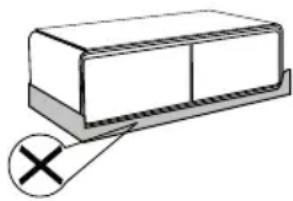
PLEASE NOTE
Only remove the blue protective film shortly before setting up the device in the location where it will be used, to prevent scratches and dirt accumulations.
If possible, keep the original packaging for the device for the duration of the guarantee period of the device, in order that the device can be re-packaged properly in the event of a guarantee claim.
3.4 Setup location requirements
In order to ensure the safe and trouble-free operation of the device, the setup location must fulfil the following prerequisites:
- Place your appliance on a floor that is strong enough to support the appliance when it is fully loaded.
- Locate the appliance away from direct sunlight and sources of heat (stove, heater, radiator, etc.). Direct sunlight and heat sources may adversely affect energy consumption and cooling performance.
- This cooling appliance is intended for ambient temperatures of 16–38 °C.
- This unit is not designed for use in a garage or any other outside installation.
- Do not set up the device in a hot, wet or extremely damp environment or near flammable material.
- The device requires an adequate flow of air in order to operate correctly. Leave a clearance of 45 cm around the appliance.
- Do not close the ventilation openings in the device housing.
- The electrical socket must be easily accessible so that the power lead can be disconnected easily, in the case of an emergency.
- The installation and assembly of this device in non-stationary setup locations (e.g. on ships) must be carried out by specialist companies / electricians, provided they guarantee the prerequisites for the safe use of this device.
- For energy saving reasons please ensure that the drawers are closed when the appliance is turned on.
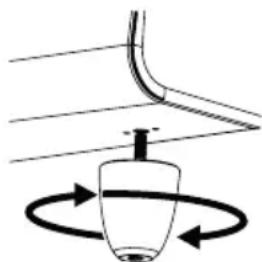
- Adjust the adjustable feet, so that the device is placed even.
3.5 Electrical connection
In order to ensure the safe and trouble-free operation of the device, the following instructions must be observed for the electrical connection:
- Connect the appliance to a properly installed power outlet with electrical data corresponding to the rating plate's specifications.
- The connection between the device and the electrical network may employ a 3 meter long (max.) extension cable with a cross-section of 1.5 mm 2 . The use of multiple plugs or gangs is prohibited because of the danger of fire that is involved with this.
- Do not bend the power cord. Place the power cord in a way so that you do not trip over it. Make sure that the power cable is undamaged and has not been installed under or over hot or sharp surfaces.
- This unit is not designed to be installed in an RV or used with an inverter.
- The electrical outlet must be protected by a 16A safety cut-out switch.
- The electrical safety of the device is only guaranteed if the device is connected to a properly installed protective conductor system. If in doubt, have the house installation checked over by a qualified electrician. The manufacturer cannot be made responsible for damages that are caused by a missing or damaged protective conductor.
- Options to connect the power cord: In case you have a ground socket below the device use this to plug in. Alternatively you can use a wall socket. In this case make sure that the power cord is placed carefully to avoid stumble, by placing under a carpet or by using the included cable channel (K).


DANGER
The mains plug must be plugged firmly into the connection socket on the bottom of the device, otherwise there is a risk of fire.
4 Design and Function
This chapter provides you with important safety notices on the design and function of the device.
4.1 Completeoverview
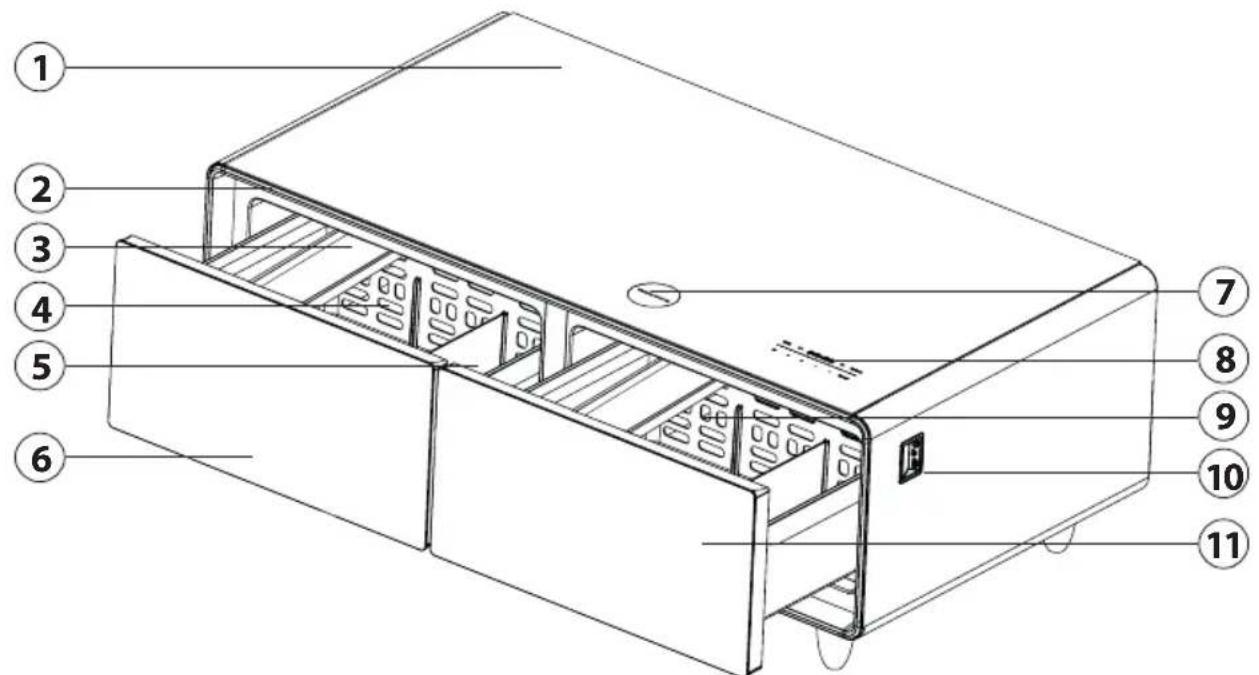

① Glass surface
② LED light strip
③ moveable insert
④ Interior, left compartment
⑤ Divider
⑥ left refrigerated drawer
⑦ Wireless charging station
⑧ Touch control panel
⑨ Interior, right compartment
10 2x USB & 1x USB-C ports
⑪ Right refrigerated drawer
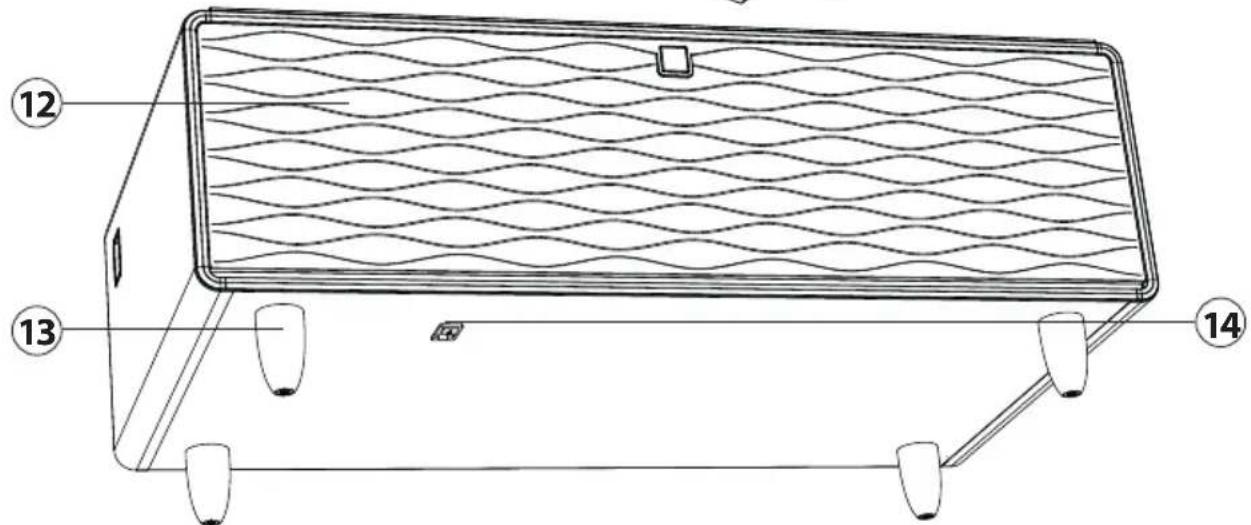
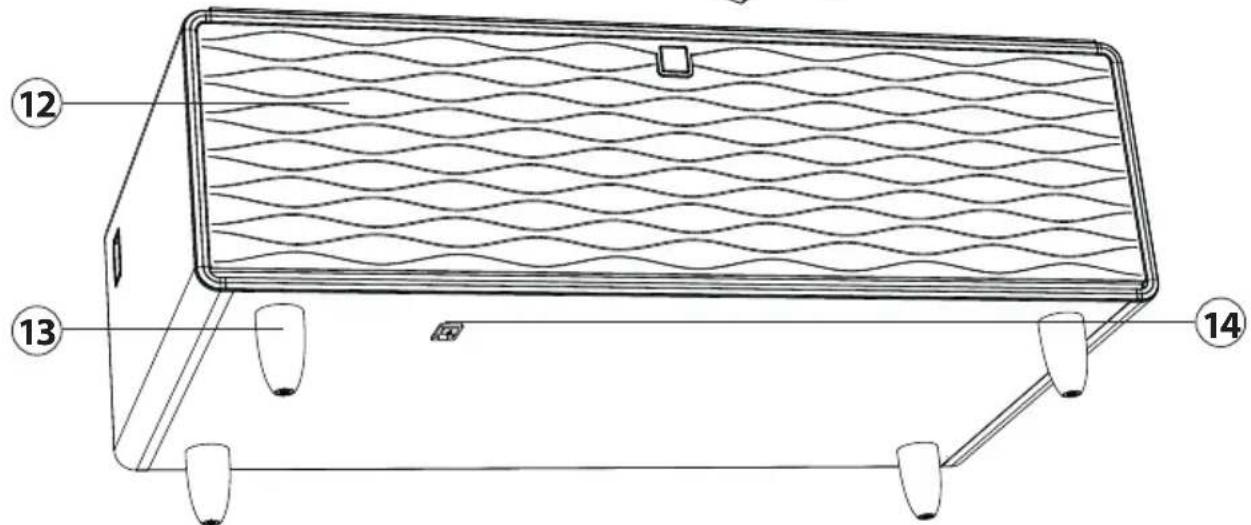
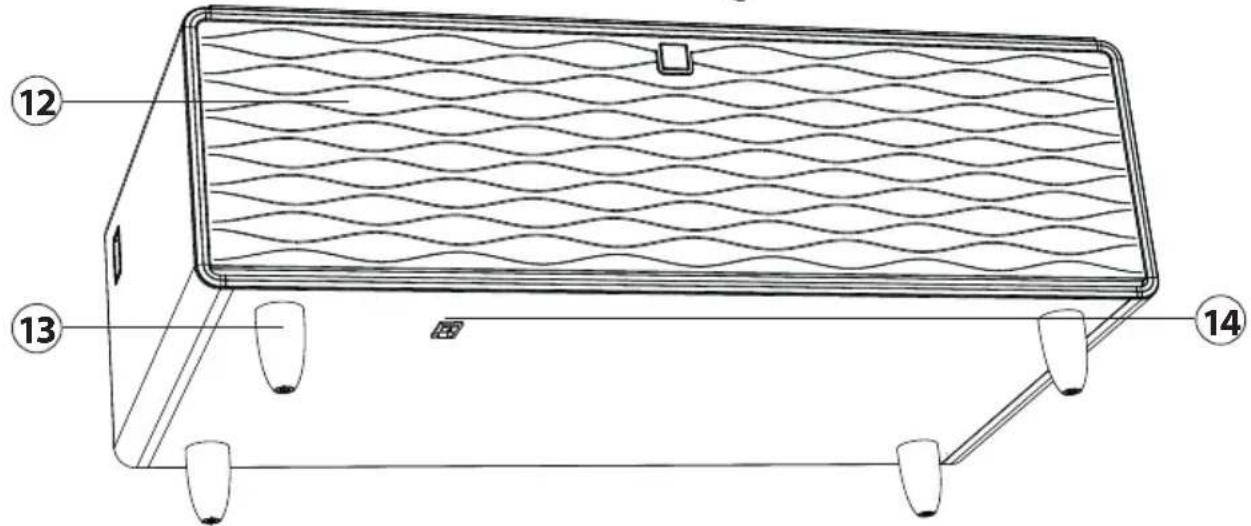
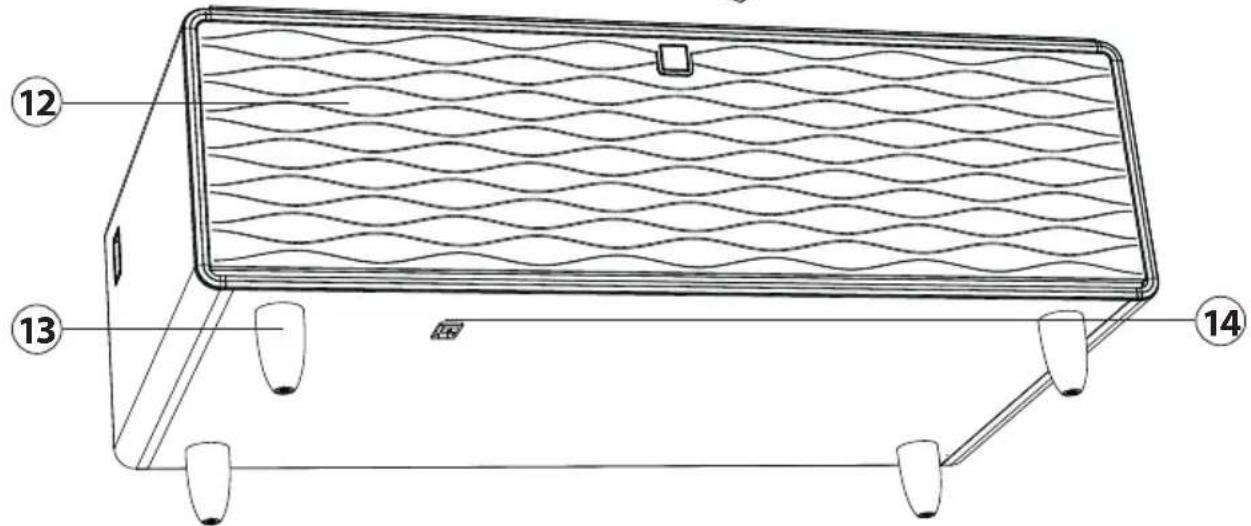
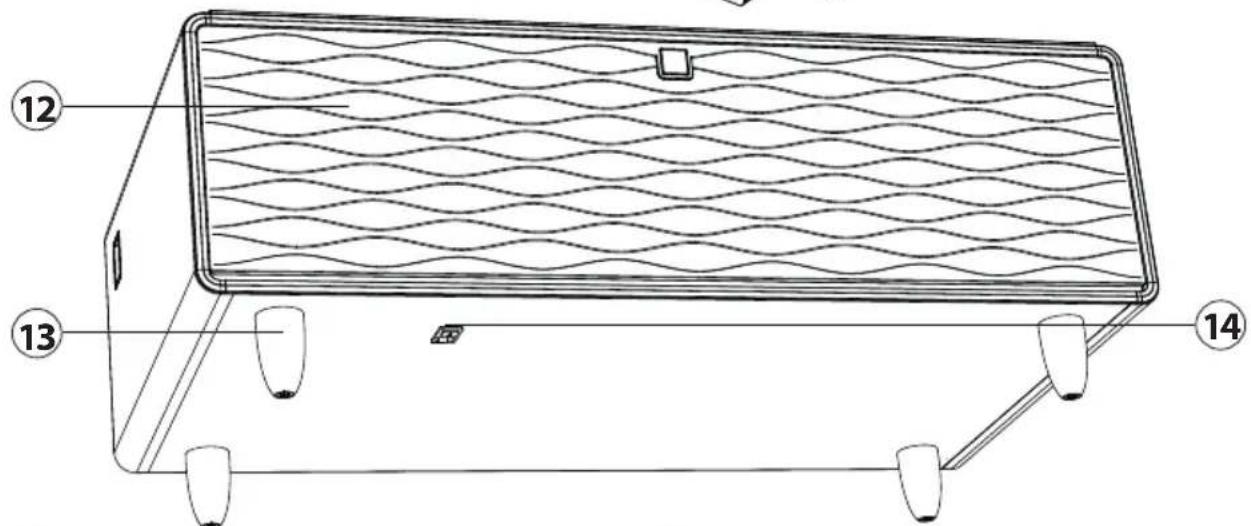
12 Speaker cover
13 Adjustable foot
14 Main switch & power plug connector
DE
EN
FR
IT
ES
NL
RUS
SE
PT
4.2Controlelements

Refrigerated compartments control elements
1520 Energy-saving mode
⑯ Temperature setting, left compartment
17 Display
18 Temperature setting, right compartment
⑲ Unlock button, temperature setting
Soundbar control elements
Sound on/off
21 Decrease volume
22 Increase volume
23 LED light strip on/off
24 Sound/light programme
25 Unlock button, music setting
PLEASE NOTE
▶ Refrigerator and Music Player share the same display zone.
4.3 Ratingplate
The type plate with the connection and performance data is located on the right-hand outside of the right-hand refrigerator drawer.
5 Operation and Handing
This chapter provides you with important notices with regard to operating the device.
5.1 Temperature setting
- Plug in the mains plug.
- Switch on the unit at the main switch (14).
- Activate the temperature setting by double-tapping the ( *button.
-
The display shows the current temperature level of the left and right refrigerated compartments.
-
Press the (L) button to change the temperature in the left compartment. You can select temperatures from 3 to 8 °C.
- Press the (R) button to change the temperature in the right compartment. You can select temperatures from 6 to 12 °C. You can also switch off the right refrigerated compartment by setting it to "OF".
- The current temperature setting that saves the most energy is set by pressing the (ECO) button. This setting depends on the ambient temperature of the unit.
- The setting is automatically confirmed after a few seconds. To make new settings, the (") button must be activated again by double-tapping it.
- When you open a drawer of the unit, the currently set temperature is shown in the display.
PLEASE NOTE
When used for the first time, it can take up to 24 hours until the operating temperature is reached.
The unit will beep and flash red when the drawer has been open too long to remind you to close it.
▶ Allow the unit to operate for 2 hours before placing food/beverages/wine in it.
The device was tested assuming the cooling areas serve as pantry compartments.
▶ Deviating low temperatures, i.e. those designed for long periods of time, may increase power consumption.
The glass surface has a load capacity of max. 200 kg.
5.2 Instructions for storing food/beverages in the unit
- Do not store food/beverages in the appliance that easily spoil at low temperatures.
- Do not place hot food / beverages into the device. Let them cool down before placing into the device.
- Bottles have to be tightly placed to prevent them form tilting when the drawers are opened.
- The portions of the drawers can be removed and the inserts can be move, to store different types of food.
- The left and right refrigerated compartments can be controlled independently. Adjust the temperature to the respective food.
- Do not overfi ll the device so that the internal air circulation is not intered.
5.3 Soundbar setting via Bluetooth
- Activate the music setting by double-tapping the ( musical button.
- Search for the device „T-BAR“ in your smartphone/tablet under the Bluetooth setting and connect to the unit.
- If your phone requires a pairing code, enter 0000.
- After a successful connection, the soundbar works as an external speaker for your smartphone/tablet and you can play your desired music.
- Make sure that the ( ▼ button is not activated, and increase the volume on your smartphone/tablet.
- Use the ( ▶) and ( ▶) buttons to adjust the volume of the unit.
-
The setting is automatically confirmed after a few seconds. To make new settings, the (") button must be activated again by double-tapping it.
-
You can switch off the music by activating the ( musical button by double-tapping it and then holding it down.
PLEASE NOTE
If Bluetooth transmission is not possible, a voice announces that the connection has been interrupted. After 5 minutes, the Bluetooth connection is deleted and reset.
The Bluetooth transmission distance is approx. 10 metres. If you are out of range and return to the unit, the Bluetooth connection is automatically re-established.
5.4 Setting the LED light bar
- Activate the music setting by double-tapping the ( "button.
- Press the ( 🔍 button to switch on the light.
- If you want to switch the light off again, press the ( 🔍 ) button.
5.5 Sound and light programmes
The appliance has fi ve dif ferent sound and light programmes. You can choose between the programmes Pop, Jazz, Rock, Film and Auto.
Activate the music setting by double-tapping and select the desired sound/light programme by pressing the (↓↓↓) button.
5.6 Charging via USB and USB-C
As soon as the appliance is switched on, you can use the two USB ports and the USB-C port to charge your smartphone, tablet and other devices.
5.7 Wireless charging station / wireless charging
Place your smartphone/tablet on the area marked for wireless charging.
PLEASE NOTE
▶ Only smartphones/tablets that have such a function can be charged.
If necessary, remove the protective cover from your smartphone/tablet if a connection cannot be established.
Do not charge your smartphone/tablet via the USB port and the wireless charging station at the same time.
6 Cleaning and Maintenance
This chapter provides you with important notices with regard to cleaning and maintaining the device. Please observe the notices to prevent damages due to cleaning the device incorrectly and to ensure trouble-free operation.
6.1 Safetyinformation
ATTENTION
Please observe the following safety notices, before you commence with cleaning the device:
Prior to commissioning, clean the appliance thoroughly.
Before cleaning, switch off the unit, unplug it from the wall socket and remove all bottles/food.
Pay attention to the USB ports on the side of the appliance. Clean them only with dry cloth. Do not use wet cloth or spray for cleaning of these ports.
Do not clean the device with spray / liquid and do not place the device in environment where the device may become wet or splashed with moisture. There is a risk of a short circuit.
Do not clean the appliance with hard, scratchy or abrasive cleaning agents such as steel wool or the like.
6.2Cleaning
- Pull the mains plug out of the power outlet.
- Remove the food/beverages and accessories (inserts/dividers) from the unit.
- Clean the mains plug and USB ports only with a soft dry cloth.
- Clean the unit's surfaces and refrigerated compartments with a soft cloth and a neutral cleaning agent. Do not use hot water for cleaning.
- Dry the appliance thoroughly after cleaning.
- Clean the drawer seal regularly to ensure that the drawer closes properly. Use only water to clean the drawer seal.
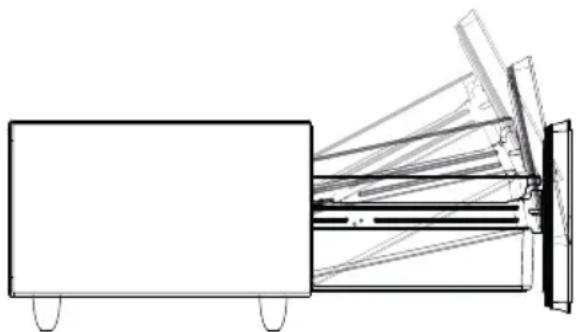
The drawer can be removed from the appliance for cleaning.
- Remove the insert and dividers.
- Pull out the drawer and move it up and back.
- Clean the drawer, inserts and dividers with a soft cloth.
6.3Defrost
The device automatically defrosts. Condensated water will be collected in a tray and will automatically evaporate by compressor heat.
6.4 Moving the appliance
Turn off the appliance first and then unplug the unit from the wall outlet. Remove the contents from the unit. Remove the drawers or tape them shut. The appliance may be title by a max angle of 45° , otherwise the cooling system can be damaged.
7Troubleshooting
This chapter provides you with important notices with regard to operating the device. Observe the following notices to avoid dangers and damages:
7.1 Safetynotices

ATTENTION
Only qualified electricians, who have been trained by the manufacturer may carry out any repairs on electrical equipment.
Improperly performed repairs may result in personal injury or damage to the device.
7.2 Troubleshootingtable
The following table assists in localizing and rectifying minor faults.
| Fault Possible Cause | |
| Device does not operate. | Not plugged in using different voltage. |
| The circuit breaker tripped or a blown fuse. | |
| Your device is not cold enough or it does not reach the adjusted temperature. Compressor does not stop to work. | Check the temperature control setting. |
| External environment may require a higher setting. | |
| The drawer is opened too often or was not closed completely. | |
| The door seal does not seal properly. | |
| The device does not have the correct clearance. | |
| Device is over filled. | |
| When used for the first time, it can take up to 24 hours until the operating temperature is reached. | |
| Vibrations Check to assure that the device is level. | |
| The device seems to make to much noise. | The device is not level. |
| Components are loose. | |
| Device touches the wall. | |
| The door will not close pro- perly. | The device is not level. |
| The seal is weak. | |
| Device is over filled. | |
| Control panel does not show anything. Buttons do not work. | Contact the customer service. |
| Compressor will not start. Room temperature is lower than desired temperature. | |
| Dew on the surface of device. | The surface of wine cabinet especially the door appear some frost if item in a damp room. This is due to the moisture in the air coming into contact with the device. Please wipe it away with dry cloth. |
| Liquid sound. | The sound of compressor when starts or stops working. The flowing sound of refrigerant in the refrigeration system. The evaporating sound of refrigerant in the evaporator. |
| Condensation formed inside the cabinet. | Under the environment with high level of humidity or the drawer has been left open for a long period or opened frequently, wipe off the drawer and walls and close the drawer as long as possible. |
PLEASE NOTE
If you cannot solve the problem by carrying out the steps described above, our Customer Service will help you free of charge.
8Disposal of the Old Device
Old electric and electronic devices frequently still contain valuable materials. However, they also contain damaging substances, which were necessary for their functionality and safety. If these were put in the non-recyclable waste or were handled incorrectly, they could be detrimental to human health and the environment. Therefore, do not put your old device into the non-recyclable waste under any circumstances.
PLEASE NOTE
Utilise the collection point, established in your town, to return and recycle old electric and electronic devices. If necessary, contact your town hall, local refuse collection service or your dealer for information.
Blowing gas inside the unit is flammable. The disposal of this flammable material should be in accordance with national regulations.
▶ Ensure that your old device is stored safely away from children until it is taken away: Remove the drawer doors, the partitions and the movable inserts in the inner space, so that children cannot be accidentally injured.
8.1 Disposal of the packaging
The packaging protects the device against damages during transit. The packaging materials are selected in accordance with environmentally compatible and recycling-related points of view and can therefore be recycled. Returning the packaging back to the material loop saves raw materials and reduces the quantities of accumulated waste. Take any packaging materials that are no longer required to "Green Dot" recycling collection points for disposal.

DE
EN
9Guarantee
FR We provide a 24-month guarantee for defects caused by production or material faults, beginning on the date of purchase. Our guarantee is valid for Germany, Austria and the Netherlands. For all other countries, please contact us.
ES Your legal guarantee claims as per Art. 437 ff . German Civil Code (BGB) will remain unaff ected by this. You may exercise your statutory guarantee rights free of charge. The guarantee NL does not cover damage caused by improper handling or use of the product or defects which have only a minor impact on the product's functionality or value. In addition to this, RUS the guarantee also excludes parts which are subject to wear and tear; transport damages insofar as we are not responsible for them and damages caused by repairs which were not SE carried out by us.
PT This product has been constructed for non-commercial use (domestic use) and its performance is designed to meet the corresponding needs. The guarantee only covers commercial use insofar as it is comparable to domestic use. The product is not intended for any other type of commercial use.
In the case of legitimate complaints we may either repair the defective product or replace it with a defect-free product at our discretion. Obvious defects must be notified to us within 14 days of the product's delivery. Any further claims are excluded.
When making a guarantee claim please contact us before you return the product (always with the purchase receipt!). Our contact details ("Guarantor") are provided at the beginning of this instruction manual.
Table des matières
REMARQUE

DANGER
4.3Plaquesignalétique
6.3Décongélation
INDICAZIONE
6.3Sbrinamento
NOTA

PELIGRO
6.3 Desescarche
TIP

GEVAAR
① Glasoppervlak
② LED-lichtlijst
③ schuifelement
④ Interieur; linker compartiment
⑤ Scheidingswand
⑥ Linker koelkastlade
⑦ Draadloos laadstation
6.3Ontdooien
ПРИМЕЧАНИЕ
6.3Разморозка

FARA
① Glasyta
2 LED-ljuslist
③ Skjutbar insats
6.2 Avfrostning
NOTA
3.5Conexão elétrica

GEFAHR
6.3 Descongelar


- HINWEIS
- GEFAHR
- 5.7 KABELLOSE LADESTATION / WIRELESS CHARGING
- 6.3 ABTAUEN
- 1GENERAL
- 1.1 INFORMATION ON THIS MANUAL
- 1.2 WARNINGNOTICES
- DANGER
- WARNING
- ATTENTION
- PLEASE NOTE
- 1.3 LIMITATION OF LIABILITY
- 1.4 COPYRIGHT PROTECTION
- 2SAFETY
- 2.1 INTENDEDUSE
- DANGER DUE TO UNINTENDED USE
- 2.2 GENERAL SAFETY INFORMATION
- PLEASE OBSERVE THE FOLLOWING GENERAL SAFETY NOTICES WITH REGARD TO THE SAFE HANDLING OF THE DEVICE
- 2.3 SOURCES OF DANGER
- 2.3.1 RISK OF FIRE / FLAMMABLE MATERIALS USED. DANGER OF BURNS OR OF EXPLOSION
- THERE IS A DANGER OF BURNS AND EXPLOSION DUE TO EXCESS PRESSURE THAT IS CREATED IN THE EVENT THE DEVICE IS NOT USED PROPERLY
- WARNING: RISK OF FI RE / FL AMMABLE MATERIALS USED
- 2.3.2 DANGERS DUE TO ELECTRICAL POWER
- MORTAL DANGER DUE TO ELECTRICAL POWER
- MORTAL DANGER EXISTS WHEN COMING INTO CONTACT WITH LIVE WIRES OR SUBASSEMBLIES
- 3COMMISSIONING
- 3.1 SAFETYINFORMATION
- 3.2 DELIVERY SCOPE AND TRANSPORT INSPECTION
- 3.3 UNPACKING
- 3.4 SETUP LOCATION REQUIREMENTS
- 3.5 ELECTRICAL CONNECTION
- 4 DESIGN AND FUNCTION
- REFRIGERATED COMPARTMENTS CONTROL ELEMENTS
- SOUNDBAR CONTROL ELEMENTS
- 4.3 RATINGPLATE
- 5 OPERATION AND HANDING
- 5.1 TEMPERATURE SETTING
- 5.2 INSTRUCTIONS FOR STORING FOOD/BEVERAGES IN THE UNIT
- 5.3 SOUNDBAR SETTING VIA BLUETOOTH
- 5.4 SETTING THE LED LIGHT BAR
- 5.5 SOUND AND LIGHT PROGRAMMES
- 5.6 CHARGING VIA USB AND USB-C
- 5.7 WIRELESS CHARGING STATION / WIRELESS CHARGING
- 6 CLEANING AND MAINTENANCE
- 6.1 SAFETYINFORMATION
- 6.2CLEANING
- 6.3DEFROST
- 6.4 MOVING THE APPLIANCE
- 7TROUBLESHOOTING
- 7.1 SAFETYNOTICES
- 7.2 TROUBLESHOOTINGTABLE
- 8DISPOSAL OF THE OLD DEVICE
- 8.1 DISPOSAL OF THE PACKAGING
- 9GUARANTEE
- TABLE DES MATIÈRES
- REMARQUE
- 4.3PLAQUESIGNALÉTIQUE
- 6.3DÉCONGÉLATION
- INDICAZIONE
- 6.3SBRINAMENTO
- NOTA
- PELIGRO
- 6.3 DESESCARCHE
- TIP
- GEVAAR
- 6.3ONTDOOIEN
- ПРИМЕЧАНИЕ
- 6.3РАЗМОРОЗКА
- FARA
- 6.2 AVFROSTNING
- 3.5CONEXÃO ELÉTRICA
- 6.3 DESCONGELAR
Brand : CASO
Model : Sound & Cool 794
Category : Soundbar