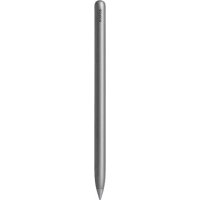
MagicPencil 3 - Digital stylus HONOR - Free user manual and instructions
Find the device manual for free MagicPencil 3 HONOR in PDF.



| Product Type | Digital Stylus |
| Brand | Honor |
| Model | MagicPencil 3 |
| Power Source | Built-in battery, charges by attaching to compatible tablet |
| Connection | Bluetooth 2.4 GHz |
| Main Functions | Writing, drawing, tablet navigation |
| Compatibility | Honor tablets that support stylus attachment |
| Tip Replacement | Yes, removable tip (turn counterclockwise to remove) |
| Operating Temperature | 0°C to 35°C |
| Storage Temperature | -20°C to +45°C |
| Power Saving Modes | Extended standby after inactivity, wake by attaching to tablet |
| Battery Protection | Protection state if unused for a long time, requires 5-10 min charging before reuse |
| Safety | Keep away from medical devices (≥15 cm), do not expose to moisture or excessive heat |
| Maintenance | Clean with a soft cloth, avoid drops |
| Spare Parts | Replacement tips available |
| Repairability | Built-in battery not user-replaceable, contact authorized service center |
| General Information | CE certified, compliant with EU directives (RED, RoHS), indoor use |
Frequently Asked Questions - MagicPencil 3 HONOR
User questions about MagicPencil 3 HONOR
0 question about this device. Answer the ones you know or ask your own.
Ask a new question about this device
Download the instructions for your Digital stylus in PDF format for free! Find your manual MagicPencil 3 - HONOR and take your electronic device back in hand. On this page are published all the documents necessary for the use of your device. MagicPencil 3 by HONOR.
USER MANUAL MagicPencil 3 HONOR
HONOR Magic-Pencil 3
Quick Start Guide
natural_image
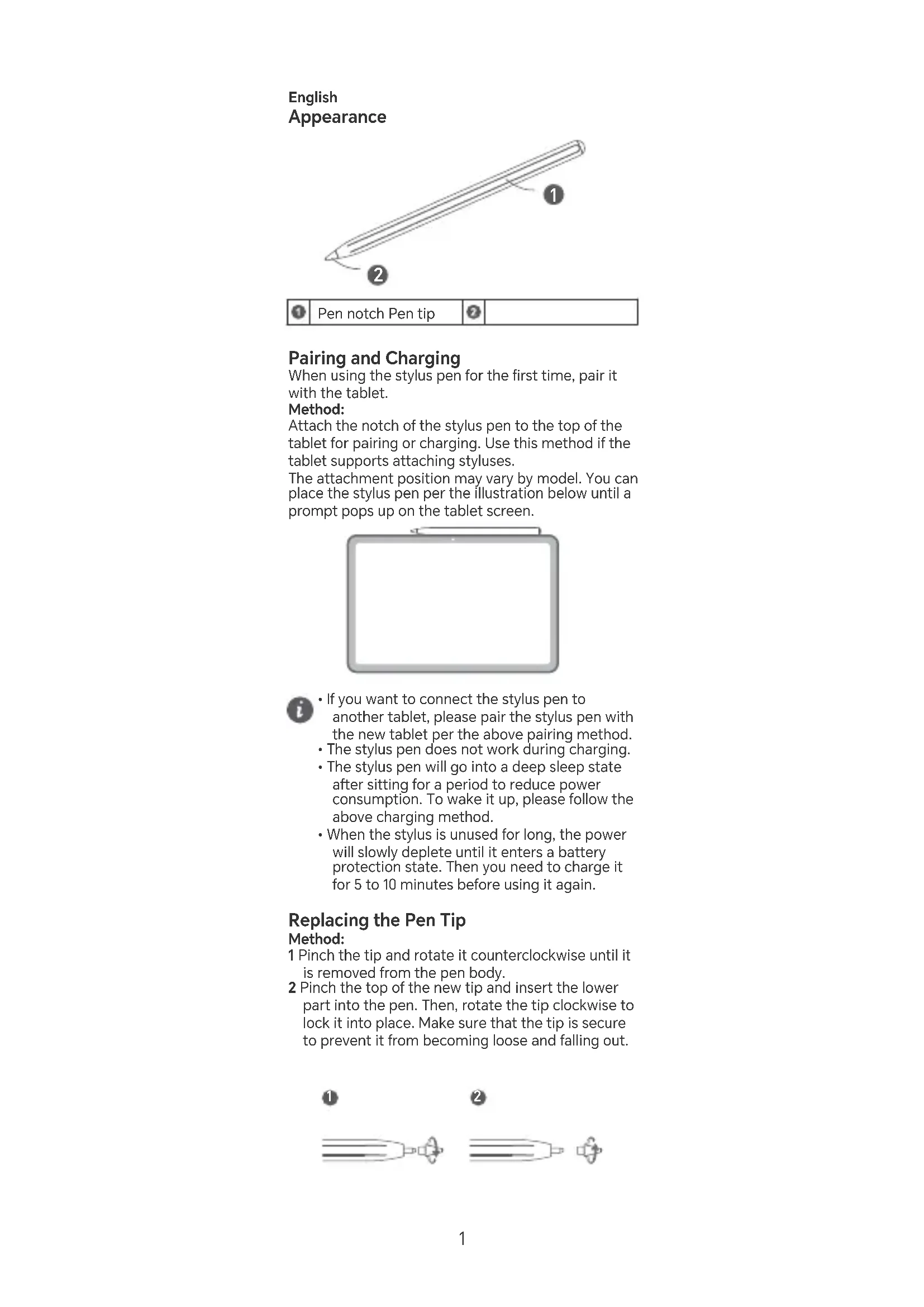
Line drawing of a pencil with two labeled parts (1 and 2), no text or symbols present.
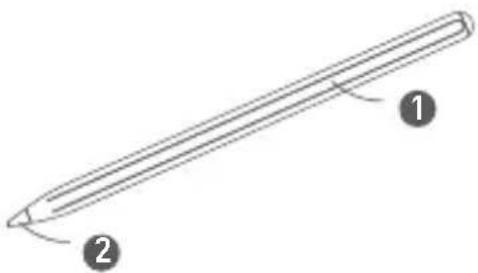
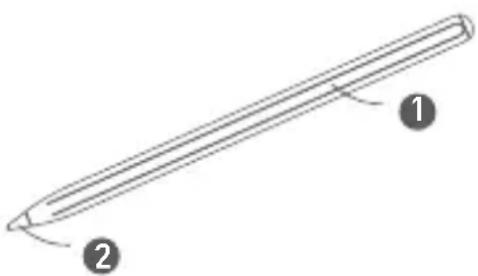
Pen notch Pen tip

Pairing and Charging
When using the stylus pen for the first time, pair it with the tablet.
Method:
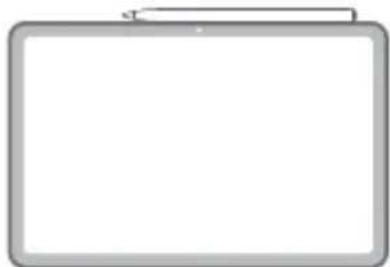
Attach the notch of the stylus pen to the top of the tablet for pairing or charging. Use this method if the tablet supports attaching styluses.
The attachment position may vary by model. You can place the stylus pen per the illustration below until a prompt pops up on the tablet screen.
natural_image
Blank whiteboard with a gray border and top margin (no text or symbols)
- If you want to connect the stylus pen to another tablet, please pair the stylus pen with the new tablet per the above pairing method.
• The stylus pen does not work during charging. - The stylus pen will go into a deep sleep state after sitting for a period to reduce power consumption. To wake it up, please follow the above charging method.
- When the stylus is unused for long, the power will slowly deplete until it enters a battery protection state. Then you need to charge it for 5 to 10 minutes before using it again.
Replacing the Pen Tip
Method:
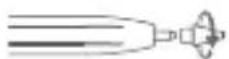
1 Pinch the tip and rotate it counterclockwise until it is removed from the pen body.
2 Pinch the top of the new tip and insert the lower part into the pen. Then, rotate the tip clockwise to lock it into place. Make sure that the tip is secure to prevent it from becoming loose and falling out.


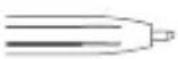


- The pen tip may wear out during daily use, especially when used on a rough protective film.
- Keep the stylus pen carefully to prevent it from dropping and tip damage.
Safety Information
Before using and operating this device, read the following precautions to ensure optimal device performance and avoid dangers or unauthorized operations.
- Some wireless devices may interfere with implantable medical devices and other medical equipment, such as pacemakers, cochlear implants, and hearing aids. When using the product, keep it at least 15 cm away from such medical devices. Consult the manufacturer of your medical equipment for more information.
- Ideal temperatures: 0^ to 35^ for operating, -20^ to +45^ for storage.
- Do not allow children or pets to bite or suck the battery. Doing so may result in damage or explosion.
- Keep this device and its accessories that may contain small components out of the reach of children. Otherwise, children may damage this device and its accessories by mistake, or swallow small components, which may cause choking.
- Do not expose this device and its accessories to rain or moisture, as this is a potential fire hazard and may cause you to experience an electric shock.
- Avoid placing this device or its accessories in environments that are too hot (for example, near heat sources or open flame) or cold as this may cause device malfunctions or even explosions.
- This device contains a built-in battery. Do not attempt to replace the battery by yourself. Otherwise, the device may not run properly or it may damage the battery. For your personal safety and to ensure that your device runs properly, you are strongly advised to contact an authorised service centre for a replacement.
- Keep the device and the battery away from fire, excessive heat and direct sunlight. Do not place them on or in heating devices, such as microwave ovens, water heaters, stoves or radiators.
- Keep the battery away from fire, and do not disassemble, modify, throw, or squeeze it. Do not insert foreign objects into it, submerge it in water or other liquids, or expose it to external force or pressure, as this may cause the battery to leak, overheat, catch fire, or even explode.
- Avoid disassembling or modifying this device and its accessories. Unauthorized disassembly and modifications may result in voiding of the factory warranty. If your device is faulty, visit an Honor or an authorised service centre for assistance.
- Using an unapproved or incompatible power adapter, charger or battery may damage your device, shorten its lifespan or cause a fire, explosion or other hazards.
- Respect local laws on the disposal of this device and its accessories and support recycling efforts.
- Dispose of this device, the battery and accessories according to local regulations. They should not be disposed of in normal household
waste. Improper battery use may lead to fire, explosion or other hazards.
- The charger is designed to be used at a distance larger than 20cm between the user and/or bystander and the antenna and/or radiating element of the product.
Disposal and Recycling Information

The symbol on the product, battery, literature, or packaging means that the products and batteries should be taken to separate waste collection points designated by local authorities at the end of the lifespan. This will ensure that EEE waste is recycled and treated in a manner that conserves valuable materials and protects human health and the environment. For more information, please contact your local authorities, retailer, or household waste disposal service or visit the website https://www.honor.com/.
Reduction of hazardous substances
This device and its electrical accessories comply with local applicable rules on the restriction of the use of certain hazardous substances in electrical and electronic equipment, such as EU REACH regulation, RoHS and Batteries (where included) directive. For declarations of conformity about REACH and RoHS, please visit the website
https://www.honor.com/global/legal/certification/.
RF Exposure Information
This product is a low-power radio transmitter and receiver, its maximum power is less than the exemption limits for SAR evaluation, the SAR testing is not required. It complies with the applicable national and international standards for exposure to radio waves.
EU Regulatory Compliance
Hereby, Honor Device Co., Ltd. declares that this device AD54s is in compliance with the following Directive: RED 2014/53/EU, RoHS 2011/65/EU. The full text of the EU declaration of conformity, and most recent information about accessories & software are available at the following internet address: https://www.honor.com/global/legal/certification/. This device may be operated in all member states of the EU.
Observe national and local regulations where the device is used.
This device may be restricted for use, depending on the local network.
UK Regulatory Compliance
Hereby, Honor Device Co., Ltd. declares that this device AD54s is in compliance with the following Regulations: Radio Equipment Regulations 2017, The Restriction of the Use of Certain Hazardous Substances in Electrical and Electronic Equipment Regulations 2012. The full text of the UK declaration of conformity, and most recent information about accessories & software are available at the following internet address:
https://www.honor.com/global/legal/certification/.
Frequency Bands and Power
The frequency bands and transmitting power (radiated and/or conducted) nominal limits applicable to this radio equipment are as follows: Bluetooth 2.4GHz: 10dBm
Legal Notice
Copyright © Honor Device Co., Ltd. 2024. All rights reserved.
The Bluetooth ^® word mark and logos are registered trademarks owned by Bluetooth SIG, Inc. and any use of such marks by Honor Device Co., Ltd. is under licence.
ALL PICTURES AND ILLUSTRATIONS IN THIS GUIDE, INCLUDING BUT NOT LIMITED TO THE DEVICE COLOUR, SIZE, AND DISPLAY CONTENT, ARE FOR YOUR REFERENCE ONLY. THE ACTUAL DEVICE MAY VARY. NOTHING IN THIS GUIDE CONSTITUTES A WARRANTY OF ANY KIND, EXPRESS OR IMPLIED.
Privacy Policy
To better understand how we protect your personal information, please see the privacy policy at https://www.honor.com/privacy-policy/worldwide/.
Français
Apparence
natural_image
Line drawing of a pencil with two labeled parts (1 and 2), no text or symbols present.
Encoche du stylet Pointe du stylet
natural_image
Blank whiteboard with a gray border and a small pen on top (no text or symbols)
natural_image
Line drawing of a pencil with two labeled parts (1 and 2), no text or symbols present.
natural_image
Blank whiteboard with gray border (no text or symbols)
https://www.honor.com/global/legal/certification/.
natural_image
Line drawing of a pencil with two labeled parts (1 and 2), no text or symbols present.
natural_image
Blank whiteboard with a gray border and a small pen on top (no text or symbols)
https://www.honor.com/privacy-policy/worldwide/.
Español
Aspecto
natural_image
Line drawing of a pencil with two labeled parts (1 and 2), no text or symbols present.Enlace y carga
natural_image
Blank whiteboard with gray border and paper clip (no text or symbols)i
https://www.honor.com/global/legal/certification/.
natural_image
Line drawing of a pencil with two labeled parts (1 and 2), no text or symbols present.
Takuk pen Hujung per

natural_image
Blank whiteboard with a gray border and top margin (no text or symbols)
natural_image
Line drawing of a pencil with two labeled parts (1 and 2), no text or symbols present.
筆身平面 筆尖


配對與充電
https://www.honor.com/global/legal/certification/。
射頻能量暴露情況
natural_image
Line drawing of a pencil with two labeled parts (1 and 2), no text or symbols present.
natural_image
Blank whiteboard with gray border (no text or symbols)https://www.honor.com/tr/support/ https://www.honor.com/tr/privacy-policy/
Yetkili Servisler:
KVK Teknik Servis Bakırköy
Adres: Kartaltepe Mah. İncirli Cad. İhsan Kalmaz SokakNo: 3/1-2 Bakırköy / İstanbul
Web: https://www.kvkteknikservis.com/
Suite 3401, Unit A, Building 6, Shum Yip Sky
Park, No. 8089, Hongli West Road, Xiangmihu Street, Futian District,
Shenzhen, Guangdong 518040, People's Republic of China
Tel: +86-755-61886688
Web: www.honor.com
Çin'de üretilmiştir
https://www.honor.com/global/legal/certification/
Web:https://www.honor.com/tr/
Yasal Uyarı
Telif Hakki © Honor Device Co., Ltd. 2024. Tüm
hakları saklıdır.
natural_image
Line drawing of a pencil with two labeled parts (1 and 2), no text or symbols present.natural_image
Blank whiteboard with a gray border and top margin (no text or symbols)i
natural_image
Diagram showing two stages of a mechanical or fluidic device with no visible text or symbols
natural_image
Line drawing of a pencil with two labeled parts (1 and 2), no text or symbols present.
Kalam oйығы Калам

natural_image
Blank whiteboard with a gray border and a small pen on top (no text or symbols)natural_image
Diagram showing two stages of a cylindrical object with internal components, labeled 1 and 2 (no text or symbols present)Suite 3401, Unit A, Building 6, Shum Yip Sky
Park, No. 8089, Hongli West Road, Xiangmihu Street, Futian District,
Shenzhen, Guangdong, 518040, People's Republic of China.
Honor Device Co., Ltd., 518040, Кытай Халык
Республикасы, Гуандун провинциясы, Шэньчжэнь каласы, Футянь ауданы, Сянмиху кешесі, Хунли-Батыс жолы, № 8089, Shenye Skypark, 6-ғимарат, 3401 люкс блогында орналаскан.