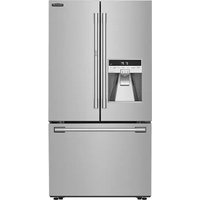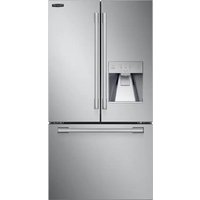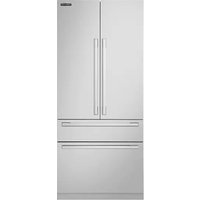
SFM3700XAQUA - Fridge SIGNATURE - Free user manual and instructions
Find the device manual for free SFM3700XAQUA SIGNATURE in PDF.


| Product type | Freestanding refrigerator |
| Brand | Signature |
| Model | SFM3700XAQUA |
| Dimensions (H x W x D) | 1850 x 595 x 625 mm |
| Total volume | 373 L |
| Energy efficiency class | F |
| Annual energy consumption | 149 kWh/year |
| Noise level | 41 dB(A) - Class C |
| Refrigerant | R600a (40 g) |
| Supply voltage | 220-240 V ~ 50 Hz |
| Rated current | 2.0 A |
| Interior lighting | LED |
| Defrost | Automatic |
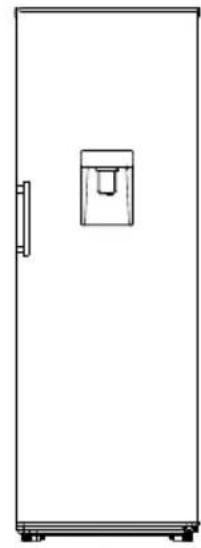
| Water dispenser | Yes, with 2 L tank |
| Super cool function | Yes |
| Door alarm | Yes |
| Reversible door hinge | Possible (left/right) |
| Shelves | Glass (multiple levels) |
| Vegetable drawer | Yes |
| Adjustable feet | Yes |
| Climate class | N/ST (16°C to 38°C) |
| Use | Household only |
| Warranty | 2 years |
| Spare parts availability | 5 years |
Frequently Asked Questions - SFM3700XAQUA SIGNATURE
User questions about SFM3700XAQUA SIGNATURE
0 question about this device. Answer the ones you know or ask your own.
Ask a new question about this device
Download the instructions for your Fridge in PDF format for free! Find your manual SFM3700XAQUA - SIGNATURE and take your electronic device back in hand. On this page are published all the documents necessary for the use of your device. SFM3700XAQUA by SIGNATURE.
USER MANUAL SFM3700XAQUA SIGNATURE
natural_image
Exterior view of a stainless steel refrigerator with a water dispenser (no visible text or symbols beyond branding)SIGN ≤ TURE
RÉFRIGÉRATEUR 1 PORTE
SFM3700X AQUA
TABLE DES MATIERES
text_image
Warning sign depicting a flame symbol in yellow and black on white backgroundnatural_image
Pure electrical circuit lines without any symbolsnatural_image
Technical diagram showing a mechanical assembly with a rectangular block and a cylindrical component, connected by an angle indicator (no text or symbols present)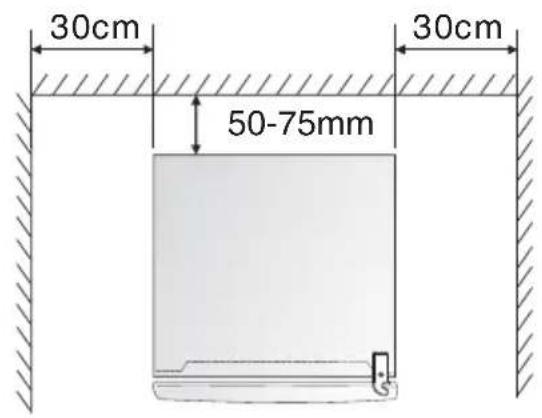
text_image
30cm 50-75mm 30cmtext_image
-88°C + - - - -natural_image
Simple line drawing of a refrigerator with a labeled inset showing the number 8 (no text or symbols on the main diagram)Figure 1
text_image
10 8 9Figure 2 Figure 3
natural_image
Simple line drawing of a rectangular refrigerator with a small side panel (no text or symbols)DISTRIBUTEUR D'EAU
natural_image
Simple line drawing of a rectangular container with a handle and top slot (no text or symbols)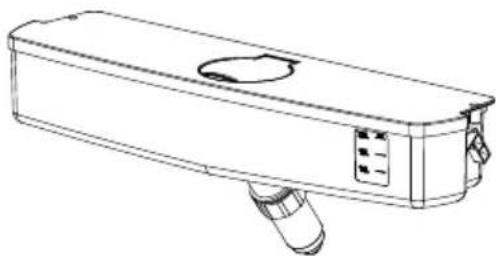
natural_image
Line drawing of a rectangular electronic device with a circular vent and handle (no text or symbols)natural_image
Exterior view of a stainless steel water dispenser appliance (no visible text or symbols on the device body)SIGN ≤ TURE
1 DOOR
FRIDGE
SFM3700X AQUA
TABLE OF CONTENTS
Important safety instructions - 38 -
Structure illustration - 44 -
Transport and handing - 45 -
Installation - 45 -
First use -46-
Display controls -47-
Storage of food - 49 -
Helpful hints and tips -52-
Cleaning and care - 53 -
Door reverse - 55 -
Water dispenser - 58 -
Coldest zone in the refrigerator - 60 -
Technical specifications - 62 -
Troubleshooting - 65 -

This product is for household use only!
Please read these instructions carefully before the first use of this product and save this manual for your future reference.
IMPORTANT SAFETY INSTRUCTIONS
This warning is only for EUROPEAN market only!
When using an electrical appliance, basic precautions should always be followed, including the following:
- This appliance can be used by children aged from 8 years and above and persons with reduced physical, sensory or mental capabilities or lack of experience and knowledge if they have been given supervision or instruction concerning use of the appliance in a safe way and understand the hazards involved. Children shall not play with the appliance. Cleaning and user maintenance shall not be made by children without supervision.
- Children aged from 3 to 8 years are allowed to load and unload refrigerating appliances.
- If the supply cord is damaged, it must be replaced by the manufacturer, its service agent or similarly qualified persons in order to avoid a hazard.
- WARNING: Keep ventilation openings, in the appliance enclosure or in the built-in structure, clear of obstruction.
- WARNING: Do not use mechanical devices or other means to accelerate the defrosting process,
other than those recommended by the manufacturer.
- WARNING: Do not damage the refrigerant circuit.
- WARNING: Do not use electrical appliances inside the food storage compartments of the appliance, unless they are of the type recommended by the manufacturer.
- Do not store explosive substances such as aerosol cans with a flammable propellant in this appliance.
- This appliance is intended to be used in household and similar applications such as
- staff kitchen areas in shops, offices and other working environments;
- farm houses and by clients in hotels, motels and other residential type environments;
- bed and breakfast type environments;
– catering and similar non-retail applications.
- Placed the appliance against a wall with a free distance not exceeding 75 mm and more than 50mm
- WARNING: When positioning the appliance, ensure the supply cord is not trapped or damaged.
- WARNING: Do not locate multiple portable socket-outlets or portable power supplies at the rear of the appliance.
- To avoid contamination of food, please respect the following instructions:
- Opening the door for long periods can cause a significant increase of the temperature in the compartments of the appliance.
- Clean regularly surfaces that can come in contact with food and accessible drainage systems.
- Clean water tanks if they have not been used for 48h; flush the water system connected to a water supply if water has not been drawn for 5 days.
- Store raw meat and fish in suitable containers in the refrigerator, so that it is not in contact with or drip onto other food.
- Two-star frozen-food compartments are suitable for storing pre-frozen food, storing or making ice cream and making ice cubes.
- One-, two- and three-star compartments are not suitable for the freezing of fresh food.
- If the refrigerating appliance is left empty for long periods, switch off, defrost, clean, dry, and leave the door open to prevent mould developing within the appliance.
-
Unplug the appliance from outlet when not in use, before putting on or taking off parts, before cleaning.
-
Make sure to place the plug all the way into socket when connecting your appliance.
-
Insert the plug into a single grounded socket.
-
Never use the appliance in place where combustible and inflammable materials are kept.
-
For safety reason, be sure to repair or replace parts at an authorized service dealers.
-
The motor is permanently lubricated and will require no oil.
-
The appliance must be positioned so that the plug is accessible.
-
Please according to local regulations regarding disposal of the appliance for its flammable blowing gas. Before you scrap the appliance, please take off the doors to prevent children trapped.
-
Ensure the refrigerator is unplugged before cleaning or if the product is not in use.
-
To clean the appliance use only mild detergents or glass cleaning products. Never use harsh
detergents or solvents.
-
It is not recommended to use this refrigerator with an extension cord or power board. Please ensure that the appliance is plugged directly into the electrical outlet.
-
Do not place hot food or drink into the refrigerator before it cools down to room temperature.
-
Close the door immediately after putting in any items so the inside temperature will not rise dramatically.
-
Keep appliance away from any heat source or direct sunlight.
-
To fix stably, the appliance must be placed on a flat and solid surface. It should not be laid on any soft material.
-
Do not place any other appliance on top of the refrigerator, and do not wet it.
-
To avoid injury or death from electrical shock do not operate the appliance with wet hands, while standing on a wet surface or while standing in water.
-
Do not use outdoors or in wet conditions.
-
Never pull the cord to disconnect it from the outlet. Grasp the plug and pull it from the outlet.
-
Keep the cord away from heated surfaces.
-
Check that the voltage of the power supply in your home is the same as the voltage shown on the rating label of this product.
-
Connect your refrigerator to an independent electrical socket and use a safe ground wire.
-
When the frost in freezer is removed, or when there is no electricity or when refrigerator ceases to be used, it should be cleaned in order to prevent it from smelling.
-
Defrost the freezer at least once a month because too much frost may affect refrigeration.
- Turn on electricity only 5 minutes later after electricity goes off. Otherwise, the compressor may be damaged.
- Children should be supervised to ensure that they do not play with the appliance.
- The appliance is not intended to be operated by means of an external timer or a separate remote-control system.
- This appliance has been incorporated with a grounded plug. Please ensure the wall outlet in your house is well earthed.
- It is recommended to check regularly the supply cord for any sign of possible deterioration, and the appliance should not be used if the cable is damaged.
- Regarding the information for replacing of the lamps of the appliance, thanks to refer to the paragraph “CLEANING AND CARE” of the manual.
- Regarding the information pertaining to the installation, handing, maintenance, servicing and disposal of the appliance, thanks to refer to the paragraph "TRANSPORT AND HANDING" "INSTALLATION" "CLEANING AND CARE" "TROUBLESHOOTING" of the manual.
- Disposal of the appliance: To prevent possible harm to the environment or human health from uncontrolled waste disposal, recycle it responsibly to promote the sustainable reuse of material resources. And the disposal should only be done through public collection points. Old refrigerators can contain CFC that destroy the ozone; contact the waste treatment center nearest your home for more details on the correct procedures for disposal.
text_image
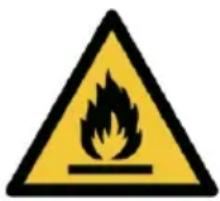
Warning sign depicting a flame symbol in yellow and black on white background- WARNING! Risk of fire – flammable material. Please keep the product far away fire source during using, service and disposal. There are flammable materials at the back of the appliance.
| CORRECT DISPOSAL OF THIS PRODUCT | |
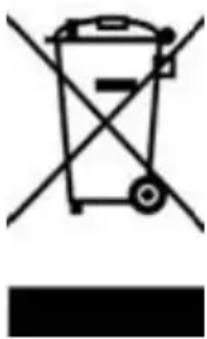 | This marking indicates that this product should not be disposed with other household wastes throughout the EU. To prevent possible harm to the environment or human health from uncontrolled waste disposal, recycle it responsibly to promote the sustainable reuse of material resources. To return your used device, please use the return and collection systems or contact the retailer where the product was purchased. They can take this product for environmental safe recycling. |
We decline liability for any damage or accident derived from any use of this product which is not in conformity with the instructions contained in this booklet.
STRUCTURE ILLUSTRATION
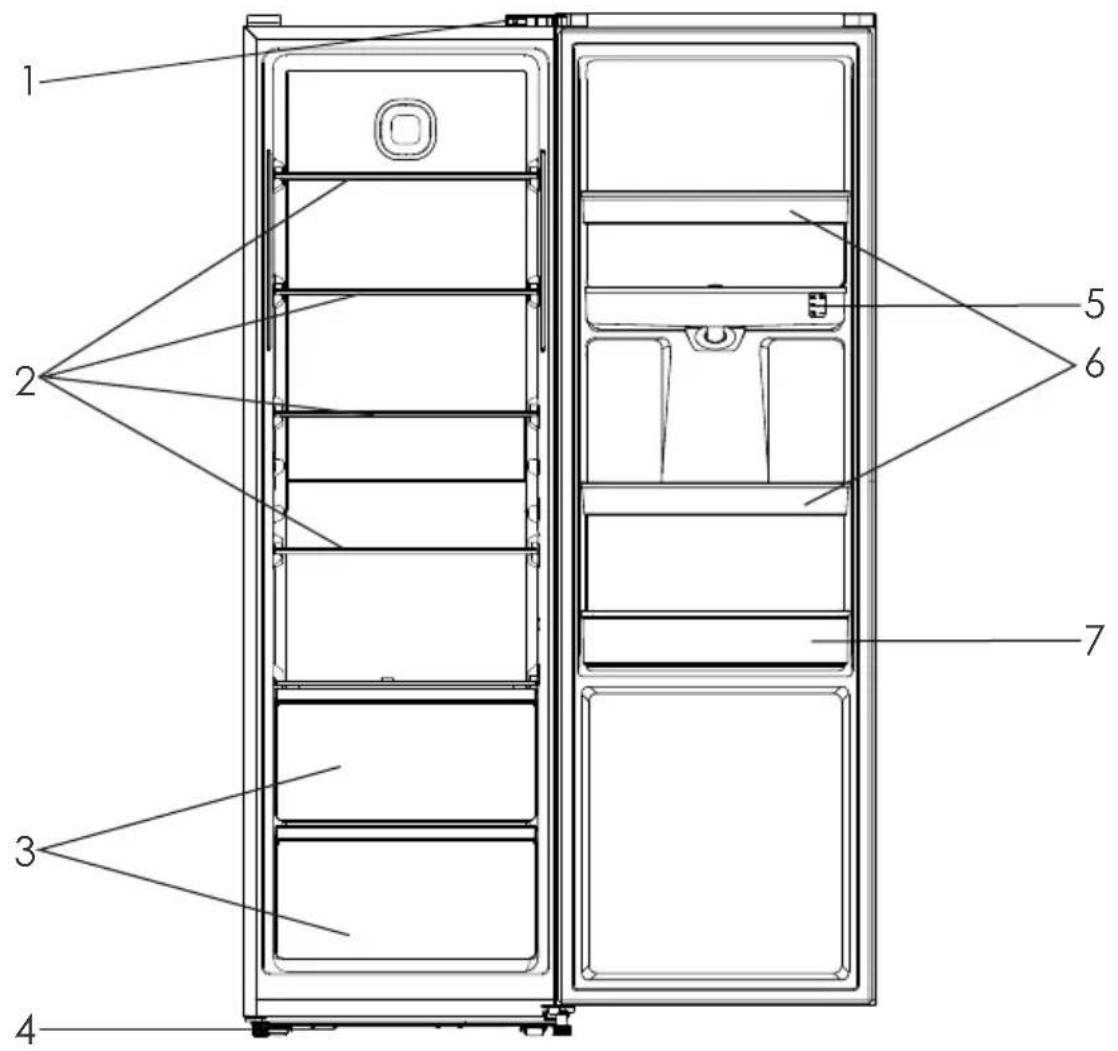
text_image
1 2 3 4 5 6 7- Light switch
- Glass shelves
- Fruits and vegetables crisper
- Adjustable feet
- Water tank
- Balcony
- Bottle rack
Note: The glass shelves and the crisper can be removed and inserted for cleaning and storing of food according to the appliance.
TRANSPORT AND HANDING
When transportation, hold the base and lift the refrigerator carefully with an angle inferior at 45 degree. Never hold the door handle as support. Never place it upside down nor horizontally. Push refrigerator on its basis and place it thanks to its roller feet.
INSTALLATION
This refrigerating appliance is not intended to be used as a built-in appliance.
To fix stably, the appliance must be placed on a flat and solid surface. It should not be laid on any soft material.
Choose a location where there is no heat source. Keep the refrigerator away from direct sunlight or other appliance producing heat.
Choose a dry and well-ventilated place where there is no corrosive air.
In order to improve efficiency of the cooling system and save energy, it is necessary to maintain good ventilation around the appliance for the dissipation of heat. For this reason, sufficient clear space should be available around the refrigerator.
The appliance is supplied with two plastic spacers. After installation of these spacers, the appliance cannot be pushed against the wall to maintain proper ventilation. Insert the spacers into the relevant openings on the back of the appliance, then screw the spacers tightly. Place the appliance against a wall with a free distance that not exceeding 75 mm but more than 50 mm.
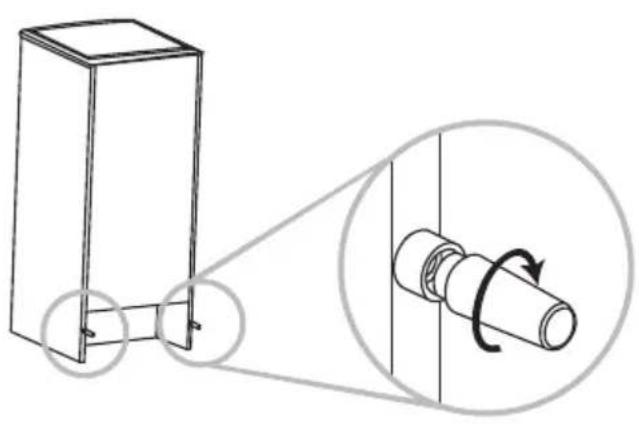
natural_image
Technical diagram showing a 3D box connected to a cylindrical component with a magnified inset illustrating rotational motion (no text or symbols)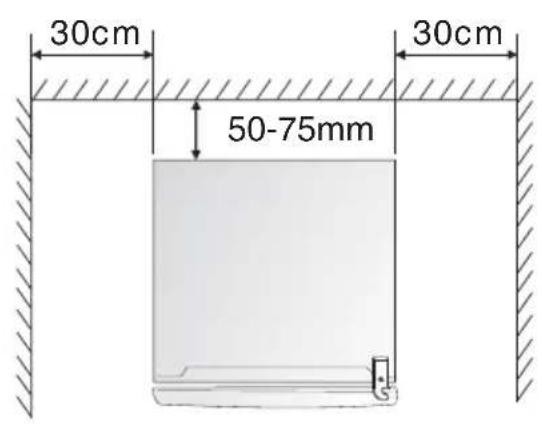
text_image
30cm 50-75mm 30cmFIRST USE
Before the use of the refrigerator, remove all the packages, including bottom cushion and foam pads and rubber belts in the refrigerator.
Adjust the feet and clear the outside and inside of the refrigerator with warm cloth.
Do not start the refrigerator immediately after vertical placement. Only start it after 2-6 hours standing to ensure its proper operation.
To prevent damage to the power cord and any consequence incidents, the power cord should be not covered by the refrigerator or other objects. Before switching on the refrigerator, please check the voltage range of refrigerator carefully if the same as that of the power supply.
When the refrigerator is first installed, allow it stabilize at normal operating temperatures for 2-3 hours prior to filling it with fresh or frozen foods.
If operation is interrupted, wait for 5 minutes before restarting.
DISPLAY CONTROLS
Use your appliance according to the following control regulations, your appliance has the corresponding functions and modes as the control panels showed in the pictures below. When the appliance is powered on for the first time, the display panel turns on but all buttons are locked. The default temperature setting is 5 If °C0 buttons have been pressed and the doors are closed, the display will turn off.
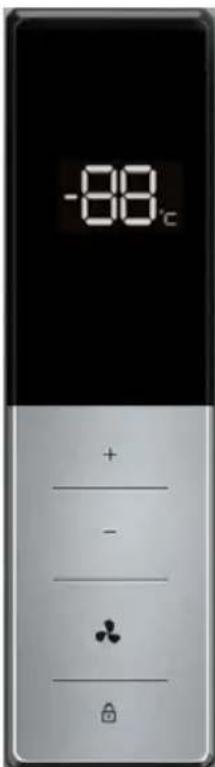
text_image
-88°C + - - ♣Controlling the temperature
We recommend that when you start your appliance for the first time, the temperature is set to 5°C. If you want to change the temperature, follow the instructions below.
Caution! When you set a temperature, you set an average temperature for the whole cabinet. Temperatures inside each compartment may vary from the temperature
values displayed on the panel, depending on how much food you store and where you place them. Ambient temperature may also affect the actual temperature inside the appliance.
Press the “☐” for 3 seconds to unlock the buttons. The display starts to flash. Press “+” and “-” to set the temperature between 2°C and 8°C as needed, and control panel will display corresponding values. After 10s, the display stops flashing and buttons locked with a sound. The setting takes effect. After another 10s, the display turns off.
It's suggested to set 4°C for daily use.
Note: the temperature will impact the storage time of food. Set the temperature as necessary. Warmer will accelerate food spoilage and colder will frozen food bad. Thus food to be wasted.
Super cool
Super cool will quickly lower the temperature within the appliance so food will cool faster. It can lock in the vitamins and nutrients of fresh food and keep food fresh longer.
Press the “💡” for 3 seconds to unlock the buttons. The display starts to flash. Press “♣”, the display shows FC and will take effect after 10s with a sound.
Super cool automatically switches off after 3 hours.
When super cool function is on you can switch off by pressing “♣” when the buttons are unlocked. The temperature setting will revert back to the previous setting.
Power outage
In the event of a power failure, all temperature settings will automatically preserved, unless you change the setting of temperature.
Door Alarm
If the door is opened for over 2 minutes, the door alarm will sound. Buzzer will sound 3 times every 1 minute and will automatically stop alarming 10 minutes later.
To save energy, please avoid keeping the door open for a long time when using the appliance. The door alarm can be cleared by closing the door.
STORAGE OF FOOD
Your appliance has the accessories as the “Structure illustration” showed in general, with this part instruction you can have the right way to storage your food. The glass shelves and crisper can be removed to store food if needed.
Note: Food is not allowed to touch directly all surfaces inside the appliance. It has to be wrapped separately in aluminum sheet or in cellophane sheet or in airtight plastic boxes.
Storing food in the refrigerator compartment
The fridge freezer compartment helps to extend the storage times of fresh perishable foods.
Fresh food care for best results:
- Store foods that are very fresh and of good quality.
- Ensure that food is well wrapped or covered before it is stored. This will prevent food from dehydrating, deteriorating in colour or losing taste and will help maintain freshness. It will also prevent odour transfer. Vegetables and fruit need not be wrapped if they are stored in the vegetable container of the fridge compartment.
- Make sure that strong smelling foods are wrapped or covered and stored away from foods such as butter, milk and cream which can be tainted by strong odours.
- Cool hot foods down before placing them in the fridge compartment.
Dairy foods and eggs
- Most pre-packed dairy foods have a recommended 'use by /best before/best by/ date stamped on them.
Store them in the fridge compartment and use within the recommended time. - Butter can become tainted by strong smelling foods so it is best stored in a sealed container.
- Eggs should be stored in the fridge compartment.
Red meat
- Place fresh red meat on a plate and loosely cover with waxed paper, plastic wrap or foil.
- Store cooked and raw meat on separate plates. This will prevent any juice lost from the raw meat from contaminating the cooked product.
Poultry
- Fresh whole birds should be rinsed inside and out with cold running water, dried and placed on a plate. Cover loosely with plastic wrap or foil.
- Poultry pieces should also be stored this way. Whole poultry should never be stuffed until just before cooking, otherwise food poisoning may result.
Fish and seafood
- Whole fish and fillets should be used on the day of purchase. Until required, refrigerate on a plate loosely covered with plastic wrap, waxed paper or foil.
- If storing overnight or longer, take particular care to select very fresh fish. Whole fish should be rinsed in cold water to remove loose scales and dirt and then patted dry with paper towels. Place whole fish or fillets in a sealed plastic bag.
- Keep shellfish chilled at all times. Use within 1-2 days.
Precooked foods and leftovers
- These should be stored in suitable covered containers so that the food will not dry out.
- Keep for only 1-2 days.
- Reheat leftovers only once and until steaming hot.
Vegetable container
- The vegetable container is the optimum storage location for fresh fruit and vegetables.
- Take care not to store the following at temperatures of less than 7°C for long periods: Citrus fruit, melons, aborigines, pineapple, papaya, curettes, passion fruit, cucumber, peppers, tomatoes.
- Undesirable changes will occur at low temperatures such as softening of the flesh, browning and/or accelerated decaying.
- Do not refrigerate avocados (until they are ripe), bananas and mangoes.
| Food | Location |
| Butter, cheese | Upper door rack |
| Eggs | Door rack |
| Fruit, vegetables, salad | Crisper |
| Meat, sausage, cheese, milk | Lower area (lowest shelf / crisper cover) |
| Dairy products, canned food, cans | Upper area or door rack |
| Drinks, bottles, tubes | Door rack |
This refrigerating appliance is not suitable for freezing foodstuffs.
We recommend that you follow the tips below to save energy.
- Try to avoid keeping the door open for long periods in order to conserve energy.
- Ensure the appliance is away from any sources of heat(Direct sunlight, electric oven or cooker etc)
- Don't set the temperature colder than necessary.
- Don't store warm food or evaporating liquid in the appliance.
- Place the appliance in a well ventilated, humidity free room. Please refer to Installing your new appliance chapter.
- The “STRUCTURE ILLUSTRATION” shows the correct combination for the drawers, crisper and shelves, do not adjust the combination as this is designed to be the most energy efficient configuration.
Hints for fresh food refrigeration
- Do not place hot food directly into the refrigerator or freezer, the internal temperature will increase resulting in the compressor having to work harder and will consume more energy.
- Do cover or wrap the food, particularly if it has a strong flavor.
- Place food properly so that air can circulate freely around it.
Hints for refrigerator
- Meat (All Types) Wrap in polythene food: wrap and place on the glass shelf above the vegetable drawer. Always follow food storage times and use by dates suggested by manufacturers.
-
Cooked food, cold dishes, etc.: They should be covered and may be placed on any shelf.
-
Fruit and vegetables: They should be stored in the special drawer provided.
- Butter and cheese: Should be wrapped in airtight foil or plastic film wrap.
- Milk bottles: Should have a lid and be stored in the door racks.
Switching off your appliance
If the appliance needs to be switched off for an extended period, the following steps should be taken prevent mould on the appliance.
- Remove all food;
- Remove the power plug from the mains socket;
- Clean and dry the interior thoroughly;
- Ensure that all the doors are wedged open slightly to allow air to circulate.
CLEANING AND CARE
For hygienic reasons the appliance (including exterior and interior accessories) should be cleaned regularly at least every two months.
WARNING: The appliance must not be connected to the mains during cleaning. Danger of electrical shock! Before cleaning switch the appliance off and remove the plug from the mains socket.
Exterior cleaning
- To maintain good appearance of your appliance, you should clean it regularly.
- Wipe the digital panel and display panel with a clean, soft cloth.
- Spray water onto the cleaning cloth instead of spraying directly on the surface of the appliance. This
helps ensure an even distribution of moisture to the surface.
- Clean the doors, handles and cabinet surfaces with a mild detergent and then wiped dry with a soft cloth.
Caution!
- Don't use sharp objects as they are likely to scratch the surface.
- Don't use Thinner, Car detergent, Clorox, ethereal oil, abrasive cleansers or organic solvent such as Benzene for cleaning. They may damage the surface of the appliance and may cause fire.
Interior cleaning
You should clean the appliance interior regularly. It will be easier to clean when food stocks are low. Wipe the inside of the fridge freezer with a weak solution of bicarbonate of soda, and then rinse with warm water using a wrung-out sponge or cloth. Wipe completely dry before replacing the shelves and baskets. Thoroughly dry all surfaces and removable parts.
Caution!
- Don't use sharp objects to remove frost from the freezer. Only after the interior completely dry should the appliance be switched back on and plugged back into the mains socket.
Door seals cleaning
Take care to keep door seals clean. Sticky food and drinks can cause seals to stick to the cabinet and tear when you open the door. Wash seal with a mild detergent and warm water. Rinse and dry it thoroughly after cleaning.
Caution!
- Only after the door seals are completely dry should the appliance be powered on.
Replacing the LED light
Warning: The LED light must not be replaced by the user! If the LED light is damaged, contact the customer helpline for assistance.
DOOR REVERSE
The side at which the door opens can be changed, from the left side (as supplied) to the right side, if the installation site requires.
Warning! When reversing the door, the appliance must not be connected to the mains. Ensure that the plug is removed from the mains socket.
Note: Before you start lay the appliance on its back in order to gain access to the base, you should rest it on soft foam packaging or similar material to avoid damaging the backboard. Stand the appliance upright. Open the door to take out all door racks (to avoid racks damaged) and then close the door. To reverse the door, the following steps are generally recommended.
- Screw off the four bolts which in top left with cross opener and take off the cover.
- Screw off the one bolt which in right hinge cover with cross opener and take it off.
- Disconnect the light switch(1) and take it off.
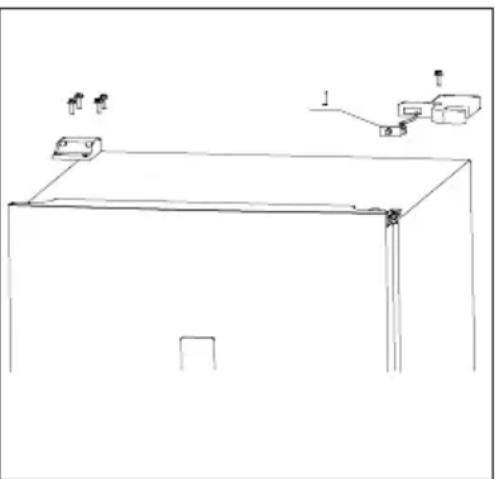
natural_image
Simple line drawing of a cabinet with hanging items and a switch (no text or symbols)| 4. Screw off the three bolts in right hinge and take them off.5. Disconnect the electrical connector.6. Take off the cover on door right(2) and put the wire into the hole and cover it | 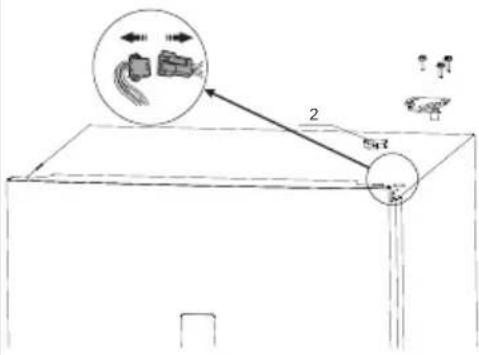 |
| 7. Lift the door upwards to disengage it from the bottom hinge, put the door to one side and lay it down gently on a padded surface. | 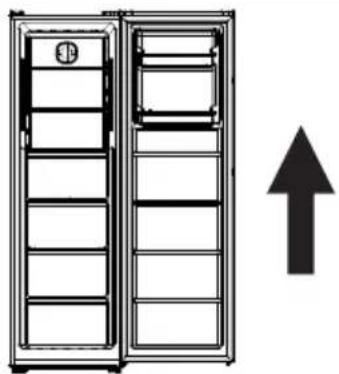 |
| 8. Screw off the bottom hinge part and foot.9. Disassemble the hinge to four parts: (3)foot; (4)nut; (5)hinge; (6)hinge pin. | 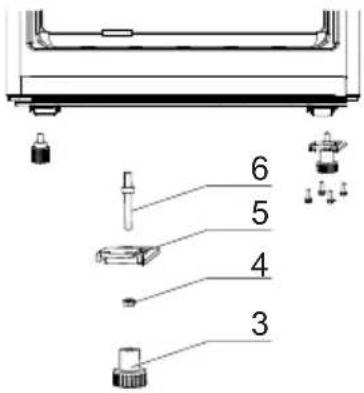 |
| 10. Remove the hinge pin from right hole to left hole and assemble the four parts. | 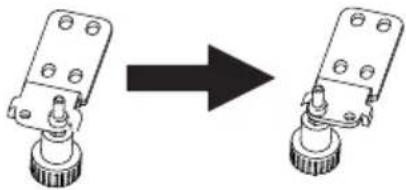 |
| 11. Install back the bottom hinge part in left and foot in right to the appliance. | 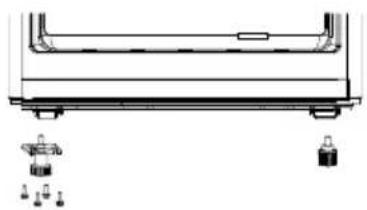 |
| 12. Screw off the block on door bottom right and install it to the bottom left. | 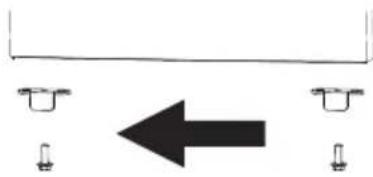 |
| 13. Place the door on the bottom hinge, making sure that the hinge pin is inserted in the hole at the bottom of the door. Install the left hinge(supplied with th appliance) and fix it with screws. | 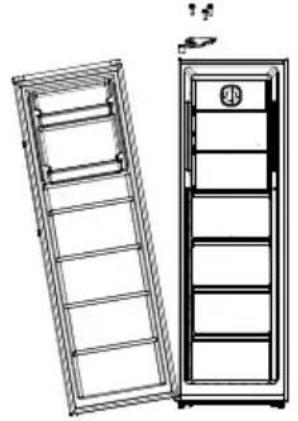 |
| 14. Open the cover on door left(7) and take out the wire. Connect the electrica connector. | 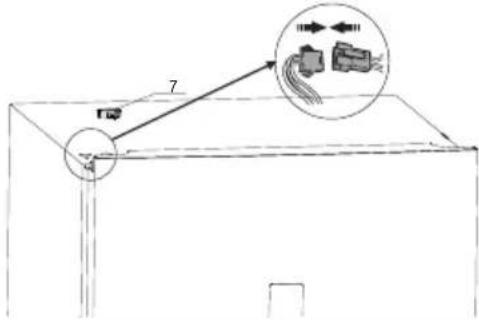 |
| 15. Install the light switch(1) to left hinge cover(supplied with the appliance) and connect the wire. 16. Fix the left hinge cover and the hole cover with screws. | 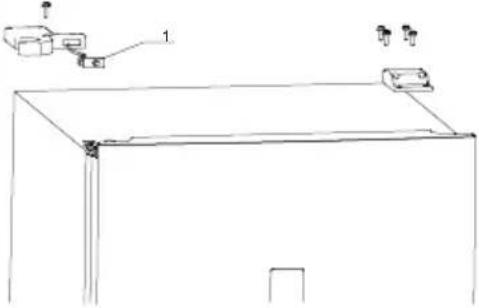 |
Installing the handles
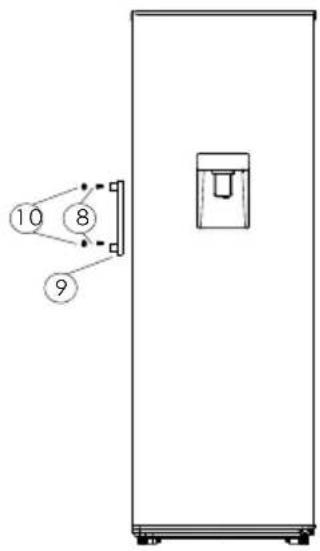
This appliance has been built with external handle, which is in poly bag. Please follow instruction below to install them:
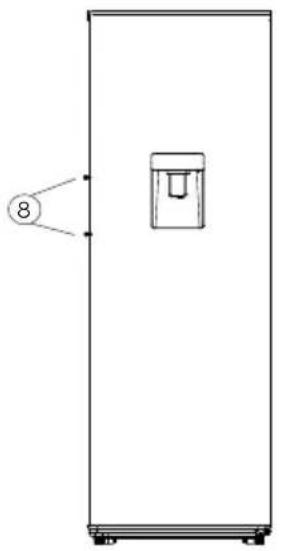
- Remove two screws(8) by a cross screwdriver.
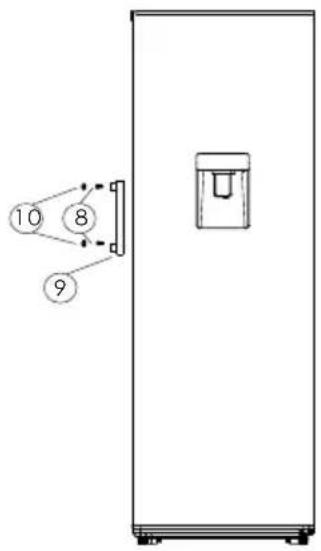
- Take out the handles(9) and fix it with the two screws(8).
- Cover the two screws(8) with two caps(10). The caps are in a small poly bag together with the handles.
Figure 1: Front view without handles
Figure 2: Exploded view of installing the handles
Figure 3: Front view with handles
natural_image
Simple line drawing of a rectangular enclosure with a small container and numbered label (8) pointing to its left side (no text or symbols on the main structure)Figure 1
text_image
10 8 9Figure 2 Figure 3
natural_image
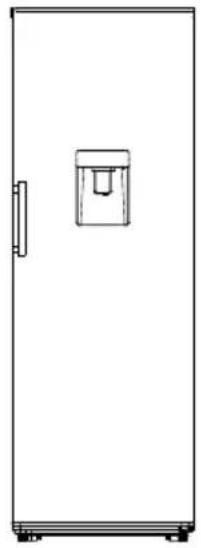
Simple line drawing of a rectangular refrigerator with a small water dispenser on the side (no text or symbols)WATER DISPENSER
The refrigerator is built with water dispenser.
The water dispenser allows access to chilled water without having to open the refrigerator door.
The number of door openings is thus reduced, less cold air is lost from the refrigerator and you save on electricity costs.
natural_image
Simple line drawing of a rectangular container with a handle and top slot (no text or symbols)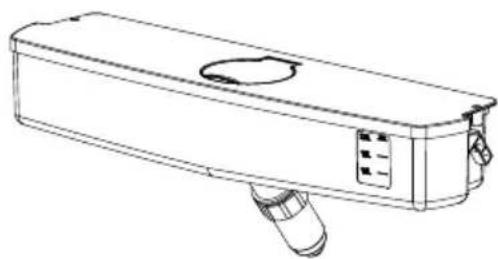
natural_image
Line drawing of a rectangular electronic device with a handle and circular vent, no text or symbols presentFilling the water tank
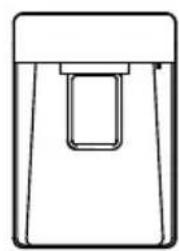
- Open the cap of the water tank.
• Fill with pure and clean drinking water. - Do not overfill the tank. The capacity is 2L.
- Close the cap.
Notes: Do not fill water tank with any liquid other than drinking water. Beverages such as fruit juice, carbonated fizzy soda drinks and alcohol are not suitable for use with the water dispenser. If such liquids are used, the water dispenser may malfunction and be damaged beyond repair. Some chemical ingredients and drink additives may also attack and damage the water tank material. The guarantee does not cover such eventualities.
Using the dispenser
- Push in the lever of the water dispenser with your glass.
- Releasing the lever, stops further dispensing of water.
- Flow rate is dependent on how far the lever is pushed back:
$$ \text { Fully back } = \text { full flow } $$
$$ \text { Gently back } = \text { trickle } $$
- As the level of water in your cup/glass rises, gently reduce the amount of pressure on the lever to avoid overflow.
Lock Function: It has a mechanical device in the groove, move to the left, the plate is locked and no water out.
Notes: Push the water dispenser lever with a rigid cup. If you are using a plastic disposable cup, then push the lever with your fingers from behind the cup.
Clean the water tank
- Take off the cover of water tank. Clean them with warm and clean water and dry them with clean and soft cloth.
• Install them with opposite steps. - To prevent possible leakage, ensure that any parts removed during cleaning are refitted correctly in their original locations.
Notes: The water tank and dispenser components are not dishwasher-proof.
COLDEST ZONE IN THE REFRIGERATOR
This part is not dedicated to the product but for your reference only.
This symbol indicates the location of the coldest zone of the refrigerator. The area is bounded below by the glass crisper, and above by the symbol or the rack positioned at the same height.

To ensure the temperatures in this area, do not change the positioning of the shelf. In forced air refrigerators (equipped with a fan or No Frost models), the symbol of the coldest zone is not represented because the temperature inside is homogeneous.
Temperature indicator setting
To help you set your refrigerator well, it is equipped with a temperature indicator that will monitor the average temperature in the coldest zone.
WARNING: This indicator is intended to work only with your refrigerator, do not use it in another refrigerator (in fact, the coldest zone is not the same), or for any other use.
Checking the temperature in the coldest zone
With the temperature indicator, you can check regularly that the temperature of the coldest zone is correct. Indeed, the internal temperature of the refrigerator depends on several factors such as the ambient temperature of the room, the amount of food stored and
the frequency of door opening. Take these factors into consideration when setting the device.
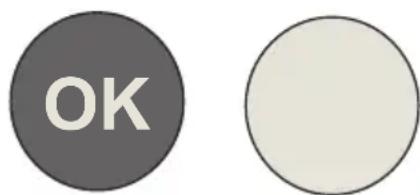
When the indicator shows « OK », this means that your thermostat is well adjusted and the internal temperature correct.
text_image
OKIf the indicator of temperature turns WHITE, this means that the temperature is too high; in this case, increase the refrigerator temperature control setting and wait for 12 hours before performing a new visual inspection of the indicator.
When fresh food has been introduced or the door has been left open, it is possible for the indicator of temperature to turn WHITE after a while.
TECHNICAL SPECIFICATIONS
| General information cooling | |||||
| Supplier's name or trade mark: SIGNATURE | |||||
| Supplier's address: BUT INTERNATIONAL, 1 AVENUE SPINOZA 77184 EMERAINVILLE, FRANCE | |||||
| Model identifier: SFM3700XAQUA | |||||
| Type of refrigerating appliance: | |||||
| Low-noise appliance: | no | Design type: | freestanding | ||
| Wine storage appliance: | no | Other refrigerating appliance: | yes | ||
| General product parameters: | |||||
| Parameter | Value | Parameter | Value | ||
| Overall dimensions (millimetre) | Height | 1850 | Total volume (dm ^3 ou l) | 373 | |
| Width | 595 | ||||
| Depth | 625 | ||||
| EEI | 124.35 | Energy efficiency class F | |||
| Airborne acoustical noise emissions (dB(A) re 1 pW) | 41 | Airborne acoustical noise emission class | C | ||
| Annual energy consumption (kWh/a) 149 Climate class: | temperate/subtropical | ||||
| Minimum ambient temperature (°C), for which the refrigerating appliance is suitable | 16 | Maximum ambient temperature (°C), for which the refrigerating appliance is suitable | 38 | ||
| Winter setting no | |||||
| Compartment Parameters: | |||||
| Compartment type | Compartment parameters and values | ||||
| Compartment Volume (dm ^3 or l) | Recommended temperature setting for optimised food storage (°C) These settings shall not contradict the storage conditions set out in Annex IV, Table 3 | Freezing capacity (kg/24 h) | Defrosting type (auto-defrost = A, manual defrost = M) | ||
| Pantry no | —— — | ||||
| Wine storage no | —— — | ||||
| Cellar no | —— — | ||||
| Fresh food yes | 373 4 — A | ||||
| Chill no — — — — | |||||
| Compartment type | Compartment parameters and values | |||||
| Compartment Volume (dm3 or l) | Recommended temperature setting for optimised food storage (°C) These settings shall not contradict the storage conditions set out in Annex IV, Table 3 | Freezing capacity (kg/24 h) | Defrosting type (auto-defrost = A, manual defrost = M) | |||
| 0-star or ice-making | no | - - - - - | ||||
| 1-star no | - - - - - | |||||
| 2-star no | - - - - - | |||||
| 3-star no | - - - - - | |||||
| 4-star no | - - - - - | |||||
| 2-star section no | - - - - - | |||||
| Variable temperature compartment | no | - - - - - | ||||
| For 4-star compartments | ||||||
| Fast freeze facility No | ||||||
| Light source parameters: | ||||||
| Type of light source LED | ||||||
| Energy efficiency class N/A | ||||||
| Minimum duration of the guarantee offered by the manufacturer: 2 years | ||||||
| Additional information: N/A | ||||||
| Weblink to the manufacturer's website, where the information in point 4(a) Annex of Commission Regulation (EU) 2019/2019 is found: www.but.fr | ||||||
| Reference: | SFM3700XAQUA |
| Rated voltage: | 220-240V~ |
| Ampere: | 2.0A |
| Rated frequency: | 50Hz |
| Climate class: | N/ST |
| Refrigerant: | R600a(40g) |
| Protection against electrical shock: | I |
| Insulation foam: | CYCLOPENTANE |
Climate class:
- Extended temperate(SN): 'this refrigerating appliance is intended to be used at ambient temperatures ranging from 10 °C to 32 °C';
- Temperate(N): 'this refrigerating appliance is intended to be used at ambient temperatures ranging from 16 °C to 32 °C';
- Subtropical(ST): 'this refrigerating appliance is intended to be used at ambient temperatures ranging from 16 °C to 38 °C';
- Tropical(T): 'this refrigerating appliance is intended to be used at ambient temperatures ranging from 16 °C to 43 °C';
Note: More data information, please scan the QR code on the energy label.
TROUBLESHOOTING
If you experience a problem with your appliance or are concerned that the appliance is not functioning correctly, you can carry out some easy checks before calling for service, please see below. You can carry out some easy checks according to this section before calling for service.
Warning! Don't try to repair the appliance yourself. If the problem persists after you have made the checks mentioned below, contact a qualified electrician, authorized service engineer or the shop where you purchased the product.
| Problem | Possible cause & Solution |
| Appliance is not working correctly | Check whether the power cord is plugged into the power outlet properly. |
| Check the fuse or circuit of your power supply, replace if necessary. | |
| The ambient temperature is too low. Try setting the chamber temperature to a colder level to solve this problem. | |
| Appliance is not working correctly | It is normal that the freezer is not operating during the automatic defrost cycle, or for a short time after the appliance is switched or to protect the compressor. |
| Odors from the appliance | The interior may need to be cleaned. |
| Some food, containers or wrapping caus odors. | |
| Noise from the appliance | The sounds below are quite normal:Compressor running noises.Air movement noise from the small fan motor in the freezer compartment or oth compartments.Gurgling sound similar to water boiling.Popping noise during automatic defrosting.Clicking noise before the compressor starts. |
| Other unusual noises are due to the reasons below and may need you to check and take action:The cabinet is not level.The back of appliance touches the wall.Bottles or containers fallen or rolling. | |
| The motor runs continuously | It is normal to frequently hear the sound of the motor, it will need to run more when in following circumstances:Temperature setting is set colder than necessaryLarge quantity of warm food has recently been stored within the appliance.The temperature outside the appliance is too high.Doors are kept open too long or too often After your installing the appliance or it has been switched off for a long time. |
| A layer of frost occurs in the appliance | Check that the air outlets are not blocked by food and ensure food is placed within the appliance to allow sufficient ventilation.Ensure that door is fully closed. To remove the frost, please refer to cleaning and care chapter. |
| Temperature inside is too warm | You may have left the doors open too long or too frequently; or the doors are kept open by some obstacle; or the appliance is located with insufficient clearance at the sides, back and top. |
| Temperature inside is too cold | Increase the temperature by following the “Display controls” chapter. |
| Doors can't be closed easily | Check whether the top of the refrigerator is tilted back by 10-15mm to allow the doors to self close, or if something inside is preventing the doors from closing. |
| Water drips on the floor | The water pan(located at the rear bottom of the cabinet)may not be properly positioned to direct water into this pan, or the water spout is blocked. You may need to pull the refrigerator away from the wall to check the pan and spout. |
| The light is not working | The LED light may be damaged. Refer to replace LED lights in cleaning and care chapter.The control system has disabled the light due to the door being kept open too long close and reopens the door to reactivate the light. |
Note:
- In accordance with Article L. 217 of the Consumer Code, your product has 2 year legal guarantee of conformity.
• Period of availability of repair spare parts: 5 years. - To contact our After-Sales Service, before going to BUT store, call 09 78 97 97 97, from Monday to Saturday from 8:00 a.m. to 8:00 p.m. (Price of a local call).