OD5010 - Color sensor IFM - Free user manual and instructions
Find the device manual for free OD5010 IFM in PDF.



| Product Type | Color sensor |
| Brand | IFM |
| Model | OD5010 |
| Category | Color detector |
| Detection technology | Direct reflection or reflection on reflector |
| Range | 12.5 mm (or up to several meters with reflector) |
| Number of switching outputs | 1 or 3 (depending on variant) |
| Supply voltage | 18...30 V DC |
| Power consumption | < 50 mA (without load) |
| Response time | < 0.2 ms |
| Dimensions (L x W x H) | 96 x 28 x 80 mm |
| Weight | Approx. 150 g |
| Housing material | Plastic (according to IFM standard) |
| Protection rating | IP67 (estimated) |
| Teach function | Teach button to store reference color |
| Color tolerance adjustment | 5-position rotary switch (1: low tolerance, 3: basic setting, 5: high tolerance) |
| LED indicators | Power LED (on) and function LED (output active) |
| Electrical connection | M12x1 connector (5 or 8 pins depending on version) |
| Operating temperature | 0...+60 °C (estimated) |
| Included accessories | User manual, optional reflector (not supplied) |
Frequently Asked Questions - OD5010 IFM
User questions about OD5010 IFM
0 question about this device. Answer the ones you know or ask your own.
Ask a new question about this device
Download the instructions for your Color sensor in PDF format for free! Find your manual OD5010 - IFM and take your electronic device back in hand. On this page are published all the documents necessary for the use of your device. OD5010 by IFM.
USER MANUAL OD5010 IFM
natural_image
Simple line drawing of a rectangular object with a bolt and three circular holes, no text or symbols present.natural_image
Pure mechanical diagram showing a lever mechanism with arrows and circles, no text or symbols present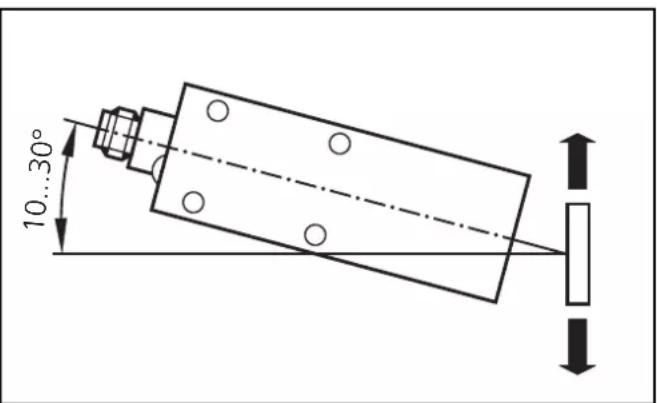
Functions and features
The colour sensor detects coloured objects and materials without contact in diffuse-reflection or retro-reflective mode.
Mounting
natural_image
Pure mechanical diagram showing a lever mechanism with arrows and circles, no text or symbols present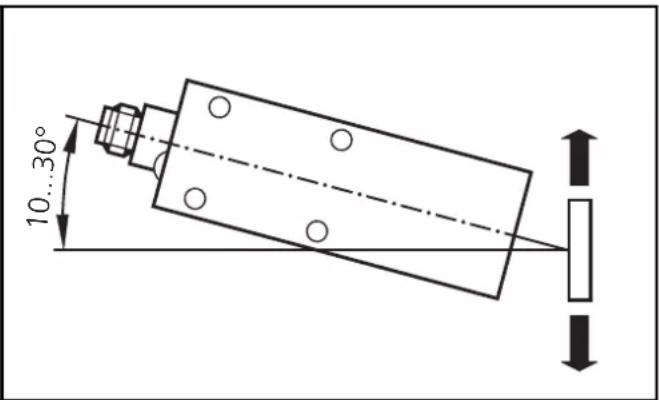
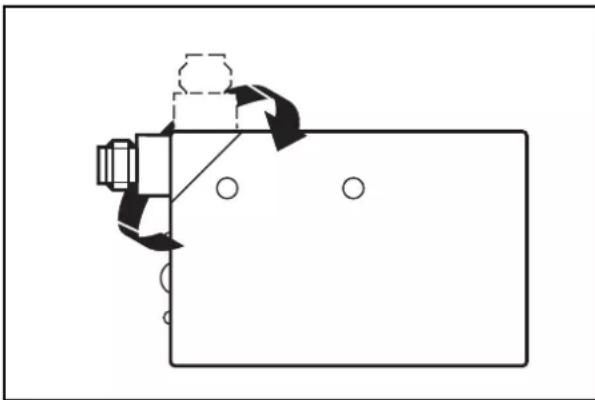
Mount the colour sensor in such a way that the object to be detected makes as little lateral and vertical movement as possible. Consider the specified sensing range.
Transparent objects can be better detected by means of a suitable reflector. Mount the reflector opposite the colour sensor so that the light beam strikes the centre of the reflector.
In the case of moving objects the direction of movement should be transverse to the sensor to achieve optimum repeatability (this only applies to sensors with a sensing range of 12.5 mm).
In the case of shiny object surfaces the sensor should be mounted at an angle of inclination of 10 ... 30° referred to the object.
Electrical connection

Disconnect power and connect the sensor as indicated on the type label.
The input AT (activation trigger = synchronising signal) can be used for triggering the sensor via an external voltage signal.
Sensor deactivated: 12 V < AT < U Vmax
Sensor activated: AT ≤2 V or unused
Response time: < 0.2 ms
The input ET (External Teach) can be used for programming the reference colour for the output out1 via an external voltage signal.
Activate teach-in: 12 V < ET < U Vmax
RUN mode: ET ≤2 V or unused
Pulse duration: 0.5ms
Controls and indicators
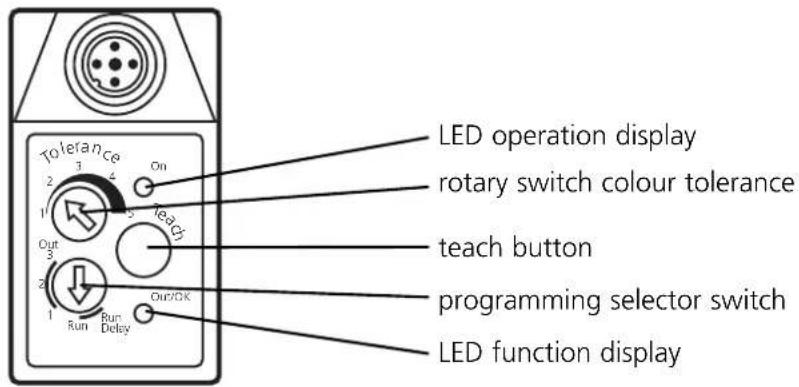
Setting and programming
| 1 | 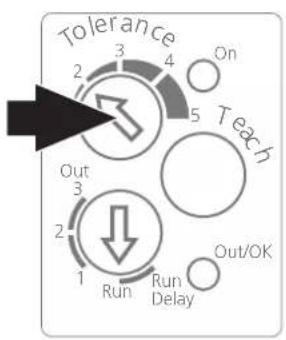 | Set the rotary switch colour tolerance (Tolerance) to the requested colour resolution.1 = small tolerance range for detecting small colour shades3 = basic setting5 = large tolerance range for detecting colour families or colour groups |
| 2 | 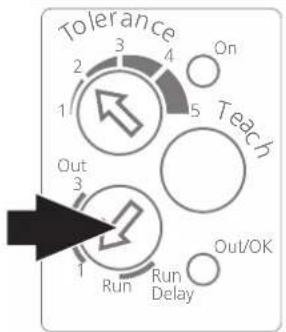 | Set the programming selector switch to the colour channel to be adjusted (switching output Out1, Out2 or Out3).For units with only one switching output set the programming selector switch to Out1. |
| 3 | 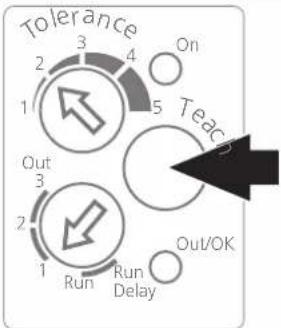 | Press the Teach button.A red light spot shows on the object.Release the Teach button, the light spot disappears. |
| 4 | 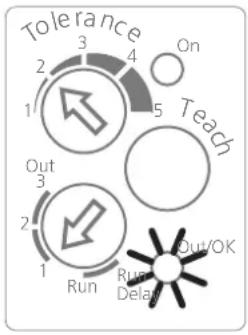 | After a successful teach-in operation the function display (Out/OK) comes on. If it flashes, the intensity is too high. Incline the sensor by 10 ... 30° and repeat the teach-in operation.If the function display is not lit, the intensity is too low. Select a lighter mark.Only for retro-reflective modeIf the function display flashes, increase the distance sensor/object or sensor/reflector or use a smaller reflector.If the function display is not lit, reduce the distance sensor/object or sensor/reflector or use a larger reflector. |
| 5 | 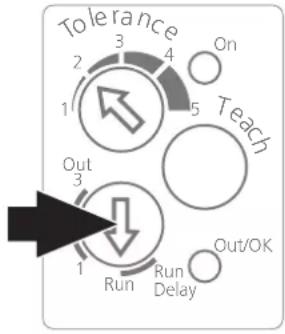 | Set the programming selector switch to Run or Run Delay (20 ms switch-off delay).For sensors with several switching outputs repeat the programming for the other switching outputs accordingly.The colour tolerance can be individually determined for each switching output.The sensor is ready for operation.If the switching output is activated, the function display is lit (Out/OK).If the tolerance setting is to be changed subsequently, programming must be made again with the tolerance setting changed. |
Programmation: 12 V < ET < U Vmax
Brand : IFM
Model : OD5010
Category : Color sensor