S380 HomeBase - Surveillance Camera eufy - Free user manual and instructions
Find the device manual for free S380 HomeBase eufy in PDF.



| Product Type | Surveillance Camera |
| Brand | Eufy |
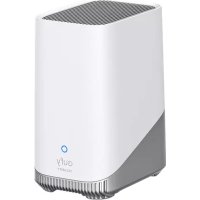
| Model | S380 HomeBase |
| Built-in Storage | 16 GB |
| Storage Expansion | 2.5-inch SATA hard drive (HDD or SSD) |
| Maximum Number of Cameras | 16 |
| Wi-Fi Connectivity | 2.4 GHz (2412 - 2472 MHz) |
| Sub-1G Connectivity | 866 - 866.8 MHz |
| Power Supply | 12 VDC / 2 A (adapter KA2401A-1202000DE) |
| Operating Temperature | -10 °C to 45 °C |
| Recommended Power Supply Temperature | 5 °C to 25 °C |
| USB Ports | 1 x USB 2.0 (output 5 VDC/0.7 A), 1 x USB 2.0 (output 5 VDC/2.4 A) |
| Power Port | 1 x power connector |
| Reset Hole | Yes |
| Hard Drive Support | Yes, for 2.5-inch hard drive |
| Installation | Via the eufy Security app |
| Usage | Indoor only |
| RF Safety Distance | 20 cm between device and body |
| Recommended Hard Drive Compatibility | Western Digital, Seagate, SAMSUNG, Kingston, PNY, Crucial, SanDisk |
Frequently Asked Questions - S380 HomeBase eufy
User questions about S380 HomeBase eufy
0 question about this device. Answer the ones you know or ask your own.
Ask a new question about this device
Download the instructions for your Surveillance Camera in PDF format for free! Find your manual S380 HomeBase - eufy and take your electronic device back in hand. On this page are published all the documents necessary for the use of your device. S380 HomeBase by eufy.
USER MANUAL S380 HomeBase eufy
eufy
SECURITY
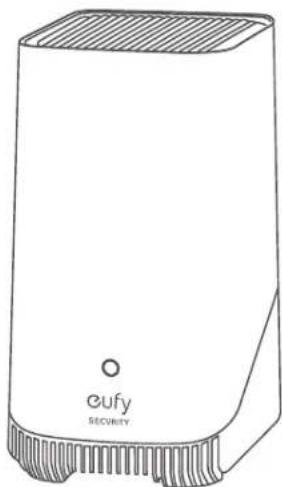
natural_image
Line drawing of a Cufy Security device with no visible text or symbols on the bodyS380 HomeBase
QUICK START GUIDE
5100500XXXX V01
English
Deutsch
Español
Français
Italiano
Nederlands
Portuguese
لعربيّة
64
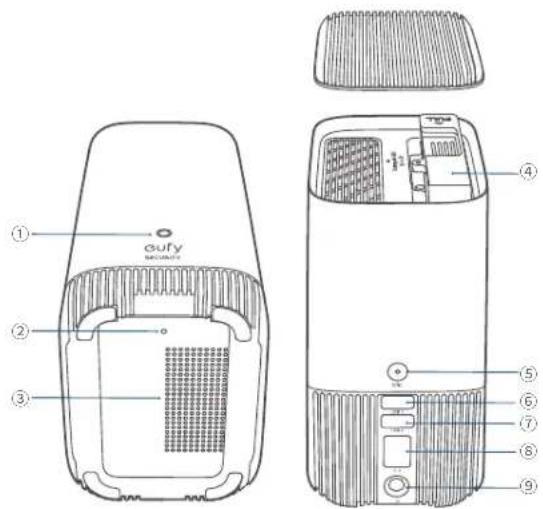
AT A GLANCE
S380 HomeBase
Model: T8030
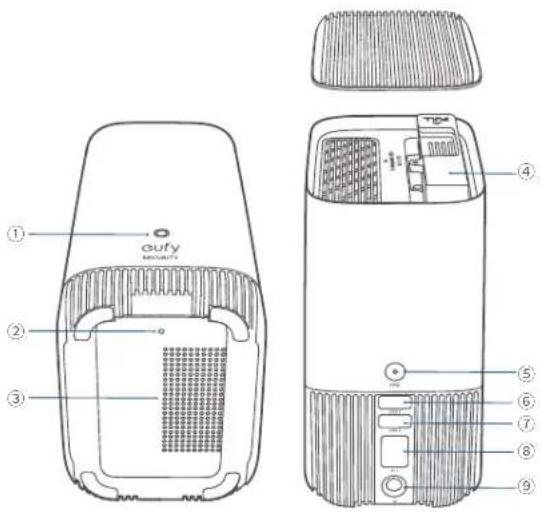
① Status LED
④ Hard Drive Bracket
⑦ USB Port 2 (Output: 5Vdc/0.7A)
② Reset Hole
⑤ SYNC / ALARM OFF Button
⑧ Ethernet Port
③Speaker
⑥ USB Port 1 (Output: 5Vdc/2.4A)
⑨ Power Port
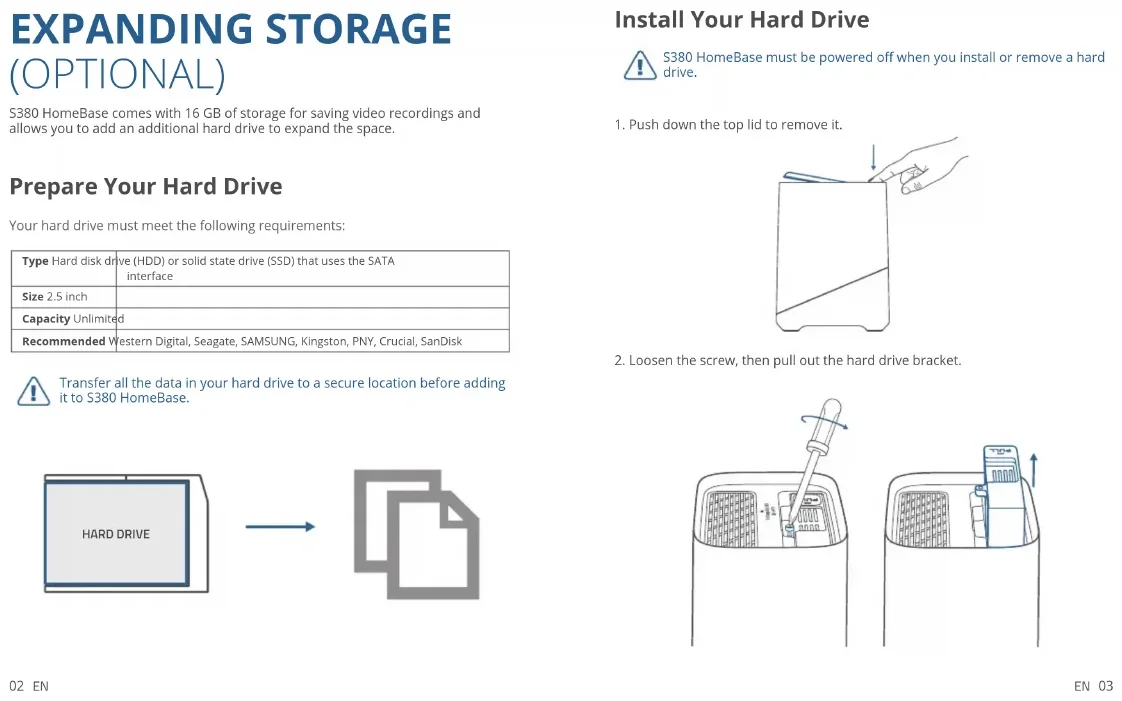
EXPANDING STORAGE (OPTIONAL)
S380 HomeBase comes with 16 GB of storage for saving video recordings and allows you to add an additional hard drive to expand the space.
Prepare Your Hard Drive
Your hard drive must meet the following requirements:
| Type Hard disk drive (HDD) or solid state drive (SSD) that uses the SATA interface | |
| Size 2.5 inch | |
| Capacity Unlimited | |
| Recommended Western Digital, Seagate, SAMSUNG, Kingston, PNY, Crucial, SanDisk | |

Transfer all the data in your hard drive to a secure location before adding it to S380 HomeBase.

flowchart
graph LR
    A["HARD DRIVE"] --> B["Document Icon"]
02 EN
Install Your Hard Drive

S380 HomeBase must be powered off when you install or remove a hard drive.
- Push down the top lid to remove it.
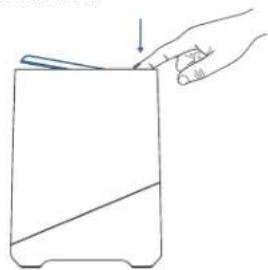
natural_image
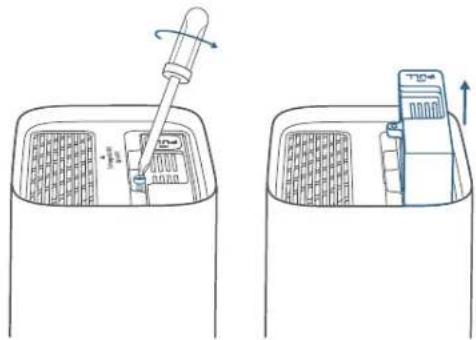
Line drawing of a hand holding a small object with an arrow pointing downward (no text or symbols)- Loosen the screw, then pull out the hard drive bracket.
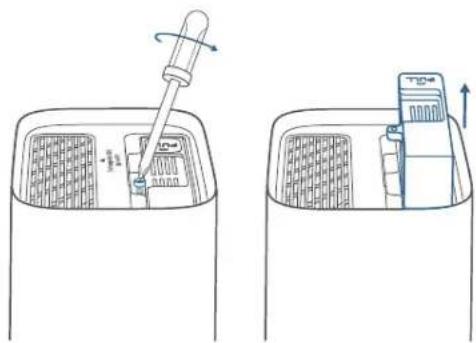
natural_image
Two technical line drawings showing a tool interacting with a device inside a container (no text or symbols)EN 03
- Fix your hard drive to the bracket with the provided screws.
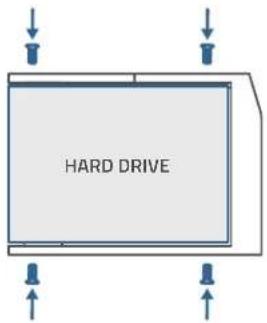
- Insert and screw the bracket back to S380 HomeBase, then put the top lid back into place.
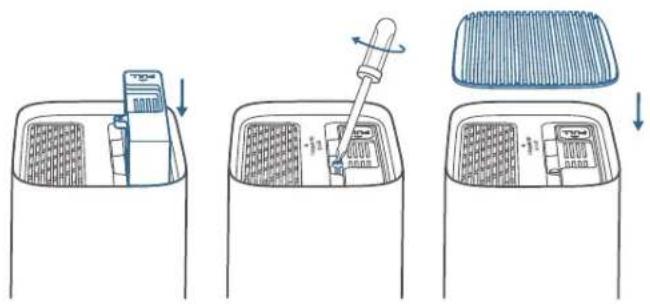
- You can follow the steps above to expand the storage whenever necessary. - A new hard drive must be initialized through the eufy Security app to work with S380 HomeBasc.
CONNECTING S380 HOMEBASE
- Power on and connect S380 HomeBase to your router.
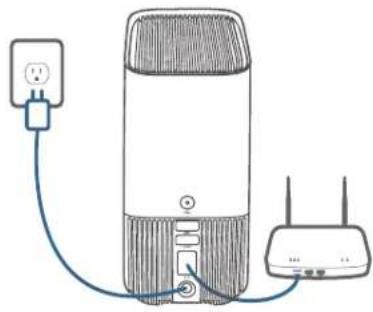
natural_image
Line drawing of a portable air conditioner connected to a wireless router via a power plug (no text or symbols)- Wait for a moment (up to 1 min) until the status LED turns blue.
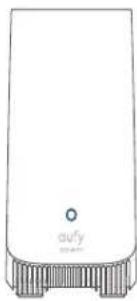
natural_image
Front view of a white electronic device with a small circular button labeled 'outy' and a textured base (no readable text or symbols beyond the label)ADDING TO EUFY SECURITY APP
- Download and install the eufy Security app, and sign up for an account.


- Add S380 HomeBase to your device list, and follow the in-app instructions to complete the setup.
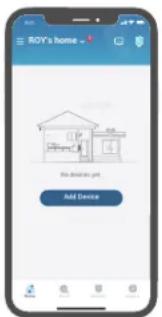
ADDING EUFY SECURITY DEVICES TO S380 HOMEBASE
Follow the in-app instructions to add your eufy Security devices to the S380 HomeBase.
- One S380 HomeBase can pair up to 16 cameras.
SAFETY
- Do not use the device in the environment at a too high or too low temperature, never expose the device to strong sunshine or too wet environment.
- The suitable temperature for T8030 and accessories is -10^ to 45^
- It is recommended to supply the device in an environment with a temperature that ranges from 5^ 25^ .
- When supplying, please place the device in an environment that has a normal room temperature and good ventilation.
• The adapter shall be installed near the equipment and shall be easily accessible. - Please ensure to use only the adapter offered by the manufacturer. Using unauthorized adapter may cause danger and violate the authorization of the device and the guarantee article.
- This adapter is for indoor use only. The adapter type (for S380 HomeBase) is KA2401A-1202000DE, rated output voltage/current is 12 Vdc/2A. The plug is considered as disconnect device of adapter.
NOTICE
NOTICE (Europe and United Kingdom)
CE This product complies with the radio interference requirements of the European Community.
Declaration of Conformity
Hereby, Anker Innovations Limited declares that this device is in compliance with the essential requirements and other relevant provisions of Directive 2014/53/EU. For the declaration of conformity, visit the website: https://uk.eufylife.com.
UK CA This product complies with the radio interference requirements of the United Kingdom
Declaration of Conformity
Hereby, Anker Innovations Limited declares that this device is in compliance with Radio Equipment Regulations 2017(SI 2017/1206). The full text of the UK declaration of conformity is available at the following internet address: https://uk.eufylife.com.
RF exposure information:
The Maximum Permissible Exposure (MPE) level has been calculated based on a distance of d=20 cm between the device and the human body. To maintain compliance with RF exposure requirement, use products that maintain a 20cm distance between the device and human body. Frequency bands and power as below:
| Function Bandes Operation Frequency Max.Power | ||
| Sub-1G for T8030 | Sub-1G 866-866.8 MHz ERP 12.973 dBm | |
| Wi-Fi for T8030 | 2.4GHz 2412-2472MHz EIRP 19.58 dBm | |
The following importer is the responsible party (contract for EU matters):
The following importer is the responsible party (contract for UK matters): Anker Technology (UK) Limited I GNR8, 49 Clarendon Road, Watford, Hertfordshire, WD17 1HP, United Kingdom
Your product is designed and manufactured with high quality materials and components, which can be recycled and reused.
This symbol means the product must not be discarded as household waste, and should be delivered to an appropriate collection facility for recycling. Proper disposal and recycling helps protect natural resources, human health and the environment. For more information on disposal and recycling of this product, contact your local municipality, disposal service, or the shop where you bought this product.
AUF EINEN BLICK
S380 HomeBase
Modell: T8030
① Status-LED
⑤SYNC/ALARM OFF-Taste
natural_image
Line drawing of a hand holding a flat object with an arrow pointing downward (no text or symbols)natural_image
Two technical line drawings of a cleaning or cleaning device inside a container, showing internal components and a piping tool (no text or symbols)12 DE
natural_image
Diagram of a portable electronic device connected to a wireless router via a cable (no text or symbols present)natural_image
Front view of a white electronic device with a small circular button and 'outy' label at the base (no other text or symbols visible)14 DE
HINZUFÜGEN ZUR EUFY SECURITY-APP
① LED de estado
flowchart
graph LR
    A["HARD DRIVE"] --> B["Document Icon"]
20 ES
natural_image
Line drawing of a hand holding a tool over a rectangular object with diagonal line (no text or symbols)natural_image
Diagram showing a hand tool interacting with a device inside a container, with no visible text or symbols.ES 21
natural_image
Line drawing of a wireless router connected to a power outlet (no text or symbols)natural_image
White rectangular device with a small circular mark and 'outly' text, no visible text or symbols on the body.Anker Technology (UK) Limited I GNR8, 49 Clarendon Road, Watford, Hertfordshire, WD17 1HP, United Kingdom
① Voyant d'état
⑤ Bouton SYNC/ALARM OFF
⑧ Port Ethernet
③ Haut-parleur
flowchart
graph LR
    A["HARD DRIVE"] --> B["Document Icon"]
natural_image
Line drawing of a hand holding a flat object with a diagonal line, no text or symbols presentnatural_image
Line drawing of a cleaning or cleaning device with a pipette inserted into a container (no text or symbols)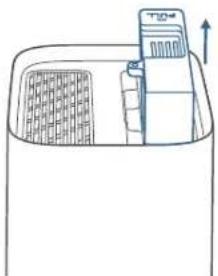
natural_image
Line drawing of a refrigerator interior with a door and up arrow (no text or symbols)30 FR
natural_image
Line drawing of a wireless router connected to an AC power outlet (no text or symbols)natural_image
Line drawing of a white electronic device with a small circular mark and 'outy' label at the base (no other text or symbols)32 FR
AJOUT À L'APPLICATION EUFY SECURITY
Anker Technology (UK) Limited | GNR8, 49 Clarendon Road, Watford, Hertfordshire, WD17 1HP, United Kingdom

① LED di stato
natural_image
Line drawing of a hand holding a tool over a rectangular object with diagonal line (no text or symbols)- Allentare la vite, quindi estrarre la staffa del disco rigido.
natural_image
Diagram showing a pipette inserted into a container with a device inside, and a close-up of the device's internal structure (no text or symbols)natural_image
Line drawing of a portable electronic device connected to a wireless router via a cable (no text or symbols)natural_image
Front view of a white electronic device with a small circular button labeled 'outy' and a textured base (no readable text or symbols beyond the label)AGGIUNTA ALL'APP EUFY SECURITY
AGGIUNTA DI DISPOSITIVI EUFY SECURITY A S380 HOMEBASE
Anker Technology (UK) Limited I GNR8, 49 Clarendon Road, Watford, Hertfordshire, WD17 1HP, United Kingdom

① Statusled
flowchart
graph LR
    A["HARD DRIVE"] --> B["Document Icon"]
NL 47
natural_image
Line drawing of a hand holding a flat object with an arrow pointing downward (no text or symbols)natural_image
Line drawing of a cleaning or cleaning device with a pipette and gridded contents (no text or symbols)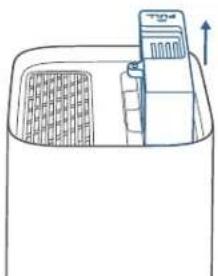
natural_image
Line drawing of a container with a lid and side panel, no text or symbols present48 NL
natural_image
Diagram of a portable electronic device connected to a network via a power outlet (no text or symbols present)natural_image
Front view of a white electronic device with a small circular button labeled 'outy' and a textured base (no readable text or symbols beyond the label)50 NL
TOEVOEGEN AAN DE EUFY SECURITY-APP
NL 51
EUFY SECURITY AAN DE S380 HOMEBASE TOEVOEGEN
Hertfordshire, WD17 1HP, United Kingdom

① LED de estado
flowchart
graph LR
    A["HARD DRIVE"] --> B["Document Icon"]
Instalar o disco rígido

natural_image
Line drawing of a hand holding a small object with an arrow pointing downward (no text or symbols)natural_image
Diagram showing two steps of a cleaning or cleaning process: dropping tool into a gridded container and moving a device into a rectangular basin (no text or symbols)natural_image
Simple line drawing of a portable router connected to a power outlet (no text or symbols)natural_image
Front view of a white electronic device with a small circular button labeled 'oufy' and a textured base (no readable text or symbols beyond the label)Anker Technology (UK) Limited I GNR8, 49 Clarendon Road, Watford, Hertfordshire, WD17 1HP, United Kingdom

natural_image
Line drawing of a hand holding a tool near a rectangular object with diagonal line (no text or symbols)S380 HOMEBASE توصيل
natural_image
Line drawing of a portable router connected to a power outlet via cable (no text or symbols)natural_image
Line drawing of a white electronic device with a small circular mark and 'outy' label, no readable text or symbols beyond the label.
Anker Technology (UK) Limited I GNR8, 49 Clarendon Road, Watford,
Hertfordshire, WD17 1HP, United Kingdom
12-month limited warranty

United States
+1 (800) 988 7973
Mon-Sat 6:15AM-6:45PM(PT)
Sun 6:15AM-5:45PM(PT)
United Kingdom
+44 (0) 1604 936 200
Mon-Sun 6:00-19:00
Germany
+49 (0) 69 9579 7960
Mo-Fr 8:00-16:00 Sa 9:00-16:00

support@eufylife.com

EufyOfficial

- Official


Anker Innovations Limited
Room 1318-19, Hollywood Plaza, 610 Nathan Road, Mongkok, Kowloon, Hong Kong