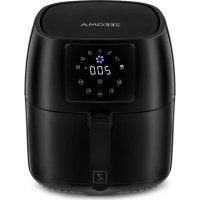
Knapper Pro - Deep fryer Zeegma - Free user manual and instructions
Find the device manual for free Knapper Pro Zeegma in PDF.


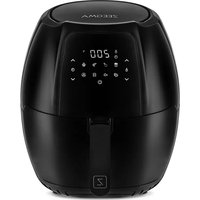
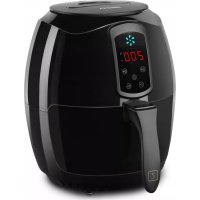
| Product type | Air fryer |
| Brand | Zeegma |
| Model | Knapper Pro |
| Power supply | 220-240 V ~ 50/60 Hz |
| Power | 1400 W |
| Maximum basket capacity | 800 g |
| Temperature range | 160 °C to 200 °C |
| Timer | Adjustable up to 60 minutes |
| Automatic programs | 7 (fries, chicken thigh, shrimp, cake, steak, fish, ribs) |
| Basket | Removable with non-stick coating |
| Bowl | Removable with non-stick coating |
| Display | Digital |
| Controls | Push buttons |
| Safety function | Automatic shut-off when basket is removed |
| Cleaning basket and bowl | Dishwasher safe |
| Cleaning the exterior | Damp cloth |
| Ventilation | Air intake and outlet, do not obstruct |
| Handle | Insulated |
| Body material | Stainless steel and plastic |
| Included accessories | Basket, bowl, crank handle |
Frequently Asked Questions - Knapper Pro Zeegma
User questions about Knapper Pro Zeegma
0 question about this device. Answer the ones you know or ask your own.
Ask a new question about this device
Download the instructions for your Deep fryer in PDF format for free! Find your manual Knapper Pro - Zeegma and take your electronic device back in hand. On this page are published all the documents necessary for the use of your device. Knapper Pro by Zeegma.
USER MANUAL Knapper Pro Zeegma
ZEEGMA
A


natural_image
Technical line drawing of a mechanical component with labeled part '7' (no text or symbols beyond label)
natural_image
Line drawing of a container with a labeled side view (no text or symbols on the diagram itself)B

Introduction
Dear customer!
Thank you for placing trust in us and choosing Zeegma.
We provide you with a product perfect for everyday use thanks to the use of high-quality materials and modern solutions.
We are convinced that the product will satisfy your requirements as it has been designed with utmost care.
Before you use the product, please read this manual carefully.
Should you have any remarks or questions concerning the product, please do not hesitate to contact us:
support@zeegma.com
Technical data
Power supply: 220-240 V AC 50-60 Hz
Power: 1400 W
Capacity: 4.5 l
Basket capacity: 3.5 l
Important information
Please read this manual before using the device to familiarise yourself with its functions and use it as intended.
- Before using the device, read the user manual and follow the instructions therein. The manufacturer is not liable for damage caused by the use of the device other than for its intended purpose or for damage caused by improper use of the device. The user manual should be kept so that it can also be used for later use.
-
This equipment may be used by children of at least 8 years of age and by people with reduced physical or mental capabilities or lack of experience and familiarity with the equipment if supervision or instruction is provided on how to use the equipment safely so that the associated risks are understood. Unsupervised children should not perform cleaning and maintenance on the equipment.
-
The device is for domestic use only. It should not be used for other purposes incompatible with its intended use.
-
The device should only be connected to an earthed socket outlet with characteristics consistent with the values on the rating plate.
-
Check that the total current consumption of all devices connected to the wall socket does not exceed the maximum load of the fuse.
-
If an extension cable is used, check that the total power consumption of the equipment connected to the extension cable does not exceed the load parameters of the extension cable. The extension cable should be arranged in such a way as to avoid accidental pulls and tripping over it.
-
Do not let the device's power cable hang over the edge of a table or shelf or touch a hot surface.
-
The device is not intended to be controlled by an external timer, a separate remote control or other equipment that can switch the device on automatically.
-
Always disconnect the device from the power supply before maintenance work.
-
When disconnecting the power cable, always pull it out of the socket by holding the plug. Never pull out the power cable by pulling on the cable, as the plug or cable may be damaged, in extreme cases an electric shock may result.
-
The device must not be left unattended when plugged in.
-
Do not immerse the device in water or any other liquid. The device cannot be cleaned under a direct stream of water.
-
The device should be cleaned regularly according to the recommendations described in the section on Cleaning and maintenance of the device.
-
Do not place the device close to heat sources, flames, an electric heating element or a hot oven or on top of any other device.
-
Special care should be taken when using the device when children or pets are around. Children should not be allowed to play with the device.
-
Do not expose the device to weather conditions (rain, sun, etc.) or use it in humid conditions (e.g. in the bathroom).
-
Periodically check the condition of the power cable. If the power cable becomes damaged, it should be replaced at the manufacturer's authorised service centre to avoid any danger.
-
Do not use the device with a damaged power cable or plug or if it has been dropped or damaged in any other way or is not working properly. Do not repair the device yourself, as there is a risk of electric shock. Take the defective device to a competent
EN
service centre for inspection or repair. Any repairs may only be undertaken by authorised service centres. An improperly executed repair can cause serious danger to the user.
-
Use only original or manufacturer-recommended accessories. The use of accessories not recommended by the manufacturer may damage the device and endanger the safety of the user.
-
Place the device on a level, heat-resistant surface, away from flammable materials (curtains, drapes, wallpaper, etc.).
-
For proper air circulation, at least 10 cm of free space on each side of the device and at least 30 cm above the device should be maintained.
-
Do not cover the ventilation openings of the device, as this may cause overheating and damage to the device.
-
Do not touch the hot surfaces of the device. Use protective gloves when removing or touching hot components.
-
Do not put portions taking up too much space in the heating chamber into the device, as this can cause a fire and damage the device.
-
Cardboard, paper, plastic and other flammable and fusible items must not be placed in the device.
-
Clean the device after each use. Wait approximately 30 minutes after last use before cleaning.
-
Do not use metal washers to clean the device. Broken pieces of wire, can come into contact with electrical parts, posing an electrical shock hazard.
-
Due to the high temperatures, special care should be taken when removing baked food, removing hot fat or other hot liquids, accessories and device components.
-
Do not use metal cutlery or other sharp cooking utensils, which can scratch the non-stick layers in the basket and bowl.
-
Do not fill the fryer bowl with oil or other fat. Knapper Pro uses hot air to thermally treat food.
-
Do not switch on the device with the tank filled with water or any other liquid.
Device description (fig. A)
- Air inlet
- Display
-
Basket
-
Handle
- Bowl
- Air outlet
- Basket release button
Control panel description (fig. B)
- On/off switch
- Display
- Increase temperature button
- Decrease temperature button
- Menu
- Time-shortening button
- Time extension button
-
-
- Seven automatic programs for easy meal preparation
-
Before first use
- Remove all cardboard boxes and protective foils from the device.
- Wash the basket and bowl with warm water and a mild detergent. Wipe the outside of the device with a damp cloth.
- Run the device for approx. 10 minutes at 200^ C . There may be an unpleasant smell coming from the device - this is normal when using it for the first time.
Use
- Place the product on a stable and level heat-resistant surface.
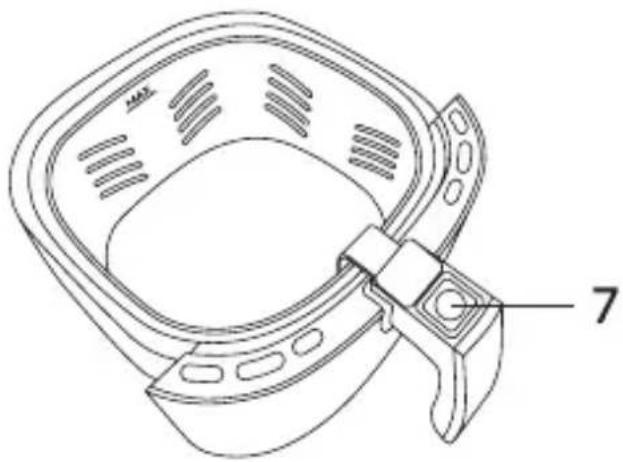
- Hold the handle (4, fig. A) and pull the bowl (5, fig. A) with the basket (3, fig. A) out of the device body. Note! Do not press the basket release button (7, Fig. A) during this operation.
- Place the prepared products in the basket. When filling the basket, do not exceed the MAX indicator located inside the basket. Insert the basket together with the bowl into the body of the device.
- Connect the device to a power source. Press the switch (1, fig. B) to turn the device on. Press this button again to start the warm-up process. Another press will turn the device off.
- Press the increase (3, fig. B) or decrease (4, fig. B) button to set the desired operating temperature of the device. Pressing these buttons causes a change of 5 degrees.
- Press the shortening (6, fig. B) or extension (7, fig. B) button to set
EN
the desired operating time of the device. Pressing these buttons causes a change of 1 minute.
-
You can also use the 7 automatic programs for easy cooking - ribs, fish, steak, pie, prawns, chicken leg or fries. Press the menu button (5, fig. B) to select the program, then press the switch to confirm. For information on programs, see the subsection Automatic programs.
-
Press the switch to start the device with the selected parameters. If there is no activity, the device will beep and switch off automatically.
-
When the device is in operation, do not approach the air outlet (6, fig. A) due to the risk of burning.
-
If the bowl with the basket is ejected while the appliance is running to stir the ingredients, it will stop its operation. To resume the process, slide the bowl with the basket back into the machine. Note! Do not press the basket release button (7, Fig. A) during this operation.
-
Slide the safety catch and then press the basket release button (7, fig. A) to remove the basket from the bowl and transfer the food being prepared to another dish.

The device is heating up.
The device is cooling down.
Once the selected time has passed or the device has been switched off, the device will start to cool down and then beep and stop.
In case of cold food, extend the operating time of the device by approximately 3 minutes.
It is recommended to stir the ingredients in the basket every 7-10 minutes.
NOTE! The bowl and basket are very hot. Put down only on a heat-resistant surface. Remove from the body of the device by holding the handle.
Automatic programs
| Meal type Suggestedquantity inthe device (g) | Time (min) T | Temperature(°C) | |
| Fries(14, fig. B) | 500 20 200 | ||
| Chicken leg(13, fig. B) | 800 25 180 | ||
| Prawns(12, fig. B) | 200 20 160 | ||
| Pie(11, fig. B) | 600 25 160 | ||
| Steak(10, fig. B) | 450 20 160 | ||
| Fish(9, fig. B) | 250 20 180 | ||
| Ribs(8, fig. B) | 400 15 180 | ||
Troubleshooting
| Problem Possible causes Solutions | |
| The device is not working | The device is not connected to a power sourceThe operating time is not set |
| Connect the device to a power sourceSet the time by pressing the shorten or extend time button and press the switch |
| Ingredients are not cooked enough | Too many ingredients in the basketOperating temperature too lowDevice operating time too short | Reduce the number of ingredients in the basket in a single useIncrease the operating temperature of the deviceExtend device operating time |
| Uneven frying of ingredients | Some ingredients need to be stirred during operation every 7 - 10 minutes | See: point 10. of the subsection USE |
Cleaning and maintenance
- The device should be cleaned after each use. Make sure the device has cooled down and been disconnected from the power source before cleaning.
- Use a damp cloth and a mild detergent to clean the outside of the device.
- Clean the basket and bowl with warm water and a mild detergent, using a soft sponge or cloth. Do not use metal or sharp tools for cleaning, which may damage the Teflon coating.
- Parts of the device in contact with food can be washed in the dishwasher.
The photos are for reference only, the actual look of the products may differ from the ones shown in the pictures.
Einführung
natural_image
Pure diagonal line without any text, numbers, or symbolsCE
EN: The product complies with requirements of EU directives.
Pursuant to the Directive 2012/19/EU, this product is subject to selective collection. The product must not be disposed of along with domestic waste as it may pose a threat to the environment and human health. The worn-out product must be handed over to the electrics and electronics recycling center.
BrandLine Group Service – Support
www.zeegma.com/en/service
Szczegółowe warunki gwarancji dostępne są na stronie: Detailed warranty conditions are available on the website: Detaillierte Garantiebedingungen finden Sie auf der Website: Le condizioni di garanzia dettagliate sono disponibili sul sito web: Les conditions de garantie détaillées sont disponibles sur le site: Las condiciones de garantía detalladas están disponibles en el sitio web: Gedetailleerde garantievoorwaarden zijn beschikbaar op de website:
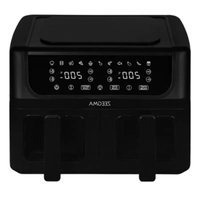
Brand : Zeegma
Model : Knapper Pro
Category : Deep fryer