SB80 - Speaker Audizio - Free user manual and instructions
Find the device manual for free SB80 Audizio in PDF.



| Product Type | Soundbar / Speaker |
| Brand | Audizio |
| Model | SB80 |
| Power Supply | 5V DC (via micro-USB port) |
| Operating Modes | Bluetooth, USB, TF, Optical, Line, HDMI ARC |
| Remote Control | Yes (included) |
| LED Indicator | Red (USB/TF), Green (Optical/Line/HDMI), Blue (Bluetooth) |
| Inputs | Optical (PCM), AUX 3.5 mm, USB, TF, HDMI ARC |
| On-device Controls | Buttons: Standby/Mode, Play/Pause/Mute, Vol+/Next, Vol-/Previous |
| EQ Function | 3 equalizer modes |
| USB/TF Audio Playback | MP3 format |
| Bluetooth Connection | Search for "SB80" to pair |
| Safety | Do not open the casing, avoid moisture, use indoors |
| Cleaning | Dry cloth only |
| Operating Temperature | 5°C to 35°C |
| Included Cables | USB to micro-USB cable, AUX 3.5 mm cable, optical cable |
Frequently Asked Questions - SB80 Audizio
User questions about SB80 Audizio
0 question about this device. Answer the ones you know or ask your own.
Ask a new question about this device
Download the instructions for your Speaker in PDF format for free! Find your manual SB80 - Audizio and take your electronic device back in hand. On this page are published all the documents necessary for the use of your device. SB80 by Audizio.
USER MANUAL SB80 Audizio
natural_image
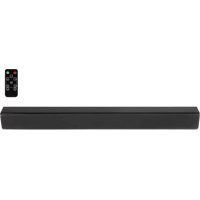
Black rectangular electronic device with textured surface (no visible text or symbols)INSTRUCTION MANUAL
GEBRUIKSAANWIJZING
BEDIENUNGSANLEITUNG
MANUEL D'INSTRUCTIONS
INSTRUKCJA OBSŁUGI
V1.2
ENGLISH 4
UNPACKING INSTRUCTION....5
PRODUCT OVERVIEW 5
REMOTE CONTROL....5
USB/TF 6
HDMI 6
LINE IN 6
OPTICAL INPUT 6
BT MODE 6
NEDERLANDS....7
UITPAKKEN 8
OVERZICHT 8
AFSTANDSBEDIENING 8
USB/SD 9
HDMI 9
LIJN-INGANG 9
OPTISCHE INGANG....9
BT MODUS....9
DEUTSCH....10
AUSPACKEN 11
ÜBERBLICK....11
FERNBEDIENUNG....11
USB/SD 12
HDMI 12
LINE EINGANG 12
Congratulations to the purchase of this Audizio product. Please read this manual thoroughly prior to using the unit in order to benefit fully from all features.
Read the manual prior to using the unit. Follow the instructions in order not to invalidate the warranty. Take all precautions to avoid fire and/or electrical shock. Repairs must only be carried out by a qualified technician in order to avoid electrical shock. Keep the manual for future reference.
- Prior to using the unit, please ask advice from a specialist. When the unit is switched on for the first time, some smell may occur. This is normal and will disappear after a while.
- The unit contains voltage carrying parts. Therefore do NOT open the housing.
- Do not place metal objects or pour liquids into the unit This may cause electrical shock and malfunction.
- Do not place the unit near heat sources such as radiators, etc. Do not place the unit on a vibrating surface. Do not cover the ventilation holes.
- The unit is not suitable for continuous use.
- Be careful with the mains lead and do not damage it. A faulty or damaged mains lead can cause electrical shock and malfunction.
- When unplugging the unit from a mains outlet, always pull the plug, never the lead.
- Do not plug or unplug the unit with wet hands.
- If the plug and/or the mains lead are damaged, they need to be replaced by a qualified technician.
- If the unit is damaged to such an extent that internal parts are visible, do NOT plug the unit into a mains outlet and DO NOT switch the unit on. Contact your dealer. Do NOT connect the unit to a rheostat or dimmer.
- To avoid fire and shock hazard, do not expose the unit to rain and moisture.
- All repairs should be carried out by a qualified technician only.
- Connect the unit to an earthed mains outlet (220-240Vac/50Hz) protected by a 10-16A fuse.
- During a thunderstorm or if the unit will not be used for a longer period of time, unplug it from the mains. The rule is: Unplug it from the mains when not in use.
- If the unit has not been used for a longer period of time, condensation may occur. Let the unit reach room temperature before you switch it on. Never use the unit in humid rooms or outdoors.
-
To prevent accidents in companies, you must follow the applicable guide lines and follow the instructions.
-
Do not repeatedly switch the fixture on and off. This shortens the life time.
- Keep the unit out of the reach of children. Do not leave the unit unattended.
- Do not use cleaning sprays to clean switches. The residues of these sprays cause deposits of dust and grease. In case of malfunction, always seek advice from a specialist.
- Do not force the controls.
- This unit is with speaker inside which can cause magnetic field. Keep this unit at least 60cm away from computer or TV.
- If this product have a built-in lead-acid rechargeable battery. Please recharge the battery every 3 months if you are not going to use the product for a long period of time. Otherwise the battery may be permanently damaged.
- If the battery is damaged please replace with same specifications battery. And dispose the damaged battery environment friendly.
- If the unit has fallen, always have it checked by a qualified technician before you switch the unit on again.
- Do not use chemicals to clean the unit. They damage the varnish. Only clean the unit with a dry cloth.
- Keep away from electronic equipment that may cause interference.
- Only use original spares for repairs, otherwise serious damage and/or dangerous radiation may occur.
- Switch the unit off prior to unplugging it from the mains and/or other equipment. Unplug all leads and cables prior to moving the unit.
- Make sure that the mains lead cannot be damaged when people walk on it. Check the mains lead before every use for damages and faults!
- The mains voltage is 220-240Vac/50Hz. Check if power outlet match. If you travel, make sure that the mains voltage of the country is suitable for this unit.
- Keep the original packing material so that you can transport the unit in safe conditions.

This mark attracts the attention of the user to high voltages that are present inside the housing and that are of sufficient magnitude to cause a shock hazard.

This mark attracts the attention of the user to important instructions that are contained in the manual and that he should read and adhere to.
The unit has been certified CE. It is prohibited to make any changes to the unit. They would invalidate the CE certificate and their guarantee!
NOTE: To make sure that the unit will function normally, it must be used in rooms with a temperature between 5^ C/ 41^ F and 35^ C/ 95^ F.

Electric products must not be put into household waste. Please bring them to a recycling centre. Ask your local authorities or your dealer about the way to proceed. The specifications are typical. The actual values can slightly change from one unit to the other. Specifications can be changed without prior notice.
Do not attempt to make any repairs yourself. This would invalid your warranty. Do not make any changes to the unit. This would also invalid your warranty. The warranty is not applicable in case of accidents or damages caused by inappropriate use or disrespect of the warnings contained in this manual. Audizio cannot be held responsible for personal injuries caused by a disrespect of the safety recommendations and warnings. This is also applicable to all damages in whatever form.
UNPACKING INSTRUCTION
CAUTION! Carefully unpack the box upon receipt. Check the contents to ensure that all parts are present and have been received in good condition. Notify the shipper immediately and retain packaging material if any parts appear damaged from shipping or the package itself shows signs of mishandling. Save the package and all packaging materials. If the product must be returned, it is important that the product is returned in the original factory box and packaging.
If the device has been exposed to drastic temperature fluctuation (e.g. after transportation), do not switch it on immediately. The arising condensation water might damage your device. Leave the device switched off until it has reached room temperature.
PRODUCT OVERVIEW
text_image
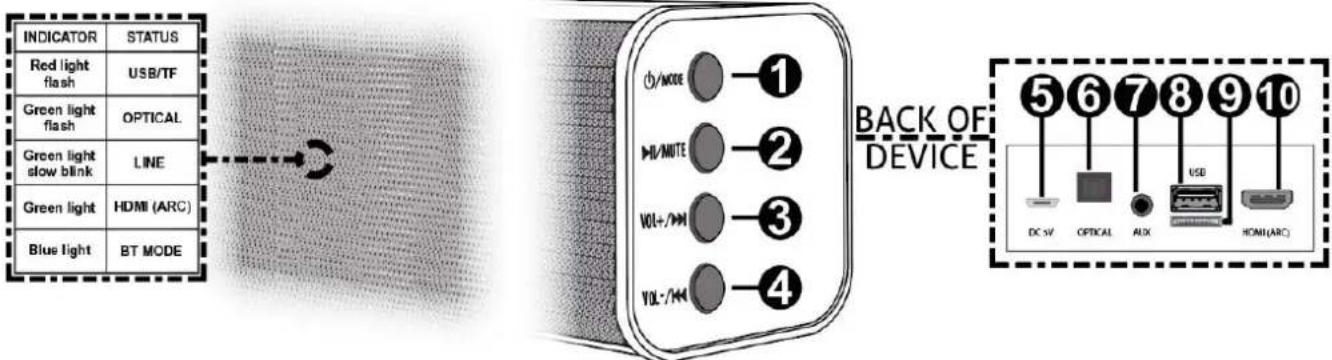
INDICATOR STATUS Red light flash USB/TF Green light flash OPTICAL Green light slow blink LINE Green light HDMI (ARC) Blue light BT MODE BACK OF DEVICE 1 2 3 4 V/MODE VOL+/M VOL-/M 5 6 7 8 9 10 DC SV OPTICAL AUX HOMI(ARC)- Standby / Mode Press to cycle trough all available modes (line, optical, BT, USB/SD and HDMI (ARC)). Long press to turn the device on/off.
- Play/pause / Mute Press to mute the device. Long press to (re)start or pause playback.
- VOL+ / Next Press to skip to next track. Long press to increase the volume level.
- VOL - / Previous Press to go to previous track. Long press to decrease the volume level.
- DC 5V power input Connector for inserting the supplied power cord (USB to micro-USB).
- Optical input For using optical input: please change your TV audio output to PCM (PCM is a form of digital signal that is used to represent analogue data, and is an optional audio format on many TVs).
- LINE input 3.5mm auxiliary jack.
- USB input
- SD card slot
- HDMI (ARC) input
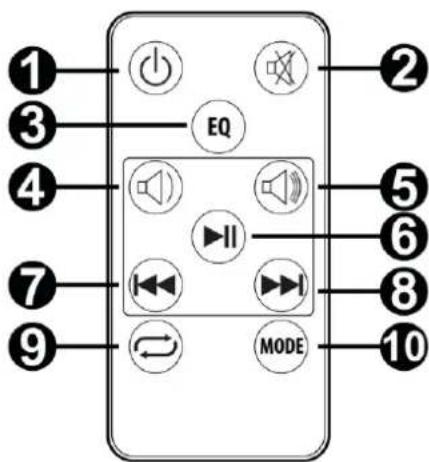
REMOTE CONTROL
- Standby Press to turn the device on/off.
- Mute Press to (un)mute the device.
- EQ Press to switch between 3 different equalizer modes.
- VOL - Press to decrease the volume level.
- VOL + Press to increase the volume level.
- Play/pause Press to (re)start or pause playback.
- Previous Press to change to previous track.
- Next Press to change to next track.
- Repeat Press to repeat a single track. Press again to repeat all tracks. Press again to cancel repeat.
- Mode Press to switch modes. Cycle through line, optical, BT, USB and HDMI (ARC).
text_image
1 2 3 4 5 6 7 8 9 EQ MODE 10USB/TF
- Ensure that the files stored on the flash drive are in MP3 format.
- Insert the USB/TF flash drive in the designated USB/TF slot on the back of the device.
- Press the mode key repeatedly until USB/TF mode has been reached (the LED indicator will flash in red color).
- Use the operational buttons (volume, play/pause, etc.) on the device or remote to control the playback.
HDMI
An HDMI (ARC) cable is needed (not included).
- Connect one end of the HDMI(ARC) connecting cable to the HDMI output of the source device and the other end to the HDMI input of the soundbar.
- Press the mode key repeatedly until HDMI mode has been reached (the LED indicator will emit green color).
- Make sure the source audio is set to HDMI settings.
- Use the operational buttons (volume, play/pause, etc.) on the device or remote to control the playback.
LINE IN
A 3.5mm audio connecting cable is needed (included).
- Connect one end of the 3.5mm connecting cable to the line output (AUX) of the source device and the other end to the line input (AUX) of the soundbar.
- Press the mode key repeatedly until line mode has been reached (the LED indicator will blink slow in green color).
- Use the operational buttons (volume, play/pause, etc.) on the device or remote to control the playback.
OPTICAL INPUT
An optical connecting cable is needed (included).
- Connect one end of the optical connecting cable to the according output of the source device and the other end to the optical input of the soundbar.
- Press the mode key repeatedly until the optical mode has been reached (the LED indicator will flash in green color).
- Make sure the source audio is set to OPT settings. Use the operational buttons (volume, play/pause, etc.) on the device or remote to control the playback.
BT MODE
- Press the mode key repeatedly until BT mode has been reached (the LED indicator will emit blue light).
- Turn on the BT function on your source device and search for "SB80" to pair. When the pairing has been successful, the soundbar will emit a sound to indicate the successful pairing.
- Use the operational buttons (volume, play/pause, etc.) on the device or remote to control the playback.
Number of Midrange : 2
Frequency Response : 50Hz - 16KHz
SPL Max : 123dB
Power Supply : 100-240VAC 50/60Hz (19V Adapter)
Dimensions (L x W x H) : 810 x 75 x 75mm
Weight (kg) : 1,30
The specifications are typical. The actual values can slightly change from one unit to the other. Specifications can be changed without prior notice.
The products referred to in this manual conform to the European Community Directives to which they are subject:
• Low Voltage (LVD) 2014/35/EU
• Electromagnetic Compatibility (EMC) 2014/30/EU
• Radio Equipment Directive (RED) 2014/53/EU
• Restriction of Hazardous Substances (RoHS) 2011/65/EU

Specifications and design are subject to change without prior notice.
www.tronios.com
Copyright © 2021 by Tronios The Netherlands