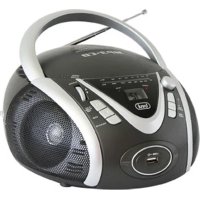
CMP 542 USB - Cd player/recorder Trevi - Free user manual and instructions
Find the device manual for free CMP 542 USB Trevi in PDF.



| Product type | CD/MP3/USB player with stereo FM radio |
| Brand | Trevi |
| Model | CMP 542 USB |
| Dimensions (W x H x D) | 220 x 130 x 240 mm |
| Power supply | Mains 230 V ~ 50 Hz or 8 type C (UM-2) batteries (not included) |
| Power consumption | 14 W |
| Maximum output power | 1.2 W x 2 (stereo) |
| CD playback system | Semiconductor laser, wavelength 790 nm, 16-bit linear quantization per channel |
| Radio bands | FM 87.5 – 108 MHz |
| Supported formats | Audio CD, MP3 CD, MP3 files on USB flash drive |
| USB port | Yes (front, for USB flash drive) |
| Speakers | Built-in stereo |
| Headphone jack | PHONES jack (3.5 mm) |
| FM antenna | Telescopic, adjustable |
| Display | LCD display |
| Playback functions | Play, pause, skip (next/previous track), fast search, repeat (track/disc/folder), random play, intro (10 seconds), program (20 tracks), folder selection (MP3) |
| Maintenance and cleaning | Clean with a soft, slightly damp cloth; do not use solvents or abrasive cleaners |
| Safety | Class 1 laser; do not open the device, risk of electric shock; do not expose to water or naked flames |
| Repairability | Repair exclusively by a TREVI authorized service center |
Frequently Asked Questions - CMP 542 USB Trevi
User questions about CMP 542 USB Trevi
0 question about this device. Answer the ones you know or ask your own.
Ask a new question about this device
Download the instructions for your Cd player/recorder in PDF format for free! Find your manual CMP 542 USB - Trevi and take your electronic device back in hand. On this page are published all the documents necessary for the use of your device. CMP 542 USB by Trevi.
USER MANUAL CMP 542 USB Trevi


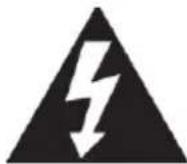
OPASNI NAPON
Ovaj simbol na poledini uređaja i u ovom priručniku ukazuje na prisutnost komponenti visokog napona unutar uređaja, ne otvarajte ga kako biste izbjegli rizik od strujnog udara.

POZOR
Ovaj simbol na poleđini uređaja i u ovom priručniku ukazuje na postojanje važnih sigurnosnih uputa na njima. Pažljivo ih pročitajte prije uporabe aparata.

UPOZORENJA O LASERU
natural_image
Black and white photo of a treu-branded MP3-CD radio with visible buttons, power screen, and speaker grille (no readable text beyond branding)IMPORTANT: Please read before using and retain for future reference.
IMPORTANT NOTES
INTRODUCTION
□ Thank you for buying our product.
☐ Please read through these operating instructions, so you will know how to operate your equipment properly. After you finished reading the instructions manual, put it away in a safe place for future reference.
WARNING
To prevent fire or shock hazard, do not expose this appliance to rain or moisture. To avoid electrical shock, do not open the cabinet; refer servicing to qualified personnel only.
CAUTION
Use of controls or adjustment or performance of procedures other than those specified herein may result in hazardous radiation exposure.
DANGER
Invisible laser radiation when open and interlock failed or defeated. Avoid direct exposure to beam.
CLASS 1 LASER PRODUCT LUOKAN 1 LASERLAITE KLASS 1 LASERAPPARAT
This Compact Disc player is classified as a Class 1 LASER PRODUCT. THE CLASS 1 LASER PRODUCT label is located on the rear exterior.
NOTE: The manufacturer is not responsible for any radio or TV interference caused by unauthorized modifications could void the user's authority to operate the equipment.
☐ Avoid installing the unit in locations described below:
- Places exposed to direct sunlight or close to heat radiating appliance such as electric heaters, on top of other stereo equipment that radiate too much heat.
- Places locking ventilation or dusty places.
- Places subject to constant vibration.
- Humid or moist places.
☐ Operate turning controls and switches as instructed in manual.
Before turning on the power for the first time, make sure that the power cord is properly installed.
☐ Store your tapes or CD in a cool area to avoid damage from heat.
CAUTION: TO REDUCE THE RISK OF ELECTRIC SHOCK, DO DOT REMOVE COVER (OR BACK). NO USER SERVICEABLE PARTS INSIDE, REFER SERVICING TO QUALIFIED SERVICE PERSONNEL.
WARNING: Remove batteries if exhausted or if they will not be used again for a long period.
- The incorrect use of batteries can cause electrolyte leakage and will corrode the compartment or cause the batteries to burst, therefore:
- Do not mix battery types, e.g. alkaline with zinc carbonate.
- When inserting new batteries, replace all batteries at the same time.
- where the MAINS plug or an appliance coupler is used as the disconnect device, the disconnect device shall remain readily operable.
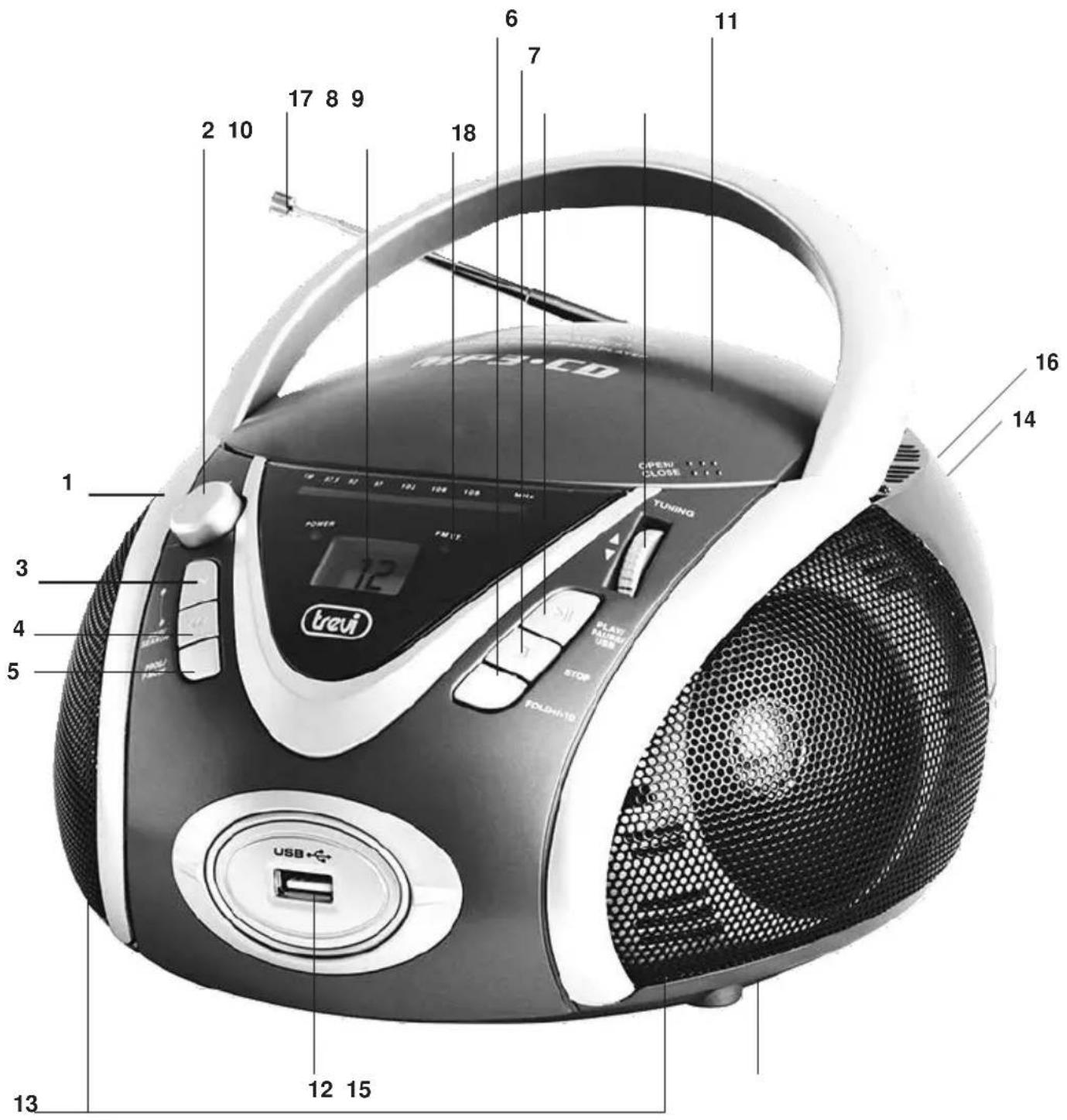
LOCATION OF CONTROLS
- HANDLE
- FUNCTION SWITCH
- SPEAKERS
- DIAL SCALE
- VOLUME KNOB
- CD SKIP/SEARCH FORWARD ▶▶ BUTTON
- CD SKIP/SEARCH BACKWARD ◀◀ BUTTON
- PROG./P-MODE BUTTON
- CD COMPARTMENT
- CD DOOR OPEN/CLOSE
- TUNING KNOB
- CD PLAY/PAUSE/STANDBY BUTTON
- CD STOP/USB BUTTON
- FOLD+/+10 BUTTON
- POWER INDICATOR
- LCD DISPLAY
- USB PORT
- FM STEREO INDICATOR
- PHONES JACK
- FM ANTENNA
- AC SOCKET
- BATTERY DOOR


natural_image
Top-down schematic of a circular device or appliance with internal components and labeled part '22' (no text or symbols beyond label)POWERSOURCE
This unit is designed to be operated on AC/DC.
AC OPERATION
Plug the smaller end of AC power cord into AC jack on unit and the other bigger end into AC wall outlet. The batteries will be automatically disconnected.
DC OPERATION
Open the BATTERY COMPARTMENT DOOR. Install 6 pcs 1.5V UM-2/C size batteries (not included) into compartment. Please follow correct polarities as indicated.
CAUTION:
Remove batteries if they are flat or not being used for a long period of time. Batteries contain chemical substances, so they should be disposed of properly.
BASICFUNCTION
SWITCHING ON THE UNIT
After connecting the AC power, set the FUNCTION switch to CD/MP3/USB or RADIO, the POWER indicator will illuminate.
NOTE: In CD/MP3/USB position, when the unit is not providing the main function for 15 minutes, the unit will automatically switch into standby mode.
ESD hints - The product maybe reset or not reset to operation of control due to electrostatic discharge, just switch off and reconnect again.
TO ADJUST VOLUME
Rotate the VOLUME CONTROL right or left to increase or decrease volume.
HEADPHONES
For private listening, plug the headphones/earphones (not included) into PHONES jack(3.5 mm diameter).
CAUTION: Long time listening with headphones/earphones at high volumes may cause harmful damage to users' ears.
To avoid possible hearing damage, limit the time listening at high volumes
USINGTHERADIO
- Move the FUNCTION switch to RADIO position.
- Tune to required station by rotating the TUNING KNOB.
- Rotate the VOLUME CONTROL to comfortable volume level.
- Extend the TELESCOPIC ANTENNA to its full length and gently rock the unit back and forth to get the best reception, or place the unit in an open place.
Note: The FM STEREO indicator will be on if you are receiving FM stereo program. - Turn off the radio by switching the FUNCTION switch to "OFF" position
USING THE CD/MP3
Discs for Playback
This system can playback all digital audio CD, MP3 finalized digital audio CD-Recordable (CD-R) discs, finalized digital audio CD-Rewritable (CD-RW) discs and CD-DA format digital audio CD/CD-R/CD-RW discs
LOADING ADISC
-
Set the FUNCTION switch to CD/MP3/USB position.
-
Open the CD door.
-
Place an audio CD into the tray with the label side facing up.
-
Close the CD door.
The total number of tracks will appear on the display after several seconds.
- To remove the CD, press to open CD compartment lid, grasp the CD by its edges, and carefully take it out.
Note:
☐ To ensure good system performance, wait until the disc tray completely reads the disc before proceeding.
☐ If no disc is loaded into the compartment, or the disc is placed upside down, the display will show N0d.
PLAYINGADISC
- Press the PLAY/PAUSE/STANDBY button to start playback.
The playback starts from track 1, the “▶” indicator is shown on the display.
To interrupt playback, press the PLAY/PAUSE/STANDBY button. The “▶” indicator will flash on the display.
To resume playback, press the PLAY/PAUSE/STANDBY button again.
- To stop playback, press the STOP/USB button, the total number of tracks appears on the display.
SELECTING A DESPRED TRACK PASSAGE
To select a desired track
☐ Press the CD SKIP/SEARCH FORWARD/BACKWARD button repeatedly in the stop mode or during play until the desired track appears on the display.
☐ Press the PLAY/PAUSE/STANDBY button to start play.
To search for a particular passage during playback (track scanning at high speed)
Press and hold the CD SKIP/SEARCH FORWARD/BACKWARD button to scan the current playing track at high speed until desired point passage, and then release the button. Playback will start again from this point.
To select a song which track number exceeds 1.0 (for MP3 disc only)
To select a song/track which number exceeds 10, Press the FOLD+/+10 button each time to skip forward 10 tracks, then press the CD SKIP/SEARCH FORWARD/BACKWARD button to select desired track. For example: to select the 17^th track, press FOLD+/+10 button, and then the SKIP/SEARCH FORWARD button six times immediately.
To Select A Desired Folder (for MP3 disc only)
Note:(if the MP3 disc contains more than one folder)
Press and hold the FOLD+/+10 button more than 1 second to skip next folder. Until the desired folder number appears on the LCD display, then release the button,
PROGRAMTRACKS
Programming tracks of disc are possible when playback is stopped. Up to CD 20 tracks /MP3 99 tracks can be stored in the memory in any order.
- In the stop mode, press the PROG./P-MODE button, the PROG will flash and the P01 will be show on the display.
- Press the CD SKIP/SEARCH FORWARD/BACKWARD button to select the first desired track to be programmed.
- PressthePROG./P-MODEbutton to enter. The display changes to show P02.
- With MP3 disc, keep pressed FOLD+/+10 button to select the desired album.
- Repeat steps 2 & 3 to store other desired tracks for CD until all tracks are programmed. Repeat steps 2,3 & 4 for MP3.
- Press the PLAY/PAUSE/STANDBY button to start playback from the first programmed track.
- Press the STOP/USB button to stop program playback.
To ErasethelMemory(Program)
To clear the program, you have two options:
- Press the STOP/USB button when the disc is stopped, or
- Open the CD compartment lid, program will be erased.
REPEAT
To Repeat a Single Track
- Press the PROG./P-MODE button once in the play mode, " ⇌ " will flash on the display. The current track will be played repeatedly until the STOP/USB button is pressed
- Press the PROG./P-MODE button until the “ ⇌ ” disappear.
To repeat all the Tracks
- Press PROG./P-MODE button until the “☐” shows steady on the display, all tracks on the disc will be played repeatedly until the STOP/USB button is pressed.
- Tocancelrepeatplay, press the PROG./P-MODEbutton till the " ∪ " disappear.
To repeat current Directory (for MP only)
- Press PROG./P-MODE button until “☐ FOLDER” shows steady on the display, The current directory will be played repeatedly until the STOP/USB button is pressed.
- Press the PROG./P-MODE button till the " FOLDER " disappear.
RANDOMPLEX
Press the PROG./P-MODE button in the play mode till the "RDM" shows steady on the display, the random play will start from next track automatically(or press CD skip forward button), until all tracks are played over and then stop. Press the PROG./P-MODE button once to cancel.
INTROSCAN PLAY (for CD disc only)
Press the PROG./P-MODE button in the play mode till the “INTRO” shows steady on the display, the unit will start to play the first 10 seconds of music of each track, until all tracks are played over and then stop. Press the PROG./P-MODE button once to cancel.
LISTENING TO USB
USB PLAYBACK
The USB input jack is compatible with a data flash memory key, it is not guaranteed the compatibility with MP3 players with proprietary software.
- Press and hold the STOP/USB button to select USB playing mode while the FUNCTION switch on main unit is set to CD/MP3/USB position.
- Connect the USB to the USB INPUT. The CD will display total number of tracks stored inside the USB.
- Press the PLAY/PAUSE/STANDBY button to start playing. Press the PLAY/PAUSE/STANDBY button once again to temporarily stop.
- Press the STOP/USB button to stop playing. The display will show total number of tracks.
- The function are the same as per MP3 playback.
- To exit USB operation, press and hold STOP/USB button to return the CD mode.
COMPACT DISC MAINTENANCE
- Always use a compact disc bearing the mark as shown.

-
Notes on handling discs
-
Removing the disc from its storage case and loading it.
- Do not touch the reflective recorded surface.
- Do not stick paper or write anything on the surface.
-
Do not bend the disc.
-
Storage
-
Store the disc in its case.
-
DO not expose discs to direct sunlight or high temperatures, high humidity or dusty places.
-
Cleaning a disc
-
Should the disc become soiled, wipe off dust, dirt and fingerprints with a soft cloth.
• The disc should be cleaned from the center to the edge.


FROM THE CENTRE TO THE EDGE
- Never use benzene, thinners, record cleaner fluid or anti-static spray.
- Be sure to close the CD door, so the lens is not contaminated by dust.
- Do not touch the lens.
SPECIFICATIONSS
GENERAL
Power Requirement AC 230V \~ 50Hz
DC 9V 6 x 1.5V UM-2 / C size
Power Consumption AC 14 Watts
Weight Approx. 1.5 kg
Dimensions Approx.220mm (W) x 240 mm (D) x 130mm (H) Operation Temperature +5°C - +35°C
CD SECTION
Optical pick-up: 3 beams laser
Frequency Response: 100Hz - 16KHz
RADIOSECTION
Receiving Band: FM ONLY
Tuning Range: FM: 87.5 - 108
Antenna: FM rod antenna
AUDIOSECTION
Power Output 1.2 Watts x 2 Phones Jack 3.5mm
ACCESSORIES
Instruction Booklet 1
AC Cord 1
Note: Specifications are subject to change for continuous improvement without prior notice.
Caution
To avoid electric shock, this unit must not be exposed to dripping water splash.
Ventilation warning - The normal ventilation of the product shall not be impeded for intended use.
VOLTAGE DANGEREUX
Consommation de OFF Mode: .... <0,5W
Consumo OFF Mode: <0,5W
Consumo OFF Mode: <0,5W
PARATHRHSEIS GIA TO LASER
Authe h suskeuhc eienai efodiasmecnh me eçna suçsthma anaegnwshVmeaktiçna laser. An kai to laser cienai camhlheV iscuoV kai eçcei eçna mhcanismog asfaleicaV pou tou empodiçzei th leitourgiça me anoicthc qurieda, preçpei na threigte austhrae tiV akoçlouqeV odhgigeV:
mhn plhsiazete ta matia sto fako tou laser me anoicth th suskeuh, kindunos traumatismou tou amfibhlstroeidh citwna.
mhn prospaqhsete na aposunarmologhsete ch na metapoihsete th monada laser, kindunos aporrofhshs aktinoboliwn.

Precautions for correct disposal of the product.
The symbol shown on the equipment indicates that waste must be disposed of in “separate collection” and so the product must not be disposed of together with urban waste.
The user must take the product to special “separate waste collection centres” provided by local government, or deliver it to the retailer against the purchase of a new product.
Separate collection of waste and subsequent treatment, recycling and disposal operations promotes the production of equipment with recycled materials and limits negative effects on the environment and on health caused by improper handling of waste.
Illegal disposal of the product leads to the enforcement of administrative penalties.

WARNING: DO NOT OPEN THE SET. NEITHER CONTROLS OR SPARE PARTS TO BE USED BY THE USER ARE TO BE FOUND INSIDE IT. APPLY TO AUTHORISED TREVI CENTERS FOR SERVICE OPERATIONS.

ATTENTION
RISQUE DE DECHARGES ELECTRIQUES NE PAS EXPOSER A LA PLUIE ET A L'HUMIDITE

ATTENTION: NE PAS OUVRIR L'APPAREIL, A L'INTERIEUR IL N'Y A PAS DE COMMANDES A MANIPULER PAR L'UTILISATEUR OU DE PIECES DE RECHANGE. POURTOUTES LES OPERATIONS DE SERVICE IL FAUT S'ADRESSERA UN SERVICE D'ASSISTANCE AUTORISE TREVI.

ACHTUNG
SIMPLIFIED EU DECLARATION OF CONFORMITY
Hereby TREVI Spa declares that the radio equipment type CMP 542 USB is in compliance with directive 2014/53/EU.
The full text of the EU declaration of conformity is available at the following internet address www.trevi.it
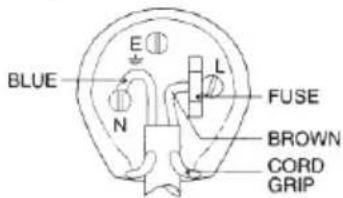
UK PLUG ONLY
WIRES CONNECTIONSTO A UK THREE-PIN PLUG
The wires in this mains lead are coloured in accordance with the following wiring codes: Blue:.... Neutral Brown:.... Live
The wires in this mains lead must be connected to the terminals in the plug as follows: Blue wire: .... N or Black Brown wire: .... L or Red Neither wire is to be connected to the earth (E or W) terminal of three-pin plug. Should the fuse fail in the plug remove the plug form the wall socket and replace the fuse with a 3Amp.ASTA approved BS 1362 fuse.


- OPASNI NAPON
- POZOR
- UPOZORENJA O LASERU
- IMPORTANT NOTES
- INTRODUCTION
- WARNING
- CAUTION
- DANGER
- LOCATION OF CONTROLS
- POWERSOURCE
- AC OPERATION
- DC OPERATION
- CAUTION:
- BASICFUNCTION
- SWITCHING ON THE UNIT
- TO ADJUST VOLUME
- HEADPHONES
- USINGTHERADIO
- USING THE CD/MP3
- Discs for Playback
- LOADING ADISC
- Note:
- PLAYINGADISC
- SELECTING A DESPRED TRACK PASSAGE
- To select a desired track
- To search for a particular passage during playback (track scanning at high speed)
- To select a song which track number exceeds 1.0 (for MP3 disc only)
- To Select A Desired Folder (for MP3 disc only)
- PROGRAMTRACKS
- To ErasethelMemory(Program)
- REPEAT
- To Repeat a Single Track
- To repeat all the Tracks
- To repeat current Directory (for MP only)
- RANDOMPLEX
- INTROSCAN PLAY (for CD disc only)
- LISTENING TO USB
- USB PLAYBACK
- COMPACT DISC MAINTENANCE
- SPECIFICATIONSS
- GENERAL
- CD SECTION
- RADIOSECTION
- AUDIOSECTION
- ACCESSORIES
- VOLTAGE DANGEREUX
- PARATHRHSEIS GIA TO LASER
- Precautions for correct disposal of the product.
- SIMPLIFIED EU DECLARATION OF CONFORMITY
Brand : Trevi
Model : CMP 542 USB
Category : Cd player/recorder