LDF9810ST - Dishwasher LG - Free user manual and instructions
Find the device manual for free LDF9810ST LG in PDF.


User questions about LDF9810ST LG
0 question about this device. Answer the ones you know or ask your own.
Ask a new question about this device
Download the instructions for your Dishwasher in PDF format for free! Find your manual LDF9810ST - LG and take your electronic device back in hand. On this page are published all the documents necessary for the use of your device. LDF9810ST by LG.
USER MANUAL LDF9810ST LG
Please read this manual carefully. It provides instructions on safe installation, use and maintenance.
Retain it for future reference.
Record the model and serial numbers of your machine and report this information to your dealer if your machine requires service.
To obtain nearest authorized service center or sales dealer, or to obtain product, customer, or service assistance, call 1-888-LG-CANADA (542-2623) and choose
the appropriate prompt from the menu and have your product type, model number, serial number and Zip code; or visit our web site at http://www.LG.ca or http://ca.lgservice.com
DISHWASHER FEATURES
■ Ultra Large Capacity
natural_image
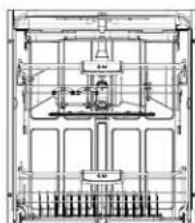
Technical line drawing of a mechanical assembly with no visible text or symbolsIf you raise the upper rack, you can load large dishes (Max. 14 in.) in the lower rack. The tall tub provides the clearance to handle large dishes as well as overall large capacity. LG dishwashers let you load very large items in the upper and lower racks.
■ Removable Utensil Rack™
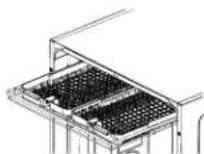
Third level cutlery rack makes it easy to load and unload flatware and cooking utensils.
Trays can be adjusted or removed to make more room for regular upper rack items.
■ Slim Direct Motor™
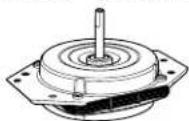
The new Slim Direct Motor ^™ is inverter-controlled. Wash power is controlled based on program selection. It also offers high energy efficiency to minimize energy use.
■ Hybrid Drying System
text_image
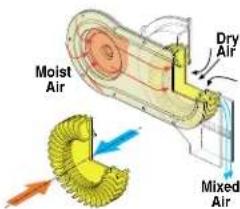
Moist Air Dry Air Mixed AirThis is a drying solution to mix cool and dry air from outside of the dishwasher and hot and humid air from inside of the dishwasher. It is safer than the system of venting hot and humid air to the outside of the dishwasher. Moreover, this is an optimized drying system that ensures less energy than heated dry system and better drying performance than condensing system.
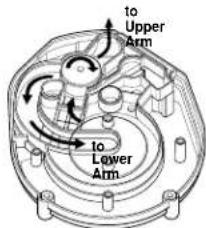
■ Vario Spray System
text_image
to Upper Arm to Lower ArmBecause the water spray is alternated between the upper and lower racks, all the power from the motor is directed to only one rack at a time which allows superior performance and reduced consumption of water and electricity.
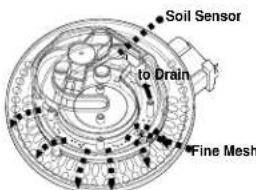
■ Self-Cleaning Filter
text_image
Soil Sensor to Drain Fine MeshFor best wash results, the self-cleaning filter system continuously cleans the water as it circulates. Your LG dishwasher has a self-cleaning filter and a chopper that grinds food into small particles before it goes down the drain.
DISHWASHER FEATURES
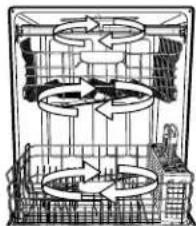
■ Dual Intensity™ Wash Cycle
natural_image
Cross-sectional diagram of a mechanical or electrical system with no visible text, numbers, or symbols.The spray intensity of the upper and lower racks is programmable by the consumer. You can select wash power based on soil level. For example, by selecting Soft Spray for the upper rack and Strong Spray for the lower rack, you can wash delicate items like stemware on the upper rack while washing pots and pans on the lower rack.
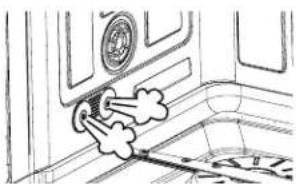
■ Steam Washing and Steam Delicate™
natural_image
Simple line drawing of a door with a circular vent and cloud-like shapes inside (no text or symbols)Adding STEAM to the wash cycles enhances wash performance with very little additional water or energy consumption. The SteamDelicate™ cycle can be used for cleaning delicate item such as china or stem ware.
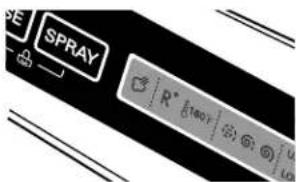
■Light Touch Buttons and Blue LCD
text_image
SPRAY R° 160°F G1 U L0The light touch buttons on the control panel make selections easy and convenient, while the blue LCD display clearly displays the selected cycle and options.
CONTENTS
PART 1. IMPORTANT SAFETY INSTRUCTIONS .... 4\~8
PART 2. PARTS OF YOUR DISHWASHER ....9
OPERATING INSTRUCTIONS
PART 3. FUNCTIONS OF CONTROL PANEL .... 10\~11
PART 4. PROGRAM....12
PART 5. USING YOUR DISHWASHER ....13\~18
PART 6. CARE AND MAINTENANCE .... 19
PART 7. OPERATING SEQUENCE ...... 20
PART 8. TROUBLESHOOTING .... 21

IMPORTANT SAFETY INSTRUCTIONS
READ ALL INSTRUCTIONS BEFORE USE
▲WARNING
For your safety, the information in this manual must be followed to minimize the risk of fire or explosion, electric shock, or to prevent property damage, personal injury, or loss of life.
Your safety and the safety of others is very important.
We have provided many important safety messages in this manual and on your appliance. Always read and obey all safety messages.

This is the safety alert symbol.
This symbol alerts you to potential hazards that can kill or hurt you and others.
All safety messages will follow the safety alert symbol and either the word DANGER or WARNING.
These words mean:
! DANGER
You can be killed or seriously injured if you don't immediately follow instructions.
WARNING
You can be killed or seriously injured if you don't follow instructions.
All safety messages will tell you what the potential hazard is, tell you how the reduce the chance of injury, and tell you what can happen if the instructions are not followed.

WARNING Tip Over Hazard
Do not put excessive downward force on the open door prior to installation as this could cause damage to the unit or cause it to tip over. The dishwasher should not be used before installation has been completed in accordance with the instructions in the installation manual.

WARNING Electrical Shock Hazard
Not following these instructions can result in death, fire, or electrical shock.
The dishwasher MUST be grounded.
Connect the ground wire to green ground connector in terminal box.
Do not use an extension cord.
READ ALL INSTRUCTIONS BEFORE USE
WARNING
For your safety, the information in this manual must be followed to minimize the risk of fire or explosion, electric shock, or to prevent property damage, personal injury, or loss of life.
Basic Safety Instructions
WARNING
To reduce the risk of fire, electric shock, or injury to persons when using this appliance, follow basic precautions, including the following.
WARNING - When using your dishwasher, follow basic precautions, including the following:
a) Read all instructions before using the dishwasher.
b) Use the dishwasher only for its intended function.
c) Use only detergents or wetting agents recommended for use in a dishwasher and keep them out of the reach of children.
d) When loading items to be washed:
1) locate sharp items so that they are not likely to damage the door seal; and
2) load sharp knives with the handles up to reduce the risk of cut-type injuries.
e) Do not wash plastic items unless they are marked "dishwasher safe" or the equivalent. For plastic items not so marked, check the manufacturer's recommendations.
Note : This statement may be omitted for an appliance that employs a heating element that is located or guarded such that melted plastic items are not likely to contact it.
f) Do not touch the heating element during or immediately after use.
g) Do not operate your dishwasher unless all enclosure panels are properly in place.
h) Do not tamper with the controls.
i) Do not abuse, sit on, or stand on the door or dish rack of the dishwasher.
j) To reduce the risk of injury, do not allow children to play in or on the dishwasher.
k) Under certain conditions, hydrogen gas may be produced in a hot-water system that has not been used for two weeks or more. HYDROGEN GAS IS EXPLOSIVE. If the hot-water system has not been used for such a period, before using the dishwasher turn on all hot-water faucets and let the water flow from each for several minutes. This will release any accumulated hydrogen gas. As the gas is flammable, do not smoke or use an open flame during this time.
I) Remove the door to the washing compartment when removing an old dishwasher from service or discarding it.

IMPORTANT SAFETY INSTRUCTIONS
WARNING
To reduce the risk of fire, electric shock, or injury to persons when using this appliance, follow basic precautions, including the following.
Installation Instructions
natural_image
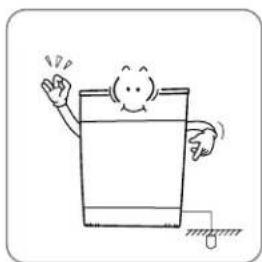
Simple line drawing of a cartoon character waving while standing on a surface (no text or symbols)The dishwasher is designed for standard household current (120 Volts AC, 60 Hz.) Before connecting the dishwasher, ensure the outlet or cable is properly fused and grounded.
Not being grounded may cause breakdowns or electric shocks.
natural_image
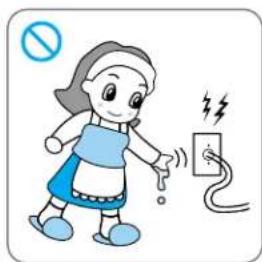
Illustration of a girl using a power outlet with a 'no' symbol and lightning bolt (no text or labels)Do not grasp the power cord or switch with wet hands. Do not use a damaged power cord, plug or socket.
It may cause electric shock.
natural_image
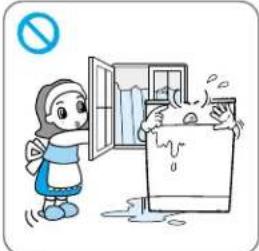
Cartoon illustration of a girl opening a refrigerator with steam rising from the window (no text or symbols)Do not install or store the dishwasher where it will be exposed to the weather.
It may cause an electric shock, fire, malfunction and damage.
NOTE Most installations are hard-wired. This will imply it is acceptable for the customer to set up the dishwasher as a portable appliance. This would apply only in cases where the dishwasher is plugged in to an outlet under the sink.
natural_image
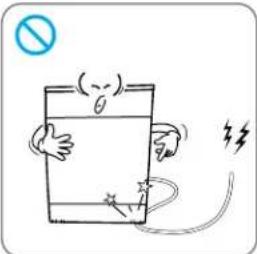
Cartoon illustration of a battery with a switch and lightning bolt symbol (no text or labels)Do not damage the power cord itself or place heavy objects on the cord.
Power cord damage may cause fire and electric shock.
text_image
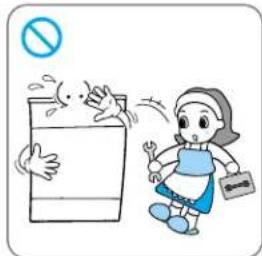
Cartoon illustration showing a child and a signpost with a prohibition symbol, likely indicating no restrictions or rejection.Disassembly or repair should be conducted by experienced service persons.
Improper disassembly or repair could lead to product failure or electrical shock.
natural_image
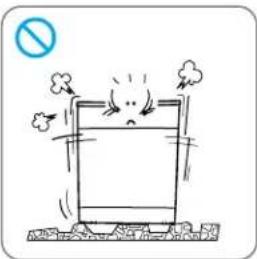
Cartoon illustration of a distressed rectangular object with smoke and flames, no text or symbols presentPlace the dishwasher on even and solid floor.
Uneven surface may cause abnormal noise.
natural_image
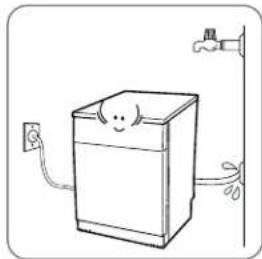
Simple line drawing of a smiling refrigerator with a power outlet and hand holding a hose (no text or symbols)After installation, recheck the water supply connections.
Loose connections could leak resulting in property damage.
For a permanently connected dishwasher:
This appliance must be connected to a grounded metal, permanent wiring system or an equipment-grounding conductor must be run with the circuit conductors and connected to the equipment-grounding terminal or lead on the appliance.
NOTE Detailed installation instructions are contained in the installation instruction manual included with your dishwasher. Be sure to read and observe all instructions in the installation manual.

IMPORTANT SAFETY INSTRUCTIONS
WARNING
To reduce the risk of fire, electric shock, or injury to persons when using this appliance, follow basic precautions, including the following.
User-Maintenance Instructions
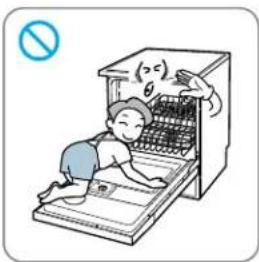
natural_image
Illustration of a child cleaning an open refrigerator with a no-smoking symbol (no text or labels)Do not allow children or pets to play on the door or inside the dishwasher as this could cause injury to the child or pet, or damage the dishwasher.
Children could fall and be injured. Children or pets could be injured by interior parts or suffocate inside dishwasher.
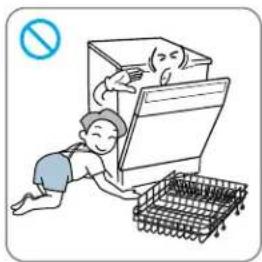
natural_image
Illustration of a person cleaning a refrigerator with a shopping basket nearby (no text or symbols)Don't leave racks out of dishwasher, except when removed for washing large items.
Children could play inside the dishwasher or fall on the rack and be injured.
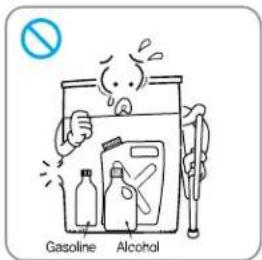
text_image
Gasoline AlcoholDo not store or use combustible materials, gasoline or other flammable vapors and liquids in or around dishwasher.
This could cause a fire.
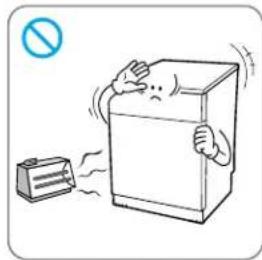
natural_image
Illustration of a refrigerator with a person standing on its side and a smokestack emitting vapor, no text or symbols present.Keep the dishwasher away from heat sources
Excessive heat could cause melting of plastic parts or fire.
natural_image
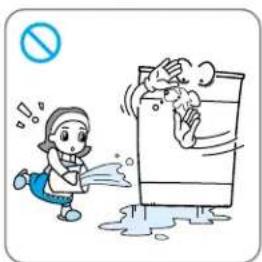
Cartoon illustration of a child reacting to a large box with steam rising, no text or symbols presentDo not splash water on the controls or on the exterior of the dishwasher.
This could cause fire or electric shock.
natural_image
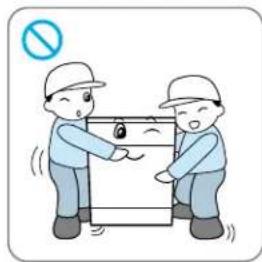
Illustration of two workers in hard hats exchanging a device with a lock, no text or symbols presentDishwasher should be unpacked and moved by 2 or more persons due to its of heavy weight.
Dropping the product may cause injury to people or damage to the dishwasher.
natural_image
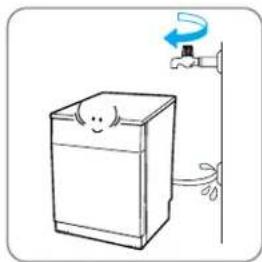
Simple line drawing of a refrigerator with a hand holding a faucet and a scroll, no text or symbols present.When dishwasher is not in use for a long time, shut off the water supply.
Property damage could result if a connection fails.
text_image
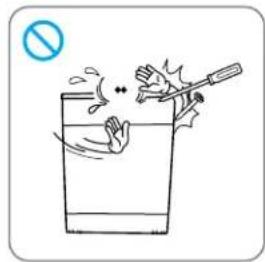
Illustration showing a hand holding a cigarette above a glass with a 'no' symbol, indicating no smoking or no smoking.Do not press the buttons with hard or sharp objects. Use only your finger tips.
Damage or electric shock could result.
text_image
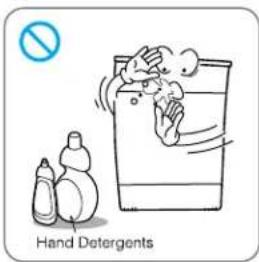
Hand DetergentsUse only detergents or wetting agents recommended for use in a dishwasher and keep them out of the reach of children.
Improper detergents may cause malfunctions, electric shock, or fire due to excessive suds.

IMPORTANT SAFETY INSTRUCTIONS
WARNING
To reduce the risk of fire, electric shock, or injury to persons when using this appliance, follow basic precautions, including the following.
User-Maintenance Instructions

WARNING Child Safety
- Controls may be locked using CHILD LOCK mode to prevent settings from being changed by children.
- Keep children away from detergents and rinse-aids. Store chemicals properly and safely.
- Do not allow children to operate the dishwasher.
- Young children should be supervised to ensure that they do not play with the appliance.

WARNING Concerning the Power Cord
Most appliances should be connected to a dedicated circuit; that is, a single outlet circuit which powers only that appliance and has no additional outlets or branch circuits. Check the specification page of this owner's manual to be certain. Do not overload wall outlets. Overloaded wall outlets, loose or damaged wall outlets, extension cords, frayed power cords, or damaged or cracked wire insulation are dangerous. Periodically examine the cord of your appliance, and if its appearance indicates damage or deterioration, unplug it, discontinue use of the appliance, and have the cord replaced with an exact replacement part by an authorized service person. Protect the power cord from physical or mechanical abuse, such as being twisted, kinked, pinched, closed in a door, or walked upon. Pay particular attention to plugs, wall outlets, and the point where the cord exits the appliance. Any of these conditions could result in electric shock or fire.
Disposal Instructions
natural_image
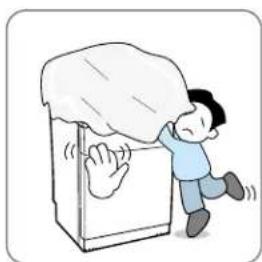
Illustration of a person climbing a large wall covered with a cloth, no text or symbols presentProperly dispose of the box, packaging, plastic bags, and extruded polystyrene.
Children playing with packing material and plastic bags could be injured or suffocate.
natural_image
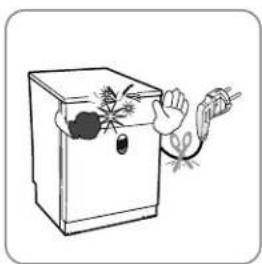
Illustration of a hand using a tool to clean or inspect a small object inside a container (no text or symbols)When the product has reached the end of its useful life and is to be discarded, remove the door, cut the power cord and disable the control panel.
Children could climb into the tub and become trapped and suffocate. Attempts to reuse the product could cause injury or property damage.
SAVE THESE INSTRUCTIONS
text_image
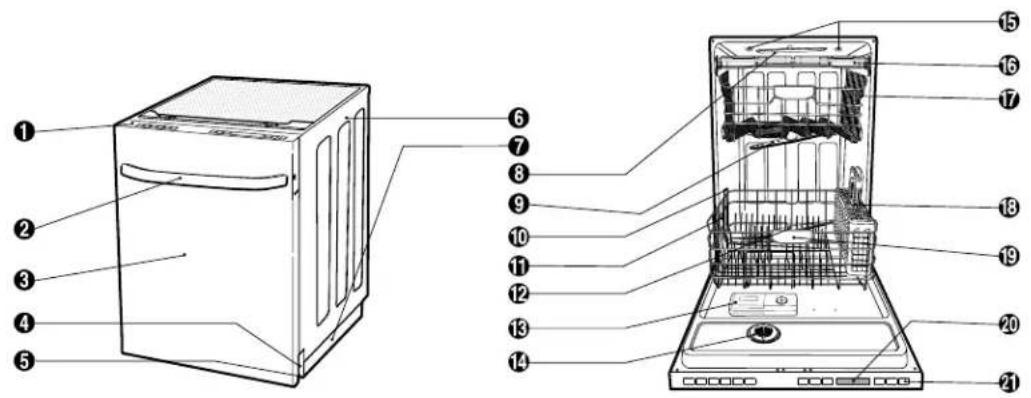
Technical diagram of a refrigerator with numbered parts for identification① Control Panel
② Door Handle
③ Front Cover
④ Lower Cover
⑤ Leveling Foot
⑥ Side Cabinet
⑦ Base
⑧ Top Spray Arm
⑨ Upper Spray Arm
⑩ Removable Tines
⑪ Steam Nozzle
⑫ Lower Spray Arm
⑬ Detergent & Rinse Aid Dispenser
⑭ Vapor Vent Cover
⑮ Tub Lamp (IllumiTub™) *
⑯ Cutlery Rack
⑰ Upper Rack
⑱ Cutlery Basket
19 Lower Rack
⑳ Blue LCD Display
②1 Power Button
* IllumiTub™ comes on when the door is opened. It goes off when the door is closed.
Specifications
• Power Supply: 120V, 60HAC only, minimum 15A circuit breaker.
• Water Pressure: 20 - 120 psi (140 - 830 kPa)
- Size (WxDxH): 23 7/8" x 25" x 33 7/8"
(606 mm x 635 mm x 860 mm)
- Minimum Recommended Inlet Water Temperature: 120^ (49°C)
• Weight: 128 lbs. (58 kg)
The appearance and specifications are subject to change without notice.

UNCTIONS OF CONTROL PANEL
SOAK
POWER SCRUB
NORMAL
STEAM DELICATE
QUICK
RINSE ONLY

CYCLE
| SOAK | This cycle is for very heavily soiled loads including pots, pans, and casserole dishes, which may have cooked on food. |
| POWER SCRUB | This cycle is for very heavily soiled loads that may require extra cleaning. |
| NORMAL | This cycle is for normally soiled, every day loads. |
| STEAM DELICATE | This cycle is for delicate items like china or stemware. |
| QUICK | This cycle is for lightly soiled, recently used dishes, and cutlery. |
| RINSE ONLY | This cycle is just for rinsing dishes quickly. No detergent is used. |
OPTION
| STEAM | Press the STEAM button to add steam to the selected cycle for added cleaning power.NOTE:Steam can only be added to the following cycles:SOAK, POWER SCRUB, NORMAL. |
| RINSE | Repeated pressing of the RINSE key will alternately select Sanitary( _160^ ),Extra Rinse( R^+ ) or both. |
| SPRAY | Select the spray intensity that matches your cleaning needs. Repeated pressing of the SPRAY key will select Strong ( ⓑ ), Medium ( Ⓠ ) or Soft ( Ⓧ ).This button is also used to activate the Dual Intensity ^TM , mode (see page 12). |
| HALF LOAD | For smaller loads, use this option to wash only the upper or lower rack to save energy and water. Press the HALF LOAD key to select half load. Repeated pressing of the key toggles between upper and lower rack. |
| DELAY START | Use this option to start the dishwasher at a later time.Press DELAY START repeatedly to delay the beginning of the selected cycle.Each press of the button will increase the delay time by one hour. Maximum delay is 24 hours. |
NOTE Only the sanitary cycle is designed to meet sanitization standards. There is no intention, either directly or indirectly, that any other cycle will meet sanitization standards.

text_image
STEAM RINSE SPRAY R⁺ 160°F UPPER LOWER 88:88 HALFLOAD DELAY START POWER ① ② ③ ④ ⑤ ⑥INDICATOR
| 1 | STEAM OPTION INDICATORIndicates that the STEAM option has been selected. The symbol will blink while steam is being injected into the dishwasher. | |
| 2 | R^+ 160^ | RINSE INDICATORThis display shows which rinse options have been selected.The ( 160^ ) symbol indicates that sanitary rinse has been selected.The symbol blinks during the cycle if the sanitary temperature has been achieved.Once the cycle has ended, the symbol will be steady if the sanitary temperature has been achieved. (See NOTE below.)The ( R^+ ) symbol indicates that an extra rinse has been added to the selected cycle. |
| 3 | SPRAY INDICATORIndicates the selected spray intensity: Strong ( ), Medium ( ) or Soft ( ). | |
| 4 | UPPERLOWER | HALF LOAD INDICATOREach press of the HALF LOAD key toggles between upper rack only and lower rack only. When DUAL INTENSITYTM is selected, both lights will be on and one will be blinking. The spray intensity for the blinking rack can be adjusted affecting the other. |
| 5 | CHILD LOCKThis symbol will be visible when Child Lock is activated.RINSE AIDThe symbol will be displayed when the rinse aid needs to be refilled. | |
| 6 | 88:88 | TIME REMAININGIndicates the normal run time for a cycle when it is first selected. The displayed time does not include any delay times, such as water heating. During the cycle, the estimated time remaining for the selected cycle will be displayed |
CANCEL & CHILD LOCK
| CANCEL | To cancel a running cycle, open the door, then press and hold the STEAM DELICATE and NORMAL buttons together for 3 seconds.The drain pump will be activated, even with the door open, and the cycle will be canceled. |
| CHILD LOCK | To lock/unlock the buttons, press SPRAY and RINSE simultaneously for 3 seconds while any cycle is running. When CHILD LOCK is set, the CHILD LOCK indicator will appear and all buttons are disabled. |
NOTE This high temperature rinse sanitizes dishware and glassware in accordance with NSF/ANSI Standard 184 for Residential Dishwashers. Certified residential dishwashers are not intended for licensed food establishments.
PROGRAM
| Cycle | WASH | RINSE | DRY | Water (gal/L) | Time (min) | Option | ||||
| Pre-Wash | Main Wash | Rinse 1 | Rinse 2 | Heating Rinse | Extra Rinse | Steam | ||||
| SOAK | 120~140~149°F | 162°F | 5.5~9.2/21~35 | 143~191 | Yes | Yes | ||||
| 49°C | 60~65°C | 72°C | ||||||||
| POWER SCRUB | 131~145°F | 154°F | 5.5~9.2/21~35 | 123~171 | Yes | Yes | ||||
| 55~63°C | 68°C | |||||||||
| NORMAL | 113~140°F | 149°F | 2.6~6.9/10~26 | 110~135 | Yes | Yes | ||||
| 35~60°C | 65°C | |||||||||
| STEAM DELICATE | 113~120°F | 154°F | 5.5~6.9/21~26 | 93 | Yes | Yes | ||||
| 68°C | ||||||||||
| QUICK | 115°F | 140°F | 5.5/2174 | Yes | No | |||||
| 46°C | 60°C | |||||||||
| RINSE ONLY | 1.3/514 | No | No | |||||||
Dual Intensity™ Wash option
The spray intensity of the upper and lower racks can be adjusted separately depending on soil level or type of dishes loaded on each rack.
For example by selecting Soft Spray for the upper rack and Strong Spray for the lower rack, you can wash delicate items like stemware can be washed on the upper rack while washing pots and pans are being washed on the lower rack.
How To Use Dual Intensity™
- Press SPRAY key for 3 second then, indicator UPPER turn on and off.
- Press SPRAY key to set the intensity for upper rack. (Strong/Medium/Soft/Off)
- Press HALF LOAD key to confirm intensity of upper rack.
- Press SPRAY key to set the intensity for lower rack (Strong/Medium/soft/off)
- Press HALF LOAD key to confirm intensity of lower rack.
- Select other options.
- Close the door.
- Dishwasher starts.

SING YOUR DISHWASHER
Before using the dishwasher, please read the Important Safety Instructions.
Water supply temperature should be a minimum of 120^ F ( 49^ C) for better washing and reasonable cycle time.
For this reason, use hot water supply only. It is also important that the dishwasher be loaded according to instructions for effective cleaning.
When loading your dishwasher, be sure to scrape off large quantities of food and remove non-food items such as paper, bones, toothpicks, etc.
- Items with deep bottoms, like some coffee cups, should be placed at an angle to help water run off for better washing and drying.
- Remove solid, burnt-on food from dishes prior to loading in the dishwasher.
- Load only items which are dishwasher safe.
NOTE Please avoid utensils that are non-heat resistant, metal decorated, etc.
Loading the Lower Rack
The extra tall tub allows loading of dishes, pans or other utensils that are up to 14 inches in size.
NOTE Do not obstruct the rotation of the spray arms. Make sure large items do not prevent the detergent dispenser from opening.
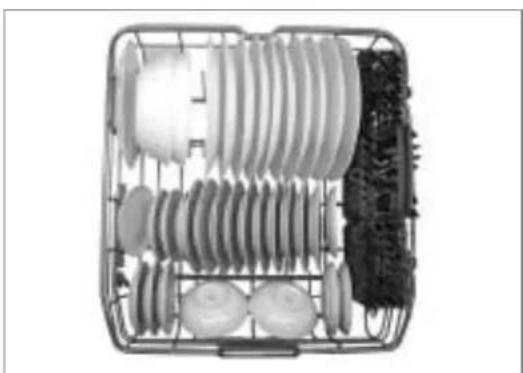
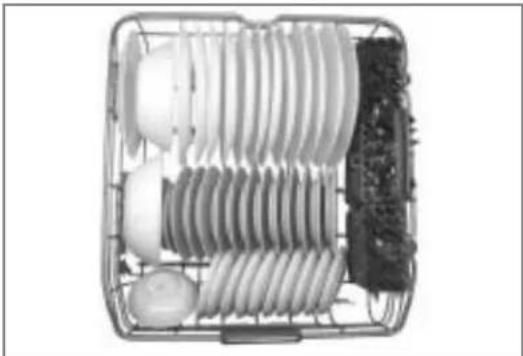
The lower rack is best loaded with dinner plates, soup bowls, dishes, pots, pans, lids and even a grill tray. Plates should be positioned upright and facing the center of the rack. Pots, pans, and large dishes must be turned so that the inside is facing downward.
natural_image
Metal cage containing various electrical insulators and components (no visible text or symbols)Sample 10-place setting, lower rack
Basically, the lower rack is not designed to handle small items like cups, wine glasses, or small plates. These items should be loaded on the upper rack for proper cleaning and to avoid damage. Upper rack tines are designed to hold even the most delicate items securely in place including tall items.
natural_image
Electrical circuit board with coiled components and a battery (no visible text or symbols)Sample 12-place setting, lower rack
Cutlery Basket
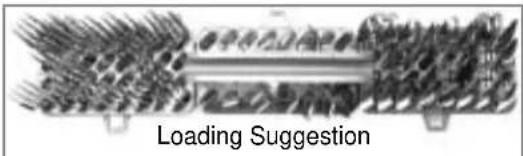
Cutlery and knife basket has separators to avoid scratching and tarnishing of your cutlery. The basket can be divided into three separate baskets which can be used on both the upper and lower levels. If you have only a small load of cutlery, the baskets can be removed, leaving extra space for other plates.
text_image
Loading Suggestion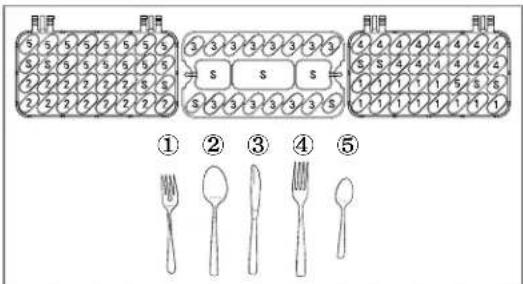
text_image
月月 月月 3 5 5 5 5 5 5 5 5 5 5 5 5 5 5 5 6 2 2 2 2 2 2 2 2 2 2 2 2 2 2 2 ① ② ③ ④ ⑤ ① ② ③ ④ ⑤! WARNING
Use caution when loading and unloading sharp items. Load knives with the handles up in order to reduce the risk of injury.

SING YOUR DISHWASHER
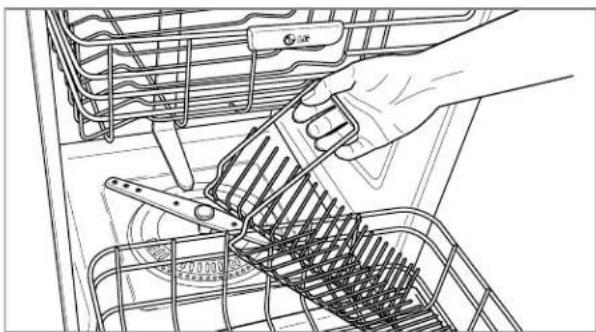
Removable Tines
If you need to wash large items, you can remove the tines from the lower rack.
natural_image
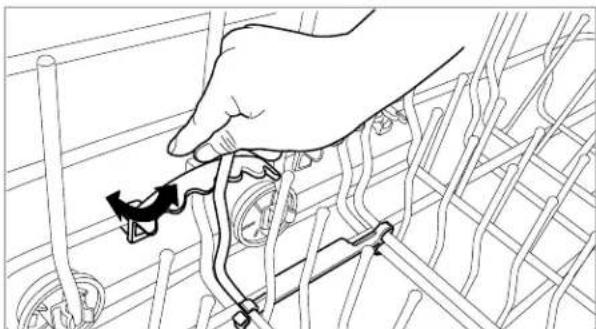
Line drawing of a hand using a tool to adjust or install a battery pack (no text or symbols visible)Adjustable angular tines
The plate supports in the lower and upper racks can be folded down. Based on the size and shape of the dishes, you can adjust the angle of the tines to five different positions.
natural_image
Line drawing of a hand connecting wires to a mechanical component (no text or symbols)NOTE
Use caution when adjusting angular tines and do not apply excessive force.
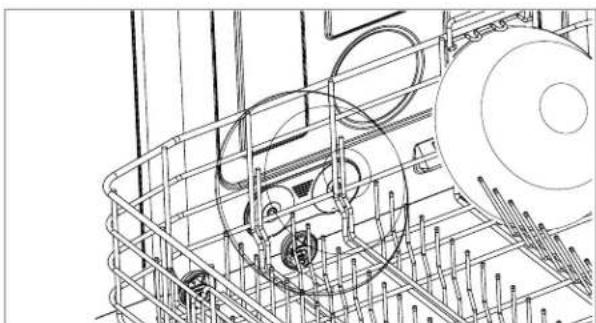
Hard Stained Dish Loading
If you want to wash hard stained dish, load the dish in front of the steam nozzle. The steam nozzle can easily remove hard stain on the dish with hot steam.
natural_image
Technical line drawing of a mechanical assembly with gears and rods (no text or symbols)NOTE
Do not load thermally weak items of Plastic, Crystal, and Gold rimed in front of the steam nozzle.
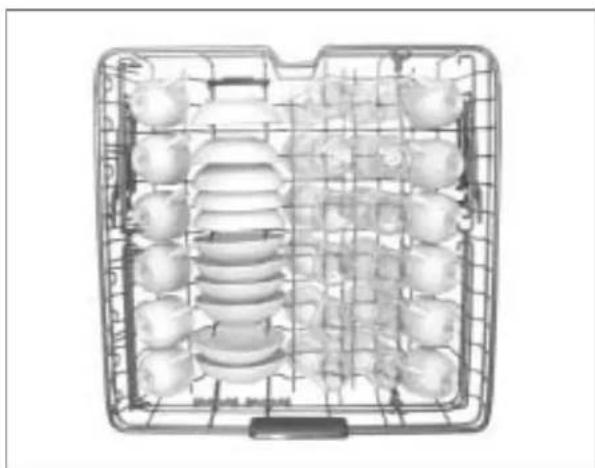
Loading the Upper Rack
The upper rack is best loaded with more delicate items, small plates, cutlery basket, cups, glasses, and dishwasher safe plastic items. Plates should be positioned upwards with the plate bottom facing the front of the rack. Cups, glasses, and bowls must be positioned upside down. Extra cups or cooking utensils can be laid on the fold-down cup racks which may also provide support for long stem glasses. Take care not to obstruct the rotation of the spray arms above and below the upper rack.

natural_image
Top-down view of a stainless steel rack with multiple food items arranged in rows (no visible text or labels)Sample 10-place setting, upper rack
natural_image
Top-down view of a stainless steel kitchen appliance with multiple food items arranged in a grid (no visible text or labels)Sample 12-place setting, upper rack

SING YOUR DISHWASHER
Height Adjustable Upper Rack
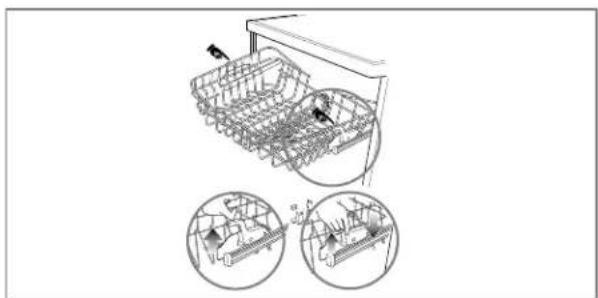
The upper rack adjusts up and down to let you put tall and oversized items on it. With the upper rack in the lower position, dishes up to 12 inches can be loaded. If the cutlery rack is removed, then dishes as large as 12 inches can be loaded. Raising the upper rack to the higher position will allow plates and other items as large as 14 inches to be washed on the lower rack.
To raise the rack
Hold the rack in the middle of each side to support the weight of the rack, then lift the lever on each side with a finger to release the rack and then lower it gently.
To lower the rack
Hold the rack in the middle of each side to support the weight of the rack, then lift the lever on each side to release the rack and lower it. ( marked position).
natural_image
Technical line drawing of a mechanical assembly with two circular insets showing internal components (no text or symbols)NOTE
Be sure both sides are adjusted to the same level. Failure to do so could cause damage to the rack, door or other components when the door is closed.

CAUTION
Non Dishwasher-Safe Items
The combination of high water temperature and dishwasher detergents may damage certain items. Therefore we do not recommend using the dishwasher to wash the following items:
- Handpainted silver or gold leaf crockery
- Wood-or bone-handled
- Iron or non-rustproof utensils
- Plastic items which are not dishwasher safe.
Half Load Option
In the event that you do not have enough dishes for a full load, you can simply load dishes in the upper rack or in the lower rack only. You can then wash that rack separately by selecting the half load option. This will save water, energy and time.
Removing the Upper Rack
The upper rack can be removed to make more room in the lower rack.
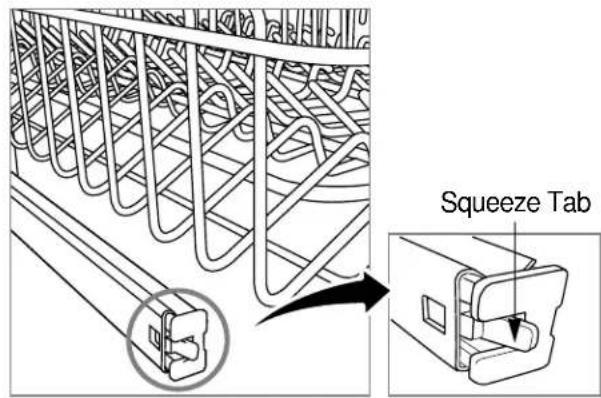
To remove the upper rack
- Pull the upper rack out until it stops.
- Squeeze the tab of the retainer at the end of each side rail toward the center of the rack, then pull the retainer out of the rail.
Be careful not to allow the upper rack to fall off the rails while removing the retainers. - Pull the upper rack out of the rails.
text_image
Squeeze Tab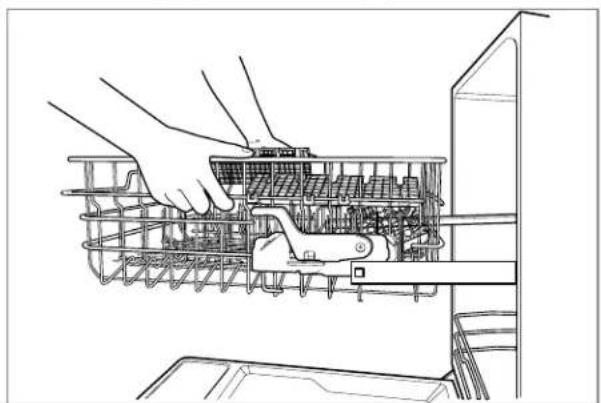
natural_image
Line drawing of hands operating a refrigerator with internal components (no text or symbols)NOTE
Always remove dishes from the upper rack before removing or reinstalling the rack.

SING YOUR DISHWASHER
Loading the cutlery Rack
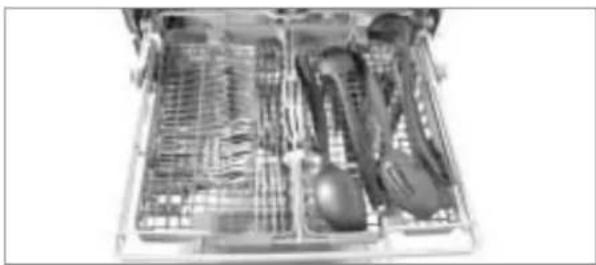
The cutlery rack is best suited for flatware and most cooking or serving utensils.
natural_image
Open kitchen drawer containing various kitchen utensils and cutlery (no visible text or labels)The separators on the cutlery racks help keep flatware separated to avoid damage and improve cleaning.
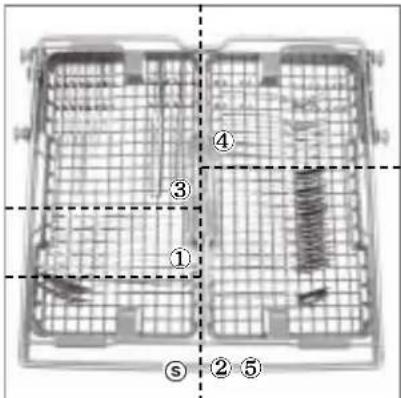
text_image
Diagram of a multi-compartment storage unit with numbered compartments and internal structure, likely for industrial or warehouse management.⑤
④
③
②
①
Sample 10-place setting.
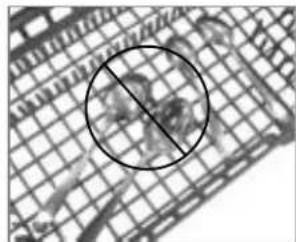
Knife, fork, and spoon handles should be positioned between the tines.
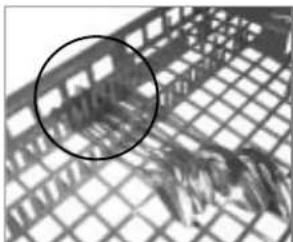
natural_image
Close-up of a mesh grid with a circled area highlighting a specific pattern (no text or symbols)Right Wrong
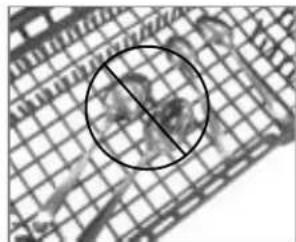
natural_image
Grid pattern with a black circle highlighting a specific area, no text or symbols present.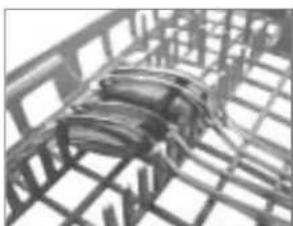
natural_image
Abstract 3D wireframe structure with layered geometric patterns (no text or symbols)Alternate
If the handles of your flatware are too thick, then reverse the pieces so the handles face the other direction as shown in the bottom figure.
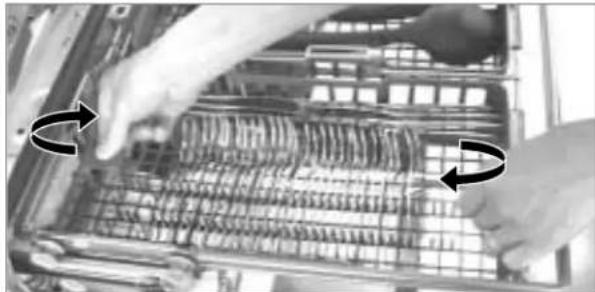
Height Adjustable tray
Each side tray can be adjusted independently to a high or low position to accommodate different sizes of utensils or cutlery.
Each tray is adjusted by lifting it out and rotating it front to back.
natural_image
Close-up of hands installing or adjusting a mechanical component with visible internal structure (no text or symbols)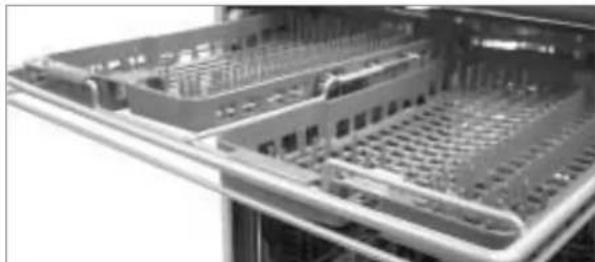
natural_image
Close-up of a server rack with multiple drive bays and ventilation grilles (no visible text or labels)Removable Cutlery Rack
The entire cutlery rack can be removed if more space is needed on the upper rack for larger items.
NOTE
Always remove cutlery from the rack before removing the rack.
natural_image
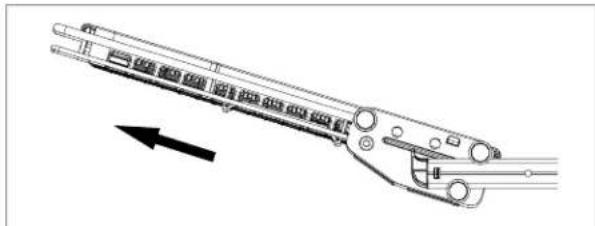
Technical line drawing of a mechanical linkage or connector component (no text or symbols)Pull the rack out to the end of the rails, then lift the front of the rack so the rollers clear the stop on the end of the rail. The rack can now be slid forward and removed from the rails.

WARNING
Be careful when loading and unloading sharp-edged items. Load sharp knives with the blade down in order to reduce the risk of injury.

SING YOUR DISHWASHER
Adding detergent to dispenser
- Detergent must be put into the detergent chamber before starting every cycle except when Rinse Only is selected.
- If your dishes are only moderately dirty, you may be able to use less detergent than recommended.
- The detergent chamber holds 1.4 oz (40g) when full.
NOTE
It is not necessary to fill the compartment to capacity. Simply use the recommended amount of detergent.
- The amount of detergent depends on the program, dish load and, soil level and water hardness. Refer to the table below and adjust these recommended amounts as necessary for your load.
| CYCLE | AMOUNT OF DETERGENT | |
| PRE-WASH compartment | MAIN WASH compartment | |
| Soak | Full (0.35 oz) | 34 Full (1.05 oz) |
| Power Scrub | Full (0.35 oz) | 34 Full (1.05 oz) |
| Normal | None | 12 Full (0.7 oz) |
| Steam Delicate | None | 14 Full (0.3 oz) |
| Quick | None | 12 Full (0.7 oz) |
| Rinse only | None | None |

CAUTION
Detergent Information
Use only the detergent intended for household dishwashers or the dishwasher may fill with suds during operation. Suds may reduce washing performance and could cause the unit to leak. (Hand-Wash detergent should NEVER be used in the dishwasher.)
Filling the dispenser
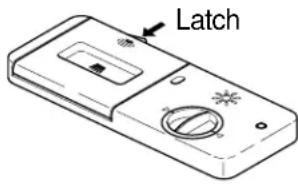
- Push latch to open if the lid is closed.
text_image
Latch- Add detergent to the main wash compartment. (See the table for the amount of detergent.)
NOTE
Do not add detergent for the Rinse Only cycle.

text_image
For main wash- If needed, add detergent to pre-wash compartment.
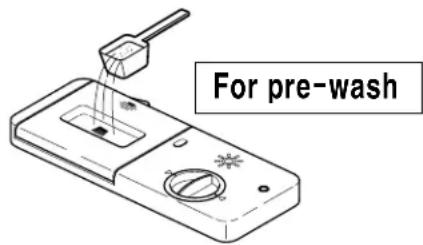
text_image
For pre-wash- Close the cover. (The cover will click shut.)
NOTE
Too much detergent can leave a film on dishes and cause a damaging buildup in the dishwasher.

SING YOUR DISHWASHER
Adding Rinse Aid to dispenser
The use of rinse aid is required to help prevent possible spots on dishes water droplets remaining after the completion of the wash cycle and to enhance the performance of the dry cycle.
NOTE
Only liquid rinse aid can be used for this dishwasher.
- Filling Rinse Aid
- Rotate the round cap counterclockwise and remove it.
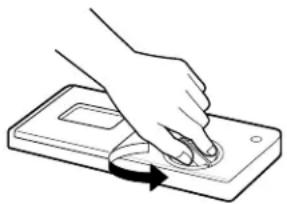
natural_image
Hand pressing a button on a device (no text or symbols visible)- Add liquid rinse aid to the maximum level. (Max. 4.8 oz (145ml))
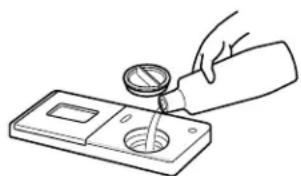
natural_image
Line drawing of a hand pouring liquid into a container with a tube (no text or symbols)- Replace and lock the cap.
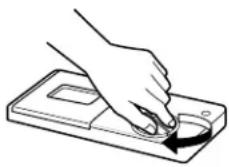
- Rinse aid will be automatically dispensed during the final rinse cycle.
- Rinse Aid Amount Setting
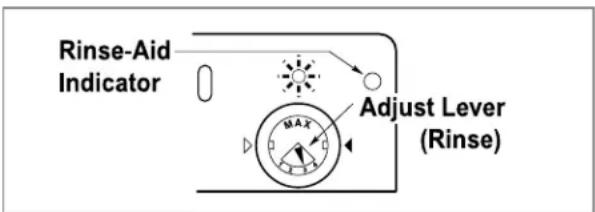
The factory setting is at level 3, which provides the best performance under most conditions. Setting the rinse aid control to a setting that is too low will contribute to spotting and streaking of the dishes and poor drying performance.
Setting the control too high can cause foaming which will cause poor wash performance.
If it becomes necessary to adjust the rinse aid setting, remove the cap and adjust the dial to a higher or lower number. Lower numbers use less rinse aid.
text_image
Rinse-Aid Indicator Adjust Lever (Rinse)- Refilling Rinse Aid
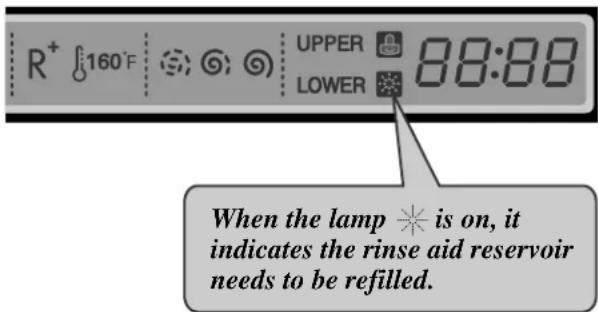
The capacity of the rinse aid dispenser is 4.8 oz (145ml). How often you need to refill the rinse aid dispenser depends on your washing habits such as the number of washes per month and which rinse aid setting you use. The indicator light will inform you when the rinse aid level is low.
text_image
R⁺ ⏻160°F ⚪️ ➕ ➕ ➕ ➕ UPPER 88:88 LOWER ➕ ➕ ➕ ➕ When the lamp ✱ is on, it indicates the rinse aid reservoir needs to be refilled.NOTE
In hard water areas where it is not economical or practical to install a water softener, use GLASS MAGIC with each load to increase the effectiveness of the detergent. Pour 1/4 cup (4 tbsp) of GLASS MAGIC into the bottom of your dishwasher each time the dishwasher is used except Rinse Only. To remove film on dishwasher recommend that use White Vinegar and operate product at about 20ml(4 tbsp) or use the Tub clean detergent.

ARE AND MAINTENANCE
For best results, it is important to periodically check and care for the filters and spray arms.
⚠ WARNING: To prevent any possible injury during care and maintenance/cleaning, be sure to wear gloves and/or protective clothing.
Cleaning metallic parts
Clean the dishwasher with a cloth or sponge. If your dishwasher has a stainless steel door panel, we recommend the use of a quality stainless steel cleaner. The stainless steel tub has a tendency to build up cloudy film on its surface, especially when using hard water.
To remove filming on the interior surfaces, add 1/4 to 1/2 cup of white vinegar to the tub and run a normal cycle. If stronger cleaning is needed, use Glisten or similar cleaning agent which can usually be found wherever detergents are sold.
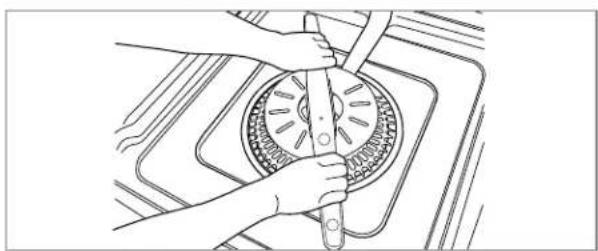
Cleaning Spray Arms
- Lower Spray Arm
- Check that the water jet holes are not blocked by food particles.
- When cleaning is necessary, remove the spray arm by pulling up.
- Clean the spray arm and replace it by pushing down to snap it in place. Be sure spray arm turns freely after installation.
natural_image
Line drawing of hands operating a circular mechanical component with a tool, no text or symbols present- Upper Spray Arm
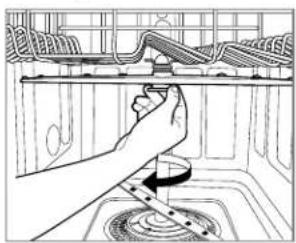
- Pull the upper rack forward. Make sure the water jet holes are not blocked by food particles.
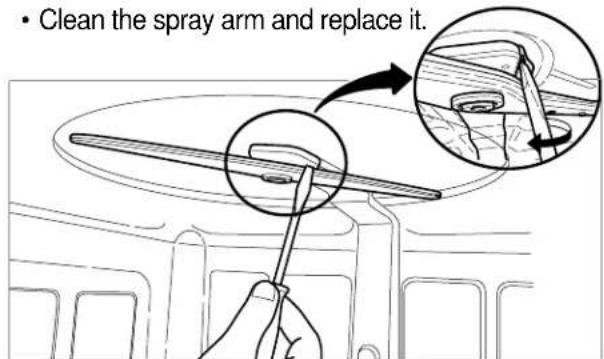
- If cleaning becomes necessary, remove the spray arm by turning the nut on the bottom of the spray arm 1/8th turn counterclockwise and pulling down. (See illustrations below)
- Clean the spray arm and replace it in the reverse order. Make sure the nut locks back in place (1/8th turn).
natural_image
Line drawing of a hand using a tool to clean or adjust the interior ceiling fixture (no text or symbols present)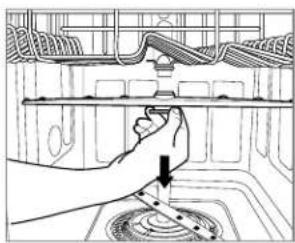
natural_image
Line drawing of a hand using a tool to adjust or install a component on an appliance (no text or symbols visible)- Top Spray Arm
- Make sure the water jet holes are not blocked by food particles.
- When cleaning is necessary, remove the arm by disengaging the water supply tube from the bracket which holds it in place.
- Slide the spray arm off the end of the water supply tube.
- Clean the spray arm and replace it.
text_image
• Clean the spray arm and replace it.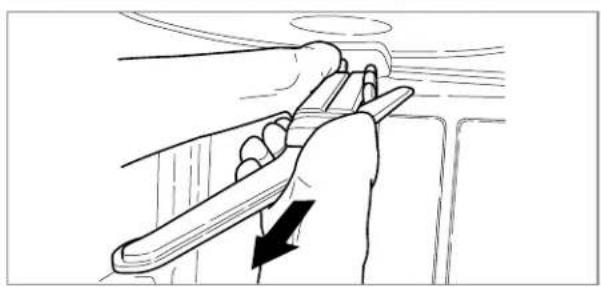
natural_image
Line drawing of a hand holding a tool with an arrow indicating direction (no text or symbols)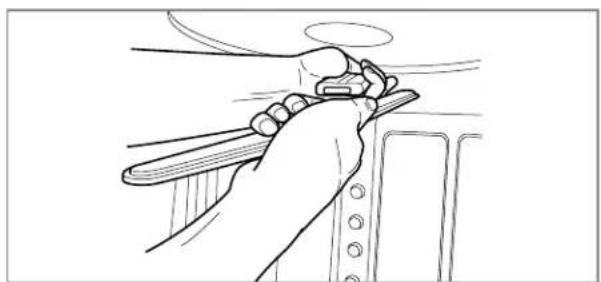
natural_image
Line drawing of a hand holding a tool near a vehicle (no text or symbols)Seasonal Maintenance and Storage
- During the summer season, if you will be absent for extended periods of time, it is recommended that you close the water valve and unplug power cord or shut off the circuit breaker.
- During the winter season, if there is a possibility of freezing temperatures, it is recommended that you winterize the water supply lines and the product itself.

PERATING SEQUENCE
1. Load the dishes.
Remove any scraps of food in advance. Pull the lower rack out and load the dishes and cutlery in and push it all the way back. Pull the upper rack out and load the cups, glasses, etc.
2. Add detergent
Add the required amount of detergent into the dispenser. Close the detergent dispenser lid.
3. Turn on the dishwasher.
When ready to run a cycle, open the door and press the power button.
4. Check rinse-aid.
The indicator lights will illuminate if the rinse aid level is low.
5. Setting the cycle and option
Select the desired cycle. You can select one of six cycles regarding the soil level.
After selecting the cycle, select the option. You can also select one of six options including dual wash.
If you want more information on the cycles and options, please refer to the page 10 and 12.
You can check the estimated remaining time on the display after setting the cycle and option.
NOTE
The estimated remaining time will be displayed. If the door is opened during operation, the dishwasher stops. Once the door is closed, the program will restart from the point where it stopped.
6. Close the door.
The dishwasher starts automatically after a slight delay.
7. At the end of the cycle
At the end of the cycle, End is displayed on the digital display for a few seconds and a tone will sound, signaling program completion. The dishwasher automatically switches off for safety and energy savings after 20 seconds.

CAUTION
Empty the lower rack first and then the upper. This will avoid water dripping from the upper rack onto the dishes in the lower one.

WARNING
In general, it is not advisable to open the door while the dishwasher is running. However, if it becomes necessary to open the door during a cycle, the dishwasher will stop automatically. The cycle will start again once the door is closed. Care should be taken when opening the door immediately following the cycle, as steam may escape.

Auto-Off
To conserve energy, the dishwasher will automatically shut off after 10 minutes if no cycle is selected or the door is not closed to start a cycle. The interior lights will continue to operate.
| Causes Recommended ActionsProblem | ||
| Dishwasher does not operate | Door is not completely closed. | Check the door is completely closed and latched. |
| Power supply is not connected. | Connect power supply properly. | |
| Fuse is blown. | Replace fuse or reset circuit breaker. | |
| Too long operation | Unit connected to cold water. | Check water supply connection or water heater setting.(Heating cold water takes longer). |
| Odor | Previous cycle was stopped before complete. | Operate Quick Wash cycle with detergents without loading dishes. |
| Water remains after a cycle finishes | Drain hose is kinked or clogged. | Adjust hose or clear blockage. |
| Food Soil remains on dishes | Improper cycle selection | Select correct cycle based on dish types and soil toughness. |
| Water temperature is low. | Check water supply connection or water heater setting. | |
| Dishwashing detergent was not used. | Use recommended detergents. | |
| Low inlet water pressure | Water pressure should range between 20 ~ 120psi. | |
| Water jet holes of spray arms blocked. | Clean the arm. | |
| Improper dish loading | Dishes shouldn't interrupt arm rotation and detergent dispensing. | |
| Spots and filming on dishes | Low water temperature | Supplied water temperature should be minimum 120°F for the best washing performance. |
| Too much detergent used | Reduce detergent amount. See page 17. | |
| Overloading | Load the proper amount of dishes. | |
| Improper loading | Rearrange dishes referring to photos on pages 13 and 14. | |
| Insufficient water pressure | Check water pressure is above 20 psi. | |
| Insufficient detergent | Increase the detergent amount. See page 17. | |
| Rinse aid dispenser empty. | Refill the rinse aid dispenser. | |
| Extremely hard water | Install home water softener or use Glass Magic (page 18). | |
| Spots and filming on door and tank | Extremely hard water | Follow instructions of pages 17 and 19 for detergent use and tub cleaning. |
| Noise | Certain noises are normal. | Detergent cover opening.Drain pump at the beginning of drain cycle. |
| Your Dishwasher isn't level. | Adjust the installation. | |
| Nozzle arm knocks against the dishes. | Reposition your dishes. | |
| Cloudiness on glassware | Combination of excessive detergent and soft water | Underload the dishwasher and use a rinse aid to minimize this process. |
| Black or gray marks on dishes | Aluminum items rub dishes during cycle. | Remove aluminum markings with a mild cleaner. |
| Yellow or brown film on inside surfaces | Coffee or tea soils | Eliminate the soil by using a stain removal product. |
| Dishes don't dry | Rinse agent dispenser empty. | Check and refill the rinse agent if empty. |
| The lamps don't illuminate | Power is not connected. | Connect power supply. |
| Fuse is blown or circuit breaker is tripped. | Replace fuse and repair circuit breaker. | |
| Spray arms don't rotate smoothly | The holes of spray arms is blocked by food particles. | Clean the holes of the spray arms. |
| Upper rack crooked | Rack is poorly adjusted. | Adjust the upper rack properly referring to page 13. |
| Control buttons do not respond | Panel is soiled by food or detergent | Clean the panel |
| Operating with rubber gloves Operate with bare hands | ||

ROUBLESHOOTING
| Causes Recommended ActionsProblem | ||
| IE Error | Water inlet trouble | Check clogging of water inlet hose (or hose kink or freezing). |
| Check water supply. | ||
| OE Error | Drainage trouble | Check clogging of water drain hose (or kink or freezing). |
| FE Error | Excessive water supplied | Please call your Authorized Service Center or LGE Customer Service at 1-888-LG-CANADA(542-2623) |
| E1 Error | Water leakage trouble | |
| HE Error | Heater Circuit Failure | |
| TE Error | Thermistor trouble or very high inlet water temperature. (over 194°F) | |
If you have followed this troubleshooting guide and the problem persists, or the problem you are experiencing is not listed here, please call LGE Customer Service at 1-888-542-2623.
Visit our web site: www.LG.ca LG Electronics Canada, Inc.
LIMITED WARRANTY
Should your product prove to be defective in materials or workmanship under normal use during the warranty period listed below, which warranty period runs from the original date of purchase, LG Electronics will, at its option, repair or replace the product at no charge to you.
The warranty is valid only to the original purchaser of the product, during the warranty period, as long as it is in Canada.
LG Dishwasher Warranty Period
| Components | Parts | Labor |
| All Parts | 2 Years | 2 Years (In-Home Service) |
| PCB, Rack | 5 Years | 2 Years (In-Home Service) |
| Stainless Steel Door Liner, Tub | Lifetime | 2 Years (In-Home Service) |
No other warranty is applicable to this product. THE DURATION OF ANY IMPLIED WARRANTIES, INCLUDING THE IMPLIED WARRANTY OF MERCHANTABILITY, IS LIMITED TO THE DURATION OF THE EXPRESS WARRANTY HEREIN. LG ELECTRONICS SHALL NOT BE LIABLE FOR THE LOSS OF USE OF THE PRODUCT, INCONVENIENCE, LOSS OR ANY OTHER DAMAGES, DIRECT OR CONSEQUENTIAL, ARISING OUT OF THE USE OF OR INABILITY TO USE, THIS PRODUCT OR FOR ANY BREACH OF ANY EXPRESS OR IMPLIED WARRANTY, INCLUDING THE IMPLIED WARRANTY OF MERCHANTABILITY OR FITNESS FOR A PARTICULAR PURPOSE, APPLICABLE TO THIS PRODUCT.
Some Provinces or Territories do not allow for the exclusion or limitation of incidental or consequential damages of limitations on how long an implied warranty lasts; so these limitations or exclusions may not apply to you. This warranty gives you, (the original purchaser) specific legal rights and you may also have other rights, which vary from province to province or territory to territory.
THE ABOVE WARRANTY DOES NOT APPLY TO:
- Service trips to your home to deliver and pickup, install, instruct or replace house fuses, or connect house wiring or plumbing, or correction of unauthorized repairs.
- Damage to the product caused by accident, pest, fire, floods or acts of God.
- Repairs when your LG product is used in other that normal, single-family household use or contrary to the instructions outlined in the product's owners manual.
- Damage resulting from accident, alteration, misuse, abuse, or improper installation or maintenance.
- Products with altered or removed serial numbers
If the product is installed outside the normal service area, any cost of transportation involved in the repair of the product, or the replacement of a defective part, shall be borne by you (the owner).
CUSTOMER ASSISTANCE INFORMATION:
| To obtain Warranty Coverage: | Retain your Bill of Sale to prove the date of purchase.A copy of your Sales Receipt must be submitted when warranty service is provided.This warranty is invalid if the factory applied serial number has been altered or removed from the product. |
| To obtain Product or Customer Service Assistance: | Call 1-888-LG-CANADA (542 2623)Press the appropriate menu option, and have your product model and serial numbers and your postal code ready. |
| To obtain the nearest Authorized Service Center: | Access our web-site at: www.LG.ca (Service Option) or Call 1-888-LG-CANADA (542 2623) Press the appropriate menu option, have your product model & serial numbers & your postal code ready. |

LG Electronics Inc.
Guide d'utilisation
Lave-vaisselle
MODÈLE : LDF9810ST/LDF9810WW/LDF9810BB
natural_image
Technical line drawing of a mechanical assembly or enclosure with no visible text or symbolsnatural_image
Cross-sectional diagram of a mechanical or electrical system with no visible text, numbers, or symbols.natural_image
Simple line drawing of a door with a circular vent and cloud-like shapes inside (no text or symbols)natural_image
Cartoon illustration of a smiling character waving while standing on a surface (no text or symbols)natural_image
Illustration of a girl using a power outlet with a 'no' symbol and lightning bolt (no text or labels)natural_image
Illustration of a child standing next to an open refrigerator with steam rising from the window (no text or symbols)text_image
Cartoon illustration showing a girl reacting to a signpost with a 'No' symbol above, indicating no sign or absence.natural_image
Simple line drawing of a distressed container with smoke and steam, no text or symbols presentnatural_image
Simple line drawing of a smiling refrigerator with a power outlet and attached pipe (no text or symbols)natural_image
Illustration of a child running inside an open industrial machine with a 'no sign' symbol (no text or labels)natural_image
Illustration of a child cleaning a large refrigerator with a shopping basket nearby (no text or symbols)natural_image
Illustration of a person standing beside a refrigerator with a smokestack nearby (no text or symbols)natural_image
Cartoon illustration of a child running away from a washing machine with a large pile of liquid, no text or symbols present.natural_image
Illustration of two workers in hard hats exchanging a device with a 'no' symbol above (no text or labels)natural_image
Simple line drawing of a smiling refrigerator with a hanging door and fan (no text or symbols)text_image
Illustration showing a hand holding a cigarette above a glass with a 'no' symbol, indicating no smoking or no smoking.natural_image
Illustration of a person struggling to push a large bag over a refrigerator (no text or symbols)natural_image
Illustration of a hand holding a tool interacting with a device inside a box (no text or symbols)text_image
Technical diagram of a refrigerator with numbered parts for identificationnatural_image
Electrical insulator assembly inside a wire cage (no visible text or symbols)natural_image
Interior view of a mechanical device with multiple insulators and housing (no visible text or symbols)natural_image
Line drawing of a hand using a tool to clean or repair a bicycle interior (no text or symbols visible)natural_image
Line drawing of a hand adjusting cable or wire components on a grid-patterned surface (no text or symbols)REMARQUE
natural_image
Technical line drawing of a mechanical assembly with gears and rods (no text or symbols)REMARQUE
natural_image
Grid of kitchen utensils arranged in rows, no text or symbols visiblenatural_image
Interior view of a rack with multiple cylindrical food items arranged in rows (no visible text or labels)natural_image
Technical line drawing of a mechanical device with internal components and two circular insets showing close-ups of parts (no text or symbols)REMARQUE
natural_image
Technical line drawing of a mechanical assembly with hands operating a component (no text or symbols visible)REMARQUE
natural_image
Interior view of a kitchen drawer with cutlery and utensils (no visible text or labels)text_image
Diagram of a multi-level electrical or mechanical layout with numbered components and grid lines, likely for electrical or mechanical design reference.⑤
④
③
②
①
natural_image
Close-up of a mesh grid with a magnified circular detail (no text or symbols visible)Correct Incorrect
natural_image
Grid pattern with a black circle containing a crosshair overlay (no text or symbols)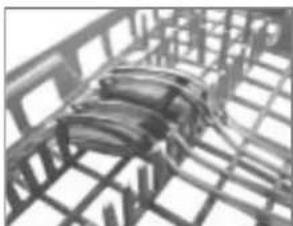
natural_image
Close-up of a metal grid structure with internal structural elements (no text or symbols visible)Alternatif
natural_image
Close-up of hands operating a computer keyboard with scrollbars and keys (no visible text or symbols)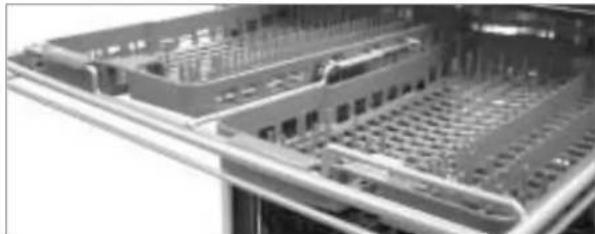
natural_image
Close-up of a server rack with multiple drive bays and ventilation grilles (no visible text or labels)natural_image
Technical line drawing of a mechanical component with no visible text or symbolsnatural_image
Hand pressing a button on a device (no text or symbols visible)natural_image
Line drawing of a hand pouring liquid into a container with a small bottle (no text or symbols)natural_image
Line drawing of hands using a tool to clean or inspect a circular component (no text or symbols visible)natural_image
Line drawing of a hand adjusting a kitchen appliance with a pan and stove (no text or symbols)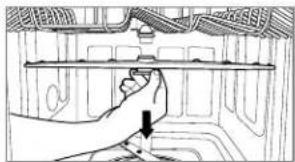
natural_image
Line drawing of a hand adjusting a train interior panel with a downward arrow (no text or symbols)natural_image
Line drawing of a hand holding a mechanical component with a black arrow indicating direction (no text or symbols)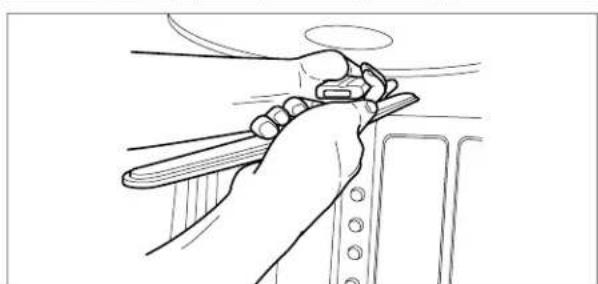
natural_image
Line drawing of a hand using a tool to lift or adjust a component (no text or symbols present)LG Electronics Canada, Inc.