21843 - Lawn mower TORO - Free user manual and instructions
Find the device manual for free 21843 TORO in PDF.


| Product Type | Cordless Lawn Mower |
| Brand | Toro |
| Model | 21843 |
| Cutting Width | 36 cm |
| Weight (without battery) | 22.1 kg |
| Dimensions (H x W x D) | 108.5 x 48.5 x 41 cm (folded) |
| Power Supply | Lithium-ion battery 60 V max, 2.5 Ah or 5 Ah |
| Runtime | Varies with battery and mowing conditions |
| Cutting Height | 6 positions, from 25 to 76 mm approx. |
| Cutting System | Rotary blade with speed adjustment (RUNSMART / MAX) |
| Functions | Mulching, bagging (grass bag), side discharge |
| Drive Type | Self-propelled (model 21844) or push (model 21843) |
| Grass Bag | With fill level indicator |
| Motor | Brushless, maintenance-free |
| Operating Temperature Range | 0 °C to 49 °C |
| Noise Level | Not specified, but complies with standards |
| Maintenance | Factory lubricated, clean after each use |
| Safety | Safety key, blade brake, overload protection |
| Spare Parts | Blades, batteries, charger, grass bag available from Toro |
| Warranty | Consult the manual or dealer |
Frequently Asked Questions - 21843 TORO
User questions about 21843 TORO
0 question about this device. Answer the ones you know or ask your own.
Ask a new question about this device
Download the instructions for your Lawn mower in PDF format for free! Find your manual 21843 - TORO and take your electronic device back in hand. On this page are published all the documents necessary for the use of your device. 21843 by TORO.
USER MANUAL 21843 TORO
Model No. 21836 —Serial No. 326000000 and Up
Model No. 21836T —Serial No. 326000000 and Up
Model No. 21843 —Serial No. 326000000 and Up
Model No. 21843T —Serial No. 326000000 and Up
Model No. 21844 —Serial No. 326000000 and Up
Model No. 21844T —Serial No. 326000000 and Up
natural_image
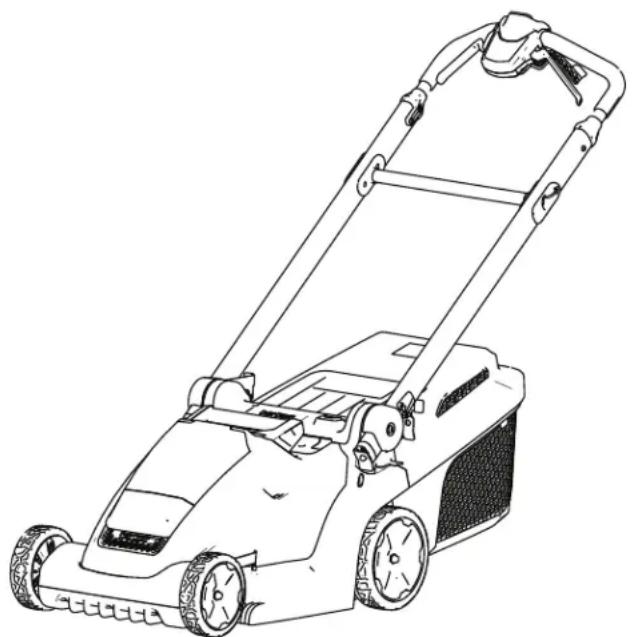
Line drawing of a lawn mower with visible blades and handle (no text or symbols)
For assistance, please see www .T oro.com/support for instructional resources or contact your Authorized Service Dealer before returning this product.
Whenever manufacturer an Authorized
Customer numbers the location product.
Service and of your product of the model W rite the numbers
Do not tamper with or machine, and check Do not attempt to adjust speed control; doing operating condition,
This product complies directives; for details, specific Declaration
Important:
scan the disable equipped) proper their product or tamp
so 1 may resulting with please of Conformity
W ith your safety code devices on to access information with the create an unsafe in personal in (DOC)
Figure 1
- Model and serial number
Introduction
This rotary-blade, to be used by residential primarily for cutting on residential properties. brush or for agricultural Flex-Force® 60V Power lithium-ion packs. These battery charged only by Flex- chargers. Using these products intended use could bystanders.
Safety-Alert
Force The packs safety-alert are manual messages
designed symbol 60V on lithium-ion machine that you must other that to you
Models 21836T, 21843T a battery or a charger

g000502
, and Figure 21844T 2 do Safety-alert symbo
Read and injury operating this maintain and V isit www safety tips, finding information your product the product .T oro.com training a dealer
carefully to learn how product properly and symbol to damage safety-alert ou are responsible that alerts you and to safely unsafe is followed by the word CAUTION more information, materials accessory DANGER indicates your product. which, register not avoided, injury . W ARNING indicates which, if not avoided, injury . CAUTION indicates a which, if not avoided, injury . This manual uses two information. Important
© 2026—The
81 1 1 L yndale
Bloomington,
T oro®
A venue
MN
Company
South 2
55420
Contact
Printed
All Rights
at w
in
Reserv
mechanical information and Note emphasizes general information worthy of special attention.
Safety
General W arnings
Machin
Contents
| Safety-A Alert Symbol | |||||||||
| General Lawn Additional Safety Setup 1 Mounting (Optional) 2 Assembling Product Specifications Before Installing Adjusting During Starting Using Adjusting Recycling Bagging Shutting Removing Machine Operating After Charging Cleaning Folding Storing Position Maintenance Lubricating Replacing Preparing Recycling Storage Service T roubleshooting | |||||||||
| C. | Do not conditions. | expose | W | pater | |
| will | increase | the | risk | ||
| D. | Do cord the heat, Damaged risk | not for power oil, | abuse carrying, tool, sharp or | entangled shock. | |
| E. | When | operating | |
| use | an | extension | |
outdoor use. Use of a cord suitable for outdoor use reduces the risk of electric shock.
4.
Power tool use and
| F. | If operating location current | a power is unavoidable, device (RCD) |
| Use of an shock. | RCD reduces |
A.
Do not force the correct power tool
The toolcorrect in a damper better use and a residual at designed protected supply
B.
Do the not risk use of electric po
does not turn it on that cannot be controlled
dangerous you are and doing must
Personal safety
| A. | Stay | alert, | watch | |
| use | common | ser | ||
| power | tool. | Do | ||
| you | are | tired | or | |
| drugs, | alcohol | |||
| of | inattention | while | ||
| may | result | serious | ||
C.
| when | disconnect | operating | the |
| use | a | power | and/or tool |
| source | the | if influence | dete |
| pack, | before | detachable | A |
| dication. | power | making | moment |
| tool | personal | such | accessories, tools |
| erating | preventative |
| B. | Use | personal | |
| Always | wear | eye | |
| equipment | such | ||
| safety | shoes, | hard | |
| protection | used | ||
| will | reduce | personal |
| protective | reduce | the | equipment | risk | of | st |
| proteactive | dentially | Protective | ||||
| as | D. a | dust | mask, | idle | non-skid | |
| hat | store | or | hearing | power | ||
| for | of | children | and | do | ||
| appropriate | conditions | the | ||||
| unfamiliar | with | the | ||||
| instructions | to | oper |
| C. | Prevent | unintentional | ||
| the | switch | is | in | |
| connecting battery tool. | pack, Carrying | to | pic pow | |
| on have | the switch the | or switch | ||
| Power | startings. | are | Edsunge | |
| OFFrained | position | users. | before | |
| E. | Maintain up | or for carrying | and/or power | misalignment, finger |
| moving | with parts, | your tools | breaka | |
| ng | any | power | condition | |
| invites | accidents. | operation |
| D. | Remove | any | ||||
| before | turning | |||||
| wrench | or | a | key | |||
| part | of | the | power | |||
| injury | ||||||
| g | the | powerkey | or | tool | wrench | repair |
| power | ents | tool | are | on. | caused | |
| attached | power | tools | to | a | rotating | |
| may | F | result | in | personal | ||
| Keep | F | cutting | in | personal | ||
| E. | Do not | overreach. | ||
| footing | and | balance | ||
| enables | better | co | ||
| unexpected | situation | |||
| G. | Use | the | power | power | to |
| easier of | at all the | times to power | control. | This tool | le |
| F . Dress clothing clothing clothes, in moving | properly or jewelry away jewelry parts. | . Do from or long |
| tool not bits | etc. | in | accor |
| instructions, | wear | loose | taking |
| working | your | hair | an |
| be moving | performed. | parts. | Loos |
| operations | can | be | caught |
| could | result | in | a hazard |
| G. | If devices connection collection connected dust collection hazards. | are of facilities, and | provided dust properly can reduce |
| Slippery | Keepextraction | clean | forhandles | theandthese | andfreeare |
| not | allow | used. | handles | Use | al |
| the | dust-related | in | for | safe | ha |
| tool | unexpected |
| H. | Do not let familiarity | ||
| frequent | use | of | |
| become complacent safety | principles. | ||
| cause | severe | injury | |
| second. | |||
| gained | from | |||
| tools and ignore | allow | you | to | |
| tool | ||||
| A careless within | action | car of | ||
| a fraction | ||||
5. Battery tool use and care
A. Recharge only with the charger specified by the manufacturer. A charger suitable for one to create a risk of fire battery pack.
B. Use power tools designated battery packs other battery packs injury and fire.
C. When battery it away from other paper clips, coins, or other small m make a connection to another . Shorting together may cause
D. Under abusive ejected from the if contact water accidentally with water . If liquid additionally additional seek ejected from the or burns.
E. Do not use is damaged modified batteries behavior resulting of injury
F . Do not expose fire or excessive to fire temperature may cause a
G. Follow all do not charge outside the in the instructions. at temperatures may damage risk of fire.
6. Service
A. Have a qualified identical ensure that maintained. your power repair replacement that the
B. Never service Service of battery be performed by authorized service
Lawn W that arnings
Do of nobattery operate pack themay comelitions. used with This another shock.
- Do only not with use the specifically lawn conditions packs. Use especially any lightning may create This a risk of by lightning.
• Thoroughly is not in use, keep to the metal lawn by objects, lawn screws that inspect can injured keys, nails, that used stick, mower from sticks, the battery, terminals thrown burns objects a fire. can c
• Before conditions, inspect assembly, damaged contacts the help grass eyes, which catch deterioration. may cause A work may increase the risk
• Keep working modified. • guard may correctly fire, • Keep a battery overheating temperature. • While above non-slip operation • operate guard, exhibit explosion all cooling air inlets or lock exposure (265°F) and protective lawn mow
wearing instructions open sandals. and of battery to packe feet or toolm re blade. range specified • While Charging operating improperly the outside long trousers. specified Exposed ra battery and of increase from likelihood
- Do not operate the W alk, never run. This and tool falling serviced which may - Person not operating on the steep parties. This This will reety control, of the slippingwer and personal injury
When damaged your packs slopes manufacturer caution provides risk of loss may result in personal use extreme caution the lawn mower towards
of your surroundings. This reduces the risk of tripping during operation.
- Do not touch blades and other hazardous
| moving reduces | parts the risk | while of injury |
| When the lawn are off | clearing mower and the battery | |
| Unexpected result | in serious operation personal | |
- Charge the battery area only.
- Do not expose a batt they charger are still fire in motion 68°C from (154n)oving parts.
- Follow material all charging or cleanir not sure charge all power the battery sw the pack temperature is disconnected. rang of the lawn mower. Otherwise, the injury battery pack and
Additional
1. T raining
• The operator of the for any accidents or others or their property
- Do not allow children the machine, battery charger; local regulations age of the operator.
- Do not allow people sensory, or mental cap experience and knowledge machine, battery pack, unless they receive in on using it safely and involved while using
- Before charging cautionary using the battery, read all the markings
2. Preparation
- Replace any damaged
• Use only the battery Using other accessories may increase the risk - Plugging the battery that is not of the proper fire or electric shock. connection, use an of the proper configuration outlet if needed.
- Do not use a damaged pack or battery charger unpredictable explosion, or risk of
• If the supply cord to damaged, dealer to contact replace it.
- Do not use non-rechargeable
- Charge the battery charger specified by for one type of battery of fire when used with
3. Operation Safety Keep
- Disengage machine is responsible before hazards occurring - Prevent unintentional the electric-start button to use or before play with Montana, Montana, Montana and pack, handling or the battery connected to the machine. - Stop the machine, button, reduced remove the physical, machine, capabilities, and wait without or before servicing or use the machine or edge - Remove battery the charger instruction from or the supervisory machine is understood it unattended the hazard accessories.
Do not pack direct and the battery disc instructions A void and dischargir a on wall these or obstructions. toward you. Stop the gravel surfaces. or unreadable
- W pack atch for holes, by ruts hidden and objects. Uneven you of injury lose attachments and your fire. balance
- If charger machine into an strike outlet vibrate voltage immediately cause remove a dif the rent electric-style attachment battery pack, adaptive to stop before the power mining damage. Make all resuming or modified operation. battery
- Stop, which the machine exhibit electric-stall that results button in fire injmachine. for hauling.
- the Under battery abusive charger condition an may Authorized subject liquid; Service avoid accidently come into flush with water batteries. If t eyes, seek medical pack with only the battery from or to the A charger suitable burns. may create a another battery pack
4. Maintenance and Storage
- Stop the machine, remove the electric-start button, remove the battery pack from the machine, and wait for all movement before servicing
• Do not as indicated Authorized on the parts.
• Sharpen maintain ensure - When
blade ca
source
• For best replacement replacement be dangerous, product warranty - Maintain sharp and performance. free from
place and
or
sharp. Use identical only .
• Unless Authorized cleaningdamaged
indicated Service the machine.
repair When the instructions.
the machine battery from have one
Dealer, perform nails, service a a identification replacement Shorting the battery terminals may burns on both or a sides. to
GleanCheck the the blade blade and and frequently for tightness.
- blade be aware A mistrea even though a risk the of fire present not disassemble the heat use the only battery genuine pack and/or in parentheses. it. Replace and accessoriesa genuine could oro suenother use tyeld of volbattersy fire or explosion. Kee
of the reach of children packaging and cutting until you safest best - handles not dispose, clean, of t cell keep explogards in possible. Keepspecial blades disp
Safety
and
Instructional

Safety of potential
decals
and danger
instructions . Replace
are easily any decal
| Battery or Charger Symbol | Explanation | ||
 | Read the Operator's Manual | ||
 | Contact your local municipalityDealer or distributor for more recycle the battery. | ||
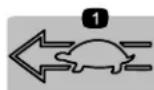
134-6016
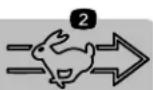
decal134-6016
- Engine
speed—slotengine
speed—fast
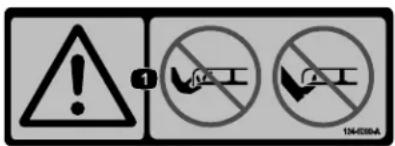
134-5099
decal134-5099
- W
arning—keep
hands

134-5297
decal134-5297
- Max Power Mode
natural_image
Pure electrical circuit lines without any symbols161-3764
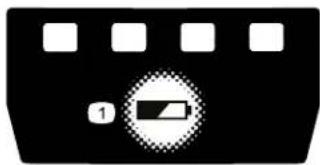
decal161-3764
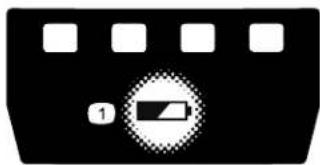
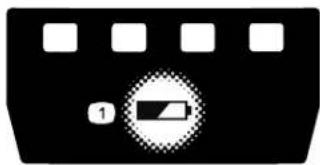
- Battery charge status
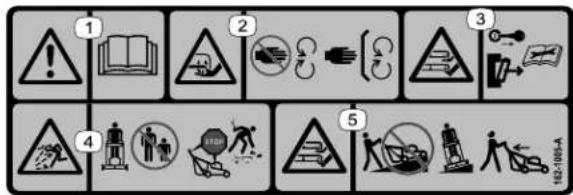
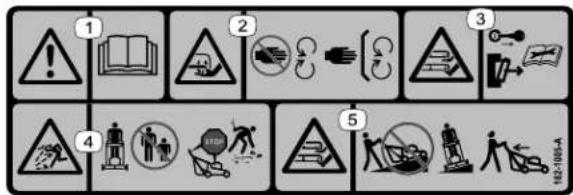
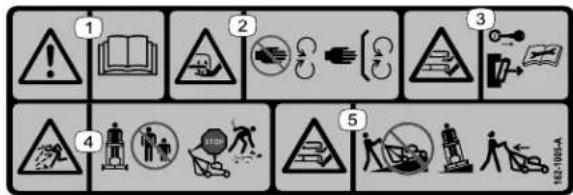
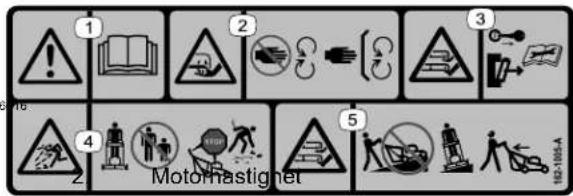
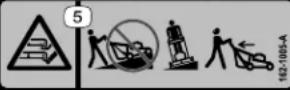
162-1005
-
Warning—read the Operator's Manual.
-
Thrown object hazard—keep bystanders away; shut of f the engine before leaving the operating pick up any deb mowing.
-
Cutting/dismemberment hazard of hand, blade—stay moving parts; guards and place.
-
Cutting/dismemberment mazard of hand or move awaylade—do from operatekeep allp and slopeids operate to side on slopes; behind you whe in reverse.
-
Cutting/dismemberment hazard of hand or foot, mower blade—remove the key, remove the battery pack, and read the Operator's Manual before performing maintenance.
Setup
| Important: the first time, | The refer battery to Charging | pack is not the fully Battery | |||||
| Note: ensure | The safety you | key remove | and them | other from | loose the | parts compartment | |
1
Mounting Charger
2
the semblin battery (Optional)
| Parts | needed | for | this proc |
| Parts | needed | for | this |
| 2 | Mounting hardware | (not | includ |
| procedure | Upper | handle | assembly |
| 2 | Bolt | ||
| 2 | Locknut |
Procedure
| If desired, wall using the charger | mount the wall-mount . | the |
| Mount near | it indoors a power | (such outlet, |
| Refer | to | Figure | 3 | for |
| charger | . |
| Slide | the | charger | over |
| hardware not | included). | to | secure |
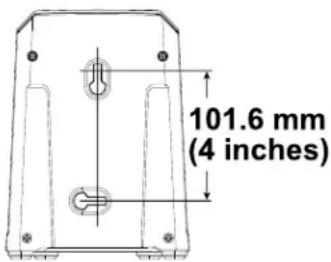
Figure 3
Procedure
| battery | charger | securely | |||
| Important: | key | holes | Remove | the | |
| plastic | sheet | that | covers | ||
| plastic or | wrapping | on | the m | ||
| as | a garage | or | other | ||
| Note: | out | Remove the | reach | the | |
| assembly | prior | to | inserting | ||
| and the | lower in | mounting | b | ||
| manufacturing | to | prevent | |||
the appropriately
the app W ARNIN
| Folding can operating | damage | or | unfolding the condition. | cables |
- Do not damage the unfolding the handle.
• If a cable is damaged, Authorized Service Dealer
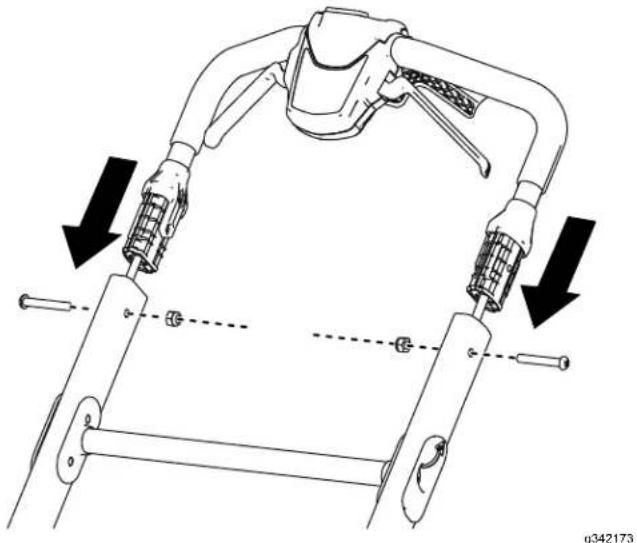
| 1. | Install | the | upper | handl |
| handle | and | secure | it | |
| as shown | in | Figure | 4 |
natural_image
Technical diagram of a robotic arm with multiple joints and directional arrows indicating movement or assembly (no text or symbols present)Figure 4
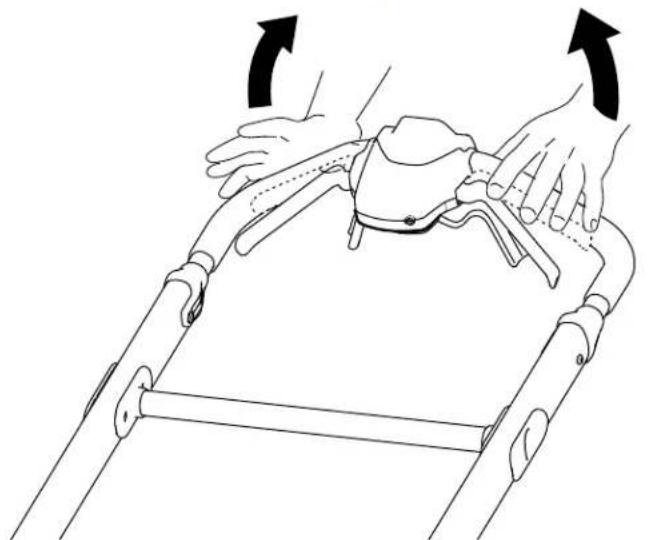
- Pull the handlebar release brace toward the upper handle to release the handle lock (Figure 5).
- Move the handle position and let go brace ( Figure 5 ).
Note:
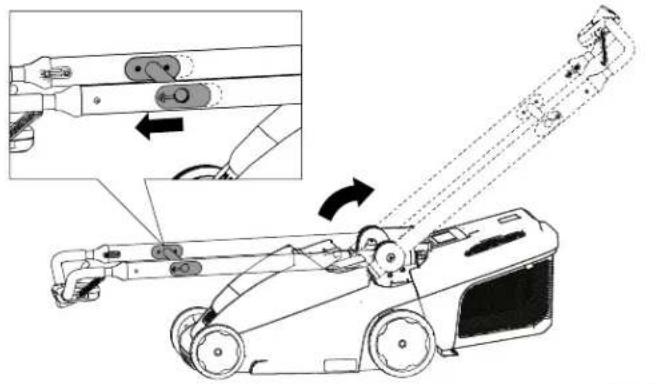
Figure 5
rearward to the operating of the handlebar release the handle clicks into
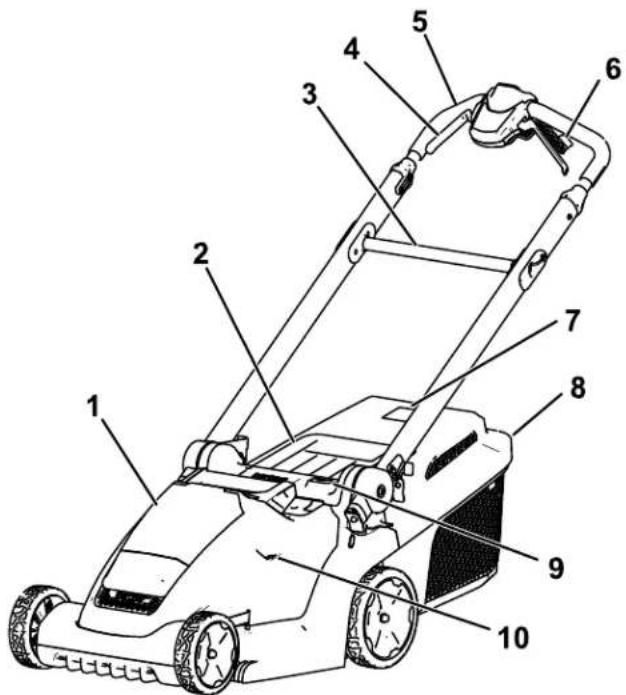
Product Overview
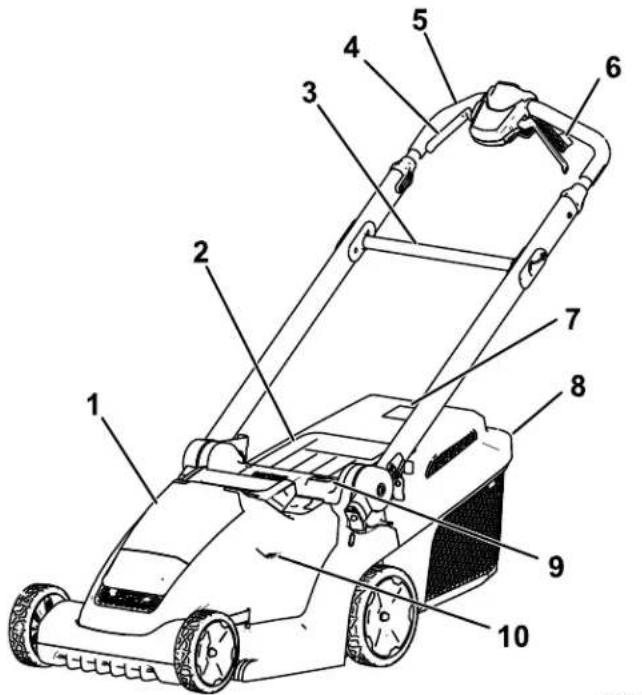
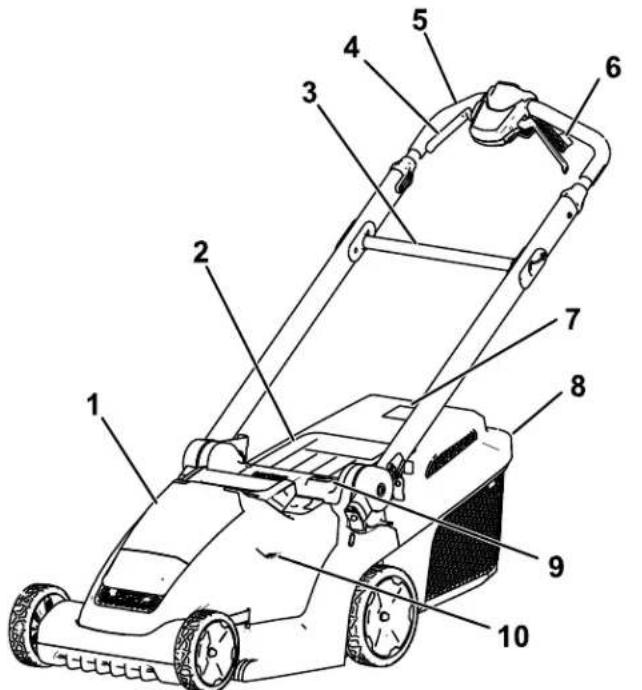
Figure 6
- Battery compartment
- Self-propel drive handles (Model 21844 only)
- Rear deflector 7. Grass box full indicator
- Handlebar release brace
- Grass box
- Blade-control handles
- Height-of-cut
- Handlebar
- Height-of-cut window
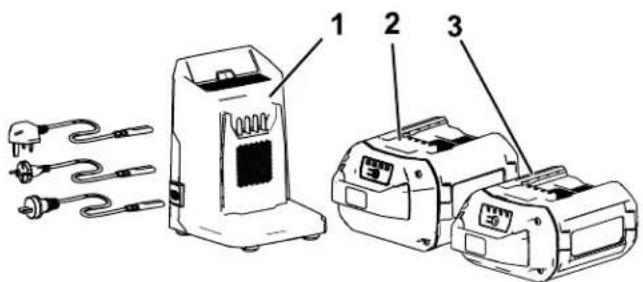
g342171
Figure 7
- Battery 86902PPK Models 21844)
charger McBlettery \$30.25
21836, Model 21843, 21836)
- Battery 88941PPK Models
pack Model (included
21843 and 21844)
pack Mode
81602549E1K
wit
with
[Non-Text]
m = 311
1
with*Charging
^h Charging
battery
m = 311
Store
in
[Non-Text]
[Non-Text]
[Non-Text]
[Non-Text]
[Non-Text]
[Non-Text]
一
Specifications
| Model | (without battery) | Wengtight | idtha | He |
| 21836/T | 20.2(44.5) | kglb)inches) | 130.6(1654.4 inches) | cm(42.2 inches) |
| 21843/T | 22.1(48.7) | kglb)inches) | 136.2(1653.6 inches) | cm(42.7 inches) |
| 21844/T | 24.0(52.9) | kglb)inches) | 136.2(1653.6 inches) | cm(42.7 inches) |
41
48
48
SmartStow
Dimensions
| Model | Length | ||
| 21836/T | inches) | 41.7 .2 inches) | cm1 13. (16.2cm (44.7 |
| 21843/T | inches) | 48.5 .0 inches) | cm1 14. (18.1cm (44.9 |
| 21844/T | 41. 0 (16.1 inches) | c48.5 | cm1 14. (19.1cm (44.9 |
W id1
inches)
inches)
inches)
Battery
Pack
| Model | 88 | 925PPK | |||
| Battery deck indicator | capacity | 2.5 | Ah | 5.0 | |
| 135 | Wh | 270 | Wh | ||
| Battery actual voltage | manufacturer varies with load. | ||||
Af
ting
Battery
Charger
| Model | 86902PPK | |
| T ype | 60V | MAX Lithium-Ion |
| Input | 100 to 240V AC | |
| Output | 60V MAX | |
50/60F
C
Appropriate
T emperature
| Charge/store at | 5°C the (41°F) battery | |||
| n (included use and | the | with battery pa | 30°C | at (-22°F) |
| Use | the | machine | 0°C | (32°F) |
to 40
t
to 49
increas
range.
batter
(
Operation
Note: Determine the left and right sides of the machine from the normal operating position.
Before Operation
Installing the Battery Pack
| Important: | Operate | the | battery | pack | only | |||||
| to | Specifications | ( page) | 1 | 1). | ||||||
| 1. | Ensure | that | the | safety | key | is | not | installed | ||
| 2. | Ensure | that | the | vents | on | the | battery | are | ||
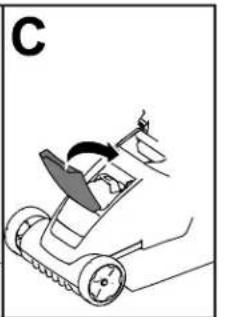
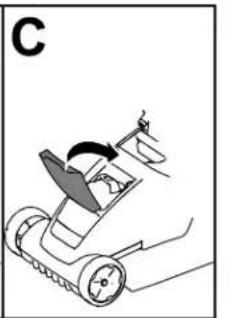
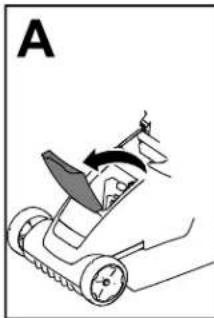
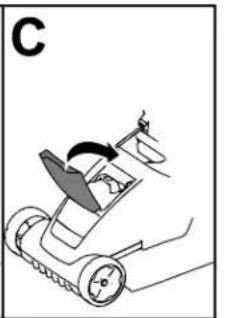
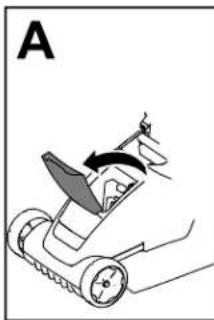
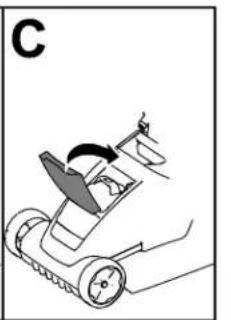
| 3. | Lift up | the | battery-compartment | lid | (A of | |||||
| 4. | Line compartment | up the | cavity until | in it | the locks | battery into | pack place | with (B of | ||
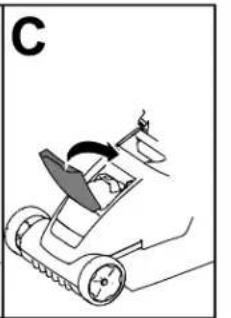
| 5. | Close | the | battery-compartment | lid | (C of | |||||
| Note: | If the | battery-compartment | lid | does | ||||||
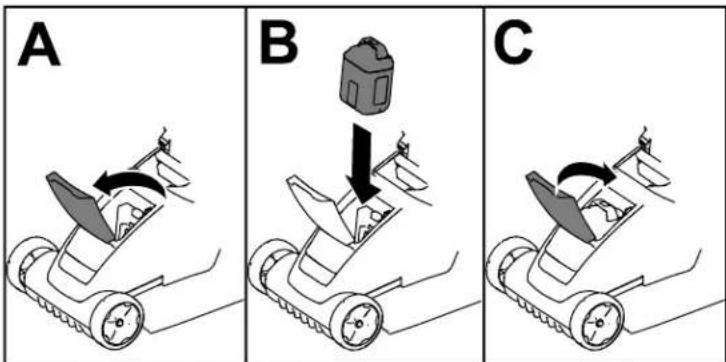
Figure
8
g341293
Adjusting the Cutting Height
⚠️ W ARNING
Adjusting the height-of-cut could bring your hands into contact with a moving blade and result in serious injury.
| Shut wait adjusting | off for | the all | motor moving the cutting |
| Do when | not | put adjusting | your |
| T o adjust height-of-cut the desired height-of-cut | the | cutting button height-of-cut window |
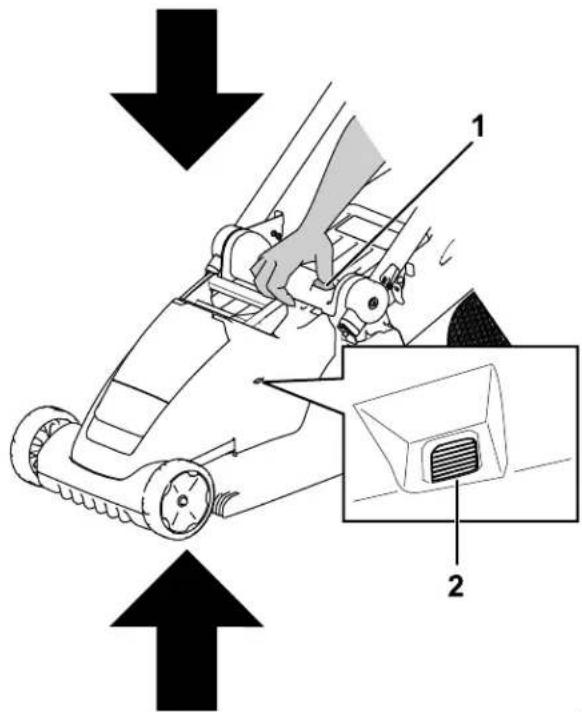
Figure 9
- Height-of-cut button
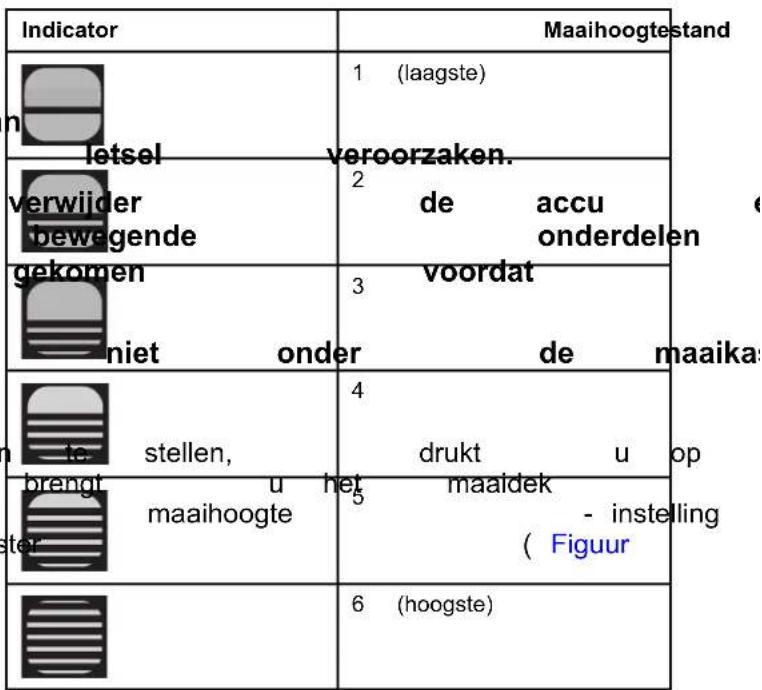
| Indicator | Height of Cut |
 | 1 (lowest) |
 | 2 |
| remove parts height. | the battery to stop before |
| under height. | |
| press press | down on |
| raise setting | or lower the is shown i |
| gure | 9). |
| YXY3 | 6 (highest) |
- Height-of-cut view window
During Operation
Starting the Machine
- Ensure that the battery pack is charged and installed in the machine; refer to Installing Battery Pack (page
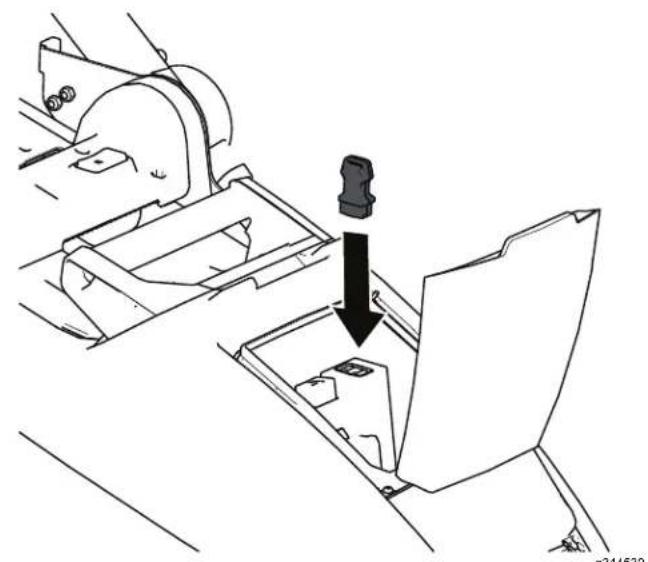
- Install the safety
natural_image
Technical line drawing of a mechanical assembly with a downward arrow indicating a component (no text or symbols present)Figure 10
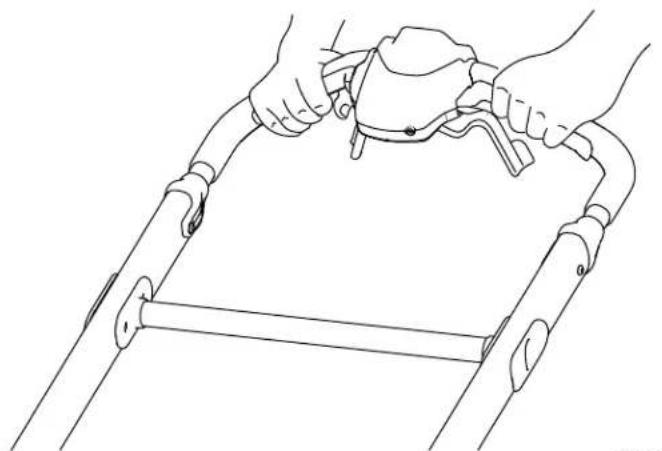
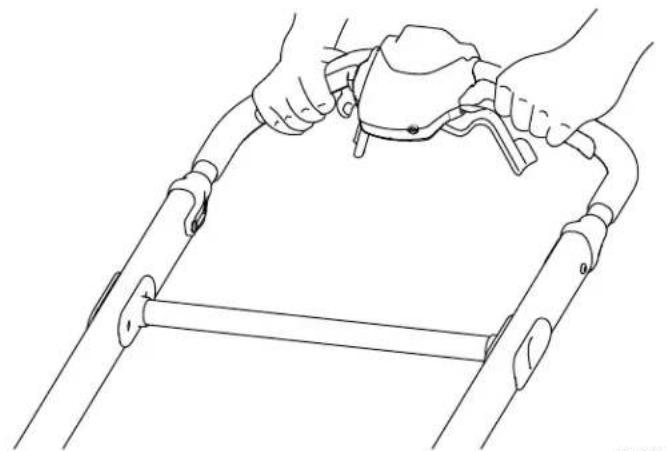
- Press the upper handle
- Squeeze machine.
natural_image
Line drawing of hands holding a tool on a metal frame (no text or symbols)Figure 1 1
g341398
Using the Sel Model 21844/T
- T o adjust the speed self-propel control - T the engage the self-propel drive hand key hold to the machine (Figure) (Figure) - T o disengage the se self-propel drive hand
Note: T o reduce the speed control to the le the right.
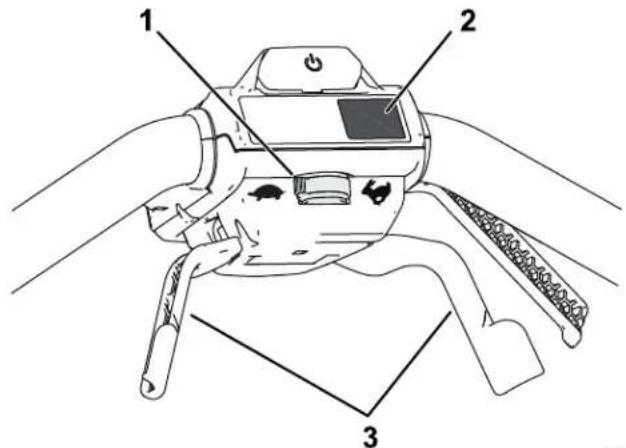
button at Figure center of 1. on Self-propel machine. speed control 2. MAX button handles to s 3. Self-propel drive handles
Adjusting
This machine has 2 blade and M AX .
- When adjusted changes the blade maintain set to R unSMART automatically in cutting speed and increases of cut. - When the highest set to the M AX at press machine the M AX button to M AX speed
Recycling the Clippings
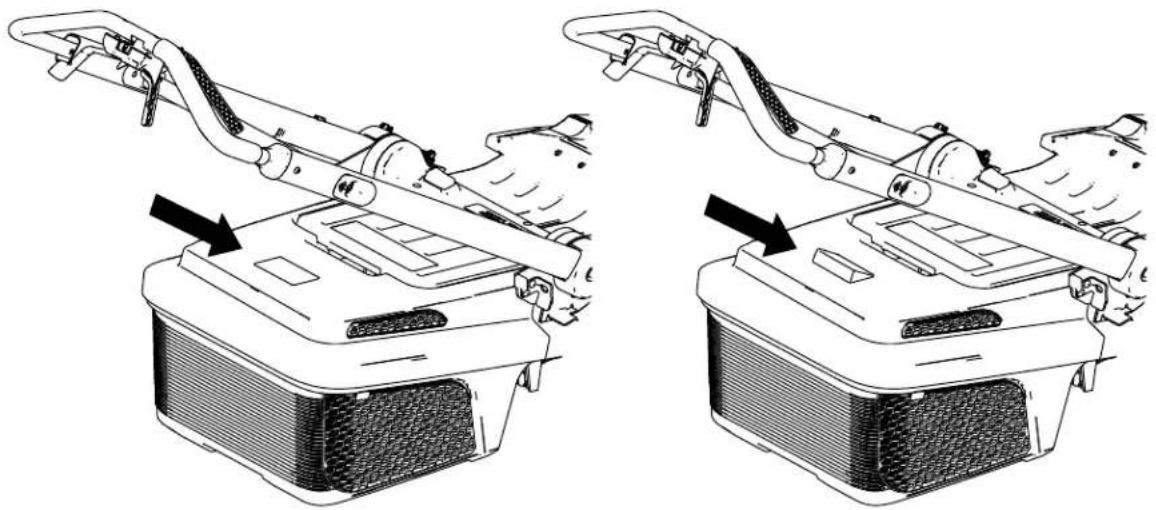
Y our machine comes from the factory ready to recycle the grass and leaf clippings back into the lawn.
| If the recycling Box | grass ( page | box the 17 | is on clippings. | the | machine, Refer | to | remove Removing |
Installing
| 1. | ShutpackBattery | of and | f safetyPack | the machinefrom | key;the Machine | and referMachine | remove toRemoving(page) | the batteryth18 |
| 2. | PlacereferPosition | to | the Storing(page) | machinethe 21 | in the Machine | the verticalMachine | vertical in the | stow V ertical-Stowpo |
| 3. | CleaninstallsMachine | the bottomproperly;(page) | of refer20 | the deck toCleaning | to ensureunder | ensure 1 | ||
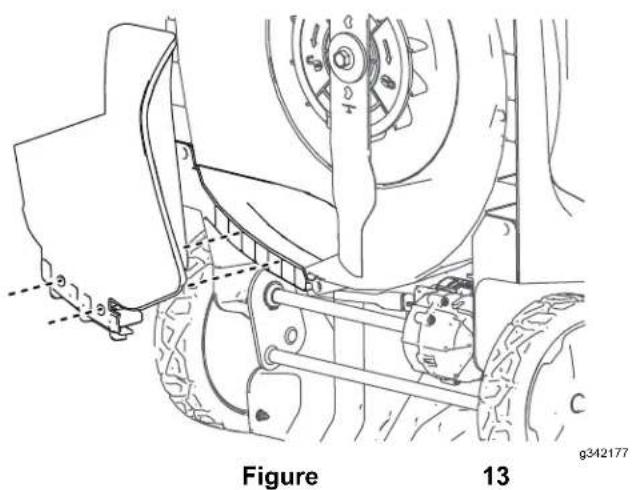
| 4. | Alignplugpins | until as | the itshown | mulch snaps | plugintoFigure | and place13 | push onto | the bottom the 2 retainir |
| Important:shouldwhendoescontact | be properlynotyour | flushinstallAuthorized | bottom with installed;correctlyAuthorized | the | of bottom if the, do Service | mulch of the mulch not use Dealer | ||
Removing
| T o and Plug | remove then (page | the reverse 15 | mulch the | plug, steps | remove in Installing | the | battery the |
Bagging the Clippings
Use the grass box when you want to collect grass and leaf clippings from the lawn.
If the mulch plug is on the machine, remove (page 15).
Installing
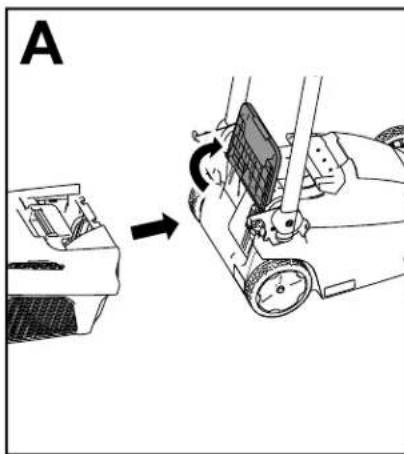
| 1. | Move | the | handle | into | the | upright | position | ||
| 2. | Install | the | hooks | of the | grass | box | into | the | |
| 3. | Allow | the | rear deflector | to rest | on | the | box | ||
| 4. | Return | the | handle | back | to the | operating | |||
the
natural_image
Diagram showing a mechanical device being adjusted to form a motor or fan assembly (no text or symbols present)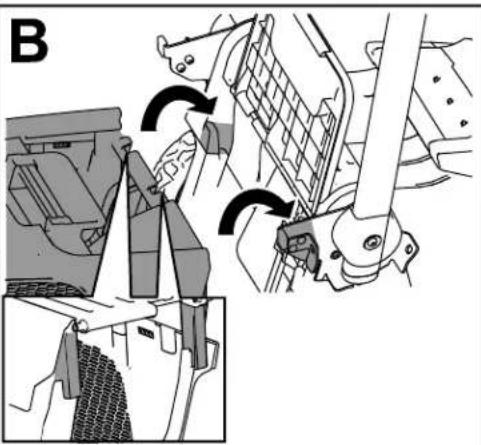
natural_image
Mechanical assembly diagram showing gear and bracket components with directional arrows (no text or labels)Grass
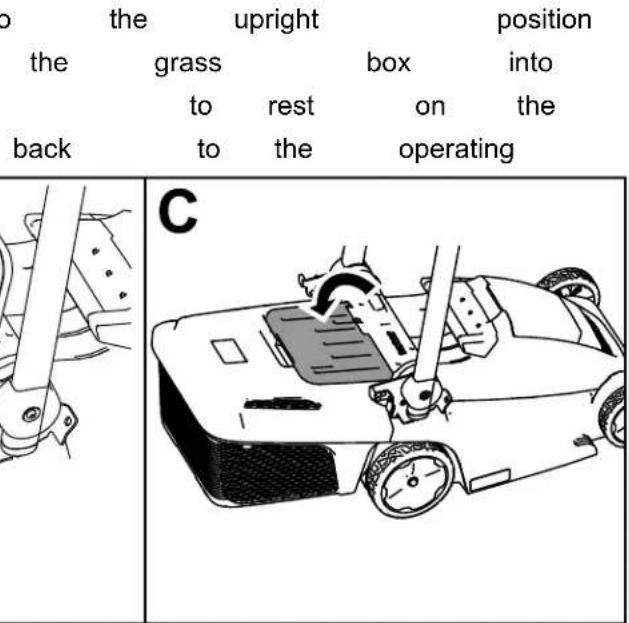
Figure 14
g341400
Grass
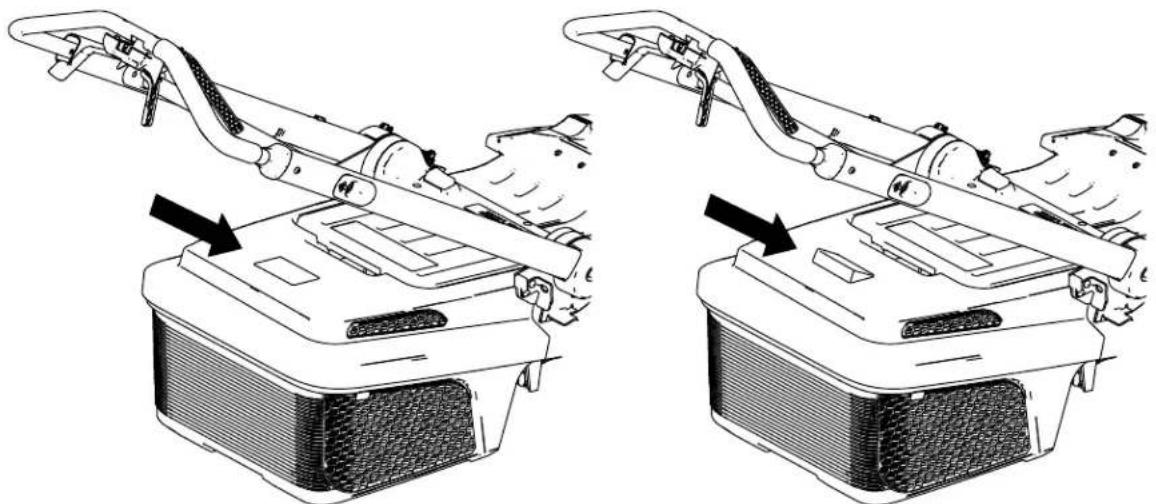
| The through blocked, | grass | box is the grass and the | fitted box, indicator | with raising | a full flap | indicator the indicator closes. | at | |
Box Full
natural_image
Technical line drawing of two mechanical components with arrows indicating assembly or movement (no text or symbols present)Figure 15
g363501
Removing the Grass Box
To remove the box, reverse the steps in Installing the Grass Box (page 16).
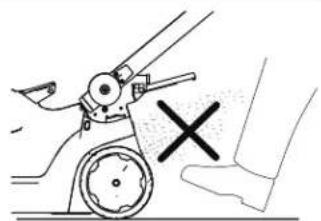
Do
box
not
only
operate
when
the
mulching,
machine
with
transporting
the
grass
the
n
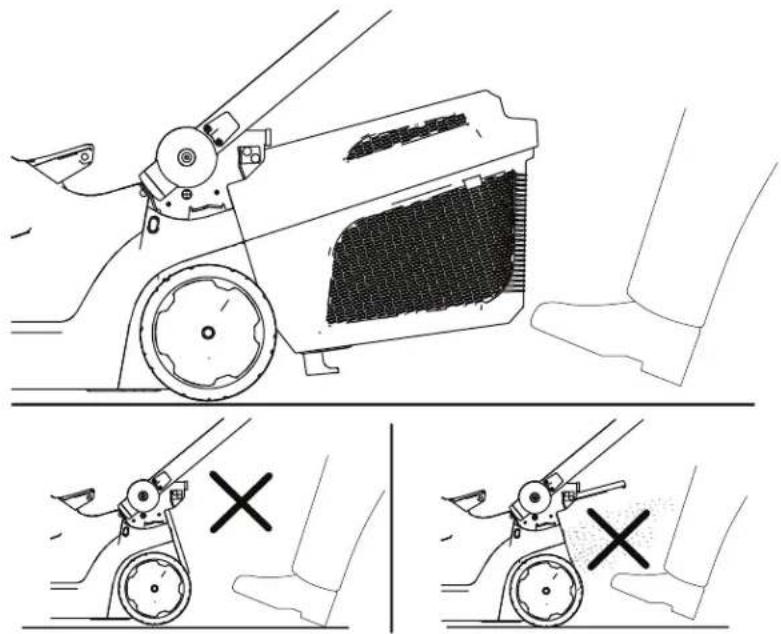
Figure
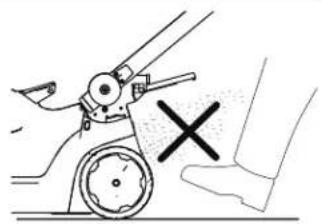
natural_image
Illustration of a hand operating a mechanical device with a cross mark indicating cancellation (no text or symbols present)16
g356991
Shutting Off the Machine
- Release the blade-control bar (Figure 10).
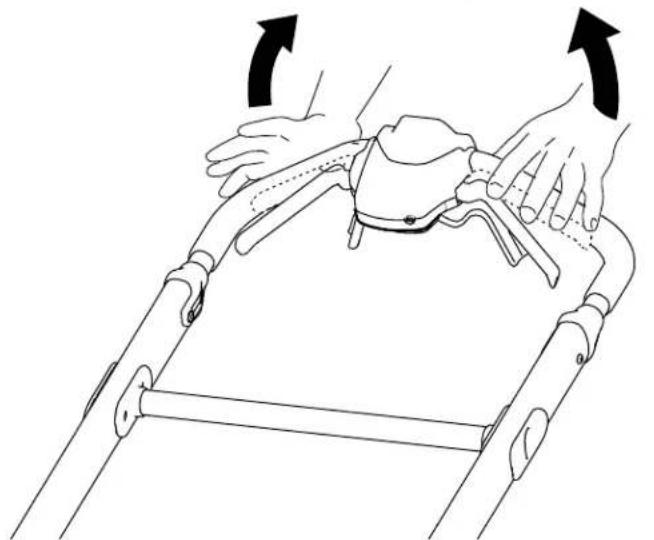
natural_image
Line drawing of a person performing a physical maneuver on a roller coaster (no text or symbols)Figure 17
- Remove the safety key from the machine 10).
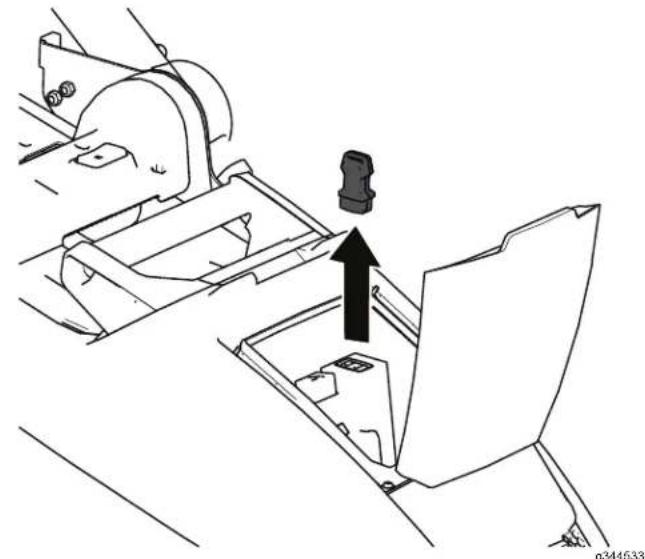
natural_image
Technical line drawing of a mechanical assembly with a black arrow indicating direction (no text or symbols)Figure 18
- Remove Battery
Note: remove
the
Pack
battery
from
Whenever the battery
Removing from
- Lift up
- Press battery
- Close
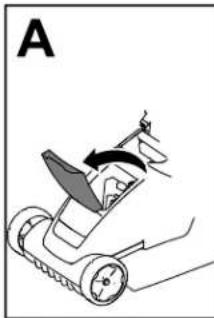
natural_image
Diagram of a robotic lawn mower with a blade and directional arrow (no text or symbols)
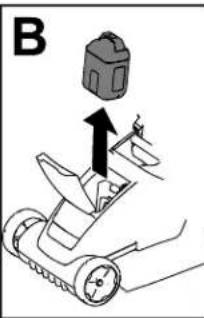
the
the battery-compartment
the
pack
battery-pack
and
the battery-compartment
Machir
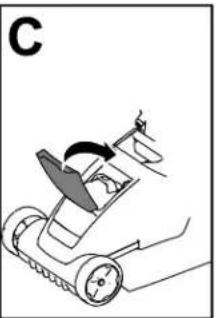
natural_image
Diagram of a robotic arm with motion arrows indicating movement (no text or symbols)g341360
Figure 19
(Figure
| the | pack; Machine | refer | to ( page | Removing 18 |
| you pack. | are not | using | the ma |
Operating T ips
General Mowing T ips
- A void striking solid objects with the blade. Never deliberately mow over any object.
• For best performance, before the cutting necessary.
Cutting
- Cut
For
cut
only
improved
grass
about
[Non-Text]
at
a
a
quality
higher
Do
unless
grass
cut
the
growth
at
grass
he
begins
- When
height
a lower
the grass
cause
cutting
setting
setti
[Non-Text]
[Non-Text]
[Non-Text]
[Non-Text]
[Non-Text]
too
tall
and
for
long,
to
stall.
• W
and
stall. A void mowing
and
cause
[Non-Text]
leaves
the
in wet
- Be
conditions,
the machine
of
a potential
follow
free
machine
conditions.
- Alternate
disperse
fertilization.
the
the
mowing
clippings
- If the
try
1
finished
- Replace
- W
- Raise
- Cut
- Overlap
swath
[Non-Text]
lawn
of the
the
blade
9
slower
cutting
grass
[Non-Text]
more
with each
pass.
Cutting
• After
shows
to make
cutting
through
more
the
lawn,
[Non-Text]
than
- Remove
ground
not
mowing
and
cutting
[Non-Text]
then
excessive
before
[Non-Text]
leaves
speed,
again
cutting
or
at
[Non-Text]
finely
mow
the
[Non-Text]
[Non-Text]
desired
leav
ugh,
a
es.
[Non-Text]
higher
[Non-Text]
[Non-Text]
er
cut
Operation
After
Charging
Important:
when
you
the first tall time,
charge ^begins
battery
pack
precautions.
Important:
temperatures
range:if
gras
refer runtime,
Noteight
At of any cut.
button
height on cut the
charge
of LED it is
- to
down.that
to Ensure
The
purchase
ew
place
T
wher
is
fully
the
Charge
that blade
to
Specifications and
time.
tery
press
late indicators).fall
wh
[Non-Text]
the
vents
at
ack
highest
debrisn
[Non-Text]
mow
appearance.
the
machine
appearance
following:
or have
- Battery-pack
pace 2. Battery-pack while
height
- Battery-charge-indicator button frequently
swaths LED indicators charge) instead
Figure 20
it sharpened.
.cavity
mowing 6. Chargerminals
youlight machine.
- Charger
venting
(current
cutting
2.
Line
up
the
cavity
the charger
with the tongue
3.
Slide ensuro
fully _leaf
out a 4
singleT
a +
backward quantities
the
up
that battery
that . (Figure . ou
overthe
ofpack
of 1 may
may writtor
whately the
of out leaves of
If the
machi
down
cutting
height.
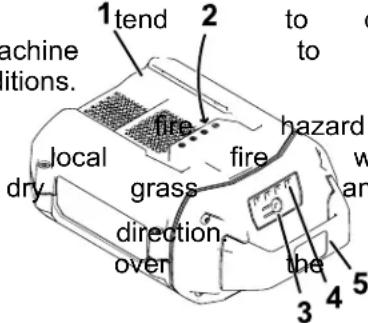
- Refer to the following table to interpret the LED indicator light on the battery charger.
| Charger Symbol | Indicator Light | Indicates |
| Green blinking | Battery pack is charging | |
| Green | Battery pack is charged | |
| Red | Battery pack and/or charger is over appropriate to | |
| Red blinking | Battery pack charging | |
| Of f | No battery pack |
Folding
the
⚠️ W ARNIN
Folding
can
damage
or
unfolding
cables
operating
condition.
• Do battery
of unfolding
not
damage
[Non-Text]
the
perature
• 5.014*
If a cable
tault*
Authorized
the
range
is
damaged,
Service Dealer
inserted
*Refer
information.
to
T roubleshooting
⚠️ W ARNIN
page
24
[Non-Text]
1
or
more
Ensure
that
the
handle
position
batterly prevent periods
pack
prior
bo
starti
K can between thrown
uses.
ill
will,
not Shut
of
used
for machino
longe
battery and
remove
in the
acchine, from
any
Of
f
e ( pag
Machine
23
(page
Important:
charger
If the
periods,
charger;
battery
[Non-Text]
refer
to
orage
2.
Pull
upper
21).
Machine
to
release
Cleaning
the
3.
Folc
the
the
Machine
position,
position
use as
shown
halfwa
forward
in
Cleaning
Service
Interval
: After
under
the
machine
5
For
best
results,
clean
you
have completed
mowing.
- Shut
pack
of
f the
machine
and
the
safety
- Lower
setting.
the
machine
- Set
refer
the
machine
the
Position
[Non-Text]
(page
21
- Using
from
a brush
the underside
or
broom
e machine.
t
use
water
[NO TEXT]
clean
Important:
machine;
components.
water
Do
not
may
damage
Figure
ele
ctr
al
g342175
- Clean
the grass
box.
1.
V ertical-stow
3.
Operation
pc
Cleaning
Service
Interval
the
: After
Grass
4.
T o
unfold
Box
the
handle,
Handbach
use page
9).
Frequently
collection
clean
capability
the
grass
Brush
box
away
to
ensure
any
ma
debris.
Storing the Machine in the V ertical-Stow Position
Note: handlebar 23 ).
Y ou can hook
release
br
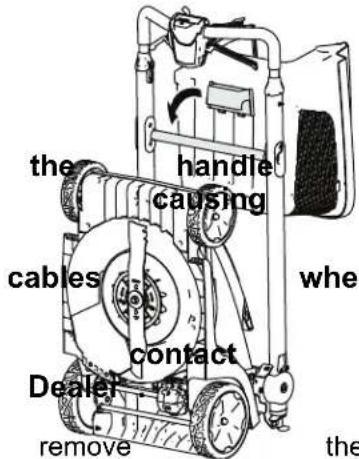
You can store your machine in the vertical position to minimize storage space.
⚠️ W ARNING
Folding
can
damage
operating
• Do not unfolding
• If a cable Authorized
or unfolding
the
condition.
damage
the
cables,
(五)订货单
is
damaged, Service
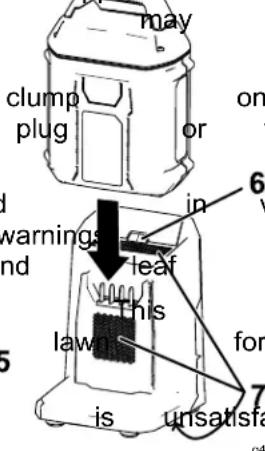
the pack; Figure Machine
improperly
an
folding
an
-
Shut of the machine, remove the safety and remove the battery pack; Figure refer to ^g35092 Battery Pack from the Machine ( page
-
Fold the handle all the way forward until into position; refer to Folding the Handle
-
Ensure machine; the Grass that it is, remove Box (page 17) . box it. is not not installed to Removing
-
Ensure that the cutting-height on the mach set to the highest setting (setting 6); if it is raise it. Refer to Adjusting the Cutting (page 13).
-
T ilt the machine back and roll it by the hand into a storage space (Figure 22).
⚠️ W ARNING
Pulling
unlocks
the
mower
ground.
the
the
handlebar
handlebar
to suddenly
release
, which
drop
brace
may
to
the
Do
to
not
move the
pull
the
machine.
handlebar
release
br
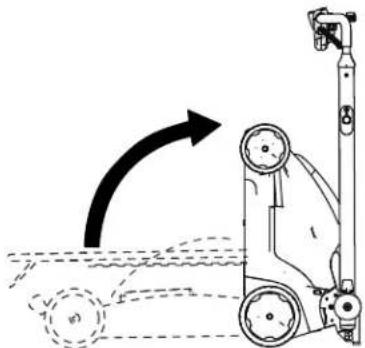
natural_image
Diagram of a mechanical device with a rotating arm and wheels, showing motion direction (no text or symbols)Figure
22
g342176
Maintenance
Remove the safety key and battery pack from the machine before maintaining or cleaning the machine.
Always parts to shut of f the r and allowing, adjusting, servicing,
Use only the manufacturer replacement parts and
Inspect the machine and maintain repaired
Dealer
Lubricating
Y ou do not need to lubricate the machine; bearings have been lubricated at the factory life of the machine. Figure 24
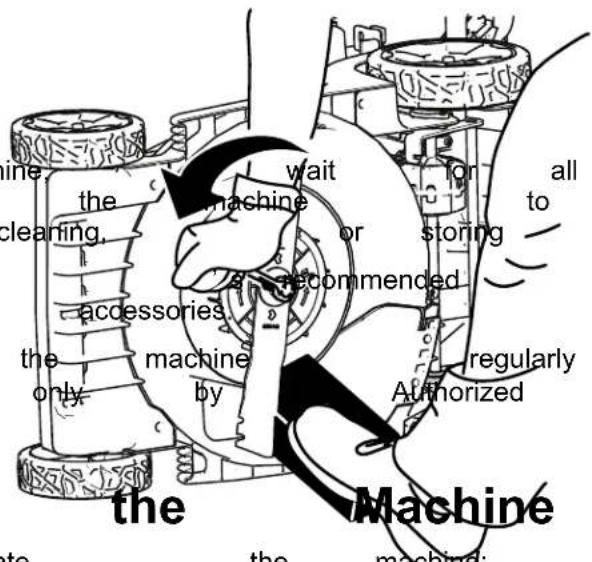
Figure 24
Replacing
Service Interval : Y early
Important: Y ou will install the blade properly torque wrench or are this procedure, contact
Dealer . If the blade is damaged immediately . If the blade it sharpened and balanced,
W ARNIN
When blade source the blade servicing can still move is off. The blade can can result
W ear gloves when
- Remove the safety the machine.
- Use a block of wood (Figure 24).
- Remove the blade the washer and blade
- Install the new blade, ( Figure 25 ).
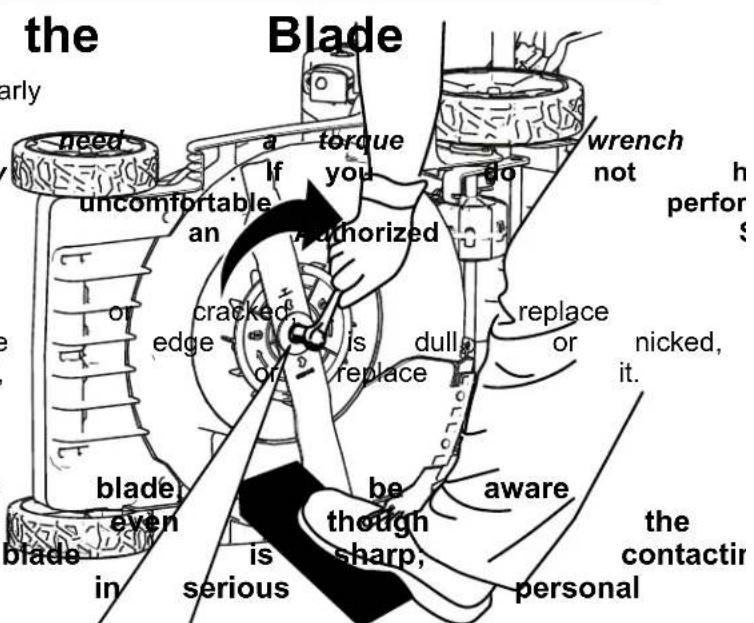
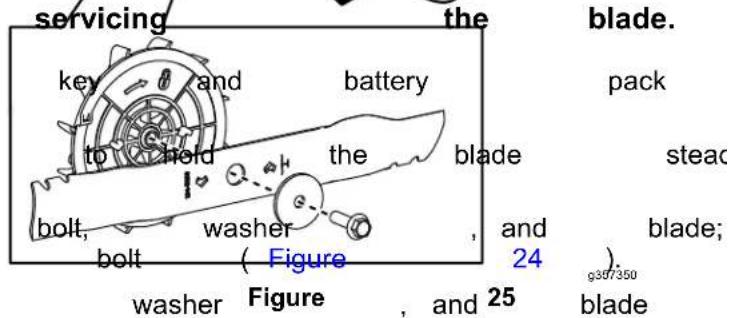
Important: blade Use to 35 facing a torque N·m (26) Position up toward wrench ft-lb). the the tighten curved machine end the blad
Preparing the Battery Pack Storage for Recycling Important:
Important: Upon removal, cover the terminals of charger the battery pack with heavy-duty adhesive tape. appropriate Do not attempt to destroy battery pack or remove important: any Contact your local municipality or Authorized Service Dealer information on how to 2 responsibly
 | Lithium-ion batteryCall2Recycle sealparticipating retailerfacility in the Call2Recycand Canada only).retailer or facility1-800-822-8837 |
 | Lithium-ion batteryEnergy Battery (HBany 60V Flex-Forcecan be recycled atretailer in the Call2Recylocate a participatingto you, please visit |
| If you nearby program visit manual on how | cannot, the the for how are please distributor recycle | locate, or have your customer for how to | questions support tool/equipment | participating of children about pack, keep charger garden recycle | pack, may site the storage store | retainer, which qualified, away chemicals and the US service all on | battery recycl for the co- from more de-icing pa- risk and battery | machine, in the cor info pa | |
Important:
Store the
only in temperatures
range; re
or disassemble
of its components. If you are
longer or your, remove authorize
or and charge for indicators recycle turn
not store a fully charged
When you are with ready
charge be recycled the recycling battery and pack
turns green program on (US the char
turn o locate green a participating the battery
closest to you, please call or • visit www .call2recycle.org. the machine
(i.e., remove _ labels and _ seal check shown with the _ battery _ high for _ here, damage _ and
• ^batteries Clean participating all ^6.0 foreign or greater material any
- Do not HEB store program.the machine batterly .hebattery or pack retailer .org. installed.
- When not in use, store
Service
| Service | Interval | : Y | early | |
| Should | this | machine | no | |
| Authorized | Service | Deal | ||
T roubleshooting
Perform only the steps described in these instructions. All further inspection, maintenance, and repair work
must be performed by an authorized service
problem yourself.
| Problem | Possible | Cause | Correctiv |
| The machine does | 1 not staff battery is machine.2. The battery pack3. The battery pack4. There is another with the machine. | 1 not Remplify installed and into the machine, fully installed and2. Remove not charged machine and charge4. Coelectrical an praliorized | then in battery charge |
| The machine does continuously. | 1. There run is ormoistores battery pack.2. The battery is tool. | 1. nAllowon run the the lead battery dry .2 not Remplify installed and into the tool making installed and latched. | of theninto |
| The machine does | 1. Thet readiness full pack too low .2. The air vents | power Rembrange. capacity machine and fully pack.are Cleaned. the air | battery vents. |
| The battery pack | 1. lose the battery parkly appropriate temperature where it is ridge. and between 5°C (41°F)2. The machine | 2s overload the grass or walk at a slower | at a |
| The battery charger | 1. The is nd battery working. charger Unplug is over the bratter under the appropriate temperature place where range temperature is and 40°C (104°F).2. The outlet that plugged into that does repair not have outlet. power | 2. the Contad battery your charger repair not have outlet. power | licensed |
| The machine does | not self-propel. cable is damaged. | 1. Contact 1. The an se#uthorizeprop | |
| The LED indicator charger is red. | 1. Tight battery the batterger Unplug and/or the battery pack is over or range. undhe battery appropriager temperature to a place where temperature and 40°C (104°F). | it between |
| Problem | Possible Cause Corrective | Action |
| The LED indicator charger is blinking | 1. There's an error in the con-unication battery between the battery pack and the charger.2. The battery pack | 1. Remove the battery pack battery charger, unplug charger from the seconds. Plug the outlet again pack on the battery indicator light of still blinking red, again. If the LED the battery charger after 2 attempts, the battery pack facility.2. is contact your if the battery is dispose of the recycling facility. |
| The machine is sound. | prodining battery a beaping2. The machine for operation.3. The machine is4. There is another with the machine. | 1. Rensovet charged. the battery pack machine and charge2s in Ensuean unsafe that the extreme angle3.overloaded. the grass or walk at a slower4. Attemptelectrical the other problem actions, if the a contact an Authorized |
| The quality of cut unsatisfactory. | 1. is The decreased blade is dull.2. The cutting deck2. Clean under debris the machine. bui | 1. Ha |
| The bagging is unsatisfactory. | decreased machine or is doubleed machine or is doubleed machine or is doubleed machine or is doubleed machine or is doubleed machine or is doubleed machine or is doubleed machine or is doubleed machine or is doubleed machine or is doubleed machine or is doubleed machine or is doubleed machine or is doubleed machine or is doubleed machine or is doubleed machine or is doubleed machine or is doubleed machine or is doubleed machine or is doubleed machine or is doubleed machine or is doubled | 1.overloaded. the grass2. ventClean are the blockpass soft brush. |
| 1. The blade is dull.2. The cutting deck is damagedContact an Auth | The machine has no damageContact an Auth | |
| The machine is | vibrating. | 1.Inspe#the blade is necessary. |
TORO®
Count on it.
Bedienungsanleitung
Flex - Force Power System 60V MAX 36 cm Rasenmäher
| Modellnr | . 21836 | —Seriennr |
| Modellnr | . 21836T | —Seriennr |
| Modellnr | . 21843 | —Seriennr |
| Modellnr | . 21843T | —Seriennr |
| Modellnr | . 21844 | —Seriennr |
| Modellnr | . 21844T | —Seriennr |
natural_image
Line drawing of a lawn mower with visible blades and handle (no text or symbols)
decal134 - 5297
134 - 5297
- Max Power
Modus
natural_image
Pure electrical circuit lines without any symbolsdecal161 - 3764
161 - 3764
- Akkuladestand
decal162 - 1005
162 - 1005
Bild
3
g290534
⚠️ W ARNUN
natural_image
Diagram of a robotic device with multiple arms and adjustment arrows indicating movement or force (no text or symbols present)Bild 4
Bild 5
Bild 6
Bild 7
Bild 9
g364065
- Schnitthöhen
natural_image
Line drawing of hands holding a tool over a mechanical component, labeled 'Bild' and numbered 1-1 (no text or symbols on the diagram itself)natural_image
Diagram showing a mechanical device being processed with a rotating component (no text or symbols present)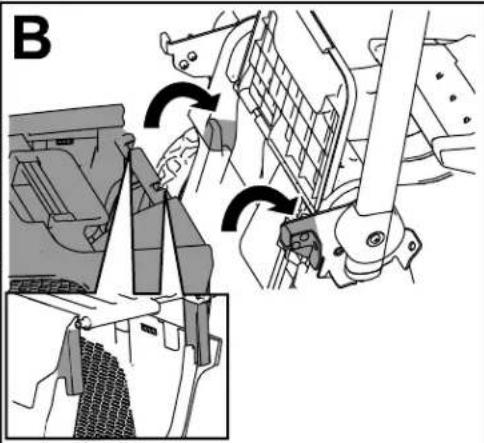
natural_image
Mechanical assembly diagram showing gear shift and mounting mechanism (no text or labels)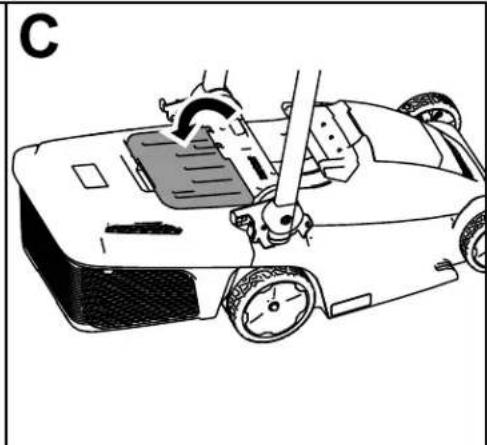
natural_image
Line drawing of a car with a hand operating the steering wheel (no text or symbols)Bild
14
g341400
Füllstandanzeige
natural_image
Technical line drawing of two mechanical components with arrows indicating assembly or movement (no text or symbols present)Bild
15
g363501
Bild
16
g356991
natural_image
Line drawing of a person performing a manual exercise on a mobility device (no text or symbols)Bild 17
Entfernen aus
natural_image
Diagram of a lawn mower with a blade and handle, showing motion direction (no text or symbols)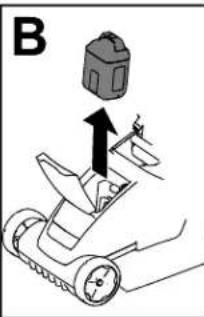
natural_image
Diagram of a robotic arm with a rotating wheel and directional arrow (no text or symbols)Bild 19
natural_image
Technical diagram of a mechanical assembly with an arrow indicating direction (no text or symbols present)Bild 18
- Entfernen
des
Akkupacks
Sie
den
aus
Akkupack,
der
Maschine
siehe
Entferne
(Seite
Hinweis:
Mal,
wenn
Entnehmen
Sie
die
Sie
den
Maschine
nicht
Akkupack
verwenden.
Betriebshinweise
Allgemeine Mähtipps
natural_image
Technical illustration of a manual lawn saw tool in operation, showing blade positioning and tool path (no text or symbols)Bild 25
g357350
natural_image
Line drawing of a lawn mower with visible blades and handle (no text or symbols)
134 - 5297
decal134 - 5297
natural_image
Pixelated black-and-white graphic with four white squares and a circular symbol containing a triangle (no text or symbols)161 - 3764
decal161 - 3764
162 - 1005
Figura 3
Procedimiento
natural_image
Technical diagram of a robotic arm with multiple joints and arrows indicating motion or assembly (no text or symbols present)Figura 4
Figura 6
Figura 7
Figura
9
1.
Botón
de
altura
altura
de
corte
de
corte
natural_image
Technical line drawing of a mechanical assembly with a downward arrow indicating a component (no text or symbols present)Figura
10
3.
Pulse
el
botón
de
del
manillar
superior
4.
Apriete
[Non-Text]
las
palancas
la máquina.
natural_image
Line drawing of hands holding a tool on a metal frame (no text or symbols)Figura
1 1
Figura
12
encendido Control
natural_image
Technical line drawing of a vehicle's suspension system showing brake, wheel, and suspension components (no text or labels)Figura
13
Retirada
Figura
16
g356991
natural_image
Line drawing of a person performing a physical maneuver on a roller coaster (no text or symbols)Figura 17
Cómo
retirar
la máquina
natural_image
Diagram of a lawn mower with a blade and handle, showing motion direction (no text or symbols)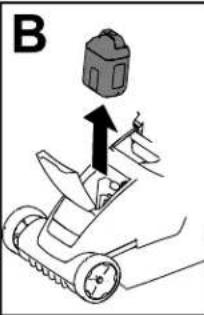
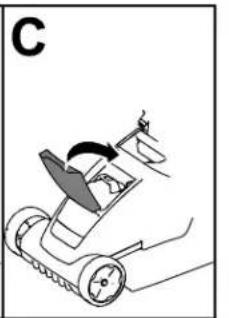
natural_image
Diagram of a robotic arm with a rotating mechanism and motion arrow (no text or symbols)Figura 19
- Retire (Figura
la llave 10).
de
seguridad
de la máquina
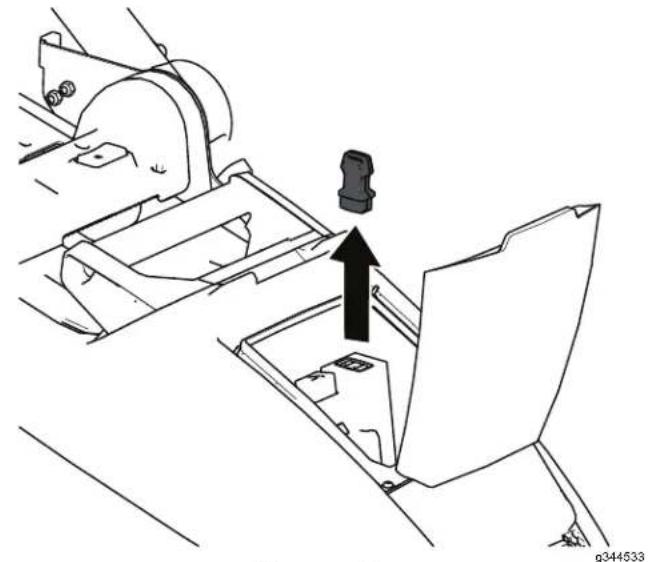
natural_image
Technical line drawing of a mechanical assembly with a highlighted component (no text or symbols)Figura 18
- Retire batería
Figura 21
natural_image
Technical illustration of a manual lawn saw tool in operation, showing blade turning and tool path (no text or symbols)Figura 25
g357350
natural_image
Line drawing of a lawn mower with visible blades and handle (no text or symbols)
dandereluses. responsible
'A TTENTION
pour
ge securite correctement
signalant
de
it ou.
Utilisation suivi
PRUDENCE
piè instructions. rotative
dangereux des
inexpérimentés.
[Non-Text]
l'outil
Arrêt et/ou
source
changer
Ces
risque si voi
gardant
gerdum
ne serve avoir
avon
et arré ne
persounes
le T mau
de Les
e les
[Non-Text]
134 - 5297
decal134 - 5297
- Mode Max Power
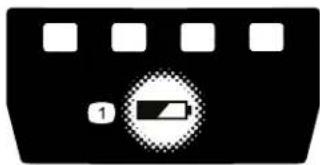
natural_image
Pure electrical circuit lines without any symbols161 - 3764
decal161 - 3764
162 - 1005
decal162 - 1005
| 2 | Fixations | (non | incluses) |
Procédure
Si vous
batteries
de fixation
le
souhaitez,
solidement
situées
au
Montez
ou tout
d'une
enfants.
- le
autre
prise
à l'intérieur
endroit
de
courant
V oir
chargeur
la Figure
3 pour
Pour
fixations
incluses).
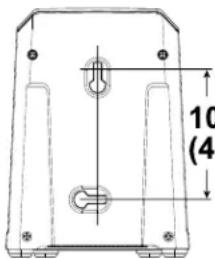
Figure
101.6 mm (4 inches)
g290534
3
Procédure
vous
pouvez
Important: un
mur
à
fixer
le cha
des
de dos. plastique
tout autre
utilise par example
natural_image
Technical diagram of a robotic arm with multiple joints and arrows indicating motion or assembly (no text or symbols present)Figure 4
Figure 5
Figure 6
Figure 7
Dimensions SmartStow
Figure
9
g364065
- Bouton coupe
natural_image
Technical line drawing of a mechanical assembly with a downward arrow indicating a component (no text or symbols present)Figure 10
natural_image
Line drawing of hands holding a tool on a metal frame (no text or symbols)Figure 1 1
Installation mulching
- Coupez
batterie
batterie
le moteur
et
la
clé
de
de
sécurité
la machine,
[Non-Text]
(page
puis
Retrait
[Non-Text]
re
C
- Placez
rangement
la verticale
la machine
; voir
(page
à la
(1) 本说明仅供参考。
24 ) .
du
plateau
de
de
coupe
Nettoyez
pouvoir
Nettoyage
installer
[Non-Text]
l'obturateur
[Non-Text]
[Non-Text]
correctement
(page
- Installez
jusqu'à
goupilles
13
l'obturateur
ce
qu'il
de
[Non-Text]
fixation,
et
poussez
:
[Non-Text]
sur
le
à la
Important:
mulching
plateau
ne l'utilisez
contactez
agréé.
Le
doit
quand
pas
votre
bas
être
il est
dans
concessionnaire
l'obturateur
parfaitement
installé
le
cas
correctement
contraire
- réparat
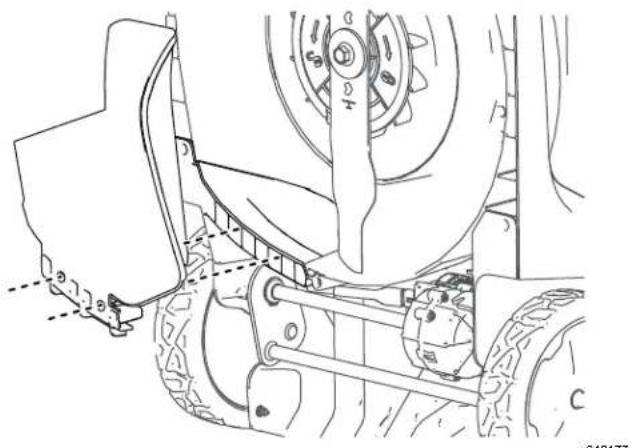
natural_image
Technical line drawing of a vehicle's lower suspension system with visible components and mounting brackets (no text or labels)Figure
13
g342177
natural_image
Diagram showing a mechanical device being adjusted to a motor or cart, with no visible text or symbols.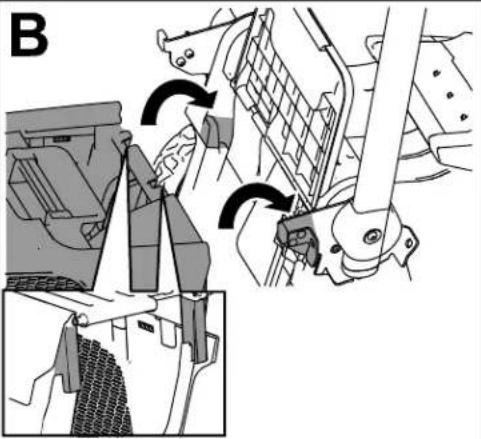
natural_image
Mechanical assembly diagram showing gear shift and mounting mechanism (no text or labels)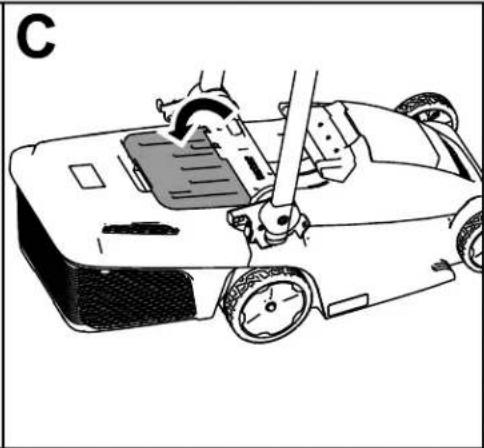
natural_image
Line drawing of a robotic car with a hand operating the steering wheel (no text or symbols)Figure 14
g341400
Indicateur
natural_image
Technical line drawing of two mechanical components with arrows indicating assembly or movement (no text or symbols present)Figure 15
g363501
Figure
16
g356991
Arrêt de la machine
natural_image
Line drawing of a person performing a manual massage on a roller, with arrows indicating motion direction (no text or symbols)Figure 17
Retrait machine
natural_image
Diagram of a robotic lawn mower with a blade and wheel, labeled 'A' (no text or symbols on the diagram itself)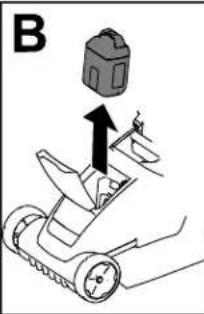
Figure 19
de la
natural_image
Diagram of a robotic car with a rotating arm and handle, labeled 'C' (no text or symbols on the diagram itself)0341360
- Retirez 10).
la clé de
sécurité
de la machine
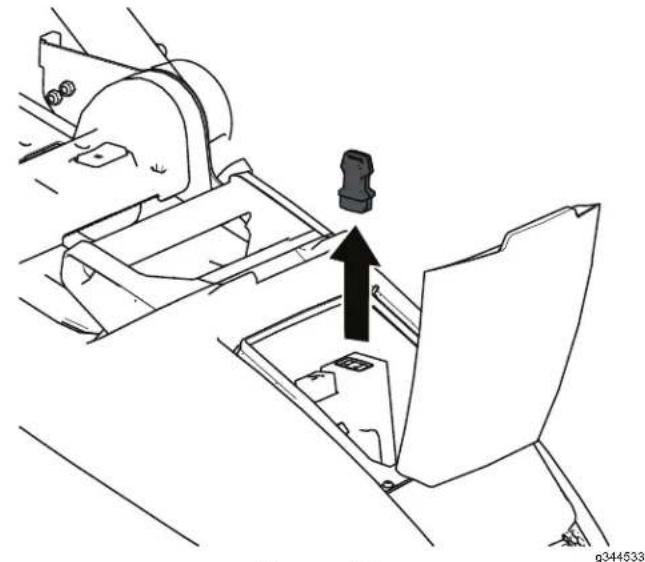
natural_image
Technical line drawing of a mechanical assembly with a black arrow indicating direction (no text or symbols)Figure 18
- Enlevez la machine
Figure 21
The Ground Truth image displays a single, solid horizontal line. According to Rule 2 (UNDERSCORE & LINE RULES), this is a stylistic or background line, not a placeholder underscore. Therefore, the OCR result must ignore it and output nothing or only meaningful text. The provided OCR content is "____", which consists of four underscores. This is an incorrect interpretation of the line as a placeholder, violating the rule that stylistic lines must be ignored. The OCR has hallucinated underscores where none should exist based on the GT's visual context. Hence, the OCR result is inconsistent with the Ground Truth.
les
pièces
es
mobiles
avant
la
egler
,
nett
The Ground Truth image displays a single, solid horizontal line. According to Rule 2 (UNDERSCORE & LINE RULES), if the GT contains lines used for stylistic emphasis or as background elements (like ruled paper), the OCR result must ignore them. The provided OCR content is "____", which consists of four underscores. This is incorrect because underscores are not equivalent to a solid line and are not permitted under the “Stylistic/Background Lines (Ignore)” rule. The OCR has hallucinated underscores where none should exist in the GT, violating the “Stylistic/Background Lines (Ignore)” rule. Therefore, the OCR result is inconsistent with the Ground Truth.
de
d
et
表决权恢复的优先股股东
natural_image
Line drawing of a lawn mower with extended blades and wheels (no text or symbols)
m = 311
parte
di
pr
ati
[Non-Text]
[Non-Text]
be
广力云智慧零售收银系统
[Non-Text]
te
nu
[Non-Text]
□
suo
di
Simbolo batteria
6 sicurezza Questi
essere . . . ca
This image contains no text to OCR. The visible element is a stylistic or background line, which must be ignored according to the rules.
all'insegna
(No text)
Leggete
utilizzare
di evitare
del
sicurezza.
sito
www
.T
II simbolo
l'informazione
non suggerimenti
A VVERTENZA
di
avviso
[Non-Text]
[Non-Text]
[Non-Text]
di
per
[Non-Text]
m
agg
che
[Non-Text]
广力云智慧零售收银系统
vi
ed
è
:
seg
uitsulla
[Non-Text]
o sugAi
TTEN
di
. μn
|
rivendit
ore
。
indica
[Non-Text]
[Non-Text]
una
che,
se
-
non
A VVERTENZA
potenziale
la morte
che,
[Non-Text]
se
non
o gravi
[Non-Text]
i
nfortuni.
© 2026—The
81 1 1 L yndale
Bloomington,
T oro®
A venue
MN
Company
South 2
The Ground Truth image displays a single, solid horizontal line. According to Rule 2 (UNDERSCORE & LINE RULES), if the GT contains lines used for stylistic emphasis or as background (like ruled paper), the OCR result must ignore them. The line in the GT is clearly a stylistic or background line, not a placeholder for text. Therefore, the OCR should not have output any underscores. Outputting `____` constitutes an error under Rule 2, as it hallucinates placeholder symbols where none are semantically intended. Hence, the OCR result is inconsistent with the Ground Truth.
Contattateci
[Non-Text]
[Non-Text]
[Non-Text]
a
T utti
i diritti
son
134 - 5297
decal134 - 5297
natural_image
Pure electrical circuit lines without any symbols161 - 3764
decal161 - 3764
162 - 1005
decal162 - 1005
Figura 3
g290534
Procedura
i. fori per
natural_image
Diagram of a robotic device with attached sensors and lever mechanism, showing force application arrows (no text or symbols)Figura 4
Figura 5
Figura 6
Figura 7
Dimensioni SmartStow
Figura 9
natural_image
Technical line drawing of a mechanical assembly with a downward arrow indicating a component (no text or symbols present)Figura
10
natural_image
Line drawing of hands holding a tool on a curved mechanical component (no text or symbols)Figura
1 1
natural_image
Technical line drawing of a vehicle's lower suspension system with visible components and mounting brackets (no text or labels)Figura
13
Rimozione
natural_image
Diagram showing a mechanical device being adjusted to form a grid, with no visible text or symbols.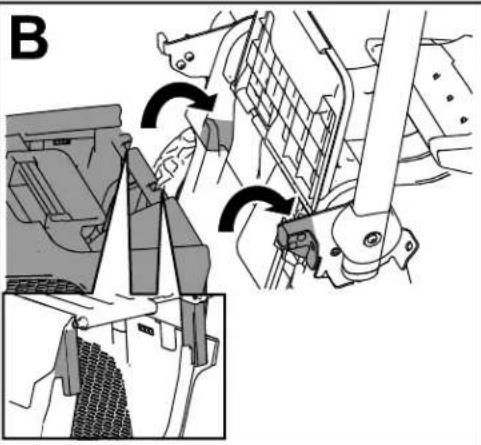
natural_image
Mechanical assembly diagram showing gear shift and mounting mechanism (no text or labels)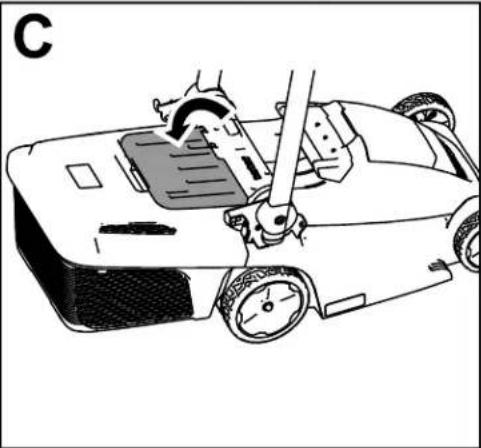
natural_image
Line drawing of a robotic car with a hand operating the wheel (no text or symbols)Figura 14
g341400
Indicatore
natural_image
Technical line drawing of two mechanical components with arrows indicating assembly or movement (no text or symbols present)Figura 15
g363501
Figura
16
g356991
natural_image
Line drawing of a person performing a medical or rehabilitation procedure on a device, with arrows indicating motion direction (no text or symbols)Figura 17
Rimozione batteria
natural_image
Diagram of a robotic lawn mower with a blade and handle, labeled 'A' (no text or symbols on the diagram itself)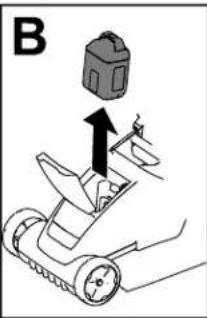
natural_image
Diagram of a robotic arm with a rotating handle and gear mechanism (no text or symbols)Figura 19
dalla
il coperchio
il fermo
batteria
del e rimuc
il coperchio
natural_image
Technical line drawing of a mechanical assembly with a highlighted component (no text or symbols)Figura 18
- Rimuovete
Rimozione
( pagina
Nota:
togliete
20).
Ogniqualvolta
il pacco
il pacco
del
pacco
batteria.
batteria;
batteria
non
fate
dalla
utilizzate
riferimento
macchina
la
maccr
Suggerimenti
la macc fate in ( poqia
Figura
21
natural_image
Diagram of a mechanical device with a rotating arrow indicating rotation, no text or symbols presentstegola i cavi
e Figura
22
g342176 condizioni
natural_image
Technical illustration of a manual lawn saw tool in operation, showing blade turning and tool path (no text or symbols)Figura 25
g357350
natural_image
Line drawing of a lawn mower with adjustable arms and wheels (no text or symbols)
134 - 5297
decal134 - 5297
- Modus 'Max
Power
natural_image
Pure electrical circuit lines without any symbols161 - 3764
decal161-3764
- Laadstatus
van accu
162 - 1005
decal162 - 1005
Figuur 3
Procedure
natural_image
Technical diagram of a robotic arm with multiple joints and arrows indicating motion or assembly (no text or symbols present)Figuur 4
natural_image
Technical line drawing of a lawn mower with mechanical components and directional arrows (no text or symbols)Figuur 5
Figuur 6
Figuur 7
-
Acculadermodel 86902PPK
-
Accupackmodel 88025E1Kerd
Figuur 9
- Maaihoogteknop
maaihoogte
De maaihoogte is verstelbaa 19 mm en 70 mm.
 |
 |
 |
 |
 |
 |
T ijdens gebruik
De machine starten
natural_image
Technical line drawing of a mechanical assembly with a downward arrow indicating a component (no text or symbols present)Figuur 10
natural_image
Line drawing of hands holding a tool on a mechanical device (no text or symbols)Figuur 1 1
natural_image
Technical line drawing of a vehicle's lower suspension system with mechanical components (no text or symbols)Figuur
13
De mulchplug
natural_image
Diagram showing a mechanical device with a rotating component and a separate view of a vehicle (no text or symbols present)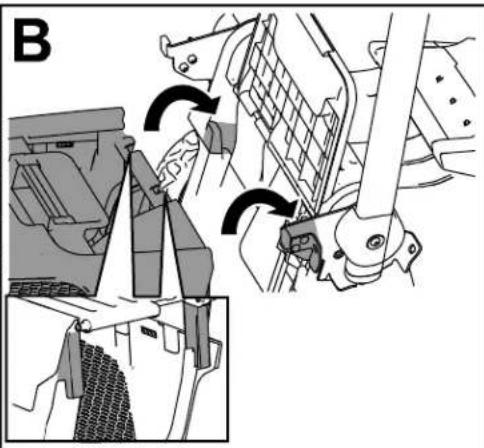
natural_image
Mechanical assembly diagram showing gear and bracket components with directional arrows (no text or labels)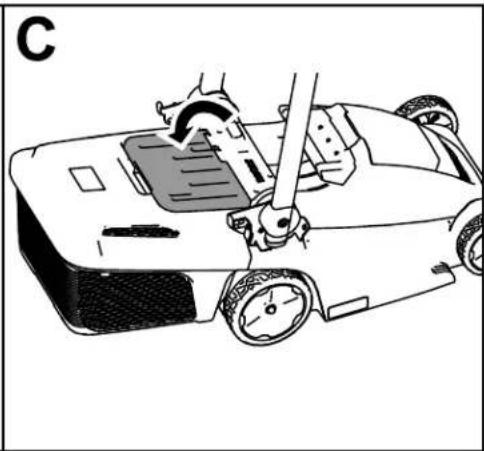
natural_image
Line drawing of a car with a hand operating the steering wheel, showing motion and control buttons (no text or symbols)Figuur 14
g341400
V olstand
natural_image
Technical line drawing of two mechanical components with arrows indicating assembly or movement (no text or symbols present)Figuur 15
g363501
Figuur
16
g356991
natural_image
Line drawing of a person performing a physical maneuver on a roller coaster, with arrows indicating motion direction (no text or symbols)Figuur 17
natural_image
Diagram of a lawn mower with directional arrow indicating motion (no text or symbols)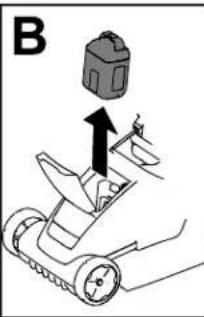
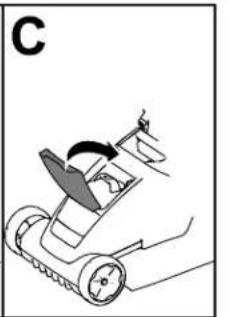
natural_image
Diagram of a robotic arm with a hand operating the motion, showing no text or symbolsFiguur 19
natural_image
Technical line drawing of a mechanical assembly with a central component and an upward arrow (no text or symbols)Figuur 18
Figuur 21
natural_image
Technical illustration of a manual lawn saw tool in operation, showing blade turning and tool path (no text or symbols)Figuur 25
g357350
natural_image
Line drawing of a lawn mower with adjustable handle and wheels (no text or symbols)
Hvis du trenger hjelp, kan du se www .T oro.com/support for instruksjonsressurser eller kontakte et autorisert forhandlerverksted før du returnerer dette produktet.
| Hvis maskinen originale kontakte kundeserviceavdeling. for hånden produktet inn numrene | T oro et autorisert | må - deler | reparere elle |
| når modell | du - og i | tar - og s | |
| de tomme feltene. | |||
V iktig: Du kan skanne
serienummermerket
utformet for bruk mied
60 V litiumionbatteripakker
134
- 5297
- Maks strømmodus
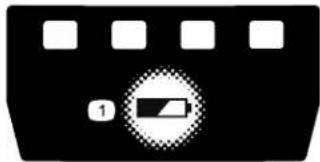
natural_image
Pure electrical circuit lines without any symbols161
- 3764
- Status for batterilading
162
- 1005
natural_image
Technical diagram of a robotic arm with multiple joints and arrows indicating motion or assembly (no text or symbols present)Figur 4
Figur 5
Figur 6
Figur 7
- Batterilader,
Figur
9
natural_image
Mechanical assembly diagram showing a component being inserted into a housing (no text or symbols visible)Figur 10
natural_image
Line drawing of hands holding a tool on a metal frame (no text or symbols)Figur 1 1
g341398
Bruke
selvdrift
Kun
modell
21844
- Juster hastighetskontrollen selvdriftshastigheten
3
i midten Figur
12
av ^g342174 det
på maskinen.
- Hastighetskontroll for kniven
-
MAX - knapp
-
Selvdriftshändtak
for for se
Justere
knivhast
Denne maskinen
har 1
R UNSMART
og
AX
.
natural_image
Diagram showing a mechanical device being adjusted to form a motor or fan assembly (no text or symbols present)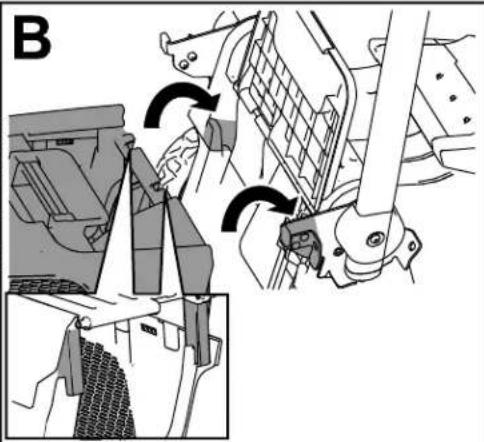
natural_image
Mechanical assembly diagram showing gear shift and mounting mechanism (no text or labels)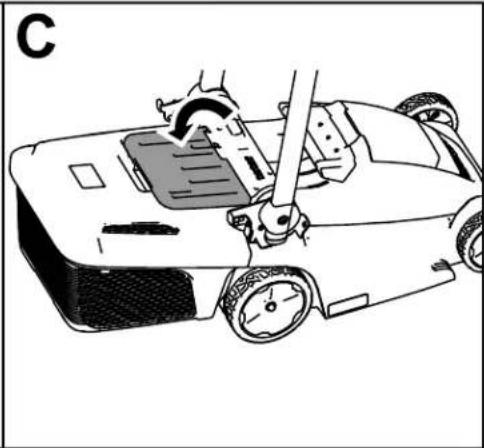
natural_image
Line drawing of a robotic car with a hand operating the steering wheel (no text or symbols)Figur 14
g341400
Indikator
for
full
gresskasse
Gressboksen
er
utstyrt
med
en
oppfylt
- indikato
inn, strømmer
luft
gjennom
gresskassen
blokkeres
og
indikatorklaf
fen
natural_image
Technical line drawing of two mechanical components with arrows indicating assembly or movement (no text or symbols present)Figur 15
g363501
Fjerne gresskassen
Figur
16
g356991
Slå av maskinen
- Slipp knivkontrollbøylen (Figur 10).
natural_image
Line drawing of a person performing a physical maneuver on a ladder, with arrows indicating motion direction (no text or symbols)Figur 17
natural_image
Mechanical assembly diagram showing a component with an arrow indicating direction (no text or symbols present)Figur 18
natural_image
Diagram of a lawn mower with a blade and directional arrow indicating motion (no text or symbols)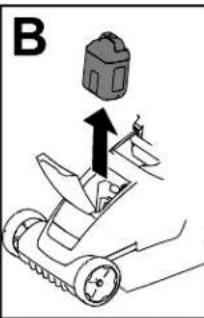
natural_image
Diagram of a robotic arm with motion arrows indicating movement (no text or symbols)Figur 19
batteripakken
natural_image
Diagram of a robotic arm with motion arrows indicating movement (no text or symbols)0341360
bruker maskinen, må
Brukstips
Generelle klippetips
natural_image
Diagram of a mechanical device with a rotating arrow indicating rotational motion (no text or symbols)Figur
22
g342176
V edlikehold
natural_image
Line drawing of a lawn mower with adjustable arms and wheels (no text or symbols)
134 - 5297
decal134 - 5297
natural_image
Pure electrical circuit lines without any symbols161 - 3764
decal161 - 3764
decal162 - 1005
natural_image
Technical line drawing of a mechanical housing or enclosure with mounting holes and internal components (no text or symbols)Rysunek 3
OSTRZEŻENIE
natural_image
Diagram of a mechanical device with two arms and a central handle, showing directional arrows indicating movement or force (no text or symbols present)Rysunek 4
Rysunek 5
Przegląd produktu
Rysunek 6
Rysunek 7
- Ladowarka akumulatora, 86902PPK modeli
-
Alemulator 88925PKRkdel rnoodoptzona 21836, 21843
-
Akumulator 88941PPK do modeli , model (dołączona 21843 i 21844)
Specyfikacje
Rysunek
9
g364065
- Przycisk
koszenia
2wysokoś/ziernik
wysokości
ze
wskaźnikiem
koszenia
W czasie pracy
natural_image
Line drawing of hands holding a tool over a metal frame, labeled 'Rysunek' and page number 1 (no text or symbols on the diagram itself)Rysunek
16
g356991
W yłączanie maszyny
natural_image
Line drawing of a person performing a manual task on a mobility device, with arrows indicating motion direction (no text or symbols)Rysunek 17
W yjmowanie maszyny
- Otwórz
pokrywę
komory
- Naciśnij akumulator
zatrzask
a
, a następnie
- Zamknij
pokrywę
komor
natural_image
Diagram of a lawn mower with a blade and handle, showing motion direction (no text or symbols)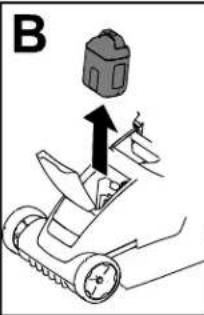
natural_image
Diagram of a robotic car with motion arrows indicating rotation (no text or symbols)Rysunek 19
natural_image
Technical line drawing of a mechanical assembly with a central component and an upward arrow indicating motion (no text or symbols)Rysunek 18
- W yjmij akumulatora
akumulator
z maszyny
patrz
W yjmowanie
( Strona
19 ) .
Informacja: gdy nie
używasz
W yjmuj maszyny
akumulator
zawsze
natural_image
Diagram of a mechanical device with a rotating arrow indicating rotation, no text or symbols presentnatural_image
Technical illustration of a tractor's wheel assembly and maintenance procedure (no text or symbols)Rysunek 25
g357350
natural_image
Line drawing of a lawn mower with extended blades and wheels (no text or symbols)
© 2026—The 81 1 1 L yndale Bloomington, T oro® Company A venue South 2 MN 55420
134
- 5297
natural_image
Pure electrical circuit lines without any symbols161
- 3764
natural_image
Diagram of a mechanical device with two arms and a central handle, showing directional arrows indicating movement or force (no text or symbols present)Figur 4
Figur 5
g341335
Produktöversikt
Figur 6
Figur 7
Figur 9
natural_image
Mechanical assembly diagram showing a component being inserted into a housing (no text or symbols visible)Figur
10
natural_image
Line drawing of hands holding a tool on a metal frame (no text or symbols)Figur
1 1
g341398
Använda
Endast
modell
Figur
12
natural_image
Technical line drawing of a vehicle's lower suspension system with brake and wheel components (no text or labels)Figur
13
Figur
natural_image
Illustration of a hand using a tool to adjust a mechanical component with a cross mark (no text or symbols)16
g356991
Stänga av maskinen
natural_image
Line drawing of a person performing a physical maneuver on a roller coaster, with arrows indicating motion direction (no text or symbols)Figur 17
T a ut batteripaketet maskinen
- L yft batterifackets
lock - T ryck batteripaketets ut batteripaketet.
- Stäng batterifackets
natural_image
Diagram of a lawn mower with a blade and handle, showing motion direction (no text or labels)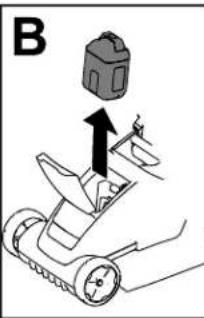
natural_image
Diagram of a robotic arm with a rotating component and directional arrow (no text or symbols)Figur 19
natural_image
Technical line drawing of a mechanical assembly with a highlighted component (no text or symbols)Figur 18
- T a bort batteripaketet.
ur maskinen
( sida
18 ) .
Obs: T a ut batteripaketet maskinen.
Se T a ut batteripaketet
när du inte använde
Arbetstips
Allmänna klipptips
marken into trimlar
Inte strinifal klinnbestighe
klippnastligheten
och sedan
Klippa
natural_image
Diagram of a mechanical device with a rotating arm and conveyor belt, showing motion direction (no text or symbols)Figur
22
g342176