
VHQ1 - Earphones VOX - Free user manual and instructions
Find the device manual for free VHQ1 VOX in PDF.
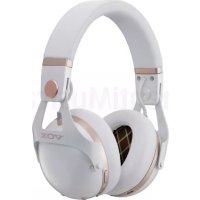


| Product type | Over-ear headphone |
| Technology | Dynamic |
| Communication type | Bluetooth 5.0 |
| Supported Bluetooth profiles | A2DP, AVRCP, HFP, HSP |
| Supported codecs | SBC, AAC, aptX, aptX Low Latency, aptX HD |
| Communication range | 10 meters (line of sight) |
| Frequency band | 2.4 GHz (2.402 - 2.480 GHz) |
| Power supply | Built-in rechargeable lithium polymer battery |
| Battery life (Bluetooth + ANC) | Approximately 12 hours |
| Battery life (Bluetooth without ANC) | Approximately 24 hours |
| Battery life (headphone cable + ANC) | Approximately 35 hours |
| Charging time | 3.5 to 6 hours |
| Weight | 320 g |
| Noise cancellation (ANC) | Yes, adjustable (high/medium) |
| Ambient sound control | Yes, with volume adjustment and equalization |
| Telephone function | Yes, with built-in microphone |
| Voice assistant | Siri / Google Assistant |
| Included accessories | Headphone, headphone cable, USB charging cable, manual, case, airplane adapter |
| Replacement parts | Earpads (ref. VH-EP-1 BK/WH) |
| Cleaning | Soft dry cloth, avoid solvents |
| Operating temperature | 0°C to 40°C |
| Operating humidity | 35% to 80% without condensation |
Frequently Asked Questions - VHQ1 VOX
User questions about VHQ1 VOX
0 question about this device. Answer the ones you know or ask your own.
Ask a new question about this device
Download the instructions for your Earphones in PDF format for free! Find your manual VHQ1 - VOX and take your electronic device back in hand. On this page are published all the documents necessary for the use of your device. VHQ1 by VOX.
USER MANUAL VHQ1 VOX
VH-Q1
Precautions
■ Please read before use
To prevent harm to the user or to other people, or damage to property, be sure to observe the precautions explained here.
The dangers and consequences of incorrect handling are explained using the following categories.
| ⚠️DANGER | This indicates an explanation of incorrect handling that could result in imminent death or serious injury to a person. |
| ⚠️WARNING | This indicates an explanation of incorrect handling that could result in death or serious injury to a person. |
| ⚠️CAUTION | This indicates an explanation of incorrect handling that could result in minor injury to a person. |
| NOTICE | This indicates an explanation of incorrect handling that could result in product damage or malfunction, material damage, or data loss. |
■ The graphic symbols appearing in this document and on the unit have the following meanings.
The following symbols inform you of cautions (and warnings).
General caution
Electric shock hazard
The following symbols indicate actions that are prohibited.
Prohibition
Do not disassemble
Do not use near water
Do not allow to become wet
Do not touch with wet hands
The following symbols indicate actions that are required or directed.

Direction Disconnect the power plug

■ Internal battery

● This unit has an internal rechargeable lithium polymer battery. Incorrect use may result in overheating, fire or explosion.
- Do not expose to fire or heat, or charge, use or store at high temperatures.
- Do not heat in a microwave or other oven.

■ Charging cable, charging connector and electrical outlet

- Do not use a charging cable other than the one that is included. Do not use the included charging cable with any other product. Otherwise, malfunction, overheating or fire may result.

- Do not damage the included charging cable or connector. Do not damage, modify, expose to heaters, forcibly bend, twist, pull, place heavy objects on, or bundle. Otherwise, malfunction, overheating, electric shock or fire may result.

- Do not charge when the Micro USB connector is wet from water or other liquids (rain, sweat, etc.). If the Micro USB connector is wet, a short circuit may occur, resulting in electric shock or fire.

- If an abnormality or malfunction occurs, immediately disconnect the charging cable and stop using the device.
Continuing to use the device may result in fire or electric shock. If an abnormality occurs, turn off the device, and then contact customer service for repairs.
- Smoke or an abnormal odor or sound is produced.
- Audio may not be output.
- Water or a foreign object has entered the device.
- The main unit or charging cable is damaged.

- Use the included charging cable to charge the device according to the specified procedure.
Charging with a procedure other than that specified may result in battery leakage, overheating or explosion.
If the charging cable is lost or damaged, contact customer service for repairs.

- If charging is not completed after the specified charging time, stop charging.
Otherwise, battery overheating, explosion or fire may result.
Headphones

- Follow the instructions of the medical institution when using in hospitals. When this unit is used with a Bluetooth connection, radio waves from this unit may affect electronic devices and medical electrical equipment. Turn off the Bluetooth connection in places where use is prohibited. Connecting an audio cable to this unit turns off the Bluetooth connection and stops the emission of radio waves.

- Do not use this unit if you have a cardiac pacemaker. When this unit is used with a Bluetooth connection, radio waves from this unit may affect the operation of the pacemaker.

- Follow the instructions of the crew on aircraft. If this unit is used with a Bluetooth connection, radio waves from this unit may affect operation, resulting in an accident due to malfunction.

- Do not use near automatic control equipment such as automatic doors and fire alarms. If this unit is used with a Bluetooth connection, radio waves from this unit may affect operation, resulting in an accident due to malfunction.

● Never use this device while operating a car, motorcycle or bicycle. Otherwise, a traffic accident may result.

- Do not use in places that are dangerous if you cannot hear surrounding sounds (such as railroad crossings, station platforms, construction sites, and roads traveled by cars and bicycles). Otherwise, an accident may result.

- Do not use at a volume that does not allow you to hear external sounds. While using this unit, it will be difficult to hear external sounds. Ensure safety by using at a volume that allows you to hear surrounding sounds.

- Do not use at a high volume for a long time. Using this unit at loud volumes for an extended period of time may damage your hearing. If you experience any difficulties in hearing or ringing in your ears, consult with a specialized physician.

- Keep out of reach of infants. Otherwise, an unexpected accident may result.

- Do not allow water or foreign objects to enter the unit. This unit is not waterproof or dustproof. Be especially careful when touching it with wet hands or using it in the rain, during snowfall, on water, or at the beach. Otherwise, a short circuit or overheating may occur, resulting in electric shock, fire or malfunction.

- Do not cover with cloth, etc. Otherwise, overheating may occur, resulting in fire or injuries.

- Do not disassemble or modify. Otherwise, device malfunction, electric shock, burns or fire may result.
CAUTION
Handling

- Do not use if direct contact with the unit causes abnormal sensations in your ears, skin, etc. Immediately stop using the unit. If symptoms persist, consult a doctor.

- Stop using the unit if it causes a feeling of unwellness.
Remove this unit from your ears. If symptoms persist, consult a doctor.

● Do not place or store in a location exposed to high temperatures,
such as near a fire, in direct sunlight, or in a car under the hot sun. The internal battery may overheat, explode or ignite, resulting in a fire.

● Store in a location with low humidity and limited dust.
Otherwise, fire, electric shock or malfunction may result.

- Do not bring this unit near items affected by a magnetic field.
Cash cards, commuter passes, clocks, etc., may no longer function correctly due to the magnetic field produced by this unit.
- This unit is not equipped with magnetic shielding. Do not place this unit near a CRT device.

● Before turning on or off, be sure to minimize the volume of this unit and all connected devices.
Otherwise, a loud noise may be produced, resulting in hearing damage or malfunction.
- Increase the volume gradually.
NOTICE
Handling

- Do not apply excessive force to the arm, body or controls.
Otherwise, malfunction may result.
- Be careful not to apply excessive force to this unit.
- Using this unit while sleeping or lying down may strain it, resulting in damage, malfunction or injuries.
■ Cleaning

● Do not use fluids like benzene or thinner.
Otherwise, discoloration or deformation may result.
When cleaning this unit, gently wipe with a soft, dry cloth.
Introduction
Thank you for purchasing this VOX product.
In order to take full advantage of this unit's functionality and ensure years of trouble-free operation, please read this manual carefully before use.
Conventions in this manual
- Specifications and appearance of this product are subject to change without notice. ● The shape and displays shown by illustrations in this manual may differ in some ways from the actual product. Symbols used in this manual
NOTE
This indicates an explanation that you should heed to ensure that you can correctly utilize the performance or functionality of this unit.
HINT
This indicates supplementary information that is useful to know.
About Bluetooth products
Industrial, scientific and medical equipment, such as microwave ovens, as well as mobile object identification premises radio stations used in factory production lines (radio stations that require a license), specified low-power radio stations (radio stations that do not require a license) and amateur radio stations (radio stations that require a license) operate within the operating frequency band of this unit.
- Before using this unit, make sure that no premises radio stations for mobile object identification, specified low-power radio stations, or amateur radio stations are used in the vicinity.
- In the unlikely event that this unit causes harmful radio frequency interference to a premises radio station for mobile object identification, immediately change the operating location or stop using the radio waves, and then contact customer service to discuss measures for avoiding interference (for example, installing partitions).
- If any other problems occur, such as harmful radio frequency interference of this unit with specified low-power radio stations for mobile object identification or amateur radio stations, contact customer service.
Usage restrictions
● Wireless communication with all Bluetooth-compatible devices is not guaranteed. ● Devices compatible with the Bluetooth function for wireless communication must conform to the standards defined by The Bluetooth SIG, Inc. and be certified. However, even devices that conform to the standards may not be able to connect depending on the device specifications and settings. In addition, the operating method, display, and operation are not guaranteed. ● A security function conforming to the Bluetooth standard is supported; however, security may not be sufficient depending on the operating environment and settings. Be careful when using wireless communication. - Please note that we assume no responsibility for any data or information leaks that may occur during wireless communication.
Communication range
Use within a line-of-sight distance of about 10 meters. If there are obstacles or people in between, or interfering devices nearby, the usable range will be shorter depending on the surrounding environment and building configuration. Note that the above range is not guaranteed.
Simultaneous use with other devices
Failure, such as interrupted audio, may occur due to radio frequency interference caused by influences from devices that use radio waves in the same frequency band (2.4 GHz) as this unit, for example, Bluetooth-compatible devices, devices using a wireless LAN, or microwave ovens. In addition, please be aware of the following since the radio waves of this unit may affect those devices.
- Separate this unit and devices that use radio waves in the same frequency band (2.4 GHz) as this unit.
- Do not use in hospitals.
Regulatory Information
KORG adheres to the certification requirements for various regions around the world.
For Customers in U.S.A Only
■ The FCC Regulation Warning
This device complies with Part 15 of the FCC Rules.
Operation is subject to the following two conditions:
(1) this device may not cause harmful interference, and (2) this device must accept any interference received, including interference that may cause undesired operation.
NOTE: This equipment has been tested and found to comply with the limits for a Class B digital device, pursuant to Part 15 of the FCC Rules. These limits are designed to provide reasonable protection against harmful interference in a residential installation. This equipment generates, uses, and can radiate radio frequency energy and, if not installed and used in accordance with the instructions, may cause harmful interference to radio communications. However, there is no guarantee that interference will not occur in a particular installation. If this equipment does cause harmful interference to radio or television reception, which can be determined by turning the equipment off and on, the user is encouraged to try to correct the interference by one or more of the following measures:
- Reorient or relocate the receiving antenna.
- Increase the distance between the equipment and receiver.
- Connect the equipment into an outlet on a circuit different from that to which the receiver is connected.
- Consult the dealer or an experienced radio/TV technician for help.
Changes or modifications not expressly approved by KORG could void the user's authority to operate this equipment.
For detailed certification information, please refer to the part under the earmuff.
If items such as cables are included with this equipment, you must use those included items.
For Customers in Canada Statement Only
IC Warning:
This device contains licence-exempt transmitter(s)/receiver(s) that comply with Innovation, Science and Economic Development Canada's licence-exempt RSS(s). Operation is subject to the following two conditions:
(1) This device may not cause interference. (2) This device must accept any interference, including interference that may cause undesired operation of the device.
For Customers in EU Only
KORG INC., 4015-2 Yanokuchi, Inagi-city, Tokyo, 206-0812, Japan, declare under their sole responsibility that the product described in this user guide complies with technical standards EN300328, EN301489, EN55022, EN55024, EN50332.
The product is only guaranteed to comply with EN50332 in generic mode with immersion of with the volume limiter on. Depending on the hearing of the user, some combinations of hearing corrections and immersion setting may exceed EN50332 limits.
To prevent possible hearing damage, do not listen at high levels for long periods.
This device may be operated in all member states of the EU. Declaration for EU compliance: Operation Frequency Band/Max. RF power transmitted: 2400-2483.5MHz, <6.39mW.
Hereby, KORG INC. declares that the radio equipment type 'headphones' is in compliance with Directive 2014/53/EU. The full text of the EU declaration of conformity is available in the Owner's Manual of this product posted on the KORG website (www.korg.com).
Focus on your safety and that of others if you use the headphones while engaging in any activity requiring your attention. You may remove the headphones or adjust your volume to ensure you can hear surrounding sounds, including alarms and warning signals.
Do not use the headphones if they emit any loud or unusual noise. If this happens, take the headphones off and contact KORG customer service.
Do not submerge or expose the headphones to water, or wear them while participating in water sports, e.g., swimming, surfing, etc.
■ Notice Regarding Disposal
The symbol for the Directive 2012/19/EU on waste electrical and electronic equipment (WEEE):
The symbol for the Directive 2006/66/EC on batteries:


In the European Union, these symbols indicate that the products and batteries should not be disposed of with general household wastes. For proper treatment, recovery and recycling of old EEE, accessories and batteries, please take them to applicable collection points, in accordance with your national legislation. This helps to prevent potential negative consequences for the environment and human health. For more information, please contact your local municipality or distributor.
Setup
Nomenclature and functions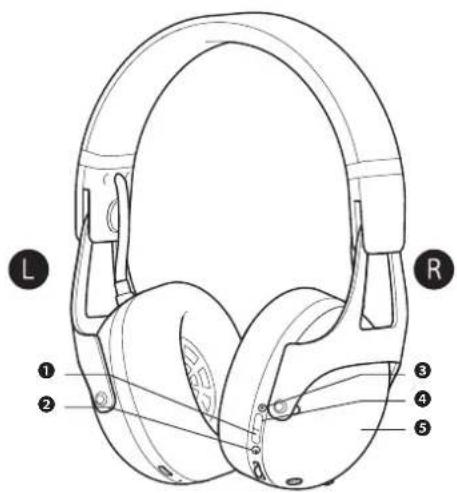
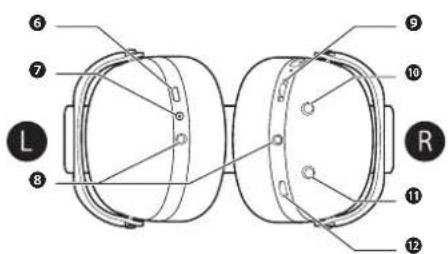
Shows the current power status. (page 9)
③ NC (noise cancelling) indicator
Shows the operating status for the noise-cancelling function. (page 12)
④ NC (noise cancelling) button
Turn on/off the noise-cancelling function. (page 12)
⑤ Touch sensor
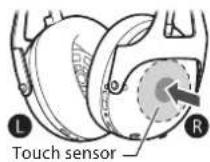
Touch with your finger to turn on/off ambient sound monitoring. (page 12)
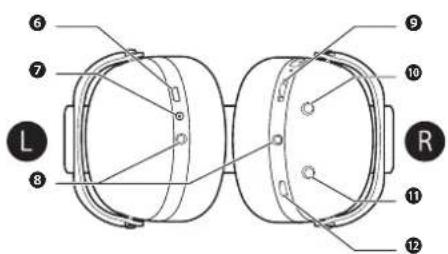
⑥ Micro USB port
Connect the included charging cable here to charge this unit. (page 9)
⑦ Charging indicator
Shows the current charging status. (page 9)
⑧ Headphone cable jack
Connect a headphone cable when connecting to a mixer. The cable can be connected to the jack on either the left or right. (page 11)
⑨ Ambient sound monitoring volume controller
Adjust the monitoring volume of the ambient sound. (page 13)
10 SOUND ENHANCING button
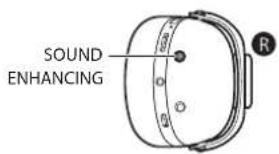
Adjust the monitoring EQ of the ambient sound according to the room characteristics. (page 13)
⑪ ANC button
Noise cancelling level can be changed to H or Medium.
⑫ Function button
Adjust the volume of playback, and perform operations such as play/stop. (page 11)
Charging and turning on/off
■ Connecting the charging cable
● Charge this unit before the first use. - When the battery level becomes low, the voice guide sounds "Battery level empty" to indicate that the battery level is low, and the power indicator lights up or flashes in red. When the voice guide sounds, charge this unit. ● The time required to fully charge this unit is 3.5 to 6 hours (depending on operating conditions).
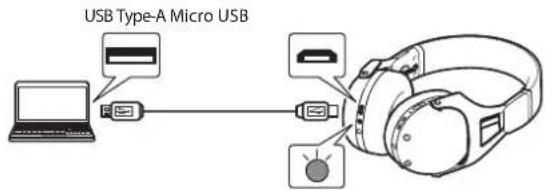
- Plug the Micro USB connector of the included charging cable into the Micro USB port on this unit.
- When connecting the charging cable, check the orientation of the connector and insert it straight in.
- The included charging cable is for this unit only. Do not use it for any purpose other than charging this unit.
- Plug the USB Type-A connector of the included charging cable into the port on your computer.
• The indicator on the unit lights up in red, and charging starts. • While charging, the unit cannot be turned on/off or operated. - When charging is complete, the charging indicator goes off.
■ Turning on the unit
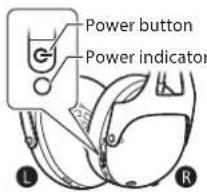
Hold down the power button ( ) for approximately two seconds.
- The unit turns on, and the power indicator shows the status of the unit. Not lit: Off
Lit in blue*: On
Flashing in blue*: Waiting for Bluetooth connection Flashes in blue twice*: Establishing a Bluetooth connection Flashing alternately in blue and red: Bluetooth pairing mode
* Changes to red when the battery level is low.
■ Turning off the unit
While the unit is on, hold down the power button ( ) for approximately two seconds.
• The unit turns off, and the power indicator goes off.
Connecting to a Bluetooth device
■ Registering (pairing) this unit with a device
Pairing is required to connect this unit and a Bluetooth device in order to listen to music or make a call.
- While the unit is off, hold down the power button ( ⏻) for approximately five seconds to enter pairing mode.
- The power indicator flashes alternately in blue and red, and the unit enters pairing mode. After the unit has entered pairing mode, remove your finger from the power button.
- If pairing with a device is not completed within five minutes, pairing mode will be automatically cancelled.
- Turn on the device to be connected to this unit, and perform the pairing operation to search for this unit.
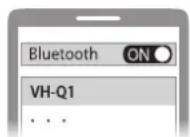
- "VH-Q1" (the name of this unit) appears in the device search screen of the device to be connected to this unit.
- Place the device to be connected to this unit within one meter.
- For details on the pairing procedure, also check the manual of the device to be connected to this unit.
- Pair with the device to be connected to.
- Select "VH-Q1" (displayed in the device search screen) to establish a connection.
- Check the connection status.
- The connection has been made when the power indicator on this unit flashes slowly.
■ Connecting to a registered device
- Turn on this unit.
- Select this unit on the device to be connected to.
Refer to steps 2 through 4 in "Registering (pairing) this unit with a device".
NOTE
- This unit remembers the last connected device. When this unit is turned on, it may automatically connect to the last connected device.
- A device that has been paired once does not need to be paired again. However, if this unit can no longer connect to the device, perform pairing again.
Operation
Listening to music
Connecting with Bluetooth
Turn on this unit and the connected device to playback music.
- Make a Bluetooth connection between this unit and the device to be connected.
- Playback the music from the connected device. • The music is played back from this unit.
Connecting with a headphone cable
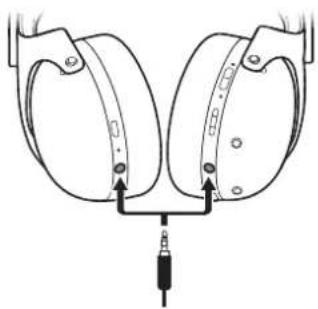
When the included headphone cable is connected, this unit can be used as regular headphones, even when the unit is turned off.
Connect the headphone cable and turn on this unit to use it as noise-cancelling headphones.
■ Using the function button
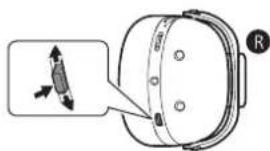
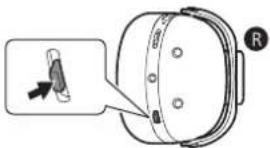
Use the function button on the right side of this unit to perform playback operations and adjust the volume.
- Play/pause track: Press.
- Next track: Press twice quickly. • Previous track: Press three times quickly.
- Increase/decrease volume: Move to +/-
- Start Sin (iOS)/Google Assistant (Android™): Hold down for more than two seconds.
HINT
• Make sure that the headphone cable is fully inserted. - The headphone cable can be connected on either the left or right side of the unit. When the cable is connected to both the left and right sides, the right side has priority. - Turning on this unit while wearing it with a Bluetooth connection established may automatically start music playback. - Connecting the headphone cable to this unit with a Bluetooth connection established cuts the Bluetooth connection and gives priority to the sound from the headphone cable connection. - When the headphone cable is connected, a Bluetooth connection cannot be established.
■ Using the phone
When connected to a smartphone or mobile phone via Bluetooth, you can make calls using the microphone in this unit. Check that the device to be connected supports the call function profiles.
Supported profiles of this unit
● HSP (Headset Profile): Making calls ● HFP (Hands Free Profile): Making and receiving calls
Making a call
Make the call from the smartphone or mobile phone.
Receiving a call
When you hear the ring tone from this unit, press the function button on the right side of the unit.
Ending a call
During the call, press the function button.
HINT
If a call is made during music playback, playback will pause. When the call ends, playback resumes automatically.
Noise-cancelling function
You can comfortably enjoy music while reducing ambient noise.
■ Using noise cancelling
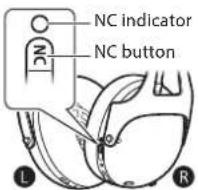
Press the NC button on the right side of the unit to turn on/off noise cancelling.
- Turning on this unit turns on the NC indicator and noise cancelling.
- Turning off noise cancelling goes off the NC indicator.
- The NC indicator flashes when ambient sound monitoring is on or after switching the ambient sound monitoring.
HINT
If this unit is turned on with no Bluetooth device or headphone cable connected, only the noise-cancelling function can be used.
Ambient sound monitoring function
Using the built-in microphone, you can listen to the ambient sound. Change the settings to adjust the monitoring volume and EQ of the ambient sound.
■ Turning on/off ambient sound monitoring
Touch the touch sensor on the right side of the unit to turn on ambient sound monitoring.
■ Adjusting the monitoring EQ of the ambient sound
Press the SOUND ENHANCING button on the right side of the unit to adjust the monitoring EQ of the ambient sound.
• Repeatedly pressing the SOUND ENHANCING button cycles through the settings in the following order: Basic for a guitar → Big for a guitar → Bright for a guitar → Big for a bass → Bright for a bass → FLAT.
■ Adjusting the monitoring volume of the ambient sound
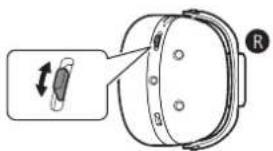
Use the ambient sound monitoring volume controller on the right side of this unit to adjust the monitoring volume of the ambient sound. - (+): Increases volume (-): Decreases volume
Cleaning
In order to enjoy continued use of this unit for a long time, regularly maintain the various parts. Do not clean using solvents such as alcohol or thinner.
Cleaning the headphone body
● Wipe the headphone body with a dry cloth. - If the charging connector or a control button gets wet, wipe it off immediately. Otherwise, malfunction may result. ● The headphone ear pads easily get dirty, so wipe them frequently to keep them clean. Leaving bodily or other oily residue on the ear pads will cause them to deteriorate quickly. ● Since the sound-producing parts of this unit are delicate, do not touch or blow on them or expose them to wind. Otherwise, malfunction may result. - If the charging cable becomes dirty, wipe it with a dry cloth. Continuing to use the cable while it is dirty may cause it to deteriorate and malfunction.
Replacing parts
■ Replacing ear pads
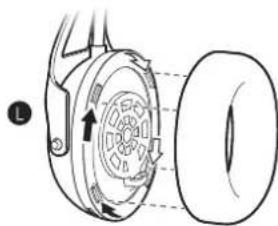
If the ear pads are lost or become unusable due to wear, replace them with the separately sold accessory.
Pull off the old ear pad while rotating it toward you for the left (L) side, or away from you for the right (R) side, and then attach the new ear pad by inserting the four tabs as shown and rotating the ear pad.
Troubleshooting
If this unit stops operating normally, check the following items. If taking the indicated action does not resolve the problem, or if the problem is not listed here, turn off the unit and contact customer service.
| Problem Cause Action | ||
| The unit cannot be turned on. | The unit is not charged. Charge the unit.(page 9) | |
| The unit cannot be charged. | The device supplying power is turned off. | Turn on the device supplying power (such as a computer).Power may not be supplied to a USB port while the device is asleep or in standby. |
| Pairing is not possible. | The distance between this unit and the device to be connected to is too large. | Bring this unit and the device to be connected to closer together. |
| No sound is output./Low sound is output. | The volume of this unit is low. | Adjust the volume of this unit.(page 11) |
| The volume of the connected device is low. | Adjust the volume of the connected device. | |
| The audio breaks up./There is noise in the audio. | The volume of the connected device is high. | Decrease the volume of the playback device. |
| Problem Cause Action | ||
| The audio is interrupted. | The distance between this unit and the connected device is large. | Bring this unit and the device to be connected to closer together. |
| There are obstructions or interfering radio waves. | Change the location where this unit is used. | |
| The other party's voice cannot be heard during a call./The other party's voice is low. | The volume of the connected device is low. | Adjust the phone volume on the connected device. |
| The headphones immediately fall off. | They are not worn correctly. | Adjust the length of the headband before putting them on. |
| The monitoring volume of the ambient sound is low/high. | The monitoring volume of the ambient sound is inappropriate. | Adjust the monitoring volume of the ambient sound.(page 13) |
| Noise cancelling is weak/not possible. | The settings for noise cancelling and ANC are inappropriate. | Check the settings for noise cancelling and ANC.(page 8, page 12) |
Specifications
General specifications
| Technology Dynamic | |
| Type Over the ears | |
| Communication method Compliant with Bluetooth standard Ver. 5.0 | |
| Maximum RF output | Class 2 2.5mW |
| Maximum communication range | Within a good line-of-sight of 10 meters |
| Operating frequency band | 2.4 GHz band (2.402 GHz to 2.480 GHz) |
| Modulation method FHSS | |
| Supported Bluetooth profiles | A2DP/AV/ICP/HFP/HSP |
| Supported codecs | SBC/AAC/Qualcomm® aptXTM/aptXTM Low Latency/aptXTM HD |
| Supported content protection | SCMS-T method |
| Power supply Internal rechargeable lithium polymer battery | |
| Battery life* | Bluetooth connectionNoise cancelling turned on: Approximately 12 hoursNoise cancelling turned off: Approximately 24 hours |
| Headphone cable connectionNoise cancelling turned on: Approximately 35 hours | |
| Charging time 3.5 to 6 hours | |
| Recommended charging temperature range | 10°C - 35°C |
| Operating temperature range | 0°C - 40°C |
| Operating humidity range | 35%RH - 80%RH (No condensation) |
| Weight 320g | |
* Varies depending on operating conditions.
• For the purpose of improvement, specifications are subject to change without notice. - Bluetooth is a registered trademark of Bluetooth SIG, Inc. - Qualcomm aptX is a product of Qualcomm Technologies International, Ltd. Qualcomm is a trademark of Qualcomm Incorporated, registered in the United States and other countries, used with permission. aptX is a trademark of Qualcomm Technologies International, Ltd., registered in the United States and other countries, used with permission. • Sir is a trademark of Apple Inc • Android and Google Assistant are trademarks of Google LLC. - Other model, company and product names mentioned in this manual are trademarks or registered trademarks of their respective companies. Furthermore, "and" marks may have been omitted from the text. • This product made and assembled in China. - No part of this work may be reproduced, modified distributed or otherwise used without prior written permission.
Included items
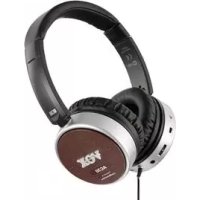
Unit Headphone cable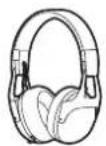
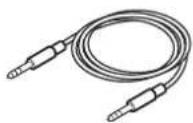
Charging cable (USB Type-A to Micro USB)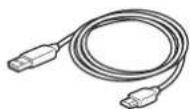
Owner's Manual (this document) Carrying pouch Plug Adaptor for In-flight Use
Accessories (separately sold)
Ear pads: VH-EP-1 BK/WH
Precautions
HINT
Cleaning
27VH-O1:
Troubleshooting
4 NC button (Noise Cancelling)
HINT
Ending a call
Troubleshooting
HINT
■ Operating the function button
HINT
Ending a call
- Each time you press the SOUND ENHANCING button, the preset switches in the following order: Basic for a guitar → Big for a guitar → Bright for a guitar → Big for a bass → Bright for a bass → FLAT.
■ Adjusting the monitor volume
Care
If you need help
This warranty is valid only in Japan.
- Use of this product outside of Japan could be dangerous and could invalidate the manufacturer's or distributor's warranty.
- Any service provided by properly qualified personnel is not available if purchased outside Japan.
- Any unauthorised modification or removal of original serial number will disqualify this product from warranty protection.
Customer Support Center

0570-666-569
This product has been manufactured according to strict specifications and voltage requirements that are applicable in the country in which it is intended that this product should be used. If you have purchased this product via the internet, through mail order, and/or via a telephone sale, you must verify that this product is intended to be used in the country in which you reside.
WARNING: Use of this product in any country other than that for which it is intended could be dangerous and could invalidate the manufacturer's or distributor's warranty. Please also retain your receipt as proof of purchase otherwise your product may be disqualified from the manufacturer's or distributor's warranty.
IMPORTANT NOTE FOR CUSTOMERS
Vox Amplification Ltd.
1 Harrison Close, Knowlhill, Milton Keynes, MK5 8PA. UK
© 2020 VOX AMPLIFICATION LTD.
www.voxamps.com
- VH-Q
- PRECAUTIONS
- PLEASE READ BEFORE USE
- INTERNAL BATTERY
- HEADPHONES
- CAUTION
- HANDLING
- NOTICE
- CLEANING
- INTRODUCTION
- CONVENTIONS IN THIS MANUAL
- ABOUT BLUETOOTH PRODUCTS
- USAGE RESTRICTIONS
- COMMUNICATION RANGE
- SIMULTANEOUS USE WITH OTHER DEVICES
- REGULATORY INFORMATION
- FOR CUSTOMERS IN U.S.A ONLY
- THE FCC REGULATION WARNING
- FOR CUSTOMERS IN CANADA STATEMENT ONLY
- FOR CUSTOMERS IN EU ONLY
- SETUP
- CHARGING AND TURNING ON/OFF
- CONNECTING THE CHARGING CABLE
- TURNING ON THE UNIT
- TURNING OFF THE UNIT
- CONNECTING TO A BLUETOOTH DEVICE
- REGISTERING (PAIRING) THIS UNIT WITH A DEVICE
- CONNECTING TO A REGISTERED DEVICE
- OPERATION
- LISTENING TO MUSIC
- CONNECTING WITH BLUETOOTH
- CONNECTING WITH A HEADPHONE CABLE
- USING THE FUNCTION BUTTON
- USING THE PHONE
- SUPPORTED PROFILES OF THIS UNIT
- MAKING A CALL
- RECEIVING A CALL
- ENDING A CALL
- NOISE-CANCELLING FUNCTION
- USING NOISE CANCELLING
- AMBIENT SOUND MONITORING FUNCTION
- TURNING ON/OFF AMBIENT SOUND MONITORING
- CLEANING THE HEADPHONE BODY
- REPLACING PARTS
- TROUBLESHOOTING
- SPECIFICATIONS
- INCLUDED ITEMS
- ACCESSORIES (SEPARATELY SOLD)
- OPERATING THE FUNCTION BUTTON
- ADJUSTING THE MONITOR VOLUME
- CARE
- IF YOU NEED HELP
- IMPORTANT NOTE FOR CUSTOMERS
Brand : VOX
Model : VHQ1
Category : Earphones