
PEGKT99BK - Musical instrument Pyle - Free user manual and instructions
Find the device manual for free PEGKT99BK Pyle in PDF.




| Brand | Pyle |
| Model | PEGKT99BK |
| Product Type | Electric Guitar |
| Number of Strings | 6 (standard) |
| Pickup Type | Magnetic (single coil or humbucker depending on model) |
| Controls | Volume, Tone, Pickup Selector |
| Output Connector | 6.35 mm Jack |
| Tuning | Via tuning pegs (standard, reverse for locking tremolo) |
| Bridge | Floating or adjustable depending on version |
| Truss Rod | Adjustable (4 mm Allen key or 8 mm socket) |
| Power | Passive (no battery); if active electronics, battery not included |
| Maintenance | Clean after each use, wipe metal parts |
| String Change | Every 3 months for daily use |
| Bridge Adjustment | Check harmonic at 12th fret |
| Neck Adjustment | Via truss rod, not recommended without technician |
| Recommended Amplifier | See guide: input, gain, drive, tone, volume, aux, headphones |
| Warranty | Manufacturer warranty, registration recommended at PyleUSA.com |
| Customer Service | 1-718-535-1800 |
Frequently Asked Questions - PEGKT99BK Pyle
User questions about PEGKT99BK Pyle
0 question about this device. Answer the ones you know or ask your own.
Ask a new question about this device
Download the instructions for your Musical instrument in PDF format for free! Find your manual PEGKT99BK - Pyle and take your electronic device back in hand. On this page are published all the documents necessary for the use of your device. PEGKT99BK by Pyle.
USER MANUAL PEGKT99BK Pyle
Please take a few moments to read through this manual. It will provide you with answers to many of your questions as well as inform you about the care and maintenance of your new instrument
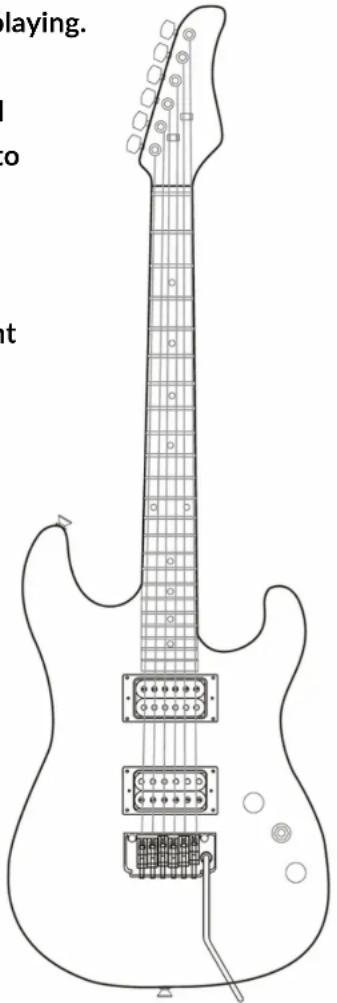
GUITAR ANATOMY
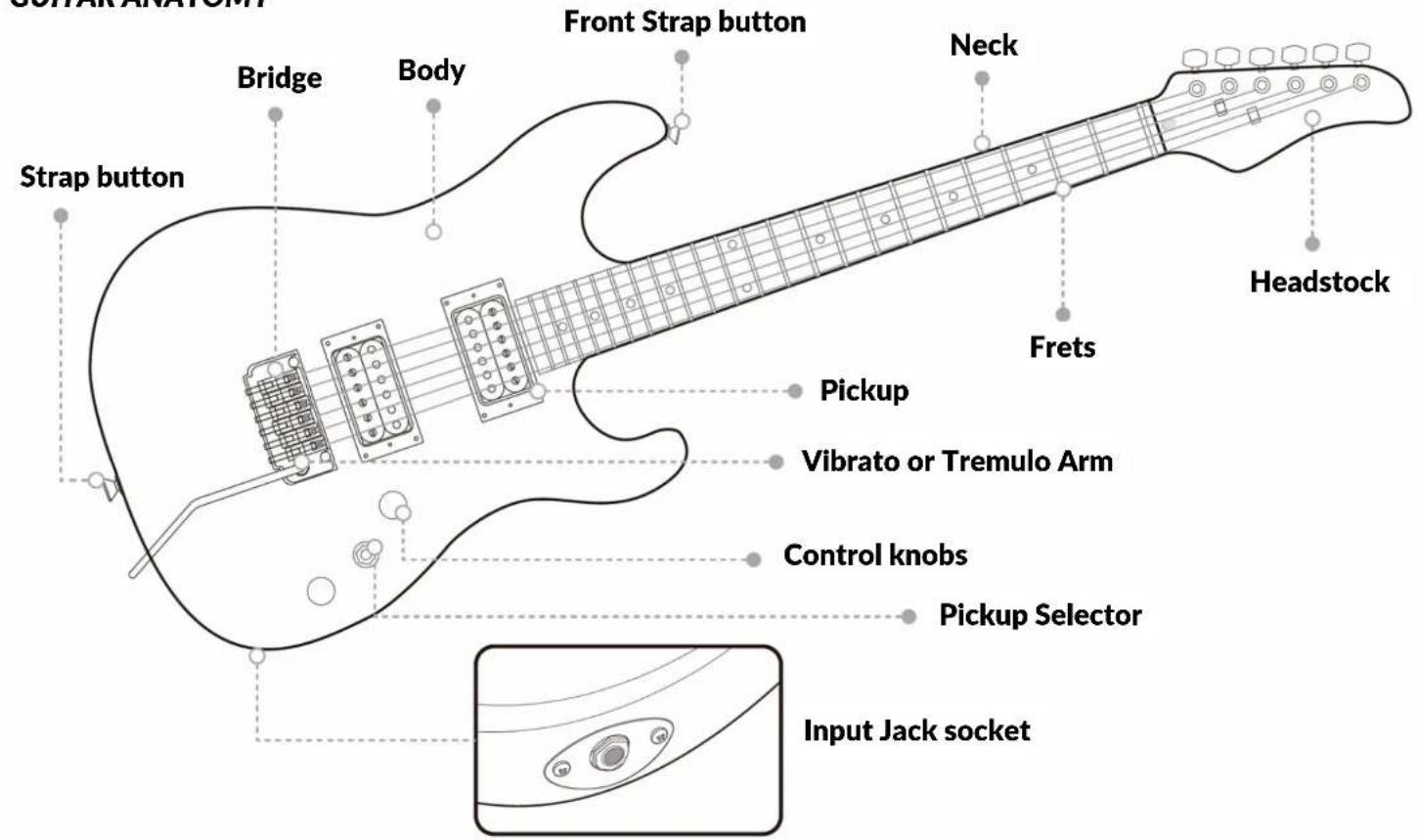
CLEANING
Cleaning your guitar regularly is one of the best ways to maintain the finish and prolong string life. Clean your guitar after each use, making sure to wipe the fingerboard and strings as well as any of the plated parts such as tuners, pickups, bridge etc. Make sure to remove all perspiration, as it can lead to corrosion and rusting in metal hardware ar strings.
TUNING YOUR GUITAR
Tune your instrument using the tuning keys to raise or lower the pitch.
On a guitar with a locking tremolo system, you must first loosen the locking nut before you can adjust the tuning with the tuning machines. Although locking tremolo systems have fine tuners located on the bridge, they only allow limited (fine) tuning. Counter-clockwise rotation of the tuning keys will raise the pitch of the string while clockwise rotation will lower the pitch of the string you are tuning. Tune your guitar starting with the lowest to highest strings.
After you have done this once, go back and double-check the tuning again. On some instruments you will have to do this a few times, especially if the strings are new or you have a guitar with a floating tremolo bridge. Tuning one string may affect the other strings and it is necessary to recheck the tuning until all strings are staying at the desired pitch.
Note: New strings tend to stretch and detune until they settle. It is a good idea to stretch the strings when you have just put on a new set. Do this after the initial tuning by bending notes and physically stretching each string by pulling away from the fingerboard (be careful no to pull too hard as you may break a string that way). After thoroughly stretching thestrings repeat the tuning process.
CHANGING STRINGS
We strongly recommend that you change your strings fairly often. If you play daily, we recommend that you change your strings every 3 months. A new set of strings will sound clear and precise, while an old set will sound dull and can produce unusual buzzing and dead notes. If you notice that your strings have become dirty, discolored, or produce an unusual buzzing or dull sound, then it is definitely time to put a new set of strings on your guitar.
Always check your new strings and make sure they are smooth and free of defects before installing them. If there are any irregularities, such as kinks, twists, or any other manufacturing defects, they will cause buzzing and untrue notes as well as sound distortion. We recommend replacing one string at a time, so that all the tension is not taken off of the neck. This will make it easier to re-tune and setup the neck.
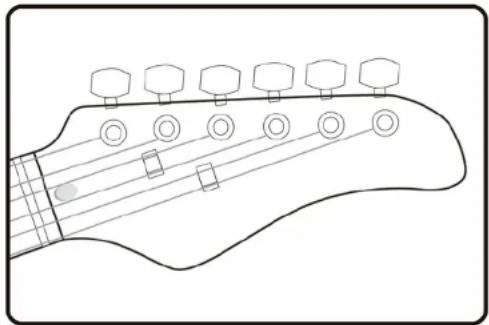
When winding strings on to the tuning machine post, always wind them tightly and evenly to avoid any slipping than can occur if there are any gaps. Always use at least 2 or 3 winds around the post starting from top to bottom. As a rule of thumb, use about and extra 5cm (2 inches) of slack when restringing a guitar and about 8cm (3 inches) of slack when restringing a bass. For unwound, or plain strings, follow the diagram (Figure 1) detailing how to install these strings on to the post to prevent them from slipping.
- Insert end of string into tuning post (make sure to leave enough slack for a few wraps around the post).
- Wrap end of string clockwise around post and under the string where it goes into the post (counterclockwise when stringing tuners on treble side of headstock).
natural_image
Line drawing of a guitar headstock with six tuning pegs and strings (no text or symbols)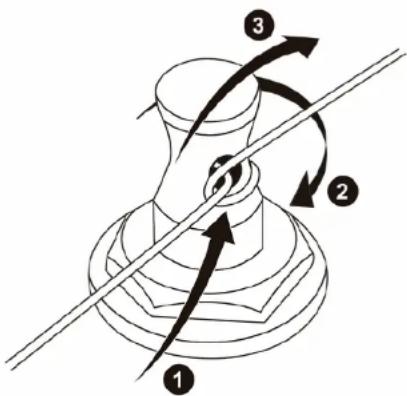
Figure 1: Stringing Plain Strings
- Pull end of string tight over itself making a sort of knot (end of string may then be bent down and cut off cleanly near knot).
- Tune to pitch, making sure the wraps wind neatly down the tuning post.
Note: Strings are always wound clockwise around the posts on the bass side and counter-clockwise around the posts on the treble side of headstock.
FLOATING BRIDGE ADJUSTMENT
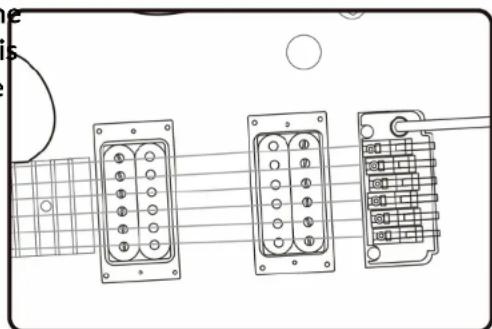
A floating bridge has an arched wooden or metal base held in position on the instrument top only by the downward pressure of the strings. If the bridge is moved even slightly while re-stringing, the intonation will no longer be true (some instruments feature "pinned" bridges that eliminate this possibility).
To adjust floating bridge intonation on a guitar, first check the 12th-fret harmonic and the fretted 12th-fret tuning of both E strings (high and low). If properly intonated, the fretted and harmonic 12-fret pitches of both E strings will agree, with none of them being sharp or flat.
natural_image
Diagram of three electric shock absorbers with pin layouts and wiring, placed on a guitar fretboard (no text or symbols present)If the pitch of the 12th-fret note is sharp relative to the pitch of the 12th-fret harmonic, lightly tap the foot of the bridge to move it back toward the tail piece until both pitches agree. If the pitch of the 12th-fret note is flat relative to the pitch of the 12th-fret harmonic, lightly tap the foot of the bridge to move it forward toward the neck until the two pitches agree. To fine-tune fully adjustable bridges, adjust each saddle forward or back using the individual intonation screws while checking the tuning of the 12-fret harmonic against the fretted 12th fret pitch.
IMPORTANT NOTE: When re-stringing a guitar with a floating bridge, change strings one at a time. Do not remove all the strings at once, as the bridge is held in the correct position only by the downward pressure of the strings.
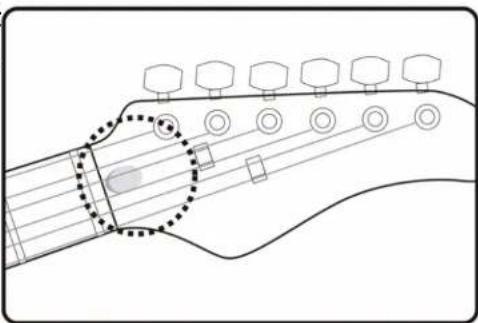
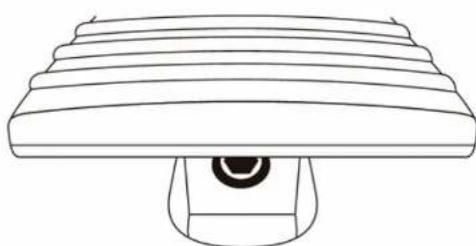
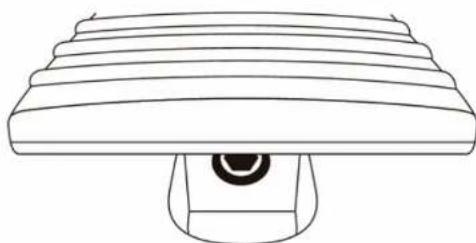
To adjust the truss rod, first locate the truss rod access at the headstock (Figure 2) or end of neck by body joint (Figure 3), remove the truss rod cover, and insert the correct size allen wrench (4mm) or pipe wrench (8mm) to adjust. Turn counter-clockwise to loosen and clockwise to tighten.
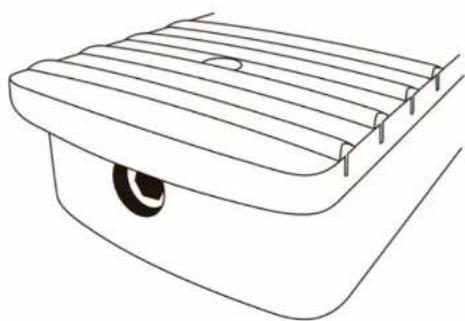
Note: If your truss rod nut access is not visible, it is possible your instrument has it located inside of the neck pocket (Figure 4) - this will require the neck to be taken off of the body to adjust the truss rod.
Truss rod adjustments should only be performed by a qualified technician. Improperly adjusting or over adjusting the truss rod can result in damage to the guitar neck and is not covered under the warranty.
natural_image
Line drawing of a guitar fretboard with tuning pegs and strings, no text or symbols present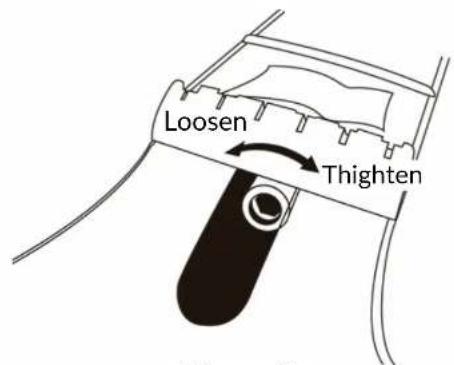
Figure 2: Truss Rod at Headstock
natural_image
Line drawing of a mechanical component with layered structure and central base (no text or symbols)Figure 3: Truss Rod by Body Joint
natural_image
Line drawing of a vehicle rear bumper with a circular vent and side supports (no text or symbols)Figure 4: Truss Rod Inside Neck Pocket
CONTROLS AND SPECS
The following are some brief descriptions of the basic electronic controls and terminology. For more specific information on your model please visit our website at www.PyleUSA.com.
Note: Most control knobs are easily tightened or removed by using a 2.0mm allen wrench or flathead screwdriver to adjust the set screw on the side of the knob. If a knob becomes loose, you should first remove the knob and check the control to make sure It Is properly tightened to the body before re-tightening the knob onto the control shaft. A loose control shaft can easily be tightened using any adjustable wrench. You will need to remove the electronics backplate and hold the control from the back of the guitar while tightening the nut from the top of body. This will ensure that you do not move the controls or damage/break any of the wire connections.
Volume Control
Controls the master output level of the guitar. Turning the knob clockwise will increase the volume while turning counter clockwise will decrease the volume. Some instruments will have multiple volume controls in which case, you'll find there's a volume control for each pickup.
Note: In the case of multiple volume controls, when either volume control is turned off and the pickup selector switch is in the middle position w/both pickups on, the entire signal of the instrument will be turned off.
Tone Control
This adjusts the high frequencies present in the signal coming from your guitar. With the knob turned fully clockwise, all frequencies are present. Turning the knob counter-clockwise decreases the high frequencies.
Output Jack
This is where the output signal of the guitar is sent to the amplifier by plugging in any standard 1/4" guitar cable. Most output jacks are located near the bottom corner of the guitar below the electronics cavity.
Note: If your guitar has active electronics, you should always remove your cable after playing.
Leaving your cable plugged into your instrument will drain the battery.
If your jack ever comes loose, do not tighten it without first removing the jackplate and securing the inside of the jack, otherwise you may break the wires causing your guitar to lose output.
Pickups
The pickups on your guitar turn the string vibrations into an electronic signal that is sent to your amplifier. Pickups are made up of magnets and coils of wire.
There are 2 types of magnetic pickups used in most electric guitars - Single Coils and Humbuckers. A Single Coil pickup is made up of only 1 coil of wire and generally has a weak output.
Due to its construction, a single coil will be noisy since it cannot block hum and RF interference. Humbuckers on the other hand are in fact "hum-cancelling" because of their construction using 2 coils side by side. The signals from each coil are combined in a certain way that cancels the hum and RF interference that is common with single coil pickups. Humbuckers generally have a higher output signal compared to single coils.
Pickup Selector Switch
The selector is used to switch between different pickups or combinations of pickups (on guitars with two or more pickups).
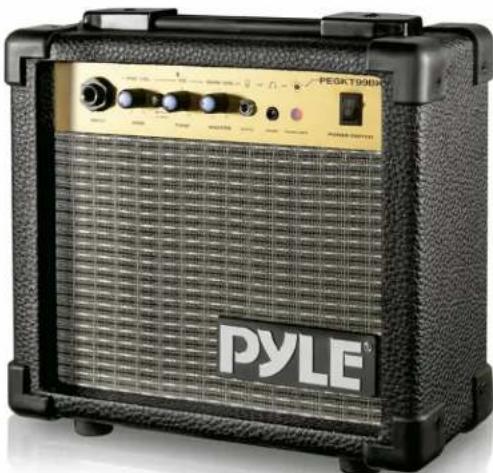
GUITAR AMP SETTINGS GUIDE
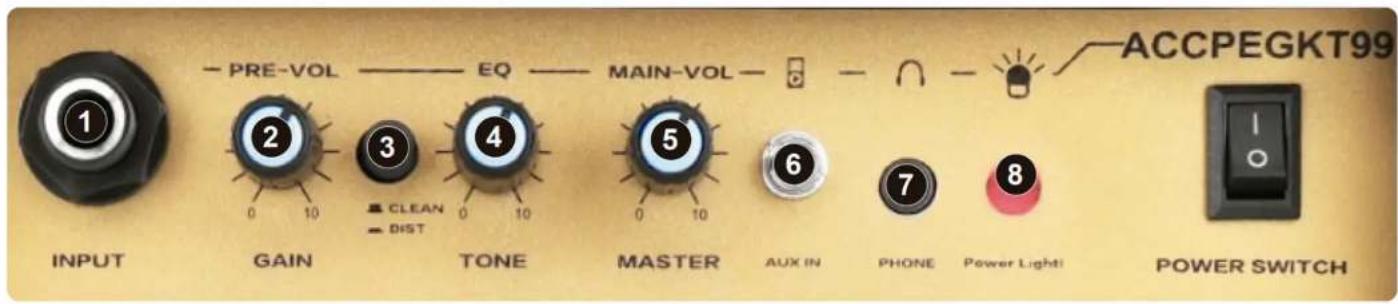
FUNCTION
INPUT: Plug in your electric guitar here.1.
- GAIN: Controls the gain level for overdrive. As the gain increases so will the distortion level in your sound.
CLEAN AND DISTORTION MODE: Used to switch the clean and distortion ON/OFF.3.
TONE: Controls the low, middle, and high frequency range.4.
MASTER VOLUME: Overall level control for the clean channel or distortion channel.5.
- AUX IN: Accepts mobile devices such as mobile phone, computer, iPad, TV box, CD player, MP3 player and more.
PHONE: 3.5mm standard stereo headphone jack for plugging in headphones.7.
- POWER LIGHT: This light is normally on when the power is turned on and off when the power is turned off.
POWER SWITH: ON/OFF switch for the main power of the amplifier.9.
CAUTION
- To prevent the xed bolt to touch the switch and fuse holder, the fixed bolt can't be over 4mm (Diameter) x 30mm (length). Unplug amp from mains before replacing the fuse.2.
IMPORTANT!!
To avoid risk of electrical shock, do not expose to water or damp.
- Always connect your instrument cord to your guitar before connecting to your amplifier.
Connecting to your amplifier rst may cause damage to speaker.
• DO NOT leave your guitar unattended with the volume turned up.
- Neon or uorescent lighting near the amplifier may cay cause slight hum.
This can frequently be eliminated by changing the position of your instrument or the amplifier.
- To avoid injuring your ears or damaging your headphones, reduce amplifier volume before plugging in your headphones. Plugging in a pair of headphones will turn o your amplifier speaker.
natural_image
Black and white Pyle T900MHz audio amplifier with visible buttons and grille (no readable text beyond branding)Register Product
Thank you for choosing PyleUSA. By registering your product, you ensure that you receive the full benefits of our exclusive warranty and personalized customer support.
Complete the form to access expert support and to keep your PyleUSA purchase in perfect condition.

PyleUSA.com/register

natural_image
Abstract geometric logo design with interlocking curved shapes (no text or symbols)
Questions? Comments?
We are here to help!
Phone: (1) 718-535-1800
PyleUSA.com/ContactUs

natural_image
Line drawing of a guitar headstock with six tuning pegs and strings (no text or symbols)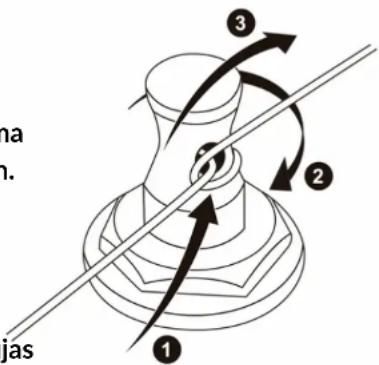
natural_image
Diagram of three electronic components with labeled pins, arranged in a row on a guitar fretboard (no text or symbols present)natural_image
Diagram of a guitar fretboard showing fretboard and fretboard positions (no text or symbols)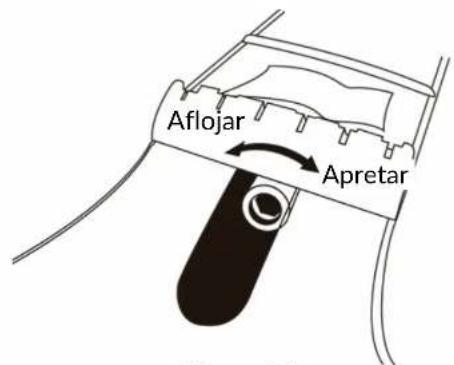
Figura 2:
Alma en el clavijero
natural_image
Line drawing of a mechanical component with layered structure and central circular element (no text or symbols)natural_image
Line drawing of a vehicle rear bumper with a circular tire and side-mounted sensors (no text or symbols)natural_image
Black and white Pyle T900H audio amplifier device with visible grille and control buttons (no readable text beyond branding)PyleUSA.com/register

natural_image
Abstract black and white line drawing resembling a stylized bird or swirl (no text or symbols)
natural_image
Line drawing of a guitar headstock with six tuning pegs and strings (no text or symbols)Figure 1: Fixation Simple de Cordes
natural_image
Diagram of three electronic components with labeled pins, arranged in a row on a guitar fretboard (no text or symbols present)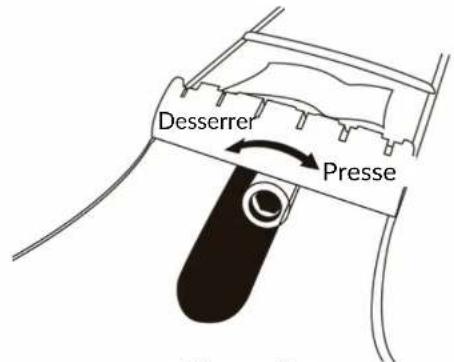
natural_image
Line drawing of a mechanical component with layered structure and central base (no text or symbols)natural_image
Line drawing of a vehicle rear bumper with a circular vent and side supports (no text or symbols)natural_image
Black and white Pyle T900H audio amplifier device with visible grille and control buttons (no readable text beyond branding)
PyleUSA.com/register

natural_image
Abstract geometric logo design with interlocking curved shapes (no text or symbols)
Des questions? Des commentaires?
natural_image
Line drawing of a guitar headstock with six tuning pegs and strings (no text or symbols)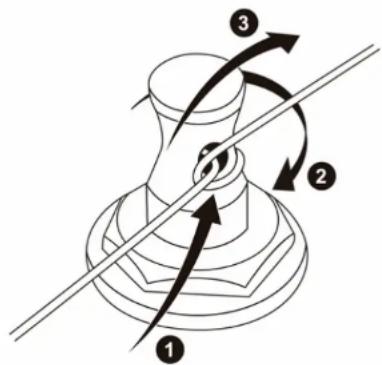
natural_image
Diagram of three electric shock absorbers with pin layouts and wiring, arranged in a row (no text or symbols)natural_image
Diagram of a guitar fretboard showing six tuning pegs and a highlighted section (no text or labels)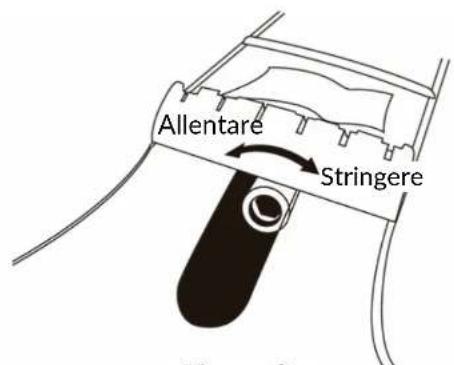
natural_image
Simple line drawing of a mechanical component with layered structure and central base (no text or symbols)Figura 3:
natural_image
Line drawing of a vehicle rear bumper with a circular vent and side supports (no text or symbols)natural_image
Black and white Pyle electric guitar amplifier with visible grille and control buttons (no readable text beyond branding)PyleUSA.com/register

natural_image
Abstract geometric logo design with interlocking curved shapes (no text or symbols)
Domande? Commenti?
natural_image
Line drawing of a guitar headstock with six tuning pegs and strings (no text or symbols)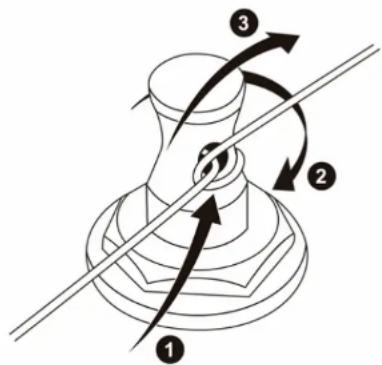
natural_image
Diagram of three electronic components with labeled pins and wiring, arranged in a row (no text or symbols present)natural_image
Line drawing of a guitar fretboard with tuning pegs and strings (no text or symbols)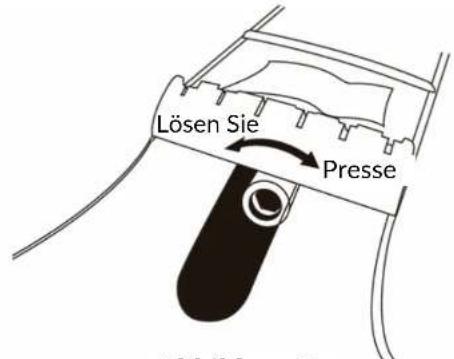
natural_image
Simple line drawing of a mechanical component with layered structure and central base (no text or symbols)natural_image
Line drawing of a vehicle rear bumper with a circular vent (no text or symbols)natural_image
Black and white Pyle audio amplifier with visible grille and control buttons (no readable text beyond branding)
PyleUSA.com/register

natural_image
Abstract geometric logo design with interlocking curved shapes (no text or symbols)
Fragen? Kommentare?
natural_image
Line drawing of a guitar headstock with six tuning pegs and strings (no text or symbols)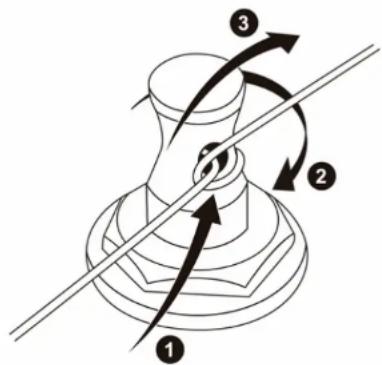
natural_image
Diagram of three electronic components with labeled pins, arranged in a row on a guitar fretboard (no text or symbols present)natural_image
Line drawing of a guitar headstock with tuning pegs and fretboard, showing keyway and fretboard position (no text or symbols)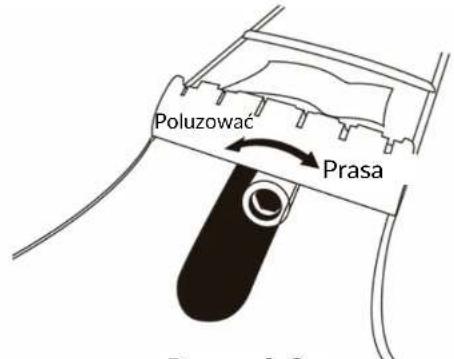
natural_image
Simple line drawing of a mechanical component with layered top and base (no text or symbols)natural_image
Line drawing of a vehicle rear bumper with a circular vent (no text or symbols)natural_image
Black and white Pyle electric guitar amplifier with visible grille and control buttons (no readable text beyond branding)
PyleUSA.com/register

natural_image
Abstract black and white line drawing resembling a stylized bird or swirl (no text or symbols)
natural_image
Line drawing of a guitar headstock with six tuning pegs and strings (no text or symbols)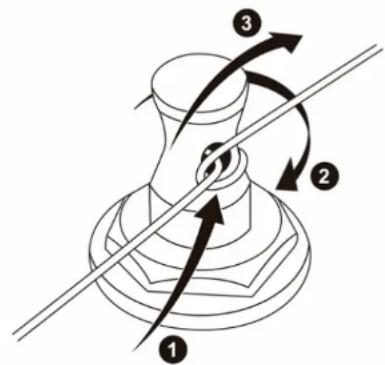
natural_image
Diagram of three electric guitar input dials connected to a string, showing pin arrangement (no text or symbols)natural_image
Diagram of a guitar fretboard showing six tuning pegs and fretboard position (no text or symbols)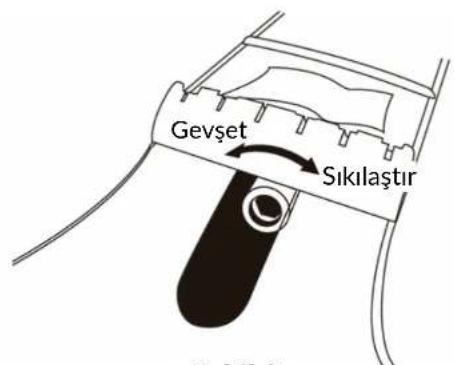
natural_image
Simple line drawing of a mechanical component with layered top and base (no text or symbols)natural_image
Line drawing of a vehicle rear bumper with a circular tire and side-mounted sensors (no text or symbols)natural_image
Black and white Pyle audio amplifier with visible grille, buttons, and speaker grille (no text or symbols on body)
PyleUSA.com/register

natural_image
Abstract black and white line drawing resembling a stylized bird or swirl (no text or symbols)
Brand : Pyle
Model : PEGKT99BK
Category : Musical instrument