CBC124810.1 - Heating Emerio - Free user manual and instructions
Find the device manual for free CBC124810.1 Emerio in PDF.


| Product type | Wall-mounted infrared heater |
| Brand | Emerio |
| Model | CBC124810.1 |
| Power supply | 220-240 V ~ 50 Hz |
| Power consumption | 350 W |
| Nominal heat output | 0.35 kW |
| Standby consumption | 0.001 kW |
| Heating type | Infrared |
| Temperature control | Electronic with weekly timer |
| Main functions | 24h timer, open window detection, weekly programming mode, remote control, LCD display |
| Adjustable temperature | 0 to 37 °C |
| Safety | Overheat protection, automatic shut-off, hot surface indication |
| Installation | Wall mounting, minimum distance of 20 cm from objects, 20 cm from floor and ceiling |
| Maintenance and cleaning | Unplug and let cool, wipe with a damp cloth, no abrasive detergents |
| Remote control | Yes, with 2 AAA 1.5 V batteries (not supplied) |
| Warranty | 2 years |
| Customer service contact | Emerio Switzerland AG, Oberneuhofstrasse 1, 6340 Baar, Switzerland |
| Recycling | Do not dispose of with household waste, follow Directive 2012/19/EU |
Frequently Asked Questions - CBC124810.1 Emerio
User questions about CBC124810.1 Emerio
0 question about this device. Answer the ones you know or ask your own.
Ask a new question about this device
Download the instructions for your Heating in PDF format for free! Find your manual CBC124810.1 - Emerio and take your electronic device back in hand. On this page are published all the documents necessary for the use of your device. CBC124810.1 by Emerio.
USER MANUAL CBC124810.1 Emerio
natural_image
Plain metallic panel with smooth surface and no visible text or markingsInfrared panel heater (EN)
Instruction manual – English ...... - 2 -
Before use make sure to read all of the below instructions in order to avoid injury or damage, and to get the best results from the appliance. Make sure to keep this manual in a safe place. If you give or transfer this appliance to someone else make sure to also include this manual.
In case of damage caused by user failing to follow the instructions in this manual the warranty will be void. The manufacturer/importer accepts no liability for damages caused by failure to follow the manual, a negligent use or use not in accordance with the requirements of this manual.
- Read and save these instructions. Attention: pictures in the IM are for reference only.
- This appliance can be used by children aged from 8 years and above and persons with reduced physical, sensory or mental capabilities or lack of experience and knowledge if they have been given supervision or instruction concerning use of the appliance in a safe way and understand the hazards involved.
- Children shall not play with the appliance.
- Cleaning and user maintenance shall not be made by children without supervision.
- Children of less than 3 years should be kept away unless continuously supervised.
-
Children aged from 3 years and less than 8 years shall only switch on/off the appliance provided that it has been placed or installed in its intended normal operating position and they have been given supervision or instruction concerning use of the appliance in a safe way and understand the hazards involved. Children aged from 3 years and less than 8 years shall not plug in, regulate and clean the appliance or perform user maintenance.
-
CAUTION — Some parts of this product can become very hot and cause burns. Particular attention has to be given where children and vulnerable people are present.
- If the supply cord is damaged, it must be replaced by the manufacturer, its service agent or similarly qualified persons in order to avoid a hazard.
- Before inserting the plug into the mains socket, please check that the voltage and frequency comply with the specifications on the rating label.
- This appliance is intended to be used in household and similar applications.
- The heater is not intended for use in bathrooms, laundry areas or similar indoor locations. Never place the heater where it may fall into a bathtub or any other water container.
- Do not use outdoors. Do not use to dry clothes or any fabric.
- The heater must not be located immediately below a socket outlet.
- Do not use the heater if the power cord is damaged.
- Do not use the heater in areas where flammable liquids are stored or where flammable fumes may be present.
- WARNING: In order to avoid overheating, do not cover the heater.
- WARNING: The heater must not be used if the panel is damaged.
- Do not use this heater in the immediate surroundings of a bath, a shower or a swimming pool.

-
Means "DO NOT COVER".
-
Keep combustible material such as furniture, cushions, bedding, paper, clothes, curtains etc. at least 100cm away from the heater.
-
This heater has hot and arcing or sparking parts inside. Do not use it in the areas where gasoline, paint, or flammable liquids are used or stored.
- To prevent overloading a circuit, do not plug the heater into a circuit that already has other appliances working. Do not install the heater under the wall socket.
- Always unplug the appliance when not in use.
- The appliance is hot when in use. Do not touch the heater panel when it switches on.
- The heater is designed to be wall mounting, do not mount it on the ceiling.
-
Always switch the heater off, unplug it and leave to cool down before:
-
cleaning the heater
- carrying out maintenance on the heater
-
touching or moving the heater.
-
Keep a distance of at least 40cm in the front and 20cm on the sides to any object and wall.
- Keep away babies and children from all packaging material such as plastic bags to avoid danger of suffocation.
- The appliance (incl. cord and plug) may only be opened and/or repaired by properly authorized and qualified persons.
- Only use this heater for its intended purpose and as described in this instruction manual.
- Regarding the information pertaining to the installation, please refer to the below paragraph of the manual.
PARTS DESCRIPTION
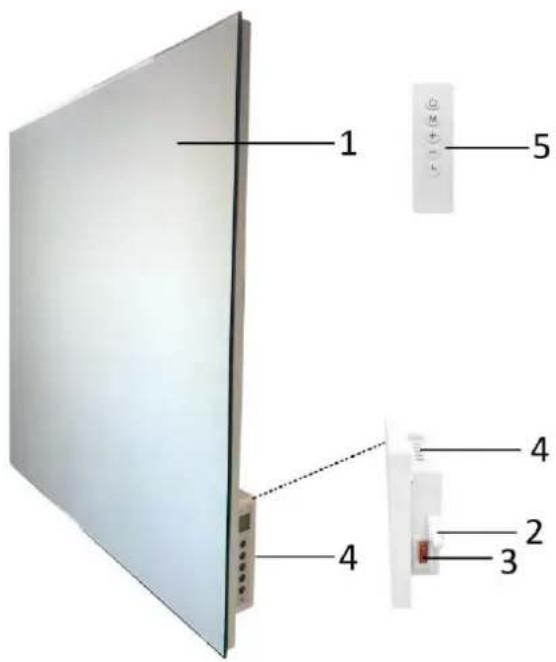
- Heating panel
- Temperature sensor
- Power switch
- Control panel
- Remote control
a) LCD display
b) On/off button
c) Mode button
d) Value increase button
e) Value decrease button
f) Timer button
g) Heating light
LCD display
a) Date icon
b) Icon of open-window detection function
c) Icon of timer
d) Time
e) Temperature
f) Icon of normal mode
g) Icon of weekly schedule
h) Period of the weekly schedule
Remote control
This unit has a remote control. Before use, install 2×AAA 1.5V batteries into the remote control. If it is not in use for a long time, please take the batteries out of the remote control. The functions of the remote control buttons are the same as the functions of the buttons on the control panel.


WALL MOUNTING
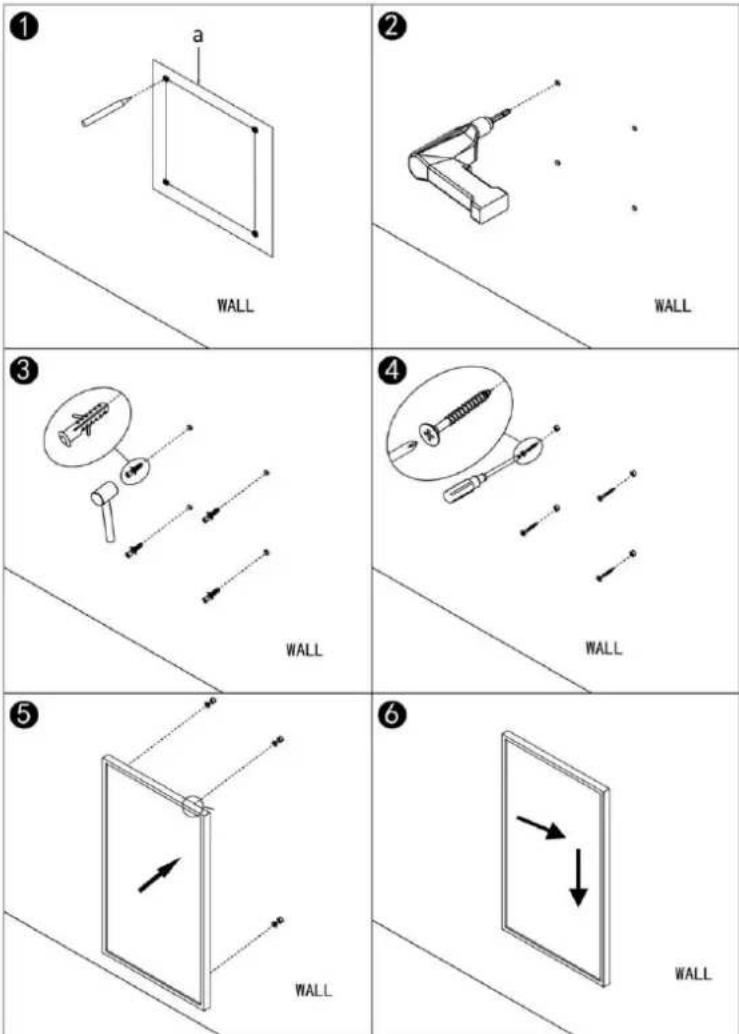
There is a pack of accessories provided with the appliance. Please use them for wall mounting according to below illustrations. Before installation, make sure the appliance is turned off and disconnected from power.
- Use the supplied installation template (a) to mark the position of the holes on the wall.
- Drill holes using a 8mm drill.
- Insert the plastic expansion bolts into the holes.
- Screw the 4pcs screws into the plastic expansion bolts.
- Mount the appliance on to the screws.
- Move the appliance to the right and then down unit it's secured.
NOTE: The kit supplied in the package is designed for mounting vertically on a solid wall. The heater must be at least 20 cm removed from all objects, walls, etc.; the distance to the floor must be at least 20 cm and there must be at least 20 cm above the heater.
OPERATION
Plug the appliance into an appropriate electrical outlet. Power on the appliance by pressing the power switch to position "I". The power switch will be illuminated. LCD display lights up and shows "OFF". The appliance is standby. Press the on/off button "to turn on your appliance."
- Temperature calibration
Long press the button “+” for 5 seconds to enter the temperature calibration, adjusting the number by pressing button “+” or “-”. The calibration ranges from -5 to +5 degrees.
- Set the temperature.
1) Press the button “+” or “-” to set your desired temperature. You can choose from 0^ C to 37^ C.
2) The display will flash the set temperature a few seconds and then turn back to show the current temperature. It means the temperature has been set.
3) If the set temperature is higher than the current temperature, the appliance will start to heat and the heating light will be illuminated. If the set temperature is reached, the appliance will automatically switch off and then switch on again when the room cools down. The heating light will be off and illuminated again accordingly.
- Timing function
Short press button “☐”, the timer “00 H” shows in the display. Press button “+” or “-” to set the desired working time from 0 to 24 hours. The appliance will shut itself off automatically when the time is up.
- Turn off
Press button " again to turn off the appliance. Turn off the power switch and unplug the power cord from the outlet.
- Weekly timer function
A. Time setting: Set the current day and time (so that you can set the weekly timer function later)
1) When the appliance is on, long press button “☐” until you hear “DI” sound; the date icon flashes, press button “+” or “-” to set the day of today from 1 to 7;
2) Short press button “,”, the hour flashes, press button “+” or “-” to set current hour from 00 to 23;
3) Short press button “+”, the minute flashes, press button “+” or “-” to set current minute from 00 to 59;
$$ 1 = \text { Monday }, 2 = \text { Tuesday }, 3 = \text { Wednesday }, 4 = \text { Thursday }, 5 = \text { Friday }, 6 = \text { Saturday }, 7 = \text { Sunday } $$
B. Weekly schedule:
When the appliance is on, press button "M" to switch to the weekly schedule mode, icon "P" will appear on the display. Now the appliance will work according to the default program setting like below:
Four periods of the programs each day.
| Monday 1 / Tuesday 2 / Wednesday 3 / Thursday 4 / Friday 5 / Saturday 6 / Sunday 7 | ||||
| Period | P 1 | P 2 | P 3 | P 4 |
| Time | 6:30 | 8:00 | 18:00 | 22:30 |
| Temperature | 21°C | 18°C | 21°C | 16°C |
For example: on Monday, the first period (P 1) is from 6:30 to 8:00, the set temperature for this period is 21^ ; the second period (P 2) is from 8:00 to 18:00, the set temperature for this period is 18^ ; the third period (P 3) is from 18:00 to 22:30, the set temperature for this period is 21^ ; the forth period (P 4) is from 22:30 to 6:30 of the Tuesday, the set temperature for this period is 16^ .
If you want to adjust the set temperature once for the current time period. You can directly press button
“+” / “-”. The appliance will not record this change.
If you want to permanently modify the weekly schedule, please follow the steps below:
1) Long press button "M" until you hear "DI" sound; the date icon flashes, press button "+" or "-" to choice which day you want to modify; "P 1" will show on the display.
2) Short press button "M", the time flashes; press button "+" or "-" to adjust the start time of the first period. Each press for 15 mintues.
3) Short press button "M", the temperature flashes; press button "+" or "-" to adjust the temperature for the first period.
4) Short press button "M" to shift to the second period of setting; the time flashes again, press button "+" or "-" to adjust the start time of this period. Each press for 15 mintues.
5) Short press button "M", the temperature flashes; press button "+" or "-" to adjust the temperature for this period.
6) Repeat above operation to set the third and forth periods.
7) To leave the settings, press time button "☐".
Note: If the appliance is switched off by using the power switch or by removing the plug from the electrical outlet, all settings will be lost.
Open-window detection function
The appliance is equipped with an open-window detection function. If our control system detects that the room temperature decreases dramatically in short period when the heater is in the heating status, it will recognize that a window is open. The window sign on the screen will start to flash and the heater will be powered off for 30 minutes and get back to the previous setting automatically after 30 minutes.
Long press button “-” for 5 seconds to turn on/off this function, and the icon “☐” will appear or disappear accordingly.
SAFETY SYSTEM
The appliance has a safety system which automatically switches the unit off when overheated.
CLEANING THE HEATER
Always un-plug the heater from the wall socket and allow it to cool down completely before cleaning. Clean the outside of the heater by wiping with a damp cloth and with a dry cloth. Do not use any detergents or abrasives and do not allow any water to penetrate the heater.
STORING THE HEATER
When the heater is not used for long time it should be protected from dust and stored in a clean dry place.
TECHNICAL DATA:
Operating voltage: 2 2 0 -240V \~ 50Hz
Power consumption: 350W
GUARANTEE AND CUSTOMER SERVICE
Before delivery our devices are subjected to rigorous quality control. If, despite all care, damage has occurred during production or transportation, please return the device to your dealer. In addition to statutory legal rights, the purchaser has an option to claim under the terms of the following guarantee:
For the purchased device we provide 2 years guarantee, commencing from the day of sale. If you have a
defective product, you can directly go back to the point of purchase.
Defects which arise due to improper handling of the device and malfunctions due to interventions and repairs by third parties or the fitting of non-original parts are not covered by this guarantee. Always keep your receipt, without the receipt you can't claim any form of warranty. Damage caused by not following the instruction manual, will lead to a void of warranty, if this results in consequential damages then we will not be liable.
Neither can we hold responsible for material damage or personal injury caused by improper use if the instruction manual is not properly executed. Damage to accessories does not mean free replacement of the whole appliance. In such case please contact our service department. Broken glass or breakage of plastic parts is always subject to a charge. Defects to consumables or parts subjected to wearing, as well as cleaning, maintenance or the replacement of said parts are not covered by the warranty and are to be paid.
ENVIRONMENT FRIENDLY DISPOSAL

Recycling – European Directive 2012/19/EU
This marking indicates that this product should not be disposed with other household wastes. To prevent possible harm to the environment or human health from uncontrolled waste disposal, recycle it responsibly to promote the sustainable reuse of material resources. To return your used device, please use the return and collection systems or contact the retailer where the product was
purchased. They can take this product for environmental safe recycling.


BATTERY MUST BE RECYCLED OR DISPOSED OF PROPERLY. DO NOT OPEN. DO NOT DISPOSE
OR IN FIRE OR SHORT CIRCUIT.
Emerio Switzerland AG
Oberneuhofstrasse 1
6340 Baar
Switzerland
ERP information (EN)
Supplier: Emerio Switzerland AG
Oberneuhofstrasse 1
6340 Baar
Switzerland
Declare that the product detailed below:
Information requirements for electric local space heaters
| Model identifier(s): | |||||
| Item | Symbol | Value | Unit | Item | Unit |
| Heat output | Type of heat input, for electric storage local space heaters only (select one) | ||||
| Nominal heat output | P_nom | 0.35 | kW | manual heat charge control, with integrated thermostat | No |
| Minimum heat output (indicative) | P_min | 0.0 | kW | manual heat charge control with room and/or outdoor temperature feedback | No |
| Maximum continuous heat output | P_max,c | 0.35 | kW | electronic heat charge control with room and/or outdoor temperature feedback | No |
| Auxiliary electricity consumption | --- | --- | --- | fan assisted heat output | No |
| At nominal heat output | el_max | 0.350 | kW | Type of heat output/room temperature control (select one) | |
| At minimum heat output | el_min | 0.000 | kW | single stage heat output and no room temperature control | No |
| In standby mode | el_SB | 0.001 | kW | Two or more manual stages, no room temperature control | No |
| with mechanic thermostat room temperature control | No | ||||
| with electronic room temperature control | No | ||||
| electronic room temperature control plus day timer | No | ||||
| electronic room temperature control plus week timer | Yes | ||||
| Other control options (multiple selections possible) | |||||
| room temperature control, with presence detection | No | ||||
| room temperature control, with open window detection | Yes | ||||
| with distance control option | No | ||||
| with adaptive start control | No | ||||
| with working time limitation | No | ||||
| with black bulb sensor | No | ||||
| Contact details | Emerio Switzerland AGOberneuhofstrasse 16340 BaarSwitzerland | ||||
Satisfies the requirement of the Council Directives:
COMMISSION REGULATION (EU) No 2015/1188 of 28 April 2015 and Amending COMMISSION REGULATION (EU) 2016/2282 implementing Directive 2009/125/EC of the European Parliament and of the Council with regards to ecodesign requirements for local space heaters
Regarding information for consumers on how to install, use and maintain the product, WEEE information, please check the instruction manual provided with packaging.
SICHERHEITSHINWEISE
Emerio Switzerland AG
Oberneuhofstrasse 1
6340 Baar
Switzerland
Lieferant: Emerio Switzerland AG
Oberneuhofstrasse 1
6340 Baar
Switzerland
Emerio Switzerland AG
Oberneuhofstrasse 1
6340 Baar
Switzerland
Informations ERP (FR)
Fournisseur: Emerio Switzerland AG
Oberneuhofstrasse 1
6340 Baar
Switzerland
Emerio Switzerland AG
Oberneuhofstrasse 1
6340 Baar
Switzerland

Brand : Emerio
Model : CBC124810.1
Category : Heating