AC24BK - Air-conditioner LG - Free user manual and instructions
Find the device manual for free AC24BK LG in PDF.



| Product type | Wall-mounted air conditioner |
| Brand | LG |
| Model | AC24BK |
| Cooling capacity | Approximately 24000 BTU/h (7 kW) |
| Heating capacity | Approximately 24000 BTU/h (7 kW) |
| Power supply | 220-240 V, 50 Hz |
| Indoor unit dimensions (WxHxD) | Approximately 800 x 300 x 200 mm |
| Outdoor unit dimensions (WxHxD) | Approximately 800 x 600 x 300 mm |
| Indoor unit weight | Approximately 10 kg |
| Outdoor unit weight | Approximately 30 kg |
| Refrigerant | R32 |
| Operating modes | Cooling, heating, dehumidification, ventilation, automatic, Jet Mode |
| Fan speed | Multiple adjustable speeds |
| Airflow direction | Vertical and horizontal (Swing) |
| Remote control | Wireless with AAA 1.5 V batteries |
| Timer | Programmable on/off |
| Energy consumption display | Yes (optional) |
| Air filter | Washable, clean every 2 weeks |
| Maintenance and cleaning | Regular cleaning of filter and fins |
| Operating temperature | From 22 to 24 °C (emergency mode) |
| Unit conversion | °C/°F (dedicated button) |
| Noise level (indoor unit) | Approximately 30-40 dB(A) |
| Noise level (outdoor unit) | Approximately 50-60 dB(A) |
| Warranty | See manual or LG website |
Frequently Asked Questions - AC24BK LG
User questions about AC24BK LG
0 question about this device. Answer the ones you know or ask your own.
Ask a new question about this device
Download the instructions for your Air-conditioner in PDF format for free! Find your manual AC24BK - LG and take your electronic device back in hand. On this page are published all the documents necessary for the use of your device. AC24BK by LG.
USER MANUAL AC24BK LG
Read this owner's manual thoroughly before operating the appliance and keep it handy for reference at all times.
This manual is the simplified version of original manual. You can obtain the original manual from www.lg.com.
TYPE: WALL MOUNTED
Original instruction
EN ENGLISH
ITITALIANO
ES ESPANOL
FR FRANÇAIS
DE DEUTSCH
EL EAAHNIKA
PT PORTUGUES
NL NEDERLANDS
PL POLSKI
RO ROMAN
LG Electronics Inc. Single Point of Contact (EU/UK) & EU Importer:
LG Electronics European Shared Service Center B.V.
Krijgsman 1, 1186 DM Amstelveen, The Netherlands
When installed, enter the model name and send it to the customer.

5401521249 Rev.: a

Model Name
*
- Read the QR Code.
- Enter the model name.
- Select the manual that you want to see.
TABLE OF CONTENTS
This manual may contain images or content different from the model you purchased.
This manual is subject to revision by the manufacturer.
OPERATION 3
Notes for Operation 3
Parts and Functions 3
Wireless Remote Control. 4
OPERATION
EN
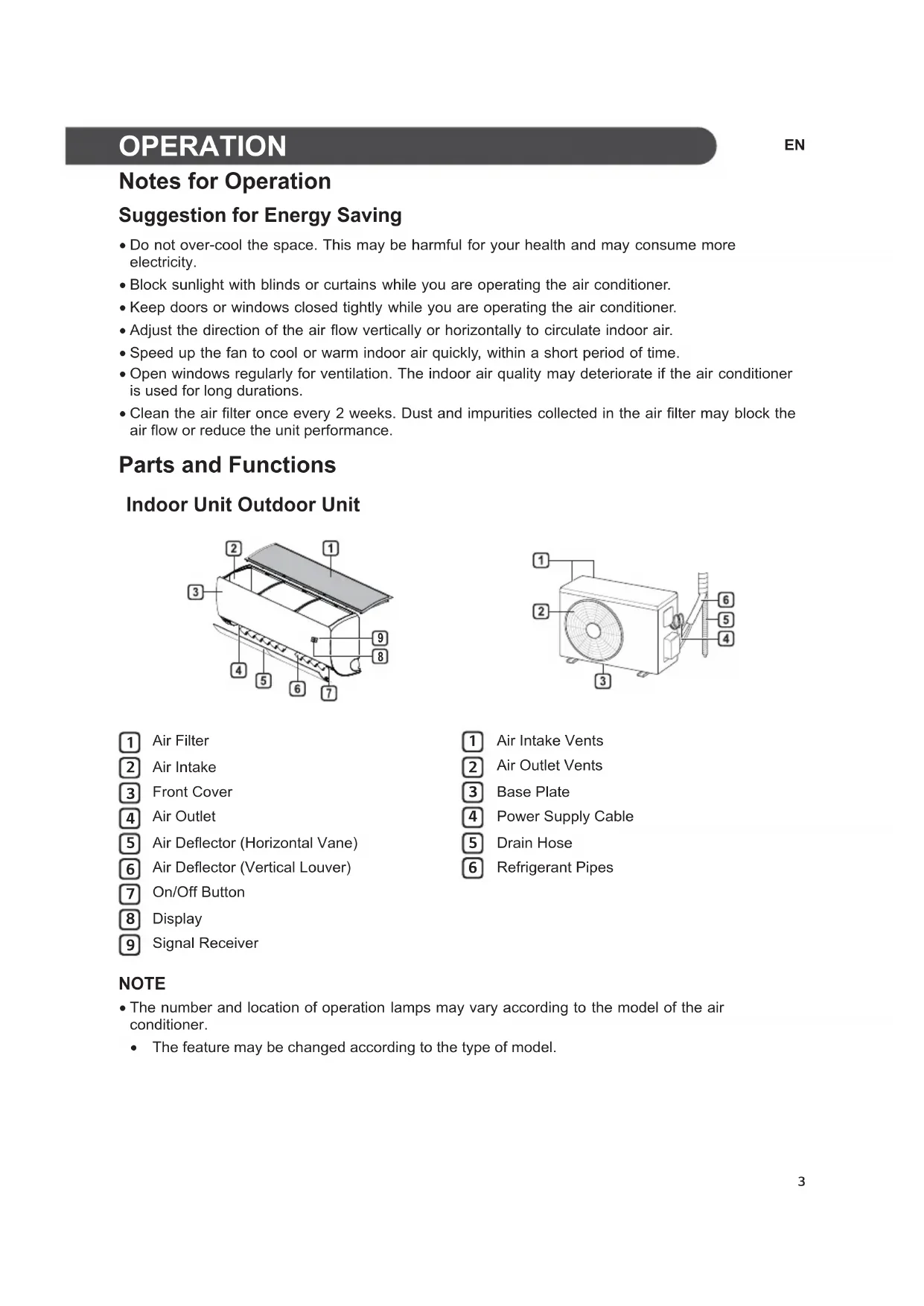
Notes for Operation
Suggestion for Energy Saving
- Do not over-cool the space. This may be harmful for your health and may consume more electricity.
- Block sunlight with blinds or curtains while you are operating the air conditioner.
- Keep doors or windows closed tightly while you are operating the air conditioner.
- Adjust the direction of the air flow vertically or horizontally to circulate indoor air.
- Speed up the fan to cool or warm indoor air quickly, within a short period of time.
- Open windows regularly for ventilation. The indoor air quality may deteriorate if the air conditioner is used for long durations.
- Clean the air filter once every 2 weeks. Dust and impurities collected in the air filter may block the air flow or reduce the unit performance.
Parts and Functions
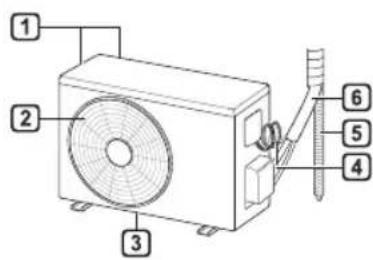
Indoor Unit Outdoor Unit
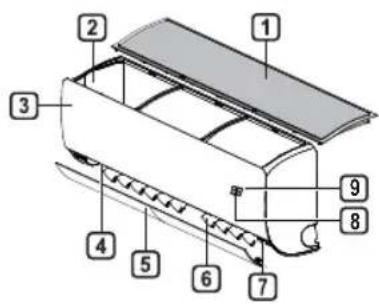
Air Filter
Air Intake
3 Front Cover
4 Air Outlet
5 Air Deflector (Horizontal Vane)
6 Air Deflector (Vertical Louver)
7 On/Off Button
8 Display
9 Signal Receiver
Air Intake Vents
Air Outlet Vents
3 Base Plate
4 Power Supply Cable
5 Drain Hose
6 Refrigerant Pipes
NOTE
- The number and location of operation lamps may vary according to the model of the air conditioner.
The feature may be changed according to the type of model.
Wireless Remote Control
Inserting Batteries
If the display screen of the remote control begins to fade, replace the batteries. Insert AAA (1.5 V) batteries before using the remote control.
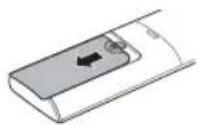
1 Remove the battery cover.
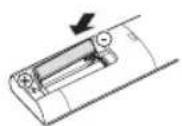
2 Insert the new batteries and make sure that the + and - terminals of the batteries are installed correctly.
Installing the Remote Control Holder
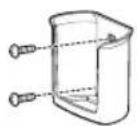
To protect the remote control, install the holder where there is no direct sunlight.
1 Choose a safe and easily accessible location.
2 Fix the holder by fastening 2 screws firmly with a screwdriver.
Operating Method
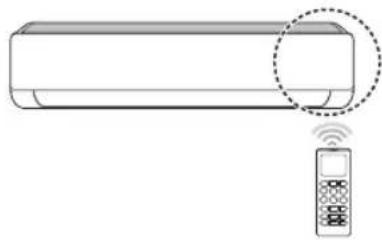
Point the remote control towards the signal receiver at the right side of the air conditioner to operate it.
NOTE
- The remote control may operate other electronic devices if it is directed towards them. Make sure to point the remote control towards the air conditioner signal receiver.
- For proper operation, use a soft cloth to clean the signal transmitter and receiver.
In case of a function not provided in the product, no buzzer sound occurs from the product when a button for such function on the remote control is pressed except for Air Flow Direction (Swing), Energy Display (Air Purification function).
Setting the Current Time
1 Insert batteries.
- The icon below blinks at the bottom of the display screen.

2 Press button to select the minutes.
3 Press Set/Cancel button to finish.
NOTE
- The On/Off Timer is available after setting the current time.
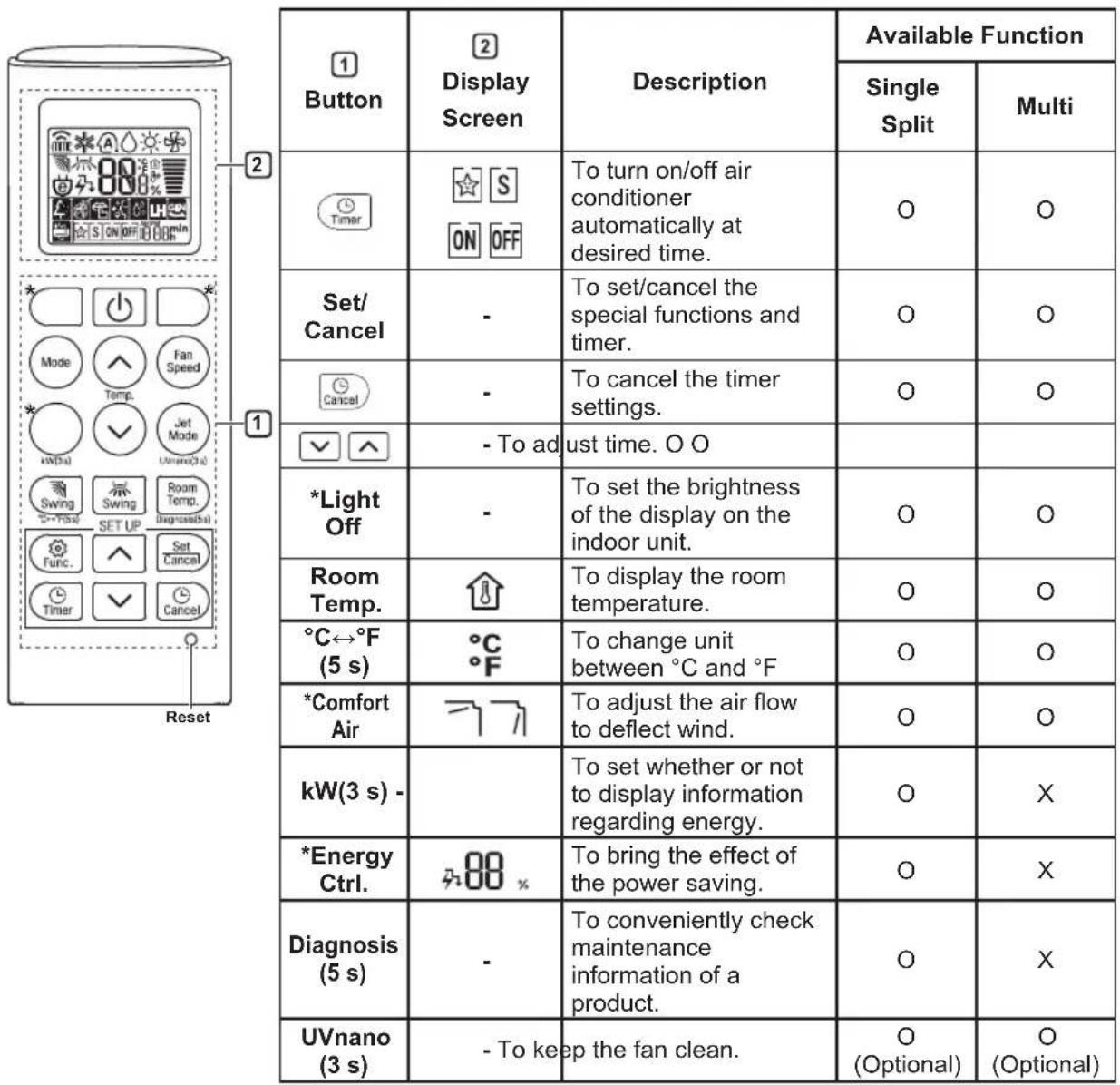
Using the ^ C / ^ Conversion Function (Optional)
This function changes unit between ^ C and ^ F
Press and hold button about 5 seconds.
Operating the Air Conditioner without the Remote Control
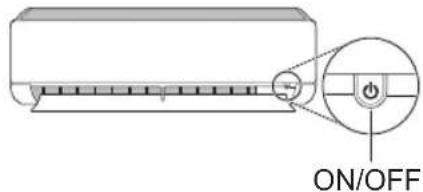
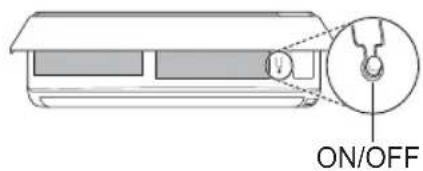
You can use the ON/OFF button of the indoor unit to operate the air conditioner when the remote control is unavailable.
1 Open the front cover (Type2) or horizontal vane (Type1).
2 Press the ON/OFF button.
Type1
Type2
NOTE
- The stepping motor may be broken, if the horizontal vane opens rapidly.
The fan speed is set to high.
The feature may be changed according to the type of model. - The temperature cannot be altered when using this emergency ON/OFF button.
- For cooling & heating models, the temperature is set from 22^ to 24^
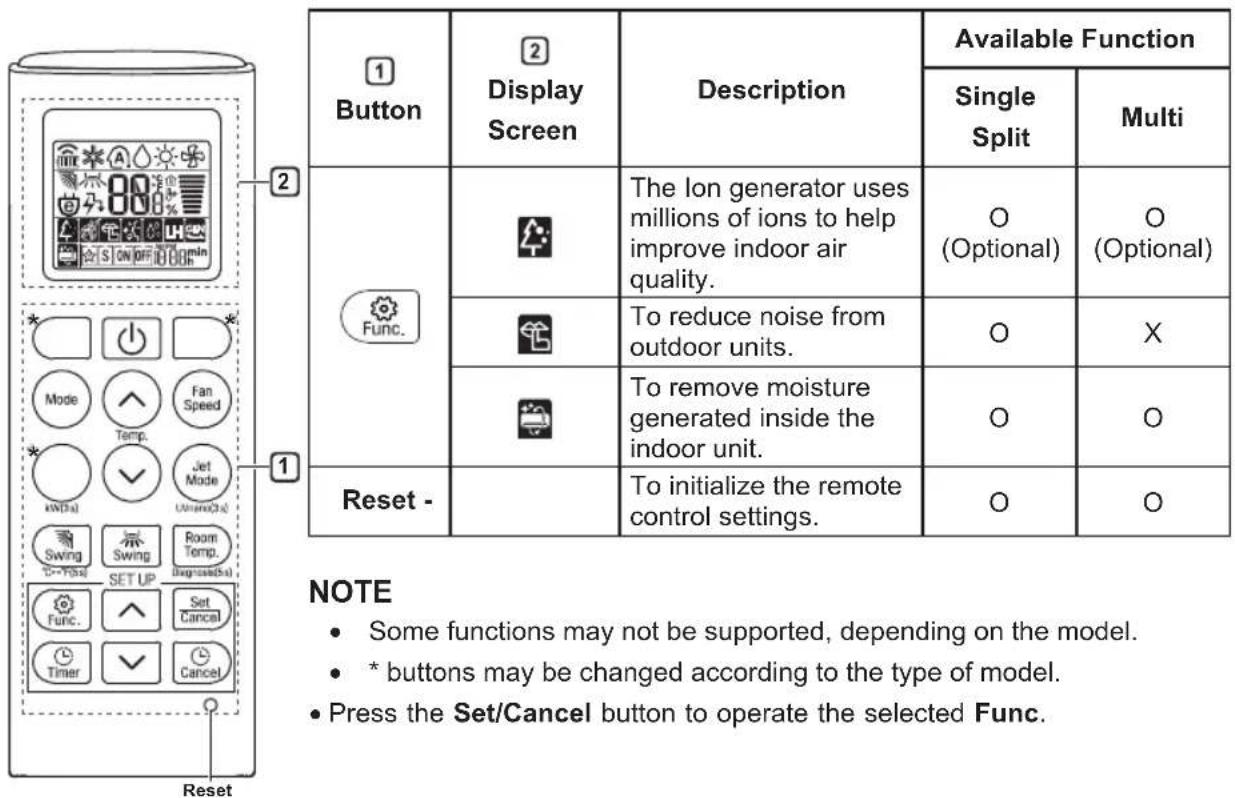
Using Wireless Remote Control
You can operate the air conditioner more conveniently with the remote control.
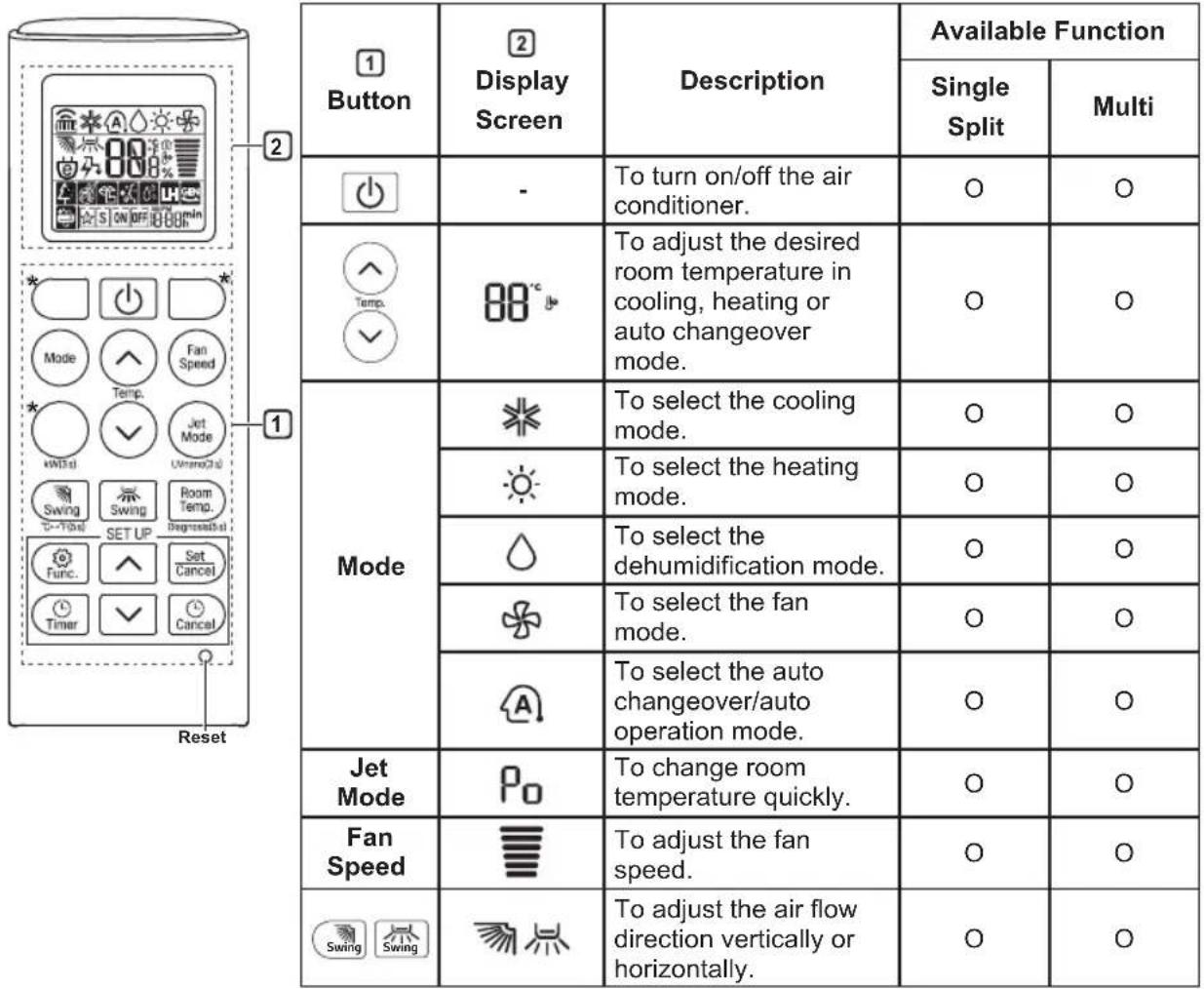
NOTE
-
- buttons may be changed according to the type of model.
-
When connected to the Multi Outdoor unit, the Energy Display, Energy Control, Silent and Smart Diagnosis function may not be supported.
MANUALE D'USO
CLIMATIZZATORE

When installed, enter the model name and send it to the customer.

Model Name
*
- Read the QR Code.
- Enter the model name.
- Select the manual that you want to see.