
Energy Storm 3600iE - Generator Lifan - Free user manual and instructions
Find the device manual for free Energy Storm 3600iE Lifan in PDF.


| Type | Generator |
| Brand | Lifan |
| Model | Energy Storm 3600iE (ESI-3600iE) |
| Fuel | Gasoline (87 octane or higher) |
| Fuel Tank Capacity | 3.5 gallons (approx. 13.25 liters) |
| Engine Type | 4-stroke, single cylinder, overhead valve, air-cooled |
| Engine Displacement | 229 cc |
| Engine Oil Capacity | 32 ounces (approx. 0.95 liter) |
| Recommended Engine Oil | SAE 10W-30 (4-stroke oil API SJ) |
| Rated AC Output | 3000W (120V, 26A, 60Hz) |
| Maximum AC Output | 3300W |
| DC Output | 12V, 8.3A |
| Starting | Electric (key) and manual recoil |
| Noise Level | 57 dB |
| Protections | Overload indicator, low oil warning system, AC and DC circuit breakers |
| Idle Control | Yes (ON/OFF switch) |
| Grounding | Ground terminal with 16-gauge copper wire |
| Spark Plug | NGK, gap 0.6-0.7 mm |
| Warranty | 1 year parts and labor (residential use), 2nd year parts, 3rd year engine parts |
| Intended Use | Outdoor only, not for marine applications |
Frequently Asked Questions - Energy Storm 3600iE Lifan
User questions about Energy Storm 3600iE Lifan
0 question about this device. Answer the ones you know or ask your own.
Ask a new question about this device
Download the instructions for your Generator in PDF format for free! Find your manual Energy Storm 3600iE - Lifan and take your electronic device back in hand. On this page are published all the documents necessary for the use of your device. Energy Storm 3600iE by Lifan.
USER MANUAL Energy Storm 3600iE Lifan
natural_image
Green STORM2 Series portable gas generator with black control panel and 'SPANISH' branding (no readable text on device body)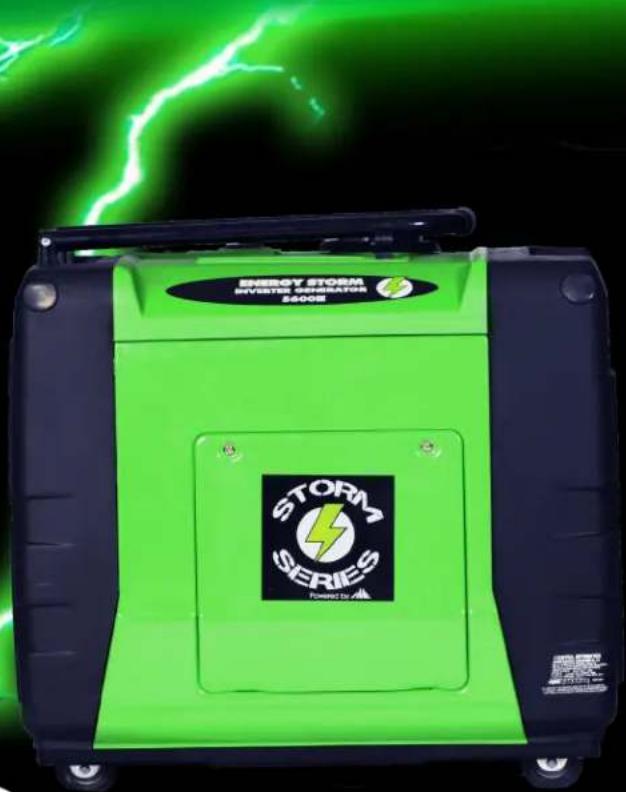
natural_image
Green energy storm system device with 'STORM SERIES' logo and 'ENERGY STORM INVISTE GENERATION 2500E' label, against a black background with green lightning (no readable text beyond branding)ESI3600iE(CA)
ESI5600iE(CA)
Operating Instructions and Owner's Manual
PLEASE READ THIS MANUAL CAREFLLY BEFORE OPERATING YOUR NEW INVERTER GENERATOR
(E) in the Model Number designates Electric Start
(CA) in the Model Number designates California Compliant by CARB
LANGUAGE TABLE OF CONTENTS
ENGLISH.... pg 1
FRENCH.... pg 26
SPANISH...... pg 52
Please Read the Following INSTRUCTIONS!!!!
- Unit Shipped with "NO OIL" installed in Engine or where applicable pumps and/or accessories. Check and fill with proper oil as outlined in the Owners Manual included in this box under "Lubrication Specs".
-
For repairs under Warranty or questions concerning Warranty, "DO NOT" return this product to the Store where purchased. Follow the procedures as outlined in the "WARRANTY POLICY" and "WARRANTY REGISTRATION" included in this box. Call 1-866-471-7464 - We welcome your call
-
Read the "Owners Manual" prior to operating any equipment and familiarize yourself with the proper and safe operation of this equipment. If you have any questions please call Toll Free 866-471-7464.
Distributed by: EquipSource, LLC d/b/a Lifan Power USA, 2205 Industrial Park Road, Van Buren, AR
TABLE OF CONTENTS
pg.
ENGLISH....1
SAFETY LABEL LOCATIONS.... 5
COMPONENT IDENTIFACATION.... 6
PRE OPERATION CHECK....8
- ENGINE OIL REQUIREMENTS....8
- ENGINE OIL FILLING.... 9
- CHECKING GAS LEVEL.... 10
- CHECK AIR CLEANER ELEMENT.... 10
- GROUNDING THE GENERATOR.... 11
STARTING THE ENGINE.... 12
- ELECTRIC START.... 12
- RECOIL PULL STARTING.... 13
- HIGH ALTITUDE AREA OPERATION.... 13
- APPLICATIONS.... 14
USING YOUR GENERATOR.... 14
- HOW TO USE AC POWER.... 14
- HOW TO USE 12 VOLT DC OUTPUT.... 16
- LOW OIL ALARM SYSTEM.... 17
- STOPPING THE ENGINE.... 18
- MAINTENANCE.... 18
TRAINSPORTATION AND STORAGE.... 23
SPECIFICATIONS....24
WARRANTY 25
FRENCH....27
For product support and services please visit us at www.lifanpowerusa.com or by calling toll free at 1-866-471-7464.
SAFETY ISSUES

This is the safety alert symbol. It is used to alert you to potential personal injury hazards.
Obey all safety messages that follow this symbol to avoid possible injury or death.

For your safety read this manual carefully. Become familiar with the proper operation, care, and maintenance of your Energy Storm generator.
The safety and alert symbol (A) is used with a signal word (CAUTION, DANGER, WARNING), a pictorial and/or safety message to alert you to hazards. CAUTION indicates a hazard which, if not avoided, might result in minor or moderate injury. DANGER indicates a hazard which, if not avoided, will result in death or serious injury. WARNING indicates a hazard which, if not avoided, could result in death or serious injury.
WARNING!
Running generator emits carbon monoxide an odorless, colorless, poison gas.
Breathing carbon monoxide can cause nausea or death!
ONLY operate generator outdoors.
Exhaust gas must be prevented from entering confined areas.
Direct exhaust gas away from windows, doors, ventilation and other openings.
Do not operate generator inside or under any buildings.
Operating this generator inside the compartment of a recreational vehicle will likely result in death!
WARNING!
The engine exhaust from this generator contains chemicals known to the state of California to cause birth defects, reproductive harm, and cancer.
Do not use this generator within the generator compartment of a recreational vehicle!
This generator does not meet U.S. Coast Guard Regulation 33CFR-183 and should not be used on marine applications.
Use of this generator on marine applications could result in injury or death.
Hazard Symbols and Meanings

Explosion

Fire

Electric
Toxic Fumes

Hot Surface or Gas

Kickback

WARNING!

Generator produces powerful voltage!
Only a licensed electrician can safely connect generator to existing utility hookups. Failure to isolate generator from electrical grid can result in death to utility workers as well as others.
- When using generator as backup power, notify utility company. Use approved transfer equipment to isolate generator from electric utility.
- Do Not operate generator while exposed to rain or other wet conditions.
- Do Not handle generator when in contact with water.
- Do Not contact bare wires or receptacles.
- Inspect all electrical cords for damage and discontinue from use any damaged or excessively worn cords.
- Do Not allow unqualified persons to operate or service generator.

WARNING!


Fuel and its vapors are extremely flammable and explosive.
Fire or explosion can cause severe burns or death.

WARNING!


while engine is running temperature may exceed 150^ F ( 65^ ).
Server burns may occur.
Exhaust heat/gasses can ignite combustibles, structures or damage fuel tank causing a fire.
- Do not touch hot surfaces and avoid exhaust gasses.
- Allow generator to cool before touching.
- Keep at least 6 ft. (183cm) clearance on all sides of generator including overhead.
• Reflective exhaust heat may damage fuel tank causing fire. - Code of Federal Regulation(CFR) Title 36 Parks, Forests, and Public Property require equipment powered by an internal combustion engine to have a spark arrester, maintained in working order, complying to USDA Forest service standard 5100-1c or later revision. In the state of California a spark arrester is required under section 4442 of the California Public resources code.

WARNING!


Unintentional sparking can result in fire or electrical shock.
WHEN TESTING FOR ENGINE SPARK
- Do not check for spark with the spark plug removed.
- Use approved spark plug tester.
WHEN REPAIRNG OR ADJUSTING GENERATOR
- Disconnect the spark plug wire from the spark plug and place the wire where it cannot contact spark plug.
WHEN ADDING OR DRAINING FUEL
- Turn generator off and let it cool for at least three minutes before removing fuel cap. Loosen cap slowly in order to relieve pressure in the fuel tank.
• Fill or drain fuel tank outdoors. Do not excessively inhale fuel vapors. - Keep away from open flames or sparks and other sources of ignition.
- Do not smoke while filling fuel tank.
- Do not overfill tank. Allow space for fuel expansion.
WHEN TRANSPORTING OR REPAIRING EQUIPMENT
- Transport generator with the fuel valve in the off position.
• Repair generator with the fuel tank empty or the fuel valve in the off position. - Disconnect spark plug wire before transport or service.
WHEN STORING FUEL OR EQUIPMENT CONTAINING FUEL
- Store away from furnaces, stoves, water heaters, clothes dryers or other appliances that have pilot light or other ignition source because they can ignite fuel vapors.
WHEN STARTING EQUIPMENT
- Ensure spark plug, muffler, air cleaner, and fuel cap are in place.
- Do not crank engine with spark plug removed.
- If fuels spills, wait until it evaporates before starting engine.
WHEN OPERATING EQUIPMENT
- Do not choke carburetor to stop engine.
- Do not tip engine or equipment at an angle which causes fuel to spill.
- This generator is not for use in marine applications.
Safety Label Locations
These labels warn you of potential hazards that can cause serious injury.
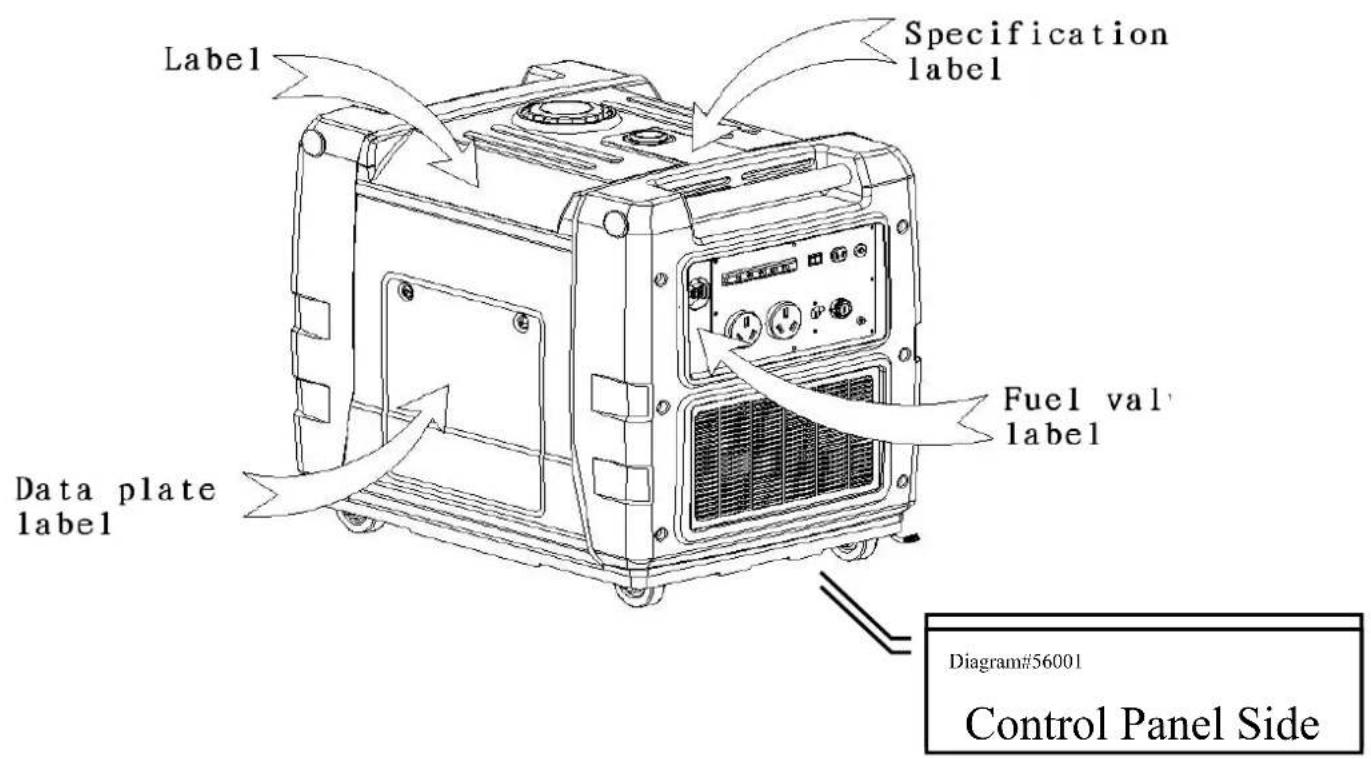
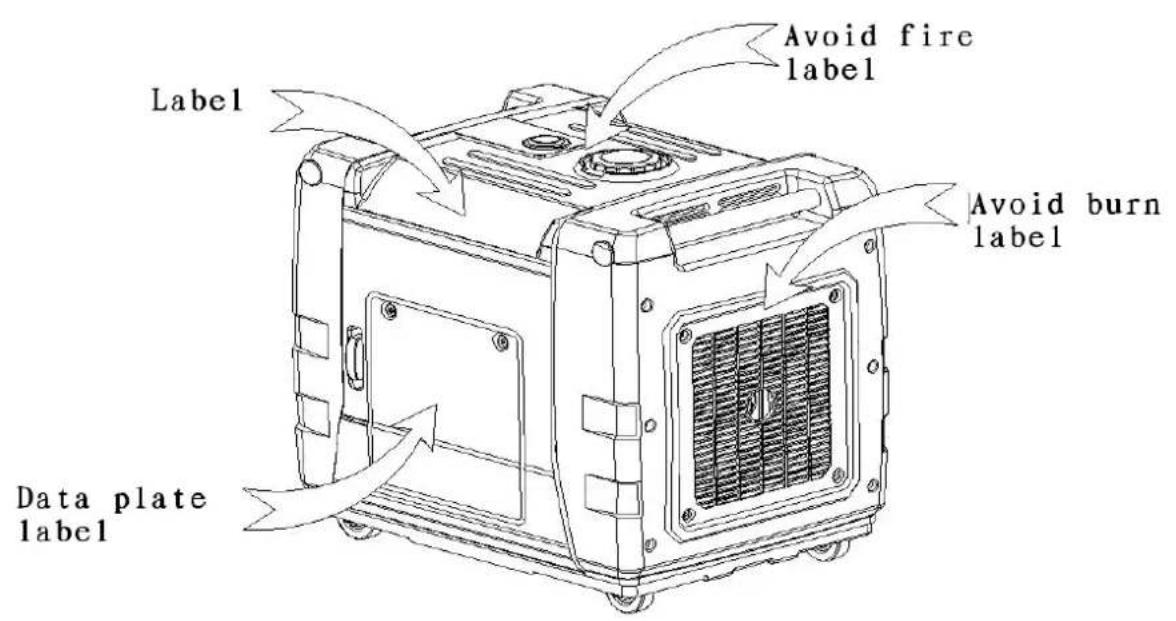
- Component Identification
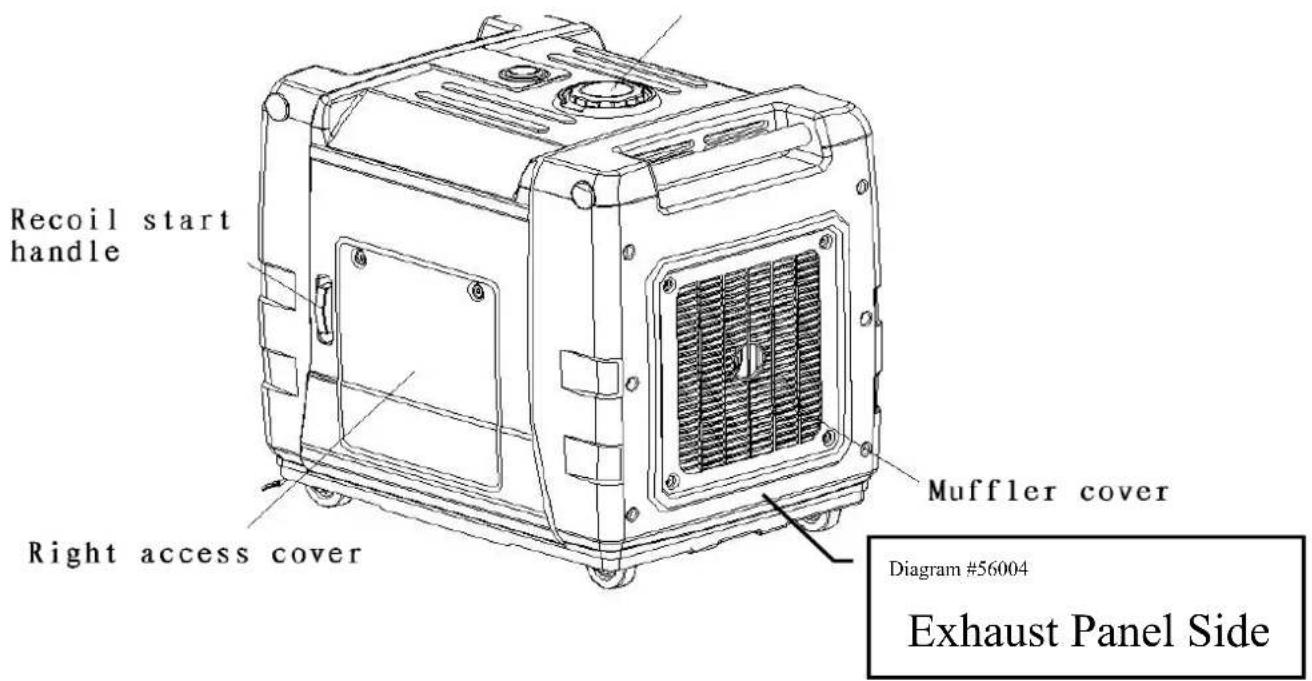
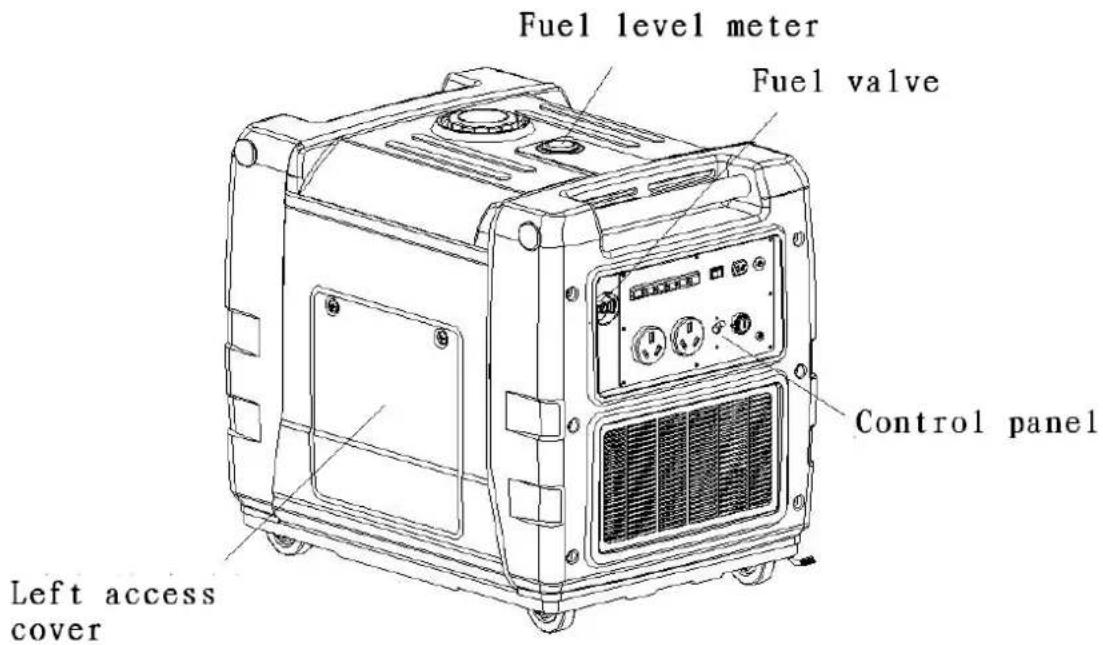
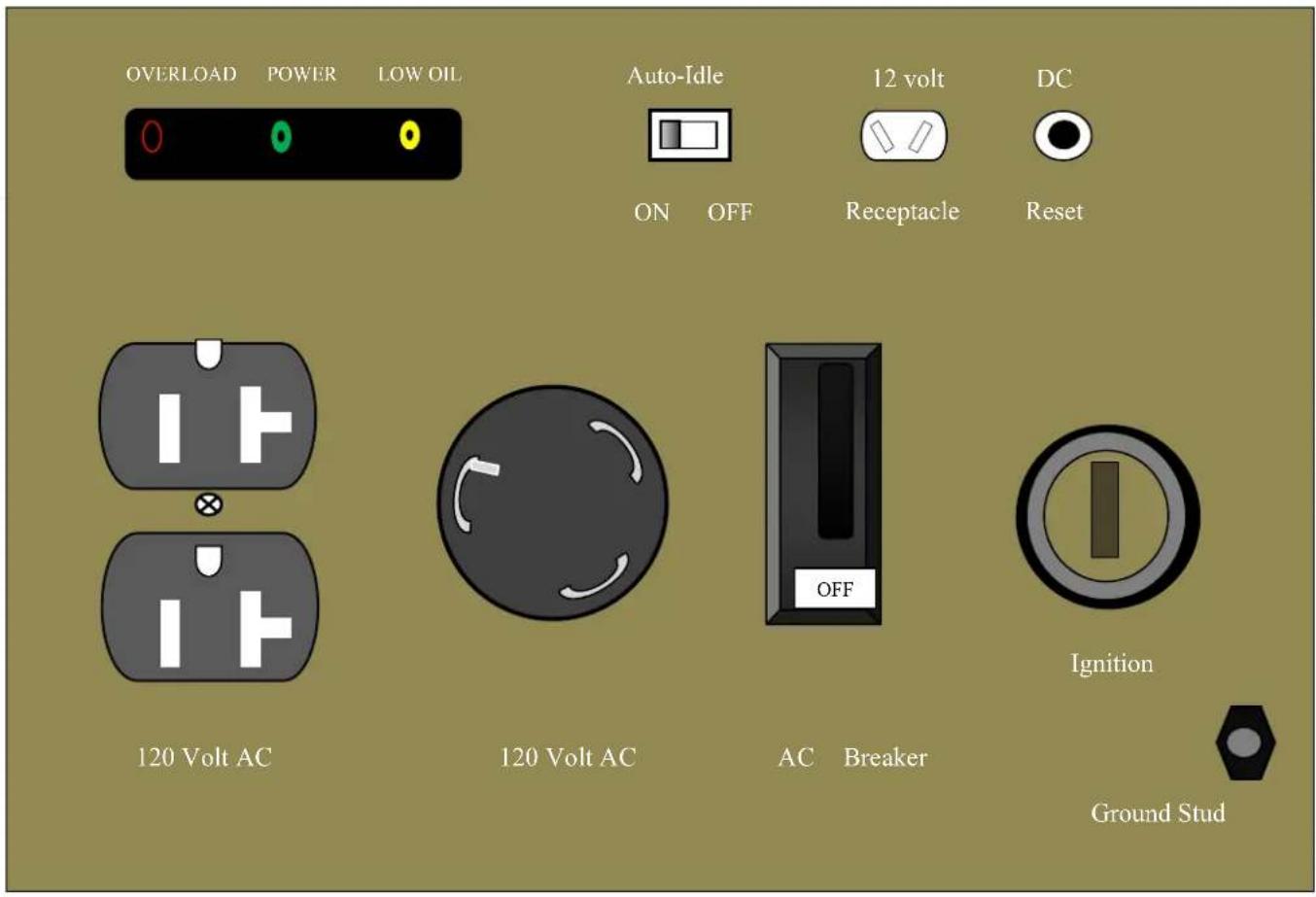
CONTROL PANEL
Style and the number of components may vary for each individual model and production date.
CAUTION!
IDLE CONTROL SWITCH
When there is no power requirement or load on the generators, generators go to gas-saving mode; upon demand, it will turn to correct speed automatically in order to supply the correct power that device needs which minimizes fuel consumption and reduces noise levels when no load is applied to the generator.
• If high electrical loads are connected simultaneously, turn the Auto Idle switch to the OFF position to reduce voltage changes.
- Turn the AUTO IDLE feature off when the equipment you are running requires full power at startup (ex. power tools and other equipment with electric motors).
- When generators are working at constant rated power output mode, turn off the AUTO IDLE SWITCH
Pre-Operation Check
1. Engine Oil Requirements

Be careful
Operating generators with insufficient oil may damage the engine and void your warranty.
- Engine oil is a major factor affecting engine performance and service life. Non-detergent and 2-stroke engine oil will damage the engine and must not be used in your Energy Storm Generator.
- Use 4-stroke motor oil that meets or exceeds the requirements for API service classification SJ. Always check the API SERVICE label on the oil container to be sure it includes the letter SJ.
- SAE 10W-30 is recommended for general, all-temperature use. Other viscosities shown in the chart may be used when the average temperature in your area is within the indicated range.
Note:
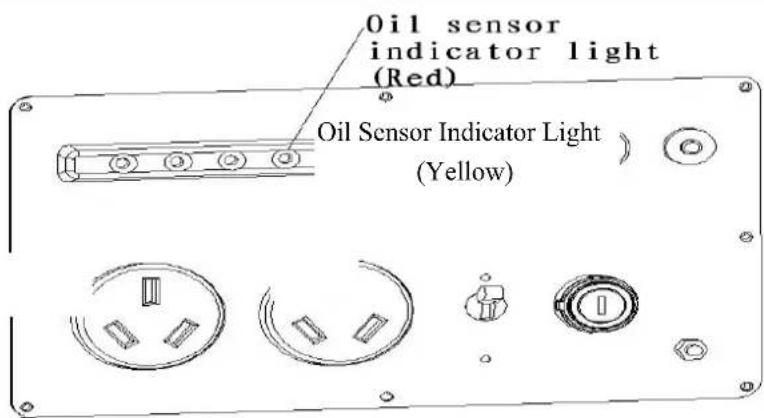
The Oil Alert system is designed to prevent engine damage caused by an insufficient amount of oil in the crankcase. Before the oil level in the crankcase falls below a safe limit, the oil alert indicator light comes on and the Oil Alert system will automatically stop the engine (the engine switch will remain in the ON position, turn it to the OFF position in this occurrence). If the engine stops or the Oil Alert indicator light comes on when you pull the starter grip, check the engine oil level before troubleshooting in other areas.
2. Engine Oil Filling
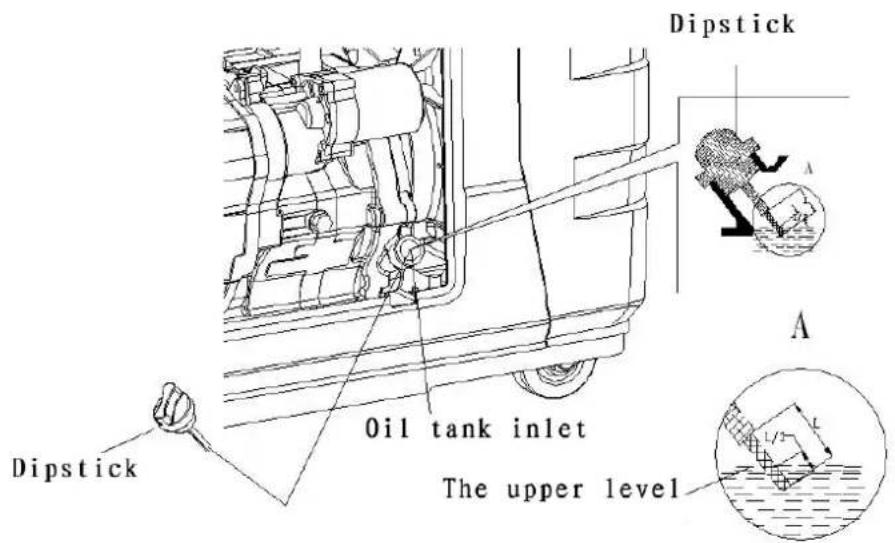
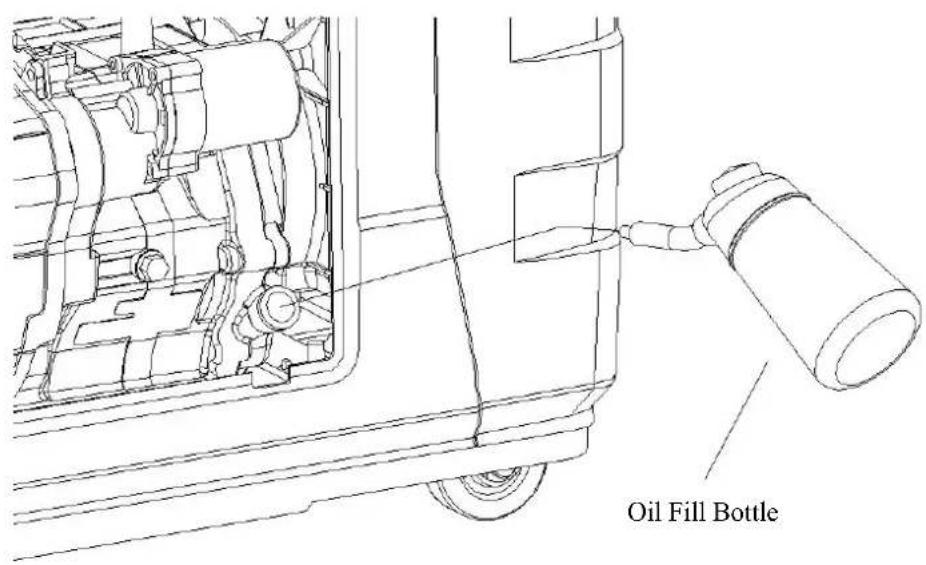
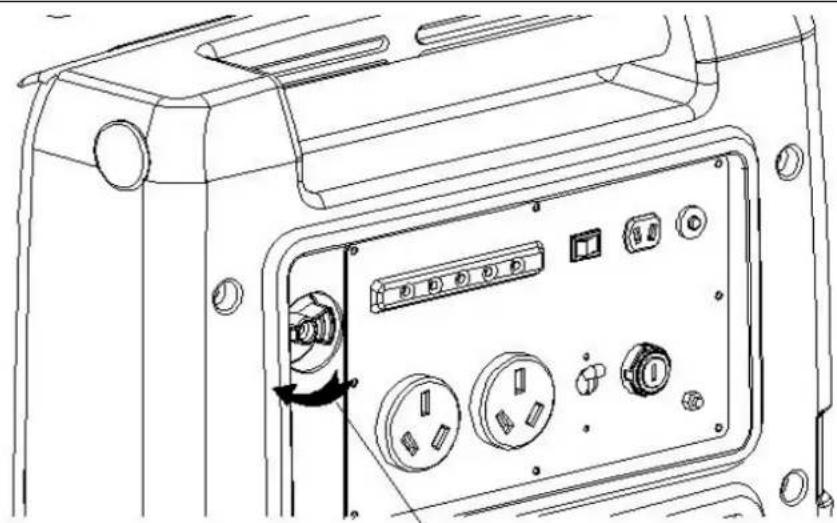
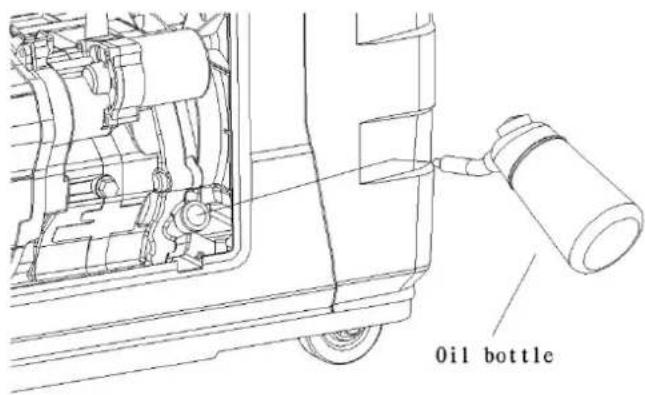
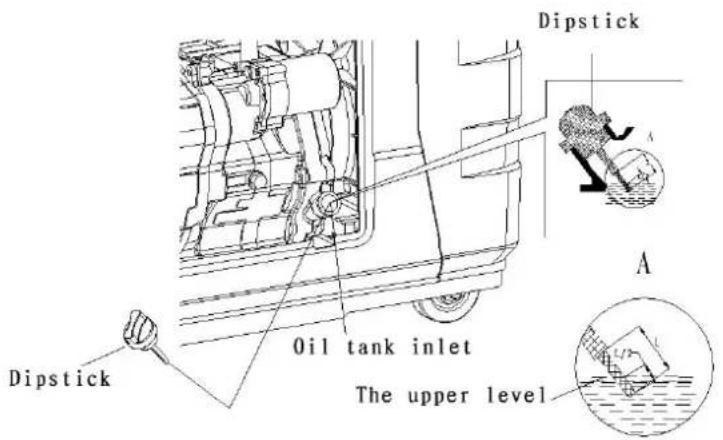
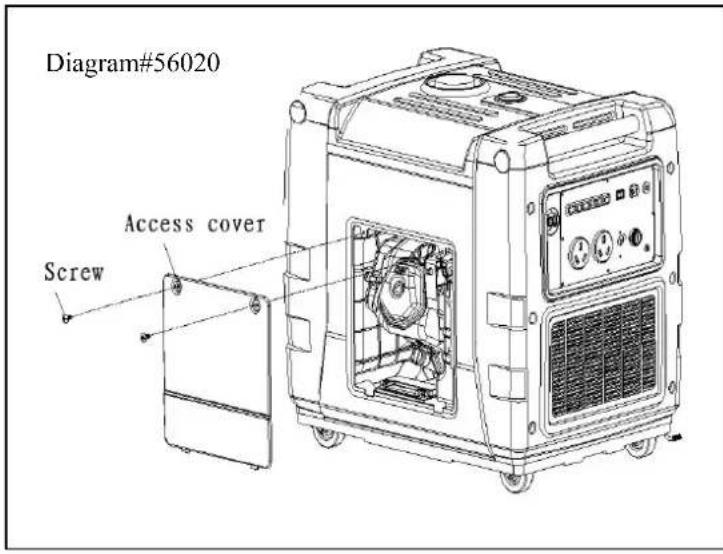
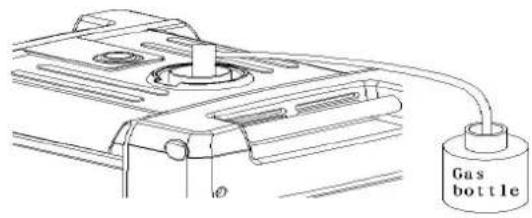
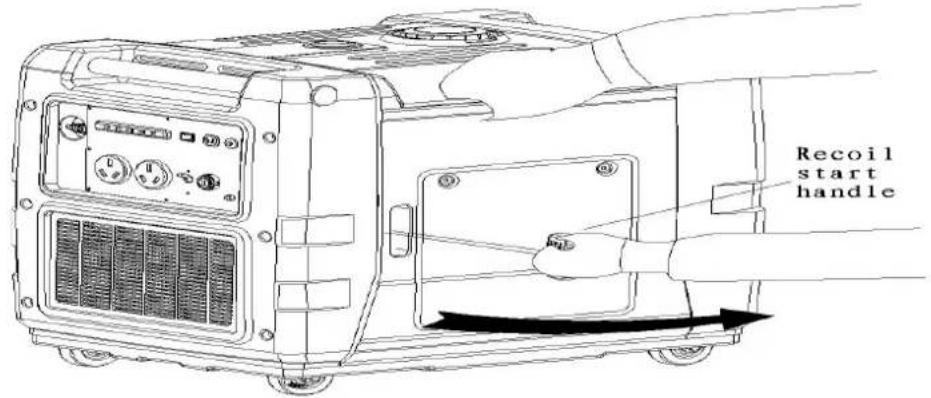
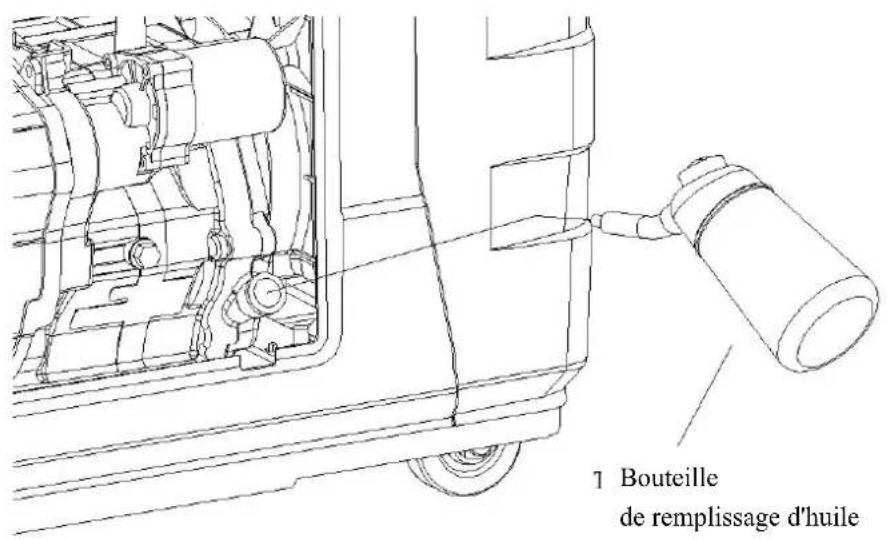
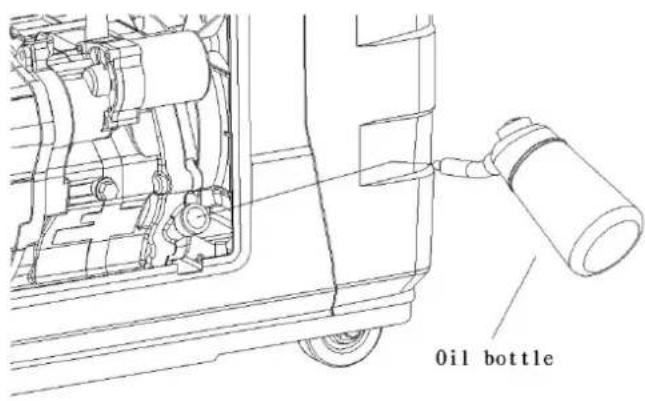
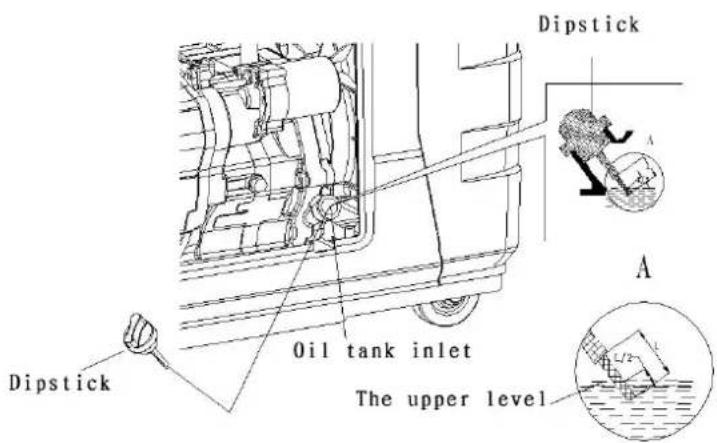
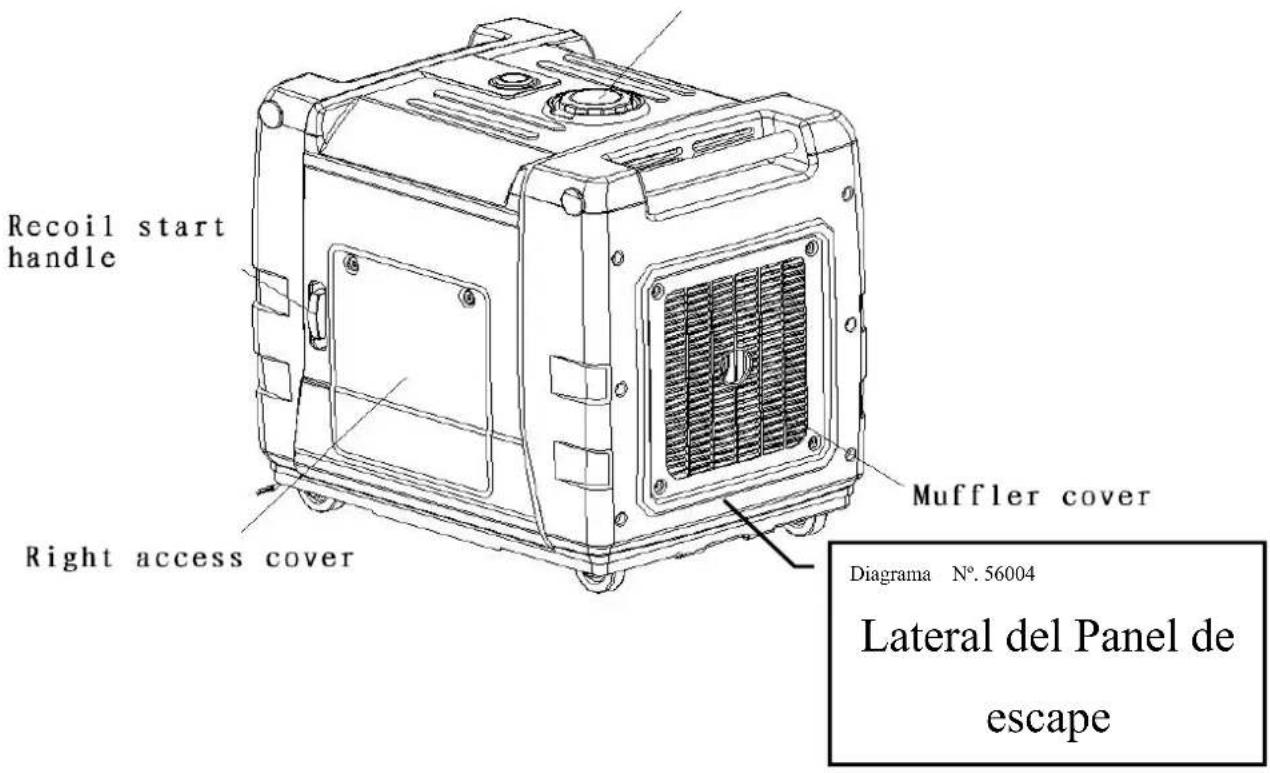
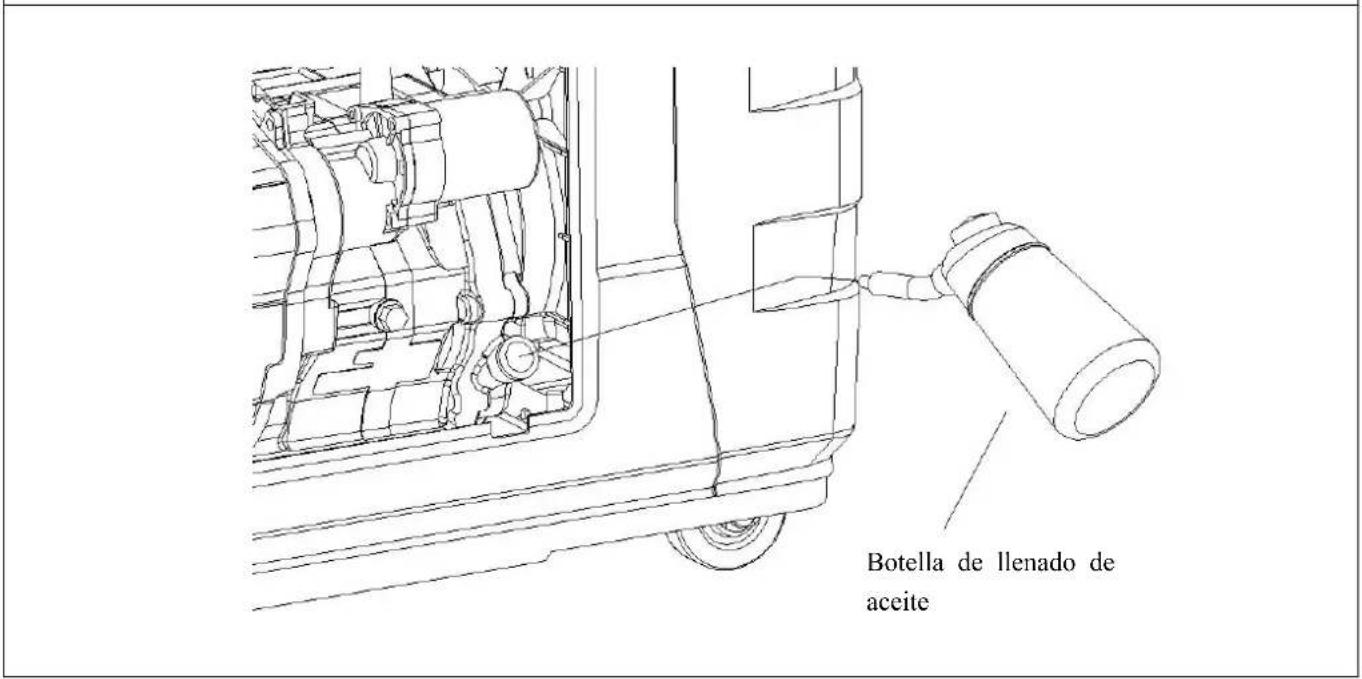
- Take off the right access cover (refer to diagram #56004). Unscrew the oil dipstick, wipe the dipstick with a clean cloth, then insert the dipstick into the oil tank, and check the level of the oil. If the oil level is low or lower than recommended, fill with the recommended oil using the oil fill bottle (included in tool package)
Diagram #56005
3. Check the Gas Level
! warning!
Gasoline is extremely flammable and is explosive under certain Conditions.
- Do not smoke or allow flames or sparks where the generator is refueled or where gasoline is stored. Refuel in a well-ventilated area with the engine stopped.
DO NOT overfill fuel tank. Tighten fuel cap after adding fuel.
- Be careful and avoid gas spillage when adding fuel, spilled fuel or gas fumes can catch on fire. In the case of any fuel spillage, be sure that all fuel has vaporized or has been cleaned up before starting engine.
● Avoid contact with fuel or breathing gas fumes. Always wash hands or areas exposed to fuel.
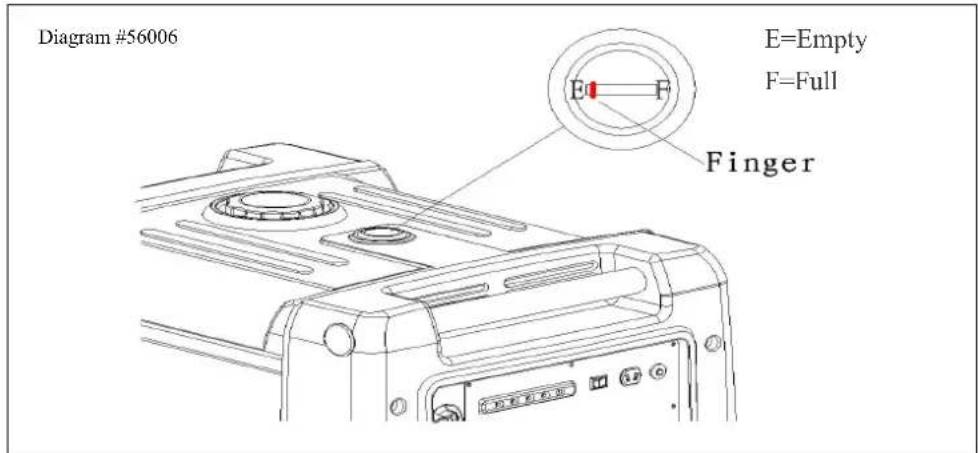
Check the gasoline level on the gauge (Diagram 56006); prior to starting the generator., Fill the gasoline tank to proper levels with 87 octane gasoline. Always fill with fresh and clean gasoline. Avoid allowing dirt or water into the fuel tank. Tighten the fuel tank cap after adding fuel.
4. Check the Air Cleaner Element
Keep the element clean and free of contaminants at all times.
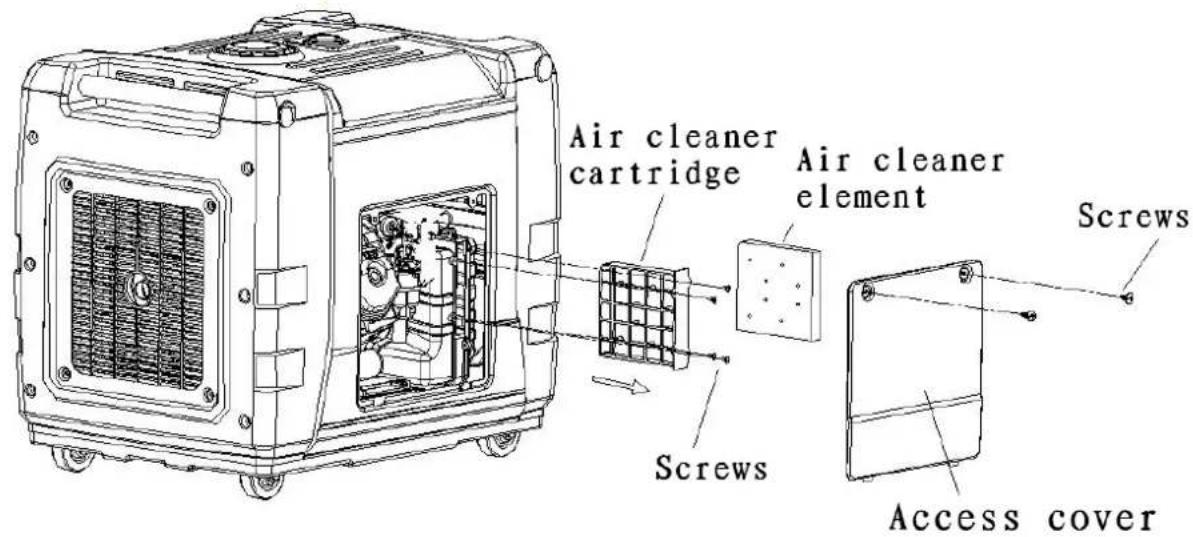
- Remove the screws on the left access cover, open it.
- Remove the three screws on the air cleaner case.
- Pull out the air cleaner cartridge following the direction of the arrow point.
- Check the air cleaner element, clean or change with a new one if necessary.
- Re-install the air cleaner, air cleaner cover, and access cover.
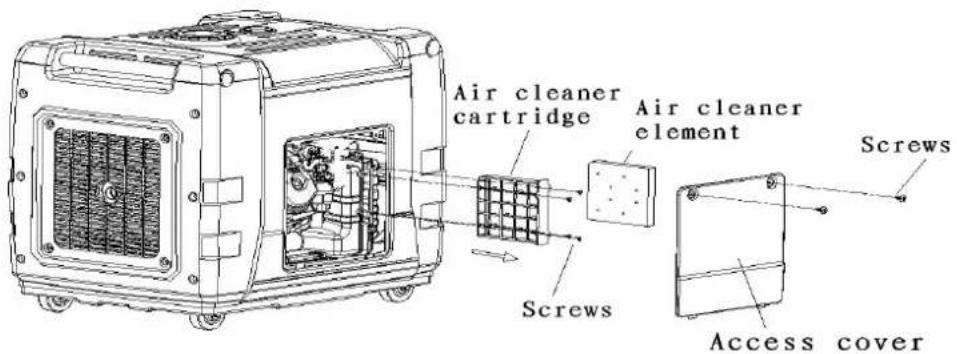
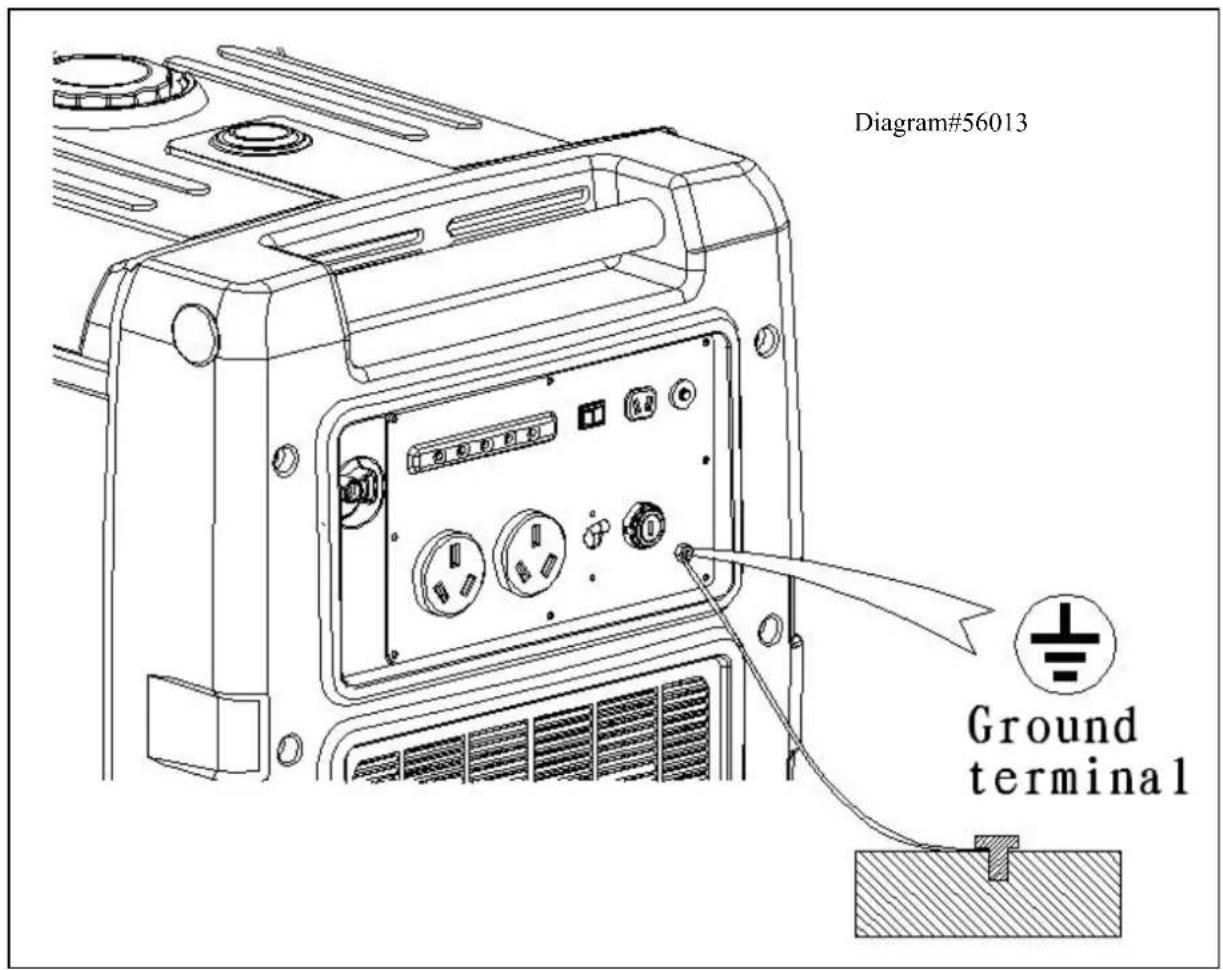
5. Grounding the Generator
Using copper electrical wire with a minimum diameter of 16gauge, connect the ground terminal on the generator to an acceptable source of electrical ground, such as a copper grounding stake.
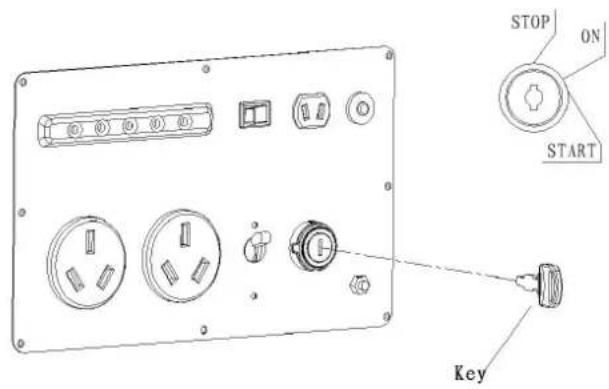
Electric start (only for electric start models)
1. Open gasoline switch
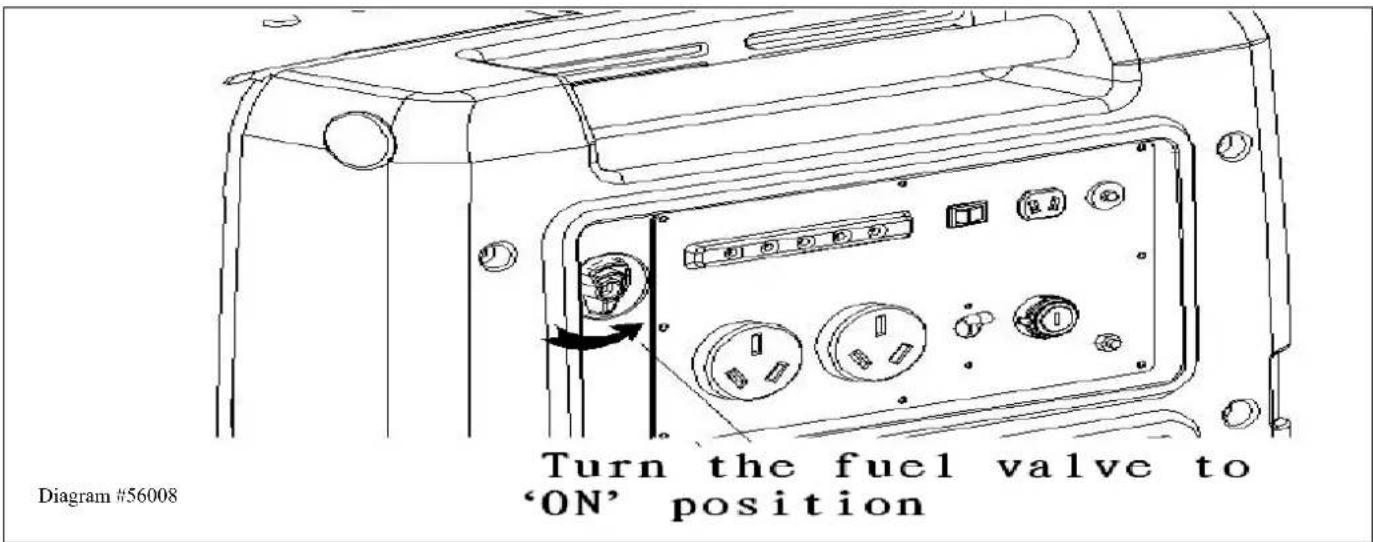
2. Put the key into the ignition switch, and turn the key to 'ON' position.
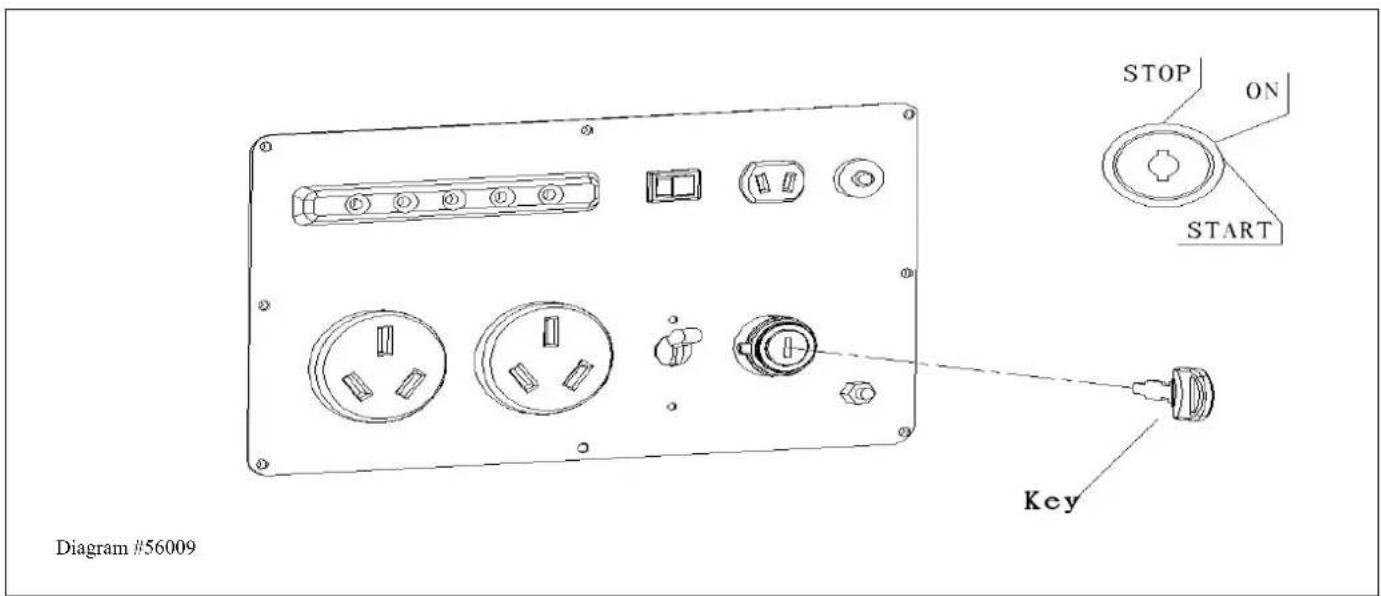
3. Turn the electric start key to "START" position and release when engine starts
Recoil Pull Starting (only for electric/recoil models)
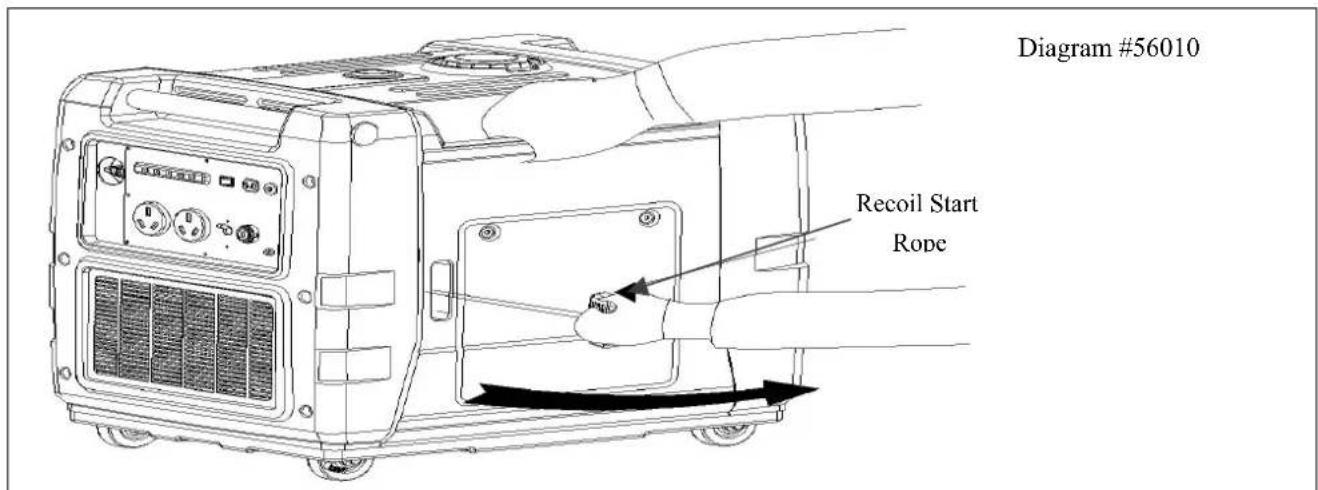
- Open gasoline switch
- Place the key into the ignition switch, and turn the key to 'ON' position.
- Pull the starting rope until feel the resistance, then pull briskly to start the engine.
! Be careful
Do not allow the starter grip to snap back against the engine. Return it gently to prevent damage to the starter or housing.
If the engine will not start after being stopped, please check the oil level first.
3. High altitude area operation
At high altitude, the standard carburetor air/fuel mixture will be too rich. Performance will decrease, and fuel consumption will increase. High altitude performance can be improved by specific modifications to the carburetor. If you always operate your generator at altitudes above 5,000 feet (1,500 meters), please ask your Authorized EnergyStorm Service Center to properly jet the carburetor for High Altitude use. Even with carburetor modifications, the engine horsepower will decrease about 3.5% for each 1,000-feet increase in altitude. The effect of altitude on horsepower will be greater than this if no carburetor modification is made.
BE CAREFUL
When the carburetor has been modified for high altitude operation, this modified
NOTE
Carburetor may cause the engine to overheat and result in serious engine damage.
4. Applications
Warning!
Connections for standby power to a building electrical system must be made by a qualified electrician. The connection must isolate the generator power from utility power, and must comply with all applicable laws and electrical codes. Improper connections to a building electrical system can allow electrical current from the generator to back feed into the utility lines. Such back feed can cause injury or may electrocute utility company workers or others who contact the lines during a power outage, and the generator could explode, burn, or cause fires when utility power is restored.
In order to avoid getting an electric shock, always ground generator from the
Ground Lug to the Earth for proper grounding.
Using Your Generator
Be careful
- When the generator operates constantly, do not overload its rated power capacity. Consider total power for all the equipment and appliances being powered.
DO NOT overload its rated current.
• DO NOT connect the generator to household panel circuit; it may damage the generator or home electric equipment.
- DO NOT use the generator for other than the intended purpose and comply with the following rules:
- DO NOT parallel connect this model generator. Generators cannot be combined with other electric wires or extension cords or multiple socket boxes.
- DO NOT lengthen the exhaust pipe or vent it with any extensions.
- Please use SJ or SJO type extension cords if you need additional length from the appliance cord.
- Extension wire length limit: 16gauge cord 200feet maximum; 10 gauge cord 330 feet maximum.
NOTE!
- You can use DC power at the same time that you are using AC power.
- Please do not exceed the power or wattage total of DC & AC
- Pay attention to the start-up wattage and running wattage requirements in determining the items to be powered by your generator. Consult the Wattage Use Chart located on the back page of this manual.
1. How to Use AC Power
- Start the engine with no electrically powered items plugged into the generator.
- After unit starts and the green output indicator light (see diagram #56011) illuminates you may know plug in and operate electrically powered devices.
Diagram#56011

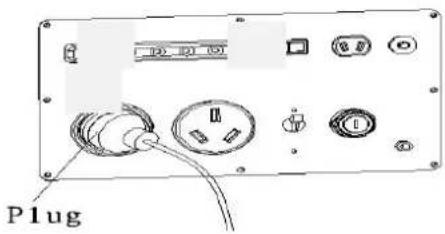

Be careful
Substantial overloading will illuminate the red overload indicator light and damage the generator.
Marginal overloading that temporarily lights the overload indicator light (red) may shorten the service life of the generator.
If an appliance begins to operate abnormally, becomes sluggish, or stops suddenly, turn it off immediately.
Disconnect the appliance, and determine whether the problem is the appliance, or if the rated load capacity of the generator has been exceeded.
Output and overload indicator
At normal condition, output indicator (green light) will stay lit. If the generator is overloaded or if there is a short circuit in a connected appliance, the overload indicator light (red) will illuminate. Then after about four seconds, current to the connected appliance(s) will shut off, and the output indicator light (green) will go OFF.
If the red indicator light activates, please stop the engine and find out the reason for the overload.
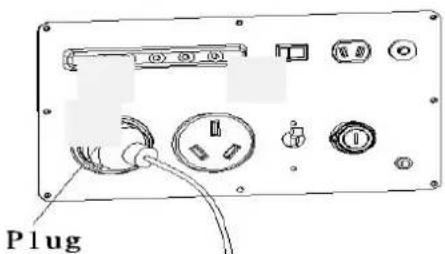
- Check your equipment for proper operation, electrical shorts, malfunctions, and make sure that the power required to operate the desired equipment does not exceed the power available from the generator. Only then put the plug in the socket, and start the engine.
- Be sure all equipment is in the off position upon starting the generator. Only start your equipment when the green power indicator light is illuminated and the generator is providing the necessary power to run your equipment.

be careful
If the red overload light and the green output light activate at the same time after starting engine and the red overload indicator light stays on after the green output indicator light goes off please turn off the generator and consult your closest authorized service center or EquipSource, LLC. @ 866-471-7464.
A. Start Engine (refer to section 6 for instructions)
B. Wait five seconds for green power light to illuminate.
If the green output indicator light is off, and the red overload indicator light is on, stop the engine using the ignition switch, then follow section 6 start engine requirements and restart.
C. Make sure your tools or appliances on in the off position, and then you may plug them in the socket.

Be careful
If connected equipment is in the ON position before connecting, it will start suddenly, and cause injury or damage.
D. Turn on equipment.
If the generator is overloaded or if there is a malfunction in your equipment, green output indicator light will turn off and the red overload indicator light will turn on and power output from the generator will not continue. If this occurs the engine will not stop, you must turn off the ignition switch to stop engine in order to reset the power circuit of the generator.

Be careful
- If the equipment power requirement meets the system capability for initial start-up, the overload indicator and output indicator will turn on at the same time for a short period, that's normal. The red indicator light will turn off and the green light stays on after the equipments start.
2. How to Use 12 Volt DC Output

NOTE!
- When using the DC output, turn the Auto Idle switch to the OFF position (see diagram #56361 for switch location)
• You can use DC power and AC power at the same time.
- DC overload circuit may disconnect, reset circuit protector by pressing reset button.
Diagram#56012
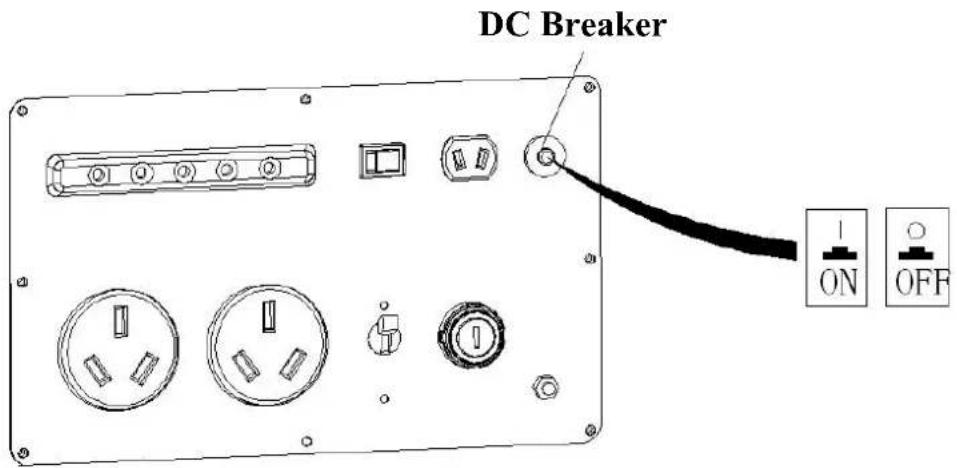
Special Instructions for Charging 12Volt Batteries (diagram #56013)

Warning!
- When charging, put the charging plug in the DC socket, and then connect to the terminals of the battery. After charging remove battery terminals first then un-plug charging plug. This procedure will reduce the chances of sparking.
-
When charging car batteries, please remove the ground wire of the battery first, reconnect it after charging in order to avoid short circuit or spark.
-
Do not start cars when generators are connected to batteries or use the DC power of the generator to start a car, this may cause damage to the generator.
- Always be sure to match the positive and negative cables of the DC power cord with the Batteries' Positive and Negative Posts.

Warning!
- Always charge in a well ventilated area and keep away from flames as batteries generate flammable gases during charging.
- Batteries contain vitriol (electrolyte) which can burn skin and eyes when we touched, please wear safety clothes and goggles. If electrolytes splash on skin, use fresh water to wash at once.
If electrolytes splash in eyes, immerse in fresh water wash for 15 minutes and seek medical attention immediately.
If electrolytes are swallowed by mistake, drink a massive dose of water or milk at once, then consume some magnesia milk or vegetable oil, seek immediate medical attention. - Keep Batteries and electrolytes away from children.
Diagram #56013
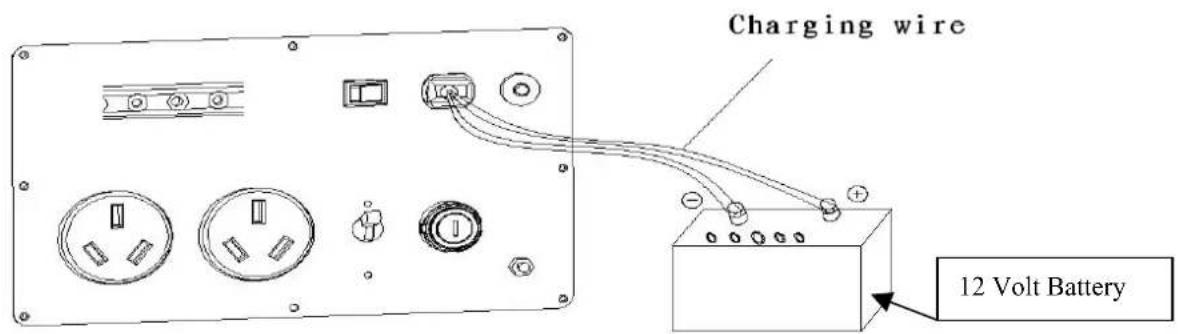
3. Low Oil Alarm System (diagram#56014)
Oil alert system is designed to avoid engine damage from insufficient oil in the crankcase, the oil alarm system will stop the
engine automatically before the oil level in the crankcase gets below safe operating levels (ignition switch will stay on, Turn OFF)
(diagram #56014)
4. Stopping the Engine
Emergency Shutdown:
- Turn key to stop position
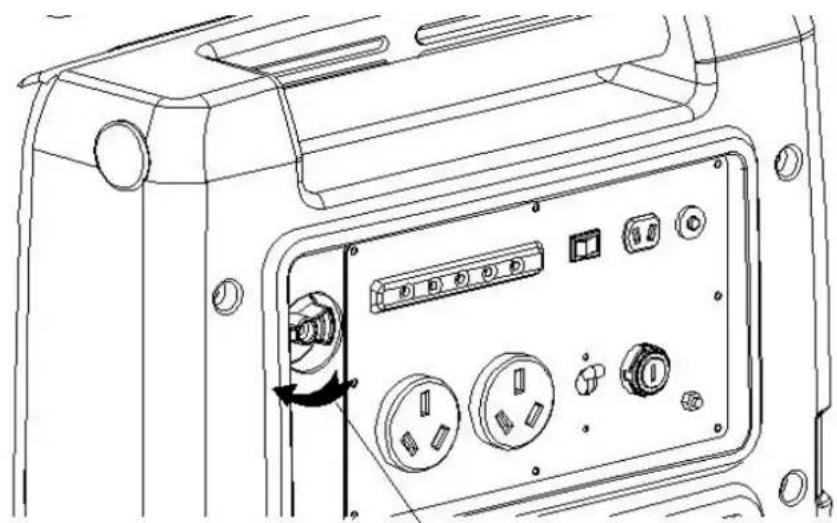
• Turn off Fuel Valve (diagram 56016)
Normal Shutdown:
• Un-plug all electrical loads
- Turn key to stop position
• Turn off Fuel Valve (diagram #56016)
Diagram#56015
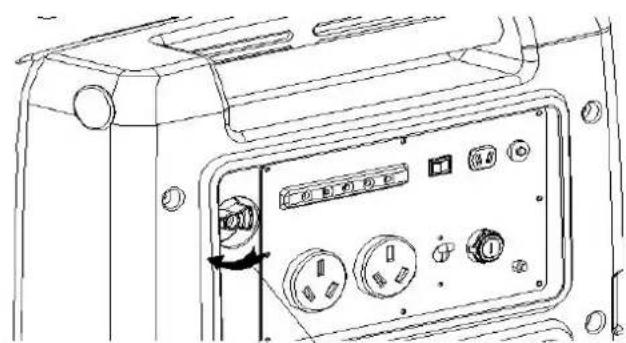
Diagram# 56016
natural_image
Line drawing of a device rear panel with buttons and a rotary knob (no text or symbols)Turn fuel valve to 'OFF'
5. MAINTENANCE
Good maintenance is essential for safe, economical, and trouble-free operation. It also helps reduce air pollution.

WARNING
- Stop engine before servicing. If service performance requires operating generator, BE SURE to operate generator in a well ventilated environment, Exhaust contains poisonous gas -carbon monoxide which can result in death.
- Always use Genuine Energy Storm parts or equal quality parts for repairs and maintenance, aftermarket parts can damage the unit and void the warranty.
Maintenance calendar
| Regular service period perform at every indicated month or operating hour interval whichever comes first. item | Every time use it | Every month or every 20 hours | Every 3 months or every 50 hours | Every 6 months or every 100 hours | Every year or every 300 hours | |
| engine oil | check | ○ | ||||
| replace | ○ | ○ | ||||
| Air cleaner | check | ○ | ||||
| clean | ○ | |||||
| Spark plug | Clean -adjust | ○ | ||||
| spark arrester | Clean | ○ | ||||
| Valve clearance | Check-adjust | ○ | ||||
| gas tank and air cleaner | clean | ○ | ||||
| fuel line | Check | Every two years (change it If necessary) | ||||
Note: Calendar above is the maintenance schedule for typical use areas, service more frequently when used in dusty areas.
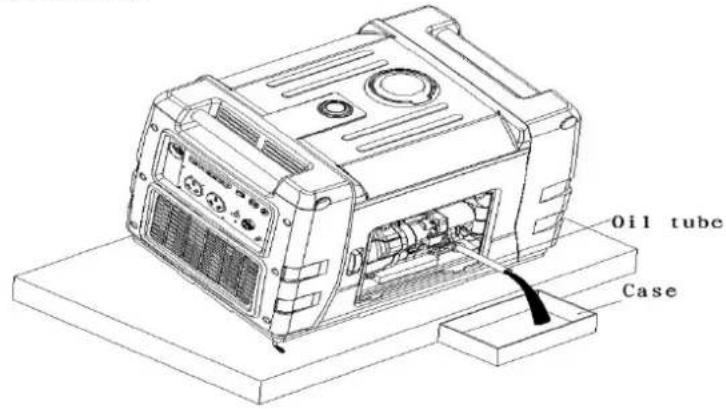
A. ENGINE OIL CHANGE
Drain the used oil while the engine is warm. Warm oil drains more quickly and completely.

Be careful
- Turn the engine switch and vent lever to the OFF position to reduce the possibility of fuel leakage.
- Insert the Oil tube in the filler neck of the oil tank (oil tube is provided in tool kit)
- Tilt the generator, drain the oil completely
- Fill with the recommended oil (see 4.1) check the level of oil.
- Shake the generator to make sure the float in the Oil Alert System is free after filling with new oil.
Oil tank capacity: Varies with Model see specification sticker on generator
Diagram #56017

Be careful
Improper disposal of engine oil can be harmful to the environment. If you change your own oil, please dispose of it properly. Put it in a sealed container, and take it to a recycling center. Do not discard it in a trash bin, dump it on the ground, or pour it down a drain.
B. Air Cleaner Servicing
A dirty air cleaner will restrict air flow to the carburetor. To prevent carburetor malfunction, service the air cleaner regularly. Service more frequently when operating the generator in extremely dusty areas.

Warning
- Using gasoline or flammable solvent to clean the air filter can cause a fire or explosion. Use only soapy water or nonflammable solvent.
Check the air cleaner element; keep the element clear and free of dirt.
a. Remove left access cover screws, remove the cover.
b. Remove the three screws on the air cleaner case.
c. Pull out the air cleaner cartridge following the arrow point.
d. Check the air cleaner element, clean or change with a new one if necessary.
C. Spark plug servicing
Please use high quality Brand Name (i.e. Champion, AC, etc) spark plug.
To ensure proper engine operation, the spark plug must be properly gapped and free of deposits.
- Remove the screws on the top maintenance cover.
- Clean any dirt from around the spark plug base
- .Use the provided spark plug wrench to remove the spark plug.
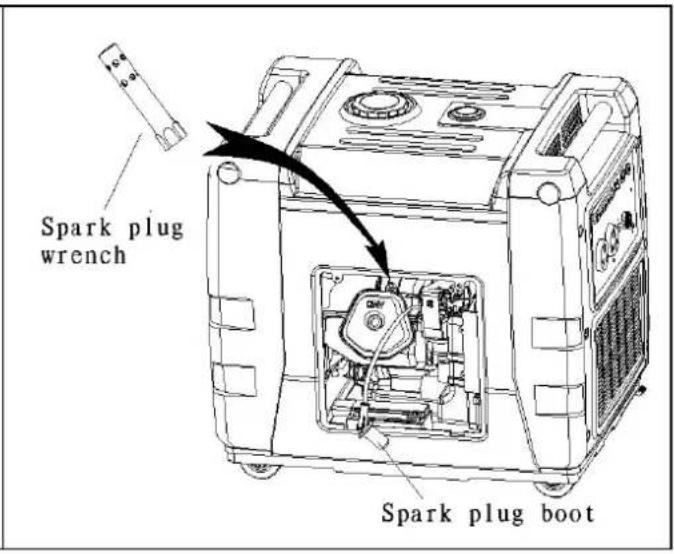
- Visually inspect the spark plug. Discard it if the insulator is cracked or chipped.
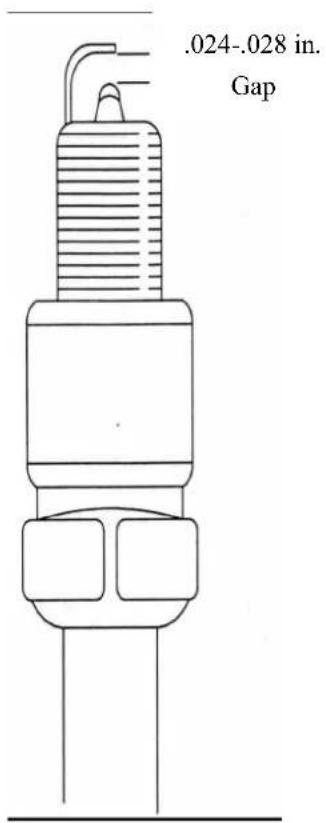
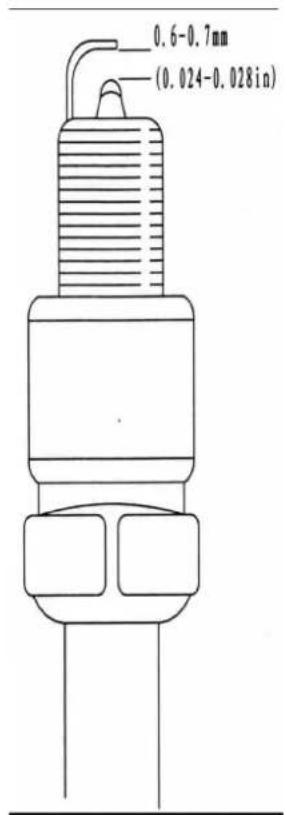
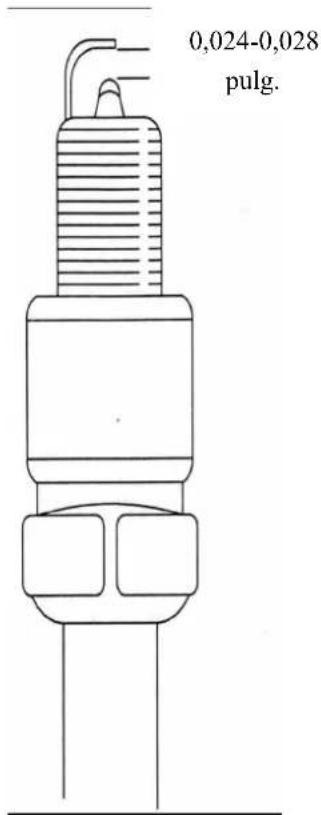
- Please use plug gauge to check spark plug gap, it should be 0.6-0.7mm (0.024-0.028inch)
- Check that the spark plug sealing washer is in good condition, and thread the spark plug in by hand to prevent cross-threading.
- After the spark plug is seated, tighten with a spark plug wrench to compress the washer. If installing a new spark plug, tighten 1/2 turn after the spark plug seats to compress the washer. If reinstalling a used spark plug, tighten 1/8 to 1/4 turn after the spark plug seats to compress the washer.
- Reinstall the spark plug cap on the spark plug securely.
- Reinstall the spark plug maintenance cover.

Be careful
- Spark plug must be assembled firmly, or it will become hot and may damage generator.
- A loose spark plug can overheat and damage the engine.
D. Battery assembly and maintenance (electric start models only)
- Remove the screws from left access cover, take off the cover.
Diagram#56021
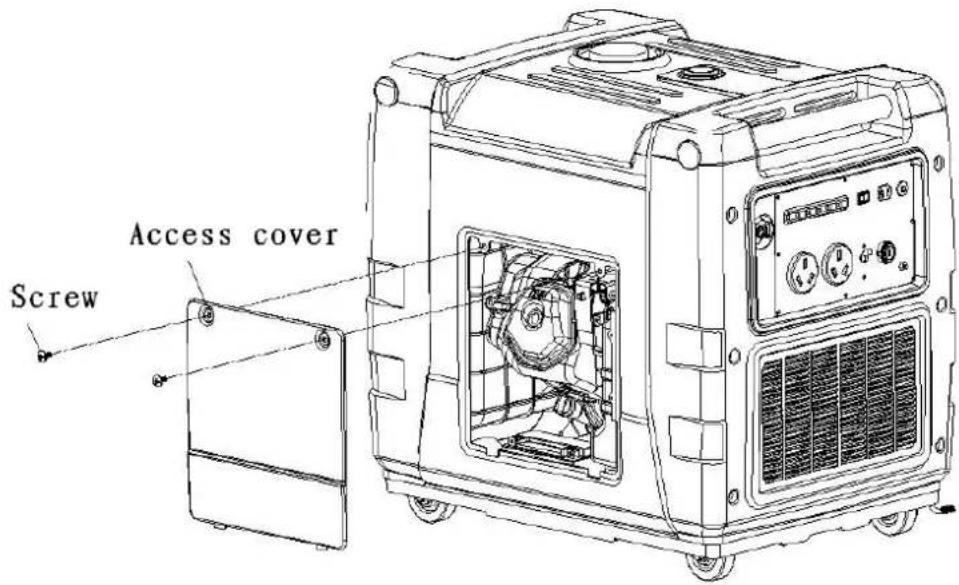
- Put the battery into the battery tray install the battery cover and tighten the clamping nuts.
- Disassemble the setscrew, connect the wire. The red terminal is anode(+) and the black terminal is cathode(-).
Diagram#56022
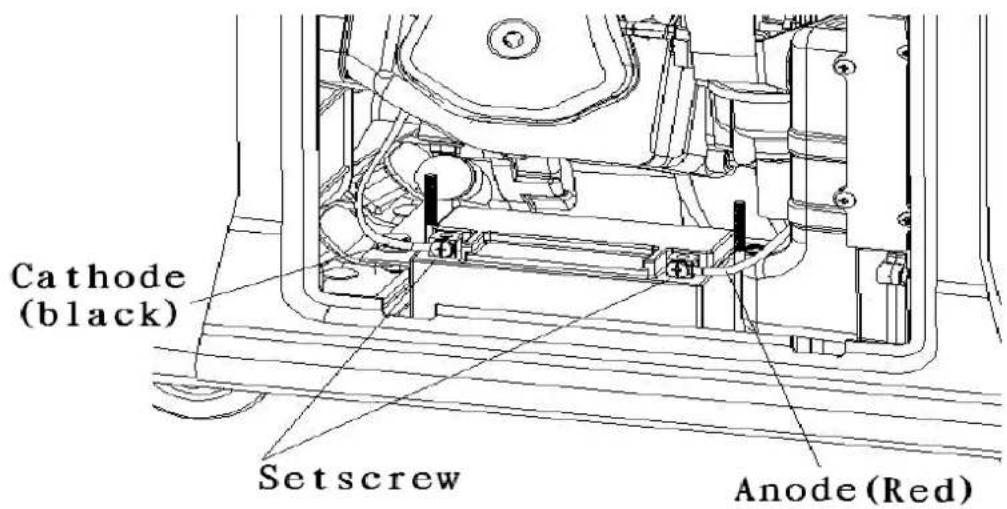
- Reinstall the cover.
! warning!
◆ Make sure to connect the right poles, (the red side is Anode and the black is cathode.)
◆ Incorrect installation will lead to battery and engine damage..
Transportation and Storage
To avoid gas leakage during transportation and storage, please close gas switch and vent lever switch,
! warning!
When transporting the generator:
Do not overfill the gas tank (1/2 tank or less is recommended)
Do not operate generator during transportation, always operate in well ventilated areas.
- Avoid direct sunlight during transportation; high temperature can cause gas vaporization and could become explosive.
- DO not transport generators on rough roads, for great distances. You must completely drain the gas tank if this situation occurs.
Before Storing the Generator.
- Ensure that the location where generator is stored is dry and clean.
- Run the engine with the fuel valve in the off position until the engine stops operating then drain the fuel from the gas tank.
! warning!
Gas may become extremely incendiary and explosive in some conditions. Do not store where fire, smoking, or any other flammable uses occur.
Diagram#56023
- Change engine oil per instructions in section 11.1.
- Remove spark plug and fill cylinder with a 0.5 oz. of fresh oil, pull the recoil rope (if equipped) to disperse excess oil, reassemble spark plug.
- Pull start rope slowly until you feel some pressure, at this time the piston moves to the top, valves are closed, and generator is in the proper condition for storage. The oil in the cylinder should prevent rusting and contaminants.
IF THE ENGINE IS NOT EQUIPPED WITH A PULL ROPE YOU MUST ROTATE THE FLYWHEEL USING THE FLYWHEEL RETENTION NUT. THIS PROCEDURE SHOULD BE DONE BY A TRAINED PROFESSIONAL. Dagram#56024
Specifications
Size and weight
| Item | ESI-3600iE/ESI3600iE-CA | ESI-5600iE/ESI5600iE-CA |
| L x W x H | 25.5"x20"x22.25" | 29.5"x21.65"x31.5" |
| Net weight | 132 lbs. | 144 lbs. |
Engine
| TYPE | 177F | 188F |
| Engine specification | 4-stroke,overhead valve, single cylinder | 4-stroke,overhead valve, single cylinder |
| Displacement | 229CC | 406CC |
| Compression ration | 8.5-1 | 8-1 |
| engine speed | Variable | Variable |
| cooling system | Air | Air |
| Ignition system | TEI | TEI |
| Oil capacity | 32 oz. | 32oz. |
| Fuel tank capacity | 3.5 Gallons | 4 Gallons |
| Spark plug | NGK | NGK |
| Sound class | 57db | 59db |
Generator
| TYPE | Item | ESI-3600iE/ESI3600iE-CA | ESI-5600iE/ESI5600iE-CA |
| AC output | rated voltage(V) | 120 | 120 |
| Rated frequency(HZ) | 60 | 60 | |
| Rated current(A) | 26 | 45 | |
| Rated output(KVA) | 3000 | 5000 | |
| Maximum output(KVA) | 3300 | 5500 | |
| DC output | 12V/8.3A | 12V@8.3A | 12V@8.3A |
LIMITED WARRANTY POLICY
ENERGY STORM POWER EQUIPMENT
LENGTH OF WARRANTY
| Residential Use** | Commercial/Rental*** | |||
| PRODUCTS COVERED | 1^st Year | 2^nd Year | 3^rd Year | Warranty not to exceed 300 hrs. Or terms listed below. |
| Walk Behind Mowers | Full unit parts and labor | Full unit parts only | Engine: parts only | Full unit: 3 months parts and labor |
| Water Pumps | Full unit parts and labor | Full unit parts only | Engine: parts only | Full unit: 12 months parts and labor |
| Generators/Inverter Generators | Full unit parts and labor | Full unit parts only | Engine: parts only | Full unit: 12 months parts and labor |
| Pressure Washer Engines | Full unit parts and labor | Full unit parts only | Engine: parts only | Full unit: 12 months parts and labor |
| Pressure Washer Pumps* | Full unit parts and labor | NA | NA | Full unit: 12 months parts and labor |
| Gasoline Engines | Full unit parts and labor | Full unit parts only | Engine: parts only | Full unit: 12 months parts and labor |
| Gasoline Powered Welders | Full unit parts and labor | Full unit parts only | Engine: parts only | Full unit: 6 months parts and labor |
*All Lifan Pressure Pro™ and Storm Series Pressure Storm™ pressure washers are equipped with Annovi Reverberi

high pressure water pumps Which are covered by the
manufactures 1 year limited warranty. Go to www.lifanpowerusa.com for details.
** Residential Use is defined as items that are for personal use.
*** Commercial/Rental use is defined as any usage for income producing or other business related uses.
In order to qualify for the limited warranty the product(s) must be purchased in North America from an authorized EquipSource dealer or a dealer authorized by EquipSource to sell Lifan products. This warranty is non-transferable and applies only to the original purchaser. The supplied "Warranty Registration Card" must be completed and on file with EquipSource, LLC (at the supplied address), at the time that any warranty claim is made. The "Warranty Registration Card" must be submitted with a receipt of purchase which clearly states the date of purchase.
During the warranty period (stated above) EquipSource, LLC will repair or replace, at its' option, any part that is proven to be defective in material or workmanship under normal usage. Repairs and/or replacement will be made without charge for parts or labor. All parts found to be defective must be returned to EquipSource. Upon reception of the parts a judgment as to the validity of the warranty claim will be determined. All parts replaced under warranty will be considered part of the original product and any warranty on those parts will coincide with the original warranty.
To obtain Warranty Service, you must take the product, at your expense, to an authorized Lifan Power Products or Storm Series Power Products service center. If you are unable to locate warranty service or are dissatisfied with the warranty service that you receive, contact EquipSource, LLC at 866-471-7464. At EquipSource's discretion; Equipsource may elect to replace a defective unit. In this case the end user is responsible for all shipping and handling charges associated with the exchange.
This warranty is not valid for products or parts affected or damaged by accident, collision, normal wear, fuel contamination, abuse, neglect, misuse, alteration and/or unsuitable use or unauthorized parts replacement. Mower decks and blades are specifically not warranted for impact or abrasive damage. Warranty becomes void if the customer fails to install, maintain, and/or operate the product in accordance with the instructions and recommended actions of Lifan set forth in the owner's manual. EquipSource, LLC disclaims any responsibility for time loss or loss of usage of the product, transportation, commercial loss, or any other incidental or consequential damage. Prior to any warranty service an approval code must be issued to the service center in order for the warranty claim to be valid. Any implied warranties are limited to the duration of this written limited warranty. This warranty gives you specific legal rights, and you may also have other rights, which may vary from state to state.
This warranty specifically excludes the use of any Lifan Power Equipment or Storm Series power equipment for the purpose of powering Life Support devices, Life Support appliances, Medical devices, and/or Medical appliances. EquipSource, LLC will not be held responsible for any damage due to the use of any Lifan or Storm Series power equipment for these purposes.
Exclusions to Warranty:
- Failure to perform "Periodic Maintenance" as required and specified in the supplied "Owner's Manual."
- Improper repair of product or replacement of parts with non-oem (original equipment manufacturer) parts.
• Operation in uses and methods other than those outlined in the "Owner's Manual." - Service and/or repairs performed by anyone other than an "Authorized Lifan or Storm Series Products Service Center."
FRENCH
ENERGY STORM™
Générateur onduleur
Démarrage du moteur
! Be careful
Be careful
natural_image
Line drawing of a device front panel with buttons and dials (no text or symbols)Turn fuel valve to 'OFF'
5. ENTRETIEN

Be careful
Espacement dc,024-,028
Spécifications
Taille et poids
| Item | ESI-3600iE/ESI3600iE-CA | ESI-5600iE/ESI5600iE-CA |
| L x P x H | 25,5 po x 20 po x 22,25 po | 29,5 po x 21,65 po x 31,5 po |
| Poids net | 132 livres | 144 livres |
Moteur
Fuel tank cover
Be careful
Diagrama N°. 56016
natural_image
Line drawing of a device rear panel with buttons and switches, showing no text or symbolsTurn fuel valve to 'OFF'
5. MANTENIMIENTO

Be careful
Especificaciones
Tamaño y peso
| Artículo | ESI-3600iE/ESI3600iE-CA | ESI-5600iE/ESI5600iE-CA |
| Lo x An x Al | 25,5" x 20" x 22,25" | 29,5" x 21,65" x 31,5" |
| Peso neto | 132 lbs. | 144 lbs. |
Motor
AVERAGE APPLIANCE WATT CHART
AVERAGE APPLIANCE WATTAGE CHART
| Appliance | Typical Running Watts |
| CONTRACTOR | |
| Air Conditioner, Window | 500-1440 |
| Aquarium | 50-1210 |
| Clock Radio | 10 |
| Coffee Maker | 900-1200 |
| Computer CPU Awake | 120 |
| Computer Monitor Awake | 150 |
| Computer Laptop | 50 |
| Dehumidifier | 785 |
| Dishwasher | 1200-2400 |
| Dryer | 1800-5000 |
| Electric Blanket | 60-100 |
| Fan Ceiling | 65-175 |
| Microwave (1000w) | 1000 |
| Furnace | 750 |
| Refrigerator/ Freezer | 725 |
| Box Fan | 55-250 |
| AM/FM Radio | 70-400 |
| Portable Electric Grill | 1650 |
| Hair Dryer | 1200-1875 |
| Heater Portable | 750-1500 |
| Television 19" | 65-110 |
| Television 27" | 113 |
| Television 36" | 130 |
| Television 53"-61" Projection | 170 |
| Television Flat Screen | 120 |
When selecting a inverter generator it is very important to choose one that is capable of producing enough energy to meet all of your requirements. You must match the rated output of the generator to the maximum power needed by the user. Use the chart from this worksheet to determine the running watts and starting watts for all of the equipment that you will operate with your Energy Storm Inverter Generator. Add the running watts together for all of the equipment and record that figure. Then identify the single piece of equipment with the largest starting watt requirement and add that figure to the total running watts from all equipment. Select the appropriate Energy Storm Inverter Generator by reviewing the specifications chart for Energy Storm Inverter Generators and compare your total wattage requirements to the surge ratings for each generator. Remember to follow all safety precautions outlined on the inverter generator or in the Owners Manual. Use of our "DuoPower" Parallel Cord option can double your wattage for the power you need.
LIFAN POWER USA
Please Read This Manual Carefully Before Operating Your New Generator
Thank you for purchasing our EnergyStorm Inverter. This Manual includes the operation and maintenance of the ESI3600iE and ESI5600iE Models.
All information in this publication is based on the latest product information available at the time of approval for printing. We reserve the right to make changes at any time without notice and without incurring any obligation. The copyright of this manual belongs to our company. No parts of this publication may be reproduced without our written permission. This manual should be considered a permanent part of the generator and should remain with it if it is resold.
For Product Support and Service Please Visit Us at www.lifanpowerusa.com or call Toll Free 1-866-471-7464