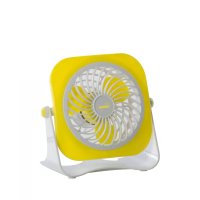
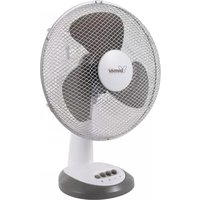
VT14 - Fan Bimar - Free user manual and instructions
Find the device manual for free VT14 Bimar in PDF.



| Brand | Bimar |
| Model | VT14 |
| Product type | Mini desk fan |
| Power supply | USB 5Vdc or AC/DC adapter (not included) |
| Functions | On/Off, manual tilt |
| Use | Indoor domestic use |
| Max ambient temperature | 40°C |
| Safety | Protective grille, do not insert objects |
| Cleaning | Soft slightly damp cloth |
| Maintenance | Clean the grilles and motor air vents |
| Power cable | Removable USB |
| Insulation class | III |
| Material | Plastic |
| Protective grille | Yes |
| Airflow direction | Manually adjustable (up/down) |
| Ventilation type | Axial |
| Dimensions (approx.) | 15 x 15 x 18 cm |
| Weight (approx.) | 0.3 kg |
| Color | White |
Frequently Asked Questions - VT14 Bimar
User questions about VT14 Bimar
0 question about this device. Answer the ones you know or ask your own.
Ask a new question about this device
Download the instructions for your Fan in PDF format for free! Find your manual VT14 - Bimar and take your electronic device back in hand. On this page are published all the documents necessary for the use of your device. VT14 by Bimar.
USER MANUAL VT14 Bimar
natural_image
Black laptop and a small fan with visible wiring, no text or symbols present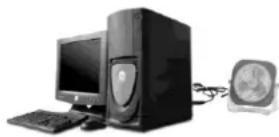
Please read these instructions carefully before using appliance, and instruct other persons using it, too, necessary. Keep booklet Hndy for further use.
If when reading this instructions manual certain parts remain difficult to understand, or if there is any contract contact the company indicated on the last page before the product.
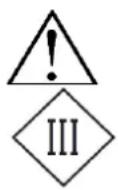
Attention: instructions and general notices for safe
This symbol on the appliance data plate indicates elect insulation class III.
GENERAL NOTICES
- This device is intended for internal home use only, to ventilate individual comfort: do not use it for any other purpose. Any other use is to be considered inappropriate and therefore dangerous. The manufacturer cannot be held responsible for eventual damage caused by inappropriate, improper or irresponsible use and/or for repairs made to the product by unauthorised personnel.
- Do not touch the appliance with wet hands or feet.
- Do not insert any tool, or your fingers, into the grille protecting the blades.
- This appliance can be used by children aged from 8 years and above and persons with reduced physical, sensory or mental capabilities or lack of experience and knowledge if they have been given supervision or instruction concerning use of the appliance in a safe way and if they understand the hazards involved. Children shall not play with the appliance. Cleaning and user maintenance shall not be made by children without supervision.
- This appliance can be used by children aged 8 and older and by persons with reduced physical, sensory or mental capabilities or lack of experience and knowledge if they are properly supervised or if they have received instructions regarding the safe use of the appliance and have understood the related dangers. Children should not play with the appliance. Cleaning and maintenance should not be performed by children unless they are older than 8 years of age and are supervised.
- The appliance must be kept out of children's reach.
- Attention: when using electric appliances, the basic safety precautions must always be observed to avoid risks of fire, electric shocks and physical injury.
- Do not use the appliance if it is not operating correctly or seems damaged; if in doubt, contact professionally qualified personnel.
- Make sure that the appliance is working correctly: if not, turn the appliance off and have it checked by professionally qualified personnel.
- Unplug USB the appliance when not in use.
- Do not use the device at room temperatures above 40^ .
- Do not move the appliance when it is in function.
- Do not leave the device exposed to the weather (sun, rain, etc.).
- Do not allow children, or irresponsible persons, to use the device without supervision.
- If the electric cord is damaged, it has to be replaced by the supplier or an authorized service center or a professionally qualified, to avoid any risks.
- Do not use the appliance with a timer or a programmer or with a system that can switch on the appliance automatically, to avoid risk of fire, since a fire risk exists if the heater is covered or positioned incorrectly.
- In the event of a breakdown or poor operation, turn the fan heater off and ask for professionally qualified help.
INSTALLATION
- After removing the packing materials, check the integrity of the heater; if you are unsure, do not use it and ask for qualified professional help. The packing materials (plastic bags, polystyrene foam, nails, etc.) must be kept out the reach of children because they are potential sources of danger.
- Before connecting the appliance, check that the voltage values shown on the data plate correspond to those of the AC/DC adaptor or PC.
- The connector USB must be easy to reach so the plug can be removed quickly in case of emergency.
- To not place the appliance near sinks or other container of liquids (minimum distance of 2 meters) to avoid the risk of it falling in.
- Do not place the appliance near an open flame, cooking or other heating appliance.
- Keep the fan far away from fabrics (curtains, etc.) or unstable materials that could obstruct the air intake grille; make sure that the front is free of unstable materials (dust, etc.).
- Make sure that the electric cord is not touching rough, hot or moving surfaces and not twisted or wrapped around the appliance.
- Stand the appliance on a horizontal, flat surface or table; do not stand on a inclined plane (the appliance could upset).
INSTRUCTIONS:
Before each use, verify that the unit is in good condition, the electric cord is not damaged, if the power cord is damaged, it must be replaced by the manufacturer or a competent qualified electrician or a person with similar qualifications, in order to avoid any risk.
- Please put the appliance on a secure surface (verify that the area around the surface is clean, without dust).
- Make sure that the fan is switched off ( pos.0 ).
- The fan can be manually adjusted up and down by the air grating and according to his inclination.
- You can use the fan in the computer USB port or AC / DC adapter (not included); check that the voltage values shown on the data plate correspond to those of the AC/DC adaptor or PC, in this case 5Vdc..
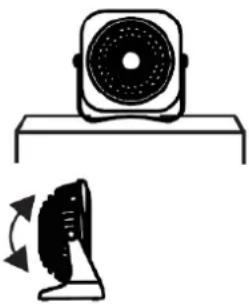
natural_image
Illustration of a front-mounted fan and its side-mounted base fan with motion arrows (no text or symbols)- Use with USB on your computer:
- Plug the USB into the computer, take care to properly orient the plug into the USB port.
- Turn on the fan through the 0 / I switch on the back, in pos. "I".
- To turn off the device, select the 0 / I switch to pos. "0" and remove the plug from USB into the computer.
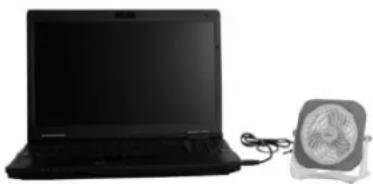
natural_image
Black laptop and a small fan on a stand, no visible text or symbols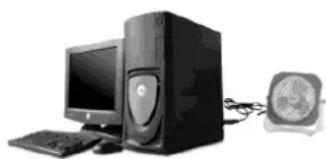
natural_image
Computer setup with tower, monitor, keyboard, and speaker (no visible text or symbols)- Use with AC/DC adapter (NOT included):
- Insert the USB plug into the adapter, make sure to correctly orient the plug into the USB port, insert the pina of the adapter into the power outlet.
- Turn on the fan through the 0 / I switch on the back, in pos. "I".
To turn off the device, select the 0 / I switch to pos. "0" and remove the plug from the socket.
When not in use for long periods, remove the USB connector from adaptor or from the computer.
CLEANING AND MAINTENANCE
Attention: before normal cleaning, remove the plug USB from the computer or adapteur.
- Clean the body with soft, slightly damp, cloth; do not use abrasive or corrosive products.
- Do not immerse any part of the fan in water or other liquid: if this should happen, do not put your hand in the liquid, but first remove the plug from the socket. Carefully dry the appliance and make sure that all the electrical parts are dry: in the case of doubt, ask for professionally qualified help.
- If the fan will not be used for long periods, it must be protected from dust and humidity; we recommend storing it in its original packaging.
- Should you decide not to use the appliance any more, we recommend making it inoperative by cutting the power cord (after making sure you have disconnected the plug from the socket) and make dangerous parts harmless if children are allowed to play with them (such as the blade).
IMPORTANT INFORMATION FOR CORRECT DISPOSAL OF THE PRODUCT IN ACCORDANCE WITH EC DIRECTIVE 2011/65/EC.
At the end of its working life, the product must not be disposed of as urban waste. It must be taken to a special local authority differentiated waste collection centre or to a dealer providing this service. Disposing of a household appliance separately avoids possible negative consequences for the environment and health deriving from inappropriate disposal and enables the constituent materials to be recovered to obtain significant savings in energy and resources. As a reminder of the need to dispose of household appliances separately, the product is marked with a crossed-out wheeled dustbin.


natural_image
Black laptop and a small fan with a power cord, no visible text or symbols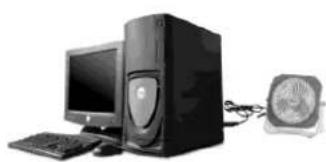
natural_image
Computer setup with desktop tower, monitor, keyboard, and speaker (no visible text or labels)natural_image
Illustration of a speaker and a fan device (no text or symbols)natural_image
Black laptop and a small fan with visible wiring, no text or symbols present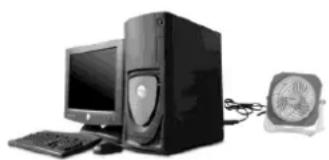
natural_image
Computer setup with desktop tower, keyboard, and monitor connected to a speaker (no visible text or symbols)natural_image
Simple line drawing of a speaker on a base (no text or symbols)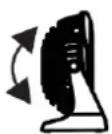
natural_image
Black laptop and a small fan with visible blades, connected by cables (no text or symbols)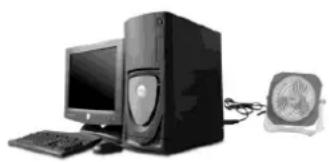
natural_image
Computer setup with tower, monitor, keyboard, and fan (no visible text or symbols)

Brand : Bimar
Model : VT14
Category : Fan