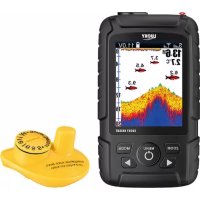
FF718LICW - Fish finder Lucky - Free user manual and instructions
Find the device manual for free FF718LICW Lucky in PDF.


User questions about FF718LICW Lucky
0 question about this device. Answer the ones you know or ask your own.
Ask a new question about this device
Download the instructions for your Fish finder in PDF format for free! Find your manual FF718LICW - Lucky and take your electronic device back in hand. On this page are published all the documents necessary for the use of your device. FF718LICW by Lucky.
USER MANUAL FF718LICW Lucky
1. Thank you for choosing LUCKY FF718LiC-W fish finder.
This amazing product is especially designed for amateur and professional fisherman alike, to find out the location of fish, depth and bottom contour of water. The unit can be used in ocean, river or lake, and is fantastic for detecting schools of fish in any particular area. Using amazing and innovative technology, this fish finder is the ideal tool to bring the fish to you!
The FF718LiGW has two user modes: WIRELESS/SIMULATION. Use the Mode menu choice to change between these two user modes.

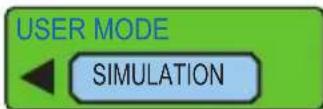
WIRELESS: This user mode allows you to operate the F With the Wireless sonar sensor. When signal indicator( ) is displayed on the screen, the unit is in Wireless mode.
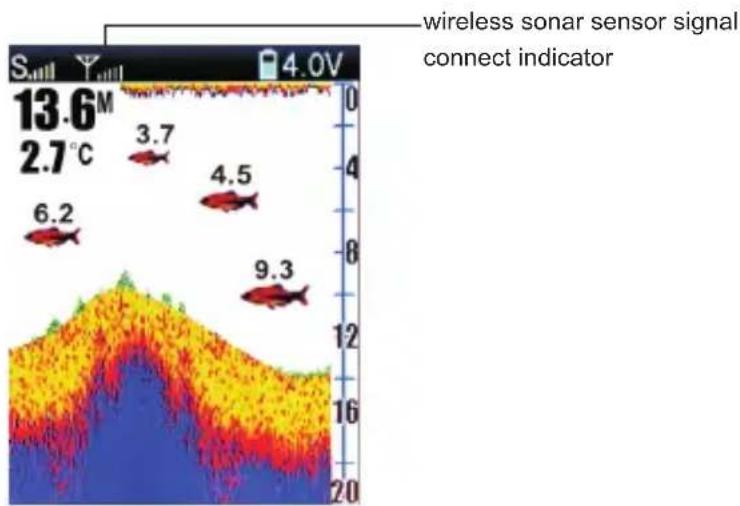
area
| Position | Value | |--------|-------| | 1 | 6.2 | | 2 | 3.7 | | 3 | 4.5 | | 4 | 9.3 |2. Using the Wireless sonar sensor
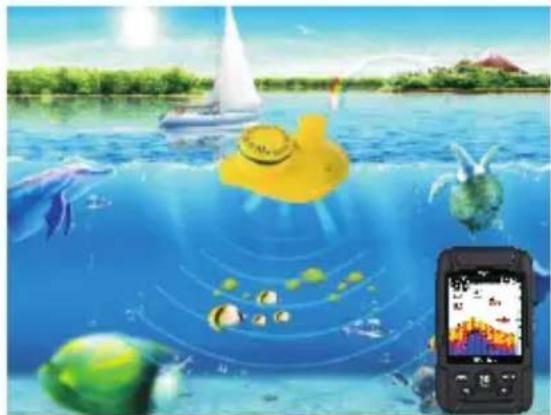
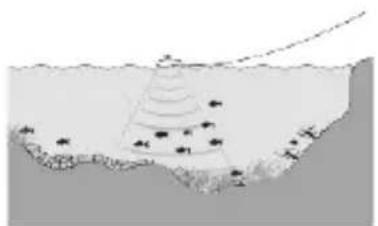
The Wireless user mode allows you to use the Wireless Sonar Sensor. Simply attach the wireless sensor to the end of your fishing line and cast it into the water as you would a normal float or lure, then power on the FF718LiGW and you are ready to fish. In Wireless mode, your FF718LiC-W separ technology to send sound waves from the wireless sonar sensor, the returned “echoes” are transmitted with wireless technology to the display unit and displayed on the LCD. New information appears on the right . As this information moves to the left a very accurate picture of the underwater world is displayed, Including the depth of underwater objects such as the bottom, fish, and structures.
natural_image
Illustration of a yellow submarine underwater with floating objects and a smartwatch displaying a colorful screen (no text or symbols)
natural_image
Illustration of a yellow duck floating on water with curved white stripes, under a blue sky (no text or symbols)fig-1
3. Using the Wireless sonar sensor
The Wireless user mode allows you to use the Wireless Sonar Sensor. Simply attach the wireless sensor to the end of your fishing line and cast it into the water as you would a normal float or lure, then power on the FF718Li -W and you are ready to fish. In C Wireless mode, your FF718LiC-W uses sonar technology to send sound waves from the wireless sonar sensor,the returned “echoes” are transmitted with wireless technology to the display unit and displayed on the LCD.
New information appears on the right.
As this information moves to the left a very accurate picture of the underwater world is displayed, including the depth of underwater objects such as the bottom, fish, and structures.
NOTE: When casting the Wireless Sonar Sensor into water, shock from abrupt contact with rocks will damage your Wireless sonar sensor, we recommend using your wireless sensor in water deeper than 1 foot only.
natural_image
Diagram of a geological or sedimentary structure with layered strata and scattered particles (no text or symbols)4. Attaching the Wireless sonar sensor
The line coming from your reel can be tied off to the front hole in the Wireless Sonar Sensor. If you wish to use the Wireless Sonar Sensor as a conventional float, use the second hole to attach your hook using a lighter weight line.
A snag will break the lighter line if you have to break free. Slip line techniques are not recommended because of the higher risk of losing the Wireless Sonar Sensor. If you do use the slip line method, use a lighter weight line after the lower stop, enabling retrieval of the Wireless Sonar Sensor if the lower line with hook breaks away.
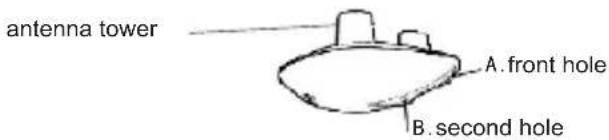
Handle the Wireless Sonar Sensor by the antenna tower when it has been in water. Use a heavy test line, standard knots, and tackle such as a swivel.
The second leader hole is for using the Wireless Sonar Sensor as a float. Connect a lighter weight hook line to this hole. Do not over-weight the hook line as this will submerge the Wireless Sonar Sensor, causing signal loss.
NOTE : You will increase the possibility of breaking your line if you use light test pound line on your reel. The Wireless Sonar Sensor is positively buoyant . The maximum amount of weight for any attachment to the Wireless Sonar Sensor is approximately 5.67 grams, and includes the combined weight of any hook, line, weight, swivel/snap swivel and bait that is attached to the Wireless Sonar Sensor.
NOTE :Store the Wireless Sonar Sensor in a dry, non-metallic container, such as a tackle box, in a separate compartment, and isolated from any metallic devices.
NOTE :The bottom of the Wireless Sonar Sensor should not be handled during sonar operation, as this may cause physical discomfort and may result in personal injury in the form of tissue damage. Handle the Wireless Sonar Sensor only by the antenna tower when it has been in the water.
NOTE : The Wireless Sonar Sensor is not intended for use by children younger than 6 years old without adult supervision as the Wireless Sonar Sensor may represent a choking hazard to small children.
5.Wireless Sonar Sensor Power
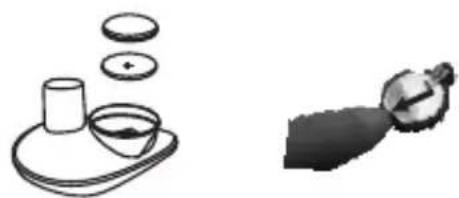
The Wireless Sonar Sensor has a CR-2032 Lithium battery .It is can be replaced.PIs check the attach pictures to change the battery.Remove the battery door of the Wireless Sonar Sensor and press the lock-block of the battery holder,the battery will flip automatically.
natural_image
Simple line drawings of a tea setup with a cup, teapot, and leaf (no text or symbols)NOTE: Make sure that the O-ring in the battery compartment is present, positioned correctly in the grooves, and free of debris before reinstalling the battery door. The Wireless Sonar Sensor has contacts that perceive when the device is immersed in the water. These contact turn on the Sonar Sensor/Receiver and begin transmitting the sonar information via RF to the display. The Wireless Sonar Sensor automatically stops using power a few seconds after being pulled out of the water.
NOTE : Do not place the Wireless Sonar Sensor in a wet area when not in use as this will turn on the Wireless Sonar Sensor and shorten its usable life. Store the Wireless Sonar Sensor in a dry area when not in use to conserve power. Never place the Wireless Sonar Sensor in a wet area of a boat or on a metal surface that could accidentally power it on.
FISHFINDER
NOTE : If the Wireless Sonar Sensor was used in salt water, rinse it with fresh water before storing it. Display View A simple menu system allows you to access your FFW718LiC-W adjustable settings. To activate the menu system, press the POWER-MENU key.
Press the POWER-MENU key repeatedly to display the FF718LiC-W menu settings, one at a time. When a menu settings is on the display, use the UP and DOWN Arrow keys to adjust the menu setting. Menus settings are removed from the screen automatically after several seconds. In Normal operating mode, most menu settings saved to memory.
6. Display View
The FF718LC-W displays underwater information in an easy-to-understand format. The top of the display corresponds to the water surface at the transducer, and the bottom of the display corresponds to the Depth Range automatically selected for the current water depth. The Bottom Contour varies as the depth under the boat changes. Digital readouts provide precise information for depth, fish and water temperature.
As the boat moves, terrain and bottom composition variations are displayed. Fish, baitfish and the rmoclines (underwater temperature changes) are displayed when detected. Underwater conditions vary greatly, so some experience and interpretation is needed to realize all the benefits of the F5748LiC Picture as a guide to the most common conditions and practice using the F5748LiOWM bottom types.
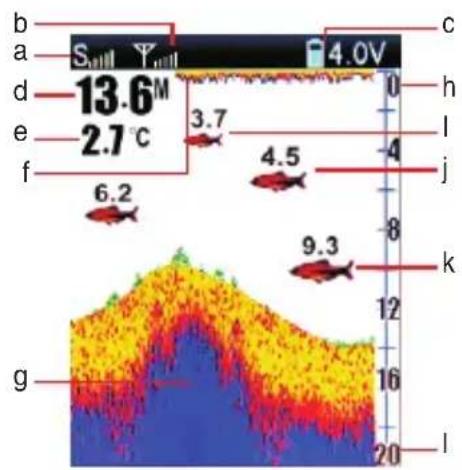
a. Sensitivity
b. Sensor connect indicator
c. Fish finder battery strength
d. Water depth
e. Water temperature
f.Water surface
g. Bottom contour
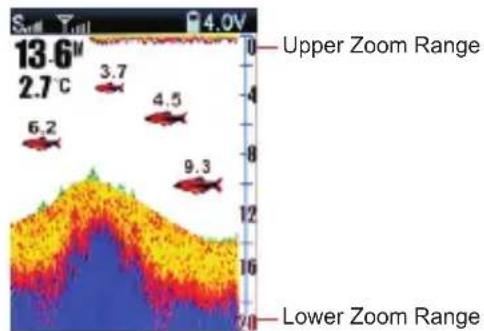
h. upper zoom range
I. Small fish icon with depth
j. Middle fish icon with depth
k. Large fish icon with depth
I. Lower zoom range
7. Powering ON and OFF
Press and release the POWER-MENU key to power the FF718Ci -W on. Press and hold the POWER-MENU key until the unit shuts down to power off.
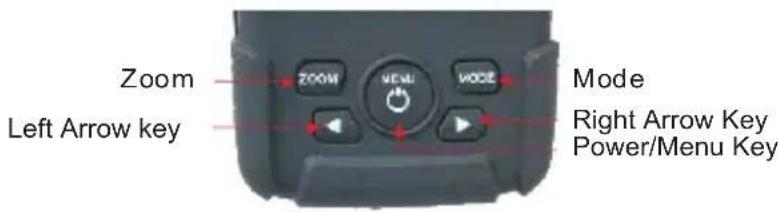
When the FF718LiC-W powers on, the LiC will temporarily display on screen last for 5 seconds.
Then will show START UP START UP, From this menu, use the arrow keys to select either Start-Up, Simulation. If you do nothing, the unit will default to normal on the water use.
- Use Start-Up for on the water use.

- Use Simulation for learning how to use the system with simulated sonar data; access Simulation by pressing the right Arrow Key once
8. The Menu System
A simple menu system allows you to access your FF718LC-W adjustable settings. To activate the menu system, press the POWER-MENU key. Press the POWER-MENU key repeatedly to display the FF718LC-W menu settings, one at a time. When a menu settings is on the display, use the UP and DOWN Arrow keys to adjust the menu setting. Menus settings are removed from the screen automatically after several seconds. In normal operating mode, most menu settings saved to memory will not return to their default values when the unit is turned off. See individual menu choices for more information.
NOTE: Each time the POWER-MENU key is pressed, the backlight momentarily illuminates for easy viewing at night. Adjust the LIGHT menu setting to keep the backlight on.
8.1 User mode----

Press the POWER-MENU key until USER MODE menu appears. Select a setting from

8.2 Sensitivity—
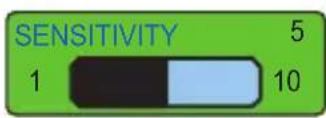
Press the POWER-MENU key until SENSITIVITY appears. Sensitivity controls how much detail is shown on the display. Increasing the sensitivity shows more sonar returns from small baitfish and suspended debris in the water; however, the display may become too cluttered. When operating in very clear water or greater depths, increased sensitivity shows weaker returns that may be of interest. Decreasing the sensitivity eliminates the clutter from the display that is sometimes present in murky or muddy water. If Sensitivity is adjusted too low, the display may not show many sonar returns that could be fish. (1 –10).
8.3 Depth Range---
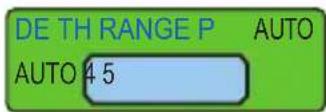
Press the POWER-MENU key until DEPTH RANGE appears. Automatic is the default setting. When in automatic, the lower range will be adjusted by the unit to follow the bottom. (Auto, 1 to 45 meter)
NOTE: In manual operation, if the current depth is greater than the depth range settings, the bottom will not be visible on the display. Select AUTO to return to automatic operation.
8.4 ZOOM—
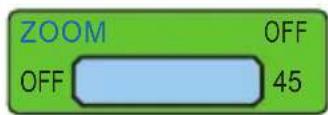
Press the POWER-MENU key until ZOOM appears. Select Auto to magnify the area around the bottom in order to reveal fish and structure close to the bottom that may not be visible during normal operation. When ZOOM is set to Auto, the upper and lower Depth Ranges are automatically adjusted to keep the area above and below the bottom on the display. Select Off to return to normal operation. (Off, 1 to 45 ) meter
heatmap
| Depth (cm) | Value | | ---------- | ----- | | 6.2 | 6.2 | | 3.7 | 3.7 | | 4.5 | 4.5 | | 9.3 | 9.3 |There is also a series of manual ranges which can be selected. The manual depth ranges are determined by the present depth conditions.
8.5 Depth Alarm –
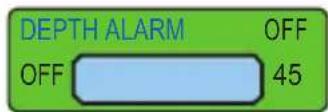
Press the POWER-MENU key until DEPTH ALARM appears. Select OFF for no Depth Alarm, or select 1 to 45 meters the alarm depth. An audible alarm sounds when the depth is equal to or less than the setting. (Off, Off, 1 to 45 meter
8.6 Fish Icon
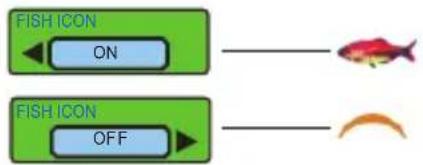
Make sure press the POWER-MENU key until FISH ICON appears. Select either Off to view "raw" sonar returns, or On to view Fish symbols. Fish ICON uses advanced signal processing to interpret sonar returns, and will display a Fish Symbol when very selective requirements are met.
A select number of possible fish returns will be displayed with their associated depth. (On, Off)
flowchart
graph LR
    A["FISH ICON"] --> B["ON"]
    C["FISH ICON"] --> D["OFF"]
    E["Red Fish Icon"] --> F["Orange Arrow"]
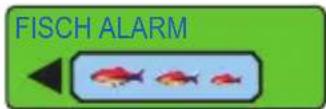
8.7 Fish Alarm—
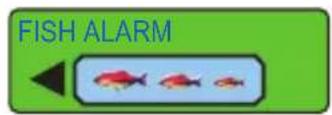
Press the POWER-MENU key until FISH ALARM appears. Select Off for no fish alarm, or one of the following symbols to set the alarm. An alarm will sound when the FF718LiC-W detects fish that correspond to the alarm setting. Fish Alarm will only sound if Fish ID+ is also set to On. (Off, Large fish, Large fish/Small fish).
Large fish only
Large fish/Middle fish
Large fish/Middle/Small fish



8.8 Units

Make sure press the POWER-MENU key until UNITS appears. UNITS selects the Depth units of Feet or Meter and TEMPE units selects the ^ C or ^ F。
8.9 Color tone

Press the POWER-MENU key until Color tone menu appears. Select a setting from BLUE, ORANGE or GREY.
8.10 Battery alarm
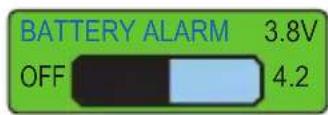
Press the POWER-MENU key until Battery alarm menu appears. Select a setting from OFF or from 3.6V-4.2V, Battery alarm sounds when the input battery voltage is equal to or less than the menu setting.
8.11 Language—

Press the POWER-MENU key until LANGUAGE appears. The FF718LiQW fish finder has two language choice(English, Russian)
8.12 Brightness
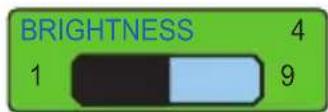
Press the POWER-MENU key until Brightness appears. Use the backlight for night fishing. Select 1-9 to activate the backlight at the desired level.
8.13 Chart Speed
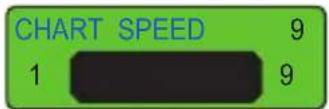
Press the POWER-MENU key until CHART SPEED menu appears. Select a setting from 1-9 to increase or decrease the chart speed, where 1 is the slowest and 4 is the fastest chart speed. (1 to 9)
9. Maintenance
Follow these simple procedures to ensure your FF718Li CW continues to deliver top performance.
If the unit comes into contact with salt spray, wipe the affected surfaces with a cloth dampened in fresh water.
Do not use a chemical glass cleaner on the less-this may cause cracking in the lens.
When cleaning the LCD protective lens, use a chamois and non-abrasive, mild cleaner. Do not wipe while dirt or grease is on the lens. Be careful to avoid scratching the lens.
Never leave the unit in a closed car or trunk - the extremely high temperatures generated in hot weather can damage the electronics.
10. Wireless sonar sensor Maintenance
After using the Wireless sonar sensor in salt water, wipe the affected surfaces with a cloth dampened with fresh water. The Wireless sonar sensor Cuprum-switch must be rinsed with fresh water after exposure to salt water prevent corrosion.
If your Wireless sonar sensor remains out of the water for a long period of time, it may take some time to wet it when returned to the water. Small air bubbles can cling to the surface of the Wireless sonar sensor and interfere with proper operation. Wipe the face of the Wireless sonar sensor with a wet cloth to remove them.
Never leave the Wireless sonar sensor in a closed car or trunk-the extremely high temperatures generated in hot weather can damage the electronics.
11. Trouble
1. The FF718LiGW loses signal in wireless User Mode.
If the FF718LiQW, while in Wireless user mode, is not able to get an RF signal from the Wireless sonar sensor, the display will stop updating and the NO SINGAL will be displayed after several seconds. Whenever reception is lost or the Wireless sonar sensor pulled out from the water for more than a few seconds, the ____ will be displayed until the Wireless sonar sensor is placed back in the water and reception is regained.
1) The Wireless sonar sensor uses line-of-sight wireless technology. If objects are placed between the FF718LiGW and the Wireless sonar sensor, reception may be lost.
2) The Wireless sonar sensor depth range is 2 to 147 feet (0.7 to 45 meters). Erratic readings may occur in water that is shallower than 2 feet. In addition, because of the nature of sonar, this product is not intended for use in swimming pools or small enclosed bodies of water.
3) Reeling the Wireless sonar sensor too fast can cause loss of signal and the screen will freeze.
4) Check the buoyant balance between the Wireless sonar sensor and your tackle; over 0.2 ounce will submerge the Wireless sonar sensor, causing signal loss.
5) The Wireless sonar sensor may not obtain its maximum RF distance of 590 feet unless the water is smooth. Waves or chop may reduce the RF range significantly.
2. When in very shallow water, I get gaps in the bottom reading and inconsistent digital depth indication.
The Wireless sonar sensor will work reliably in water 2 feet (0.7 meters) or deeper. The depth is measured from the Wireless sonar sensor.
A Wireless sonar sensor to FF718LiC-W distance of greater than 590ft may cause intermittent screen display. Excessively rough water may cause the Wireless sonar sensor to submerge, again losing contact.
-
The display shows fluctuating depth readings and excessive clutter, including vertical bars that may be drawn on top of fish icons.
-
The screen jumps and the bottom has an abrupt change; sometimes a vertical line is missing or a black line from top to bottom is displayed. This screen image jump is due to an automatic change in depth. New returns graphed at a different scale will not match up with the historic data already graphed at a higher or lower scale. Vertical lines can also occur as the radio signal from the Wireless sonar sensor is lost and then regained in rough water conditions.
FISHFINDER
SPECIFICATIONS
Fish finder:
1.Input power: ----3.7 Volt rechargeable lithium battery
2. Display Type----2. 8 inch color TFT LCD dispaly,240*(RGB)*320
3. Running time----20 hours (depend on actual using and working status)
Wireless sonar sensor:
- Power requirement----CR-2032 cell battery
2.Sonar operation Frequency----125 KHz
3.Sonar coverage----90 degrees
4.Depth capability ----45 meters (147 feet)/0.7 meters (2 feet) - Surface water temperature----built in transducer
6.Wireless operational frequency----433.92 MHz
7.Wireless operational range---- 100 meters (328 feet)
natural_image
Illustration of a yellow duck floating on blue water with fish and a sailboat, next to a smartphone displaying a scenic view (no text or symbols)
natural_image
Illustration of a yellow duck floating on water with curved white stripes, under a blue sky (no text or symbols)natural_image
Diagram of a boat navigating water channels with scattered fish (no text or labels)4. Den drahtlosen Sonarsensor anbringen
natural_image
Illustration of a coffee tray with a cup and a bowl, alongside a hand holding a small object (no text or symbols)flowchart
graph LR
    A["FISCH ICON ON"] --> B["→ Fish Icon"]
    C["FISCH ICON OFF"] --> D["→ Orange Arrow"]
8.7 Fisch Alarm
natural_image
Simple line drawing of a boat navigating water with a triangular structure and scattered stars (no text or symbols)Sensore sonar Wireless:
natural_image
Illustration of underwater gear and a smartwatch with floating objects, no visible text or symbolsnatural_image
Diagram of a coastal structure with water layers and vegetation, no text or symbols presentnatural_image
Illustration of a cup on a tray with three circular objects and a magnifying glass nearby (no text or symbols)natural_image
Six red fish arranged in two rows, no text or symbols present8.8 Unidades

Wireless sonar sensor:
- Power requirement CR-2032 cell battery
2.Sonar operation Frequency----125 KHz
3.Sonar coverage----90 degrees
4.Depth capability ----45 meters (147 feet)/0.7 meters (2 feet) - Surface water temperature----built in transducer
6.Wireless operational frequency----433.92 MHz
7.Wireless operational range---- 100 meters (328 feet)
natural_image
Illustration of underwater gear and smart lock system with floating objects and a smartphone displaying app interface (no text or symbols)natural_image
Diagram of a geological or sedimentary structure with layered strata and scattered particles (no text or symbols)natural_image
Illustration of a coffee cup on a tray with two additional cups and a magnifying glass (no text or symbols)natural_image
Six red fish arranged in two rows (no text or symbols)8.8 Unités

fishing makes life better
www.goodluckycn.Com