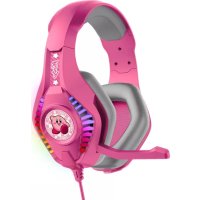
Kirby Pro G5 - Earphones OTL Technologies - Free user manual and instructions
Find the device manual for free Kirby Pro G5 OTL Technologies in PDF.


| Product type | Audio headset (headphone) |
| Brand | OTL Technologies |
| Model | Kirby Pro G5 |
| Speakers | 40 mm with color-changing light effect |
| Connector | USB + 3.5 mm stereo jack |
| Cable length | 2.2 m |
| Microphone sensitivity | 40 dB ± 3 dB |
| Microphone impedance | 2.2 Ω |
| Compatibility | PC, mobile, tablet, Nintendo Switch, PS4, Xbox One |
| Volume control | On the cable (wheel) |
| Warranty | 12 months (UK), 21 months (EU) from date of purchase |
| Care and cleaning | Clean with a soft, dry cloth. Do not immerse in water. |
| Safety precautions | Do not use at high volume for long periods. Keep out of reach of children under 3 years. |
| Weight | Approximately 250 g |
| Color | Black with RGB lighting (color-changing) |
Frequently Asked Questions - Kirby Pro G5 OTL Technologies
User questions about Kirby Pro G5 OTL Technologies
0 question about this device. Answer the ones you know or ask your own.
Ask a new question about this device
Download the instructions for your Earphones in PDF format for free! Find your manual Kirby Pro G5 - OTL Technologies and take your electronic device back in hand. On this page are published all the documents necessary for the use of your device. Kirby Pro G5 by OTL Technologies.
USER MANUAL Kirby Pro G5 OTL Technologies
22m multi-alkal kohel
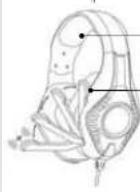
Zachr & comfortal
met 35 mm sensitizing
Angela, no 1956 + 3.5 mm water solution
Kohlenzny 25 m
Microphonocapsilabid: 62 dB + 3dB
Microconimpevanbe: 220Ω
ALGEMENE INSTRUCTIES
natural_image
Line drawing of a headset and a game controller (no text or symbols). Geansrinstellingen >Apparcten >/4.cic-apparcten
2. Кис Фензия винограде на Свердинара и Академоргески
3. See Umgang in op Kepetictor op Alcudio
4. S is not a source of an unseparative factors in the most common
b. I os volumersi-veau van de kopto-lecteen en de microfoon kan a s voigt in het 254 ^TM .
systemmeri worden aangetaat
6. Kopstelfort volume, betelungen > Apparaten > Audio-suppression >
Volumetrooling (kaatsloboni)
7. Mertoborensen, Irsteifungen > Apparaten > Autoapparaten > Micellecrivien
oppreisen (see no. mierelcrivien ser lat do indicator "good" vangell)
INSTELLING
natural_image
Line drawing of a VR headset and a game controller (no text or symbols)The image is too blurry to recognize any text content.
+ Niat ordem compelan in water
Mill Yutien Hwet, London 54712 SPZ, UK
- Couple or comfortable
Communities on claims prices at
microsphere photodistors
n=1.53k a /20
2014年1月1日
In the present or other case
Institute: 2015
Response in frequency: 30 - 29 000 Hz
Serabilihe: 97 dB + 3 dB
natural_image
Line drawing of a handheld gaming device with a screen and controller (no text or symbols)natural_image
Line drawing of a VR headset and a game controller (no text or symbols)GARANTIE DU PRODUIT ET GUIDE INFORMATIF
GARANTIE:
CONDITIONS DE LA GARANTIE
11 Yuen Heat, neden 561/81/18
- u lcnbergweg 278-308, LLC | BV Amrotercam. Zuidocst. NL
OTL
TECHNOLOGIES
PRO G5
OVER-EAR WIRED GAMING HEADPHONES
USER GUIDE
PACKAGING CONTENTS
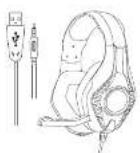
OTL PRO GS Cariring headphones

User guida
PRODUCT OVERVIEW TECHNICAL SPECIFICATION
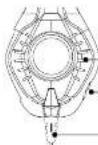
Circuit charge 40mm and 80 speakers
Adjust the source of the rooming game and chat audio
-25m, multi-aclining color
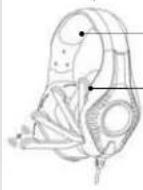
- Edit & comfortable
Clear communication with 120° retractable omnidirectional microrhors
- Comparable with all doses using
(1) Let us find a point of the () function, then let () be obtained from the solution of () . Then we use a solution to define the Solution of () with respect to the Solution of () .
Irradence 220
Frequency response: 20-20,000 L
Scraberry, 073B + 33B
Connector, USB + 3.6nm stereo jack
Bank 12, 01: 23:11
Носкопияненерг. 225,0
GENERAL INSTRUCTIONS
- Please make sure to adjust the hands-on set in the correct way for a proper filter.
the best sound quality
- Car cup with detachable microphone and 3 mm A.X cable should be the left
Chemistry (other) of E1
• To be satisfied with the sound quality, please make sure the plug is fully
inserted into both jacks, if the pieces are not fully inserted or loose, you may near
source from one side at no sound from bath our cup
• Compatible with all devices using 3.5mm thermal jack
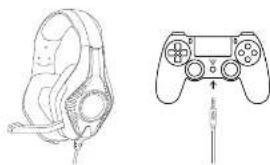
TM SETUP XBOX ONE
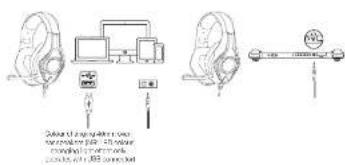
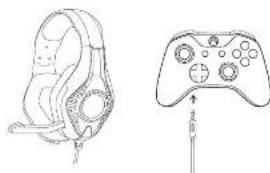
Most new PC's have a single 3.5mm jack connector. Simply plug the 3.5mm jack from the headphones into the port on your PC. The same applies when connecting to a mobile tablet and Nintendo Safari® Console. The headphones should work upon connection.
*If your PC uses separate Green/Port connectors for audio, you will need a PC splitter cable (not included)
** certain models of mobile and smart devices report a 3.5m in mobile device jack adapter (not included). Chat available for games that support in-game chat capability
P54 ^TM SETUPPC / MOBILE & TABLET AND NINTENDO SWITCH
natural_image
Line drawing of a headset and a game controller with a screwdriver (no text or symbols)-
Code Settings > Devices > Audio Devices
-
Select Hostset Connected to Controller for Input & Output Device
-
Se. Output to Headphones to Alaska
-
Set volume Control (headphones) level to maximum
-
The volume level of the headphones and microphone can be adjusted within the
PSI® system performance
G. Telephone volume: Settings > Devices > Audio Devices > Volume control
(need points)
- Microphane level: Settings > Devices > Audio Devices > Adjust microphane level
adjusted non-encephons see until the influence shows "good".
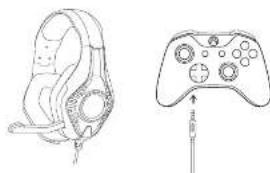
TM SETUP
natural_image
Line drawing of a VR headset and a game controller (no text or symbols)Rosa OTL Gaming Telephone required, the NEW Xbox One™ Controller (with 3.5mm task). If you are using an original Xbox One™ controller, you will require the Xbox One™ server based operator (not included)
XBOX ONE™ VOLUME SETUP
HEADSET CHAT MIXER
Press the Xbox button on your controller
-
Go1c System tab
-
Select Accio
-
Ensure the headset Mile is turned an
-
Se the reported values to maximum
-
Evis Hug-sondral Cini 15 years the midlife
-
For the idle period, you desired last
(一)公司董事会会议决议公告
XBOX ONE™ VOLUME SETUP
SURROUND SOUND
.. Press the Xbox button on your controller
-
Go to Saramab
-
Select Settings > Display & Sound > Audio Output
-
Select Beepast to Windows Bank for Headphones
PRODUCT GUARANTEE AND SAFETY INFORMATION
WARRANTY:
This product is not rated against defective medications and workmanship. If the warranty service is required, you should return the product to the retailer from where it was purchased. If the item was purchased in the United Kingdom, the guarantee stated is for 12 months from the date of purchase. It was purchased in the full time the guarantee period is 24 months from the date of purchase.
WARRANTY CONDITIONS
-
This warranty is only valid if when warranty service is required, the original invoice or sales ship is proposed, and the serial number on the product has not been deleted.
-
The manufacturer's obligations are limited to the repair or its discretion, replacement of the product or the detective part.
-
Warranty repairs must be carried out by an authorized dealer or authorized service centre. No reimbursement will be made for repairs carried out by non-authorized parties, and any such repair work or damage to the product caused by such repair work will not be covered by the warranty.
This cannot call not be considered to be defective in materials or workmanship by reason that it requires adaptation in order to conform with rational or local technical or safety standards. In terms in any country either than those for which it is originally designed and structured. This warranty will not over, and no reimbursement will be made for any such adaptation nor any damage which may result from it.
- This warranty covers none of the following:
- Maintenance and repair or replacement of parts due to normal wear and tear.
• Cest return to transport, renewal in installation of the process.
- Misuse (including the return to use this product for its normal purpose) or correct installation.
- Damage caused by lighting, water. Ire. Acta or Gce, war, public disturbance, or other causes beyond the control of the manufacturer.
-
This warranty is valid for any person who legally acquired the product during the warranty period.
-
The consumer's statutory lights under any applicable legislation, whether against the retailer or the manufacturer, and whether arising under contract or otherwise, are not affected by this warranty.
SAFETY INSTRUCTIONS:
Read all the instructions carefully before using the product and keep them for (1) reference
- Wearing headphones limits your ability to hear noises around you, regardless of the volume was used with a portion and communication
- Do not increase in water
- Unsuitable for use by children under the age of 3 due to small parts which may cause circling.
- We are needed that children aged 3.7 were supervised by an adult while using the product, procedure is not advised.
- Do not use these headphones whilst operating machinery driving, using a waterlake or bicycle, or in an orange where to maintain to hear surrounding noise may prevent another to yourself or others.
- Set volume to low be one unit on sound.
• The device may become warm while charging.
• Long-term excursions to loud noise may cause damage to search risks or losses of
barre
WARNING
• This product is not a toy.
+ Ba or disassemis, repair, or modify the nausea.
- Keep the headphones dry and do not store the headphones in damo areas to
avoid damage to the headphones.
• Avoid cropping the headphones as 7 may cause damage to the project.
• De no, immeterer in Salet
- Do not insert jack plug into electric sockets.
INFORMATION ON DISPOSAL FOR USERS OF WASTE ELECTRICAL & ELECTRONIC EQUIPMENT (PRIVATE HOUSEHOLD)
This number as the products are/or accompanying documents means that user, electronic and electronic product should not be mined with general house hold waste. I or proper treatment recovery and rejoining, please take these products to designated collection agents, where they will be accepted or a fair of charge basis. Alternatively, in some countries you may be able to return your product to your local retail on upon the purchase of equivalent new product. Setting of the product scope, you will help to save valuable resources and ensure any potential negative effects on human health and the own restaurant which could otherwise arise from inappropriate assets holding. Please standard your local authority for under-cause of your desired designated scope, on point, prices may be applicable for treatment disposal of this waste, in accordance with national legislation.
DECLARATION OF CONFORMITY
Cores's trading Ltd (CT Technology Ltd) decrease that the product complex
with the following directives:
EMC Directive of the European Union 2014/30/EU
This equipment meets the following performance standards
Safety
EN82988-12017A112017
LN0032-22013
ES FNE2988 12014 A112017
B3 LN6032-22013
Health
FN824792010
LN00632017
E5FN4M702013
US LN 539532017
EMC / UKCA-EMC
L:31_NJ01409-1V22312018-11
LISI_N 201469-17/03.2.4(2020-08)
ROHS Directive
[LU] 2015/083 Amending 2011/66/LU
Radio
ENSI EN 300 328 V22 2(2019-07)
EU Toy Safety Directive
EN71-12014-A1:2018
EN71-2:2011-A:2014
EN71-2:2020
EN71-5:2019
EN21-2019-01-2021
REACH
REGULATION EC 1907/2006

www.cai.101234;8000011-168541-101234;8000011
Made in PRC
13 Y. Box Road London 50412 927, UK
H. Tenergung 270-838, I. 31 E.V. Amsterdam, Quid-coz, NL