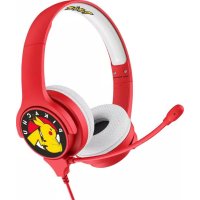
Pokémon - Earphones OTL Technologies - Free user manual and instructions
Find the device manual for free Pokémon OTL Technologies in PDF.


| Product type | Wireless headset |
| Brand | OTL Technologies |
| Model | Pokémon |
| Bluetooth version | 6.0 |
| Supported Bluetooth profiles | A2DP, AVRCP |
| Wireless range | 10 meters |
| Battery life | Up to 24 hours |
| Charging time | Approximately 1 to 2 hours |
| Battery type | Lithium-ion 3.7V |
| Battery capacity | 600 mAh (estimated) |
| Impedance | 32 ohms |
| Sensitivity | 95 dB ± 3 dB |
| Frequency response | 20 Hz - 20 kHz |
| Earphone type | Circumaural (over-ear) |
| Microphone | Built-in |
| Auxiliary input | 3.5mm jack |
| Charging port | USB Type-C |
| Controls | Volume, play/pause, track, voice assistant |
| Weight | Approximately 200 g |
| Dimensions | 18 x 15 x 8 cm |
| Box contents | Headset, AUX cable, USB-C cable, manual |
| Warranty | 12 months (depending on retailer) |
Frequently Asked Questions - Pokémon OTL Technologies
User questions about Pokémon OTL Technologies
0 question about this device. Answer the ones you know or ask your own.
Ask a new question about this device
Download the instructions for your Earphones in PDF format for free! Find your manual Pokémon - OTL Technologies and take your electronic device back in hand. On this page are published all the documents necessary for the use of your device. Pokémon by OTL Technologies.
USER MANUAL Pokémon OTL Technologies
OTL
TECHNOLOGIES
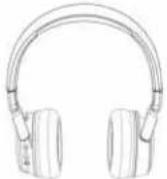
DRAADLOZE KOPTELEFOON
VOOR KINDEREN
HANDLEIDING

INHOUD
Coplels on

.61-4000000000000
AUX label reader

District of Chicago, IL 60061834, IL 742P/WRSP; HFP
(2) https://sgeslsznd.10m
Bottlenspanning: 3,79
Велинізарасія 500mA
Leadsochning batter:DO
[Unreadable]
Work posted: annexes 34 wur
imovians at 250
Georgefield 85 dB + 3dB (95 dB) + 3dB
Diameter | uidsprisior: 40 mm
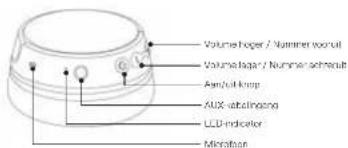
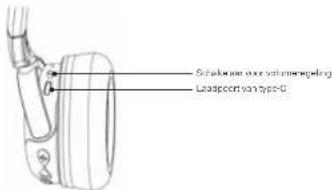
BEDIENINGSOVERZICHT
KOPPELEN MET BLUETOOTH-APPARATEN
- 340 cm (Budetel)-appened near "busdrogen" → "Budetel" → "muzakeil
Ucooohin
USB Type C charging cable
Sharing ALX cable

West guide & warranty issued
SAFETY INSTRUCTIONS:
- Read all the instructions carefully before using the product and keep them for future reference.
- Wearing headphones limits your ability to hear noises around you, regardless of the volume level. Use with sound and consideration
- Do not include a vector.
- Unsuitable for use by children under the age of 2 due to small parts which may be as check me.
- We recommend that children aged 5+ are supervised by an adult while using the product, prolonged use is no advised
- Do not use these headphones while operating machinery driving, riding a motorcycle or bicycle, or in situations where an inability to bear surrounding noise may present a danger to yourself or others.
- The device may become warm white charging
- Set volume to live before turning on sound.
- Long-term exposure to loud notes may cause damage to end trauma or loss of hearing.
WARNING
• This product is not a toy.
• Direct misassemble, repair, or modify the headpromax.
• Do not place headphones in or near line to avoid danger
- Do not stare the hexphones in extreme temperatures, this car shorten the
Barnery life and may affect the headphones.
- Do not use a headphone during a mandarature to avoid irregular function and increased risk of electric shock
- Do not use batch chemicals or strong detergents to clean the headphones.
- Keep that phone calls.
- Avoid mapping the best failures set may cause damage to the account
• Do not insert, ask plug into electric sensors.
SPECIFICATION
Boscoohv5.0
Chipset information: JAC6955F
List of Bluetooth Protocols: A2DR/MWRCP/HFP
Clones ^™ is a class of
Winghua, 2016
17.2.12 17.2.13
a_1 = 5 - b - c
Ersenius Vipomini /Omn
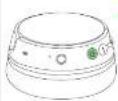
CONTROL OVERVIEW
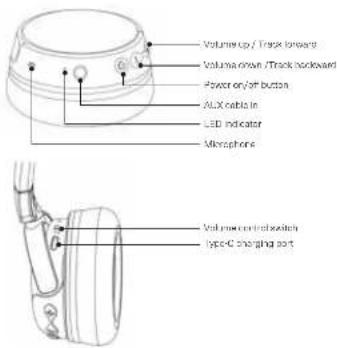
PAIR WITH BLUETOOTH DEVICES
Please ensure that the Bluetooth function has been carried on in the settings of your Bluetooth enabled device. You must pair the hardware with a bluetooth enabled device before it can be used exclusively.
You only need to pay your headphones to each Bluehall enclosed device once. They will automatically reconnect to each device when turned on in their vicinity. They may more devices are available, the best device joined will be the one that recommends.
FIRST TIME USE / PAIR TO NEW DEVICE
-
On your Bluetooth device go to "settings" → "Bluetooth" → on your Bluetooth
-
Turn the headphones on by pressing the power/multifunction button until the IFD indicator light equals flash. The IFD indicator light will flash to detect Bus or unable channels use you and call enter using video.
-
"OIL KID8 B12" will appear on the Bluetooth cover list, select OIL KID8 B12 to establish pairing.
-
When parring is successful the LLD indicator light on the headphones will glow BLUF and flash for 5 seconds
When you want, to play audio from another Bluetooth device, disconnect the headphones from the original device and follow steps 1-4 to re-part the headphones with a new Bluetooth enabled device.
BUTTON FUNCTION
Power on
xellin co oas end center pelino mode
Power off
Press for 3 seconds, the LLU indicator
Lighted go out, and the headprames is all
Answer & hang up the call
Dr. 1984
Play / pause
Free the button once
Note: If there's an incoming call, music
S ACD = S COD + S COD - S COD
Closing price
(1) 2024年1月1日
Voicn xiaixianl
Press the button for 2 seconds to activate
voice sexualist, a Siror Google
Agricorm
Track forward
Presse the button for 2 seconds
Volume down
Press the button as many times as
required only the desired volume level is reached.
USING AUX CABLE
- Connect the headphones to a smartphone, audio video or laptop (sea overview)
diagram for location (with the sharing AUX cable or 3.5mm AUX cable included)
- When the headphones are used with the ALL cable, all functions are disabled, including the volume control switch set up.
Note: Occphones will not work if charging cable is still connected.
Plac-er charge yinai bexiapho-er beic'or first time a
- Value the base-keeping phase channel is the related USB Type Cable
The charging time is approximately 2 hours and provides up to 24 hours or continuous operation.
- The LED indicator light will be red during charging and will turn off once it is fully charged. When the battery is low, the LED indicator light will flash red.
Press the button twice
Volume up
Press the button as many times as you
"want until reach to desire volume level"
"Long-term exposure to loud voice may
cause damage to cerdrums or loss of
Lacking
Track backward
Press the button for 2 seconds
TROUBLESHOOT
- When an error occurs with the headphones, please turn off the headphones and report it to double another.
- When the headphones power is low, the Bluetooth range may be affected. Please charge the headphones to avoid dispositions during use.
- Please see our website to www.achinoogies.com for general group e-shooting instruction.
PRODUCT GUARANTEE AND SAFETY INFORMATION
WARRANTY:
This product is not named against effective margins and workmanship. If the war only service is required, you should return the product to the retailer from where it was purchased. If the item was purchased in the United Kingdom, the guarantee started is for 12 months from the date of purchase. It was purchased in the full, then the guarantee period is 24 months from the date of purchase.
WARRANTY CONDITIONS
- This warranty is only void if when warranty service is required, the original invoice or sales slip is produced, and the serial number on the product has not been deloced.
- The manufacturer's obligations are limited to the repair or its discretion, replacement of the product or the detective part.
-
Warranty repairs must be carried out by an authorized dealer or authorised service centre. During imprisonment will be made for repairs carried out by non-authorized permits, and any such repair work or damage to the product caused by such repair work will not be covered by the warranty.
This amount will not be considered to be defective in materials or materials and by reason that requires adoption in order to conform with rational or local technical or safety standards. In terms of currency either as those for which it is or greatly designed and should be used. This security will not offer, and no reimbursement will be made for any such advertisement nor any damage which may result from it. -
This warranty covers none of the following:
-
Maintenance and repair or replacement of parts due to normal wear and tear.
• Infrastructure is transport, research in publisher of the product. - (Mioso including the return to use this product for its normal purpose) or incorrect installation.
- Damage caused by lightning, water, fire, Act of Oec, war, public disturbance, or other causes beyond the control of new manufacture.
- The warranty is valid for any person who legally acquired the product during the warranty period.
- The consumer's statutory rights under any applicable legislation, whether against the retailer or the manufacturer, and whether arising under contract or otherwise, are not allowed by this warranty.
INFORMATION ON DISPOSAL FOR USERS OF WASTE ELECTRICAL & ELECTRONIC EQUIPMENT (PRIVATE HOUSEHOLD)
This symbol on the products and/or accompanying documents means that used electrical and electronic products should not be made with general no use told. For proper treatment, recently and recording, please take these amounts to designated collection points where, may will be expected only free of charge basis. Alternatively, in any number you may be able to return your products to your new leader upon the purchases of an equivalent new product. Disposing of this product correctly will make to save valuable resources and prevent any potential negative effects on human brain and the environment which could otherwise omit from immediate waste handling. Please check your social authority for further details of your location recognized collection plant. Permit may also applicable for interest disposal of this way, in accordance with national legislation.
DECLARATION OF CONFORMITY
Oceanis Trading Ltd/OTL Technologies Ltd decrease that this product comprises
with the following directions
RED DIRECTIVE 2014/63/EV
This equipment, requires the following compliance standards:
SAFETY
EN82368-1204-A112017
EN5132-2:2013
B3 FN62988 1.2017 A11 2017
US LN0032-22013
HEALTH
FNE21732010
EN506632017
RS FN 624782010
09 LN 606632017
EMC
L19 LN30 409-1 V2.23 (2018-11)
L15 LN30 409-17(324(2026))
RADIO
LNG LN 300 329 V2 2212019-07
ROHS DIRECTIVE
(LU) 2016/053. Amending 2017/50/LU
REACH
REGULATION EC 1907/2008
EU TOY SAFETY DIRECTIVE
EN71-1:2014+512018
EN71-2 2011-A1204
EN71-22020
FN7132018
LNY1-3 2019+A1 2021
MSDS REPORT
Certification No: NC120050719XM1-1
BATTERY POLYMER LI-ON
nodelro:Y53335/0.72

www.all.who.org.com 01@Salle news.com
Made P.PFC
Coceanic Trading Ltd/OTL Technologies
In the hospital 27-30, 1811 (or hospital, as reported)
OTL
TECHNOLOGIES
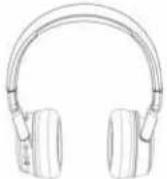
CASQUE SANS FIL
ENFANT
GUIDE UTILISATEUR

CONTENU
Cenque

Câbia de chargement USB de type C
Cable AUX de portage

Guide cubesieur el noticede de garantie.
CONSIGNES DE SÉCURITÉ :
Technician characteristics: OCF ^+
The following table is the same as the first time of the last time.
Our data is from Table 2.3.1, 2017, 1984, 1985, 1986, and 1987.
-
2017年,公司与上海浦东发展银行股份有限公司签订了《关于使用部分闲置募集资金进行现金管理的协议》。
-
Waren die Kapitung erfolgreich ist, leuromer das FDI Anzeige am Kapitbarer 31 AU und direkt 5 Sekunden lang.
18 Y. bar (onal lonsar 80/12 9/7, UK
Cable AUX compatibility

In formation of a small Chinese II, AC8965F
Licente dei proteotti Bluetooth: A2LP/AMRSP/II P
Note: S = a^2k_1 and a^2k_2 are not a, is
The following described procedure is
chiameta banga crepata, culante, jo
[Unreadable]
Axiextente vocale