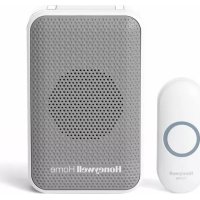
RDWL313A2000 - Doorbells HONEYWELL - Free user manual and instructions
Find the device manual for free RDWL313A2000 HONEYWELL in PDF.


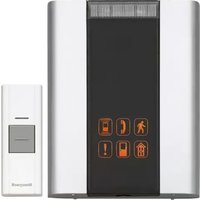
| Product Type | Plug-in wireless doorbell |
| Brand | Honeywell Home (licensed by Resideo) |
| Model | RDWL313A2000 |
| Doorbell power supply | 100-240 V~, 50-60 Hz, 300 mA |
| Push button power supply | 1 CR2032 battery (included) |
| Battery life | Up to 2 years (5 activations/day) |
| Communication frequency | 916.8 MHz (ActivLink) |
| Free field range | 76 m (250 ft) |
| Typical sound level | 84 dBA |
| Number of melodies | Multiple (selection by dedicated button) |
| Lighting | Adjustable flashing LED (top, bottom, or both) |
| Max number of connectable accessories | 4 (push buttons, motion sensors, etc.) |
| Secret melody function | Yes (triple quick press for different chime and lighting) |
| Doorbell operating temperature | -5 °C to 40 °C (23 °F to 104 °F) |
| Push button operating temperature | -20 °C to 50 °C (-4 °F to 122 °F) |
| Push button waterproof rating | Rainproof (UL1598 tested) |
| Warranty | 1 year (excluding batteries) |
| Box contents | Doorbell, push button, mounting bracket, CR2032 battery, screws, adhesive pad |
| Maintenance | Periodic replacement of push button battery |
| Reset | Press and hold the setup button while plugging in |
| Compatibility | Additional Honeywell ActivLink accessories |
| Country of manufacture | United States |
Frequently Asked Questions - RDWL313A2000 HONEYWELL
User questions about RDWL313A2000 HONEYWELL
0 question about this device. Answer the ones you know or ask your own.
Ask a new question about this device
Download the instructions for your Doorbells in PDF format for free! Find your manual RDWL313A2000 - HONEYWELL and take your electronic device back in hand. On this page are published all the documents necessary for the use of your device. RDWL313A2000 by HONEYWELL.
USER MANUAL RDWL313A2000 HONEYWELL
Installation and Operation Guide
Plug-In Wireless Doorbell
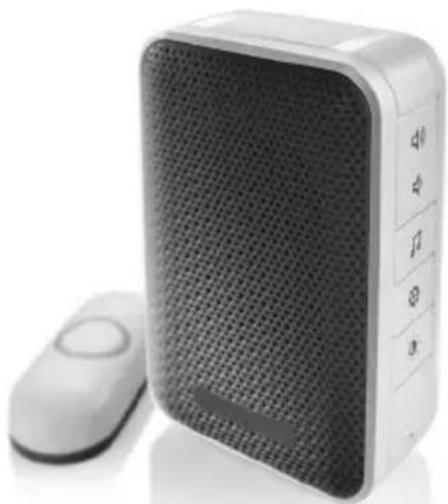
natural_image
White portable electronic device with mesh grille and control buttons, no visible text or symbols on the device body.RDWL313P2000
Read before installing
Preparation
In the box you will find
natural_image
Blank rectangular frame with rounded corners (no text or symbols)Doorbell
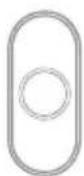
Push Button
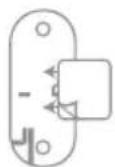
Push Button Mounting Bracket and Adhesive Pad

CR2032
Battery

Flat Head Screws
To install you will need


Phillips Screwdriver
Standard Screwdriver
The push button supplied with this kit is pre-programmed to operate with the doorbell. If it is not, see "Connect a Push Button" on page 4.
Overview
Just follow these simple steps:
- Install the push button battery and plug in the doorbell.
- Set up the doorbell and your preferences.
- Install the push button.
Power-up
- Choose an outlet location that is not near a heat source, where the doorbell will be easy to see and hear, and plug in the doorbell.
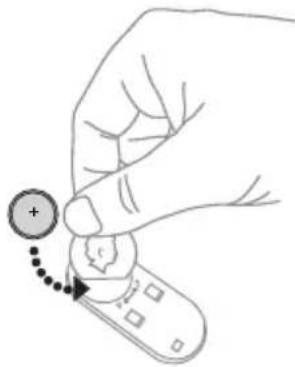
- Open the push button battery cover and install the CR2032 battery.
Setup and Operation
natural_image
Hand holding a remote control with a plus sign and dotted arrow indicating action (no text or symbols)Press the push button to test whether it is paired with the doorbell. The doorbell will light up and ring. If it does not, see “Connect a Push Button” on page 4.
Change the Light Setting
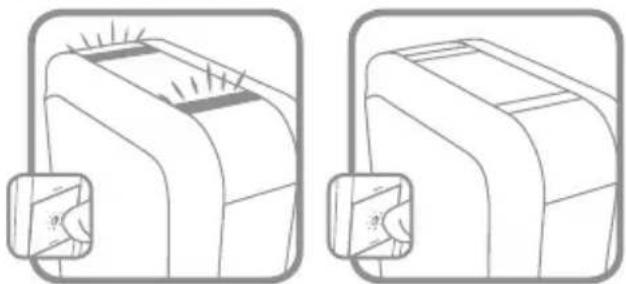
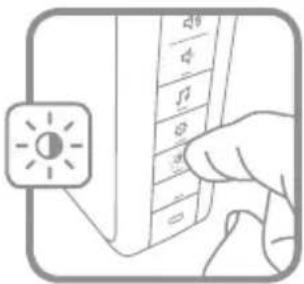
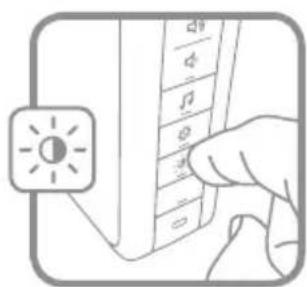
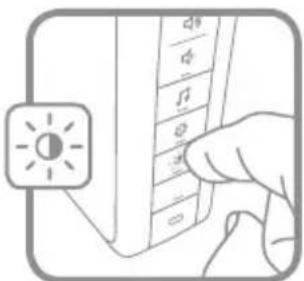
Press the Sunlight button to change the lights that flash when the doorbell rings.
Press the Sunlight button
1 time 2 times
natural_image
Two identical line drawings of a device with a magnified inset showing internal components (no text or symbols)Top lights only No lights.
Change the Tune
Press the Music button to change the doorbell tune.
Every time you press the Music button, the tune will change. Stop pressing the Music button when you hear the tune you want:

natural_image
Illustration of a hand pressing down on a keyboard with musical notes (no text or symbols visible)Ding Dong Westminster Piano Fantasy Soft Alert Smart Sax
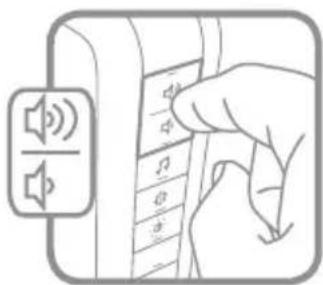
Adjust the Volume
Press the Volume Up or Volume Down buttons to adjust the volume of the Doorbell.
natural_image
Illustration of a hand pressing down on a device panel with speaker icons (no text or symbols)Install Push Button
-
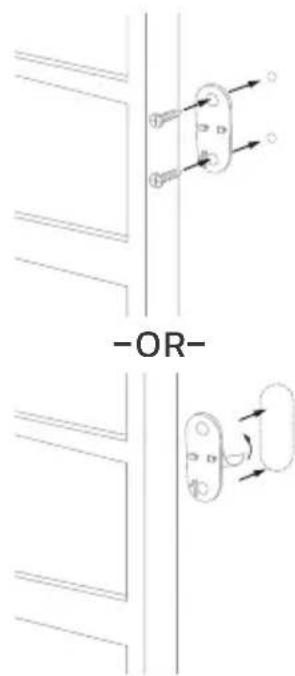
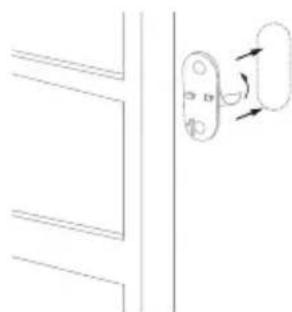
Mount the push button bracket in the desired location Use the screws -OR- Use the adhesive backing. If using the adhesive backing, clean the surface first.
-
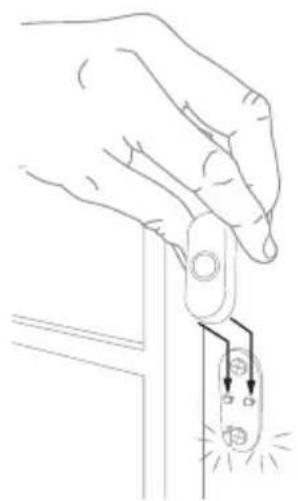
Snap the push button onto the mounting bracket.
natural_image
Line drawing of a hand holding a switch with a power outlet, showing electrical connections (no text or symbols)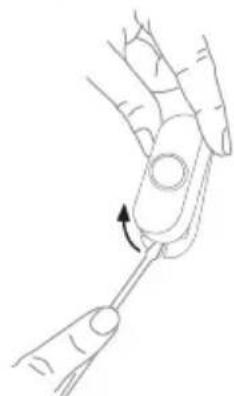
natural_image
Line drawing of a hand holding a finger with a tool, showing a curved arrow indicating rotation (no text or symbols)Note: If you need to remove the push button, use a small screwdriver to release the tab.
Accessories
You can connect 4 accessories to your doorbell, including other push buttons, window or door opening sensors, and motion sensors.
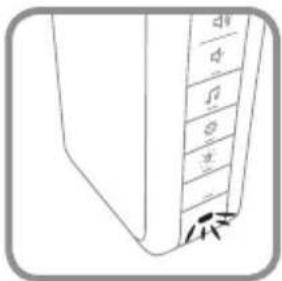
If you try to connect more accessories than the max number, the LED on the side blinks red.
Connect a Motion Sensor
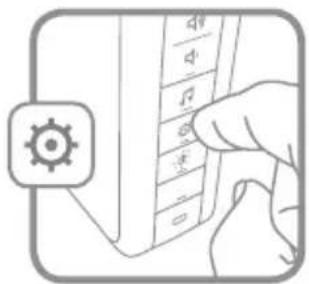
- Press and hold the Setting button on the doorbell for three seconds.
The LED on the side turns on with an amber color.
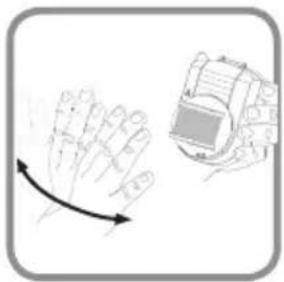
- Within 20 seconds of pressing the Setting button, wave or make some other kind of motion in front of the motion sensor.
natural_image
Illustration of a hand with a curved arrow and a device on top (no text or symbols)Connect a Push Button
Follow these steps to change the ring and light settings for an existing doorbell, too.
-
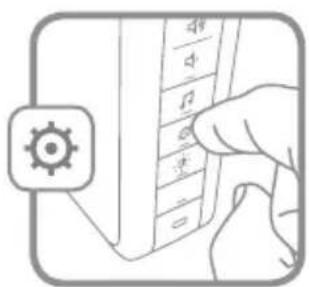
Press and hold the Setting button on the doorbell for three seconds. The LED on the side turns on with an amber color.
-
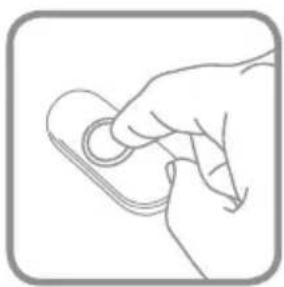
Press the push button.
-
Within 12 seconds of pressing the push button, press the Music button to select the ring for that push button.
-
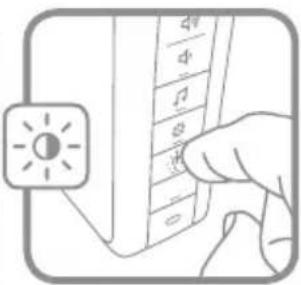
Within 12 seconds of pressing the doorbell, press the Sunlight button to select light setting for that push button.
natural_image
Line drawing of a hand holding a small object, no text or symbols present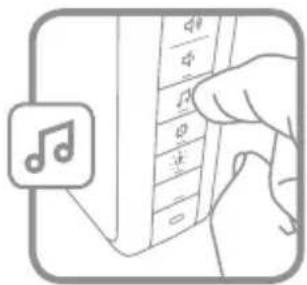
Secret Knock
You can set up a Secret Knock that makes a different ring and light setting for each push button. The Secret Knock is triggered by pressing the push button quickly 3 times.
- Press the push button 3 times quickly.
- Within 12 seconds of pressing the push button, press the Music button to select the ring for the Secret Knock
- Within 12 seconds of pressing the push button, press the Sunlight button to select a light setting for the Secret Knock.
Maintenance
Your doorbell and push button require no maintenance except to periodically change the battery.
If using the correct battery, its life should be approximately:
- Up to 2 years for the push button; replace with CR2032 lithium battery
Low Battery Notification
When the push button batteries are low, two beep sounds are heard after the normal tune.
Reset
This process removes all pairings, including the push button that came with this doorbell:
- Unplug the doorbell.
- Press and hold the Setting button, and plug the doorbell back in at the same time.
- The doorbell will beep several times rapidly, and is returned to its factory default settings.
Specifications
| Doorbell Push Button | ||
| Operating Temperature 23°F to 104°F | (-5°C to 40°C) -4°F to 122°F (- | 20°C to 50°C) |
| ActivLinkTM 916.8 MHz 916.8 MHz | ||
| Range (open field) 250 ft. (76 m) 250 ft. (76 m) | ||
| Sound Level (typical) 84dBA - | ||
| RF Power - <1.2W | ||
| Battery Type | Input 100-240V~ 50-60Hz 300mA | CR2032 |
| Battery Life (5 activations/day) - Up to 2 years | ||
| Rain proof N/A Pass UL1598 rain test. | ||
Troubleshooting
| If | Then |
| The doorbell does not work | 1. Make sure the correct batteries (1 CR2032) are installed with the correct polarity.2. The doorbell might be out of range; try the doorbell in a different location.3. Reconnect the doorbell. See “Connect a Push Button”. |
| Two ‘beep’ sounds are heard after the normal tune | Replace push button battery with a new CR2032. |
| Range is reduced | 1. Metal structures including uPVC door frames can reduce the range. Don’t mount the the doorbell or push button on or near metal structures.2. Move the doorbell closer to the push button.3. Weak batteries will reduce range. In cold conditions (below 41°F [5°C]), batteries may need to be replaced more often. |
For help please visit honeywellhome.com or call 1-800-633-3991.
FCC Regulations
This device complies with part 15 of the FCC Rules. Operation is subject to the following two conditions: (1) This device may not cause harmful interference, and (2) this device must accept any interference received, including interference that may cause undesired operation.
The grantee is not responsible for any changes or modifications not expressly approved by the party responsible for compliance. Such modifications could void the user's authority to operate the equipment.
This equipment has been tested and found to comply with the limits for a Class B digital device, pursuant to part 15 of the FCC Rules. These limits are designed to provide reasonable protection against harmful interference in a residential installation. This equipment generates, uses and can radiate radio frequency energy and, if not installed and used in accordance with the instructions, may cause harmful interference to radio communications.
However, there is no guarantee that interference will not occur in a particular installation. If this equipment does cause harmful interference to radio or television reception, which can be determined by turning the equipment off and on, the user is encouraged to try to correct the interference by one or more of the following measures:
- Reorient or relocate the receiving antenna.
- Increase the separation between the equipment and receiver.
- Connect the equipment into an outlet on a circuit different from that to which the receiver is connected.
- Consult the dealer or an experienced radio/TV technician for help.
This transmitter must not be co-located or operating in conjunction with any other antenna or transmitter. This equipment should be installed and operated with a minimum distance of 20 millimeters between the radiator and your body.
IC Regulations
CAN ICES-3(B)/ NMB-3(B)
This device complies with Industry Canada licence-exempt RSS standard(s). Operation is subject to the following two conditions: (1) this device may not cause interference, and (2) this device must accept any interference, including interference that may cause undesired operation of the device.
CAN ICES-3(B)/NMB-3(B)
The device meets the exemption from the routine evaluation limits in section 2.5 of RSS 102 and compliance with RSS-102 RF exposure, users can obtain Canadian information on RF exposure and compliance.
This transmitter must not be co-located or operating in conjunction with any other antenna or transmitter. This equipment should be installed and operated with a minimum distance of 20 millimeters between the radiator and your body.
The operation of this equipment is subject to the following two conditions: (1) this equipment or device may not cause harmful interference, and (2) this equipment or device must accept any interference, including interference that may cause undesired operation.
1-year limited warranty
Resideo warrants this product, excluding battery, to be free from defects in workmanship or materials, under normal use and service, for a period of one (1) year from the date of first purchase by the original purchaser. If at any time during the warranty period the product is determined to be defective due to workmanship or materials, Resideo shall repair or replace it (at Resideo's option).
If the product is defective,
(i) return it, with a bill of sale or other dated proof of purchase, to the place from which you purchased it; or (ii) call Resideo Customer Care at 1-800-633-3991. Customer Care will make the determination whether the product should be returned to the following address: Resideo Return Goods, 1985 Douglas Dr. N., Golden Valley, MN 55422, or whether a replacement product can be sent to you.
This warranty does not cover removal or reinstallation costs. This warranty shall not apply if it is shown by Resideo that the defect was caused by damage which occurred while the product was in the possession of a consumer. Resideo's sole responsibility shall be to repair or replace the product within the terms stated above. RESIDEO SHALL NOT BE LIABLE FOR ANY LOSS OR DAMAGE OF ANY KIND, INCLUDING ANY INCIDENTAL OR CONSEQUENTIAL DAMAGES RESULTING, DIRECTLY OR INDIRECTLY, FROM ANY BREACH OF ANY WARRANTY, EXPRESS OR IMPLIED, OR ANY OTHER FAILURE OF THIS PRODUCT.
Some states do not allow the exclusion or limitation of incidental or consequential damages, so this limitation may not apply to you.
THIS WARRANTY IS THE ONLY EXPRESS WARRANTY RESIDEO MAKES ON THIS PRODUCT. THE DURATION OF ANY IMPLIED WARRANTIES, INCLUDING THE WARRANTIES OF MERCHANTABILITY AND FITNESS FOR A PARTICULAR PURPOSE, IS HEREBY LIMITED TO THE ONE YEAR DURATION OF THIS WARRANTY. Some states do not allow limitations on how long an implied warranty lasts, so the above limitation may not apply to you.
This warranty gives you specific legal rights, and you may have other rights which vary from state to state. If you have any questions concerning this warranty, please write Resideo Customer Care, 1985 Douglas Dr, Golden Valley, MN 55422 or call 1-800-633-3991.

resideo
Resideo Inc., 1985 Douglas Drive North
Golden Valley, MN 55422
www.resideo.com
33-00193EFS-05 M.S. Rev. 01-20 | Printed in United States
This product is manufactured by Resideo Technologies, Inc., Golden Valley, MN, 1-800-633-3991 © 2020 Resideo Technologies, Inc. The Honeywell Home trademark is used under license from Honeywell International Inc.
All rights reserved.

33-00193EFS-05
natural_image
White portable electronic device with mesh back panel and control buttons (no visible text or symbols)RDWL313P2000
natural_image
Blank rectangular frame with rounded corners (no text or symbols)Sonnette
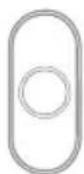
Bouton-
poussoir
natural_image
Hand holding a remote control with a plus button and arrow indicator (no text or symbols)natural_image
Diagram of a device with light rays and a magnified inset showing a small object (no text or symbols)natural_image
Line drawing of a mechanical component with a magnified inset showing a circular feature (no text or symbols)Aucune lumière
natural_image
Illustration of a hand pressing down on a keyboard with musical notes (no text or symbols visible)Ding Dong
Westminster
Piano
Fantaisie
Alerte douce
Smart Sax
Réglage du volume
natural_image
Illustration of a hand pressing down on a device panel with speaker icons (no text or symbols)natural_image
Pure electrical circuit lines without any symbols-OU-
natural_image
Simple line drawing of a door handle with a scroll wheel, no text or symbols present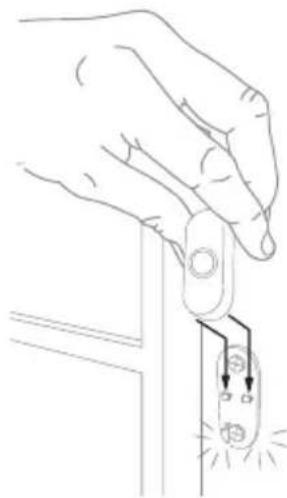
natural_image
Line drawing of a hand holding a switch with a small electrical component, emitting sparklers (no text or symbols)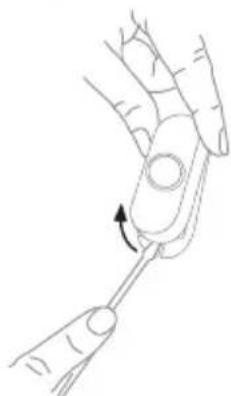
natural_image
Line drawing of a hand holding a small object with an arrow indicating rotation (no text or symbols)natural_image
Illustration showing a hand inserting a card into a mobile phone with a gear icon (no text or symbols)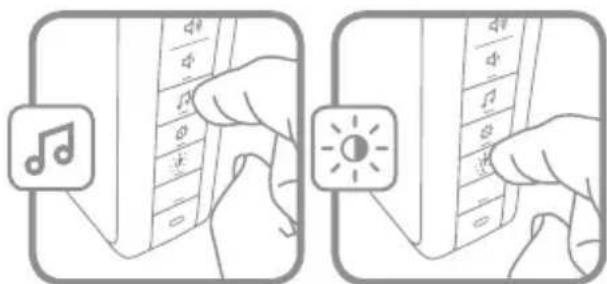
Resideo Inc., 1985 Douglas Drive North
Golden Valley, MN 55422
www.resideo.com
33-00193EFS-05
natural_image
White portable electronic device with mesh grille and control buttons, no visible text or symbols on the device body.RDWL313P2000
Leer antes de instalar
Preparación
natural_image
Blank rectangular frame with rounded corners (no text or symbols)Timbre
natural_image
Hand holding a remote control with a plus sign and cursor icon (no text or symbols)natural_image
Illustration of a device with light rays and a magnified inset showing a small screen (no text or symbols)natural_image
Line drawing of a mechanical component with a magnified inset showing a circular feature (no text or symbols)Sin iluminación
Ding Dong
Westminster
Piano
Fantasía
Alerta suave
Saxofón inteligente
natural_image
Illustration of a hand pressing down on a device with sound waves and musical notes (no text or symbols)Instale el pulsador
natural_image
Line drawing of a hand holding a small electronic component with a glowing bulb (no text or symbols)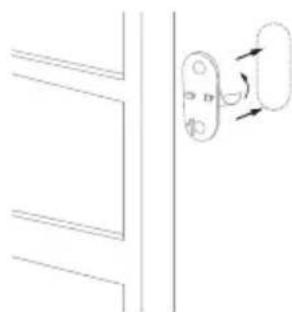
natural_image
Simple line drawing of a door handle with a lock mechanism, no text or symbols present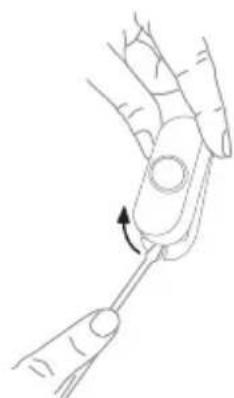
natural_image
Line drawing of a hand holding a tool with an arrow indicating rotation (no text or symbols)natural_image
Illustration showing a hand holding a device with a gear icon and a close-up of the hands adjusting a circular component (no text or symbols present)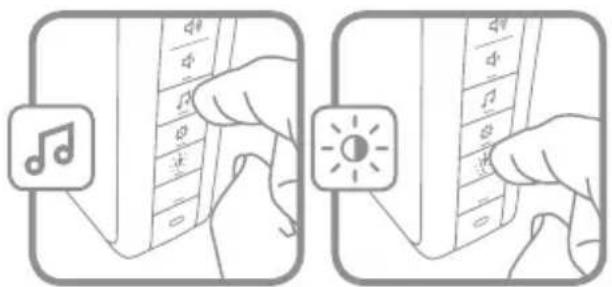
Resideo Inc., 1985 Douglas Drive North
Golden Valley, MN 55422
www.resideo.com
33-00193EFS-05