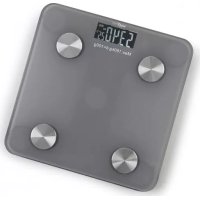
00272 - Scale Maxxmee - Free user manual and instructions
Find the device manual for free 00272 Maxxmee in PDF.


| Type of product | Connected body analysis scale |
| Brand | Maxxmee |
| Model | 00272 |
| Power supply | 2 AAA 1.5V batteries (3V total) |
| Maximum capacity | 180 kg |
| Minimum capacity | 5 kg |
| Accuracy | 100 g |
| Weight units | kg, lb |
| Main functions | Weighing, body fat analysis, water mass, muscle mass, bone mass, BMI, daily calorie intake, visceral fat |
| Connectivity | Bluetooth 2402-2480 MHz, OKOK app (iOS/Android) |
| User profiles | 8 (1 owner + 7 guests) |
| Display | Digital screen |
| Material | Glass and plastic |
| Cleaning and maintenance | Slightly damp soft cloth, no corrosive products |
| Safety | Not suitable for people with pacemakers, pregnant women, people on dialysis or taking cardiovascular medication. Do not use on uneven floor or thick carpet. |
| Error messages | Lo (low batteries), OL (overload >180 kg), measurement error |
| Disposal | Do not dispose of with household waste, recycle batteries separately |
| Radio frequency | 2402-2480 MHz |
| Transmission power | 2.84 mW |
| Model number | TS-30447 |
Frequently Asked Questions - 00272 Maxxmee
User questions about 00272 Maxxmee
0 question about this device. Answer the ones you know or ask your own.
Ask a new question about this device
Download the instructions for your Scale in PDF format for free! Find your manual 00272 - Maxxmee and take your electronic device back in hand. On this page are published all the documents necessary for the use of your device. 00272 by Maxxmee.
USER MANUAL 00272 Maxxmee
Inserting / Changing Batteries 14
Use 14
Error Messages 17
Incorrect Specifications 18
Cleaning and Storage 18
Technical Data 18
Disposal 19
Notice on the Declaration of Conformity 19
ITEMS SUPPLIED
• Body analysis scales 1 x
• 1.5 volt battery AAA type 2 x
- Operating instructions 1 x
Check the items supplied for completeness and check components for transport damage. If you find any damage, do not use the device but contact our customer service department.
Remove any possible films, stickers or transport protection from the device.
Never remove the rating plate and any possible warnings!
AT A GLANCE
(Picture A)
1 Display
2 Contact areas for the right foot
3 Battery compartment (on the bottom)
4 Contact areas for the left foot
Display indications are shown as follows: OL
Key numbers are shown as follows: (1)
Picture references are shown as follows: (Picture A)
EN
Dear Customer,
We are delighted that you have chosen the MAXXMEE body analysis scales.
If you have any questions about the device and about spare parts / accessories, contact the customer service department via our website:
We hope you have a lot of fun with your MAXXMEE body analysis scales.
Information About the Operating Instructions
Before using the device for the first time, please read through these operating instructions carefully and keep them for future reference and other users. They form an integral part of the device. The manufacturer and importer do not accept any liability if the information in these operating instructions is not complied with.
Please Note: To be able to utilise all the functions of the scales, you require the "OKOK" app. You can download this app free of charge in your App Store (iOS) or Play Store (Android). Please note the system requirements.
Without the app you can only use the normal weighing function (in kg)!
SYMBOLS

Danger symbols: These symbols indicate possible dangers. Read the associated safety notices carefully and follow them.

Supplementary information

Symbol for direct current Read operating instructions before use!
SIGNAL WORDS
Signal words indicate hazards if the associated notices are not followed.
WARNING – medium risk, may result in serious injury or death
NOTICE – may result in risk of damage to material
INTENDED USE
■ This device is intended to be used for determining body weight and analysing the proportion of water and body fat as well as the proportion of muscle and bone mass in the body,
and for calculating the body mass index (BMI).
■ The BMI function is only suitable for calculating the ideal weight for adults aged 18 and above. The app is unable to display this function for those who are under 18 years of age.
The analysis of the body is not suitable for people under the age of 10 or over the age of 70. We recommend that these people only use the conventional weighing mode.
■ The set of body analysis scales is not suitable for the following people:
- People with a pacemaker or another medical implant with electronic components. The correct functioning of the implant could be impaired or endangered;
- People with symptoms of fever, oedema or osteoporosis;
- People undergoing dialysis treatment;
- People who are taking cardio-vascular medication;
○ Pregnant women.
■ The device is for personal use only and is not intended for commercial applications.
■ The device should only be used as described in the operating instructions. Any other use is deemed to be improper.
■ The warranty does not cover faults caused by incorrect handling, damage or attempted repairs. The same applies to normal wear and tear.
Please note that for technical reasons measurement tolerances are possible as these scales are not calibrated scales for professional or medical use. The results which are calculated are only reference values and act as a guideline. Moreover, different values may occur in the case of performance athletes or people who are being treated with medicines. You are explicitly advised against using these results as the basis for any form of medical treatment or diet! You must consult a doctor if you have any questions about your weight, a medical treatment or a diet.

Please note that for technical reasons measurement tolerances are possible as these scales are not calibrated scales for professional or medical use. The results which are calculated are only reference values and act as a guideline. Moreover, different values may occur in the case of performance athletes or people who are being treated with medicines. You are explicitly advised against using these results as the basis for any form of medical treatment or diet! You must consult a doctor if you have any questions about your weight, a medical treatment or a diet.
SAFETY NOTICES

WARNING – Danger of injury
- Keep the packaging material away from children and animals. There is a danger of suffocation.
■ The device is not a toy! Do not leave children and animals unsupervised with the device.
■ Danger of slipping! Do not stand on the scales with wet feet and make sure that the measuring surface and the surface underneath are dry.
■ Danger of slipping off! Do not stand on the edge of the scales.
■ Batteries can be fatal if swallowed. Keep batteries and the device out of the reach of children and animals. If a battery is swallowed, immediate medical attention must be sought. There is a danger of burns from battery acid.
If a battery leaks, avoid physical contact with the battery acid. Wear protective gloves. If you touch battery acid, rinse the affected areas with abundant clear water straight away and seek medical assistance immediately. There is a danger of burns from battery acid.
NOTICE – Risk of damage to material and property
■ Always check the device for damage before each use. Do not use the device if it has visible signs of damage. Do not attempt to carry out repairs yourself. Repairs may only be carried out by specialists. In the event of damage, contact the customer service department.
■ The device can withstand a maximum body weight of 180 kg! A higher weight may damage the device!
EN
■ Do not place anything on the scales permanently as this may damage the weighing function.
■ Take the batteries out of the device when they are dead or if you will not be using the device for a prolonged period. This will prevent any damage caused by leaks.
■ Remove dead batteries from the device immediately.
■ Batteries must not be recharged or reactivated in any way, disassembled, thrown into a fire, immersed in liquids or short-circuited.
■ Protect the device from heat, naked flames, direct sunlight, extreme temperatures, persistent moisture and impacts.
■ Never jump on the device so that you do not damage it.
INSERTING / CHANGING BATTERIES
Please Note!
■ Before inserting the batteries, check whether the contacts in the device and on the batteries are clean, and clean them if necessary.
■ Use only the battery type specified in the technical data.
■ Always replace all batteries together. Never use batteries of different types or brands, or batteries with different capacities.

If Lo appears on the display, the batteries are too weak and need to be replaced. Two 1.5 V batteries of the AAA type are required.
- Open the battery compartment on the bottom of the scales by pushing the locking lug towards the battery compartment and removing the battery compartment cover.

-
Take the used batteries out of the battery compartment.
-
Insert two new 1.5 V batteries, AAA type. Pay attention to the correct polarity (+/-).
-
Close the battery compartment. The battery compartment cover must engage audibly.
USE
Please Note!
■ Always place the device on a dry, flat and solid surface. Uneven floors or soft surfaces, such as long pile carpets, may distort the measurement result.
■ The device should only be used in closed indoor rooms with a temperate climate. When the device is brought from a cold room into a warm room, condensation can form. Allow the device to warm back up to room temperature before it is used.
Before initial use insert batteries (see the "Inserting / Changing Batteries" chapter).
Good to know
- Weigh yourself without any clothing and barefoot. To make it easier to compare results, it is advisable to always weigh yourself at the same time (preferably in the evening, before eating) and under the same circumstances.
- The measured values may be distorted if you measure yourself immediately after doing sport or you have not eaten and / or drunk enough over the day.
- Stand on the contact areas during weighing. The scales can only work properly if you place yourself correctly on the contact areas.
Body analysis scales
- Measurement of the body fat and water content as well as muscle and bone mass is only possible barefoot. Give the contact areas a wipe if necessary in order to improve the conductivity. Your feet must be dry!
- The scales round up the weight to whole 100 g.
- The scales react to a minimum weight of 5 kg.
Conventional Weighing
- Stand on the scales. The body weight will be calculated.
- Once the body weight has been established, the number on the display begins to flash. You can now step off the scales.
- The scales switch off automatically after approx. 10 seconds.
Downloading App and Creating Account
For the body analysis and any settings on the scales, the "OKOK" app is required. As well as your own user profile, up to seven more user profiles can be saved in the app.
- Download the "OKOK" app either using the QR code on the packaging or from the Play Store (Android) or AppStore (iOS). The app requires iOS 7.0 or higher, or Android 4.3 or higher.
- Register using an e-mail address and a password.

At the beginning, the app automatically selects the language which is set on your smartphone. If this language is not available in the app, the app automatically adopts English as the set language.
EN
Creating a User Profile
Your own user profile can be set up in the app as soon as you have registered.
- Enter all the required details (name, gender, date of birth, height) and confirm the details entered with Next.
- Set the target weight by swiping to the left or right and confirm by pressing OK. This completes the process of setting up the user profile.
Further user profiles can be created under Profile (see the "Managing User Profiles" section).
Connecting Scales to App
- Switch on Bluetooth ® on the smartphone with the app installed on it.
- Open the "OKOK" app and, if you have not already done so, log in.
- Select the scales symbol in the middle of the menu bar and follow the instructions. Please Note: Only connect one smartphone to the scales at the same time.
Calculating Body Fat and Water Content, Bone and Muscle Mass and BMI and Calorie Demand
- Switch on Bluetooth ® on the smartphone with the app installed on it.
- Open the "OKOK" app and, if you have not already done so, log in.
- Select the scales symbol in the middle of the menu bar.
- Stand on the scales in your bare feet. Make sure that your feet are positioned correctly on the contact areas. The body weight will be calculated.
- Once the body weight has been established, the number on the display begins to flash. The other values are calculated immediately after this.
- Remain still on the scales until all of the data is displayed in the app.
EN
- The values determined are displayed in the following order under Dynamic:
Weight
○ BMI (Body Mass Index)
○ Body fat content in %
○ Muscle mass in kg
- Water content in %
- Visceral fat
○ Bone mass in kg
- Basal metabolic rate in kcal
-
Alongside the measured or calculated value, it is displayed whether the values are in the standard range or are too high or too low (measured against average values).
-
Select one of the values to display details about the values.

Under Dynamic > History values for previous measurements are saved and can be viewed.
Managing User Profiles
It is possible to create several different user profiles. These can be created and managed under Me.
Further user profiles
- Select either the profile picture at the top left or Me at the bottom right in the menu bar.
- Select Add. The Profile creation mask opens up.
- Set up the new profile (name, gender, date of birth, height) and confirm the details entered with Next.
- Set the target weight by swiping to the left or right and confirm by pressing OK. This completes the process of setting up the user profile.
Please Note: The user profile created most recently automatically becomes the active user profile! The active user profile can be changed via selection of the profile picture (not the profile name!) at the top left where the profile you want should be selected from the list.
Managing User Profiles
Under Me the personal details of the user profiles and your own profile can be modified at any time. User profiles can also be deleted in this way. Please Note: Your own account can only be deleted under Me > Settings > Account Settings (Android) or Account (iOS) (see the "Other Functions" section).

The active user profile can also be edited by selecting the profile name (not the profile picture!) at the top left under Dynamic. This menu also provides access to a guest account which can be used to perform a one-off measurement including analysis without needing to create a user profile.
Managing Paired Devices
Under the Device menu item, the devices that are paired to the app can be viewed and managed. This menu item can be used to connect further devices or disconnect paired devices:
- Connect: Select Add device and follow the instructions.
○ Disconnect: Select the scales you want from the list of connected devices and tap on the Unbind (Android) or Unpair (iOS) button.
Other Functions
Track progress
Your individual progress can be viewed under Trend. To do this, select the diagram symbol from the menu bar.
Share app
The values can be shared with family, friends and acquaintances via various platforms. To do this, select the left-hand symbol in the top, right corner under Dynamic.
Enter weight manually
The weight can also be entered manually. To do this, select the right-hand symbol in the top, right corner under Dynamic. Please Note: With manual entry, only the BMI is calculated.
In addition, the following further functions are available under Me > Settings:
Account
Under Account Settings for Android devices the e-mail address and password can be changed or the account deleted.
Unit of measurement
Under Unit Settings the units of measurement can be set for height and weight (cm / in / mile and kg / lb). Please Note: The unit of measurement changes only in the app. The scale continues to show the weight in kilogrammes (kg).
Reminder (weighing)
Under Weight Remind up to three different reminders can be set.
Additional values
Under Health index it is possible to set additional values which are calculated on the basis of the weight: protein, level of obesity, metabolic age and weight without fat.
Feedback
Under Feedback the app can be rated.
Help
Under Help answers are provided to frequently asked questions. Please Note: These are only available in English!
Website
If you click on Visit Website, you will be redirected to the website of the app.
Privacy and log
Under Privacy And Protocol information about the user agreement and privacy policy can be found. Please Note: These are only available in English!
About OKOK
Under About OKOK you can see which version of the app is installed.
Clear cache
Via Remove Cache the cache can be cleared. Please Note: The data stored under Dynamic > History and Trend will not be deleted!
Connection to system's own app
Under Google Fit connection (Android) or Synch With Health App the app can be connected to a Google Fit account (Android) or Health account (iOS).
Connection to FitBit
Under Connect to Fit Bit the app can be connected to a FitBit account.
Logout
You can use the Logout button to log out from the app.
ERROR MESSAGES
The following error messages may appear on the display of the device:
Lo
The batteries in the scales are too weak.
▶ Insert new batteries
OL
More than 180 kg are on the scales.
▶ The scales are overloaded.
An error has occurred during measurement.
▶ Step off the scales and step onto them again to repeat the measuring process.
EN
INCORRECT SPECIFICATIONS
Implausible values for body fat and water content.
Body fat includes relatively little water. This means that the body's water content may be below the guideline figures in people who have a high body fat content. In the case of endurance or performance athletes, by contrast, the guideline figures may be exceeded due to the lower fat contents and the high proportion of muscle.
Incorrect weight measurement.
The scales are positioned on an uneven surface (e. g. a carpet). The measured values may be distorted if the surface underneath is uneven. Place the scales on an even and firm base.
No values are displayed.
No values for the body fat and water content can be calculated. Check the position of the feet. The feet must be bare and dry and be positioned correctly on the contact areas of the scales.
CLEANING AND STORAGE
Please Note!
■ Never immerse the device in water or other liquids. No liquid must be allowed to enter the device during cleaning.
■ Do not use any caustic or abrasive cleaning agents to clean the device. These may damage the surface.
- Clean the device with a slightly damp, soft cloth and, if necessary, a little mild cleaning agent.
- If you are not going to use the device for a prolonged period of time, remove the batteries (see the "Inserting/Replacing Batteries" chapter) and store the device away in a dry, clean place which is protected from direct sunlight and is out of the reach of children and animals..
TECHNICAL DATA
Article number: 00272
Model: TS-30447
Voltage supply: 3 V (2 x 1.5 V battery, AAA)
User profiles: 8
Weighing range: min. 5 kg; max. 180 kg
min. 11 lb; max. 396.8 lb
Reading accuracy: 100 g
Weight units kg, lb
Frequency: 2402–2480 Mhz
Transmission power: 2.84 mW
ID operating instructions: Z 00272 M DS V5.2 0924 as

DISPOSAL

Dispose of the packaging material in an environmentally friendly manner so that it can be recycled. The adjacent symbol (crossed-out bin underlined) means that used devices should not be disposed of in the domestic waste, but should instead be taken to special collection and return systems.
Owners of used devices must remove from the used device any used batteries or rechargeable batteries which are not encapsulated by the used device and can be removed in a non-destructive way and dispose of them separately (see also the section on battery disposal).
Owners of used devices from private households can take them free of charge to the collection points of the public waste disposal authorities or the disposal points which are set up by manufacturers and distributors under the Electrical Equipment Act so that they can be disposed of in an environmentally friendly way and valuable raw materials can be recovered. If they are not disposed of properly, toxic ingredients may escape into the environment and cause harm to the health of humans, animals and plants. Businesses which market electrical and electronic devices are also obliged to take back used devices.

(Rechargeable) batteries must not be disposed of along with the household waste. Consumers are legally obliged to dispose of (rechargeable) batteries separately. (Rechargeable) batteries can be handed in free of charge at a collection point of the local authority/district or in retailers so that they can be disposed of in an environmentally friendly way and valuable raw materials can be recovered. If they are not disposed of properly, toxic ingredients may escape into the environment and cause harm to the health of humans, animals and plants.
Only dispose of (rechargeable) batteries when they are discharged. If possible, use rechargeable batteries rather than single-use batteries. In the case of (rechargeable) batteries containing lithium, tape over the poles before you dispose of them to prevent a short circuit. A short circuit may cause a fire or explosion.
Waste prevention makes an even more valuable contribution to protecting the environment. This means if possible, as well as continuing to use or repair, passing it on to another user also represents an ecologically beneficial alternative to disposal.
NOTICE ON THE DECLARATION OF CONFORMITY
DS Produkte GmbH hereby declares that the radio equipment with model number TS-30447 (Article number 00272) complies with Directive 2014/53/EU.
The full text of the EU declaration of conformity can be found at the end of our website www.ds-group.de/kontakt under Rechtliches / Konformitätserklärungen.
All rights reserved.
FR
SOMMAIRE
Composition 20
Aperçu général 20
Symboles 21
MISE EN PLACE / REMPLACEMENT DES PILES
À observer!
WAARSCHUWING – Verwon- dingsgevaar
▶ Deze is overbelast.
---

- ITEMS SUPPLIED
- AT A GLANCE
- EN
- DEAR CUSTOMER
- INFORMATION ABOUT THE OPERATING INSTRUCTIONS
- SYMBOLS
- SIGNAL WORDS
- INTENDED USE
- SAFETY NOTICES
- WARNING – DANGER OF INJURY
- NOTICE – RISK OF DAMAGE TO MATERIAL AND PROPERTY
- INSERTING / CHANGING BATTERIES
- PLEASE NOTE
- USE
- GOOD TO KNOW
- BODY ANALYSIS SCALES
- CONVENTIONAL WEIGHING
- DOWNLOADING APP AND CREATING ACCOUNT
- CREATING A USER PROFILE
- CONNECTING SCALES TO APP
- CALCULATING BODY FAT AND WATER CONTENT, BONE AND MUSCLE MASS AND BMI AND CALORIE DEMAND
- MANAGING USER PROFILES
- FURTHER USER PROFILES
- MANAGING PAIRED DEVICES
- OTHER FUNCTIONS
- TRACK PROGRESS
- SHARE APP
- ENTER WEIGHT MANUALLY
- ACCOUNT
- UNIT OF MEASUREMENT
- REMINDER (WEIGHING)
- ADDITIONAL VALUES
- FEEDBACK
- HELP
- WEBSITE
- PRIVACY AND LOG
- ABOUT OKOK
- CLEAR CACHE
- CONNECTION TO SYSTEM'S OWN APP
- CONNECTION TO FITBIT
- LOGOUT
- ERROR MESSAGES
- LO
- OL
- INCORRECT SPECIFICATIONS
- CLEANING AND STORAGE
- TECHNICAL DATA
- DISPOSAL
- NOTICE ON THE DECLARATION OF CONFORMITY
- SOMMAIRE
- MISE EN PLACE / REMPLACEMENT DES PILES
- À OBSERVER
- WAARSCHUWING – VERWON- DINGSGEVAAR
Brand : Maxxmee
Model : 00272
Category : Scale