UU37WISL - Air-conditioner LG - Free user manual and instructions
Find the device manual for free UU37WISL LG in PDF.



| Brand | LG |
| Model | UU37WISL |
| Product type | Ducted concealed ceiling air conditioner |
| Category | Air conditioner |
| Power supply | 230 V ~ 50 Hz |
| Operating modes | Cooling, Heating, Dehumidification, Fan, Auto |
| Fan speeds | Low, Medium, High, Auto, Power |
| Airflow direction | Adjustable vertical and horizontal |
| Air purification | Air filter and ion purification (Plasma) |
| Remote control | Wired with digital display |
| Programming functions | Simple timer, Sleep, Programmed on/off, Holiday, Weekly programming |
| Child safety | Yes (command lock) |
| Temperature range (cooling) | 18 °C to 30 °C |
| Temperature range (heating) | 16 °C to 30 °C |
| Ambient temperature display | Yes |
| Maintenance | Clean air filter every 2 weeks |
| Number of manual pages | 284 pages |
| Manual languages | French, Czech, German, Greek, English, Spanish, Italian, Dutch, Polish, Romanian |
| Safety | Mandatory grounding, automatic stop in case of anomaly |
| Warranty | Void if non-professional installation |
| Repairability | Spare parts available through authorized service |
Frequently Asked Questions - UU37WISL LG
User questions about UU37WISL LG
0 question about this device. Answer the ones you know or ask your own.
Ask a new question about this device
Download the instructions for your Air-conditioner in PDF format for free! Find your manual UU37WISL - LG and take your electronic device back in hand. On this page are published all the documents necessary for the use of your device. UU37WISL by LG.
USER MANUAL UU37WISL LG
Read this owner's manual thoroughly before operating the appliance and keep it handy for reference at all times.
TYPE: CEILING CONCEALED DUCT
Original instruction
EN English IT Italiano ES Español FR Français DE Deutsch
EL Ελληνικά CZ Čeština NL Nederlands PL Polski RO Română
TABLE OF CONTENTS
This manual may contain images or content different from the model you purchased.
This manual is subject to revision by the manufacturer.
SAFETY INSTRUCTIONS .... 3
IMPORTANT SAFETY INSTRUCTIONS....3
OPERATION 11
Notes for Operation 11
Parts and Functions....11
Wired Remote Control....12
Using the Mode Function....14
Using the Fan Speed Function....15
Using the Air Flow Direction Function....16
Using the Temperature Setting Function 16
Using the Room Temperature Check Function....16
Using the Air Purification Function....17
Using Special Functions....17
Using the Reservation Function 19
MAINTENANCE....23
Clean the Air Filter 24
TROUBLESHOOTING 25
The following safety guidelines are intended to prevent unforeseen risks or damage from unsafe or incorrect operation of the appliance.
The guidelines are separated into ‘WARNING’ and ‘CAUTION’ as described below.

This symbol is displayed to indicate matters and operations that can cause risk. Read the part with this symbol carefully and follow the instructions in order to avoid risk.

WARNING
This indicates that the failure to follow the instructions can cause serious injury or death.

CAUTION
This indicates that the failure to follow the instructions can cause the minor injury or damage to the product.
IMPORTANT SAFETY INSTRUCTIONS

WARNING
To reduce the risk of explosion, fire, death, electric shock, injury or scalding to persons when using this product, follow basic precautions, including the following:
Children in the Household
This appliance is not intended for use by persons (including children) with reduced physical, sensory or mental capabilities, or lack of experience and knowledge, unless they have been given supervision or instruction concerning use of the appliance by a person responsible for their safety. Children should be supervised to ensure that they do not play with the appliance.
For use in Europe:
This appliance can be used by children aged from 8 years and above and persons with reduced physical, sensory or mental capabilities or lack of experience and knowledge if they have been given supervision or instruction concerning use of the appliance in a safe way and understand the hazards involved. Children shall not play with the appliance. Cleaning and user maintenance shall not be made by children without supervision.
Installation
- This appliance must be properly grounded to minimize risk of electric shock.
- Do not connect the ground wire to a gas pipe, a lightning rod, or a telephone ground wire.
- Install the panel and the cover of the control box safely.
- Contact an authorized service center when installing or relocating the air conditioner.
- Do not install the appliance on an unstable surface or in a place where there is danger of it falling.
- Do not install the unit in an area where there are flammable materials.
- Install dedicated electric outlet and earth leakage breaker before using the appliance.
- Do not install, remove, or reinstall the unit by yourself (customer).
-
The indoor/outdoor wiring connections must be secured tightly, and the cable should be routed properly so that there is no force pulling the cable from the connection terminals. Improper or loose connections can cause heat generation or fire.
-
When installing the unit, use the installation kit provided with the product.
- The appliance shall be installed in accordance with national wiring regulations.
- Do not use a defective or underrated circuit breaker.
- Do not plug multiple socket outlets, an extension power cable or adapter with this appliance.
- If the supply cord is damaged, it must be replaced by the manufacturer or its service agents or similarly qualified person in order to avoid a hazard.
- Use standard circuit breaker and fuse that conform to the rating of the air conditioner.
- Do not modify or extend the power cable. Scratches or peeling insulation on the power cables may result in fire or electric shock, and should be replaced.
- Make sure that the power cable is neither dirty, loose, nor broken.
- Turn off the power and unplug the power cord before you perform any maintenance; otherwise it may cause electric shock.
- Unplug the power plug during a severe thunderstorm or lightening or when not in use for a long period of time.
- Take care to ensure that power cable could not be pulled out or damaged during operation.
- Do not place any objects on the power cable.
- Do not plug or unplug the power supply plug to turn the unit ON/OFF.
- Appliance shall be disconnected from its power source during service and when replacing parts.
Operation
- When the product is soaked (flooded or submerged) in water, contact an Authorized Service Center for repair before using it again.
- Use only the refrigerant specified on the air conditioner label.
- Do not touch the power plug or the appliance controls with wet hands.
- Do not place a heater or other heating appliances near the power cable.
- Do not allow water to run into electric parts. Install the unit away from water sources.
- Do not use flammable gas and combustible substances (benzene, gasoline, thinner, petroleum, alcohol, etc.) near the appliance.
- Stop operation and close the window in storm or hurricane. If possible, remove the product from the window before the hurricane arrives.
- Be cautious that water could not enter the product.
- In outdoor unit the step-up capacitor supplies high voltage electricity to the electrical components. Be sure to discharge the capacitor completely before conducting the repair work.
- Be sure to use only those parts listed in the service parts list. Never attempt to modify the equipment.
-
Do not use the product in a tightly closed space for a long time. Perform ventilation regularly.
-
Do not open the front grille of the product during operation. (Do not touch the electrostatic filter, if the unit is so equipped.)
- If strange sounds, smell or smoke comes from product. Immediately turn the breaker off or disconnect the power supply cable.
- Be sure to ventilate sufficiently when the air conditioner and a heating appliance such as a heater are used simultaneously.
- Make sure that do not climb on or hit the outdoor unit.
- When flammable gas leaks, turn off the gas and open a window for ventilation before turn the product on. Do not use the telephone or turn switches on or off.
- Use a vacuum pump or Inert (nitrogen) gas when doing leakage test or air purge. Do not compress air or Oxygen and Do not use Flammable gases.
- Do not touch refrigerant pipe, water pipe and any internal parts while the unit is operating or immediately after operation.
Maintenance
- Safely dispose of packing materials such as screws, nails or batteries using proper packaging after installation or repair.

CAUTION
To reduce the risk of minor injury to persons, malfunction, or damage to the product or property when using this product, follow basic precautions, including the following:
Installation
- Two or more people must lift and transport the product.
- Do not install the air conditioner in an area where it is directly exposed to sea wind (salt spray).
- Install the drain hose properly for the smooth drainage of water condensation.
- Adjust the level after placing the appliance in the installation area.
- Install the air conditioner in a place where the noise from the outdoor unit or the exhaust fumes will not inconvenience the neighbors. Failure to do so may result in conflict with the neighbors.
- Be sure to check if there is a refrigerant leak after installing or repairing the air conditioner.
- Exercise caution when unpacking or installing the air conditioner.
- Do not touch the leaking refrigerant during installation or repair.
- Do not tilt the appliance to pull or push it when transporting.
- Do not mix air or gas other than the specified refrigerant used in the system.
- If the refrigerant gas leaks during the installation, ventilate the area immediately.
- Dismantling the unit, treatment of the refrigerant oil and eventual parts should be done in accordance with local and national standards.
- If anyone other than a licensed Professional installs, repairs, or alters LG Electronics Air Conditioning Products, the warranty is voided. All costs associated with repair are then the full responsibility of the owner.
- Do not install the unit in potentially explosive atmospheres.
Operation
- Do not use the product for special purposes, such as preserving foods, works of art, and etc. It is an air conditioner for consumer purposes, not a precision refrigeration system.
- Do not block the inlet or outlet of air flow.
- Never touch the metal parts of the air conditioner when removing the air filter.
- Do not place any object on the air conditioner.
- Do not insert hands or other objects through the air inlet or outlet while the air conditioner is operating.
- Never mix different types of batteries, or old and new batteries for the remote control.
- Dispose of the batteries in a place where there is no danger of fire.
- Stop using the remote control if there is a fluid leak in the battery. If your clothes or skin are exposed to the leaking battery fluid, wash off with clean water.
- If the leaking battery fluid has been swallowed, wash off the inside of the mouth thoroughly and consult a doctor.
- Do not let the air conditioner run for a long time when humidity is very high or when a door or a window has been left open.
- Do not expose people, animals, or plants to the cold or hot wind from the air conditioner for extended periods of time.
- Do not drink the water drained from the air conditioner.
- The air conditioner is not intended for use by young children or invalids without supervision.
- Young children should be supervised to ensure that they do not play with the air conditioner.
Maintenance
- Use a soft cloth to clean. Do not use harsh detergents, solvents or splashing water etc.
- Clean the air filters once every 2 weeks, or more, if necessary.
- Use a sturdy stool or ladder when cleaning, maintaining, or repairing the air conditioner at a height.
Notes for Operation
Suggestion for Energy Saving
- Do not over-cool the space. This may be harmful for your health and may consume more electricity.
- Block sunlight with blinds or curtains while you are operating the air conditioner.
- Keep doors or windows closed tightly while you are operating the air conditioner.
- Adjust the direction of the air flow vertically or horizontally to circulate indoor air.
- Speed up the fan to cool or warm indoor air quickly, within a short period of time.
- Open windows regularly for ventilation. The indoor air quality may deteriorate if the air conditioner is used for long durations.
- Clean the air filter once every 2 weeks. Dust and impurities collected in the air filter may block the air flow or reduce the unit performance.
Parts and Functions
Type1 Type2
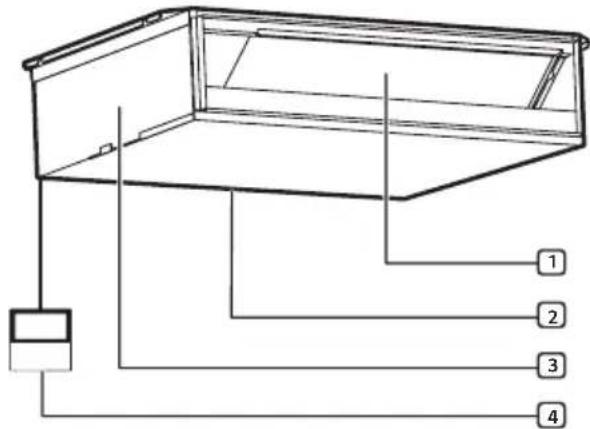
text_image
Technical diagram of a mechanical or electrical component with numbered parts labeled 1 to 41 Air Outlet Vents
③ Control Box
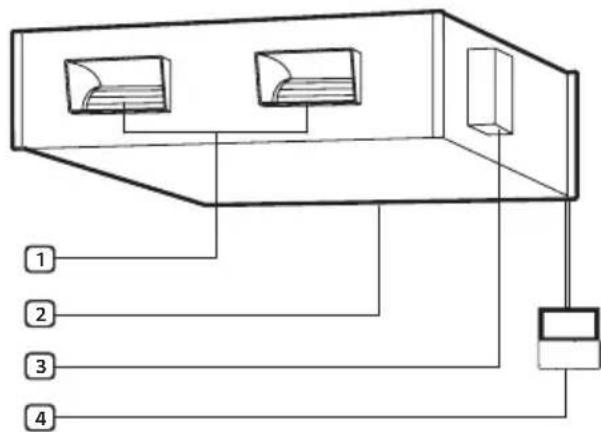
text_image
1 2 3 4② Air Intake Vents
4 Wired Remote Controller
NOTE
- The feature may be changed according to the type of model.
Wired Remote Control
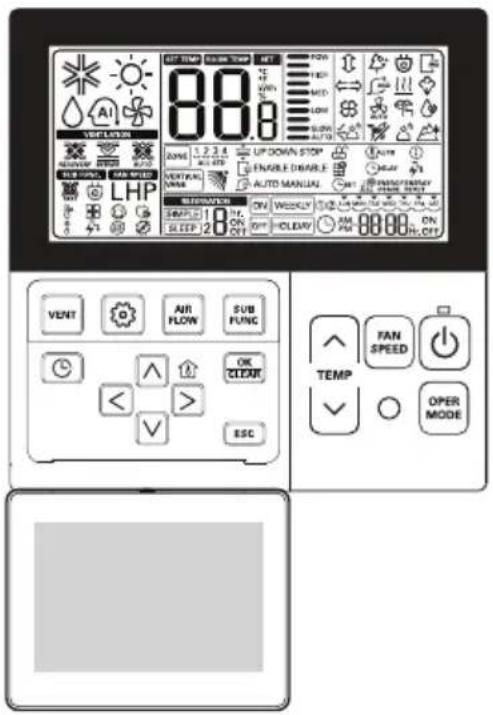
You can operate the air conditioner more conveniently with the remote control.
text_image
88.8 VEGETABLE ZONE 1.2.3.4 UP DOWN STOP ENABLE DISABLE AUTO MANUAL SET DURING/TERMAL LEFT WIND SUB TYPE SUB SPEED LHP VERTICAL NAME SOLUTION ON WEEKLY SPEED ON OFF CLEAVY AM 88.88 ON OFF VENT AIR FLOW SUB FUNC OK CLEAR < > ESC FAN SPEED TEMP OPER MODE| Button | Display Screen | Description |
 | - | To turn on/off the air conditioner. |
 |  | To adjust the desired room temperature in cooling, heating or auto changeover mode. |
| OPER MODE |  | To select the cooling mode. |
 | To select the heating mode. | |
 | To select the dehumidification mode. | |
 | To select the fan mode. | |
 | To select the auto changeover/ auto operation mode. | |
| FAN SPEED | 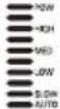 | To adjust the fan speed. |
 | To select the power cooling mode. | |
| SUB FUNC |  | To select the plasma purification. |
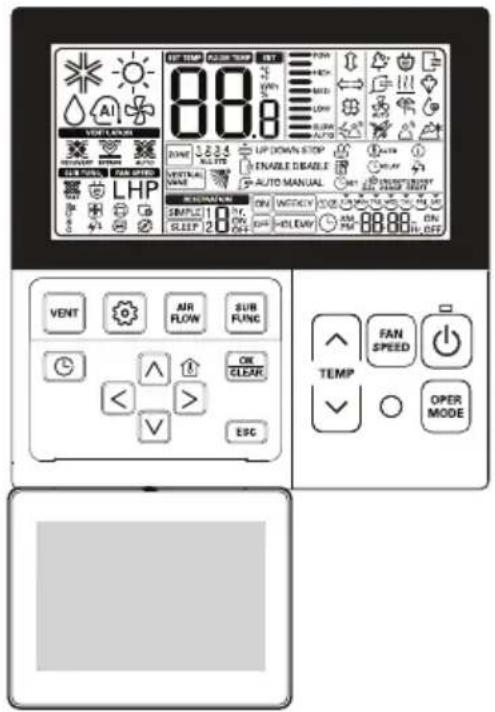
text_image
88.8 VEGETABLE ZONE UP DOWN STOP ENABLE BEABLE AUTO MANUAL SPEED MOUNT ON WEALTHY ON 88.88 ON OFF VENT AIR FLOW SUB FUNC FAN SPEED TEMP OPER MODE < > ESG| Button | Display Screen | Description |
| AIR FLOW | To adjust the air flow direction vertically or horizontally. | |
| - | To select the additional operations function. | |
| VENT - | For interlocking operations of air conditioner and ventilator. | |
| - To schedule an operation. | ||
| - | To adjust time.To display the room temperature. | |
| OK/CLEAR | - | To save the settings in the menu. |
| ESC - To exit the menu. | ||
NOTE
- Displayed temperature can be different from actual room temperature if the remote controller is installed at the place exposed to direct sunlight or the place near a source of heat.
• Some products may not receive wired signals. - When using the simultaneous operation system, the system will operate approximately 1-2 minutes after pressing the remote controller button.
- The feature may be changed according to the type of model.
- Some functions may not be supported, depending on the model.
Using the Mode Function
This function allows you to select the desired function.
Cooling Mode
1 Turn the appliance on.
2 Press OPER MODE button repeatedly to select the Cooling Mode.

is displayed on the display screen.
3 Press /or button to set the desired temperature.
Heating Mode
1 Turn the appliance on.
2 Press OPER MODE button repeatedly to select the Heating Mode.

is displayed on the display screen.
3 Press /or button to set the desired temperature.
NOTE
- Heating Mode is not available for Cooling only models.
Dehumidification Mode
This mode removes excess moisture from a highly humid environment or during the rainy season, in order to prevent mildew from setting in. This mode adjusts the room temperature and the fan speed automatically to maintain the optimal level of humidity.
1 Turn the appliance on.
2 Press OPER MODE button repeatedly to select the Dehumidification Mode.

is displayed on the display screen.
3 Press FAN SPEED button repeatedly to adjust the fan speed.
NOTE
- In this mode you cannot adjust the room temperature, it is adjusted automatically.
- The menu item might not be partially selected according to product function.
- Some functions may not be supported, depending on the model.
Fan Mode
This mode only circulates the indoor air without changing the room temperature.
1 Turn the appliance on.
2 Press OPER MODE button repeatedly to select the Fan Mode.

is displayed on the display screen.
3 Press FAN SPEED button to adjust the fan speed.
Auto Operation
This mode automatically sets the fan speed and temperature depending on the room temperature.
1 Turn the appliance on.
2 Press OPER MODE button repeatedly to select the Auto Operation.
AI is displayed on the display screen.
3 Press /or button to set the desired temperature.
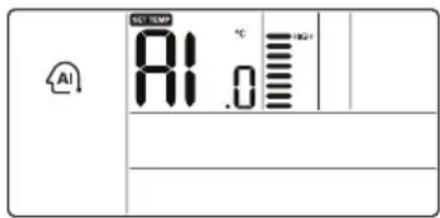
text_image
AI TCT 100M A1.0 °C +20V - - -| Code Description | |
| 2 Cold | |
| 1 A little cold | |
| 0 Maintain room temperature | |
| -1 A little hot | |
| -2 Hot | |
NOTE
- The FAN SPEED button can be used.
- It can be switched to another operation mode manually.
- Some functions may not be supported, depending on the model.
Using the Fan Speed Function
Adjusting the Fan Speed
- Press FAN SPEED button repeatedly to adjust the fan speed.
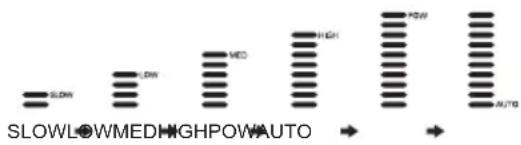
text_image
SLOWLOWMEDHIGHPOWAUTO → AUTONOTE
- The menu item might not be partially selected according to product function.
Changing Room Temperature Quickly
1 Turn the appliance on.
2 Press FAN SPEED button repeatedly to switch to the Power Cooling Mode.
P_0 is displayed on the display screen.
NOTE
• Desired Temperature: Po (18 °C)
• Wind Flow: Power wind
• Wind Direction: Fixed to the cooling position
- Some appliances do not feature power cooling function.
Using the Air Flow Direction Function
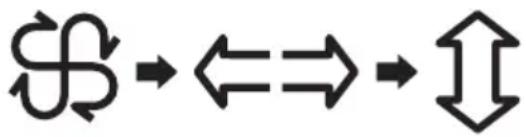
This function adjusts the direction of the air flow vertically (horizontally).
- Press AIR FLOW button repeatedly and select the desired direction.
flowchart
graph LR
    A["Process Step 1"] --> B["Process Step 2"]
    B --> C["Output Step 3"]
NOTE
- The menu item might not be partially selected according to product function.
- The feature may be changed according to the type of model.
Using the Temperature Setting Function
This function adjusts the desired temperature.
: Increases the temperature by 1 °C or 2 °F with each push.
√ : Decreases the temperature by 1 °C or 2 °F with each push.
NOTE
- Room Temperature: Indicates current room temperature.
- Set Temperature: Indicates the temperature that user wants to set.
- Depending on what kind of controller, the desired temperature can be adjusted by 0.5 °C or 1 °F
Using the Room Temperature Check Function
Press >button.
- The room temperature will be displayed for 5 seconds.
NOTE
- After 5 seconds, it is switched to display the desired temperature.
- Because of location of remote controller, the real room temperature and the this displayed value can be different.
- The range of the desired temperature is 18 °C \~ 30 °C for cooling, and 16 °C \~ 30 °C for heating.
- The adequate difference between the room temperature and the outside temperature is 5 °C
Using the Air Purification Function
It supplies clean and fresh air with ion particles and the filter.
1 Press SUB FUNC button repeatedly to select Air Purification.
is displayed on the display screen.
2 Press OK/CLEAR button to select or cancel the function.
icon appears or disappears on SUB FUNC display part up to selection.
3 Press ESC button to exit the setup mode.
NOTE
- After setup, it automatically exits setup mode if there is no button input for 25 seconds.
- When exiting without pressing the set button, the changed value is not applied.
- The menu item might not be partially selected according to product function.
- If you want independent cleaning air drive, please setup cleaning air by pressing additional drive button at ventilation drive.
- Some functions may not be supported, depending on the model.
Using Special Functions Child Lock Function
Use this option to disable the controls. This feature can prevent children from changing cycles or operating the appliance.
1 Press button repeatedly until the icon flashes.
2 Press or button repeatedly until the icon flashes.
3 Press OK/CLEAR button to complete the setting.
4 Press ESC button to exit the setup mode.
NOTE
- After setup, it automatically exits setup mode if there is no button input for 60 seconds.
- When exiting without pressing the set button, the changed value is not applied.
- When cancelling lock function, if moving to 📋 icon by pressing <or button and then, pressing OK/CLEAR button, child lock function is cancelled.
Filter Sign Clear Function
This function is to clear the indicator of indoor filter cleaning.
1 Press button repeatedly until the icon flashes.
2 Press OK/CLEAR button to complete the setting.
NOTE
- When the filter is covered with dust, the cooling/heating efficiency will be reduced and more electric power will be required. Clean the filter whenever cleaning time is expired.
- Filter cleaning indication is automatically cancelled after a certain period of time without having to cancel it manually.
Change Current Time Function
1 Press button repeatedly until the icon flashes.
2 Press or to adjust the current day.
3 Press key to switch to AM/PM setting mode.
• The AM/PM segment will flash.
4 Press /or button to set the desired AM/PM value.
5 Press or to switch to Hour setting mode.
• The Hour segment will flash.
6 Press /or button to set the desired Hour value.
7 Press □ or to switch to Minute setting mode.
• The Minute segment will flash.
8 Press /or button to set the desired Minute value.
9 Press OK/CLEAR button to complete the setting.
10 Press ESC button to exit the setup mode.
NOTE
- In case of exit with incomplete information, it will return to the previous setting.
- When exiting without pressing the set button, the changed value is not applied.
Change Temperature Function
Change temperature is the function to setup cooling and heating drive automatically changeable according to the temperature at artificial intelligence drive mode.
1 Press button repeatedly until the icon flashes.
2 Press /or button to change.
- Converting temp value: 1\~7
3 Press OK/CLEAR button to complete the setting.
4 Press ESC button to exit the setup mode.
NOTE
- Press button to exit or system will automatically release without any input after 60 seconds.
- When exiting without pressing the set button, the changed value is not applied.
Using the Reservation Function
Simple Reservation Function
It is automatically turned on or off at the set time.
1 Press button repeatedly until the SIMPLE icon flashes.
2 Press /or button to adjust the sheduled time.
- The timer can be set from 1 to 7 hours.
3 Press OK/CLEAR button to complete the setting.
4 Press ESC button to exit the setup mode.
NOTE
- After setup, it automatically exits setup mode if there is no button input for 25 seconds.
- When exiting without pressing the set button, the changed value is not applied.
Sleep Reservation Function
The product runs in the sleep mode or it stops after a certain period of time while you are sleeping. When the sleep mode is programmed after connecting to a ventilator, and in a certain period of time after sleep mode operation, only sleep mode will be cancelled.
1 Press button repeatedly until the SLEEP icon flashes.
2 Press /or button to adjust the sheduled time.
- The timer can be set from 1 to 7 hours.
3 Press OK/CLEAR button to complete the setting.
4 Press ESC button to exit the setup mode.
NOTE
- After setup, it automatically exits setup mode if there is no button input for 25 seconds.
- When exiting without pressing the set button, the changed value is not applied.
- When the sleep timer is set, the air conditioner operates in the sleep mode and stops at the set time.
- Please set the timer properly when sleeping. (Excessive cooling is not good for your health.)
- Since it automatically adjusts the desired cooling temperature in the sleep mode for comfort, the desired temperature of the remote controller may be different from the desired temperature of the air conditioner.
- Sleep reservation operates as off reservation for the product whose temperature adjustment isn't controlled by unit of 0.5 °C
On Reservation Function
It is automatically turned on at the set time.
1 Press button repeatedly until the ON icon flashes.
2 Set the AM/PM, Hour and Minute in the same way as for the Changing Current Time Function.
3 Press OK/CLEAR button to complete the setting.
4 Press ESC button to exit the setup mode.
NOTE
- After setup, it automatically exits setup mode if there is no button input for 25 seconds.
- When exiting without pressing the set button, the changed value is not applied.
- If the timer is cancelled, ON indication disappears.
Off Reservation Function
It is automatically turned off at the set time.
1 Press button repeatedly until the OFF icon flashes.
2 Set the AM/PM, Hour and Minute in the same way as for the Changing Current Time Function.
3 Press OK/CLEAR button to complete the setting.
4 Press ESC button to exit the setup mode.
NOTE
- After setup, it automatically exits setup mode if there is no button input for 25 seconds.
- When exiting without pressing the set button, the changed value is not applied.
- If the timer is cancelled, OFF indication disappears.
Holiday Reservation Function
It automatically stops at reserved day that you set.
1 Press button repeatedly until the HOLIDAY icon flashes.
2 Press or button to switch to Date setting mode.
3 Press ▲ or OK/CLEAR button to set or cancel.
- When you setup Monday and Friday to holiday, MON and FRI letter disappear.
4 Press ESC button to exit the setup mode.
NOTE
- Once the holiday timer is set, the air conditioner automatically stops within one hour even when you run the air conditioner unless you cancel holiday timer.
Weekly Reservation Function
You can set the daily reservation in weekly unit.
1 Press button repeatedly until the WEEKLY icon flashes.
2 Press or button to select weekly reservation ① or ②.
- Weekly timer can be programmed up to 2 schedules per day, and up to 14 reservations per week.
3 Press or button to switch to Date setting mode.
• The Date segment will flash.
4 Set the AM/PM, Hour and Minute in the same way as for the Changing Current Time Function.
- This section is to program when the product will turn ON.
5 Set the AM/PM, Hour and Minute in the same way as for the Changing Current Time Function.
- This section is to program when the product will turn OFF.
6 Press OK/CLEAR button to complete the setting.
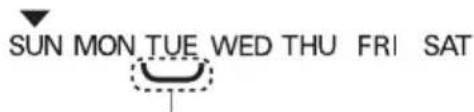
Weekly Reservation Explanation
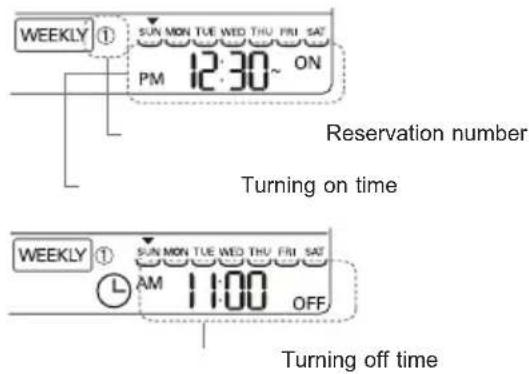
text_image
WEEKLY ① SUN MON TUE WED THU FRI SAT PM 12:30~ ON Reservation number Turning on time WEEKLY ① SUN MON TUE WED THU FRI SAT L AM 1:00 OFF Turning off time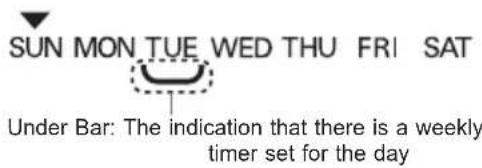
text_image
SUN MON TUE WED THU FRI SAT Under Bar: The indication that there is a weekly timer set for the dayNOTE
- If you setup in the same method as above by selecting the day that you'd like to setup, it is operated by the weekly timer.
- If you setup the start and end times for the timer the same, the timer would not work.
- The indoor unit is turned on to the desired temperature if it is configured using ▲ or ▼ button in the preset of weekly operation time.
- When the desired temperature is not set, it is turned on automatically to the desired temperature of previous operation.

WARNING
- Before cleaning or performing maintenance, disconnect the power supply and wait until the fan stops.
If the air conditioner will not be used for an extended period of time, dry the air conditioner to maintain it in best condition. Clean the product regularly to maintain optimal performance and to prevent possible breakdown.
- Dry the air conditioner in Fan mode for 3 to 4 hours and disconnect the power. There may be internal damage if moisture is left in its components.
- Before using the air conditioner again, dry the inner components of the air conditioner in Fan mode for 3 to 4 hours. This will help to remove the odor generated from moisture.
Clean the Air Filter
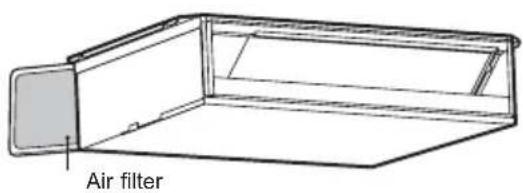
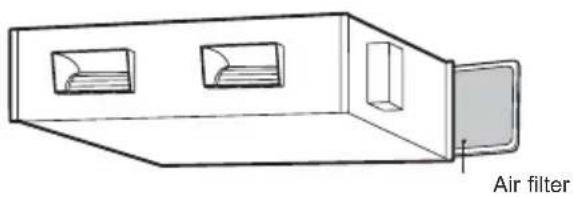
1 Remove the air filter from the indoor unit.
- Hold the tab and pull slightly forward to remove the filter.
Type1
text_image
Air filterType2
text_image
Air filter2 Clean the filter with a vacuum cleaner or with lukewarm water with neutral detergent.
3 Dry the filter in the shade.
4 Install the Air filter.
WARNING
- Turn off the power and unplug the power cord before you perform any maintenance; otherwise it may cause electric shock.
CAUTION
- Never touch the metal parts of the air conditioner when removing the air filter.
- Never use water that is higher than 40 °C when you clean the filter. It may cause deformation or discoloration.
- Never use volatile substances when you clean the filter. They may damage the surface of the product.
- Do not use bleach or abrasives.
NOTE
- Clean the air filter once every 2 weeks, or more, if necessary.
- Clean the Indoor unit surface by using a soft, dry cloth.
• This product is concealed in the ceiling. - Contact an authorized service center when maintaining.
Before Calling for Service
Please check the following before you contact the service center. If the problem persists, contact your local service center.
| Problem Possible | Causes Corrective Action | |
| The air conditioner does not work normally. | Burning smell and strange sounds are coming from the unit. | Turn off the air conditioner, switch OFF, or disconnect the power supply, and contact the service center. |
| Water leaks from the indoor unit even when the humidity level is low. | ||
| The power cable is damaged or it is generating excessive heat. | ||
| A switch, a circuit breaker (safety, ground), or a fuse is not operated properly. | ||
| The unit generates an error code from its self-diagnosis. | ||
| The air conditioner does not work. | The air conditioner is unplugged. | Check whether the power cord is plugged into the outlet or the power isolators are switched on. |
| A fuse exploded, or the power supply is blocked. | Replace the fuse or check if the circuit breaker has tripped. | |
| A power failure has occurred. | Turn off the air conditioner when a power failure occurs.When the power is restored, wait 3 minutes, and then turn on the air conditioner. | |
| The voltage is too high or too low. | Check if the circuit breaker has tripped. | |
| The air conditioner was turned off automatically at a preset time. | Turn the air conditioner on. | |
| The battery setting in the remote controller is incorrect. | Make sure that the batteries are inserted correctly in your remote controller.If the batteries are placed correctly, but the air conditioner still does not operate, replace the batteries and try again. |
EN
| Problem Possible | Causes Corrective Action | |
| The air conditioner does not emit cool air. | Air is not circulating properly. | Make sure that there are no curtains, blinds, or pieces of furniture blocking the front of the air conditioner. |
| The air filter is dirty. | Clean the air filter once every 2 weeks.See “Clean the Air Filter” for more information. | |
| The room temperature is too high. | In summer, cooling the indoor air fully may take some time. In this case, select the Jet Mode to cool the indoor air quickly. | |
| Cold air is escaping from the room. | Make sure that no cold air is escaping through the ventilation points in the room. | |
| The desired temperature is higher than the current temperature. | Set the desired temperature to a level lower than the current temperature. | |
| There is a heating source nearby. | Avoid using heat generators like electric ovens or gas burners while the air conditioner is in operation. | |
| Fan Mode is selected. | During Fan Mode, air blows from the air conditioner without cooling or heating the indoor air.Switch the operation mode to cooling operation. | |
| Outside temperature is too high. | The cooling effect may not be sufficient. | |
| The air conditioner stops during operation. | The air conditioner is suddenly turned off. | The Timer Function may have timed out, which turns the unit off. Check the timer settings. |
| A power failure has occurred during operation. | Wait for the power to come back. If you have the Auto Restart function enabled, your unit will resume its last operation several minutes after power is restored. | |
| The indoor unit is still operating even when the unit has been turned off. | The Auto Clean function is being operated. | Allow the Auto Clean function to continue since it removes any remaining moisture inside the indoor unit. If you do not want this feature, you can turn the unit off. |
EN
| Problem Possible | Causes Corrective Action | |
| The air outlet on the indoor unit is discharging mist. | The cooled air from the air conditioner makes mist. | When the room temperature decreases, this phenomenon will disappear. |
| Water leaks from the outdoor unit. | In the heating operations, condensed water drops from the heat exchanger. | This symptom requires installing a drain hose under the base pan. Contact the installer. |
| There is noise or vibration. | A clicking sound can be heard when the unit starts or stops due to movement of the reversing valve.Creaking sound: The plastic parts of the indoor unit creak when they shrink or expand due to sudden temperature changes.Flowing or Blowing sound: This is the flow of refrigerant through the air conditioner. | These are normal symptoms. The noise will stop. |
| The indoor unit gives off an odor. | Odors (such as cigarette smoke) may be absorbed into the indoor unit and discharged with airflow. | If the smell does not disappear, you need to wash the filter. If this does not work, contact the service center to clean your heat exchanger. |
| The air conditioner does not emit warm air. | When Heating Mode starts, the vane is almost closed, and no air comes out, even though the outdoor unit is operating. | This symptom is normal. Please wait until the unit has generated enough warm air to blow through the indoor unit. |
| The outdoor unit is in Defrosting Mode. | In Heating Mode, ice/frost is built up on the coils when the outside temperature falls. This function removes a layer of frost on the coil, and it should finish in approximately 15 minutes. | |
| Outside temperature is too low. | The heating effect may not be sufficient. |
NOTE
- Some functions may not be supported, depending on the model.
Memo
MANUALE D'USO
CLIMATIZZATORE
text_image
Technical diagram of a device with numbered components, showing internal structure and connections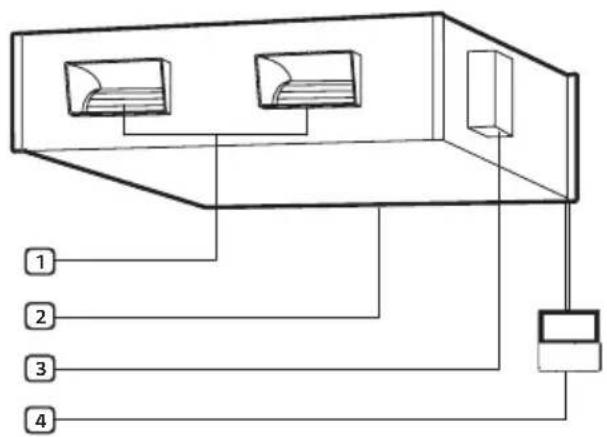
flowchart
graph TD
    A["Component 1"] --> B["Component 2"]
    C["Component 3"] --> B
    D["Component 4"] --> B
    B --> E["Output"]
text_image
88.8 VEGETABLE ZONE 1.2.3.4 UP DOWN STOP ENABLE DISABLE AUTO MANUAL SET DURING/TERMAL LEFT WIND SUB SPLIT AIR SPEED VERTICAL NAME SOLUTION ON WEEKLY SPEED ON OFF CLEAVY AM 88.88 ON OFF ON OFF VENT AIR FLOW SUB FUNC OK CLEAR < > ESC FAN SPEED TEMP OPER MODEtext_image
AI TCT 100M AI .0 °C +20V - - -text_image
SUN MON TUE WED THU FRI SATnatural_image
Simple line drawing of a rectangular box with two internal compartments and a side panel (no text or symbols)text_image
Technical diagram of a mechanical or electrical component with numbered parts labeled 1 to 4text_image
Diagram of a server rack with four labeled ports and connections, showing internal structure and wiring layout.text_image
88.8 VEGETABLE ZONE 1.2.3.4 UP DOWN STOP ENABLE DISABLE AUTO MANUAL VERTICAL NAME AUTO MANUAL SOLUTION ON WEEKLY SPEED ON OFF CLEAV ON AM 88.88 ON OFF VENT AIR FLOW SUB FUNC OR CLEAR < > ESC FAN SPEED TEMP OPER MODEtext_image
AI SUT TEM AI 1.0 °C +2Ω - - -natural_image
Simple line drawing of a 3D rectangular box with two internal compartments and a side panel (no text or symbols)Filtro de aire
text_image
Technical diagram of a mechanical or electrical component with numbered parts labeled 1 to 4.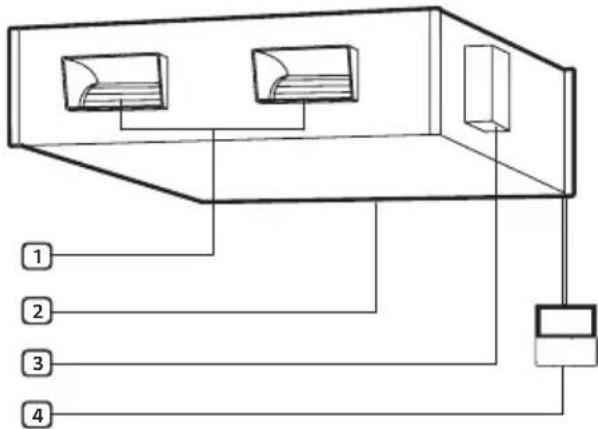
flowchart
graph TD
    A["Computer 1"] --> B["Server"]
    C["Computer 2"] --> B
    D["Computer 3"] --> B
    E["Computer 4"] --> B
    B --> F["Output Port"]
text_image
88.8 VEGETABLE ZONE 1.2.3.4 UP DOWN STOP ENABLE DISABLE AUTO MANUAL SET DURING/TERMAL LEFT WIND SUB SPLIT AIR SPEED VERTICAL NAME SOLUTION ON WEEKLY SPLIT ON OFF HOLEARY AM 88.88 ON SLEEP ON OFF VENT AIR FLOW SUB FUNC OK CLEAR < > ESC FAN SPEED TEMP OPER MODEtext_image
88.8 VEGETABLE ZONE UP DOWN STOP ENABLE BEABLE AUTO MANUAL SPEED MOUNT ON WEETCPLY ON 88.88 ON OFF VENT AIR FLOW SUB FUNC FAN SPEED TEMP OPER MODE < > ESGtext_image
AI SCT BAN AI 1.0 °C +AG-1 - - -text_image
WEEKLY ① SUN MON TUE WED THU PRI SAT PM 12:30~ ONtext_image
WEEKLY ① SUN MON TUE WED THU FRI SAT L AM 11:00 OFFTemps d'arrêt
text_image
SUN MON TUE WED THU FRI SATnatural_image
Diagram of a 3D air vent with two internal compartments and a label pointing to the right side (no text or symbols on the diagram itself)text_image
Technical diagram of a device with numbered components, showing internal structure and connections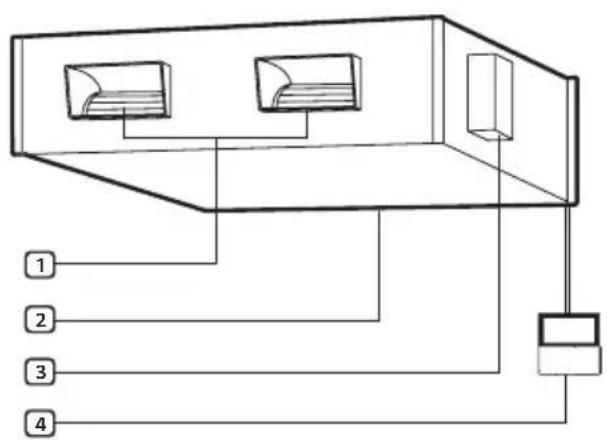
text_image
Diagram of a server rack with four labeled ports and connections, showing internal structure and wiring layout.text_image
88.8 VEGETABLE ZONE 1.2.3.4 UP DOWN STOP ENABLE DISABLE AUTO MANUAL SET DURING/TERMAL LEFT WIND SUB TYPE AIR SPEED VERTICAL NAME SOLUTION ON WEEKLY SPEED ON OFF CLEAV ON AM 88.88 ON OFF VENT AIR FLOW SUB FUNC OK CLEAR < > ESC FAN SPEED TEMP OPER MODEtext_image
TEMP 88.8 VEGETABLE BEET AIR AIR FLOW AVOCATION LHP SINGLE SLEEP 20 UP DOWN STOP ENABLE DISABLE AUTO MANUAL ON ON ON ON ON ON ON ON ON ON ON ON ON ON ON ON ON ON ON ON ON ON ON ON ON ON ON ON ON ON ON ON ON ON ON ON ON ON ON ON ON ON ON ON ON ON ON ON ON ON OFF FAN SPEED OPER MODEnatural_image
Diagram of a 3D box with two internal compartments and a labeled 'Luftfilter' component (no other text or symbols)text_image
Technical diagram of a device with numbered components, likely for electrical or mechanical assembly reference.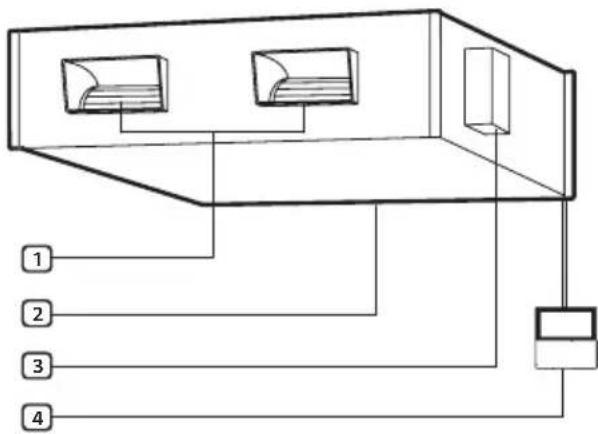
flowchart
graph TD
    A["Device 1"] --> B["Server"]
    C["Device 2"] --> B
    D["Device 3"] --> B
    E["Device 4"] --> B
text_image
88.8 VEGETATION ZONE 1.2.3.4 UP DOWN STOP ENABLE DISABLE AUTO MANUAL SUB FOUNT LAN SPEED LHP VERTICAL VANS RESERVATION SAMPL 18 HV ON OFF HOLIDAY AM 88.88 ON SLEEP 28 HV OFF VENT AIR FLOW SUB FUNC OK CLEAR < > ESC FAN SPEED TEMP OPER MODEtext_image
88.8 TEMP AIR TIME FAN HED MED LOW FLOW AUTO UP DOWN STOP ENABLE DEABLE AUTO MANUAL SUPPORTATION ON WHOLECY ON ON OFF VENT AIR FLOW SUB FLOW FAN SPEED TEMP OPER MODE OR CLEAR ESGtext_image
SUN MON TUE WED THU FRI SATnatural_image
Simple line drawing of a rectangular box with two internal compartments and a side panel (no text or symbols)Φίλτρο Αέρα
text_image
Technical diagram of a mechanical or electrical component with numbered parts labeled 1 to 4text_image
Diagram of a server rack with four labeled ports and connections, showing internal structure and wiring layout.text_image
88.8 VEGETABLE ZONE 1.2.3.4 UP DOWN STOP ENABLE DISABLE AUTO MANUAL LEFT VERTICAL AVES SUB SPLIT AIR SPEED LHP SOLUTION ON WEEKLY SLEEP ON OFF HOLEARY AM 88.88 ON OUT ON OFF VENT AIR FLOW SUB FUNC OK CLEAR < > ESC FAN SPEED TEMP OPER MODEtext_image
AI SET TEMP A1.0 °C +30+flowchart
graph LR
    S --> ⇌ ⇌ ↩
POZNÁMKA
natural_image
Simple line drawing of a rectangular box with two internal compartments and a side panel (no text or symbols)PROBLEEMOPLOSSING....25
text_image
Technical diagram of a mechanical or electrical enclosure with numbered components labeled 1 to 4.text_image
88.8 VEGETABLE ZONE 1.2.3.4 UP DOWN STOP ENABLE DISABLE AUTO MANUAL SET FAN/TERMAL ON VEGETABLE SUB INPUT AIR SPEED VERTICAL NAME SOLUTION ON WEEKLY SPEED ON CLEAV VENT AIR FLOW SUB FUNC OK CLEAR < > ESC TEMP FAN SPEED OPER MODEtext_image
AI SUT TEM AI 1.0 °C +20V - - -natural_image
Diagram of a 3D box with two internal compartments and a labeled 'Luchtfilter' component (no other text or symbols)text_image
Technical diagram of a device with numbered components, showing internal structure and connections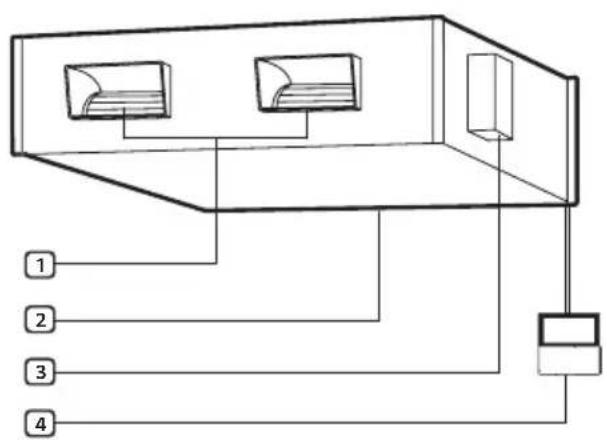
text_image
Diagram of a server rack with four labeled ports and connections, showing internal structure and wiring layout.1 Wylot powietrza
3 Moduł sterujący
UWAGA
2 Wlot powietrza
text_image
88.8 VEGETABLE ZONE 1.2.3.4 UP DOWN STOP ENABLE DISABLE AUTO MANUAL SET DURING/TERMAL LEFT WIND SUB INPUT AIR SPEED VERTICAL NAME SOLUTION ON WEEKLY SPEED ON CLEAVY AM 88.88 ON CLEAVY VENT AIR FLOW SUB FUNC OK CLEAR < > ESC FAN SPEED TEMP OPER MODEtext_image
AI TCT 100M AI .0 °C +20V - - -flowchart
graph LR
    A["Symbol"] --> B["Left"]
    B --> C["Right"]
    C --> D["Down"]
UWAGA
natural_image
Simple line drawing of a rectangular box with two internal compartments and a side panel (no text or symbols)INSTRUCTIUNI DE SIGURANTĂ IMPORTANTE....3
OPERARE....11
text_image
Technical diagram of a mechanical or electrical component with numbered parts labeled 1 to 4text_image
Diagram of a server rack with four labeled ports and connections, showing internal structure and wiring layout.text_image
AI TCT 500V A1 .0 °C +20+ - - -text_image
SUN MON TUE WED THU FRI SATnatural_image
Simple line drawing of a rectangular box with two internal compartments and a side panel (no text or symbols)[Representative] LG Electronics Inc. EU Representative :
LG Electronics European Shared Service Center B.V.
Krijgsman 1, 1186 DM Amestelveen, The Netherlands
[Manufacturer]
LG Electronics Inc. Changwon 2nd factory 84, Wanam-ro,
Seongsan-gu, Changwon-si, Gyeongsangnam-do, KOREA