Band 5 Sport - Sports Watch HONOR - Free user manual and instructions
Find the device manual for free Band 5 Sport HONOR in PDF.



User questions about Band 5 Sport HONOR
0 question about this device. Answer the ones you know or ask your own.
Ask a new question about this device
Download the instructions for your Sports Watch in PDF format for free! Find your manual Band 5 Sport - HONOR and take your electronic device back in hand. On this page are published all the documents necessary for the use of your device. Band 5 Sport by HONOR.
USER MANUAL Band 5 Sport HONOR
Quick Start Guide....01
The following items are included in the box:
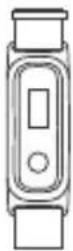
1. Band
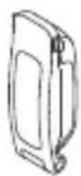
2. Shoe buckle
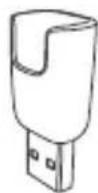
3. Charging cradle
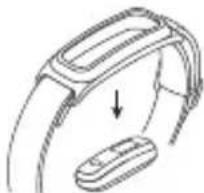
2. Removing the band body
Push the band body through the strap to remove it.
natural_image
Diagram of a smartwatch with a hand pointing to a device (no text or symbols present)3. Powering on the band
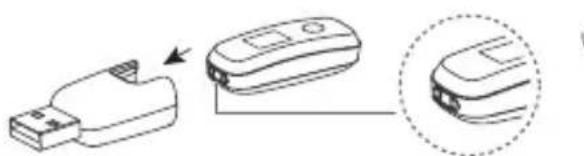
Align the metal contacts on the side of the band body with those on the charging cradle. The band will automatically power on when connected to a charger, once it is on, it can be paired with a phone.
The strap can be washed with soap and warm water. Place the strap somewhere out of the sun to dry.
natural_image
Diagram showing a USB device being processed with a close-up view of its internal components (no text or symbols present)
• Make sure the charging port is dry before charging.
- Use the charging cable that came with your band for charging.
- Refer to the figure for how to properly insert the band body into the cradle.
4. Downloading the Huawei Health app
Search for "Huawei Health" in your app store, then download and install the Huawei Health app.
5. Pairing your band with your phone
Select your device from the list in Huawei Health, then follow the on screen instructions to complete pairing.
6. Putting on the band
- The strap is made of flexible materials. Adjust it before putting it on.
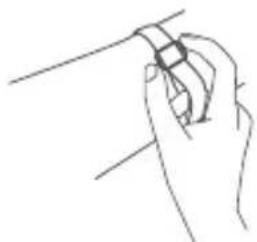
- If you need to adjust the strap again after putting it on, put your middle finger between the layers of the strap, then use your thumb and index finger to slide the buckle.
natural_image
Line drawing of a hand holding a small object, possibly a tool or device, with no visible text or symbols.7. Starting a workout
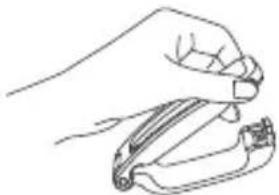
natural_image
Line drawing of a hand holding a tool or device (no text or symbols)- Pinch the buttons on either side of the shoe buckle to open it.
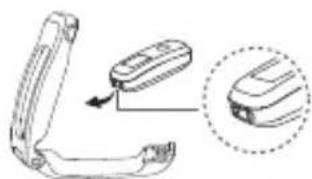
natural_image
Diagram showing a device being inserted into a housing, with an arrow indicating the insertion direction (no text or symbols present)- Insert the band body, aligning the metal contacts with those on the shoe buckle.
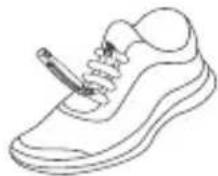
3. Slip the back part of the case behind the laces of your shoes.
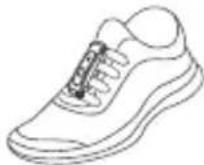
4. Buckle the shoe buckle tightly.
Switch between workout modes by touching the key. Hold the key to start. You can also start a run with the Huawei Health app on a connected phone.
8. Finding more information
Open the Huawei Health app to find out more information about your band, including how to pair the band with your phone, useful features, and more.
Copyright © Huawei Technologies Co., Ltd. 2019. All rights reserved.
THIS DOCUMENT IS FOR INFORMATION PURPOSE ONLY, AND DOES NOT CONSTITUTE ANY KIND OF WARRANTIES.
Trademarks and Permissions

HUAWEI and

The Bluetooth ^® word mark and logos are registered trademarks owned by Bluetooth SIG, Inc. and any use of such marks by Huawei Technologies Co., Ltd. is under license.
Other trademarks, product, service and company names mentioned may be the property of their respective owners.
Privacy Policy
To better understand how we protect your personal information, please see the privacy policy at
http://consumer.huawei.com/privacy-policy, or read the privacy policy and service terms using the app after pairing it with your phone.
Blasting Caps and Areas
Turn off your mobile phone or wireless device when in a blasting area or in areas posted turn off "two-way radios" or "electronic devices" to avoid interfering with blasting operations.
Operation and safety
• Using an unapproved or incompatible power adapter, charger or battery may cause fire, explosion or other hazards.
- Ideal temperatures are -10^ to +45^ .
- Some wireless devices may affect the performance of hearing aids or pacemakers. Consult your service provider for more information.
- Pacemaker manufacturers recommend that a minimum distance of 15 cm be maintained between a device and a pacemaker to prevent potential interference with the pacemaker. If using a pacemaker, hold the device on the side opposite the pacemaker and do not carry the device in your front pocket.
- Keep the device and the battery away from excessive heat and direct sunlight. Do not place them on or in heating devices, such as microwave ovens, stoves, or radiators.
- Observe local laws and regulations while using the device. To reduce the risk of accidents, do not use your wireless device while driving.
- To prevent damage to your device's parts or internal circuits, do not use it in dusty, smoky, damp or dirty environments or near magnetic fields.
- Do not use, store or transport the device where flammables or explosives are stored (in a gas station, oil depot, or chemical plant, for example). Using your device in these environments increases the risk of explosion or fire.
- Dispose of this device, the battery, and accessories according to local regulations. They should not be disposed of in normal household waste. Improper battery use may lead to fire, explosion, or other hazards.
• The device has undergone testing and has demonstrated water and dust resistance in certain environments. - The device has a built-in, non-removable battery, do not attempt to remove the battery, otherwise the device may be damaged. To replace the battery, take the device to an authorized service center.
- If the battery leaks, ensure that the electrolyte does not make direct contact with your skin or eyes. If the electrolyte touches your skin or splashes into your eyes, immediately flush with clean water and consult a doctor.
- When charging the device, make sure the power adapter is plugged into a socket near the devices and is easily accessible.
- Unplug the charger from electrical outlets and the device when not in use.
Disposal and recycling information
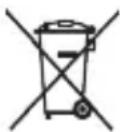
The crossed-out wheeled-bin symbol on your product, battery, literature or packaging reminds you that all electronic products and batteries must be taken to separate waste collection points at the end of their working lives; they must not be disposed of in the normal waste stream with household garbage. It is the responsibility of the user to dispose of the equipment using a designated collection point or service for separate recycling of waste electrical and electronic equipment (WEEE) and batteries according to local laws.
Proper collection and recycling of your equipment helps ensure electrical and electronic equipment (EEE)
waste is recycled in a manner that conserves valuable materials and protects human health and the environment, improper handling, accidental breakage, damage, and/or improper recycling at the end of its life may be harmful for health and environment. For more information about where and how to drop off your EEE waste, please contact your local authorities, retailer or household waste disposal service or visit the website http://consumer.huawei.com/en/.
Reduction of hazardous substances
This device and any electrical accessories are compliant with local applicable rules on the restriction of the use of certain hazardous substances in electrical and electronic equipment, such as EU REACH, RoHS and Batteries (where included) regulations, etc. For declarations of conformity about REACH and RoHS, please visit our web site http://consumer.huawei.com/certification.
EU regulatory conformance
RF exposure requirements
Important safety information regarding radio frequency (RF) radiation exposure:
RF exposure guidelines require that the device should be used for wrist and on the shoe. Failure to observe this guideline may result in RF exposure exceeding limits.
Statement
Hereby, Huawei Technologies Co., Ltd. declares that this device AW70 is in compliance with the essential requirements and other relevant provisions of Directive 2014/53/EU.
The most recent and valid version of the DoC (Declaration of Conformity) can be viewed at http://consumer.huawei.com/certification.
This device may be operated in all member states of the EU.
Observe national and local regulations where the device is used.
This device may be restricted for use, depending on the local network.
Frequency bands and power
(a) Frequency bands in which the radio equipment operates: Some bands may not be available in all countries or all areas. Please contact the local carrier for more details.
(b) Maximum radio-frequency power transmitted in the frequency bands in which the radio equipment operates: The maximum power for all bands is less than the highest limit value specified in the related Harmonized Standard.
The frequency bands and transmitting power (radiated and/or conducted) nominal limits applicable to this radio equipment are as follows: AW70: Bluetooth: 10 dBm
Accessories and Software Information
It is recommended that the following accessories should be used:
Strap Shoe buckle Charging cradle
The product software version is AW70: 1.1.3.5
Software updates will be released by the manufacturer to fix bugs or enhance functions after the product has been released. All software versions released by the manufacturer have been verified and are still compliant with the related rules.
All RF parameters (for example, frequency range and output power) are not accessible to the user, and cannot be changed by the user.
For the most recent information about accessories and software, please see the DoC (Declaration of Conformity) at http://consumer.huawei.com/certification.
Knock the screen four times with your knuckle, and press and hold the touch-sensitive button to view the E-label screen.
Please visit http://consumer.huawei.com/en/support/hotline for recently updated hotline and email address in your country
or region.
Caution: Any changes or modifications to this device not expressly approved by Huawei Technologies Co., Ltd. for compliance could void the user's authority to operate the equipment.
natural_image
Diagram of a smartwatch handle and wrist strap mechanism (no text or symbols)
natural_image
Diagram showing a USB device connected to a device with an arrow indicating process, and a close-up view of the device (no text or symbols present)
natural_image
Line drawing of a hand holding a small object against a plain background (no text or symbols)natural_image
Line drawing of a hand holding a tool, no text or symbols presentnatural_image
Diagram showing a device being processed into a cable, with an arrow indicating the process (no text or symbols present)natural_image
Diagram of a smartwatch with a device partially visible, showing no text or symbols.natural_image
Diagram showing a device being connected to a device with an arrow indicating the process (no text or symbols present)
natural_image
Line drawing of a hand holding a small object, no text or symbols presentnatural_image
Line drawing of a hand holding a tool, no text or symbols presentnatural_image
Diagram showing a mechanical component with an arrow indicating direction, alongside a close-up of a device (no text or symbols present)and Electronic Equipment).
natural_image
Three technical line drawings of electronic devices: a smartwatch, a door switch, and a USB port (no text or symbols present)natural_image
Diagram of a smartwatch with a device partially visible, showing no text or symbols.natural_image
Diagram showing a USB device connected to a device with an arrow indicating process (no text or symbols present)
natural_image
Line drawing of a hand holding a small object, no text or symbols presentnatural_image
Line drawing of a hand holding a tool, no text or symbols presentnatural_image
Diagram showing a device with a handle and a close-up view of its internal components (no text or symbols)natural_image
Diagram of a smartwatch with a device attached, showing a curved arm and a separate device (no text or symbols present)natural_image
Diagram showing a USB device connected to a device with an arrow indicating transformation (no text or symbols present)
natural_image
Line drawing of a hand holding a small object, possibly a tool or device, with no visible text or symbols.natural_image
Line drawing of a hand holding a tool, no text or symbols presentnatural_image
Diagram of a handheld device with an arrow indicating left-side movement, showing internal components (no text or symbols)natural_image
Diagram of a smartwatch with a handle and a small device, showing no text or symbols3. Ligar a pulseira
natural_image
Diagram showing a USB device connected to a padlock, with an inset close-up view of the padlock's tip (no text or symbols present)
natural_image
Line drawing of a hand holding a small object, possibly a tool or device, with no visible text or symbols.natural_image
Line drawing of a hand holding a pen-like tool (no text or symbols)natural_image
Line drawing of a handheld device with an arrow indicating motion, showing a close-up of the device (no text or symbols present)natural_image
Diagram of a smartwatch with a hand pointing to a smaller device (no text or symbols present)3. De band inschakelen
natural_image
Diagram showing a device with an arrow pointing to a closed portion of its internal structure, no text or symbols present.natural_image
Line drawing of a hand holding a small object, possibly a tool or device, with no visible text or symbols.natural_image
Line drawing of a hand holding a pen or stylus (no text or symbols)natural_image
Diagram showing a device with an open lid and a close-up view of its internal components (no text or symbols)Limited Warranty Notice (English)
This warranty will be provided by Huawei Technologies Co., Ltd. or the relevant local affiliate listed at the following address: www.hihonor.com("HONOR"). HONOR provides the warranty set out in this document, in respect of this Honor branded product and/or accessory ("Product(s)") purchased in a member state of the European Union, Iceland, Norway or Switzerland, to the consumer (the "Warranty"). If the Product is purchased in any of the countries referenced above, this Warranty is valid and enforceable in all of them, although, if the Warranty service is provided in a different country to the country of purchase, the service may be delayed.
The Warranty is voluntarily offered by HONOR and is separate and in addition to the legal rights of consumers under applicable local country laws governing the sale of consumer goods and to any rights of the consumer against the original retail seller of the Product and, therefore, does not affect, change or replace such rights.
- HONOR warrants that the Products are free from defects in materials and workmanship under normal use and use in accordance with the respective Product user manual, during the Warranty Period (defined below).
- The Warranty is provided for a period of: twenty-four (24) months in respect of the device; six (6) months in respect of the charger and a removable battery; and, three (3) months in respect of the earphones, from the date of the original retail purchase of the Product ("Warranty Period").
- Consumer law in some countries does not permit limitations on the warranty period or on the type of components covered by a warranty, and therefore, the limitations described at point 2 above, for the limitations not in accordance with such laws, may not apply to you.
- During the Warranty Period, HONOR or an authorised service center, the list of authorised service centers is available at the following address: www.hihonor.com("Authorised Service Center") will repair or replace, at HONOR's option, the Product or any relevant parts thereof in the event of any defect in the materials and workmanship.
- The repaired Product or part or, the Product or part provided as a replacement for a defective Product or part, shall be free from defect in materials and workmanship. Repair or replacement of a Product or part may involve the use of a functionally equivalent reconditioned unit.
- The consumer shall not be charged (whether for parts, labour or otherwise) for the repair or replacement of a defective Product during the Warranty Period. All replaced defective Product, parts, boards or equipment shall become the property of HONOR.
- The Warranty in respect of a repaired or replaced Product or part shall continue for the remainder of the Warranty Period of the Product, which was repaired or replaced, or for three (3) months from the date of repair, whichever is longer.
-
The consumer will be required to provide the original retail purchase receipt or other documentation or information requested or required by applicable legislation in respect of the date and place of purchase. In the event that such information is not presented or if it is incomplete or illegible, HONOR reserves the right to refuse providing the above service in respect of the Warranty claim.
-
This Warranty does not cover defects and damage resulting from:
a. Normal wear and tear of the equipment or otherwise due to the normal aging of the equipment.
b. The Product being used other than in a normal and customary manner.
c. Any disassembly, repair, alteration or modifications carried out by anyone other than HONOR or an Authorised Service Center.
d. Misuse, abuse, negligence or an accident howsoever caused.
e. Improper testing, operation, maintenance, installation, or any alteration or modification of the Product.
f. Spillage of food or liquids, corrosion, rust or the use of wrong voltage.
g. Scratches or damage to plastic surfaces and all other externally exposed parts due to normal use.
h. Use outside of use permitted under the Product's user manual.
-
This Warranty will not be available: a) if the serial number or warranty seal on the Product is illegible, has been defaced or removed; or, b) without any proof of purchase.
-
The Warranty applies to the Product as originally supplied. The Warranty does not apply to any software or other equipment owned by HONOR or third parties however, you should check the end-user license agreement, separate warranty/guarantee statement(s) and/or any exclusions, which are provided or intended to apply to such items.
Your responsibilities
Before delivering your Product to HONOR or an Authorised Service Center for service under this Warranty, you should make a backup copy of the contents of your Product and remove all personal information and disable all security passwords.
Limitation of HONOR's liability
- Except for the express warranties set forth above, HONOR grants no other warranties, express or implied, by statute or otherwise, regarding the Product, fitness for any purpose or otherwise. Consumer law in some countries does not permit limitations under a Product warranty and therefore certain limitations set out in this warranty document may not apply to you.
- HONOR is not responsible or liable for the damage to or loss of any programs, data, SIM card or removable storage media where you do not backup your data before delivering your Product to HONOR or an Authorised Service Center for service under this Warranty.
- To the extent permitted by local laws, HONOR shall not be liable for any loss which is not a reasonably foreseeable consequence of a breach by HONOR of this Warranty. As a consumer your use of the devices shall be non-commercial. HONOR shall therefore not be liable to you for any loss of profits, revenue, anticipated savings contracts or time arising out of your use of or inability to use the device.
- In any event, HONOR and its supplier's liability under this limited warranty shall be limited to the amount actually paid by the consumer for the Product or the current replacement value, whichever is greater.
- Nothing in this warranty shall exclude or limit HONOR's liability for death or personal injury caused by its negligence, fraud,
fraudulent misrepresentation or any other liability that cannot be limited or excluded by law.
- If you experience any difficulty please contact the HONOR hotline in your country or refer to services on your local HONOR website.
- This Warranty shall be updated by HONOR from time to time. Please refer to your local HONOR website to obtain the latest version of the Warranty for the Product.
This Warranty will be provided locally by the relevant Honor affiliates which are listed under the following address: consumer.Honor.com

This symbol (with or without a solid bar) on the device, batteries (if included), and/or the packaging, indicates that the device, its electrical accessories (for example, a headset, adapter, or cable), and batteries should not be disposed of as household garbage.
Should your product require warranty service, please return it to the dealer from whom it was purchased. You will be required to fill out the information on this warranty card and show it to the dealer, along with the proof of purchase [purchase receipt] for availing free service/repair.
| Purchase Date: | |
| Owner's Name: | |
| TEL/MP Number: | |
| Address: | |
| Model: | |
| IMEI NO: | |
| Serial NO: |
Authorized Distributor's Stamp
IMPORTANT: This product works reliably upon purchase.
I have read the warranty notice carefully.
Owner's Signature/Stamp
Service Contact Information
| Country | Hotline | Service Website |
| United Kingdom | +44-800 088 6900 | https://www.hihonor.com/uk/support/ |
| France | +33-800 972 284 | https://www.hihonor.com/fr/support/ |
| Germany | 0-800 888 9050 | https://www.hihonor.com/de/support/ |
| Italy | 0-800 646 667 | https://www.hihonor.com/it/support/ |
| Spain | +34-902 012 420 | https://www.hihonor.com/es/support/ |
| Portugal | 0-800 100 068 | |
| Netherlands | 0-900 110 0777 | https://www.hihonor.com/nl/support/ |
| Switzerland | +41-800 688 888 | |
| Ireland +353-189 048 2934 | ||
| Belgium | +32-800 251 60 | |
| Austria 0800202110 | ||
96725907_01