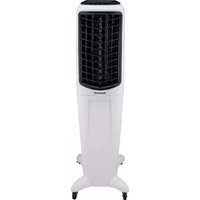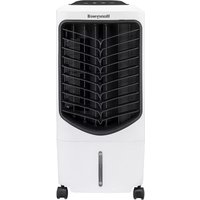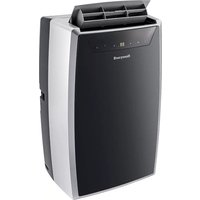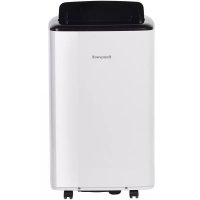
HF0CESVWK - Portable air conditioner HONEYWELL - Free user manual and instructions
Find the device manual for free HF0CESVWK HONEYWELL in PDF.



| Product Type | Portable Air Conditioner |
| Brand | Honeywell |
| Model | HF08CESVWK / HF10CESVWK |
| Cooling Capacity | 8,000 BTU / 10,000 BTU (depending on model) |
| Power Supply | 120 V ~ 60 Hz |
| Control Panel | Touch with Digital Display |
| Remote Control | Yes, with AAA batteries included |
| Wi-Fi Connectivity | Yes (for smart models) |
| Operating Modes | Cooling, Dehumidification, Fan, Auto |
| Fan Speeds | 4: High, Medium, Low, Auto |
| Temperature Range | 16°C to 32°C (60°F to 90°F) |
| Timer | Programmable from 1 to 24 hours (auto shut-off/start) |
| Sleep Mode | Yes, gradual temperature adjustment |
| Dust Filter | Washable, clean every 2 weeks |
| Water Drainage | Manual (bottom plug) or continuous (dehumidification mode) |
| Safety | Automatic shut-off at max water level (code P1), LCDI protection |
| Included Installation Kit | Exhaust hose, window bracket, adapter, foam seals |
| Compatibility | Honeywell Air Comfort App (iOS/Android), Amazon Echo voice control |
Frequently Asked Questions - HF0CESVWK HONEYWELL
User questions about HF0CESVWK HONEYWELL
0 question about this device. Answer the ones you know or ask your own.
Ask a new question about this device
Download the instructions for your Portable air conditioner in PDF format for free! Find your manual HF0CESVWK - HONEYWELL and take your electronic device back in hand. On this page are published all the documents necessary for the use of your device. HF0CESVWK by HONEYWELL.
USER MANUAL HF0CESVWK HONEYWELL
Read and save these instructions before use
natural_image
Line drawing of a Honeywell air purifier with control panel and wheels (no text or symbols on device body)Assistance Au Client:
^ Canada Customer Support service available for models sold in Canada only.
text_image
QR code image containing encoded data, no visible human-readable textFor Models: HF08CESVWK / HF10CESVWK Smart Portable Air Conditioner with WiFi Connectivity
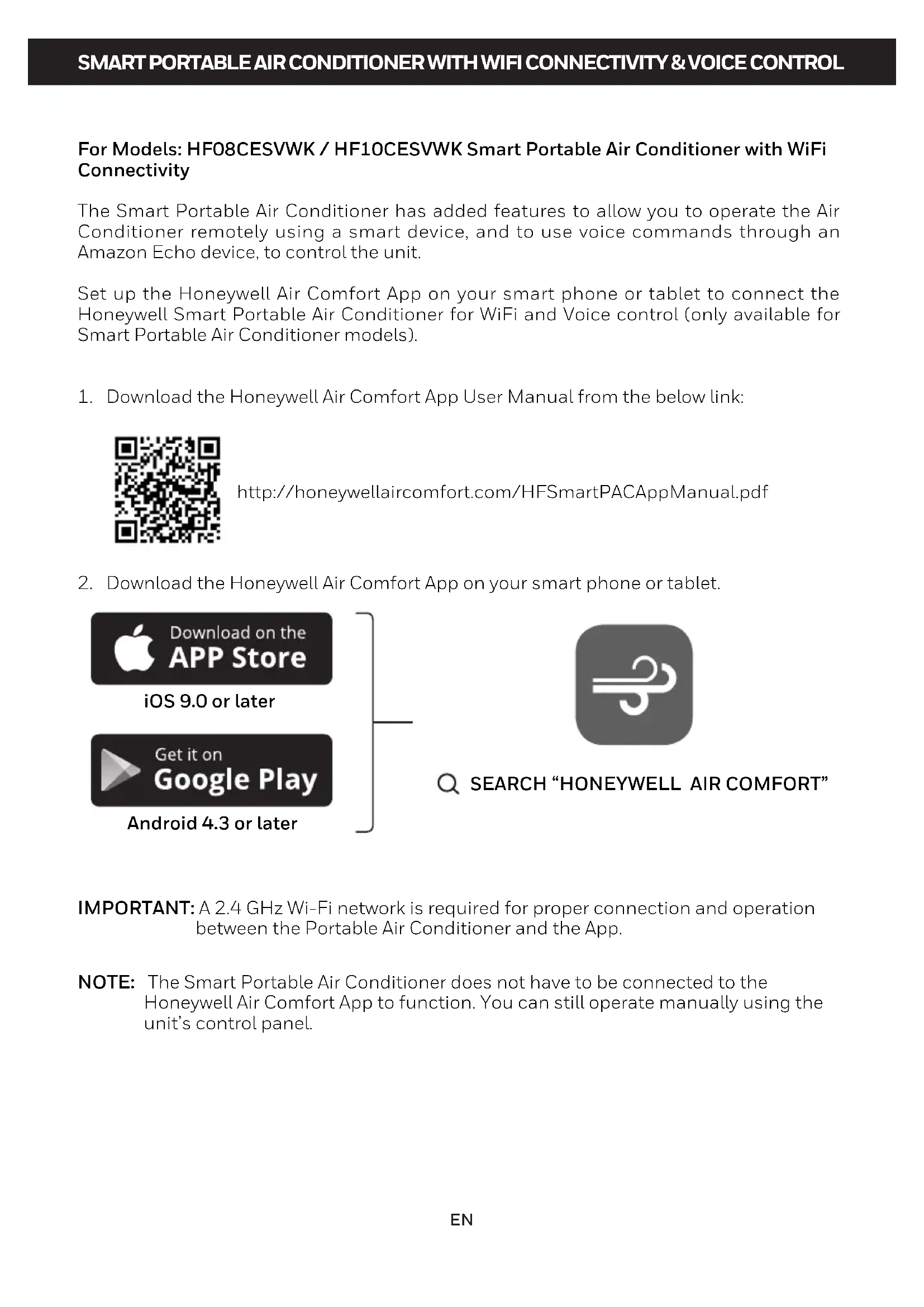
The Smart Portable Air Conditioner has added features to allow you to operate the Air Conditioner remotely using a smart device, and to use voice commands through an Amazon Echo device, to control the unit.
Set up the Honeywell Air Comfort App on your smart phone or tablet to connect the Honeywell Smart Portable Air Conditioner for WiFi and Voice control (only available for Smart Portable Air Conditioner models).
- Download the Honeywell Air Comfort App User Manual from the below link:

http://honeywellaircomfort.com/HFSmartPACAppManual.pdf
- Download the Honeywell Air Comfort App on your smart phone or tablet.
text_image
Download on the APP Store iOS 9.0 or later Get it on Google Play Android 4.3 or later
text_image
SEARCH "HONEYWELL AIR COMFORT"IMPORTANT: A 2.4 GHz Wi-Fi network is required for proper connection and operation between the Portable Air Conditioner and the App.
NOTE: The Smart Portable Air Conditioner does not have to be connected to the Honeywell Air Comfort App to function. You can still operate manually using the unit's control panel.
READ AND SAVE THESE INSTRUCTIONS
IMPORTANT SAFETY INSTRUCTIONS. READ CAREFULLY AND KEEP FOR FUTURE REFERENCE. IN CASE THERE IS ANY INCONSISTENCY OR CONFLICT BETWEEN THE ENGLISH VERSION AND ANY OTHER LANGUAGE VERSION OF THE CONTENT OF THIS MATERIAL, THE ENGLISH VERSION SHALL PREVAIL.
WARNING:
- DO NOT operate the unit with a damaged plug or loose wall outlet. If the supply cord is damaged, it must be replaced by the manufacturer, its service agent or similarly qualified persons in order to avoid a hazard.
- DO NOT cover the air intake and exhaust when in use.
• DO NOT place objects on or sit on the unit. - Always turn off and unplug the unit when cleaning or servicing.
• DO NOT use the appliance if it is damaged. - If service is needed contact an authorized service agent.
- Unplug the unit when stored or not in use.
- DO NOT pull or carry the appliance by the power cord.
- DO NOT pinch the power cord in the door and DO NOT pull it along edges or sharp corners.
- DO NOT run the power cord under carpeting and rugs.
- Use caution to prevent tripping on cord.
- DO NOT use the device in the following cases:
- Near a fire source
- In areas where gasoline, paint or other flammable goods are stored
- In an area where the water can be projected
- DO NOT touch the plug or the device with wet hands.
-
Basic safety precautions should always be followed when using electrical appliances.
-
This appliance has been manufactured for use in domestic environments and should not be used for other purposes.
- Only use the installation kit provided to install this unit. DO NOT attempt to extend the hose or install this unit using other methods other than that shown in this manual. Improper installation will void any existing warranties.
- DO NOT use an extension cord with this unit.
- This appliance can be used by children aged from 8 years and above, and persons with reduced physical, sensory or mental capabilities or lack of experience and knowledge if they have been given supervision or instruction concerning use of the appliance in a safe way and understand the hazards involved. Children shall not play with the appliance. Cleaning and user maintenance shall not be made by children without supervision.
- Never insert your fingers or rods into the air outlet. Take special care to warn children of these dangers.
- The manufacturer is not liable for injury caused to persons or property damage due to non-compliance with maintenance instructions and improper use of the appliance.
- The appliance shall be installed in accordance with national wiring regulations.
- The appliance is not to be used by persons (including children) with reduced physical, sensory or mental capabilities, or lack of experience and knowledge, unless they have been given supervision or instruction.
- Children should be supervised to ensure that they do not play with the appliance.
Congratulations on your purchase of this Honeywell Portable Air Conditioner.
Regarding the information pertaining to the installation, handling, servicing, cleaning and disposal of the appliance, please refer to the below paragraph of the manual.
USER TIPS
Portable Air Conditioners are ideal for spot cooling. The compressor, condenser and evaporator are housed in a compact unit. The air is dehumidified and cooled while a flexible hose sends heat outside. The Portable Air Conditioner includes a window venting kit.
No permanent installation is needed. The unit is easy to move from room to room and offers a truly flexible air conditioning solution.
Auto Evaporation System - The unit automatically evaporates the condensate through the hose. There is no need to empty the drainage tank except in humid conditions. Read and follow the instructions carefully.
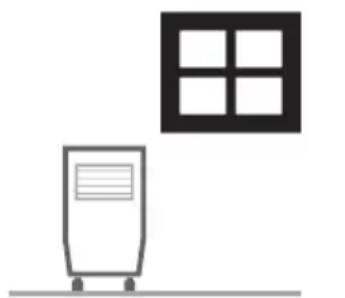
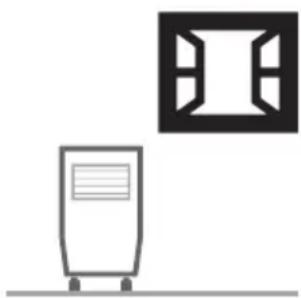
To ensure optimal efficiency of the product, keep doors and windows closed when it is used as an air conditioner or dehumidifier. If the product is being used with the fan function only, an open window could improve air circulation.
natural_image
Simple line drawing of a kitchen appliance with wheels and a window (no text or symbols)Cooling and Dehumidifying Operation
natural_image
Simple line drawing of a server unit with a monitor and a square window symbol (no text or labels)Fan Operation
Important:
Before installing the unit, place it UPRIGHT for 1 hour before use to allow the refrigerant to stabilize. Air outlet automatically opens when the unit is turned on, and automatically closes when the unit is turned off. Manually adjust the air vent located at the top of the unit to adjust the direction of air flow.
- Follow installation instructions to set up the unit.
- Plug the unit into a properly grounded circuit. DO NOT plug into an extension cord.
text_image
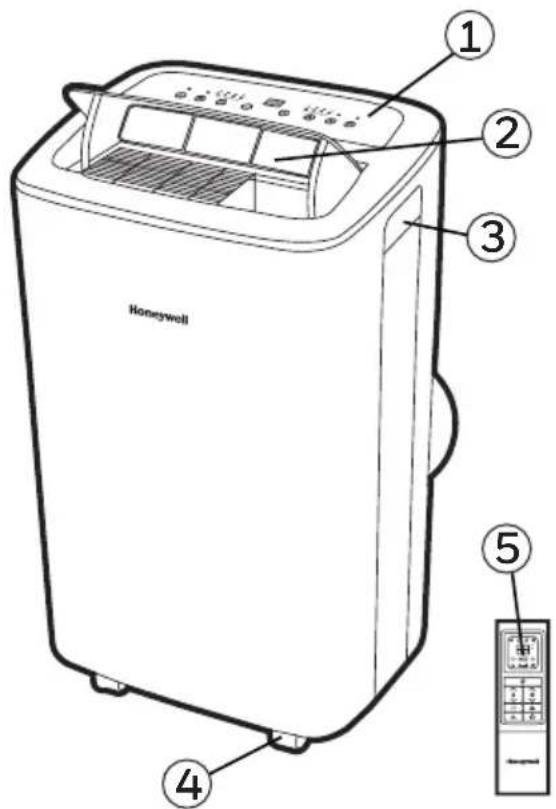
Honeywell ① ② ③ ④ ⑤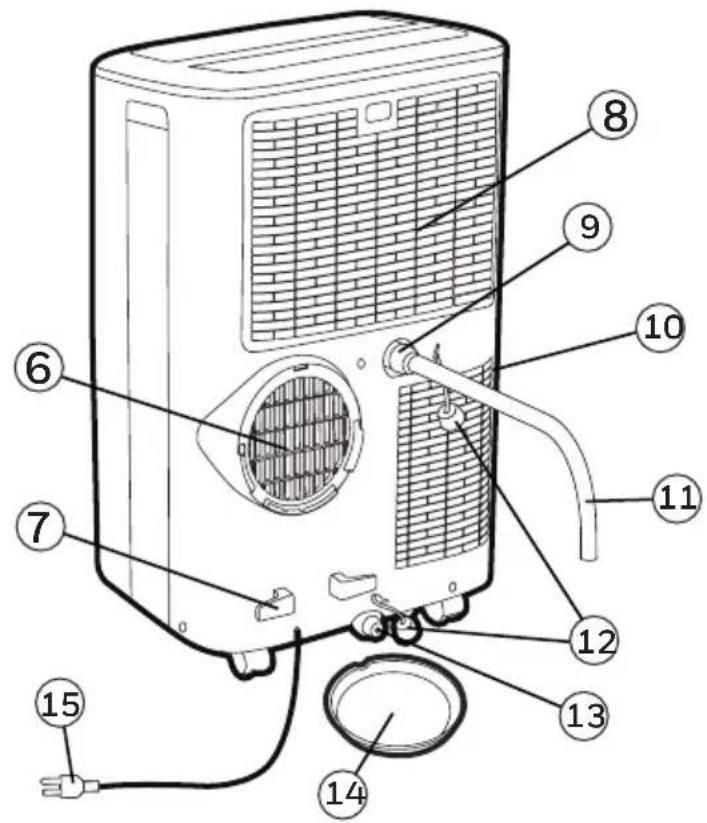
text_image
Labeled diagram of a portable air conditioner unit with numbered parts for identification1) Control Panel 9) Upper Rubber Drain Plug
(Dehumidifying Mode)
2) Air Outlet 10) Lower Dust Filter
(For Continuous Drain)
(Air Conditioning Mode)
It is important that the installation instructions below are followed for successful installation of this Portable Air Conditioner. Please call Customer Support if you have any difficulties or queries regarding these installation procedures.
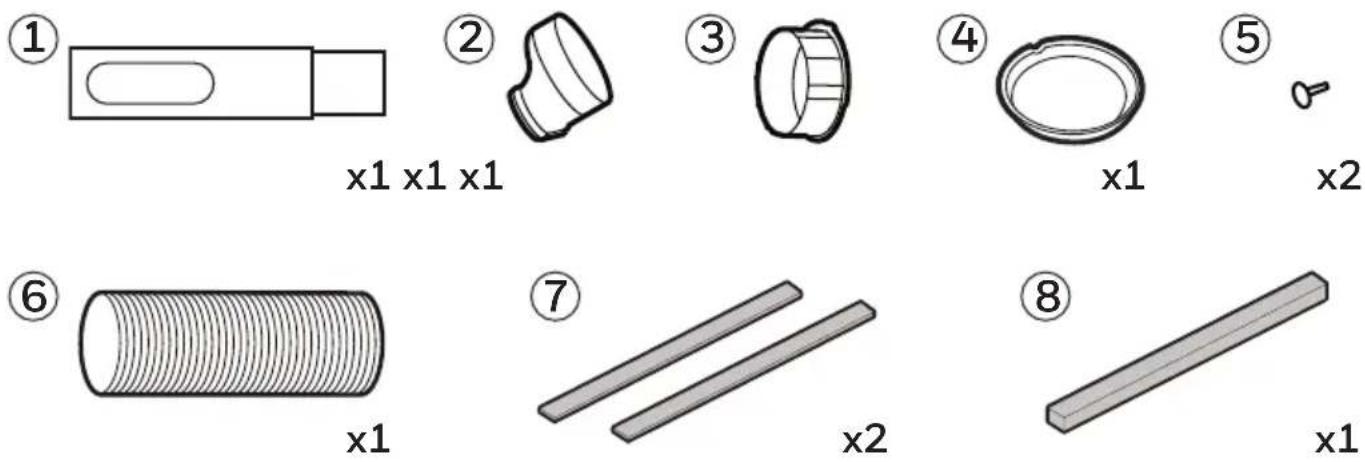
Installation Kit:
- Window Bracket Kit (1 Set) 5. Plastic Pin (2 Pieces)
- Window Bracket Panel Adapter (1 Piece) 6. Hose (1 Piece)
- Hose Connector (1 Piece) 7. Foam Seal (adhesive) (2 Pieces)
- Drain Pan (1 Piece) 8. Foam Seal (non-adhesive) (1 Piece)
Installation Steps:
Window bracket panel adapter, hose and hose connector are pre-assembled inside the package.1.
natural_image
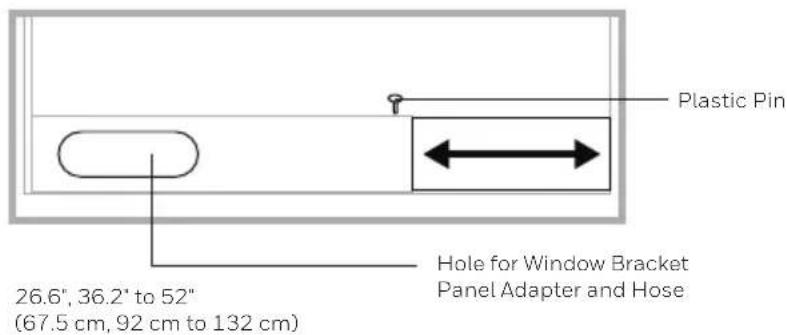
Technical line drawing of a mechanical component with no visible text or symbols- Adjust the window bracket as per width or height of your window and insert the plastic pin to fix at the desired position. There is a hole where the hose will be inserted later. Make sure this hole is not blocked.
text_image
Plastic Pin 26.6", 36.2" to 52" (67.5 cm, 92 cm to 132 cm) Hole for Window Bracket Panel Adapter and HoseINSTALLATION (CONTINUED)
Note: After setting the window bracket to the size of your window, please remove it from the window and follow the instructions below.
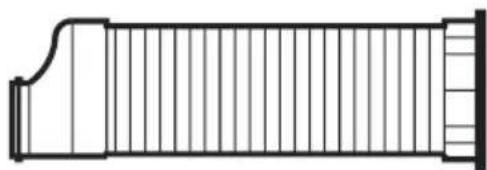
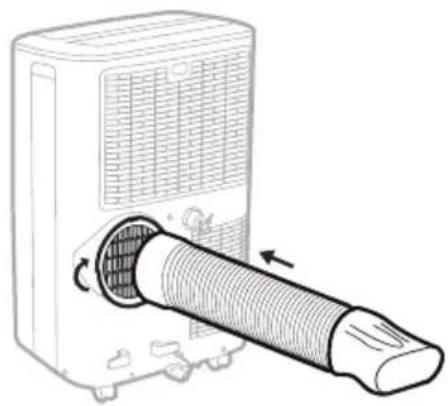
- Connect the hose to the rear exhaust outlet on the back of the unit. Slide-in the hose connector then rotate clockwise until it is locked in place.
natural_image
Line drawing of a portable air conditioner unit with a coiled tube inserted, showing airflow direction (no text or symbols)Hose:
Dia. 5.9" (15 cm)
Length: 10.6" to 59" (27 cm to 150 cm)
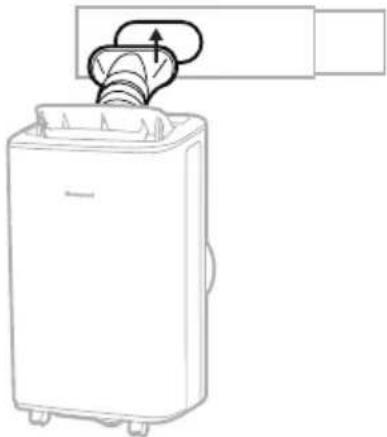
- Connect the window bracket to the window bracket panel adapter. Ensure that all connections are tight and installed properly.
natural_image
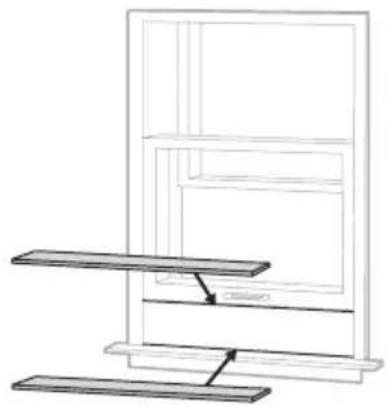
Line drawing of a portable air conditioner unit with a handle and lid, no text or symbols present- Cut the Foam Seal (adhesive) to the proper length and attach them to the window sash and frame.
natural_image
Line drawing of a multi-level shelf assembly with no text or symbols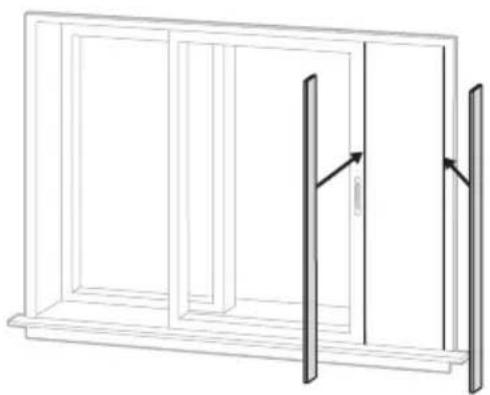
natural_image
Line drawing of a two-panel door frame with an open door and vertical panel, no text or symbols presentHorizontal Sliding Window Vertical Sliding Window
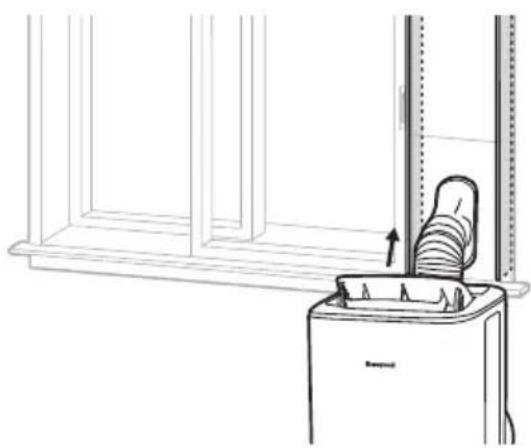
- Connect the window bracket to the window.
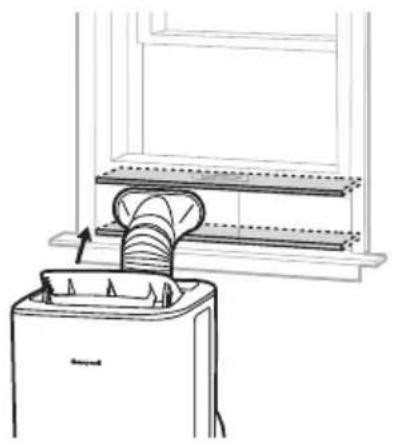
natural_image
Line drawing of a kitchen appliance with a leaf being inserted into a sink (no text or symbols)Horizontal Sliding Window
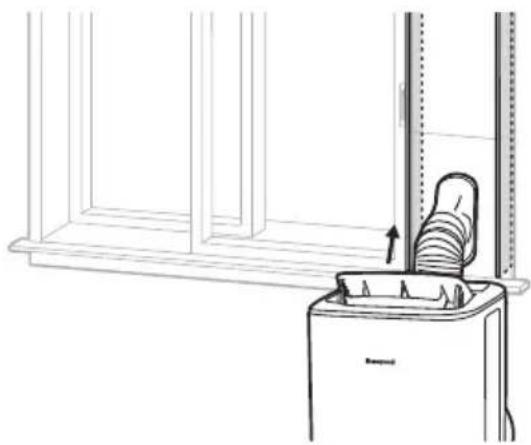
natural_image
Line drawing of a trash bin with an upward arrow indicating motion, no text or symbols presentVertical Sliding Window
- Cut the Foam Seal (non-adhesive) to the window length. Stuff the Foam Seal (non-adhesive) between the inner window sash and the outer window glass to prevent air and insects from getting into room.
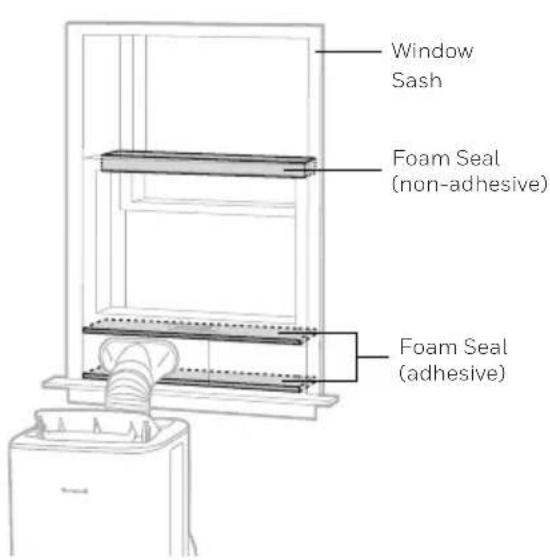
text_image
Window Sash Foam Seal (non-adhesive) Foam Seal (adhesive)Horizontal Sliding Window
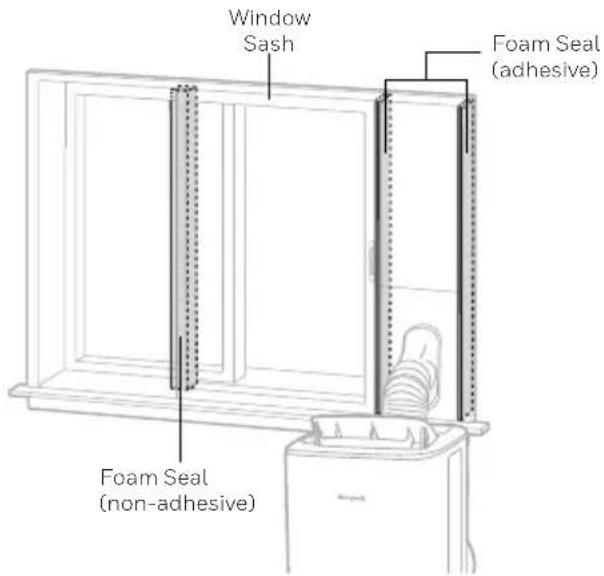
text_image
Window Sash Foam Seal (adhesive) Foam Seal (non-adhesive)Vertical Sliding Window
- The Portable Air Conditioner is now ready to use.
IMPORTANT:
Do not replace or lengthen the hose as this could cause the unit to malfunction.
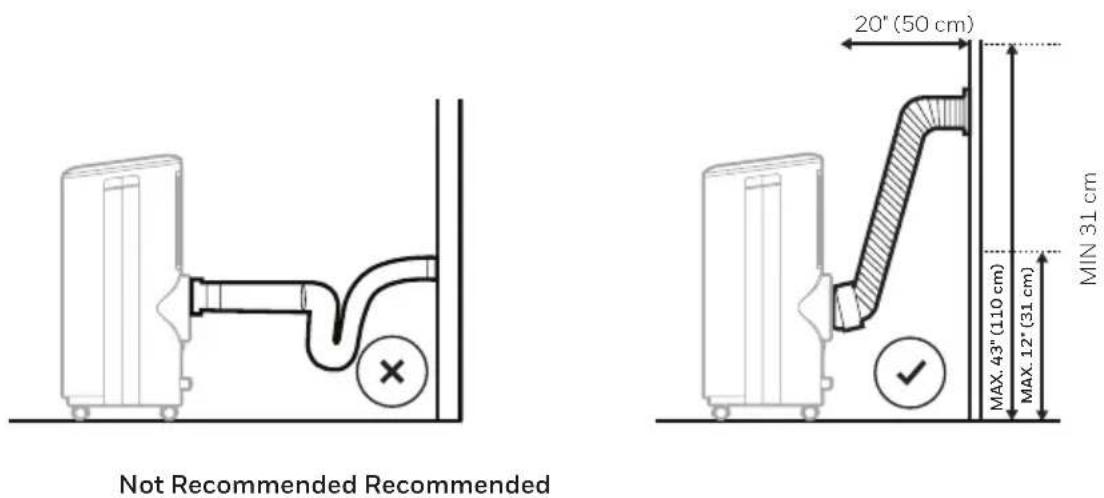
WARNING: Any warranties included with this product will be voided if an extra extension hose is added to the originally provided installation kit or if the installation is performed differently than the manufacturer's instructions, without proper consultation. Please contact Customer Support for help with installation procedures if needed.
- The supplied hose has a diameter of 5.9" (15 cm) and can be extended from 10.6" to 59" (27 cm to 150 cm).
- Do not bend (to the extent shown below) the hose. A bent hose will block exhaust air and cause the unit to malfunction or shut-off.
- Make sure the back of the unit is at least 20" (50 cm) away from the wall. Do not place the unit in front of curtains or drapes as this could obstruct the airflow.
CONTROL PANEL
text_image
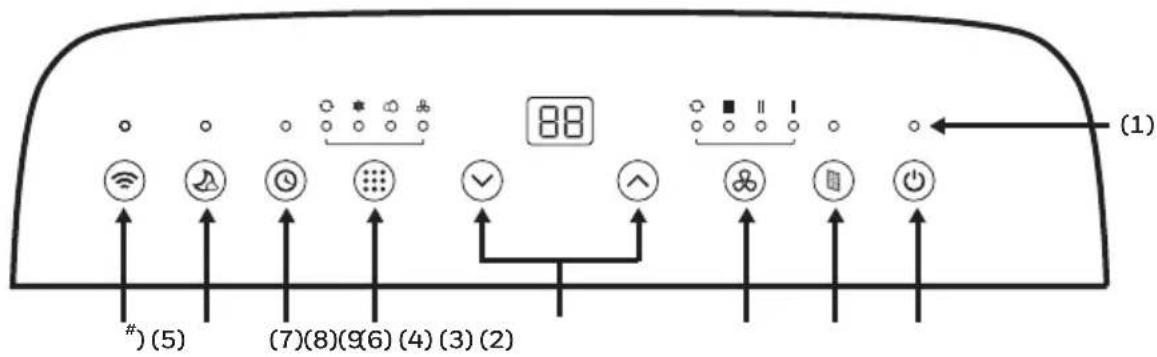
(1) (7)(8)(9)(6)(4)(3)(2) #)(5)1) Indicator Lights 5) Timer / Temperature Set Controls
2) Power Control 6) Mode Control
3) Filter Reset 7) Timer Control
4) Fan Speed Control 8) Sleep Control
9^) Wi-Fi Connectivity and Voice Activated Control
^THIS IS ONLY FOR MODEL HF08CESVWK / HF10CESVWK WITH WIFI SMART FEATURES
NOTE: For detailed instructions to set up your Portable Air Conditioner for connected operation from your smart phone or tablet, separate user manual can be downloaded at:

text_image
QR code image containing encoded data, no visible human-readable texthttp://honeywellaircomfort.com/HFSmartPACAppManual.pdf
FUNCTION BUTTONS
POWER CONTROL ⏻
The Power Control turns the unit on and off. The air vent will automatically open when the unit is turned ON and automatically close when unit is turned OFF.
FILTER RESET

When the operation has reached 250 hours, the Filter Reset light will illuminate. Switch the Portable Air Conditioner OFF and carefully remove filters from the unit and clean. Replace filters and press the Filter Reset button, the Filter Reset light will turn off and the operation time will be cleared.
FUNCTION BUTTONS (CONTINUED)
FAN SPEED CONTROL
4 settings: High, Medium, Low and Auto.
Note: Auto fan speed can be selected in cooling mode only.
TEMPERATURE CONTROL
• The default display is setting temperature.
- In cooling mode, when ∧ or ∨ button is pressed, the set temperature is displayed and may be adjusted.
Note: By pressing both ∧ or ∨ buttons at the same time, the display will toggle between Celsius (°C) and Fahrenheit (°F).
MODE CONTROL
Settings: Air Conditioning, Dehumidifying, Fan, Auto.
The corresponding indicator light will illuminate to indicate the current mode setting.
• Air Conditioning Mode (COOL)
Adjust fan speed and air temperature to suit your desired comfort level.
Temperature setting range is 16^ C - 32^ C ( 60^ F - 90^ F).
Ambient temperature range is 16^ C - 35^ C ( 60^ F - 95^ F).

• Dehumidifying Mode (DRY)
Fan speed is preset to Low.

Note: If the unit will be used mainly as a dehumidifier, do not connect the hose. Continuous drainage is then necessary (refer to Continuous Draining for Dehumidifier Mode).
IMPORTANT: The Dehumidifier mode is used to support moisture reduction but should not be expected to dehumidify to the same degree as a standard dehumidifier-only appliance. The built-in dehumidifier automatically adjusts dehumidification based on ambient room temperatures. It is not possible to adjust to a desired humidity percentage. The front display only shows the current and desired temperatures. It does not show humidity levels.
- Fan Mode
For air circulation without air conditioner cooling.
Note: Auto fan speed cannot be selected in fan mode.
- Auto Mode
Press the ▲ or ▼ button to select the temperature you want.
In this mode, the unit will automatically select cooling or fan only depends on the set temperature and the room temperature. The Portable Air Conditioner will control room temperature automatically around the set temperature.
Note: Fan speed can't be adjusted in auto mode.
FUNCTION BUTTONS (CONTINUED)
TIMER CONTROL Ⓤ
The Timer is adjustable between 1 - 24 hours.
AUTO TURN OFF:
While unit is running, press the Timer button ⏻ and the display will flash. While the display is flashing, press the ▲ or ▼ button to select the number of hours you want the unit to turn OFF automatically.
AUTO TURN ON:
When unit is in a standby mode (plugged in with power light will on for seconds when plugged then turn off), press the Timer button ⏻ and the display will flash. While the display is flashing, press the ▲ or ▼ button to select the number of hours until you want the unit to turn ON automatically.
SLEEP MODE
When the Sleep Mode is activated in Air Conditioning mode, the set temperature will increase by 1^ C or 1^ F after the first hour of cooling and will increase a further 1^ C or 1^ F after the second hour of cooling. The unit will maintain this temperature for 5 hours. The set temperature will then reduce by 1^ C or 1^ F on the seventh hour and reduce a further 1^ C or 1^ F on the tenth hour. Sleep mode will then deactivate automatically.
Note: The Sleep Mode can be deactivated during cooling mode by pressing any button at any time.
WATER FULL ALARM
Condensation may accumulate in the unit.
If the internal tank is full, error code "P1" will be displayed and an alarm will beep for 3 seconds. The unit will not operate until the water has been drained from the lower drain plug (refer to Water Condensation Drainage).
After switching the Portable Air Conditioner off, the compressor will not start immediately. You must wait about 4 minutes before it switches back on again.
WI-FI MODE^

When the Smart Portable Air Conditioner is connected to the wifi function, the 📋 indicator light will be illuminated.
^THIS IS ONLY FOR MODEL HF08CESVWK / HF10CESVWK WITH WI-FI SMART FEATURES
REMOTE CONTROL
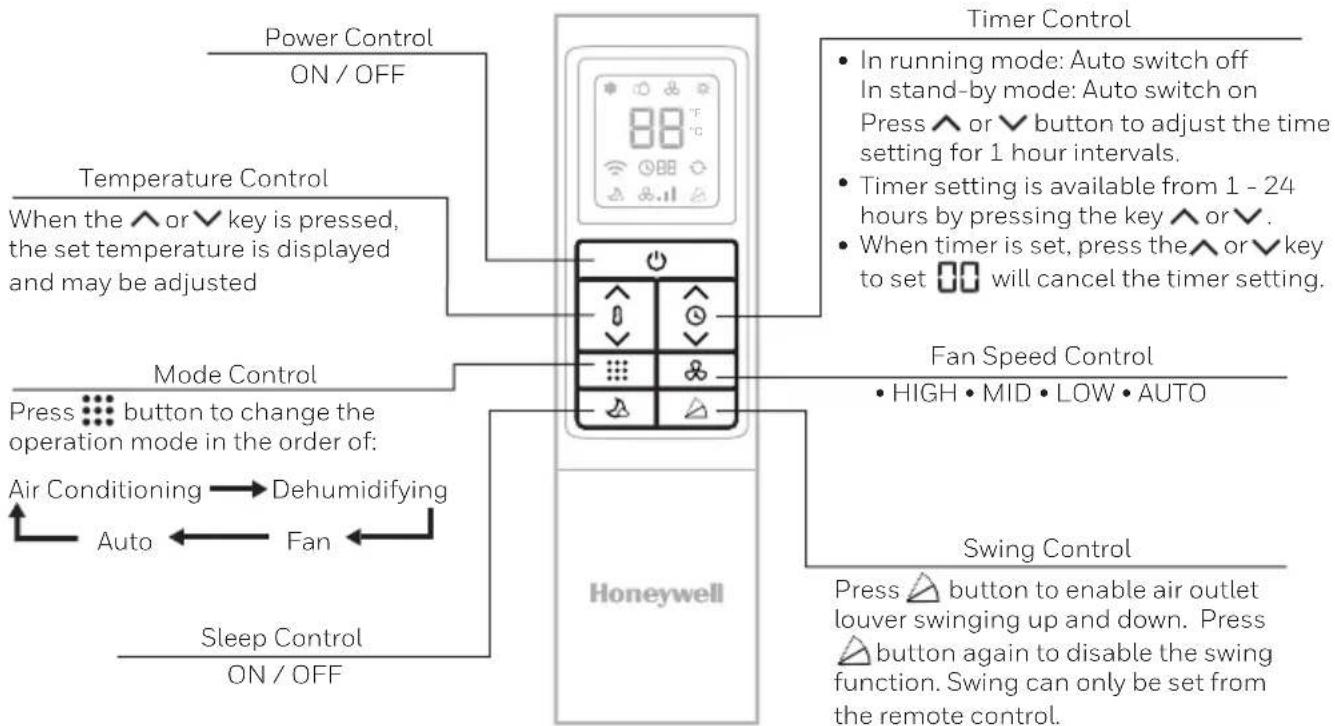
All key functions can be accessed from the remote control.
flowchart
graph TD
    A["Power Control ON/OFF"] --> B["Mode Control"]
    B --> C["Sleep Control ON/OFF"]
    D["Temperature Control When the ∧ or √ key is pressed, the set temperature is displayed and may be adjusted"] --> A
    E["Mode Control Press button to change the operation mode in the order of: Air Conditioning → Dehumidifying"] --> B
    F["Timer Control In running mode: Auto switch off In stand-by mode: Auto switch on Press ∧ or √ button to adjust the time setting for 1 hour intervals. Timer setting is available from 1 - 24 hours by pressing the key ∧ or √. When timer is set, press the ∧ or √ key to set 📄 will cancel the timer setting."] --> F
    G["Fan Speed Control HIGH • MID • LOW • AUTO"] --> H["Honeywell"]
    I["Swing Control Press △ button to enable air outlet louver swinging up and down. Press △ button again to disable the swing function. Swing can only be set from the remote control."] --> H
Note:
- Battery Installation: Remove the cover on the back of the remote control and insert two AAA batteries with + and - pointing in the proper direction according to the polarity markings.

text_image
Diagram showing two battery terminal blocks with labeled pins and charging symbols, alongside a blank schematic panel.Caution:
• Use only two AAA or IEC R03 1.5V batteries.
- Remove the batteries if the remote control is not in use for a month or longer.
- All batteries should be replaced at the same time, do not mix with old batteries.
- Do not mix alkaline, standard (carbon-zinc) or rechargeable (nickel-cadmium) batteries.
• Properly dispose of used batteries.
This device complies with part 15 of the FCC Rules. Operation is subject to following two conditions: (1) this device may not cause harmful interference, and (2) this device must accept any interference received, including interference that may cause undesired operation.
This equipment has been tested and found to comply with the limits for a Class B digital device, pursuant to part 15 of the FCC Rules. These limits are designed to provide reasonable protection against harmful interference in a residential installation. This equipment generates, uses and can radiate radio frequency energy and, if not installed and used in accordance with the instructions, may cause harmful interference to radio communications. However, there is no guarantee that interference will not occur in a particular installation. If this equipment dose cause harmful interference to radio or television reception, which can be determined by turning the equipment off and on, the user is encouraged to try to correct the interference by one or more of the following measures:
• Reorient or relocate the receiving antenna.
- Increase the separation between the equipment and the receiver.
- Connect the equipment info an outlet on a circuit different from that to which the receiver is connected.
- Consult the dealer or an experienced radio/TV technician for help.
Caution: Any changes or modifications not expressly approved by the party responsible for compliance could void the user's authority to operate the equipment.
Appliance Maintenance:
- Turn off the appliance before disconnecting the power supply.
- Only clean the appliance with a soft dry cloth.
Dust Filter Maintenance:
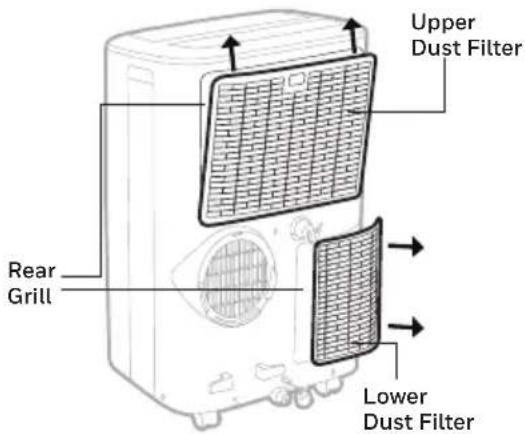
The dust filter is to be cleaned every two weeks to maintain air cooling efficiency. Please follow the below instructions for cleaning the dust filters:
- Switch off and unplug the Portable Air Conditioner from the electrical outlet.
- Remove the Upper Filter/ Grill, unscrew the Lower Filter/ Grill and carefully remove.
- Gently wash using water and/or diluted liquid dishwashing detergent. Rinse thoroughly and gently shake excess water from the filters. Make sure the filters are dry before reinstalling. Note: You may use a vacuum cleaner to remove dust.
- Replace the Upper Grill onto the unit, and reinstall the Lower Grill with the screw.
text_image
Upper Dust Filter Rear Grill Lower Dust FilterWARNING: DO NOT power or operate the Portable Air Conditioner when cleaning or when the Dust Filter is removed from the unit, or if there is a loose-fitting Dust Filter. DO NOT attempt to handle or touch any of the parts or wiring inside the Rear Grill after the Dust Filter has been removed from the unit. Doing so can cause serious injury or electrical shock.
End of Season Storage and Maintenance:
If the appliance will not be used for a long time, follow these steps:
- Be sure to drain the left-over water condensation. Remove the lower drain plug and use a drain pan to collect the water (make sure to replace the deain plug cap when finished).
- To dry excess moisture, run the unit in Fan only mode for 30 minutes before storing.
- Turn off and unplug the Portable Air Conditioner from the power supply.
- Remove the dust filter and clean with water. Dry the dust filter and then reinstall.
-
Disconnecting the Window Installation Kit:
-
Remove the Hose from the unit by rotating anti-clockwise then pulling away.
- Remove the Foam Seal, Window Bracket, Window Bracket Panel Adapter and Hose Connector.
- It is recommended to store the Window Kit parts in a bag together with the Remote Control, Drain Tube and placing them together with the Portable Air Conditioner unit.
-
If needed, you can clean the Window Kit with a damp cloth and water before storing. Make sure all parts of the Window Kit are dry before storage.
-
Cover the Portable Air Conditioner with a cloth/ plastic bag before storage, to protect from dust and scratches collecting on the surface of the unit.
- It is recommended to coil the power cord before storing to ensure the cord is protected from bents and creases.
- Store the Portable Air Conditioner in a cool, dry place, away from direct sunlight.
WATER CONDENSATION DRAINAGE
When there is excess water condensation inside the unit, the Portable Air Conditioner stops running and shows an error code "P1" with an alarm. This indicates that the water condensation needs to be drained using the following procedures:
Manual Draining in Cooling, Dehumidifying and Auto Modes
Water may need to be drained in high humidity areas.
- Unplug the unit from power source.
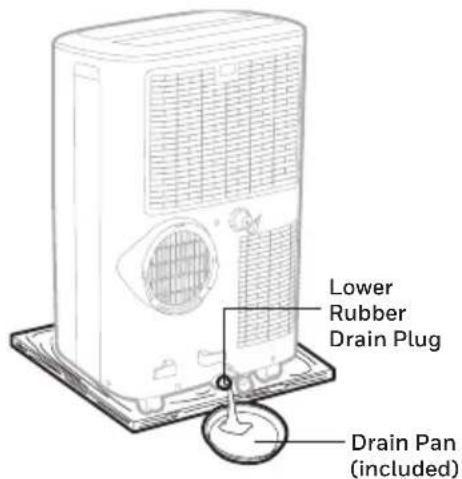
- Place a drain pan under the lower rubber drain plug. See diagram.
- Remove the drain plug cap.
- Water will drain out and collect in the drain pan.
- After the water is drained, replace the drain plug cap.
- You can now turn on the unit.
text_image
Lower Rubber Drain Plug Drain Pan (included)Continuous Draining in Dehumidifier Mode
While using the unit in dehumidifier mode, continuous drainage is recommended.
- Unplug the unit from power source.
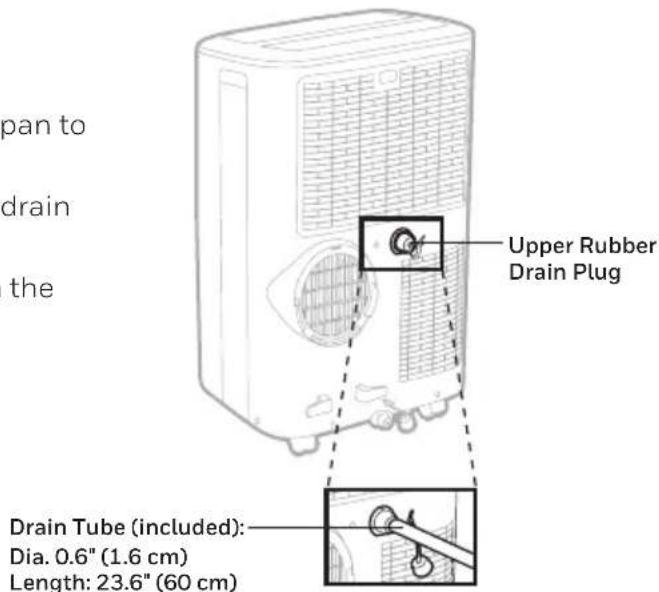
- Remove the upper drain plug cap.
Some residual water may spill so please have a pan to collect the water. - Connect the drain tube (included) to the upper drain plug. See diagram.
- The water can be continuously drained through the drain tube into a floor drain or bucket.
- Replace the drain plug cap.
- You can now turn on the unit.
text_image
pan to drain the Upper Rubber Drain Plug Drain Tube (included): Dia. 0.6" (1.6 cm) Length: 23.6" (60 cm)IMPORTANT: It is NOT recommended to connect the drain hose for continuous drainage while the unit is switched ON in air conditioning cooling mode. Doing so can reduce the cooling efficiency of the Portable Air Conditioner. Only drain the water condensation when the unit is switched off. Continuous drainage is only suitable when the unit is set up in Dehumidifier mode.
TROUBLESHOOTING GUIDE
The following troubleshooting guide addresses the most common problems. If problems persist, call customer support. Unplug and disconnect the appliance from the power source before attempting to troubleshoot.
| PROBLEM POSSIBLE CAUSE SOLUTION | ||
| The air conditioning unit does not start | No electricity. Check for power. | |
| Batteries in the remote control need to be replaced. | Change remote control batteries. | |
| The power cord is not properly plugged in. | Remove and reconnect the power cord. | |
| The safety LCDI plug has tripped (USA / Canada / Mexico only). | Reset the safety LCDI plug, if problem persists contact our customer support (USA / Canada / Mexico only). | |
| Runs a short while only | The thermostat temperature setting is too close to room temperature. | Lower the set temperature. |
| Air outlet is blocked. Make sure the hose is properly connected. | ||
| There are tight bends in the air hose. | Connect hose as per instructions on page 3. | |
TROUBLESHOOTING GUIDE (CONTINUED)
| PROBLEM POSSIBLE CAUSE SOLUTION | ||
| Runs but not cooling | A door or window is open. | Make sure the window or door is closed. |
| The dust filter is dirty. Clean the dust filter. | ||
| The hose is detached. | Reinstall hose properly (refer to Installation section). | |
| Temperature setting is too high. | Reduce temperature setting. | |
| Air outlet or intake is blocked. | Remove blockage. | |
| Room exceeds recommended size. | Move unit to smaller room. | |
| Large size or number of windows are decreasing cooling effectiveness. | Cover windows with curtains or blinds. | |
| Will not run and error code "P1" is displayed | Excess water condensation inside the tank. | Drain the water (refer to Water Condensation Drainage). |
| ERROR CODE ERROR POSSIBLE CAUSE | |
| "E1" Indoor temperature sensor failure (open circuit or short circuit). | |
| "E3" Evaporator temperature sensor failure (open circuit or short circuit). | |
| "P1" Water full alarm. |
http://honeywellaircomfort.com/HFSmartPACAppManual.pdf
natural_image
Simple line drawing of a door with wheels and a window (no text or symbols)natural_image
Simple line drawing of a server unit with a door symbol above it (no text or labels)text_image
Labeled diagram of a portable air conditioner unit with numbered parts for identificationnatural_image
Technical line drawing of a mechanical component with no visible text or symbolsnatural_image
Line drawing of a portable air conditioner unit with a coiled hose and airflow direction arrow (no text or symbols)Tuyau:
Dia. 5.9" (15 cm)
natural_image
Line drawing of a portable air conditioner unit with a lid emitting vapor (no text or symbols)natural_image
Line drawing of a cabinet or shelf structure with two horizontal plates and a vertical shelf (no text or symbols)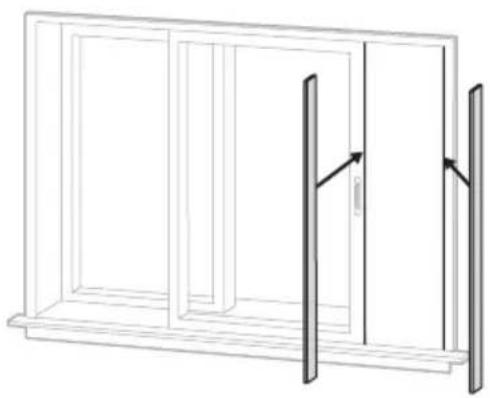
natural_image
Line drawing of a two-panel window frame with vertical bars and an arrow indicating direction (no text or symbols)natural_image
Line drawing of a kitchen appliance with a drain and a shelf, no text or symbols present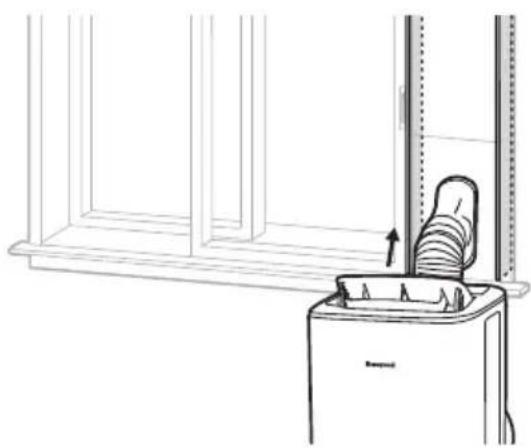
natural_image
Line drawing of a trash bin with a bucket and upward arrow, no text or symbols presenttext_image
QR code image containing encoded data, no visible human-readable texthttp://honeywellaircomfort.com/HFSmartPACAppManual.pdf
TOUCHES DE FONCTION
INTERRUPTEUR
text_image
Diagram showing two battery terminal blocks with labeled pins and charging symbols, alongside a blank panel.Attention:
This equipment has been tested and found to comply with the limits for a Class B digital device, pursuant to part 15 of the FCC Rules. These limits are designed to provide reasonable protection against harmful interference in a residential installation. This equipment generates, uses and can radiate radio frequency energy and, if not installed and used in accordance with the instructions, may cause harmful interference to radio communications. However, there is no guarantee that interference will not occur in a particular installation. If this equipment dose cause harmful interference to radio or television reception, which can be determined by turning the equipment off and on, the user is encouraged to try to correct the interference by one or more of the following measures:
• Reorient or relocate the receiving antenna.
- Increase the separation between the equipment and the receiver.
- Connect the equipment info an outlet on a circuit different from that to which the receiver is connected.
- Consult the dealer or an experienced radio/TV technician for help.
Caution: Any changes or modifications not expressly approved by the party responsible for compliance could void the user's authority to operate the equipment.
Tube de drainage (included):
Dia. 0.6" (1.6 cm)
Length: 23.6" (60 cm)
text_image
QR code image containing encoded data, no visible human-readable texthttp://honeywellaircomfort.com/HFSmartPACAppManual.pdf
natural_image
Simple line drawing of a water heater with a window and door, no text or symbols presentnatural_image
Simple line drawing of a device with a window and a square symbol above it (no text or labels)Función Ventilador
Importante:
text_image
Labeled diagram of a portable air conditioner unit with numbered parts for identificationnatural_image
Technical line drawing of a mechanical component with no visible text or symbolsnatural_image
Diagram of a portable air conditioner unit with a coiled hose and airflow direction arrows (no text or symbols)Manguera
natural_image
Line drawing of a portable air conditioner unit with a lid emitting vapor (no text or symbols)natural_image
Line drawing of a cabinet or shelf assembly with two horizontal plates and a vertical shelf (no text or symbols)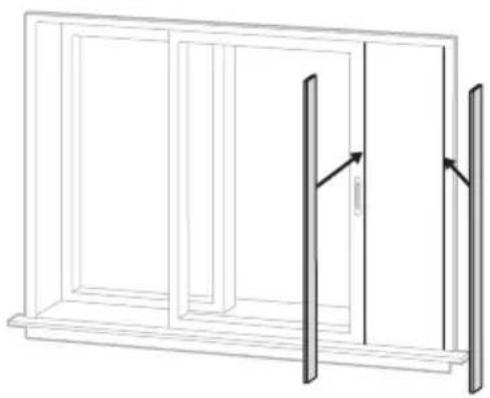
natural_image
Line drawing of a two-panel window frame with vertical and horizontal panels, no text or symbols presentVentana Corrediza Horizontal Ventana Corrediza Vertical
natural_image
Line drawing of a kitchen appliance with a drain and shelf, no text or symbols presentVentana Corrediza Horizontal Ventana Corrediza Vertical
natural_image
Line drawing of a trash bin with a bucket and an upward arrow, no text or symbols presenttext_image
QR code image containing encoded data, no visible human-readable texthttp://honeywellaircomfort.com/HFSmartPACAppManualpdf
International Inc. Honeywell International Inc. no representa
© 2020 JMATEK Limited. All rights reserved.
The Honeywell Trademark is used under license
from Honeywell International Inc.
Honeywell International Inc. makes no
representations or warranties with respect to this product.
This product is manufactured by Airtek Int'l Corp. Ltd.