Conga Rockstar Micro 12000 - Vacuum Cleaner CECOTEC - Free user manual and instructions
Find the device manual for free Conga Rockstar Micro 12000 CECOTEC in PDF.



| Brand | Cecotec |
| Model | Conga Rockstar Micro 12000 |
| Product type | Cordless hand vacuum |
| Rated power | 200 W |
| Power supply | 100-240 V~, 50/60 Hz (charging base DC 14 V) |
| Battery | Lithium-ion rechargeable |
| Charging time | Approximately 4 to 4.5 hours |
| Dustbin capacity | Not specified (approximately 0.5 L estimated) |
| Filters | Stainless steel filter + high efficiency filter |
| Included accessories | Upholstery tool, 2-in-1 furniture and crevice tool, charging base, power adapter, 12V car adapter |
| Features | Handheld suction, charging indicator, low battery auto shut-off |
| Safety | Do not vacuum liquids, hot ashes, toxic substances; do not immerse |
| Maintenance | Clean the dustbin and filters after each use, wash with water and neutral soap |
| Warranty | 2 years (excluding abnormal use, consumable parts) |
| After-sales service | +34 9 63 21 07 28 (Cecotec) |
| Country of origin | Spain (brand) |
Frequently Asked Questions - Conga Rockstar Micro 12000 CECOTEC
User questions about Conga Rockstar Micro 12000 CECOTEC
0 question about this device. Answer the ones you know or ask your own.
Ask a new question about this device
Download the instructions for your Vacuum Cleaner in PDF format for free! Find your manual Conga Rockstar Micro 12000 - CECOTEC and take your electronic device back in hand. On this page are published all the documents necessary for the use of your device. Conga Rockstar Micro 12000 by CECOTEC.
USER MANUAL Conga Rockstar Micro 12000 CECOTEC
natural_image
Exterior view of a modern office building (no signage)cecòtec
Safety instructions 8
-
Parts and components 33
-
Before use 33
-
Product assembly 33
-
Operation 34
-
Cleaning and maintenance 34
-
Troubleshooting 35
-
Technical specifications 36
-
Disposal of old electrical appliances 36
-
Technical support service and warranty 36
SOMMAIRE
Read these instructions thoroughly before using the appliance. Keep this instruction manual for future reference or new users. Make sure that the mains voltage matches the voltage stated on the rating label of the appliance and that the outlet is grounded.
Do not use the appliance for other than intended use.
Do not use the appliance to vacuum liquids, lighted matches, cigarette ends, hot ash or on wet surfaces.
Do not use the device to vacuum cement, gypsum powder, wall powder, construction waste, paper mass and similar substances, they could block the device.
Do not use the device in areas where there are toxic liquids such as chlorine, bleach or ammonia.
Do not immerse the cord, plug, or any non-removable part of the appliance in water or any other liquid, nor expose the electrical connections to water.
Do not use the device or handle the charger with wet hands.
Do not place the appliance close to heat sources, flammable substances, wet surfaces where it can fall or be pushed into water or allow it to come into contact with water or other liquids.
Do not use the device if it has been dropped or if there are any visible signs of damage.
Do not use any battery that has not been provided with the original product or by Cecotec.
Check the power cord regularly for visible damage. If the cord is damaged, it must be replaced by the official Technical Support Service of Cecotec, in order to avoid any type of danger.
Do not operate outdoors.
The ventilation slots of the device must never be blocked.
The appliance can only be operated with the supplied battery
and power adapter.
Do not use the appliance if its cord, plug, charging base or housing is damaged, nor after it malfunctions or has been dropped or damaged in any way. Maintenance and repairs must be carried out by a qualified technician from Cecotec. Do not disassemble the device by yourself.
Do not use the appliance for other than intended use.
Please dispose the used batteries according to local laws and regulations.
Only use accessories recommended or supplied by Cecotec.
This appliance is not intended to be used by persons with reduced physical, sensory, or mental capabilities, or lack of experience or knowledge, unless they have been given supervision or instruction concerning the use of the appliance in a safe way by a person responsible for their safety, and understand the hazards involved.
Supervise young children to make sure that they do not play with the appliance. Close supervision is necessary when the appliance is being used by or near children.
It can be used by children over the age of 12, as long as they are given continuous supervision.
Battery instructions
This appliance includes Li-ion batteries, do not incinerate or expose them to high temperatures, as they may explode.
Leaks from the battery or battery cells can occur under extreme conditions. Do not touch any liquid that leaks from the battery. If the liquid gets into contact with skin, wash immediately with soap and water. If the liquid gets into the eyes, flush them immediately with clean water for a minimum of 10 minutes and seek medical attention. Wear gloves to handle the battery and dispose of immediately in accordance with local regulations.
Avoid contact between the battery and small metallic objects such as paper clips, coins, keys, nails or screws.
Before a new battery is used or the battery is used for the first time after long-term storage, fully charge the battery. When the device is stored and not used for long periods of time, ensure that the battery pack is fully charged, and ensure that the battery is charged and discharged at least once every three months.
INSTRUCTIONS DE SÉCURITÉ
- Rear cover
- Power/charge/battery indicator
- Handle
- Body
- Body assembly
- Suction part
- Motor housing
- Dust tank assembly
- Dust tank release button
- Stainless Steel filter and high-efficiency filter
- Accessory for upholstery
- 2-in-1 accessory for corners and furniture
- Charging base
- Charging connector
- Power adapter
- Dust tank lock button
- Charger with 12 V connection for car
2. BEFORE USE
Take the product out of the box.
Remove all packaging materials, rating labels and transport protectors before plugging the device. Keep the original box.
Make sure all parts and components are included and in good conditions. If any visible signs of damage are observed, contact Cecotec's Technical Support Service immediately.
Before the first use, the device must be fully charged.
3. PRODUCT ASSEMBLY
Note: Always make sure that the filter is well fitted into place before turning on the device.
Assembling the handheld vacuum cleaner and accessories
Fig. 2.
Before starting using the device, insert the desired accessory in the vacuuming nozzle.
Removing the dust tank
ENGLISH
Fig. 3.
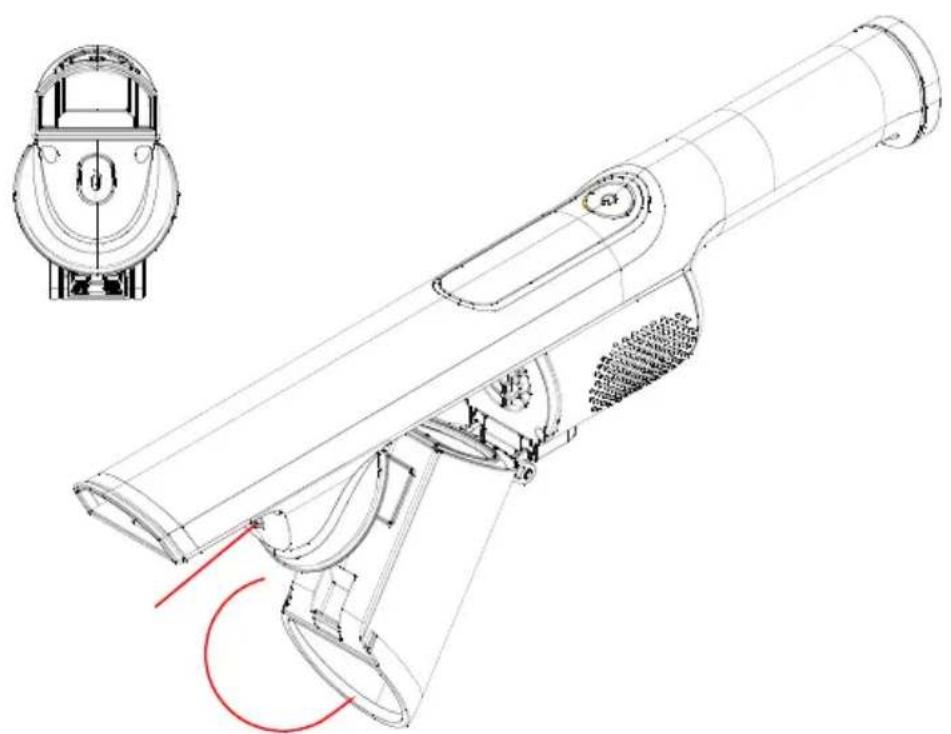
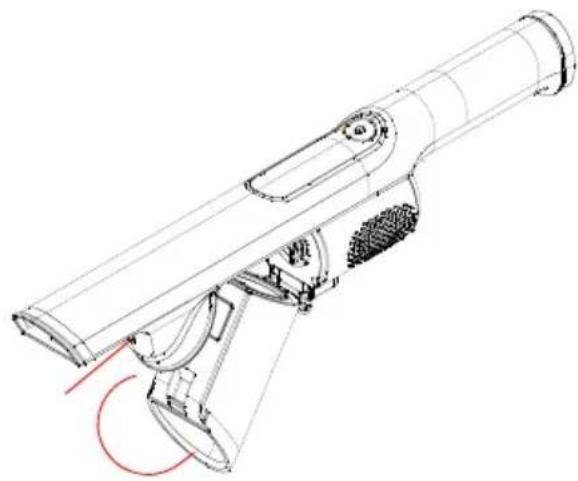
Press the dust tank release button located on the bottom part of the main body. The dust tank will spring out.
Then, press the dust tank lock button of the dust tank assembly in the direction shown. The dust tank will slide out from the device.
Assembling the dust tank
Fig. 4.
Slide the tab on the dust tank into the slot on the bottom part of the motor housing until it clicks into place (lock button).
Fig. 5.
Fig. 6.
Press the dust tank in the shown direction until it clicks.
4. OPERATION
Charge
The unit must be charged on the charging base.
Before the first use, the device must be fully charged. The charge time is 4-4.5 hrs. approx.
During the first use, the device must be fully discharged in order to ensure proper operation of the battery.
Light indicator
During charge
Blinking: Charging
Steady blue: Fully charged
During use
Steady blue: In use
Blinking: 2 minutes of battery left
Note: The device cannot be turned on during charge.
5. CLEANING AND MAINTENANCE
Disconnect the appliance from the power supply and allow it to cool down before cleaning. If the device is going to be stored for a long time, charge and discharge it.
Charge and discharge it every 3 times at the least.
Use a soft, damp cloth to clean the product's surface.
Do not immerse the appliance in water or other liquid.
Do not use abrasive scouring pads, powders or cleaners.
Store the device, the charger and the charging base in a cool, dry area.
Cleaning the dust tank and filters
Fig. 7.
Without removing the dust tank from the device, place the dust tank vertically above the rubbish bin and press the release button shown on the picture. The dust tank will open. Empty the dirt.
Tap the dust tank lightly to knock off dust and debris.
For a more thorough cleaning, remove the dust tank as indicated on the "Removing the dust tank" section. Use water and soap if necessary.
Fig. 8.
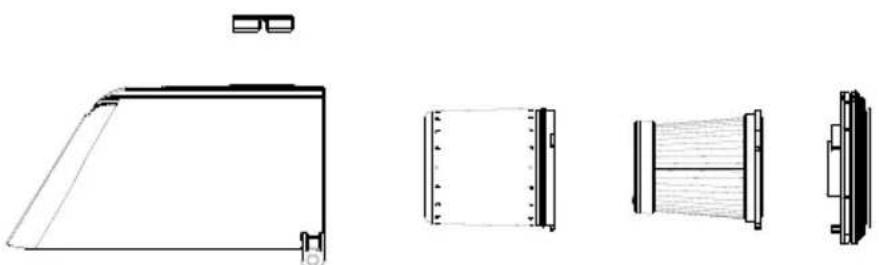
While the device is switched off, take out the whole set of filters from the dust tank.
Turn the cover anticlockwise and remove the stainless steel filter.
Clean it with a cloth, water and soap, and allow it to dry completely before replacing it.
Turn the high-efficiency filter anticlockwise in order to separate it from the base, clean it with a cloth, a soft brush or water and soap, and allow it to dry completely in a well ventilated place.
Fig. 9.
Fig. 10.
Fig. 11.
Fig. 12.
Follow these steps in the reverse order in order to assemble it back in place.
Fig. 13.
It is recommended to clean the dust tank after each use.
When the filter accumulates too much dust, it is recommended to clean or replace it.
After long-term use, the accessories must be cleaned to remove any hair or dirt entangled.
7. TROUBLESHOOTING
| Problem Possible cause Solution | ||
| Not working No battery. | Circuit problems. | Charge the battery.Do not disassemble the product. Contact the Technical Support Service of Cecotec. |
| Low suction power Dust tank | k is full.High-efficiency filter blocked. | Clean the dust tank.Remove and clean the High-efficiency filter. |
| Power indicator not on during charging | The battery pack is not properly assembled. | Contact the Technical Support Service of Cecotec. |
| Insufficient operating time after charging. | Not charged enough time.Battery too old. | Charge it fully.Contact the Technical Support Service of Cecotec. |
| Dust leakage Dust tank blocked. | Clean the dust tank and filter and restart the device. | |
8. TECHNICAL SPECIFICATIONS
Product reference: 05561
Product: Conga RockStar Micro 12000
Rated input power: 200 W
100-240 V\~50/60 Hz
Charging base: DC 14 V
9. DISPOSAL OF OLD ELECTRICAL APPLIANCES

The European directive 2012/19/EU on Waste Electrical and Electronic Equipment (WEEE), specifies that old household electrical appliances must not be disposed of with the normal unsorted municipal waste. Old appliances must be collected separately, in order to optimize the recovery and recycling of the materials they contain and reduce the impact on human health and the environment.
The crossed out “wheeled bin” symbol on the product reminds you of your obligation to dispose of the appliance correctly. If the product has a built-in battery or uses batteries, they should be removed from the appliance and disposed of appropriately.
Consumers must contact their local authorities or retailer for information concerning the correct disposal of old appliances and/or their batteries.
10. TECHNICAL SUPPORT SERVICE AND WARRANTY
This product is under warranty for 2 years from the date of purchase, as long as the proof of purchase is submitted, the product is in perfect physical condition, and it has been given proper use, as explained in this instruction manual.
The warranty will not cover the following situations:
The product has been used for purposes other than those intended for it, misused, beaten, exposed to moisture, immersed in liquid or corrosive substances, as well as any other fault attributable to the customer.
The product has been disassembled, modified, or repaired by persons, not authorised by the official Technical Support Service of Cecotec.
Faults deriving from the normal wear and tear of its parts, due to use.
The warranty service covers every manufacturing defects of your appliance for 2 years, based on current legislation, except consumable parts. In the event of misuse, the warranty will not apply.
If at any moment you detect any problem with your product or have any doubt, do not hesitate to contact Cecotec Technical Support Service at +34 963 210 728.
FRANÇAIS
1. PIÈCES ET COMPOSANTS
Img. 1
Ladestation: DC 14 V
natural_image
Technical line drawing of a vacuum cleaner assembly (no text or symbols)Fig./Img./Abb. / Rys. / Obr. 2
natural_image
Technical line drawing of a mechanical device with a side-view inset showing internal components (no text or symbols)Fig./Img./Abb. / Rys. / Obr. 3

natural_image
Technical line drawing of a handheld device with internal components and red annotation arrows (no text or symbols)Fig./Img./Abb. / Rys. / Obr. 4

natural_image
Technical line drawing of a handheld device with internal components and mounting bracket (no text or symbols)Fig./Img./Abb. / Rys. / Obr. 5

natural_image
Technical line drawing of a mechanical device with no visible text or symbolsFig./Img./Abb. / Rys. / Obr. 6

Fig./Img./Abb. / Rys. / Obr. 7
natural_image
Technical line drawing of a mechanical device with no visible text or symbolsFig./Img./Abb. / Rys. / Obr. 8

natural_image
Technical line drawing of a mechanical device with no visible text or symbolsFig./Img./Abb. / Rys. / Obr. 9

natural_image
Technical line drawing of a mechanical device with internal components and a red arrow indicating a specific part (no text or symbols present)
natural_image
Technical line drawing of a mechanical component with exploded and assembled views (no text or symbols)Fig./Img./Abb. / Rys. / Obr. 10 Fig./Img./Abb. / Rys. / Obr. 11

natural_image
Blank rectangular notebook with visible lettering and page number (no text or symbols on the cover)Fig./Img./Abb. / Rys. / Obr. 12
natural_image
Technical line drawings of a mechanical component, showing front, side, and top views (no text or symbols)Fig./Img./Abb. / Rys. / Obr. 13
www.cecotec.es
Quart de Poblet, Valencia (Spain)
YV01200817