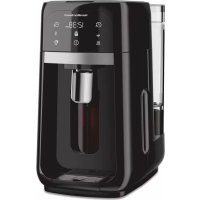
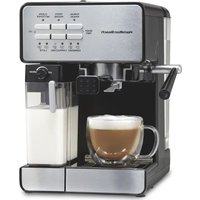
One Press 47601 - Coffee machine HAMILTON BEACH - Free user manual and instructions
Find the device manual for free One Press 47601 HAMILTON BEACH in PDF.


| Product Type | Coffee Maker |
| Brand | Hamilton Beach |
| Model | One Press 47601 |
| Capacity | 12 cups (max) / 2 cups (min) |
| Power Supply Voltage | 120 V ~ 60 Hz |
| Power | 900 W (estimated) |
| Brew Type | Lever dispense onto carafe |
| Water Reservoir | Removable, 12 cups |
| Warming Plate Function | Yes, adjustable from 0 to 4 hours |
| Programming | Delayed brew up to 24 h |
| Intensity Selector | 1-4 cups, regular, bold |
| Filter Basket | Removable for ground coffee, compatible with 8-12 cup paper filters |
| Water Filter | Integrated, replaceable every 3 months or 60 cycles |
| Carafe | Glass coffee carafe with lid, handle and dispense lever |
| Cleaning (Descaling) | Automatic cycle with white vinegar |
| Safety | Automatic shut-off, polarized plug, hot surface warnings |
| Removable Parts Care | Dishwasher safe (except carafe and base) |
| Warranty | 1 year in the US, 5 years in Canada |
| Included Accessories | Water filter, filter basket, water reservoir |
Frequently Asked Questions - One Press 47601 HAMILTON BEACH
User questions about One Press 47601 HAMILTON BEACH
0 question about this device. Answer the ones you know or ask your own.
Ask a new question about this device
Download the instructions for your Coffee machine in PDF format for free! Find your manual One Press 47601 - HAMILTON BEACH and take your electronic device back in hand. On this page are published all the documents necessary for the use of your device. One Press 47601 by HAMILTON BEACH.
USER MANUAL One Press 47601 HAMILTON BEACH
Visit hamiltonbeach.com for our complete line of products and Use and Care Guides – as well as delicious recipes, tips, and to register your product online.
LIRE AVANT UTILISATION
Français.... 13
natural_image
Black and white image of a Hamilton Bosch water dispenser with digital display and control buttons (no visible text or symbols on device body)One Press® Dispensing Coffee Maker Machine distributrice de café One Press® Cafetera expendedora One Press®
IMPORTANT SAFEGUARDS
When using electrical appliances, basic safety precautions should always be followed to reduce the risk of fire, electric shock, and/or injury to persons, including the following:
-
Read all instructions.
-
This appliance is not intended for use by persons (including children) with reduced physical, sensory, or mental capabilities, or lack of experience and knowledge, unless they are closely supervised and instructed concerning use of the appliance by a person responsible for their safety.
-
Close supervision is necessary when any appliance is used by or near children. Cleaning and user maintenance shall not be made by children without supervision. Children should be supervised to ensure that they do not play with the appliance.
-
Do not touch hot surfaces. Use handles or knobs. Care must be taken, as burns can occur from touching hot parts or from spilled, hot liquid.
-
To protect against electric shock, do not place cord, plug, or coffee maker in water or other liquid.
-
Unplug from outlet when either the coffee maker or clock is not in use and before cleaning. Allow to cool before putting on or taking off parts and before cleaning the appliance.
-
Coffee maker must be operated on a flat surface away from the edge of counter to prevent accidental tipping.
-
Do not operate any appliance with a damaged supply cord or plug, or after the appliance malfunctions or has been dropped or damaged in any manner. Supply cord replacement and repairs must be conducted by the manufacturer, its service agent, or similarly qualified persons in order to avoid a hazard. Contact Customer Service for information on examination, repair, or adjustment as set forth in the Limited Warranty.
-
The use of accessory attachments not recommended by the appliance manufacturer may cause injuries.
-
Use only the coffee reservoir provided with the appliance.
-
Do not use outdoors.
-
Do not let cord hang over edge of table or counter or touch hot surfaces, including the stove.
-
The coffee reservoir is designed for use with this coffee maker. It must never be used on a range top or in a microwave oven.
-
Do not set hot coffee reservoir on a wet or cold surface.
-
Do not use a cracked coffee reservoir or one with a loose or weakened handle.
-
Do not clean coffee reservoir with cleansers, steel wool pads, or other abrasive materials.
-
Be certain coffee reservoir lid is securely in place during brew cycle. Do not use force when placing lid on reservoir.
-
Do not place coffee maker on or near a hot gas or electric burner or in a heated oven.
-
To disconnect coffee maker, turn brew cycle and keep warm functions off and then remove plug from wall outlet. To unplug, grasp the plug and pull from the outlet. Never pull from the power cord.
-
WARNING! Risk of Fire or Electric Shock. Do not remove the bottom cover. No user-serviceable parts are inside. Repair should be done by authorized service personnel only.
-
Do not use appliance for other than intended use.
-
Warming plate may remain hot after the coffee maker is turned off.
-
Do not place coffee maker in a cabinet when in use.
-
Scalding may occur if the coffee maker lid is lifted during the brewing cycle.
SAVE THESE INSTRUCTIONS
Other Consumer Safety Information
This appliance is intended for household use only.
▲ WARNING Electrical Shock Hazard: This product is provided with a polarized plug (one wide blade) to reduce the risk of electric shock. The plug fits only one way into a polarized outlet. Do not defeat the safety purpose of the plug by modifying the plug in any way or by using an adapter. If the plug does not fit fully into the outlet, reverse the plug. If it still does not fit, have an electrician replace the outlet.
The length of the cord used on this appliance was selected to reduce the hazards of becoming tangled in or tripping over a longer cord. If a longer cord is necessary, an approved extension cord may be used. The electrical rating of the extension cord must be equal to or greater than the rating of the appliance. Care must be taken to arrange the extension cord so that it will not drape over the countertop or tabletop where it can be pulled on by children or accidentally tripped over.
To avoid an electrical circuit overload, do not use another high-wattage appliance on the same circuit with this appliance.
Coffee Reservoir Safety Precautions

This symbol alerts you to potential danger for personal injury if you fail to read and follow these safety precautions.
This symbol reminds you that glass is fragile and can break, which could result in personal injury.

This symbol instructs you to read the use and care manual before operating the coffee maker.
- Do not use a cracked coffee reservoir or a coffee reservoir having a loose or weakened handle.
- This coffee reservoir is designed to be used only on warming plate of your coffee maker. Do not use on a gas or electric rangetop, or in a microwave or conventional oven.
- To avoid breakage, handle coffee reservoir with care. Avoid impact. Glass will break as a result of impact. Use care when filling with water to avoid hitting faucet.
- Do not place hot coffee reservoir on cool or wet surface. Allow to cool before washing or adding liquids.
- Do not set empty coffee reservoir on a hot heating surface.
-
Do not clean with steel wool pads, abrasive cleanser, or any other materials that may scratch.
-
Do not place hands inside coffee reservoir. When handling, be careful if wearing any hand jewelry, especially diamond rings. Jewelry can scratch glass, which increases possibility of breakage.
- Do not bump, scratch, or boil dry.
- Discard coffee reservoir if it is cracked, scratched, or heated while empty for an extended period of time.
- Do not pour hot coffee or liquids directly out of coffee reservoir. Only dispense coffee in fully assembled unit.
- If stirring in the coffee reservoir, use only wooden, plastic, or rubber utensils. Do not use metal utensils.
- Follow above safety precautions carefully to avoid serious burn injuries which may result if breakage occurs while coffee reservoir holds heated liquids.
Parts and Features
To order parts, visit:
hamiltonbeach.com/parts
| 1 | Removable Grounds Filter Basket (with select models) |
| 2 | Removable Brew Basket |
| 3 | Control Panel/Display |
| 4 | Front Housing |
| 5 | Coffee Window |
| 6 | 6a. Water Filter Lid |
| 6b. Water Filter | |
| 6c. Water Filter Base | |
| 7 | Removable Drip Tray with Cover |
| 8 | Handles (on both sides) |
| 9 | Base |
| 10 | Coffee Maker Lid |
| 11 | Removable Water Reservoir Lid |
| 12 | Removable Water Reservoir |
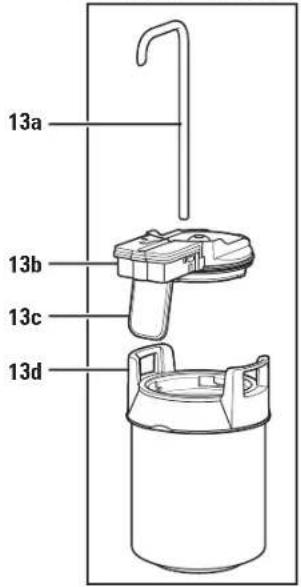
| 13 | Coffee Reservoir Assembly |
| 13a. Stainless Steel Dispensing Straw | |
| 13b. Coffee Reservoir Lid with Handle | |
| 13c. Coffee Dispensing Lever | |
| 13d. Coffee Reservoir with Handles |
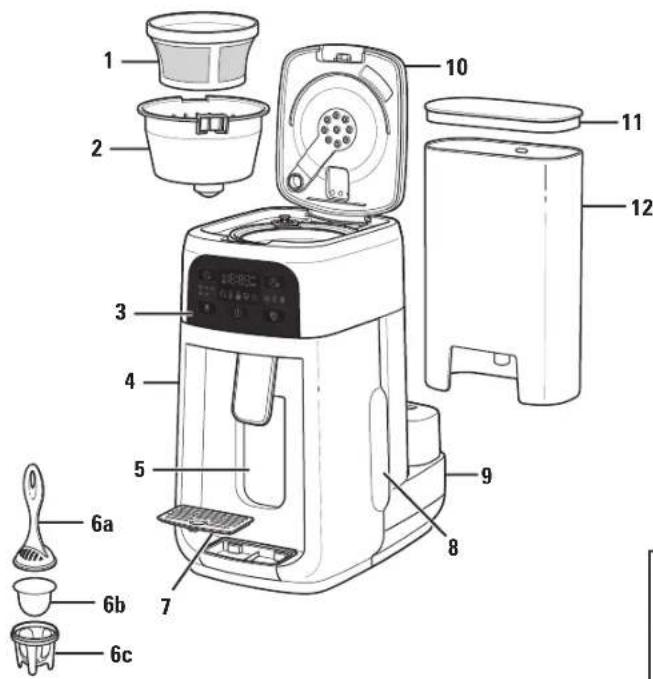
(with select models)
Coffee Reservoir Assembly
Control Panel
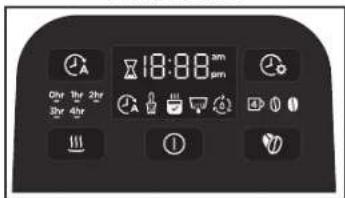
Display Panel Icons
BUTTON/ICON FUNCTION
 | Brew ON (I)/OFF (Φ) Turns Coffee Maker on and off |
 | Set Clock: Press button to set clock |
 | Keep Warm: Keeps brewed coffee warm for up to 4 hoursNOTE: Press to manually turn on/off keep warm function. Select time from 0 hr, 1 hr, 2 hr, 3 hr, or 4 hr to keep coffee warm. |
 | Brew Strength: Press button to choose between (1-4 cups), (regular) or (bold) |
 | Brewing: Coffee is brewing and will not dispense until brewing is complete |
 | Brew Later: Program Coffee Maker to brew at a later time |
 | Coffee Ready: Coffee is finished brewing and ready to drink |
 | Time Since Brew: Display counts up when coffee is brewing and during selected keep warm time to indicate freshness |
| FIL H20 | FIL H20: Add water to Water Reservoir and restart brew cycle |
| Clean Coffee Maker: Reminds you to clean Coffee Maker every 30 brew cycles | |
| Water Filter: Reminds you to change the Water Filter every 60 brew cycles |
How to Disassemble
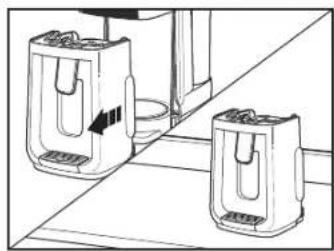
natural_image
Line drawing of two kitchen grilles on a counter, one with a handle and arrow indicating motion (no text or symbols)NOTE: Remove all plastic packing materials from Coffee Maker. Remember to recycle and read your Use and Care manual.
- While holding Coffee Maker Handles, slide front of Coffee Maker towards you to remove from Base and place on countertop.
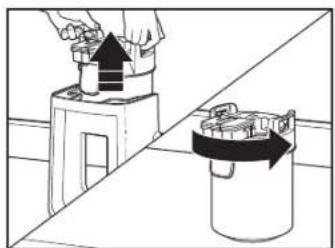
natural_image
Diagram showing a hand placing a black arrow into a container with a curved arrow indicating rotation (no text or symbols present)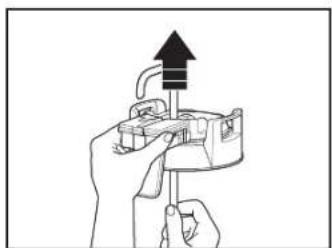
natural_image
Illustration of hands using a tool to adjust or install a device (no text or symbols visible)-
Hold Coffee Reservoir Handles, lift up and place on countertop. Turn Coffee Reservoir Lid counterclockwise from lock (to unlock) to remove.
-
While holding Coffee Reservoir Lid, push up on bottom of Straw to lift out of Lid.
How to Assemble
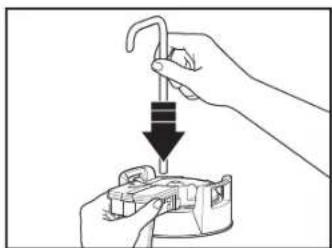
natural_image
Illustration of a hand using a tool to press down a component, with no visible text or symbols.- While holding Coffee Reservoir Lid, push long end of Straw through opening in center of Lid shorter end of Straw in opening closest to Dispensing Lever.
Before first use: Wash Removable Grounds Filter Basket, Removable Brew Basket, Water Reservoir, Water Reservoir Lid, Coffee Reservoir, Straw, and Coffee Reservoir Lid in hot, soapy water. Rinse and dry.
natural_image
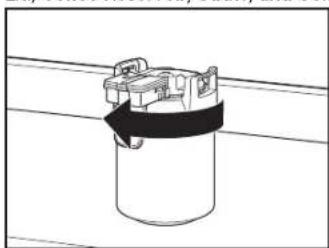
Simple line drawing of a cylindrical container with a black strap and metal clamped top (no text or symbols)- Insert Coffee Reservoir Lid onto Coffee Reservoir. While holding Lid Handle, turn clockwise from unlock (to lock) to secure into place.
natural_image
Illustration of a hand using a tool to lift a cylindrical object into a container (no text or symbols visible)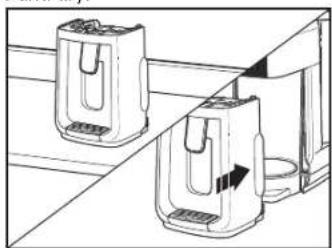
natural_image
Line drawing of two kitchen appliances on a counter, one with a handle and the other with a cup (no text or symbols)-
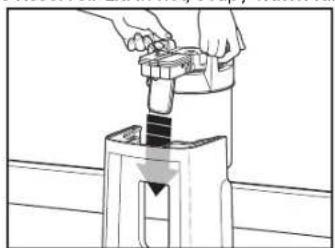
Carefully, lift Handles and insert Coffee Reservoir into Front Housing, aligning Coffee Dispensing Lever with opening on front of Front Housing and Handles to the sides.
-
While holding Coffee Maker Handles, slide Front Housing onto Base.
-
Brew one cycle with water and discard water before brewing coffee.
-
Insert optional Water Filter into Water Reservoir. See Care and Cleaning for direction.
To Set Clock
- Plug into outlet.
- "0:00" will flash and (set clock) will appear on Display. Press (set clock) button and "12":00 (hours) will flash on Display. Press (set clock) button until correct hour (AM or PM) is selected.
How to Brew Now
- In 3 seconds 12: "00" (minutes) will flash on Display. Press ⏻ (set clock) button until correct minutes are selected.
- Wait 3 seconds. Display will illuminate set time.
WARNING Burn Hazard.
- If filter basket overflows, unplug and allow to cool before removing filter basket.
- When using decaffeinated coffee, do not exceed the coffee manufacturer's recommended serving amount to avoid overflow.
natural_image
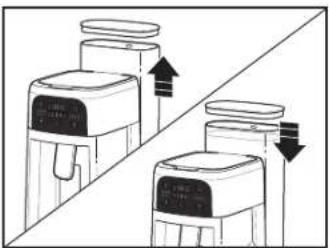
Diagram showing two identical devices with upward and downward arrows indicating movement or change (no text or symbols present)- Lift up Water Reservoir and remove Lid. Add water to at least 2 cup line (minimum), up to 12 or 14 cup line (maximum). Replace Lid and place Water Reservoir on Base.
natural_image
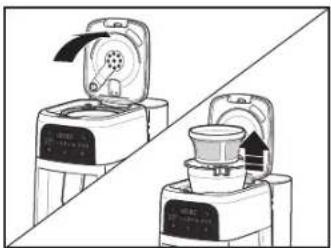
Illustration of two kitchen appliances with a diagonal line indicating alignment (no text or symbols)- Lift Coffee Maker Lid and remove Removable Grounds Filter Basket (with select models) and Removable Brew Basket.
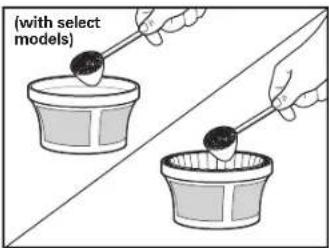
- Add coffee grounds to Filter Basket or add a 8-12 cup basket-style paper filter to Removable Brew Basket. Add coffee grounds. Exceeding 14 tablespoons (70 g) may cause overflow if coffee is too finely ground, decaf or flavored.
natural_image
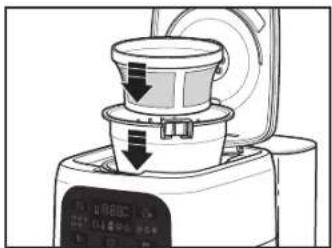
Illustration of a kitchen appliance with a lid and control panel, showing no text or symbols.- Align Filter Basket with opening in top of Coffee Maker and add Brew Basket with coffee grounds.
How to Brew Now (cont.)
natural_image
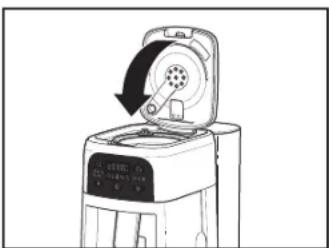
Line drawing of a device with a circular button and arrow indicating rotation (no text or symbols)- Close Lid.
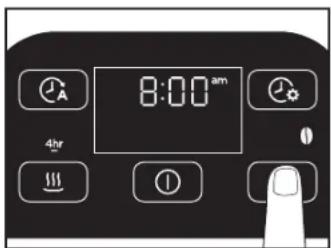
- Press Ⓞ(brew strength) button to select from ④ (1-4 cups), ①(regular) or ⑪ (bold).
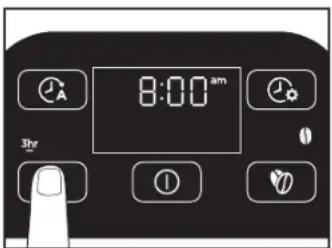
- Press !!!(keep warm) button to select from 0 hour to 4 hours (default is 4 hours); Coffee Maker will switch to keep warm for selected hours, or automatically turn off if set to 0 hours.
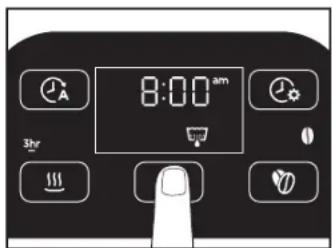
- Press ① (brew ON [I]/OFF (●) button to begin brewing. When brewing is complete, Coffee Maker Display will turn off or 📄will appear on Display.
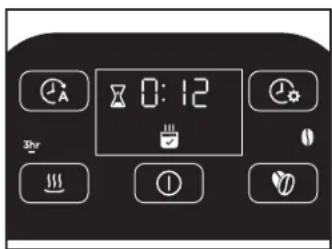
- Display will show time since brew and will count up once brewing is complete. When keep warm is complete, Display will show time of day.
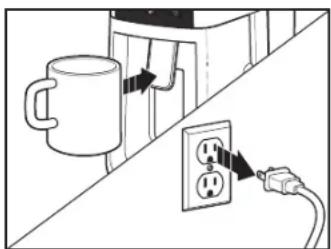
- To dispense coffee, press travel mug or cup against Coffee Dispensing Lever. Coffee Maker will not dispense until brewing is complete and appears on Display.
- Unplug.
NOTES:
When brewing 1-4 cups, always use a minimum 4 tablespoons (20 g) ground coffee.
For each cup of coffee being made, place one level tablespoon (5 g) ground coffee into filter. For decaf or flavored coffee use (bold) or slightly less coffee grounds.
How to Program to Brew Later
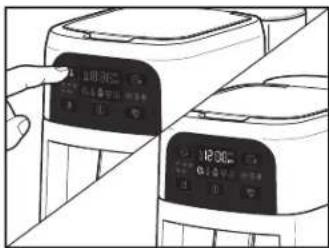
- Press (brew later) button and (brew later) will illuminate on Display with "19:99 AM".
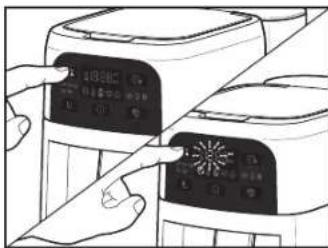
- Press (brew later) button. "12":00 (hours) will flash on Display. Wait 3 seconds and press (brew later) button until correct brew hour (AM or PM) is selected.
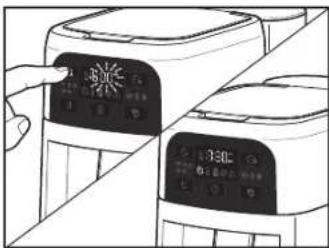
- In 3 seconds 12: "00" (minutes) will flash on Display press (brew later) button until correct minutes are selected. In 3 seconds Display will illuminate current time and (brew later). Coffee Maker will start at programmed time.
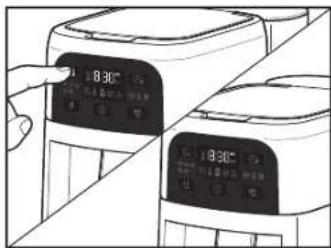
- To turn off (brew later) at any time, press (brew later) button and (brew later) will turn off on Display.
Care and Cleaning
Do not use abrasive scouring pads or powders since they may scratch coffee tank surface, causing glass to break suddenly during use or cleaning.
- Unplug and cool completely. Follow "How to Disassemble" Coffee Maker directions on page 6.
- Wash Coffee Reservoir with Lid and Dispensing Straw in hot, soapy water. Rinse and dry. Removable Grounds Filter Basket, Removable Brew Basket, Water Reservoir, and Water Reservoir Lid are dishwasher safe.
WARNING Electrical Shock Hazard
Do not immerse cord, plug, or coffee maker in any liquid.
- DO NOT use "SANITIZE" setting when washing in dishwasher. SANITIZE cycle temperatures could damage your product.
- Wipe Coffee Maker with a damp cloth or sponge, and dry. Do not use abrasive cleansers or sponges, which will damage Coffee Maker finish.
Care and Cleaning (cont.)
To Replace Water Filter
For better-tasting coffee, use a water filter. Filter should be replaced every 3 months for best-tasting coffee. ⚙ (filter) will illuminate every 60 brew cycles, and stay illuminated for 2 consecutive brew cycles before turning off. If you have hard water or use your Coffee Maker a lot, Filter should be replaced more frequently.
- Soak Filter in cold water for 15 minutes.
- Add Filter to bottom half of Water Filter Holder.
- Snap top half of Water Filter Holder onto bottom half.
- Remove Water Reservoir Lid and insert Water Filter Holder, Filter side down, into opening at bottom of Water Reservoir
- Fill Water Reservoir with cold water to minimum 2 cup line or not above maximum 12 or 14 cup line. Place Water Reservoir Lid on Water Reservoir.
Clean Notification (✗)
All coffee makers should be cleaned at least once a month (once a week for areas with hard water). 🐘clean coffee maker) will appear on Display after 30 brew cycles. To run a clean cycle, proceed with the following steps:
- Remove Water Filter Assembly from empty Water Reservoir.
- Fill empty Water Reservoir with 1 pint (2 cups [473 mL]) of plain white vinegar.
- Make sure Coffee Tank Assembly and Front Housing are installed.
-
Press and hold both (set clock) and (crew strength) for 5 seconds.
-
(clean coffee maker) will begin flashing, showing that a cycle has begun.
-
Coffee Maker will heat up, and pump vinegar into Water Reservoir to send vinegar in heater to descale. Coffee Maker will then appear inactive for 30 minutes as vinegar descales the system. After 30 minutes of rest, Coffee Maker will reactivate heater and pump remaining vinegar from Water Reservoir.
-
Once vinegar cycle is completed, run 2-3 full brew cycles of 14 cups fresh water to flush the system, emptying Water Reservoir each time. Press Ⓐbrew ON [I]/OFF ( ⚠button to turn off.
-
Allow Coffee Maker to cool.
-
Coffee Maker is clean and ready to brew.
NOTE: Performing cleaning procedure will turn off (clean coffee maker) on Display.
Troubleshooting
Coffee overflowing.
- If coffee overflows from Removable Grounds Filter Basket after using Hamilton Beach Brands-recommended amount of 1 tablespoon (5 g) per a cup, check coffee manufacturer proportions. Consider using less grounds for fine and coarse ground coffee in Removable Grounds Filter Basket.
- If coffee grounds overflow paper filter, make sure correct grounds proportions are used, or try a higher-quality paper filter.
- If using decaf or fine-grind coffee and overflow occurs, try using Ⓞ (bold) brew strength for a slower brew rate.
- If overflow occurs, rinse out Removable Grounds Filter Basket, Coffee Reservoir Lid, and Coffee Reservoir to clear grounds. Dry and reinstall for next use.
- Coffee Maker will dispense coffee except when brewing. Trying to dispense while brewing will cause overflow onto countertop.
Poor dispensing.
- Make sure Coffee Reservoir Lid is seated properly on Coffee Reservoir.
- Make sure there are no coffee grounds between the seals, especially in Coffee Reservoir Lid area.
- Seals should be room temperature or warmer. Do not place Coffee Reservoir in refrigerator.
- Remove Stainless Steel Dispensing Straw and flush with warm soapy water to clear any obstructions. Rinse, dry, and reinstall.
- Gurgling may occur when dispensing coffee and coffee level is low in Coffee Reservoir.
Error code appears.
- (clean coffee maker): Clean Coffee Maker according to "Care and Cleaning" section.
- (filter): Replace Water Filter according to "Care and Cleaning" section.
• FIL H20 : Add cold water to Water Reservoir.
Limited Warranty
This warranty applies to products purchased and used in the U.S. and Canada. This is the only express warranty for this product and is in lieu of any other warranty or condition.
This product is warranted to be free from defects in material and workmanship for a period of five (5) years from the date of original purchase in Canada and one (1) year from the date of original purchase in the U.S. During this period, your exclusive remedy is replacement of this product or any component found to be defective, at our option; however, you are responsible for all costs associated with our returning a product or component under this warranty to you. If the product or component is unavailable, we will replace with a similar one of equal or greater value.
This warranty does not cover glass, filters, wear from normal use, use not in conformity with the printed directions, or damage to the product resulting from accident, alteration, abuse, or misuse. This warranty extends only to the original consumer purchaser or gift recipient. Keep the original sales receipt, as proof of purchase is required to make a warranty claim. This warranty is void if the product is used for other than single-family household use or subjected to any voltage and waveform other than as specified on the rating label (e.g., 120 V \~ 60 Hz).
We exclude all claims for special, incidental, and consequential damages caused by breach of express or implied warranty. All liability is limited to the amount of the purchase price. Every implied warranty, including any statutory warranty or condition of merchantability or fitness for a particular purpose, is disclaimed except to the extent prohibited by law, in which case such warranty or condition is limited to the duration of this written warranty. This warranty gives you specific legal rights. You may have other legal rights that vary depending on where you live. Some states or provinces do not allow limitations on implied warranties or special, incidental, or consequential damages, so the foregoing limitations may not apply to you.
To make warranty claim, do not return this appliance to the store. Please write Hamilton Beach Brands, Inc., Customer Service Department, 4421 Waterfront Dr., Glen Allen, VA 23060, or visit hamiltonbeach.com/customer-service in the U.S. or hamiltonbeach.ca/customer-service in Canada. For faster service, locate the model, type, and series numbers on your appliance.

PRÉCAUTIONS IMPORTANTES
natural_image
Line drawing of two kitchen grilles on a counter, one with a handle and arrow indicating direction (no text or symbols)natural_image
Diagram showing a hand placing a black house on a platform next to a cylindrical device with an arrow indicating rotation (no text or symbols present)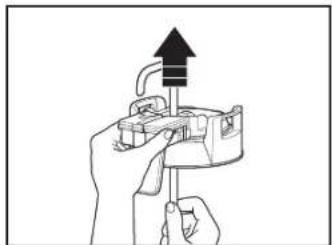
natural_image
Illustration of hands using a tool to adjust or install a mechanical component (no text or symbols visible)natural_image
Illustration of a hand using a tool to press down a component into a container (no text or symbols)natural_image
Simple line drawing of a cylindrical container with a black strap and metal clamped top (no text or symbols)natural_image
Illustration of a hand using a tool to press or install a mechanical component, with no visible text or symbols.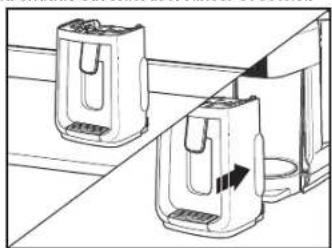
natural_image
Line drawing of two kitchen appliances on a shelf, one with a handle and the other with a side arm (no text or symbols)natural_image
Diagram showing two water filter units with directional arrows indicating flow or movement (no text or symbols)natural_image
Two identical kitchen appliances with open doors, one closed and one open, against a diagonal line (no text or symbols visible)natural_image
Line drawing of a kitchen appliance with a lid and control panel (no text or symbols)natural_image
Line drawing of a device with a circular component and a rotating arrow, no text or symbols presentREMARQUES :
natural_image
Line drawing of two kitchen grilles on a counter, one with a handle and arrow indicating direction (no text or symbols)natural_image
Diagram showing a hand placing a black object into a container while another container moves with an arrow (no text or symbols)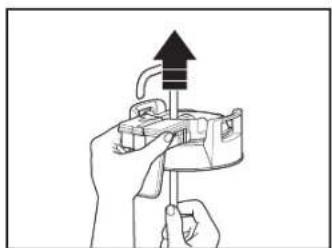
natural_image
Illustration of hands using a tool to adjust or install a mechanical component (no text or symbols visible)natural_image
Illustration of a hand using a tool to adjust or install a component, with no visible text or symbols.natural_image
Simple line drawing of a cylindrical object with a black strap and handle, placed on a horizontal surface (no text or symbols)natural_image
Illustration of a hand using a tool to lift a component into a container (no text or symbols visible)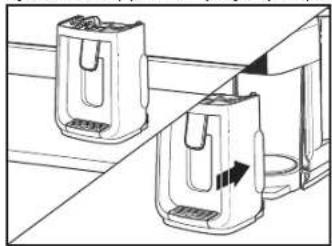
natural_image
Line drawing of two kitchen appliances on a shelf, one with a handle and arrow indicating rotation (no text or symbols)natural_image
Diagram showing two water purifiers with directional arrows indicating flow or movement (no text or symbols)natural_image
Two line drawings of a kitchen appliance with lid and side views, no text or symbols present.natural_image
Line drawing of a kitchen appliance with a lid and side panel, showing a downward arrow indicating a process (no text or symbols)natural_image
Line drawing of a device with a circular component and a rotating arrow, no text or symbols presentPresanderel botón
NOTAS:
Mixcoac, Benito Juárez,

- LIRE AVANT UTILISATION
- IMPORTANT SAFEGUARDS
- SAVE THESE INSTRUCTIONS
- Other Consumer Safety Information
- This appliance is intended for household use only.
- Coffee Reservoir Safety Precautions
- Parts and Features
- Display Panel Icons
- To Set Clock
- How to Brew Now
- WARNING Burn Hazard.
- How to Brew Now (cont.)
- NOTES:
- How to Program to Brew Later
- Care and Cleaning
- WARNING Electrical Shock Hazard
- Care and Cleaning (cont.)
- To Replace Water Filter
- Clean Notification (✗)
- Troubleshooting
- Coffee overflowing.
- Poor dispensing.
- Error code appears.
- Limited Warranty
- PRÉCAUTIONS IMPORTANTES
- REMARQUES :
- NOTAS:
Brand : HAMILTON BEACH
Model : One Press 47601
Category : Coffee machine