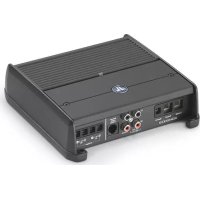
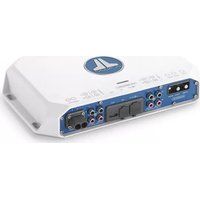
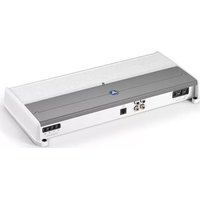
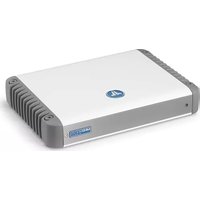
XDM2002 - Receiver JL Audio - Free user manual and instructions
Find the device manual for free XDM2002 JL Audio in PDF.


| Product Type | 2-Channel Class D Stereo Amplifier |
| Brand | JL Audio |
| Model | XDM2002 |
| Category | Audio Amplifier for Vehicle/Boat |
| Amplification Technology | Ultra-Fast NexD™ Class D |
| RMS Power (14.4V, <1% THD) | 75 W x 2 (4 Ω), 100 W x 2 (2 Ω), 150 W x 1 (8 Ω bridged), 200 W x 1 (4 Ω bridged) |
| RMS Power (12.5V, <1% THD) | 60 W x 2 (4 Ω), 90 W x 2 (2 Ω), 120 W x 1 (8 Ω bridged), 180 W x 1 (4 Ω bridged) |
| Frequency Response | 12 Hz – 22 kHz (+0, -1 dB) |
| Signal-to-Noise Ratio | > 104 dB (ref. rated power), > 84 dB (ref. 1 W) |
| Damping Factor | > 150 (50 Hz, 4 Ω), > 75 (50 Hz, 2 Ω) |
| Audio Inputs | 2 RCA inputs (stereo pair), differential balanced type |
| Input Voltage Range | 200 mV – 4 V RMS |
| Filter Type | Active, 12 dB/octave, high-pass or low-pass, defeatable |
| Adjustable Filter Frequency | 50 Hz – 500 Hz |
| Remote Level Control | HD-RLC or MHD-RLC (optional), full attenuation to 0 dB |
| Power Supply | 12 V DC, negative ground |
| Recommended Fuse | 20 A (installed within 18 inches of battery) |
| Minimum Wire Gauge (power/ground) | 8 AWG (copper) |
| Dimensions (L x W x H) | 174 mm x 180 mm x 52 mm (6.85 x 7.09 x 2.05 in) |
| Safety | Do not immerse, use with 12 V negative ground system, secure mounting, external fuse required |
| Maintenance | Clean with a dry cloth, avoid moisture and water splashes |
| Repairability | Contact a professional for any repairs |
Frequently Asked Questions - XDM2002 JL Audio
User questions about XDM2002 JL Audio
0 question about this device. Answer the ones you know or ask your own.
Ask a new question about this device
Download the instructions for your Receiver in PDF format for free! Find your manual XDM2002 - JL Audio and take your electronic device back in hand. On this page are published all the documents necessary for the use of your device. XDM2002 by JL Audio.
USER MANUAL XDM2002 JL Audio
natural_image
Front view of a black electronic device with ventilation grille and a logo (no visible text or symbols)XDM200/2
200W 2-CHANNEL AMPLIFIER
OWNER'S MANUAL MANUEL D'UTILISATION MANUAL DEL PROPIETARIO BEDIENUNGSANLEITUNG MANUALE DEL PROPRIETARIO
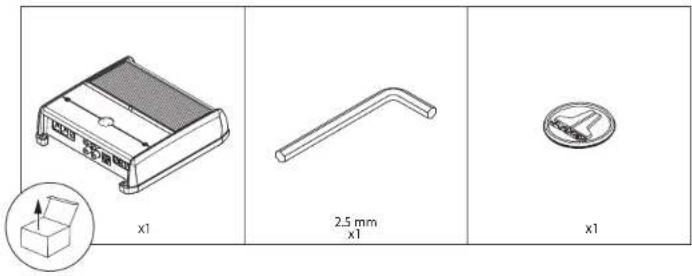
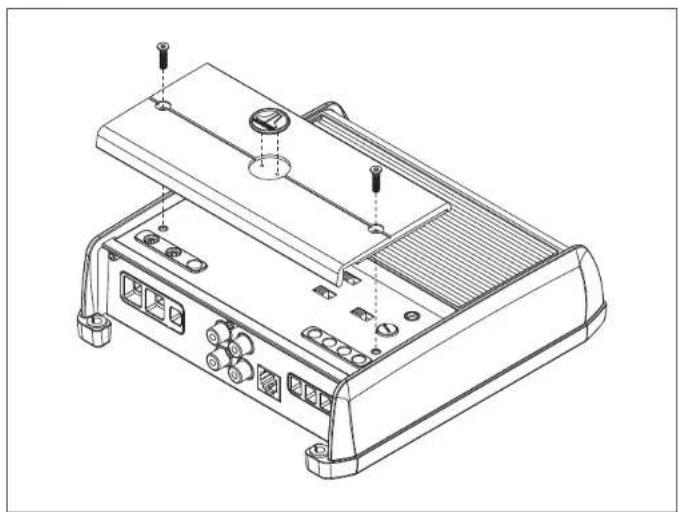
natural_image
Technical line drawing of an electronic device chassis with ports and connectors (no text or symbols)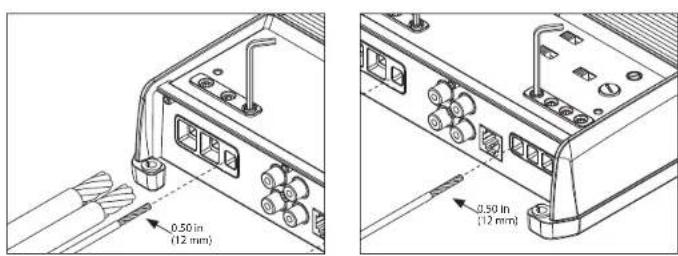
2 | JIAudio*-XDM/00/2
INSTALLATION CONSIDERATIONS
• Installation requires appropriate tools and safety equipment. Professional installation is recommended.
• This product is water-resistant. Do not submerge or subject to high-pressure water spray.
- Before installation, turn off the audio system and disconnect the battery system from the audio system.
- When possible, install in a dry, well-ventilated location that does not interfere with factory-installed systems. If a dry environment is not available, a location that is not exposed to heavy splashing may be used.
- Do not install in the engine compartment, any areas of extreme heat or where it will be directly exposed to the elements.
• Before cutting or drilling, check for potential obstacles behind mounting surfaces.
- Carefully route all system wiring away moving parts and sharp edges; secure with cable ties or wire clamps and use grommets and loom where appropriate to protect from sharp edges.
SAFETY CONSIDERATIONS
- Only use this product with 12 volt, negative-ground electrical systems. This product is not certified or approved for use in aircraft.
- Mount this product securely to prevent damage or injury in severe conditions.
- An appropriate fuse (or circuit breaker) at the main power wire is vital for vehicle/vessel safety and must be installed within 18 inches (45 cm) of the positive battery connection.
- For ABYC and NMEA applications, circuit protection is required within 7 inches (18 cm) of the battery, unless the cable is in an enclosure or conduit.
- Listen to your audio system at levels appropriate for operating conditions and hearing safety.
CONNECTIONS
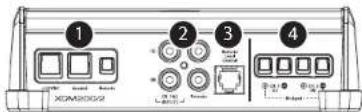
| Connection Description Notes | |||||
| 1 | +12 VDC Positive (+12V) Power Connection | • 4 AWG wire (8 AWG minimum)• Install 20A fuse at 14 battery post | |||
| Ground Negative (GND) Ground Connection • 4 AWG wire (required) | |||||
| Remote Positive (+12V) Activation Connection | • 18 - 12 AWG wire capacity• See On Mode for more info | ||||
| 2 | CH. 1 Input Left Input Signal, Black RCA | • Accepts 200mV – 4V input voltage• See Input Mode for more info | |||
| CH. 2 Input Right Input Signal, Red RCA | |||||
| Precut 1 Left Pass-Through Preamp Signal, Black RCA | • Same signal that is connected to CH. 1&2 inputs• Unaffected by the amplifier's filters | ||||
| Precut 2 Right Pass-Through Preamp Signal, Red RCA | |||||
| 3 | Remote Level Control | Remote Level Controller Connection (optional)(HD-RLC or MHD-RLC) | • Operates as an attenuator only:Fully counter-clockwise – Level Muted Fully clockwise – Level Unaffected• Multiple amplifiers can be controlled from a single HD-RLC using a non-duplex phone line splitter and multiple phone cables. | ||
| 4 | CH. 1(L) Speaker Output | ⊕ | (+) Positive Speaker Output Cl | 1&2 Bridged (-) | • Minimum impedance load:Sterco mode ≥2 ohmsBridged mode ≥4 ohms• 16 - 8 AWG wire capacity |
| ⊖ | ( ) Negative Speaker Output | ||||
| CH. 2(R) Speaker Output | ⊕ | (+) Positive Speaker Output | |||
| ⊖ | (−) Negative Speaker Output Cl | 1&2 Bridged (-) | |||
CONTROLS
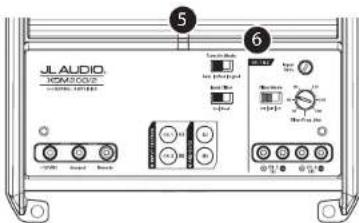
| Control (Function) Setting Description | ||||
| 5 | Status LED (indicatesoperating status) | Flashing Green | Amplifier Powering Up, Audio Output Muted | |
| Green On | Normal Operation, Active Audio Output | |||
| Rod | On-Safe Mode, Over-Temperature Condition, Audio Output Reduced • Revorts to normal operation when temperature returns to a safe level | |||
| Amber (yellow) | On Safe Mode, Over-Current Condition, Audio Output Muted • May exhibit repetitive, audible ticking or thumping noise in the output • Inspect for speaker/wire short circuit or low impedance | |||
| LEDs Off | Amplifier Turns Off (unexpectedly), Low-Voltage Condition • Occurs when battery or remote turn-on voltage drops below 10V • Reverts to normal operation when voltage rises above 11V | |||
| 6 | Turn On Mode (configures activation method) | Remote | +12V Remute Turn-On (Preferred) • Controlled by a switched +12V circuit or turn-on out-put of your source unit/OEM interface | |
| Offset | DC Offset Sensing (Automatic) • Turns On by detecting the presence of small DC signal in OEM audio outputs and turns Off after the signal is removed | • Designed for high-level (speaker) signals only • Detects input signal from CH. 1 (LI only • Using DC Offset or Signal Sensing methods will turn the "Remote" terminal into a +12V turn-on output. | ||
| Signal | Signal Sensing (Automatic) • Turns On by detecting full-range OEM audio signals and turns OFF after the signal is removed (within 30 seconds) | |||
| Input Filter (configuresinput filter application) | Car Select for most Installations (automotive or mariner) | |||
| Boat | Select if experiencing interference from high current mechanical switches/devices | |||
| 7 | Input Sens. (adjustseach channel pair's input stage) | Variable | Use to match the source unit's output voltage with the inputs of each pair of amplifier channels. See Appendix A for detailed information. | |
| Filter Mode (configures the filter of CH. 1&2) | Off Filter | defeated; passes full range of frequencies present at the inputs | ||
| HP | Attenuates frequencies below the CH. 1&2 "Filter Freq. (Hz)" dial, at a rate of 12dB/octave | |||
| Filter Freq. (Hz) (adjustfilter cutoff frequency) | LP | Attenuates frequencies above the CH. 1&2 "Filter Freq. (Hz)" dial, at a rate of 12dB/octave | ||
| Variable | Use to adjust the cutoff frequency of channel 1&2's active filter, from 50 Hz - 500 Hz / 12dB per octave | |||
APPENDIX A:
Input Sensitivity Level Setting
Follow the steps below to adjust the input sensitivity of each amplifier
channel pair to achieve overall system balance.
Necessary Equipment
| • Digital AC Voltmeter |
| • Sine-wave test tone recorded at 0 dBfs reference level in the frequency range to be amplified.Do not use attenuated test tones (-10 dB, -20 dB, etc.).Full range channel/amplifier applications: 1 kHzSubwoofer channel/amplifier applications: 50 Hz |
| • Depending on your type of source unit, the sine-wave may be played via a CD, USB thumb drive, portable media player or Bluetooth® audio source. Make sure to disable any FQ/DSP modes on your portable media player during level setting. |
The Nine-Step Procedure
| 1. Disconnect the speaker(s) from the amplifier's speaker output connectors. |
| 2. Turn off all processing (bass/treble, loudness, EQ, etc.) on the source unit, processors (if used), and amplifier. Set the factor control to center position and the subwoofer level control to 3/4 of maximum, if used. |
| 3. Turn all "Input Sens." controls all the way down. |
| 4. Set the source unit volume to 3/4 of full volume. This will allow for reasonable gain overlap with moderate clipping at full volume. |
| 5. Using the chart below, determine the target voltage for input sensitivity adjustment according to the nominal impedance of the speaker system connected to the amplifier outputs. |
| 6. Verify that you have disconnected the speakers before proceeding. Play a track with an appropriate sine wave (within the frequency range to be amplified) at 3/4 source unit volume. |
| 7. Connect the AC voltmeter to the speaker output terminals of the amplifier. If the channel pair is operating in stereo, it is only necessary to measure one channel. If bridged, make sure you test the voltage at the correct terminals (L+ and R-). |
| 8. Increase the "Input Sens." control until the target voltage is observed with the voltmeter. |
| 9. Once you have adjusted each channel section to its maximum low-distortion output level, reconnect the speaker(s). The "Input Sens." controls can now be adjusted downward if the amplifier requires attenuation to achieve the desired system balance. |
| IMPORTANT! |
| • Do not increase any "Input Sens." setting for any amplifier channel or channel pair in the system beyond the maximum level established during this procedure. Doing so will result in audible distortion and possible speaker damage. |
| • It will be necessary to re-adjust the "Input Sens." if any equalizer boost is activated after setting the "Input Sens." with this procedure. This applies to any EQ boost circuit, including source unit tone controls or EQ circuits. EQ cuts will not require re-adjustment. |
| Nominal Impedance | Target AC Voltage | |
| Stereo Bridged | ||
| 8Ω 17.2 V | 24.6 V | |
| 4Ω 17.3 V | 78.2 V | |
| 2Ω 14.1 V | not recommended | |
SPECIFICATIONS
| Amplifier Section | ||
| Amplifier Topology | NexDTM Ultra-High Speed Class D | |
| Power Supply Type | Unregulated MOSFET Switching | |
| Minimum Copper Power/GND Wire | 8 AWG(Note: CCA/Copper Clad Aluminum wire is not recommended.) | |
| Recommended Fuse | 20 A | |
| Rated RMS Power @ 14.4V, <1% THD+N | 75W x 2 @ 4 Ω 100W x 2 @ 2 Ω | |
| 150W x 1 @ 8 Ω Bridged 200W x 1 @ 4 Ω Bridged | ||
| Rated RMS Power @ 12.5V, <1% THD+N | 60W x 2 @ 4 Ω | 90W x 2 @ 2 Ω |
| 120W x 1 @ 8 Ω Bridged 180W x 1 @ 4 Ω Bridged | ||
| Frequency Response | 2 Hz - 22 kHz (+0, -1dB) | |
| S/N Ratio(A-weighted, 20 Hz - 20 kHz noise bandwidth) | >104 dB (Referred to rated power), >84 dB (Referred to 1W) | |
| Damping Factor | >150 / 50 Hz @ 4 Ω, >75 / 50 Hz @ 2 Ω | |
| Input Section | ||
| Number of Inputs | {One Stereo Pair} | |
| Input Type | Differential-Balanced with RCA jack inputs | |
| Input Voltage Range | 200mV - 4V RMS | |
| Signal Processing | ||
| Filter Type | Active, 12dB/octave, High-Pass or Low-Pass(50 - 500 Hz), defeatable | |
| Remote Level Control | HD-RLC or MHD-RLC (optional). Full mute to 0 dB range. | |
| Dimensions | ||
| L x W x H | 6.85 in. x 7.09 in. x 2.05 in. (174 mm x 180 mm x 52 mm) | |
natural_image
Technical line drawing of a device chassis with labeled ports and connectors (no text or symbols)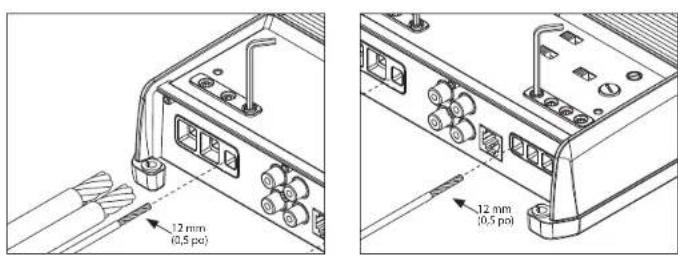
8 | JIAudio*-XDM000/2
CONSIDÉRATIONS RELATIVES À L'INSTALLATION
natural_image
Technical line drawing of an electronic device chassis with ports and connectors (no text or symbols)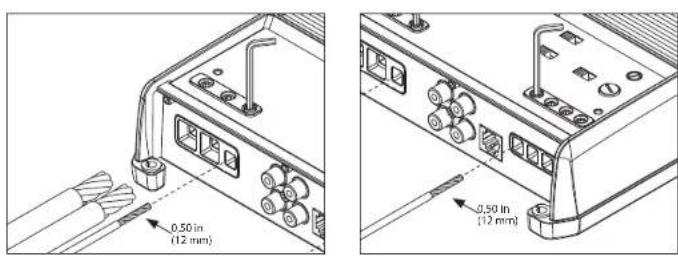
14 | II Audio° - XOMX00/7
natural_image
Technical line drawing of an electronic device chassis with ports and connectors (no text or symbols)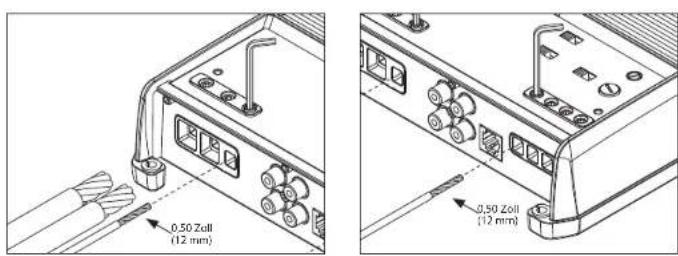
HINWEISE ZUR INSTALLATION
natural_image
Technical line drawing of a device chassis with labeled ports and connectors (no text or symbols)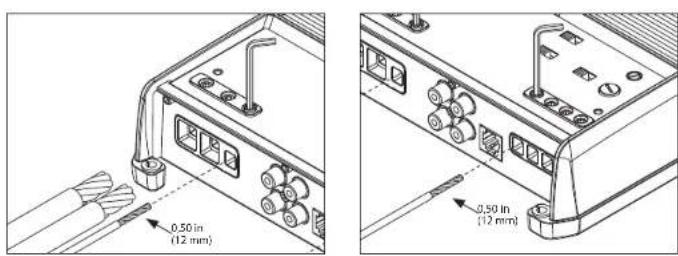

Brand : JL Audio
Model : XDM2002
Category : Receiver