HV112906 - Vacuum Cleaner Emerio - Free user manual and instructions
Find the device manual for free HV112906 Emerio in PDF.



| Brand | Emerio |
| Model | HV112906 |
| Product type | Rechargeable handheld vacuum with extension tube and floor brush |
| Power supply | Rechargeable lithium-ion battery 22.2 V DC |
| Charger | AC adapter included |
| Charging station | Wall mount with charging function |
| Dust bin capacity | Approx. 0.5 L (MAX level indicated) |
| Filtration system | Washable HEPA filter with protection compartment |
| Number of speeds | 2 (low and high) |
| Included accessories | Floor brush with removable AnimalPro brush, extension tube, long crevice tool, 2-in-1 crevice tool |
| Usage | Dry surfaces only (floor, furniture, fabrics, etc.) |
| Filter maintenance | Clean HEPA filter about every 2 weeks, replace if necessary |
| Accessories cleaning | Wash with soapy water (<40°C) except the main unit |
| Safety | Overheat protection, use under supervision near children, do not vacuum flammable liquids |
| Removable battery | Yes, with release button |
| LED indicators | 3 battery level indicators (flashing when charging, solid when charged) |
| Warranty | 2 years (subject to conditions described in the manual) |
| Recycling | Do not dispose with household waste, follow WEEE directive |
| Country of origin | Not specified in the manual |
Frequently Asked Questions - HV112906 Emerio
User questions about HV112906 Emerio
0 question about this device. Answer the ones you know or ask your own.
Ask a new question about this device
Download the instructions for your Vacuum Cleaner in PDF format for free! Find your manual HV112906 - Emerio and take your electronic device back in hand. On this page are published all the documents necessary for the use of your device. HV112906 by Emerio.
USER MANUAL HV112906 Emerio
natural_image
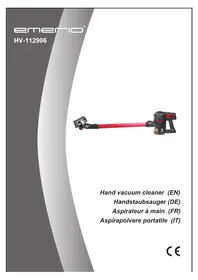
Red and black cleaning brush with handle, isolated on white background (no text or symbols visible)Hand vacuum cleaner (EN)
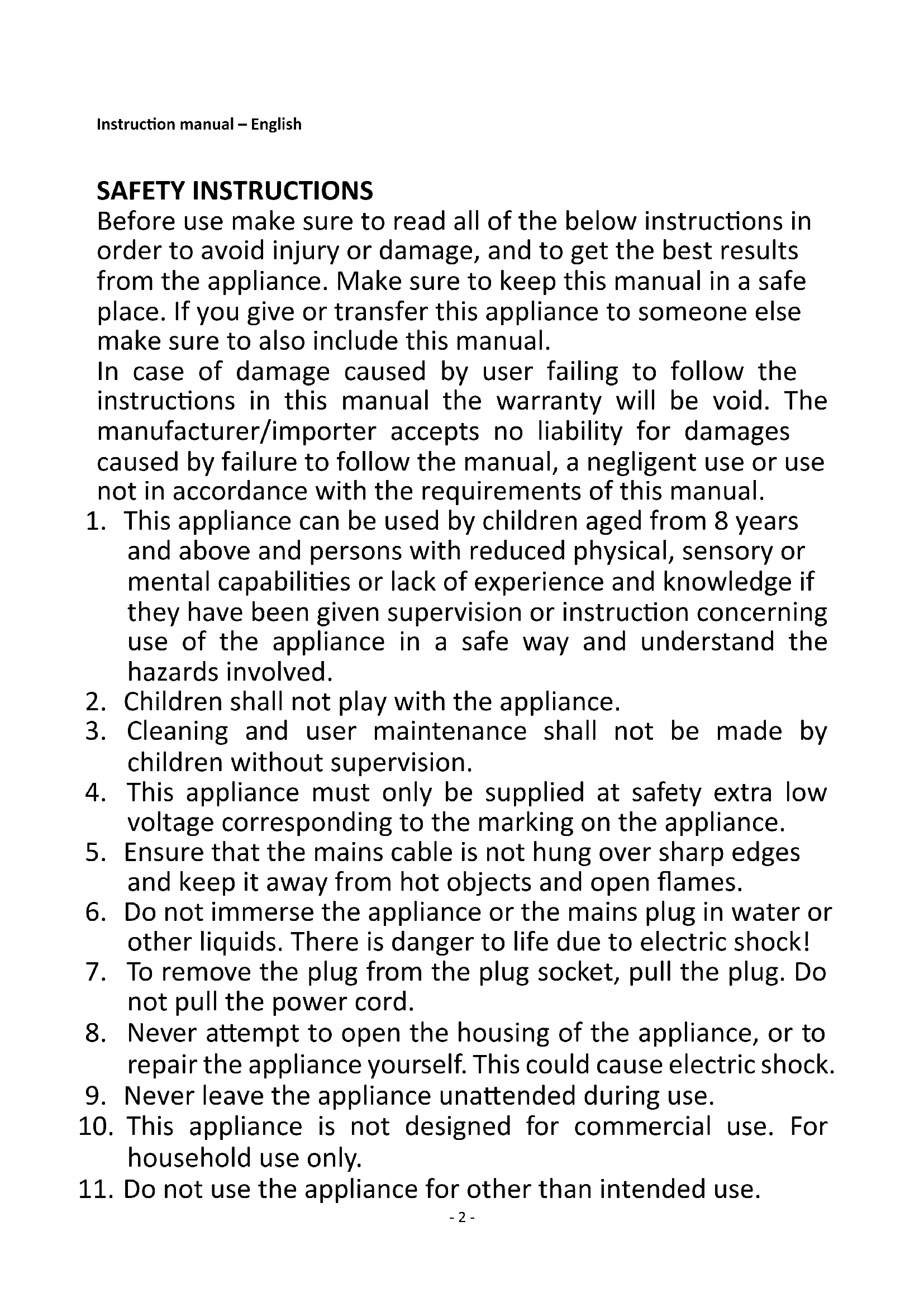
Before use make sure to read all of the below instructions in order to avoid injury or damage, and to get the best results from the appliance. Make sure to keep this manual in a safe place. If you give or transfer this appliance to someone else make sure to also include this manual.
In case of damage caused by user failing to follow the instructions in this manual the warranty will be void. The manufacturer/importer accepts no liability for damages caused by failure to follow the manual, a negligent use or use not in accordance with the requirements of this manual.
- This appliance can be used by children aged from 8 years and above and persons with reduced physical, sensory or mental capabilities or lack of experience and knowledge if they have been given supervision or instruction concerning use of the appliance in a safe way and understand the hazards involved.
- Children shall not play with the appliance.
- Cleaning and user maintenance shall not be made by children without supervision.
- This appliance must only be supplied at safety extra low voltage corresponding to the marking on the appliance.
- Ensure that the mains cable is not hung over sharp edges and keep it away from hot objects and open flames.
- Do not immerse the appliance or the mains plug in water or other liquids. There is danger to life due to electric shock!
- To remove the plug from the plug socket, pull the plug. Do not pull the power cord.
- Never attempt to open the housing of the appliance, or to repair the appliance yourself. This could cause electric shock.
- Never leave the appliance unattended during use.
- This appliance is not designed for commercial use. For household use only.
-
Do not use the appliance for other than intended use.
-
Do not wind the cord around the charger and do not bend it.
- Close supervision is necessary for any appliance being used by or near children. Do not leave the system unattended while connected. Keep hair, loose clothing, fingers and all parts of body away from opening and moving parts.
- Do not use to pick up flammable or combustible liquids such as gasoline or use in areas where they may be present.
- Do not pick up anything that is burning or smoking such as cigarettes, matches or hot ashes.
- Use extra care when cleaning on stairs.
- Do not use the appliance without the dust cup filter in place.
- The use of accessory attachment not recommended by the appliance manufacturer may cause injuries.
- Do not put any objects into openings. Do not use with any opening blocked. Keep free of dust, lint, hair and anything else that may reduce air flow.
- Use only on dry surfaces.
- Important: If the suction opening in the unit is blocked, switch off the appliance and remove the blocking substance before you start the unit again.
- Do not operate the appliance too close to heaters, radiators or cigarette butts.
- Before you start vacuuming, make sure to remove large or sharp objects that might damage the dust cup filter.
- The appliance is only to be used with the power supply unit provided with the appliance.
- The charger must be removed from the socket before removing the battery.
- Use the included charger to charge the vacuum cleaner and do not use the charger for other purposes.
- Do not open the charger.
- Batteries: Never attempt to open for any reason. Do not expose the battery to water.
Do not expose the battery to heat.
Do not store in locations where the temperature may exceed 40^ C.
-
In an emergency situation contact professional help immediately.
-
Leaks from the battery cells can occur under extreme conditions. Do not touch any liquid that leaks from the battery. If the liquid that gets on skin wash immediately with soap and water. If the liquid gets into the eyes, flush them immediately with clean water for a minimum of 10 minutes and seek medical attention. Wear gloves to handle the battery and dispose of immediately in accordance with local regulations.
-
When the battery pack is not in use, keep it away from paper clips, coins, keys, nails, screws or other small metal objects that could make a connection from one terminal to another
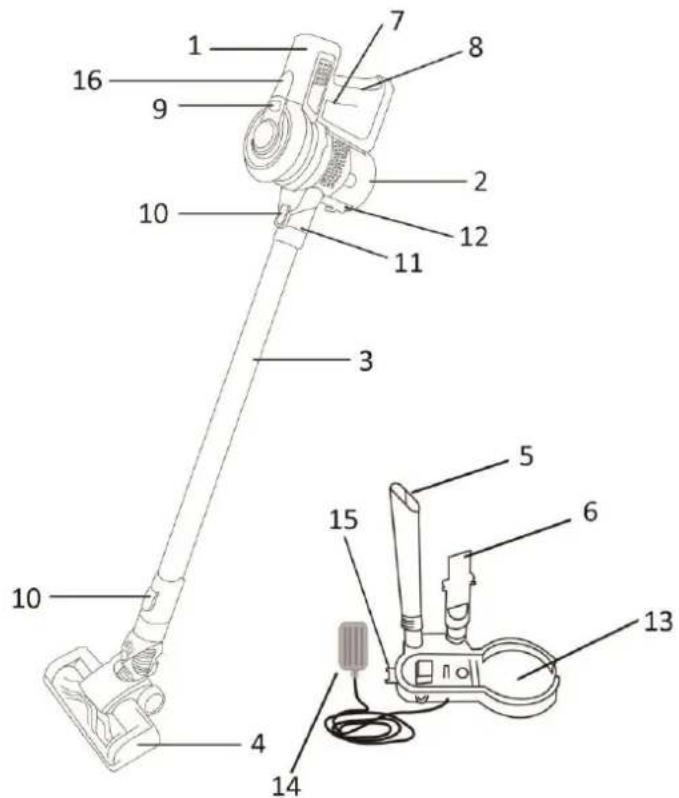
PARTS DESCRIPTION
-
Main unit (battery)
-
Dust cup
-
Extension tube
-
Floor brush
-
Long crevice nozzle
-
2 in 1 crevice nozzle
-
Speed button
-
Handle
-
Dust cup release button
-
Accessory release button
-
Suction hole opening
-
Locking clip
-
Recharge seat/ wall-mounted bracket
-
Charger
-
Battery release button
-
Battery pilot lights
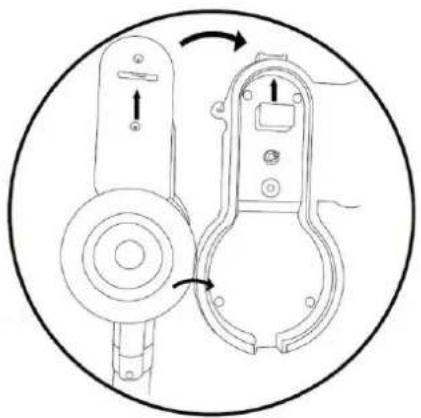
RECHARGE SEAT CAN BE WALL-MOUNTED:
-
Measure the distance between the holes situated at the back of the bracket and drill four holes in the wall with the same distance.
-
Put the expansion bolts into the holes and then use the screws to fix the bracket onto the wall.
-
Pay attention to the height of the bracket mounted. It shall be mounted more than 80 cm above the floor.
RECHARGING THE APPLIANCE:
- When one pilot light is blinking in the process of operation, the appliance needs to be recharged.
- Plug the charger into a suitable wall socket and place the vacuum cleaner onto the recharge seat.
- While charging, the pilot light will be blinking to indicate the charger is under working. When the charging operation is finished, the charger will switch off automatically and 3 pilot lights will be on instead of blinking.
- After charging, unplug the charger first, and then press the battery release button to take out the appliance.
Note: Do not let the appliance uncharged for a long time, because the inner accumulators may be damaged.
natural_image
Technical line drawing of a door handle assembly with directional arrows indicating rotation (no text or symbols)OPERATION
-
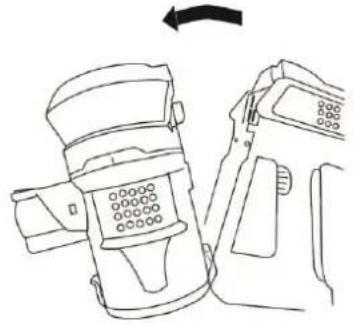
Assemble the battery into the dust cup, make sure they combined firmly. (fig. A)
-
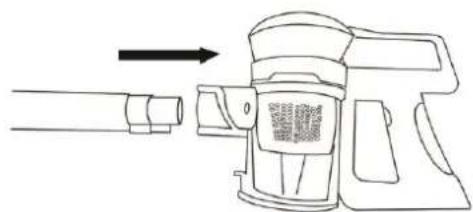
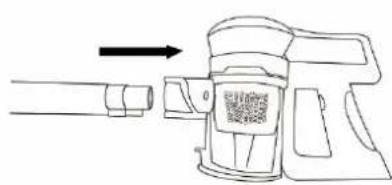
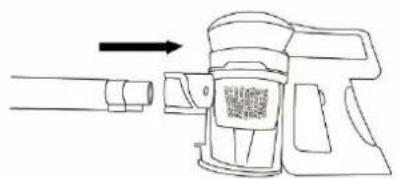
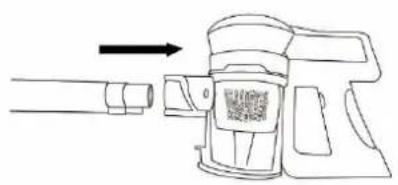
Insert the extension tube into the suction hole opening; make sure it fits firmly. (fig.B)
-
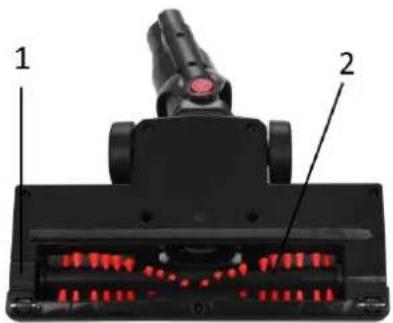
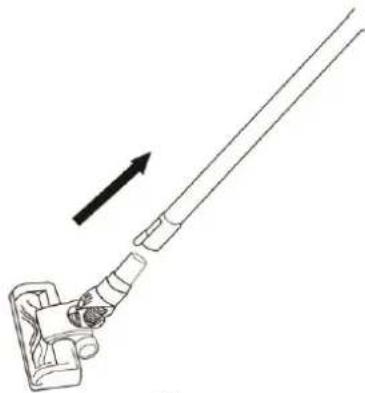
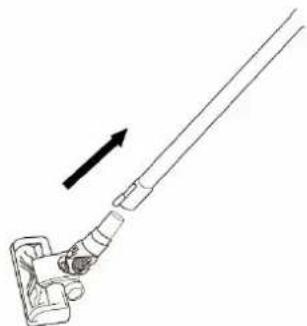
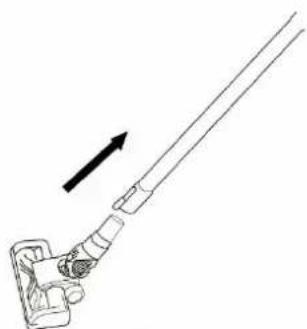
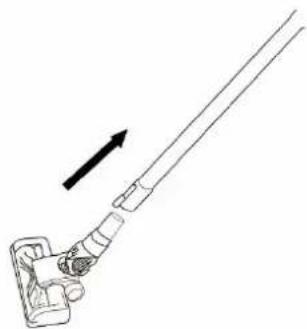
Attach the floor brush to the other side of the extension tube. (fig.C)
Note: There is a lock (1) on bottom of floor brush to fix the AnimalPro brush (2). Make sure it's locked in place for use.
-
If you want to use the attachment long crevice nozzle or 2 in 1 crevice nozzle, attach it to the suction hole opening directly or to the other side of the extension tube instead of the floor brush according to your own desire.
-
Press the speed button to turn on the appliance.
Press the speed button once: low speed;
Press the speed button twice: high speed;
Press the speed button thrice: off.
NOTE: During use, please pay attention to the dust capacity and do not exceed the "MAX" level indicated on the dust cup. This appliance is for dry suction only.
Caution: The suction hole opening must be open and free of any obstructions at all times. Otherwise, the motor will overheat and could become damaged.
natural_image
Line drawing of a device with a left-side arrow indicating transformation (no text or symbols present)A
natural_image
Line drawing of a mechanical device with an arrow indicating direction (no text or symbols)B
natural_image
Line drawing of a mechanical tool with an arrow indicating direction (no text or symbols)C
CLEANING AND MAINTENANCE
- Except for the main unit, other parts can be cleaned in warm soapy water (<40°C). Rinse and dry them completely before reassembly. Do not immerse the main unit in water or any other liquids.
- Use only a soft moist cloth to clean the outside of the main unit. Do not allow any kind of liquid to enter the main unit.
- Do not use aggressive chemicals or abrasives.
- Do not use the device if the filter is broken or worn out.
-
The unit does not contain parts serviceable by you, do not disassemble it and do not try to repair it yourself.
-
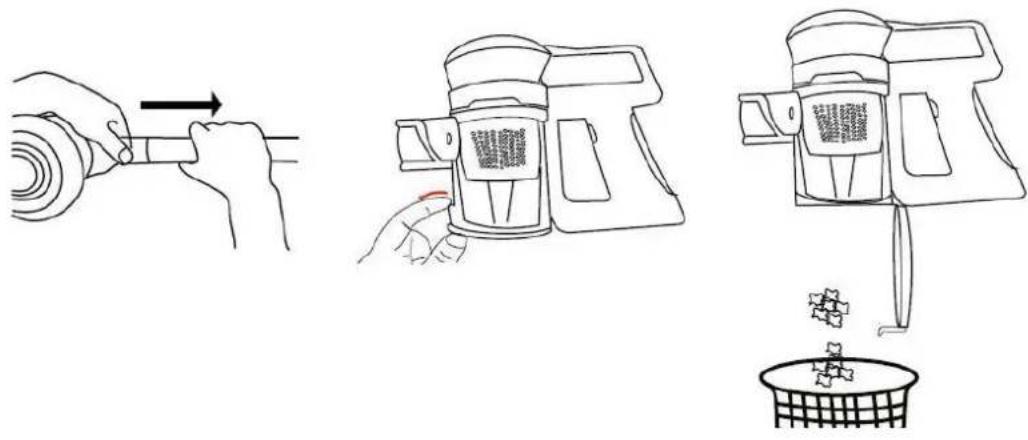
How to empty the dust cup:
1) Press the release button to take out the extension tube;
2) Press down the locking clip on the dust cup to empty dust from the container.
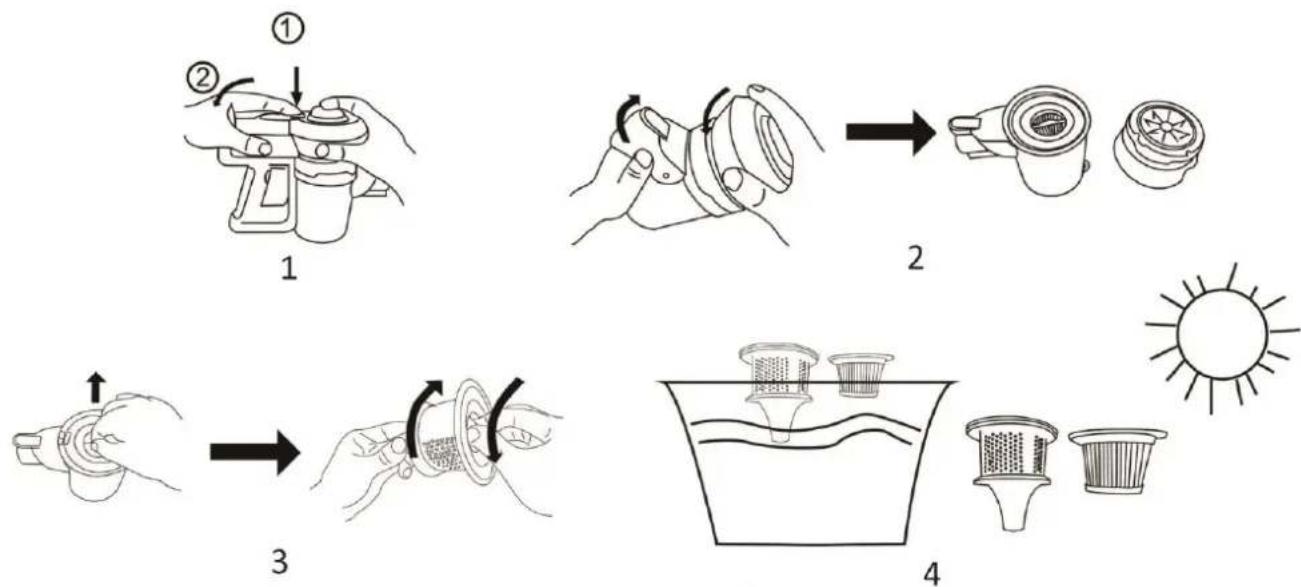
2. How to clean the dust cup filter:
1) Press the dust cup release button to remove the container from the main unit.
2) Detach the upper part from the dust cup.
3) Take out the HEPA case first, and then take out the HEPA filter.
4) Rinse them in water, and then air dry completely before placing them back in the dust cup. AIR DRY ONLY.
flowchart
graph TD
    A["1: Hand pump, ①"] --> B["2: Washer brush, ②"]
    B --> C["3: Washer brush, ③"]
    C --> D["4: Cover cup, ④"]
    D --> E["Sunlight, Sun"]
Note:
(1) Clean the dust cup filter every two weeks or so (depending on usage).
(2) To ensure peak performance of the appliance, if the HEPA filter cannot be well cleaned or the suction of the appliance is decreasing, it is the time to replace the HEPA filter.
(3) The HEPA filter protective net cover is used to protect the HEPA filter from blocking. Make sure it is in place when placing the HEPA filter back into the HEPA case.
3. How to clean the AnimalPro brush
1) Unlock the AnimalPro brush from the floor brush. Take it out and remove any dirt (hair and other fibers) tangled around the roller.
2) Wash the brush under running water with mild detergent. Make sure that it is completely dry before replacing it.
TECHNICAL DATA: DC 22.2 V
GUARANTEE AND CUSTOMER SERVICE
Before delivery our devices are subjected to rigorous quality control. If, despite all care, damage has occurred during production or transportation, please return the device to your dealer. In addition to statutory legal rights, the purchaser has an option to claim under the terms of the following guarantee:
For the purchased device we provide 2 years guarantee, commencing from the day of sale. If you have a defective product, you can directly go back to the point of purchase.
Defects which arise due to improper handling of the device and malfunctions due to interventions and repairs by third parties or the fitting of non-original parts are not covered by this guarantee. Always keep your receipt, without the receipt you can't claim any form of warranty. Damage caused by not following the instruction manual, will lead to a void of warranty, if this results in consequential damages then we will not be liable. Neither can we hold responsible for material damage or personal injury caused by improper use if the instruction manual is not properly executed. Damage to accessories does not mean free replacement of the whole appliance. In such case please contact our service department. Broken glass or breakage of plastic parts is always subject to a charge.
Defects to consumables or parts subjected to wearing, as well as cleaning, maintenance, replacement of said parts or shipping and transportation costs to and from any place of repair are not covered by the warranty and are to be paid.
ENVIRONMENT FRIENDLY DISPOSAL
Recycling – European Directive 2012/19/EU
This marking indicates that this product should not be disposed with other household wastes. To prevent possible harm to the environment or human health from uncontrolled waste disposal, recycle it responsibly to promote the sustainable reuse of material resources. To return your used device,
please use the return and collection systems or contact the retailer where the product was purchased. They can take this product for environmental safe recycling.
EMERIO Switzerland AG
Industriestrasse 47
6300 Zug
Switzerland
SICHERHEITSHINWEISE
LADESTATION KANN AN DER WAND MONTIERT WERDEN:
natural_image
Technical line drawing of a mechanical device with two views, showing internal components and directional arrows (no text or symbols)BETRIEB
natural_image
Close-up of a black mechanical device with red LED display and labeled parts (no text or symbols visible)A
natural_image
Diagram of a mechanical device with an arrow pointing to a cylindrical component (no text or symbols present)B
natural_image
Diagram of a mechanical lever mechanism with an arrow indicating direction (no text or symbols present)C
flowchart
graph TD
    A["Step 1: Hand holding a spray can with a lid"] --> B["Step 2: Process step with a brush and lid"]
    B --> C["Step 3: Hand holding a spray can with a lid"]
    C --> D["Step 4: Sun-grown cleaning with a filter and water bath"]
Hinweis:
EMERIO Switzerland AG
Industriestrasse 47
6300 Zug
Switzerland
CONSIGNES DE SÉCURITÉ
LA STATION DE CHARGE PEUT ÊTRE MONTÉE SUR UN MUR :
natural_image
Technical line drawing of a mechanical device with two views showing internal components (no text or symbols)FONCTIONNEMENT
natural_image
Line drawing of a device being adjusted to a device, showing a left-hand rule and right-hand rule (no text or symbols)A
natural_image
Line drawing of a mechanical device with an arrow pointing to a cylindrical component (no text or symbols)B
natural_image
Diagram of a mechanical lever system with an arrow indicating direction (no text or symbols present)C
NETTOYAGE ET ENTRETIEN
flowchart
graph TD
    A["1: Hand gun with spray gun"] --> B["2: Stainless steamer with cloth"]
    B --> C["3: Hand cleaner with brush, down foot"]
    C --> D["4: Cover cup with filter, wash, sun icon"]
Remarque:
EMERIO Switzerland AG
Industriestrasse 47
6300 Zug
Switzerland
LA BASE DI RICARICA PUÒ ESSERE MONTATA AL MURO:
natural_image
Technical line drawing of a mechanical device with two views, one showing internal components and the other showing external housing (no text or symbols)FUNZIONAMENTO
natural_image
Line drawing of a device with a device attached, showing a left-hand rule and a right-hand rule (no text or symbols present)A
natural_image
Line drawing of a mechanical device with an arrow indicating direction (no text or symbols)B
natural_image
Simple line drawing of a mechanical lever with an arrow indicating upward motion (no text or symbols)C
flowchart
graph TD
    A["1: Spray Bottle"] --> B["2: Covered Lamp"]
    B --> C["3: Stained Cover"]
    C --> D["4: Filtered Plate with Sun"]
Nota:
EMERIO Switzerland AG
Industriestrasse 47
6300 Zug
Switzerland

- PARTS DESCRIPTION
- RECHARGE SEAT CAN BE WALL-MOUNTED:
- RECHARGING THE APPLIANCE:
- OPERATION
- CLEANING AND MAINTENANCE
- How to clean the dust cup filter:
- Note:
- How to clean the AnimalPro brush
- GUARANTEE AND CUSTOMER SERVICE
- ENVIRONMENT FRIENDLY DISPOSAL
- SICHERHEITSHINWEISE
- LADESTATION KANN AN DER WAND MONTIERT WERDEN:
- BETRIEB
- Hinweis:
- CONSIGNES DE SÉCURITÉ
- LA STATION DE CHARGE PEUT ÊTRE MONTÉE SUR UN MUR :
- FONCTIONNEMENT
- NETTOYAGE ET ENTRETIEN
- Remarque:
- LA BASE DI RICARICA PUÒ ESSERE MONTATA AL MURO:
- FUNZIONAMENTO
- Nota:
Brand : Emerio
Model : HV112906
Category : Vacuum Cleaner