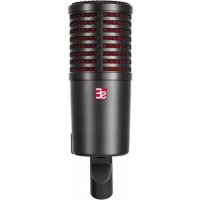
DynaCaster - Microphone SE Electronics - Free user manual and instructions
Find the device manual for free DynaCaster SE Electronics in PDF.


| Product Type | Dynamic Broadcast Microphone |
| Brand | SE Electronics |
| Model | DynaCaster |
| Capsule Type | Dynamic with aluminum voice coil and neodymium magnet |
| Polar Pattern | Cardioid |
| Frequency Response | 20 Hz – 19 kHz |
| Sensitivity | 2.0 / 60 mV/Pa (-54 / -24 dBV) |
| Power Supply | 48V phantom power (for active preamp) or passive operation without power |
| Current Consumption | 3.0 mA (in active mode) |
| Electrical Impedance | 300 / 135 Ohms |
| Recommended Load Impedance | > 1 kOhms |
| Connectivity | 3-pin male XLR connector |
| Dimensions | 62 x 220 mm (2.44 x 8.66 in) |
| Weight | 732 g (25.82 oz) |
| Switches | 3 recessed switches (DYNAMITE preamp activation, low-frequency adjustment, high-frequency adjustment) |
| Pop Filter | Internal 3-layer, removable and washable |
| Box Contents | DynaCaster microphone, external windscreen, threaded microphone stand adapter |
| Warranty | 3 years after registration on seelectronics.com |
| Cleaning | Soft cloth, no harsh chemicals |
| Recommended Uses | Speech, vocals, acoustic instruments, amplifier recording |
| Special Features | DMC8 capsule with integrated shock absorption, built-in DYNAMITE preamp (30 dB), acoustic adjustment switches, internal pop filter, XLR connector at mounting point for discrete cabling |
Frequently Asked Questions - DynaCaster SE Electronics
User questions about DynaCaster SE Electronics
0 question about this device. Answer the ones you know or ask your own.
Ask a new question about this device
Download the instructions for your Microphone in PDF format for free! Find your manual DynaCaster - SE Electronics and take your electronic device back in hand. On this page are published all the documents necessary for the use of your device. DynaCaster by SE Electronics.
USER MANUAL DynaCaster SE Electronics
natural_image
Close-up of a black audio recording device with red mesh grille and black handle (no text or symbols visible)Thank you
Thank you for choosing an sE microphone! In addition to some basic safety precautions, this manual includes details and specifications to help you get the most out of your DynaCaster. Please take a few minutes to read through it.
Capturing excellent audio is our passion. We sincerely hope you'll enjoy the sound of this mic as much as we've enjoyed designing and building it for you.
Happy Broadcasting,
The sE Team
Brief Description
The DynaCaster has been designed from scratch to set a new standard for broadcast-style microphones. Its brand-new DMC8 capsule and integrated DYNAMITE preamp provide better sonic reproduction, more sensitivity, and less noise than the standards of decades past. The capsule has a patented shock absorption system built into its body, preventing the need for a bulky external shockmount. Best of all, the three recessed switches on the rear of the microphone allow you to tune the DynaCaster to your specific tonal needs.
The DynaCaster is compatible with all broadcast boom arms. Furthermore, the XLR jack is integrated into the stand mounting point for unobtrusive cabling and a low profile for on-camera applicators. The internal three-layer pop filter is removable for cleaning, and designed to offer enough plosive protection to be used without an external "chunky" pop filter. However, we've included an external windscreen, just in case that suits your preference.
The DynaCaster is not just a speaking microphone. It can be used for singing, acoustic instruments, and miking amplifiers. All of the features that make it great for broadcast applications double as tone-tailoring options when recording and performing music!
What's in the box
• DynaCaster microphone
• External windscreen
- Microphone stand thread adapter
Controls
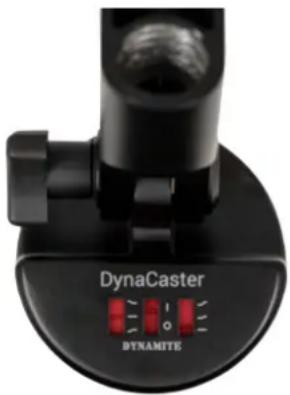
The DynaCaster has three switches. The middle switch toggles the internal DYNAMITE preamp on and off. On the left and right are acoustic trim switches, allowing you to fine-tune the overall voicing of the microphone.
DYNAMITE I/O Switch
When the DYNAMITE I/O Switch [middle] is in the “on” position, the DynaCaster's internal DYNAMITE preamp provides 30 dB of additional gain, ideal for speech and softer sources. This requires Phantom power.
In the "off" position, the DynaCaster functions as a completely passive microphone, not requiring any external or Phantom power.
Low Frequency Trim
natural_image
Close-up of a black DynaCaster camera mount with red indicator lights (no text or symbols on the device itself)The microphone's Low Frequency Trim [left] switch gives you three
different options for it low-end character. The center position is flat, or unaffected. The downward position attenuates the lows to reduce boominess, also known as the proximity effect. In the upward position, the lows are slightly boosted, giving the microphone's sound some extra richness. This can be helpful when speaking from a farther distance, or miking an instrument that sounds a bit thin.
High Frequency Trim
The microphone's High Frequency Trim [right] switch gives you three different options for its presence character. The downward position is flat, or unaffected. The center position creates a slight high-frequency boost to add clarity, and help your voice cut through a busy background. The fully upward position boosts the highs through the presence range, helping to correct for rooms where acoustic treatment has absorbed too much treble.
The Three-Layer Pop Filter
Broadcast microphones are a staple of social media channels that are distributed as video, in addition to audio. One of the issues we tried to address in designing the DynaCaster is the visual disruption of external windscreens and pop filters. To keep your video looking clean, the DynaCaster has an internal three-layer pop filter. This concept has been extensively tested to stand up to plosives, without the need for any external protection.
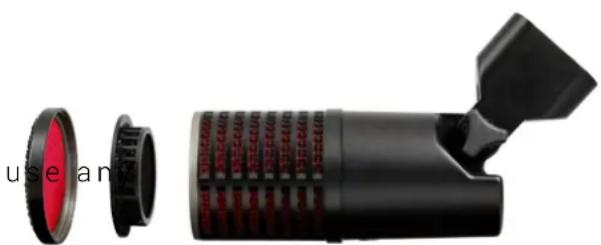
The three-layer pop filter and microphone grille can be easily removed and cleaned as needed. Simply turn the speaking surface of the microphone counter-clockwise to remove it. From there, the pop filter will easily lift out. Use a soft cloth, moistened with water only. Do not cleaning agents or aggressive liquids. Once clean, reassemble the mic and turn the speaking surface clockwise until tight. You're ready to go!
natural_image
Diagram of a black cylindrical device with red internal components and a handle, showing no text or symbols.Tips for practical use
When using the DynaCaster at close range for speech recording, start with the DYNAMITE preamp engaged and the Low Frequency Trim in the downward position. Begin with the High Frequency Trim in the downward position; evaluate the high-frequency tone of your voice. If it sounds acceptable, leave it there. It your "s" sounds are sharp and piercing, move the High Frequency Trim into the center position. If your voice sounds muffled or unintelligible, move the High Frequency Switch into the fully upward position to boost its presence range.
When recording instruments or a vocalist singing, you can think of the DynaCaster's switches as tone-shaping controls. Unless Phantom power is not available, we'd generally recommend keeping the DYNAMITE preamp engaged, as the built-in microphone preamps on a mixing console or audio interface can introduce more noise than desirable at higher gain settings. If you're experiencing overload, i.e. your mixer's preamp is clipping despite the gain being all the way down, then go ahead and disengage the DYNAMITE preamp, and reintroduce gain on the mixer as needed.
Powering

Risk of damage
Do not connect the microphone to any power supply other than a 48V Phantom power source. Phantom power is often integrated into both mixers and audio interfaces, and engaged via a switch on the unit's panel. Verify that any potential external power source is a direct substitute for integrated 48V Phantom power.
Please be aware that Phantom power cannot pass through TRS connectors. A balanced microphone cable with XLR connectors at both sides is required to provide Phantom power to a microphone.
Safety and maintenance

Risk of damage
Please make sure that the piece of equipment to which your microphone will be connected fulfils the safety regulations enforced in your country and is fitted with a ground lead.
Cleaning the microphone
The microphone should only be cleaned with a soft cloth. Do not use any cleaning agents or aggressive liquids.
| Capsule | Dynamic |
| Voice coil | Aluminum |
| Magnet | Neodymium |
| Polar Pattern | Cardioid |
| Frequency range | 20 Hz - 19 kHz |
| Sensitivity | 2.0 / 60 mV/Pa (-54 / -24 dBV) |
| Powering | +48V Phantom power |
| Current consumption | 3.0 mA |
| Electrical impedance | 300 / 135 Ohms |
| Recommended load impedance | >1k Ohms |
| Connectivity | 3-pin male XLR connector |
| Dimensions | 62 x 220 mm / 2.44 x 8.66 in. |
| Weight | 732 g / 25.82 oz. |
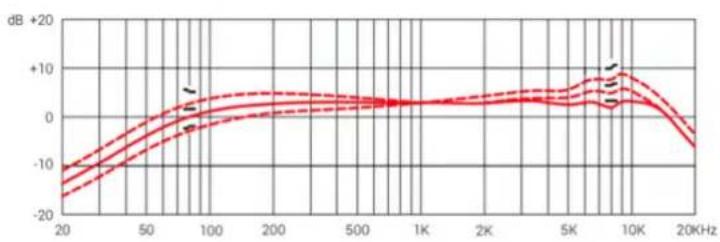
Frequency Response
Polar Pattern
line
| Frequency | Value (dB) | | --------- | ---------- | | 20 | -18 | | 50 | -5 | | 100 | 2 | | 200 | 3 | | 500 | 2 | | 1K | 2 | | 2K | 3 | | 5K | 5 | | 10K | 10 | | 20K | -5 |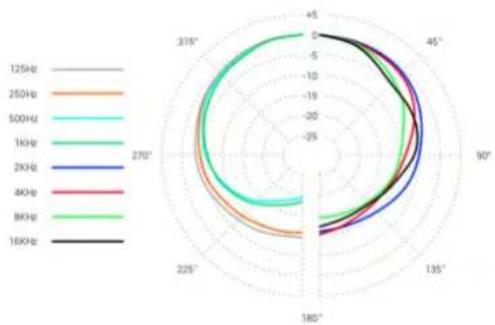
radar
| Frequency | 125Hz | 250Hz | 500Hz | 1KHz | 2KHz | 8KHz | 8KHz | 16KHz | |---|---|---|---|---|---|---|---|---| | 125Hz | -4.5 | -4.0 | -3.5 | -3.0 | -2.5 | -2.0 | -1.5 | -1.0 | | 250Hz | -4.0 | -3.5 | -3.0 | -2.5 | -2.0 | -1.5 | -1.0 | -0.5 | | 500Hz | -3.5 | -3.0 | -2.5 | -2.0 | -1.5 | -1.0 | -0.5 | 0.0 | | 1KHz | -3.0 | -2.5 | -2.0 | -1.5 | -1.0 | -0.5 | 0.0 | 0.5 | | 2KHz | -2.5 | -2.0 | -1.5 | -1.0 | -0.5 | 0.0 | 0.5 | 1.0 | | 8KHz | -2.0 | -1.5 | -1.0 | -0.5 | 0.0 | 0.5 | 1.0 | 1.5 | | 16KHz | -1.5 | -1.0 | -0.5 | 0.0 | 0.5 | 1.0 | 1.5 | 2.0 | The chart displays a polar coordinate system with angular positions in degrees and corresponding frequency values for each frequency band along the circular axis. The y-axis represents the magnitude of the measured variable at each angle.Support
In the event that you experience any problems or have any questions regarding your sE product, please contact your dealer first for the fastest and most direct service. If authorized service is required, it will be arranged by that dealer: http://www.seelectronics.com/dealers
If you are still having difficulties with support or assistance, please do not hesitate to contact us directly: http://www.seelectronics.com/contact-us
Lastly, please remember to register your new gear with sE to extend your warranty to a full three years: http://www.seelectronics.com/registration
Contact
Feel free to contact us:
sE Electronics International, Inc.
448 Ignacio Blvd, STE 411
Novato, CA 94949 USA
www.seelectronics.com
contact@seelectronics.com
Our international distributors & sales representatives: http://www.seelectronics.com/contact-us
This product conforms to the standards listed in the Declaration of Conformity. Please contact us if you want to order a free copy of the Declaration of Conformity. Technical data subject to change without notice.
Danke
natural_image
Exploded view of a black camera lens assembly showing red lens and black handle (no text or symbols visible)Praxistipps
Beschädigungsgefahr
Beschädigungsgefahr
http://www.seelectronics.com/registration
Kontakt
sE Electronics International, Inc.
448 Ignacio Blvd, STE 411
Novato, CA 94949 USA
www.seelectronics.com
contact@seelectronics.com
Unsere internationalen Distributoren und Handelsvertreter: http://www.seelectronics.com/contact-us
natural_image
Close-up of a black DynaCaster camera lens with red indicator lights (no text or symbols on the lens body)低频调节开关
natural_image
Exploded view of a black cylindrical device with red lens and mechanical components (no visible text or symbols)实用技巧
损坏风险
损坏风险
http://www.seelectronics.com/registration
联系方式
sE Electronics International, Inc.
448 Ignacio Blvd, STE 411
Novato, CA 94949 USA
www.seelectronics.com
contact@seelectronics.com
natural_image
Close-up of a black DynaCaster camera mount with red indicator lights (no text or symbols on the device itself)natural_image
Exploded view of a black cylindrical device with red lens and mechanical components (no visible text or symbols)Rischio di danno
http://www.seelectronics.com/registration
Contatti
sE Electronics International, Inc.
448 Ignacio Blvd, STE 411
Novato, CA 94949 USA
www.seelectronics.com
contact@seelectronics.com
natural_image
Close-up of a black DynaCaster camera lens with red indicator lights (no text or symbols on the lens body)natural_image
Exterior view of a black cylindrical device with red lens and multiple circular cutouts (no visible text or symbols)Risque d'endommagement
Risque d'endommagement
sE Electronics International, Inc.
448 Ignacio Blvd, STE 411
Novato, CA 94949 USA
www.seelectronics.com
contact@seelectronics.com
natural_image
Exploded view of a black cylindrical device with red lens and mechanical handle (no visible text or symbols)Riesgo de daño
Riesgo de daño
sE Electronics International, Inc.
448 Ignacio Blvd, STE 411
Novato, CA 94949 USA
www.seelectronics.com
contact@seelectronics.com
natural_image
Close-up of a black DynaCaster camera lens with red indicator lights (no text or symbols on the lens body)natural_image
Exploded view of a black cylindrical device with red lens and mechanical handle (no text or symbols visible)Риск повреждения
Риск повреждения
sE Electronics International, Inc.
448 Ignacio Blvd, STE 411
Novato, CA 94949 USA
www.seelectronics.com
contact@seelectronics.com
Thank you for purchasing an sE product! You are automatically entitled to a two-year warranty, but can extend this to a full three years with registration. To register your new equipment and to read the full warranty details, please go here:
http://www.seelectronics.com/registration
Most Sincerely,
The sE Team