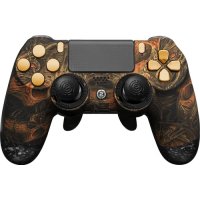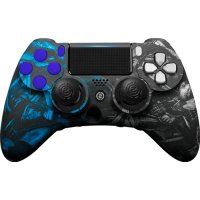
Impact - Controller Scuf Gaming - Free user manual and instructions
Find the device manual for free Impact Scuf Gaming in PDF.


| Product Type | Game Controller |
| Brand | Scuf Gaming |
| Model | Impact |
| Compatibility | PlayStation 4 |
| Connectivity | Wired via USB |
| Remappable paddles | 4 paddles with EMR magnetic key |
| Adjustable triggers | Tension adjustment with 0.9 mm SCUF key |
| Quick trigger stop system | 0.9 mm SCUF key, 180° rotation |
| Interchangeable joysticks | With SCUF Lock tool |
| Dimensions (approx.) | 160 x 100 x 60 mm |
| Weight (approx.) | 300 g |
| Power | Via USB cable (console) |
| Material | ABS plastic, neodymium magnet |
| Box contents | Controller, USB cable, EMR key, SCUF Lock tool, 0.9 mm key, additional paddles |
| Maintenance and cleaning | Soft dry cloth, avoid liquids and abrasive products |
| Safety | Powerful magnet, keep away from pacemakers, credit cards, children |
| Spare parts | Paddles, joysticks, EMR key, SCUF Lock tool |
| Repairability | Replacement of paddles, joysticks and EMR key possible by user |
| Warranty | Limited warranty, see Scuf Gaming website |
| User manual | Available as free PDF on notice-facile.com |
Frequently Asked Questions - Impact Scuf Gaming
User questions about Impact Scuf Gaming
0 question about this device. Answer the ones you know or ask your own.
Ask a new question about this device
Download the instructions for your Controller in PDF format for free! Find your manual Impact - Scuf Gaming and take your electronic device back in hand. On this page are published all the documents necessary for the use of your device. Impact by Scuf Gaming.
USER MANUAL Impact Scuf Gaming
natural_image
Black and white photo of a white handheld game controller with hexagonal branding, shown from front and side (no text or symbols visible on the device itself)SCUFIMPACT
PRODUCT GUIDE
TABLE OF CONTENTS
SCUF Limited Warranty 2
SCUF IMAPACT Controller Set-Up 3
Wired Connectivity through USB 3
SCUF IMPACT Paddle Removal & Replacement 3
Resetting your SCUF IMPACT 3
SCUF Trigger Covers 4
Interchangeable Thumbstick Control Area 4
SCUF Adjustable Hair Trigger 4
SCUF Quick Shift Trigger Stop 5
SCUF EMR 5
Spanish 6
French 9
German 12
Italian 15
SCUF GAMING LIMITED WARRANTY
For Scuf Gaming Limited Warranty information, please visit:
US & International: https://scufgaming.com/limited-warranty/
Europe: https://scufgaming.com/limited-warranty-eu
Europa: https://scufgaming.com/limited-warranty-eu
Europe: https://scufgaming.com/limited-warranty-eu
Europa: https://scufgaming.com/limited-warranty-eu
Europa: https://scufgaming.com/limited-warranty-eu
DIRECTIONS
Controller Set-Up
To set up your SCUF first turn on your gaming console, then sync controller to console. Start a game of your choice. Instructions may be found at: scufgaming.com/instructions
Wired Connectivity through USB
Step 1 To change from a wireless connection to a wired one, turn off the controller and the PS4 console.
Step 2 Attach the charging cable to the usb socket in the middle of the front of the controller.
Step 3 Connect the opposite USB side of this cable to one of the USB ports on your PS4 console, and switch the console back on.
Step 4 Press the SCUF button on the controller when prompted on screen.
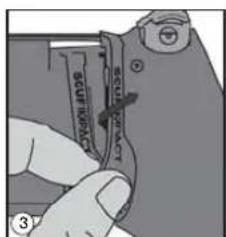
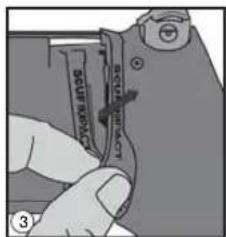
SCUF IMPACT Paddle Removal and Replacement
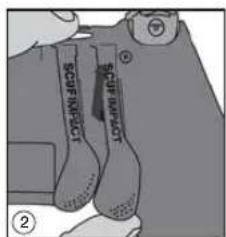
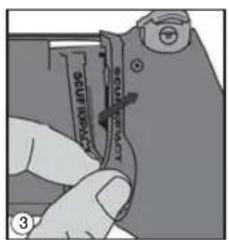
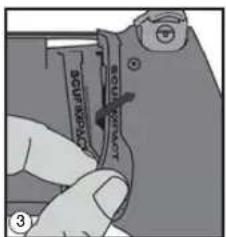
Step 1 Lift up slightly on the bottom of the paddle to be removed.
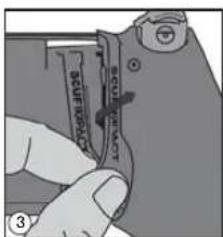
Step 2 Push the paddle upwards, and twist slightly out toward the closest handle to remove the paddle.
Step 3 To replace a paddle, twist the paddle into the paddle cavity from the top. Then slide to secure into place. You will hear a click when the paddle is secured in place.

Resetting your SCUF IMPACT
Step 1 Turn off the controller.
Step 2 Remove the paddle closest to the L2 shoulder button.
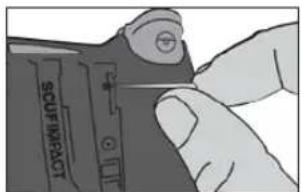
Step 3 Locate the small reset button on the back of the controller near the L2 shoulder button.
Step 3 Use a small, unfolded paper-clip or something similar to push the button; the button is inside the tiny hole. Hold the button down for a few seconds and release.
SCUF Trigger Covers
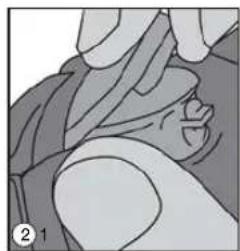
Step 1 To remove the trigger cover, push the trigger down on the Quick Shift Trigger Stop.
Step 2 Lift the bottom of the cover straight up to separate from the trigger mechanism.
Step 3 To replace the trigger cover, push the trigger down on the Quick Shift Trigger Stop, then snap the top part of the cover on first, then tilt the cover down to snap on the bottom.
natural_image
Illustration of a hand holding a small object, possibly a tool or device, with no visible text or symbols.Interchangeable Thumbstick Control Area
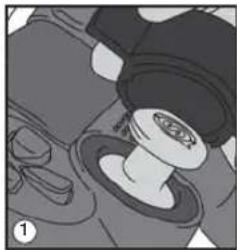
Step 1 Place the SCUF Lock over the IMPACT Ring and thumbstick on the controller. The notches on the bottom of the SCUF Lock will insert into the grooves of the Infinity Ring.
Step 2 Turn the lock counter clockwise until movement stops. Pull straight up on the thumbstick to remove both ring and thumbstick at the same time.
Step 3 Place a new thumbstick into your controller, make sure to line up the thumbstick on the thumbstick shaft to ensure correct placement. The thumbstick will lock into place on the controller.
Step 4 Use your SCUF Lock to secure the ring in place by turning the lock clockwise until movement stops.
natural_image
Illustration of a mechanical component with gears and a central shaft (no text or symbols)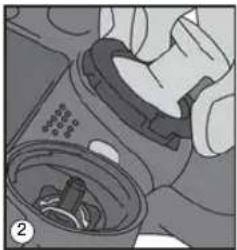
natural_image
Close-up illustration of a hand inserting a device into a container (no text or symbols visible)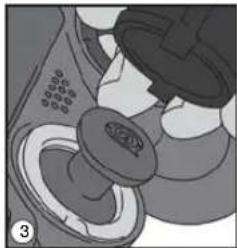
natural_image
Close-up of a mechanical component with circular features and a central knob (no visible text or symbols)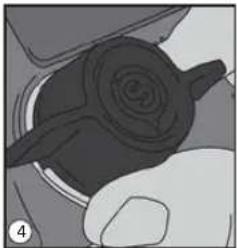
natural_image
Close-up of a hand holding a mechanical component with a spiral-shaped component (no visible text or symbols)SCUF IMPACT
SCUF Adjustable Hair Trigger
Step 1 Remove the short trigger cover or trigger extender.
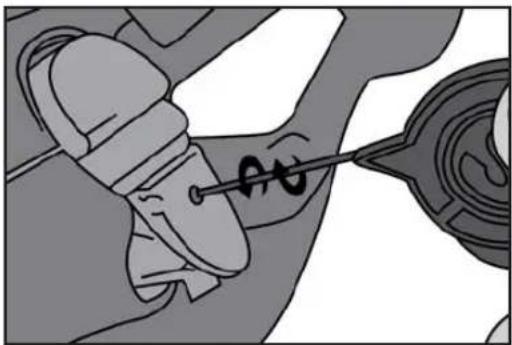
Step 2 Insert the 0.9mm SCUF key into the adjustable screw.
Step 3 With trigger stops off turn the 0.9mm SCUF key two full clockwise turns to tighten and activate the adjustable hair trigger.
Step 4 Turn the key counterclockwise to loosen and fine tune the adjustable hair trigger.
Note: It is recommended to adjust the hair triggers in-game to adjust to preference. Tighten the adjustable hair trigger in-game until the weapon fires, then loosen slightly to playing preference.
Step 5 To turn the adjustable hair trigger off, Insert the 0.9mm SCUF key into the adjustable screw on the top of the trigger mechanism and turn counterclockwise until the top of the screw is flush against the top of the trigger mechanism.
Note: To adjust the hair triggers you must remove the trigger cover or trigger extenders Trigger Cover Removal instructions above.
natural_image
Illustration of a hand holding a tool near a mechanical component (no text or symbols visible)SCUF Quick Shift Trigger Stop
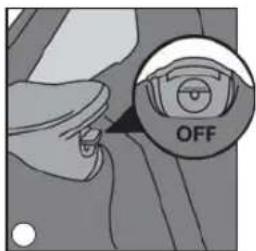
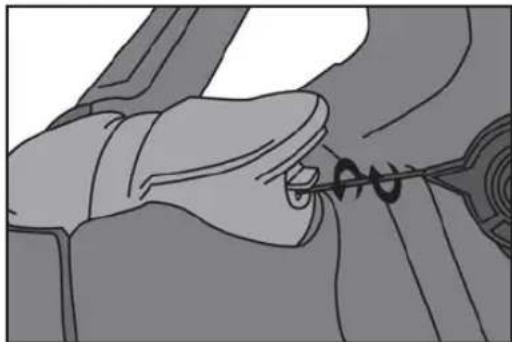
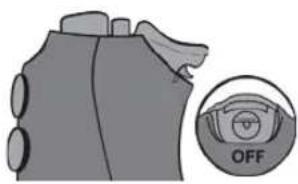
Step 1 Insert the 0.9mm SCUF Key into the Quick Shift Trigger Stop on the trigger mechanism.
Step 2 Turn the 0.9mm SCUF Key 180° to either the left or right in order to turn on the Quick Shift Trigger Stop.
Step 3 To turn off the Quick Shift Trigger Stop, Insert the 0.9mm SCUF Key into the trigger mechanism and turn 180° to either the left or right.
natural_image
Illustration of a hand holding a tool with a spiral tool inserted, no text or symbols present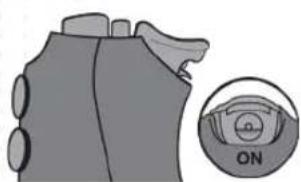
natural_image
Diagram of a mechanical component with an inset showing a circular dial labeled 'ON' (no text or symbols on the main diagram)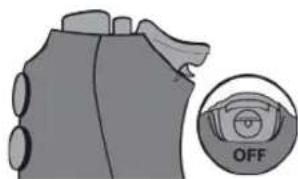
natural_image
Illustration of a mechanical component with an inset showing a circular dial labeled 'OFF' (no text or symbols on the diagram itself)Trigger Stop ACTIVATED Trigger Stop DEACTIVATED
SCUF EMR (Electro Magnetic Remapping)
PLEASE NOTE: This is an optional feature available if selected at time of purchase.
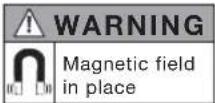
WARNING: The SCUF Mag Key contains a powerful Neodymium Magnet. See last page for Safety.
Step 1 Turn on the game console and your SCUF controller.
Step 2 Place the EMR Mag Key on the back of the controller (as indicated) so the magnet symbol latches onto the controller.
Step 3 Press and hold the paddle that you wish to remap a function.
Step 4 Press and hold the function (X, O, Δ, □, L DPAD, R DPAD, Left Thumbstick down, Right Thumbstick down) that you would like to map to a paddle.
Step 5 Release the function.
Step 6 Release the paddle.
Step 7 Remove the EMR Mag Key and place it at least 5cm away from the back of the controller to prevent the SCUF controller from accidentally entering remapping mode.

natural_image
Illustration of a game controller with multiple grip handles and a central logo (no text or symbols on the device itself)Visit scufgaming.com/EMR for a list of functions available for remap. Additional instructions at scufgaming.com/instructions
DIRECCIONES
SCUF IMPACT
natural_image
Illustration of a hand performing a medical or therapeutic procedure on a patient's arm (no text or symbols visible)SCUF Adjustable Hair Trigger
natural_image
Illustration of a hand using a tool to adjust or install a mechanical component (no text or symbols visible)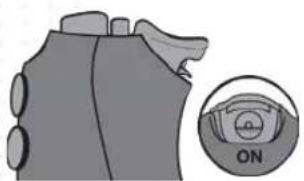
natural_image
Diagram of a device with a circular dial labeled 'ON' and a close-up view of the dial (no text or symbols beyond the label)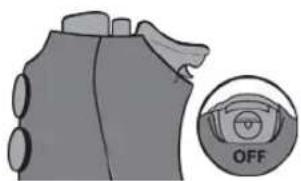
natural_image
Diagram of a mechanical component with an inset showing a circular dial labeled 'OFF' (no text or symbols on the main diagram)Trigger Stop ACTIVADO Trigger Stop DESACTIVADO
SCUF IMPACT
SCUF EMR (Electro Magnetic Remapping)
natural_image
Illustration of a game controller with labeled buttons and a central logo (no text or symbols on the device itself)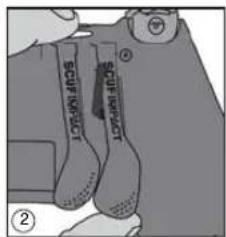
natural_image
Illustration of a hand holding a small object, possibly a tool or device, with no visible text or symbols.natural_image
Illustration of a mechanical component with no visible text or symbols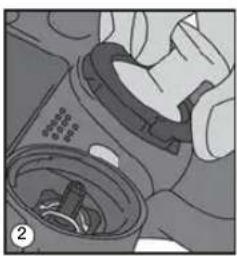
natural_image
Illustration of a hand inserting a container into a device (no text or symbols visible)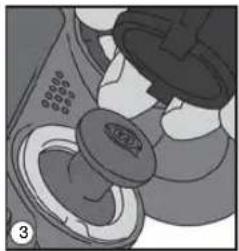
natural_image
Illustration of a mechanical component with no visible text or symbols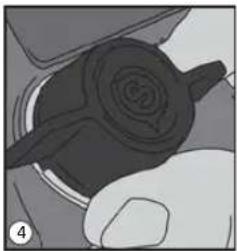
natural_image
Close-up of a hand holding a mechanical component with a spiral-shaped knob (no visible text or symbols)SCUF IMPACT
SCUF Adjustable Hair Trigger
natural_image
Illustration of a mechanical component with a pointed tool interacting with a circular component (no text or symbols visible)natural_image
Illustration of a hand using a tool to adjust or install a mechanical component (no text or symbols visible)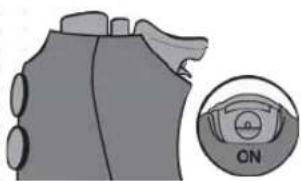
natural_image
Diagram of a mechanical component with a close-up inset showing a circular dial labeled 'CN' (no text or symbols on the main diagram)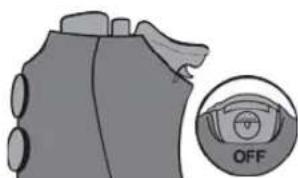
Trigger Stop ACTIVÉ Trigger Stop DÉSACTIVÉ
SCUF EMR (Electro Magnetic Remapping)
natural_image
Illustration of a game controller with multiple grip handles and a central circular button (no text or symbols)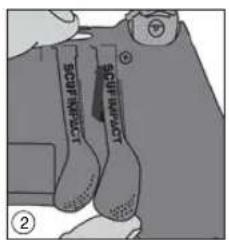
SCUF IMPACT
natural_image
Illustration of a person's face with hands near the head (no text or symbols)natural_image
Illustration of a mechanical device with gears and a central component (no visible text or symbols)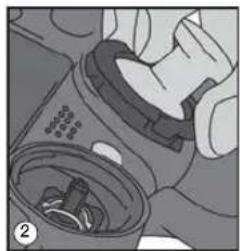
natural_image
Close-up of hands holding a mechanical component with internal components (no visible text or symbols)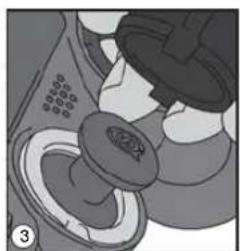
natural_image
Illustration of a medical device with a magnified view of internal organs (no text or symbols)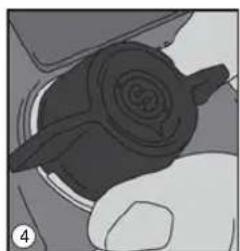
natural_image
Close-up of a mechanical component with a spiral-shaped knob and circular features, no visible text or symbolsnatural_image
Mechanical diagram showing a tool interacting with a car's seat (no text or symbols visible)SCUF Quick Shift Trigger Stop
natural_image
Illustration of a hand holding a tool with a spiral arrow, no text or symbols present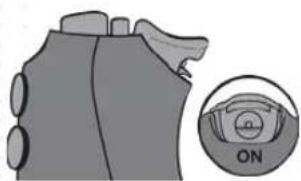
natural_image
Diagram of a mechanical component with a circular inset showing a dial labeled 'ON' (no text or symbols on the main diagram)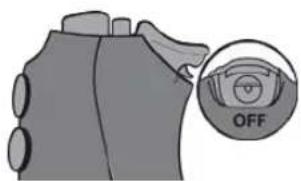
Trigger Stop AKTIVIERT Trigger Stop DEAKTIVIERT
SCUF IMPACT
SCUF EMR (Electro Magnetic Remapping)
natural_image
Illustration of a game controller with front and back panels, no visible text or symbols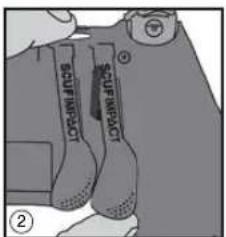
natural_image
Illustration of a hand holding a piece of hair, no text or symbols presentnatural_image
Illustration of a mechanical component with a central shaft and flange, no visible text or symbols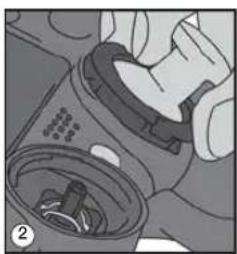
natural_image
Close-up of hands cleaning a mechanical component with a circular inset showing internal parts (no text or symbols visible)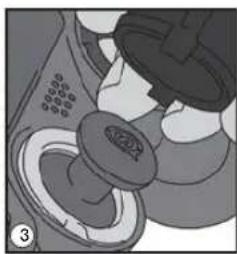
natural_image
Close-up of a mechanical component with a circular base and textured surface (no visible text or symbols)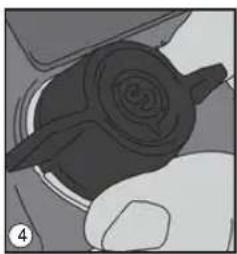
natural_image
Close-up of a hand holding a mechanical component with a spiral pattern (no visible text or symbols)natural_image
Illustration of a mechanical component with a pointed tool inserted, showing internal structure (no text or symbols)natural_image
Illustration of a hand holding a car tire with a screwdriver inserted (no text or symbols)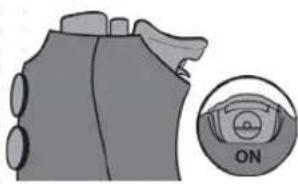
natural_image
Diagram of a mechanical component with a circular inset showing a labeled 'ON' button (no text or symbols on the main diagram)Trigger Stop ATTIVATO
natural_image
Diagram of a vehicle's seat with an 'OFF' button, no text or symbols presentTrigger Stop DISATTIVATO
natural_image
Illustration of a game controller with labeled buttons and a central logo (no text or symbols beyond branding)WARNING: The SCUF Mag Key contains a powerful Neodymium Magnet
Liability: Scuf Gaming does not accept any responsibility for damages caused by the improper handling of the EMR Mag Key. The Mag Key may have a surprising amount of magnetic power and if handled incorrectly can be dangerous. If you are giving the EMR Mag Key as a gift, please ensure to enclose this warning sheet.
Children: Do not allow children to handle the EMR Mag Key, it contains a powerful magnet and may cause choking and trapping injuries and can be fatal if swallowed. Seek immediate medical attention if the EMR Mag Key is swallowed.
Magnetically Sensitive Items: Keep away from credit cards and other magnetically stored media.
Heart Pacemakers & Other Implanted Medical Devices: Keep the EMR Mag Key away from heart pacemakers and other implanted medical devices. The operation of these devices can be adversely affected by the close proximity of a magnet up to and including deactivating the operation of these devices.
CHOKING: Your game controller or accessory may contain small pieces. Please keep your controller or accessory out of reach of children under 3 years old. To avoid danger of suffocation, keep plastic bags away from babies and children. Do not use plastic bags in cribs, beds, carriages, or playpens. The thin film may cling to the nose and mouth and prevent breathing. A plastic bag is not a toy.
ADDITIONAL
- Do not attempt to repair your game controller or accessory. Please contact Scuf Gaming to discuss your warranty or other options you have for repair or replacement of your game controller or accessory.
- Do not expose your game controller or accessory to high temperature, strong wind or intense pressure.
- Do not allow your game controller or accessory to hit or come in contact with another person or object. Doing so may cause serious harm or injury. Make sure that you are clear of other people or any other object(s) before and while you are playing with your game controller or accessory.
- Properly clean your game controller or accessory with a clean cloth avoiding the use of cleaners, chemicals or any liquids.
- Do not drop, throw or exert force on your game controller or accessory.

⚠ WARNING: CHOKING HAZARD — Small parts. Not for children under 3 years.