EasyManual
PBS 42002M - Scale Kern - Free user manual and instructions
Find the device manual for free PBS 42002M Kern in PDF.



User questions about PBS 42002M Kern
0 question about this device. Answer the ones you know or ask your own.
Ask a new question about this device
Download the instructions for your Scale in PDF format for free! Find your manual PBS 42002M - Kern and take your electronic device back in hand. On this page are published all the documents necessary for the use of your device. PBS 42002M by Kern.
USER MANUAL PBS 42002M Kern
Further language versions you will find online under www.kern-sohn.com/manuals
5.1 Pay attention to the instructions in the Operation Manual ..............................16
8.1.1 Adjustment with internal weight (only models PBJ) ......................................................... 25
8.1.2 Adjustment with external weight (factory setting models PBS) ....................................... 27
8.2 Adjustment test ...................................................................................................29 8.2.1 Adjustment test with external weight ............................................................................... 30 8.2.2 Adjustment test with internal weight ................................................................................ 323 PBS/PBJ-BA-def-2319 English
8.3 Automatic adjustment by PSC (Perfect Self Calibration), only models PBJ ...33
8.4 Automatic adjustment by Clock-CAL (model PB only) ....................................34
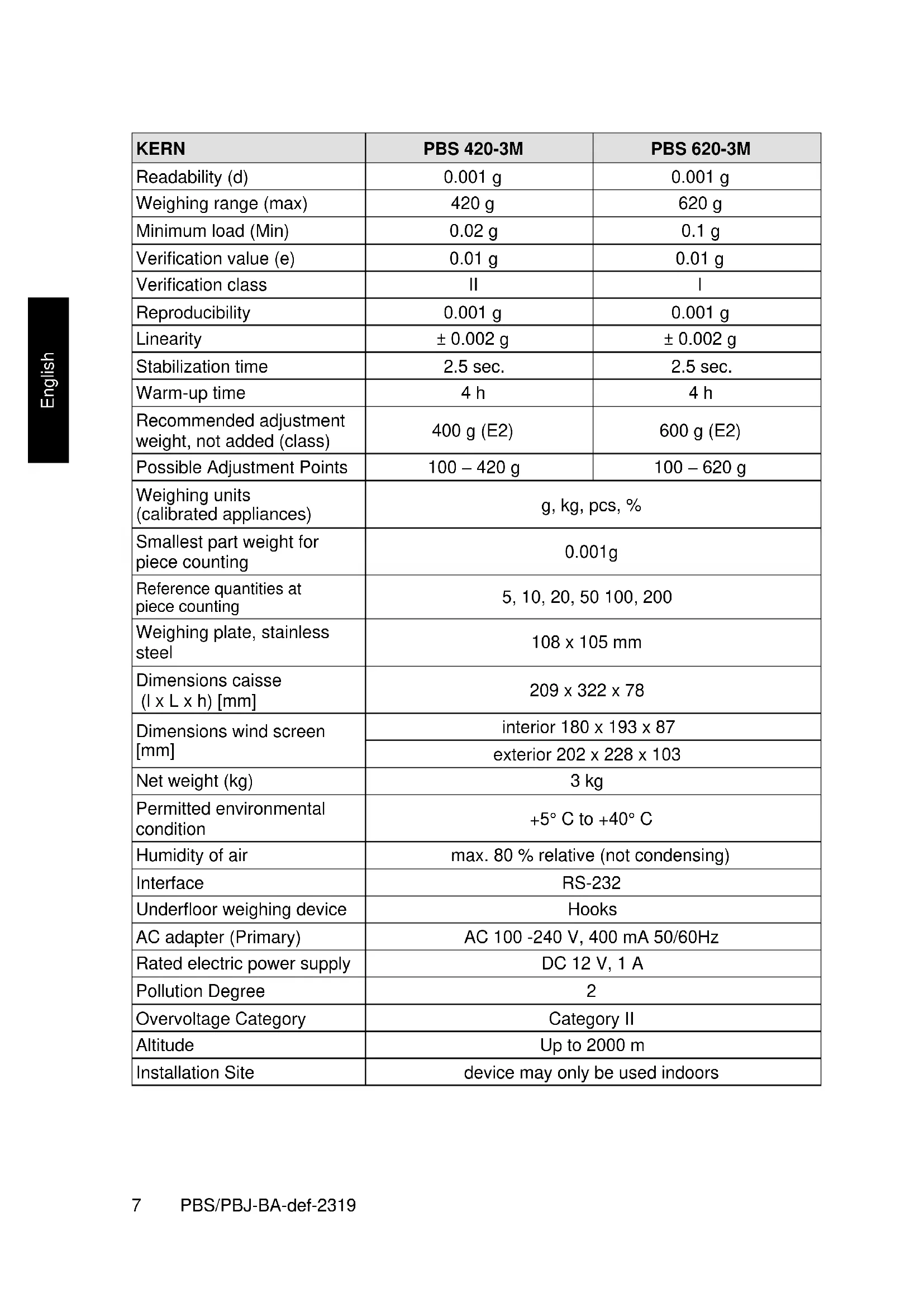
Verification value (e)
Linearity ± 0.002 g Stabilization time
Warm-up time 4 h Adjustment weight internal Weighing units (calibrated appliances) g, kg, pcs, % Smallest part weight for piece counting 1 mg Reference quantities at piece counting 5, 10, 20, 50 100, 200 Weighing plate, stainless steel 108 x 105 mm Dimensions caisse (l x L x h) [mm] 209 x 322 x 78 Dimensions wind screen [mm] interior 180 x 193 x 87 exterior 202 x 228 x 103 Net weight (kg)
Permitted environmental condition +10° C to +30° C Humidity of air max. 80 % relative (not condensing) Interface RS-232 Underfloor weighing device Hooks AC adapter (Primary) AC 100 -240 V, 400 mA 50/60Hz Rated electric power supply DC 12 V, 1 A Pollution Degree
Weighing range (max)
1 g Verification class
Adjustment weight internal Weighing units (calibrated appliances) g, kg, pcs, % Smallest part weight for piece counting 10 mg 100 mg Reference quantities at piece counting 5, 10, 20, 50 100, 200 Weighing plate, stainless steel 170 x 180 mm Dimensions caisse (l x L x h) [mm] 209 x 322 x 78 Net weight (kg)
Permitted environmental condition +10° C to +30° C Humidity of air max. 80 % relative (not condensing) Interface RS-232 Underfloor weighing device Hooks AC adapter (Primary) AC 100 -240 V, 400 mA 50/60Hz Rated electric power supply DC 12 V, 1 A Pollution Degree
Verification value (e)
Linearity ± 0.002 g ± 0.002 g Stabilization time
Warm-up time 4 h 4 h Recommended adjustment weight, not added (class) 400 g (E2) 600 g (E2) Possible Adjustment Points 100 – 420 g 100 – 620 g Weighing units (calibrated appliances) g, kg, pcs, % Smallest part weight for piece counting 0.001g Reference quantities at piece counting 5, 10, 20, 50 100, 200 Weighing plate, stainless steel 108 x 105 mm Dimensions caisse (l x L x h) [mm] 209 x 322 x 78 Dimensions wind screen [mm] interior 180 x 193 x 87 exterior 202 x 228 x 103 Net weight (kg) 3 kg Permitted environmental condition +5° C to +40° C Humidity of air max. 80 % relative (not condensing) Interface RS-232 Underfloor weighing device Hooks AC adapter (Primary) AC 100 -240 V, 400 mA 50/60Hz Rated electric power supply DC 12 V, 1 A Pollution Degree
Weighing range (max)
1 g Verification class
Recommended adjustment weight, not added (class) 4 kg (E2) 5 kg (E2) 7 kg (E2) Possible Adjustment Points 1000 – 4200 g 1000 – 6200 g 1000 – 8200 g Weighing units (calibrated appliances) g, kg, pcs, % Smallest part weight for piece counting 10 mg 100 mg Reference quantities at piece counting 5, 10, 20, 50 100, 200 Weighing plate, stainless steel 170 x 180 Dimensions caisse (l x L x h) [mm] 209 x 322 x 78 Net weight (kg) 3 kg Permitted environmental condition +5° C to +40° C Humidity of air max. 80 % relative (not condensing) Interface RS-232 Underfloor weighing device Hooks AC adapter (Primary) AC 100 -240 V, 400 mA 50/60Hz Rated electric power supply DC 12 V, 1 A Pollution Degree
Overvoltage Category Category II Altitude Up to 2000 m Installation Site device may only be used indoors9 PBS/PBJ-BA-def-2319 English 2 Declaration of conformity
To view the current EC/EU Declaration of Conformity go to:
The scope of delivery for verified weighing balances (= conformity- rated weighing balances) includes a Declaration of Conformity.PBS/PBJ-BA-def-2319 10 English 3 Appliance overview Models with readability d = 0.001 g:
Models with readability d ≥ 0.01 g:
In weighing mode: Button Description Pressed once and released Keep pressed for about 3 seconds
[ON/OFF] Switches between the operation and standby modes. Exit menu / Return to weighing mode
[TARE] Taring / Setting to zero No operation
[UNIT] Switch over weighing unit (*3) No operation
[PRINT] Issue of weighing value to external appliances (printer, PC) Issue of date and time to external appliances.
*1 This key is used to set a value when percent (%), number of pieces (PCS), specific weight of solids (▼d) or specific weight of liquid (d) is displayed. *3 Units different than „g” must be first set in the balance, before they can be used for measurements. Only gram (g), percent (%) and number of pieces (PCS) are factory set.
In menu: Button Description Pressed once and released Keep pressed for about 3 seconds
[ON/OFF] To return to a submenu or weighing mode. Return to weighing mode
[TARE] To select or set the menu element recently displayed. No operation
[PRINT] Entering numeric values: To go to the next position. No operation
Navigation button ➔ Digit selection to the right
- With numerical input the indicator [#] appears.
- „SET“ indicates that the value has been saved successfully.
- „ERR“ means that the value could not be saved successfully; back to menu by and repeat enter.
- Repeat actuating the button until the last digit flashes. Actuate the button again in order to call up the decimal point setting mode. The reversed triangle symbol ▼or the current decimal point flashes.
- Actuate the button in order to move the decimal point to the required position by one digit each.
- Actuate the button to define the position of the decimal point. The message „SEt“ which appears for a short period of time indicates that setting has been completed.
Indicates that the weighed value is stable. (*1) It marks the currently selected element during menu element selection.
Tare symbol Informs about setting an initial tare value.
Weight symbol It is displayed during adjusting the measuring range. It indicates adjusting settings during menu selection. Flashes prior to start of automatic adjustment. Note: If automatic adjusting of measuring range is not activated, a user must perform it when this symbol flashes.
- with built-in weight (PBJ models refer to chapter 8.31.1)
- with external weight (PBS models refer to chapter 8.1.2).
Brackets The non-calibrated value is given in brackets in calibrated scales.
Menu symbol Appears during menu selection. Always shown when the menu is locked.
Communication symbol Is lit up during communication with external appliances via RS- 232C cable. Shown when communication functions are ON.
Inverse triangle symbol Indicates the setting of specific weight measurement. It is used as an alternative to the decimal point.
Animal symbol Shows the setting of animal weighing function.
Automatic storage and zeroing symbol Shows the setting of automatic saving and zeroing function.
Memory Symbol Balance is in formula mode
Auto Print symbol Displays set-up of the Auto Print function.
Standby mark Appears when the balance power supply is in stand-by mode. It is also displayed when operational function changes into stand-by mode. *1 Stabilisation symbol When the stabilisation symbol is illuminated for a long time, the displayed value may oscillate when a weight is slowly changed or stabilisation detection range is set to high value. Capacity display Display of units Stability display15 PBS/PBJ-BA-def-2319 English 4 Basic Information (General)
The balance you purchased is intended to determine the weighing value of material to be weighed. It is intended to be used as a “non-automatic balcance”, i.e. the material to be weighed is manually and carefully placed in the centre of the weighing pan.. As soon as a stable weighing value is reached the weighing value can be read.
Do not use balance for dynamic add-on weighing procedures, if small amounts of goods to be weighed are removed or added. The “stability compensation“ installed in the balance may result in displaying an incorrect measuring value! (Example: Slowly draining fluids from a container on the balance.) Do not leave permanent load on the weighing pan. This may damage the measuring system. Impacts and overloading exceeding the stated maximum load (max) of the balance, minus a possibly existing tare load, must be strictly avoided. Balance may be damage by this. Never operate balance in explosive environment. The serial version is not explosion protected. The structure of the balance may not be modified. This may lead to incorrect weighing results, safety-related faults and destruction of the balance. The balance may only be used according to the described conditions. Other areas of use must be released by KERN in writing.
Warranty claims shall be voided in case
- Our conditions in the operation manual are ignored
- The appliance is used outside the described uses
- The appliance is modified or opened
- Mechanical damage or damage by media, liquids, natural wear and tear
- The appliance is improperly set up or incorrectly electrically connected
- The measuring system is overloadedPBS/PBJ-BA-def-2319 16 English
4.4 Monitoring of Test Resources
In the framework of quality assurance the measuring-related properties of the balance and, if applicable, the testing weight, must be checked regularly. The responsible user must define a suitable interval as well as type and scope of this test. Information is available on KERN’s home page (www.kern-sohn.com with regard to the monitoring of balance test substances and the test weights required for this. In KERN's accredited DKD calibration laboratory test weights and balances may be calibrated (return to the national standard) fast and at moderate cost. 5 Basic Safety Precautions
5.1 Pay attention to the instructions in the Operation Manual
Carefully read this operation manual before setup and commissioning, even if you are already familiar with KERN balances.
5.2 Personnel training
The appliance may only be operated and maintained by trained personnel. 6 Transport and storage
6.1 Testing upon acceptance
When receiving the appliance, please check packaging immediately, and the appliance itself when unpacking for possible visible damage.
Keep all parts of the original packaging for a possibly required return. Only use original packaging for returning. Prior to dispatch disconnect all cables and remove loose/mobile parts. Reattach possibly supplied transport securing devices. Secure all parts such as the glass wind screen, the weighing platform, power unit etc. against shifting and damage.17 PBS/PBJ-BA-def-2319 English 7 Unpacking, Setup and Commissioning
7.1 Installation Site, Location of Use
The balances are designed in a way that reliable weighing results are achieved in common conditions of use. You will work accurately and fast, if you select the right location for your balance. Therefore, observe the following for the installation site:
- Operate the device only indoors.
- Place the balance on a firm, level surface;
- Avoid extreme heat as well as temperature fluctuation caused by installing next to a radiator or in the direct sunlight;
- Protect the balance against direct draughts due to open windows and doors;
- Avoid jarring during weighing;
- Protect the balance against high humidity, vapours and dust;
- Do not expose the device to extreme dampness for longer periods of time. Non-permitted condensation (condensation of air humidity on the appliance) may occur if a cold appliance is taken to a considerably warmer environment. In this case, acclimatize the disconnected appliance for ca. 2 hours at room temperature.
- Avoid static charge of goods to be weighed or weighing container. If electro-magnetic fields or static charge occur, or if the power supply is unstable major deviations on the display (incorrect weighing results) are possible. In that case, the location must be changed.
7.2 Unpacking / Scope of delivery
Remove device and accessories carefully from packaging, remove packaging material and place device at the planned work place. Verify that there has been no damage and that all packing items are present.PBS/PBJ-BA-def-2319 18 English Scope of delivery / serial accessories: Models with readability d = 0.001 g: Models with readability d ≥ 0.01 g:
- Operating instructions
Remove transport guard (models PBJ)
To loosen the transport guard, turn both transport screws [1] anti-clockwise until they are locked (refer to sign [2]). For transport, turn both transport screws clockwise until they are locked. Mount safety hood Remove protective foil from adhesive strips and mount the safety hood so that it does not contact the weighing plate.PBS/PBJ-BA-def-2319 20 English Levelling
Turn in all three foot screws [1] as far as they go.
Slightly press down the left front side of the scale and turn out the two front foot screws until the air bubble [3] in the spirit level [2] is within the prescribed circle. While continuing to exert a slight pressure to the front side of the scale, turn out the rear foot screw until the scale stands in stable position. Check levelling regularly.21 PBS/PBJ-BA-def-2319 English Installation of weighing plate Models with readability d ≥ 0.01 g:PBS/PBJ-BA-def-2319 22 English Models with readability = 0.001 g:
Remove rubber plug as shown in picture.
Attach wind guard and fix it by means of screws.
Install weighing pan as per illustration. Note the correct position.
Place the wind guard cover.23 PBS/PBJ-BA-def-2319 English
7.4 Mains connection
Power is supplied via the external mains adapter. The stated voltage value must be the same as the local voltage. Only use original KERN mains adapters. Using other makes requires consent by KERN.
Models PBJ: Prior to mains connection, loosen the transport guard screws at the scale according to the sign in any case, see chapter 7.3
7.5 Switch power supply on
Supply power to balance via mains adapter. The display lights up and the balance carries out a selftest.
Models PBS After a successful selftest „OFF“ is displayed. To switch on press the ON/OFF button. The balance will carry out a display test. As soon as the weight display appears, the balance is ready for weighing.PBS/PBJ-BA-def-2319 24 English
7.6 Connection of peripheral devices
Before connecting or disconnecting of additional devices (printer, PC) to the data interface, always disconnect the balance from the power supply. With your balance, only use accessories and peripheral devices by KERN, as they are ideally tuned to your balance. Terminal for external devices:
Interfaces at the balance back
7.7 Initial Commissioning
In order to obtain exact results with the electronic balances, your balance must have reached the operating temperature (see warming up time chap. During this warming up time the balance must be connected to the power supply (mains, accumulator or battery). The accuracy of the balance depends on the local acceleration of gravity. Strictly observe hints in chapter Adjustment.
125 PBS/PBJ-BA-def-2319 English 8 Adjustment As the acceleration value due to gravity is not the same at every location on earth, each balance must be coordinated - in compliance with the underlying physical weighing principle - to the existing acceleration due to gravity at its place of location (only if the balance has not already been adjusted to the location in the factory). This adjustment process must be carried out for the first commissioning, after each change of location as well as in case of fluctuating environment temperature. To receive accurate measuring values it is also recommended to adjust the balance periodically in weighing operation.
Observe stable environmental conditions. A warming up time (see chapter 1) is required for stabilization. Ensure that there are no objects on the weighing pan.
8.1 Manual adjustment by CAL button
The scales have been set by the manufacturer so that adjustment can be started directly from the weighing mode using the CAL button.
- Models PBJ: Adjustment with internal weight
- Models PBS: Adjustment by external weight (blocked for calibrated scales) Other adjustment procedures can be activated in the menu.
8.1.1 Adjustment with internal weight (only models PBJ)
1. In weighing mode press . I-CAL is displayed.
2. Press the button and adjustment will take place
3. After successful adjustment the balance automatically
returns to weighing mode. In case of an adjustment error (e.g. objects on the weighing plate) the display will show an error message, repeat adjustment. When an optional printer is connected and the GLP function is connected, the adjustment log will be edited, see chap. 8.5
WBxxxxxxxxx Serial no.
Balance identification no. (see chap.
BFR 4003.97g Before adjustment
AFT 4000.00g After adjustment
-SIGNATURE- prepared by
8.1.2 Adjustment with external weight (factory setting models PBS)
- At verified balances, the adjustment is locked by a switch (except accuracy class I). To disable the access lock, destroy the seal and actuate the adjustment switch. 9Position of the adjustment switch see chap. 9 Attention: After destruction of the seal the balance must be re-verified by an authorised agency and a new verification wire/seal mark fitted before it can be reused for applications subject to verification.
- Carry out adjustment as near as possible to the balance’s maximum weight (recommended adjustment weight see chap. 1). Weights of different nominal values or tolerance classes may be used for adjustment but are not optimal for technical measuring. The accuracy of the adjustment weight must correspond approximately to or, if possible, be better than, the readability d of the balance. Information about test weights you will find in the internet under http://www.kern-sohn.com In weighing mode press . E CAL is displayed.
If „E-CAL“ is not displayed, press to return into weighing mode and activate menu element 3, see menu overview. Press, the weight value of the recommended adjustment weight (see chap. 1) appears flashing.
Wait until the zero display flashes.PBS/PBJ-BA-def-2319 28 English Remove adjustment weight and press . After successful adjustment the balance automatically returns to weighing mode. In case of an adjustment error (e.g. objects on the weighing plate) the display will show an error message, repeat adjustment. When an optional printer is connected and the GLP function is connected, the adjustment log will be edited, see chap. 8.5. Printout example (KERN YKB-01N):
WBxxxxxxxxx Serial no.
Balance identification no. (see chap.
BFR 3999.97g Before adjustment
AFT 4000.00g After adjustment
-SIGNATURE- prepared by
Activate function: Press 3 times in weighing mode. Menu group 1 „Adjustment“ is displayed, the indicator flashes.
Acknowledge by , the current setting flashes.
Adjustment with internal weight „I-CAL“ (only models PBJ, see chap. 8.1.1), Menu element 1
Adjustment test with internal weight „I-tESt“ (only models PBJ, see chap. 8.2.2), Menu element 2
Adjustment with external weight „E-CAL“ (see chap. 8.1.2), Menu element 3
Press repeatedly or for 3 s and the scale returns into weighing mode
The saved setting can now be called up directly via .PBS/PBJ-BA-def-2319 30 English
8.2.1 Adjustment test with external weight
- At verified balances, the adjustment test is locked by a switch (except accuracy class I). To disable the access lock, destroy the seal and actuate the adjustment switch. 9Position of the adjustment switch see chap. 9 Attention: After destruction of the seal the balance must be re-verified by an authorised agency and a new verification wire/seal mark fitted before it can be reused for applications subject to verification.
In weighing mode press . E-tESt is displayed.
If „E-tESt“ is not displayed, press to return into weighing mode and activate menu element 4, see menu overview. Press , checking is started. The displayed weight value of the recommended adjustment weight (see chapter 1) flashes.
Wait until the zero display flashes.31 PBS/PBJ-BA-def-2319 English Remove adjustment weight and press . Wait for a short period of time, the difference to the previous adjustment is displayed. Either press , the d-value is reset to zero. Adjustment of balance by resetting.
8.2.2 Adjustment test with internal weight
In weighing mode press . I-tESt is displayed.
If „i-tESt“ is not displayed, press to return into weighing mode and activate menu element 2, see menu overview. Press , checking is automatic.
Wait for a short period of time, the difference to the previous adjustment is displayed.
Either Press , the d-value is reset to zero. Adjustment of balance by resetting.
Press , the d-value is not reset to zero. No adjustment occurs.33 PBS/PBJ-BA-def-2319 English
8.3 Automatic adjustment by PSC (Perfect Self Calibration), only models PBJ
The PSC function determines the ambient temperature of the scale at any time. If the tolerance groups are exceed upwards or downwards, this is signalled and the necessary adjustment is carried out fully automatically. This will ensure that the scale is ready at any time. Activate function: Press 3 times in weighing mode. Menu group 1 „Adjustment“ is displayed, the indicator flashes.
Acknowledge by , the current setting flashes. Press several times until „A“ flashes.
Acknowledge with . is used to change-over among the following settings. „PSC on“ (menu element 5) = function activated „PSC off“ (menu element 6) = function deactivated The current setting is marked by the stability display (
Acknowledge selection by .
Press repeatedly or for 3 s and the scale returns into weighing mode.PBS/PBJ-BA-def-2319 34 English
- The flashing weight symbol signals that automatic adjustment is imminent
- In order to avoid that adjustment is started possibly during a series of measurements, actuate as soon as the weight symbol flashes. This will interrupt automatic adjustment.
- If the PSC function has not been activated, the operator has to adjust by means of an internal adjustment weight (chapter 8.1.1) as soon as the weight symbol flashes.
8.4 Automatic adjustment by Clock-CAL (model PB only)
With the help of its internal adjusting weight and integrated clock the balance can be set to carry out automatic adjustment at set times (up to three times daily, „ACALt1“, „ACALt2“ und „ACALt3“). Clock-CAL is a very convenient function, when calibration logs are desired to be made for regular calibrations, or when wishing span calibrations during break times to avoid interruption of measurement work. In order to execute Clock-Cal the following conditions must be met at the defined time. If the conditions are not met within one minute, adjustment is skipped. o The scale must be in weighing or standby mode. o The stability display must be indicated. o The load at the weighing plate must be near zero. o No other adjustment process must be started.
o The weight symbol blinks for about two minutes as notification of span calibration before it begins. o In order to avoid that adjustment is started possibly during a series of measurements, actuate as soon as the weight symbol flashes. This will interrupt automatic adjustment. o If all three times ate set to „00:00“ the function is switched off.35 PBS/PBJ-BA-def-2319 English Setting the time for Clock-CAL: Example „ACALt1“ to 12:00 p.m.. Press 3 times in weighing mode. Menu group 1 „Adjustment“ is displayed, the indicator flashes.
Acknowledge by , the current setting flashes. Press several times until „t“ flashes.
Acknowledge by , the first time „tCAL t1“ (menu element 7) is displayed.
Acknowledge by , the current setting is displayed (the active digit flashes).
Call up „tCAL t2“ (menu element 8) or „tCAL t3“ (menu element 9) by and enter required time as described above.
Quality assurance systems require printouts of weighing results as well as of correct adjustment of the balance stating date and time and balance identification. The easiest way is to have a printer connected.
Make sure that the communication parameter of balance and printer are the same. Communication parameter, see chap. 17.4
8.5.1 Setting of adjustment protocol and scale identification number
Actuate in weighing mode until „S“ flashes.
Press several times until „t“ flashes.
Press is used to change-over among the following settings. „GLP on“ (menu element 68) = function activated „GLP off“ (menu element 69) = function deactivated The current setting is marked by the stability display ( ).
37 PBS/PBJ-BA-def-2319 English Acknowledge selection by .
Acknowledge by , the currently set scale identification number is displayed (the active digit flashes).
Back to weighing mode press again or for 3 s.PBS/PBJ-BA-def-2319 38 English 9 Verification General introduction: According to EU directive 90/384/EEC or 2009/23EG balances must be officially verified if they are used as follows (legally controlled area): a) For commercial transactions if the price of goods is determined by weighing. b) For the production of medicines in pharmacies as well as for analyses in the medical and pharmaceutical laboratory. c) For official purposes d) For manufacturing final packages In cases of doubt, please contact your local trade in standard. Verification notes: An EU type approval exists for balances described in their technical data as verifiable. If a balance is used where obligation to verify exists as described above, it must be verified and re-verified at regular intervals. Re-verification of a balance is carried out according to the respective national regulations. The validity for verification of balances in Germany is e.g. 2 years. The legal regulation of the country where the balance is used must be observed!
Verification of the balance is invalid without the seal. The seal marks attached on verified balances point out that the balance may only be opened and serviced by trained and authorised specialist staff. If the seal mark is destroyed, verification looses its validity. Please observe all national laws and legal regulations. In Germany a re-verification will be necessary.
Position of seals and adjusting switch
Seal of approval Seal/Verification switch39 PBS/PBJ-BA-def-2319 English 10 Basic Operation
10.1 Switch on off balance
1. After connection to the power supply the balance
2. If the scale is in standby mode, press . The scale is
ready for service immediately without heating up time.
1. Press ; the balance changes into standby mode,
that means that the balance is now in state ready-for- operation..
2. To switch-off the balance completely, separate balance
If [WAIT] or [SET] are displayed, do not separate the balance from power supply.
10.2 Simple weighing
In order to obtain exact weighing results, your balance must have reached the operating temperature (see warming up time chap. 1). Wait for zero display, reset to zero using . Place goods to be weighed on balance. Wait until the stability display appears ( ). Read weighing result.
Error display during the weighing process
Overload, the capacity of the scale has been exceeded -oL Under-load, the load at the scale is too low
When an optional printer is connected, the weighing value can be edited. Printout examples (KERN YKB-01N):
50.5[7] g Weighing value, the non-calibrated value is given in brackets in calibrated scales.
2. Non-verified models
The dead weight of any weighing container may be tared away by pressing a button, so that the following weighing procedures show the net weight of the goods to be weighed. Put weighing container on the weighing pan. Wait until the stability display appears ( ), then press . The weight of the container is now internally saved. Weigh the material. Wait until the stability display appears ( ). Read net weight. Note:
- When the balance is unloaded the saved taring value is displayed with negative sign.
- To delete the stored tare value, remove load from weighing plate and press
- The taring process can be repeated any number of times. The limit is reached when the whole weighing range is exhausted.
- The PRE-TARE function for subtracting a known container weight can be activated in the menu, see chapter / menu element 36PBS/PBJ-BA-def-2319 42 English
10.4 Underfloor weighing
Objects unsuitable for placing on the weighing scale due to size or shape may be weighed with the help of the flush-mounted platform. Proceed as follows:
- Switch off the balance.
- Open closing cover at the balance bottom.
- Place weighing balance over an opening.
- Attach load to hook and carry out weighing procedure. CAUTION
- Always ensure that all suspended objects are stable enough to hold the desired goods to be weighed safely (danger of breaking).
- Never suspend loads that exceed the stated maximum load (max) (danger of breaking) Always ensure that there are no persons, animals or objects that might be damaged underneath the load.
NOTICE After completing the underfloor weighing the opening on the bottom of the balance must always be closed (dust protection).
11.1 Navigation in the menu
The menu consists of 7 groups and 4 levels. The configuration of the menu shows this structure where access to the required functions is facilitated by the numbering of the relevant menu elements. For navigation in the menu please use the enclosed menu is displayed.
For navigation in the menu the symbol is displayed.
Call function: Press 3 times in weighing mode. The first menu group „Adjustment“ is displayed, the indicator flashes.
Select the required menu group by . When pressing , the relevant symbols flashes; refer to the explanation below.PBS/PBJ-BA-def-2319 44 English Menu group Flashing symbol Description
Installation environment and taring
Application measurements and automatic output
Conversion of units and specific weight measurement
Setting of time and generation of an adjustment data set
Communication with external devices
Making settings: As an example, the condition for evaluating the stability of 1 count (menu element 27) to 4 counts (menu element 29) shall be set. Use the number and look for the function in the menu overview and make the following settings at the scale. Call up menu group 3, the symbol „E“ flashes.
Press , the next menu level is displayed.
Repeatedly press , until „Eb-4“ (menu element 29 ) is displayed.
Save by . „SET“ followed by the current setting „Eb-4“ is displayed, characterized by the stability display ( ).
Back to menu or onto weighing mode: Actuate for a short time, back to menu. Actuate for a long time, back to weighing mode.PBS/PBJ-BA-def-2319 46 English
This function is useful if an application requires frequent changes at a certain menu element. In weighing mode or when selecting the menu, keep the button pressed for approx. 3 seconds. Then the menu element is displayed which has been changed or set lastly.
11.2.2 Resetting the menu
This function is used to reset all settings in the menu to default setting. Default settings are marked by “#
Actuate in weighing mode until „S“ flashes.
Press several times until „r“ flashes.
Acknowledge with . The query for menu reset „rESEt?“ is displayed
Press „rESEt“ indicates that menu reset has been completed.
Back to weighing mode press repeatedly or for 3 s.
Locking the access to the menu: Connect scale to power supply. During the off display, keep pressed until „Locked“ appears.
Menu access is rejected now and the message „Locked“ appears as soon as the operator tries to select a menu.
Canceling the access lock: Disconnect scale from power supply. Wait for 10 seconds, then re-connect scale. During the off display, keep pressed until „release“ appears.
PBS/PBJ-BA-def-2319 48 English 12 Set the installed clock
Actuate in weighing mode until „S“ flashes.
Press several times until „d“ flashes.
Press again, the current date is displayed.
Change by means of navigation buttons (see chapter
Return to weighing mode using
Press to go to date format setting
Press , the current set format is displayed.49 PBS/PBJ-BA-def-2319 English is used to select among the following formats
Back to weighing mode - press repeatedly or for 3 s.
- The installed clock will carry out the corrections automatically for a leap year.
- If the button is actuated to complete date setting, the seconds are set to zero If the date is set after the time, the second value is thus not correct. Thus it is important to set the date first and then the time and/or correct the second value by means of the second correction function (±), see chapter 12.3.
Set time in the same way as the date (see chap. 12.1).PBS/PBJ-BA-def-2319 50 English
12.3 Setting the display for the standby mode
Define the items which shall be displayed in standby mode.
Select menu element 66 is the date shall be displayed, see chapter 11.1
If the time is displayed in standby mode, you have the following functions available
- Display of seconds Using you can activate display/hiding of seconds.
- Correction by ±30 seconds: Actuate while the seconds are displayed. If the value is between
00 - 29 seconds, the seconds are rounded off to zero. If the value is
between 30 -59 seconds, it is round up by one minute and 00 is displayed for seconds.51 PBS/PBJ-BA-def-2319 English 13 Functions for adaptation to ambient conditions
13.1 Stability and reaction (average value)
Exists the possibility to tune the stability of the display and the degree of reaction of the balance to the requirements of certain applications or the installation environment. There is a possibility of selection among five operating modes. Please note that in general slowing down reaction times result in higher stability of the set data handling, while speeding up reaction times have an influence on the stability deterioration. However, the balances of PBS/PBJ type are designed to ensure both properties i.e. fast reaction time and high stability.
13.1.1 Automatic mode
Select the menu element 22: The balance automatically and dynamically undertakes to optimally determine the average value during observation of load data. If there are not any special circumstances, this setting should always be used.
Select the menu element 23: This mode is suitable for weighing invariable liquid volumes. It is very susceptible to wind and vibration. (When the filling mode is active, the button makes it possible to switch over between 3 stability settings.)
13.1.3 Standard mode
Select the menu element 24: This mode is suitable for weighing in normal environment. The determination of the average value is fixed and is not subject to adaptation as in the automatic mode which is performed dynamically.
13.1.4 Antivibration mode
Select the menu element 25: This mode should be used if the balance is placed at a location where there are strong vibrations, and its readings fluctuate in automatic mode. The balance reaction is deteriorated in a result of small changes of weight.
13.1.5 Antiwind mode
Select the menu element 26: This mode should be used if the balance is placed at a location where it is exposed to air currents which cause fluctuations of its readings in automatic mode. This reaction is deteriorated even more than in the antivibration mode, but the weighing process is more stable. MODEPBS/PBJ-BA-def-2319 52 English
13.2 Stability Detection Band
(up to 8 counts for verifiable, up to 64 counts for non verifiable models) The band makes it possible to select conditions at which the balance should be considered as stable. If „1 count” is selected, and the reading (within counting the readings) remains constant, the balance is considered as stable and the stability display is shown. The stability detection band can be set from 2 to 64 counts. Select the menu element:
Tracking is the function which ensures to receive present value displaying in possible long period. To ACTIVATE this function, select the menu element 34. To DEACTIVATE this function, select the menu element 35. 14 Capacity display This function displays a bar graph representation of the load on the weighing pan. This may be used to prevent sudden appearance of “oL” (overload) during measurement. Select the menu element 11 in the menu overview to set the full range mode: (1)
The bar located within the lower scale range indicates that the weight located on the scale pan is small. (1)
The bar approaching the upper scale range indicates that the weight located on the scale pan almost reaches the balance capacity. (2)
If the bar graph is not to be displayed, press the menu element 2153 PBS/PBJ-BA-def-2319 English 15 Switch-over weighing unit Press the button several times to switch over the display between the activated units. The default setting provides the following options: [g] → [%] → [PCS] → [%] Other settings must be activated in the menu as follows:
(Example) Menu overview No. 54 to 62 : Press button to switch over between the units. Save the selected unit using button
„SET“ appears shortly. The unit has been accepted.
In weighing mode, press the key repeatedly until the „%” symbol will be seen on the display. Setting 100% of the reference value:
Press the key to tare the balance.
Put the reference sample which represents 100% value. This value must correspond to 100 or more counts in „g” unit.
When the stabilisation display appears, press the key at once.
„SET“ appears shortly.
The reference sample weight will be shown as 100%.
Weights of next samples will be displayed as a percent value of the reference sample weight.
With parts counting you can either count parts into a container or remove parts from a container. To count a greater number of parts the average weight per part has to be determined with a small quantity (reference quantity). The larger the reference quantity, the higher the counting exactness. High reference must be selected for small parts or parts with considerably different sizes. The process has four steps:
- Tare the weighing container
- Determine the reference unit
- Weigh in the reference unit
Condition: Activate the PCS function with the menu element 57 if it is not set. (The unit of PCS function is factory set.) Make sure that the balance is in the weighing mode. (the unit of „g” is displayed)
Press the button repeatedly until the „PCS” symbol is displayed.
Place the container on the balance plate and tare the balance with the button.
Count exactly 9 (or 10, 20, 50, 100 or 200) pieces of the sample to be weighed and put them into the container.
Press the button when the display corresponds to the number of the pieces being put. The reference quantity is saved.
16.2 Control weighing and target weighing
16.2.1 Control weighing (comparator) display type 1
It is the most suitable method which makes it possible to assess weighing courses or errors on the basis of the sample weight. Select the menu element 15 in the menu overview. Display elements used
The upper threshold value, indicated with the upper triangle symbol, is defined with the menu element
The lower threshold value, indicated with the lower triangle symbol, is defined with the menu element
Note: Determination is carried out in the following way: Upper threshold value < sample weight HI Lower threshold value ≤ sample weight ≤ upper threshold value GO Sample weight < lower threshold value LO
16.2.2 Control weighing (comparator) – display type 2
This mode should be used for classifying on the basis of the sample weight. The display looks like a bar graph, but it also includes the control weighing function. Select the menu element 18 in the menu overview. Display elements used
The upper threshold value, indicated with the upper triangle symbol, is defined with the menu element
The lower threshold value, indicated with the lower triangle symbol, is defined with the menu element
Note: Determination is carried out in the following way: Upper threshold value < sample weight HI Lower threshold value ≤ sample weight ≤ upper threshold value GO Sample weight < lower threshold value LO57 PBS/PBJ-BA-def-2319 English
16.2.3 Target weighing mode
This mode is used for weighing constant liquid quantities or for assessment of missing quantities or excess quantities. The target value is the numeric value which corresponds to the nominal quantity of the used unit. The target value is a numerical value which corresponds to quantity of the set unit to be used for weighing. The target value on the analogue display is presented as the centre line. The limit values are indicated with the triangle symbols. The movable bar presents the current weight on the scale pan. The target weighing mode is selected with the menu element 12. Display elements used
The „target value”, which corresponds to the centre line on the graphic display, is to be set with the menu element 13.
The „limit value”, which corresponds to the distance between the centre line and upper or lower triangle symbol, is to be set with the menu element 14.
To carry out the density determination of solids and liquids please refer to the user manual which KERN delivers together with the density determination kit.
16.4 Extreme value recording
(models with non-verifiable setting only) The “extreme value” stands for the highest or lowest value indicated after a value alteration of more than fivefold the null region. To determine the extreme value, choose menu item 49.
Target value → Without load With weight within limit rangePBS/PBJ-BA-def-2319 58 English
16.5 Auto Print function
(models with non-verifiable setting only) Using the Auto Print function ensures automatic data printing without necessity to press the button for each single measurement. If the function is activated, the (Auto-Print) symbol is displayed. It is possible to select from six types of automatic printing. Information concerning setting the zero range can be found in chapter 11.7 Printing whilst loading: Select the menu element 42 in the menu overview. Place or remove the sample when the displayed value lies within the zero range. The data will be output automatically when the stabilisation symbol is illuminated and the displayed positive value exceeds 5 times the zero range value. The next data output will occur when the display is brought to the value within the zero range by removing the sample or pressing the button. Printing whilst loading and unloading: Select the menu element 43 in the menu overview. Place or remove the sample when the displayed value lies within the zero range. The data will be output automatically when the stabilisation symbol is illuminated and the displayed positive or negative value exceeds 5 times the zero range value. The next data output will occur when the display is brought to the value within the zero range by removing the sample or pressing the button. Printing whilst loading and at zero: Select the menu element 44 in the menu overview. Place or remove the sample when the displayed value lies within the zero range. The data will be output automatically when the stabilisation symbol is illuminated and the displayed positive value exceeds 5 times the zero range value. Remove the sample or press the button. The data will be output again when the displayed value lies within the zero range and the stabilisation symbol is illuminated. Printing whilst loading, unloading and at zero: Select the menu element 45 in the menu overview. Place or remove the sample when the displayed value lies within the zero range. The data will be output automatically when the stabilisation symbol is illuminated and the displayed positive or negative value exceeds 5 times the zero range value. Remove the sample or press the button. The data will be output again when the displayed value lies within the zero range and the stabilisation symbol is illuminated. PRINT TARE / TARE / TARE / TARE /59 PBS/PBJ-BA-def-2319 English
16.6 Automatic zero setting
(models with non-verifiable setting only) If the displayed value is within the zero range and the stability display lights up, zero setting occurs automatically. The zero symbol appears. To switch-on the zero setting function, select menu symbol 41
The „zero range“ is used as a reference value, whether a sample was placed or not. To determine the zero range, select the menu element 48 .
16.8 Taring /printing at stability (models PBJ)
(only in verifiable units) Determine if the balance first has to reach stability before printing via the button or the zero point can be displayed via the button. If you want to print or to tare without waiting for stability: (immediate operation)
- Select the menu element 39. If printing or taring only after having reached stability: (waiting for stability)
- Select the menu element 40. Notes: While the balance waits for stability, „----“ is displayed.
- Press button, then „---“ appears. At this opportunity press the button, if you deactivate this function and want to cancel taring.
- If the communication - and the standby symbol are illuminated and you press the button, you have to wait for the stability symbol . The data are output, when the stability symbol is illuminated. If during waiting time you press the button, the balance goes to standby mode. Data are printed as soon as in the next weighing process stability has been reached.
This mode is used for convenient weighing of individual recipe components. Weights of each component are displayed and saved after each pressing the button. The weights of those component are sent with the RS-232C or DATA I/O interface, and the display is automatically zeroed to weigh the next component. When all components are weighed, their weights are added up and the total weight is displayed. This value output is edited by the button. Select the menu element 51 in the menu overview.
- 1. If the recipe mode is activated, the display is in the recipe stand-by mode until it is started. The display shows the Add-On symbol, memory symbol and stand-by mode symbol. Place the container (if used) and press the button to tare it. Please remember that taring with the button will not be accepted after previous pressing the button (as in the step 2). Taring is possible again after previous pressing the button (as in the step 5).
- 4. Step 3 is to be repeated for all components to be weighed.
- 5. Then press the button. The total weight will be displayed and output to peripheral devices with the „TOTAL=” unit.
- 6. Remove everything from the balance plate. The next recipe is started from the step 1.
16.10 Automatic saving and zeroing
This function is used for weighing large number of single samples. If the function is activated, the automatic saving and zeroing symbol is illuminated. Select the menu element 52 in the menu overview.
- Place the container to be weighed on the balance and press the button when the automatic saving and zeroing function is in the stand-by mode. (The automatic saving and zeroing symbol and mode symbol are illuminated.) The balance will be zeroed.
- Press the button. The stand-by symbol disappears and measurements within the automatic saving and zeroing function can be started.
- Place the first sample on the scale pan. Each time when the stabilisation symbol is illuminated and the value corresponding to five times the zero range or higher is illuminated or when the button is pressed, the illuminating value output and balance zeroing is carried out.
- Weighing process of the next sample is carried out without the necessity to press the button.
- Press the button. The balance returns to the stand-by mode of the automatic saving and zeroing function, the total weight placed on the scale pan without the packaging weight is displayed. To print this value, press the button. Notes:
- If the stabilisation symbol is illuminated and the display value lies within the zero range, zeroing is carried out automatically.
- Pressing the button when the display value lies below five times the zero range is followed by zeroing after data output. (Manual loading)
- Pressing the button when the automatic saving and zeroing function is in stand-by mode is also followed by setting mains supply in stand-by mode. TARE / PRINT PRINT ESC ON/OFF ESC ON/OFF PRINT PRINT ESC ON/OFFPBS/PBJ-BA-def-2319 62 English
16.11 Animal weighing
(only possible with non verifiable setting) This function is used for weighing animals. The animal symbol is displayed when the animal weighing mode is active. Select the menu element 53 in the menu overview.
- Place the weighing container on the scale pan and press the button. Note: When the weighing container is placed on the scale pan, data output is possible. It is not a fault. This no malfunction.
- Place an animal on the scale pan. Its weight must exceed 50 times the zero range.
- The value will be given automatically when the weighing value is stabilised.
- Press the button or remove an animal from the scale pan.
- If the displayed value is stable, but it lies below 10 times of the zero range, the balance will be zeroed automatically. Any remaining materials on the scale pan (excrement or skin) will be automatically written off and zeroed. If the balance is not zeroed, the zero range value must be increased (refer to
- The stand-by mode is not provided for the animal weighing function.
- Press the button to switch over to the mains supply stand-by mode.
- When live animals are weighed in the animal weighing mode, automatic extension of stability detection band is carried out. Repeatability of measuring data is a bit lower than in other operational modes.
- If an animal being weighed cannot be controlled and the automatic printing function does not respond, you can press the button to output the display value. Then remove an animal from the balance. Even if the stability symbol appears before an animal is removed from the balance, the data will not be printed again.
- The stability symbol will appear earlier due to setting the wider stability detection band in the menu.
- If the balance returns to the zero point too slowly, the zero range is to be set to a higher value.
17.1.1 Connecting the Cable
ATTENTION: By using the RS-232C/AUX interface of the PBS/PBJ type balances it is also possible to output other signals than RS-232C ones. Incorrect connection of those signal cables may lead to the personal computer or balance failure. Therefore, make sure that the suitable and correctly connected cable provides communication between the balance and computer. Some types of computers may not operate normally when they are connected by using the optional RS-232C cable in the way shown in the below figure. (1) IBM PC/AT computer and compatible (9-pin D-sub connector)
The following explanations refer to the case when the menu element 77 (EB type format) is selected. Explanations concerning other formats are included in the data of computers compatible with the suitable data formats. Note: The mark indicates the space code, and <Limiter> indicates the limiter code.
1. For measuring values:
from 2. to 11. sign: Numerical values or „[”, ”]” are right justified. Position of the decimal point is changed depending on the device type.
from 12. to 13. sign: Units such as g or kg
- If the CR or LF command is the limiter (the menu element 94 or 95 is selected), sign 13 is not available.
- When stability information is printed, the first of the above mentioned signs is preceded with the following sign: Stable time: S Instable time: D
17.3 Using codes of commands
Note: Incorrect setting of communication parameters results in displaying the communication error „ComErr”.
1. Commands ending with a digit, letter or symbol different than [=]:
commands to the balance must be transmitted with a limiter for each command code.
Example 1: PRINT<CR> ... The same process as after pressing the button.
2. Commands ending with the [=] sign: Digits must be transmitted with a limiter to the
Example 2: TIME=1234 <CR> .. The time of 12:34 is set as the current time
Example 3: P.TARE=1.23 <CR> (example for two positions after the point). The value of 1,23 g is set as the initial taring value.
Example 4: P.TARE=0.00 <CR> (example for two positions after the point). ... cancels (writes off) the initial taring value.
Note: Number of positions, decimal point and position of the decimal point in the number sign transmitted after the ‘=’ sign are the same as they would be for entering numerical value with the buttonboard. Use the same number of places after the point as in the weighing mode. This limitation does not refer to USER=, SOLID= and LIQUID= commands.
- If 0 is at the beginning of the four-position number, the setting is finished at this point, and the menu selection is finished.
- The result of such a command depends on the balance type. Example 6: #=2.56 <CR>
Example 7: #=12.345.67 <CR> A computer makes it possible to determine the specified presentation way of numbers for processes of weighing and displaying on the balance. In the case of commands from examples 6 and 7, the values of [#2.56] and [#12.345.67] are displayed on the balance. When the button is pressed, the ’2-56<CR>’ and ’12-345-67<CR>’ strings are sent from the balance.
3. Return message command
The balance sends back the N string of signs which are limited by the return message command ‘{‘ or ’}’ and limiter. In the receive buffer of the balance there are not left any not processed return message commands for N ≤30.
Example 8: ABCDEFG12345<CR> ... When this command is received, the balance sends ABCDEFG12345<CR> string. This string can be printed by the printer.
Note: Only capital letters and part of symbols (decimal point, decimal symbol etc.) can be used for data output with an electronic printer. Maximal length of line is 15 characters.
4. Codes of commands for EB type formats (the menu element 77) and Old EB type
D01 Continuous output
D03 Continuous output with stability information
D06 Automatic printing setting (type of automatic printing is set separately)
D07 Single output with stability information
D09 Cancellation of continuous output and automatic printing
Corresponds to the button. UNIT Corresponds to the button. PRINT Corresponds to the button. POWER* Corresponds to holding the button for about 3 seconds. MENU+ Corresponds to holding the button for about 3 seconds. UNIT+ Corresponds to holding the button for about 3 seconds. PRINT+ Corresponds to holding the button for about 3 seconds.
(iii) Commands concerning user measurements ADDON Sets automatic saving and zeroing mode.
Comes into use immediately after setting the automatic saving and zeroing mode.
Sets animal weighing mode. ANIMAL Sets animal weighing mode.
Cancels user weighing mode.
(iv) Commands concerning conversion of units
Registration of „kg” unit and switching over. PERCENT Registration of „%” unit and switching over.
Sets 100% when displaying is carried out in „%” unit.
g - % switching over. PCS Registration of „PCS” unit and switching over. SDENSE Registration of „Solid density” unit and switching over. LDENSE Registration of „Liquid density” unit and switching over. RSTUNIT Return to the standard settings.
CALWIT= Sets external weight value for calibration of measuring range. ACALT1= Sets time 1 in the Clock-CAL mode. ACALT2= Sets time 2 in the Clock-CAL mode. ACALT3= Sets time 3 in the Clock-CAL mode. UW= Sets weight unit. VOL= Sets volume of reference weight. SDENSE= Sets density of ambient liquid. DATE= Sets date. TIME= Sets time. TARGET= Sets target value. LIMIT Sets limit value. G.LO= Sets lower limit value on the display of the check weighing 1. G.UP= Sets upper limit value on the display of the check weighing 1. L.LO= Sets lower limit value on the display of the check weighing 2. L.UP= Sets upper limit value on the display of the check weighing 2. PCS= Sets any number of pieces.
CAL Calls up measuring range calibration mode. C18 Calls up measuring range calibration mode. LOCK Sets menu lockout. RELEASE Releases menu lockout. TIME Reads date and time. ADJCLK Carries out correction by ± 30 seconds. RSTMN Resetting the menu MENU= Makes it possible to call up any menu.
Switches over to the multipoint connection mode. (@ for lower case letters)
5. Commands compatible with Mettler Toledo series electronic balances
Single output in stable condition
Immediate, single output SIR Continuous output
Continuous output in stable condition
Zeroing (the same as immediate taring)
5. Commands compatible with Sartorius series electronic balances
This menu is used to determine technical data of communication between the balance and a computer or electronic printer. Note: This menu applies both to the RS-232C interface and DATA I/O interface. For the device to which the DATA I/O interface is connected e.g. electronic printer, the balance communication parameters should be set to the standard settings i.e. select the following menu elements: 76, 77, 83, 89, 92, 94.
The handshake function determines whether or not peripheral devices can receive communication data from the balance. It does not transfer the balance status to the peripheral devices. The balance can receive data as long as there is a free space in its receive buffer memory. This function is ready for operation when the „oFF” symbol is displayed. Its reliable operation in other states cannot be guaranteed. If the balance data output is interrupted by the handshake function, the balance display is locked. Enter the suitable settings for the handshake function. If the software handshake function is not to be performed, select the menu element
If the software handshake function is to be performed in the way described below, select the menu element
- When the X-OFF (13H) command is received by the balance, the balance data output is stopped.
- When the X-ON (11H) command is received by the balance, the balance data output is started.
If the hardware handshake function is to be performed in the way described below, select the menu element
- If the DTR parameter is set to OFF, the balance data output is stopped.
Specify the format of data output by the balance. For the standard format of the KERN electronic balances
17.4.4 Speed of communication
Specify the transmission speed (300, 600, 1200, 2400, 4800, 9600, 19200 or 38400 bps). The value presented as „b-xxx” gives the number of bps (bits/second). Baud-rate and bps are the same value. Select one of the menu elements from 81 to 88.
17.4.5 Parity / Bit length
Select the parity and bit length. No parity, 8-bit length: Select the menu element 89
Odd parity, 7-bit length: Select the menu element 90
Straight parity, 7-bit length: Select the menu element 91
Select the number of stop bits. Stop bit 1: Select the menu element 92
The „limiter” is used to separate single data or commands from each other. The limiter is to be set in the following way: Setting to CR(0DH): Select the menu element 94
Setting to LF(0AH): Select the menu element 95
Before cleaning, please disconnect the appliance from the operating voltage. Please do not use aggressive cleaning agents (solvents or similar agents), but a cloth dampened with mild soap suds. Ensure that no liquid penetrates into the device and wipe with a dry soft cloth. Loose residue sample/powder can be removed carefully with a brush or manual vacuum cleaner. Spilled weighing goods must be removed immediately.
The appliance may only be opened by trained service technicians who are authorized by KERN. Before opening, disconnect from power supply.
Disposal of packaging and appliance must be carried out by operator according to valid national or regional law of the location where the appliance is used.73 PBS/PBJ-BA-def-2319 English 19 Instant help In case of an error in the program process, briefly turn off the balance and disconnect from power supply. The weighing process must then be restarted from the beginning. General display: Display Explication
Wait for the next display.
Date and time are output.
The process has been interrupted.
Operational measurement is allowed.
Too large error was found during calibration check. (Please contact your sales representative.)
Too large error was found during calibration check. (Please contact your sales representative.)
Menu lockout released.
The menu has been reset.
The contents of the new setting and factor have been saved.
Return in a result of mains failure.
The built-in weight is moving. Please wait. All number signs are flashing. Put the calibration weight being displayed.PBS/PBJ-BA-def-2319 74 English Error message: Displayed error code Explication Remedy
Disturbances in weight loading mechanical elements. Check transport screws.
Weight on the scale pan is unstable during calibration.
Large zero point drift during calibration. Empty the scale pan.
Large drift during the PCAL function. Use the correct weight.
Large drift during calibration of the measuring range. Use the correct weight.
Calibration weight is incorrect. Use the correct weight.
Disturbances in the balance (the balance is stopped when this display appears).
Received command code is incorrect. Check limiters etc.
Total number of the displayed unit is longer than 7 positions. Reduce load.
Disturbance in the balance.
The power voltage is incorrect. Check the power voltage .
- Please contact your sales representative.75 PBS/PBJ-BA-def-2319 English Fault finding Procedures: Symptom Possible cause Remedy
- Mains adapter is not connected.
- The room mains circuit-breaker is switched off.
- Incorrect voltage. Check mains voltage and connect the mains adapter correctly.
„OL” or „-OL” display The transport screws are not locked. Turn the screws anticlockwise until they are locked.
Pads of the scale pan not installed. Install pads of the scale pan.
To large weight on the scale pan. Use the weight within its capacity.
The display does not react after putting a weight on the scale pan. The weighing pan is displaced. Place the weighing pan correctly.
The display fluctuates. Influence of vibrations or air flow. Place the weight at the suitable location. Try to change environment settings.
Protective shield is touching the scale pan. Install the shield on the main unit of the balance.
Incorrect weighing result. Calibration of the measuring range is not effective. Calibrate the balance correctly
Taring is not effective. Tare the balance before weighing.
The balance does not display the required unit. The unit has not been set. First set the unit.
Selection of the menu element is rejected. Menu lock ACTIVATED. Remove the menu lockPBS/PBJ-BA-def-2319 2 Français