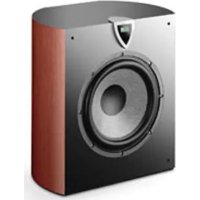
Profile SW 908 - Subwoofer FOCAL - Free user manual and instructions
Find the device manual for free Profile SW 908 FOCAL in PDF.


| Product type | Active subwoofer with built-in DSP |
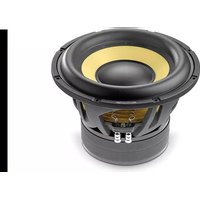
| Speaker | 33 cm "W" cone, 65 mm voice coil |
| Frequency response | 27 Hz - 150 Hz |
| Amplifier | BASH® 500 W RMS (700 W max) |
| Low-pass filter | 50 Hz - 150 Hz, 24 dB/octave, in 5 Hz steps |
| Subsonic filter | 20 Hz - 45 Hz, 24 dB/octave, in 10 Hz steps |
| Phase adjustment | 0° - 180°, in 10° steps |
| Boost mode | +3 dB boost at 40 Hz |
| Night mode | Digital dynamic compression for low-volume listening |
| User presets | 3 presets: Hi-Fi, Cinema, User |
| Analog inputs | LFE mono (RCA) and Stereo (RCA) |
| Digital input | Coaxial (RCA) |
| Digital output | Coaxial (RCA) for daisy chain |
| Power supply | Mains: On/Off switch and Auto Power mode |
| Dimensions (H x W x D) | 510 x 488 x 380 mm |
| Weight | 27 kg |
| Enclosure material | Bent multilayer MDF (SW 908) |
| Included accessory | Infrared remote control |
| Cleaning | Dry cloth only |
| Safety precautions | Do not expose to water, do not block ventilation openings |
| Warranty (France) | 10 years mechanical parts, 1 year electronics |
Frequently Asked Questions - Profile SW 908 FOCAL
User questions about Profile SW 908 FOCAL
0 question about this device. Answer the ones you know or ask your own.
Ask a new question about this device
Download the instructions for your Subwoofer in PDF format for free! Find your manual Profile SW 908 - FOCAL and take your electronic device back in hand. On this page are published all the documents necessary for the use of your device. Profile SW 908 by FOCAL.
USER MANUAL Profile SW 908 FOCAL
Due to constant technological advances, Focal reserves its right to modify specifications without notice. Images may not conform exactly to specific product.
READ FIRST!
IMPORTANT SAFETY INSTRUCTIONS!
Magnetic disturbance
Application
Start-up and shut-down
Adjusting the volume
Night"mode
Program application
Parameters
Navigation
Input mode
Low Pass Mode
Boost Mode
Subsonic Mode
Phase Mode
Gain Mode
Presets buttons
Specifications and warranty
Specifications
Conditions of guarantee
Notes 36
International Guarantee
Page
12
14
16
18
21
39
PROFILE SUBWOOFER MANUAL
Congratulations and thank you for your purchase of a Profile self-powered subwoofer. We are pleased to share our philosophy with you: "the Spirit of Sound". This high-performance subwoofer features the latest technical developments from Focal-JMlab in terms of speaker design and amplification, whether it is for hi-fi or home theatre systems. In order to make the most of this subwoofer, we recommend that this user manual be kept for future consultation.
Break-in period
The driver used in the Profile is made up of complex mechanical elements that require an adaptation period before they deliver the best of their performance. They must adapt to the temperature and humidity conditions of their environment. This break-in period depends upon the encountered conditions and can last several weeks. To shorten this period, we recommend the use of the subwoofer during approximately twenty hours at medium level, playing standard music program, but with a large amount of bass. Once the components of the loudspeaker are completely stabilized, it is possible to enjoy the real performance of your self-powered subwoofer.
The Focal-JMlab warranty only applies if the enclosed warranty card is returned to us within 10 days of purchase.
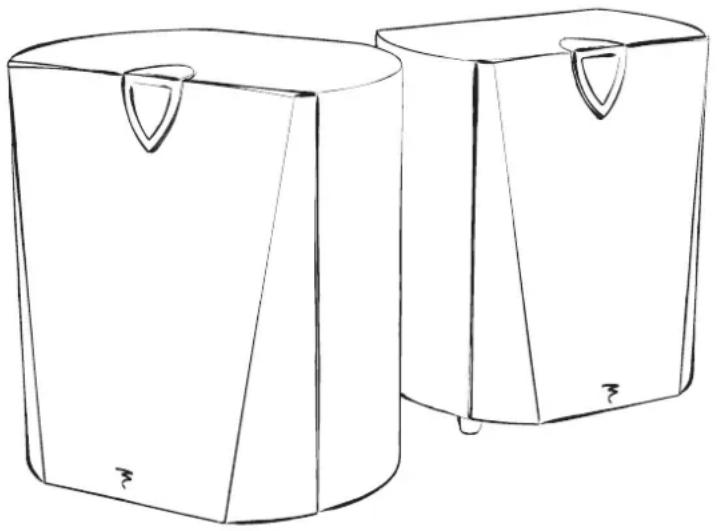
Specifications
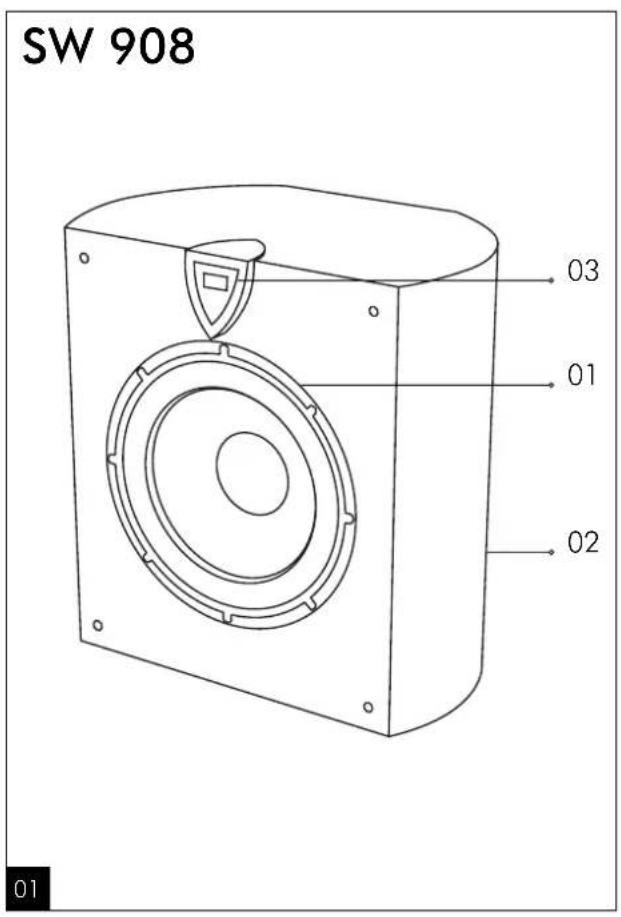
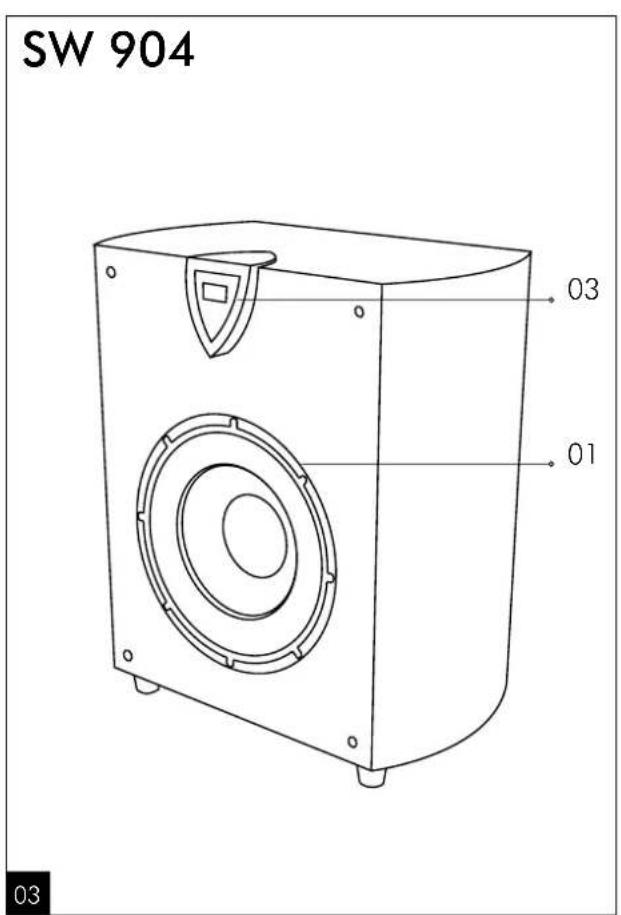
"Sandwich composite woofer (1)
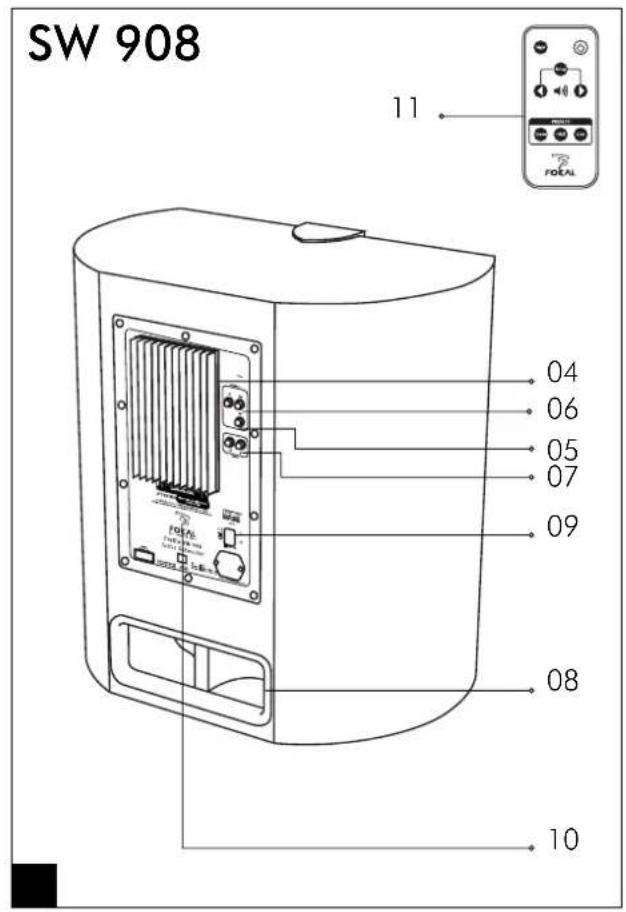
BASH® digital amplifier (4)
DSP 24 bit processor (10)
- Active high-pass crossover, variable from 50 to 150Hz , 24dB/octave
-Variable phase from 0 to 180^ - 3dB boost at 40Hz
- Subsonic filter adjustable, 24dB/ octave
-Variable gain (-6dB to +6dB)
LCD display (3)
Multi-layer, curved MDF construction (2) (for SW 908 only)
Double-flared FTP aerodynamic port (8) (for SW 908 only)
Auto Power (9)
LFE input (5)
Stereo inputs (6)
Digital input/output on coaxial (7) (for SW 908 only)
Full-function, infrared remote control (11)
Three programmable memories
INSTALLATION
Connections
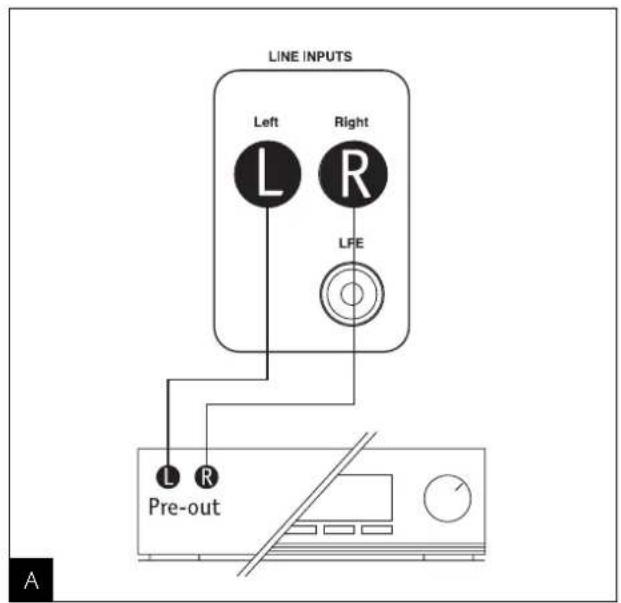
Low-level inputs on RCA
When using a two-channel, stereo amplifier with preamplifier line outputs, the Profile must be connected through RCA stereo inputs "line inputs Right/Left" (fig. A). This configuration is better than that of the high-level inputs and will deliver a cleaner sound.
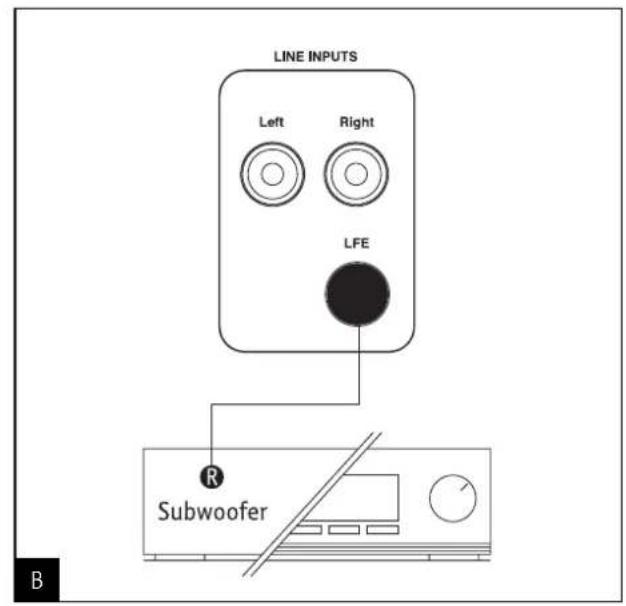
LFE input
When using an audio/video, multi-channel amplifier, the single LFE input of the Profile should be connected to the mono "Subwoofer" output of the audio/video amplifier (fig. B).
Digital input/output (Digital)
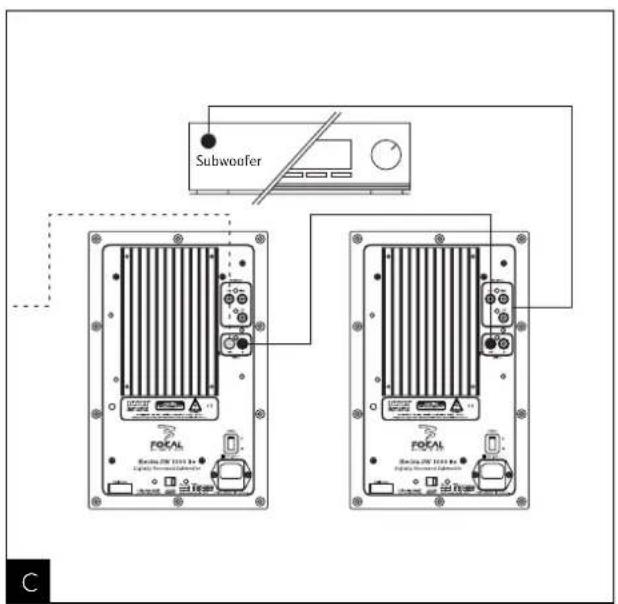
Several Profile SW908 subwoofer can be digitally connected to greatly increase sound pressure levels. The first "master" subwoofer receives the analog signal from the source unit and then drives in the digital domain as many additional "slave" subwoofer as deemed necessary. This permits all the settings and corrections on the master subwoofer to be systematically applied to the slaves (whose control menus are partially deactivated). Only gain and phase are accessible. The digital connection is serial from one subwoofer to the next (fig. C). Volume control of slave subwoofer is synchronized with master subwoofer.
Positioning
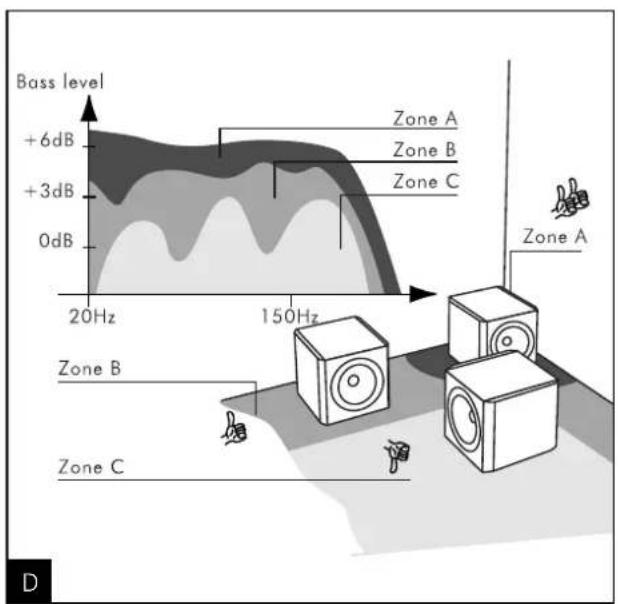
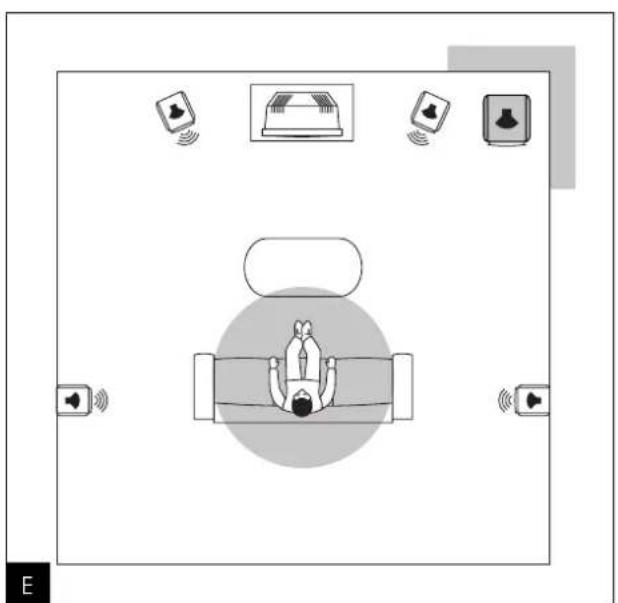
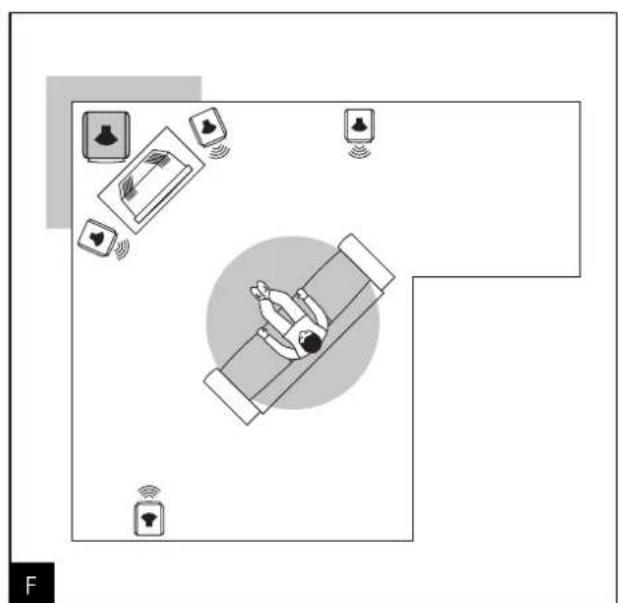
Contrary to conventional, hi-fi loudspeakers, which have to be placed at a reasonable distance from the walls and the listening area corners, we recommend placement of the Profile subwoofer in a corner of the listening area (fig. E, F). If the subwoofer is placed against only one wall or too far from the walls, the very large wavelength of the bass delivered by the subwoofer will excite the resonance of the listening room in an unpredictable way. Frequency response linearity will then be compromised and sound rendition will be affected (lack of depth, "boomy sound", poor bass, difficult or impossible coupling with the other loudspeakers). If you put the Profile sub in a corner, the resonant frequencies of the room will be more linear and predictable. In such a configuration, you will not only benefit from an optimum perception of the bass frequency range but the bass level will also increase by 6dB (fig. D). If a particular disposition of the room does not allow placement of the subwoofer in a corner, we recommend that you try different configurations until you find the best possible sound. Generally, the subwoofer should be placed along the front wall of a listening room. As bass frequency waves are omni-directional, the sound dispersion will not be affected if a piece of furniture or an object is placed between the subwoofer and the listening area. It is then possible to hide the Profile behind a piece of furniture as long as the bass frequency dispersion is not affected.
Magnetic disturbance
The Profile generates a magnetic field that may interfere with other sensitive household appliances. It is strongly advised to not place the Profile closer than 50cm (20^ ) to your TV screen. Frame geometry as well as colours can be severely distorted by a magnetic field if the loudspeaker is placed to close to the cathode ray tube. Generally, all sensitive media (audio tapes, video tapes, magnetic data storage, projector and CRTS overhead projector) should not be placed close to any non-shielded loudspeaker.
APPLICATION
Start-up and shut-down
Turn the power switch on the back of the unit to the "On" position. A "Loading" message will appear on the display (this will only ever appear as start-up and shut-down of the subwoofer).
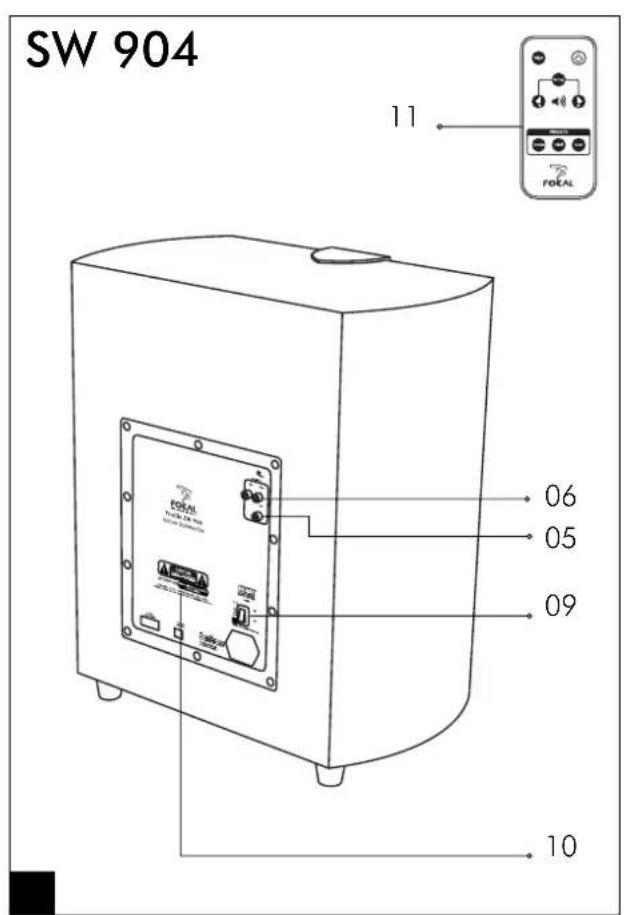
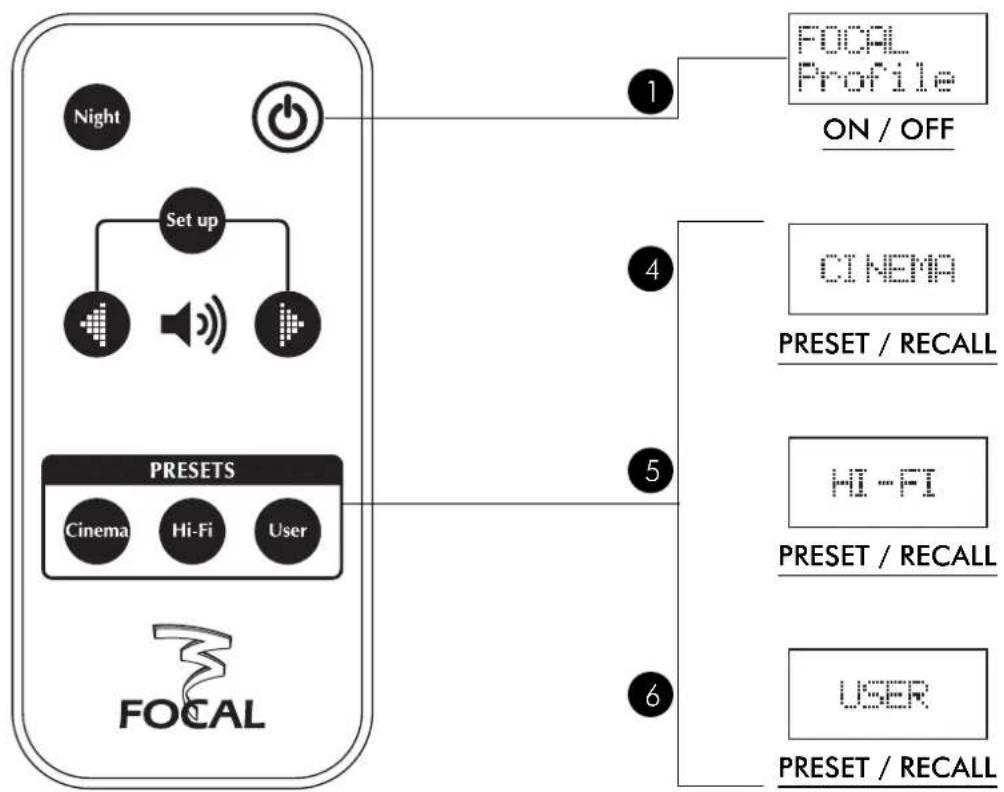
Thanks to the integrated "Auto-power" setting, start-up is automatic on receiving an audio signal on the analog inputs. The message "FOCAL Profile" which appears on the screen indicates that the subwoofer is operational and awaiting instruction. Start-up can also be attained (ex: setting parameters of the subwoofer without an analog signal, see following chapter) by pressing the ① button on the remote.
In absence of an input audio signal, stand-by is as well automatic after approximately a period of 15 minutes. Stand-by can also be attained by pressing on the button on the remote.
When absent for several days, it is recommended to turn the power switch to "Off" on the back of the amplifier.
During an electrical storm, disconnect the mains cable.
Adjusting the volume
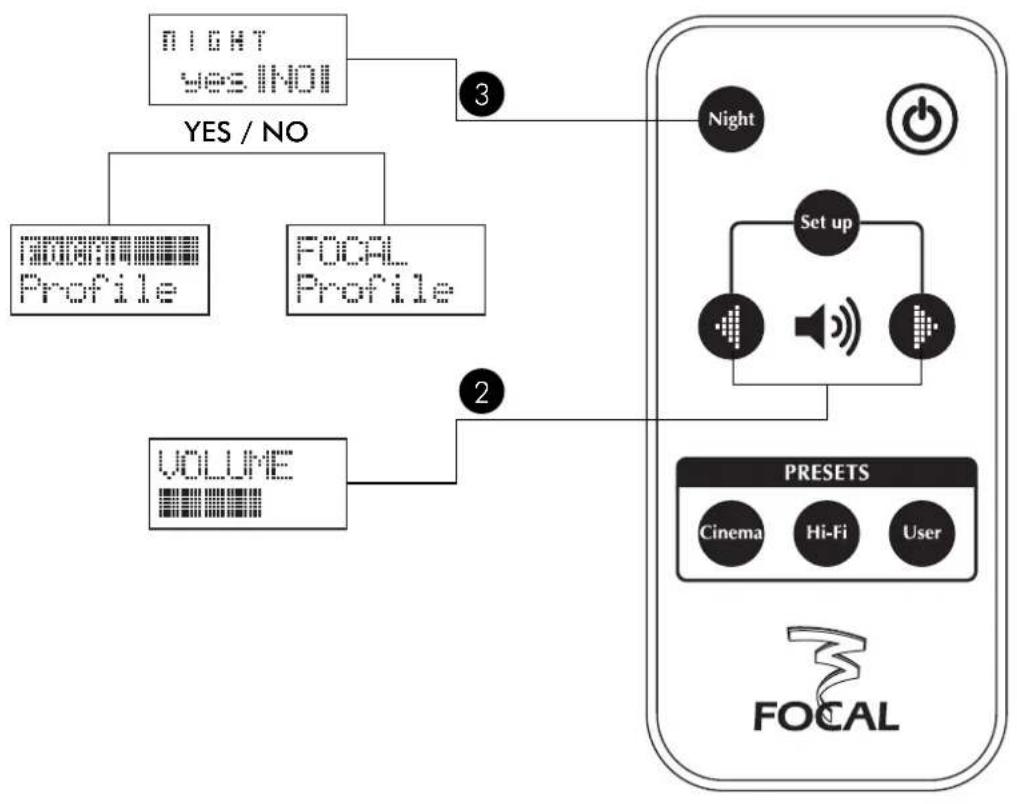
Adjusting the volume (button 2) allows a proper output level of the subwoofer compared to those of the other speakers in the system. Establishing this by remote control permits a very precise fine-tuning of the level according to the nature of the listening material.
Night"mode
This type of digital, dynamic compression of the signal permits the user to avoid large differences in playback level between weak and powerful signals. Weak signals are increased so that the bass is more present and satisfactory, even at low listening levels, while powerful signals are decreased in amplitude.
This function allows for an excellent listening comfort in bass response, even at very low listening levels, and to avoid disturbing the neighbors or others nearby.
The default message "FOCAL Profile" appears highlighted on the display when in "Night" mode (button ③).
Program application
Three digital memory settings are accessible on the remote control (button 4, 5 or 6). The factory settings correspond generally to a range of applications. The "Hi-fi" mode corresponds to a setting, which is as linear as possible, with a well-integrated and deep bass. "Cinema" is calibrated to be more demonstrative and dynamic to highlight performance in film soundtracks. In the "User" mode, all corrections and filters are deactivated. All these settings can be modified at will. Consult the table at the end of the manual to return to the factory settings.
PARAMETERS
The DSP (Digital Signal Processing) module replaces the typical analog module generally found in subwoofoers. In addition to the exacting control in settings, the module's precision is exceptional. Thanks to the ease of use of the remote, one can control at distance all the functions in order to immediately compare the different choices without leaving the listening zone, which allows the installer to tune with great precision.
The digital display of different values of filtering or correction allows one to easily recognize and establish the favorite settings (this should be saved in writing at the end of the manual).
Navigation
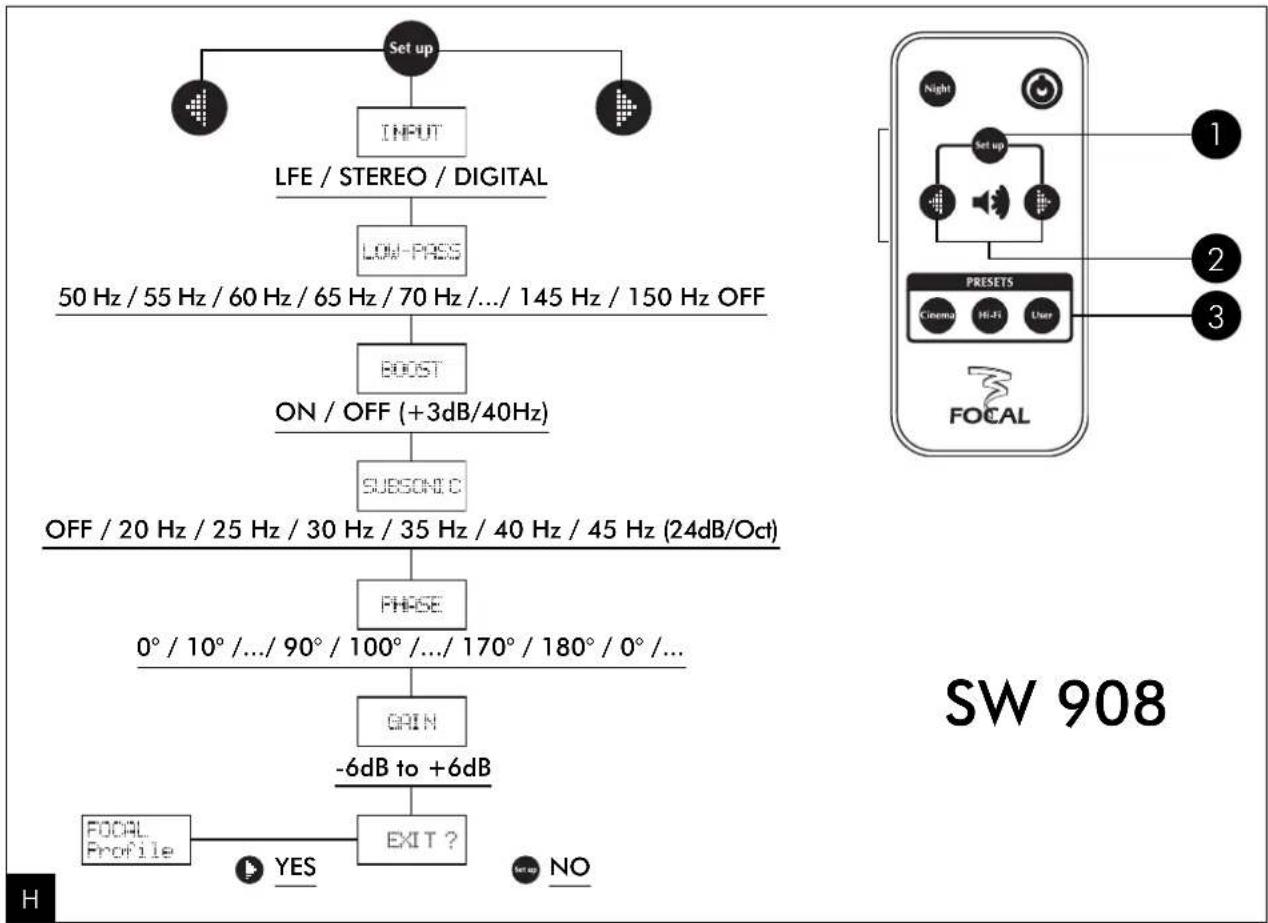
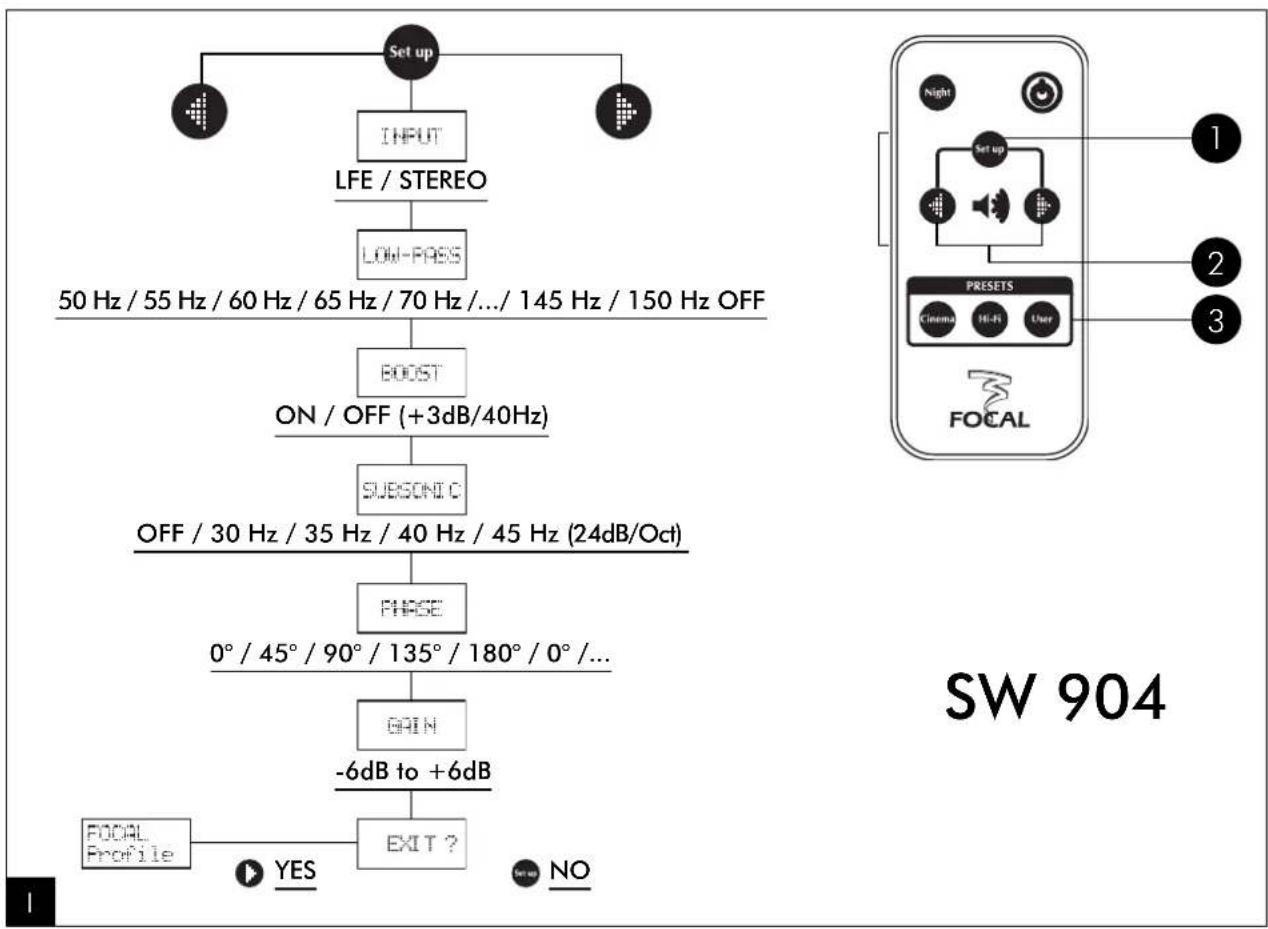
One only has to push once the button "Set-up" ① to enter the first mode of the menu. Pushing the button several times then displays the different types of programming. Selecting a setting is as easy as scrolling through the choices ②. Several dozen different options can be proposed. Once the settings are made, one can leave the menu simply by pressing the scroll button ② as the display shows "Exit?" To return to the first line of the menu without exiting, simply press on "Set-up" ①.
Input mode
Choice of analog inputs LFE (Low Frequency Effects) mono or stereo, or digital coaxial (Digital).
Note 1: it is possible to simultaneously connect the stereo inputs and the LFE from the amplifier for both stereo and multi-channel listening. These choices will be conserved in the memory as "Hi-fi" and "Cinema".
Note 2: the menus on the "slave" subwoofer's connected to the input "Digital" are partially deactivated. Only "Gain" and "Phase" are active on each subwoofer to allow easy adaptation to room acoustics.
Low Pass Mode
Active digital crossover, adjustable from 50 to 150Hz 5Hz steps,24dB/octave slope. Set the frequency according to the characteristics and performance of the associated speakers. On stereo program, with speakers that already perform well in bass frequencies, choose a crossover value lower or equal to 80Hz to give lower bass support without overloading the lower octave.
In multi-channel mode, this value can rise (to 100 or 120Hz ) to give more impact in the bass.
Use a value higher or equal to 120Hz when the speakers are compact satellites with little bass performance.
Note 1: the inactive mode (Off) can be chosen when the active filters of the amplifier are used.
Note 2: the active crossovers of the Profile subwoofer, due to their extreme precision, can work simultaneously with those of an AV amplifier. The latter usually employs a crossover with a 12dB/octave slope. In this case, using simultaneously the crossovers, and set at the same frequency, the result is a sharp slope of 36dB/octave. This facilitates the integration of the subwoofer with the other speakers in the system.
PARAMETERS
Boost Mode
Increase of the bass level by +3dB at 40Hz . To be used as preference or need on multi-channel playback for very dynamic bass.
Subsonic Mode
Low-pass filter, adjustable from 0 (OFF) to 45Hz by 10Hz steps, at a slope of 24dB /octave. This filter can be very practical when the subwoofer is placed in a small room and/or at an angle in the room, or if the walls of the room are thin or not very rigid. The room may generate an excessive sound level in the lower bass or even cause saturation. Vibration and unpleasant resonances can then occur. The subsonic filter can progressively eliminate this annoyance and maintain a clean and strong bass performance. Adjust the filter value until the resonances disappear in the listening room.
Note 1: this filter setting can be used as well during extended listening periods at high levels. It inhibits excessive cone movement of the diaphragm (bottoming out) and delays the appearance of distortion.
Note 2: this filter can be used simultaneously with the mode "Boost" activated. The increase in energy (+ 3dB, equal to a doubling of power) is compensated by the subsonic filter, which suppresses energy in the upper bass.
Phase Mode
Adjustment of the phase from 0^ to 180^ . This adjustment allows to precisely lock in the phase of the subwoofer with that of the other loudspeakers at the crossover frequency. Navigate through the phase values with the directional arrows until the bass of the subwoofer perfectly meets that of the loudspeakers.
Note 1: this adjustment can be done by ear. However, measuring instruments make for easy work, and are recommended: discuss this with your reseller.
Note 2: it is possible, whilst listening, to compare the position 0^ and 180^ (inverted phase) directly from the menu, without fine-tuning by steps. This easy phase inversion solution can simplify final adjustment.
Gain Mode
It is possible to assign a different gain (from -6dB to +6dB) according to either a music or cinema program that would benefit from a higher level. This level can be kept in memory on the buttons Select Hi-fi and Cinema.
Presets buttons (memory)
After exiting a menu, you can assign your adjustments to one of the three available memory settings. Press, and hold one of the three "Preset" buttons for two seconds. When the display flashes, the setting has been memorized.
Note 1: the preset buttons correspond to the everyday use of either a stereo or home theatre system. Naturally, according to the use or nature of the system, these three buttons can be assigned to settings for either stereo or home theatre.
Note 2: the "User" function is an additional memory setting that can be assigned to another use of the subwoofer, e.g.: multi-channel SACD or DVD-Audio, which may require different settings.
SPECIFICATIONS AND WARRANTY
Specifications
| SW908 SW904 | ||
| Driver 13" "W" cone woofer, | 11" "W" cone woofer, | |
| 2-1/2" voice coil | 2-1/2" voice coil | |
| Frequency response 27 to 150Hz 32 to 150Hz | ||
| Amplifier 500Wrms (700 W max) BASH | 350Wrms (450W max) BASH® | |
| DSP section 24dB/octave active filter | 24dB/octave active filter | |
| (50 to 150Hz) | (50 to 150Hz) | |
| Adjustable phase from 0° to 180° | Adjustable phase from 0° to 180° | |
| (by step of 10°) | (by step of 45°) | |
| 24 dB/octave subsonic filter | 24 dB/octave subsonic filter | |
| (20 to 45Hz) | (30 to 45Hz) | |
| Boost mode | Boost mode | |
| Night mode | Night mode | |
| 3 users presets | 3 users presets | |
| Input | LFe/Stereo/Digital on coaxial | LFe/Stereo |
| (SPDIF) | ||
| Power mode | On/Off/Autopower | On/Off/Autopower |
| Dimensions (HxWxD) | 20x19.2x15" | 19-13/16x16-15/16x12-3/8 |
| (510x488x380mm) | (504x430x315mm) | |
| Weight | 59.5lbs (27kg) | 50.6lbs (23kg) |
Conditions of guarantee
All Focal-JMlab loudspeakers are covered by warranty, which is drawn up by the official Focal-JMlab distributor in your country. Your distributor can provide details concerning the conditions of warranty. Warranty coverage extends at least to that granted by the legal warranty in force in the country where the original purchase invoice was issued.

Your Focal-JMlab product was developed and manufactured with high-quality materials and components which can be recycled and/or re-used. This symbol indicates that electrical and electronic equipment must be disposed of separately from normal garbage at the end of its operational lifetime. Please dispose of this product by bringing it to your local collection point or recycling centre for such equipment. This will help to protect the environment in which we all live.
Woofer membrane sandwich composite "W" (1)
The Focal guarantee only applies if this page is returned to us within 10 days purchase, to the following address:
Name of dealer: Town:
Date of purchase: Purchase price:
Your name: Age: Occupation:
Your complete address:
Your email address:
Details of your installation (brand, model):
Cassette: CD:
■ Tuner:Satellite/cable:
DVD: Amp. Preamp. Receiver:
CD/DVD recorder:Other elements:
Your decision for purchasing this Focal model was made according to:
□Dealer's advice Friend's advice
□ Visit to an exhibition, show Press article
□ Listening in auditorium □Already own Focal products
□ Reliability / Quality □Documentation
□Reputation French produce
Guarantee
□ Design / Finishes
Sound
In case of purchase of new equipment, what were your former speakers?
Explain in a few words why you choose Focal...
Further comments: