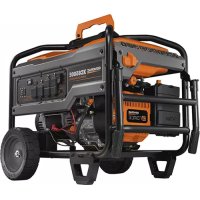
XC6500E - Generator Generac - Free user manual and instructions
Find the device manual for free XC6500E Generac in PDF.



| Product Type | Portable Generator |
| Brand | Generac |
| Model | XC6500E |
| Rated Power (power factor 1.0) | 6.5 kW |
| Starting Power | 8.13 kW |
| Rated Voltage | 120/240 V AC |
| Rated Frequency | 60 Hz |
| Phase | Single Phase |
| Engine Displacement | 426 cc |
| Starting Type | Manual (recoil start) / Electric (depending on version) |
| Fuel Tank Capacity | 32 L (8.5 US gal) |
| Runtime at 50% Load | 14 hours |
| Dry Weight (manual start) | 111.8 kg |
| Dry Weight (electric start) | 117.9 kg |
| 120 V AC, 20 A Outlet | Dual NEMA 5-20R |
| 120/240 V AC, 30 A Outlet | NEMA L14-30R (locking) |
| 120 V AC, 30 A Outlet | NEMA L5-30R (locking) |
| Safety Device | GFCI (Ground Fault Circuit Interrupter), low oil pressure shutdown, overload circuit breakers |
| Additional Features | Hour meter, automatic idle control, maintenance indicator |
| Routine Maintenance | Oil change, air filter, spark plug, fuel filter, spark arrestor |
| Parts Availability | Through authorized Generac dealer or website www.generac.com |
Frequently Asked Questions - XC6500E Generac
User questions about XC6500E Generac
0 question about this device. Answer the ones you know or ask your own.
Ask a new question about this device
Download the instructions for your Generator in PDF format for free! Find your manual XC6500E - Generac and take your electronic device back in hand. On this page are published all the documents necessary for the use of your device. XC6500E by Generac.
USER MANUAL XC6500E Generac
XC Series Portable Generator
Owner's Manual
MODEL:
SERIAL:
DATE PURCHASED:

WARNING
Loss of life. This product is not intended to be used in a critical life support application. Failure to adhere to this warning could result in death or serious injury. (000209b)
(000209b)
Register your Generac product at:
WWW.GENERAC.COM
1-888-GENERAC
(1-888-436-3722)
Section 1 Introduction and Safety 1
Introduction 1
Safety Rules 1
Safety Symbols and Meanings 1
Exhaust and Location Hazards 2
Electrical Hazards 3
Fire Hazards 3
Lifting or Suspending Generator 3
Standards Index 4
Section 2 General Information and Setup 5
Know Your Generator 6
Emissions 6
Connection Plugs 7
Hour Meter 8
Remove Contents from Carton 8
Assembly 9
Battery Cable Connection (if equipped) 10
Add Engine Oil 10
Fuel 11
Section 3 Operation 12
Operation and Use Questions 12
Before Starting Engine 12
Prepare Generator for Use 12
Grounding the Generator When Used as a Portable 12
Know Generator Limits 13
Transporting/Tipping of the Unit .... 14
Starting Pull Start Engines 14
Starting Electric Start Engines 14
Generator Shut Down 15
Low Oil Pressure Shutdown System. 15
Section 4 Maintenance and
Troubleshooting 16
Maintenance 16
Maintenance Schedule 16
Preventive Maintenance 16
Engine Maintenance 16
Battery Replacement (if applicable) 18
Inspect Muffler and Spark Arrester 18
Valve Clearance 19
Storage 19
Troubleshooting 20
Section 1 Introduction and Safety
Introduction
Thank you for purchasing a Generac Power Systems Inc. product. This unit has been designed to provide high-performance, efficient operation, and years of use when maintained properly.

WARNING
Consult Manual. Read and understand manual completely before using product. Failure to completely understand manual and product could result in death or serious injury (000100a)
If any section of the manual is not understood, contact your nearest Independent Authorized Service Dealer (IASD), or contact Generac Customer Service at 1-888-GENERAC (1-888-436-3722), or wwwgenerac.com with any questions or concerns.
The owner is responsible for proper maintenance and safe use of the equipment. Before operating, servicing or storing this generator:
- Study all warnings in this manual and on the product carefully.
- Become familiar with this manual and the unit before use.
Refer to the Assembly section of the manual for instructions on final assembly procedures. Follow the instructions completely.
Save these instructions for future reference. ALWAYS supply this manual to any individual that will use this machine.
The information in this manual is accurate based on products produced at the time of publication. The manufacturer reserves the right to make technical updates, corrections, and product revisions at any time without notice.
Safety Rules
The manufacturer cannot anticipate every possible circumstance that might involve a hazard. The alerts in this manual, and on tags and decals affixed to the unit, are not all inclusive. If using a procedure, work method, or operating technique that the manufacturer does not specifically recommend, verify that it is safe for others and does not render the equipment unsafe.
Throughout this publication, and on tags and decals affixed to the unit, DANGER, WARNING, CAUTION, and NOTE blocks are used to alert personnel to special instructions about a particular operation that may be hazardous if performed incorrectly or carelessly. Observe them carefully. Alert definitions are as follows:
DANGER
Indicates a hazardous situation which, if not avoided, will result in death or serious injury.
(000001)
WARNING
Indicates a hazardous situation which, if not avoided, could result in death or serious injury.
(000002)
CAUTION
Indicates a hazardous situation which, if not avoided, could result in minor or moderate injury.
(000003)
NOTE: Notes contain additional information important to a procedure and will be found within the regular text of this manual.
These safety alerts cannot eliminate the hazards that they indicate. Common sense and strict compliance with the special instructions while performing the action or service are essential to preventing accidents.
Safety Symbols and Meanings
DANGER
Using a generator indoors CAN KILL YOU IN MINUTES
Generator exhaust contains carbon monoxide. This is a poison you cannot see or smell.


NEVER use Inside a home or garage, EVEN IF doors and windows are open.

Only use OUTSIDE and far away from windows, doors, and vents.
000657

DANGER
Asphyxiation. Running engines produce carbon
monoxide, a colorless, odorless, poisonous gas.
Carbon monoxide, if not avoided,
will result in death or serious injury. (000103)
If you start to feel sick, dizzy, or weak after the generator has been running, move to fresh air IMMEDIATELY. See a doctor, as you could have carbon monoxide poisoning.

DANGER
Asphyxiation. The exhaust system must be properly maintained. Do not alter or modify the exhaust system as to render it unsafe or make it noncompliant with local codes and/or standards. Failure to do so will result in death or serious injury. (000179b)
(000179b)

DANGER
Electrocution. Water contact with a power source, if not avoided, will result in death or serious injury.
(000104)

DANGER
Electrocution. Turn utility and emergency power supplies to OFF before connecting power source and load lines. Failure to do so will result in death or serious injury. (000116)
Equipment and property damage. Do not alter construction of, installation, or block ventilation for generator. Failure to do so could result in unsafe operation or damage to the generator.
(000146)

WARNING
Asphyxiation. Always use a battery operated carbon monoxide alarm indoors and installed according to the manufacturer's instructions. Failure to do so could result in death or serious injury. (000178a)

AWARNING
Equipment and property damage. Do not operate unit on uneven surfaces, or areas of excessive moisture, dirt, dust or corrosive vapors. Doing so could result in death, serious injury, property and equipment damage. (000250)

AWARNING
Moving Parts. Keep clothing, hair, and appendages away from moving parts. Failure to do so could result in death or serious injury.
(000111)

AWARNING
Hot Surfaces. When opering machine, do not touch hot surfaces. Keep machine away from combustables during use. Hot surfaces could result in severe burns or fire. (000108)

AWARNING
Personal injury. Do not insert any object through the air cooling slots. Generator can start at any time and could result in death, serious injury, and unit damage. (000142a)

AWARNING
Risk of injury. Do not operate or service this machine if not fully alert. Fatigue can impair the ability to service this equipment and could result in death or serious injury. (000215)

AWARNING
Injury and equipment damage. Do not use generator as a step. Doing so could result in falling, damaged parts, unsafe equipment operation, and could result in death or serious injury. (000216)
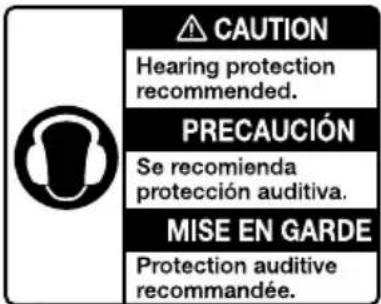
000406
- For safety reasons, it is recommended that the maintenance of this equipment be performed by an IASD. Inspect the generator regularly, and contact the nearest IASD for parts needing repair or replacement.
Exhaust and Location Hazards

DANGER
Asphyxiation. Running engines produce carbon monoxide, a colorless, odorless, poisonous gas. Carbon monoxide, if not avoided, will result in death or serious injury. (000103)

ADANGER
Asphyxiation. The exhaust system must be properly maintained. Do not alter or modify the exhaust system as to render it unsafe or make it noncompliant with local codes and/or standards. Failure to do so will result in death or serious injury. (000179h)
WARNING
Equipment and property damage. Do not alter construction of, installation, or block ventilation for generator. Failure to do so could result in unsafe operation or damage to the generator.
(000146)

WARNING
Asphyxiation. Always use a battery operated carbon monoxide alarm indoors and installed according to the manufacturer's instructions. Failure to do so could result in death or serious injury. (200173)
(000178a)
If you start to feel sick, dizzy, or weak after the generator has been running, move to fresh air IMMEDIATELY. See a doctor, as you could have carbon monoxide poisoning.
- NEVER run a generator indoors or in a partly enclosed area such as garages.
- ONLY use outdoors and far away from windows, doors, vents, crawl spaces and in an area where adequate ventilation is available and will not accumulate deadly exhaust gas.
- Using a fan or opening a door will not provide sufficient ventilation.
- Point muffler exhaust away from people and occupied buildings.
Electrical Hazards
DANGER
Electrocution. Contact with bare wires, terminals, and connections while generator is running will result in death or serious injury. (000144)
DANGER
Electrocution. Water contact with a power source, if not avoided, will result in death or serious injury.
(000104)
DANGER
Electrocution. In the event of electrical accident, immediately shut power OFF. Use non-conductive implements to free victim from live conductor. Apply first aid and get medical help. Failure to do so will result in death or serious injury. (000145)
WARNING
Accidental Start-up. Disconnect the negative battery cable, then the positive battery cable when working on unit. Failure to do so could result in death or serious injury. (000130)
- The National Electric Code (NEC) requires the frame and external electrically conductive parts of the generator be properly connected to an approved earth ground. Local electrical codes may also require proper grounding of the generator. Consult with a local electrician for grounding requirements in the area.
Fire Hazards

ADANGER
Explosion and Fire. Fuel and vapors are extremely flammable and explosive. Add fuel in a well ventilated area. Keep fire and spark away. Failure to do so will result in death or serious injury. (000105)

DANGER
Explosion and Fire. Do not overfill fuel tank. Fill to 1/2 inch from top of tank to allow for fuel expansion. Overfilling may cause fuel to spill onto engine causing fire or explosion, which will result in death or serious injury. (000166b)

DANGER
Risk of fire. Allow fuel spills to completely dry before starting engine. Failure to do so will result in death or serious injury. (000174)

WARNING
Personal injury. Do not insert any object through the air cooling slots. Generator can start at any time and could result in death, serious injury, and unit damage. (000142a)
- Do not operate the generator if connected electrical devices overheat, if electrical output is lost, if engine or generator sparks or if flames or smoke are observed while unit is running.
- Keep a fire extinguisher near the generator at all times.
- Allow at least 5 feet of clearance on all sides of the generator when operating to prevent overheating and fire.
Lifting or Suspending Generator

WARNING
Personal injury. Failure to properly connect lifting cables, chains, or straps could result in death, serious injury, or property damage. (000346)

WARNING
Personal injury. Failure to use cables, chains, or straps rated at 2000 lbs. (907 kg) working load or greater to raise or suspend unit could result in death, serious injury, or property damage. (000347)
WARNING
Personal injury. Never operate generator while suspended. Doing so could result in death, serious injury, or property damage. (000348)
WARNING
Personal Injury. Do not use lifting hook if there are signs of damage or corrosion. Doing so could result in death, serious injury, or property damage. (0003)
WARNING
Personal Injury. Do not use lifting hook other than as directed. Failure to do so could result in death, serious injury, or property damage. (000350)
WARNING
Personal Injury. Verify all fasteners are properly tightened prior to lifting unit. Failure to do so could result in death, serious injury, or property damage. (000)
Standards Index
- National Fire Protection Association (NFPA) 70: The NATIONAL ELECTRIC CODE (NEC) available from www.nfpa.org
- National Fire Protection Association (NFPA) 5000: BUILDING CONSTRUCTION AND SAFETY CODE available from www.nfpa.org
- International Building Code available from www.iccsafe.org
- Agricultural Wiring Handbook available from www.rerc.org, Rural Electricity Resource Council P.O. Box 309 Wilmington, OH 45177-0309
- ASAE EP-364.2 Installation and Maintenance of Farm Standby Electric Power available from www.asabe.org, American Society of Agricultural & Biological Engineers 2950 Niles Road, St. Joseph, MI 49085
- Safety and Performance of Portable Generators ANSI/PGMA G300 available from pgmaonline.com
- CSA C22.2 100-14 Electric motors and generators for installation and use, in accordance with the Rules of Canadian Electrical Code.
This list is not all inclusive. Check with the Authority Having Jurisdiction (AHJ) for any local codes or standards which may be applicable to your jurisdiction.
Section 2 General Information and Setup
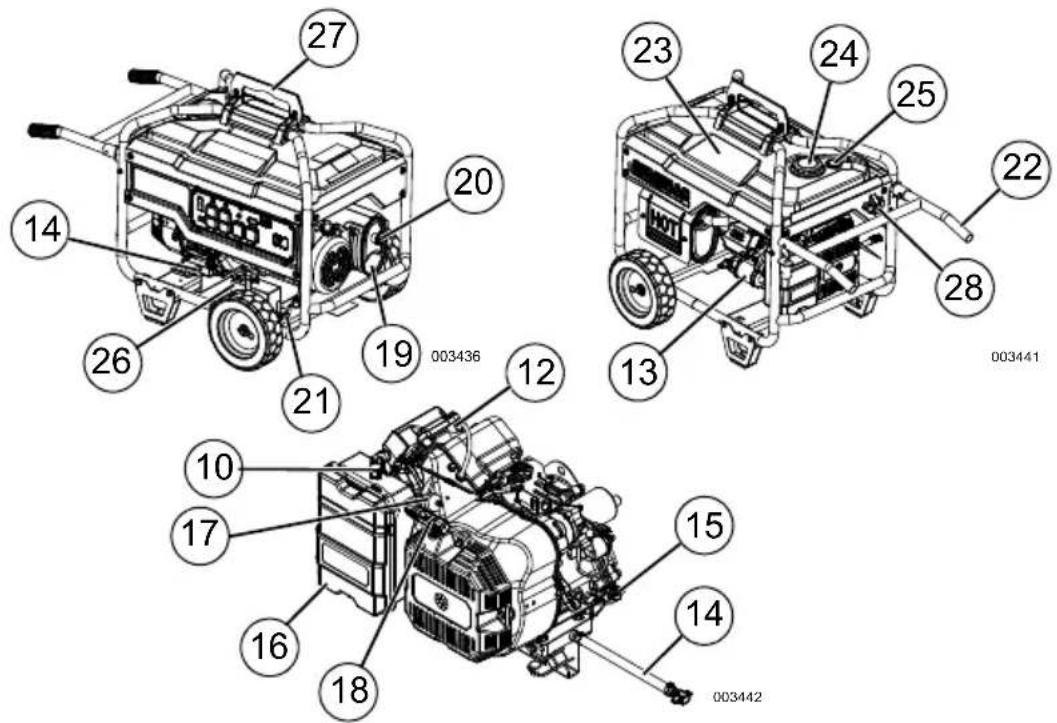
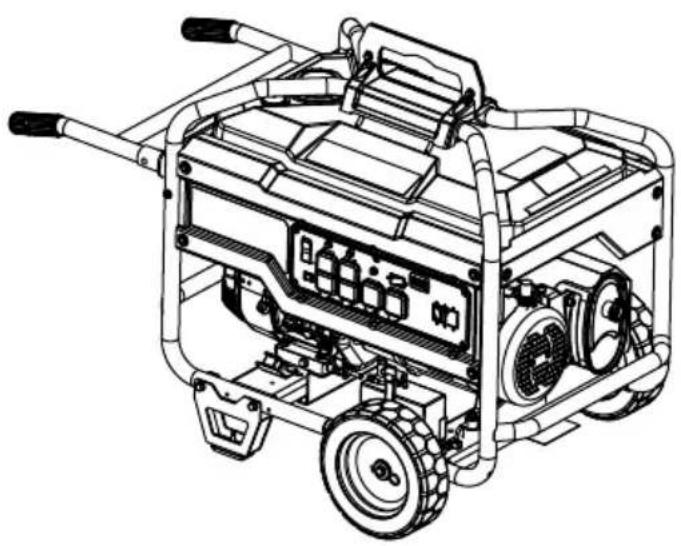
Figure 2-1. Features and Controls
TABLE 1. Generator Components
21 Grounding Lug
1 120 Volt AC, 20 Amp Duplex Receptacle
2 120/240 Volt AC, 30 Amp Locking Receptacle
3 1-pole Circuit Breakers (AC)
4 2-pole Circuit Breaker
5 120 Volt AC, 30 Amp Locking Receptacle
6 Idle Control
7 Ground Fault Sensing Module
8 GFCI Module Circuit Breaker
9 Hour Meter
10 Choke Lever
11 Start/Run/Stop Switch (Electric start) (6.5kW, Run/Stop Switch, recoil start only)
12 Spark Plug
13 Oil Filter
14 Oil Drain
15 Oil Fill
16 Air Filter
17 Fuel Filter
18 Recoil Starter
19 Muffler
20 Spark Arrestor
22 Handles
23 Fuel Tank
24 Gas Cap
25 Fuel Gauge
26 Battery (if equipped)
27 Steel Lifting Pocket
28 Handle Release Knob
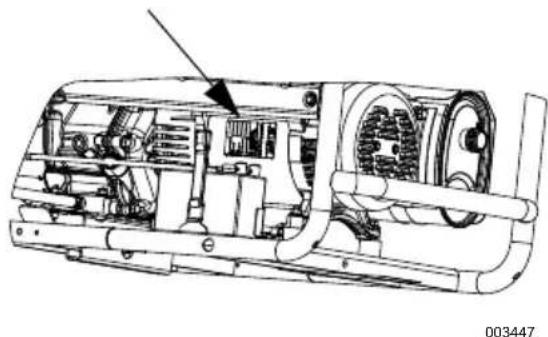
Figure 2-2. Unit Identification Label
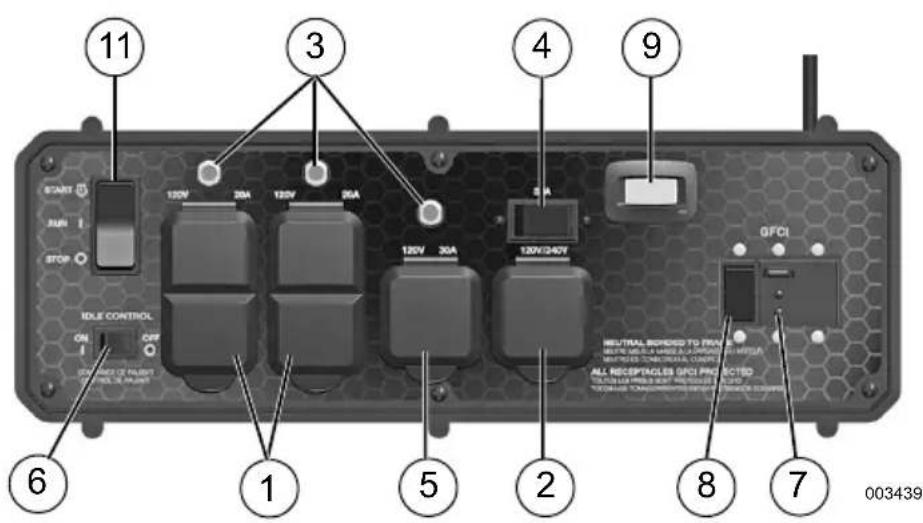
Figure 2-3. XC Series Control Panel
Know Your Generator

AWARNING
Consult Manual. Read and understand manual completely before using product. Failure to completely understand manual and product could result in death or serious injury. (000100a)
Replacement owner's manuals are available at wwwgenerac.com.
Emissions
The United States Environmental Protection Agency (US EPA) (and California Air Resources Board (CARB), for engines/equipment certified to California standards) requires that this engine/equipment complies with exhaust and evaporative emissions standards. Locate the emissions compliance decal on the engine to determine applicable standards. For emissions warranty information, please reference the included emissions warranty. It is important to follow the maintenance specifications in the manual to ensure that the engine complies with the applicable emissions standards for the duration of the product's life.
TABLE 2. Product Specifications
| 6.5 kW / 8.0 kW Generator Specifications | |
| Rated Power @ 1.0 Power Factor 6.5kW** / 8 | 0kW** |
| Starting Watts 8.13kVA** / 10kVA** | |
| Rated AC Voltage 120/240 | |
| Rated AC Load (120 Volt / 240 Volt) 6.5 kW 8.0 kW | 54.2 / 27.1 Amps** 66.7 / 33.3 Amps** |
| Rated Frequency 60 Hz @ 3600 RPM | |
| Phase Single Phase | |
| Unit Weight (Dry) 6.5 kW (recoil start only) 6.5 kW (electric start) 8.0 kW (electric start) | 246 lbs. (111.8 kg) 260 lbs. (117.9 kg) |
| ** Operating Temperature Range: -18 deg. C (0 deg. F) to 40 Deg. C (104 Deg. F). When operated above 25 deg. C (77 deg. F) there may be a decrease in power. ** Maximum wattage and current are subject to, and limited by, such factors as fuel Btu content, ambient temperature, altitude, engine condition, etc. Maximum power decreases about 3.5% for each 1,000 feet above sea level; and will also decrease about 1% for each 6° C (10° F) above 16° C (60° F) ambient temperature. | |
TABLE 2. Product Specifications
| 6.5 kW / 8.0 kW Engine Specifications | |
| Displacement 426 cc | |
| Spark Plug Part No. 0G0767B | |
| Spark Plug Type Champion RC12YC or Equivalent | |
| Spark Plug Gap 0.020 inch (0.51mm) | |
| Gasoline Capacity 32 L (8.5 U.S. gallons) | |
| Oil Type | See chart in Add Engine Oil. |
| Oil Capacity with filter change without filter change | 1.0 L (1.1 qt.) 0.9 L (0.95 qt.) |
| Run Time at 50% Load (6.5kW / 8.0kW) 14 Hours / 11 Hours | |
| * Go to wwwgenerac.com or contact an IASD for replacement parts. | |
Connection Plugs
120 VAC, 20 Amp, Duplex Receptacle
The 120 Volt outlet is overload protected by a 20 Amp push-to-reset circuit breaker. See Figure 2-4. Each receptacle will power 120 Volt AC, single phase, 60Hz electrical loads requiring up to 2400 watts (2.4kW) or 20 Amps of current. Use only high quality, well-insulated, 3-wire grounded cord sets rated for 125 Volts at 20 Amps (or greater).
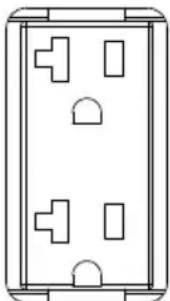
000424
Figure 2-4. 120 VAC, 20 Amp, Duplex Receptacle NEMA 5-20R
120/240 VAC, 30 Amp Receptacle
Use a NEMA L14-30 plug with this receptacle (rotate to lock/unlock). Connect a suitable 4-wire grounded cord set to plug and desired load. The cord set should be rated 250 Volts AC at 30 Amps (or greater). See Figure 2-5.
- Use this receptacle to operate 120 Volt AC, 60Hz , single phase loads requiring up to 3600 watts (3.6 kW) of power at 30 Amps or 240 Volt AC, 60Hz , single phase loads requiring up to 7200 watts (7.2 kW) of power at 30 Amps. The outlet is protected by a 2-pole 30 Amp rocker circuit breaker.

000204
Figure 2-5. 120/240 VAC, 30 Amp Receptacle NEMA L14-30R
120 VAC, 30 Amp Receptacle
Use a NEMA L5-30 plug with this receptacle (rotate to lock/unlock). Connect a suitable 3-wire cord set to the plug and to desired load. The cord set should be rated for 125 Volts AC at 30 Amps (or greater). See Figure 2-6.
Use this receptacle to operate 120 Volt AC, 60Hz single phase loads requiring up to 3600 watts (3.6kW) of power at 30 Amps. The outlet is protected by a 30 Amp push-to-reset circuit breaker.

000844
Figure 2-6. 120 VAC, 30 Amp Receptacle NEMA L5-30
Hour Meter
The Hour Meter tracks hours of operation for scheduled maintenance. See Figure 2-7.
- The SVC display will illuminate one hour before and one hour after each 200 hour interval providing a two hour window to perform service.
When the hour meter is in flash alert mode, the maintenance message will alternate with elapsed time in hours and tenths. The hours will flash four times, then alternate with the maintenance message four times until the meter automatically resets.
- 200 hours - SVC — Change oil, oil filter, air filter, fuel filter, and spark plug. Clean spark arrestor screen. (Every 200 hrs)
NOTE: The hour glass icon will flash when the engine is running. This signifies the meter is recording hours of operation.
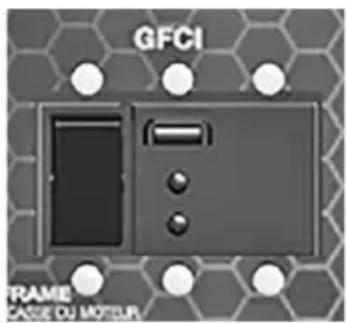
This unit is equipped with a ground fault circuit interrupter (GFCI). This device meets applicable federal, state and local codes. The ground fault sensing module covers all receptacles.
In the event of a ground fault, the GFCI will trip and stop the flow of electricity to prevent serious injury.
The GFCI constantly monitors electricity flowing in a circuit. If current flowing through a circuit varies from what is returning, the GFCI switches power off tripping the main circuit breaker on the generator's control panel.
A GFCI does NOT protect against circuit overloads, short circuits, or shocks. Electric shock can still occur if a person touches charged electrical wires while standing on a non-conducting surface, such as a wood floor.
Test the GFCI module before each use. See Figure 2-8.
- Start generator.
- Plug a test lamp into duplex receptacle. The lamp should be on.
-
Press TEST button on GFCI to trip the device. The main breaker should 'trip'. This is indicated by movement of the actuator handle to the OFF position.
-
This should stop the flow of electricity making the lamp shut off. If the main breaker does not trip, the GFCI is not working and the generator should not be used. Contact an IASD.
- To restore the flow of electricity, set the main breaker actuator handle to the ON position. The handles should remain latched in this position. If it does not, either the GFCI or the main breaker is failing and should be replaced. Contact an IASD.
- This GFCI is protected against overload by a 6.5kW, 30 Amp or 8.0kW, 35A/240V main breaker.
- The GFCI has Auto-Monitor and End-of-Life indications with LED status lights.
004285
Figure 2-8. Test the GFCI
Automatic Idle Control (if equipped)
This feature improves fuel economy. When this switch is turned ON, the engine will run at a normal fast governed engine speed when electrical load is connected. When load is removed, the engine will run at a reduced speed. With the switch OFF, the engine continually runs at a normal fast engine speed. Always have the switch OFF when starting and stopping the engine. See Figure 2-8.
Remove Contents from Carton
- Open carton completely by cutting each corner from top to bottom.
- Remove and verify carton contents prior to assembly. Carton contents should contain the following:
TABLE 3. Accessories
| Item Qty. | |
| Main Unit 1 | |
| Owner's Manual 1 | |
| Engine Manual 1 | |
| Quart SAE Oil 1 | |
| Oil Filter 1 | |
| Air Filter 1 | |
| Spark Plug 1 | |
| Spark Plug Wrench 1 | |
| Shop Towel 1 | |
| Top Cover (8) | 2 |
| Wheel (1) | 2 |
| Frame Foot (2) | 2 |
| Steel Lifting Pocket (3) | 2 |
| Hardware Bag | Qty. |
| Hair Pin (4) | 2 |
| Axle (5) | 1 |
| 5/8" Flat Washer (6) | 2 |
| 45mm Bolt (7) 8 | |
| Binding Post Assembly (9) | 2 |
| 20mm Bolt (10) | 2 |
| Nut (11) | 6 |
- Call Generac Customer Service at 1-888-GENERAC (1-888-436-3722) with the unit model and serial number for any missing carton contents.
- Record model, serial number, and date of purchase on front cover of this manual.
Assembly

WARNING
Consult Manual. Read and understand manual completely before using product. Failure to completely understand manual and product could result in death or serious injury. (000100a)
Call Generac Customer Service at 1-888-GENERAC (1-888-436-3722) for any assembly issues or concerns. Please have model and serial number available.
The following tools are required to install the accessory kit.
Screwdriver (1)
8mm Wrench (2)
13mm Wrench (2)
See Figure 2-9.
Install lifting pocket assembly as follows:
- Install each halve of lifting pocket (3) underneath frame and loosely assemble with 45mm bolt (7) and nut (11) through holes in frame.
- Install 20mm bolt (10) and nut (11) through top holes of lifting pocket halves.
- Tighten all bolts securely.
- Align each top cover (8) with bottom lifting pocket (3) holes. Insert binding post (9) barrel and secure with binding post screw (9).
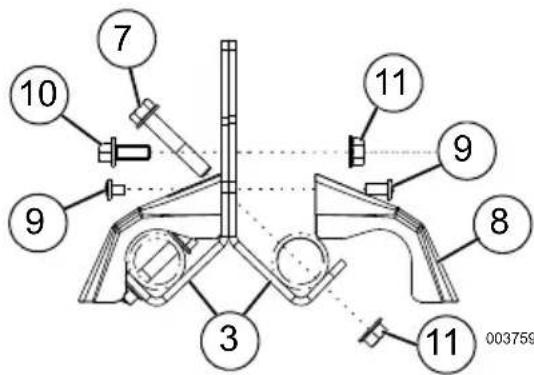
Figure 2-9. Steel Lifting Pocket Assembly
NOTE: The wheels are not intended for overthe-road use.
See Figure 2-10.
Install wheels as follows:
- Slide axle (5) through generator frame axle holes.
- Slide wheel (1) and one 5/8" flat washer (6) onto axle.
- Secure with hair pin (4). Repeat on opposite side.
Install frame foot assembly as follows:
1. Align frame foot (2) with holes in frame and secure with 45mm bolts (7).
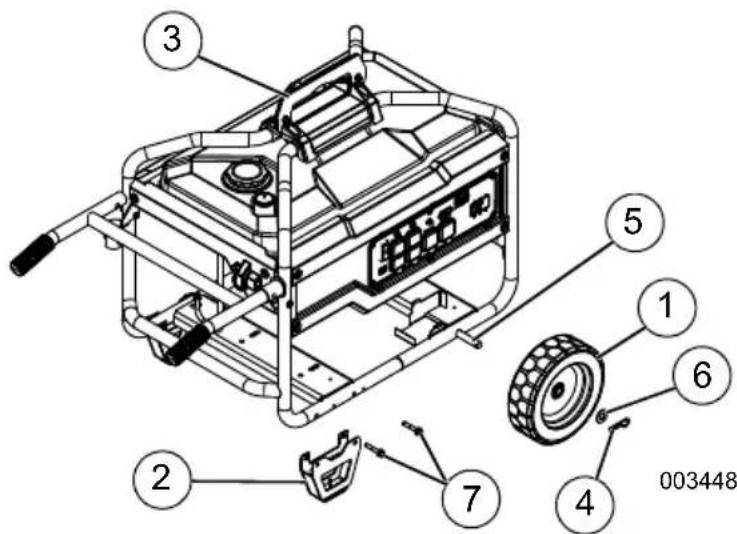
Figure 2-10. Wheel and Foot Assembly
Battery Cable Connection (if equipped)
CAUTION
Equipment damage. Do not make battery connections in reverse. Doing so will result in equipment damage.
(000167a)
The unit has been shipped with the battery cables disconnected.
You will need two 8mm box wrenches to connect the battery cables. See Figure 4-5.
- Cut off cable ties securing battery cables and remove red cover from battery terminal.
- First, connect the red cables to the positive (+) battery terminal with the bolt and nut supplied.
- Make sure connections are secure and slide rubber boot over the positive (+) battery terminal and connection hardware.
- Connect the black cables to the negative (-) battery terminal with the bolt and nut supplied. Slide rubber boot over the negative (-) battery terminal and connection hardware.
- Make sure all connections are secure.
NOTE: If the battery is unable to start the engine, charge it with an appropriate 12V charger or manually start the generator and let run until charged.
Add Engine Oil
CAUTION
Engine damage. Verify proper type and quantity of engine oil prior to starting engine. Failure to do so could result in engine damage.
(000135)
- Place generator on a level surface.
- Verify oil fill area is clean.
- Remove oil fill cap and wipe dipstick clean. See Figure 2-11.
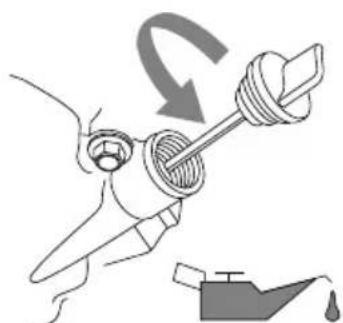
Figure 2-11. Remove Dipstick
000115
- Add recommended engine oil. Climate determines proper engine oil viscosity. See chart to select correct viscosity.
NOTE: Use petroleum based oil (supplied) for engine break-in before using synthetic oil.
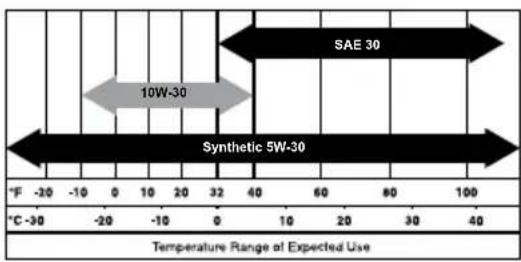
000399
NOTE: Some units have more than one oil fill location. It is only necessary to use one oil fill point.
- Thread dipstick into oil filler neck. Oil level is checked with dipstick fully installed.
- See Figure 2-12. Remove dipstick and verify oil level is within safe operating range.
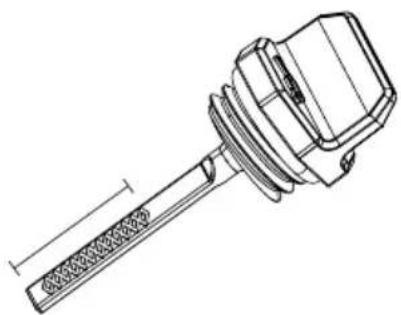
003620
Figure 2-12. Safe Operating Range
- Install oil fill cap/dipstick and hand-tighten.
Fuel

DANGER
Explosion and Fire. Fuel and vapors are extremely flammable and explosive. Add fuel in a well ventilated area. Keep fire and spark away. Failure to do so will result in death or serious injury. (000105)

DANGER
Explosion and Fire. Do not overfill fuel tank. Fill to 1/2 inch from top of tank to allow for fuel expansion. Overfilling may cause fuel to spill onto engine causing fire or explosion, which will result in death or serious injury. (000166)
Fuel requirements are as follows:
- Clean, fresh, unleaded gasoline.
Minimum rating of 87 octane/87 AKI (91 RON). - Up to 10% ethanol (gasohol) is acceptable (where available; non-ethanol-premium fuel is recommended).
DO NOT use E85.
DO NOT use a gas oil mix.
DO NOT modify engine to run on alternate fuels. Stabilize fuel prior to storage. -
Verify unit is OFF and cooled for a minimum of two minutes prior to fueling.
-
Place unit on level ground in a well ventilated area.
- Clean area around fuel cap and remove cap slowly.
- Slowly add recommended fuel. Do not fill above inner lip (A). See Figure 2-13.
- Install fuel cap.
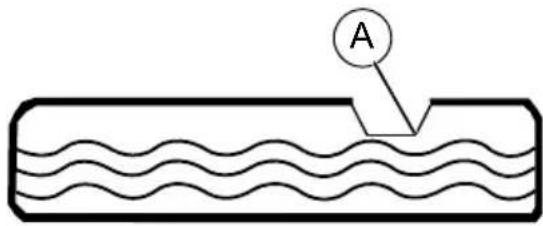
000230
Figure 2-13. Add Recommended Fuel
NOTE: Allow spilled fuel to evaporate before starting unit.
IMPORTANT NOTE: It is important to prevent gum deposits from forming in fuel system parts such as the carburetor, fuel hose or tank during storage. Alcoholblended fuels (called gasohol, ethanol or methanol) can attract moisture, which leads to separation and formation of acids during storage. Acidic gas can damage the fuel system of an engine while in storage. To avoid engine problems, the fuel system should be emptied before storage of 30 days or longer. See the Storage section. Never use engine or carburetor cleaner products in the fuel tank as permanent damage may occur.
Section 3 Operation
Operation and Use Questions
Call Generac Customer Service at 1-888-GENERAC (1-888-436-3722) with questions or concerns about equipment operation and maintenance.
Before Starting Engine
- Verify engine oil level is correct.
- Verify fuel level is correct.
- Verify unit is secure on level ground, with proper clearance and is outdoors in a well ventilated area.
Prepare Generator for Use

DANGER
Asphyxiation. Running engines produce carbon monoxide, a colorless, odorless, poisonous gas. Carbon monoxide, if not avoided, will result in death or serious injury. (000103)

DANGER
Asphyxiation. The exhaust system must be properly maintained. Do not alter or modify the exhaust system as to render it unsafe or make it noncompliant with local codes and/or standards. Failure to do so will result in death or serious injury. (000179b)

WARNING
Risk of fire. Do not use generator without spark arrester installed. Failure to do so could result in death or serious injury.
(000118a)

WARNING
Asphyxiation. Always use a battery operated carbon monoxide alarm indoors and installed according to the manufacturer's instructions. Failure to do so could result in death or serious injury. (000178a)
(000178a)

WARNING
Risk of Fire. Hot surfaces could ignite combustibles, resulting in fire. Fire could result in death or serious injury.
(000110)

WARNING
Hot Surfaces. When operating machine, do not touch hot surfaces. Keep machine away from combustibles during use. Hot surfaces could result in severe burns or fire. (000108)
CAUTION
Equipment and property damage. Disconnect electrical loads prior to starting or stopping unit. Failure to do so could result in equipment and property damage. (000136)
Grounding the Generator When Used as a Portable
The generator is equipped with a terminal for the connection of a grounding electrode system. Article 250.34 (A) does not require the frame of the generator to be connected to a grounding electrode system when the generator only supplies power to cord and plug connected equipment through the receptacles on the generator.
When the generator supplies power to a 3-pole manual transfer switch or distribution panel boards for temporary power, a grounding electrode system shall be installed and connected to the grounding electrode terminal on the generator. See NEC 250.30, 250.34 and 250.52 for clarification. See Figure 3-1.
- Neutral Bonded to Frame
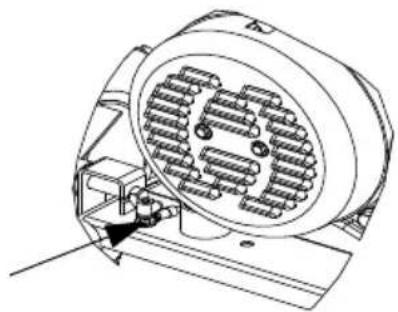
Figure 3-1.Grounding the Generator
000227
Special Requirements
Review all Federal and State Occupational Safety and Health Administration (OSHA) regulations, local codes, and ordinances applicable to the intended use of the generator. Additional regulations may apply if the generator is used at a construction site.
Consult a qualified electrician, electrical inspector, or the local agency having jurisdiction for additional requirements that may be unique to your area, such as whether the generator is required to be registered with local utility.
Connecting the Generator to a Building Electrical System
It is recommended to use a manual transfer switch when connecting directly to a building electrical system. Connecting a portable generator to a building electrical system must be made in strict compliance with all national and local electrical codes and laws, and be completed by a qualified electrician.
Connecting Electrical Loads
DO NOT connect 240 Volt loads to 120 Volt receptacles. DO NOT connect 3-phase loads to generator. DO NOT connect 50Hz loads to generator.
Let engine stabilize and warm up for a few minutes after starting.
Plug in and turn on the desired 120 or 240 Volt AC, single phase, 60Hz electrical loads.
Add up the rated watts (or amps) of all loads to be connected at one time. This total should not be greater than (a) the rated wattage/ amperage capacity of the generator or (b) circuit breaker rating of the receptacle supplying the power. See Know Generator Limits.
Know Generator Limits
Overloading a generator can result in damage to the generator and connected electrical devices. Observe the following to prevent overload:
- Add up the total wattage of all electrical devices to be connected at one time. This total should NOT be greater than the generator's wattage capacity.
- The rated wattage of lights can be taken from light bulbs. The rated wattage of tools, appliances, and motors can be found on a data label or decal affixed to the device.
- If the appliance, tool, or motor does not give wattage, multiply volts times ampere rating to determine watts (volts x amps = watts).
- Some electric motors, such as induction types, require about three times more watts of power for starting than for running. This surge of power lasts only a few seconds when starting such motors. Make sure to allow for high starting wattage when selecting electrical devices to connect to the generator:
- Figure the watts needed to start the largest motor.
- Add to that figure the running watts of all other connected loads.
The Wattage Reference Guide is provided to assist in determining how many items the generator can operate at one time.
NOTE: All figures are approximate. See data label on appliance for wattage requirements.
Table 3. Wattage Reference Guide
| Device Running | Watts |
| *Air Conditioner (12,000 Btu) 1700 | |
| *Air Conditioner (24,000 Btu) 3800 | |
| *Air Conditioner (40,000 Btu) 6000 | |
| Battery Charger (20 Amp) 500 | |
| Belt Sander (3") 1000 | |
| Chain Saw 1200 | |
| Circular Saw (6-1/2") 800 to 1000 | |
| *Clothes Dryer (Electric) 5750 | |
| *Clothes Dryer (Gas) 700 | |
| *Clothes Washer | 1150 |
| Coffee Maker | 1750 |
| *Compressor (1 HP) 2000 | |
| *Compressor (3/4 HP) | 1800 |
| *Compressor (1/2 HP) | 1400 |
| Curling Iron | 700 |
| *Dehumidifier | 650 |
| Disc Sander (9") | 1200 |
| Edge Trimmer | 500 |
| Electric Blanket | 400 |
| Electric Nail Gun | 1200 |
| Electric Range (per element) | 1500 |
| Electric Skillet | 1250 |
| *Freezer | 700 |
| *Furnace Fan (3/5 HP) | 875 |
| *Garage Door Opener | 500 to 750 |
| Hair Dryer 1200 | |
| Hand Drill | 250 to 1100 |
| Hedge Trimmer | 450 |
| Impact Wrench | 500 |
| Iron | 1200 |
| *Jet Pump | 800 |
| Lawn Mower | 1200 |
| Light Bulb | 100 |
| Microwave Oven 700 to 1000 | |
| *Milk cooler | 1100 |
| Oil Burner on Furnace | 300 |
| Oil Fired Space Heater (140,000 Btu) | 400 |
| Oil Fired Space Heater (85,000 Btu) | 225 |
| Oil Fired Space Heater (30,000 Btu) | 150 |
| *Paint Sprayer, Airless (1/3 HP) | 600 |
| Paint Sprayer, Airless (hand-held) | 150 |
| Radio 50 to 200 | |
| *Refrigerator 700 | |
| Slow Cooker 200 | |
| *Submersible Pump (1-1/2 HP) 2800 | |
| *Submersible Pump (1 HP) 2000 | |
| *Submersible Pump (1/2 HP) 1500 | |
| *Sump Pump 800 to 1050 | |
| *Table Saw (10") 1750 to 2000 | |
| Television 200 to 500 | |
| Toaster 1000 to 1650 | |
| Weed Trimmer 500 | |
| * Allow 3 times the listed watts for starting these devices. | |
Transporting/Tipping of the Unit
Do not store or transport the unit at an angle greater than 15 degrees.
Starting Pull Start Engines

WARNING
Recoil Hazard. Recoil could retract unexpectedly. Kickback could result in death or serious injury.
(000183)
CAUTION
Equipment and property damage. Disconnect electrical loads prior to starting or stopping unit. Failure to do so could result in equipment and property damage. (000136)
- Unplug all electrical loads from the unit's receptacles before starting engine.
- Place generator on a level surface.
- Rotate the fuel shut-off valve (A) counterclockwise to the ON (open) position. See Figure 3-2.
- Turn engine STOP/RUN switch to RUN. See Table 1: Generator Components.
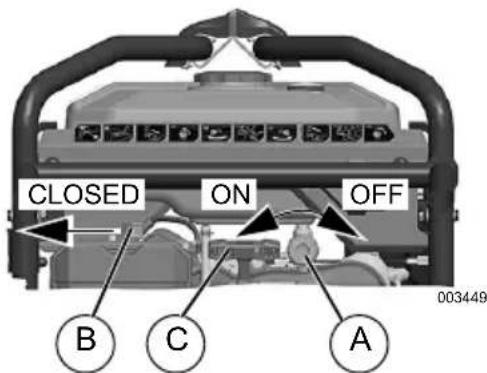
Figure 3-2. Engine Controls
-
Slide engine choke lever (B) to Full CHOKE position (left). See Figure 3-2.
-
See Figure 3-2. Firmly grasp recoil handle (C) and pull slowly until increased resistance is felt. Pull rapidly up and away.
- When engine starts, move choke lever to 1/2 CHoke position until engine runs smoothly, then fully into OPEN (right) position. If engine falters, move choke lever back to 1/2-CHoke position until engine runs smoothly, then to OPEN (right) position.
NOTE: If engine fires, but does not continue to run, move choke lever to Full CHOKE (left) and repeat starting instructions.
IMPORTANT NOTE: Do not overload generator or individual panel receptacles. These outlets are overload protected with push-to-reset circuit breakers. If amperage rating of any circuit breaker is exceeded, that breaker opens and electrical output to that receptacle is lost. Read Know Generator Limits carefully.
Starting Electric Start Engines
CAUTION
Equipment and property damage. Disconnect electrical loads prior to starting or stopping unit. Failure to do so could result in equipment and property damage.
(000136)
- Unplug all electrical loads from the unit's receptacles before starting the engine.
- Place generator on a level surface.
- Rotate the fuel shut-off valve (A) counterclockwise to the ON (open) position. See Figure 3-2.
- Slide engine choke lever (B) to Full CHOKE position (left). See Figure 3-2.
- Turn and hold START/RUN/STOP switch in the START position. When engine starts, release the switch to the RUN position.
- When engine starts, move choke lever to 1/2 CHoke position until engine runs smoothly, then fully into OPEN (right) position. If engine falters, move choke lever back to 1/2-CHoke position until engine runs smoothly, then to OPEN (right) position.
NOTE: If engine fires, but does not continue to run, move choke lever to Full CHOKE (left) and repeat starting instructions.
Generator Shut Down
CAUTION
Equipment and property damage. Disconnect electrical loads prior to starting or stopping unit. Failure to do so could result in equipment and property damage. (000136)
- Shut off all loads and unplug electrical loads from generator panel receptacles.
- Let engine run at no-load for several minutes to stabilize internal temperatures of engine and generator.
- Move START/RUN/STOP switch to STOP.
- Rotate fuel shut-off valve clockwise to the OFF (closed) position.
NOTE: Under normal conditions, close fuel valve and allow generator to run carburetor bowl out of fuel. For emergencies, switch to STOP.
Low Oil Pressure Shutdown System
The engine is equipped with a low oil pressure sensor that shuts down the engine automatically when the oil pressure drops below specifications. The engine will not run until the oil has been filled to the proper level.
If the engine shuts down and there is sufficient fuel, check engine oil level.
Section 4 Maintenance and Troubleshooting
Maintenance
Regular maintenance will improve performance and extend engine/equipment life. Generac Power Systems, Inc. recommends that all maintenance work be performed by an Independent Authorized Service Dealer (IASD). Regular maintenance, replacement, or repair of the emissions control devices and systems may be performed by any repair shop or person of the owner's choosing. To obtain emissions control warranty service free of charge, the work must be performed by an IASD. See the emissions warranty.
NOTE: Call 1-888-GENERAC (1-888-436-3722) with questions about component replacement.
Maintenance Schedule
Follow maintenance schedule intervals, whichever occurs first according to use.
NOTE: Adverse conditions will require more frequent service.
NOTE: Go to Generac.com or contact an IASD for replacement parts.
NOTE: All required service and adjustments should be each season as detailed in the following chart.
| At Each Use |
| Check engine oil level |
| Every 100 Hours or Every Season* |
| Clean spark arrestor screen |
| Every Season |
| Check valve clearance*** |
| Every 200 Hours or Every Season |
| Change oil ‡ |
| Replace spark plug |
| Replace fuel filter |
| Inspect/clean air cleaner filter** |
| ‡ Change oil after first 25 hours of operation, then every season.* Change oil and oil filter every month when operating under heavy load or in high temperatures. ** Clean more often under dirty or dusty oper-ating conditions. Replace air filter parts if they cannot be adequately cleaned. *** Check valve clearance and adjust if neces-sary after first 50 hours of operation and every 400 hours thereafter. |
Preventive Maintenance
Dirt or debris can cause improper operation and equipment damage. Clean generator daily or before each use. Keep area around and behind muffler free from combustible debris. Inspect all cooling air openings on generator.
WARNING
Personal injury. Do not insert any object through the air cooling slots. Generator can start at any time and could result in death, serious injury, and unit damage.
(000142a)
- Use a damp cloth to wipe exterior surfaces clean.
- Use a soft bristle brush to loosen caked on dirt, oil, etc.
- Use a vacuum to pick up loose dirt and debris.
- Low pressure air (not to exceed 25 psi) may be used to blow away dirt. Inspect cooling air slots and openings on generator. These openings must be kept clean and unobstructed.
NOTE: DO NOT use a garden hose to clean generator. Water can enter engine fuel system and cause problems. If water enters generator through cooling air slots, some water will be retained in voids and crevices of rotor and stator winding insulation. Water and dirt buildup on generator internal windings will decrease insulation resistance of windings.
Engine Maintenance
AWARNING
Accidental start-up. Disconnect spark plug wires when working on unit. Failure to do so could result in death or serious injury.
(000141)
Engine Oil Recommendations
To maintain the product warranty, the engine oil should be serviced in accordance with the recommendations of this manual. For your convenience, maintenance kits designed and intended for use on this product are available from the manufacturer that include engine oil, oil filter, air filter, spark plug(s), a shop towel and funnel. These kits can be obtained from an Independent Authorized Service Dealer (IASD).
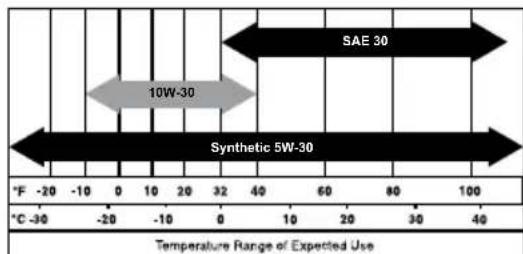
000399.
Inspect Engine Oil Level

WARNING
Risk of burns. Allow engine to cool before draining oil or coolant. Failure to do so could result in death or serious injury.
(000139)
Inspect engine oil level prior to each use, or every 8 hours of operation.
- Place generator on a level surface.
- Clean area around oil fill.
- See Figure 4-1. Remove oil fill cap and wipe dipstick clean.
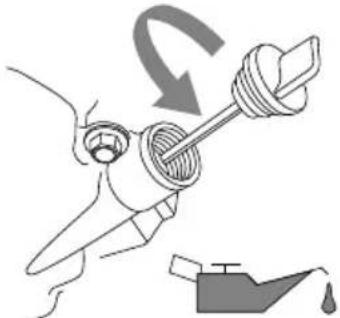
Figure 4-1. Engine Oil Fill
000115
- Screw dipstick into filler neck. Remove dipstick and verify oil level is within safe operating range. See Figure 4-2.
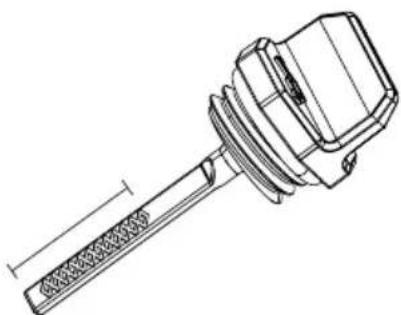
Figure 4-2. Safe Operating Range
003620
- Add recommended engine oil as necessary.
- Replace oil fill cap and hand-tighten.
NOTE: Some units have more than one oil fill location. It is only necessary to use one oil fill point.
Change Engine Oil and Oil Filter
WARNING
Accidental start-up. Disconnect spark plug wires when working on unit. Failure to do so could result in death or serious injury.
(000141)

AWARNING
Risk of burns. Allow engine to cool before draining oil or coolant. Failure to do so could result in death or serious injury.
(000139)
When using generator under extreme, dirty, dusty conditions, or in extremely hot weather, change oil more frequently.
NOTE: Don't pollute. Conserve resources. Return used oil to collection centers.
Change oil while engine cool as follows:
- Place generator on a level surface.
- Disconnect the spark plug wire from the spark plug and place the wire where it cannot contact spark plug.
- Clean area around oil fill, and oil drain plug.
- Remove oil fill cap.
- Remove oil drain hose cap and drain oil completely into a suitable container.
- Install oil drain hose cap and tighten securely.
- Place a suitable container beneath the oil filter and turn filter counterclockwise to remove. Discard according to local regulations.
- Coat gasket of new filter with clean engine oil. Turn filter clockwise until gasket contacts lightly with filter adapter. Then tighten an additional 3/4 turn.
- Slowly pour oil into oil fill opening until oil level is in safe operating range on dipstick. DO NOT overfill.
- Install oil fill cap, and finger tighten.
- Wipe up any spilled oil.
- Properly dispose of oil in accordance with all applicable regulations.
Air Filter
Engine will not run properly and may be damaged if run with a dirty air filter. Service air filter more frequently in dirty or dusty conditions. To service air filter:
- See Figure 4-3. Remove air filter cover (A) and filter (B).
- Gently tap filter on a solid surface. If too dirty, replace with new filter.
- Clean air filter cover before installation.
NOTE: To order a new air filter, contact the nearest IASD at 1-888-GENERAC (1-888-436-3722).
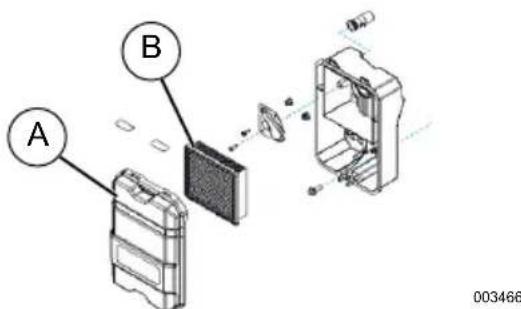
Figure 4-3. Air Filter Assembly
Service Spark Plug
To service spark plug:
- Clean area around spark plug.
- Remove and inspect spark plug.
- Inspect electrode gap with wire feeler gauge and reset spark plug gap to 0.020 in (0.51 mm). See Figure 4-4.
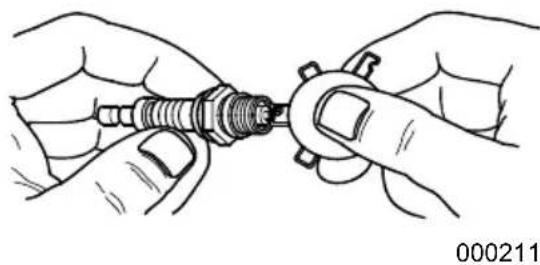
Figure 4-4. Spark Plug
NOTE: Replace spark plug if electrodes are pitted, burned or porcelain is cracked. Use ONLY recommended replacement plug. See Specifications.
4. Install spark plug finger tight, and tighten an additional 3/8 to 1/2 turn using spark plug wrench.
Battery Replacement (if applicable)
NOTE: The battery shipped with the generator has been fully charged. A battery may lose some charge when not in use for prolonged periods of time. The battery may have to be charged before the first use. Running the generator will charge battery.
AWARNING
Accidental Start-up. Disconnect the negative battery cable, then the positive battery cable when working on unit. Failure to do so could result in death or serious injury. (000130)
See Figure 4-5.
-
Disconnect and remove the battery connecting hardware (8mm) and BLACK wire (B) from the battery's NEGATIVE (-) terminal.
-
Remove the red rubber boot (A) and disconnect the battery connecting hardware (8mm) and RED wire (C) from the battery's POSITIVE (+) terminal.
- Install new battery. Secure battery with strap.
- Connect RED wire to the POSITIVE (+) battery terminal (C). Slide rubber boot (A) over connection hardware.
- Connect BLACK wire to the NEGATIVE (-) battery terminal (B).
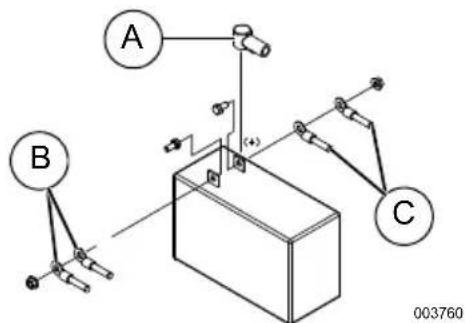
Figure 4-5. Battery Connection
WARNING
Environmental Hazard. Always recycle batteries at an official recycling center in accordance with all local laws and regulations. Failure to do so could result in environmental damage, death or serious injury. (000228)
Inspect Muffler and Spark Arrester
NOTE: It is a violation of California Public Resource Code, Section 4442, to use or operate the engine on any forest-covered, brush-covered, or grass-covered land unless the exhaust system is equipped with a spark arrester, as defined in Section 4442, maintained in effective working order. Other states or federal jurisdictions may have similar laws.
Contact original equipment manufacturer, retailer, or dealer to obtain a spark arrester designed for exhaust system installed on this engine.
NOTE: Use ONLY original equipment replacement parts.
Inspect muffler for cracks, corrosion, or other damage. Remove spark arrester, if equipped, inspect for damage or carbon blockage. Replace parts as required.
Inspect Spark Arrester Screen

WARNING
Hot Surfaces. When operating machine, do not touch hot surfaces. Keep machine away from combustibles during use. Hot surfaces could result in severe burns or fire. (000108)
- Loosen clamp (A). See Figure 4-6.
- Inspect cone (C) and replace if torn, perforated or otherwise damaged. If cone is not damaged, clean with commercial solvent.
- Replace spark arrestor cone (C) and collar (B). Secure with clamp (A).
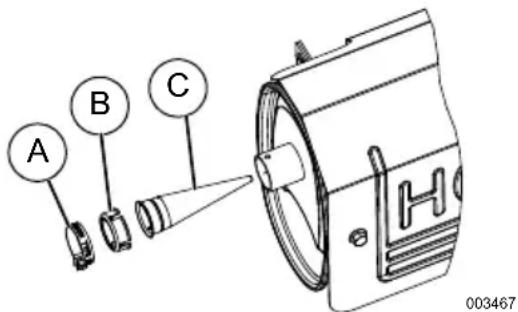
Figure 4-6. Spark Arrestor Screen
Valve Clearance
Important: Please contact an Independent Authorized Service Dealer for service assistance. Proper valve clearance is essential for prolonging the life of the engine.
Check valve clearance after the first fifty-hours of operation. Adjust as necessary.
- Intake — 0.05 to 0.08 mm (0.002" to 0.003" inch)
- Exhaust — 0.05 to 0.08 mm (0.002" to 0.003" inch)
Storage
General

DANGER
Explosion and Fire. Fuel and vapors are extremely flammable and explosive. Store fuel in a well ventilated area. Keep fire and spark away. Failure to do so will result in death or serious injury.
(000143)

WARNING
Risk of Fire. Verify machine has properly cooled before installing cover and storing machine. Hot surfaces could result in fire.
(000109)
It is recommended to start and run the generator for 30 minutes, every 30 days. If this is not possible, refer to the following list to prepare unit for storage.
- DO NOT place a storage cover on a hot generator. Allow unit to cool to room temperature before storage.
DO NOT store fuel from one season to another unless properly treated.
- Replace fuel container if rust is present. Rust in fuel will cause fuel system problems.
- Cover unit with a suitable protective, moisture resistant cover.
- Store unit in a clean and dry area.
- Always store generator and fuel away from heat and ignition sources.
Prepare Fuel System for Storage
Fuel stored over 30 days can go bad and damage fuel system components. Keep fuel fresh, use fuel stabilizer.
If fuel stabilizer is added to fuel system, prepare and run engine for long term storage. Run engine for 10-15 minutes to circulate stabilizer throughout fuel system. Adequately prepared fuel can be stored up to 24 months.
NOTE: If fuel has not been treated with fuel stabilizer, it must be drained into an approved container. Run engine until it stops from lack of fuel. Use of fuel stabilizer in fuel storage container is recommended to keep fuel fresh.
- Change engine oil.
- Remove spark plug.
- Pour tablespoon (5-10cc) of clean engine oil or spray a suitable fogging agent into cylinder.

WARNING
Vision Loss. Eye protection is required to avoid spray from spark plug hole when cranking engine. Failure to do so could result in vision loss.
(000181)
- Pull starter recoil several times to distribute oil in cylinder.
- Install spark plug.
- Pull recoil slowly until resistance is felt. This will close valves so moisture cannot enter engine cylinder. Gently release recoil.
Change Oil
Change engine oil before storage. See Change Engine Oil and Oil Filter.
Troubleshooting
| PROBLEM CAUSE CORRECTION | ||
| Engine is running, but AC output is not available. | 1. Circuit breaker OPEN. 2. Poor connection or defective cord set. 3. Connected device is bad. 4. Fault in generator. 5. GFCI breaker module is OPEN. | 1. Reset circuit breaker. 2. Check and repair. 3. Connect another device that is in good condition. 4. Contact IASD. 5. Correct ground fault and press reset button on GFCI breaker module. |
| Engine runs well at no-load, but bogs when load is applied. | 1. Short circuit in a connected load. 2. Generator is overloaded. 3. Engine speed is too slow. 4. Shorted generator circuit. 5. Dirty fuel filter. 6. Clogged spark arrestor. | 1. Disconnect shorted electrical load. 2. See Know Generator Limits. 3. Contact IASD. 4. Contact IASD. 5. Replace fuel filter. 6. Clean spark arrestor screen. |
| Engine will not start; or starts and runs rough. | 1. Fuel shut-off is OFF. 2. Dirty air filter. 3. Out of fuel. 4. Stale fuel. 5. Spark plug wire not connected to spark plug. 6. Bad spark plug. 7. Water in fuel. 8. Overchoking. 9. Low oil level. 10. Excessive rich fuel mixture. 11. Intake valve stuck open or closed. 12. Engine lost compression. 13. Dirty fuel filter. | 1. Turn fuel shut-off ON. 2. Clean or replace air filter. 3. Fill fuel tank. 4. Drain fuel tank and fill with fresh fuel. 5. Connect wire to spark plug. 6. Replace spark plug. 7. Drain fuel tank; fill with fresh fuel. 8. Set choke to no choke position. 9. Fill crankcase to correct level. 10. Contact IASD. 11. Contact IASD. 12. Contact IASD. 13. Replace fuel filter. |
| Engine shuts down during operation. | 1. Out of fuel. 2. Low oil level. 3. Fault in engine. | 1. Fill fuel tank. 2. Fill crankcase to correct level. 3. Contact IASD. |
| Engine lacks power. 1. Load is too high. 2. Dirty air filter. 3. Engine needs to be serviced. 4. Dirty fuel filter. 5. Clogged spark arrestor. | 1. Reduce load (see Know Gen- erator Limits). 2. Clean or replace air filter. 3. Contact IASD. 4. Replace fuel filter. 5. Clean spark arrestor screen. | |
| Engine surges or stumbles. | 1. Choke is opened too soon. 2. Carburetor is running too rich or too lean. | 1. Set choke to halfway position until engine runs smoothly. 2. Contact IASD. |
Part No. 10000004327 Rev. B 05/14/2018
©2018 Generac Power Systems, Inc.
All rights reserved
Specifications are subject to change without notice.
No reproduction allowed in any form without prior
written consent from Generac Power Systems, Inc.
GENERAC
PRO
Generac Power Systems, Inc.
S45 W29290 Hwy. 59
Waukesha, WI 53189
1-888-GENERAC (1-888-436-3722)
wwwgenerac.com/pro
Generador portátil série XC
Manual del usuario
MODELO:
SERIE:
FECHA DE LA COMPRA:

ADVERTENCIA
©2018 Generac Power Systems, Inc.
Hearing protection recommended.
PRECAUCION
Protection auditive recommende.
000406
©2018 Generac Power Systems, Inc.