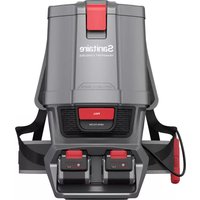
System Pro SL3681A - Vacuum Cleaner Sanitaire - Free user manual and instructions
Find the device manual for free System Pro SL3681A Sanitaire in PDF.



| Product Type | Backpack Vacuum |
| Brand | Sanitaire |
| Model | System Pro SL3681A |
| Power Source | Rechargeable lithium-ion battery |
| Voltage | 24 V |
| Battery Capacity | 8 Ah (x2) |
| Power Modes | Normal and Maximum |
| Filtration | HEPA filter (99.97% of particles up to 0.3 micron) and pre-motor filter |
| Dust Bag | Paper bag (optional) + reusable cloth bag |
| Warranty | 2 years limited (1 year for battery) |
| Customer Service | 1-800-800-8975 |
| Usage | Indoor commercial use |
| Compatible Batteries | Model 3719 (1633728 / 1635147) |
| Compatible Charger | Model 3717 (1633730 / 1635149) |
| Maintenance | Clean cloth bag, replace paper bag, HEPA filter every 6 months |
| Safety | Automatic shut-off, overheat and short circuit protection |
| Accessories | Hose, extension wands, floor tool |
Frequently Asked Questions - System Pro SL3681A Sanitaire
User questions about System Pro SL3681A Sanitaire
0 question about this device. Answer the ones you know or ask your own.
Ask a new question about this device
Download the instructions for your Vacuum Cleaner in PDF format for free! Find your manual System Pro SL3681A - Sanitaire and take your electronic device back in hand. On this page are published all the documents necessary for the use of your device. System Pro SL3681A by Sanitaire.
USER MANUAL System Pro SL3681A Sanitaire
Commercial Cordless Backpack Vacuum
OWNER'S GUIDE
Series 580
For assembly and maintenance videos go to www.youtube.com/sanitairevacas
Index
Important safety instructions .2-3
How to assemble and use 4
How to maintain 5
Problem solving 6
Warranty 6
How to order replacement parts . . . .19
French owner's guide 7-12, 19
Spanish owner's guide 13-18, 19
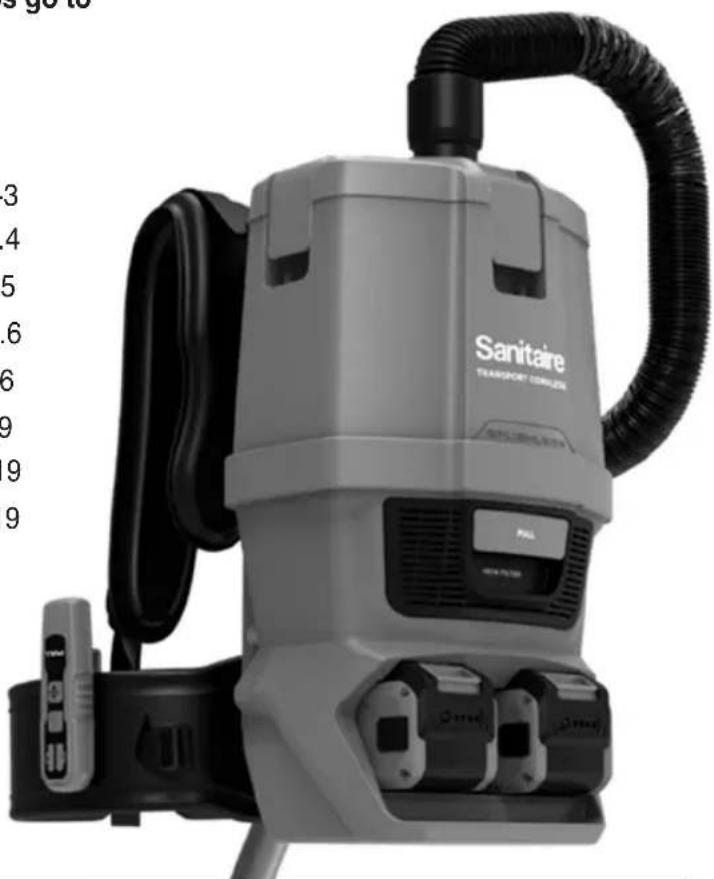
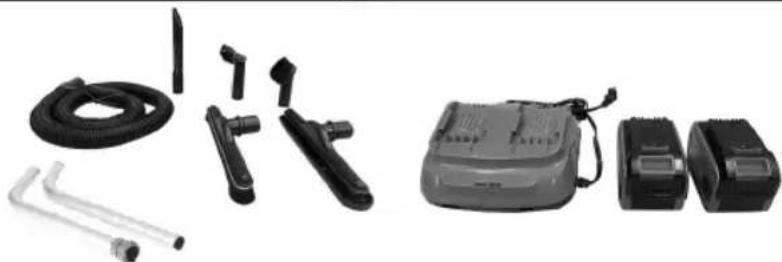
What's in the carton

WARNING: This product contains Lithium-ion rechargeable batteries. DO NOT mix Lithium-ion batteries with general household waste. According to Federal and State regulations, removal and proper disposal of Lithium-ion batteries is required. For specific battery disposal instructions please contact Call2Recycle at 877-723-1297 or visit www.call2recycle.org.


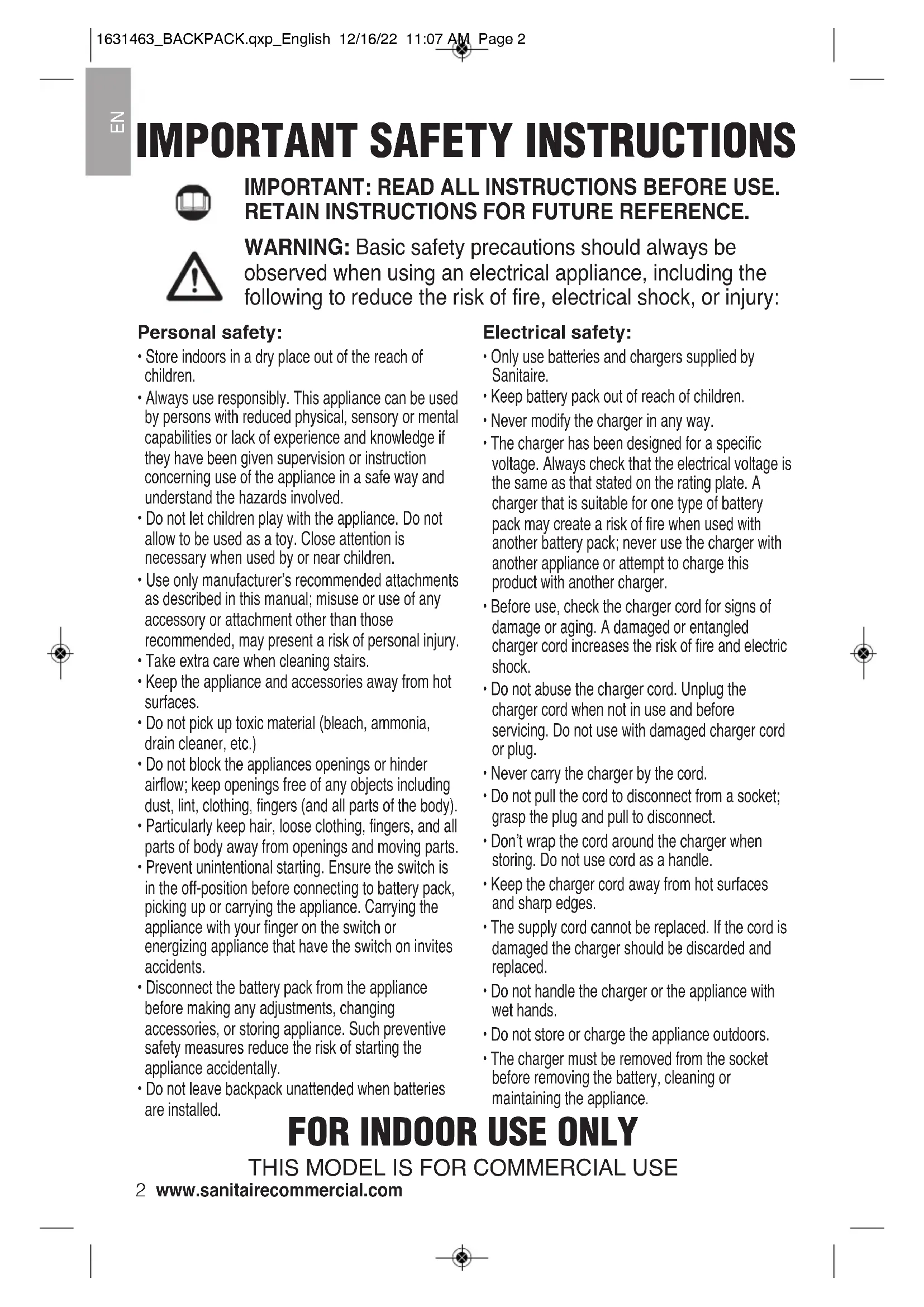
IMPORTANT SAFETY INSTRUCTIONS

IMPORTANT: READ ALL INSTRUCTIONS BEFORE USE. RETAIN INSTRUCTIONS FOR FUTURE REFERENCE.

WARNING: Basic safety precautions should always be observed when using an electrical appliance, including the following to reduce the risk of fire, electrical shock, or injury:
Personal safety:
- Store indoors in a dry place out of the reach of children.
- Always use responsibly. This appliance can be used by persons with reduced physical, sensory or mental capabilities or lack of experience and knowledge if they have been given supervision or instruction concerning use of the appliance in a safe way and understand the hazards involved.
- Do not let children play with the appliance. Do not allow to be used as a toy. Close attention is necessary when used by or near children.
- Use only manufacturer's recommended attachments as described in this manual; misuse or use of any accessory or attachment other than those recommended, may present a risk of personal injury.
Take extra care when cleaning stairs. - Keep the appliance and accessories away from hot surfaces.
- Do not pick up toxic material (bleach, ammonia, drain cleaner, etc.)
- Do not block the appliances openings or hinder airflow; keep openings free of any objects including dust, lint, clothing, fingers (and all parts of the body).
- Particularly keep hair, loose clothing, fingers, and all parts of body away from openings and moving parts.
- Prevent unintentional starting. Ensure the switch is in the off-position before connecting to battery pack, picking up or carrying the appliance. Carrying the appliance with your finger on the switch or energizing appliance that have the switch on invites accidents.
- Disconnect the battery pack from the appliance before making any adjustments, changing accessories, or storing appliance. Such preventive safety measures reduce the risk of starting the appliance accidentally.
- Do not leave backpack unattended when batteries are installed.
Electrical safety:
- Only use batteries and chargers supplied by Sanitaire.
- Keep battery pack out of reach of children.
- Never modify the charger in any way.
- The charger has been designed for a specific voltage. Always check that the electrical voltage is the same as that stated on the rating plate. A charger that is suitable for one type of battery pack may create a risk of fire when used with another battery pack; never use the charger with another appliance or attempt to charge this product with another charger.
- Before use, check the charger cord for signs of damage or aging. A damaged or entangled charger cord increases the risk of fire and electric shock.
- Do not abuse the charger cord. Unplug the charger cord when not in use and before servicing. Do not use with damaged charger cord or plug.
- Never carry the charger by the cord.
- Do not pull the cord to disconnect from a socket; grasp the plug and pull to disconnect.
- Don't wrap the cord around the charger when storing. Do not use cord as a handle.
- Keep the charger cord away from hot surfaces and sharp edges.
- The supply cord cannot be replaced. If the cord is damaged the charger should be discarded and replaced.
- Do not handle the charger or the appliance with wet hands.
- Do not store or charge the appliance outdoors.
- The charger must be removed from the socket before removing the battery, cleaning or maintaining the appliance.
FORINDOORUSEONLY
THIS MODEL IS FOR COMMERCIAL USE
2 www.sanitairecommercial.com
Battery safety:
- Use appliances only with specifically designated battery packs. Use of any other battery packs may create a risk of injury and fire.
- This appliance includes Li-Ion batteries. Do not expose a battery pack or appliance to fire or excessive temperature. Exposure to fire or temperature above 130^ / 266^ may cause explosion.
- Do not use a battery pack or appliance that is damaged or modified.
In an emergency situation contact professional help immediately! - Leaks from the battery cells can occur under extreme conditions. Do not touch any liquid that leaks from the battery. If the liquid gets on the skin wash immediately with soap and water. If the liquid gets into the eyes, flush them immediately with clean water for a minimum of 10 minutes and seek medical attention. Wear gloves to handle the battery and dispose of immediately in accordance with local regulations. Liquid ejected from the battery may cause irritation or burns.
- Shorting the battery terminals may cause burns or fire.
- When the battery pack is not in use, keep it away from paper clips, coins, keys, nails, screws or other small metal objects that could make a connection from one terminal to another.
- When you dispose of the appliance remove the battery and dispose of the battery safely in accordance with local regulations.
- Do not use a battery pack or appliance that is damaged or modified. Damaged or modified batteries may exhibit unpredictable behavior resulting in fire, explosion or risk of injury.
- Follow all charging instructions and do not charge the battery pack or appliance outside of the temperature range specified in the instructions. Charging improperly or at temperatures outside of the specified range may damage the battery and increase the risk of fire.
For use: recommended ambient temp -14^ - 45^ / 7^ - 113^
For charging: recommended ambient temp 6^ - 40^ / 43^ - 104^
For storage: recommended ambient temp 0^ - 60^ / 32^ - 140^
- Use only battery pack 3719 (1633728 / 1635147)
Use only charger 3717 (1633730 / 1635149)
Service:
- Before using the appliance and after any impact, check for signs of wear or damage and repair as necessary.
- Do not use the appliance if any part is damaged or defective.
- If appliance is not working as it should, has been dropped, damaged, left outdoors, or dropped into water, return it to a service center.
- Repairs should be carried out by a service agent or a suitably qualified person in accordance with relevant safety regulations. Repairs by unqualified persons could be dangerous.
- Never modify or attempt to repair the appliance or battery pack in any way as this may increase the risk of personal injury.
- Only use replacement parts or accessories provided or recommended by Sanitaire.
Intended use:
- This appliance has been designed for commercial dry vacuum cleaning only.
- Do not pick up liquids or use outdoors or on wet surfaces.
- Do not pick up anything that is flammable, burning or smoking, such as cigarettes, matches, or hot ashes.
- Do not use to pick up flammable or combustible liquids, such as gasoline, or use in areas where they may be present.
- Use only as described in this manual.
WARNING:
- Do not use water, solvents, or polishes to clean the outside of the appliance; wipe clean with a dry cloth.
- Never immerse the vacuum in water and do not clean in a dishwasher.
- Never use the appliance without the filter in place.
SAVE THESE INSTRUCTIONS

How to assemble and use
Follow these simple steps for easy and effective operation of the Backpack vacuum.
Open the lid and ensure that the cloth bag is correctly located and the flexible ring provides a proper seal when the lid is closed. For optimum performance, filtration and maximum hygiene, it is advisable to use a paper vacuum bag in addition to the standard cloth bag.
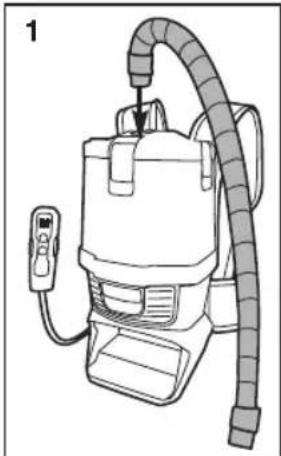
- Push vacuum hose into the cuff in the lid (Fig.1). It should not be necessary to remove the hose in normal operation.
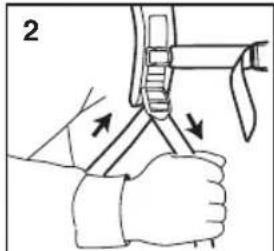
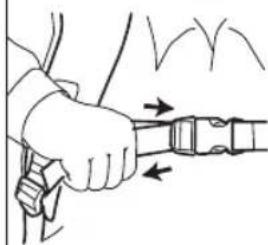
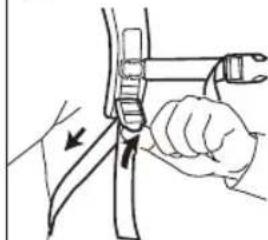
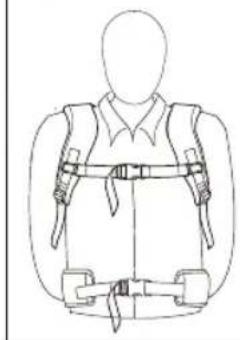
- Place the Backpack vacuum on your back, adjust the shoulder straps until you feel comfortable and then tighten the waist belt. The Backpack vacuum is designed to ride higher on your back for maximum comfort (Fig. 2).
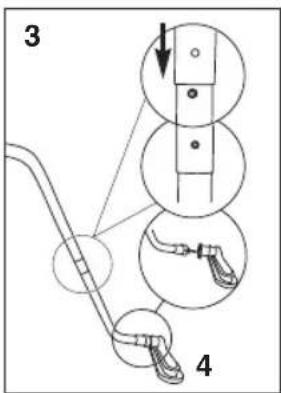
- Attach hose, wands and floor tool (Fig. 3 and 4). To attach floor tool, loosen lock nut at the end of the wand, slide on tool, then tighten lock nut.
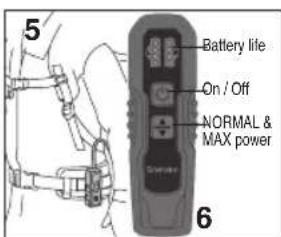
- Turn the vacuum on. The switch is located on the switch box. The switch box can be secured to the waist belt (Fig. 5). It has 2 modes: NORMAL power and MAX power (Fig. 6).
After you finish cleaning, turn off the main power switch before removing the Backpack.
Battery Charging
This vacuum is equipped with two 24volt 8Ah batteries. They can be charged at the same time or only one at a time in the dual charging station provided.
- When the state of charge indicators are all green, the battery is fully charged and ready for use. When there is only one green indicator light on and flashing or no green indicators on, battery needs to be recharged (Fig. 7).
- To recharge, attach battery or batteries to charger as shown (Fig. 8). The charger will recharge two batteries at the same time in 2 hours.
- Once fully charged, install batteries in vacuum housing (Fig. 9). The vacuum will operate on one battery but run time will be shortened.
Use only battery pack 3719 (1633728 / 1635147) Use only charger 3717 (1633730 / 1635149)
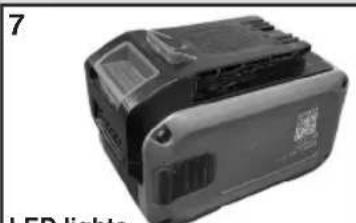
LED lights
All green - full charge 1 flashing green - recharge
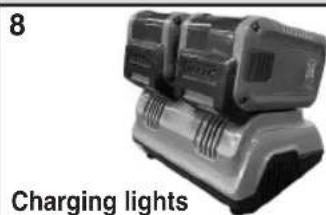
Red - not charging Flashing green - charging Solid green - fully charged.
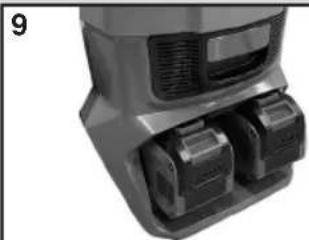
Slide in place until it locks. Press button to remove.
How to maintain
Changing the filter collection bags
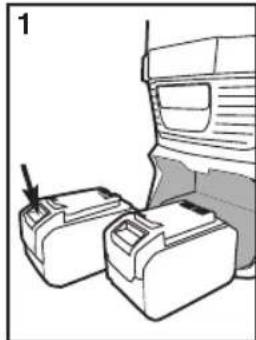
- Turn off the power switch and remove batteries (Fig. 1).
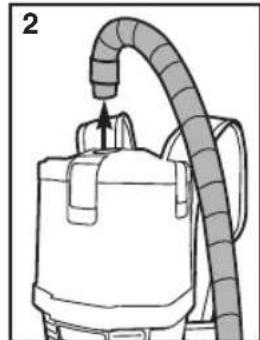
- Remove vacuum hose from top of vacuum (Fig 2).
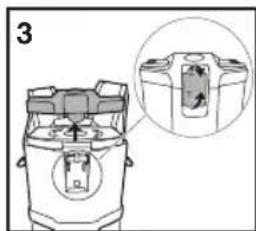
- Release the three latches and lift off lid (Fig. 3).
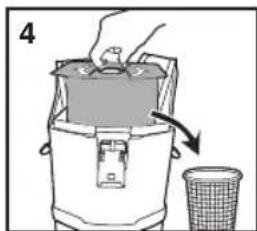
- Separate lid from paper bag insert and dispose of paper bag (Fig. 4).
- Remove the cloth bag, clean and reinstall.
- Insert new paper bag making sure to align lid nozzle with bag hole and secure latches.
Changing the pleated HEPA exhaust filter
The vacuum cleaner is equipped with a pre-motor filter and an exhaust HEPA filter. The pre-motor filter protects the motor from dirt. The HEPA filter captures 99.97% of dust particles down to .03 micron in size. It is important to replace the pre-motor filter and exhaust filter approximately every six months.
To replace the HEPA exhaust filter
- Turn off the power switch and remove batteries.
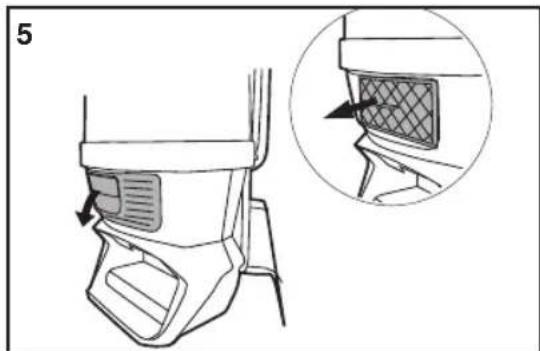
- Detach the exhaust filter cover from the front of the vacuum (Fig. 5).
- Remove the exhaust filter.
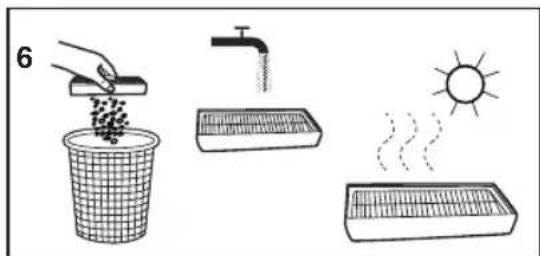
- Clean or replace filter. To clean, shake off loose dust, rinse with warm water then allow to dry (Fig. 6).
Changing the pre-motor filter
- Turn off the power switch and remove batteries.
- Remove the lid, paper bag and cloth bag to expose the filter.
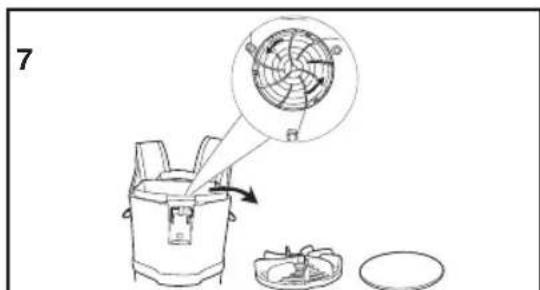
- Remove the plastic filter cap on the top of the filter by twisting counter-clockwise (Fig. 7).
- Remove the filter from the dust compartment.
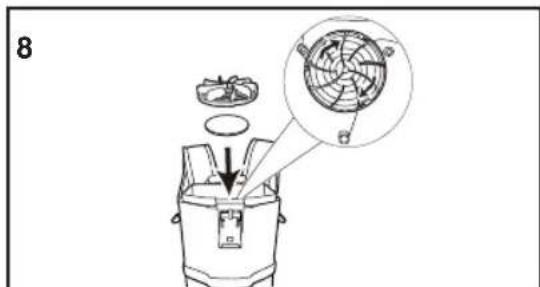
- Insert a new filter and replace the filter cap (Fig. 8). Refit the cloth bag, paper bag, and replace lid.
NOTE: The cloth bag can NOT be washed and reused.
- Clean the cloth bag regularly. After removing the cloth bag, turn it inside out and shake as much dust out of the fabric as possible. Optimum performance is achieved by using a paper filter bag with the cloth bag.
- Use only approved paper filter bags.
- Ensure the vacuum hose, the extension wand and the vacuuming accessories are not blocked.
- Ensure the batteries are securely installed. Incorrect connections may cause damage to the vacuum or the batteries.
- Have your vacuum serviced by an authorized repair service center if you suspect any potential problems.
- Ensure that the flexible cloth bag ring provides a proper seal before attaching the lid.
Problem solving

WARNING: To reduce the risk of electric shock, turn power switch off and remove battery before performing maintenance or troubleshooting checks.
| Problem Solution | |
| Motor will not start | •Fully charge batteries. •Properly install batteries. |
| Cleaner does not clean | •Clean or replace the filters or cloth bag. Hint:If picking up fine dust, the filters may not look dirty, but a fine sub-stance tends to reduce suction when it blocks the airflow through the filters. |
| No suction at the end of hose | •Be sure hose adapter is secure. •Clean or replace the filters or cloth bag. Hint:If picking up fine dust, the filters may not look dirty, but a fine sub-stance tends to reduce suction when it blocks the airflow through the filters. •Remove any clogs from the hose that restrict the airflow. |
WARRANTY
This warranty gives you specific legal rights, and you may also have other rights which may vary from state to state. If you need additional instruction regarding this warranty or have questions regarding what it may cover, please contact Sanitaire Customer Service by E-mail, telephone or regular mail as described below.
Limited Two-Year Warranty
Subject to the *EXCEPTIONS AND EXCLUSIONS identified below, upon receipt of the product Sanitaire will repair or replace (with new, refurbished, lightly used, or remanufactured components or products), at Sanitaire's option, free of charge from the date of purchase by the original purchaser, for two years any defective or malfunctioning part excluding the battery pack which as a limited warranty of one year.
See information below on "If your Sanitaire product should require service".
This warranty does not apply to fans or routine maintenance components such as filters, belts or brushes. Damage or malfunction caused by negligence, abuse, neglect, unauthorized repair, or any other use not in accordance with the user guide is not covered.
Some states do not allow the exclusion or limitation of incidental or conse quential damages, so the above limitation or exclusion may not apply to you.
*EXCEPTIONS AND EXCLUSIONS FROM THE TERMS OF THE LIMITED WARRANTY
THIS WARRANTY IS EXCLUSIVE AND IN LIEU OF ANY OTHER WARRANTYES, EITHER ORAL OR WRITTEN. ANY IMPLIED WARRANTYES WHICH MAY ARISE BY OPERATION OF LAW, INCLUDING THE IMPLIED WARRANTYES OF MERCHANTABILITY AND FITNESS FOR A PARTICULAR PURPOSE, ARE LIMITED TO THE TWO-YEAR DURATION FROM THE DATE OF PURCHASE AS DESCRIBED ABOVE.
Some states do not allow limitations on how long an implied warranty last so the above limitation may not apply to you.
NOTE: Please keep your original sales receipt. It provides proof of date of purchase in the event of a warranty claim.
Service information
If your Sanitaire product should require service
You will find the nearest Sanitaire Authorized Service Center in your area online at sanitairecommercial.com under service locator or contact Sanitaire Customer Service.
If you need information about repairs or replacement parts, or if you have questions about your warranty, contact Sanitaire Customer Service.
Website: www.sanitairecommercial.com
Call: Sanitaire Customer Service 1-800-800-8975
Sanitaire®
TRANSPORTS f
FR
Aspirateur commercial dorsal sans fil GUIDE DU PROPRIÉTAIRE
Serie 580
Comment assembler 10
Comment entretenir 11
*EXCEPTIONS ET EXCLUSIONS DES CONDITIONS DE LA GARANTIE LIMITÉE
CETTE GARANTIE EST EXCLUSIVE ET REMPLAC TOUTE AUTRE GARANTIE, VERBALE OU ÉCRITE. TOUTES LES GARANTIES IMPLICITES POUVANT RÉSULTER DE L'APPLICATION D'UNE LOI, Y COMPRIS LES GARANTIES IMPLICITES DE QUALITÉ MARCHANDE ET DE CONVENANCE À UN USAGEPARTICULIER, SONT LIMITÉES À LA DUREE DE DEUX ANS À COMPTER DE LA DATE D'ACHAT,TEL QUE STIPULE CI-DESS.