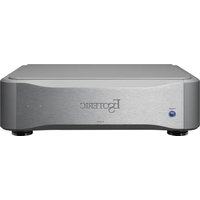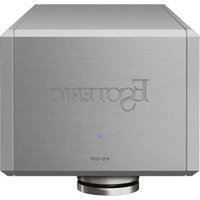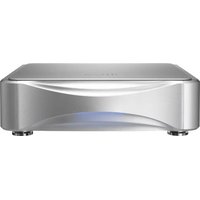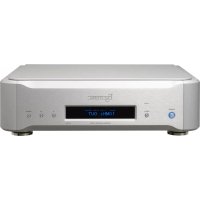
G01X - Clock Esoteric - Free user manual and instructions
Find the device manual for free G01X Esoteric in PDF.



| Product Type | Audio Reference Master Clock |
| Brand | Esoteric |
| Model | G01X |
| Oscillator | Built-in rubidium, accuracy ±0.05 ppb, stability ±0.1 ppb |
| Clock Outputs CLOCK OUT | 4 BNC connectors, square wave, TTL/75 Ω level, multiple frequencies (44.1 kHz to 22.5792 MHz / 48 kHz to 24.576 MHz) |
| 10 MHz Outputs | 4 BNC connectors, sine wave, 0.5 Vrms/50 Ω |
| External Reference Input (EXT IN) | 1 BNC, 10 MHz (0.5-1.0 Vrms sine/TTL) or 1 pps (TTL) |
| Synchronization Modes | Internal rubidium, +1pps (GPS), +10MHz (GPS) |
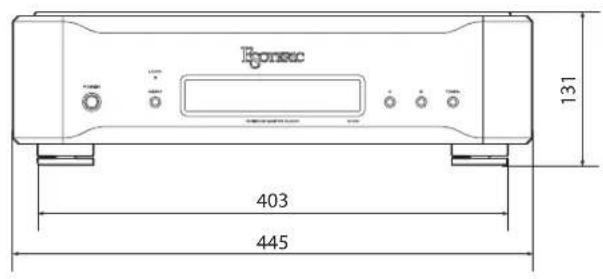
| Dimensions (W x H x D) | 445 mm x 131 mm x 403 mm |
| Weight | Approximately 23 kg (estimated from description 'very heavy') |
| Power Supply | AC 220-240 V, 50/60 Hz (Europe) / AC 110-120 V, 60 Hz (USA/Canada) |
| Power Consumption | 75 W during warm-up, 30 W in stable operation |
| Operating Temperature | +5 °C to +35 °C |
| Preheating | Yes, adjustable (ON/OFF), approximately 10 minutes stabilization |
| LOCK Indicator | Indicates lock: green (Adaptive Zero Ground mode), blue (normal mode) |
| Display | OLED screen, adjustable brightness and duration (ON/LONG/SHORT) |
| Maintenance | Clean with a dry, soft cloth, unplug before cleaning |
| Safety | Do not open the casing, use only Esoteric power cord, maintain ventilation distances (20 cm) |
| Included Accessories | Power cord, felt pads (3), instruction manual, warranty card |
| Repairability | No user-repairable parts, contact your dealer |
Frequently Asked Questions - G01X Esoteric
User questions about G01X Esoteric
0 question about this device. Answer the ones you know or ask your own.
Ask a new question about this device
Download the instructions for your Clock in PDF format for free! Find your manual G01X - Esoteric and take your electronic device back in hand. On this page are published all the documents necessary for the use of your device. G01X by Esoteric.
USER MANUAL G01X Esoteric
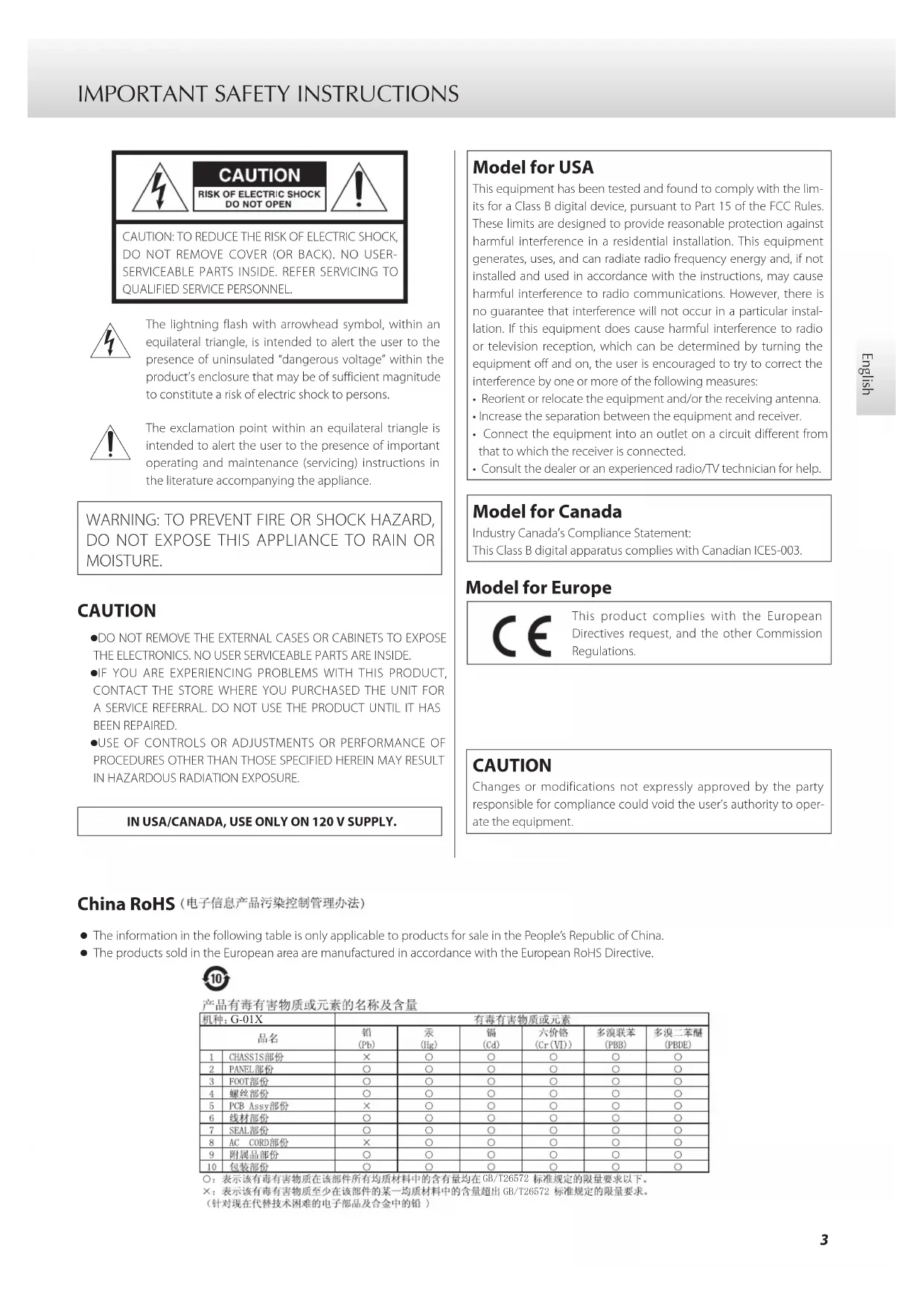
The lightning flash with arrowhead symbol, within an equilateral triangle, is intended to alert the user to the presence of uninsulated "dangerous voltage" within the product's enclosure that may be of sufficient magnitude to constitute a risk of electric shock to persons.

The exclamation point within an equilateral triangle is intended to alert the user to the presence of important operating and maintenance (servicing) instructions in the literature accompanying the appliance.
WARNING: TO PREVENT FIRE OR SHOCK HAZARD, DO NOT EXPOSE THIS APPLIANCE TO RAIN OR MOISTURE.
CAUTION
●DO NOT REMOVE THE EXTERNAL CASES OR CABINETS TO EXPOSE THE ELECTRONICS. NO USER SERVICEABLE PARTS ARE INSIDE.
- IF YOU ARE EXPERIENCING PROBLEMS WITH THIS PRODUCT, CONTACT THE STORE WHERE YOU PURCHASED THE UNIT FOR A SERVICE REFERRAL. DO NOT USE THE PRODUCT UNTIL IT HAS BEEN REPAIRED.
- USE OF CONTROLS OR ADJUSTMENTS OR PERFORMANCE OF PROCEDURES OTHER THAN THOSE SPECIFIED HEREIN MAY RESULT IN HAZARDOUS RADIATION EXPOSURE.
IN USA/CANADA, USE ONLY ON 120 V SUPPLY.
Model for USA
This equipment has been tested and found to comply with the limits for a Class B digital device, pursuant to Part 15 of the FCC Rules. These limits are designed to provide reasonable protection against harmful interference in a residential installation. This equipment generates, uses, and can radiate radio frequency energy and, if not installed and used in accordance with the instructions, may cause harmful interference to radio communications. However, there is no guarantee that interference will not occur in a particular installation. If this equipment does cause harmful interference to radio or television reception, which can be determined by turning the equipment off and on, the user is encouraged to try to correct the interference by one or more of the following measures:
- Reorient or relocate the equipment and/or the receiving antenna.
- Increase the separation between the equipment and receiver.
- Connect the equipment into an outlet on a circuit different from that to which the receiver is connected.
- Consult the dealer or an experienced radio/TV technician for help.
Model for Canada
Industry Canada's Compliance Statement:
This Class B digital apparatus complies with Canadian ICES-003.
Model for Europe


This product complies with the European Directives request, and the other Commission Regulations.
CAUTION
Changes or modifications not expressly approved by the party responsible for compliance could void the user's authority to operate the equipment.
- The information in the following table is only applicable to products for sale in the People's Republic of China.
● The products sold in the European area are manufactured in accordance with the European RoHS Directive.

产品有毒有害物质或元素的名称及含量
1) Read these instructions.
2) Keep these instructions.
3) Heed all warnings.
4) Follow all instructions.
5) Do not use this apparatus near water.
6) Clean only with dry cloth.
7) Do not block any ventilation openings. Install in accordance with the manufacturer's instructions.
8) Do not install near any heat sources such as radiators, heat registers, stoves, or other apparatus (including amplifiers) that produce heat.
9) Do not defeat the safety purpose of the polarized or grounding-type plug. A polarized plug has two blades with one wider than the other. A grounding type plug has two blades and a third grounding prong. The wide blade or the third prong are provided for your safety. If the provided plug does not fit into your outlet, consult an electrician for replacement of the obsolete outlet.
10) Protect the power cord from being walked on or pinched particularly at plugs, convenience receptacles, and the point where they exit from the apparatus.
11) Only use attachments/accessories specified by the manufacturer.
12) Use only with the cart, stand, tripod, bracket, or table specified by the manufacturer, or sold with the apparatus. When a cart is used, use caution when moving the cart/ apparatus combination to avoid injury from tip-over.
13) Unplug this apparatus during lightning storms or when unused for long periods of time.
14) Refer all servicing to qualified service personnel. Servicing is required when the apparatus has been damaged in any way, such as power-supply cord or plug is damaged, liquid has been spilled or objects have fallen into the apparatus, the apparatus has been exposed to rain or moisture, does not operate normally, or has been dropped.
●The apparatus draws nominal non-operating power from the AC outlet with its POWER or STANDBY/ON switch not in the ON position.
- The mains plug is used as the disconnect device; the disconnect device shall remain readily operable.
●Caution should be taken when using earphones or headphones with the product because excessive sound pressure (volume) from earphones or headphones can cause hearing loss.

WARNING
Products with Class I construction are equipped with a power supply cord that has a grounding plug. The cord of such a product must be plugged into an AC outlet that has a protective grounding connection.
CAUTION
- Do not expose this apparatus to drips or splashes.
- Do not place any objects filled with liquids, such as vases, on the apparatus.
- Do not install this apparatus in a confined space such as a book case or similar unit.
●The apparatus should be located close enough to the AC outlet so that you can easily reach the power cord plug at any time. - If the product uses batteries (including a battery pack or installed batteries), they should not be exposed to sunshine, fire or excessive heat.
- CAUTION for products that use replaceable lithium batteries: there is danger of explosion if a battery is replaced with an incorrect type of battery. Replace only with the same or equivalent type.
For European Customers
Disposal of electrical and electronic equipment and batteries and/or accumulators
a) All electrical/electronic equipment and waste batteries/accumulators should be disposed of separately from the municipal waste stream via collection facilities designated by the government or local authorities.
b) By disposing of electrical/electronic equipment and waste batteries/accumulators correctly, you will help save valuable resources and prevent any potential negative effects on human health and the environment.
c) Improper disposal of waste electrical/electronic equipment and batteries/accumulators can have serious effects on the environment and human health because of the presence of hazardous substances in the equipment.
d) The Waste Electrical and Electronic Equipment (WEEE) symbols, which show wheeled bins that have been crossed out, indicate that electrical/electronic equipment and batteries/accumulators must be collected and disposed of separately from household waste.

If a battery or accumulator contains more than the specified values of lead (Pb), mercury (Hg), and/or cadmium (Cd) as defined in the Battery Directive (2006/66/EC), then the chemical symbols for those elements will be indicated beneath the WEEE symbol.

e) Return and collection systems are available to end users. For more detailed information about the disposal of old electrical/electronic equipment and waste batteries/accumulators, please contact your city office, waste disposal service or the shop where you purchased the equipment.
Contents
Thank you for purchasing this Esoteric product.
Read this manual carefully to get the best performance from this product. After reading it, keep it in a safe place with the warranty card for future reference.
IMPORTANT SAFETY INSTRUCTIONS 3
Before use....6
About the transportation locking screws....7
Making connections....8
Names and functions of parts....10
Names and functions of parts (display)....11
Rubidium oscillator....11
Basic operation....12
Clock output frequency setting....13
Setting mode....16
Messages....19
Maintenance....19
Troubleshooting....20
Restoring factory default settings....20
Specifications....21
Dimensional drawings....22
MEXCEL is a registered trademark of Mitsubishi Cable Industries, Ltd. in Japan and other countries.
ESOTERIC is a trademark of TEAC CORPORATION, registered in the U.S. and other countries.
Other company names and product names in this document are the trademarks or registered trademarks of their respective owners.
What's in the box
Check to be sure the box includes all the supplied accessories shown below. Please contact the store where you purchased this unit if any of these accessories are missing or have been damaged during transportation.
Power cord × 1
Felt pads × 3
Owner's manual (this document) × 1
Warranty card × 1
Note about pinpoint feet
High-precision metal pinpoint feet are attached firmly to the bottom plate of this unit.
Chassis Pinpoint foot (metal)
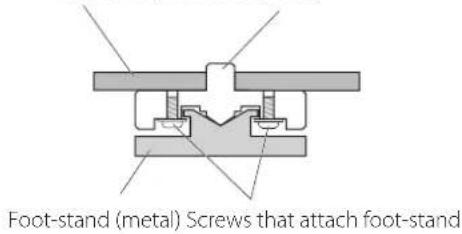
text_image
Foot-stand (metal) Screws that attach foot-standThe stands for these feet are loose, but when the unit is placed in position, it is supported by these pinpoint feet, which will effectively disperse vibrations.
- Apply the included felt pads to the bottoms of the foot-stands to avoid scratching the surface where the unit is placed.
Precautions for use
- This unit is very heavy, so take care to avoid injury during installation.
- Do not install this unit in a location that could become hot. This includes places that are exposed to direct sunlight or near a radiator, heater, stove or other heating equipment. Moreover, do not place it on top of an amplifier or other equipment that generates heat. Doing so could cause discoloration, deformation or malfunction.
- When installing this unit, leave a little space (at least 20 cm or 8") between it and walls and other devices in order to allow good heat dissipation.
If you put it in a rack, take precautions to prevent overheating by leaving at least 5 cm (2") open above the top of the unit and at least 10 cm (4") open behind the unit. Failure to provide these gaps could cause heat to build up inside and result in fire.
- Place the unit in a stable location near the audio system that you will use with it.
- Do not move the unit during use.
- Be careful to avoid injury when moving the unit due to its weight. Get someone to help you if necessary.
- The voltage supplied to the unit should match the voltage printed on the rear panel. If you are in any doubt regarding this matter, consult an electrician.
- Do not open the body of the unit as this might result in damage to the circuitry or cause electric shock. If a foreign object should get into the unit, contact your dealer.
- Do not place anything, not even CDs, CD-Rs, LP records or cassette tapes, on top of the unit. Doing so could cause damage.
- When removing the power plug from an outlet, always pull directly on the plug; never yank on the cord itself.
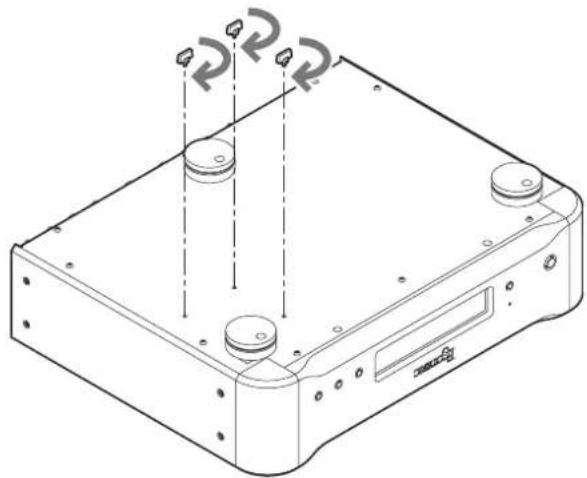
The rubidium unit is attached loosely inside this equipment because this contributes to improving the sound quality.
For this reason, before shipment from the factory, transportation locking screws have been attached through the bottom of the G-01X to protect the rubidium unit from vibration during transportation.
- After removing the transportation locking screws, save them in a safe place because you will need to reattach them before transporting the unit in the future.
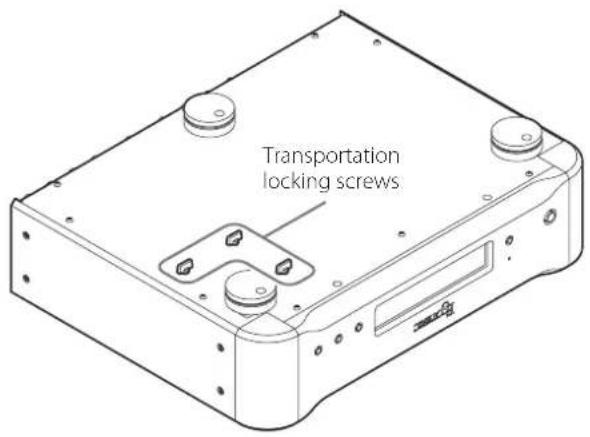
text_image
Transportation locking screwsBefore installing the unit
Before installing the unit, remove the three transportation locking screws.
- Save the transportation locking screws in a safe place because you will need to reattach them before transporting the unit in the future.
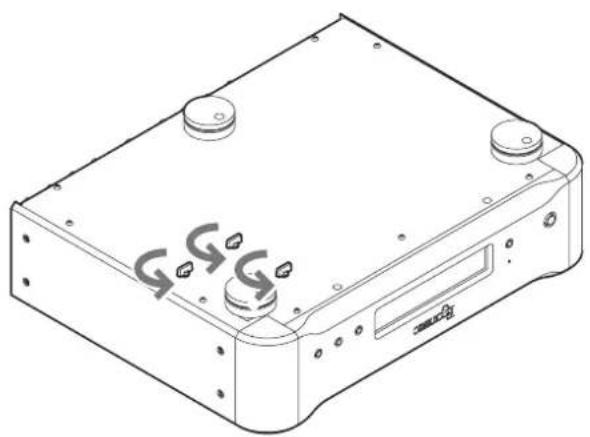
natural_image
Technical line drawing of a mechanical device with mounting holes and a central display (no text or symbols)Before transporting the unit
Before transporting the unit again, reattach the three transportation locking screws removed when the unit was installed.
natural_image
Technical line drawing of a computer chassis with two circular components and mounting holes (no text or symbols)
cautions when making connections
● After completing all other connections, plug the power plug into a power outlet.
- Read the owner's manuals of all devices that will be connected, and follow their instructions.
- For connections other than clock sync, refer to the owner's manuals of the other devices.
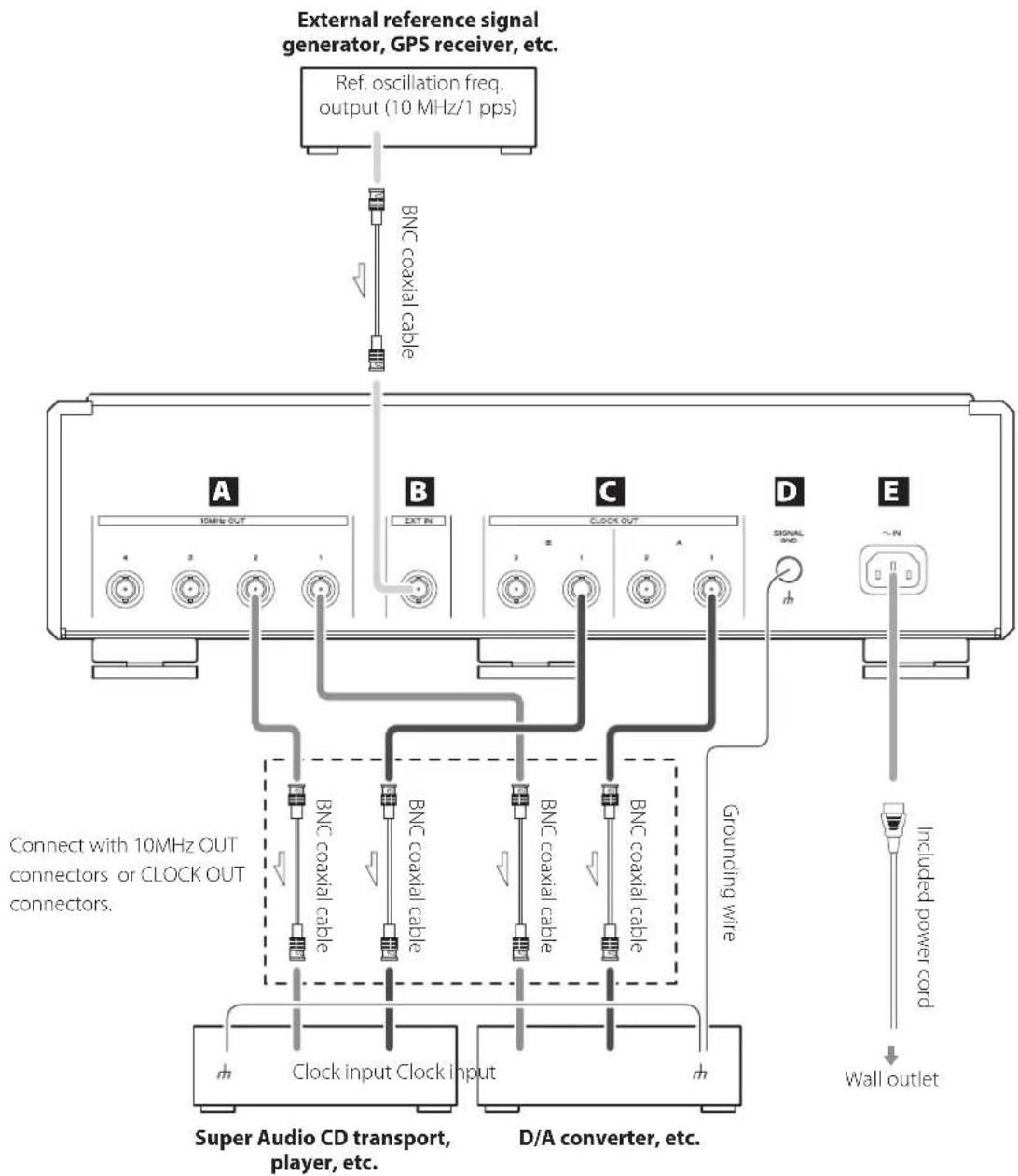
- When using separate devices, such as a CD transport and a D/A converter, input the clock signal from this unit to both.
flowchart
graph TD
    A["External reference signal generator, GPS receiver, etc."] --> B["Ref. oscillation freq. output (10 MHz/1 pps)"]
    B --> C["BNC coaxial cable"]
    C --> D["A"]
    C --> E["B"]
    C --> F["C"]
    C --> G["D"]
    C --> H["E"]
    D --> I["10MHz OUT"]
    E --> J["EXT IN"]
    F --> K["CLOCK OUT"]
    G --> L["SIGNAL GND"]
    H --> M["Grounding wire"]
    I --> N["BNC coaxial cable"]
    J --> O["BNC coaxial cable"]
    K --> P["BNC coaxial cable"]
    L --> Q["Grounding wire"]
    M --> R["Clock input Clock input"]
    N --> S["Super Audio CD transport, player, etc."]
    O --> T["D/A converter, etc."]
    P --> U["Super Audio CD transport, player, etc."]
    Q --> V["Super Audio CD transport, player, etc."]
    R --> W["Super Audio CD transport, player, etc."]
    S --> X["Super Audio CD transport, player, etc."]
    T --> Y["Super Audio CD transport, player, etc."]
    U --> Z["Super Audio CD transport, player, etc."]
    V --> AA["Super Audio CD transport, player, etc."]
    W --> AB["Super Audio CD transport, player, etc."]
    X --> AC["Super Audio CD transport, player, etc."]
    Y --> AD["Super Audio CD transport, player, etc."]
    Z --> AE["Super Audio CD transport, player, etc."]
    AA --> AF["Super Audio CD transport, player, etc."]
    AB --> AG["Super Audio CD transport, player, etc."]
    AC --> AH["Super Audio CD transport, player, etc."]
    AD --> AI["Super Audio CD transport, player, etc."]
    AE --> AJ["Super Audio CD transport, player, etc."]
    AF --> AK["Super Audio CD transport, player, etc."]
    AG --> AL["Super Audio CD transport, player, etc."]
    AH --> AM["Super Audio CD transport, player, etc."]
    AI --> AN["Super Audio CD transport, player, etc."]
    AJ --> AO["Super Audio CD transport, player, etc."]
    AK --> AP["Super Audio CD transport, player, etc."]
    AL --> AQ["Super Audio CD transport, player, etc."]
    AM --> AR["Super Audio CD transport, player, etc."]
    AN --> AS["Super Audio CD transport, player, etc."]
A 10MHz OUT connectors (1–4)
These output 10MHz clock signals (sine wave, 0.5Vrms output level, 30Ω output impedance).
Connect these 10MHz OUT connectors to the clock input, connectors of CD players, D/A converters and other digital devices that support 10MHz input.
- Use the 10MHz button and the 10MHz OUT connector 1.4 output settings to set the 10MHz OUT connectors (pages 17 and 18).
B Reference frequency input (EXT IN) connector
To synchronize with a signal from an external reference signal generator (10MHz output) or GPS receiver (pps/10MHz output), connect the output connector of that device to this EXT IN connector and change the reference clock setting (page 18).
- If the output level of the external oscillator is outside the allowable input range of this unit, it cannot be used. Refer to the oscillator manual for information on the output level and accuracy of the oscillator.
C CLOCK OUT connectors
These output clock signals (square wave, 111 level, 75Ω output impedance).
Correct these CLOCK OUT connectors to the clock input con
E Power inlet (\~IN)
Connect the included power cord to this socket. After completing all other connections, plug the power plug into a power outlet.
Use only a genuine Esoteric power cord. Use of other power cords could result in fire or electric shock.
Connect the power plug from the outlet if you will not use the unit for a long time.
Use a commercially-available BNC coaxial cable with 50Ω or 75Ω impedance for each connector.
At Esoteric, we use Esoteric MEXCEL stressfree cables for reference.
For detailed information, access the following website.
http://www.esoteric.jp/products/esoteric/accessory/indexe.html
text_image
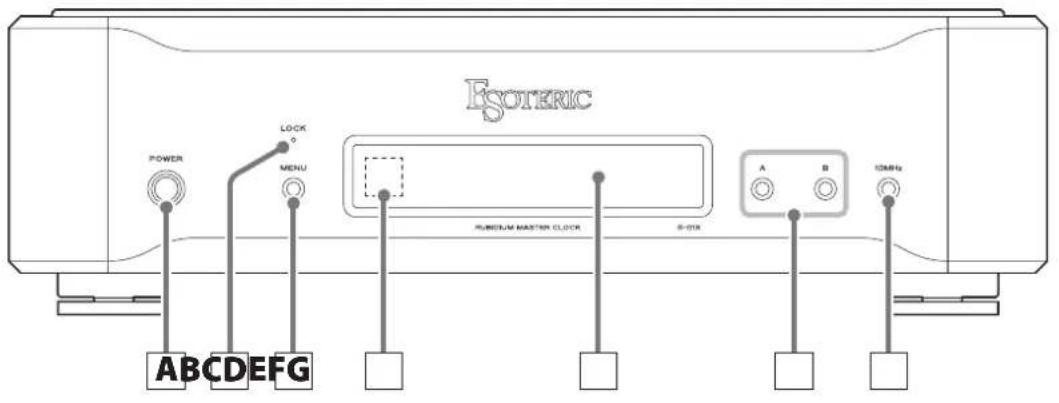
ESOTERIC POWER LOCK MENU RUMENUM MASTER CLOCK B-013K A B 12MHz ABCDEFGA POWER button
Press this to turn the unit on and off.
When the unit is on, the power indicator (ring around this button) lights blue.
- When the power is turned on, the unit starts warming the rubidium unit up to its operating temperature. It takes ten minutes for the oscillator frequency to stabilize.
When you do not plan to use the unit for an extended amount of time, turn the preheat (PrHEAT) setting OFF and press the POWER button to turn the unit off.
B LOCK indicator
This shows the clock status.
This blinks when locking or preheating or when an error occurs. It stays lit when locked completely.
The indicator color changes according to the operation mode (MODE).
It lights green when in Adaptive Zero Ground (A.GND) mode and lights blue when in normal (NORM) mode.
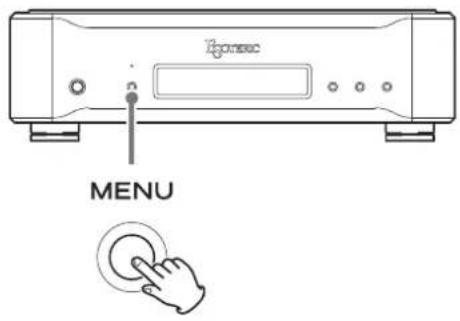
C MENU button
Press to enter setting mode (page 16).
When in setting mode, this changes the setting item.
D Remote control signal receiver
This receives signals from the remote control. When using the remote control, point the end of it toward this receiver panel.
●This unit does not include a remote control.
- The dimmer of this unit can be adjusted using a remote control included with other Esoteric products (page 17).
E Display
This shows the output clock frequency (ordinary display), setting screens and error messages.
●During ordinary display, if any output is on, the name and output frequency of the one that was last set is shown.
- "A", "B" or "10MHz" will usually appear.
"NO OUTPUT" will appear if none of these are being output.
F Frequency selection (A/B) buttons
Use these to set the clock frequency output from the CLOCK OUT connectors (page 13).
When in setting mode, press to select a setting item (page 16).
G 10MHz button
Press this to turn the 10MHz OUT connector output on and off (page 12).
Press when in setting mode to quit setting mode.
- Use the menu to set which 10MHz OUT connectors (1–4) to use (page 18).
Names and functions of parts (display) Rubidium oscillator
text_image
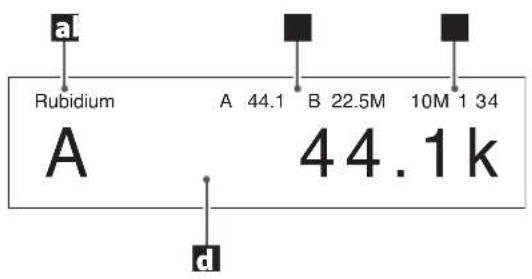
a Rubidium A 44.1 B 22.5M 10M 1 34 A 44.1k da Reference clock
This shows the reference clock setting (page 18).
"Rubidium" shown when Rb>INT
“+EXT1pps” shown when Rb>+1pps
“+EXT10M” shown when Rb>+10MHz
b Frequency mode
This shows the A and B output frequencies (page 13).
C 10MHz outputs
This shows the connectors that have output set to ON (page 18).
d Message display area
This shows output settings, setting items, messages and other information.
This unit uses a rubidium oscillator to generate its reference master clock.
Since rubidium oscillators have extremely high precision and high stability, they are used in GPS satellites and similar applications. In this master clock generator, we have incorporated a rubidium unit because it also features short-term stability and high waveform quality as well as the ability to be used for many years without calibration. These and other characteristics make it excellent for meeting the demands of a master clock generator in a high-end audio system.
When shipped new, this unit is set to Rubidium mode, and will use the built-in rubidium unit to generate the reference clock.
With a frequency precision of ±0.05 ppb (when shipped new) and a frequency stability of less than ±0.1 ppb at temperatures ranging from -20^ to +65^ , this rubidium unit is able to provide an extremely stable audio clock.
This master clock generator can also be connected to a GPS receiver for GPS-linked operation.
By inputting a GPS 1pps signal through the reference frequency input (EXT IN) connector and enabling 1pps mode, the built-in rubidium unit can be made to follow the GPS.
In most cases with GPS receiver output, the degree of short-term stability depends on the GPS receiver. However, since the degree of long-term stability depends on the GPS satellite, this mode allows this master clock generator to synchronize with the accuracy provided by the long-term stability of the GPS satellite (about 0.001 ppb) while utilizing the high quality of the rubidium unit.
In order for the rubidium unit to synchronize with a 1pps input signal, the signal must have accuracy and stability that are equivalent to GPS.
If you are using a GPS receiver that does not have 1pps output, this master clock generator can itself generate a 1pps signal from the GPS receiver's +10MHz output signal. To do this, use this unit's 10MHz mode to make the rubidium unit operate synchronized with the GPS.
text_image
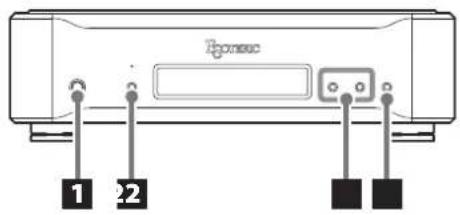
Ponosc 1 21 Press the POWER button to turn the unit on.
POWER

The power indicator lights blue.
- When the power is turned on, the unit starts warming the rubidium unit up to its operating temperature. It takes ten minutes for the oscillator frequency to stabilize.
When you do not plan to use the unit for an extended amount of time, turn the preheat (PrHEAT) setting OFF and press the POWER button to turn the unit off.
2 Make clock output settings.
When using the CLOCK OUT connectors
1) Set the clock reference frequency to 44.1 or 48 kHz.
Press the MENU button to open the FREQ menu and use the A and B buttons to set the frequency mode (pages 16–17).
MENU

A

B

44 (44.1 kHz)
Use for playback of CDs, Super Audio CDs and other 44.1kHz sources.
48 (48 kHz)
Use for playback of DVDs, DATs and other 48kHz sources. (Some DVDs and DATs are recorded at 44.1 kHz. In this case, use the 44.1kHz setting.)
- When using only universal clock (100 kHz or 10 MHz), either setting is fine.
- Only use 44EXP or 48EXP for frequencies that are not covered by the 44 and 48 modes (page 17).
2) Use the A and B buttons to set the frequencies sent to connected devices (page 13).
A
B

When setting 10MHz OUT connectors
Press the 10MHz button to turn output on and off.
Use the menu to set which 10MHz OUT connectors (1–4) to use (page 18).
- If you do nothing for five or more seconds, setting mode will end and ordinary display will resume. (If DISP is set to SHORT, this will happen after three seconds.)
10MHz

3 On the connected devices, turn clock sync ON (or set to slave mode).
Read the owner's manual for each device for instructions on how to set their clock sync status properly.
If you connect this unit to devices from other manufacturers, be sure to read the manuals of those devices to confirm the clock frequencies that they can receive.
Some devices require the clock frequency to be set to the same value as the audio signal sampling frequency.
Some dual AES connections might require that the clock frequency be set to half of the audio signal frequency.
- Due to the nature of the rubidium oscillator, continuous operation stabilizes the precision of operation, so we recommend turning the preheat (PrHEAT) setting ON (page 18).
●Settings are retained even when the power is turned off. - Once settings have been made, those settings can be used when the power is turned on again.
Set the frequency mode according to the type of disc to be played or device being used (page 17).
Clock output frequency setting
You can set the clock frequency output from the CLOCK OUT connectors.
- This unit has 2 pairs (A and B) of clock outputs that can be separated further into 4 individual outputs (A1, A2, B1 and B2). You can set the clock frequency independently for each of these outputs.
- By default, the A and B outputs are set to be used as pairs.
Setting A and B outputs by pair (default)
When you change the A setting, the output frequency is set for both A1 and A2 simultaneously. Follow the same procedure for B.
When "A >" or "B >" appears, pressing the A or B button changes the output frequency of that pair. Press repeatedly to cycle through the options.
- Press and hold the A or B button for at least two seconds to set A2 or B2, respectively (See "Setting A2 or B2").
- If you do nothing for five or more seconds, setting mode will end and ordinary display will resume. (If DISP is set to SHORT, this will happen after three seconds.)
Setting A1, A2, B1 or B2
Press the A button for at least two seconds until "A2>" appears. Then, press the A button to change the A2 setting. You can set different clock frequencies for A1 and A2. Follow the same procedure for B.
Setting A1 or B1
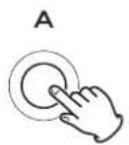
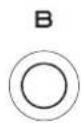
When A2 is set to any value that is not the same as the A1 setting, when "A1>" appears, press the A button to change just the A1 output frequency. Follow the same procedure for B.
Setting A2 or B2
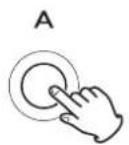
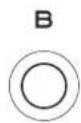
Press the A or B button for at least two seconds to set A2 or B2.
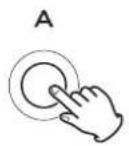
When "A2>" appears, press the A button to change just the A2 output frequency. Follow the same procedure for B.
- To set A1 after setting A2, press the A button again after returning to the ordinary display.
- If you set A2 to the same value as A1, "A" will appear again, and you can set the output frequency used by both outputs in the A pair simultaneously. Follow the same procedure for B (See "Setting A and B outputs by pair (default)").
Frequency setting options
The frequency setting options depend on the frequency mode (FREQ) setting (page 17).
When the frequency mode (FREQ) is set to 44:
OFF
No clock signal is output.
44.1k
44.1kHz clock frequency is output.
88.2k
2 × 44.1 kHz (88.2 kHz) clock is output.
176.4k
4 × 44.1kHz (176.4kHz) clock is output.
22.5MHz
512×44.1kHz (22.5792MHz) clock is output.
100kHz
100kHz clock is output.
10MHz
10MHz clock is output.
A2 = A1
The A2 clock output matches the A1 clock output and will be switched with the A1 setting.
This only appears for the A2 clock setting.
B2 = B1
This setting for B functions in the same way as the "A2 = A1" setting.
When the frequency mode (FREQ) is set to 48:
OFF
No clock signal is output.
48kHz
48kHz clock frequency is output.
96kHz
2 × 48kHz (96kHz) clock is output.
192kHz
4 × 48kHz (192kHz) clock is output.
24.5MHz
512 × 48kHz (24.576MHz) clock is output.
100kHz
100kHz clock is output.
10MHz
10MHz clock is output.
A2 = A1
The A2 clock output matches the A1 clock output and will be switched with the A1 setting.
This only appears for the A2 clock setting.
B2 = B1
This setting for B functions in the same way as the "A2 = A1" setting.
When the frequency mode (FREQ) is set to 44EXP:
OFF
No clock signal is output.
44.1k
44.1 kHz clock frequency is output.
88.2k
2 × 44.1kHz (88.2kHz) clock is output.
176.4k
4 × 44.1kHz (176.4kHz) clock is output.
352.8k
8 × 44.1 kHz (352.8 kHz) clock is output.
705.6k
16 × 44.1 kHz (705.6 kHz) clock is output.
1.4MHz
32 × 44.1kHz (1.4112MHz) clock is output.
2.8MHz
64 × 44.1 kHz (2.8224MHz) clock is output.
5.6MHz
128 × 44.1kHz (5.6448MHz) clock is output.
11.2MHz
256 × 44.1kHz (11.2896MHz) clock is output.
22.5MHz
512 × 44.1kHz (22.5792MHz) clock is output.
100kHz
100kHz clock is output.
10MHz
10MHz clock is output.
A2 = A1
The A2 clock output matches the A1 clock output and will be switched with the A1 setting.
This only appears for the A2 clock setting.
B2 = B1
This setting for B functions in the same way as the "A2 = A1" setting.
When the frequency mode (FREQ) is set to 48EXP:
OFF
No clock signal is output.
48kHz
48kHz clock frequency is output.
96kHz
2 × 48kHz (96kHz) clock is output.
192kHz
4 × 48kHz (192kHz) clock is output.
384kHz
8 × 48kHz (384kHz) clock is output.
768kHz
16 × 48kHz (768kHz) clock is output.
1.5MHz
32 × 48kHz (1.536MHz) clock is output.
3.0MHz
64 × 48kHz (3.072MHz) clock is output.
6.1MHz
128 × 48kHz (6.144MHz) clock is output.
12.2MHz
256 × 48kHz (12.288MHz) clock is output.
24.5MHz
512 × 48kHz (24.576MHz) clock is output.
100kHz
100kHz clock is output.
10MHz
10MHz clock is output.
A2 = A1
The A2 clock output matches the A1 clock output and will be switched with the A1 setting.
This only appears for the A2 clock setting.
B2 = B1
This setting for B functions in the same way as the "A2 = A1" setting.
1 Press the MENU button.
text_image
I2pomsec MENUPress the MENU button again to cycle through the setting items.
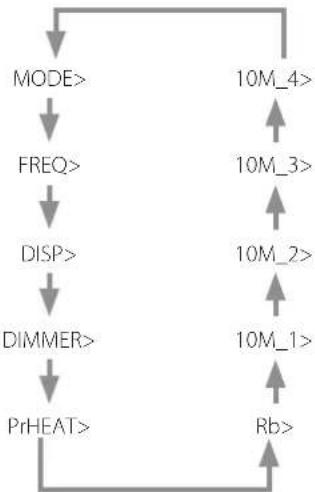
flowchart
graph TD
    A["MODE>"] --> B["FREQ>"]
    B --> C["DISP>"]
    C --> D["Dimmer>"]
    D --> E["PrHEAT>"]
    E --> F["Rb>"]
    F --> G["10M_4>"]
    G --> H["10M_3>"]
    H --> I["10M_2>"]
    I --> J["10M_1>"]
    J --> K["↑"]
    K --> L["↑"]
●The DIMMER item only appears when DISP is set to ON.
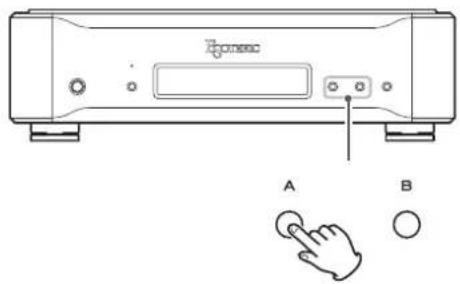
2 Use the A and B buttons to change the settings.
text_image
CD-ROM A BFor explanations of each setting, see pages 17–18.
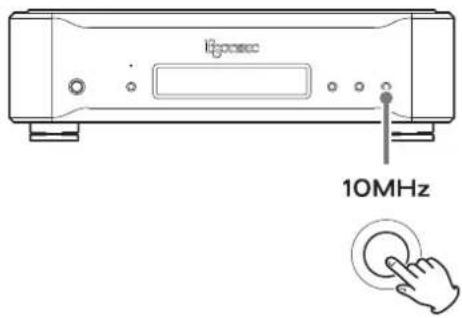
3 Press the 10MHz button to show the ordinary display.
text_image
Epocsec 10MHz- If you do nothing for ten or more seconds, setting mode will end and ordinary display will resume.
- When DISP is set to SHORT, after three seconds without use the unit will exit setting mode and ordinary display will resume (page 17).
●Settings are retained even when the power is turned off.
Operation mode setting
MODE>***
Use this to set the operation mode of the CLOCK OUT connectors.
A.GND (Adaptive Zero Ground)
The amp is used to drive the negative connector so that it becomes 0 V.
NORM
This outputs a clock signal with normal output.
Frequency mode setting
FREQ>***
Set the clock reference frequency to 44.1 kHz or 48 kHz. Use an EXP mode to increase the range of output frequency options that can be used.
- Set the reference frequency according to the playback source.
44.1 kHz
Use for playback of CDs, Super Audio CDs and other 44.1kHz sources.
48 kHz
Use for playback of DVDs, DATs and other 48kHz sources. (Some DVDs and DATs are recorded at 44.1 kHz. In this case, use the 44.1kHz setting.)
- 100 kHz and 10 MHz can be output regardless of the selected setting.
44
Sets the reference frequency to 44.1 kHz.
The frequency can be set to 44.1, 88.2, 100 or 176.4 kHz or 10 or 22.5792 MHz.
48
Sets the reference frequency to 48 kHz.
The frequency can be set to 48, 96, 100 or 192 kHz or 10 or 24.576 MHz.
44EXP
Sets the reference frequency to 44.1 kHz.
The frequency can be set to 44.1, 88.2, 100, 176.4, 352.8 or 705.6 kHz or 1.4112, 2.8224, 5.6448, 10, 11.2896 or 22.5792 MHz.
48EXP
Sets the reference frequency to 48 kHz.
The frequency can be set to 48, 96, 100, 192, 384 or 768 kHz or 1.536, 3.072, 6.144, 10, 12.288 or 24.576 MHz.
Display illumination time setting
DISP>***
You can set the amount of time that the clock frequency is shown on the display to ON, LONG or SHORT.
- We recommend setting this to LONG or SHORT because display brightness irregularities might occur if the same information is shown without change for a long time.
ON
In this mode, the display always stays lit.
Set the brightness of the display with the dimmer setting.
LONG
When ordinary display continues without any operation being conducted for about 20 seconds, the display will automatically turn off.
SHORT
When ordinary display continues without any operation being conducted for about three seconds, the display will automatically turn off.
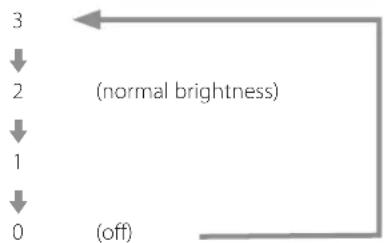
Dimmer setting
DIMMER>***
When the display illumination time setting (DISP) is ON, you can adjust the brightness of the unit's display and indicators.
- You can also change this setting using the DIMMER button on a remote control that is included with another Esoteric product such as the P-02X, K-01X or K-03X.
flowchart
graph TD
    A["3"] --> B["2"]
    B --> C["1"]
    C --> D["0"]
    D --> E["(off)"]
    style A fill:#f9f,stroke:#333
    style B fill:#f9f,stroke:#333
    style C fill:#f9f,stroke:#333
    style D fill:#f9f,stroke:#333
    style E fill:#f9f,stroke:#333
    note right of A (normal brightness)
- When set to "DIMMER>0", the display will not be lit.
- When unlit, pressing a button will cause the display to light for a few seconds.
- When set to a value other than "DIMMER>3", error messages and settings menu items will be shown at normal brightness ("DIMMER>2").
Preheating setting
PrHEAT>\*\*\*
Use to turn ON/OFF preheating when the unit is off.
OFF
The POWER button turns the rubidium oscillator on/off with the unit.
ON
This turns the power for the rubidium oscillator on regardless of the POWER button setting. This shortens the amount of time until the oscillator stabilizes after the unit is turned on.
- Due to the nature of the rubidium oscillator, continuous operation stabilizes the precision of operation, so we recommend turning this ON.
- When the unit power is off, clock is not output even though the rubidium oscillator is operating.
- If the rubidium oscillator is always on, the unit will consume considerably more power when the unit is off.
Reference clock setting
Rb>***
INT
The built-in rubidium unit is used for the reference clock.
+1pps
Use this mode when a GPS 1pps signal is input through the reference frequency input (EXT IN) connector to operate with the built-in rubidium unit synchronized to the GPS.
- Synchronization of the rubidium unit with a 1pps signal takes about ten minutes.
While synchronizing, the LOCK indicator blinks and "1ppsLCK-ING" appears on the display.
+10MHz
Use this mode when inputting the 10MHz output from a GPS receiver to the reference frequency input (EXT IN) connector. (Use when the GPS receiver does not have a 1pps output.) This unit will internally generate a 1pps signal and operate with the built-in rubidium unit synchronized to the GPS.
- When using +1pps or +10MHz mode, since synchronizing with the built-in rubidium oscillator takes a very long time, we strongly recommend setting PrHEAT (preheating) to ON.
10MHz OUT connector 1 output setting
10M_1>***
Use to set the output for the 10MHz OUT 1 connector.
ON
This enables it.
OFF
This disables it.
10MHz OUT connector 2 output setting
10M_2>***
Use to set the output for the 10MHz OUT 2 connector.
ON
This enables it.
OFF
This disables it.
10MHz OUT connector 3 output setting
10M_3>***
Use to set the output for the 10MHz OUT 3 connector.
ON
This enables it.
OFF
This disables it.
10MHz OUT connector 4 output setting
10M_4>***
Use to set the output for the 10MHz OUT 4 connector.
ON
This enables it.
OFF
This disables it.
Messages
Maintenance
PLL LCKING
The 10MHz reference clock from the built-in rubidium oscillator is being locked by the internal PLL circuit.
When locking completes, this message will disappear.
o Ordinarily, only a few seconds are needed until locking completes (PLL locking time), but it can take up to a minute depending on the operating temperature and other factors.
o If locking cannot be completed because input conditions are not met when set to +10MHz, the message will continue to be displayed.
Check the input reference clock.
Rb LOCKING
The output of the ruhidium unit is being stabilized (when preheating or changing the reference clock).
Use a soft dry cloth to wipe the surface of the unit clean.
For stubborn smudges, use a damp cloth that has been thoroughly wrung out to remove excess moisture.
For safety, disconnect the power plug from the outlet before cleaning.
o Never spray liquid directly on this unit.
Do not use chemically-treated wipes, thinner or similar substances because they could damage the surface of the unit.
o Avoid allowing rubber or plastic materials to touch the unit for long periods of time because they could damage the cabinet.
1ppsLCKING
This sometimes appears when the reference clock is set to +10MHz or +1pps.
This message appears during synchronization with a 1pps signal that has been converted by this unit from an input 10MHz clock (+10MHz) or with an input 1pps clock (+1pps).
o Synchronization sometimes takes a long time.
o If the input signal precision does not meet the requirements of this unit, synchronization will not occur even after ten minutes and "1ppsLCKING" will continue to appear on the display. Check the input signal precision. If it does not meet the requirements of this unit, set the reference clock to INT.
English
Troubleshooting
If you experience a problem with this unit, please take a moment to review the following information before requesting service. If this product still does not operate correctly, contact the retailer where you purchased it.
The unit does not turn on.
→Check that the power cord is plugged into a working power outlet.
→Check that the power cord is properly connected to this unit.
The clock output is not synchronizing another device.
→Confirm that the clock being output is supported by the device connected to this unit. (Select a clock frequency that the connected device can use.)
The input and synchronization of clock signals might vary according to the device. Refer to the owner's manual of each device for how to connect and set them.
The desired frequency cannot be selected by pressing the A and B buttons.
→Set the reference frequency with the frequency mode setting (FREQ) first, and then use the A and B buttons (page 17).
Restoring factory default settings
natural_image
Line drawing of a portable electronic device with ports and indicator lights (no text or symbols)POWER

MENU

Settings are retained even if the power plug is disconnected.
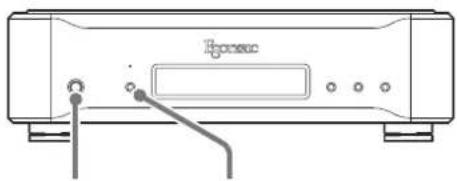
Follow these procedures to restore all settings to their factory defaults and clear the unit's memory.
1 Turn the unit off.
If the unit is on, press the POWER button to turn it off and wait for more than 30 seconds.
2 Press the POWER button while holding down the MENU button.
- Release the MENU button when the unit turns on and the display lights.
Clock outputs
CLOCK OUT connectors
44.1 kHz setting.... 44.1, 88.2, 176.4, 352.8, 705.6 kHz
1.4112, 2.8224, 5.6448, 11.2896, 22.5792 MHz
48kHz setting....48, 96, 192, 384, 768 kHz
1.536, 3.072, 6.144, 12.288, 24.576 MHz
Both settings....100 kHz, 10 MHz
BNC connectors....4
Output level..... Rectangle wave: TTL level/75 Ω
10MHz OUT connectors 10 MHz
BNC connectors....4
Output level..... sine wave, 0.5±0.1 Vrms/50 Ω
Master clock input (EXT IN)
Input frequency
+1pps mode .... 1pps signal (GPS precision or better)
+10MHz mode .... 10 MHz (GPS precision or better)
BNC connector....1
Input levels
10 MHz.... Sine wave: 0.5–1.0 Vrms/50 Ω
Rectangle wave: TTL level/10 kΩ
1pps signal.... Positive pulse: TTL level/10 kΩ
Rubidium oscillator
Clock stabilization time ....about 10 minutes (time until oscillator stabilizes after unit turned on)
Frequency stability ....Within ±0.1 ppb (−20°C to +65°C)
Frequency precision .... Within ±0.05 ppb (when shipped new) (ppb = 10 ^- )
General
Power supply
Model for Europe/Hong Kong/Korea.....AC 220–240 V, 50/60 Hz
Model for USA/Canada/Taiwan ..... AC 110–120 V, 60 Hz
Power consumption....75 W (while warming up)
30 W (when stable)
Dimensions (W × H × D) (including protrusions)
445 × 131 × 359 ~mm (17 5 / 8'' × 5 1 / 4'' × 14 1 / 4'' )
Weight 13.3 kg (29 3/8 lb)
Operating temperature....+5°C to +35°C
Included accessories
Power cord × 1
Felt pads × 3
Owner's manual (this document) × 1
Warranty card × 1
●Design and specifications are subject to change without notice.
●Weight and dimensions are approximate.
● Illustrations in this manual might differ slightly from production models.
text_image
Honec 403 445 131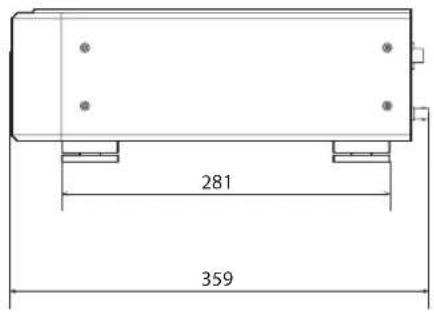
text_image
281 359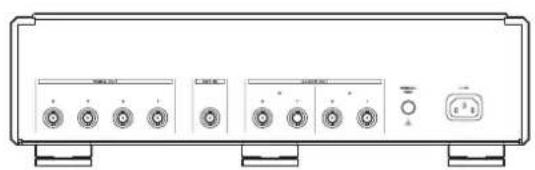
natural_image
Front view of a portable electronic device with four buttons and a control panel (no visible text or labels)Dimensions in millimeters (mm)
CAUTION
RISK OF ELECTRIC SHOCK DO NOT OPEN

ATTENTION : POUR RÉDUIRE LE RISQUE D'ÉLECTROCUTION, NE RETIREZ PAS LE CAPOT (OU L'ARRIÈRE). AUCUNE PIÈCE INTERNE N'EST RÉPARABLE PAR L'UTILISATEUR. CONFIEZ TOUTE RÉPARATION À UN SERVICE APRÈS-VENTE QUALIFIÉ.

natural_image
Symbolic icon of a person pushing a large object under a circular background (no text or symbols)MEXCEL is a registered trademark of Mitsubishi Cable Industries, Ltd. in Japan and other countries.
ESOTERIC is a trademark of TEAC CORPORATION, registered in the U.S. and other countries.
natural_image
Isometric line drawing of a rectangular electronic device with four circular ports and a central display (no text or symbols)natural_image
Technical line drawing of a computer chassis with mounting holes and a display unit (no text or symbols)text_image
Ponosc 1 2text_image
Sonybox A BA.GND (Adaptive Zero Ground)
Dimensions (L × H × P) (saillies incluses) ..... 445 × 131 × 359 mm
Poids 13,3 kg
natural_image
Front view of a portable electronic device with four buttons and a control panel (no visible text or labels)natural_image
Silhouette of a person climbing a ladder inside a circular frame (no text or symbols)MEXCEL is a registered trademark of Mitsubishi Cable Industries, Ltd. in Japan and other countries.
ESOTERIC is a trademark of TEAC CORPORATION, registered in the U.S. and other countries.
natural_image
Pure mechanical assembly diagram without any text, numbers, or symbolsnatural_image
Isometric line drawing of a rectangular electronic device with mounting holes and a central display (no text or symbols)natural_image
Technical line drawing of a mechanical device with mounting holes and a central display (no text or symbols)
A.GND (Adaptive Zero Ground)
natural_image
Front view of a portable electronic device with four buttons and a control panel (no visible text or labels)This appliance has a serial number located on the rear panel. Please record the serial number and retain it for your records.
Model name: G-01X Serial number