Xcite Z350 - Electric mower HUSQVARNA - Free user manual and instructions
Find the device manual for free Xcite Z350 HUSQVARNA in PDF.



| Product Type | Zero-turn riding lawn mower |
| Brand | Husqvarna |
| Model | Xcite Z350 |
| Engine | Kohler KT735, 24 hp (17.9 kW), 725 cm³ |
| Fuel | Unleaded gasoline (min. octane rating 87), tank 16.3 L |
| Cutting width | 137 cm (54 in) |
| Cutting height | 3.9 to 11.4 cm (1.5 to 4.5 in), 12 positions |
| Number of blades | 3 blades of 53 cm (21 in) |
| Blade engagement | Electric (Ogura clutch) with button on right lever |
| Transmission | Tuff Torq TZ-350 (hydrostatic) |
| Maximum forward/reverse speed | 12.87 km/h / 5.63 km/h |
| Maximum slope | 10° (17.6%) |
| Front/rear tires | 13 x 6.5-6 / 20 x 10-10 (Turf) |
| Tire pressure | 103 kPa (15 psi) |
| Dimensions (L x W x H) | 200 x 126 x 108 cm |
| Weight (without fuel) | 360.2 kg |
| Battery | 12 V, 230 CCA |
| Lighting | LED headlights |
| Connectivity | Bluetooth® (Husqvarna Connect app) |
| Safety | Mechanical parking brake, operator presence control, battery disconnect |
| Maintenance | Regular cleaning, engine oil change, blade sharpening, belt inspection |
| Warranty | Original parts mandatory, warranty void if modifications |
Frequently Asked Questions - Xcite Z350 HUSQVARNA
User questions about Xcite Z350 HUSQVARNA
0 question about this device. Answer the ones you know or ask your own.
Ask a new question about this device
Download the instructions for your Electric mower in PDF format for free! Find your manual Xcite Z350 - HUSQVARNA and take your electronic device back in hand. On this page are published all the documents necessary for the use of your device. Xcite Z350 by HUSQVARNA.
USER MANUAL Xcite Z350 HUSQVARNA
Xcite™ Z350, Xcite™ Z380
EN Operator's manual 2-35
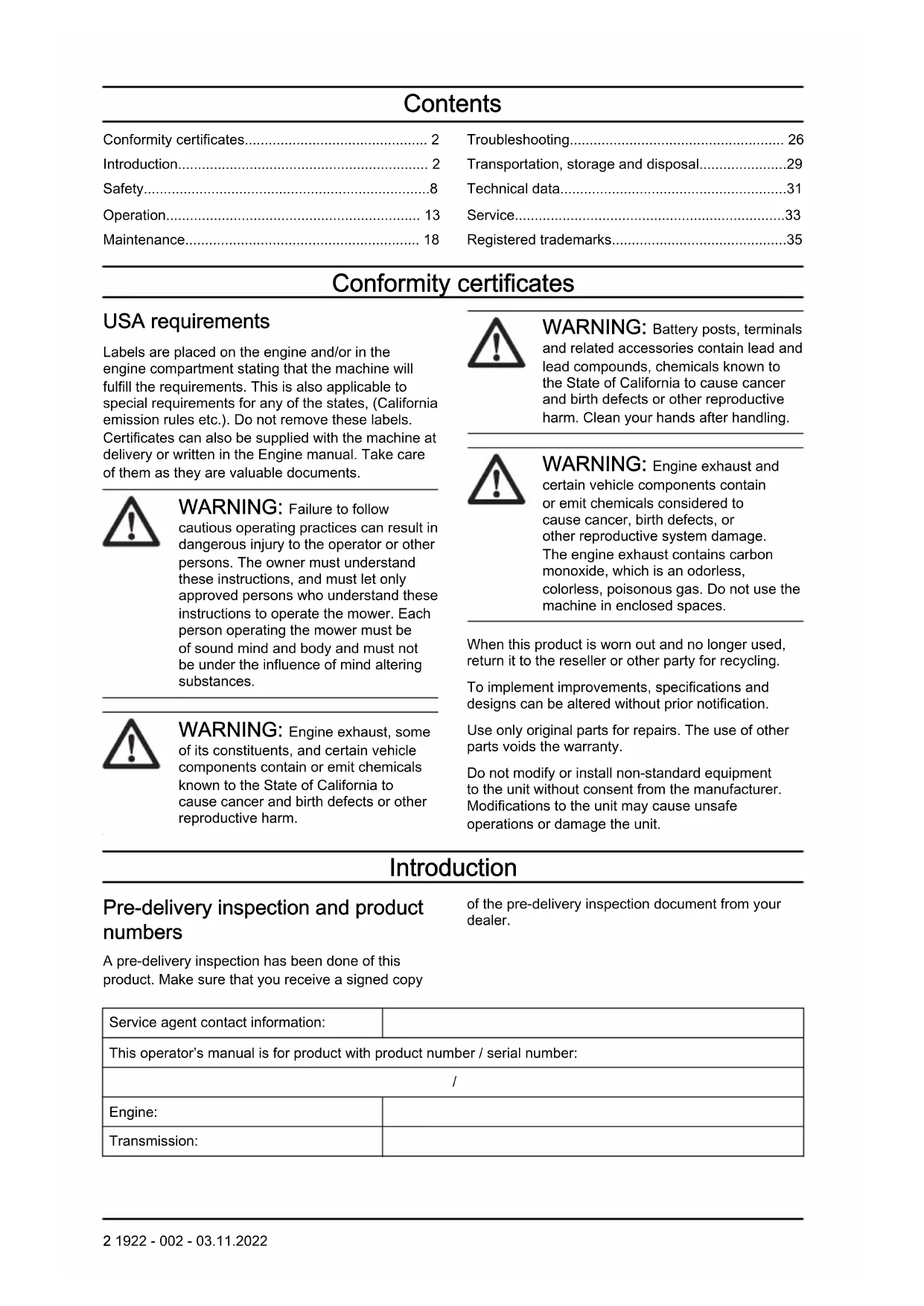
Conformity certificates.... 2
Introduction.... 2
Safety....8
Operation.... 13
Maintenance.... 18
Troubleshooting.... 26
Transportation, storage and disposal....29
Technical data....31
Service....33
Registered trademarks....35
Conformity certificates
USA requirements
Labels are placed on the engine and/or in the engine compartment stating that the machine will fulfill the requirements. This is also applicable to special requirements for any of the states, (California emission rules etc.). Do not remove these labels. Certificates can also be supplied with the machine at delivery or written in the Engine manual. Take care of them as they are valuable documents.

WARNING: Failure to follow cautious operating practices can result in dangerous injury to the operator or other persons. The owner must understand these instructions, and must let only approved persons who understand these instructions to operate the mower. Each person operating the mower must be of sound mind and body and must not be under the influence of mind altering substances.

WARNING: Engine exhaust, some of its constituents, and certain vehicle components contain or emit chemicals known to the State of California to cause cancer and birth defects or other reproductive harm.

WARNING: Battery posts, terminals and related accessories contain lead and lead compounds, chemicals known to the State of California to cause cancer and birth defects or other reproductive harm. Clean your hands after handling.

WARNING: Engine exhaust and certain vehicle components contain or emit chemicals considered to cause cancer, birth defects, or other reproductive system damage. The engine exhaust contains carbon monoxide, which is an odorless, colorless, poisonous gas. Do not use the machine in enclosed spaces.
When this product is worn out and no longer used, return it to the reseller or other party for recycling.
To implement improvements, specifications and designs can be altered without prior notification.
Use only original parts for repairs. The use of other parts voids the warranty.
Do not modify or install non-standard equipment to the unit without consent from the manufacturer. Modifications to the unit may cause unsafe operations or damage the unit.
Introduction
Pre-delivery inspection and product numbers
A pre-delivery inspection has been done of this product. Make sure that you receive a signed copy
of the pre-delivery inspection document from your dealer.
| Service agent contact information: | |
| This operator's manual is for product with product number / serial number: | |
| / | |
| Engine: | |
| Transmission: | |
The product numbers are found on the type plate. Refer to Product overview on page 3 for the location of the type plate.
Product description
This product is a ride-on lawn mower. The control levers let the operator steer the product and adjust
the speed of the product. An hour meter shows how many hours the product has been used.
Intended use
The product is made to cut grass on open and level ground only. Do not use the product for other tasks.
Product overview
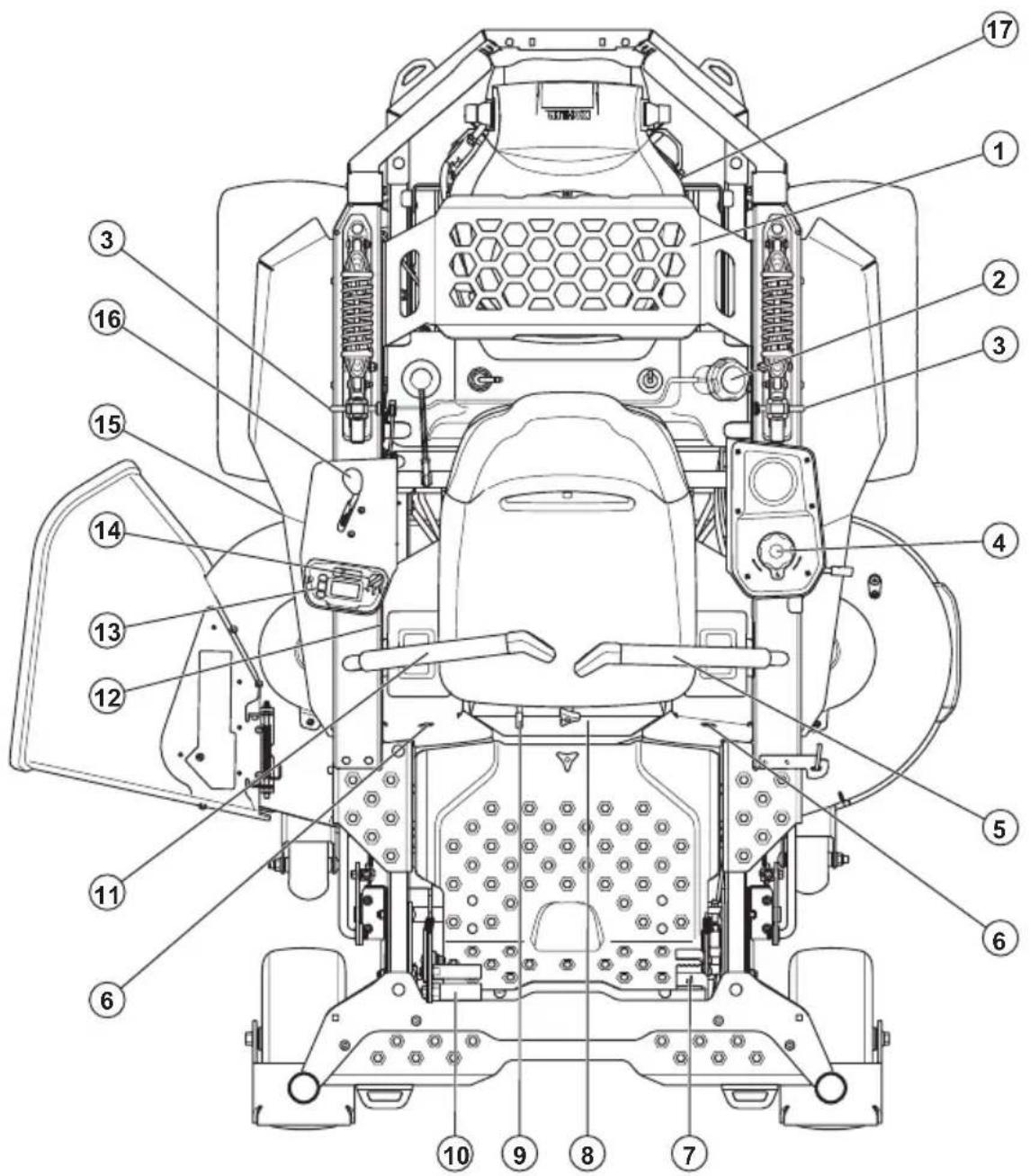
text_image
Technical diagram of a mechanical device with numbered parts for identification- Accessory rack
- Fuel tank
- Seat suspension adjustment
- Cutting height adjustment
- Left control lever with start/stop button
- Tracking control
-
Parking brake pedal
-
Battery compartment cover
- Seat adjustment lever
- Deck lifting pedal
- Right control lever with PTO button
- Fuses
- Control panel
-
Key switch with key
-
Type plate
-
Throttle control
-
Oil drain plug
Control panel overview

text_image
Husqvarma START STOP OK STOP OK OK STOP OK OK STOP OK OK OK OK OK OK OK OK OK OK OK OK OK OK OK OK OK OK OK OK OK OK OK OK OK OK OK OK OK OK OK OK OK OK OK OK OK OK OK OK OK OK OK OK OK OK OK OK OK OK AK- Display
- Key switch unlocked position
- Key switch locked position
- Key switch
- Engine START/STOP button
- ON/OFF button for the headlights
- Down button
- OK button
- Up button
To do selections on the display
You can select between engine speed, session time, battery status and ambient temperature to show on the display during operation. Refer to Symbols on the control panel and display on page 7 for descriptions of the symbols.
- Push the OK button on the control panel to open the menu structure.
- Push the up and down buttons on the control panel until the correct symbol is selected.
- Push the OK button and wait 5 seconds. The selected symbol shows on the display together with the current value.
Message types
There are 4 types of messages that can show on the display. A message is shown as a symbol or a combination of symbols.
| Message type | Description |
| Information message | In the lower right corner of the display. Shows an engaged function or that servicing is necessary. |
| Caution message | In the center of the display. Shows a condition that is not correct. Refer to Caution messages on the display on page 28. |
| Warning message | In the center of the display. A warning triangle shows together with an additional symbol if there is a safety warning or the product is defective. Refer to Warning messages on the display on page 29. |
| Error message | In the center of the display. A warning triangle shows together with a number. The product cannot be operated until servicing is done. Speak to your Husqvarna servicing dealer. |
Steering controls
The direction of the product is controlled by the 2 control levers. Refer to Product overview on page 3 The right control lever has a PTO (Power Take-Off)
button. The left control lever has a START/STOP button.
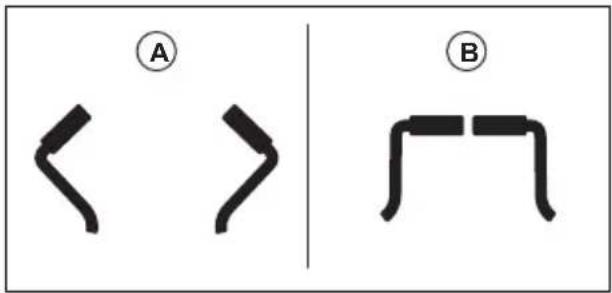
The control levers must be moved out to the park position (A) to start the product. The control levers can be moved forward and rearward from the neutral position (B). Refer to To operate the product on page 17.
text_image
A B< >PTO (Power Take-Off) button and LED indicator
The PTO button (A) is on the right control lever. The PTO button engages and disengages the PTO clutch and the cutting deck. The correct start conditions must be obeyed to engage the drive of the blades. Refer to Operation conditions on page 11 for the correct start conditions.

text_image
B A- Push and hold the PTO button for approximately 1–2 seconds to engage the drive to the blades. A PTO symbol on the display shows that the drive to the blades is engaged.
- Push and hold the PTO button for approximately 1–2 seconds again to disengage the drive to the blades.
The LED indicator (B) adjacent to the PTO button shows the PTO status.
| LED indicator | Description |
| Solid white | The drive to the blades is engaged, no errors. |
| Flashes yellow | When you push the PTO button: The drive to the blades cannot be engaged because the operator is not in the seat. |
| During operation: The drive to the blades will soon disengage because the operator is not in the seat. |
| LED indicator | Description |
| Flashes red | The drive to the blades is disengaged because the operator is not in the seat. |
| Solid red | The PTO function is defective. Servicing is necessary. |
Engine START/STOP button and LED indicator
The engine START/STOP button (A) is on the left control lever.
Note: There is also an engine START/STOP button on the control panel. Refer to Control panel overview on page 4. The 2 engine START/STOP buttons have the same function.
The engine START/STOP button starts and stops the engine. The correct start conditions must be obeyed to start the engine. Refer to Operation conditions on page 11 for the correct start conditions.
The LED indicator (B) adjacent to the engine START/STOP button on the left control lever gives information about the engine operation.

text_image
Diagram of a device with labeled parts A and B, showing internal structure and connector| LED indicator | Description |
| Solid white The engine is on, no errors. | |
| Flashes yellow | The engine cannot start. The parking brake is not engaged, the control levers are in an incorrect position or the key switch is in locked position. |
| Flashes white | All operation conditions are obeyed. Start of the engine is possible. |
| Flashes red | The engine stopped because the parking brake is not engaged and the operator is not in the seat. |
| Solid red | The engine is defective. Servicing is necessary. |
Operator Presence Control (OPC)
The OPC engages when the operator lifts from the seat. The engine and the drive to the blades stop if the blades are engaged or the parking brake is not applied. Refer to Operation conditions on page 11.
Throttle control
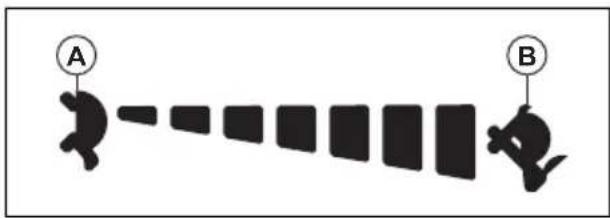
The throttle control adjusts the speed of the engine and the speed of the blades if the blades are engaged. The throttle control has 2 end positions, idle speed and full throttle.
text_image
A B- Idle speed (A) - decreases the engine speed.
• Full throttle (B) - increases the engine speed.

CAUTION: Do not operate the engine at idle speed (A) for longer time than necessary. Too much operation time at idle speed can decrease the life of the spark plugs.
Fuses
The location of the fuses is in the fuse box. The fuse box is below the seat. Remove the battery compartment cover to get access to the fuse box. Refer to the decal on the fuse box for identification of the different fuses.
Hour meter
The product has an hour meter that shows how many hours the engine has operated. The hour meter is selected on the control panel display.
To read the hour meter
- Push the OK button on the control panel to open the menu structure.
- Push the down button on the control panel until the information symbol is selected.
- Push the OK button. The display shows how many hours that the engine has been in operation.
- To go back to the menu, push the down button 2 times and then push the OK button.
Symbols on the product

WARNING: This product can be dangerous and cause serious injury or death to the operator or others. Be careful and use the product correctly.
Read the operator's manual carefully and make sure that you understand the instructions before you use the product.
Stop the engine and remove the key before you do maintenance.

Keep a safe distance from the product.

Do not operate the product on slopes larger than 10^ .
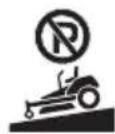
Do not park the product on slopes.
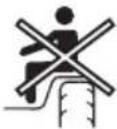
Do not keep passengers.
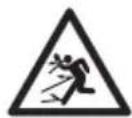
Look out for ejecting objects and ricochets.
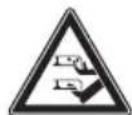
Keep hands and feet away from the cutting deck.

Keep hands away from rotating parts.

Look out for persons and animals when you operate the product forward.
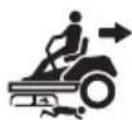
Look out for persons and animals when you operate the product rearward.

Do not sit on the accessory rack.
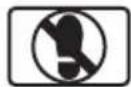
Do not put your foot here.

Control levers out.
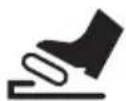

Parking brake.
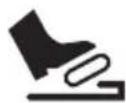
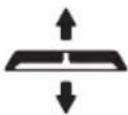
Cutting deck lift.
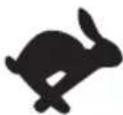
Engine speed – fast.
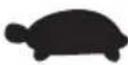
Engine speed – slow.

Neutral.

Reverse.

Fuel.
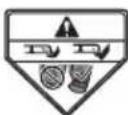
Do not operate the product without deflector or grass catcher.

Low cutting height.

High cutting height.
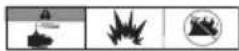
Warning! Battery acid is corrosive, explosive and flammable.

Keep body parts away from rotating parts.
yyyyMMddxxxx The rating plate shows
the serial number. yyyy is the production year and ww is the production week.
Note: Other symbols/decals on the product refer to certification requirements for some commercial areas.
Symbols on the control panel and display
For information about caution symbols, refer to Caution messages on the display on page 28.
START STOP
Start/stop the engine.

The key switch is unlocked.

The key switch is locked.

Headlights on.

Parking brake engaged.

PTO (Power Take-Off) indicator. The drive of the blades is engaged.

Servicing.

Bluetooth®.
Fuel level.

Engine speed.

Elapsed time for the current session.
Battery.

Ambient temperature.

Information.

Hour meter.

Reset remaining hours to servicing.

Cancel reset of remaining hours to servicing.

Confirm reset of remaining hours to servicing.

Go back to previous menu.
Product liability
As referred to in the product liability laws, we are not liable for damages that our product causes if:
• the product is incorrectly repaired.
- the product is repaired with parts that are not from the manufacturer or not approved by the manufacturer.
- the product has an accessory that is not from the manufacturer or not approved by the manufacturer.
- the product is not repaired at an approved service center or by an approved authority.
Safety
Safety definitions
Warnings, cautions and notes are used to point out specially important parts of the manual.

WARNING: Used if there is a risk of injury or death for the operator or bystanders if the instructions in the manual are not obeyed.

CAUTION: Used if there is a risk of damage to the product, other materials or the adjacent area if the instructions in the manual are not obeyed.
Note: Used to give more information that is necessary in a given situation.
General safety instructions

WARNING: Read the warning instructions that follow before you use the product

WARNING: This product is capable of amputating hands and feet and throwing objects. Failure to observe the following safety instructions could result in serious injury or death.
- Read, understand, and follow instructions and warnings in this document, the operator's manual and on the product, engine and attachments.
- Only allow operators, who are responsible, trained, familiar with the instructions, and physically capable to operate the product.
- Do not carry passengers and keep bystanders away.
-
Do not operate the product while under the influence of alcohol or drugs.
-
Follow the manufacturer's recommendation for wheel weights or counterweights.
- Learn how to use the product and its controls safely and learn how to stop the product quickly.
- Learn to recognize the safety decals.
- Keep the product clean to make sure that you can clearly read signs and stickers.
- Keep in mind that the operator will be held responsible for accidents that involve other persons or their property.
- Only use the product in daylight or in other well-lit conditions. Keep the product at a safe distance from holes or other irregularities in the ground. Look out for other possible risks.
- Do not let children or other persons not approved for operation of the product to use or do servicing on it. Local laws may regulate the age of the user.
- Make sure that nobody else is in the vicinity of the product when you start the engine, engage the drive or start to move the product.
- Keep an eye on the traffic when you mow near a road or move across a road.
- Do not use the product if you are fatigued, while under the influence of alcohol or drugs, medicine or anything that can have a negative effect on your vision, alertness, coordination or judgement.
• Always park the product on a level surface with the engine stopped.
Safety instructions regarding children

WARNING: Read the warning instructions that follow before you use the product.
- Tragic accidents can occur if the operator is not alert to the presence of children. Children are often attracted to the product and the mowing activity. Never assume that children will remain where you last saw them.
- Keep children out of the operating area and under the watchful care of a responsible adult other than the operator.
- Do not carry children, even with the blade(s) shut off. Children could fall off and be seriously injured or interfere with safe product operation. Children who have been given rides in the past could suddenly appear in the mowing area for another ride and be run over or backed over by the product.
Safety instructions for operation

WARNING: Read the warning instructions that follow before you use the product.

WARNING: Do not touch the engine or exhaust system during or directly after operation. The engine and the exhaust system become very hot during operation. Risk of burn injuries, fire and damage to property or adjacent areas. When you operate the product, keep away from bushes and other objects.
- Only operate the engine in well ventilated areas. Exhaust gases contain carbon monoxide, a deadly poison.
- Only operate the product in daylight or good artificial light.
- Avoid holes, ruts, bumps, rocks, or other hidden hazards. Uneven terrain could overturn the product, or cause operator to lose their balance or footing.
- Do not put hands or feet near rotating parts or under the product. Keep clear of the discharge opening at all times.
- Do not direct discharge material toward anyone. Avoid discharging material against a wall or obstruction. Material may ricochet back toward the operator. Stop the blade(s) when crossing gravel surfaces.
- Do not leave a running product unattended. Always park on level ground, disengage the attachment, set parking brake, and stop engine/motor.
- Do not mow in reverse unless absolutely necessary. Always look down and behind before and while backing.
- Decrease the speed before you turn around a corner.
Bluetooth®

CAUTION: Changes or modifications made to this equipment not expressly approved by Husqvarna may void the FCC authorization to operate this equipment.
Notice: This device complies with Part 15 of FCC Rules and with Innovation, Science and Economic Development Canada licence-exempt RSS standard. Operation is subject to the following two conditions:
• This device may not cause harmful interference
- This device must accept any interference received, including interference that cause undesired operation.
Note: This equipment has been tested and found to comply with the limits for a Class B digital device, pursuant to part 15 of the FCC Rules. These limits are designed to provide reasonable protection against harmful interference in a residential installation. This equipment generates, uses and can radiate radio frequency energy and, if not installed
and used in accordance with the instructions, may cause harmful interference to radio communications. However, there is no guarantee that interference will not occur in a particular installation. If this equipment does cause harmful interference to radio or television reception, which can be determined by turning the equipment off and on, the user is encouraged to try to correct the interference by one or more of the following measures:
- Reorient or relocate the receiving antenna.
- Increase the separation between the equipment and receiver.
- Connect the equipment into an outlet on a circuit different from that to which the receiver is connected.
- Consult the dealer or an experienced radio/TV technician for help.
This product meets the applicable Innovation, Science and Economic Development Canada technical specifications.
Suppliers Declaration of Conformity for HusqvarnaXcite™ Z350, Xcite™ Z380
Responsible Party
Husqvarna Professional Product, Inc.
9335 Harris Corners Parkway
Charlotte, NC 28269
United States
Telephone: +1 704 597 5000
E-mail: http://www.husqvarna.com/us/support/e-mail/
Safety instructions for operation on slopes

WARNING: Read the warning instructions that follow before you use the product.
Slopes are a major factor related to accidents. Operation on slopes requires extra caution.
- Travel in the manufacturer recommended direction on slopes. Use caution while operating near dropoffs.
- Avoid mowing wet grass. (Poor footing could cause a slip and fall accident.)
- Do not operate product under any condition where traction, steering, or stability is in question. Tires could slide even if the wheels are stopped.
- Always keep the product in gear when going down slopes. Do not coast downhill.
- Avoid starting and stopping on slopes. Avoid making sudden changes in speed or direction. Make turns slowly and gradually.
- Use extra care while operating product with a grass catcher or other attachment(s). They can affect the stability of the product.
- To cut grass on slopes increases the risk that you can not control the product and that it overturns. This can cause injury or death. It is necessary to cut the grass carefully on all slopes. If you cannot reverse up a slope or if you do not feel safe, do not cut it.
- Remove stones, branches and other obstacles.
- Cut the grass on the slope up and down, not from side to side.
- Do not operate the product on ground that slopes more than 10^ .
- Move smoothly and slowly on slopes.
- Look out for and do not move across furrows, holes and bumps. There is a higher risk that the product overturns on ground that is not flat. Long grass can hide obstacles.
- Do not cut grass near edges, ditches or banks. The product can suddenly overturn if a wheel moves across the edge of a steep slope or a ditch, or if an edge gives way.
Personal protective equipment

WARNING: Read the warning instructions that follow before you use the product.
- Use approved personal protective equipment when you use the product. Personal protective equipment cannot fully prevent injury but it decreases the degree of injury if an accident does occur. Let your dealer help you select the right equipment.
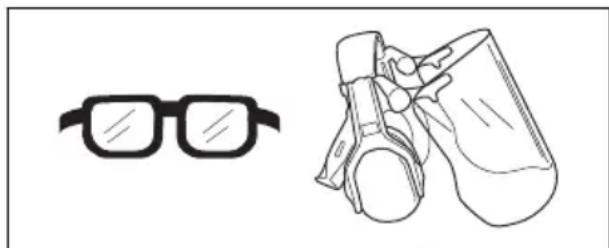
- Use approved eye protection. If you use a visor, you must also use approved protective goggles. Approved protective goggles must agree with the ANSI Z87.1 standard in the USA or EN 166 in EU countries.
natural_image
Line drawings of glasses and protective gear (no text or symbols)- Always wear approved hearing protection. Long term exposure to noise can result in permanent hearing impairment.
• Always wear protective shoes or protective boots. Steel toes are recommended. Do not use the product barefoot.

natural_image
Line drawings of two different boots, one showing front and side views (no text or symbols)- Wear gloves when necessary, for example when you attach, examine or clean the cutting equipment.
- Do not wear loose-fitting clothing, jewelry or other items that can get caught in moving parts.
- Keep first aid equipment and fire extinguisher close at hand.
Safety devices on the product

WARNING: Read the warning instructions that follow before you use the product.
- Do not use a product with defective safety devices. Do a check of the safety devices regularly. If the safety devices are defective, speak to your Husqvarna service agent.
- Do not make modifications on safety devices. Do not use the product if protective plates, protective covers, safety switches or other protective devices are not attached or are defective.
Key switch and key
The key switch is on the control panel. To start the engine, the key must be in the key switch and the key switch must be in unlocked position.
To do a check of the key switch and key
- Start and stop the engine. Refer to To start the engine on page 16 and To stop the engine on page 18.
- If the key switch and key operates correctly, the engine can only start when the key switch is in the unlocked position.
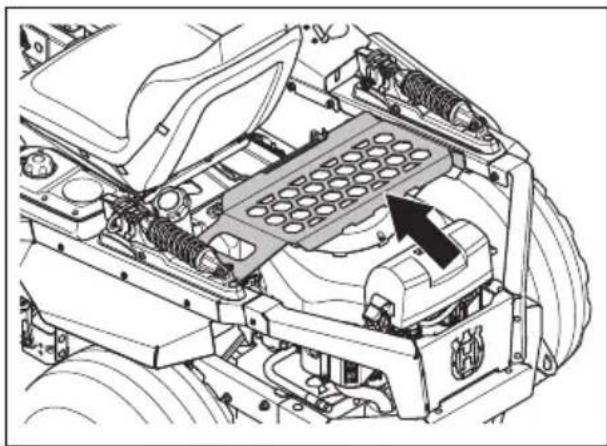
Accessory rack
The accessory rack is used for storage and transportation. The weight limit is 30 lb (13.6 kg).

CAUTION:
- For transportation of liquids, use containers that are correctly sealed and not damaged to prevent spills on the engine.
- Attach items to the accessory rack with straps.

WARNING: Do not use the accessory rack as a seat.
natural_image
Technical diagram of an engine cylinder assembly with no visible text or symbolsEngine START/STOP button
The product has 2 engine START/STOP buttons: 1 on the control panel and 1 on the left control lever.
To do a check of the engine START/STOP buttons
- Start the engine. Refer to To start the engine on page 16.
- Push and hold the engine START/STOP button on the control panel for approximately 1–2 seconds and make sure that the engine stops.
- Start the engine again.
- Push and hold the engine START/STOP button on the left control lever for approximately 1–2 seconds and make sure that the engine stops.
Operation conditions
These conditions are necessary to start the engine:
• The control levers are in the park position.
• The parking brake is applied.
• The drive of the blades is disengaged.
The engine must stop in these situations:
- The parking brake is not applied and the operator lifts from the seat.
• The drive of the blades is engaged and the operator lifts from the seat.
Try to start the engine without 1 of the conditions. Change the conditions and try again. Do this check daily.
Parking brake

WARNING: If the parking brake does not work, the product can start to move and cause injury or damage. Make
sure that the parking brake is regularly examined and adjusted.
Refer to To do a check of the parking brake on page 21.
Muffler

WARNING: Do not use the product if the muffler is missing or defective. A defective muffler increases the noise level and the risk of fire.
The muffler keeps the noise levels to a minimum and sends the exhaust fumes away from the operator.
Examine the muffler regularly to make sure that it is attached correctly and not damaged.

WARNING: The muffler becomes very hot during and after use and when the engine operates at idle speed. Be careful near flammable materials and/or fumes to prevent fire.
To do a check of the muffler
- Examine the muffler regularly to make sure that it is attached correctly and not damaged.
Spark arrestor
This product has an internal-combustion engine. Do not use the product near vegetation without a spark arrestor that is approved by local or state laws. Federal laws apply on federal lands.
A spark arrestor for the muffler is available through your approved Husqvarna dealer.
Protective covers
Missing or damaged protective covers increase the risk of injury on moving parts and hot surfaces. Do a check of the protective covers before you operate the product. Make sure that the protective covers are correctly attached and do not have cracks or other damages. Replace damaged covers.
Fuel safety

WARNING: Read the warning instructions that follow before you use the product.

WARNING: Be careful with fuel. It is very flammable, and can cause injury and damage to property.
- Extinguish all cigarettes, cigars, pipes and other sources of ignition.
- Use only an approved fuel container.
- Do not remove fuel cap or add fuel with the engine running or while hot.
- Do not refuel indoors or in enclosed spaces.
- Do not store the product or fuel container, or refuel, where there is an open flame, spark, or pilot light such as on a water heater or other appliance.
- If fuel is spilled, do not attempt to start the engine and avoid creating any source of ignition until fuel vapors have dissipated.
- To help prevent fires: keep product free of grass, leaves, or other debris build up; clean up oil or fuel spillage and remove any fuel soaked debris; allow product to cool before storing.
- Use extra care in handling gasoline and other fuels. They are flammable and vapors are explosive.
• Gasoline and gasoline fumes are poisonous and very flammable. Be careful with gasoline to prevent injury or fire.
- Let the engine become cool before you refuel.
- Do not fill fuel near sparks or naked flames.
- If there are leaks in the fuel system, do not start the engine until the leaks are repaired.
- Do not fill above recommended fuel level. The heat from the engine and the sun makes the fuel expand and the fuel overflows if the tank is filled too much.
- Store the product and fuel in such a way that there is no risk that fuel leaks or fumes can cause damage.
Transport safety
- Do not tow this product.
- Use an approved transport vehicle for transportation of the product.
- A market's national or local regulations can set limit to the transportation of the product.
- The operator of the transport vehicle is responsible to attach the product safely during transport. Refer to Transportation on page 29.
Hauling
- Use full width ramps for loading and unloading a product for transport.
Battery safety

WARNING: A damaged battery can cause an explosion and cause injury. If the battery has a deformation or is damaged, speak to an approved Husqvarna service agent.

WARNING: Read the warning instructions that follow before you use the product.
- Use protective glasses when you are near batteries.
- Do not wear watches, jewelry or other metal objects near the battery.
- Keep the battery out of reach for children.
- Charge the battery in a space with good airflow.
- Keep flammable materials at a minimum clearance of 1 m when you charge the battery.
- Discard replaced batteries. See Disposal on page 30.
- Explosive gases can come from the battery. Do not smoke near the battery. Keep the battery away from open flames and sparks.
Safety instructions for maintenance

WARNING: Read the warning instructions that follow before you use the product.

WARNING: The product is heavy and can cause injury or damage to property or the adjacent area. Do not do maintenance on the engine or the cutting deck without these conditions:
- The engine is off.
- The product is parked on a level surface.
• The parking brake is applied. - The ignition key in stop position and removed.
• The blades are disengaged. - All moving parts have stopped.
- The ignition cables are removed from the spark plugs.

WARNING: Fluid escaping under pressure may have sufficient force to penetrate skin and cause serious injury. If fluid is injected into the skin, seek immediate medical attention. Keep body and hands away from pin holes or nozzles that eject fluid under high
pressure. If a leak occurs, have the product immediately serviced by a trained technician.

WARNING: The exhaust fumes from the engine contain carbon monoxide, an odorless, poisonous and very dangerous gas. Do not run the product in closed spaces or spaces with no sufficient air flow.
- Keep the product in good working order. Replace worn or damaged parts.
Use caution when servicing blades. Wrap the blade(s) or wear gloves. Replace damaged blades. Do not repair or alter blade(s).
If equipped, disconnect spark plug wire(s) and the negative battery cable before making any repairs.
For best performance and safety, do maintenance on the product regularly as given in the maintenance schedule. Refer to Maintenance schedule on page 18.
- Electrical shocks can cause injuries. Do not touch the cables when the engine is on. Do not do a function test on the ignition system with your fingers.
- Let the product become cool before you do maintenance near the engine.
- The blades are sharp and can cause cuts. Wind protection around the blades or use protective gloves when you do work on the blades.
- Do not turn the engine over if the spark plug or ignition cable is removed.
- Make sure that all nuts and bolts are tightened correctly and that the equipment is in good condition.
- Do not change the adjustment of governors. If the engine speed is too high, the product components can become damaged. Refer to Technical data on page 31 for highest permitted engine speed.
- The product is approved only with the equipment supplied or recommended by the manufacturer.
Operation
Introduction

WARNING: Before you operate the product, you must read and understand the safety chapter.
Husqvarna Connect
Husqvarna Connect is a free app for your mobile device. The Husqvarna Connect app gives extended functions for your Husqvarna product.
- Extended product information.
• Information about, and help with, product parts and servicing.
Bluetooth ^® wireless technology
Products with built-in Bluetooth ^® wireless technology can connect to mobile devices and enables additional functions from Husqvarna Connect.
The symbol for Bluetooth ^® wireless technology comes on when your mobile device is connected to the product.

To start to use Husqvarna Connect
- Download the Husqvarna Connect app on your mobile device.
- Add in the Husqvarna Connect app.
- Follow the instruction steps in the Husqvarna Connect app to connect and add the product.
Note: Husqvarna Connect app is not available for download in all markets. Speak to your servicing dealer for more information.
To operate the product for the first time

WARNING: Before you operate the product for the first time, you must read and understand this chapter.
- Use a decreased throttle speed and a decreased ground speed when you operate the product for the first time.
- Do not move the control levers to the fully forward position or the fully reverse position during the initial operation.
- Learn how to operate the movement of the product on a hard surface, for example concrete or asphalt, before you operate the product on a lawn for the first time.
To do before you operate the product

WARNING: Before you operate the product, you must read and understand the safety chapter.

WARNING: Before you operate the product, you must make sure that there are no stones or other objects in the work area that can be thrown by the rotating blades.
- Do the daily maintenance. Refer to Maintenance schedule on page 18.
- Make sure that there is sufficient fuel in the fuel tank.
- Set the cutting height. Refer to To set the cutting height on page 16.
To fill fuel

WARNING: Gasoline is very flammable. Be careful and refuel outdoors, refer to Fuel safety on page 12.

WARNING: The engine and the exhaust system become very hot during operation. Risk of burn injury. Let the engine and the exhaust system become cool before you fill fuel in the product.

WARNING: Do not use the fuel tank as a support area.

CAUTION: Incorrect type of fuel can result in engine damage.
The engine runs on gasoline with a minimum octane rating of 91 RON (87 AKI), not mixed with oil. We recommend biodegradable alkylate gasoline.
- Do a check of the fuel level before each use and refuel if it is necessary.
- Do not fill the fuel tank fully. Fill to the bottom of the fuel tank neck.
Fuel level
The fuel level shows on the display.
| Symbol | Description |
 | The left indicator flashes. Remaining fuel is 0–10%. |
 | The left indicator is on.Remaining fuel is 11–25%. |
 | Two indicators are on.Remaining fuel is 26–50%. |
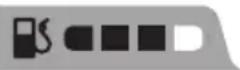 | Three indicators are on.Remaining fuel is 51–75%. |
| Symbol Description | |
 | All 4 indicators are on.Remaining fuel is 76–100%. |
To adjust the seat
The position of the seat can be moved forward or rearward and the suspension of the seat can be adjusted. The suspension on the left side and right side of the seat are adjusted independently.

WARNING: Do not make adjustments to the seat when the product is in operation.
• To adjust the suspension, do these steps:
a) Pull the handle on the suspension adjuster to release the pin.

natural_image
Technical line drawing of a mechanical suspension system with spring and mounting bracket (no text or symbols)b) Move the handle in the direction of "-" for softer suspension.
c) Move the handle in the direction of "+" for harder suspension.
d) Do the same procedure on the suspension adjuster on the opposite side.
• To adjust the position of the seat, push the lever (B) below the seat to the side and push the seat forward or rearward.

natural_image
Technical line drawing of a vehicle's seat assembly with no visible text or symbolsTo engage and disengage the parking brake

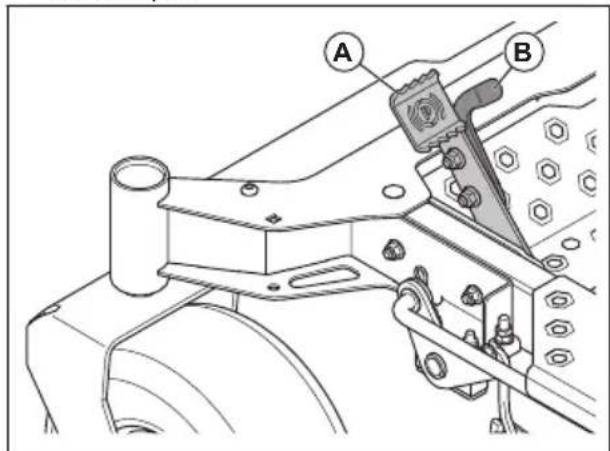
CAUTION: The product must be stationary when you engage the parking brake.
• To engage the parking brake, push the large pedal (A) forward until the latch bracket engages the latch pin.
text_image
Technical diagram showing mechanical assembly with labeled parts A and B, likely for assembly or maintenance instructions.- To disengage the parking brake, push the small pedal (B) of the latch bracket and let the large pedal (A) and the small pedal (B) move back slowly.
To disengage and engage the drive system

CAUTION: Only disengage or engage the drive system when the product is parked on level ground.
If it is necessary to move the product by hand, with the engine off, the drive system must be disengaged. The drive system is disengaged and engaged by the bypass valves. The bypass valves are found on the front of each transmission.
Follow the procedure below to disengage the drive system.
- Park the product on level ground and stop the engine. Do not engage the parking brake.
-
Set the cutting deck to the lowest position.
-
Move the bypass levers on each side of the product.
A
B
- Turn the cutting height adjustment knob.
a) For Xcite ^TM Z350: Push the 2 bypass levers (A) rearward.
b) For Xcite ^TM Z380: Turn the 2 bypass levers (B) to the horizontal position.
- Push the product by hand.
CAUTION: Do not push the control levers.
- To engage the drive system on Xcite ^TM Z350, push the bypass levers (A) forward.
- To engage the drive system on Xcite ^TM Z380, turn the bypass levers (B) to the vertical position.
To set the cutting deck in transport position or mow position
The cutting deck must be in transport position during transportation.
- To set the product in transport position, push the deck lift pedal (A) forward until the cutting deck latches in the transport position.
A
B
a) Turn clockwise to increase the cutting height.
b) Turn counterclockwise to decrease the cutting height.
- Lower the cutting deck into mow position. Refer to To set the cutting deck in transport position or mow position on page 16
Cutting height setting Cutting height, in./cm
1 1.5/3.8
2 1.75/4.4
3 2.0/5.1
4 2.25/5.7
5 2.5/6.4
6 2.75/7.0
7 3.0/7.6
8 3.25/8.3
9 3.5/8.9
10 3.75/9.5
11 4.0/10.2
12 4.25/10.8
To start the engine
It is necessary to do the procedure in the correct order and with the correct conditions to start the engine. If a start condition is not met, a corresponding symbol shows on the display. Refer to Caution messages on the display on page 28.
- Sit in the seat. The display comes on.
- Set the cutting deck to the transport position. Refer to To set the cutting deck in transport position or mow position on page 16.
- Engage the parking brake. Refer to To engage and disengage the parking brake on page 15.
- To set the product in mow position, push the deck release pedal (B).
To set the cutting height
-
Set the cutting deck in transport position. Refer to To set the cutting deck in transport position or mow position on page 16.
-
Move the throttle control (A) to 12 throttle position.
text_image
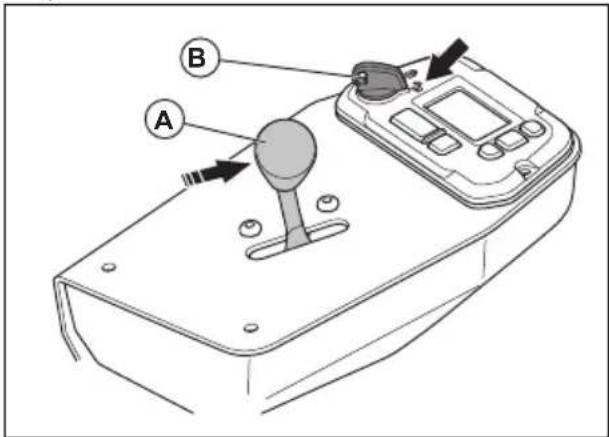
Technical diagram of a device with labeled parts A and B, showing directional arrows and a central knob.- Put the key (B) into the key switch.
- Turn the key switch to the unlocked position.
- Set the control levers in park position.
- Push and hold the START/STOP button on the control panel or on the left control lever for approximately 1–2 seconds to start the engine.
- Let the engine run at 12 throttle for 3–5 minutes before you apply full throttle.
- Push the throttle control to the full throttle position.
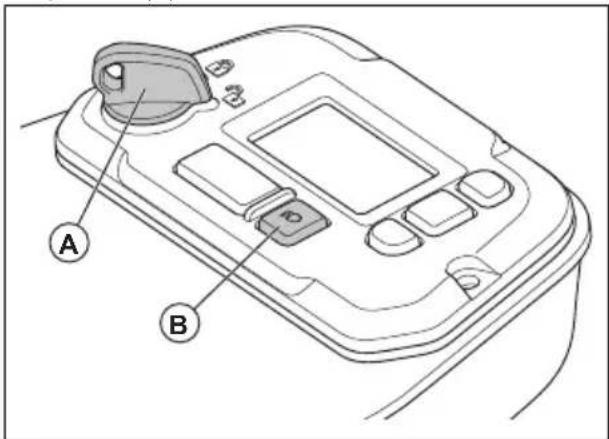
To operate the headlights
- Make sure that the key switch is in the unlocked position (A).
text_image
A B- Push and hold the headlights button (B) for approximately 1–2 seconds. The headlights come on.
- Push and hold the headlights button for approximately 1–2 seconds again. The headlights go off.
To operate the product
- Start the engine. Refer to To start the engine on page 16.
-
Disengage the parking brake. Refer to To engage and disengage the parking brake on page 15.
-
Carefully push the 2 control levers forward. The product will start to move forward. The forward speed increases the more the 2 control levers are pushed forward.

natural_image
Traffic sign indicating straight and curved road directions (no text or symbols)- Carefully pull the 2 control levers rearward. The product will start to move rearward. The rearward speed increases the more the 2 control levers are pulled rearward.
- Put the 2 control levers in neutral position to decrease the speed and stop the product.
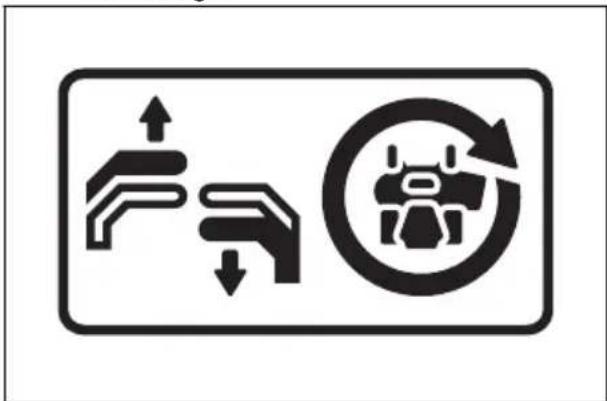
- Do the steps that follow to turn left or right when you go in a forward direction.
a) Pull the left control lever rearward in the direction of the neutral position to make the product turn left. The more you pull the left control lever rearward, the more the product will turn left.

text_image
Traffic sign indicating vehicle lane and traffic flow with icons for road, lane, and robotb) Pull the right control lever rearward in the direction of the neutral position to make the product turn right. The more you pull the right control lever rearward, the more the product will turn right.
text_image
Traffic sign indicating road changes with upward and downward arrows, a robot icon, and circular arrow symbol- Do the steps that follow to make a zero turn.
a) Pull the 2 control levers rearward in the direction of the neutral position to decrease the speed or stop the product.
b) Move 1 control lever slightly forward and the other control lever slightly rearward to make a zero turn.
-
Lower the cutting deck to mow position. Refer to To set the cutting deck in transport position or mow position on page 16.
-
Push and hold the PTO button on the right control lever for approximately 1–2 seconds to engage the drive of the blades.
-
If it is necessary to adjust the cutting height during operation, refer to To set the cutting height on page 16.
To stop the engine
- Move the 2 control levers to the park position to stop the movement of the product.
- Engage the parking brake.
- Push and hold the PTO button for approximately 1–2 seconds to disengage the drive of the blades.

natural_image
Simple line drawing of a mechanical component with an arrow pointing to a rectangular slot (no text or symbols)-
Put the cutting deck in the transport position.
-
Move the throttle control to the minimum throttle position.
-
Let the engine idle for a minimum of 1 minute until the engine is at usual operation temperature.
-
Push and hold the START/STOP button on the control panel or on the left control lever for approximately 1–2 seconds to stop the engine.
-
Turn the key switch to the locked position.
-
Remove the key from the key switch when you go away from the product.
To get a good cutting result
- For best performance, do maintenance on the product regularly as given in the maintenance schedule. Refer to Maintenance on page 18.
- Do not cut a wet lawn. Wet grass can give a bad cutting result.
- Start with a high cutting height and decrease it gradually.
- Use full throttle when you cut the grass.
- Move the product forward at low speed if the grass is high and thick.
- Cut the grass in an irregular pattern.
- When you cut large areas, move the product to the right during 1 or 2 turns around the work area. This procedure will keep the grass discharge away from shrubs, fences and driveways. After approximately 2 turns around the work area, cut in the opposite direction.

flowchart
graph TD
    A["Central Machine"] --> B["Loop 1"]
    A --> C["Loop 2"]
    A --> D["Loop 3"]
    A --> E["Loop 4"]
    A --> F["Loop 5"]
    A --> G["Loop 6"]
    A --> H["Loop 7"]
    A --> I["Loop 8"]
    A --> J["Loop 9"]
    A --> K["Loop 10"]
    A --> L["Loop 11"]
    A --> M["Loop 12"]
    A --> N["Loop 13"]
    A --> O["Loop 14"]
    A --> P["Loop 15"]
    A --> Q["Loop 16"]
    A --> R["Loop 17"]
    A --> S["Loop 18"]
    A --> T["Loop 19"]
    A --> U["Loop 20"]
    A --> V["Loop 21"]
    A --> W["Loop 22"]
    A --> X["Loop 23"]
    A --> Y["Loop 24"]
    A --> Z["Loop 25"]
- When the mulch kit is used, cut the grass more frequently.
- To get the best cutting result, cut the grass frequently.
Maintenance
Introduction

WARNING: Before you do any maintenance work you must read and understand the safety chapter.
Maintenance schedule
* = The instructions are not given in this operator's manual.
X = The instructions are given in this operator's manual.
O = Refer to the engine manual for instructions.
Maintenance schedule for the operator
| Maintenance | Daily maintenance Do | maintenance at a minimum of 1300 the each year | Maintenance interval in hours | ||||
| Before After 25 50 100 | |||||||
| Do a check of the parking brake. | XXX | XX | |||||
| Do a check of the engine oil level. | O | ||||||
| Do a check of the safety system. | X | ||||||
| Make sure that there are no fuel or oil leaks from the product. | * | ||||||
| Make sure that there are no damages on the product. | * | ||||||
| Make sure that there are no loose parts. | * | ||||||
| Do a check for damages on the cutting deck. | * | ||||||
| Do a check of the cutting deck for adjustment. | X | X | |||||
| Do a check of the tire pressure. | XXX | X | |||||
| Do a check of the battery connections. | XXXXX | ||||||
| Do a check of the throttle cable. | O | O | |||||
| Do a check of the front wheels. | XXX | ||||||
| Do a check of the clearance of the engine valve.1 | * | * | |||||
| Clean the air intake of the engine.2 | OOOO | ||||||
| Clean the bottom side of the cutting deck. | X | ||||||
| Clean around the engine. | * | ||||||
| Clean around the belts and the belt pulleys. | * | * | * | * | |||
| Do a check of the belts and the belt pulleys. | XXX | ||||||
| Clean the foam pre-filter (if equipped).3 | OOOO | ||||||
1 Must be done by approved service agent.
2 In conditions with dust, cleaning and replacement must be done more frequently.
^3 In conditions with dust, cleaning and replacement must be done more frequently.
| Maintenance | Daily maintenance Do | maintenance at a minimum of 1 time each year | Maintenance interval in hours | ||||
| Before After 25 50 100 | |||||||
| Replace the foam pre-fil-ter (if equipped).4 | O | ||||||
| Clean the paper filter car-tridge.5 | O O O O O | ||||||
| Examine the muffler and spark arrester screen. | * * * * | ||||||
| Start the engine and blades and listen for un-usual sounds. | * | ||||||
| Sharpen the blades.6 | X X X X X | ||||||
| Replace the blades. X X X | X X | ||||||
| Replace the spark plugs. O | O O | ||||||
| Replace the engine oil.7 | O | O O O | |||||
| Replace the engine oil fil-ter. | O | O O | |||||
| Replace the fuel filter. | O | O O | |||||
| Replace the paper air fil-ter.8 | O | O O | |||||
Servicing interval
When the product is at a servicing interval, the servicing symbol (A) shows on the display. The servicing symbol stays on the display until the servicing timer is reset.

text_image
112° F 32° CTo reset the servicing timer
-
Push the OK button on the control panel to open the menu structure.
-
Push the down button on the control panel until the information symbol is selected.

text_image
i-
Push the OK button. The display shows the hour meter.
-
Push the down button on the control panel one time. The display shows the next servicing interval (A) and the elapsed time since the last servicing (B).
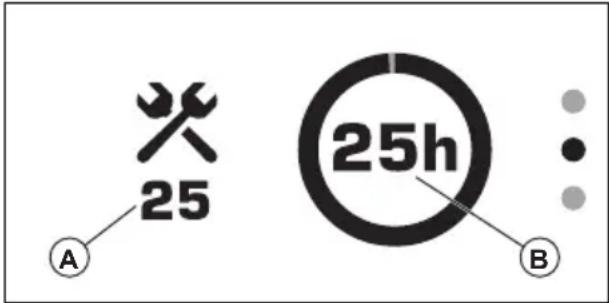
text_image
25 A 25h B- Push the OK button.
a) To reset the servicing timer, push the OK button when the check mark (C) is selected.
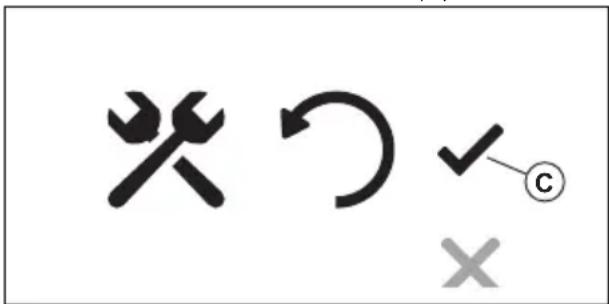
text_image
×↑✓ ×b) To cancel the reset, push the down button and push the OK button when the "X" symbol is selected.
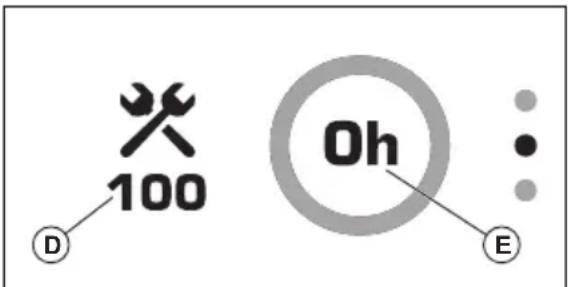
The display shows the next servicing interval (D) and the elapsed time since the last servicing (E).
text_image
100 D Oh E- Push the down button and then push the OK button to go back to the main menu.
To clean the product

CAUTION: Do not use a high-pressure washer or a steam cleaner. Water can go into bearings and electrical connections and cause corrosion which causes damage to the product.
Clean the product immediately after use.
- Do not clean hot surfaces such as the engine, muffler and exhaust system. Wait until the surfaces are cool, then remove the grass or dirt.
-
Before you clean with water, clean with a brush. Remove grass and dirt on and around the transmission, the transmission air intake, and the engine.
-
Use running water from a hose to clean the product. Do not use high-pressure.
- Do not point the water at electrical components or bearings. Detergent usually increases the damage.
- Use compressed air to clean the top side of the mower deck.
- Use a water hose to clean below the cutting deck.
- When the product is clean, start the cutting deck for a short period to remove remaining water.
To clean the engine and the muffler
Keep the engine and muffler free from grass cuttings and dirt. Grass cuttings soaked in fuel or oil on the engine can increase the fire risk and the risk that the engine becomes too hot. Let the engine cool before it is cleaned. Clean with water and a brush.
Grass cuttings around the muffler dry quickly and are a fire risk. Use a brush or remove the grass cuttings with water when the muffler is cold.
To clean the battery
Corrosion and dirt on the battery and the terminals can cause the power of the battery to decrease.
- Remove the battery. Refer to To remove and install the battery on page 22.
- Flush the battery with water and let dry.

CAUTION: Do not use a high-pressure washer or a steam cleaner. Water can go into bearings and electrical connections and cause corrosion which causes damage to the product.
- Clean the terminals and the cable ends of the battery cables with a wire brush.
To do a check of the parking brake
- Park the product on a slope with a hard surface.
Note: Do not park the product on a grass slope when you do a check of the parking brake.
- Engage the parking brake.
- If the product starts to move with the parking brake engaged, let an approved service agent adjust the parking brake.
- Disengage the parking brake.
To charge the battery
- Charge the battery if it is too weak to start the engine. Refer to Battery charging times on page 32 for battery charging times.
- Use a standard battery charger.

CAUTION: Do not use a boost charger or start booster. A boost charger or a start booster will cause damage to the electrical system of the product.
• Always disconnect the battery charger before you start the engine.
To do an emergency start of the engine
If the battery is too weak to start the engine, you can use jumper cables to do an emergency start. This product has a 12 V system with negative ground. The product that is used for the emergency start must also have a 12 V system with negative ground.
To connect the jumper cables

WARNING: Risk of explosion because of explosive gas that comes from the battery. Do not connect the negative terminal of the fully charged battery to or near the negative terminal of the weak battery.

CAUTION: Do not use the battery of the product to start other vehicles.
- Connect one end of the red cable to the POSITIVE battery terminal (+) on the weak battery (A).

text_image
Diagram showing two connected batteries (A and B) with labeled terminals and a ground symbol, illustrating electrical connections.- Connect the other end of the red cable to the POSITIVE battery terminal (+) on the fully charged battery (B).

WARNING: Do not short circuit the ends of the red cable against the chassis.
-
Connect one end of the black cable to the NEGATIVE battery terminal (-) on the fully charged battery (C).
-
Connect the other end of the black cable to a CHASSIS GROUND (D), away from the fuel tank and the battery.
To remove the jumper cables
Note: Remove the jumper cables in the opposite sequence to how you connect them.
- Remove the BLACK cable from the chassis.
- Remove the BLACK cable from the fully charged battery.
- Remove the RED cable from the 2 batteries.
To remove and install the battery
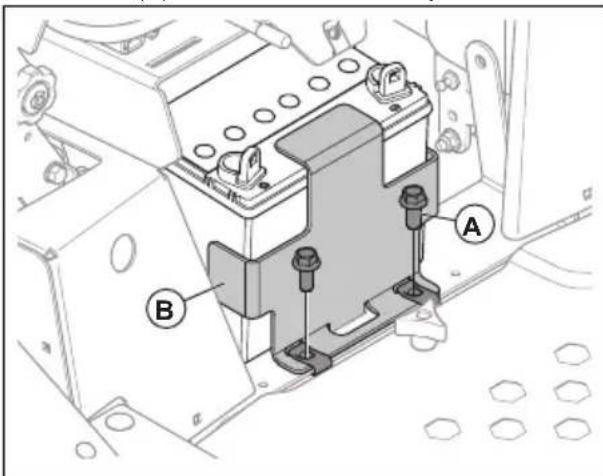
- Remove the battery compartment cover below the seat.
- Remove the 2 screws (A) from the battery bracket (B) and remove the battery bracket.
text_image
Technical diagram of an electrical contactor with labeled components A and B- Use a wrench to disconnect the black battery cable from the negative (−) terminal on the battery.
- Use a wrench to disconnect the red battery cable from the positive (+) terminal on the battery.
- Carefully remove the battery from the product.
- Install in the opposite sequence.
To adjust the tracking speed
If the product does not move straight forward, the tracking speed must be adjusted.

WARNING: Always adjust the tracking speed in an open area without bystanders.
- Do a check of the tire pressure. Refer to Tire pressure on page 23.
- Turn the tracking controls fully in. Refer to Product overview on page 3 for the location of the tracking controls.
- Turn the tracking controls out 4 turns.

CAUTION: More than 4 turns can cause damage to the product.
- Start the product.
- Move the control levers forward fully and operate the product at full throttle.
- Turn the tracking control on the right side gradually until the product starts to move right.
- Turn the tracking control on the left side gradually until the product starts to move straight forward.
Tire pressure
Make sure to have the correct tire pressure on all 4 tires. Refer to Technical data on page 31.
To remove and install the front wheels
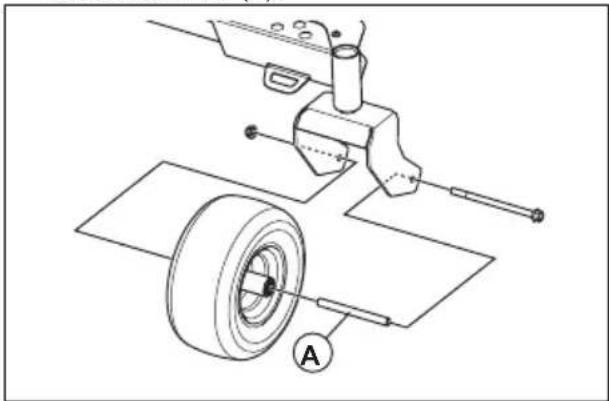
- Remove the nut and the bolt to remove the front wheels from the forks. It is not necessary to remove the tube (A).
text_image
Technical diagram showing mechanical assembly with labeled components and a circular symbol A- Install in the opposite sequence. Torque the nut and bolt to 60–85 ft-lbs / 81–115 Nm.

CAUTION: Make sure that the tube (A) is installed correctly. If the tube is not installed, the performance will be bad and the life of the wheel is decreased.
To adjust the anti-scalp rollers
The anti-scalp rollers keep the cutting deck in the correct position on the ground and prevent lawn scalping in most terrain conditions. The anti-scalp rollers can be set in 3 positions for different lengths of grass:
- Top position: 1.5–2.5 in. / 38–64 mm grass.
- Middle position: 2.5–4 in. / 64–102 mm grass.
- Bottom position: 4–5 in. / 102–127 mm grass.
-
Park the product on level ground and stop the engine.
-
Remove the nut, the bolt, the axle and the anti-scalp roller.

natural_image
Technical line drawing of a mechanical assembly with pulleys, gears, and a housing (no text or symbols)- Install the anti-scalp roller in one of the 3 positions.

CAUTION: The cutting deck can become damaged if the anti-scalp rollers are incorrectly adjusted. The anti-scalp rollers must be approximately 1/4 in. / 6.4 mm from the ground.
To adjust the parallelism of the cutting deck
This procedure will set the cutting deck in a standard position.
- Make sure that the tire pressure is correct. Refer to Tire pressure on page 23.
- Park the product on a level surface.
- Turn the outer blade tips to align with the cutting deck side to side.

natural_image
Technical line drawing of a mechanical device with gears and housing (no text or symbols)
WARNING: The blades on the cutting deck are sharp and can cause injury. Use protective gloves.
-
Measure the distance between the ground and the bottom of the blade tip on the discharge side of the cutting deck. Make a note of the distance.
-
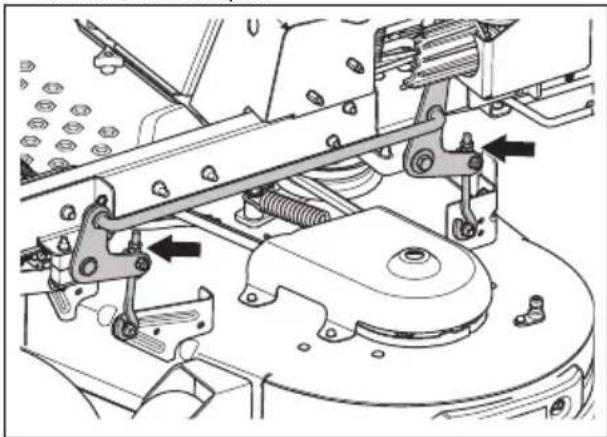
Measure the distance between the ground and the bottom of the blade tip on the side opposite to the discharge side. The distance must be the same as the distance for the discharge side. If adjustment is necessary, adjust the locknut on the top of the rear links until the 2 side to side distances are equal.
natural_image
Mechanical assembly diagram showing a motor and gear mechanism (no text or labels)- Turn the 2 outer blades to align with the cutting deck front to rear.

natural_image
Technical line drawing of a mechanical device with no visible text or symbols-
Adjust the 2 front bolts until the rear blade tips are set 1/8-3/8 in. / 3.2-9.5 mm higher in the rear than in the front blade tips.
-
Measure the distances again to make sure that the cutting deck has been adjusted correctly.
To examine the blades

CAUTION: Damaged or incorrectly balanced blades can cause damage to the product. Replace damaged blades. Let an approved service agent help you sharpen and balance blunt blades.
- Look at the blades to see if they are damaged and if it is necessary to sharpen them.
To replace the blades
-
Remove the blade bolt.
-
Assemble the new blade with the side without stamps in the direction of the cutting deck.

WARNING: Incorrect blade type can cause objects to eject from
the cutting deck and cause serious injury. Use only approved blades.
- Attach the blade bolt. Torque the bolt to 61–75 Nm.
To remove the deck belt
Park the product on level ground and engage the parking brake before you do this task.
- Set the cutting deck in the lowest position.
- Remove the 2 belt covers.
- Remove dirt and unwanted materials from around the cutter housings and the cutting deck surface.
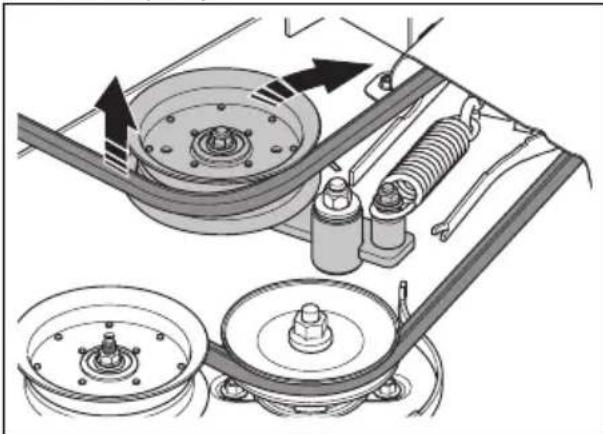
- Push in the idler arm to decrease the tension on the deck belt and carefully remove the deck belt from the pulleys.
natural_image
Mechanical assembly diagram showing pulley, belt, and suspension components (no text or labels)- Remove the deck belt from the electric clutch on the engine shaft.
To install the deck belt
- Put the deck belt around the electric clutch pulley on the engine shaft.
- Put the deck belt around the pulleys on the cutting deck.
Note: Refer to the routing decal on the cutting deck when you install the deck belt.
- Push in the idler arm until you can put the deck belt around the stationary idler pulley and hold it there.
- Carefully put the deck belt around the stationary idler pulley and slowly release the idler arm back into position.
- Make sure that the belt routing align with the belt routing shown on the belt routing decal.
- Make sure that the deck belt is not twisted.
- Install the 2 belt covers.
To remove the pump belt
Park the product on level ground and engage the parking brake before you do this task.
- Lift the rear of the product and put supports below it.
- Remove the drive wheels.
- Remove the deck belt. Refer to To remove the deck belt on page 24.
- Remove the clutch stop to get access to the pump belt.
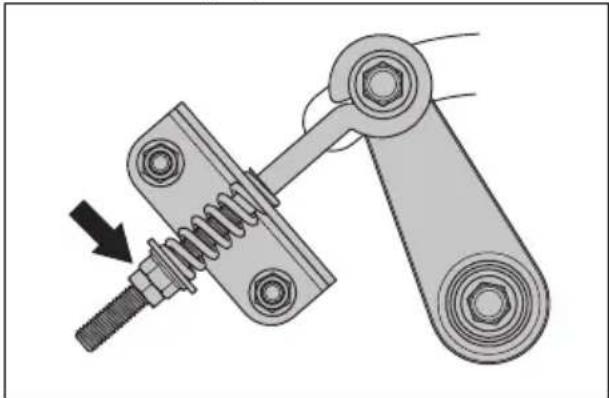
- Loosen the nuts on the eye bolt to decrease the tension in the pump belt.
natural_image
Mechanical linkage diagram showing a spring-loaded lever assembly with a bolt and nut (no text or symbols)- Remove the pump belt from the engine and the pump pulleys.
To install the pump belt
- Loosen the nuts on the eye bolt to decrease the tension in the pump belt.
- Put the pump belt around the right and left pump pulleys.
- Put the pump belt around the engine pulley.
- Install the clutch stop.
- Turn the nut on the eye bolt on the idler pulley to adjust the tension of the pump belt. The length of the spring must be 1.38–1.50 in.
- Install the deck belt. Refer to To install the deck belt on page 24.
- Install the drive wheels.
- Remove the supports and lower the rear of the product.
To do a check of the engine oil level
- Park the product on level ground and stop the engine.
- Loosen the dipstick and pull it out.
- Clean the oil from the dipstick.
- Put the dipstick in the hole for the dipstick and tighten it.
-
Loosen and pull the dipstick out and read the oil level.
-
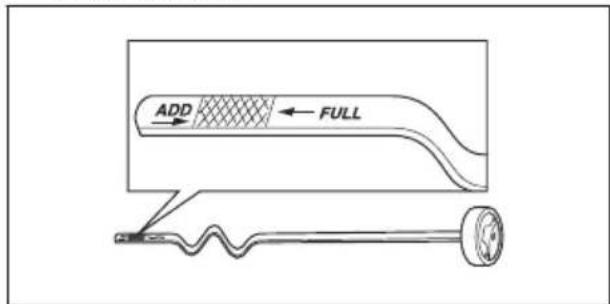
The oil level must be between the marks on the dipstick. If the level is near the ADD mark, fill oil to the FULL mark.
text_image
ADD FULL- Fill the oil through the hole for the dipstick. Fill the oil slowly.
Note: Refer to Technical data on page 31 for the types of engine oil that Husqvarna recommends. Do not mix different types of oil. - Tighten the dipstick fully before you start the engine.
To replace the engine oil
If the engine is cold, start the engine for 1–2 minutes before you drain the engine oil. This makes the engine oil warm and faster to drain.

WARNING: Do not operate the engine for more than 1–2 minutes before you drain the engine oil. The engine oil becomes very hot and can cause burn injuries. Let the engine become cool before you drain the engine oil.

WARNING: If you spill engine oil on your body, clean with soap and water.
- Park the product on level ground and stop the engine.
- Engage the parking brake. Refer to To engage and disengage the parking brake on page 15.
- Remove all dirt around the oil tank cap.
- Remove the oil tank cap and the dipstick.
- Find the oil drain plug on the engine. Refer to Product overview on page 3.
- Put a container below the oil drain plug.
- Remove the oil drain plug.
- Let the oil run out into the container.
- Replace and install the oil drain plug.
- Fill with new oil and do a check of the engine oil level. Refer to To do a check of the engine oil level on page 25.
- Install the oil tank cap and the dipstick.
Note: For safe disposal of used engine oil, refer to Disposal on page 30.
Lubrication, general information
- Remove the ignition key to prevent accidental movements during lubrication.
- Clean the area before you lubricate a part on the product.
- Use engine oil when you lubricate with an oil can.
- When you lubricate with grease, use a chassis or ball bearing grease that prevents corrosion. Remove unwanted grease after lubrication.
- Lubricate 2 times a week if you operate the product daily.
- Do not spill lubricant on the drive belts or the grooves of the belt pulleys. If you do spill, clean with alcohol. If the friction between the drive belt and the pulley is not sufficient after you clean with alcohol, replace the drive belt.

CAUTION: Do not use gasoline or other petroleum products to clean drive belts.
To lubricate the cutting deck spindles
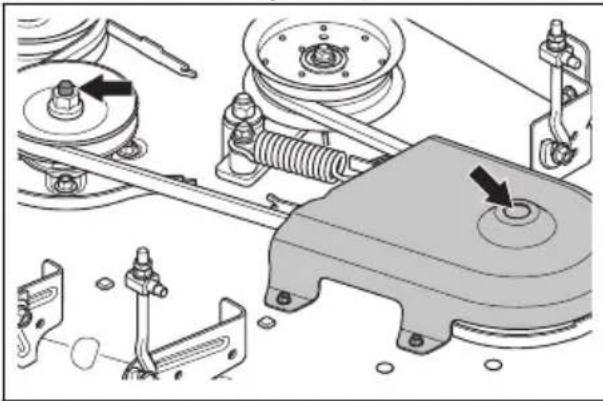
- Set the cutting deck in mow position.
- Lubricate each cutting deck spindle 2-3 strokes.
natural_image
Mechanical assembly diagram showing components like springs, levers, and a central rotating knob (no text or labels)Note: Use a grease gun with a rubber hose when you lubricate the cutting deck spindles.
Troubleshooting
Troubleshooting schedule
If you cannot find a solution to your problems in this operator's manual, speak to your Husqvarna service agent.
| Problem Cause | |
| The engine does not start. The drive of the | blades is engaged. Refer to PTO (Power Take-Off) button and LED indicator on page 5. |
| Steering controls are not locked in the neutral position. | |
| The battery is too weak. Refer to To charge the battery on page 21. | |
| There is dirt in the carburetor or fuel line. | |
| The fuel filter or fuel line is clogged. | |
| The ignition system is damaged. | |
| The starter motor does not turn the engine over. | The battery is too weak. Refer to To charge the battery on page 21. |
| The connection at the cable connectors on the battery terminals is bad. Refer to To clean the battery on page 21. | |
| A fuse is blown. Refer to Fuses on page 6. | |
| The OPC is defective. Refer to Operator Presence Control (OPC) on page 6. | |
| The engine does not run smoothly. The carburetor is incorrectly set. | |
| The air filter is clogged. | |
| The engine apparently has no power. The air filter is clogged. | |
| There is vibration in the product. The blades are loose. Refer to To examine the blades on page 24. | |
| The engine becomes too hot. The air filter or the cooling fins are clogged. | |
| The battery does not charge. The connection at the cable connectors on the battery terminals is bad. Refer to To clean the battery on page 21. | |
| The product moves slowly, with irregular speed or not at all. | |
| The drive of the blades do not engage. The drive belt on the mower deck is loose. | |
| The transaxle leaks oil. The seals, housing | or gaskets are damaged. |
| There is air in the hydraulic system. | |
| The cutting result is unsatisfactory. The tire | pressure is different on the right and left sides. Refer to Tire pressure on page 23. |
| The blades are damaged. | |
| The suspension of the cutting deck is not level. | |
| The blades are blunt. Refer to To examine the blades on page 24. | |
| The product is operated at too high forward or rearward speed. Refer to To get a good cutting result on page 18. | |
| The grass is long. Refer to Symbols on the product on page 6. | |
| There is grass blockage in the cutting deck. Refer to To clean the product on page 21. | |
Caution messages on the display
| Symbol Name | Cause | |
 | Operator presence control (OPC) indicator | The product stops because the operator is not in the seat and the parking brake is not engaged. |
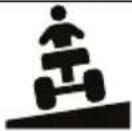 | Slope indicator | The product is operated on a slope >10°. Refer to Safety instructions for operation on slopes on page 10. |
 | Parking brake indicator The parking brake is engaged. | |
 | Key switch indicator | The product cannot start if the key switch is in locked position. |
| The product stops if the key switch is moved from unlocked to locked position. | ||
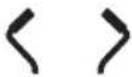 | Control lever indicator The control levers are in the park position. | |
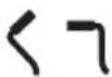 | Control lever indicator One of the control levers is not in the neutral position. | |
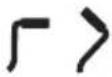 | ||
 | Control lever indicator The control levers are in the neutral position. | |
Warning messages on the display
A warning indicator flashes and the symbol for the type of warning shows. If the warning indicator
shows together with an error number, speak to your Husqvarna servicing dealer.
| Symbol Name | Cause | |
 | Warning indicator | Safety warning. The other symbol shows the warning type. |
 | Slope indicator | You operate the product in a slope >10°. Refer to Safety instructions for operation on slopes on page 10. |
 | Headlights The headlights are on. | |
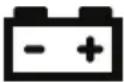 | Battery level indicator | The battery has low voltage. Refer to To charge the battery on page 21. |
 | PTO (Power Take-Off) indicator | The drive of the blades is engaged. |
 | Parking brake indicator The parking brake is engaged. | |
 | Engine indicator There is an engine problem. |
Transportation, storage and disposal
Transportation
- Do not tow the product.
- The product is heavy and can cause crush injuries. Be careful when you load it onto or off a vehicle or trailer.
- Load the product in reverse on approved ramps of a maximum operation angle of 10^ . Do not lift the product.
- Use an approved trailer for transportation of the product.
- Make sure that you have knowledge of local road traffic regulations before transportation of the product in a trailer or on roads.
- Lock the product with approved devices, such as straps. Use tie-down points on the product or applicable areas of the frame. The parking brake is not sufficient to lock the product during transportation.
Storage
Prepare the product for storage at the end of the season, and before more than 30 days of storage. If you keep fuel in the fuel tank for 30 days or more, tacky particles can cause blockage in the carburetor. This has a negative effect on the engine function.
To prevent tacky particles during storage, add a stabilizer. If alkylate gasoline is used, stabilizer is not necessary. If you use standard gasoline, do not change to alkylate gasoline. This can cause sensitive rubber parts to become hard. Add stabilizer to the fuel in the tank or in the container used for storage. Always use the mixing ratios given by the manufacturer. Add the stabilizer and run the engine for a minimum of 10 minutes, until the fuel flows into the carburetor.

WARNING: Do not keep the product with fuel in the tank in an indoor location or in locations with bad airflow. Risk of fire if fuel fumes come near open flames, sparks, or pilot lights in for example boilers, hot water tanks and clothes dryers.

WARNING: Remove grass, leaves and other flammable materials from the product to decrease the risk of fire. Let the product become cool before you put it in storage.
- Clean the product, refer to To clean the product on page 21.
- Remove unwanted materials from the cooling fan.
- Repair paint damages to prevent corrosion.
- Examine the product for worn or damaged parts and tighten loose screws and nuts.
- Remove the battery. Clean it, charge it, and keep it cool during storage.
- Replace the engine oil, and discard the waste oil.
- Empty the fuel tank. Start the engine and run it until there is no remaining fuel in the carburetor.
Note: Do not empty the fuel tank and carburetor if a stabilizer has been added.
- Remove the plugs and put about a tablespoon of engine oil into each cylinder. Manually turn the engine shaft to apply the oil and put the plugs back on.
- Lubricate all grease nipples, joints and axles.
- Keep the product in a clean and dry area and put a cover on it for more protection.
Disposal
• Chemicals can be dangerous and must not be discarded on the ground. Always discard used chemicals at a service center or an applicable disposal location.
- When the product is worn out, send it to the dealer or to an applicable recycling location.
- Oil, oil filters, fuel and the battery can have negative effects on the environment. Obey the local recycling requirements and applicable regulations.
- Do not discard the battery as domestic waste.
- Send the battery to a Husqvarna service agent or discard it at a disposal location for used batteries.
Technical data
Technical data
| XciteTM Z350 Xcite | TM Z380 | |
| Engine | ||
| Brand/model Kohler/KT735 Kohler/KT745 | ||
| Nominal engine output, kW/hp9 | 17.9/24 19.3/26 | |
| Displacement, cm3 | 725 747 | |
| Max. engine speed, rpm 3600 ± 75 | 3600 ± 75 | |
| Fuel, min. octane grade lead-free, max 10% Ethanol, max 15% MTBE | 87 87 | |
| Tank volume, gal/l 4.31/16.3 4.31/16.3 | ||
| Oil Class SF, SG, SH, SJ or | SL SAE40, SAE30, SAE20W-50, SAE10W-40, SAE10W-30, SAE5W-20 | Class SF, SG, SH, SJ or SL SAE40, SAE30, SAE20W-50, SAE10W-40, SAE10W-30, SAE5W-20 |
| Oil volume, incl. filter, oz/l 64/1.9 64/1.9 | ||
| Oil volume, excl. filter, oz/l 66.6/2 66.6/2 | ||
| Lubrication system Pressure with oil filter Pressure with oil filter | ||
| Cooling system | Air cooled Air cooled | |
| Air filter | Heavy duty canister | Heavy duty canister |
| Alternator, V. amp. @ 3600 rpm | 12 V 15 amp @ 3500 ± 100 rpm | 12 V 15 amp @ 3500 ± 100 rpm |
| Start motor | Electric start 12 V | Electric start 12 V |
| Dimensions | ||
| Length, in./cm | 78.75/200.3 | 78.75/200.3 |
| Width, in./cm | 49.5/126 | 49.5/126 |
| Width including chute up, in./cm | 53.9/137 | 53.9/137 |
| Width including chute down, in./cm | 68/172.7 | 68/172.7 |
| Height, in./cm 42.5/108 | 46/116.8 | |
| Weight, with no fuel, lb/kg | 794/360.2 828/375.6 | |
| Max. gross vehicle weight rating (GVWR), lb/kg 10 | 1300/589.6 | 1300/589.6 |
| Max. gradient, degrees ° | 10 10 | |
| Cutting width, in./cm | 54/137 | 54/137 |
| Cutting height, in./cm 1.5-4.5/3.9-11 | 4 1.5-4.5/3.9-11.4 | |
| Cutting deck | ||
| Deck construction 10 gauge fabricated 10 gauge fabricated | ||
| Number of blades 3 3 | ||
| Blade length, in./cm 21/53 21/53 | ||
| Blade engagement Ogura Clutch Ogura Clutch | ||
| Productivity, acres/h / m2/h 3.48/14083 3.92/15863 | ||
| Tires | ||
| Tire pressure, front, kPa/PSI/bar 103/15/1 103/15/1 | ||
| Tire pressure, rear, kPa/PSI/bar 103/15/1 103/15/1 | ||
| Front tires, in. | 13 x 6.5-6 | 13 x 6.5-6 |
| Rear tires, turf pneumatic, in. | 20 x 10-10 | 22 x 10-10 |
| Anti-scalp roller | 4 adjustable | 4 adjustable |
| Transmission | ||
| Transmission | Tuff Torq TZ-350 | Parker HTE 10 |
| Transmission oil | Tuff Torq Tuff Tech, Castrol Syn-tec 5W-50, Amsoil AW ISO 68, Shell TTF-SB, other premium syn-thetic (15W40 min.) | Parker HT-1000, Castrol Syntec 5W-50, Amsoil AW ISO 68, Shell TTF-SB, other premium synthetic (15W40 min.) |
| Steering control | Dual levers, foam gripped | Dual levers, foam gripped |
| Maximum speed forward, mph / km/h | 8/12.87 | 9/14.48 |
| Maximum speed reverse, mph / km/h | 3.5/5.63 | 4.5/7.24 |
| Brakes | Mechanical parking brake | Mechanical parking brake |
| Electrical system | ||
| Battery | 12 V 230 CCA Class | 12 V 230 CCA Class |
| Spark plug | XC12YC XC12YC | |
| Electrode gap, in./mm | 0.03/0.76 | 0.03/0.76 |
| Spark plug torque, Nm/ft-lb 27/22 27/22 | ||
Battery charging times
| STD battery | State of charge | Approximate charging time to full charge at 80° F / 26° C11 | |||
| Maximum rate at: | |||||
| 50 Amps | 30 Amps | 20 Amps | 10 Amps | ||
| 12.6 V | 100% | Fully charged | |||
| STD battery State of charge | Approximate charging time to full charge at 80° F / 26° C11 | |||
| Maximum rate at: | ||||
| 50 Amps 30 Amps 20 Amps 10 Amps | ||||
| 12.4 V 75% | 20 min 35 min 48 min 90 min | |||
| 12.2 V 50% | 45 min 75 min 95 min 180 min | |||
| 12.0 V 25% | 65 min 115 min 145 min 280 min | |||
| 11.8 V 0% 85 min 150 min 195 min 370 min | ||||
Service
Do a yearly check at an authorized service center to make sure that the product functions safely and at its best during high season. The best time to do a servicing or overhaul of the product is low season.
When you send an order for the spare parts, give information about the purchase year, model, type, and serial number.
Always use original spare parts.
text_image
100 D Oh Etext_image
Diagram of two battery charging setups with labeled components A, B, C, D and a sad face on the bottom panel.text_image
Technical diagram of an electrical contactor with labeled components A and Btext_image
Technical diagram showing mechanical assembly with labeled component A and parts of a vehicle or tire assembly.natural_image
Technical line drawing of a mechanical assembly with pulleys, gears, and a wheel (no text or symbols)natural_image
Technical diagram of a mechanical device with internal components and mounting base (no text or labels)
natural_image
Mechanical assembly diagram showing a lever mechanism with no visible text or symbolsnatural_image
Technical line drawing of a mechanical device with no visible text or symbolsnatural_image
Mechanical assembly diagram showing pulley, belt, and suspension components (no text or labels)natural_image
Mechanical linkage diagram showing a spring and chain assembly with a bolt (no text or symbols)natural_image
Mechanical assembly diagram showing components like pulleys, springs, and a motor (no text or labels)text_image
Technical diagram of a mechanical device with numbered parts for identificationtext_image
Husqvarna START STOP OK STOP OK OK OK OK OK OK OK OK OK OK OK OK OK OK OK OK OK OK OK OK OK OK OK OK OK OK OK OK OK OK OK OK OK OK OK OK OK OK OK OK OK OK OK OK OK OK OK OK OK OK AKHusqvarna Professional Product, Inc.
9335 Harris Corners Parkway
Charlotte, NC 28269
États-Unis
Téléphone : +1 704 597-5000
Courriel : http://www.husqvarna.com/us/support/e-mail/
natural_image
Line drawing of eyeglasses and binoculars (no text or symbols)natural_image
Line drawings of two different boots, one with a circular opening and the other with a long, textured boot (no text or symbols)natural_image
Mechanical assembly diagram showing engine components and a highlighted piston mechanism (no text or labels)natural_image
Technical line drawing of a mechanical suspension or shock absorber assembly (no text or symbols)natural_image
Technical line drawing of a vehicle's seat assembly with no visible text or symbolstext_image
Technical diagram showing mechanical assembly with labeled parts A and B, likely illustrating a tool or component assembly.text_image
Technical diagram of a vehicle engine assembly with labeled parts A and B, showing internal components and structural details.text_image
Technical diagram of a mechanical assembly with labeled parts A and B, showing bolted connection details.natural_image
Line drawing of a mechanical component with directional arrows indicating motion (no text or symbols)text_image
Technical diagram of a device with labeled parts A and B, showing mechanical components and directional arrows.text_image
Technical diagram of a device with labeled parts A and B, showing internal components and mounting points.natural_image
Two black directional arrows and a vehicle diagram symbol, no text or labels presenttext_image
Traffic sign indicating vehicle lane and traffic flow with directional arrows and a circular icon showing a robot.text_image
Traffic sign indicating upward and downward movement with a robot icon and circular arrow symbolnatural_image
Simple line drawing of a tool handle with a rectangular component inserted (no text or symbols)flowchart
graph TD
    A["Top: Truck Icon"] --> B{Spiral Path}
    B --> C["Left Side"]
    B --> D["Right Side"]
    B --> E["Bottom Left Side"]
    B --> F["Bottom Right Side"]
    B --> G["Center Route"]
    G --> H["Upward Arrow to Center"]
    G --> I["Downward Arrow to Right"]
    G --> J["Upward Arrow to Bottom"]
    G --> K["Downward Arrow to Left"]
text_image
兴 ↑ ✓ © ×text_image
100 D Oh Etext_image
Diagram showing two battery charging setups with labeled components A, B, C, D and a sad face on the battery.text_image
Technical diagram of an electrical contactor with labeled components A and Bnatural_image
Technical diagram of a mechanical assembly with a tire and pulley, no text or symbols presentnatural_image
Technical line drawing of a mechanical assembly with pulleys, gears, and a wheel (no text or symbols)natural_image
Technical line drawing of a mechanical device with internal components and mounting base (no text or symbols)
AVERTISSEMENT : Les
natural_image
Mechanical assembly diagram showing a vehicle chassis with levers and suspension components (no text or labels)natural_image
Technical line drawing of a mechanical device with no visible text or symbolsnatural_image
Mechanical assembly diagram showing components like pulleys, springs, and a belt drive system (no text or labels)natural_image
Mechanical linkage diagram showing a spring and chain assembly with a bolt (no text or symbols)Original instructions