 ManualGo.com
CSMZ16ZKE - Air Conditioning PANASONIC - Free user manual and instructions
Find the device manual for free CSMZ16ZKE PANASONIC in PDF.



Download the instructions for your Air Conditioning in PDF format for free! Find your manual CSMZ16ZKE - PANASONIC and take your electronic device back in hand. On this page are published all the documents necessary for the use of your device. CSMZ16ZKE by PANASONIC.
USER MANUAL CSMZ16ZKE PANASONIC
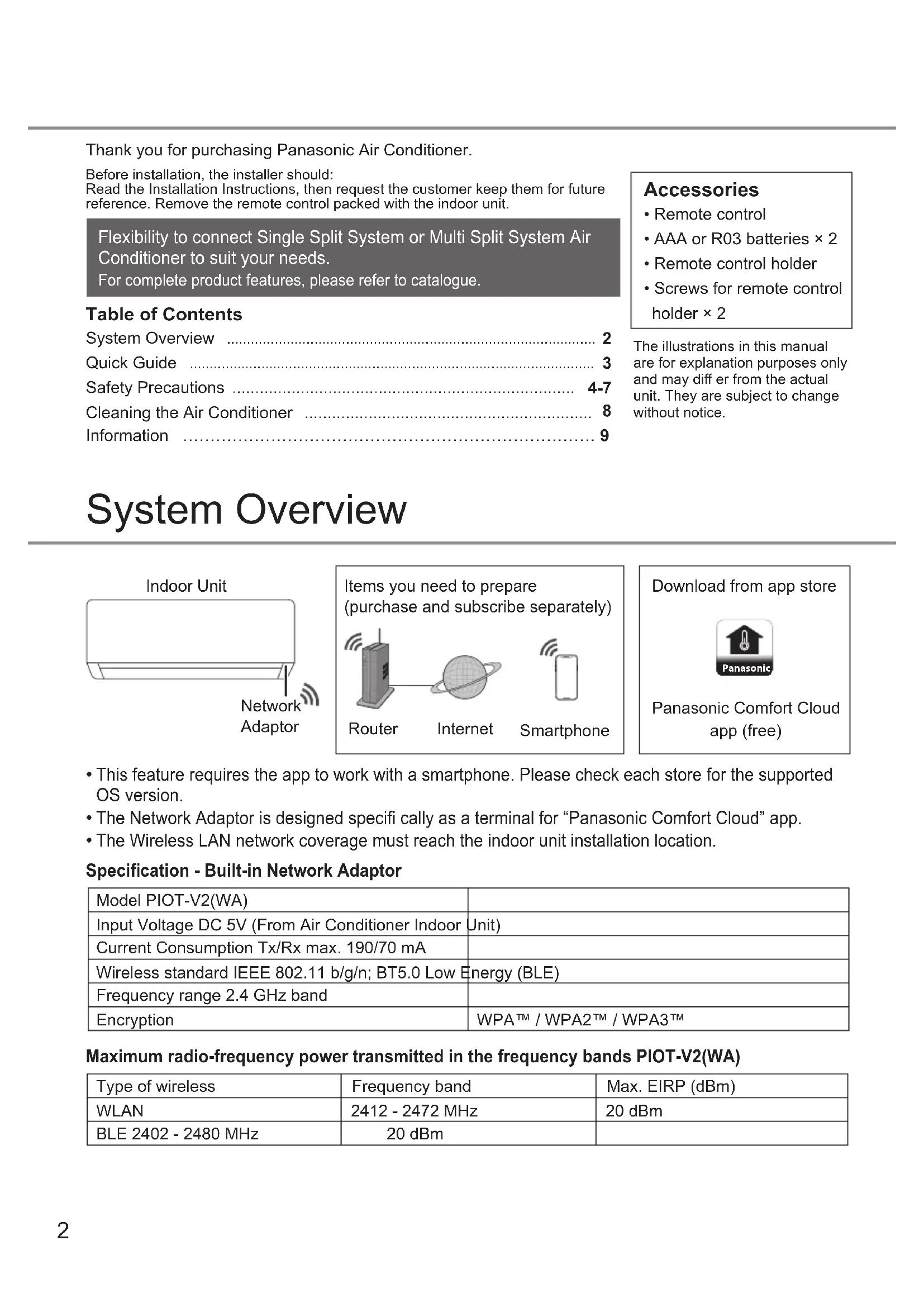
Operating Instructions (Simplifi ed Version) Air Conditioner https://eu.datanavi.ac.smartcloud.panasonic.com/documents/index.htm?model=MZ16ZKEQR code for Web Manual2 Flexibility to connect Single Split System or Multi Split System Air Conditioner to suit your needs. For complete product features, please refer to catalogue. Thank you for purchasing Panasonic Air Conditioner. The illustrations in this manual are for explanation purposes only and may diff er from the actual unit. They are subject to change without notice. Accessories
- Remote control holder
- Screws for remote control holder × 2 Before installation, the installer should:Read the Installation Instructions, then request the customer keep them for future reference. Remove the remote control packed with the indoor unit. Table of Contents System Overview …………………………………………………………………………………
This feature requires the app to work with a smartphone. Please check each store for the supported OS version.
The Network Adaptor is designed specifi cally as a terminal for “Panasonic Comfort Cloud” app.
The Wireless LAN network coverage must reach the indoor unit installation location. Panasonic Download from app store Router Internet Smartphone Items you need to prepare (purchase and subscribe separately) Panasonic Comfort Cloud app (free) Indoor Unit Network Adaptor Model PIOT-V2(WA) Input Voltage DC 5V (From Air Conditioner Indoor Unit) Current Consumption Tx/Rx max. 190/70 mA Wireless standard IEEE 802.11 b/g/n; BT5.0 Low Energy (BLE) Frequency range 2.4 GHz band Encryption WPA™ / WPA2™ / WPA3™ Specifi cation - Built-in Network Adaptor Maximum radio-frequency power transmitted in the frequency bands PIOT-V2(WA) Type of wireless Frequency band Max. EIRP (dBm) WLAN 2412 - 2472 MHz 20 dBm BLE 2402 - 2480 MHz 20 dBm3
Clock setting Inserting the batteries
Pull out the back cover of remote control.
Insert AAA or R03 batteries. Close the cover. Press CLOCK, then press to set the time
Press CLOCK for approximately 5 seconds to show the time as 12-hour (am/pm) or 24-hour.
Press to confi rm.POWER Press to start/stop the operation. When the unit is ON, disappears from the remote control display. DRY AUTO HEAT COOL
Press to select the desired mode.
Press TEMP UP, TEMP DOWN to select the desired temperature.Selection range: 16.0 °C ~ 30.0 °C / 60 °F ~ 86 °F. Press for approximately 10 seconds to show the temperature as °C or °F.
To connect to a network
Press to turn the Wireless LAN feature ON or OFF. For Wireless LAN Module operation setup, please refer to Setup Instructions Web Manual. If the Wireless LAN LED blinks continuously and you do not want to use the app, press the Wireless LAN button to turn it off .
System Overview / Quick Guide4 Safety Precautions To prevent personal injury, injury to others or property damage, please comply with the following: Incorrect operation due to failure to follow instructions below may cause harm or damage, the seriousness of which is classifi ed as below: This appliances is not intended for accessibility by the general public. WARNING This sign warns of death or serious injury. CAUTION This sign warns of injury or damage to property. The instructions to be followed are classifi ed by the following symbols: This symbol denotes an action that is PROHIBITED. These symbols denote actions COMPULSORY. WARNING Indoor unit and outdoor unit This appliance can be used by children aged from 8 years and above and persons with reduced physical, sensory or mental capabilities or lack of experience and knowledge if they have been given supervision or instruction concerning use of the appliance in a safe way and understand the hazards involved. Children shall not play with the appliance. Cleaning and user maintenance shall not be made by children without supervision. Please consult authorised dealer or specialist to clean the internal parts, repair, install, remove, disassemble and reinstall the unit. Improper installation and handling will cause leakage, electric shock or fi re. Confi rm with authorised dealer or specialist on usage of any specifi ed refrigerant type. Using refrigerant type other than the specifi ed may cause product damage, burst and injury etc. Do not use means to accelerate the defrosting process or to clean, other than those recommended by manufacturer. Any unfi t method or using incompatible material may cause product damage, burst and serious injury. Do not install the unit in a potentially explosive or fl ammable atmosphere. Failure to do so could result in fi re. Do not insert your fi ngers or other objects into the air conditioner indoor or outdoor unit, rotating parts may cause injury. Do not touch the outdoor unit during lightning, it may cause electric shock. Do not expose yourself directly to cold air for a long period to avoid excess cooling. Do not sit or step on the unit, you may fall down accidentally. Remote control Do not allow infants and small children to play with the remote control to prevent them from accidentally swallowing the batteries. Indoor unit Outdoor unit Power supply Remote control Air inlet Air inlet Air inlet Air inlet Air outlet Air outlet Air outlet Air outlet5
Power supply Do not use a modifi ed cord, joint cord, extension cord or unspecifi ed cord to prevent overheating and fi re. To prevent overheating, fi re or electric shock:
Do not share the same power outlet with other equipment.
Do not operate with wet hands.
Do not over bend the power supply cord.
Do not operate or stop the unit by inserting or pulling out the power plug. If the supply cord is damaged, it must be replaced by the manufacturer, service agent or similarly qualifi ed persons in order to avoid a hazard. It is strongly recommended to be installed with Earth Leakage Circuit Breaker (ELCB) or Residual Current Device (RCD) to prevent electric shock or fi re. To prevent overheating, fi re or electric shock:
Insert the power plug properly.
Dust on the power plug should be periodically wiped with a dry cloth. Stop using the product if any abnormality/ failure occurs and disconnect the power plug or turn off the power switch and breaker. (Risk of smoke/fi re/electric shock) Examples of abnormality/failure
The ELCB trips frequently.
Burning smell is observed.
Abnormal noise or vibration of the unit is observed.
Water leaks from the indoor unit.
Power cord or plug becomes abnormally hot.
Fan speed cannot be controlled.
The unit stops running immediately even if it is switched on for operation.
The fan does not stop even if the operation is stopped. Contact your local dealer immediately for maintenance/repair. This equipment must be earthed to prevent electrical shock or fi re. Prevent electric shock by switching off the power supply and unplug: - Before cleaning or servicing, - When extended non-use, or - During abnormally strong lightning activity. CAUTION Indoor unit and outdoor unit Do not wash the indoor unit with water, benzine, thinner or scouring powder to avoid damage or corrosion at the unit. Do not use for preservation of precise equipment, food, animals, plants, artwork or other objects. This may cause quality deterioration, etc. Do not use any combustible equipment in front of the airfl ow outlet to avoid fi re propagation. Do not expose plants or pet directly to airfl ow to avoid injury, etc. Do not touch the sharp aluminium fi n, sharp parts may cause injury. Do not switch ON the indoor unit when waxing the fl oor. After waxing, aerate the room properly before operating the unit. Do not install the unit in oily and smoky areas to prevent damage to the unit. Do not dismantle the unit for cleaning purpose to avoid injury. Do not step onto an unstable bench when cleaning the unit to avoid injury. Do not place a vase or water container on the unit. Water may enter the unit and degrade the insulation. This may cause an electric shock. Do not open window or door for long time during operation, it may lead to ineffi cient power usage and uncomfortable temperature changes. Prevent water leakage by ensuring drainage pipe is: - Connected properly, - Kept clear of gutters and containers, or - Not immersed in water After a long period of use or use with any combustible equipment, aerate the room regularly. After a long period of use, make sure the installation rack does not deteriorate to prevent the unit from falling down. Safety Precautions6 Remote control Do not use rechargeable (Ni-Cd) batteries. It may damage the remote control. To prevent malfunction or damage of the remote control:
Remove the batteries if the unit is not going to be used for a long period of time.
New batteries of the same type must be inserted following the polarity stated. Power supply Do not disconnect the plug by pulling the cord to prevent electric shock. WARNING This appliance is fi lled with R32 (mild fl ammable refrigerant). If the refrigerant is leaked and exposed to an external ignition source, there is a risk of fi re. Indoor unit and outdoor unit The appliance shall be installed, and/or operated in a room with fl oor area larger than A min (m²) and keep away from ignition sources, such as heat/sparks/open fl ame or hazardous areas such as gas appliances, gas cooking, reticulated gas supply systems or electric cooking appliances, etc. (Refer to Table A of Installation instructions table for A min (m²)) Be aware that refrigerant may not contain an odour, highly recommended to ensure suitable fl ammable refrigerant gas detectors are present, operating and able to warn of a leak. Keep any required ventilation openings clear of obstruction. Do not pierce or burn as the appliance is pressurized. Do not expose the appliance to heat, fl ame, sparks, or other sources of ignition. Else it may explode and cause injury or death. Precaution for using R32 refrigerant No person carrying out work in relation to a refrigerating system which involves exposing any pipe work that contains or has contained fl ammable refrigerant shall use any sources of ignition in such a manner that it may lead to the risk of fi re or explosion. They must not be smoking when carrying out such work. All possible ignition sources, including cigarette smoking, should be kept suffi ciently far away from the site of installation, repairing, removing and disposal, during which fl ammable refrigerant can possibly be released to the surrounding space. Safety Precautions7
Before attempting to control / operate this air-conditioner product via wireless communication from a remote location, make sure to check the installation of the appliance and its surrounding area, and, be wary of any person(s) within the vicinity. WARNING Network Adaptor (activated) Do not use the indoor unit near to any medical equipment or automatic control equipment (automatic door, wire alarms, etc.). (Radio wave from indoor unit may interfere with the equipment and may cause incident due to malfunction) Keep at least 15 cm away from the indoor unit if you have a cardiac pacemaker. (Radio wave from indoor unit may interfere with the operation of pacemaker) CAUTION Network Adaptor (activated) Check the following requirements in advanced (At home):
Insert the power supply thoroughly. Ensure no dust builds up on the power supply. (This can cause fi re due to ignition in the power supply’s of poor contact)
Check the status of timer activation set by other persons. (Unexpected run-stop operation may cause harm to human body, pets, and plants)
There should be no abnormality in the air conditioner such as change of airfl ow. Ensure no object(s) which may be displaced easily due to the airfl ow blowing directly at it. The fallen or moved object(s) might lead to danger such as fi re, injury etc.
At all times, use the in-house remote control when there is a possibility of person(s) (such as infant, children, disabled person(s), elderly or sickly person(s)) who are incapable of controlling the temperature themselves and rely on the pre-set confi guration of the air- conditioner. The rise and drop in the temperature due to remote operation might cause the occupant(s) to experience discomfort and/or disrupt their daily routine. Plant(s) and animal(s) are likely to be aff ected by sudden temperature adjustments. Check the following requirements before operating the air conditioner from a remote location:
Do inform the person(s) in the vicinity of the area being air-conditioned that you will remotely control the air conditioner operation and settings. This is to avoid any possibility of serious eff ects on person(s) either due to being taken by surprise or due to sudden changes in temperature (from comfort to cold or vice versa). (This may cause harm to human body due to sudden changes of outside temperature and room temperature.Temperature adjustment can be operated by remote control)
If the main display of the Panasonic Comfort Cloud app does not refl ect the status of the operation, please use the in-house remote control to operate the air-conditioner.
As the app uses network communication, there may be times when remote operation is not possible due to communication and/ or network failures (such as Panasonic Cloud server downtime, telecom providers’ server downtime, WIFI connectivity etc.). In the event of such failure(s), please use the in-house remote control to operate the air- conditioner. Safety Precautions8 Cleaning the Air Conditioner Cleaning has to be carried out at regular intervals to ensure the unit is at optimal performance. A dirty unit may cause malfunction and you may retrieve “H 99” error code. Consult an authorised dealer.
- Before cleaning, switch off the power supply and unplug the unit.
- Do not touch the aluminium fi n as the sharp parts may cause injury.
- Do not use benzine, thinner or scouring powder.
- Use soap ( pH 7) or neutral household detergent only.
- Do not use water hotter than 40 °C / 104 °F. Air fi lters Once every 2 weeks
- Wash/rinse the fi lters gently with water to avoid damaging the surface.
- Dry the fi lters thoroughly under a shade, away from fi re or direct sunlight.
- Replace any damaged fi lters. Operating conditions Use this air conditioner in the temperature range indicated in the table. Temperature °C (°F) Indoor Multi split outdoor unit
Information Cleaning the Air Conditioner / Information Information for Users on Collection and Disposal of Old Equipment and Used Batteries These symbols on the products, packaging, and/or accompanying documents mean that used electrical and electronic products and batteries must not be mixed with general household waste. For proper treatment, recovery and recycling of old products and used batteries, please take them to applicable collection points in accordance with your national legislation. By disposing of them correctly, you will help to save valuable resources and prevent any potential negative eff ects on human health and the environment. For more information about collection and recycling, please contact your local authority. Penalties may be applicable for incorrect disposal of this waste, in accordance with national legislation.
For Business users in the European Union and some other European countries If you wish to discard electrical and electronic equipment, please contact your dealer or supplier for further information. [Information on Disposal in other Countries outside the European Union] These symbols are only valid in the European Union. If you wish to discard these items, please contact your local authority or dealer and ask for the correct method of disposal. Note for the battery symbol (bottom two symbol examples): This symbol might be used in combination with a chemical symbol. In this case it complies with the requirement set by the Directive for the chemical involved. WARNING This symbol shows that this equipment uses a fl ammable refrigerant. If the refrigerant is leaked, together with an external ignition source, there is a possibility of ignition. This symbol shows that the Operation Instructions should be read carefully. This symbol shows that a service personnel should be handling this equipment with reference to the Installation Instructions. This symbol shows that there is information included in the Operation Instructions and/or Installation Instructions. This air conditioner incorporates a device that generates a biocidal product. Free radicals generated by a device incorporated in the air conditioner have the capacity to inhibit pollutants, such as certain types of bacteria, viruses, mould. Active substances : Free radicals generated in situ from ambient air or water. Usage : This device function can be operated ON / OFF by “nanoe X” icon button. Do refer to “How to Use” in detailed manuals (Matrix 2D scanning) for more information. Cross fl ow fan coating was treated with biocidal active substances [2-octyl-2H- isothiazol-3-one (OIT), 3-iodo-2-propynylbutylcarbamate (IPBC), Zinc pyrithione] to inhibit growth of mold and fungi on its surface.10 Possibilité de connecter un climatiseur à système Monosplit ou à système Multisplit. Pour connaître les caractéristiques complètes des produits, veuillez vous référer au catalogue. Nous vous remercions d’avoir porté votre choix sur un climatiseur Panasonic. Les illustrations de ce mode d’emploi sont fournies à titre d’exemple uniquement et peuvent présenter des diff érences par rapport à l’appareil proprement dit. Celui-ci peut être modifi é sans préavis. Accessoires
Panasonic Marketing Europe GmbH Упълномощен представител в ЕС: Panasonic Testing Centre Winsbergring 15, 22525 Hamburg, Германия Declaration Of Conformity (DOC) Hereby, "Panasonic Corporation" declares that this product is in compliance with the essential requirements and other relevant provisions of the relevant statutory requirements. The full text of the declaration of conformity is available at the following internet address: http://www.ptc.panasonic.eu/ Contact in the UK : Panasonic UK, a branch of Panasonic Marketing Europe GmbH, Maxis 2, Western Road, Bracknell, Berkshire, RG12 1RT ACXF55-34740 FC0922-0