512BBA - Microphone 512 Audio - Free user manual and instructions
Find the device manual for free 512BBA 512 Audio in PDF.



User questions about 512BBA 512 Audio
0 question about this device. Answer the ones you know or ask your own.
Ask a new question about this device
Download the instructions for your Microphone in PDF format for free! Find your manual 512BBA - 512 Audio and take your electronic device back in hand. On this page are published all the documents necessary for the use of your device. 512BBA by 512 Audio.
USER MANUAL 512BBA 512 Audio
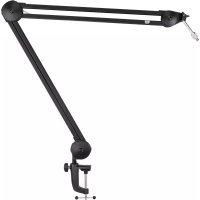
Congratulations for purchasing the BBA from 512 Audio! Perfect for any situation where a microphone boom arm is needed, the 512-BBA allows you to position your microphone where it sounds best for your voice, with a professional look on camera, every time.
LET'S GET STARTED
The BBA is intended to be mounted to a desktop or similar flat surface, using the clamp assembly at the base of the arm.
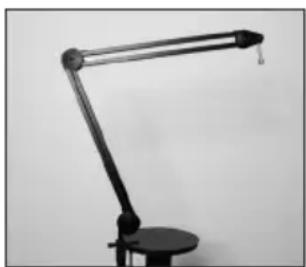
Begin by determining where on your worktop the base should be placed. The boom arm should ideally come close to forming an inverted "L" when set up, to allow the internal spring assembly to handle the weight of any microphone easily. That means that for very deep and large table tops or work surfaces you may need to mount the arm on the same side of the table that your body sits on, in order to maintain the desired shape for the arm.

Open the clamp at the base of the arm wide enough to accommodate the flat surface, and place the arm in position. The clamp will be seated properly when both of its surfaces are making solid contact with a flat and solid surface on the top and bottom of the clamp.
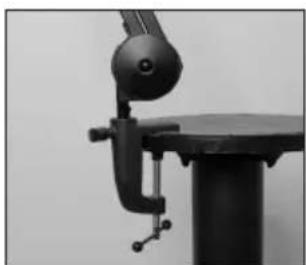
Tighten the clamp until the assembly is secure and the base of the arm won't move unintentionally.
NOTE: Make sure that you don't over-fighten the clamp! (We realize that might sound a lot like "make sure you don't get overly wet when you go swimming", or "enjoy your dinner but don't eat it all", but it's true.)
SETTING UP YOUR MICROPHONE
The BBA has a number of different ways to mount a microphone to it: mics can be attached to the boom arm via hard mount, shock mount or even directly to the microphone itself if desired (for instance, the Blue Yeti is often attached directly if a shockmount isn't being used).
The BBA can attach mounts or clips using either 3/8 or 5/8-inch threading, and the microphone can hang from underneath the top of the arm (which is the most traditional way of mounting mics in the broadcast world), or be mounted face up above the top of the arm, if desired.

- Once the clamp at the base is set correctly, attach your microphone's mount onto the BBA and make sure that it's secure (but remember - don't over-fighten!).
- Attach your microphone to the mount according to the manufacturer's instructions.
- The BBA has a high-tension spring system inside that will hold it in position easily. Move the microphone into roughly the correct position and move on to the next step.
REFINE YOUR SETUP
Now that you have everything roughly in place, it's time to get things looking and sounding great for your production environment.
- Sit down in your chair and get your body into the position that it will normally be in when you're streaming or broadcasting.
- Determine the best position by speaking into the microphone and listening to the sound of your voice. If you're not appearing on-camera, it makes sense to put the mic where it sounds the absolute best, regardless of what it does to the look of your setup. If you ARE appearing on camera, you will need to find the best compromise between sound quality, lighting and on-camera look.
- Now that your microphone is properly situated, you can clean up the final
look by attaching the microphone cable along the length of the boom arm with the provided Velcro straps, pulling the cable tight to the arm but still loose enough to make sure that the arm can swing freely.
Enjoy your BBA!
EN|9
SPECIFICATIONS
Upper arm length 470mm (18.5")
Lower arm length 470mm (18.5")
Weight 1.75kg (3.9 lbs)
Horizontal Reach 80 Omm (31.5")
Vertical Reach 820mm (32")
Rotation 360 degrees
Load Supports microphones weighing 450g - 1360g (1-3 lbs) including shock me
Maximum Desktop 55mm (2.17")
Thickness
WARRANTY STATEMENT
512 Audio warranties this product to be free from defect in materials and workmanship for one year from the date of purchase, for the original purchaser to whom this equipment is registered. This warranty is non-transferable.
This warranty is void in the event of damage incurred from unauthorized service to this unit, or from electrical or mechanical modification. This warranty does not cover damage resulting from abuse, accidental damage, misuse, improper electrical conditions such as mis-wiring, incorrect voltage or frequency, unstable power, disconnection from earth ground (for products requiring a 3 pin, grounded power cable), or from exposure to hostile environmental conditions such as moisture, humidity, smoke, fire, sand or other debris, and extreme temperatures.
512 Audio will, at its sole discretion, repair or replace this product in a timely manner. This limited warranty extends only to products determined to be defective and does not cover incidental costs such as equipment rental, loss of revenue, etc. Please visit us at www.512audio.com for more information on your warranty, or to request warranty service.
This warranty applies to products sold in the United States of America. For warranty information in any other country, please refer to your local 512 Audio distributor. This warranty provides specific legal rights, which may vary from state to state. Depending on the state in which you live, you may have rights in addition to those covered in this statement. Please refer to your state laws or see your local 512 Audio retailer for more information.