Skylight - Microphone 512 Audio - Free user manual and instructions
Find the device manual for free Skylight 512 Audio in PDF.



| Product type | Condenser microphone |
| Brand | 512 Audio |
| Model | Skylight |
| Capsule type | Condenser |
| Capsule size | 34 mm large gold-sputtered diaphragm |
| Polar pattern | Cardioid |
| Frequency response | 20 Hz – 20 kHz |
| Sensitivity | -42 dB ±3 dB (0 dB = 1 V/Pa at 1 kHz) |
| Impedance | 200 ohms |
| Maximum SPL | 144 dB |
| Weight | 1 kg |
| Dimensions | 202 x 55.5 mm |
| Power requirement | 48V phantom power |
| Connection | 3-pin XLR |
| Connector type | Side-address |
| Included accessories | Shock mount, pop filter, carrying bag |
| Recommended use | Podcasting, streaming, vocals, instruments |
| Warranty | 1 year (original purchaser, non-transferable) |
| Care | Clean with a soft, dry cloth; avoid moisture |
| Safety | Use only with 48V phantom power; lower volume before engaging |
Frequently Asked Questions - Skylight 512 Audio
User questions about Skylight 512 Audio
0 question about this device. Answer the ones you know or ask your own.
Ask a new question about this device
Download the instructions for your Microphone in PDF format for free! Find your manual Skylight - 512 Audio and take your electronic device back in hand. On this page are published all the documents necessary for the use of your device. Skylight by 512 Audio.
USER MANUAL Skylight 512 Audio
text_image
SKYL STUDI S12SKYLIGHT USER GUIDE
STUDIO CONDENSER MICROPHONE
S12
AUDIO
Whether you Podcast, Broadcast, Stream, Play or Produce, 512 Audio's new Skylight Condenser Microphone delivers the studio quality sound you and your listeners demand.
Designed by engineers with a deep passion for audio, Skylight is ready to bring your voice to the world.
Let's begin.
STEP INTO THE SKYLIGHT

natural_image
Close-up of a mechanical device with a tool interacting with it, showing no visible text or symbols.Skylight is a side-address design, which means that it picks up audio coming in to the side of the microphone, not the end. For easy reference, the "front" of the microphone body carries the 512 Audio badge, so just point the side with the badge towards the speaker you're trying to capture and you'll be ready to go.
natural_image
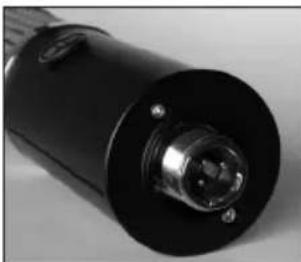
Close-up of a black cylindrical electronic device with a metallic connector and mounting holes (no visible text or symbols)On the bottom of the microphone is the XLR connector which accepts a standard 3-pin microphone cable for easy, secure connection to your audio mixer, interface or portable recorder.
SHOCK TREATMENT

natural_image
Mechanical component with curved and flanged parts, no visible text or symbolsYour Skylight microphone includes an adjustable Shock Mount cradle designed to gracefully suspend the microphone exactly where you need it, which not only looks great but protects your audio from the thumps and booms of stomping feet and table-tapping guests. Simply attach the Shock Mount to your boom arm or mic stand, slip Skylight into place and tighten the bottom ring to snug everything into place. Lastly, connect an XLR mic cable and run it from Skylight to your mixer, interface or portable recorder.
I GOT THE POWER

text_image
48V PAD INST PHASESkylight is a condenser microphone, which contributes to its lush tone and sensitivity. It also means that it requires 48 Volts of external power to operate (which is sometimes referred to as "Phantom Power"). Most USB audio interfaces, modern mixers, and recording devices are equipped with phantom power, which is typically accessible via a switch or button labeled "48V" somewhere near the microphone input or on the front or back panel. (NOTE: Before turning on phantom power, it's a good idea to turn your speakers down or take off your headphones, as there's often a bit of a "pop" sound as the power first kicks on.) Once you're connected and powered on, you're ready to rock.
SOUND CHECK
Now that you're up and running, let's take a few moments to talk about how to get the best out of your new microphone. Here are a few tips to help you sound your best:
PLAYING THE GAIN
text_image
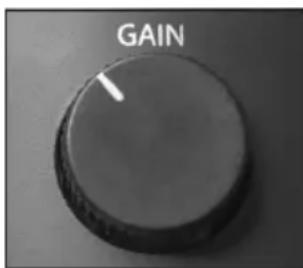
GAINNot to be confused with volume, the Gain setting on your mixer, interface, or portable recorder is used to both provide a clear, noise-free signal and to shape the tone of your recording to suit your creative fancy. This all-important setting controls the sensitivity of the microphone and allows you to determine how much the sound of your room is captured along with your voice or instrument. Setting the gain on the low side and moving in close to the microphone will produce a breathy, intimate tone that's perfect for any
SOUND CHECK (CONTINUED)
major motion picture trailers that you might be hired to narrate. This will also reduce the amount of reverberation and room echo that the microphone will hear. By the same token, increasing the gain and moving further from the microphone will allow more of the sound of your room to be captured, adding a nice "live" feel. A few minutes of experimentation with the gain setting and microphone placement will not only let you say classic things like "Test, test" and "Check one – Check two" like a pro, but will help you to quickly zero in on your signature sound.
MIND YOUR Ps AND Ts
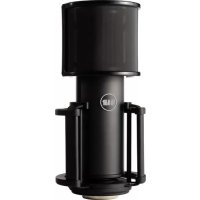
To help tame popping Ps and thumping Ts, Skylight comes complete with a custom Pop Filter. Simply use the two elastic bands to position the pop filter over the top of the microphone, so that it sits between the mic and your mouth. This will help to remove any small bursts of air from these powerful plosives but will still let your voice shine through loud and clear.
SOUND CHECK (CONTINUED)
Pro Tip
If you prefer not to block your face with the pop filter for visual reasons, you can still easily address plosives by adjusting the Angle of Incidence (this is a fancy way of saying "move the mic," and will convince your friends you went to audio engineering school). As an exercise, place your hand in front of your face and say the word "pop" over and over. Now move your hand slowly side to side as you speak. You'll quickly notice that you only feel the puffs of air when your hand is directly in front of your mouth. Simply move the microphone up or to the side - while still pointing it at your mouth - you'll sound as great as ever and won't be bothered by annoying pops.
SPECS AND TECH
Capsule Type Condenser
Capsule Size 34mm Gold plated large diaphragm
Polar Pattern Cardioid
Frequency Range 20Hz - 20kHz
Sensitivity -42dB +3dB (OdB = 1V/Pa at 1kHz)
Impedance 200 ohm
Max SPL 144dB
Weight 1kg
Dimensions 202 x 55.5mm
Included Accessories Shock Mount, Pop filter, carry bag
WARRANTY STATEMENT
512 Audio warranties this product to be free from defect in materials and workmanship for one year from the date of purchase, for the original purchaser to whom this equipment is registered. This warranty is non-transferable.
This warranty is void in the event of damage incurred from unauthorized service to this unit, or from electrical or mechanical modification. This warranty does not cover damage resulting from abuse, accidental damage, misuse, improper electrical conditions such as mis-wiring, incorrect voltage or frequency, unstable power, disconnection from earth ground (for products requiring a 3 pin, grounded power cable), or from exposure to hostile environmental conditions such as moisture, humidity, smoke, fire, sand or other debris, and extreme temperatures.
512 Audio will, at its sole discretion, repair or replace this product in a timely manner. This limited warranty extends only to products determined to be defective and does not cover incidental costs such as equipment rental, loss of revenue, etc. Please visit us at www.512audio.com for more information on your warranty, or to request warranty service.
This warranty applies to products sold in the United States of America. For warranty information in any other country, please refer to your local 512 Audio distributor. This warranty provides specific legal rights, which may vary from state to state. Depending on the state in which you live, you may have rights in addition to those covered in this statement. Please refer to your state laws or see your local 512 Audio retailer for more information.