Pearl OT 80 - Pregnancy test BEURER - Free user manual and instructions
Find the device manual for free Pearl OT 80 BEURER in PDF.


| Product type | Pregnancy test and fertility tracking (Pearl Fertility system) |
| Brand | Beurer |
| Model | Pearl OT 80 |
| Kit contents | 15 FSH strips, 15 LH strips, 2 hCG strips, 1 reusable strip holder, Pearl Fertility app, user manual |
| Strip holder dimensions | Approx. 10 x 2 x 1 cm (estimated) |
| Strip holder weight | Approx. 30 g (estimated) |
| Power supply | None (device does not require batteries; app requires a charged smartphone) |
| Smartphone compatibility | iOS ≥ 11.0, Android ≥ 6.0 |
| Main functions | Ovulation detection (FSH, LH), pregnancy test (hCG), menstrual cycle tracking, visual photo analysis via app |
| Test duration | 10 to 15 minutes (do not exceed 20 minutes) |
| Storage conditions | 4 °C to 30 °C, protected from light |
| Care and cleaning | Clean the strip holder with water after each use, dry with a soft cloth; do not sterilize or use solvents |
| Safety | Single use of strips; do not use as contraceptive; follow warnings and precautions |
| Spare parts and consumables | Hormone test strips (FSH, LH, hCG) sold separately; reusable strip holder |
| Repairability | Not user repairable; contact customer service if problems occur |
| General information | Manufactured by Beurer GmbH; for cycles of 21 to 35 days; do not use with hormonal contraception |
Frequently Asked Questions - Pearl OT 80 BEURER
User questions about Pearl OT 80 BEURER
0 question about this device. Answer the ones you know or ask your own.
Ask a new question about this device
Download the instructions for your Pregnancy test in PDF format for free! Find your manual Pearl OT 80 - BEURER and take your electronic device back in hand. On this page are published all the documents necessary for the use of your device. Pearl OT 80 by BEURER.
USER MANUAL Pearl OT 80 BEURER
Read these instructions for use carefully and keep them for later use, be sure to make them accessible to other users and observe the information they contain.
Thank you for choosing one of our products. Our name stands for high-quality, thoroughly tested products for applications in the areas of heat, weight, blood pressure, body temperature, pulse, gentle therapy, massage, beauty, baby and air. With kind regards, Your Beurer team
Table of contents
- Included in delivery 16
- Signs and symbols 16
- Intended use 17
4.Warnings and precautions 18 - Accessories 18
- Initial use 19
-
How does the Pearl Fertility System work? 19
-
Icons and Symbols 20
- Using the Pearl Fertility App. 21
- Cleaning and maintenance 25
- Storage and disposal 26
- Technical data.. 26
- Customer service address 26
1. Included in delivery
Check that the exterior of the cardboard delivery packaging is intact and make sure that all contents are present. Before use, ensure that there is no visible damage to the kit or accessories and that all packaging material has been removed. If you have any doubts, do not use the kit and contact your retailer or the specified Customer Service address.
Free Pearl Fertility App
- 1 x activation QR code for the Pearl Fertility app
15 x Pearl Fertility test strips - FSH
15 x Pearl Fertility test strips - LH
- 2 × Pearl Fertility test strips - hCG (pregnancy tests)
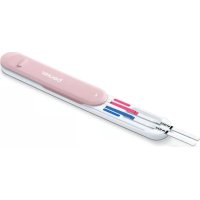
- 1x reusable stripholder
- 1x instruction for use App and handling the device
- 1x instructions for hormones
2. Signs and symbols
The following symbols are used in these instructions for use and on the packaging:
| WARNING Warning notice indicating a risk of injuryor damage to health | |
| i | Product information Note on important information |
| i | Observe the instructions for use |
| Manufacturer | |
| IVD | In vitro diagnostic device |
| 2 | Not for re-use/for single use only |
| Keep away from sunlight | |
| 30°C 4°C | Temperature limit +4°C to +30°C |
| CE0123 | This product satisfies the requirements of the applicable European and national directives |
| Use by | |
| LOT | Batch designation |
| SN | Serial number |
| REF/Art.-Nr. | Reference number |
| PAP | Dispose of packaging in an environmentally friendly manner |
3. Intended use
The Pearl Fertility system is a self-testing device consisting of a mobile application in combination with FSH and LH hormonal test strips intended for an accurate estimation of the most fertile days during a womans cycle. The App is able to track factors of the cycle based on user input.
The hormonal test strips have their own instructions for use and must be read carefully before using them. These instructions for use are for the Pearl Fertility system (app and strips) only and may refer to the test strip instructions for guidance only. The App is NOT to be used for contraceptive purposes; nor alone, nor in combination with the test strips. If you are seeking natural family planning consult a professional.
The kit is designed to cover cycles greater than 21 and up to 35 days. Longer cycles may require an additional set. If you have conditions, especially those that affect your natural hormone balance or cycle, please consult your doctor before using the kit.
4.Warnings and precautions
Pearl Fertility App informs you when the best days to conceive are. This does not mean those days are the only days in which pregnancy is possible and frequent sexual intercourse during the fertile days is recommended in order to get pregnant.
Pearl Fertility App is not compatible with the use of hormonal contraception, as hormonal contraception affects natural course of events to achieve pregnancy. The only test strips that are supported by Pearl Fertility App are the Pearl LH, FSH, test strips included in the Pearl Fertility Kits.
- Use the Pearl Fertility App only with test strips that are included in the Pearl Fertility Kit. Using other test strips will produce inaccurate results, and it is breach to Pearl Fertility App Terms of Use.
- The use of the Pearl Fertility App in combination with the Pearl Fertility Kit test strips is limited to the countries where the Pearl Fertility Kits are sold. Do not use Pearl Fertility App in combination with test strips outside of these countries.
- If you experience irregular cycles and use Pearl Fertility App in combination with test strips, make sure you have sufficient number of test strips to cover the maximum length of your cycle.
5. Accessories
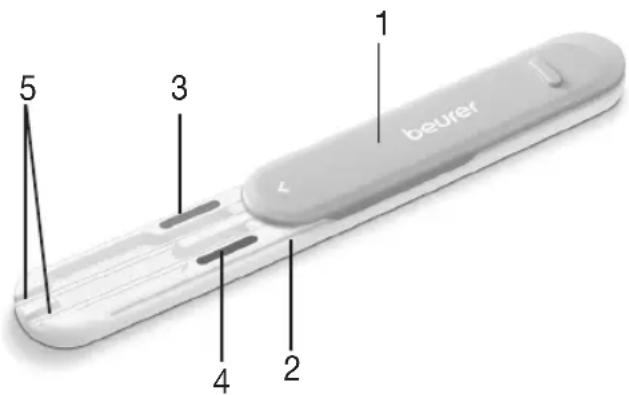
- Protective cover (can be removed)
- Stripholder
- Color indicator pink
- Color indicator blue
- Strip slot
6. Initial use
Download the Pearl Fertility App to your smartphone

Before initial use, you first have to download the Pearl Fertility App to your smartphone. Please find the list of compatible devices via the QR-code in the chapter Technical data.
Before you get your measurements, proceed as follows:
- Download the free Pearl Fertility App from the Apple App Store (iOS) or from Google Play (AndroidTM).
- Open the Pearl Fertility App on your smartphone.
- Register the kit via the activation QR-code on the seperate sheet in the kit.
- Follow the instructions in the Pearl Fertility App.

You can only read the result tone via the test strips and using the Pearl Fertility App.
Do you have any questions about the Pearl Fertility App?
The Pearl team is on hand to help. For more information on this, please visit www.pearl-fertility.com/faq The Pearl Fertility App also has a contact function in your profile, which you can also use to send us your questions and feedback directly. The Pearl website and the information
sections in the app already offer some answers and diverse background information about your cycle.
7. How does the Pearl Fertility System work?
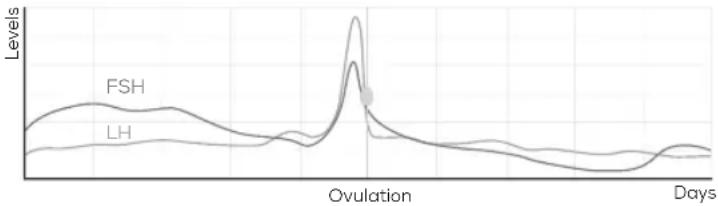
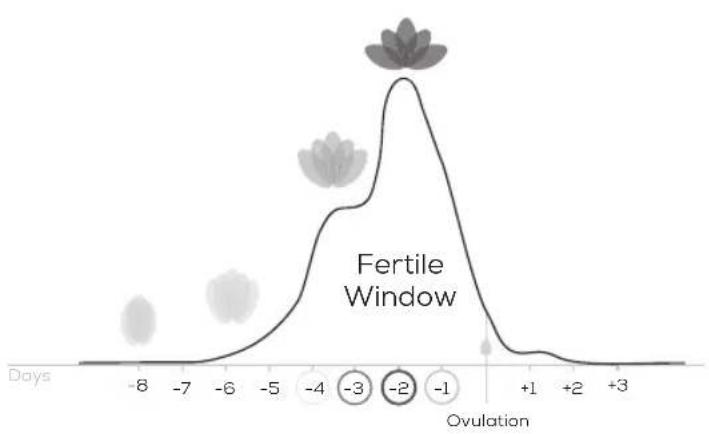
The Pearl Fertility System uses hormonal profiles, acquired by testing hormones (FSH and LH) for a couples of days, to find out when the ovulation is going to happen. Then, the Pearl Fertility System displays the Fertile Window (the daily chance to conceive), based on the hormonal readings.
[1] Treloar, A. E., et al (1967). Variation of the human menstrual cycle through reproductive life. Int J Fertil, 12(1 Pt 2), 77-126
[2] Stanford, et al., Timing intercourse to achieve pregnancy: current evidence. "Obstetrics & Gyn. 100.6 (2002): 1333-1341
- Icons and Symbols
| O | Ovulation |
| ♥ | Intercourse Medium flow |
| a | Protected Intercourse |
| i | More information button |
| LH test strip (pink) | |
| Test completed (pink) | |
| Today button | |
| Expose the test strip to the first morning urine |
9. Using the Pearl Fertility App
The Pearl Fertility App has three main screens: the calendar view, the cycle view, and the measurements view. The calendar view displays cycle information and the Fertile Window on a calendar format, so that you have all the important informations at a glance. The cycle view shows the view of the current cycle, so you are in control of the current events. The measurements view shows you how the tests are interpreted, so you gain insights every day. Before using the app it is important to know what test strips are needed each morning.
The test strips need to be exposed to first morning urine. Please read the instructions for use of the test strips which are in a seperate instruction manual.
Step 1: Wait for your cycle to start
On day one of your cycle, i.e. the first day you notice bleeding, tap on the flower and tell Pearl your period has come. You do this by selecting a drop on the period input menu. Pearl will ask you if this day marks the beginning of your cycle. Select yes. The cycle view will refresh starting from day 1.
Step 2: Wake up in the morning and start testing
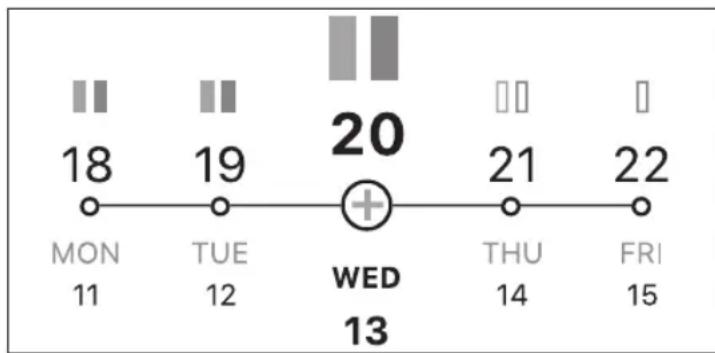
Starting from day #2 of your cycle, i.e. the day after you noticed the first bleeding, Pearl will notify you what hormone tests you need to use that day. The symbols on the Cycle View days indicate what test strip to use, pink for LH, blue for FSH. Remember to always use first morning urine, and to read the instructions for use of each test strip before using them.
There are two different testing possibilities.
Usage with stripholder: Load the strip or strips into the stripholder to directly pee on them.
Usage with urine container: Collect some first morning urine in a clean dry plastic urine catcher (can be glass). Dip the absorbent tip of the hormone strip vertically into the urine sample.
Usage with stripholder
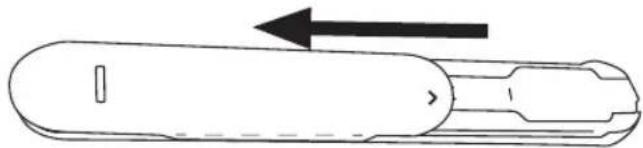
- Slide the protective cover all the way back.
- Place the required hormone strip (LH or FSH) into the colour-coded strip slot of the stripholder.

The pregnancy tests can be inserted in both the LH and in the FSH slot.
- Insert the hormone strips fully up to the "Max" line. Ensure that the "Max" marking on the hormone strips aligns with the stripholder.

- Slide the protective cover all the way forward again.

- Hold only the absorbent tip of the hormone strip facing downward in your urine stream for 3 seconds. Make sure that you hold the strips completely in the urine stream up to the "Max" marking; otherwise, not enough liquid will hit the strips and they cannot be evaluated. In doing so, ensure that the arrow marking on the stripholder does not become wet.

Clean the stripholder after each use (for more information see chapter on cleaning).
Usage with urine container
-
Collect the urine sample in a clean and dry container.
-
Dip the absorbent tip of the hormone strip vertically up to the "Max" marking into the urine sample for 5 seconds. Make sure that the strips are fully immersed in the urine sample up to the "Max" marking; otherwise, they will not come into contact with enough liquid and they cannot be evaluated. However, the "Max" marking must not be exceeded.
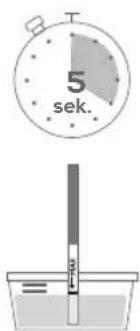
After usage
- Place the hormone strip on a non-absorbent surface. We recommend the blank side of the foil packaging of the hormone strip as a surface; it can then be disposed of. You can use the timer in the app to measure the evaluation time
- Wait for the test strips to develop for at least 10-15 minutes but no longer than 20 minutes. Preferably do not take the measurement after 30min.
- After 30 minutes any change in your result should be disregarded.
Step 3: Take a visual reading with the App
- After the test has been developed, select the strip on the inputs menu of the App.
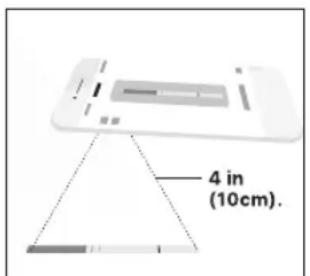
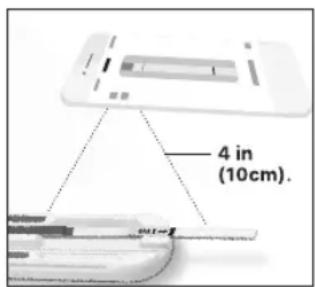
- Take a picture of the test strip: center the test strip in the rectangle shown in the app. Make sure the strip is well lit and no shadows cast on in.
or
- Align the colored part (example for blue strip) of the test strip with the colored part in the app, or let the automatic strip detection pre-find it for you; you can pinch, drag, and rotate to make sure the strip is captured correctly.
- Align the test lines by dragging the handles on the side up and down, so that the control and test lines of the test strips are exactly covered by the rectangular layout shown in the app. When the lines are faint try to center them as much as possible.
Control line
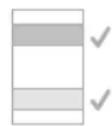
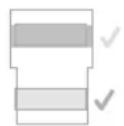
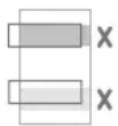
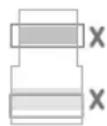
- Done for today! After successfully aligning the lines click done, the strip will be saved and a tick will appear on the input dialogue indicating that you have completed that test.
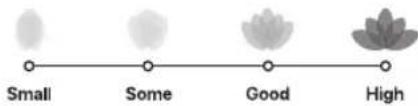
To dispose of the used strip, slide the protective cover back while holding the stripholder vertically, facing downward. The hormone strip should automatically release from the holder. Tap on the end of the holder if the hormone strip does not automatically release. As you continue to test, Pearl will build your hormonal profile and update your cycle view. The flower is a graphical representation of your chance to get pregnant that day.
The Fertile Window
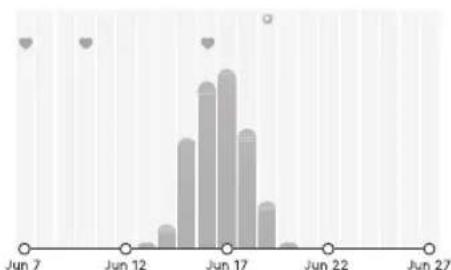
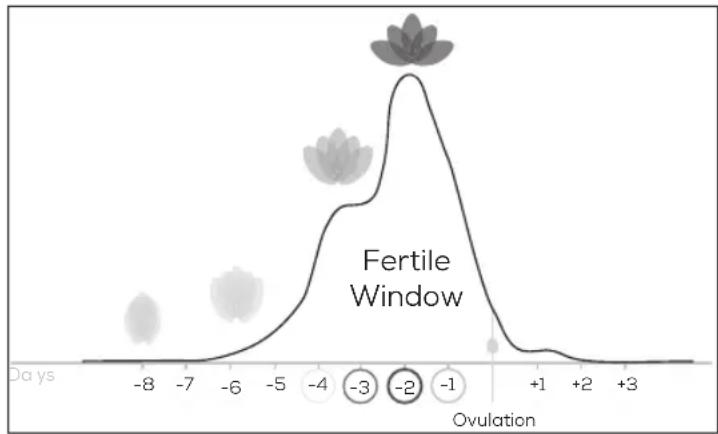
The Fertile Window is the time when women have a good chance of getting prgenant. It lasts approx. 8 days and starts 6 days before ovulation.
Chances of getting pregnant

The term "fertile days" includes the days within the cycle when there is a good chance of pregnancy. This period lasts approximately 8 days - it begins about 6 days before ovulation and ends one day after ovulation. The kit can tell you up to 6 days in advance when is your ovulation, covering up to 8 days of your fertile window (see chart).
The angle between the petals is the probability of getting pregnant in percentage, as represented by the Fertile Window. An overlay of the flower, the Fertile Window, and the calendar colors can help you better understand your Fertile Window.
10. Cleaning and maintenance
WARNING
In order to prevent damage to the strip holder, do not use benzene, petrol or any solvents for cleaning. Do NOT sterilise the Pearl Fertility Holder by boiling, with gas or with an autoclave.
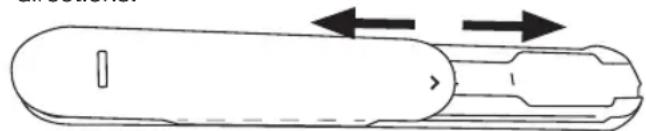
- Separate the protective cover from the stripholder by sliding the protective cover and the stripholder in opposite directions.
- Clean the strip holder with water after each use.
- Dry the strip holder with a soft, dry cloth. Do not disinfect the strip holder.
- To reassemble the holder, slide the protective cover with the arrow marking facing forward back onto the stripholder.

Please always store the holder open, i.e. with the protective cover open, so that the holder is not damaged.
11. Storage and disposal
Dispose the strips and the strip holder in the household waste after one cycle is complete.
12. Technical data
| Model OT 80 | |
| Type C-BEU | |
| Storage and transportation conditions | Temperature 4 – 30°C |
| System requirementsiOS ≥ 11.0, Android™ ≥ 6.0,List of compatible devices: |
13. Customer service address
Please contact our Customer Service department if you have any questions. Please find the service address in the attached address insert. OUR OBLIGATIONS TO YOU: Our mission is to supply you with high-quality health products and the best customer service. If you are not completely satisfied with this product, please contact our Customer Service department.
Do you have any questions about the Pearl Fertility App?
The Pearl team is on hand to help. For more information on this, please visit www.pearl-fertility.com/faq
The Pearl Fertility App also has a contact function in your profile, which you can also use to send us your questions and feedback directly. The Pearl website and the information sections in the app already offer some answers and diverse background information about your cycle.
FRANÇAIS

Apple and the Apple logo are trademarks of Apple Inc., registered in the U.S. and other countries. App Store is a service mark of Apple Inc., registered in the U.S. and other countries.
Google Play and the Google Play logo are trademarks of Google LLC.
Android is a trademark of Google LLC.

Colorimetrix GmbH · Michael-Huber-Weg 18 · 81667 München (Germany) · Tel.: +49 (0) 15255 820489 www.colorimetrix.com/gmbh · Mail: info@colorimetrix.com
Distributed by BEURER GmbH Solfinger Str. 218 89077 Ulm (Germany) Tel. +49 (0) 731 / 39 89-144 Fax: +49 (0) 731 / 39 89-255 www.beurer.com-Mail: kd@beurer.de