288 - Vacuum Cleaner Hobot - Free user manual and instructions
Find the device manual for free 288 Hobot in PDF.


| Product type | Window cleaning robot |
| Dimensions (L x W x H) | 240 x 240 x 100 mm |
| Product weight | 1.2 kg |
| Input voltage | 100~240 VAC, 50/60 Hz |
| Adapter output | 24 V / 3.0 A minimum |
| Power consumption | 72 W |
| Battery | Li-Po, 4 x 3.7 V |
| Battery life | 20 minutes |
| Cleaning speed | 2.4 min/m² |
| Noise | 64 dB |
| Maximum cleaning area | Height: 6 m, width: 5 m |
| Safety rope | Length 4.5 m, strength 150 Kgf |
| AC power cord length | 1.0 m |
| DC power cord length | 4.0 m |
| Automatic modes | 3 types (zigzag, N-shaped path, etc.) |
| Technology | AI V1.0, laser sensors, ASI (Uninterrupted Power Supply) system |
| Included accessories | Remote control, adapter, cables, 3 dry cloths + 3 polishing cloths, safety rope |
| Belt maintenance | Regular cleaning after each use |
| Cloth washing | Wash at max 40°C, do not bleach, do not tumble dry |
| Safety | Safety rope, automatic stop, edge detection, anti-fall ASI |
| Warranty | Contact authorized dealer for hardware defects |
Frequently Asked Questions - 288 Hobot
User questions about 288 Hobot
0 question about this device. Answer the ones you know or ask your own.
Ask a new question about this device
Download the instructions for your Vacuum Cleaner in PDF format for free! Find your manual 288 - Hobot and take your electronic device back in hand. On this page are published all the documents necessary for the use of your device. 288 by Hobot.
USER MANUAL 288 Hobot
natural_image
Close-up of a metallic chain strap tied with blue rope, no visible text or symbolsnatural_image
Hand cleaning a blue textured device with a grid-patterned panel and a pink cloth (no text or symbols visible)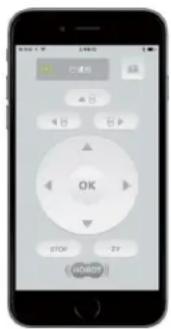
flowchart
graph TD
    A["Circle with arrow"] --> B["Arrow"]
    B --> C["Arrow"]
    C --> D["Arrow"]
Voll-Automodus Automodus links/runter Automodus rechts/runter
LED Anzeige
natural_image
Three abstract geometric symbols: three squares with diagonal lines and one cross, no text or labels present.Garantie
natural_image
Hand cleaning a blue textured device with a grid-patterned vent and a pink cloth (no text or symbols visible)- Fonction ASI (Alimentation sans Interruptions)
flowchart
graph TD
    A[" "] --> B[" "]
    B --> C[" "]
    D["..."] --> A
    E["8"] --> F[" "]
    style E fill:#fff,stroke:#000,stroke-width:2px
flowchart
graph TD
    A["8"] --> B
    B --> C
    C --> D
    D --> E
    E --> F
    F --> G
    G --> H
    H --> I
    I --> J
    J --> K
    K --> L
    L --> M
    M --> N
    N --> O
    O --> P
    P --> Q
    Q --> R
    R --> S
    S --> T
    T --> U
    U --> V
    V --> W
    W --> X
    X --> Y
    Y --> Z
natural_image
Three abstract geometric symbols: two squares with diagonal lines and one X, no text or labels present.FR
Garantie limitée
natural_image
Close-up of a metallic chain strap securing a blue rope tied with a U-shaped metal barbell (no text or symbols visible)natural_image
Close-up of a white car front bumper with a black arrow pointing to the top surface (no visible text or symbols)Errato
natural_image
Close-up of a printer edge with a downward arrow indicating compression or texture (no text or symbols)Correo
natural_image
Hand cleaning a blue textured device with a grid-patterned panel and a pink tool (no text or symbols visible)Telecomando
flowchart
graph TD
    A[" "] --> B[" "]
    B --> C[" "]
    style A fill:#fff,stroke:#000
    style C fill:#fff,stroke:#000
    note right of C: 8
flowchart
graph TD
    A["Circle with arrow labeled '8'"] --> B["Arrow pointing to top"]
    B --> C["Arrow pointing right"]
    C --> D["Arrow pointing down"]
natural_image
Three abstract geometric symbols: three squares with diagonal lines and one cross, no text or labels present.Garanzia
Copyright © 2017 by HOBOT® Technology Inc. All rights reserved. No part of this publication may be reproduced, transmitted, transcribed, stored in a retrieval system or translated into any language or computer language, in any form or by any means, electronic, mechanical, magnetic, optical, chemical, manual or otherwise, without the prior written permission of this company.
Trademarks
All other logos, products, or company names mentioned in this manual may be the registered trademarks or copyrights of their respective companies, and are used for informational purposes only.
Technical support
If any problems occur and this manual cannot provide the solution you need, please contact a local retailer or local authorized dealer.
service address:
support:
Mobex Handels AG
Grenzweg 1
phone: +41 (0)56 618 40 40
5610 Wohlen
info@mobex.ch
Schweiz
www.mobex.ch
Disclaimer
HOBOT Technology Inc. makes no claims or warranties, either expressed or implied, with respect to the contents hereof and specifically disclaims any warranties, tradability or suitability for any particular purpose. Furthermore, HOBOT Technology Inc. reserves the right to revise this publication and to make changes from time to time in the contents hereof without obligation of this company to provide notification of such revisions or changes.
The user should follow the instructions provided in this user manual, but is ultimately responsible for assessing placement and safety when using this glass cleaning tool.
Important Safety Precautions
Read all instructions before operating this device.
WARNING
- Fasten the safety rope and tie to an indoor fixture before operating the device.
- Check if the safety rope is broken or the knot is loose before operating the device.
- A power cord must be used for the HOBOT to function properly.
- For windows with no balcony, a warning area must be established on the ground below to prevent people from coming near it.
- The battery must be fully charged (green light ON) before using.
- Do not use on rainy or humid days.
- Turn power on before putting device onto glass.
- When placing the appliance onto glass, make sure it sticks to the surface before removing the supporting hand.
- Remove the device before turning the power off.
- Make sure to put the cleaning cloth onto the device correctly to avoid air leakage.
- Do not spray or pour water onto the appliance.
- Prohibit children from using this device.
- Remove any obstructions on the glass. Do not use on cracked glass. Reflective or coated glass may be scratched during operation by dirt on the glass.
- Keep hair, loose clothing, fingers, and all body parts away from the openings and moving parts.
- Do not use in areas containing flammable or combustible liquids or gases.
Product Description
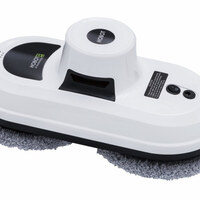
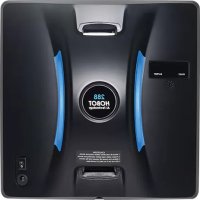
HOBOT is a square-shaped window-cleaning robot with a vacuum motor inside that uses suction to stick to glass surfaces. The device also has two caterpillar wheels that can freely traverse window surfaces, and even walls. The easily-replaceable lint-free cloth is used on the pad. Micro-fiber cloth is used to attain superior glass cleaning.
An embedded UPS (Uninterrupted Power System) can prevent the robot from falling off the window even when the power is off.
There are two advanced sensors added for enhancing HOBOT's cleaning performance and tightening its security while it works on framed and even frameless windows. The pressure sensor monitors air leakage and the laser sensor detects the edge of windows.
HOBOT has AI Technology that can calculate paths, auto-detect window edges, and auto-clean entire windows. It also features a mode for manual operation.
Specifications
| Product size | 240mm x 240mm x 100mm (LWH) |
| Product weight | 1.2Kg |
| Input Voltage | 100~240VAC, 50Hz~60Hz |
| Adapter output | Minimum 24V/3.0A |
| Power consumption | 72W |
| AC power cord length | 1.0m |
| DC power cord length | 4.0m |
| Safety rope length | 4.5m, Stength:150Kgf |
| Battery | Li-Po, 4x3.7 V |
| Battery working time | 20 minutes |
| Cleaning speed | 2.4 min/ m^2 (Cleaning the entire area twice) |
| Noise | 64dB |
| Maximum cleaning area | Height: 6 meters, Width: 5 meters |
Product and accessories
- Device x 1
- Remote controller x 1
- Adapter (100\~240VAC, 50\~60Hz) x 1
- AC power cord x 1
• DC power extension cord (4 meters) x 1 - Microfiber dry-cleaning cloth x 3
- Microfiber polishing cloth x 3
- Safety rope x 1
- User manual x 1
Product features
- Designed for any thickness glass
- AI Technology V1.0
- Cleaning speed: 2.4 min/m ^2 .
- 3 kinds of automatic operation modes for cleaning the entire window
- Stops automatically upon completion of cleaning.
- Embedded UPS (Uninterrupted Power System)
- Applicable to frameless windows (Laser sensor detects edges of windows)
• Anti-falling control algorithm
• Auto-detects edges of window - Microfiber cloth
• High-strength safety rope (tensile strength 150Kgf) and buckle - Remote control
• Power consumption: 72W - Input voltage: 100\~240VAC, 50\~60Hz
Getting to know the device
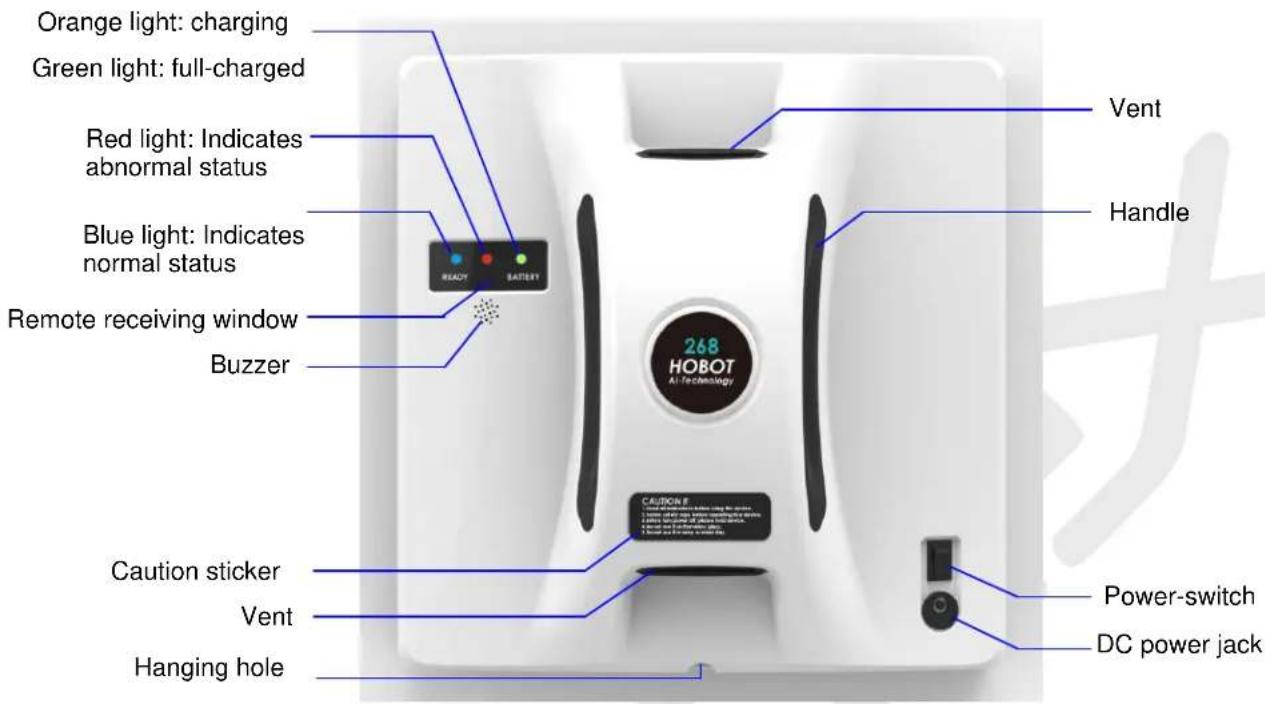
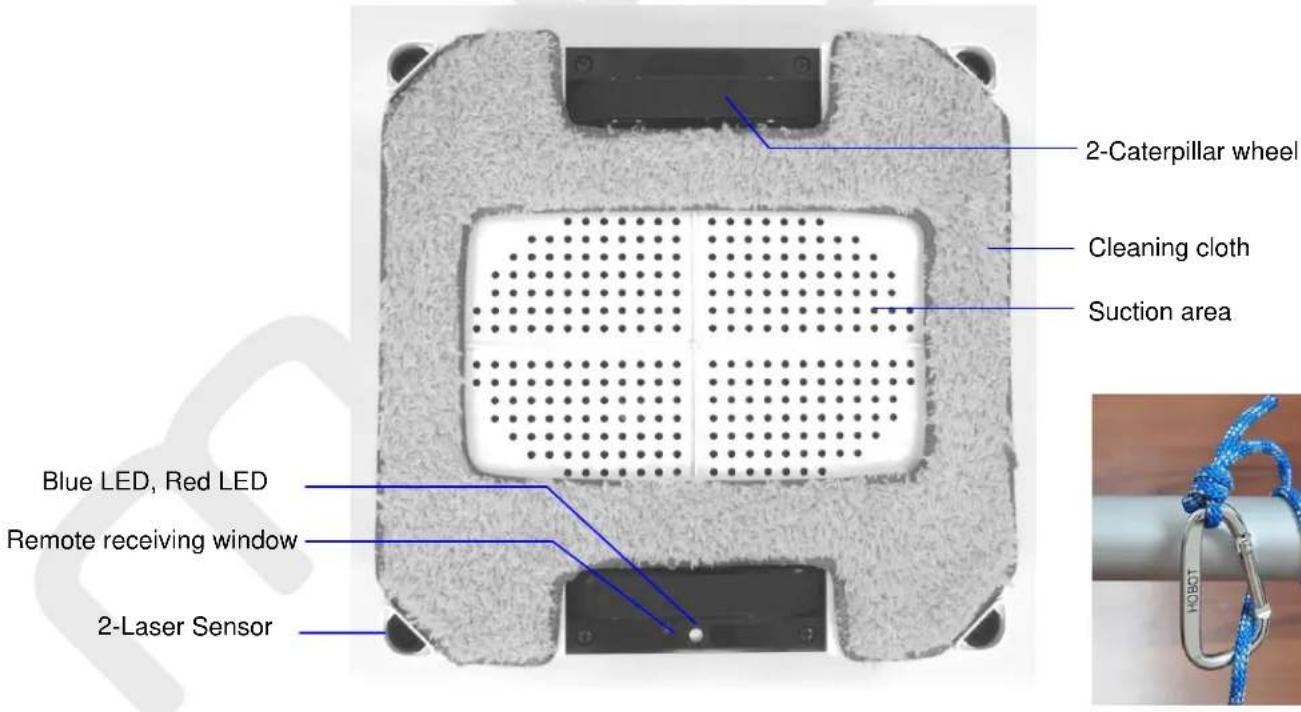
Step 1. Preparing
natural_image
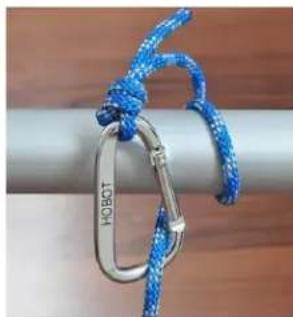
Close-up of a blue and silver chain strap with a metal keychain, attached to a cylindrical object (no text or symbols visible)Safety rope & buckle
(1) Do not use device on rainy or humid days.
(2) For windows with no balcony, a warning area must be established on the ground below to prevent people from coming near it.
(3) Check to see if the safety rope is broken or if the knot is loose.
(4) Fasten the safety rope and tie to an indoor fixture before operating if clean outside of higher floor window.
Step 2. Connect power cord to HOBOT correctly.
Step 3. Make sure the battery is fully charged (green light ON) before use:
(1) First, turn off the power switch on the device. Plug it into a power source. Orange light ON means charging.
(2) Green light ON means the battery is fully charged.
Step 4. Make sure to put the cleaning cloth onto the device correctly to avoid air leakage.
Step 5. Put the device onto glass.
(1) Turn power switch on make sure fan is running.
(2) Put device onto glass and keep 10cm away from the window frame.
(3) Check if device is sticking to the glass before releasing it.
Step 6. Auto mode or manual mode operation.
(1) Operate HOBOT-268 by remote controller. There are 3 kinds auto mode


that could automatically clean whole window.
(2) Press

to stop device running.
(3) Press


control device moving.
Step 7. Finish and remove the device from glass.
(1) While device is running, hold the safety rope with one hand and take device down from glass with the other hand.
(2) Remove the device to a safe area, then turn it off.
• Put cleaning cloth onto device correctly
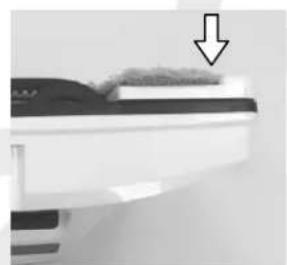
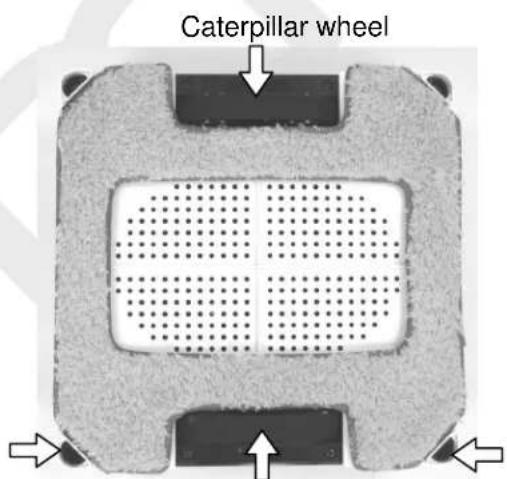
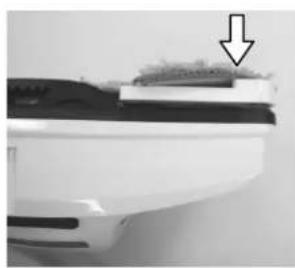
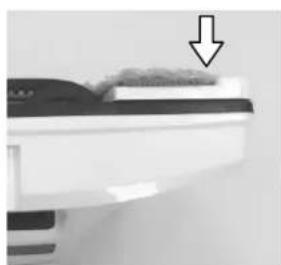
(1) HOBOT has 2-laser sensors for detecting glass edge. These laser sensors can not be covered by cleaning cloth like as shown.
(2) Put cleaning cloth onto device flatly and do not let cloth cover the caterpillar wheel and laser sensors.
natural_image
Close-up of a white car's side panel with a black arrow pointing to the top surface (no text or symbols visible)X
natural_image
Close-up of a printer edge with a downward arrow indicating compression or disassembly (no text or symbols visible)O
2-laser sensor
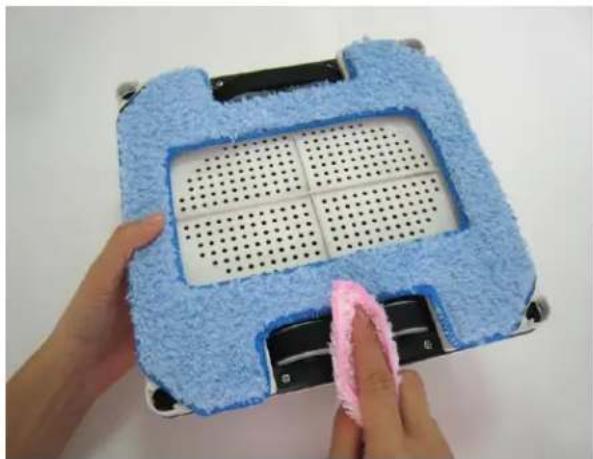
• How to clean caterpillar belt
When the device easily slips on the surface of the window, it is because belts are stained with accumulation of dust and water after each use. It is highly recommend cleaning caterpillar belts before putting the device away.
Please follow 3 steps below.
Step 1: Turn the device upside down.
Step 2: Turn power switch on, the device's caterpillar belts continually rotate for 3 minutes.
Step 3: Customers use cloth clean caterpillar belts and keep cloth in the middle of belts to avoid cloth being jammed in the belts. If cloth is jammed, users can turn power switch off and
draw it out.
natural_image
Hand cleaning a blue textured device with perforated panel and black buttons (no text or symbols visible)- UPS (Uninterrupted Power System) function
(1) The UPS function will be enabled automatically when no electric power is supplied. The backup time of this UPS is 20 minutes.
(2) If no electric power is supplied, the device will stop automatically, sound an alert, and flash a red light. The user should take the device down from the glass as soon as possible.
(3) The safety rope can be used to pull the device back. Gently pull the safety rope at an angle close to the glass to prevent it from falling off.
How to clean the glass
- Microfiber dry-cleaning cloth : it is specifically used for dry clean to wipe partial dust, dirt off the outside of windows because of its lower friction and poorer water absorbency.
- Microfiber polishing cloth : it can be used for wet or dry clean and suitable for dust-free exterior windows and interior windows due to its higher friction factor and better water absorbency.
Spraying detergent on the glass makes HOBOT effectively polish window and leave window shining. If the device slips and cannot move, please change cloth to microfiber dry-cleaning cloth.
- If there is water or detergent on the cloth or glass, the water or detergent will mix together with the dust or dirt to become mud. Thus, dusty windows must be cleaned with dry- cleaning cloth as the first step of cleaning glasses, no water or detergent is needed, exterior windows especially.
• Using HOBOT on sunny days or days with low humidity for best results. - The surface of window with water molecules becomes slippery and has white streaks left on the glass so it is not suggested using the device to clean exterior windows on rainy or high humidity days.
Remote controller
The device can be remote controlled from the front and back sides. To replace the battery, just pull down the battery cover.
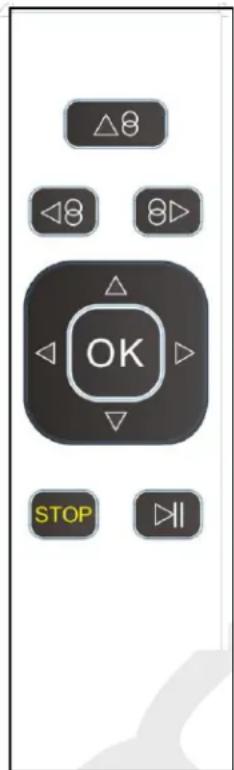
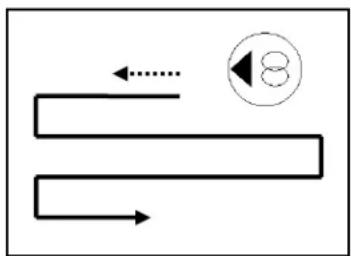
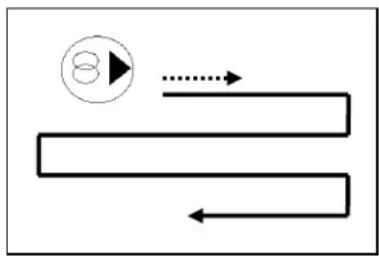
| SetupDirection | Horizontal Setup | 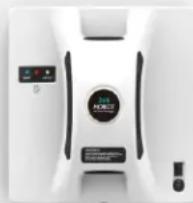 | Vertical Setup | 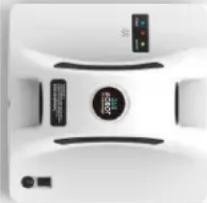 |
| Zigzag, then N-way auto-clean whole window | N-way auto-clean whole window | |||
| move LEFT then Zigzag auto-clean the rest window | move UP then N-way auto-clean the rest window | |||
| move RIGHT then Zigzag auto-clean the rest window | move DOWN then in N-way auto-clean the rest window | |||
| Manually move UP, DOWN, RIGHT, LEFT | ||||
| Stop | ||||
| Start/Stop | ||||
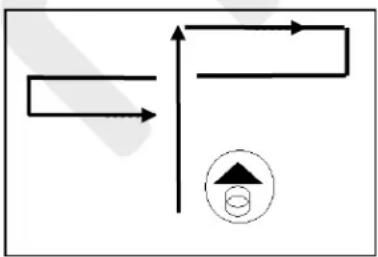
flowchart
graph TD
    A["Start"] --> B{Decision}
    B -->|Yes| C["Process"]
    B -->|No| D["End"]
Auto up then down
flowchart
graph TD
    A["Path 1"] --> B["Path 2"]
    B --> C["..."]
    C --> D["Step 8"]
Auto left then down
flowchart
graph TD
    A["Circle with arrow"] --> B["Arrow"]
    B --> C["Arrow"]
    C --> D["Arrow"]
    D --> E["Arrow"]
Auto right then down
Setting up the device with the HOBOT App. (HOBOT-288 only)
Step 1: Scan QR code or search "HOBOT" on the App Store or Google Play to download HOBOT app on your smart phone or tablet.
Step2. Turn on Bluetooth and click HOBOT App.
Step3. Turn on the device and wait for "Connected" shown on HOBOT App.

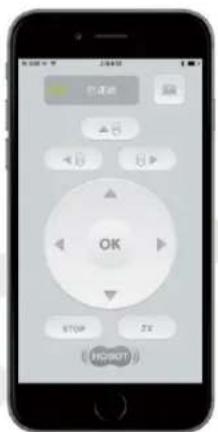
Make sure both HOBOT App and the device are on, so you can use your iOS or Android smart device to operate the device.
LED indication
| Situation | LED indication/Sound |
| 1. Battery charging | Orange LED is ON |
| 2. Battery charged full | Green LED is ON |
| 3. No electrical power | Blue LED is ONRed LED flashingSound: repeat beep |
| 4. Hardware error | Red-LED flashingBlue-LED flashing with “error number”Sound: beep once 60 seconds |
| 5. Vacuum pressure too low | Blue LED is ONRed-LED flashes onceSound: single beep |
| 6. Air leakage while operating | Blue LED is ONRed-LED flashes onceSound: single beep |
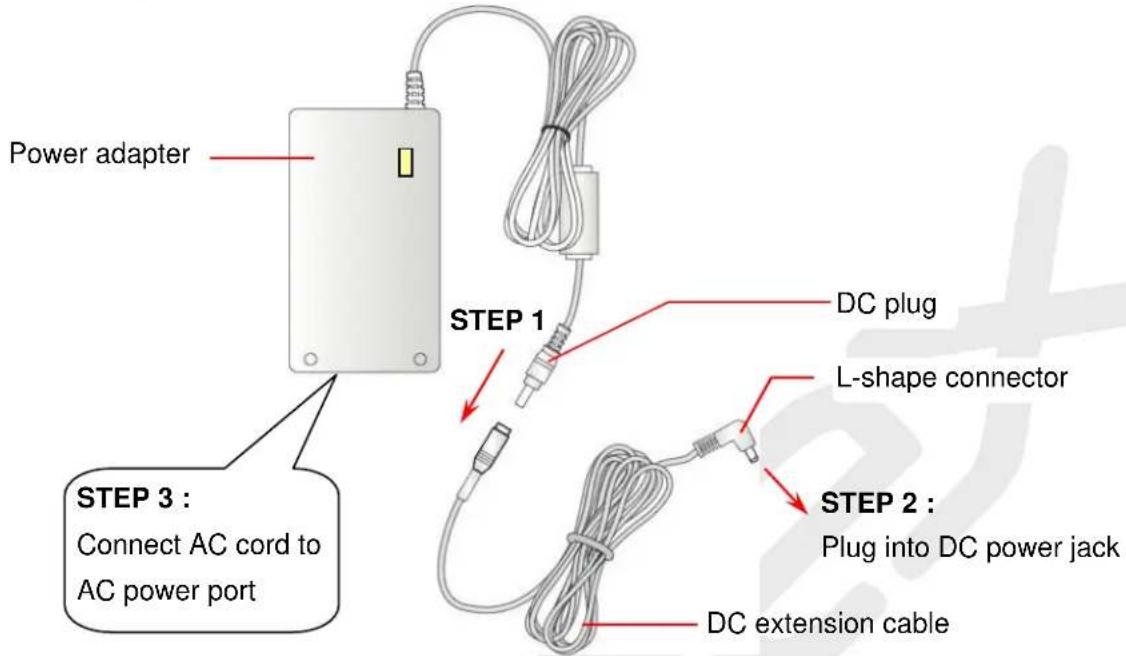
Power adapter/DC extension cable
Frequently asked questions (FAQ)
Q1: When the power switch is turned on, the FAN does not rotate, and no any beep sounds.
| Case | LED signal/Sound | Situation and Solution |
| 1. Battery voltage is too low | Blue: flashRed: offOrange: onSound: no beep | It means battery charge is too low. Wait for battery to fully charge (green light is lit). If machine still can't be used after charging for 8 hours, the battery should be changed. |
| 2. Hardware failure | Blue: flashRed: flashSound: beep | Machine hardware failure.Please contact a local retailer or local authorized dealer for repairs. |
Q2: When the power switch is turned on, the FAN is rotating, Blue-LED is lighting, Red-LED is flashing, with repeat beep sounds.
Ans: No electrical power supplied. Please connect and check power cord, adapter, and the device.
Q3: When the power switch is turned on, HOBOT can't start up by remote controller.
| Case | LED signal/Sound | Situation and Solution |
| 1. Pressure not enough | Blue: onRed: flash one timeSound: single beep | The vacuum pressure is not enough. User could re-attach cleaning cloth onto device again, or change a new cleaning cloth. |
| 2. Remote failure | Blue: onRed: offSound: no beep when press remote key | Remote controller failure.Please contact a local retailer or local authorized dealer for repairs. |
Q4: The HOBOT slips and cannot detect the upper frame of window in "Auto Up then Down"() mode.
Ans: (1) Press OK stop, switch to manual mode to lower the half of the device and then switch to "Auto Up then Down" (▲) mode again. or, (2) Press OK stop, switch to manual mode to lower the half of the device and then switch to or auto mode.
Q5: HOBOT cannot finish cleaning the whole window and stops in the middle area.
Ans: Press 8▶ or ◀8 auto mode to continue cleaning.
Q6: HOBOT slips and cannot climb up to the window frame.
Ans: (1) The cleaning cloth already got heavy dirt or too wet. It shall change cleaning cloth. (2) The caterpillar belt might be too wet or got heavy dust. It shall clean caterpillar belt.
Q7: HOBOT does not move smoothly, or it moves irregularly.
Ans: (1) Cleaning cloth is too dirty. Please change out the cleaning cloth for a clean one. (2) Do not spray too much water on glass or cleaning cloth. (3) Glass surface has different friction factor areas due to glass stickers, window film, and so on. Please limit use the HOBOT to certain areas of the window.
Q8: What to do if HOBOT stops due to a power outage?
Ans: (1) User can pull HOBOT back with safety rope. Gently pull the safety rope at an angle close to the glass to prevent it from falling off the glass. (2) Switch the power switch to "off". (3) Check whether there is a poor connection or broken cord.
Q9: What to do if HOBOT unexpectedly stops and the red light is flashing, with no alarm sounding?
Ans: (1) User can move HOBOT to safe area by remote control, or pull HOBOT back with safety rope. Gently pull the safety rope at an angle close to the glass to prevent it from falling off the glass. (2) Remove obstacles on the glass surface. (3) Check whether there is air leakage caused by a gap or uneven window frame.
Safety information about power adapter/battery
- Use only the power adapter supplied with this device. Use of other types of power adapters will result in malfunction and/or danger.
- Please use a proper electrical outlet and make sure no heavy objects are placed on the power adapter or the power cord.
- Allow adequate ventilation around the adapter when using it to operate the device. Do not cover the power adapter with objects that will reduce ventilation and cooling.
- Do not use the adapter in a humid environment. Never handle the adapter with wet hands.
- Connect the adapter to a proper power source. The voltage requirements are listed on the adapter.
- Do not use a broken adapter, power cord, or plug.
- Do not attempt to service the adapter. There are no service parts included. Replace the whole unit if it is damaged or exposed to high moisture. Consult your HOBOT dealer for help and maintenance.
- The battery used in this device may present a risk of fire or chemical burn if mistreated. Do not disassemble, short the contacts, heat above 60^ C(140°F), or incinerate.
- Please charge the battery every 3 months to conserve the battery life.
- If you have to dispose of old equipment, please take it to the local recycling center for recycling electrical and electronic parts.
General safety information
- Retain the safety and operating instructions for future reference.
- Follow all operating and use instructions.
- Do not expose your device to rain or excess humidity, and keep it away from liquids (such as beverages, faucets, and so on).
- Avoid exposing your device to direct sunlight or sources of intense light, and keep it away from sources of heat (such as radiators, space heaters, stoves, and so on).
- Do not place the device in the vicinity of strong magnetic fields.
- Keep the device and accessories away from children.
- Product operating temperatures: 0\~40°C(32\~104°F)
- Product storage temperatures: -10\~50°C(14\~122°F)
Cleaning cloth laundry instructions
- Washing under 40^ (104°F)
- Do not bleach.
- Do not tumble-dry.
- Do not iron.
- Do not dry clean.


natural_image
Three abstract geometric symbols: three squares with diagonal lines and one cross, no text or labels present.Limited warranty
If there are defects in your HOBOT glass-cleaning robot due to faulty materials, poor workmanship, or malfunction within the warranty period from the date of purchase or delivery, please contact a local retailer or local authorized dealer for repairs or replacement.
Not covered by warranty
- Normal wear and tear (e.g. cleaning cloth, safety rope, etc).
- Reduction in battery discharge time due to battery age or use.
- Damage caused by assembly or installation that is not in accordance with the instructions included with the HOBOT.
- Damage caused by using the HOBOT glass cleaning robot for anything other than normal domestic household purposes.
- Damage caused by using parts and accessories which are not specified by HOBOT.
- Damage caused by accidents, abuse, or misuse.
Service address
Mobex Handels AG
Grenzweg 1
5610 Wohlen
Schweiz
phone: +41 (0)56 618 40 40
info@mobex.ch
www.mobex.ch