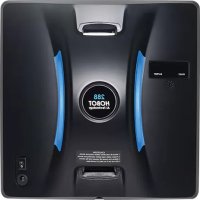
188 - Vacuum Cleaner Hobot - Free user manual and instructions
Find the device manual for free 188 Hobot in PDF.


User questions about 188 Hobot
0 question about this device. Answer the ones you know or ask your own.
Ask a new question about this device
Download the instructions for your Vacuum Cleaner in PDF format for free! Find your manual 188 - Hobot and take your electronic device back in hand. On this page are published all the documents necessary for the use of your device. 188 by Hobot.
USER MANUAL 188 Hobot
natural_image
Close-up of a blue rope knot tied with a metallic HOBOT pendant (no text or symbols on the object itself)natural_image
Person installing or adjusting a white digital cleaning device mounted on a wall, with a window view and building in the background (no visible text or symbols)Betrieb
natural_image
Illustration of a hand adjusting a mechanical component (no text or symbols visible)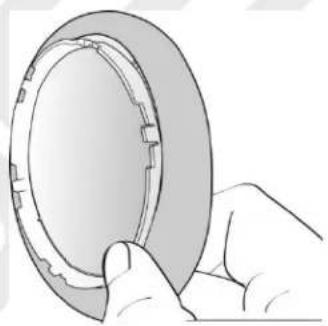
natural_image
Illustration of a hand holding a circular mechanical component (no text or symbols visible)natural_image
Close-up of a white cleaning brush head with a gray textured surface and a yellow arrow pointing to the brush tip (no text or symbols visible)natural_image
Diagram showing cable routing from a wall-mounted device to a rectangular device, with no text or symbols present.Reinigung
Schritt I: Trocken vorreinigen
text_image
Close-up of a remote control with black buttons and a central 'OK' button, likely from a digital interface.flowchart
graph TD
    A["8"] --> B
    B --> C
    C --> D
    D --> E
    E --> F
    F --> G
    G --> H
    H --> I
    I --> J
    J --> K
    K --> L
    L --> M
    M --> N
    N --> O
    O --> P
    P --> Q
    Q --> R
    R --> S
    S --> T
    T --> U
    U --> V
    V --> W
    W --> X
    X --> Y
    Y --> Z
Assistance technique
natural_image
Illustration of a hand adjusting a mechanical component (no text or symbols visible)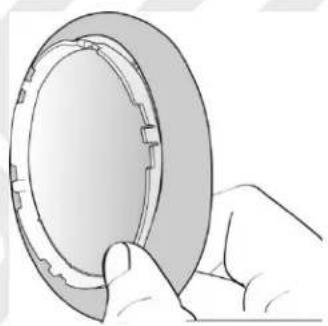
natural_image
Illustration of a hand holding a circular mechanical component (no text or symbols visible)natural_image
Close-up of a white cleaning brush head with a gray filter material, showing a yellow arrow pointing to the edge (no text or symbols visible)flowchart
graph TD
    A[" "] --> B[" "]
    B --> C[" "]
    D[" "] --> E[" "]
    E --> F[" "]
    style D stroke:#000,stroke-width:2px
    style E stroke:#000,stroke-width:2px
    style F stroke:#000,stroke-width:2px
flowchart
graph TD
    A["8"] --> B
    B --> C
    C --> D
    D --> E
    E --> F
    F --> G
    G --> H
    H --> I
    I --> J
    J --> K
    K --> L
    L --> M
    M --> N
    N --> O
    O --> P
    P --> Q
    Q --> R
    R --> S
    S --> T
    T --> U
    U --> V
    V --> W
    W --> X
    X --> Y
    Y --> Z
natural_image
Three abstract geometric symbols: three squares with diagonal lines and one cross, no text or labels present.FR
Garantie limitée
natural_image
Close-up of a blue rope knot with a metallic chain strap and 'HOBOT' label, tied on a metal bar (no other text or symbols visible)natural_image
Line drawing of a person using a handheld device to interact with a wall-mounted device (no text or symbols present)Funzionamento
natural_image
Three-step illustration showing hands assembling a mechanical component (no text or symbols present)natural_image
Close-up of a white cleaning brush head with a textured gray material, showing a blue arrow pointing to the brush tip (no text or symbols visible)natural_image
Diagram showing cable routing from a wall socket to an electronic device via cables (no text or symbols)Telecomando
flowchart
graph TD
    A["Path 1"] --> B["Path 2"]
    B --> C["..."]
    C --> D["Output"]
    style A stroke:#000,stroke-width:2px
    style B stroke:#000,stroke-width:2px
    style C stroke:#000,stroke-width:2px
    style D stroke:#000,stroke-width:2px
natural_image
Three abstract geometric symbols: three squares with diagonal lines and one cross, no text or labels present.Garanzia
Copyright © 2014 by HOBOT® Technology Inc. All rights reserved. No part of this publication may be reproduced, transmitted, transcribed, stored in a retrieval system or translated into any language or computer language, in any form or by any means, electronic, mechanical, magnetic, optical, chemical, manual or otherwise, without the prior written permission of this company.
Trademark
All other logos, products, or company names mentioned in this manual may be the registered trademarks or copyrights of their respective companies, and are used for informational purposes only.
Technical support
If any problems occur and this manual cannot provide the solution you need, please contact a local retailer or local authorized dealer.
Service address:
Mobex Handels AG
Grenzweg 1
5610 Wohlen
Schweiz
Support:
Tel: +41 (0)56 618 40 40
info@mobex.ch
www.mobex.ch
Disclaimer
HOBOT Technology Inc. makes no claims or warranties, either expressed or implied, with respect to the contents hereof and specifically disclaims any warranties, tradability or suitability for any particular purpose. Furthermore, HOBOT Technology Inc. reserves the right to revise this publication and to make changes from time to time in the contents hereof without obligation of this company to provide notification of such revisions or changes.
The user should follow the instructions provided in this user manual, but is ultimately responsible for assessing placement and safety when using this glass cleaning tool.
Important Safety Precautions
Read all instructions before operating this device.
WARNING
- Fasten the safety rope and tie to an indoor fixture before operating the device.
- Check if the safety rope is broken or the knot is loose before operating the device.
- A power cord must be used for the HOBOT-188 to function properly.
- For windows with no balcony, a warning area must be established on the ground below to prevent people from coming near it.
- The battery must be fully charged (green light ON) before using.
- Do not use on rainy or humid days.
- Turn power on before putting device onto glass.
- When placing the appliance onto glass, make sure it sticks to the surface before removing the supporting hand.
- Remove the device before turning the power off.
- Do not use on frameless glass.
- Make sure to put the cleaning ring onto the cleaning wheel correctly to avoid leakage.
- Do not spray or pour water onto the appliance.
- Prohibit children from using this device.
- Remove any obstructions on the glass. Do not use on cracked glass. Reflective or coated glass may be scratched during operation by dirt on the glass.
- Keep hair, loose clothing, fingers, and all body parts away from the openings and moving parts.
- Do not use in areas containing flammable or combustible liquids or gases.
Product Description
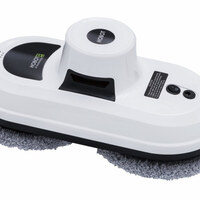
HOBOT-188 is a glass-cleaning robot with a vacuum motor inside that uses suction to stick to glass surfaces. An embedded UPS (Uninterrupted Power System) can prevent the robot from falling off the window even when the power is off.
HOBOT has two specially-design cleaning wheels that can freely traverse window surfaces, and even walls. The easily-replaceable lint-free cloth is used on both cleaning wheels. Micro-fiber cloth is used to attain superior glass cleaning.
HOBOT has AI Technology that can calculate paths, auto-detect window edges, and auto-clean entire windows. It also features a mode for manual operation.
Specifications
| Product size | 295mm x 148mm x 120mm (LWH) |
| Product weight | 940g |
| Input Voltage | 100~240VAC, 50Hz~60Hz |
| Adapter output | 24V/3.75A |
| Power consumption | 80W |
| AC power cord length | 1.0m |
| DC power cord length | 4.0m |
| Safety rope length | 4.5m |
| Battery | Li-Po, 14.8V |
| Battery working time | 20 minutes |
| Cleaning speed | 4 min/square meter(Cleaning the entire area twice) |
| Maximum cleaning area | Height: 6 metersWidth: 5 meters |
Product and accessories
- Device x 1
- Remote controller x 1
- Adapter (100\~240VAC, 50\~60Hz) x 1
- AC power cord x 1
• DC power extension cord (4 meters) x 1 - Cleaning cloths x 14
- Cleaning rings x 4
- User manual x 1
Product features
- Designed for any thickness glass
- AI Technology V2.0
- Cleaning speed: 4 min/m ^2 .
- 3 kinds of automatic operation modes for cleaning the entire window
- Stops automatically upon completion of cleaning.
- Embedded UPS (Uninterrupted Power System)
• Anti-falling control algorithm
• Auto-detects edges of window - Microfiber cloth
- High-strength safety rope (tensile strength 150Kgf) and buckle
- Remote control
- Table cleaning mode
• Power consumption : 80W - Input voltage: 100\~240VAC, 50\~60Hz
Getting to know the device
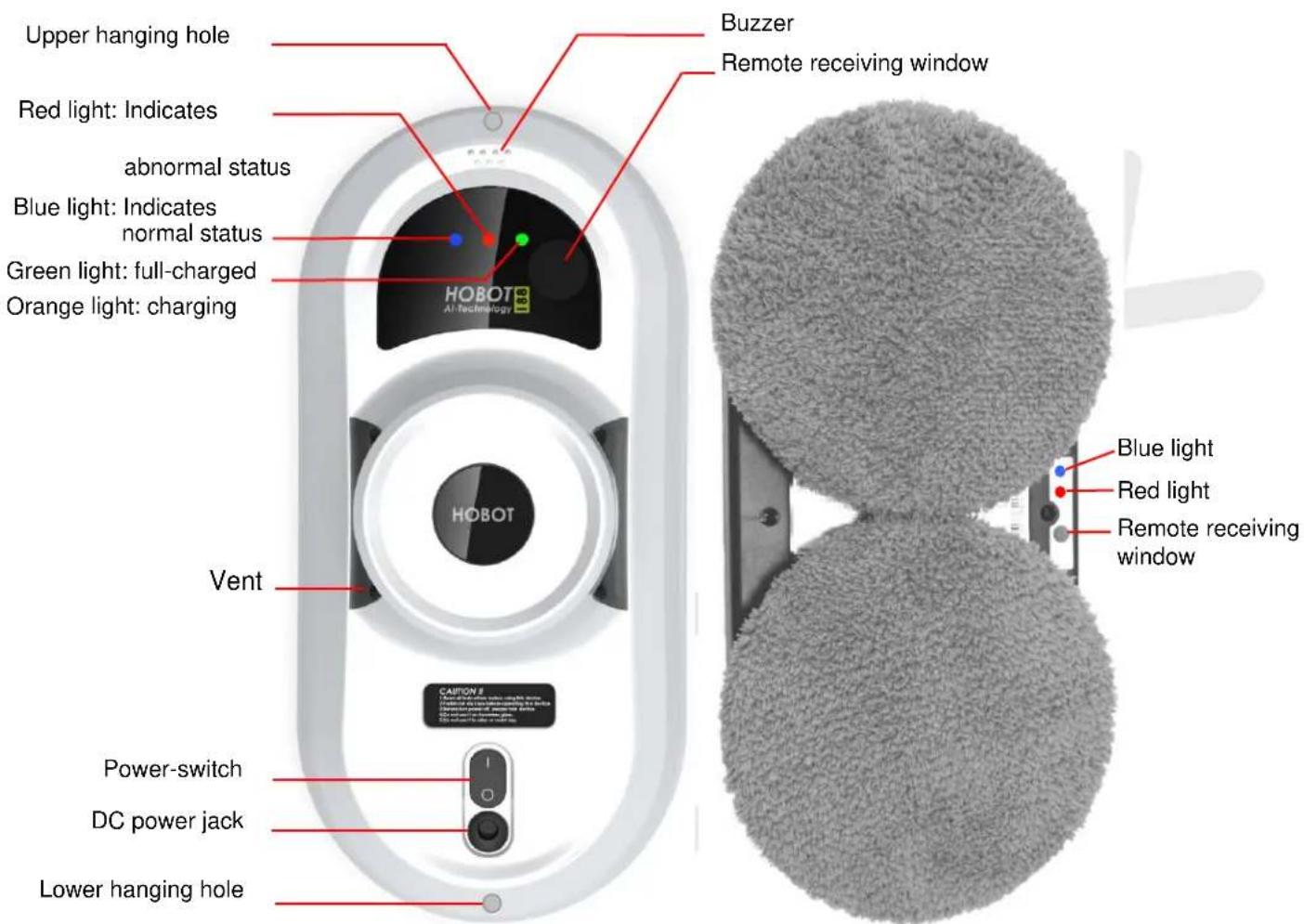
text_image
Upper hanging hole Red light: Indicates abnormal status Blue light: Indicates normal status Green light: full-charged Orange light: charging Buzzer Remote receiving window HOBOT Vent CAPTOR II Power-switch DC power jack Lower hanging hole Blue light Red light Remote receiving window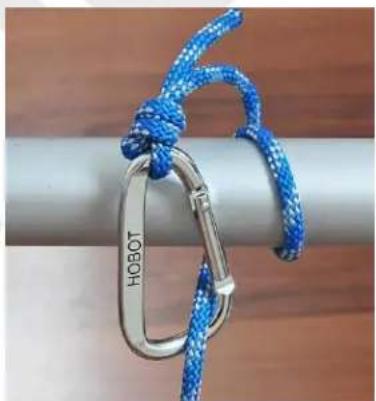
natural_image
Close-up of a blue rope knot tied with a metallic chain strap (no text or symbols visible)Safety rope & buckle
natural_image
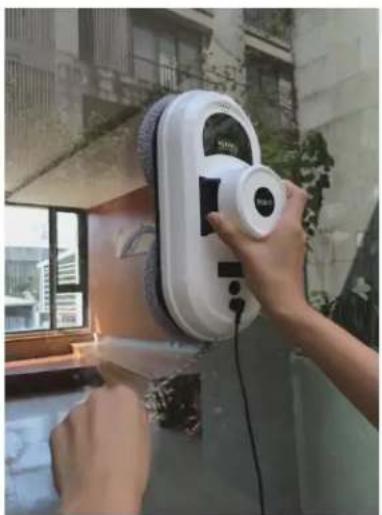
Person using a cleaning or cleaning tool on a wall-mounted digital brush (no visible text or symbols)● A power cord must be used for the HOBOT-188 to function properly.
● How to put the device onto glass:
(1) Turn power switch on. Make sure fan is running.
(2) Put device onto glass and keep 10cm away from the window frame.
(3) Check if device is sticking to the glass before releasing it.
● How to remove the device from glass:
(1) While device is running, hold the safety rope with one hand and take device down from glass with the other hand.
(2) Remove the device to a safe area, then turn it off.
● Safety rope and buckle:
(1) Before using, check to see if the safety rope is broken or if the knot is loose.
(2) Fasten the safety rope and tie to an indoor fixture before operating.
- UPS (Uninterrupted Power System) function:
(1) The UPS function will be enabled automatically when no electric power is supplied. The backup time of this UPS is 20 minutes.
(2) If no electric power is supplied, the device will stop automatically, sound an alert, and flash a red light. The user should take the device down from the glass as soon as possible.
(3) The safety rope can be used to pull the device back. Gently pull the safety rope at an angle close to the glass to prevent it from falling off.
● Make sure the battery is fully charged (green light ON) before use:
(1) First, turn off the power switch on the device. Plug it into a power source. Orange light ON means charging.
(2) Green light ON means the battery is fully charged.
- Other things to pay attention to:
(1) Do not use on frameless glass.
(2) Make sure to put the cleaning ring onto the cleaning wheel correctly to avoid leakage.
(3) Do not use it on rainy or humid days.
(4) For windows with no balcony, a warning area must be established on the ground below to prevent people from coming near it.
LED indication
| Situation | LED indication |
| 1. Battery charging | Orange LED is ON |
| 2. Battery charged | Green LED is ON |
| 3. No electrical power | Red LED flashingRepeated beeping sound |
| 4. Hardware error | Red-LED flashingBlue-LED flashing with “error number” |
| 5. Friction factor check error at start-up. | Red-LED flashes onceBeep |
| 6. Vacuum pressure too low | Red-LED flashes onceBeep |
| 7. Air leakage while operating | Red-LED flashes onceBeep |
How to clean the glass
Step I: "Dry Clean" first
Use a clean and dry cleaning cloth to clean dust and dirt from the glass.
- If there is water or detergent on the cloth or glass, the water or detergent will mix together with the dust or dirt to become mud, making cleaning results bad.
• Using HOBOT on sunny days or days with low humidity for best results.
- Don't use HOBOT on rainy or high humidity days, otherwise it will produce white streaks. The white streaks are water molecules. This is the same thing that can happen when manually cleaning with a cloth.
Step II: Use a clean and dry cleaning cloth. Keep the cleaning cloth on the upper wheel clean and dry.
Spray a little detergent (1\~2 sprays) on the lower wheel's cleaning cloth, but not too much (if too wet, the machine can't move well), then clean the glass again.
Remote controller
The device can be remote controlled from the front and back sides.
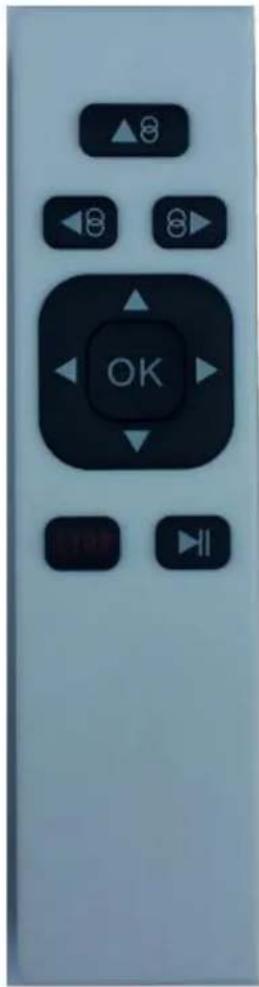
text_image
OK| Automatically move up then down | Manually move up | ||
| Automatically move left then down | Manually move down | ||
| Automatically move right then down | Manually move right | ||
| STOP, OK | Stop | Manually move left | |
| Start/Stop |

flowchart
graph TD
    A["Input"] --> B["Process"]
    B --> C["Output"]
    style A fill:#f9f,stroke:#333
    style B fill:#ccf,stroke:#333
    style C fill:#cfc,stroke:#333
Auto up then down
flowchart
graph TD
    A[" "] --> B[" "]
    C[" "] --> D[" "]
    E[" "] --> F[" "]
    G[" "] --> H[" "]
    I[" "] --> J[" "]
    K[" "] --> L[" "]
    M[" "] --> N[" "]
    O[" "] --> P[" "]
    Q[" "] --> R[" "]
    S[" "] --> T[" "]
    U[" "] --> V[" "]
    W[" "] --> X[" "]
    Y[" "] --> Z[" "]
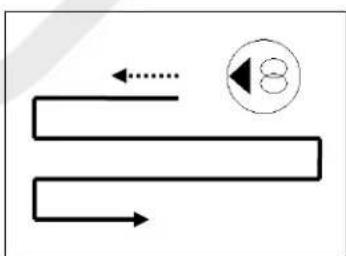
Auto left then down
flowchart
graph TD
    A["8"] --> B
    B --> C
    C --> D
    D --> E
    E --> F
    F --> G
    G --> H
    H --> I
    I --> J
    J --> K
    K --> L
    L --> M
    M --> N
    N --> O
    O --> P
    P --> Q
    Q --> R
    R --> S
    S --> T
    T --> U
    U --> V
    V --> W
    W --> X
    X --> Y
    Y --> Z
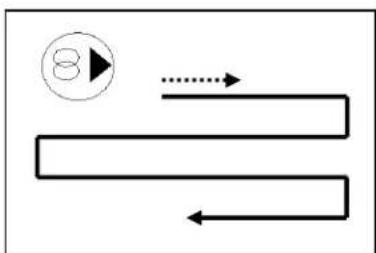
Auto right then down
※ If you have to replace the battery, just pull down the battery cover.
Power adapter/DC extension cable
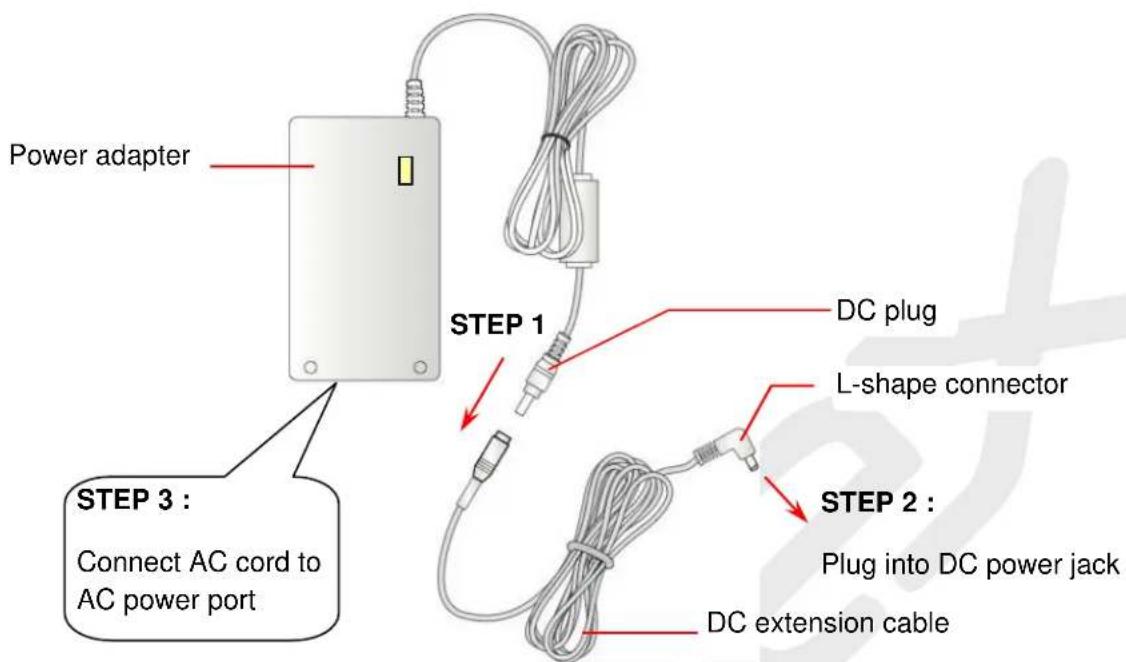
text_image
Power adapter STEP 3 : Connect AC cord to AC power port STEP 1 DC plug L-shape connector STEP 2 : Plug into DC power jack DC extension cableUsing the cleaning ring and the cleaning cloth
- Cover cleaning ring with cleaning cloth.
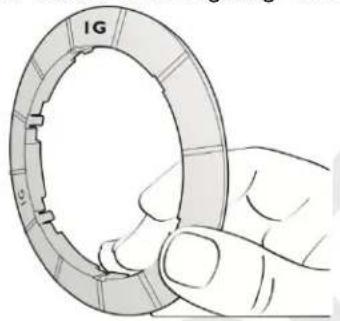
natural_image
Hand holding a mechanical ring component (no text or symbols visible)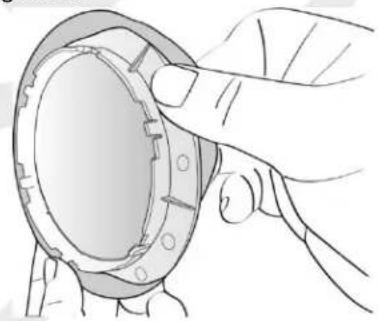
natural_image
Illustration of a hand adjusting a mechanical component (no text or symbols visible)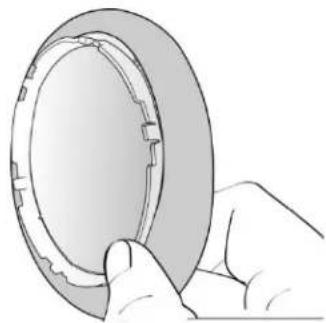
natural_image
Illustration of a hand holding a circular mechanical component (no text or symbols visible)- Put cleaning ring onto cleaning wheel correctly (snap the 6 latches) to avoid leakage.
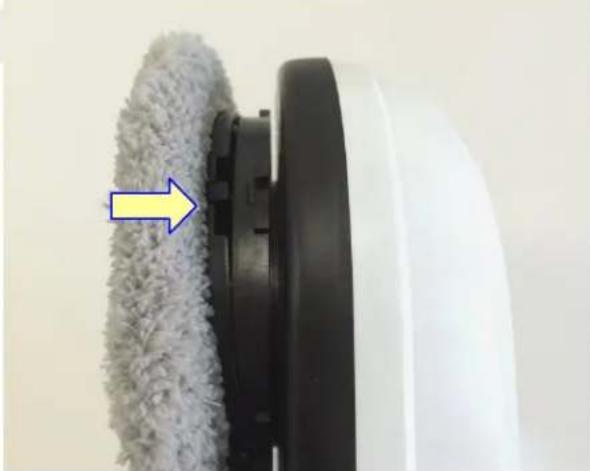
natural_image
Close-up of a white cleaning brush head with a gray textured brush and a blue arrow pointing to the brush tip (no text or symbols visible)Frequently asked questions (FAQ)
Q1: HOBOT can't start up and it sounds an alert at the beginning of the self-test.
Ans: It means that there is too much or too little friction. Pease check:
(1) Whether the cleaning cloth is too dirty.
(2) Glass stickers and window film have a friction factor that is too low.
(3) If the window is cleaned many times, the glass surface will become very slippery.
(4) The glass surface will become slippery if cleaned several times in a low humidity environment such as in air-conditioned room.
(5) When starting up the device (pressing ⬇, or ⚫ or ⬆ keep it 10cm or more away from the window frame to prevent the device from making an incorrect assessment.
Q2: The HOBOT slips and cannot detect the upper frame of window in "Auto Up then Down" (⑧) mode.
Ans: Press STOP key and switch to 8 or ◀8 auto mode.
Q3: HOBOT cannot finish cleaning the whole window and stops in the middle area.
Ans: Press 8▶ or ◀8 auto mode to continue cleaning.
Q4: HOBOT slips and can not climb up to the window frame.
Ans: (1) The friction factor is too low and may caused by glass stickers or window film on the glass.
(2) The cleaning cloth might be too wet.
(3) If the window is cleaned many times, the glass surface will become very slippery.
(4) The glass surface will become slippery if cleaned several times in a low humidity environment such as in air-conditioned room.
(5) When starting up (press ⬆, or ⬇ or ⬇), keep the device 10cm or more away from the window frame to prevent it from making an incorrect assessment.
Q5: HOBOT does not move smoothly, or it moves irregularly.
Ans: (1) Cleaning cloth is too dirty. Please change out the cleaning cloth for a clean one.
(2) Glass surface has different friction factor areas due to glass stickers, window film, and so on. Please limit use the HOBOT to certain areas of the window.
(3) The screw of the cleaning wheel might have become loose. Just tighten it.
Q6: After cleaning, a circular mark is left on the glass.
Ans: Cleaning cloth is too dirty. Please change out the cleaning cloth out for a clean one and clean again.
Q7: What to do if HOBOT stops due to a power outage?
Ans: (1) User can pull HOBOT back with safety rope. Gently pull the safety rope at an angle close to the glass to prevent it from falling off the glass.
(2) Switch the power switch to "off".
(3) Check whether there is a poor connection or broken cord.
Q8: What to do if HOBOT unexpectedly stops and the red light is flashing, with no alarm sounding?
Ans:(1) User can move HOBOT to safe area by remote control, or pull HOBOT back with safety rope.
Gently pull the safety rope at an angle close to the glass to prevent it from falling off the glass.
(2) Switch the power switch to "off".
(3) Check whether there is air leakage caused by a gap or uneven window frame.
Q9: When the power switch is turned on, the FAN does not rotate, and no alarm sounds.
| Case | LED signal | Situation |
| 1 | Blue: flashOrange: onRed: offNo alarm | It means battery charge is too low. Wait for battery to full charge (green light is lit). If machine still can't be used after charging for 8 hours, the battery should be changed. |
| 2 | Blue: flashRed: flashNo alarm | Machine hardware failure.Please contact a local retailer or local authorized dealer fo repairs. |
Q10: If HOBOT can't auto-stop at bottom of window when it finishes cleaning.
Ans: Press STOP key to stop machine.
Safety information about power adapter/battery
- Use only the power adapter supplied with this device. Use of other types of power adapters will result in malfunction and/or danger.
- Please use a proper electrical outlet and make sure no heavy objects are placed on the power adapter or the power cord.
- Allow adequate ventilation around the adapter when using it to operate the device. Do not cover the power adapter with objects that will reduce ventilation and cooling.
- Do not use the adapter in a humid environment. Never handle the adapter with wet hands.
- Connect the adapter to a proper power source. The voltage requirements are listed on the adapter.
- Do not use a broken adapter, power cord, or plug.
- Do not attempt to service the adapter. There are no service parts included. Replace the whole unit if it is damaged or exposed to high moisture. Consult your HOBOT dealer for help and maintenance.
- The battery used in this device may present a risk of fire or chemical burn if mistreated. Do not disassemble, short the contacts, heat above 60^ C( 140^ F), or incinerate.
- Please charge the battery every 3 months to conserve the battery life.
- If you have to dispose of old equipment, please take it to the local recycling center for recycling electrical and electronic parts.
General safety information
- Retain the safety and operating instructions for future reference.
- Follow all operating and use instructions.
- Do not expose your device to rain or excess humidity, and keep it away from liquids (such as beverages, faucets, and so on).
- Avoid exposing your device to direct sunlight or sources of intense light, and keep it away from sources of heat (such as radiators, space heaters, stoves, and so on).
- Do not place the device in the vicinity of strong magnetic fields.
- Keep the device and accessories away from children.
• Product operating temperatures: 0\~40°C(32\~104°F)
• Product storage temperatures: -10\~50°C(14\~122°F)
Cleaning cloth laundry instructions
- Washing under 40^(104^)
- Do not bleach.
- Do not tumble-dry.
- Do not iron.
- Do not dry clean.
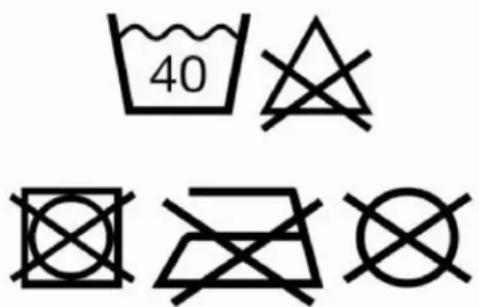
text_image
40Limited warranty
If there are defects in your HOBOT glass-cleaning robot due to faulty materials, poor workmanship, or malfunction within the warranty period from the date of purchase or delivery, please contact a local retailer or local authorized dealer for repairs or replacement.
Not covered by warranty
- Normal wear and tear (e.g. cleaning cloth, safety rope, etc).
- Reduction in battery discharge time due to battery age or use.
- Damage caused by assembly or installation that is not in accordance with the instructions included with the HOBOT.
- Damage caused by using the HOBOT glass cleaning robot for anything other than normal domestic household purposes.
- Damage caused by using parts and accessories which are not specified by HOBOT.
- Damage caused by accidents, abuse, or misuse.
Service address
Mobex Handels AG Tel: 056 618 40 40
Grenzweg 1 info@mobex.ch
5610 Wohlen www.mobex.ch
Schweiz