PB5024 - Pressure sensor IFM - Free user manual and instructions
Find the device manual for free PB5024 IFM in PDF.



| Product type | Electronic pressure sensor |
| Brand | IFM |
| Model | PB5024 |
| Supply voltage | 18 ... 30 V DC |
| Current consumption | 50 mA |
| Output current | 250 mA (protection short circuit, reverse polarity, overload) |
| Switching point accuracy | < ±2.0 % of measuring range |
| Repeatability | < ±0.25 % of measuring range |
| Temperature drift | < ±0.3 % of measuring range per 10°C |
| Operating temperature | -25 ... +80 °C |
| Storage temperature | -40 ... +100 °C |
| Protection | IP65 / III (according to variant) |
| Materials in contact with fluid | Stainless steel 303, ceramic, FPM (Viton) |
| Housing material | EEPDM/X, FPM, NBR, PA, Pocan, PC (Macrolon), Stainless steel 304 |
| Switching function | Adjustable hysteresis, N.O. or N.C. modes |
| Display | 10 green LEDs (pressure) + 1 yellow LED (switching status) |
| Adjustment | SET/ENTER buttons for high and low set points |
| Switching cycles | 100 million minimum |
| Shock resistance | 50 g (DIN / IEC 68-2-27, 11 ms) |
| Vibration resistance | 20 g (DIN / IEC 68-2-6, 10 - 2000 Hz) |
| Mounting | By appropriate process connection (see label "Port Size") |
| Safety | Avoid pressure peaks exceeding the indicated overpressure; for gaseous fluids, limit to max. 25 bar. |
| Locking | Press both buttons for 10 s to lock/unlock programming |
| Maintenance | No special maintenance required |
Frequently Asked Questions - PB5024 IFM
User questions about PB5024 IFM
0 question about this device. Answer the ones you know or ask your own.
Ask a new question about this device
Download the instructions for your Pressure sensor in PDF format for free! Find your manual PB5024 - IFM and take your electronic device back in hand. On this page are published all the documents necessary for the use of your device. PB5024 by IFM.
USER MANUAL PB5024 IFM
1 = BN (braun), 2 = WH (weiβ), 3 = BU (blau), 4 = BK (schwarz)
5. Programmieren
Controls and visual indication
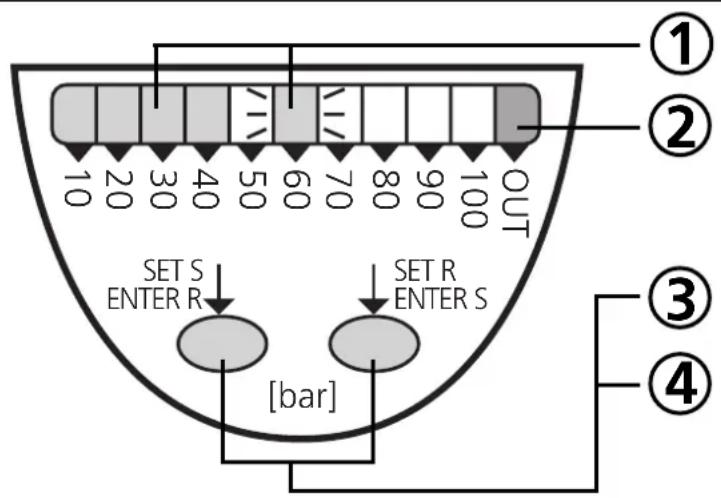
| ① | LEDs green | display of the system pressure (lit LEDs, ☐ and of the switch-on point (flashing LED, ☑ |
| ② | LED yellow | switching status; lights if the output has switched |
| ③ | SET S / ENTER R button | indication and adjustment of the switch-on point (S); acknowledgement of the switch-off point (R)* |
| ④ | SET R / ENTER S button | indication and adjustment of the switch-off point (R); acknowledgement of the switch-on point (S)* |
| *Setting: scrolling by holding pressed; incremental by pressing briefly | ||
Contents
Safety instructions page 12
- Function and features 12
- Operating modes . page 14
- Installation 15
- Electrical connection page 15
- Programming 16
- Commissioning / Operation 17
- Technical data page 17 Scale drawing page 26
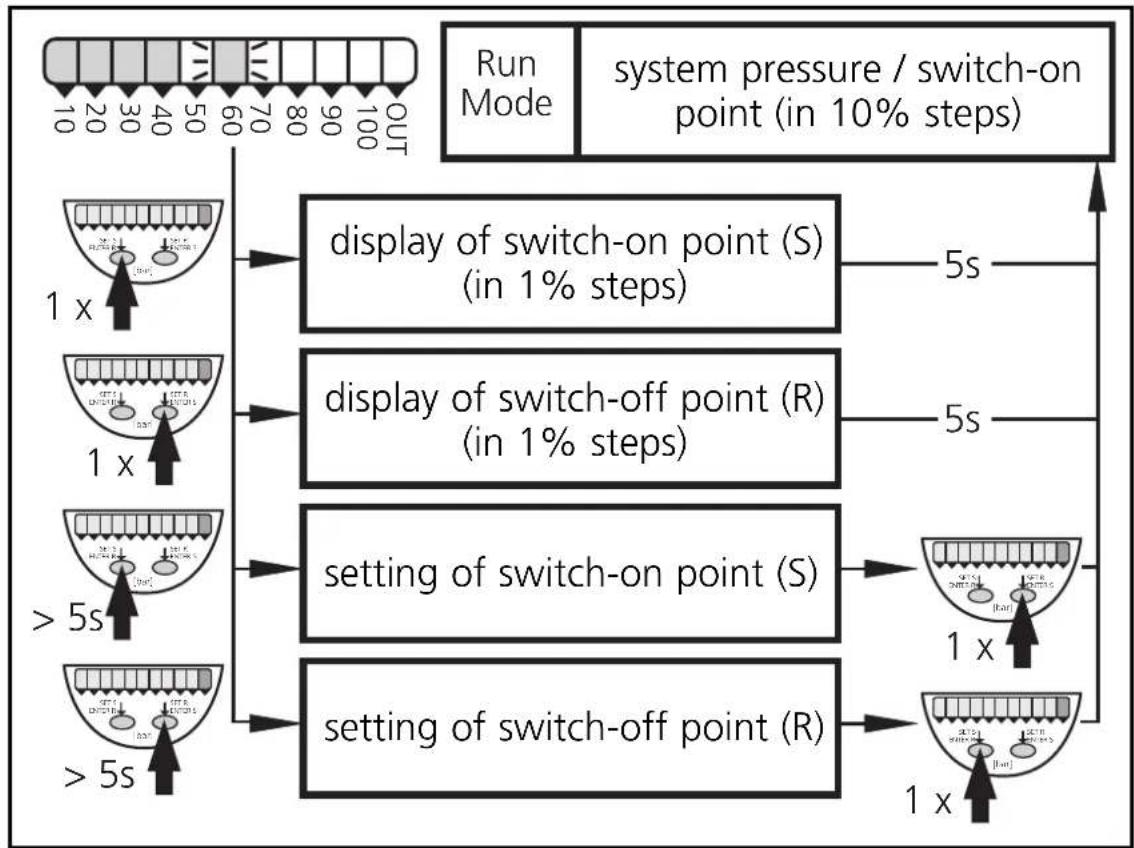
Menu structure
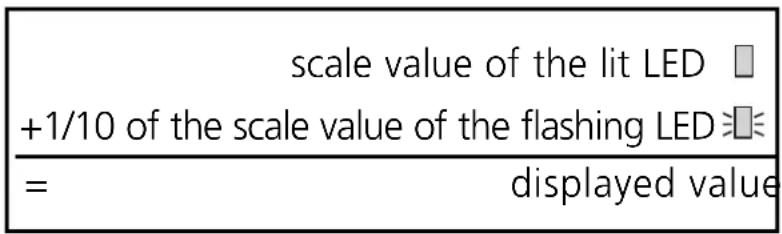
| Display of S / R in 1% steps) = value of the lit LED (□) + 1/10 of the value of the flashing LED (※) | PBxxx3 0-25 bar | ||
| PBxxx0 40 120bar + 32bar = 152bar | 40 80 120 200 360 120bar + 32bar = 152bar | PBxxx4 0-10 bar | |
| PBxxx6 0-25 bar | |||
| PBxxx1 25 75bar + 20bar = 95bar | 25 75 125 150 175 200 225 250 75bar + 20bar = 95bar | PBxxx7 0-1 bar | |
| PBxxx8 0-25 bar | |||
ENGLISH
Safety instructions
Please read the product description prior to installing the unit. Please check that the product is suitable for your application without any restrictions.
If the operating instructions or the technical data are not adhered to, personal injury and/or damage to property may occur.
Please check in all applications that the product materials (see Technical data) are compatible with the media to be measured.
For gaseous media the application is limited to max. 25 bar.
1. Function and features
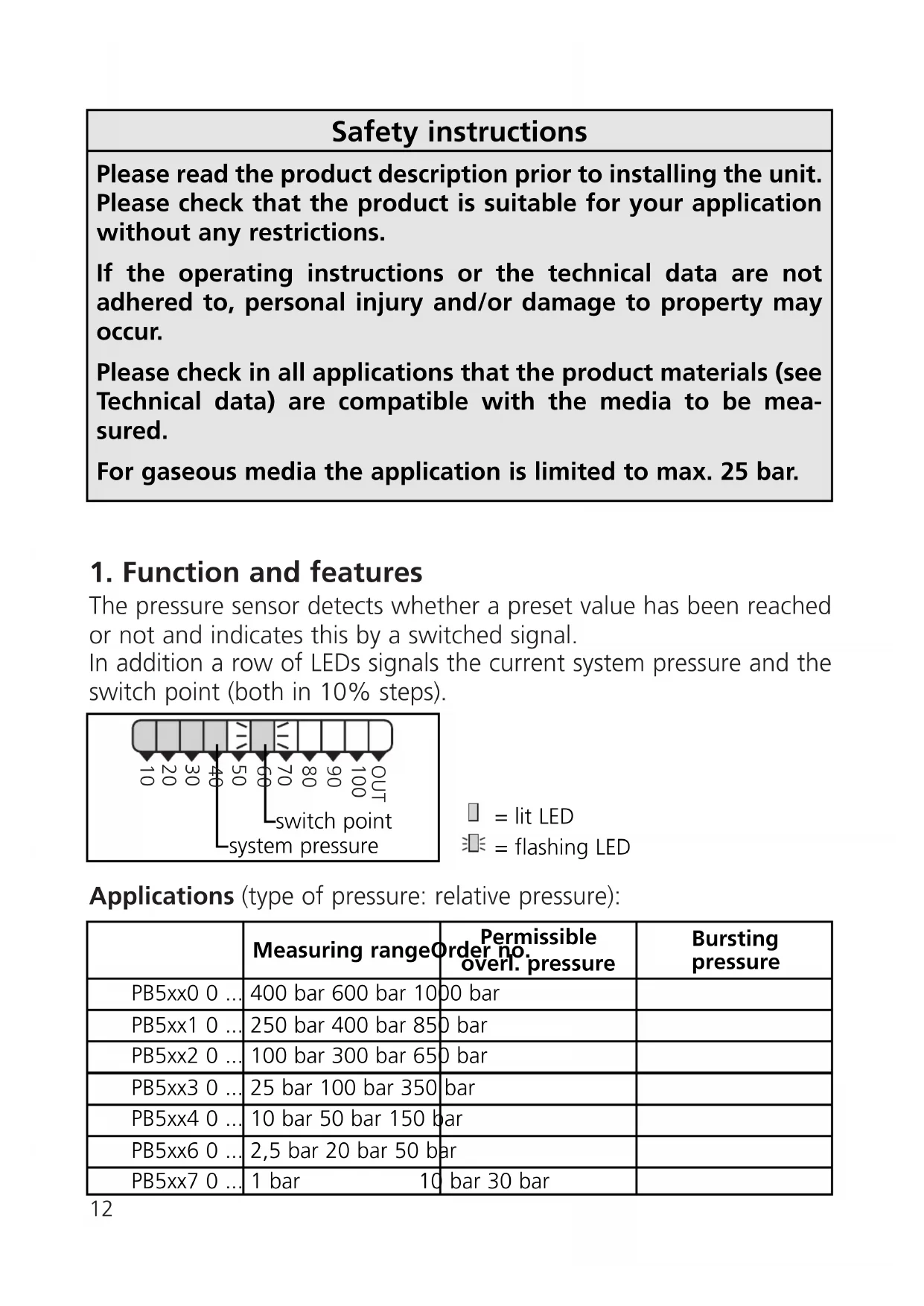
The pressure sensor detects whether a preset value has been reached or not and indicates this by a switched signal.
In addition a row of LEDs signals the current system pressure and the switch point (both in 10% steps).
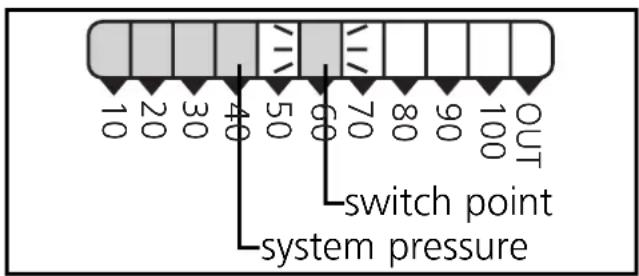
= lit LED
= flashing LED
Applications (type of pressure: relative pressure):
| Measuring range | Order no. overl. pressure | Bursting pressure | |
| PB5xx0 0 ... | 400 bar 600 bar 1000 bar | ||
| PB5xx1 0 ... | 250 bar 400 bar 850 bar | ||
| PB5xx2 0 ... | 100 bar 300 bar 650 bar | ||
| PB5xx3 0 ... | 25 bar 100 bar 350 bar | ||
| PB5xx4 0 ... | 10 bar 50 bar 150 bar | ||
| PB5xx6 0 ... | 2,5 bar 20 bar 50 bar | ||
| PB5xx7 0 ... | 1 bar 10 bar 30 bar |

Avoid static and dynamic overpressure exceeding the given overload pressure.
Even if the bursting pressure is exceeded only for a short time the unit can be destroyed (danger of injuries)!

Indication of the current system pressure as from 5% of the value of the measuring range. "All LEDs OUT" does not mean that the system is free of pressure!
The unit
can be used as N.O. or N.C.
- and operates with the hysteresis function.
When the system pressure is rising, the output switches when the switch-on point has been reached (S); when the system pressure is falling again, the output switches back when the switch-off point (R) has been reached.
The hysteresis can be set: First the switch-on point is set, then the switch-off point with the requested difference.
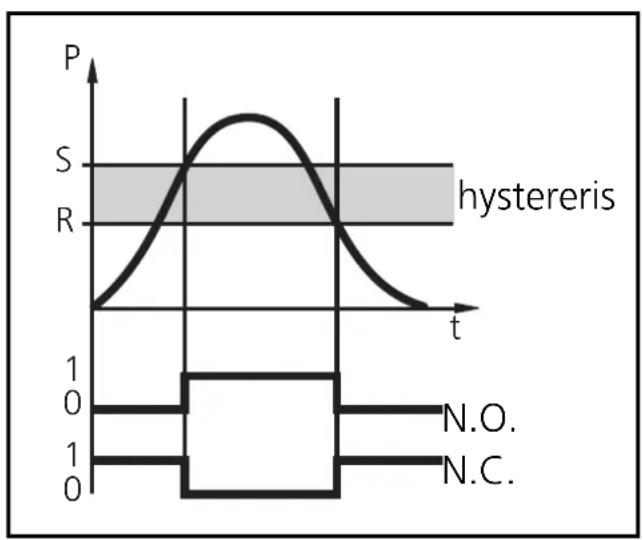
Setting range:
| Switch-on point (S) | Switch-off point (R) | in steps ofOrd | |
| PB5xx0 20...400 bar 12...392 | bar 4 bar | ||
| PB5xx1 | 12.5...250 bar 7.5...245 bar 2,5 bar | ||
| PB5xx2 | 5...100 bar 3...98 bar 1 bar | ||
| PB5xx3 | 1.25...25 bar 0.75...24.5 bar 0.25 bar | ||
| PB5xx4 | 0.5...10 bar 0.3...9.8 bar 0.1 bar | ||
| PB5xx6 | 0.125...2.5 bar 0.075...2.45 bar | 0.025 bar | |
| PB5xx7 | 0.05...1.0 bar | 0.03...0.98 bar | 0.01 bar |
2. Operating modes
The unit has the following operating modes:
Run mode (normal operating mode), display mode (indication of the switch-on / switch-off point), programming mode (setting of the switch-on / switch-off point).
Run mode:
When the supply voltage has been applied, the unit is in the Run mode. It monitors and switches the transistor output according to the set hysteresis.
The green LEDs indicate the current system pressure, the yellow LED indicates the switching state of the output.
Display mode:
When the button "SET S" (or "SET R") is pressed for a short time, the unit passes to the Display mode. Internally it remains in the operating mode. Irrespective of this the switch-on / switch-off point can be read in 1% steps.
- When the button is pressed for a short time, the corresponding value is displayed for approx. 5s; then the unit returns to the Run mode.
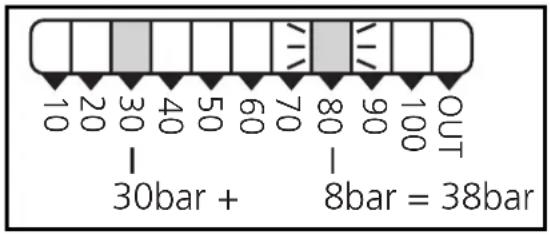
Programming mode:
The unit passes to the programming mode when after the selection of a parameter value (Display mode) the "Set" button is pressed until the display of the parameter value is changed. Internally the unit remains in the operating mode. It continues its monitoring function with the existing parameters until the change has been terminated.
You can change the parameter value by pressing the "Set" button and confirm it by pressing the "Mode/Enter" button. The unit returns to the Run mode when no button has been pressed for 5s.
3. Installation

Before mounting and removing the sensor, make sure that no pressure is applied to the system.
Mount the pressure sensor on a suitable process connection (see type label "Port Size").
4. Electrical connection
The unit must only be connected by an electrician.
The national and international regulations for the installation of electrical equipment must be observed.
Voltage supply to EN50178, SELV, PELV.
Disconnect power before connecting the unit. Wiring:
| M12 connector DC PNP | 1 BN L+ 4 BK 3 BU L- | 3 BU L+ 4 BK 1 BN L- |
| M12 connector DC NPN | 1 BN 4 BK 3 BU L- | 3 BU L+ 4 BK 1 BN L- |
| SS connector DC PNP | 1 3 L+ 2 2 L- | 2 3 L+ 1 1 L- |
Core colours of ifm sockets:
1 = BN (brown), 2 = WH (white), 3 = BU (blue), 4 = BK (black).
5. Programming
Increase the switch-on point / switch-off point
| 1 | Press the SET S-button* and keep it pressed until the requested switch point is displayed. As soon as the LED starts moving the switch point can be increased (incremental by pressing briefly or scrolling by holding pressed). | → | After 5s the flashing LED moves from left to right. → 10 20 30 40 50 60 70 80 90 100 UT 10 20 30 40 50 60 70 80 90 100 UT after LED 9 has been reached the cycle starts again at LED 0. The LED which is constantly lit moves on by one position.** |
| 2 | Press the ENTER S-button* briefly (acknowledgement). | → | The set switch point becomes effective; the unit passes into the operating mode. |
- SET R button to set the switch-off point
ENTER R button to acknowledge the setting of the switch-off point
The switch-on point (S) is always higher than the switch-off point (R). The unit does not accept values for R which are higher than S.
**Overflow: If the flashing LED and the lit LED exceed the maximum setting value, the cycle starts again at the minimum setting value.
Decrease the switch-on point / switch-off point
Let the flashing and lit LEDs move to the maximum setting value. Then the cycle starts again at the minimum setting value.
Locking / Unlocking
The unit can be electronically locked to prevent unwanted adjustment of the set parameters: Press both pushbuttons for 10s. Indication goes out briefly (acknowledgement of locking / unlocking). Units are delivered from the factory in the unlocked state.
6. Commissioning / Operation
After mounting, wiring and setting check whether the unit operates correctly. Faults displayed during operation: All LEDs flashing in case of short-circuit.
7. Technical data
| Operating voltage [V] | 18 ... 30 DC |
| Current rating [mA]. | 250 short-circuit protection, reverse polarity protection / overload protection, integrated watchdog Voltage drop [V] < 2 Current consumption [mA] 50 |
| Repeatability [% of value of measuring range] | < ± 0.25 Accuracy of switch point [% of value of measuring range] < ± 2.0 Temperature drift [% of value of measuring range / 10 K] < ± 0.3 in the temperature range [°C] -25 ... +80 Power-on delay time [s] 0.2 |
| Materials (wetted parts) | stainless steel (303S22); ceramics; FPM (Viton) Housing material... EEPDM/X (Santoprene); FPM (Viton); NBR (Buna N); PA; Pocan; PC (Macrolon); stainless steel (304S15) Protection PB5x00 ... PB5x07 IP 65 / III Protection PB5x20 ... PB5x22 IP 67 / III Protection PB5x23 ... PB5x27 IP 65* / III Insulation resistance [MΩ] > 100 (500 V DC) Shock resistance [g] 50 (DIN / IEC 68-2-27, 11ms) Vibration resistance [g] 20 (DIN / IEC 68-2-6, 10 - 2000 Hz) Switching cycles min. 100 million Ambient temperature [°C] -25 ... +80 Medium temperature [°C] -25 ... +80 Storage temperature [°C] -40 ... +100 EMC IEC 1000/4/2 ESD: 4 / 8 KV IEC 1000/4/3 HF radiated: 10 V/m IEC 1000/4/4 Burst: 2 KV IEC 1000/4/6 HF conducted: 10 V |
*Encreased protection (IP 67) with accessories (Order no. E30038).
Applications (type de pression: pression relative):
| N° de commande | Etendue de mesure | Surpression admissible | Pression d'éclatement |
| PB5xx0 0 ... | 400 bar 600 bar 1000 bar | ||
| PB5xx1 0 ... | 250 bar 400 bar 850 bar | ||
| PB5xx2 0 ... | 100 bar 300 bar 650 bar | ||
| PB5xx3 0 ... | 25 bar 100 bar 350 bar | ||
| PB5xx4 0 ... | 10 bar 50 bar 150 bar | ||
| PB5xx6 0 ... | 2,5 bar 20 bar 50 bar | ||
| PB5xx7 0 ... | 1 bar 10 bar 30 bar |

| embase M12 DC PNP | 1 BN L+ 4 BK 3 BU L- | 3 BU L+ 4 BK 1 BN L- |
| embase M12 DC NPN | 1 BN L+ 4 BK 3 BU L- | 3 BU L+ 4 BK 1 BN L- |
| embase SS DC PNP | 1 L+ 3 2 L- | 2 L+ 3 1 L- |
1 = BN (brun), 2 = WH (blanc), 3 = BU (bleu), 4 = BK (noir).
5. Programmation
| 1 = Programmiertaste 2 = Prozeßanschluß |
| 1 = programming button 2 = process connection |
| 1 = bouton poussoir 2 = montage process |
1 = programming button
2 = process connection
1 = bouton pousoir
2 = montage process