PLF860 - Bluetooth speaker LG - Free user manual and instructions
Find the device manual for free PLF860 LG in PDF.



User questions about PLF860 LG
0 question about this device. Answer the ones you know or ask your own.
Ask a new question about this device
Download the instructions for your Bluetooth speaker in PDF format for free! Find your manual PLF860 - LG and take your electronic device back in hand. On this page are published all the documents necessary for the use of your device. PLF860 by LG.
USER MANUAL PLF860 LG
Please read the Safety Precautions carefully before using this product.
After reading this manual, please keep it in an easily accessible location for future reference.
PL-F860
SAFETY PRECAUTIONS
Please read this manual carefully to properly install this product.
After reading the manual, please keep it in an easily accessible location for future reference.

WARNING
- Carefully follow the instructions in this manual to install this product correctly.
- Failure to follow the instructions in the manual can result in personal injury or product damage.
• After the product is installed, do not stand on or lean against the product. - This may cause the product to fall and cause injury.
- Protect the product from severe impact after installation.
- This may cause the product to fall and cause injury.
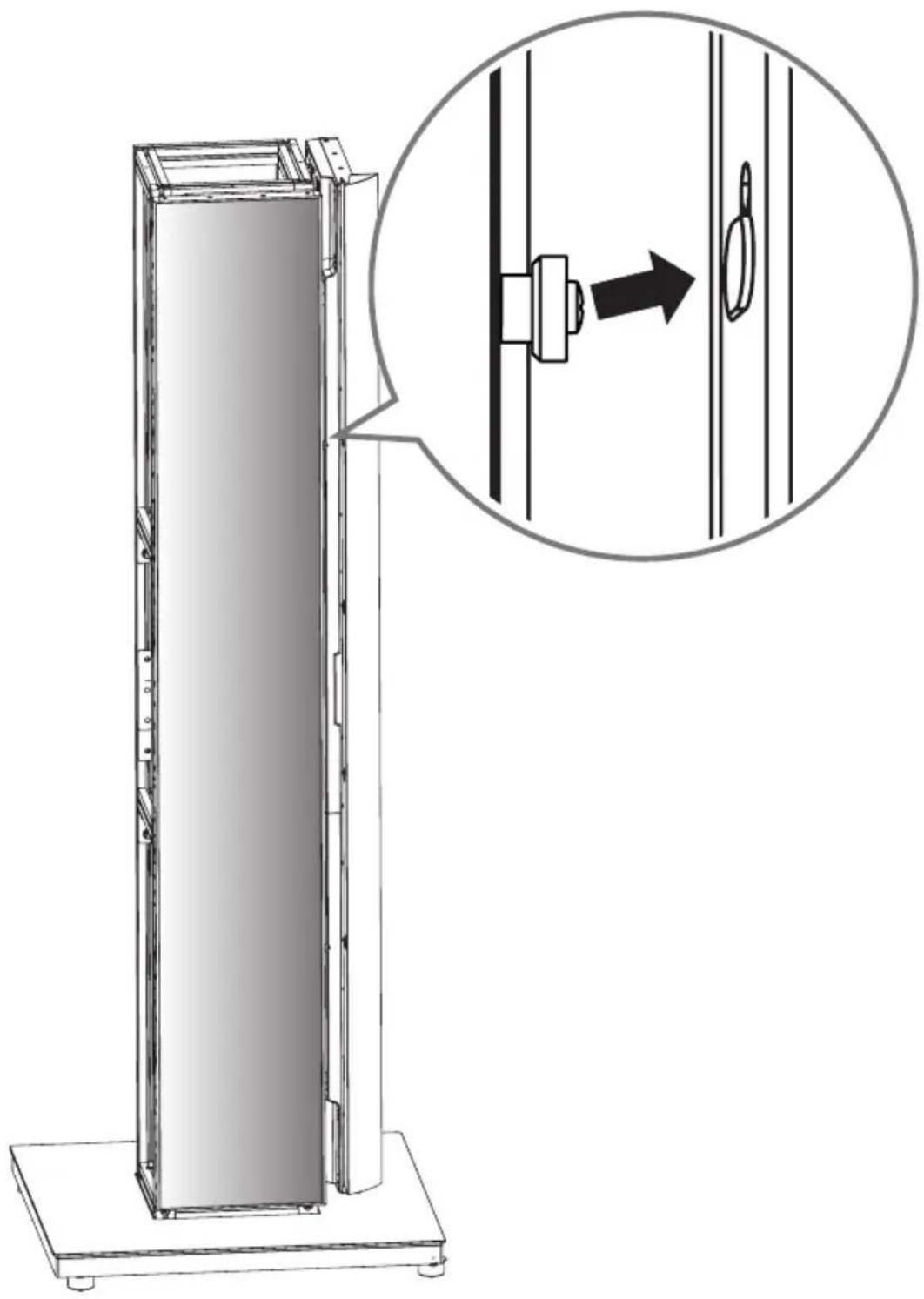
• Always use the product on a flat surface. - If used on an uneven or unsteady surface, the product may fall and cause injury.
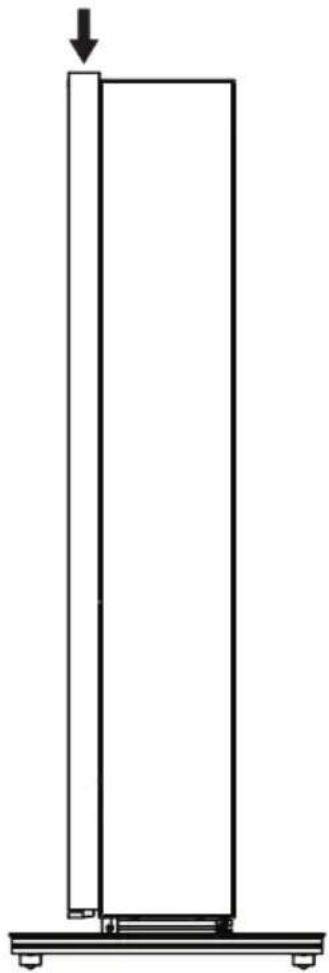
- Do not attach other objects to the stand aside from displays.
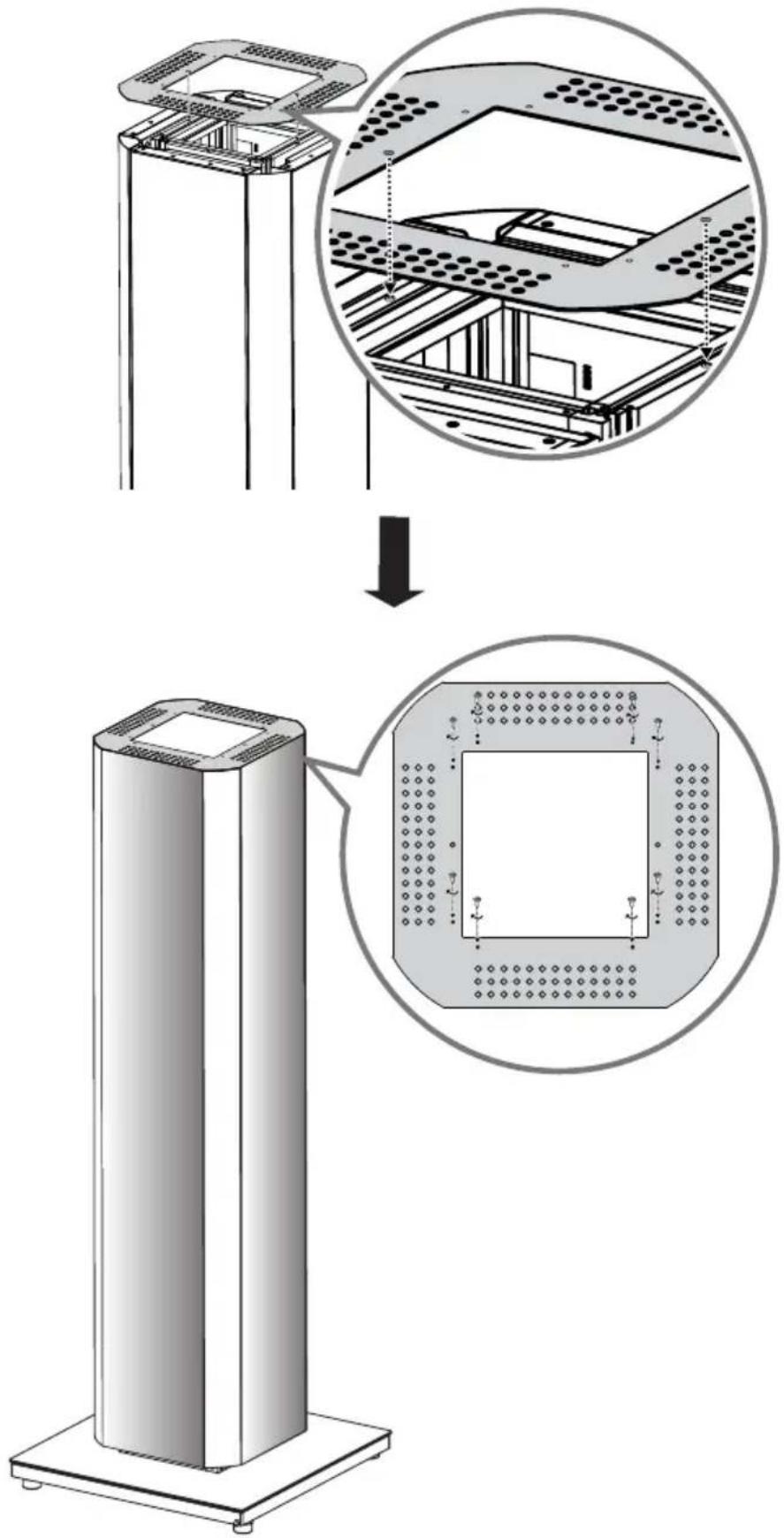
- The objects may fall and cause personal injury or damage.
• Once displays have been installed, only use them indoors. - If used outdoors, moisture may enter the units and result in fire, electric shock or product malfunction.
- Do not modify or alter the product.

CAUTION
• Before moving the product, disconnect the power cord from any power outlets.
- Moving the product while the power cord is connected may result in electric shock or fire.
- Do not clean the product with a wet towel, and do not place heaters or humidifiers beneath it.
- If moisture, steam or heat enters the product, this may cause fire, electric shock or product malfunction.
- Wear work gloves when installing the product. Do not use your bare hands.
- Not wearing gloves may expose you to risk of injury.
ASSEMBLY AND PREPARATION

CAUTION
- Be careful when installing and using the product to prevent product damage or safety hazards.
- If the instructions in the manual are unclear, stop the installation process and contact the service center.
- Check that the accessories provided with the product are all included before beginning installation. LG Electronics is not liable for any damage or loss of accessories after the package has been opened.
- Make sure that the accessories are kept out of reach of children to prevent accidents, such as choking on small parts.
• Make sure that the screws are fastened tight. - Applying excessive force to the screws may cause damage to the wall, affect product performance or cause product damage.
- Make sure that the installed display does not exceed the specified load and that no external force is applied to it.
- In order to prevent any accidents, take caution when handling tools during the installation.

NOTE
- Save the content you intend to use to your monitor set before installing the Quad Digital Pillar.
Accessories
Accessories are subject to change without prior notice to improve the performance of the product, and new accessories may be added as well.
The illustrations in this manual may differ from the actual product and accessories.
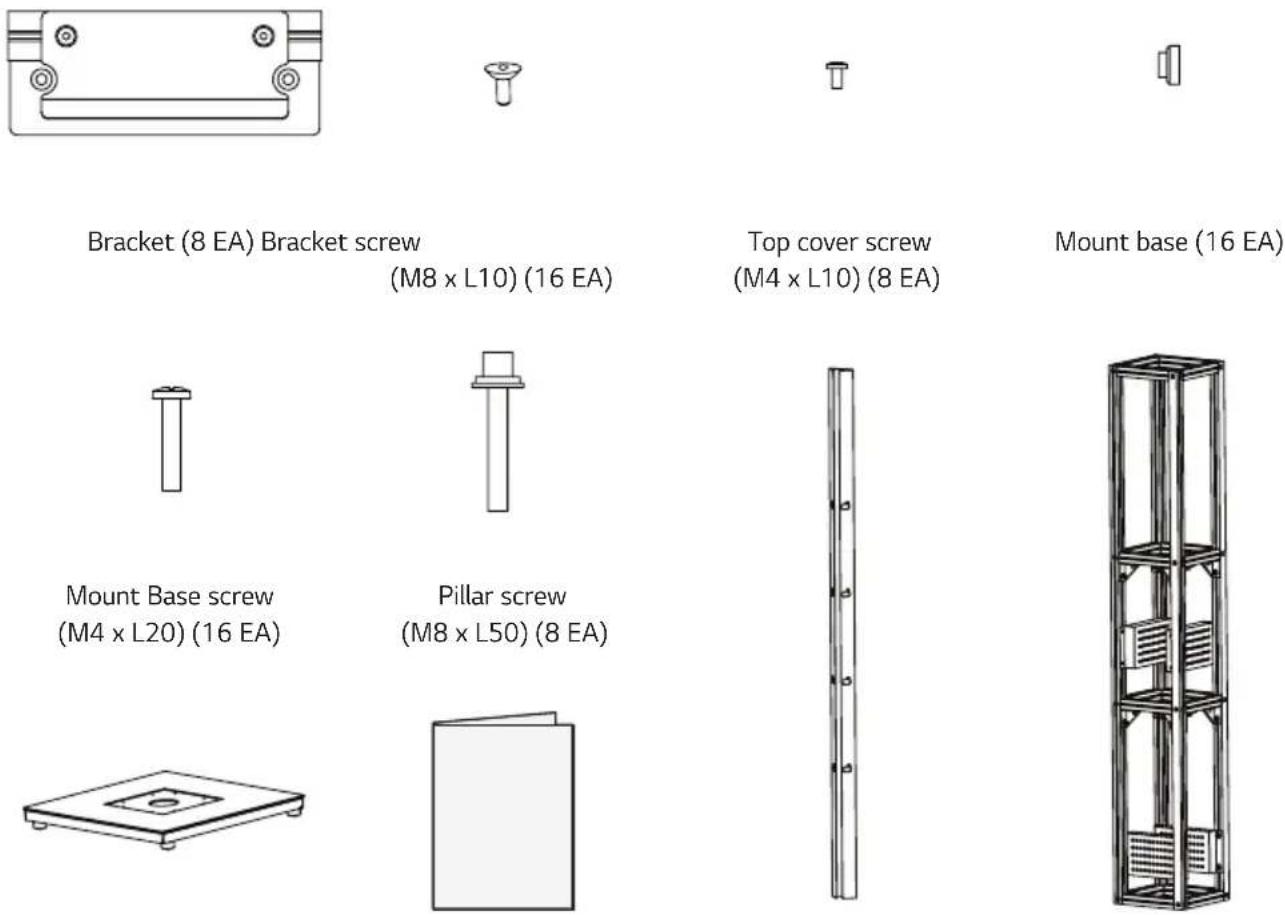
Bracket (8 EA) Bracket screw
(M8 x L10) (16 EA)
Top cover screw
(M4 × L10) (8 EA)
Mount base (16 EA)
Mount Base screw (M4 x L20) (16 EA)
Pillar screw (M8 x L50) (8 EA)
Stand base (1 EA) User Manual Deco frame (4 EA) Pillar (1 EA)
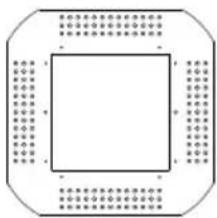
natural_image
Pure geometric diagram of a square with surrounding dots and lines, no text or symbols present.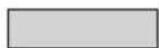
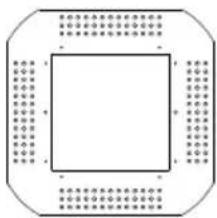
Top cover (1 EA) Double-sided tape (2 EA)
Required Tools
Wrench, Screwdriver, Ladder
Assembly
The images may differ from the actual product.

WARNING
• For safety, at least two people must work together to install the product.
• Make sure to use gloves or other protective equipment during assembly for safety.
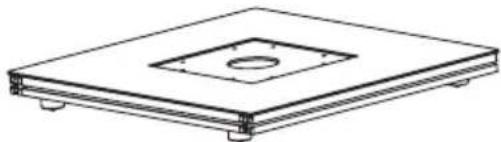
1 Place the stand base on a flat surface.
natural_image
Technical line drawing of a rectangular electronic component with a central square and mounting base (no text or symbols)2 Place the pillar on the stand base, aligning it with the grooves in the base.
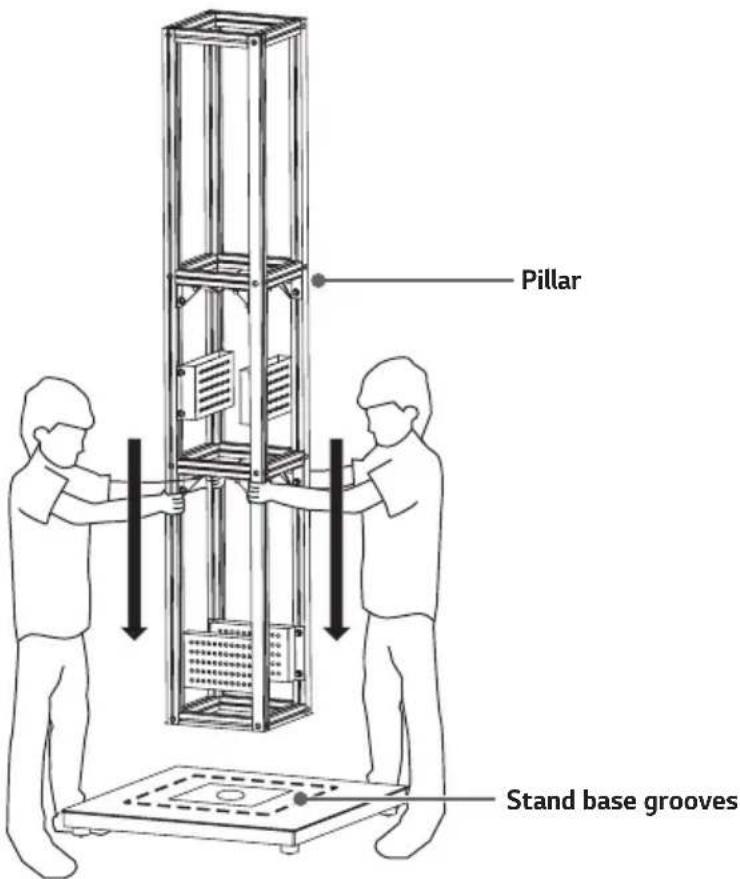
text_image
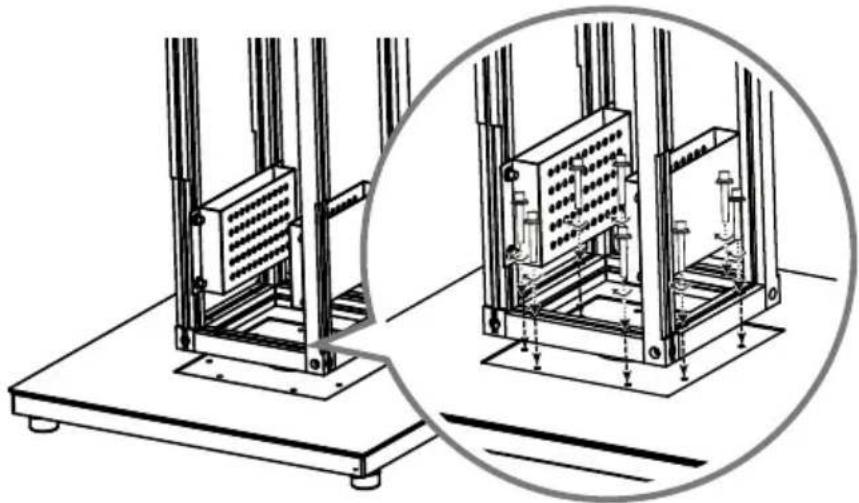
Pillar Stand base grooves3 Place the pillar on the grooves on the stand base and assemble using the eight screws (M8 x L50) provided.
natural_image
Technical line drawing of a mechanical testing setup with two views of a platform (no text or symbols)4 Put a power strip into the hole in the stand base. The shape of the power strip may differ by region.
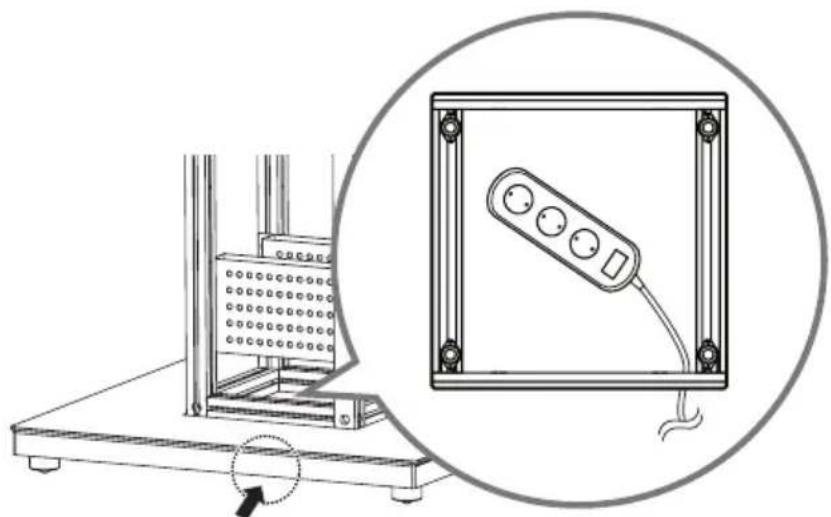
natural_image
Technical diagram showing a mechanical setup with a bracket and a control panel, both enclosed in a circle (no text or symbols present)5 Apply the double-sided tape to the power strip and attach it to the inner side of a pillar as shown in the image.
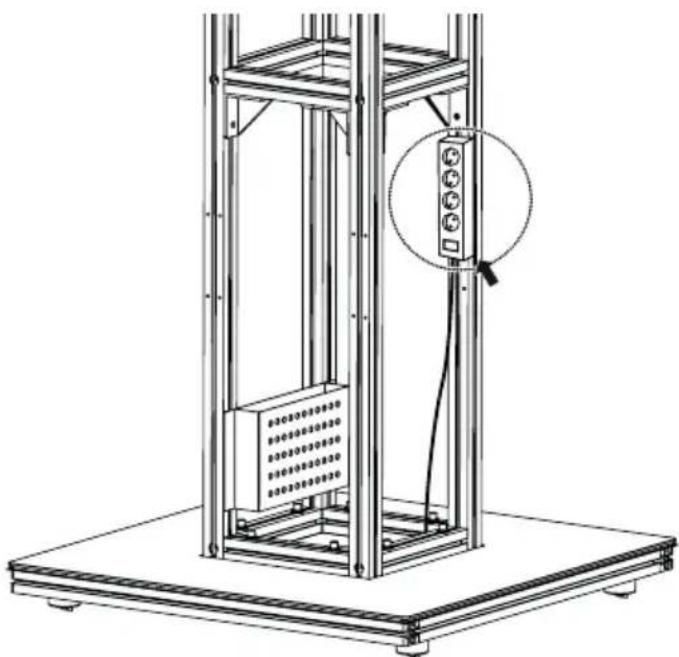
natural_image
Technical line drawing of a mechanical lifting device with a magnified inset showing internal components (no text or symbols)
NOTE
• Cut the double-sided tape in sizes that will fit the size of the power strip.
• Install the power strip so that its cord hangs down toward the floor.
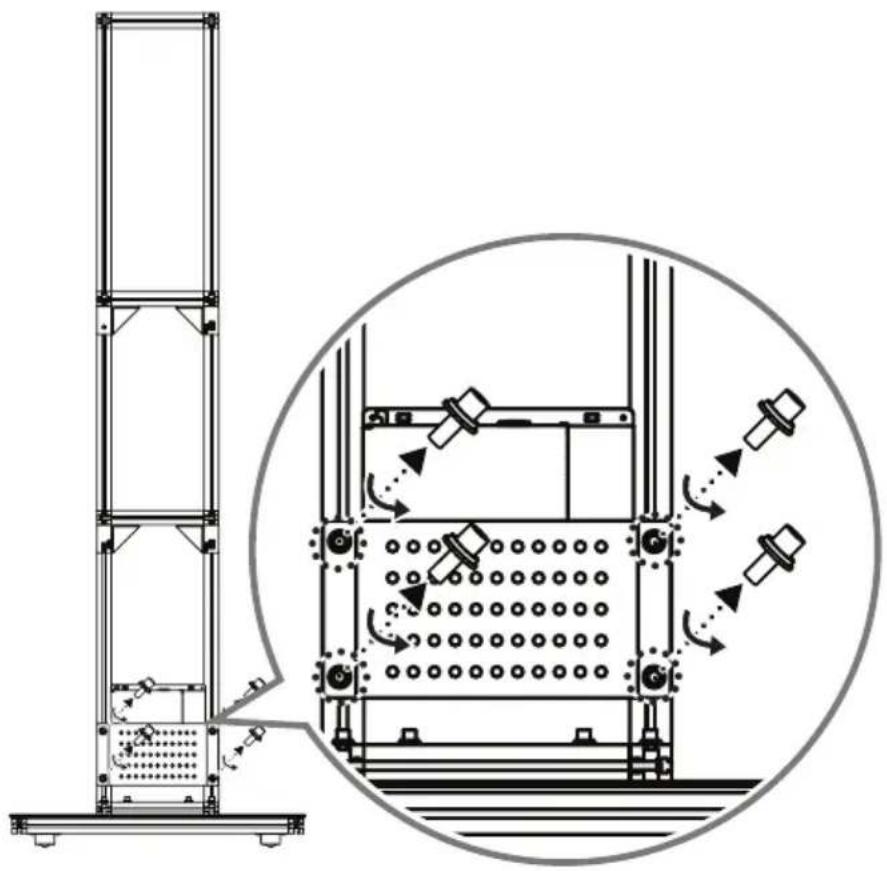
6 Fix power strips only on the four areas indicated in the image below. If the power strips are attached elsewhere, you may not be able to insert the media player.
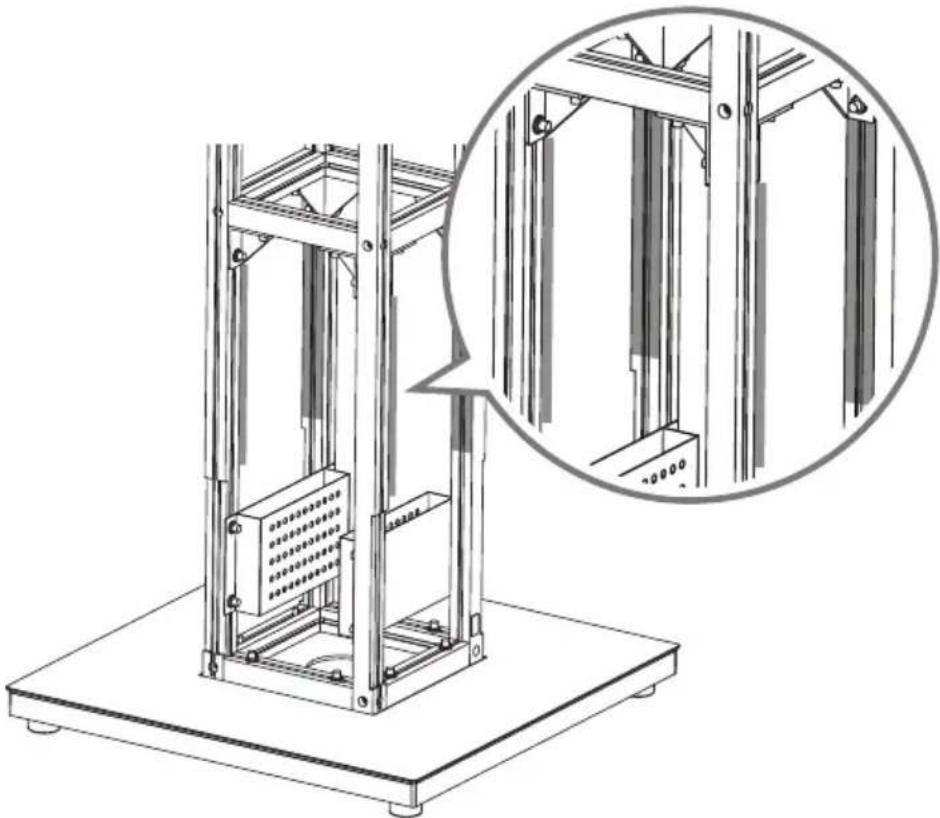
natural_image
Technical line drawing of a mechanical lifting device with an inset close-up showing internal components (no text or symbols)7 If using a media player provided by LG Electronics, place it inside the media player box attached to the pillar.
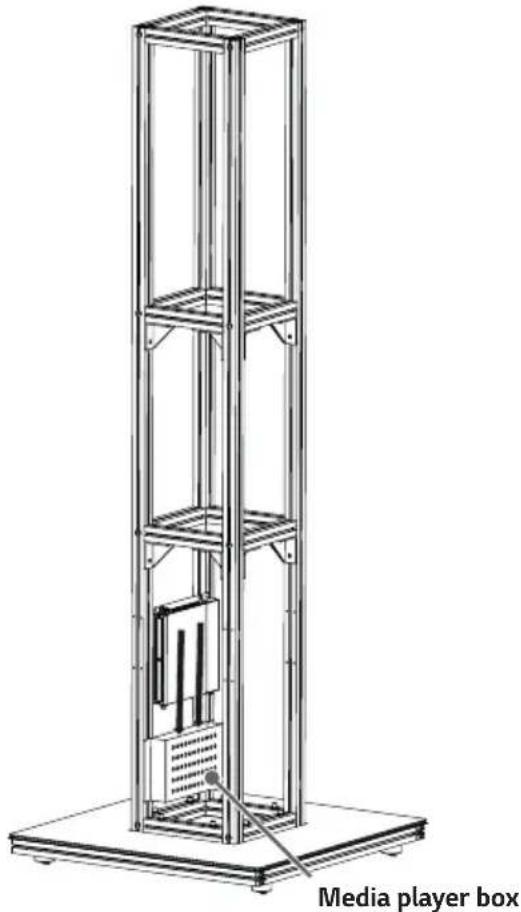
text_image
Media player box2 If using a media player other than those provided by LG Electronics, loosen the screws to remove the media player box and attach using a different bracket.
natural_image
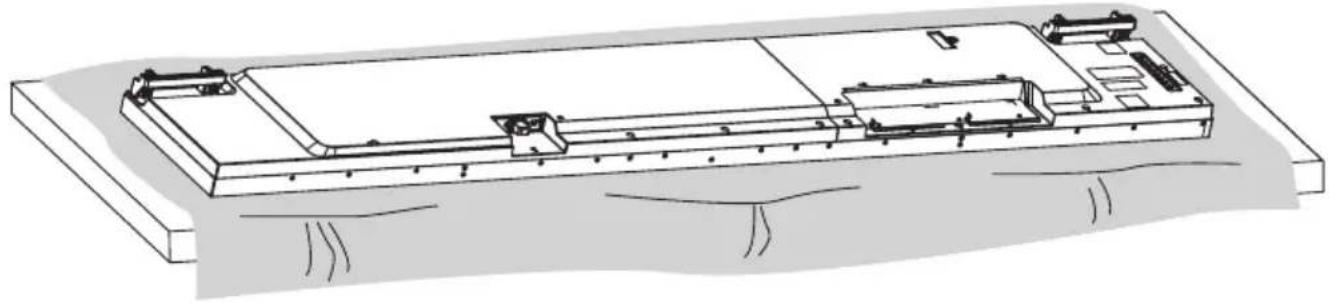
Technical line drawing of a vertical structural frame with internal components and directional arrows indicating motion or movement (no text or symbols)8 Lay a clean cloth on the floor, and then put the monitor set on it with the screen face down.
natural_image
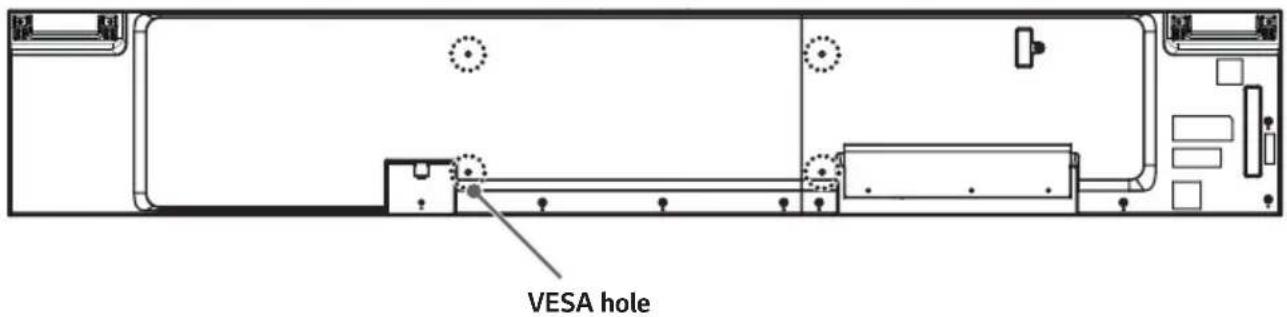
Technical line drawing of a mechanical assembly with no visible text or symbols9 Place the brackets on the back of the monitor set, aligning them with the VESA holes.
text_image
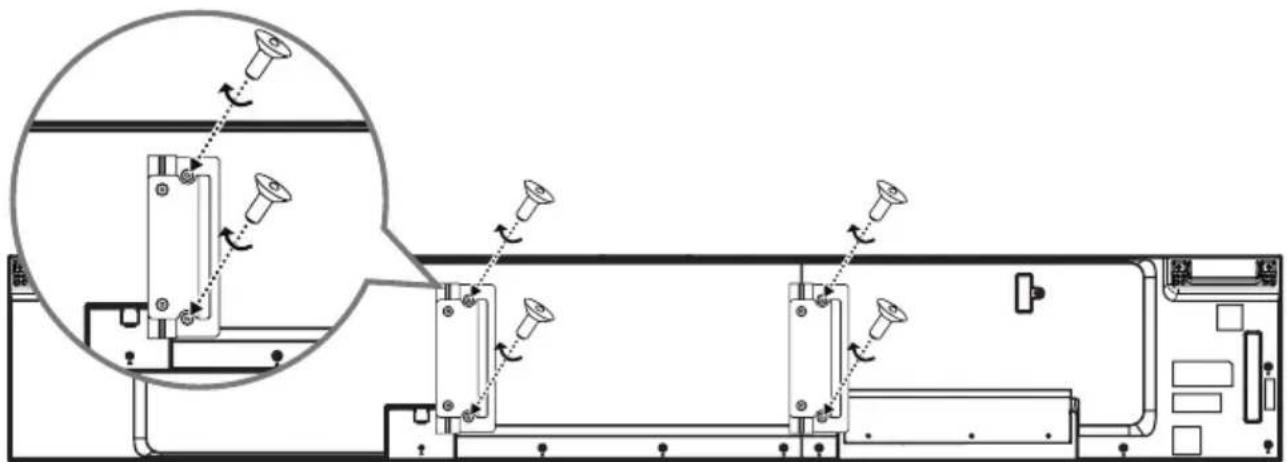
VESA hole10 Use the four screws (M8 x L10) provided and an L-wrench to attach the brackets to the monitor set. Make sure the holes in the brackets and the VESA holes are aligned.
natural_image
Technical diagram of a mechanical assembly with multiple screw fasteners and a magnified inset showing pin alignment (no text or labels)11 Place a soft cushion next to the pillar attached to the stand base. (Cushion size: At least 100 mm x 400 mm)
12 Hold the assembled brackets and use the cushion to set the monitor set upright.
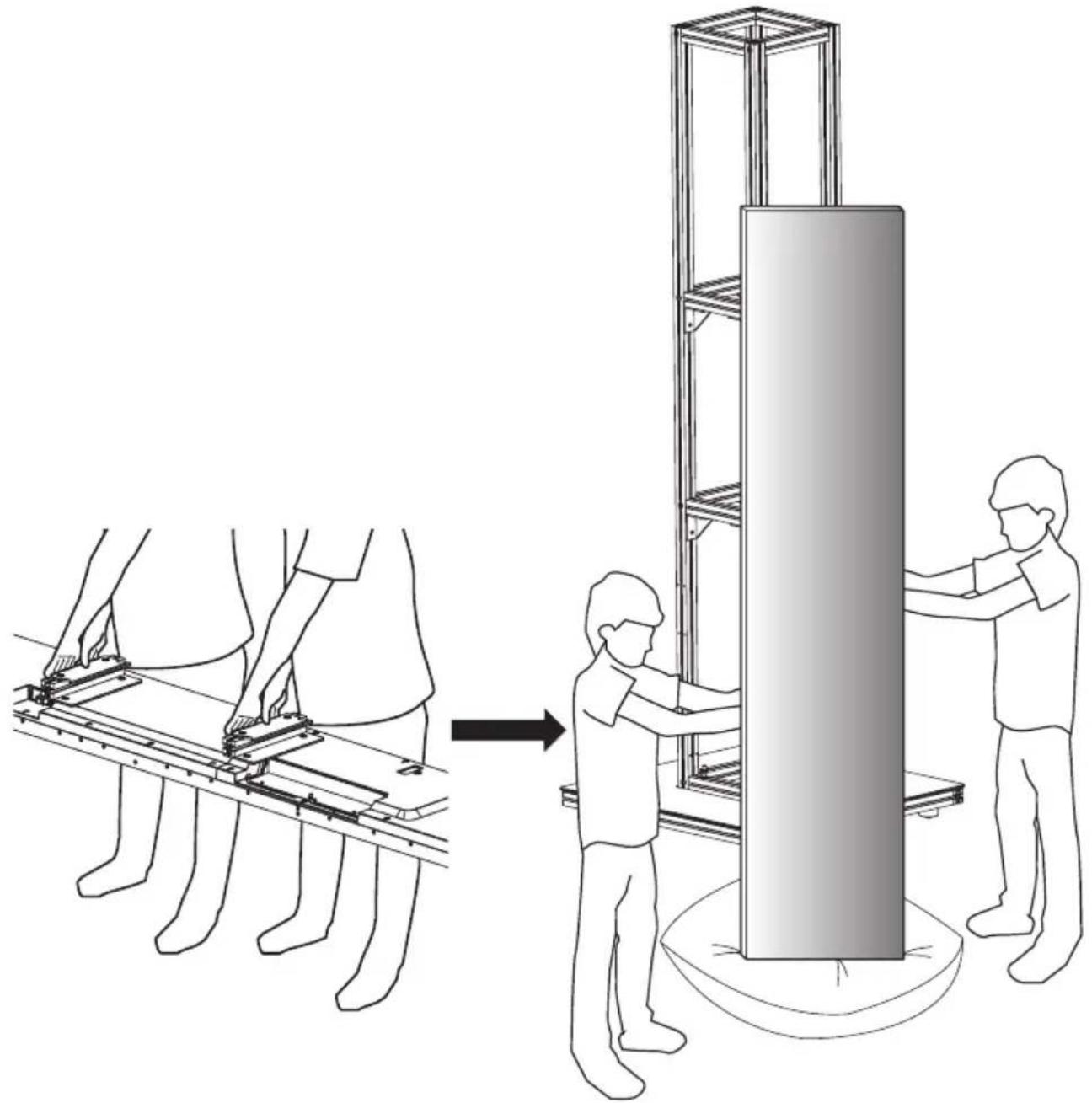
natural_image
Diagram showing two figures assembling a vertical structure with scaffolding, illustrating mechanical assembly (no text or symbols present)13 Refer to the image below and make sure one person is holding the top of the monitor set while the other is holding the bottom panel, then lift it up. Use the brackets to hang the monitor set on the pillar.
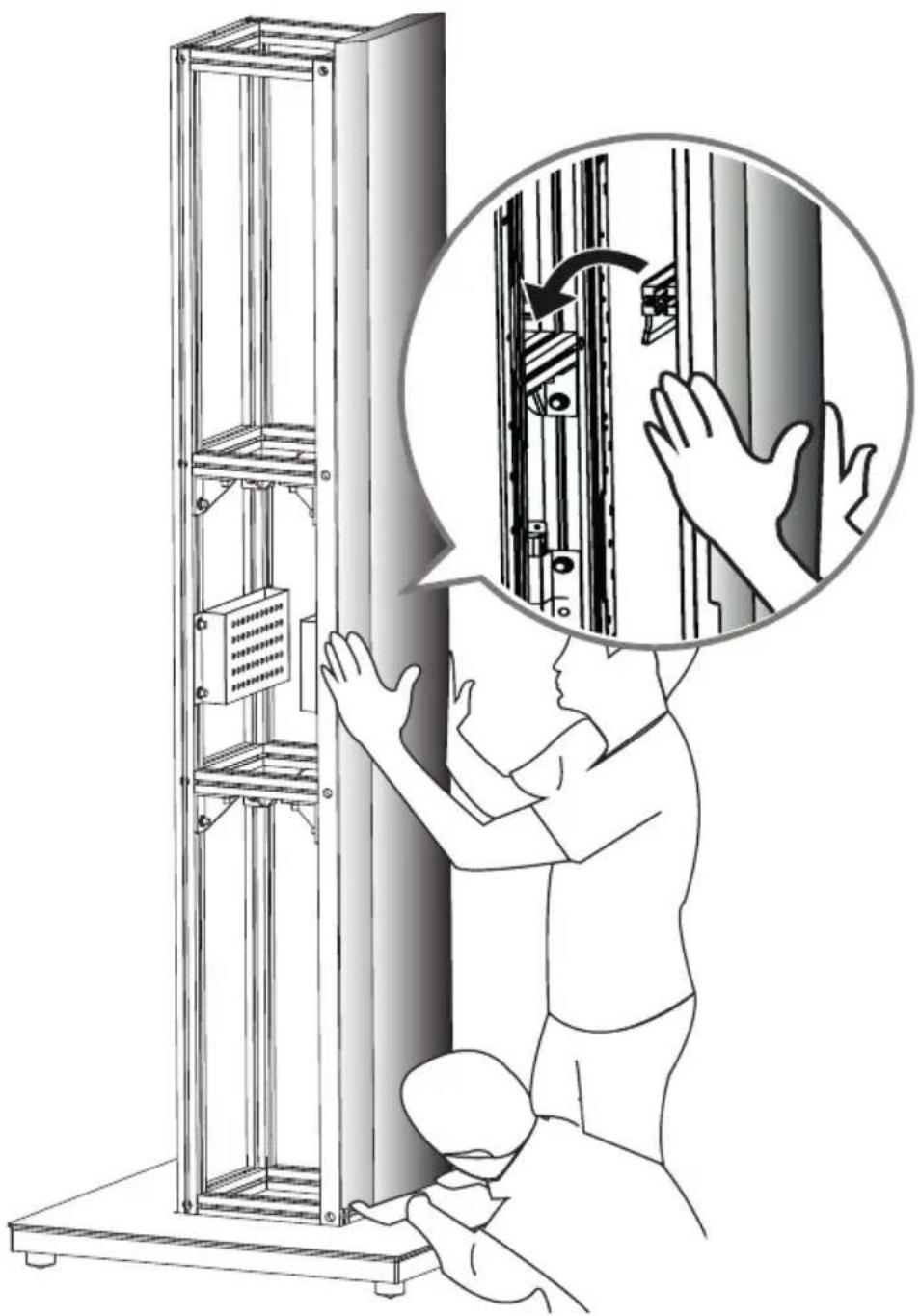
natural_image
Illustration of a person installing or adjusting server racks in a rack, with hand gestures and a magnified inset showing the process (no text or symbols present)
WARNING
• If excessive force is applied to the front of the monitor set, the panel may be damaged.
• Make sure the power cord does not get caught between the brackets and pillar.
14 After hanging the monitor set on the pillar, connect the power cord and IR receiver. Attach the IR receiver to the bottom of the monitor set.
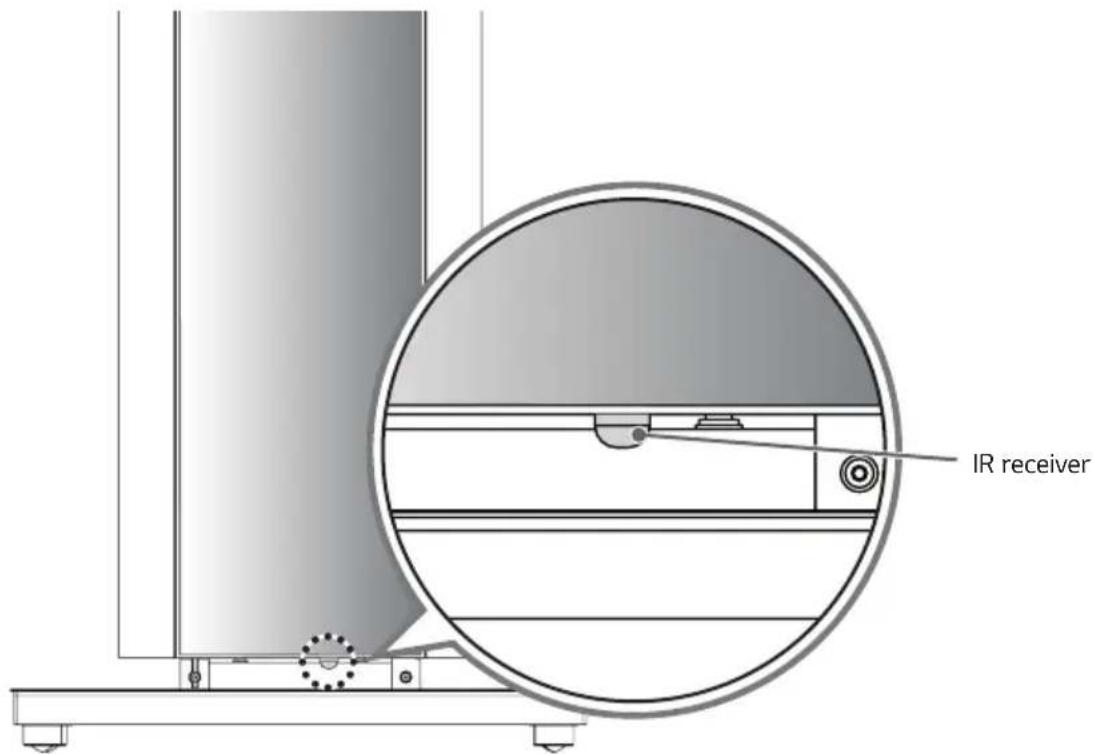
text_image
IR receiver15 Hang two more monitor sets on the pillar in the same method.
16 The last monitor set must be hung on the pillar after the power cord and IR receiver are connected.
17 Assemble the provided screws (M4 x L20) and mount bases.

text_image
Diagram showing a battery symbol, plus sign, and rightward arrow indicating direction18 Tighten two screws and mount bases each in the holes in the sides of the monitor sets.
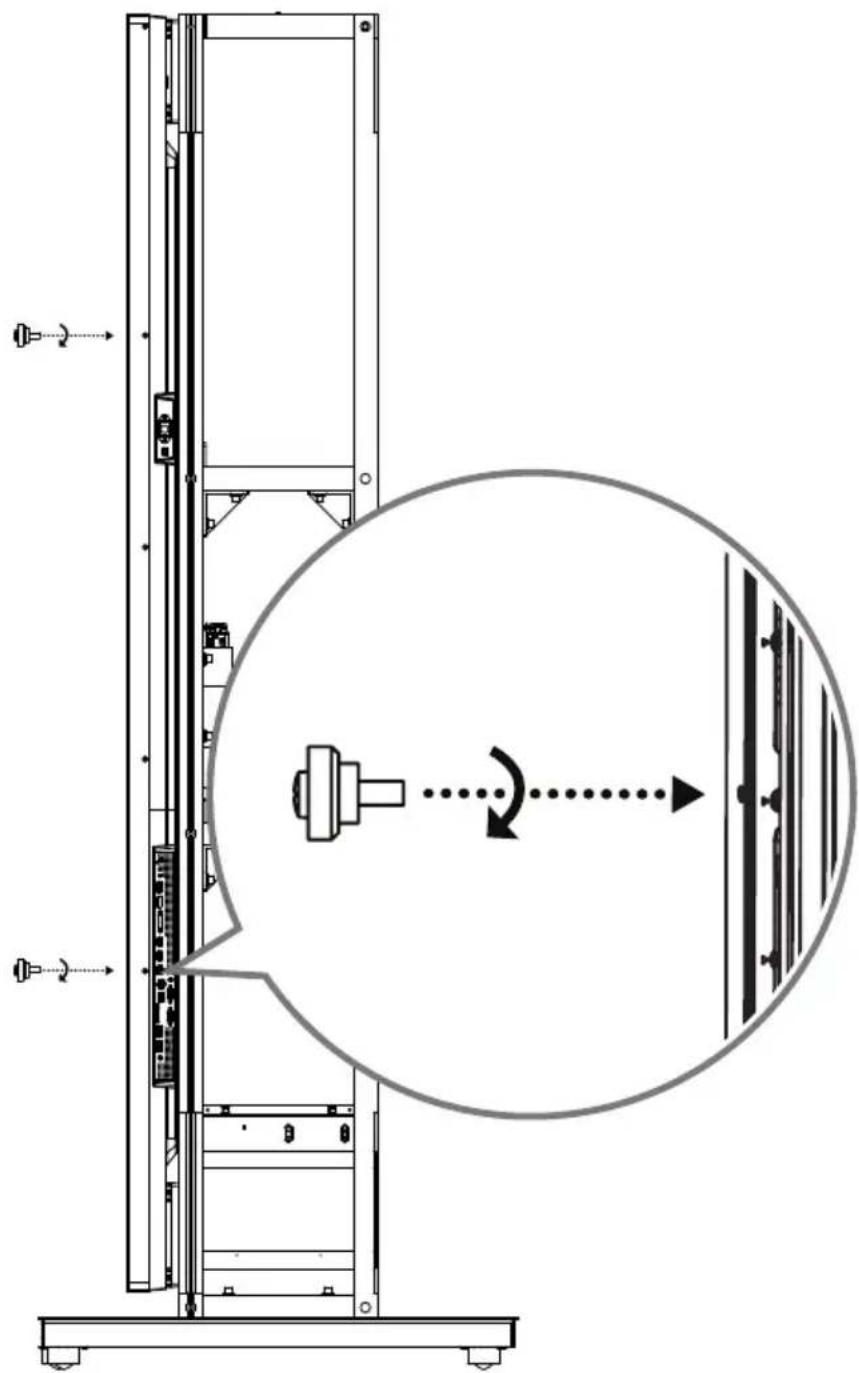
text_image
Technical diagram showing a mechanical assembly with labeled components and motion arrows, including a magnified circular view of the component.19 Make sure the holes in the deco frame are slightly higher than the monitor set's screws. Hang the screws attached to the monitor sets onto the deco frame.
natural_image
Technical diagram of a vertical shelf or support structure with an inset showing a close-up of a mechanical component (no text or symbols present)20 Push down on the deco frame so it is attach in place.
natural_image
Simple line drawing of a vertical structure with a downward arrow, no text or symbols present21 Attach the top cover using the guides as shown in the image, and attach with the eight screws (M4xL10) provided.
text_image
Technical diagram showing a device with internal components and its magnified cross-section, including detailed views of the structure.PRODUCT SPECIFICATIONS
other
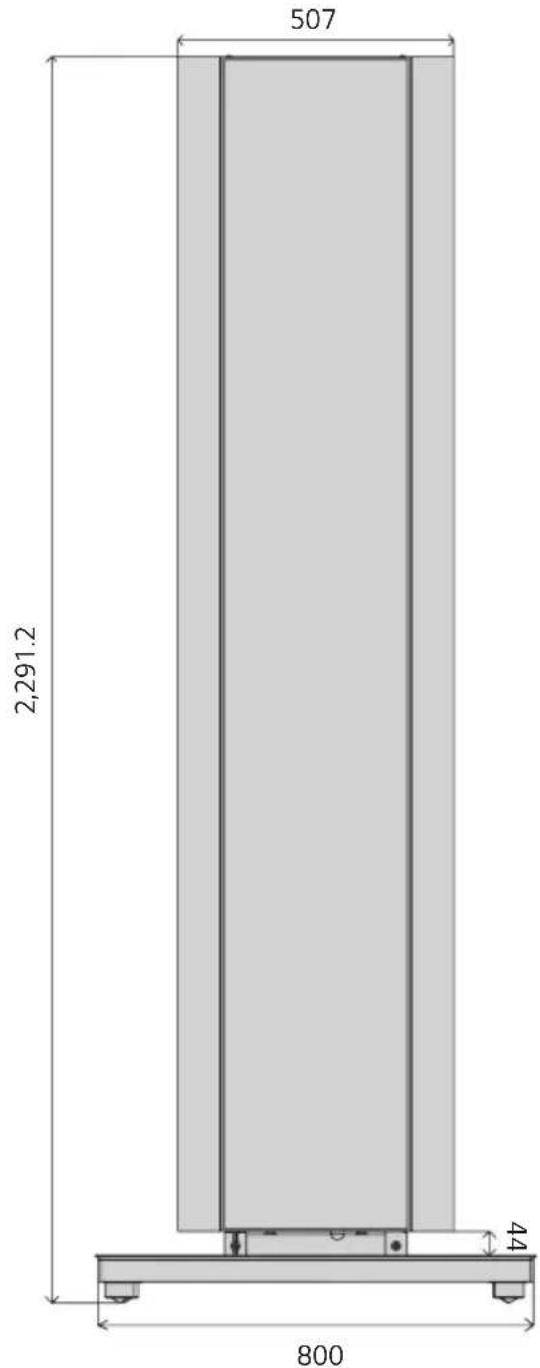
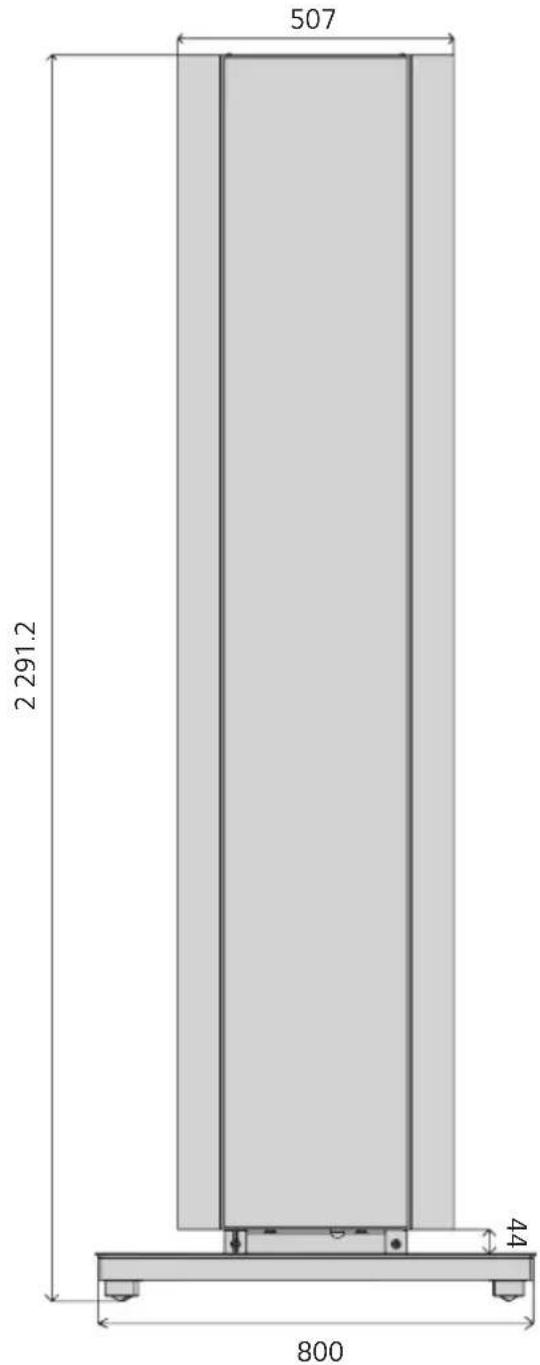
| Dimension | Value | | --------- | ----- | | Height | 507 | | Width | 2,291.2 | | Base | 800 | | Height (Horizontal) | 424 | | Width (Horizontal) | 800 || Model name PL-F860 | |
| Width (mm) 800 | |
| Height (mm) 2,291.2 | |
| Depth (mm) 800 | |
| Product weight (kg) 132.5 | |
| Product weight in package (kg) 163 | |

LG
Life's Good
The model name and serial number can be found on the back of the product.
Please make a note of the following:
Model name ____
Serial No. ____
Contact your retailer for the applicable model.
natural_image
Pure mechanical component diagram without any text, numbers, or symbols


Support (8 EA) Vis de fixation
(M8 × L10) (16 EA)
natural_image
Structural diagram of a multi-level metal shelving unit with no visible text or symbolsPied (1 EA)
natural_image
Pure geometric diagram of a square with surrounding dots and lines, no text or symbols present.
natural_image
Technical line drawing of a rectangular electronic component with a central square recess and mounting base (no text or symbols)natural_image
Technical line drawing of a mechanical testing setup with two views of a platform (no text or symbols)natural_image
Technical line drawing of a mechanical testing setup with a rack-mounted device and a control panel (no text or symbols)natural_image
Technical line drawing of a mechanical lifting device with a circular component inserted, no visible text or symbols! REMARQUE
natural_image
Technical line drawing of a mechanical lifting device with an inset magnified detail (no text or symbols)natural_image
Technical line drawing of a vertical structural frame with internal components and directional arrows indicating motion (no text or symbols)natural_image
Technical line drawing of a mechanical assembly with no visible text or symbolsnatural_image
Technical line drawing of a mechanical assembly with multiple components and a magnified inset showing rotational motion (no text or symbols)natural_image
Diagram showing two figures assembling a structural frame with a vertical column, illustrating mechanical assembly (no text or symbols present)natural_image
Illustration of a person installing or adjusting server racks in a rack, with an inset showing hand gestures (no text or symbols present)
AVERTISSEMENT
text_image
IR receivertext_image
Diagram showing a battery symbol with plus sign and arrow indicating direction, likely illustrating a basic electrical or mechanical process.text_image
Technical diagram showing a mechanical assembly with labeled components and motion arrows, including a circular annotation highlighting rotational motion.natural_image
Technical diagram of a vertical shelf or enclosure with an inset showing a close-up of the internal components (no text or symbols present)natural_image
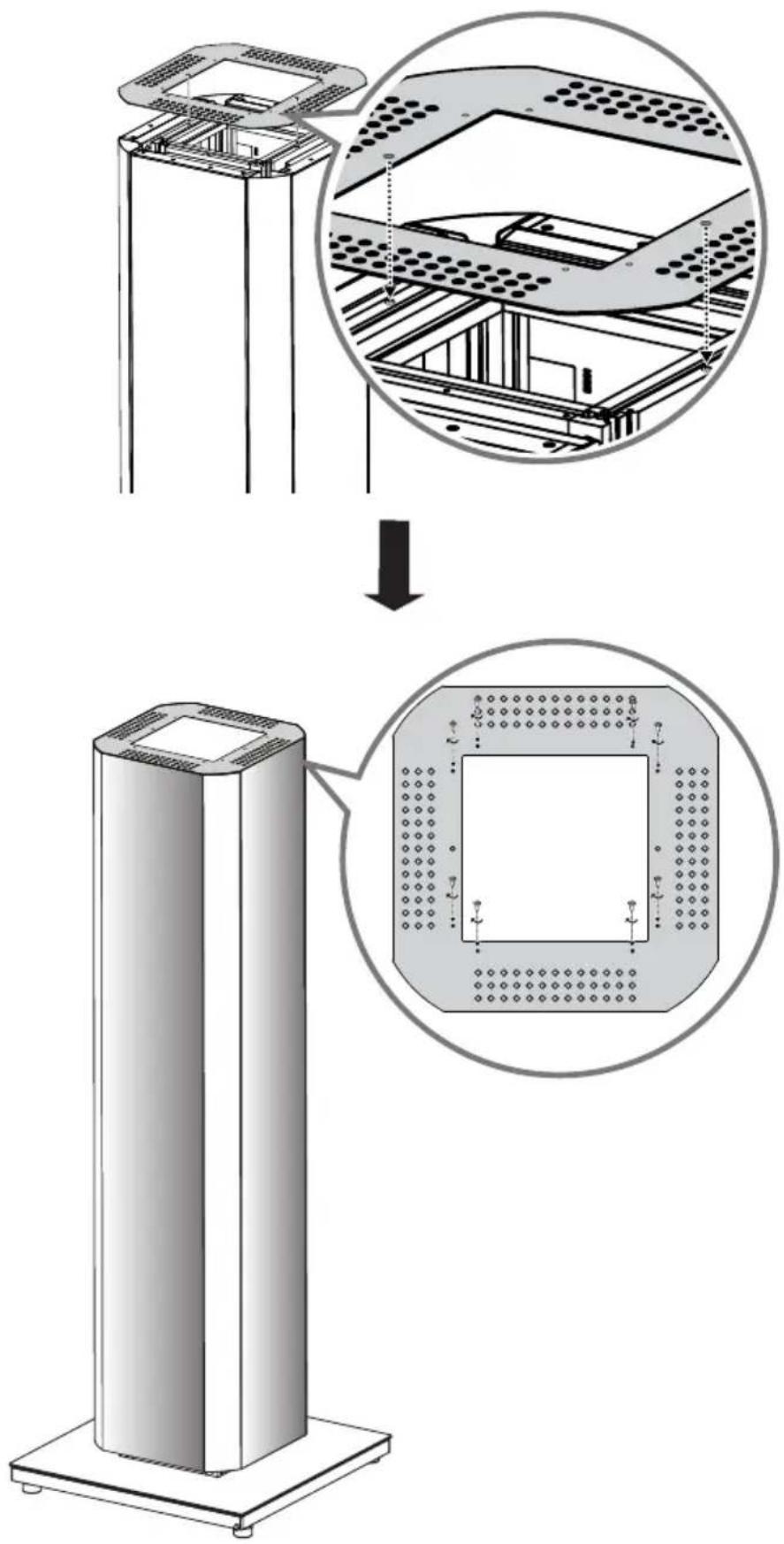
Simple line drawing of a vertical structure with a downward arrow, no text or symbols present21 Attach the top cover using the guides as shown in the image, and fix in place with the eight screws (M4 x L10) provided.
text_image
Technical diagram showing a device with internal components and its magnified view, including detailed structural details.SPÉCIFICATIONS DU PRODUIT
other
| Dimension | Value | | --------- | ----- | | Height | 2291.2 | | Width | 44 | | Base | 800 | | Total Length | 507 |natural_image
Pure geometric diagram of a square with surrounding dots and lines, no text or symbols present.
natural_image
Technical line drawing of a rectangular electronic component with a central square and mounting base (no text or symbols)natural_image
Technical line drawing of a mechanical testing setup with two views of a vertical support structure (no text or symbols)natural_image
Technical diagram showing a mechanical assembly with a magnified inset of a control panel (no text or symbols present)natural_image
Technical line drawing of a vertical metal lifting device with a circular component inserted, no text or symbols present
NOTA
natural_image
Technical line drawing of a mechanical lifting device with an inset magnified detail (no text or symbols)natural_image
Technical line drawing of a vertical metal shelving unit with internal compartments and support structure (no text or symbols)natural_image
Technical line drawing of a vertical structural frame with internal components and motion arrows, no text or symbols present.natural_image
Technical line drawing of a mechanical assembly with no visible text or symbolsnatural_image
Technical line drawing of a mechanical assembly with multiple components and a magnified inset showing rotational motion (no text or symbols)natural_image
Diagram showing two figures assembling a vertical structure with scaffolding, illustrating mechanical assembly (no text or symbols present)natural_image
Illustration of a person installing or adjusting server racks in a rack, with hand gestures and a magnified inset showing the process (no text or symbols present)
ADVERTENCIA
text_image
Diagram showing a mechanical component with plus sign, arrow, and right-angle viewtext_image
Technical diagram showing a server rack with directional arrows and a circular annotation indicating rotation or movement.natural_image
Technical diagram of a vertical shelf or enclosure with an inset showing a close-up of the internal structure (no text or symbols present)natural_image
Simple line drawing of a vertical structure with a downward arrow, no text or symbols presenttext_image
Technical diagram showing a device with internal components and its magnified cross-section, including detailed views of the structure.other
| Dimension | Value | | --------- | ----- | | Height | 507 | | Width | 2.291 | | Base | 800 | | Height (Width) | 4.4 | | Width (Width) | 4.4 |PACKING INFORMATION (CUSTOMS UNION)
Русский