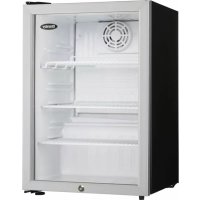
Silhouette SPRWC140D1SS - Fridge DANBY - Free user manual and instructions
Find the device manual for free Silhouette SPRWC140D1SS DANBY in PDF.


User questions about Silhouette SPRWC140D1SS DANBY
0 question about this device. Answer the ones you know or ask your own.
Ask a new question about this device
Download the instructions for your Fridge in PDF format for free! Find your manual Silhouette SPRWC140D1SS - DANBY and take your electronic device back in hand. On this page are published all the documents necessary for the use of your device. Silhouette SPRWC140D1SS by DANBY.
USER MANUAL Silhouette SPRWC140D1SS DANBY
Welcome to the Silhouette family. We are proud of our quality products and we believe in dependable service. We suggest that you read this owner's manual before plugging in your new appliance as it contains important operation information, safety information, troubleshooting and maintenance tips to ensure the reliability and longevity of your appliance.
Visit www.SilhouetteAppliances.com to access self service tools, FAQs and much more. For additional assistance call 1-844-455-6097.
Note the information below; you will need this information to obtain service under warranty.
You must provide the original purchase receipt to validate your warranty and receive service.
Model Number:
Serial Number:
Date of Purchase:
Need Help?
Before you call for service, here are a few things you can do to help us serve you better.
Read this owner's manual:
It contains instructions to help you use and maintain your appliance properly.
If you receive a damaged appliance:
Immediately contact the retailer or builder that sold you the appliance.
Save time and money:
Check the troubleshooting section at the end of this manual before calling. This section will help you solve common problems that may occur.

1-844-455-6097

Important Safety Information READ AND FOLLOW ALL SAFETY INSTRUCTIONS
SAFETY REQUIREMENTS
DANGER: Risk of fire or explosion. Flammable refrigerant used. Do not puncture refrigerant tubing.
- Do not use mechanical devices to defrost refrigerator.
- Ensure that servicing is done by factory authorized service personnel, to minimize product damage or safety issues.
- If the power supply cord is damaged, it must be replaced by the manufacturer, its service agent or similar qualified person in order to avoid hazard.
- Consult repair manual or owner's guide before attempting to service this product. All safety precautions must be followed.
- Dispose of properly in accordance with federal or local regulations.
- Follow handling instructions carefully.
- Do not store explosive substances such as aerosol cans with a flammable propellant in this appliance.
WARNING: Keep ventilation openings, in the appliance enclosure or in the built-in structure, clear of obstruction.
WARNING: Do not use mechanical devices or other means to accelerate the defrosting process, other than those recommended by the manufacturer.
WARNING: Do not damage the refrigerant circuit.
WARNING: Do not use electrical appliances inside the food storage compartments of the appliance, unless they are of the type recommended by the manufacturer.
CAUTION: Children should be supervised to ensure that they do not play with the appliance.
DANGER: Risk of child entrapment. Before throwing away an old appliance:
- Remove the door or lid.
- Leave shelves in place so that children may not easily climb inside.
DANGER: Do not add a lock to the door or lid. This can cause child entrapment and harm.
SAFETY REQUIREMENTS
This appliance is not intended for use by persons (including children) whose physical, sensory or mental capabilities may be different or reduced, or who lack experience or knowledge, unless such persons receive supervision or training to operate the appliance by a person responsible for their safety.
This appliance is intended to be used in household and similar applications such as:
Staff kitchen areas in shops, offi ces and other working environments;
- Farm houses and by clients in hotels, motels and other residential type environments;
- Bed and breakfast type environments;
- Catering and similar non-retail applications.
GROUNDING INSTRUCTIONS
This appliance must be grounded. Grounding reduces the risk of electrical shock by providing an escape wire for the electrical current.
This appliance has a cord that has a grounding wire with a 3-prong plug. The power cord must be plugged into an outlet that is properly grounded. If the outlet is a 2-prong wall outlet, it must be replaced with a properly grounded 3-prong wall outlet. The serial rating plate indicates the voltage and frequency the appliance is designed for.
WARNING - Improper use of the grounding plug can result in a risk of electric shock.
Consult a qualified electrician or service agent if the grounding instructions are not completely understood, or if doubt exists as to whether the appliance is properly grounded.
Do not connect your appliance to extension cords or together with another appliance in the same wall outlet. Do not splice the power cord.
Do not under any circumstances cut or remove the third ground prong from the power cord. Do not use extension cords or ungrounded (two prongs) adapters.
SAVE THESE INSTRUCTIONS!
INSTALLATION INSTRUCTIONS
LOCATION
- Two people should be used when moving the appliance.
- Remove interior and exterior packaging prior to installation. Wipe the outside of the appliance with a soft, dry cloth and the inside with a lukewarm wet cloth.
- Place the appliance on a floor that is strong enough to support it when it is fully loaded.
- Do not place the appliance in direct sunlight or near sources of heat, such as a stove or heater, as this can increase electrical consumption. Extreme cold ambient temperatures may also cause the appliance to perform improperly.
- Do not use the appliance near water, for example in a wet basement or near a sink.
- This appliance is intended for household use only. It is not designed for outside installation, including anywhere that is not temperature controlled (garages, porches, vehicles, etc.).
- Before connecting the appliance to a power source, let it stand upright for approximately 6 hours. This will reduce the possibility of a malfunction in the cooling system from handling during transportation.
- This appliance is 23.4 inches (59.5 cm) wide by 69.8 inches (177.3 cm) high by 28.6 inches (72.7 cm) deep.
IMPORTANT
Ensure that the door is fully closed when the appliance is in operation. Failure to fully close the door can lead to excessive condensation and potential water damage to floring under the appliance. Danby will not be responsible for damages from misuse.
FRONT VENT
This appliance is front breathing. Do not block the front air vent as this will result in high operating temperatures, higher energy usage and possible system overheating and failure.
LEVELING INSTRUCTIONS
There is an adjustable leg on the bottom of the appliance that can be turned up or down to ensure that the appliance is level. It is important that the appliance is level to minimize noise and vibration. To level the appliance:
- Turn the leveling leg counter-clockwise as far as it will go, until the top of the foot is touching the bottom of the cabinet.
- Slowly turn the leveling leg clockwise until the appliance is level.
INSTALLATION INSTRUCTIONS
PREPARING THE ENCLOSURE
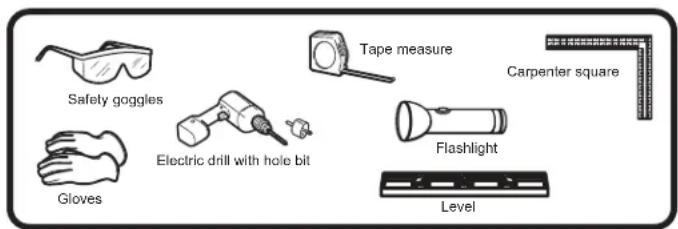
Gloves and safety goggles should be worn during installation.
It is not recommended to install the appliance into a corner or directly beside a wall. The door will need to be opened more than 90^ to allow full extension of the shelves. If it is necessary to place the unit next to a wall or in a corner, leave at least 2-4 inches (5-10 cm) of space between the wall and the appliance to allow for the door opening.
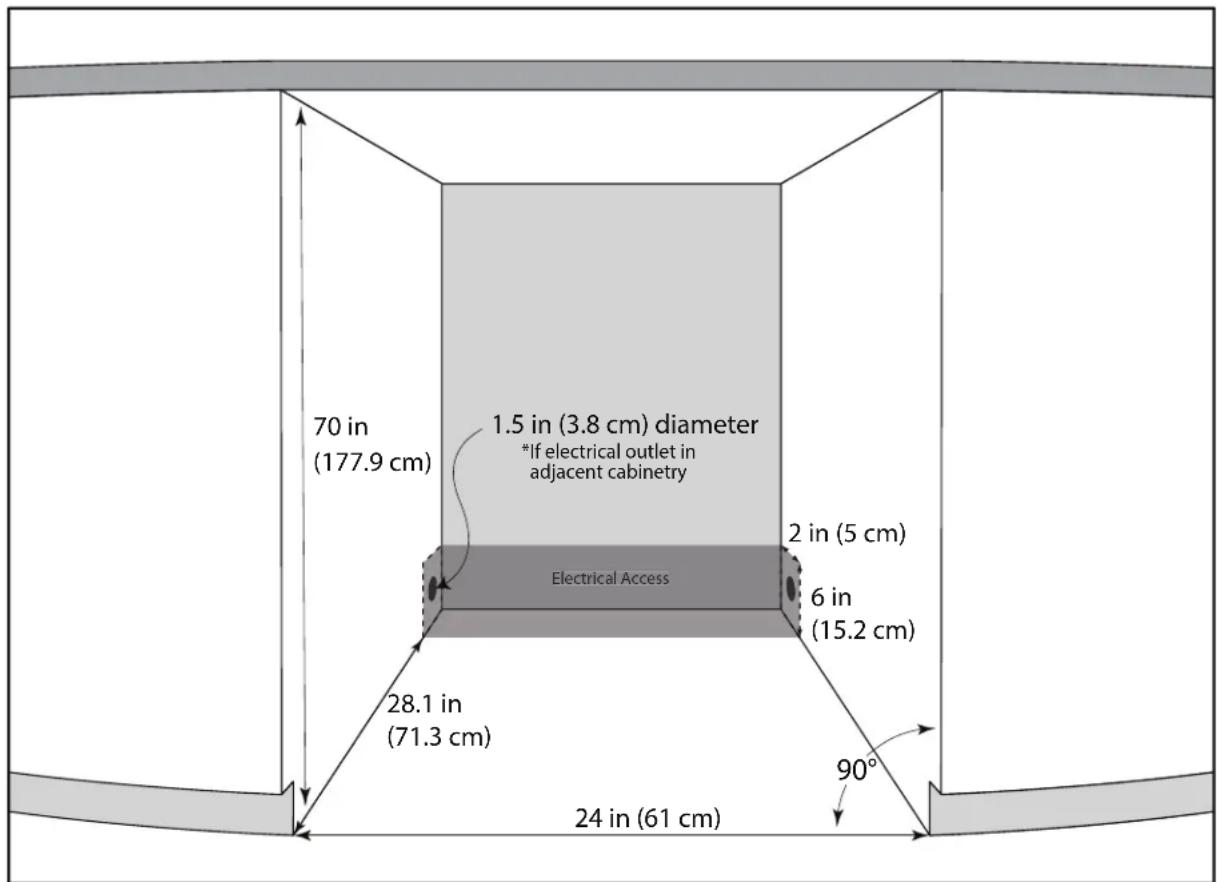
The cabinet opening must be at least 24 inches (61 cm) wide by 70 inches (177.9 cm) high by 28.1 inches (71.3 cm) deep.
Note: The listed depth requirement is assuming that the electrical outlet is located in the adjacent cabinetry or fl ash mounted in the rear wall, not surface mounted inside the enclosure.
If the electrical outlet is located inside adjacent cabinetry, cut a 1.5 inch (3.8 cm) diameter hole to admit the power cord. If the cabinet wall is metal, the hole edge must be covered with a bushing or grommet.
REQUIRED TOOLS
- Safety goggles
Gloves - Tape measure
Carpenter square
Level - Flashlight
Electric drill with hole bit
INSTALLATION INSTRUCTIONS
ANTI-TIP BRACKET
This appliance may tip when shelves are extended, causing damage, injury or loss of contents. If this appliance is being used in a free standing application, the anti-tip bracket must be installed on both sides of the cabinet.
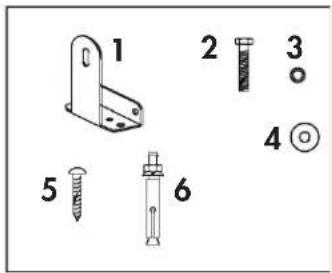
ACCESSIONS
- Anti-tip bracket
- Bolt
- Lock Washer
- Flat Washer
- Screws
- Expansion Screws
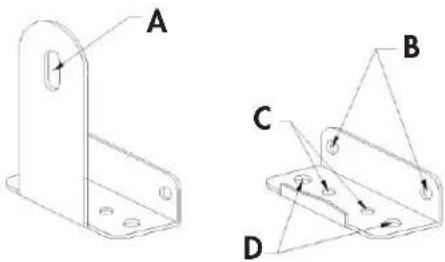
ANTI-TIP BRACKET MOUNTING HOLES
A: Fixed mounting hole for unit
B: Fixed mounting holes for drywall
C: Fixed mounting holes for wood floor
D: Fixed mounting holes for concrete floor
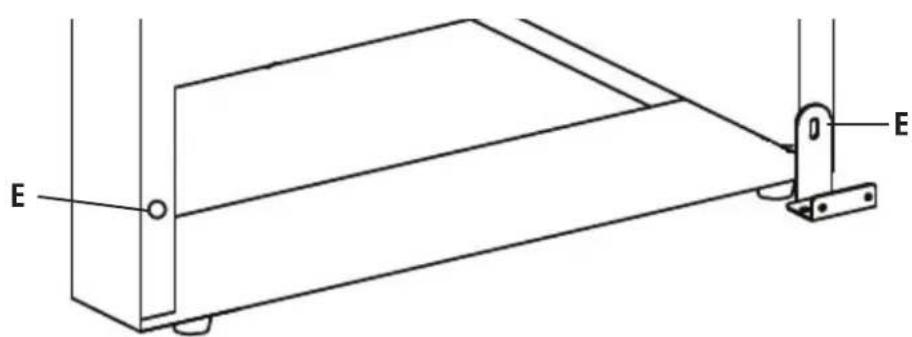
E: Mounting holes on the back of the unit
INSTALLATION INSTRUCTIONS
Important: Determine the final location of the appliance before attempting to install the bracket. Choose one of the three installation methods below.
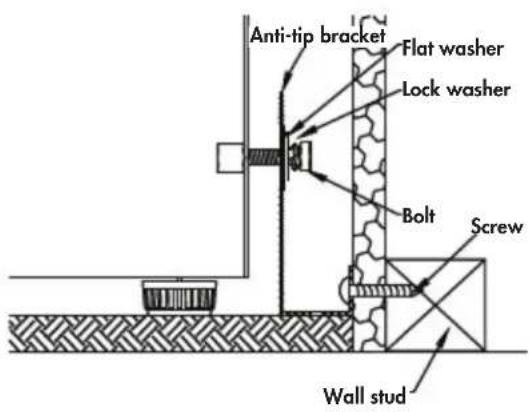
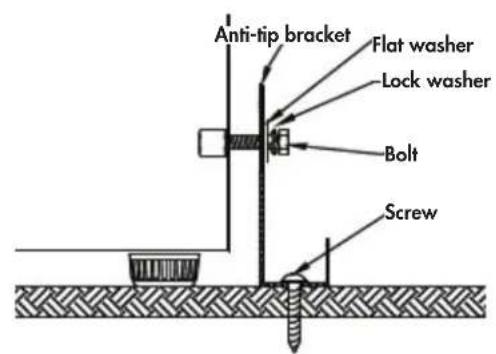
Drywall Installation:
- Place the bracket on the floor with mounting hole B against the wall
- Use two screws to secure the bracket to the wall.
- Ensure at least one screw is secured to a wall stud.
- Place the unit so that the mounting hole E on the unit is lined up with mounting hole A on the bracket and secure with a bolt, a lock washer and a fl at washer.
Note: At least one screw must enter a wood wall stud. If there are no wall studs available, use floor installation.
Wood Floor Installation:
- Place the bracket on the floor and secure it with two screws.
- Place the unit so that mounting hole E on the unit is aligned with mounting hole A on the bracket and secure with a bolt, a lock washer and a flat washer.
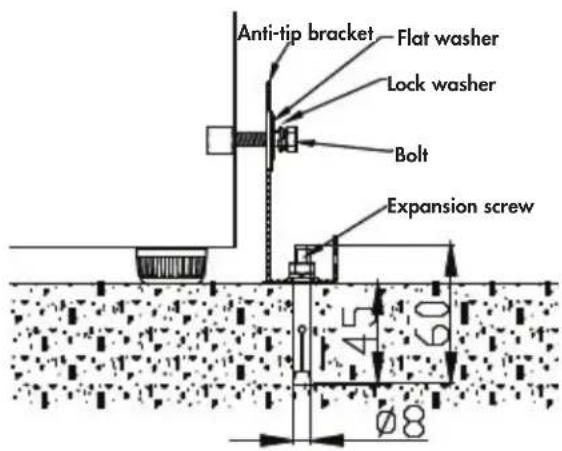
Concrete Floor Installation:
- Place the bracket on the floor and mark the location of mounting hole D on the floor.
- Using a concrete drill bit, drill an 8mm (3 / 8^ ) pilot hole 45 55mm (1.7^ 2^ ) deep at the marked location.
- Remove the nut, spring washer and washer from the expansion screw.
- Carefully tap the expansion screw into the drilled hole using a hammer or mallet.
- Place the floor bracket with mounting hole D over the expansion screw and secure with the nut, spring washer and washer.
- Place the unit so that mounting hole E on the unit is aligned with mounting hold A on the bracket and secure with a bolt, lock washer and fl at washer.
Important: After installing the bracket, try using light force to tip the unit. If the unit does not tip then the bracket is installed correctly. If the unit does tip, reinstall the bracket more securely.
OPERATING INSTRUCTIONS
CONTROL PANEL
- Standard mode indicator
- Energy saving mode indicator
- Sabbath mode indicator
- Demo mode indicator
- Interior light colour setting indicator
- Alarm indicator
- Disable door alarm indicator
- Upper display panel: Shows the set temperature of the upper chamber.
- Lower display panel: Shows the set temperature of the lower chamber.
10.Powerindicator: Illuminates when the compressor is running. - Upper chamber indicator
- Lower chamber indicator
- Temperature scale indicator
- Increase and decrease buttons: Used to increase or decrease the set temperature 1^ increments.
15.Mode button: Press to toggle between standard and energy saving mode. The relevant indicator light will illuminate. The appliance will default to standard mode.
16.LightButton: Used to set the light mode.
17.Power button: Press to turn the appliance on. Press and hold for 3 seconds to turn the appliance off.
INTERIOR LIGHT
The interior light will default to turning on and off when the door is opened or closed.
Press the light button once to turn the light off while the door is open. The light will resume default functioning when the door is closed.
There are four light mode settings:
- L1: The light will turn on and off when the door is opened and closed.
L2: The light will remain on indefinitely at 100% illumination. - L3: The light will remain on for 120 minutes at 100% illumination and then resume default operation.
L4: The light will remain on for 120 minutes at 50% illumination and then resume default operation.
To change the light setting, press the light button once to display the current setting. Press the light button repeatedly to choose the desired light setting. The display will flash the chosen setting 5 times to confirm.
INTERIOR LIGHT COLOR
The interior light can be set to either white or blue.
Press and hold the light button for 3 seconds until the interior light color symbol fl ashes, then press the light button to toggle between a white or blue light. The interior light colour setting indicator light will flash 5 times to confirm.

OPERATING INSTRUCTIONS
FUNCTION INSTRUCTION
The default temperature setting is 54^ (12^) . The default temperature scale is ^ F .
To switch the display between ^ F and ^ C , press and hold the increase and decrease buttons simultaneously for approximately 3-5 seconds.
The temperature can be set as low as 41^ (5^) or as high as 64^ (18^) .
Actual temperature inside the appliance can vary based on ambient temperature, how often the door is opened and how many warm bottles have recently been added to the appliance.
If the appliance loses power, the control panel will remember the set temperature. Once power is restored, the appliance will return to normal functioning automatically.
If the inner cabinet temperature is higher than 73^ (23^) for one hour, the error code "HI" will show on the display, the alarm indicator light will illuminate and an alarm will sound.
If the inner cabinet temperature is lower than 32^ (0^) the error code "LO" will show on the display, the alarm indicator light will illuminate and an alarm will sound.
If the inner cabinet temperature remains at 32^ (0^) for more than 30 minutes, the error code "CL" will show on the display, the alarm indicator light will illuminate and an alarm will sound. The appliance will stop functioning to prevent the contents from freezing.
DEMO MODE
Demo mode is only intended to be used on the sales floor. It can be used to show how the appliance will look while running without engaging the compressor or the cooling function. The fan will run on low speed but all alarms and beeping will be disabled.
Press and hold the increase button and the power button at the same time for 10 seconds to enable demo mode. The demo mode indicator light will illuminate.
Press and hold the increase button and the power button at the same time for 10 seconds to return the appliance to standard mode.
OPEN DOOR ALARM
If the door is not closed completely for 5 minutes, the alarm indicator light will illuminate and an alarm will sound.
The open door alarm can be silenced temporarily by pressing the power button once. The alarm indicator light will remain illuminated and the interior light will continue to flash until the door is closed.
If the door is closed and the alarm continues to sound, check that the actuator at the bottom of the door is making contact with the switch on the appliance.
DISABLE OPEN DOOR ALARM
The audible door alarm can be permanently turned off if desired. The alarm indicator light and the interior light will continue to illuminate if the door is left open for more than 5 minutes.
To disable the open door alarm, press and hold the mode button and the light button at the same time for 3 seconds until the disable door alarm indicator light illuminates. In future if the door is left open the alarm indicator light and the interior light will still flash, but the audible door alarm will not sound.
ENERGY SAVING MODE
Energy saving mode will turn off the interior light, the control panel lights and the display. The energy saving mode indicator light will illuminate.
Pressing the increase or decrease button will cause the display to turn on for 5 seconds before resuming energy saving mode.
SABBATH MODE
Sabbath mode can be used to disable all interior lights and sounds from the appliance.
Press and hold the increase button and the mode button at the same time for 5 seconds to enable Sabbath mode. The SAB symbol will illuminate and the display will show "Sb" to indicate that Sabbath mode is active.
Press and hold the increase button and the mode button for 5 seconds to return the appliance to standard mode.
OPERATING INSTRUCTIONS
STORAGE INSTRUCTIONS
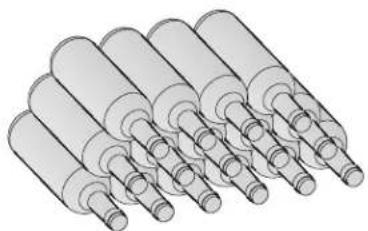
The maximum capacity of this unit is 135 wine bottles. The upper zone will hold 60 bottles and the lower zone will hold 75 bottles. This capacity is based on a standard 750 ml Bordeaux style bottle. Actual storage capacity may vary if different bottle sizes are stored.
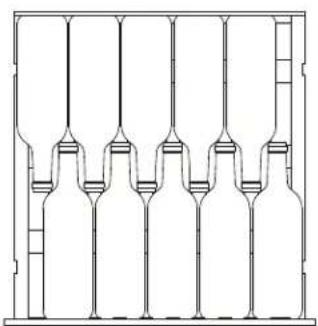
Upper Zone: To achieve maximum capacity, position bottles alternately on the upper six shelves as shown in fi gure A, for total storage of 60 bottles.
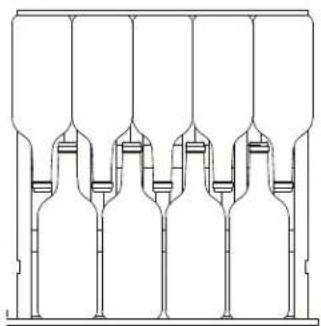
The upper zone has larger spacing between the shelves which can accommodate larger wine bottles such as Pinot or Burgundies. These bottles should be positioned alternately on the upper six shelves as shown in figure B, which allows for storage of 9 bottles per shelf.
Lower Zone: To achieve maximum capacity, position bottles alternately on the lower six shelves as shown in fi gure A, for total storage of 60 bottles. The bottom of the cabinet holds 15 bottles when stocked as per fi gure C.
A
B
C
SHELF INSTRUCTIONS
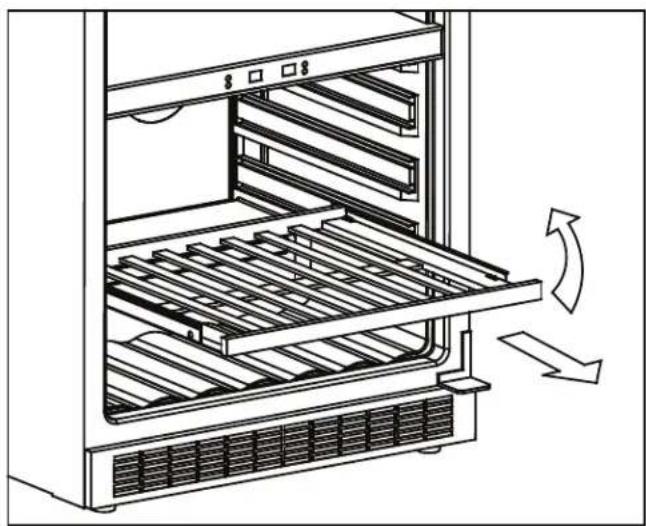
Do not cover the gaps on the racks with aluminum foil or any other material that will prevent adequate air circulation within the cabinet.
To remove a shelf:
- Fully extend the shelf.
- Lift the front of the shelf up.
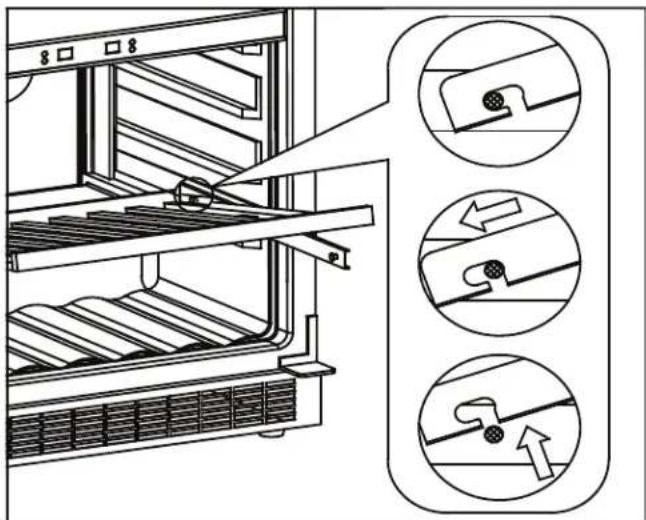
- Holding the shelf track, push the shelf in and then up to release the shelf from the rear dampers.
To replace a shelf:
- Ensure the shelf is resting securely on the track.
- Push the shelf in until it locks into place.
OPERATING INSTRUCTIONS
DOOR REVERSAL INSTRUCTIONS
If the appliance is placed on its back or side for any length of time during this process, it must be allowed to remain upright for 6 hours before plugging it in to avoid damage to the internal components.
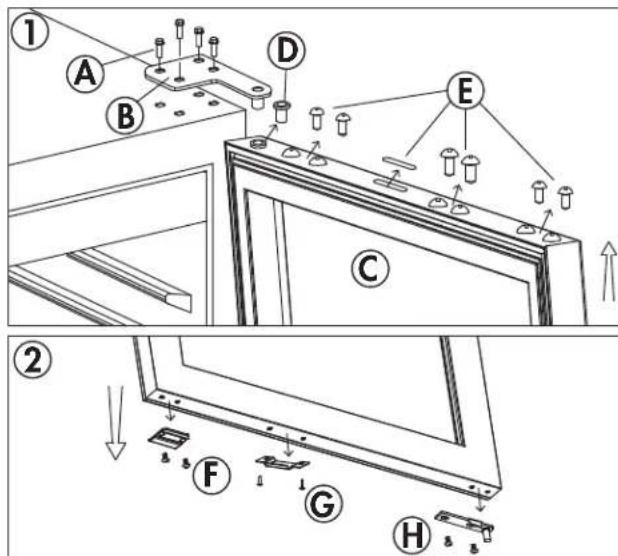
- Remove the upper right hinge from the top right side of the cabinet. Remove the door from the cabinet. Remove the hinge sleeve and hole covers from the top of the door.
- Remove the door stop, the actuator and the door axis from the bottom of the door.
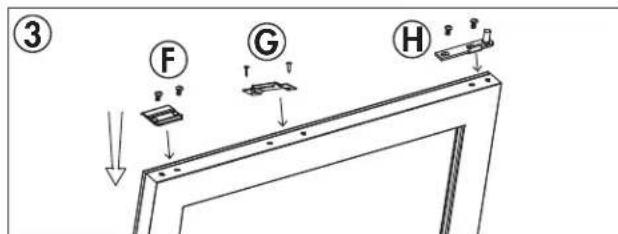
- Install the door stop, the actuator and the door axis on the top of the door. The door will need to be flipped 180^ before being reinstalled on the cabinet to ensure that the door handle is on the correct side.
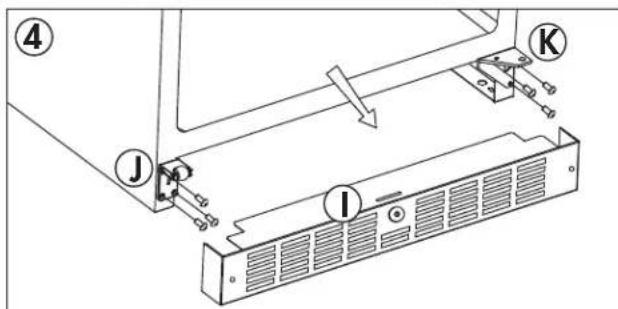
- Remove the kickplate. Remove the roller door support from the lower left side of the cabinet. Remove the lower right hinge from the lower right side of the cabinet.
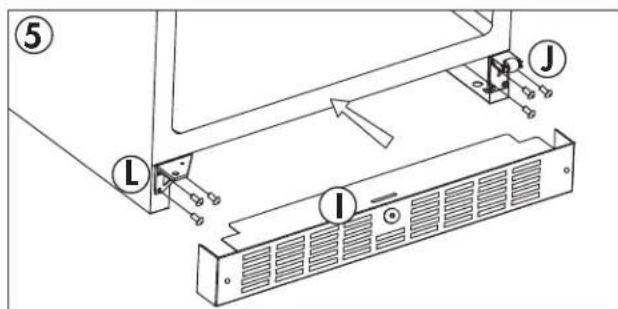
- Install the roller door support on the lower right side of the cabinet. Install the lower left hinge on the lower left side of the cabinet. The lower left hinge can be found in the accessory bag. Install the kickplate.
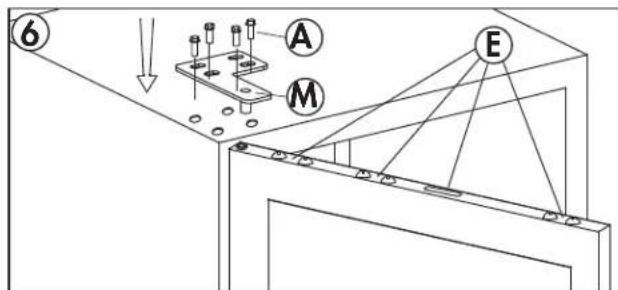
- Rotate the door 180^ . Install the hole covers in the holes in what is now the top of the door. Install the door on the cabinet. Install the upper left hinge. The upper left hinge can be found in the accessory bag. Before tightening the upper hinge screws, ensure that the top of the door is level with the top of the cabinet, that the actuator is making contact with the switch on the cabinet and that the rubber gasket makes a good seal with the cabinet all the way around.
A. Screws
B. Upper Right Hinge
C. Door
D. Hinge Sleeve
E. Hole Covers
F. Door Stop
G. Actuator
H. Door Axis
I. Kickplate
J. Roller Door Support
K. Lower Right Hinge
L. Lower Left Hinge
M. Upper Left Hinge
CARE & MAINTENANCE
CLEANING
Ensure the appliance is unplugged before cleaning.
- To clean the inside of the appliance, use a soft cloth and a solution of a tablespoon of baking soda to one quart of water or a mild soap solution or some mild detergent.
- Wash removable shelves in a mild detergent solution, then dry and wipe with a soft cloth.
- Clean the outside with a soft, damp cloth and some mild detergent.
It is important to keep the area clean where the door seals against the cabinet. Clean this area with a soapy cloth. Rinse with a damp cloth and let dry.
Note: Do not use cleaners containing ammonia or alcohol on the appliance. Ammonia or alcohol can damage the appearance of the appliance. Never use any commercial or abrasive cleaners or sharp objects on any part of the appliance.
POWER FAILURE
Most power failures are corrected within a few hours and should not affect the temperature of your appliance if you minimize the number of times the door is opened. If the power is going to be off for a longer period of time, take the proper steps to protect your contents.
Note: Wait 3 to 5 minutes before attempting to restart the appliance if operation has been interrupted.
ERROR CODES
If the "HI", "LO" or "CL" error codes appear on the display for more than 5 minutes, a power reset may rectify the issue. Unplug the appliance, wait 5 minutes and then plug the unit back in. If the error code persists after a power reset, contact consumer care or an authorized service agent.
DEFROST
This unit is equipped with an automatic defrost function and does not require manual defrosting. Defrost water from the appliance is channeled into a drip tray located above the compressor. Heat transfer from the compressor causes the defrost water to evaporate.
VACATION
- Short vacations: Leave the appliance operating during vacations of less than three weeks.
- Long vacations: If the appliance will not be used for several months, remove all items and turn off the appliance. Clean and dry the interior thoroughly. To prevent odor and mold growth, leave the door open slightly, blocking it open if necessary.
MOVING
- Make sure the appliance is empty.
- Secure the shelves with tape.
- Secure the door with tape.
- Turn the adjustable fool up to the base to avoid damage.
- Protect the outside of the appliance with a blanket or similar item.
- Be sure the appliance stays in the upright position during transportation.
- If the appliance is placed on its back or side during transportation, upon reaching the destination, allow it to remain upright for 6 hours before plugging in to avoid damage to internal components.
DISPOSAL
This appliance may not be treated as regular household waste, it should be taken to the appropriate waste collection point for recycling of electrical components. For information on local waste collection points, contact your local waste removal agency or government office.
TROUBLESHOOTING
Silhouette Consumer Care: 1-844-455-6097
Hours of operation:
Monday to Thursday 8:30 am - 6:00 pm Eastern Standard Time
Friday 8:30 am - 4:00 pm Eastern Standard Time
Information in this manual is subject to change without notice.
| PROBLEM POSSIBLE CAUSE | |
| No power • A fuse may be blown or the circuit breaker tripped • Plug not fully inserted into the wall outlet | |
| Internal temperature not cold enough | • Door is not shut properly or opened excessively |
| Appliance runs continuously | • Exhaust vent is obstructed |
| Alarm sounding and “HI” on the display panel | • Recently added a large quantity of warm bottles to the cabinet |
| Alarm indicator light is illuminated | • Close proximity to heat source or direct sunlight |
| • Ambient temperature or humidity is very high | |
| • Possible system leak, evaporator fan failure or compressor failure | |
| • Demo mode is active | |
| • The actuator on the bottom of the door is not making contact with the switch on the cabinet | |
| Condensation on the cabinet or door • Door is not | shut properly or opened excessively |
| • Ambient temperature or humidity is very high | |
| Alarm sounding and “LO” on the display panel | • Ambient temperature is excessively low |
| Alarm indicator light is illuminated | • Sensor failure |
| • Evaporator temperature is too low | |
| Display is not functioning and interior light will not turn on | • The appliance may be operating in energy saving mode or Sabbath mode |
Silhouette
LIMITED "IN HOME" WARRANTY
This quality product is warranted to be free from manufacturer's defects in material and workmanship, provided that the unit is used under the normal operating conditions intended by the manufacturer.
This warranty is available only to the person to whom the unit was originally sold by Danby Products Limited (Canada) or Danby Products Inc. (U.S.A.) (hereafter "Danby") or by an authorized distributor of Danby, and is non-transferable.
TERMS OF WARRANTY
Plastic parts are warranted for thirty (30) days from the date of purchase, with no extensions provided.
First 24 months During the first twenty four (24) months, any functional parts of this product found to be defective, will be repaired or replaced, at warrantor's option, at no charge to the original purchaser.
To obtain service Contact the dealer where the unit was purchased, or contact the nearest authorized Danby service depot, where service must be performed by a qualified service technician. If service is performed on the unit by anyone other than an authorized service depot, all obligations of Danby under this warranty shall be void.
Boundaries of Danby reserves the right to limit the boundaries of "In Home Service" to the proximity of an authorized service depot. Any appliance requiring service outside the limited boundaries of "In Home Service", will be the consumer's responsibility to transport at their own expense to the original point of purchase or a service depot for repair. If the appliance is installed in a location that is 100 kilometers (62 miles) or more from the nearest service center, it must be delivered to the nearest authorized Danby Service Depot by the purchaser.
Transportation charges to and from the service location are not protected by this warranty and are the responsibility of the purchaser.
Nothing within this warranty shall imply that Danby will be responsible or liable for any spoilage or damage to food or other contents of this appliance, whether due to any defect of the appliance, or its use, whether proper or improper.
EXCLUSIONS
Save as herein provided, by Danby, there are no other warranties, conditions, representations or guarantees, express or implied, made or intended by Danby or its authorized distributors and all other warranties, conditions, representations or guarantees, including any warranties, conditions, representations or guarantees under any Sale of Goods Act or like legislation or statute is hereby expressly excluded. Save as herein provided, Danby shall not be responsible for any damages to persons or property, including the unit itself, howsoever caused or any consequential damages arising from the malfunction of the unit and by the purchase of the unit, the purchaser does hereby agree to indemnify and hold harmless Danby from any claim for damages to persons or property caused by the unit.
GENERAL PROVISIONS
No warranty or insurance herein contained or set out shall apply when damage or repair is caused by any of the following:
1) Power failure.
2) Damage in transit or when moving the appliance.
3) Improper power supply such as low voltage, defective house wiring or inadequate fuses.
4) Accident, alteration, abuse or misuse of the appliance such as inadequate air circulation in the room or abnormal operating conditions (ie. extremely high or low room temperature).
5) Use for commercial or industrial purposes (i.e. If the appliance is not installed in a domestic residence).
6) Fire, water damage, theft, war, riot, hostility, acts of God such as hurricanes, floods etc.
7 Service calls resulting in customer education.
8) Improper Installation (ie. Building-in of a free standing appliance or using an appliance outdoors that is not approved for outdoor application, including but not limited to: garages, patios, porches or anywhere that is not properly insulated or climate controlled).
Proof of purchase date will be required for warranty claims; retain bills of sale. In the event that warranty service is required, present the proof of purchase to our authorized service depot.
Warranty Service In Home
Danby Products Limited
PO Box 1778, Guelph, Ontario, Canada N1H 6Z9
Telephone: [519] 837-0920 FAX: [519] 837-0449
1-844-455-6097 04/17
Danby Products Inc.
PO Box 669, Findlay, Ohio, U.S.A. 45840
Telephone: (419) 425-8627 FAX: (419) 425-8629
Bienvenue
Danby Products Limited
PO Box 1778, Guelph, Ontario, Canada N1H 6Z9
Telephone: (519) 837-0920 Telecopieur: (519) 837-0449
1-844-455-6097
04/17
Danby Products Inc.
PO Box 669, Findlay, Ohio, U.S.A. 45840
Telephone: 419425-8627 Telecopieur: (419) 425-8629
Bienvenido
Para guitar un estate:
PROBLEMPOSSIBLECAUSA
Danby Products Limited
PO Box 1778, Guelph, Ontario, Canada N1H 6Z9
Telephone: [519] 837-0920 FAX: [519] 837-0449
1-844-455-6097
04/17
Danby Products Inc.
PO Box 669, Findlay, Ohio, U.S.A. 45840
Telephone: (419) 425-8627 FAX: (419) 425-8629
NOTES / REMARQUES / NOTAS :
MODEL • MODELE • MODELO
SPRWC140D1SS