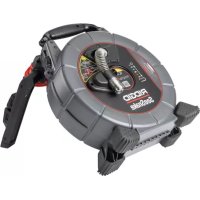
SeeSnake microReel APX - Video camera RIDGID - Free user manual and instructions
Find the device manual for free SeeSnake microReel APX RIDGID in PDF.



| Product Type | Inspection Video Camera |
| Brand | RIDGID |
| Model | SeeSnake microReel APX |
| Imaging Technology | TruSense® with TiltSense™ and HDR sensor |
| Camera Resolution | 640 x 480 pixels |
| Integrated Probe Type | Frequency 512 Hz |
| Push Cable Length | 30 m (100 ft) |
| Push Cable Diameter | 6.7 mm (0.27 in) |
| Pipe Capacity | 38 to 101 mm (1.5 to 4 in) |
| Dimensions (L x D x H) | 337 x 224 x 411 mm (13.3 x 8.8 x 16.2 in) |
| Weight | 5.8 kg (12.7 lb) |
| Operating Temperature | 0 to 46 °C (32 to 115 °F) |
| Storage Temperature | -20 to 70 °C (-4 to 158 °F) |
| Protection Rating (without monitor) | IP×5 (splash resistant) |
| Power Supply | By the connected SeeSnake monitor |
| Image Flip Function | Automatic, keeps image oriented upright |
| HDR Sensor | Yes, high dynamic range |
| TiltSense Inclinometer | Measures and displays tilt angle |
| Two-way Communication | Yes, via TruSense technology |
| Monitor Compatibility | All SeeSnake and CSx Via monitors |
| Maintenance | Clean with soft cloth and mild detergent; no solvent |
| Safety | Electric shock warnings, do not use in water |
| Reparability | By a RIDGID authorized service center |
Frequently Asked Questions - SeeSnake microReel APX RIDGID
User questions about SeeSnake microReel APX RIDGID
0 question about this device. Answer the ones you know or ask your own.
Ask a new question about this device
Download the instructions for your Video camera in PDF format for free! Find your manual SeeSnake microReel APX - RIDGID and take your electronic device back in hand. On this page are published all the documents necessary for the use of your device. SeeSnake microReel APX by RIDGID.
USER MANUAL SeeSnake microReel APX RIDGID
With TruSense® Technology

WARNING!
Read this Operator's Manual carefully before using this tool. Failure to understand and follow the contents of this manual may result in electrical shock, fire, and/or serious personal injury.
- Français – 17
- Español – 33
For support and additional information about using your microReel go to support.seesnake.com/microreel or scan this QR code.

Table of Contents
Introduction
Regulatory Statements....3
Safety Symbols....3
General Safety Rules
Work Area Safety 4
Electrical Safety 4
Personal Safety 4
Equipment Use and Care 5
Pre-Operation Inspection....6
See Snake microReel APX Overview
Description....7
Specifications 8
Components 9
Specific Safety Information
microReel Safety 10
Operating Instructions
Placement....11
Opening the microReel Case ....11
Installing the Drum....12
Inspection Overview 12
Pipe Guides....13
Removing the Slip Ring Assembly.... 13
Maintenance and Support
Cleaning 14
Maintaining Components.... 14
Disposal....14
Appendix
Appendix A: Reinserting the Push Cable 15
*Original Instructions - English
Introduction
The warnings, cautions, and instructions discussed in this manual cannot cover all possible conditions and situations which may occur. It must be understood by the operator that common sense and caution are factors that cannot be built into this product, but must be supplied by the operator.
Regulatory Statements

The EC Declaration of Conformity (999-995-232.10) will accompany this manual as a separate document when required.

This device complies with Part 15 of FCC rules. Operation is subject to the following two conditions: (1) This device may not cause harmful interference, and (2) this device must accept any interference received, including interference that may cause undesired operation.

UK Importer
Ridge Tool UK (RIDGID)
44 Baker Street
London W1U 7AL, UK
Safety Symbols
In this manual and on the product, safety symbols and signal words are used to communicate important safety information. This section is provided to improve understanding of these signal words and symbols.

This is the safety alert symbol. It is used to alert you to potential personal injury hazards. Obey all safety messages that follow this symbol to avoid possible injury or death.

DANGER
DANGER indicates a hazardous situation which, if not avoided, will result in death or serious injury.

WARNING
WARNING indicates a hazardous situation which, if not avoided, could result in death or serious injury.

CAUTION
CAUTION indicates a hazardous situation which, if not avoided, could result in minor or moderate injury.
NOTICE
NOTICE indicates information that relates to the protection of property.

This symbol means read the manual carefully before using the equipment. The manual contains important information on the safe and proper operation of the equipment.

This symbol means always wear safety glasses with side shields or goggles when handling or using this equipment to reduce the risk of eye injury.

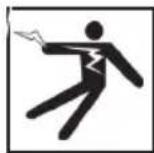
This symbol indicates the risk of electrical shock.
General Safety Rules
WARNING

natural_image
Two abstract icons: a stylized figure holding a pointer and a blue circular logo with a pair of eyeglasses (no text or symbols)Read all safety warnings and instructions. Failure to follow the warnings and instructions may result in electrical shock, fire, and/or serious injury.
SAVE THESE INSTRUCTIONS!
Work Area Safety
- Keep your work area clean and well lit. Cluttered or dark areas invite accidents.
- Do not operate equipment in explosive atmospheres, such as in the presence of flammable liquids, gases, or dust. Equipment can create sparks which may ignite the dust or fumes.
- Keep children and bystanders away while operating equipment. Distractions can cause you to lose control.
- Avoid traffic. Pay attention to moving vehicles when using on or near roadways. Wear high-visibility clothing or reflector vests.
Electrical Safety
- Avoid body contact with earthed or grounded surfaces such as pipes, radiators, ranges, and refrigerators. There is an increased risk of electrical shock if your body is earthed or grounded.
- Do not expose equipment to rain or wet conditions. Water entering equipment will increase the risk of electrical shock.
-
Keep all electrical connections dry and off the ground. Touching equipment or plugs with wet hands can increase the risk of electrical shock.
-
Do not abuse the cord. Never use the cord for carrying, pulling, or unplugging the power tool. Keep cord away from heat, extreme cold, oil, sharp edges, and moving parts. Damaged or entangled cords increase the risk of electrical shock.
- If operating equipment in a damp location is unavoidable, use a ground fault circuit interrupter (GFCI) protected supply. Use of a GFCI reduces the risk of electrical shock.
Personal Safety
- Stay alert, watch what you are doing, and use common sense when operating equipment. Do not use equipment while you are tired or under the influence of drugs, alcohol, or medication. A moment of inattention while operating equipment may result in serious injury.
- Dress properly. Do not wear loose clothing or jewelry. Loose clothes, jewelry, and long hair can be caught in moving parts.
- Practice good hygiene. Use hot, soapy water to wash hands and other body parts exposed to drain contents after handling or using drain inspection equipment. To prevent contamination from toxic or infectious material, do not eat or smoke while operating or handling drain inspection equipment.
- Always use appropriate personal protective equipment when handling and using equipment in drains. Drains may contain chemicals, bacteria, and other substances that may be toxic, infectious, and cause burns or other issues. Appropriate personal protective equipment always includes safety glasses and may include a dust mask, hard hat, hearing protection, drain cleaning gloves or mitts, latex or rubber gloves, face shields, goggles, protective clothing, respirators, and steel toed, non-skid footwear.
- If using drain cleaning equipment and drain inspection equipment at the same time, wear RIDGID drain cleaning gloves. Never grasp the rotating
drain cleaning cable with anything else, including other gloves or a rag which can become wrapped around the cable and cause hand injuries. Only wear latex or rubber gloves underneath RIDGID drain cleaner gloves. Do not use damaged drain cleaning gloves.
Equipment Use and Care
- Do not force equipment. Use the correct equipment for your application. The correct equipment does the job better and more safely.
- Do not use equipment if the power switch does not turn it on and off. Any equipment that cannot be controlled with the power switch is dangerous and must be repaired.
- Disconnect the plug from the power source and/or the battery pack from the equipment before making adjustments, changing accessories, or storing. Preventive safety measures reduce the risk of injury.
- Store idle equipment out of the reach of children and do not allow persons unfamiliar with the equipment or these instructions to operate the equipment. Equipment can be dangerous in the hands of untrained users.
- Maintain equipment. Check for misalignment or binding of moving parts, missing parts, breakage of parts, and any other condition that may affect the equipment's operation. If damaged, have the equipment repaired before use. Many accidents are caused by poorly maintained equipment.
- Do not overreach. Keep proper footing and balance at all times. This enables better control of the equipment in unexpected situations.
- Use the equipment and accessories in accordance with these instructions, taking into account the working conditions and the work to be performed. Use of the equipment for operations
different from those intended can result in hazardous situations.
- Use only accessories that are recommended by the manufacturer for your equipment. Accessories that may be suitable for one piece of equipment may become hazardous when used with other equipment.
- Keep handles dry, clean, and free from oil and grease. Clean handles give better control of the equipment.
Pre-Operation Inspection
WARNING
To reduce the risk of serious injury from electrical shock or other causes, and to prevent damage to your equipment, inspect all equipment and correct any problems before each use.
To inspect all equipment, follow these steps:
- Power off your equipment.
- Disconnect and inspect all cords, cables, and connectors for damage or modification.
- Clean any dirt, oil, or other contamination from your equipment to ease inspection and to prevent it from slipping from your grip during transportation or use.
- Inspect your equipment for any broken, worn, missing, misaligned, or binding parts, or any other condition which might prevent safe, normal operation.
- Refer to the instructions for all other equipment to inspect and make sure it is in good, usable condition.
-
Check your work area for the following:
-
Adequate lighting.
- The presence of flammable liquids, vapors, or dust that may ignite. If present, do not work in area until sources have been identified and corrected. The equipment is not explosion proof. Electrical connections can cause sparks.
-
A clear, level, stable, and dry place for the operator. Do not use the equipment while standing in water.
-
Examine the job to be done and determine the correct equipment for the task.
-
Observe the work area and erect barriers as necessary to keep bystanders away.
See additional product specific safety information and warnings starting on 10.
See Snake microReel APX Overview
natural_image
Ridgiz SeeSnake electric vehicle charging device with visible branding and wiring (no readable text beyond branding)Description
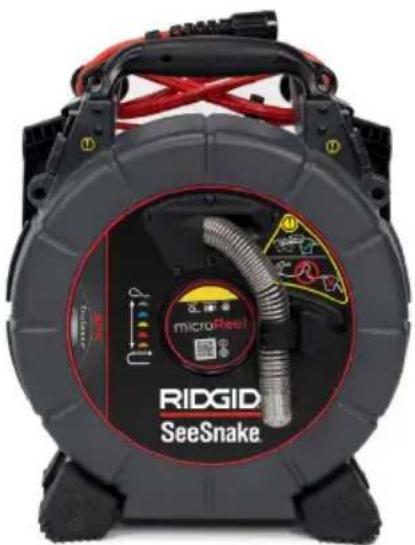
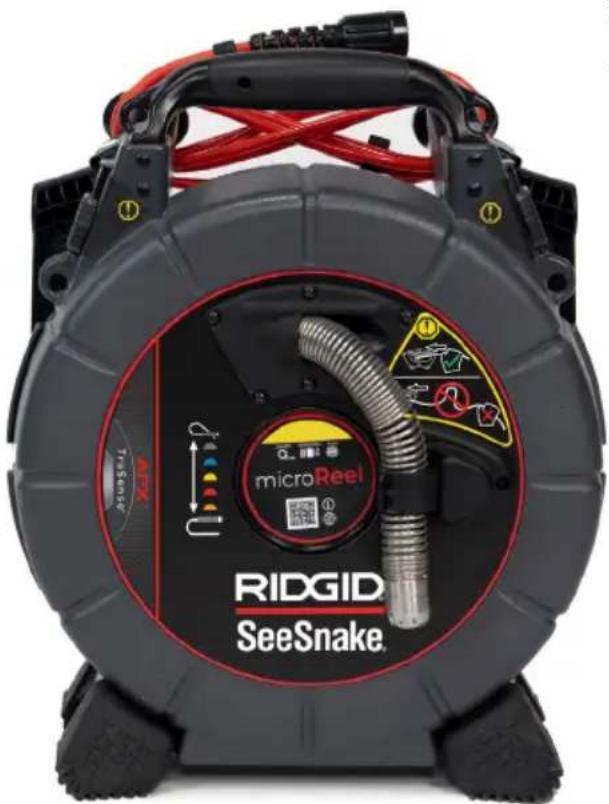
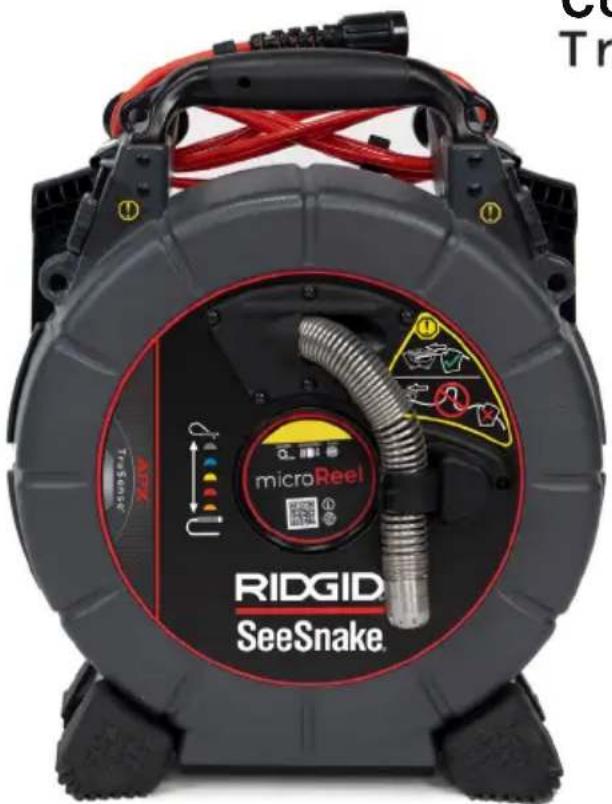
The RIDGID®SeeSnake® microReel™ APX™ is a portable and customizable diagnostic camera reel with enhanced imaging features.
The stiffer push cable makes the microReel ideal for inspecting longer runs in pipes that are 38 mm to 102 mm [1.5 in to 4 in]. The included kickstand lets you set up the microReel in the optimal position for stability while pushing or retrieving the cable.
The microReel features a built-in sonde in the camera head that can be located with a utility locating receiver to find points of interest in the pipe.
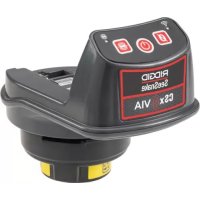
The microReel is compatible with all SeeSnake monitors. The CSx Via™ mobile inspection device easily connects to the microReel APX via the slip-ring cavity.
APX Features
The microReel APX is equipped with an auto image flip feature. When connected to a SeeSnake CSx series device, the microReel APX flips your onscreen image as the camera rotates through the pipe, ensuring your image remains oriented upright. An on-screen icon indicates the vertical orientation with respect to the image.
TruSense Technology Description
The microReel APX includes a TruSense technology-enabled camera. TruSense technology establishes a two-way communication link between the camera head and a connected CSx series Wi-Fi enabled monitor. TruSense features advanced on-camera sensors that convey valuable information about the in-pipe environment.
Included TruSense-Enabled Sensors
TiltSense™
The TiltSense inclinometer measures the camera's degree of tilt and displays it on a CSx series Wi-Fi enabled monitor, giving you a useful indicator of the camera's angle as it lays inside the pipe.
High Dynamic Range Image Sensor
The HDR sensor expands the camera's dynamic range, allowing a greater ratio of bright and dark areas to be displayed in the same image at the same time without reducing visibility. The result is superior clarity and detail, allowing you to quickly and easily identify problem areas.
| Specifications | |
| Weight 5.8 kg [12.7 lbs] | |
| Dimensions | |
| Length 337 mm [13.3 in] | |
| Depth 224 mm [8.8 in] | |
| Height 411 mm [16.2 in] | |
| Drum diameter 305 mm [12 in] | |
| TruSense Camera | |
| Length | 26 mm [1 in]*37 mm [1.5 in]** |
| Diameter 25 mm [1 in] | |
| Resolution 640 × 480 pixels | |
| Sonde | |
| Type Integrated | |
| Frequency 512 Hz | |
| Distance Measurement | |
| Type TruSense Counter | |
| Data Communication | Two-Way |
| Push Cable | |
| Length 30 m [100 ft] | |
| Diameter 6.7 mm [0.27 in] | |
| Fiberglass core diameter | 3 mm [0.12in] |
| Minimum bend radius | 64 mm [2.5 in] |
| Pipe Capacity § | 38 to 101 mm[1.5 to 4 in] |
| System Cable Length | 3 m [10 ft] |
| Specifications | |
| Operating Environment | |
| Temperature‡ | 0°C to 46°C[32°F to 115°F] |
| Storage temperature | -20°C to 70°C[-4°F to 158°F] |
| Ingress protection (without monitor) | IP×5 |
| Relative humidity | 5 to 95 percent |
| Altitude 4,000 m [13,123 ft] | |
| Camera depth rating | Waterproof to 100 m [328.1 ft] |
| * Measured from lens to spring. | |
| ** Measured from lens to end of threads. | |
| § Actual pipe capacity depends on pipe conditions. | |
| ‡ While the camera can function in extreme temperatures, some image quality changes may occur. | |
Standard Equipment
- SeeSnake microReel
- Ball guides
- Operator's manual
Components
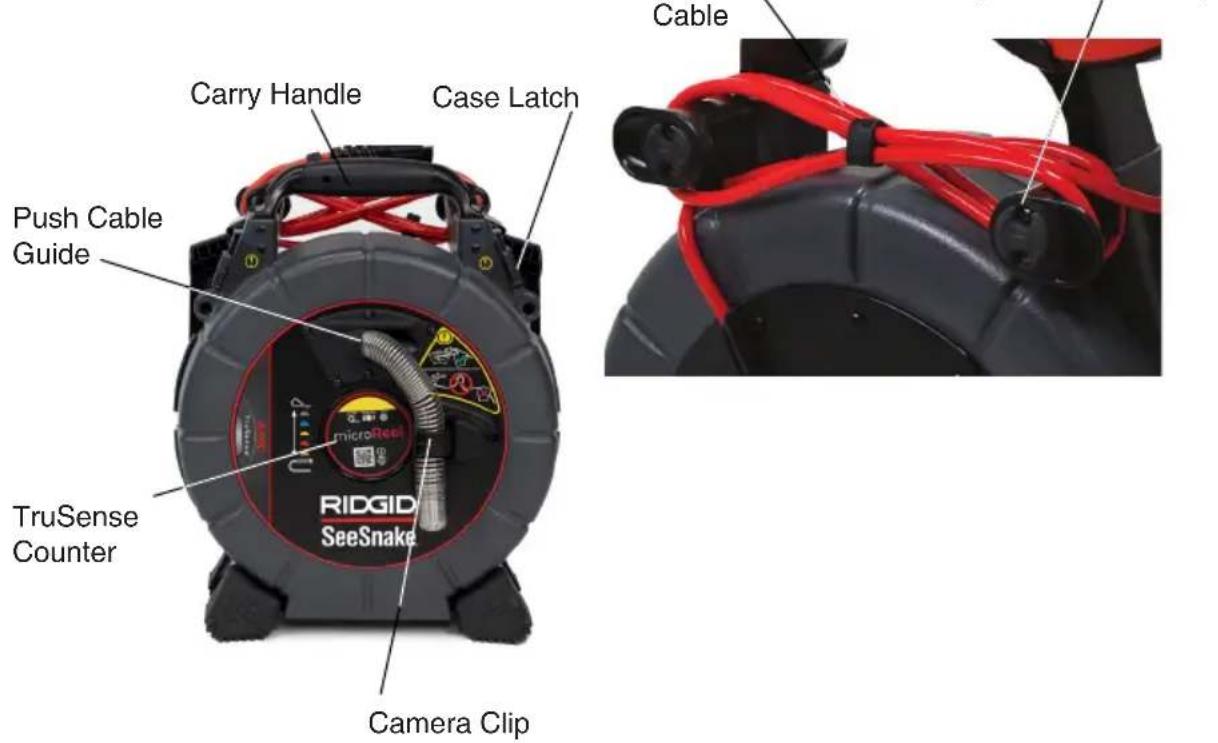
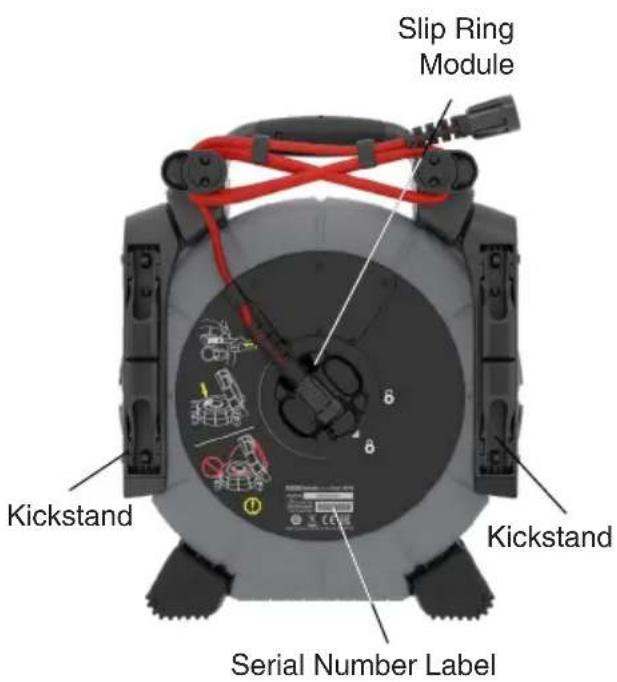
Specific Safety Information

WARNING


This section contains important safety information that is specific to the RIDGID See Snake microReel. Read these precautions carefully before using the equipment to reduce the risk of electrical shock, fire, and/or serious injury.
SAVE ALL WARNINGS AND INSTRUCTIONS FOR FUTURE REFERENCE!
microReel Safety
- Read and understand this manual, the digital reporting monitor's manual, and the instructions for any other equipment you are using before operating the equipment. Failure to follow all instructions may result in property damage and/or serious injury. Keep this manual with the equipment for future use.
- Operating the equipment while in water increases the risk of electrical shock. Do not operate the system if operator or equipment are standing in water.
- The equipment is not designed to provide high voltage protection and isolation. Do not use where a danger of high voltage contact is present.
- To prevent damage to the equipment and to decrease the risk of injury, do not expose the equipment to mechanical shocks. Exposure to mechanical shocks can damage equipment and increase the risk of serious injury.
• Always use appropriate personal protective equipment when handling and using equipment in drains. Wear
appropriate protective equipment such as latex or rubber gloves, goggles, face shields, and respirators when inspecting drains that might contain hazardous chemicals or bacteria. Always wear eye protection to protect against dirt and other foreign objects.
- Ensure the push cable is secured inside the drum to prevent the push cable from unwinding itself if the drum is removed from the case or if the case is left open with the drum inside. If the push cable unwinds, do not manually twist or force the push cable back into the non-rotating drum. The twisting and bending of the push cable that results from forcing it into the drum without the use of the outer case to rotate it will damage the push cable. See Appendix A for instructions on reinserting the push cable if it has unwound itself from the drum.
Operating Instructions
Placement
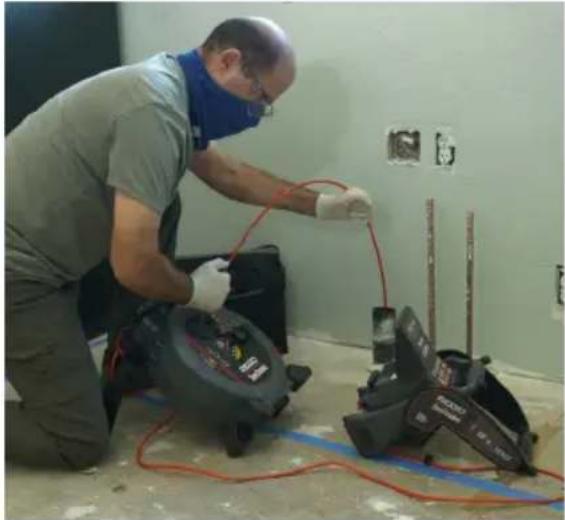
Set up your microReel near the pipe entrance so you can manipulate the push cable while viewing the display. Use the kickstand to position the microReel so that it does not tip during use.
natural_image
Worker in safety gear repairing electrical equipment in a room (no visible text or symbols)
natural_image
Exterior view of a black and orange hovercraft device (no text or symbols visible)Opening the microReel Case
WARNING
Make sure the camera is completely inside the drum before unlatching and opening the microReel case. Do not open the microReel case while the camera is stored in the camera clip. If the camera is not in the drum, the push cable can unwind and cause damage or serious injury.
Open the microReel case to route the camera, replace the drum, rewind the push cable, and to maintain and clean the system.
-
Set the unit on a level surface and lay it on its back.
-
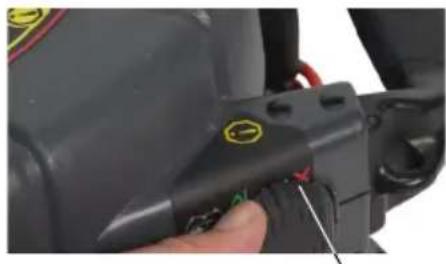
Unfasten the case latches on either side of the microReel.
natural_image
Close-up of a black mechanical component with a yellow circular button and red pins, being adjusted by a finger (no visible text or symbols)Case Latch
- Carefully open the front case and locate the camera head in the push cable drum.
- Route the camera head out through the push cable guide in the front of the case.
- Secure the camera head in the clip.
- Close and relatch the case.
natural_image
Close-up of hands installing or adjusting a mechanical component on a gray industrial machine (no visible text or symbols)Installing the Drum
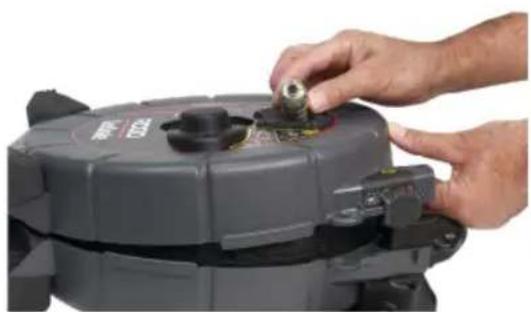
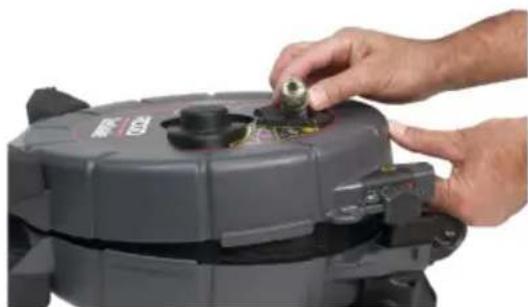
The microReel case gives you the ability to swap out the drum when the job requires a different push cable and camera combination. Either microReel drum can be installed in the microReel case, as well as the drums on the SeeSnake microDrain ^™ and nanoReel ^™ systems.
To install the drum, follow these steps:
- Open the microReel case and remove the drum.
- Place the drum you want to use in the microReel case.
- Make sure the product name label faces up.
- Spin the drum to make sure it rotates freely.
- Close and lock the case.
Inspection Overview
To perform a pipe inspection, connect any See Snake monitor to the reel, power on the system, push the push cable through the pipe, and observe the display.
For advanced inspection options, such as capturing media, locating the sonde, tracing the push cable, and delivering reports, refer to the manual that comes with your monitor.
Connecting to the Monitor
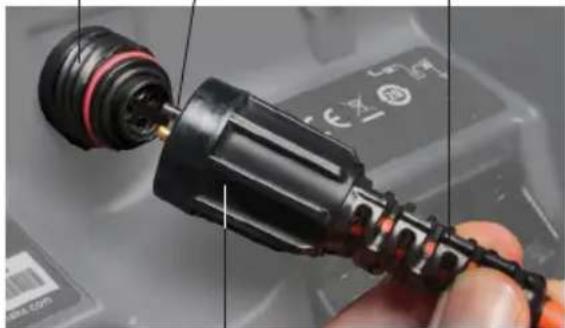
Connect the system cable to the monitor by aligning the connector guide pin with the socket and pushing the connector straight in.
NOTICE
Only twist the outer locking sleeve. Never bend or twist the connector.
Socket
Guide Pin
Connector Ridge
natural_image
Close-up of a black plastic connector with red and black bands, being held by a finger (no visible text or symbols)Outer Locking Sleeve
Connecting to the CSx Via
The CSx Via Wi-Fi inspection device can be connected to the microReel through the slip-ring cavity. Remove the slip-ring assembly from the microReel and install the CSx Via into the slip-ring cavity.
For more instructions on installing the CSx Via, refer to the operator's manual.
Retrieving the Camera
Pull the push cable back out of the pipe with slow, steady force and feed small lengths back into the drum. Wipe the push cable with a paper towel or rag as you retrieve it.
NOTICE
Do not exert excessive force or pull at sharp angles. Feeding longer lengths or forcing the push cable may cause it to loop, kink, or break.
Pipe Guides
Pipe guides center the camera in the pipe, improve picture quality, and help keep the lens clear. Use pipe guides when possible to reduce wear and tear on the camera system.
Removing the Slip Ring Assembly
-
Disconnect the system cable from the reporting monitor and remove the monitor from the docking system.
-
Unwrap the system cable from the cable wraps.
-
Pop the frame cable anchor off the frame and unhook the system cable from the frame hook.
-
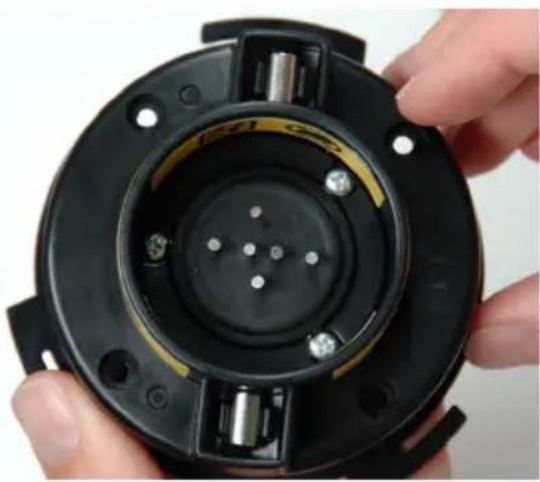
Turn the slip-ring dial counter-clockwise to the unlocked position 8
-
Pull straight out.
NOTICE
Do not touch the contact pins inside the slip-ring dial. Stressing the contact pins can cause them to break.
natural_image
Close-up of a hand holding a black circular mechanical component with embedded pins and bolts (no visible text or symbols)Maintenance and Support
Cleaning
Clean your system with rags and a soft nylon brush. If desired, a mild detergent or disinfectant can be used. Do not use solvents or high pressure water to clean any part of the system.
Maintaining Components
Camera Head
Scratches on the camera have a minimal effect on its performance. Do not use scraping tools or sand the camera to remove scratches.
Push Cable
Run a rag over the push cable and visually inspect it for cuts and abrasions while pushing it back into the drum. Replace or repair the push cable if the outer jacket is cut or abraded.
Storage
The microReel must be stored in a dry, secure area between -20°C and 70°C [-4°F and 158°F]. Store your equipment in a locked area out of the reach of children and people unfamiliar with its purpose.
Support
For support and additional information about using your system, visit support. seesnake.com/microreel.
Service and Repair
Improper service or repair can cause the camera reel to be unsafe to operate.
Service and repair of the camera reel must be performed at a RIDGID Independent Authorized Service Center. To find your nearest service center or for any service or repair questions:
- Contact your local RIDGID distributor.
- Visit RIDGID.com.
- Contact Ridge Tool Company Technical Service Department at rtctechservices@emerson.com or, in the USA and Canada, call 1-800-519-3456.
Disposal
Parts of your system contain valuable materials that can be recycled. There are companies that specialize in recycling that may be found locally. Dispose of the components in compliance with all applicable regulations. Contact your local waste management authority for more information.
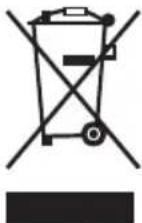
EC Countries: Do not dispose of electrical equipment with household waste!
According to the European Guideline 2012/19/EU for Waste Electrical and Electronic Equipment and its implementation into national legislation, electrical equipment that is no longer usable must be collected separately and disposed of in an environmentally correct manner.
Battery Disposal
EC Countries: Defective or used batteries must be recycled according to the guideline 2006/66/EEC.
Appendix
Appendix A: Reinserting the Push Cable
NOTICE
Do not use excessive force when attempting to rewind the push cable into the drum. Feeding longer lengths or forcing the push cable may cause it to loop, kink, or break.
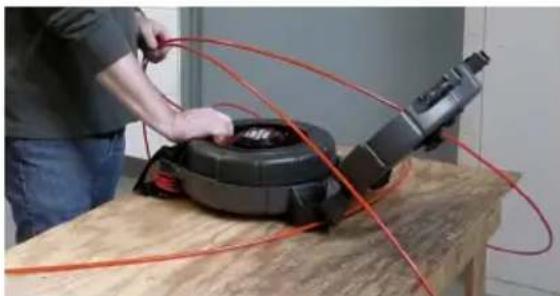
Follow these instructions to reinsert the push cable if it has unwound from the drum.
- Seat the drum in the case before reinserting the push cable.
natural_image
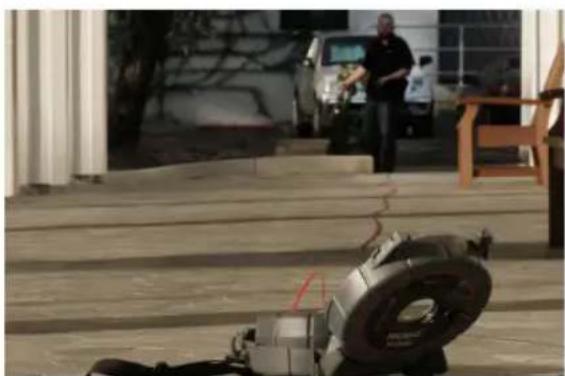
Person operating a mechanical device with red tubing, placed on a wooden table (no visible text or symbols)- If space permits, uncoil and straighten the entire length of push cable on the ground.
natural_image
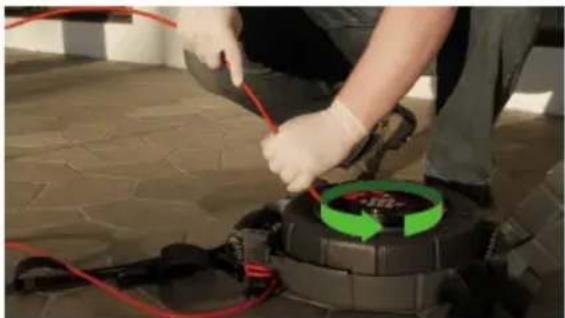
Exterior view of a building entrance with large tires and a person standing nearby (no visible text or symbols)- Using both hands, begin to rewind the push cable into the drum. If the push cable cannot be laid out straight, use extreme care when rewinding the push cable. Ensure the push cable does not bend or get caught on or underobjects.
If the push cable becomes twisted or bent, stop rewinding and untwist it before continuing.
- Ensure the drum rotates in the case as the push cable rewinds. To avoid damaging the push cable, keep one hand close to the drum when rewinding the push cable to ensure that the drum rotates freely.
natural_image
Person in protective gear using a power cord device on a tiled floor (no visible text or symbols)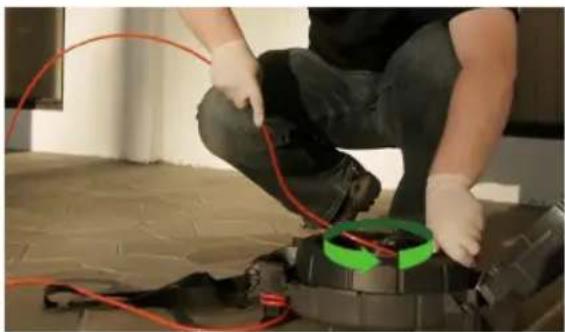
natural_image
Person kneeling on a tiled floor using red cables to install a mechanical component (no visible text or symbols)- Gently route the camera head through the push cable guide.
If replacing the camera head, only pull up on the portion of the cable that contains the spring to avoid bending or breaking the push cable.
natural_image
Close-up of hands installing or adjusting a mechanical component on a gray industrial device (no visible text or symbols)SeeSnake®
microReel™ APX™
Ridge Tool UK (RIDGID)
44 Baker Street
London W1U 7AL, UK
natural_image
Ridgid SeeSnake electric vehicle charging device with visible branding and wiring (no readable text beyond branding)Description
natural_image
Worker in safety gear using a power tool on an electrical wall, with no visible text or symbols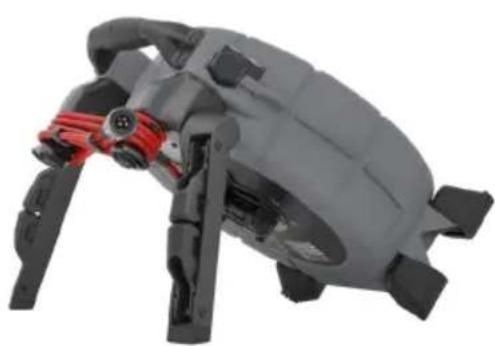
natural_image
Close-up of a gray and black robotic device with red connectors (no visible text or symbols)natural_image
Close-up of a hand holding a black mechanical component with a yellow circular mark and red wires, no visible text or symbols.Verrou du boîtier
natural_image
Close-up of hands installing or adjusting a mechanical component on a gray industrial device (no visible text or symbols)natural_image
Close-up of hands holding a black circular mechanical component with multiple pins and mounting holes (no visible text or symbols)Maintenance et assistance
Nettoyage
natural_image
Person working on a mechanical device with red cables, no visible text or symbolsnatural_image
Exterior view of a building entrance with wooden beams and a person standing nearby (no visible text or symbols)natural_image
Person in gloves and blue gloves working on a black industrial machine with red wires, surrounded by green circular arrows indicating a cycle (no text or symbols visible)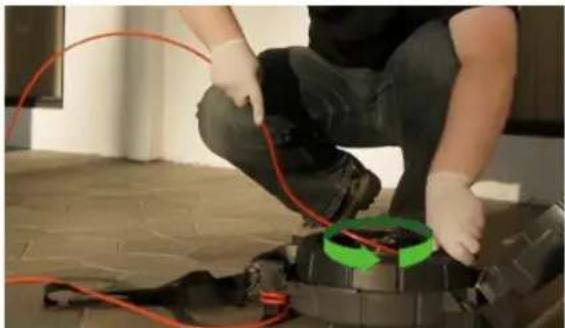
natural_image
Person kneeling on a floor next to a mechanical device with red wires and green circular components (no visible text or symbols)natural_image
Close-up of hands installing or adjusting a mechanical component on a gray industrial machine (no visible text or symbols)SeeSnake®
microReel™ APX™
Ridge Tool UK (RIDGID)
44 Baker Street
London W1U 7AL, UK
natural_image
Two symbolic icons: a stick figure pointing at a hand and a person reading a book, both without text or symbols.natural_image
Worker in safety gear repairing electrical equipment in a room (no visible text or symbols)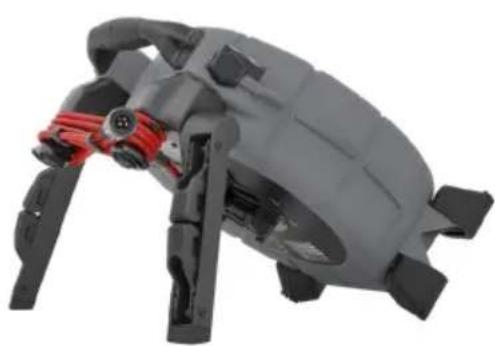
natural_image
Close-up of a gray mechanical device with red connectors and black straps (no visible text or symbols)natural_image
Close-up of a black mechanical component with a yellow circular mark and red pins, being adjusted by hand (no visible text or symbols)natural_image
Close-up of hands installing or adjusting a mechanical component on a gray industrial machine (no visible text or symbols)natural_image
Close-up of a hand holding a black circular mechanical component with multiple pins and mounting holes (no visible text or symbols)- Visite RIDGID.com.
natural_image
Person working on a mechanical device with red cables, no visible text or symbolsnatural_image
Exterior view of a building entrance with wooden steps and a person standing in the background (no visible text or symbols)natural_image
Person in gloves and gloves working on a mechanical device with red wires, no visible text or symbols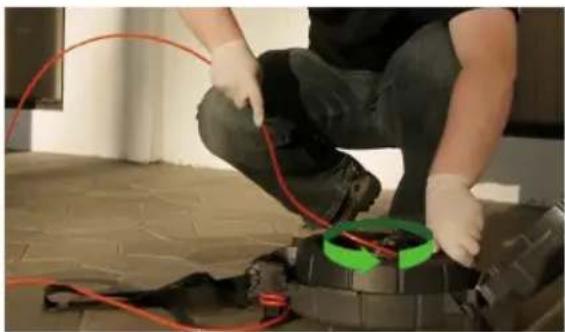
natural_image
Person kneeling on a brick wall with red cables and green circular annotations (no readable text)natural_image
Close-up of hands installing or adjusting a mechanical component on a gray industrial device (no visible text or symbols)Ridge Tool Company
Ridge Tool Europe NV (RIDGID)
Belgium
© 2022 Ridge Tool Company. All rights reserved.
Every effort has been made to ensure that the information in this manual is accurate. Ridge Tool Company and its affiliates reserve the right to change the specifications of the hardware, software, or both as described in this manual without notice. Visit www.RIDGID.com for current updates and supplemental information pertaining to this product. Due to product development, the photos and other presentations specified in this manual may differ from the actual product.
RIDGID and the RIDGID logo are trademarks of Ridge Tool Company, registered in the USA and other countries. All other registered and unregistered trademarks and logos mentioned herein are the property of their respective owners. Mention of third-party products is for informational purposes only and constitutes neither an endorsement nor a recommendation.
Printed in USA 2022/01/17
999-995-245.10
744-034-0207-00-0A

- WARNING!
- Table of Contents
- Introduction
- General Safety Rules
- See Snake microReel APX Overview
- Specific Safety Information
- Operating Instructions
- Maintenance and Support
- Appendix
- Regulatory Statements
- UK Importer
- Safety Symbols
- DANGER
- WARNING
- CAUTION
- NOTICE
- SAVE THESE INSTRUCTIONS!
- Work Area Safety
- Electrical Safety
- Personal Safety
- Equipment Use and Care
- Pre-Operation Inspection
- Description
- APX Features
- TruSense Technology Description
- Included TruSense-Enabled Sensors
- TiltSense™
- High Dynamic Range Image Sensor
- Standard Equipment
- SAVE ALL WARNINGS AND INSTRUCTIONS FOR FUTURE REFERENCE!
- microReel Safety
- Placement
- Opening the microReel Case
- Installing the Drum
- Inspection Overview
- Connecting to the Monitor
- Connecting to the CSx Via
- Retrieving the Camera
- Pipe Guides
- Removing the Slip Ring Assembly
- Cleaning
- Maintaining Components
- Camera Head
- Push Cable
- Storage
- Support
- Service and Repair
- Disposal
- Battery Disposal
- Appendix A: Reinserting the Push Cable
- SeeSnake®
- microReel™ APX™
- Maintenance et assistance
- Nettoyage
Brand : RIDGID
Model : SeeSnake microReel APX
Category : Video camera