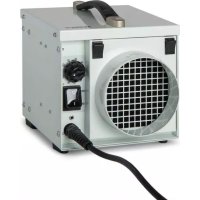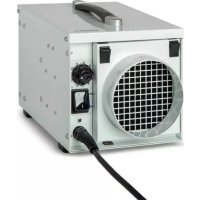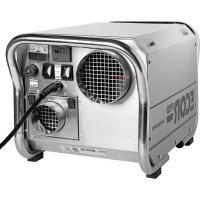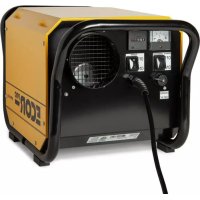
EPD150 - Dehumidifier Ecor Pro - Free user manual and instructions
Find the device manual for free EPD150 Ecor Pro in PDF.



| Product type | Desiccant dehumidifier |
| Brand | Ecor Pro |
| Model | EPD150 |
| Main function | Humidity removal by desiccant rotor |
| Drying technology | Desiccant rotor (hygroscopic honeycomb) |
| Power supply | Mains, grounded plug |
| Power consumption | 2–3 A (approx. 460–690 W) at 230 V |
| Heating type | PTC ceramic (regeneration) |
| Ventilation system | Patented RadiCal fan (process and regen) |
| Air filter | Washable intake air filter (vacuum cleaner or mild detergent) |
| Control | On/off switch, ammeter, hour meter, remote humidistat switch |
| Connectivity | Connector for remote humidistat (mains voltage) |
| Safety | Overheat protection (manual reset), fuse, grounding |
| Maintenance | Cleaning of filter, rotor and heater with vacuum cleaner or compressed air |
| Use | Indoor only, can be placed inside or outside the room |
| Optional accessories | Flexible ducts, high-voltage humidistat, reticulated foam |
| Desiccant rotor | Driven by gear motor via toothed belt (~20 rph) |
Frequently Asked Questions - EPD150 Ecor Pro
User questions about EPD150 Ecor Pro
0 question about this device. Answer the ones you know or ask your own.
Ask a new question about this device
Download the instructions for your Dehumidifier in PDF format for free! Find your manual EPD150 - Ecor Pro and take your electronic device back in hand. On this page are published all the documents necessary for the use of your device. EPD150 by Ecor Pro.
USER MANUAL EPD150 Ecor Pro
Thank you for choosing this innovative dehumidifier.
This manual describes the many benefits and advanced features that this unique product has to offer.
This dehumidifier is a tough, industrial unit designed to be used almost anywhere that dry air is required. Desiccant/Absorption dehumidifiers are especially suited to applications where low relative humidities are needed and work well over a wide temperature range.
We specialize in complete indoor humidity control. Our world class products incorporate the latest technological developments and are designed to create a quality environment.
It is important that you read these instructions carefully before installing and using your new dehumidifier.
Please keep them in a safe place for future reference.
SAFETY
For safety reasons, read this information carefully before operating. Persons who are not familiar with this type of product must not use it.

This appliance must be earthed and should only be connected to an earthed 120 V - 60 Hz mains supply.

The installation must be in accordance with the regulations of the country where the unit is used.

The unit is designated for indoor operation.
The dehumidifier is safe, however, as with other electrical appliance, use it with care.
SAFETY (2)

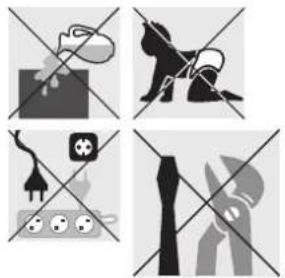
- This appliance is not intended for use by persons (including children) with reduced physical, sensory or mental capabilities, or lack of experience and knowledge, unless they have been given supervision or instruction concerning the use of the appliance by a person responsible for their safety.
- Children should be supervised to ensure that they do not play with the appliance.
- Do not clean the dehumidifier by spraying it or immersing it in water.
- Do not insert any object into the opening of the dehumidifier.
- Disconnect from the mains before cleaning the unit or any of its components.
- Never connect to an electrical outlet using an extension cord. If an outlet is not available, one should be installed by a licensed electrician.
- Any service other than regular cleaning, setting fan mode or filter replacement should be performed by an authorized service representative. Failure to do so could result in a loss of warranty. Your dehumidifier is supplied with an electrical cable and an earthed plug. Should it be necessary to replace this plug at any time, you must use an earthed electrical plug.

Warning! Never operate this appliance if it has a damaged cord or plug. If the supply cord is damaged an approved service representative or a similar qualified person must replace it in order to avoid any hazards.
There should be direct access to the electrical plug after connecting the power!
natural_image
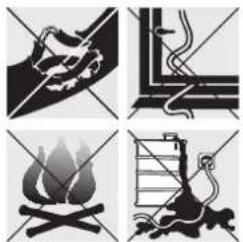
Four black-and-white illustrations depicting various scenes: a hand holding a rock, a ladder with a flame, and a person climbing a ladder (no text or symbols)Do not use your dehumidifier under the following conditions:
• If the power cable is damaged
- Where the power cable may be easily damaged
- Close to heat source
- Where small children may be left unattended
• Where there is a risk of liquids falling on the unit
- Where it may be damaged by chemicals
This product is not made for DIY repair.
natural_image
Four-panel diagram showing crossed-out black-and-white symbols: a dog, a horse, a plug, and a hand holding a tool (no text or labels)3
HOW IT WORKS EPD150/EPD150-PRO
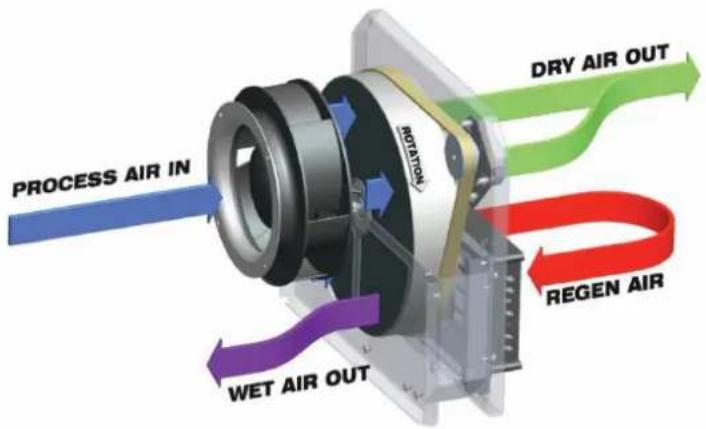
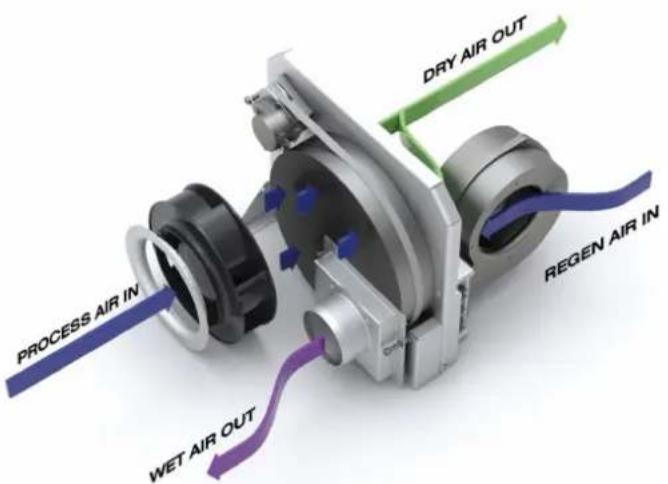
- Your EPD Desiccant dehumidifier removes moisture using a continuously rotating moisture absorbing wheel —this 'Desiccant Rotor' is literally a honeycomb of extremely hygroscopic membranes.
A highly efficient yet low noise fan draws air into the unit (Process Air) and forces it through a portion of the absorbent rotor. As the air passes through the rotor, the honeycomb of hygroscopic membranes absorb almost all of the moisture creating an extremely dry air stream.
Most of this air stream is discharged directly through the 'Dry Air Outlet' however, a portion of this air (Regen Air) is separated and directed through a heater bank (Regen Heater) where it's temperature is raised. This air is then channeled back through a section of the rotor. As this air passes back through the membranes, its higher temperature drives-out the previously absorbed moisture and discharges it as warm wet air through the 'Wet Air Out' duct.
As the wheel rotates, this process of collecting and discharging moisture is continuous.
HOW IT WORKS EPD200/EPD200-PRO
- Your EDP Desiccant dehumidifier removes moisture using a continuously rotating moisture absorbing wheel —this 'Desiccant Rotor' is literally a honeycomb of extremely hygroscopic membranes.
A highly efficient yet low noise fan draws air into the unit (Process Air) and forces it through a portion of the absorbent rotor. As the air passes through the rotor, the honeycomb of hygroscopic membranes absorb almost all of the moisture creating an extremely dry air stream; this air stream is discharged directly through the 'Dry Air Outlet'.
A second fan pushes a separate air stream (Regen Air) through a heater bank (Regen Heater) where it's temperature is raised. This air is then channeled back through a section of the rotor. As this air passes back through the membranes, its higher temperature drives-out the previously absorbed moisture and discharges it as warm wet air through the 'Wet Air Out' duct.
As the wheel rotates, this process of collecting and discharging moisture is continuous.
US
HOW IT WORKS WORKS (2)
PATENTED DESICCANT ROTOR
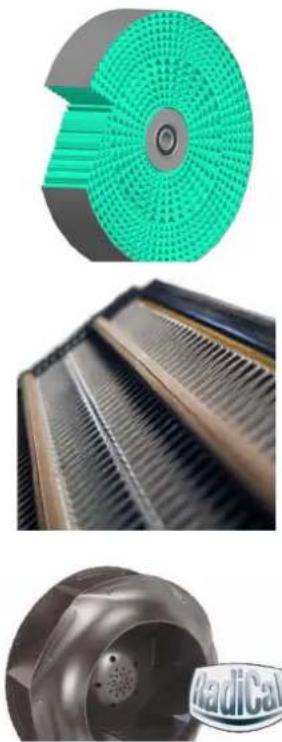
The Desiccant Rotor is the heart of the EPD dehumidifier. It is an array of specially absorbent membranes arranged as a series of corrugations (as shown in the cut-away image) to give a vast surface area making it an extremely efficient. It is encased in a galvanized steel ring and turns on high quality sealed ball bearing units.
• REGEN HEATER BANK
The EPD dehumidifier uses a ceramic PTC type regen heater. PTC (Positive Temperature Coefficient) heaters are based on a semi-conductor that changes resistance as it becomes hotter. The semi-conductor is designed so that it's resistance rises rapidly at a predesignated temperature, thus it maintains this temperature across a wide range of operational conditions.
This characteristic means that the heating element can never over heat to hazardous temperatures, even if the regen airflow is completely blocked.
FAN SYSTEM
The EPD dehumidifier uses a patented "RadiCal" backward curved fan unit, this is a highly effective yet quiet system. It is designed to give a good balance of airflows for both 'Process' and 'Regen' airflows.
POSITIONING
US
The EPD dehumidifier is designed only for indoor use however, it can be placed inside or outside the room to be dried.
• INTERNAL POSITIONING
When positioning the unit inside the room, place it centrally, ensuring inlet and outlet ducts are clear of obstruction.
If required, ducts can be connected to the outlet and/or inlet to direct the drying to specific areas.
The Wet-Air-Out MUST be ducted outside the room
• EXTERNAL POSITIONING
When positioning the unit outside the room, connect ducting to the outlet to direct the dry air stream into the room to be dried.
Optionally, the inlet may also be ducted to the room to give a re-circulation effect. In this case however, because the unit uses a portion for the inlet air for regeneration, provision must be made in the inlet duct to also draw air form outside the room.
Note:
As the Wet-Air-Out discharge is warm and very humid ensure it is directed where it will have no adverse effect on the immediate environment.
All ducting lengths should be kept to a minimum —longer lengths will reduce performance.
The Wet-Air-Out is warm and very humid, when a duct is attached, condensation may form on the inside of the duct. This duct should slope downwards away may from the unit to prevent any condensation running back into the unit.
OPERATION
Connect the unit to suitable mains supply.
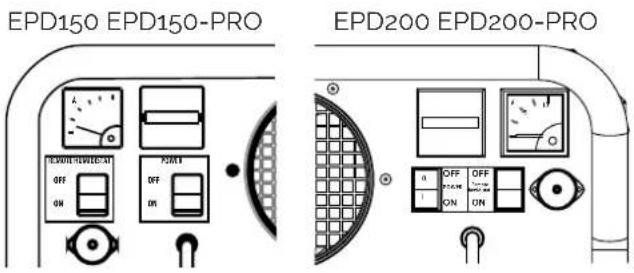
Ensure Remote Humidistat switch is set in the 'OFF' (O) position.
Switch Power switch to the 'ON' (I) position.
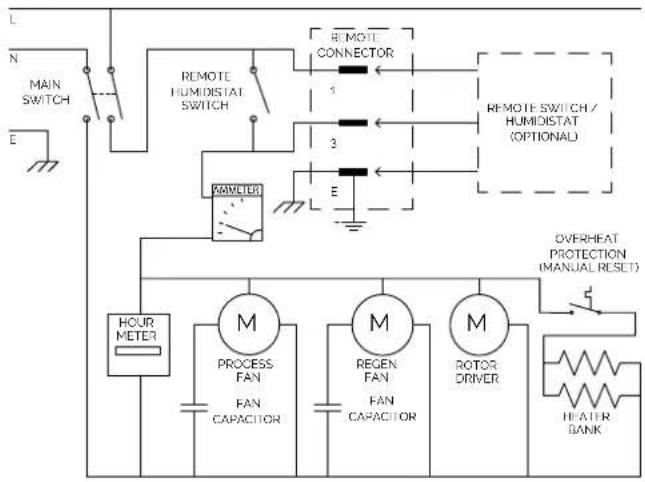
The fan will start and the Ammeter reading will rise. The ammeter indicates the current taken by the PTC
heater bank. Its reading will depend on the 'Process' air temperature and the 'Regen' airflow. Typically, it will indicate between 2 and 3 amps (EPD150/EPD150-PRO) or between 4 and 6 amps (EPD200/EPD200-PRO), this will reduce if the airflow is low or the 'Process' air temperature is high.
• REMOTE OPERATION
For remote operation it is necessary to connect a switch or humidistat via the 'Remote Humidistat Connector' which can be accessed by removing the dust cap. A connection plug is available on request.
ATTENTION: The remote connector is mains voltage!
The remote switch/humidistat should be connected between pins 1 and 3.
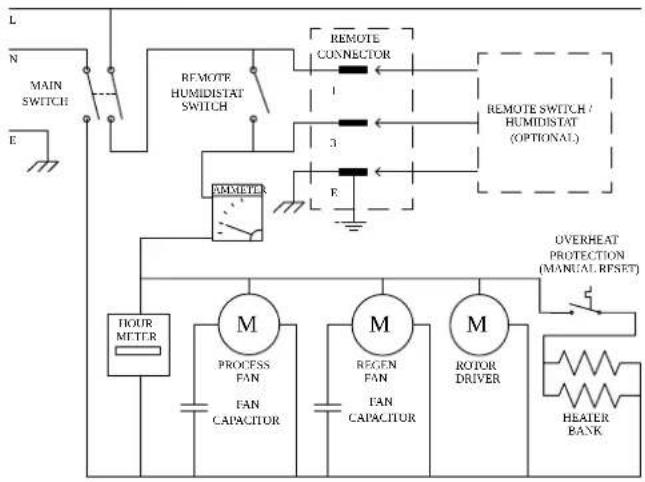
The earth pin is connected to ground and can be used if required (see wiring diagram).
The Remote Humidistat switch should be set to the 'ON' position.
The unit will now operate according to the state of the remote switch.
AIR FILTER
The unit has an inlet air filter, this should be checked periodically and if necessary cleaned. It can be cleaned with a vacuum cleaner or washed in mild detergent.
ATTENTION:
Do not run the unit without a filter fitted as dust will impair the performance of the Desiccant Rotor.
CONTROLS
- The controls are positioned on the front of the unit next to the air outlet, they are:
- Power Switch
- Ammeter
- Hour Meter
- Remote Humidistat Switch
- Remote Humidistat Connector
US
TROUBLESHOOTING
If the dehumidifier does not operate:
• Make sure the unit is plugged in.
- Check the fuse
- Check the remote humidistat setting
- Ensure the humidistat (if fitted) is turned on
Low Airflow:
- Check inlet air filter
- Check inlet/outlets not obstructed
- Check ductwork (if fitted) is not obstructed
- Check voltage level
- Check fan is working
If the unit is noisy:
- Check fan operation
- Check rotor drive
- Check for loose screws
Low Dehumidifying Effect:
- Check airflows
- Check Amps reading
- Check rotor is turning
Low Amps Reading:
- Check Regen airflow
- Check Over-Heat Protector
- Check Heater bank
Rotor Not Turning
- Check belt tension
- Check drive-motor operation
- Check rotor alignment
MAINTENANCE
ATTENTION
- Maintenance should only be carried out by qualified personnel
- Unit should be disconnected from mains before removing covers
- If unit has just been running, heater bank may still be hot
• DESICCANT ROTOR
The desiccant rotor is maintenance free, however, if it becomes blocked with dust (e.g. if it has been running without inlet air filter) it can be cleaned by vacuum cleaner or low pressure compressed air.
HEATER BANK
The PTC heater bank is maintenance free however, if it becomes blocked with dust (e.g. if it has been running without inlet air filter) it can be cleaned by vacuum cleaner or low pressure compressed air.
OVER-HEAT PROTECTOR
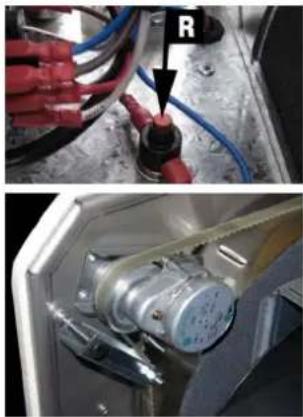
In the event of total airflow loss, the over-heat protector will operate. If this happens it will need to be manually re-set after the airflow is restored. To reset, push the red button (R) down.
• DESICCANT ROTOR DRIVE
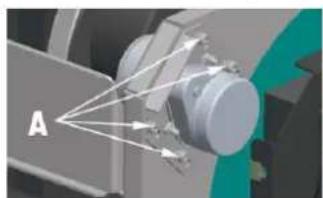
The desiccant rotor is driven by a geared motor via a toothed belt. The rotation speed is approximately 20 RPH. It can be seen turning during operation through the air outlet duct. If it appears to be slow or sticking, the belt can be re-tensioned using the 4 mounting screws @ "A".
natural_image
Diagram of a mechanical assembly with labeled component A, showing light rays converging into a central shaft (no text or symbols beyond label)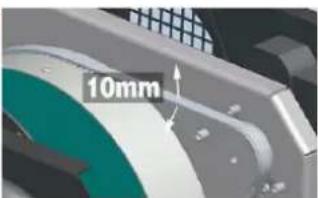
NOTE: Do NOT over-tension the belt. After tensioning it should have movement as shown in the image.
natural_image
Two-panel image showing a hand holding red cables and a close-up of an electrical motor inside a device (no visible text or symbols)TECHNICAL DATA

| Specifications EPD150 / EPD150-PRO | EPD200 / EPD200-PRO | |
| Typical extraction @ 90°F 90% RH 74 L/ day 95 L/ day | ||
| Typical extraction @ 80°F 60% RH 53 L/ day 74 L/ day | ||
| Airflow (Dry Air Out) 224 cfm 235 cfm | ||
| Airflow (Wet Air Out) 44 cfm 74 cfm | ||
| Mains 120Vac ~ 1 phase · 60 Hz 120Vac ~ 1 phase · 60 Hz | ||
| Current | 7.1A | 11.7A |
| Power | 850W | 1400W |
| Operating temperature range | -4°F - 104°F | -4°F - 104°F |
| Noise level | 56dB | 58dB |
| IP rating | IPx2 | IPx2 |
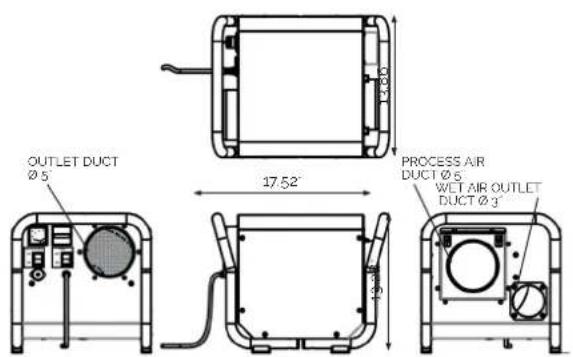
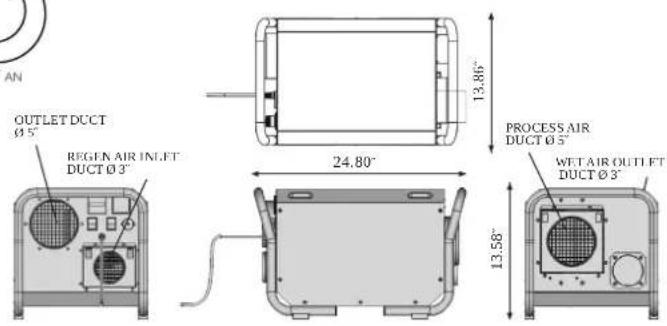
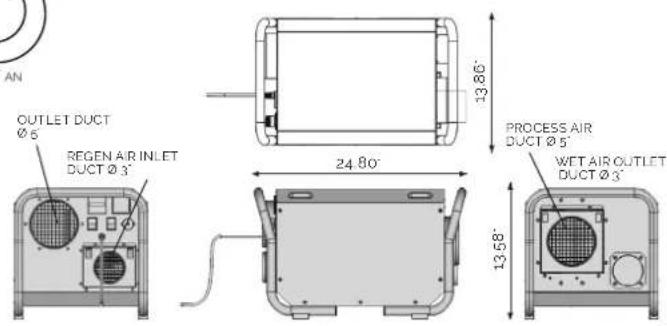
| Dimensions l x w x h inch | 17.52 x 13.86 x 13.28 | 24.80 x 13.86 x 13.28 |
| Weight net lbs | 38.60 | 45.20 |
RH = relative humidity
Subject to modifications without prior notice.
OPTIONAL PARTS

Available from your supplier
- Flexible ducting ∅ 4", 9 or 18 ft
• Flexible ducting ∅ 5°, 9 or 18 ft - High voltage humidistat – 15 ft cable mil standard screw plug connected
- Reticulated foam - pack of 3
US


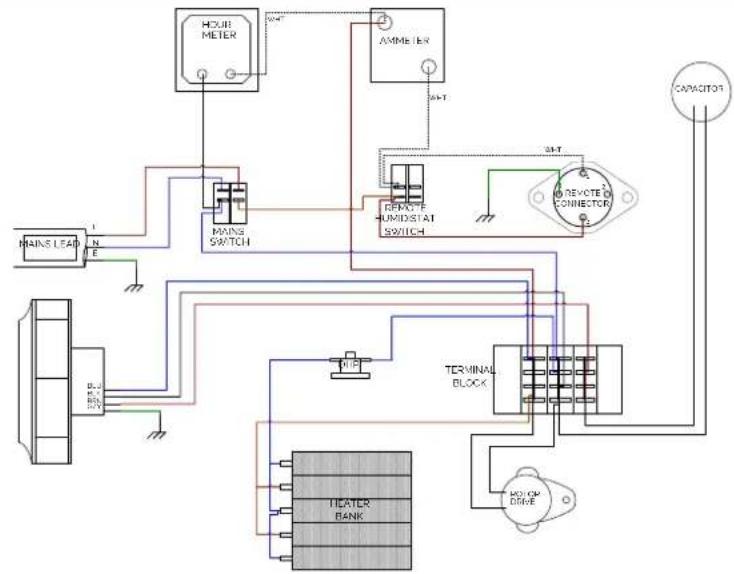
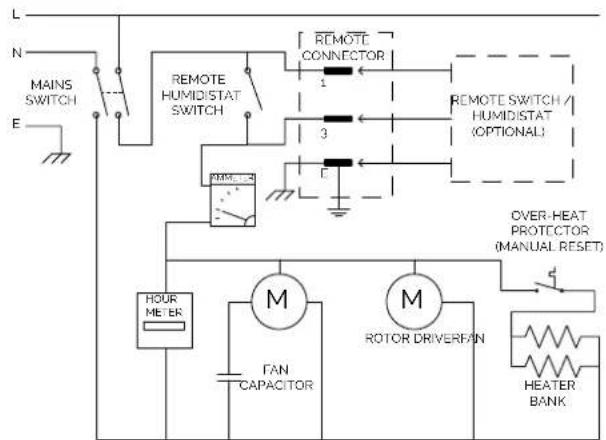
EPD150/EPD150-PRO WIRING DIAGRAM AND SCHEMATIC, DIMENSIONS
flowchart
graph TD
    A["MAIN LEAF"] --> B["PI"]
    B --> C["HEATER BANK"]
    C --> D["POWER"]
    D --> E["TERMINAL BLOCK"]
    E --> F["AMP"]
    F --> G["AMME IEN"]
    G --> H["REVIEW HUMIDISTAT SWITCH"]
    H --> I["CAPACITOR"]
    I --> J["MOCK DRIVE"]
    J --> K["POWER"]
    K --> L["HEATER BANK"]
    L --> M["POWER"]
    M --> N["TERMINAL BLOCK"]
    N --> O["AMP"]
    O --> P["AMME IEN"]
    P --> Q["REVIEW HUMIDISTAT SWITCH"]
    Q --> R["CAPACITOR"]
    R --> S["MOCK DRIVE"]
    S --> T["TERMINAL BLOCK"]
    T --> U["AMP"]
    U --> V["AMME IEN"]
flowchart
graph TD
    A["MAIN SWITCH"] --> B["REMOLETE HUMIDISTAT SWITCH"]
    B --> C["REMOTE CONNECTOR"]
    C --> D["1"]
    C --> E["3"]
    C --> F["2"]
    D --> G["REMOTE SWITCH / HUMIDISTAT (OPTIONAL)"]
    E --> G
    F --> G
    G --> H["OVER-HEAT PROTECTOR (MANUAL RESET)"]
    H --> I["HOUR METER"]
    I --> J["M"]
    I --> K["M"]
    J --> L["FAN CAPACITOR"]
    K --> M["ROTOR DRIVER/FAN"]
    M --> N["HEATER BANK"]
EPD200/EPD200-PRO WIRING DIAGRAM AND SCHEMATIC, DIMENSIONS
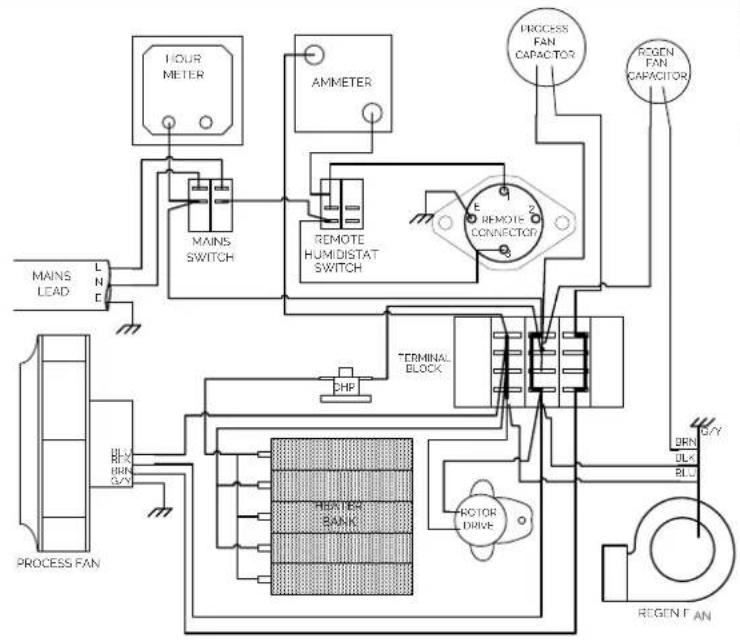
flowchart
graph TD
    A["MAINS LEAD"] --> B["LND"]
    B --> C["MAIN SWITCH"]
    C --> D["AMMETER"]
    D --> E["REMOTE HUMIDISTAT SWITCH"]
    E --> F["12 REMOTE CONNECTOR"]
    F --> G["PROCESS FAN CAPACITOR"]
    G --> H["OPEN AIR"]
    I["PROCESS FAN"] --> J["HLA-X BLN 3/4V"]
    J --> K["HEATER BANK"]
    K --> L["CHP"]
    L --> M["TERMINAL BLOCK"]
    M --> N["ROTOR DRIVE"]
    N --> O["BRN ULK BLN"]
    O --> P["OPEN AIR"]
    Q["OPEN AIR"] --> R["OPEN AIR"]
    S["OPEN AIR"] --> T["OPEN AIR"]
flowchart
graph TD
    A["MAIN SWITCH"] --> B["N"]
    B --> C["E"]
    C --> D["REMOTE HUMIDISTAT SWITCH"]
    D --> E["REMOTE CONNECTOR"]
    E --> F["3"]
    F --> G["F"]
    G --> H["REMOTE SWITCH / HUMIDISTAT (OPTIONAL)"]
    H --> I["3"]
    I --> J["F"]
    J --> K["REMOTE CONNECTOR"]
    K --> L["3"]
    L --> M["REMOTE CONNECTOR"]
    M --> N["3"]
    N --> O["F"]
    O --> P["REMOTE CONNECTOR"]
    P --> Q["3"]
    Q --> R["F"]
    R --> S["REMOTE CONNECTOR"]
    S --> T["3"]
    T --> U["F"]
    U --> V["REMOTE CONNECTOR"]
    V --> W["3"]
    W --> X["F"]
    X --> Y["REMOTE CONNECTOR"]
    Y --> Z["3"]
    Z --> AA["F"]
    AA --> AB["REMOTE CONNECTOR"]
    AB --> AC["F"]
    AC --> AD["REMOTE CONNECTOR"]
    AD --> AE["3"]
    AE --> AF["F"]
    AF --> AG["REMOTE CONNECTOR"]
    AG --> AH["3"]
    AH --> AI["F"]
    AI --> AJ["REMOTE CONNECTOR"]
    AJ --> AK["F"]
    AK --> AL["REMOTE CONNECTOR"]
    AL --> AM["F"]
    AM --> AN["REMOTE CONNECTOR"]
    AN --> AO["F"]
    AO --> AP["REMOTE CONNECTOR"]
    AP --> AQ["F"]
    AQ --> AR["REMOTE CONNECTOR"]
    AR --> AS["F"]
MERCI!
This appliance must be earthed and should only be connected to an earthed 120 V – 60 Hz mains supply.

The installation must be in accordance with the regulations of the country where the unit is used.

The unit is designated for indoor operation.
natural_image
Four black-and-white illustrations depicting various symbols and objects: a hand holding a rock, a fire plume, a bird perched on a ladder, and a boat navigating water (no text or labels)COMMENT FONCTIONNE EPD200/EPD200-PRO
COMMENT FONCTIONNE (2)
• ROTOR DESSICCANT BREVETÉ
natural_image
Mechanical assembly diagram showing light rays interacting with a central component (no text or symbols)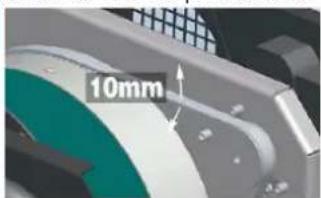
natural_image
Close-up of hands connecting red and blue cables to a black connector labeled 'R' (no text or symbols beyond label)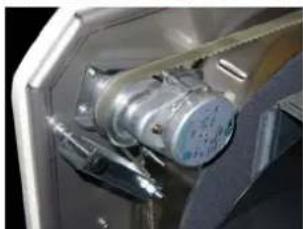
natural_image
Close-up of a metallic mechanical component with attached yellow band and metallic casing (no visible text or symbols)DONNÉES TECHNIQUE


| Spécifications EPD150 / EPD150-PRO | EPD200 / EPD200-PRO | |
| Extraction @ 90°F 90% HR 74 L/ jour 95 L/ jour | ||
| Extraction @ 80°F 60% HR 53 L/ jour 74 L/ jour | ||
| Débit d'air (Dry Air Out) 224 cfm 235 cfm | ||
| Débit d'air (Wet Air Out) 44 cfm 74 cfm | ||
| Tension | 120Vac ~ 1 phase · 60 Hz | 120Vac ~ 1 phase · 60 Hz |
| Courant | 71A | 117A |
| Puissance | 850W | 1400W |
| Plage de température | -4 °F — 104 °F | -4 °F — 104 °F |
| Niveau de bruit | 56dB | 58dB |
| Indice IP | IPx2 | IPx2 |
| Dimensions l x p x h inch | 17.52 x 13.86 x 13.28 | 24.80 x 13.86 x 13.28 |
| Poids net lbs | 38.60 | 45.20 |

iGRACIAS!
Thank you for choosing this innovative dehumidifier.
This manual describes the many benefits and advanced features that this unique product has to offer.
This dehumidifier is a tough, industrial unit designed to be used almost anywhere that dry air is required. Desiccant/Absorption dehumidifiers are especially suited to applications where low relative humidities are needed and work well over a wide temperature range.
We specialize in complete indoor humidity control. Our world class products incorporate the latest technological developments and are designed to create a quality environment.
It is important that you read these instructions carefully before installing and using your new dehumidifier.
Please keep them in a safe place for future reference.
SEGURIDAD
natural_image
Four black-and-white illustrations depicting fire safety symbols: hand, ladder, campfire, and bird (no text or labels)CÓMO FUNCIONA EPD200/EPD200-PRO
CÓMO FUNCIONA (2)
- ROTOR DESECANTE PATENTADO
natural_image
3D rendered mechanical component with green mesh pattern and central hub (no text or symbols)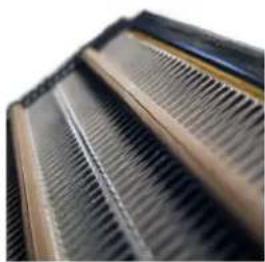
natural_image
Close-up of a corrugated metal grate with uniform ridges (no text or symbols visible)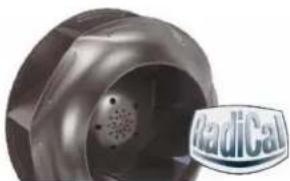
natural_image
Close-up of a metallic mechanical component with a perforated circular opening and a 'Radical' logo in the corner (no readable text or symbols on the main subject)POSICIONAMIENTO

The fan will start and the Ammeter reading will rise. The ammeter indicates the current taken by the PTC heater bank. Its reading will depend on the 'Process' air temperature and the 'Regen' airflow. Typically, it will indicate between 2 and 3 amps (EPD150) or between 4 and 6 amps (EPD200) – this will reduce if the airflow is low or the process air temperature is high.
• OPERACIÓN REMOTA
natural_image
Mechanical assembly diagram showing light rays interacting with a central component (no text or symbols)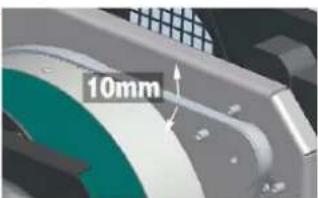
natural_image
Two-panel image showing a close-up of hands using red and blue cables to connect a component, and an open electrical motor inside a container (no visible text or symbols)DATOS TÉCNICOS

| Especifications EPD150 / EPD150-PRO | EPD200 / EPD200-PRO | |
| Extracción @ 90°F 90% hr 74 L/ dia 95 L/ dia | ||
| Extracción @ 80°F 60% hr 53 L/ dia 74 L/ dia | ||
| Flujo de aire (Dry Air Out) 224 cfm 235 cfm | ||
| Flujo de aire (Wet Air Out) 44 cfm 74 cfm | ||
| Tension | 120Vac ~ 1 phase · 60 Hz | 120Vac ~ 1 phase · 60 Hz |
| Corriente | 71A | 11.7A |
| Potencia | 850W 1400W | |
| Rango de temperature de operación | -4°F — 104°F | -4°F — 104°F |
| Nivel de ruido | 56dB | 58dB |
| Índice IP | IPx2 | IPx2 |
| Dimensions l x p x h inch | 17.52 x 13.86 x 13.28 | 24.80 x 13.86 x 13.28 |
| Peso neto lbs | 38.60 | 45.20 |

flowchart
graph TD
    A["MAINS LEAD"] --> B["LND"]
    B --> C["PROCESS FAN"]
    C --> D["BRN 3/2"]
    D --> E["BRN 3/2"]
    E --> F["BRN 3/2"]
    F --> G["BRN 3/2"]
    G --> H["BRN 3/2"]
    H --> I["BRN 3/2"]
    I --> J["BRN 3/2"]
    J --> K["BRN 3/2"]
    K --> L["BRN 3/2"]
    L --> M["BRN 3/2"]
    M --> N["BRN 3/2"]
    N --> O["BRN 3/2"]
    O --> P["BRN 3/2"]
    P --> Q["BRN 3/2"]
    Q --> R["BRN 3/2"]
    R --> S["BRN 3/2"]
    S --> T["BRN 3/2"]
    T --> U["BRN 3/2"]
    U --> V["BRN 3/2"]
    V --> W["BRN 3/2"]
    W --> X["BRN 3/2"]
    X --> Y["BRN 3/2"]
    Y --> Z["BRN 3/2"]
    Z --> AA["BRN 3/2"]
    AA --> AB["BRN 3/2"]
    AB --> AC["BRN 3/2"]
    AC --> AD["BRN 3/2"]
    AD --> AE["BRN 3/2"]
    AE --> AF["BRN 3/2"]
    AF --> AG["BRN 3/2"]
    AG --> AH["BRN 3/2"]
    AH --> AI["BRN 3/2"]
    AI --> AJ["BRN 3/2"]
    AJ --> AK["BRN 3/2"]
    AK --> AL["BRN 3/2"]
    AL --> AM["BRN 3/2"]
    AM --> AN["BRN 3/2"]
    AN --> AO["BRN 3/2"]
    AO --> AP["BRN 3/2"]
    AP --> AQ["BRN 3/2"]
    AQ --> AR["BRN 3/2"]
    AR --> AS["BRN 3/2"]
    AS --> AT["BRN 3/2"]
    AT --> AU["BRN 3/2"]
    AU --> AV["BRN 3/2"]
    AV --> AW["BRN 3/2"]
    AW --> AX["BRN 3/2"]
    AX --> AY["BRN 3/2"]
flowchart
graph TD
    A["N MAIN SWITCH"] --> B["Ground"]
    B --> C["Remote HUMIDISTAT SWITCH"]
    C --> D["MMETER"]
    D --> E["1 REMOTE CONNECTOR"]
    D --> F["2 REMOTE SWITCH / HUMIDISTAT (OPTIONAL)"]
    D --> G["3"]
    G --> H["Overheat Protection (MANUAL RESET)"]
    D --> I["4"]
    I --> J["HOUR METER"]
    J --> K["M PROCESS FAN FAN CAPACITOR"]
    J --> L["M REGEN FAN FAN CAPACITOR"]
    J --> M["M ROTOR DRIVER"]
    M --> N["HEATER BANK"]

natural_image
World map silhouette in blue, showing continents and oceans (no text or labels)ECOR PRO USA, LLC
2292 Faraday Avenue
Suite 100
Carlsbad
CA 92008
# 760-248-3010
info@ecorprousa.com
www.ecorproducts.com
ECOR PRO
Subject to modifications • Sous réserve de modifications • Sujeto a modificaciones.