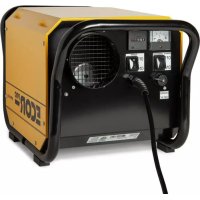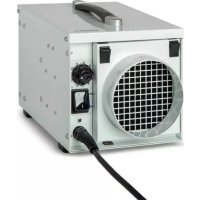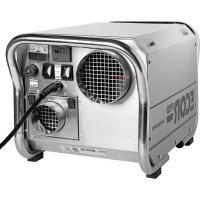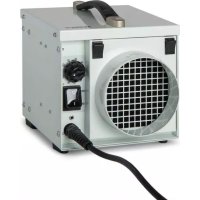
EPD30 - Dehumidifier Ecor Pro - Free user manual and instructions
Find the device manual for free EPD30 Ecor Pro in PDF.



| Product type | Rotor dehumidifier (DryFan® technology) |
| Brand | Ecor Pro |
| Model | EPD30 |
| Dimensions (L x W x H) | 7.9 x 7.9 x 7.9 inches (approx. 20 x 20 x 20 cm) |
| Net weight | 10.6 lbs (4.8 kg) |
| Power supply | 120 V ~ 60 Hz, 2.9 A |
| Power consumption | 350 W (at 27°C / 60% RH) |
| Dehumidification capacity | 13 pints/day (80°F / 60% RH) – 17 pints/day (95°F / 90% RH) |
| Operating temperature range | -4°F to +104°F (-20°C to +40°C) |
| Humid air flow rate | 53 cfm (1.5 m³/min) |
| Condensation evacuation flow rate | 8 cfm (0.23 m³/min) |
| Noise level | 49 dB |
| IP protection rating | IP24 |
| Dehumidification technology | DryFan®: absorbing rotor + self-regulating PTC ceramic element |
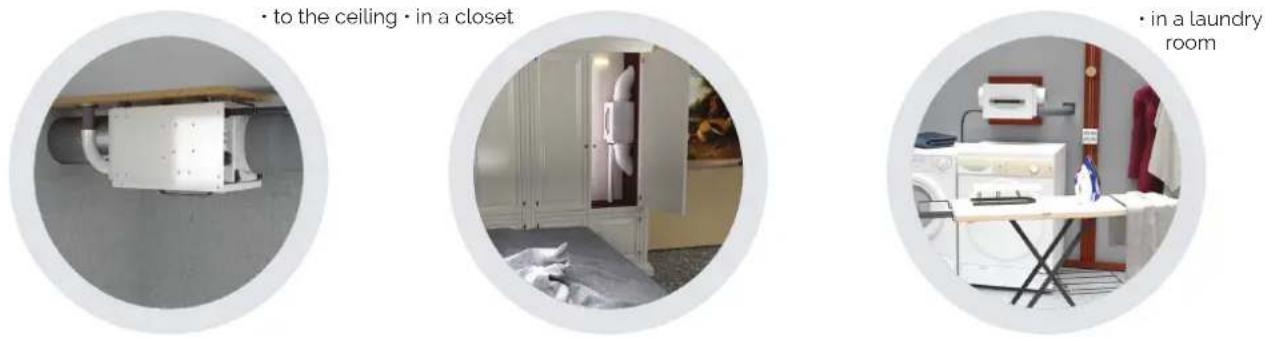
| Mounting | Universal: on floor, wall, ceiling, even upside down |
| Connections | Humid air evacuation: Ø 1.5 inch; dry air intake/evacuation: flangeless (duct max. 3.3 ft) |
| Functions | Built-in hygrostat (adjustable), automatic restart after power failure, remote control possible (external 24V humidistat not supplied) |
| Maintenance and cleaning | Washable air filter (vacuum or soapy water); clean the casing with a damp cloth |
| Safety | Overheat protection (sensor + PTC), shut-off in case of internal humidity, never use without filter |
| Spare parts available | Interchangeable filters (pack of 3), flexible ducts (for condensation, intake/exhaust air), external humidistat |
Frequently Asked Questions - EPD30 Ecor Pro
User questions about EPD30 Ecor Pro
0 question about this device. Answer the ones you know or ask your own.
Ask a new question about this device
Download the instructions for your Dehumidifier in PDF format for free! Find your manual EPD30 - Ecor Pro and take your electronic device back in hand. On this page are published all the documents necessary for the use of your device. EPD30 by Ecor Pro.
USER MANUAL EPD30 Ecor Pro
USER MANUAL MANUEL MANUEL DE USARIO
WHITE / BLANC BLANCO
EPD30 white / blanc / blanco EPD50 white / blanc / blanco
STAINLESS STEEL
EPD30 PRO stainless steel / INOX EPD50 PRO stainless steel / INOX
natural_image
Close-up of a white industrial air conditioning unit with grid-patterned panel and control dial (no visible text or symbols)DRYFAN® TECHNOLOGY
ECOR PRO




natural_image
Close-up of a textured surface with a diagonal line overlay, no visible text or symbols
natural_image
Circular cropped image showing a textured surface with a diagonal line crossing through it, no visible text or symbols.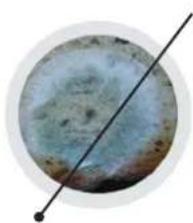
natural_image
Circular object with a diagonal line intersecting it, resembling a moon or celestial body (no text or symbols visible)
natural_image
Close-up of a metallic rod inserted into a layered material (no text or symbols visible)Your dehumidifier fights against rust, wood rot, bacteria, fungi en prevents damage from moisture.
SAFETY
For safety reasons, read this information carefully before operating. Persons who are not familiar with this type of product must not use it.

This appliance must be earthed and should only be connected to an earthed 120 V - 60 Hz mains supply.

The installation must be in accordance with the regulations of the country where the unit is used.

The unit is designated for indoor operation.
The dehumidifier is safe, however, as with other electrical appliance, use it with care.
- This appliance is not intended for use by persons (including children) with reduced physical, sensory or mental capabilities, or lack of experience and knowledge, unless they have been given supervision or instruction concerning the use of the appliance by a person responsible for their safety.
• Children should be supervised to ensure that they do not play with the appliance.
SAFETY (2)

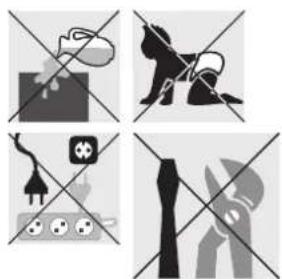
- Do not clean the dehumidifier by spraying it or immersing it in water.
- Do not insert any object into the opening of the dehumidifier.
- Disconnect from the mains before cleaning the unit or any of its components.
- Never connect to an electrical outlet using an extension cord. If an outlet is not available, one should be installed by a licensed electrician.
- Place the dehumidifier in location appropriate to the appliance IP-rating (see technical data).
- Any service other than regular cleaning, setting fan mode or filter replacement should be performed by an authorized service representative. Failure to do so could result in a loss of warranty. Your dehumidifier is supplied with an electrical cable (15 ft) and an earthed plug. Should it be necessary to replace this plug at any time, you must use an earthed electrical plug.
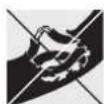
Warning! Never operate this appliance if it has a damaged cord or plug. If the supply cord is damaged an approved service representative or a similar qualified person must replace it in order to avoid any hazards.
There should be direct access to the electrical plug after connecting the power!
natural_image
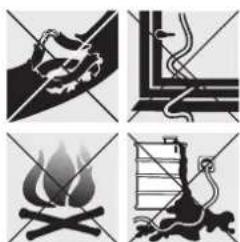
Four black-and-white illustrations depicting a fire, a campfire, a ladder, and a bird (no text or symbols)Do not use your dehumidifier under the following conditions:
- If the power cable is damaged
• Where the power cable may be easily damaged - Close to heat source
• Where small children may be left unattended - Where there is a risk of liquids falling on the unit
• Where it may be damaged by chemicals
This product is not made for DIY repair.
natural_image
Four-panel diagram showing crossed-out symbols: a dog, a horse, a plug, and a hand holding a tool (no text or labels)THANKYOU!
- Thank you for choosing this exciting innovation in drying using DryFan® technology. A unique product and a revolution to the way we keep living spaces, lofts, basements, boats, holiday homes, garages and storage areas dry all day and every day.
This dehumidifier is a tough and can even be used for industrial processes and applications.
Designed to be used almost anywhere, in any orientation and will even work upside down.
These units will perform similar to compressor dehumidifiers rated at double the capacity at normal room conditions.
Using DryFan® technology these dehumidifiers will out-perform compressor dehumidifiers by 3-4 times below 50 °F. Where compressor dehumidifiers stop working at 41 °F these units using DryFan® technology will continue to dry spaces even continuing to work to -4 °F making them ideal for unheated rooms and out-buildings.
natural_image
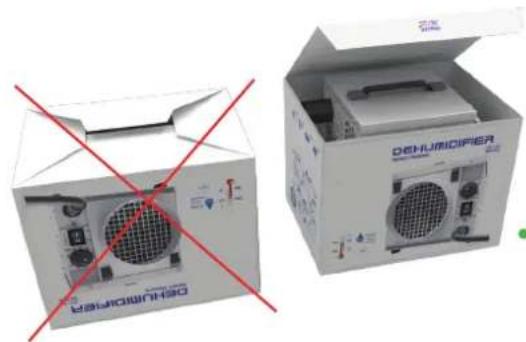
Two open industrial equipment cases with red prohibition signs, no visible text or symbols on the devices themselves.It is important that you read these instructions carefully before installing and using your new dehumidifier. Please keep them in a safe place for future reference.
You can take out your unit easily if you open the box from the top side.
HOW OUR UNIQUE TECHNOLOGY WORKS

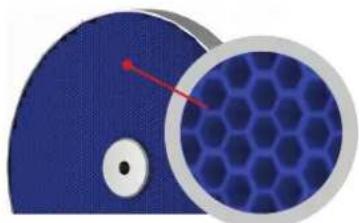
- Your dehumidifier uses DryFan® technology and uses a continuously rotating moisture absorbing patented wheel termed a "Rotor".
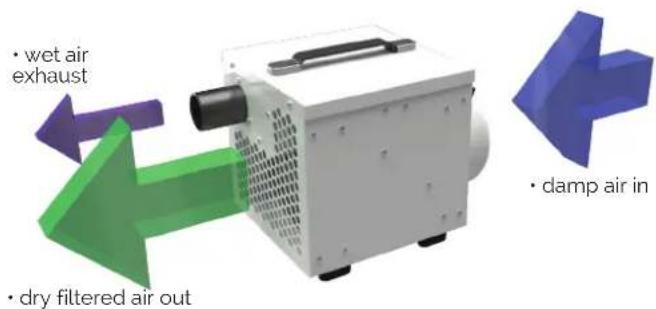
A highly efficient yet low noise fan draws air into the unit (Process Air) and forces it through a section of the rotor. As the air passes through the rotor, the honeycomb, of hygroscopic membranes absorbs almost all of the moisture creating an extremely dry air-stream.
Most of this air-stream (approx 85%) is discharged directly through the 'Dry Air Outlet'.
However, a portion (approx 15%) of this air (Regen Air) is separated and directed through a special heater bank (Regen Heater) where the air's temperature is raised.
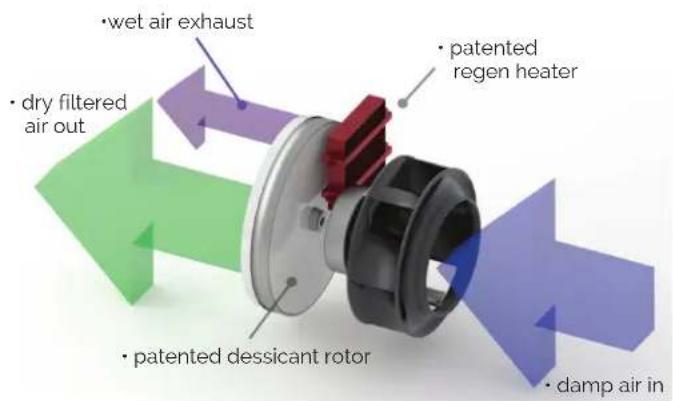
This heated air is then channeled back through a section of the Rotor.
As this hot air passes through the membranes, its higher temperature drives-out the previously absorbed moisture and discharges it as warm wet air through the 'Wet Air Out' duct.
As the wheel rotates, this process of collecting and discharging moisture is continuous.
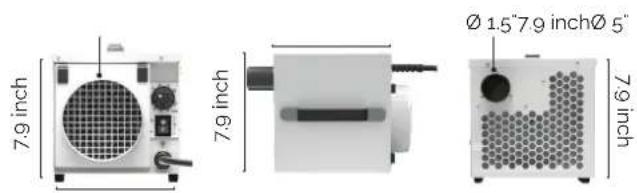
The wet air outlet is 1.5 inch in diameter making it easy to vent the moisture away using standard push fit waste water connectors.
Water is not drained away as a liquid, it is vented away similar to a tumble dryer.
HOW OUR UNIQUE TECHNOLOGY WORKS (2)
PATENTED DESICCANT ROTOR
The Desiccant Rotor is the heart of the DryFan® system. It is an array of especially absorbent membranes – patent protected – arranged as a series of corrugations (as shown in the cut-away image) to give a vast surface area that was developed over many years, making it an extremely efficient moisture collector.
PATENTED REGEN HEATER
A patented ceramic PTC Regen Heater. (PTC Positive Temperature Coefficient) is self-regulating so never to overheat. However, as triple safety we include a separate overheat smart sensor in the dehumidifier. The patented technology is both safe and energy efficient and can never overheat to hazardous temperatures, even if vents become accidentally blocked.
natural_image
Close-up of a blue abstract shape with a magnified hexagonal pattern, no text or symbols visible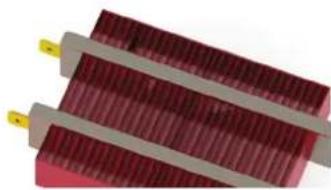
natural_image
Close-up of two red rectangular electronic components with yellow connectors, no visible text or symbols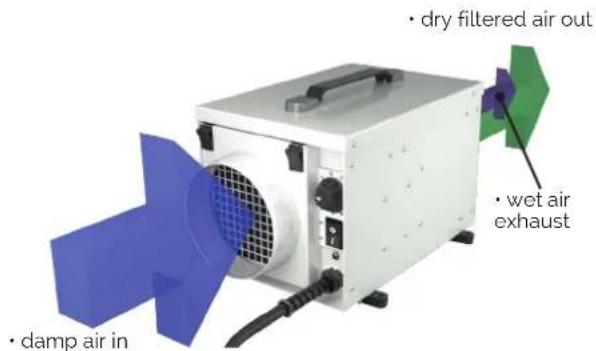
HOW OUR UNIQUE TECHNOLOGY WORKS (3)

FAN SYSTEM
All models use specialized fan technology to give quiet performance but type of fan will differ by model capacity.
Note: External ductwork will reduce restrict airflow and therefore the amount of water the dehumidifiers will extract. To maximize airflow and water extraction always keep any ducting to minimum.
Maximum lengths in feet of any ducts are outlined in the table.
| Model Maximum damp air in duct length | Maximum wet air out duct length | Maximum dry filtered air out duct length | |
| EPD30 & EPD30 PRO | 2 3.3 | No duct flange / not applicable | |
| EPD50 & EPD50 PRO | 3.3 10 10 | ||
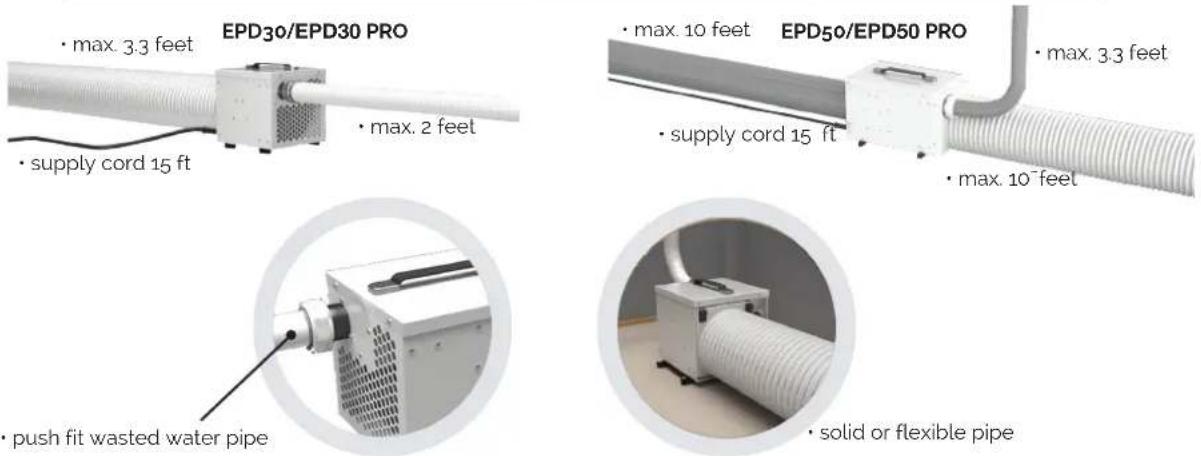
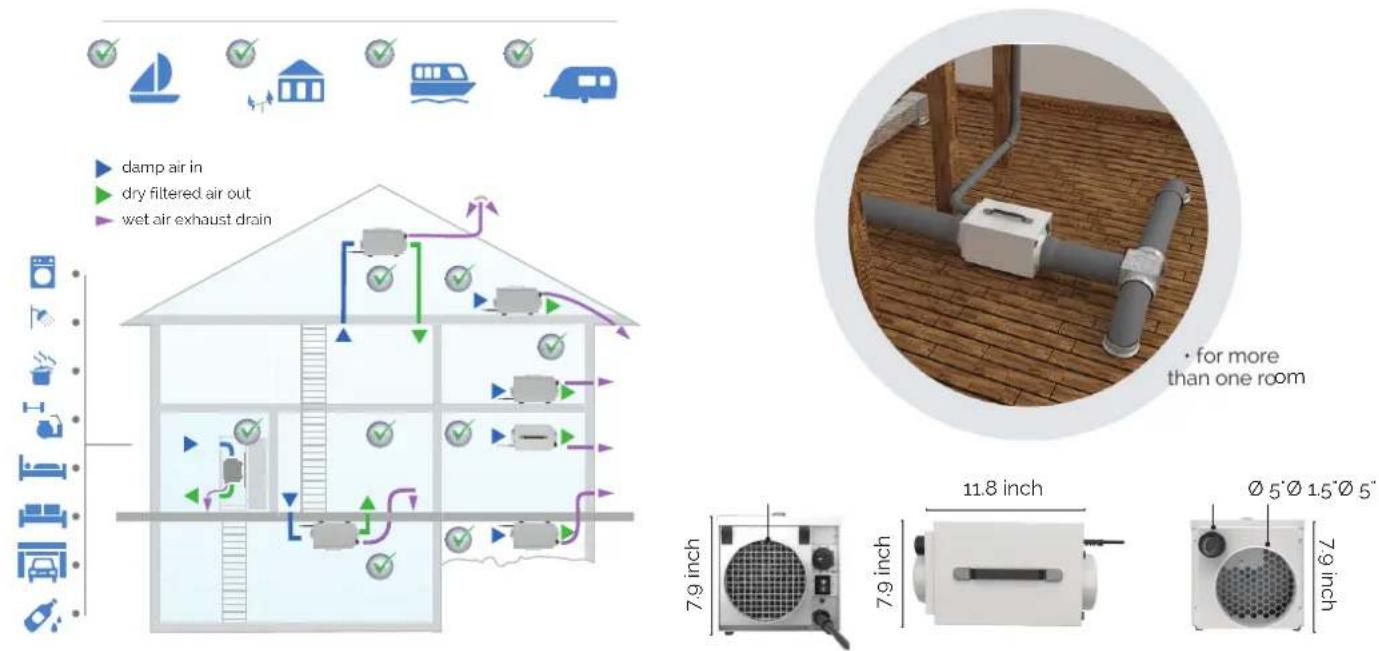
POSITIONING EPD30/EPD30 PRO
POSITIONING
The models have been designed for indoor use however, they can be placed inside or outside the room to be dried.
Internal Positioning:
When positioning the unit inside the room, place it centrally, ensuring inlet and outlet ducts are clear of obstruction. If required, ducts can be connected to the outlet and/or inlet (where fitted) to direct the drying to specific areas. The 'Wet Air Out' MUST be ducted outside the room.
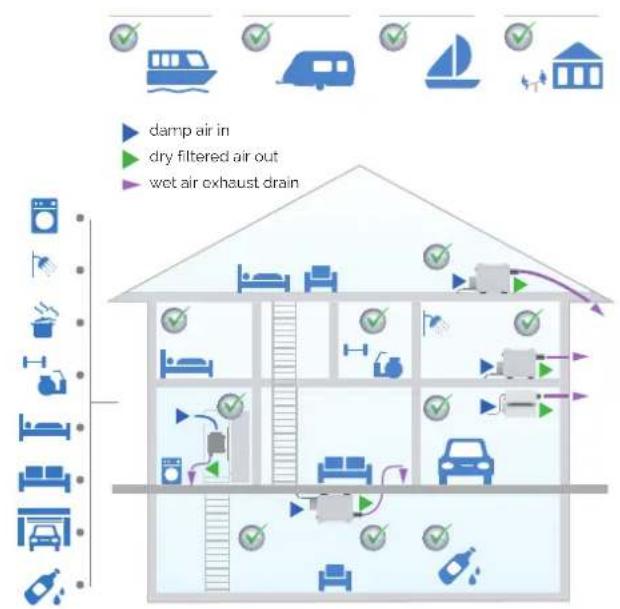
flowchart
graph TD
    A["House with water tank"] --> B["Drain system"]
    B --> C["Grid of air units"]
    C --> D["Water tank with bed"]
    C --> E["Car with car"]
    C --> F["Truck with car"]
    C --> G["Truck with car"]
    C --> H["Truck with car"]
    C --> I["Truck with car"]
    C --> J["Truck with car"]
    C --> K["Truck with car"]
    C --> L["Truck with car"]
    C --> M["Truck with car"]
    C --> N["Truck with car"]
    C --> O["Truck with car"]
    C --> P["Truck with car"]
    C --> Q["Truck with car"]
    C --> R["Truck with car"]
    C --> S["Truck with car"]
    C --> T["Truck with car"]
    C --> U["Truck with car"]
    C --> V["Truck with car"]
    C --> W["Truck with car"]
    C --> X["Truck with car"]
    C --> Y["Truck with car"]
    C --> Z["Truck with car"]
    C --> AA["Truck with car"]
    C --> AB["Truck with car"]
    C --> AC["Truck with car"]
    C --> AD["Truck with car"]
    C --> AE["Truck with car"]
    C --> AF["Truck with car"]
    C --> AG["Truck with car"]
    C --> AH["Truck with car"]
    C --> AI["Truck with car"]
    C --> AJ["Truck with car"]
    C --> AK["Truck with car"]
    C --> AL["Truck with car"]
    C --> AM["Truck with car"]
    C --> AN["Truck with car"]
    C --> AO["Truck with car"]
    C --> AP["Truck with car"]
    C --> AQ["Truck with car"]
    C --> AR["Truck with car"]
    C --> AS["Truck with car"]
    C --> AT["Truck with car"]
    C --> AU["Truck with car"]
    C --> AV["Truck with car"]
    C --> AW["Truck with car"]
    C --> AX["Truck with car"]
    C --> AY["Truck with car"]
    C --> AZ["Truck with car"]
    C --> BA["Truck with car"]
    C --> BB["Truck with car"]
    C --> BC["Truck with car"]
    C --> BD["Truck with car"]
    C --> BE["Truck with car"]
    C --> BF["Truck with car"]
    C --> BG["Truck with car"]
    C --> BH["Truck with car"]
    C --> BI["Truck with car"]
    C --> BJ["Truck with car"]
    C --> BK["Truck with car"]
    C --> BL["Truck with car"]
    C --> BM["Truck with car"]
    C --> BN["Truck with car"]
    C --> BO["Truck with car"]
    C --> BP["Truck with car"]
    C --> BQ["Truck with car"]
    C --> BR["Truck with car"]
    C --> BS["Truck with car"]
    C --> BT["Truck with car"]
    C --> BU["Truck with car"]
    C --> BV["Truck with car"]
    C --> BW["Truck with car"]
    C --> BX["Truck with car"]
    C --> BY["Truck with car"]
    C --> BZ["Truck with car"]
    C --> CA["Truck with car"]
    C --> CB["Truck with car"]
    C --> CC["Truck with car"]
    C --> CD["Truck with car"]
    C --> CE["Truck with car"]
    C --> CF["Truck with car"]
    C --> CG["Truck with car"]
    C --> CH["Truck with car"]
    C --> CI["Truck with car"]
    C --> CJ["Truck with car"]
    C --> CK["Truck with car"]
    C --> CR["Truck with car"]
    C --> CS["Truck with car"]
    C --> CT["Truck with car"]
    C --> CU["Truck with car"]
    C --> CV["Truck with car"]
    C --> CW["Truck with car"]
    C --> CX["Truck with car"]
    C --> CY["Truck with car"]
    C --> CZ["Truck with car"]
natural_image
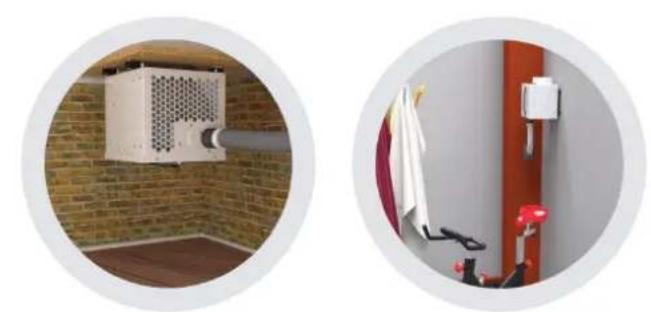
Two circular photos showing indoor security or ventilation systems: one with a white air conditioner unit mounted on a brick wall, the other with a red door and attached security guard (no text or symbols visible)• in the basement • in the gym
POSITIONING EPD50/EPD50 PRO

External Positioning (Models where Outlet Duct Fitted Only):
When positioning the unit outside the room, connect ducting to the outlet to direct the dry air-stream into the room to be dried. Optionally, the inlet may also be ducted to the room to give a re-circulation effect. In this case however, because the unit uses a portion for the inlet air for regeneration. Provision must be made in the inlet duct to draw air also from outside the room.
POSITIONING (3)
NOTE: As the Wet-Air-Out discharge is warm and very humid ensure it is directed where it will have no adverse effect on the immediate environment.
NOTE: Wet-air-out should be declined from the dehumidifier where possible if there is a risk of any condensation build up in the exhaust duct running back into the dehumidifier.
This can be avoided either with short wet-air-out duct lengths or adequately insulating the wet-air-duct to prevent condensation. Should water be seen dripping from the dehumidifier switch off the appliance immediately at the wall socket. Allow water in the unit to dry completely.
Correct the defect in the wet-air-out ducting and reconnect to the power to start operating again. Do not operate If there is a concern the unit is not thoroughly dry inside.
NOTE: The wet-air-out flange outlet is 1.5 inch. This is the standard size of push fit wasted water pipe connectors and pipes ideal for exhaust ducting. Decreasing the exhaust pipe diameter will decrease performance. Flexible ducting may be used on all inlets and outlets.
All ducting lengths should be kept to a minimum. Longer lengths will reduce performance. For the longest lengths see Fan System Table (page 7). Ducting may be also supplied by your dehumidifier supplier.
OPERATION

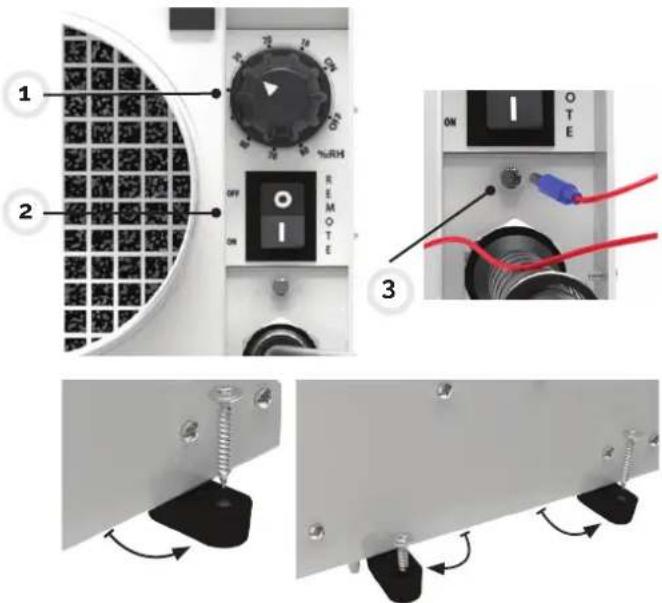
CONTROLS
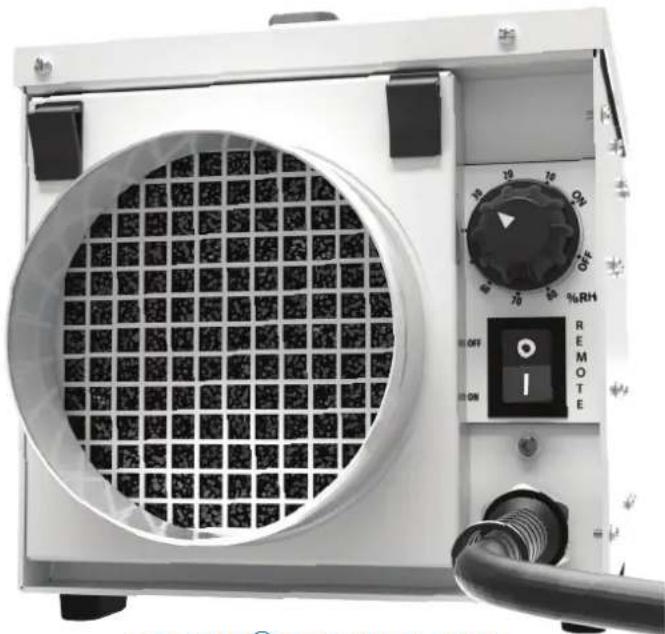
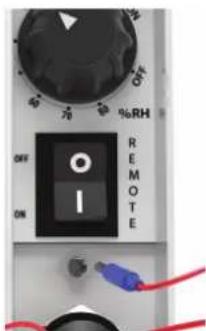
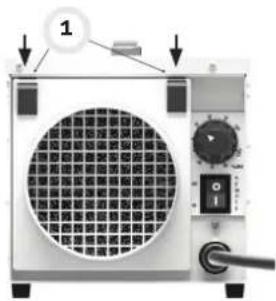
The controls are positioned on the front of the unit next to the damp air inlet duct, they are:
- Humidistat
- Remote Humidistat Switch
- Remote Humidistat Jack Plug Socket
Auto reset. If there is a power out, the dehumidifier will automatically restart when the mains power is reconnected.
MOUNTING
The dehumidifier can be mounted in any direction even up-side-down.
Turn the feet out to see the anchoring points. Secure all four feet with suitable fixings (not provided) to floor, wall or ceiling.
Connect the unit to suitable mains supply and connect ducting,
Ensure the 'Remote Humidistat' switch is set to the 'OFF' position (O).
Turn humidistat to lowest humidity level continuation or set the switch to the 'ON' position (I). The fan will start.
Set the humidity level right for the room to be dried.
OPERATION (2)
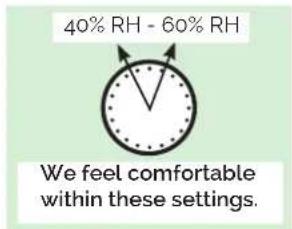
NOTE: A low setting of say 10% means the room is regulated to a very dry level while a setting of say 90% the room will be maintained at a relatively humid level. The right level for the room may vary with weather, temperature and occupation conditions over time.
REMOTE OPERATION
For remote operation it is necessary to connect a 24V external humidistat (not provided) via the jack plug connector. The external humidistat may be obtained from your appliance supplier. Ensure the "Remote Humidistat" switch is set to I (ON). The dehumidifier will now be controlled by the remote humidistat that is using low power and only 24V.
CLEANING
Disconnect from the mains before cleaning or servicing the unit or any of its components. Wipe regularly clean with a moist cloth (a soft, damp cloth) and a mild household detergent, Never use chemicals, petrol, aggressive detergents or other cleansing solutions
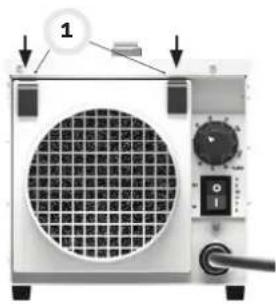
AIR FILTER
The dehumidifier has an inlet air filter. This should be checked periodically and if necessary cleaned. It can be cleaned with a vacuum cleaner or hand washed in mild detergent only.
Replacement filters are available from your supplier.
ATTENTION: Do not run the unit without a filter fitted as dust will impair the performance of the Rotor.
natural_image
Close-up of a small electronic device with a circular grid pattern and control panel (no visible text or symbols)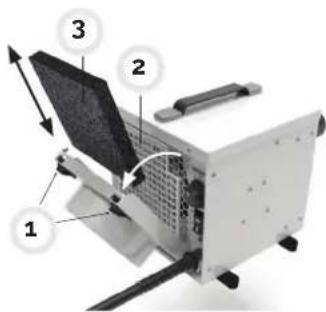
TECHNICAL DATA

| Specifications | EPD30/EPD30 PRO | EPD50/EPD50 PRO |
| Typical extraction @ 95°F 90% rh 17 pt/day 25 pt/day | ||
| Typical extraction @ 80°F 60% rh 13 pt/day 21 pt/day | ||
| Air flow (Dry Air Out) 53 cfm 73 cfm | ||
| Air flow (Wet Air Out) 8 cfm 12 cfm | ||
| Mains 120 V ~ 1 phase · 60 Hz 120 V ~ 1 phase · 60 Hz | ||
| Current 2.9 A 4.6 A | ||
| Power 350 W 550 W | ||
| Operating temperature range -4 | °F — + 104°F | -4°F — + 104°F |
| Noise level | 49 dB | 52 dB |
| IP rating | IP24 | IP24 |
| Dimensions l x d x h inch | 7.9 × 7.9 × 7.9 | 11.8 × 7.9 × 7.9 |
| Weight net | 10.6 lbs | 14.1 lbs |
rh = relative humidity
Subject to modifications.
OPTIONAL PARTS

Available from your supplier
- Wet air exhaust flexible ducting - 3.3 ft length
- Process air In or process air out flexible ducting – 10 ft length
- Remote humidistat – 16 ft cord length and jack plug
- Replaceable filters – pack of 3
- Blank replacement top plate without handle – pack of one
natural_image
Four black-and-white illustrations depicting different scenes: a hand holding a fire, a ladder with a snake, a campfire, and a bird jumping over water (no text or symbols)natural_image
Four-panel diagram showing different types of objects and symbols (no text or labels)natural_image
Two open industrial electrical enclosures with visible circuit breakers and a red warning sign (no readable text or symbols)natural_image
Illustration of a blue dome-shaped object with a white circular inset showing a hexagonal grid pattern (no text or symbols)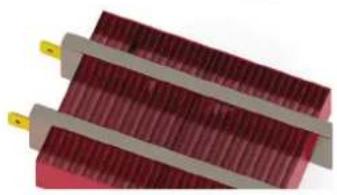
natural_image
Close-up of two red rectangular electronic components with metallic leads, no visible text or symbolsnatural_image
Close-up of a small electronic device with a circular grid pattern and control panel (no visible text or symbols)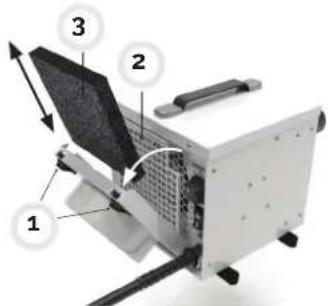
natural_image
Four black-and-white illustrations depicting fire safety symbols: hand, flame, ladder, and boat (no text or labels)natural_image
Two open industrial air purifiers with visible cooling fans and ventilation gauges, one outlined with a red diagonal line (no text or symbols on the main components)natural_image
Illustration of a blue dome-shaped object with a hexagonal pattern and two red rectangular blocks with yellow connectors (no text or symbols)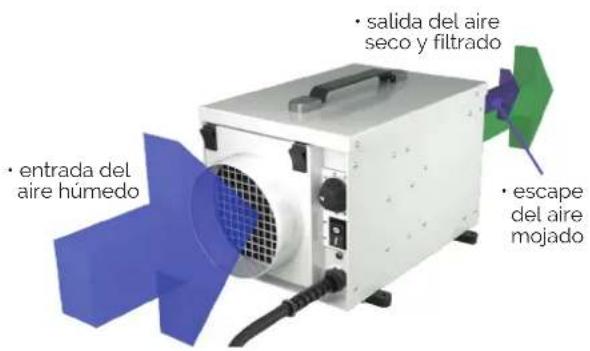
natural_image
Close-up of a white industrial air duct system with coiled tubing, enclosed in a circular frame (no visible text or symbols)- tubo sólido o flexible
POSICIONAMIENTO EPD30 / EPD30 PRO
POSICIONAMIENTO
natural_image
Close-up of a small electronic device with a grid-patterned panel and control knobs (no visible text or symbols)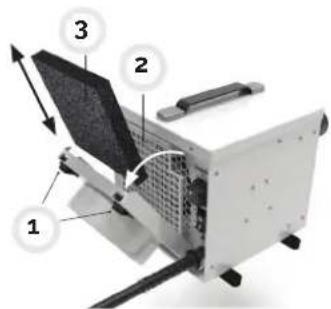
DATOS TÉCNICOS

| Especificaciones EPD30/EPD30 PRO EPD50/EPD50 PRO | ||
| Extracción típica @ 95°F 90% hr 17 pt /día 25 pt /día | ||
| Extracción típica @ 80°F 60% hr 13 pt /día 21 pt /día | ||
| Flujo de aire (Dry Air Out) 53 cfm 73 cfm | ||
| Flujo de aire (Wet Air Out) 8 cfm 12 cfm | ||
| Voltaje 120 V ~ 1 phase · 60 Hz 120 V ~ 1 phase · 60 Hz | ||
| Corriente @ 27°C 60% hr 2.9 A | 4.6 A | |
| Potencia @ 27°C 60% hr | 350 W | 550 W |
| Rango de temperatura de operación | -4°F — +104°F | -4°F — +104°F |
| Nivel de ruido | 49 dB | 52 dB |
| Índice IP | IP24 | IP24 |
| Dimensiones l x p x a inch | 7.9 × 7.9 × 7.9 | 11.8 × 7.9 × 7.9 |
| Peso neto | 10.6 lbs | 14.1 lbs |

natural_image
World map silhouette in blue, showing continents and oceans (no text or labels)ECOR PRO
info@ecorproducts.eu
www.ecorproducts.eu
ECOR PRO
Subject to modifications • Sous réserve de modifications • Sujeto a modificaciones.